ESP MERCEDES-BENZ CLS 2020 Repair Manual
[x] Cancel search | Manufacturer: MERCEDES-BENZ, Model Year: 2020, Model line: CLS, Model: MERCEDES-BENZ CLS 2020Pages: 546, PDF Size: 19.76 MB
Page 204 of 546
#
Press butt on1.
Indicat orlam p2 lights up.
The vehicle issetto thehigh leve l.
Yo ur sele ction issave d.
The vehicle islowe redag ain inthefo llo wing sit‐
uation s:
R When drivin gfa ster than 50 mph(80 km/h).
R When driving between 37mph(60 km/h)
and 50mph(80 km/h) forapp roxima tely
th re eminut es.
R Afterch ang ingadr ive pr ogram usingth e
DY NA MIC SELE CTswitc h.
The vehicle isadjus tedto theheight ofthelas t
activ edr ive pr ogr am.
Lo we ring theve hicl e #
Press butt on1.
Indicat orlam p2 goes out.Thevehicle is
adjus tedto theheight oftheactiv edr ive pr o‐
gr am. Pa
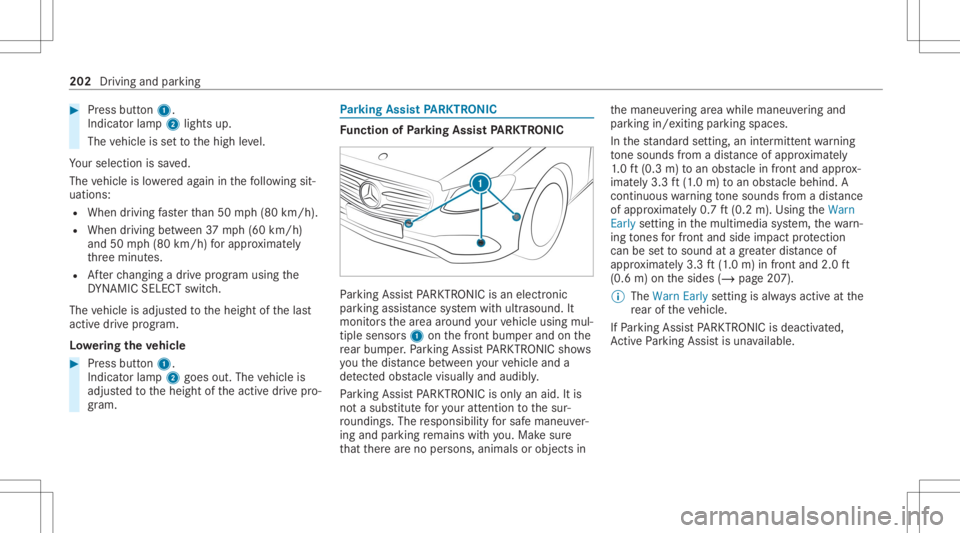
rking Assis tPA RK TRONI C Fu
nction ofParking Assis tPA RK TRONI C Pa
rking AssistPA RK TRONI Cis an elec tron ic
par kingassi stanc esy stem withultr asound. It
monit orsth ear ea around your vehicle using mul‐
tiple sensor s1 onthefront bum perand onthe
re ar bum per.Pa rking AssistPA RK TRONI Csho ws
yo uth edis tance betwee nyo ur vehicle anda
de tected obs tacle visually and audibly .
Pa rking AssistPA RK TRONI Cis on lyan aid. Itis
no ta subs titutefo ryo ur att entio nto thesur‐
ro und ings.The responsibili tyforsaf emaneu ver‐
ing and parking remains withyo u. Mak esur e
th at ther ear eno per sons, animals orobjec tsin th
emaneuv ering area while maneuv ering and
par king in/exitingpar king spaces.
In thest andar dse tting ,an intermit tent wa rning
to ne sou nds from adi st anc eof appr oximat ely
1. 0 ft (0.3 m)toan obs tacle infront and approx ‐
imat ely3. 3ft (1.0 m) toan obs tacle beh ind. A
continu ouswa rning tone sou nds from adi st anc e
of appr oximat ely0. 7ft (0.2 m).Using theWarn
Early setting inthemultimedia system, thewa rn‐
ing tones forfr ont and side impact protect ion
can besetto sound atagr eat erdis tance of
ap prox imat ely3. 3ft (1.0 m) infront and 2.0ft
(0.6 m)onthesides (/page20 7).
% The Warn Earlysetting isalw aysactiv eat the
re ar oftheve hicle.
If Pa rking AssistPA RK TRONI Cis deac tiva ted,
Ac tivePa rking Assistis una vailable. 202
Drivin gand parking
Page 210 of 546
Re
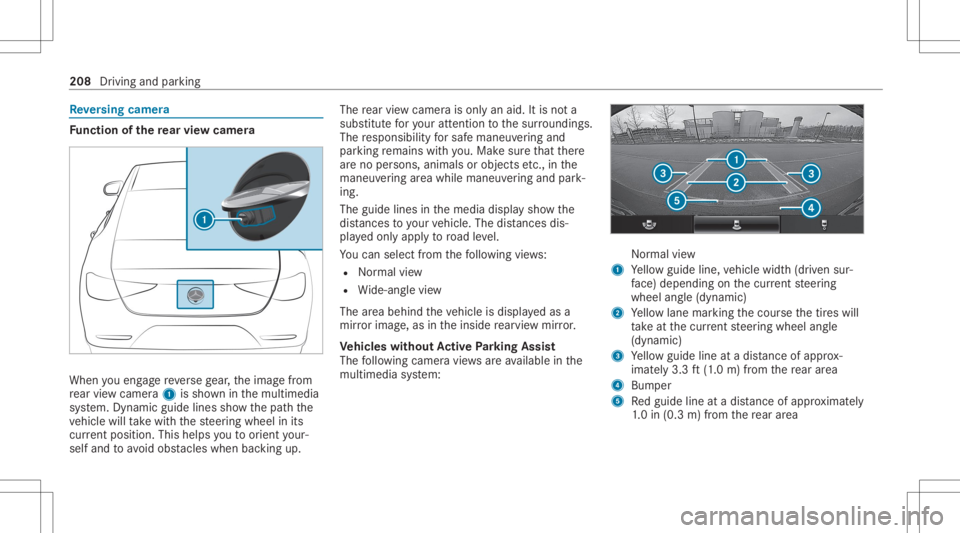
versing camer a Fu
nction ofthere ar vie wcamer a When
youen gage reve rsege ar,th eimag efrom
re ar vie wcam era1 issho wninthemultimedia
sy stem. Dynamic guidelinesshowthepat hth e
ve hicle willtake wit hth esteer ing wheel inits
cur rent positio n.Thi shel psyouto orient your‐
self and toavoid obstacle swhe nba cking up. The
rear vie wcam erais on lyan aid. Itis no ta
subs titutefo ryo ur att entio nto thesur round ings.
The responsibili tyforsaf emaneu vering and
pa rking remains withyo u. Mak esur eth at ther e
ar eno per sons, animals orobjec tsetc., inthe
maneu vering area while ma neu vering and park‐
ing.
The guide linesinthemedia displaysho wthe
dis tances toyour vehicle. Thedistances dis‐
pl ay ed onlyapply toroad leve l.
Yo ucan selectfrom thefo llo wing views:
R Normalvie w
R Wide-ang levie w
The area behind theve hicle isdispla yedas a
mir rorimag e,as intheinside rear vie wmir ror.
Ve hicl eswithout Activ ePa rking Assis t
The follo wing camer avie ws areav ailable inthe
multime diasystem: Nor
mal view
1 Yello wguide line,vehicle width(dr iven sur‐
fa ce) dep endi ngon thecur rent steer ing
wheel angle(dynamic)
2 Yello wlane markingth ecour sethetir es will
ta ke atthecur rent steer ing wheel angle
(dynamic)
3 Yello wguide lineatadis tance ofapprox ‐
imat ely3. 3ft (1.0 m) from there ar area
4 Bum per
5 Redguide lineatadis tance ofapprox imat ely
1. 0 in (0.3 m)from there ar area 208
Drivin gand parking
Page 212 of 546
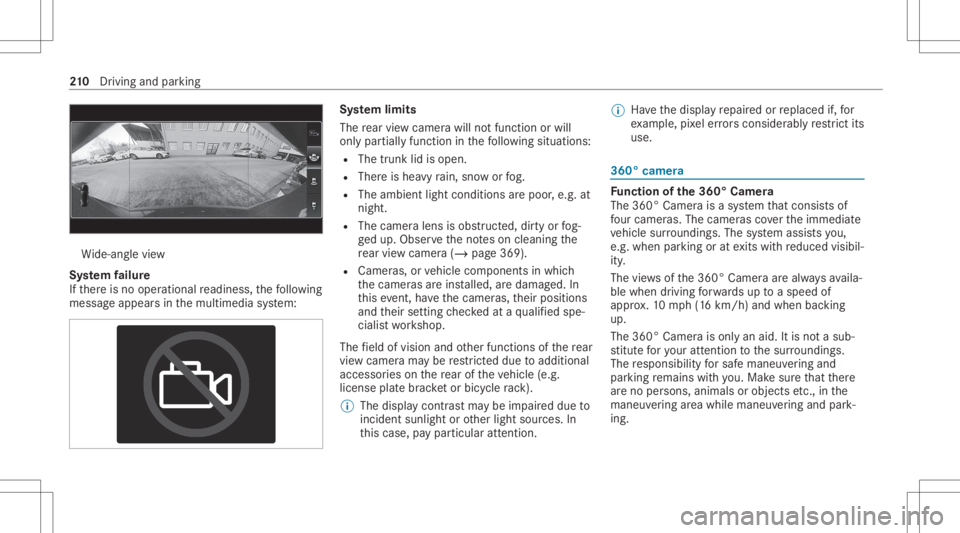
Wi
de-ang levie w
Sy stem failur e
If th er eis no oper ational readin ess, thefo llo wing
mess ageappear sin themultimedia system: Sy
stem limit s
The rear vie wcam erawill notfun ction orwill
on lypa rtiall yfunc tion inthefo llo wing situat ions:
R The trunk lidisopen .
R Ther eis hea vyrain, sno wor fog.
R The ambient lightcondit ionsarepoor ,e.g. at
night.
R The camer alens isobs truct ed, dirtyor fog‐
ge dup. Obser vetheno teson cleaning the
re ar vie wcam era(/ page36 9).
R Camer as,orvehicle component sin whic h
th ecamer asareins talled, aredamag ed.In
th is eve nt,have thecamer as,their position s
and their setting checkedat aqu alif ied spe‐
cialis two rkshop.
The field ofvision andother funct ionsofthere ar
vie wcam erama ybe restrict ed dueto addit ional
acc esso ries on there ar oftheve hicle (e.g.
license platebr ac ketor bicy cle rack ).
% The displa ycon tras tma ybe impair eddue to
inc ident sunligh tor other light sources. In
th is case, paypar ticular attent ion. %
Have thedispla yre pair edorreplaced if,for
ex am ple, pixelerro rs consi derablyrestrict its
us e. 360
°came ra Fu
nction ofthe360° Camera
The 360° Camera isasy stem that con sistsof
fo ur cam eras. The cam eras coverth eimmediat e
ve hicle surround ings.The system assis tsyou,
e.g .when parkingor atexits withre duced visibil‐
ity .
The views ofthe360° Camer aar ealw aysav aila‐
ble when drivin gfo rw ards up toaspee dof
appr ox.10 mph(1 6 km/h) andwhen backing
up.
The 360° Camer ais onl yan aid. Itis no ta sub‐
st itut efo ryo ur att entio nto thesur round ings.
The responsibili tyforsaf emaneu vering and
pa rking remains withyo u. Mak esur eth at ther e
ar eno per sons, animals orobjec tsetc., inthe
maneu vering area while ma neu vering and park‐
ing. 21
0
Driving and parking
Page 215 of 546
th
is event ,ha ve thecamer as,their position s
and their setting checkedat aqu alif ied spe‐
cialis two rkshop.
Do notuse the360° Camer aunder suchcir cum‐
st anc es.Youco uld other wise injureot her sor
collide withobject swhen parking ormaneuv er‐
ing theve hicle.
On vehicles withheight-adjus table suspension or
if th eve hicle iscar rying ahea vyload, leavingth e
st andar dheigh tcan result ininaccur aciesinthe
guide linesandinthedispla yof thege ner ated
ima ges,depending ontech nica lcond itions.
The field ofvision andother funct ionsofthe
came rasystem maybe restrict ed dueto addi‐
tio nal attachme ntson theve hicle (e.g.license
plat ebr ac ket,bicy cle rack ).
% The contras tof thedispla yma ybe impair ed
by abr uptdir ect sunlight orby other light
sour ces, e.g.when driving outofaga rage .In
th is case, paypar ticular attent ion.
% Have thedispla yre pair edorreplaced if,for
ex am ple, pixelerro rs consi derablyrestrict its
us e. See
theno teson cleaning the360° Camer a
(/ page369).
Selecting avie wforthe 360° Camer a
Re quirement s:
R The Auto.Rear View Cam. function isselec‐
te din themultimedia system. #
Engage reve rsege ar. #
Inthemultimedia system, select thedesir ed
vie w.
Opening thecam eraco verof the rear vie w
camer a
Mul timedi asy stem:
4 Vehicle 5
k Assist ance
5 Camera &Parkin g #
Select OpenCamera Cover.
% The camer aco vercloses automatical lyafte r
some timeorafte ran ignitio ncy cle.
Se tting thecam eraas afa vo rite
Yo ucan callupthecamer avie wdir ect lyin the
multime diasystem bysettin git as afa vo rite . #
Press the00E2 buttononthecon trol ele‐
ment .
The main functionsar edispla yed. #
Navig atedo wn wardstwice.
The Favorite smenu appears. #
Select New Favorite. #
Select Veh icle. #
Select Camera. Ac
tiv ePa rking Assis t Fu
nction ofActiv ePa rking Assis t
Ac tivePa rking Assistis an elect ronic parking
assis tance system whic huses ultrasound andis
aut omaticall yactiv ated dur ing forw ardtra vel.
The system isoper ational atspeeds ofup to
appr oximat ely22 mph(35 km/h). Whenallthe
condi tions areful filled, thec symbol appears
in themultifunc tiondispla yin theins trument
clus terand thesy stem automatic allysear ches
fo rand measu respar king spaces onboth sides
of theve hicle parallel andperpendicular tothe
dir ect ion oftrav el. IfAc tivePa rking Assistis act i‐
va ted, suit able parkingspaces aresho wninthe Dr
iving and parking 21
3
Page 216 of 546
displa
yof themultimedia system. Theë sym‐
bol appear sin thedispla yof themultimedia sys‐
te m. The arro ws sho won whic hside ofthero ad‐
wa yfree par king spac esareloc ated.
The parking spac eand ,if ne cessar y,thepar king
dir ect ion can beselect edasdesir ed.Active
Pa rking Assistcalc ulatesasuit able vehicle path
and assis tsyouin par kingand exitin gth epar k‐
ing space.
Ac tivePa rking Assistpr ov ides assis tance when
ch ang inggear,acc eler ating,brakin gand steer‐
ing theve hicle.
Ac tivePa rking Assistis onl yan aid. Itis no ta
subs titutefo ryo ur att entio nto thesur round ings.
The responsibili tyforsaf emaneu vering and
pa rking remains withyo u. Mak esur eth at no
per son s,anim alsorobj ect set c. arein the
maneu vering rang e.
Ac tivePa rking Assistis can celed if,amon got her
th ings ,one ofthefo llo wing actions iscar ried
out :
R Youdeac tivatePa rking AssistPA RK TRONI C.
R Youdeac tivateAc tivePa rking Assist.
R Youbegin steer ing. R
Youappl yth epar king brak e.
R Youen gage trans missi on positio n005D.
R ESP ®
int erve nes.
R Youopen thedoor sor thetrunk lidwhile
dr iving.
Sy stem limit s
Obj ectslocat edabo veorbelo wthede tection
ra ng eof ActivePa rking Assistar eno tde tected
whe nth epar king space isbeing measur ed.
These arealso notta ke nint oacco untwhen the
par kingmaneuv eriscalculat ed,e.g. overhang ing
loads, overhangs orloading ramp sof truc ks or
th eboundar iesofpar king spaces. Insome cir‐
cums tances, ActivePa rking Assistma yth er efor e
guide youint oth epar king space prematur ely. &
WARNIN GRisk ofacci dent dueto
object slocat edabo veorbelo wthe
de tection rang eof ActivePa rking Assist
If th er ear eobjec tsabo veorbelo wthe
de tection rang e, thefo llo wing situat ionsmay
ar ise:
R ActivePa rking Assistma yst eer tooear ly.
R Vehicl eswith automatic transmis‐
sio n:The vehicle mayno tst op infront of
th ese objec ts.
This could cause acollision. #
Inthese situation s,do notuse Active
Pa rking Assist. Sn
ow fallor hea vyrain ma ylead toapar king
spac ebein gmeas ured inac curately. Pa rking
spaces that arepar tiallyoccupied bytrai le r
dr aw bar smight notbe ident ified assuc hor be
measur edincor rectly .Only useAc tivePa rking
Ass iston leve l,high- grip grou nd . 21
4
Driving and parking
Page 217 of 546
Do
notus eAc tivePa rking Assistin thefo llo wing
situat ions:
R Inextreme weather condition ssuc has ice ,
pac kedsno wor inhea vyrain.
R When transpor tingaload that protru des
be yond theve hicle.
R Ifth epar king space ison ast eep downhill or
uphill gradient.
R When snowch ains areins talled.
Ac tivePa rking Assistma yalso displa ypar king
spaces that areno tsuit able forpar king, e.g.:
R Parking spaces wherepar kingis prohibit ed.
R Parking spaces onunsuit ablesurfaces.
Ac tivePa rking Assistwill notassis tyo uwit h
par kingspac esatright anglestothedir ect ion of
tr ave lin thefo llo wing situat ions:
R Iftw opar kingspaces arelocat edimmed i‐
at elyne xt to eac hot her .
R Ifth epar king space isimmediat elyne xt to a
lo w obs tacle such asacur b. Ac
tivePa rking Assistwill notassis tyo uwit h
par kingspac espar allel oratright anglestothe
dir ect ion oftrave lin thefo llo wing situat ions:
R Ifth epar king space ison acurb.
R Ifth epar king space isbor deredbyan obs ta‐
cle ,e.g. atree, apos tor atrai le r.
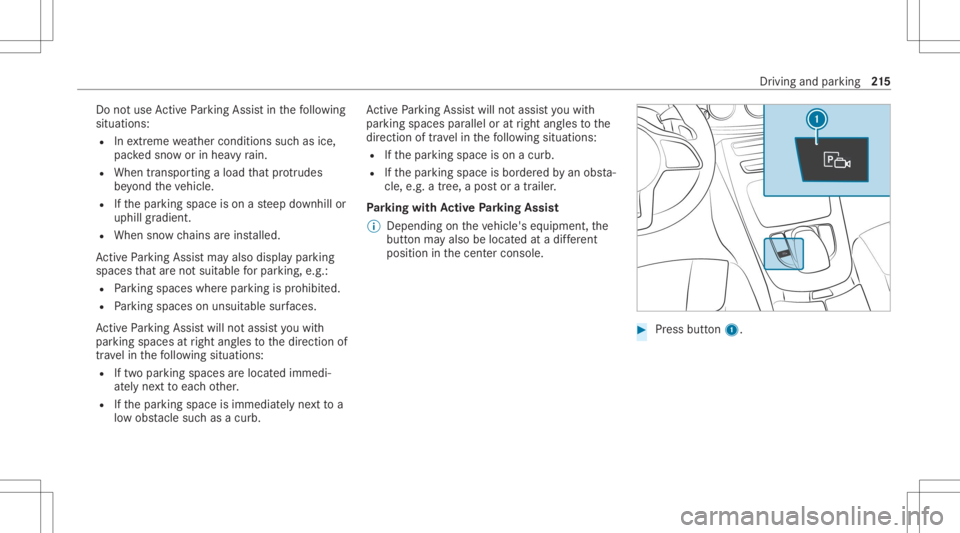
Pa rking withAc tiv ePa rking Assis t
% Depen dingontheve hicle's equipment, the
butt onmayalso belocat edatadif fere nt
po sitio nin thecent ercon sole. #
Press butt on1. Dr
iving andparking 21
5
Page 218 of 546
The
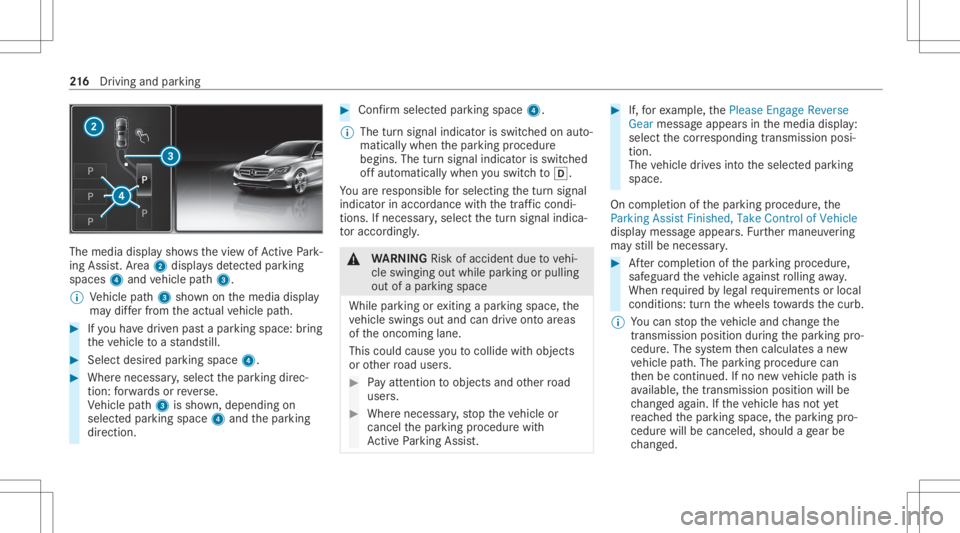
media displaysho wsthevie wof ActivePa rk‐
ing Assist. Ar ea 2 displa ysdetected parking
spaces 4and vehicle path3.
% Vehicle path3 shownonthemedia display
ma ydif ferfr om theactual vehicle path. #
Ifyo uha ve driven pas ta par kingspace: bring
th eve hicle toast ands till. #
Select desir edpar kingspac e4. #
Wher enec essar y,select thepar king direc‐
tion :fo rw ards orreve rse.
Ve hicle path3 issho wn, depending on
select edpar king space 4and thepar king
dir ect ion. #
Conf irm select edpar king space 4.
% The turnsignal indicat orisswitc hedonaut o‐
maticall ywhen thepar king procedur e
begins. Theturnsignal indicat orisswitc hed
of faut omaticall ywhen youswit chto005B .
Yo uar ere sponsible forsele cting thetur nsignal
indicat orinaccor dance withth etraf fic condi ‐
tions .If neces sary,select thetur nsignal indica‐
to raccor dingly. &
WARNIN GRisk ofacci dent dueto vehi‐
cle swinging outwhile parking orpulli ng
out ofapar king space
While parking orexitin gapar kingspace, the
ve hicle swings outand candrive ont oar eas
of theonc oming lane.
This could cause youto coll ide wi th object s
or other road user s. #
Payatt ention toobject sand other road
user s. #
Wher enec essar y,stop theve hicle or
cancel thepar king procedur ewit h
Ac tivePa rking Assist. #
If,forex am ple, thePlease Engage Reverse
Gear messag eappear sin themedia display:
select thecor responding transmission posi‐
tion.
The vehicle drives intoth eselect edpar king
space.
On com pletion ofthepar king procedur e,the
Parking AssistFinished, TakeContr olof Vehicle
displa ymessag eappear s.Fu rther maneuv ering
ma yst ill be nec essar y. #
Aftercom pletion ofthepar king procedur e,
saf eguar dth eve hicle agains tro lling away.
When requ ired bylegalrequ iremen tsor local
con dition s:tur nth ewheels towa rdsth ecurb.
% Youcan stop theve hicle andchang eth e
tr ans missi on positio ndu ring thepar king pro‐
cedur e.The system then calculat esane w
ve hicle path.The parking procedur ecan
th en be con tinued. Ifno newvehicle pathis
av ailable, thetransmission positionwillbe
ch ang edagain. Ifth eve hicle hasnotye t
re ac hed thepar king space, thepar king pro‐
cedur ewill becanc eled, should age ar be
ch ang ed. 21
6
Driving and parking
Page 220 of 546
&
WARNIN GRisk ofacci dent dueto vehi‐
cle swinging outwhile parking orpulli ng
out ofapar king space
While parking orexitin gapar kingspace, the
ve hicle swings outand candrive ont oar eas
of theonc oming lane.
This could cause youto coll ide wi th object s
or other road user s. #
Payatt ention toobject sand other road
user s. #
Wher enec essar y,stop theve hicle or
cancel thepar king procedur ewit h
Ac tivePa rking Assist. #
If,forex am ple, thePlease Engage Forward
Gear messag eappear sin themedia display:
select thecor responding transmission posi‐
tion.
The vehicle movesout ofthepar king space.
The turnsignal indicat orisswitc hedoffaut o‐
maticall y.
Af terth eex itin gpr ocedur ehas been completed,
th eParkin gAssist Finished, TakeContr olof Vehicle
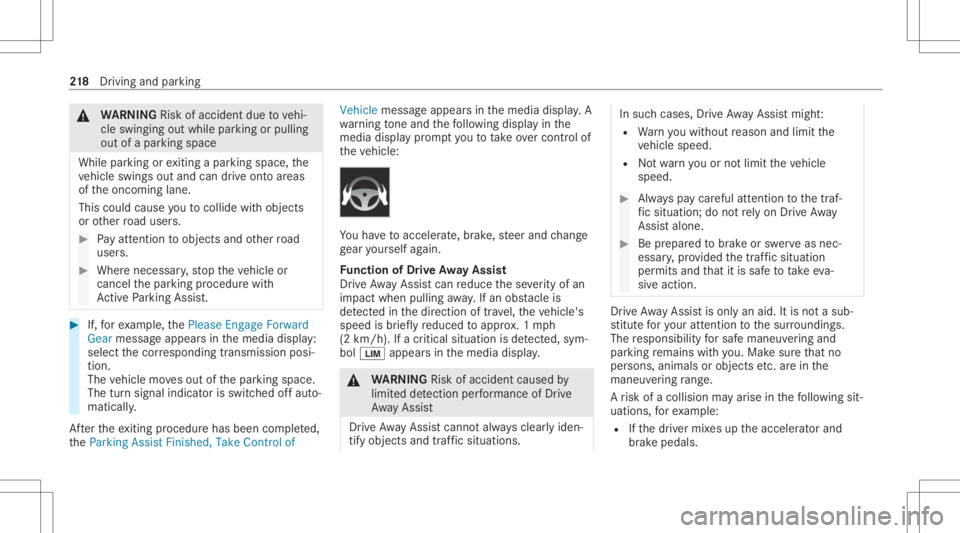
messageappear sin themedia display.A
wa rning tone and thefo llo wing displa yin the
media display pr om ptyouto take ove rcontr olof
th eve hicle: Yo
uha ve toacc eler ate, brak e, steer and chang e
ge ar yourself again.
Fu nction ofDrive Awa yAssis t
Dr ive Aw ayAssi stcan reduce these verity of an
impact when pulling away.If an obs tacle is
de tected inthedir ect ion oftrav el, theve hicle's
speed isbrief lyreduced toappr ox.1 mp h
(2 km/ h).Ifacr itic alsituat ionisde tected, sym‐
bol 00CB appea rsinthemedia display. &
WARNIN GRisk ofacci dent caused by
limit eddetection perform anc eof Drive
Aw ayAssi st
Dr ive Aw ayAssi stcanno tal wa ys cle arly iden‐
tify obje ctsand traf fic situ ations. In
such case s,Dr ive Aw ayAssi stmight :
R Warnyouwit hout reason andlimit the
ve hicle speed.
R Notwa rnyouor notlimit theve hicle
speed. #
Alw ayspa ycar eful attention tothetra f‐
fi c situ ation; donotre ly on Drive Aw ay
Assi stalon e. #
Beprepar edtobrak eor sw erve as nec ‐
essar y,prov ided thetra ffic situat ion
per mitsand that itis saf eto take eva‐
siv eact ion. Dr
ive Aw ayAssi stisonl yan aid. Itis no ta sub‐
st itut efo ryo ur att entio nto thesur round ings.
The responsibili tyforsaf emaneu vering and
pa rking remains withyo u. Mak esur eth at no
per son s,anim alsorobj ect set c. arein the
maneu vering rang e.
A risk ofacollision mayar ise inthefo llo wing sit‐
uation s,forex am ple:
R Ifth edr iver mix esup theaccelera torand
br ak epeda ls. 21
8
Driving and parking
Page 224 of 546
R
When avillag eor city boundar ywhic his
st or ed inthedigit almap ispassed.
The camer aalso detects traf fic sig ns with a
re striction indicated byan addit ionalsign (e.g.in
we tcond itions ).
Tr af fic Sign Assistisonl yan aid. Thedriver is
re sponsible forke eping asaf edis tance from the
ve hicle infront, forve hicle speed andforbr aking
in good time.
Wa rning when thema xim um permis sible
speed isexc eeded
The system can warnyouif yo uunin tentio nally
ex ceed themaximum permissible speed.Todo
th is, youcan spec ifyinthemultimedia system
by howmuc hth emaximum permissible speed
can beexceed edbef oreawa rning isissued. You
can specify whether thewa rning isto be justa
visual warning oran acous ticone aswell. Displa
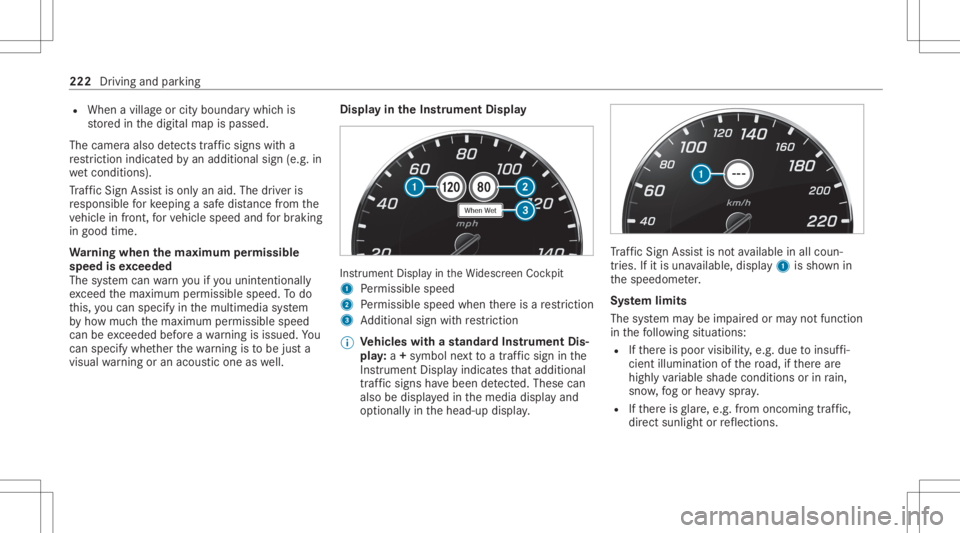
yin theIns trum ent Displa y In
stru ment Displa yin theWi descr eenCockpit
1 Perm issible speed
2 Perm issible speedwhenther eis are striction
3 Addition alsign withre striction
% Ve
hicl eswith ast andar dIns trument Dis‐
pla y:a+ symbo lne xt to atraf fic sig nin the
Ins trument Displayindicat esthat addit ional
traf fic sig ns have been detected. Thesecan
al so be displ ayed inthemedia displayand
op tion ally inthehead-up display. Tr
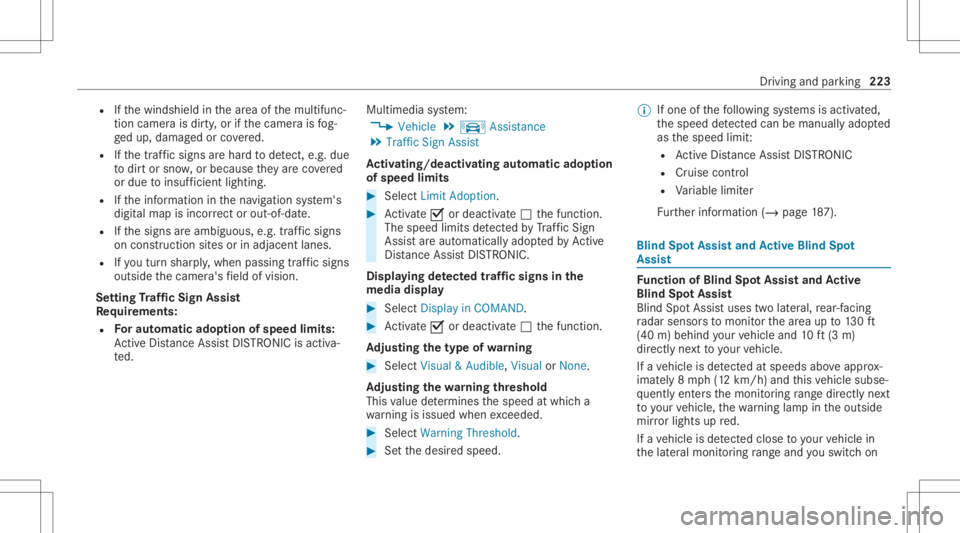
af fic Sign Assistisno tav ailable inall coun ‐
tr ies. Ifit is una vailable, display1 issho wnin
th espeedome ter.
Sy stem limit s
The system maybe impair edorma yno tfunc tion
in thefo llo wing situat ions:
R Ifth er eis poor visibility ,e.g. due toinsuf fi‐
cie ntillu mina tionofthero ad, ifth er ear e
highl yva riable shade condition sor inrain,
sno w,fogor hea vyspr ay.
R Ifth er eis glar e, e.g .fr om oncom ingtraf fic,
di re ct sunli ght orreflect ions. 222
Driving andparking
Page 225 of 546
R
Ifth ewindshield inthear ea ofthemultifunc ‐
tion camer ais dir ty,or ifth ecamer ais fog‐
ge dup, damag edorcovered.
R Ifth etraf fic sig ns areha rd todetect, e.g. due
to dir tor sno w,orbecause they areco vered
or due toinsuf ficie ntlighti ng.
R Ifth einf ormation inthena vig ation system's
digit almap isincor rect or out-of-da te.
R Ifth esigns areambiguous, e.g.traffic sign s
on con stru ction sites orinad jacent lanes.
R Ifyo utur nshar ply, when passin gtraf fic sig ns
ou tsid eth ecamer a'sfield ofvision.
Se tting Traf fic Sign Assis t
Re quirement s:
R Foraut omat icado ption ofspeed limits:
Ac tiveDis tance AssistDIS TRONI Cis acti va‐
te d. Multimedia
system:
4 Vehicle 5
k Assist ance
5 Traffic SignAssist
Ac tiv atin g/deac tivatin gaut omati cadop tion
of spe edlimits #
Select LimitAdo ption. #
Activate0073 ordeacti vate 0053 thefunc tion.
The speed limitsdetected byTraf fic Sign
Assi stareaut omat icallyadop tedby Active
Dis tance AssistDIS TRONI C.
Di spl aying detected traf fic signs inthe
med iadis pla y #
Select Display inCOMA ND. #
Activate0073 ordeacti vate 0053 thefunc tion.
Ad jus tingthe type ofwa rning #
Selec tVisual &Audible ,Visual orNon e.
Ad jus tingthe warning threshold
This value determ ines thespeed atwhic ha
wa rning isissued whenexceeded. #
Select Warning Threshold. #
Setth edesir edspeed. %
Ifone ofthefo llo wing systems isactiv ated,
th espeed detected can bemanu ally ad op ted
as thespeed limit:
R ActiveDis tance AssistDIS TRONI C
R Cruise contr ol
R Variable limiter
Fu rther information (/page18 7). Blind
SpotAss istand Activ eBli nd Spo t
As sist Fu
nction ofBlind SpotAssis tand Activ e
Bli nd Spo tAs sist
Bli nd Spo tAssi stuses twolat eral, rear-facin g
ra dar sensor sto monit orthear ea up to130ft
(40 m)behind your vehicle and10ft(3 m)
dir ect lyne xt to your vehicle.
If ave hicle isde tected atspe eds aboveappr ox‐
imat ely8 mp h(12 km/h) andthis vehicle subse‐
qu ent lyent ersth emonit oring rang edire ctly next
to your vehicle, thewa rning lam pin theoutside
mir rorlig hts upred.
If ave hicle isde tected clos eto your vehicle in
th elat eral monit oring rang eand youswit chon Dr
iving andparking 223