radio MERCEDES-BENZ CLS 2021 Owners Manual
[x] Cancel search | Manufacturer: MERCEDES-BENZ, Model Year: 2021, Model line: CLS, Model: MERCEDES-BENZ CLS 2021Pages: 434, PDF Size: 6.04 MB
Page 4 of 434
Symbols
........................................................ 5 At
agl ance ....................................................6
Coc kpit ....... ..................... ..................... ..........6
Indica torand warning lam ps.........................1 0
Ov erhead controlpanel ................................ 12
Doo rcontr olpa nel and seatad jus tment .......14
Emerg enciesand brea kdo wns ............ .......... 16 Digita
lOp erator' sMa nua l......................... 18
Callin gup theDigit alOper ator's Manual ...... 18 Gene
ralno tes... .......................................... 20
Pr otect ing theen vironmen t... ....................... 20
Genuine Mercedes- Benzparts......................2 0
Oper ator's Manual ........................... .............2 1
Ser vice andvehicle operation ......................2 2
Oper ating safety.......... .................................2 3
Decl arati on ofconf ormity forwireless
ve hicle component s... ..................................2 5
Dia gno stics con nection ................................ 25
Qualif iedspec ialistwo rkshop ....................... 27
Cor rect useof theve hicle ............................. 27 No
tesfo rper sons withelectr onicmedi‐
cal aids..... ........................................ ............ 27
Pr oblems withyo ur vehicle ............... ............ 28
Re por tingsaf etydef ects ...............................2 8
Limit edWarrant y.......................................... 29
QR cod efo rre scue card... ............... .............2 9
Dat ast or ag e... ..............................................2 9
Cop yright ...................................................... 34 Occup
antsafety.... .....................................35
Re stra int system .............................. .............3 5
Sea tbel ts<0011001100110011001100110011001100110011001100110011001100110011
0011001100110011001100110011001100110011001100110011001100110011
0011001100110011001100110011001100110011001100110011001100110011
00110011001100110011> 37
Airb ags<0011001100110011001100110011001100110011001100110011001100110011
0011001100110011> <0011001100110011001100110011001100110011001100110011001100110011
0011001100110011><0011001100110011001100110011001100110011001100110011001100110011
00110011> 41
PRE-S AFE®
sy stem ....................................... 49
Saf elytranspor tingchildr enintheve hi‐
cle ...... ..........................................................5 0
No teson pets intheve hicle ............ .............6 3 Opening
andclosing .................................. 64
Smar tKey <0011001100110011001100110011001100110011001100110011001100110011
0011001100110011001100110011001100110011001100110011001100110011
0011001100110011001100110011001100110011001100110011001100110011
001100110011001100110011> 64
Doo rs<0011001100110011001100110011001100110011001100110011001100110011
0011001100110011001100110011001100110011001100110011001100110011
0011001100110011001100110011001100110011001100110011001100110011
001100110011001100110011001100110011001100110011> 68
Tr unk ................................................ .............7 1
Sid ewi ndo ws<0011001100110011001100110011001100110011001100110011001100110011
0011001100110011001100110011001100110011001100110011001100110011
001100110011001100110011001100110011001100110011001100110011> 77
Sli ding sunroof <0011001100110011001100110011001100110011001100110011001100110011
0011001100110011001100110011001100110011001100110011001100110011
0011001100110011001100110011001100110011001100110011> 80Ro
ller sun blinds ...........................................8 2
Anti-t heftpr otect ion .....................................8 3 Seats
andstowing ...................................... 87
No teson thecor rect driver's seatpos i‐
tion <0011001100110011001100110011001100110011001100110011001100110011
001100110011001100110011001100110011001100110011> <0011001100110011001100110011001100110011001100110011001100110011
001100110011001100110011001100110011001100110011>.......87
Sea ts<0011001100110011001100110011001100110011001100110011001100110011
0011001100110011001100110011001100110011001100110011001100110011
0011001100110011001100110011001100110011001100110011001100110011
001100110011001100110011001100110011001100110011> 88
St eer ing wheel ..............................................9 6
Eas yentr yand exitfeatur e...........................9 8
Memor yfunct ion.......................................... 99
St ow agear eas ............................................ 100
Soc kets ........... ............................................ 108
Wi reless chargin gof themobile phone
and connect ionwithth eex terior ant enna ...110
Ins talling/ remo ving thefloor mats .............. 112 Light
andvisibili ty.................................... 114
Ext eriorlighti ng............. ..............................114
Int erior ligh ting ............................................ 119
Wi ndsh ield wipe rand windsh ield wa sher
sy stem ........................................................ 120
Mir rors <0011001100110011001100110011001100110011001100110011001100110011
0011001100110011001100110011001100110011001100110011001100110011
0011001100110011001100110011001100110011001100110011001100110011
00110011001100110011001100110011> 123
Ar ea perm eable toradio waveson the
winds hield.................................................. 126 2
Contents
Page 27 of 434
All
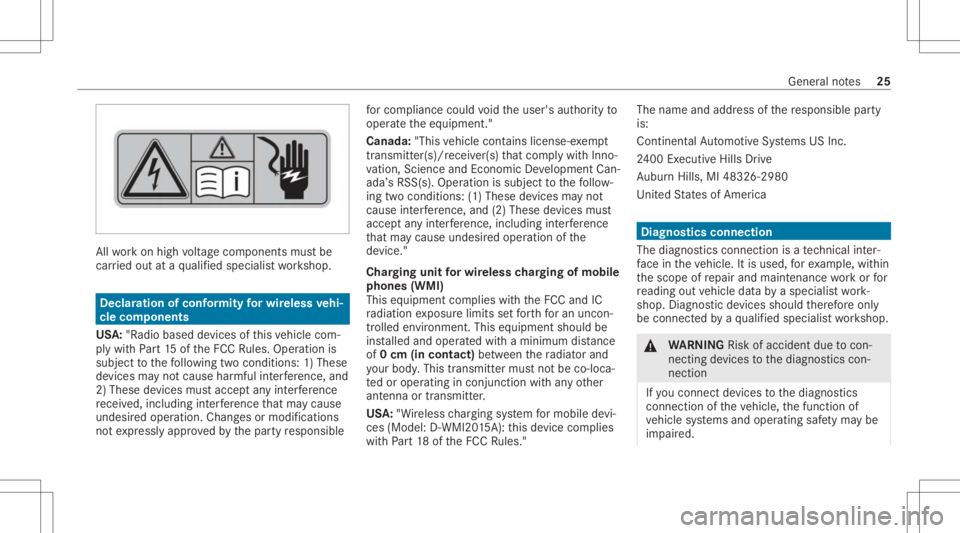
workon high voltag ecom pone ntsmus tbe
car ried out ataqu alif ied spec ialistwo rkshop. Dec
laration ofconf ormity forwi reless vehi‐
cle comp onent s
US A:"Radio based devic es ofthis vehicle com‐
ply withPa rt15 oftheFCC Rules. Opera tionis
subje ctto thefo llo wing twocon dition s:1) These
de vice sma yno tcause harmful interfere nce, and
2) The sedevice smu stacc eptan yint erfere nce
re cei ved, includin gint erfere nce that ma ycaus e
unde sired operation .Chan gesor modif ications
no tex pressl yappr ovedby thepar tyresponsible fo
rcom pliance could void theuser's author ityto
oper ateth eeq uipment. "
Canada :"This vehicle contains license-e xemp t
tr ans mitter( s)/r ece iver( s)that com plywit hInno ‐
va tio n,Scie nceand Econo micDe velopmen tCan‐
ada ’sRSS (s).Operatio nis subj ectto thefo llo w‐
ing twocon dition s:(1) These device sma yno t
cause interfere nce, and(2)The sedevice smu st
acc eptan yint erfere nce, including interfere nce
th at ma ycaus eunde sired oper ationof the
de vice. "
Char ging unitforwi reless chargin gof mobi le
phone s(WMI )
This equipment complies wit hth eFCC andIC
ra diation exposur elimits setfo rth fo ran uncon‐
tr oll ed environment. Thisequip ment shouldbe
ins talled and opera tedwit haminimum distance
of 0cm (in co ntact) betwee nth era diat orand
yo ur body .This transm itter mus tno tbe co-lo ca‐
te dor oper ating incon junc tion withan yot her
ant enna ortransmitt er.
US A:"W ireless chargin gsy stem formobil ede vi‐
ces (Mod el:D-WMI20 15A): this de vice complies
wit hPa rt18 oftheFCC Rules." The
name andaddr essofthere sponsible party
is:
Continent alAu tomo tiveSy stems USInc.
24 00 Executiv eHill sDr ive
Au bur nHills, MI483 26-298 0
Un ited States ofAm erica Diagn
ostics connect ion
The diagn ostic scon nectionis ate ch nica lint er‐
fa ce intheve hicle. Itis used, forex am ple, within
th escope ofrepair andmaint enanc ewo rkor for
re adin gout vehicle databy aspec ialistwo rk‐
shop. Diagnos ticdevices should ther efor eonl y
be con nect edbyaqu alif ied spec ialistwo rkshop. &
WARNIN GRisk ofacci dent dueto con‐
necting device sto thediagnos ticscon‐
nect ion
If yo uco nn ect devic es tothediagnos tics
con nect ionoftheve hicle, thefunc tion of
ve hicle systems andoper ating safetyma ybe
im pair ed. Gen
eral no tes 25
Page 36 of 434
MBUS
Awill notshar eEDR datawit hot her swit h‐
out thecon sent oftheve hicle owner or,if th e
ve hicle isleased, without thecon sent oftheles‐
see. Excep tion sto this repr esent ation include
re sponses tosubpoenas bylaw enf orcem ent;by
fe der al,stat eor loc algo vernment ;in connection
wit hor arising outoflitig ation invo lvin g MBUS A
or its subsidia ries and affiliat es; or,as requ ired
by law.
Wa rning: TheEDRis acom pone ntofthe
Re stra int System Module. Tamp ering with,alt er‐
ing, modifying orremo ving theED Rcom ponen t
ma yre sult inamalfunction oftheRe stra int Sys‐
te m Modu leand other systems.
St atelaws orregulations rega rding EDRs that
con flict withfe der alregulation arepr e-em pted.
This means that intheev ent ofsuc hcon flict ,th e
fe der alregulation governs. As ofDecember
20 16 ,17 stat es have enact edlaws relatin gto
EDRs . Co
pyright Fr
ee and open sourcesof tware In
fo rm atio non lice nsefo rfr ee and open-sou rce
sof twareused inyour vehicle canbefound on
th edat acar rier inyour vehicle document wallet
and withupdat eson thefo llo wing websit e:
htt ps:/ /www .mercedes- benz.com/open source Re
gis tere dtrademar ks R
Bluetoo th®
is are gis tere dtra demar kof Blue‐
to othSIG, Inc.
R DTS™ isare gis tere dtra demar kof DT S,Inc.
R Dolb y®
and MLP ™arere gis tere dtrademar ks
of DOLB YLabor ator ies.
R ESP ®
and PRE-S AFE®
arere gis tere dtra de‐
mar ksofDaimler AG.
R HomeL ink®
is are gis tere dtra demar kof Gen‐
te xCo rporation.
R iPod ®
and iTune s®
arere gis tere dtrademar ks
of Apple Inc. R
Burmes ter®
is are gis tere dtra demar kof
Bur mes terAu diosy steme GmbH.
R Micr osoft®
and Windo wsMedia ®
arere gis‐
te re dtrademar ksofMicr osoftCor poration.
R SIRIUS ®
is are gis tere dtra demar kof Sir ius
XM Radio Inc.
R HD Radio™ isare gis tere dtrademar kof iBiq‐
uity Digit alCor poration.
R Graceno te®
is are gis tere dtra demar kof
Gr aceno te,Inc .
R ZAGA TSur vey®
and relat ed brands arere gis‐
te re dtrademar ksofZag atSur vey, LL C. 34
Generalno tes
Page 69 of 434
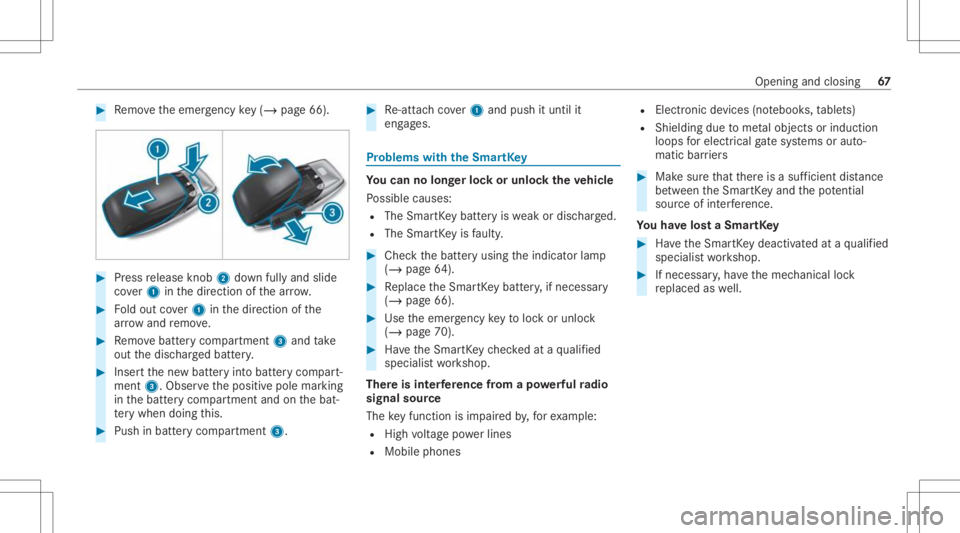
#
Remo vetheemer gency key(/ pag e66 ). #
Press release knob 2 down fullyand slide
co ver1 inthedir ect ion ofthear row . #
Foldout cover1 inthedir ect ion ofthe
ar row and remo ve. #
Remo vebatt erycom partmen t3 and take
out thedisc hargedbatt ery. #
Inser tth ene wbatt eryint obatt erycom part‐
ment 3.Obser vethepositiv epole marking
in thebatt erycom partmen tand onthebat‐
te ry when doingth is. #
Push inbatt erycom partment 3. #
Re-att achco ver1 and push ituntil it
eng ages. Pr
obl ems with theSm artK ey Yo
ucan nolon gerlo ck orunloc kth eve hicl e
Po ssible causes:
R The Smar tKey batt eryis we ak ordisc harged.
R The Smar tKey isfaulty . #
Chec kth ebatt eryusing theindicat orlam p
(/ page64 ). #
Replace theSmar tKey batt ery, ifnec essar y
(/ page66). #
Use theemer gency keyto loc kor unloc k
(/ page70). #
Have theSmar tKey checkedat aqu alif ied
spec ialistwo rkshop.
Ther eis int erfere nce from apo we rful radio
sig nal source
The keyfun ction isim pair edby,fo rex am ple:
R Highvo ltag epo we rlines
R Mobi lephones R
Electr onicdevices (notebook s,table ts)
R Shielding duetome talobje ctsor induc tion
loops forelectr icalgate systems oraut o‐
matic barrier s #
Mak esur eth at ther eis asuf ficie ntdist anc e
be tween theSmar tKey and thepo tentia l
sou rceof interfere nce.
Yo uha ve los ta Sma rtKe y #
Have theSmar tKey deactiv ated ataqu alif ied
spec ialistwo rkshop. #
Ifnecessar y,ha ve themec hanical lock
re placed aswell. Open
ingand closing 67
Page 71 of 434
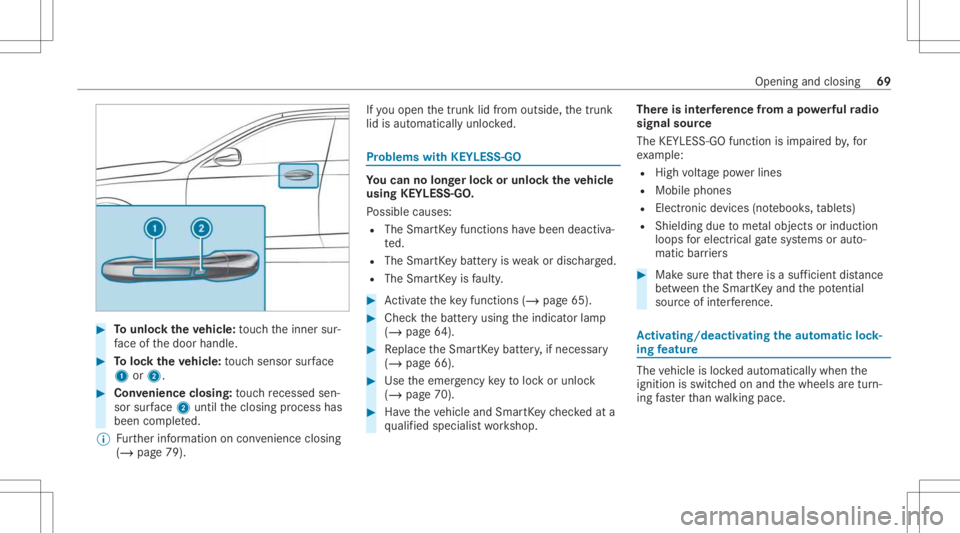
#
Tounlo cktheve hicl e:touc hth einner sur‐
fa ce ofthedoor handle. #
Toloc kth eve hicl e:touc hsen sor surface
1 or2. #
Convenience closing:touc hre cess edsen‐
sor surface 2untilth eclosing process has
been completed.
% Further information oncon venie nce closing
(/ page 79) . If
yo uopen thetrunk lidfrom outside, thetrunk
lid isaut omaticall yunloc ked. Pr
oblems withKEYLE SS-GO Yo
ucan nolon gerlo ck orunloc kth eve hicl e
using KEYLESS-GO .
Po ssible causes:
R The Smar tKey functions have been deactiv a‐
te d.
R The Smar tKey batt eryis we ak ordisc harged.
R The Smar tKey isfaulty . #
Activateth eke yfun ction s(/ page65). #
Chec kth ebatt eryusing theindicat orlam p
(/ page64 ). #
Replace theSmar tKey batt ery, ifnec essar y
(/ page66). #
Use theemer gency keyto loc kor unloc k
(/ page70). #
Have theve hicle andSmar tKey checkedat a
qu alif ied spec ialistwo rkshop. Ther
eis int erfere nce from apo we rful radio
sig nal source
The KEYLESS-G Ofuncti onisim pa ired by,fo r
ex am ple:
R Highvo ltag epo we rlines
R Mobi lephones
R Electr onicdevices (notebook s,table ts)
R Shielding duetome talobje ctsor induc tion
loops forelectr icalgate systems oraut o‐
matic barrier s #
Mak esur eth at ther eis asuf ficie ntdist anc e
be tween theSmar tKey and thepo tentia l
sou rceof interfere nce. Ac
tiv atin g/deac tivatin gthe automati clo ck ‐
ing featur e The
vehicle isloc kedaut omatic allywhen the
ignit ionisswitc hedonand thewheels aretur n‐
ing faster than walkin gpace. Open
ingand closing 69
Page 128 of 434
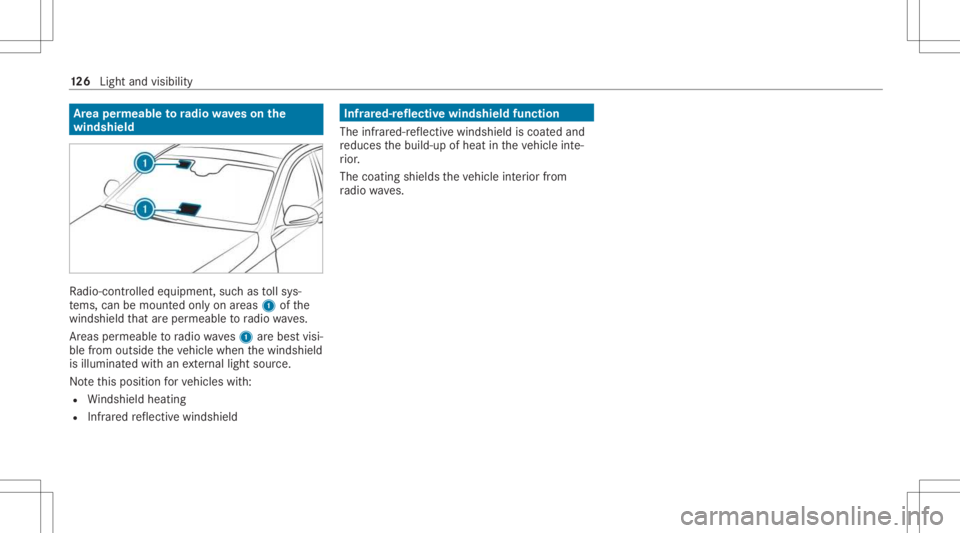
Ar
ea per mea bletoradio wav eson the
wind shield Ra
dio-co ntro lled equipmen t,suc has tollsy s‐
te ms, can bemount edonly onareas 1ofthe
winds hieldthat areper meabl eto radio wav es.
Ar eas permeable toradio wav es1 arebes tvisi‐
ble from outside theve hicle when thewindshield
is illuminat edwithan extern al light source.
No tethis posit ionforve hicles with:
R Windsh ield hea ting
R Infrared reflect ive windshield Infr
ared-r eflectiv ewindshield function
The infra red-r eflectiv ewindshield iscoat edand
re duces thebuild-up ofheat intheve hicle inte‐
ri or .
The coating shieldstheve hicle interior from
ra dio waves. 12
6
Light andvisib ility
Page 220 of 434
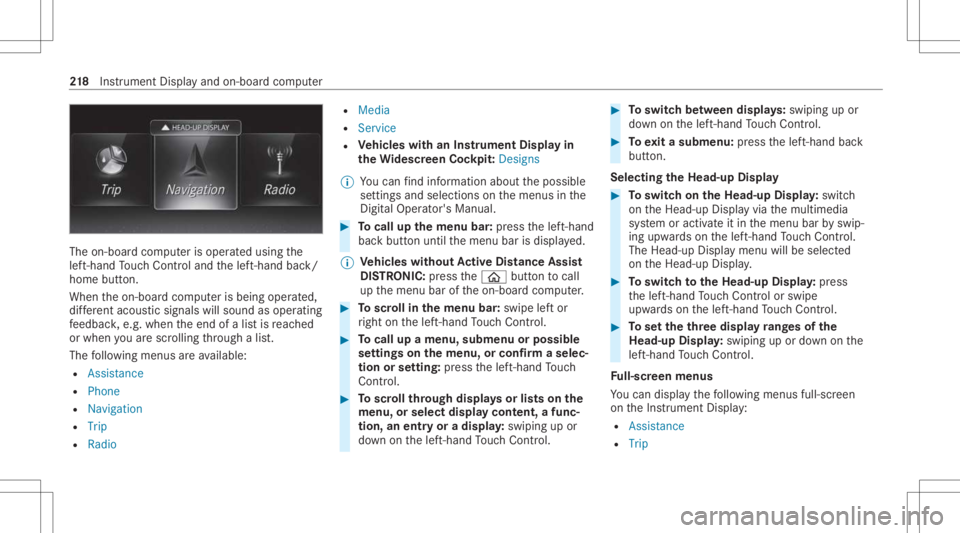
The
on-boar dcom puterisoper ated using the
lef t-hand Touc hCon trol and thelef t-hand back/
home button.
When theon- boar dcom puterisbeing operated,
dif fere nt aco ustic signa lswillsou ndasoperati ng
fe edbac k,e.g. when theend ofalis tis reac hed
or when youar esc rolling thro ugh alis t.
The follo wing menusareav ailable:
R Assist anc e
R Phon e
R Navi gation
R Trip
R Radio R
Media
R Service
R Vehicl eswith anIns trument Displayin
th eWi des cree nCo ckpit: Desi gns
% Youcan find informa tionab ou tth epossible
se ttings andselect ionsonthemenus inthe
Dig ital Op erator' sMa nua l. #
Tocall upthemenu bar:press thelef t-hand
bac kbutt onuntil themenu barisdispla yed.
% Ve
hicl eswithout Activ eDi stance Assist
DI ST RO NIC :pr ess the00E2 buttontocal l
up themenu baroftheon- boar dcom puter. #
Toscr ollinthemenu bar:swipe leftor
ri ght onthelef t-hand Touc hCon trol. #
Tocall upamen u,sub men uor poss ible
se ttings onthemenu ,or conf irm aselec‐
tion orsetting: press thelef t-hand Touc h
Con trol. #
Toscr ollthrough displa ysorlists on the
menu ,or select displaycont ent,afun c‐
tion, anentr yor adisp lay: swiping upor
do wn onthelef t-hand Touc hCon trol. #
Toswitc hbe tw een displa ys:sw iping upor
do wn onthelef t-hand Touc hCon trol. #
Toexitasubm enu:press thelef t-hand back
butt on.
Selecting theHead -upDispla y #
Toswitc hon theHead -upDispla y:switc h
on theHead-up Displayvia themultimedia
sy stem oractiv ateit in themenu barbyswip‐
ing upw ards on thelef t-hand Touc hCon trol.
The Head -upDisplaymen uwill besele cted
on theHead-up Display. #
Toswitc hto theHead -upDispla y:press
th elef t-hand Touc hCon trol or swipe
upw ards on thelef t-hand Touc hCon trol. #
Tosetth eth reedisp layra ng es ofthe
Head -upDispla y:swiping upordown onthe
lef t-hand Touc hCon trol.
Fu ll-scr eenmenu s
Yo ucan displ aythefo llo wing menusfull-s creen
on theIns trument Display:
R Assist ance
R Trip 21
8
Instrument Displayand on-boar dcom puter
Page 227 of 434
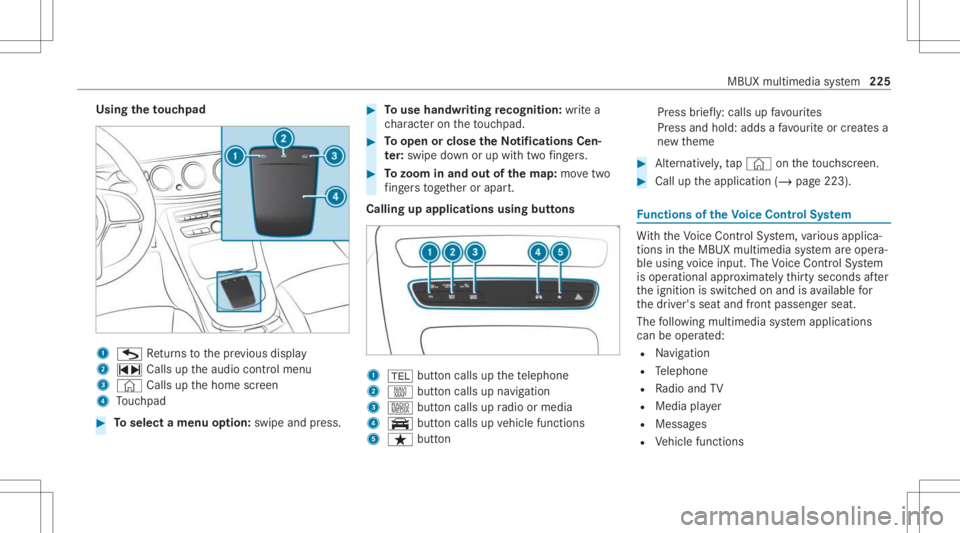
Using
theto uc hpad 1
G Retur ns tothepr ev ious displa y
2 ~ Callsuptheaudio control menu
3 © Callsupthehome screen
4 Touc hpad #
Toselect amenu option: swipe andpress. #
Touse handwr itingrecognit ion:write a
ch aract eron theto uc hpad. #
Toopen orclose theNo tificatio nsCen‐
te r: swip edo wn orup withtw ofing ers. #
Tozoo minand outofthe map: movetwo
fi ng ersto get her orapar t.
Calling upapplications usingbuttons 1
002B buttoncalls upthete lephon e
2 z buttoncalls upnavig ation
3 | buttoncalls upradio ormedia
4 y buttoncalls upvehicle functions
5 ß button Pr
ess brief ly:cal lsup favo urites
Pr ess and hold:adds afa vo urite or creat esa
ne wtheme #
Alternativ ely,tap © ontheto uc hsc reen. #
Call uptheapplication (/page223). Fu
nctions oftheVo ice Contr olSy stem Wi
th theVo ice Cont rolSy stem, various applica‐
tions intheMBUX multimedia system areoper a‐
ble using voice input. TheVoice Cont rolSy stem
is oper ational approximat elyth irty seco ndsafte r
th eignition isswitc hedonand isavailable for
th edr iver's seat andfront passeng erseat.
The follo wing multim ediasystem applications
can beoper ated:
R Navig ation
R Telephon e
R Radio and TV
R Media player
R Messag es
R Vehicle functions MBUX
multimedia system 225
Page 231 of 434
&
WARNIN GRisk ofbeco ming trap ped
du ring adjus tment ofthedr iver's seat
af te rcall ing upadr iver profile
Selecting auser profile ma ytrigg eran
adju stment ofthedr iver's seat totheposi‐
tion save dunder theuser profile. Youor
ot her vehicle occupants couldbeinjur edin
th epr ocess. #
Mak esur eth at when theposition of
dr iver's seat isbeing adjustedusing the
multime diasystem, nopeople orbody
par tsarein theseat's rang eof mo ve‐
ment.
If th er eis arisk ofsomeone becoming trap‐
ped, stop theadjus tmentpr ocess immedi‐
at ely: #
a)Tapth ewa rning mess ageon the
media display.
or #
b)Press amemor yposition buttonora
seat adjus tmentswitc hon thedr iver's
door .
The adjus tmentpr ocess willbestop‐
ped. The
driver's seat iseq uipped withan access pre‐
ve nter.
If th edr iver's door isopen, thedr iver's seat will
no tbe setaf te rcall ing upthedr iver's profile.
Pr ofiles stor eyo ur vehicle settin gsand settin gs
fo rth emultimedia system. Ifth eve hicle isused
by severaldr iver s, thedr iver can select their
ow npr ofile wi thout chang ingthestor ed profile
se ttings ofother driver s.
% Information onprofiles from Mer cedes me
conn ectcan befound intheDigita lOper a‐
to r's Manua l.
Ve hicle settin gsare, forex am ple, driver' sseat ,
st eer ing wheel andmirrorse ttings, climatecon‐
tr ol and amb ient lighti ng.Forth ese ttings ofthe
multime diasystem, youcan select,fo rex am ple,
ra dio statio ns,pr ev ious destination sas wellas
th emes, suggestion sand favo urites. Fo
rre cur ring drivi ng situa tions, such aslon g
dr ives on thefree wa y,yo ucan save your prefer‐
re dse ttings inath eme intheve hicle. Inath eme
yo ucan save thedispla yof thedigit almap, your
pr efer redra dio statio nand prefer reddr ive pr o‐
gr am, forex am ple.
The vehicle canlearnth ehabits ofthedr iver .It
th en offers sugg estions forth emos tpr obable
na vig ation destinat ions, media sources, radio
st atio nsorcon tacts. Thepre-r equir ementsfor
th at areth eselect ionofapr ofile, your consen t
to there cor ding ofdata and sufficie ntcoll ected
da ta.
Fa vourites prov ide quick acc ess toapplic ations
th at areused often. Youcan selectfavo urites
fr om categor iesoradd them direct lyto an appli‐
cat ion. MBU
Xmult imed iasystem 229
Page 243 of 434
Obser
vetheadditional information onstow ing
mobile communic ationsde vice scor rectly:
R Loa ding theve hicle (/page10 0)
Blue tooth®
connect ion:
The men uvie wand theav ailable function sin the
te lephon emen uar ein par tdepen dentonthe
Blu etoo th®
pr ofile ofthecon nect edmobile
phone. Fullfunc tionality isonl yav ailable ifth e
mobil ephone supports both ofthefo llo wing
Blue tooth®
pr ofiles:
R PBAP (Phone BookAccess Profile)
- The cont acts onthemobile phoneare
sho wnautomaticall yon themultimedia
sy stem.
R MAP (Messag eAc cess Profile)
- The mob ile pho nemess agefuncti onscan
be used on themultimedia system.
Ir re spectiv eof this, Blue tooth®
audio function al‐
ity can byused withan ymob ileradio unit.
Fo rinf ormation onthera ng eof func tions ofthe
mobil era dio unit tobe con nected, see theman‐
uf actur er'soper ating instruction s. Ne
tworkco nn ectio n:
The follo wing cases canlead tothecall being
discon nectedwhile theve hicle isin mo tion:
R Youswit chintoatransm ission /recep tion
st atio n,inwhic hno com mun ication chann el
is free.
R The SIM car dused isno tcom patible withth e
ne tworkav ailable
R Amobi lephon ewit h"T winc ard" islogg ed
int oth ene tworkwit hth esecon dSIM cardat
th esame time
The multimedia system suppor tscalls inHD
Vo ice ®
forim prov ed speec hqu alit y.Arequ ire‐
men tfo rth is isthat themobile phoneandthe
mobil ephone networkpr ov ider oftheper son
yo uar ecalli ngsuppo rtHD Voice ®
.
Depe ndingon thequ alit yof thecon nect ion,the
vo ice qualit yma yfluct uate.
Fu rther information canbeobt ained from an
aut hor ized Mercedes-Ben zCent eror at:
https: //www .mercedes-benz .com/connect MBUX
multimedia system 24
1