Lighting MERCEDES-BENZ CLS-Class 2012 W218 Owner's Guide
[x] Cancel search | Manufacturer: MERCEDES-BENZ, Model Year: 2012, Model line: CLS-Class, Model: MERCEDES-BENZ CLS-Class 2012 W218Pages: 356, PDF Size: 14.25 MB
Page 112 of 356
If you are driving faster than approximately
28 mph (45 km/h):
the headlamp range is set automatically
depending on the distance between the
vehicle and other road users.
If you are driving faster than approximately
35 mph (55 km/h) and no other road users
are identified:
the high-beam headlamps are switched on
automatically. The K indicator lamp in
the instrument cluster also lights up.
If you are driving slower than approximately
30 mph (45 km/h), or other road users are
identified, or the roads are sufficiently
illuminated:
the high-beam headlamps are switched off
automatically. The K indicator lamp in
the instrument cluster goes out. The _
indicator lamp in the instrument cluster
stays on.XTo deactivate: move the combination
switch back to its normal position.
The _ indicator lamp in the instrument
cluster goes out.GWARNING
The Adaptive Highbeam Assist is only an aid
intended to support you while driving. The
driver is and remains responsible for proper
vehicle lighting in accordance with the
prevailing light, sight and traffic conditions.
The system may be impaired or unavailable
when
R visibility is poor, e.g. due to snow, rain, fog,
or heavy spray
R the optical sensor area of the windshield is
dirty, fogged up, or covered by a sticker for
example
The system cannot recognize the following
road users:
R Road users without a lighting system of
their own, e.g. pedestrians
R Road users with dim lighting of their own,
e.g. cyclists
R Road users whose lighting is obstructed,
e.g. road users behind a guardrail
R In some seldom cases, even road users with
a lighting system of their own may be
recognized too late or not at all.
The automatic high-beam headlamps will then
not be deactivated or it will be activated in
spite of preceding or oncoming road users.
This could endanger you and/or others and
cause an accident. Always pay close attention
to the traffic situation and switch off the high
beam manually if necessary.
Headlamps fogged up on the inside
The headlamps may fog up on the inside if
there is high atmospheric humidity.
XDrive with the headlamps switched on.
The level of moisture diminishes,
depending on the length of the journey and
the weather conditions (humidity and
temperature).
If the level of moisture does not diminish:
XHave the headlamps checked at a qualified
specialist workshop.110Exterior lightingLights and windshield wipers
Page 113 of 356
Interior lighting
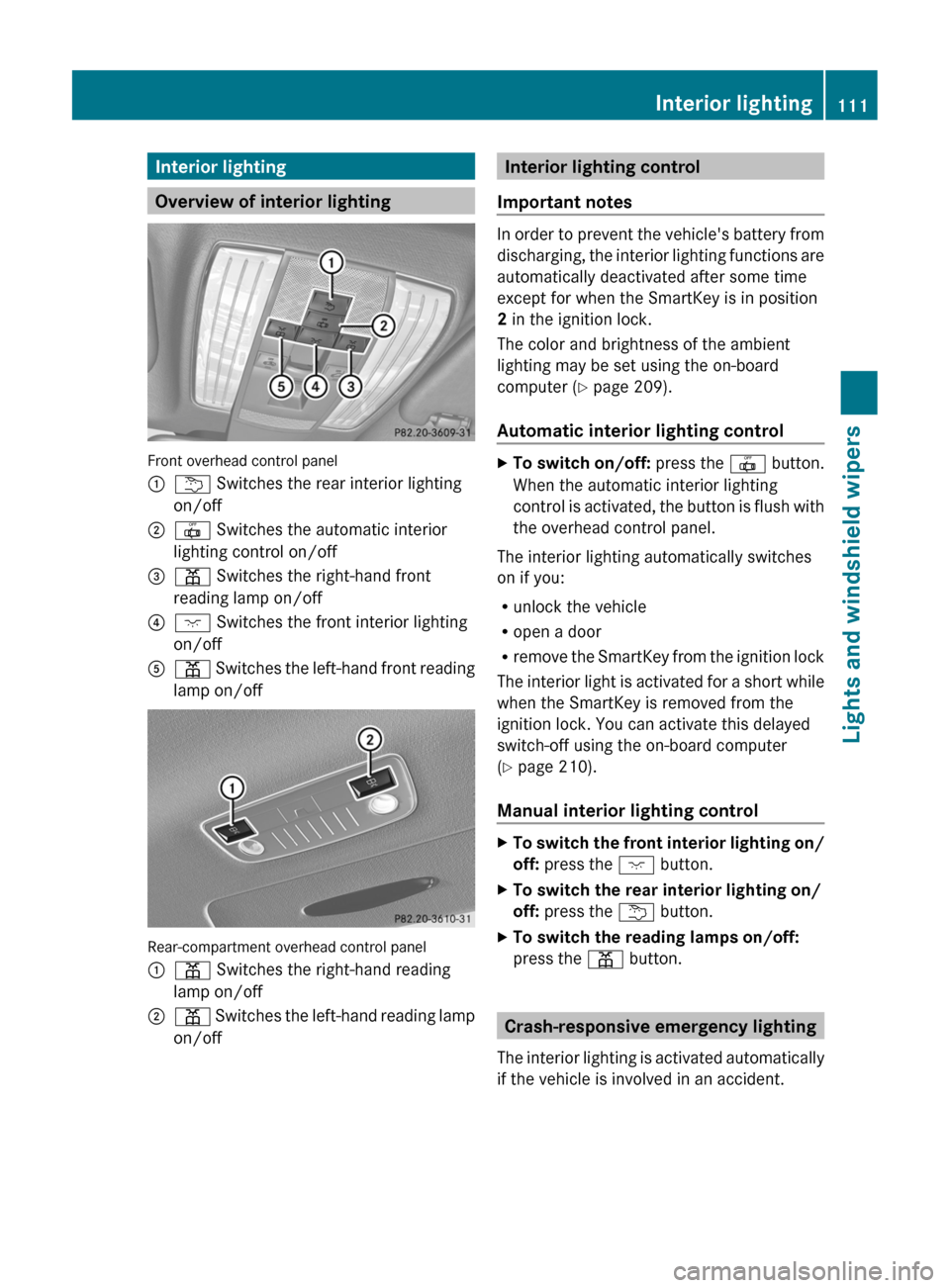
Overview of interior lighting
Front overhead control panel
:u Switches the rear interior lighting
on/off;| Switches the automatic interior
lighting control on/off=p Switches the right-hand front
reading lamp on/off?c Switches the front interior lighting
on/offAp Switches the left-hand front reading
lamp on/off
Rear-compartment overhead control panel
:p Switches the right-hand reading
lamp on/off;p Switches the left-hand reading lamp
on/offInterior lighting control
Important notes
In order to prevent the vehicle's battery from
discharging, the interior lighting functions are
automatically deactivated after some time
except for when the SmartKey is in position
2 in the ignition lock.
The color and brightness of the ambient
lighting may be set using the on-board
computer ( Y page 209).
Automatic interior lighting control
XTo switch on/off: press the | button.
When the automatic interior lighting
control is activated, the button is flush with
the overhead control panel.
The interior lighting automatically switches
on if you:
R unlock the vehicle
R open a door
R remove the SmartKey from the ignition lock
The interior light is activated for a short while
when the SmartKey is removed from the
ignition lock. You can activate this delayed
switch-off using the on-board computer
( Y page 210).
Manual interior lighting control
XTo switch the front interior lighting on/
off: press the c button.XTo switch the rear interior lighting on/
off: press the u button.XTo switch the reading lamps on/off:
press the p button.
Crash-responsive emergency lighting
The interior lighting is activated automatically
if the vehicle is involved in an accident.
Interior lighting111Lights and windshield wipersZ
Page 114 of 356
XTo switch off the crash-responsive
emergency lighting: press the hazard
warning lamp button.
or
XLock and then unlock the vehicle using the
key.
Replacing bulbs
Important safety notes
Xenon bulbs
GWARNING
Xenon bulbs carry a high voltage. You could
get an electric shock and be seriously or even
fatally injured if you touch the electric
contacts on Xenon bulbs. Therefore, never
remove the cover from Xenon bulbs.
Do not change Xenon bulbs yourself, but have
them replaced at a qualified specialist
workshop which has the necessary specialist
knowledge and tools to carry out the work
required.
Mercedes-Benz recommends that you use an
authorized Mercedes-Benz Center for this
purpose. In particular, work relevant to safety
or on safety-related systems must be carried
out at a qualified specialist workshop.
Bulbs and lamps are an important aspect of
vehicle safety. You must therefore make sure
that these function correctly at all times.
Have the headlamp setting checked regularly.
LED lamps
You can neither replace Xenon bulbs nor LED
bulbs. Have LED bulbs changed at a qualified
specialist workshop.
Mercedes-Benz recommends that you use an
authorized Mercedes-Benz Center for this
purpose. In particular, work relevant to safety
or on safety-related systems must be carried
out at a qualified specialist workshop.
Bulbs and lamps are an important aspect of
vehicle safety. You must therefore make sure
that these function correctly at all times.
Have the headlamp setting checked regularly.
Other bulbsGWARNING
Bulbs and lamps can be very hot. You should
therefore allow them to cool down before you
change them. Otherwise, you could be burned
if you touch them.
Keep bulbs out of the reach of children.
Otherwise, they could damage the bulbs, for
example, and injure themselves.
Never use a bulb which has been dropped.
Such a bulb may break or even explode and
injure you.
Halogen bulbs are pressurized and can
explode when you change them, particularly
if they are very hot. You should therefore wear
eye protection and gloves when you are
changing them.
There are bulbs other than Xenon and LED
bulbs that you cannot replace. Replace only
the bulbs listed (Y page 113). Have the bulbs
that you cannot replace yourself changed at
a qualified specialist workshop.
Mercedes-Benz recommends that you use an
authorized Mercedes-Benz Center for this
purpose. In particular, work relevant to safety
or on safety-related systems must be carried
out at a qualified specialist workshop.
If you require assistance changing bulbs,
consult a qualified specialist workshop.
Do not touch the glass tube of new bulbs with
your bare hands. Even minor contamination
can burn into the glass surface and reduce
the service life of the bulbs. Always use a lint-
free cloth or only touch the base of the bulb
when installing.
Only use bulbs of the correct type.
If the new bulb still does not light up, consult
a qualified specialist workshop.
Bulbs and lamps are an important aspect of
vehicle safety. You must therefore make sure
112Replacing bulbsLights and windshield wipers
Page 128 of 356
When you activate MAX COOL, climate
control switches to the following functions:
R maximum cooling
R maximum airflow
R air-recirculation mode onXTo activate: press the Ù button.
The indicator lamp in the button lights up.XTo deactivate: press the Ù button
again.
The indicator lamp goes out. The previously
selected settings come into effect again.
Defrosting the windows
Windows fogged up on the inside
XActivate the ¿ cooling with air
dehumidification function.XActivate automatic mode Ã.XIf the windows continue to fog up, activate
the defrosting function ( Y page 125).
i
You should only select this setting until
the windshield is clear again.
Windows fogged up on the outside
XSwitch on the windshield wipers.XPress the _ button repeatedly until the
P or O symbol appears in the
display.
i You should only select this setting until
the windshield is clear again.
Rear window defroster
Activating/deactivating
GWARNING
Any accumulation of snow and ice should be
removed from the rear window before driving.
Visibility could otherwise be impaired,
endangering you and others.
The rear window defroster has a high current
draw. You should therefore switch it off as
soon as the window is clear as it only switches
off automatically after several minutes.
If the battery voltage is too low, the rear
window defroster may switch off.XTurn the SmartKey to position 2 in the
ignition lock.XPress the ¤ button.
The indicator lamp in the ¤ button lights
up or goes out.
Problems with the rear window
defroster
The rear window defroster has deactivated
itself prematurely or cannot be activated.
XSwitch off any consumers that are not
required, e.g. reading lamps or interior
lighting.
When the battery is sufficiently charged,
the rear window defroster is activated
again automatically.
Activating/deactivating air-
recirculation mode
You can deactivate the flow of fresh air if
unpleasant odors are entering the vehicle
from outside. The air already inside the
vehicle will then be recirculated.
The operation of air-recirculation mode is the
same for all control panels.
GWARNING
Fogged windows impair visibility,
endangering you and others. If the windows
begin to fog on the inside, switching off the
air recirculation mode immediately should
clear interior window fogging. If interior
window fogging persists, make sure the air
conditioning is activated, or press the ¬
button.
126Operating the climate control systemClimate control
Page 184 of 356
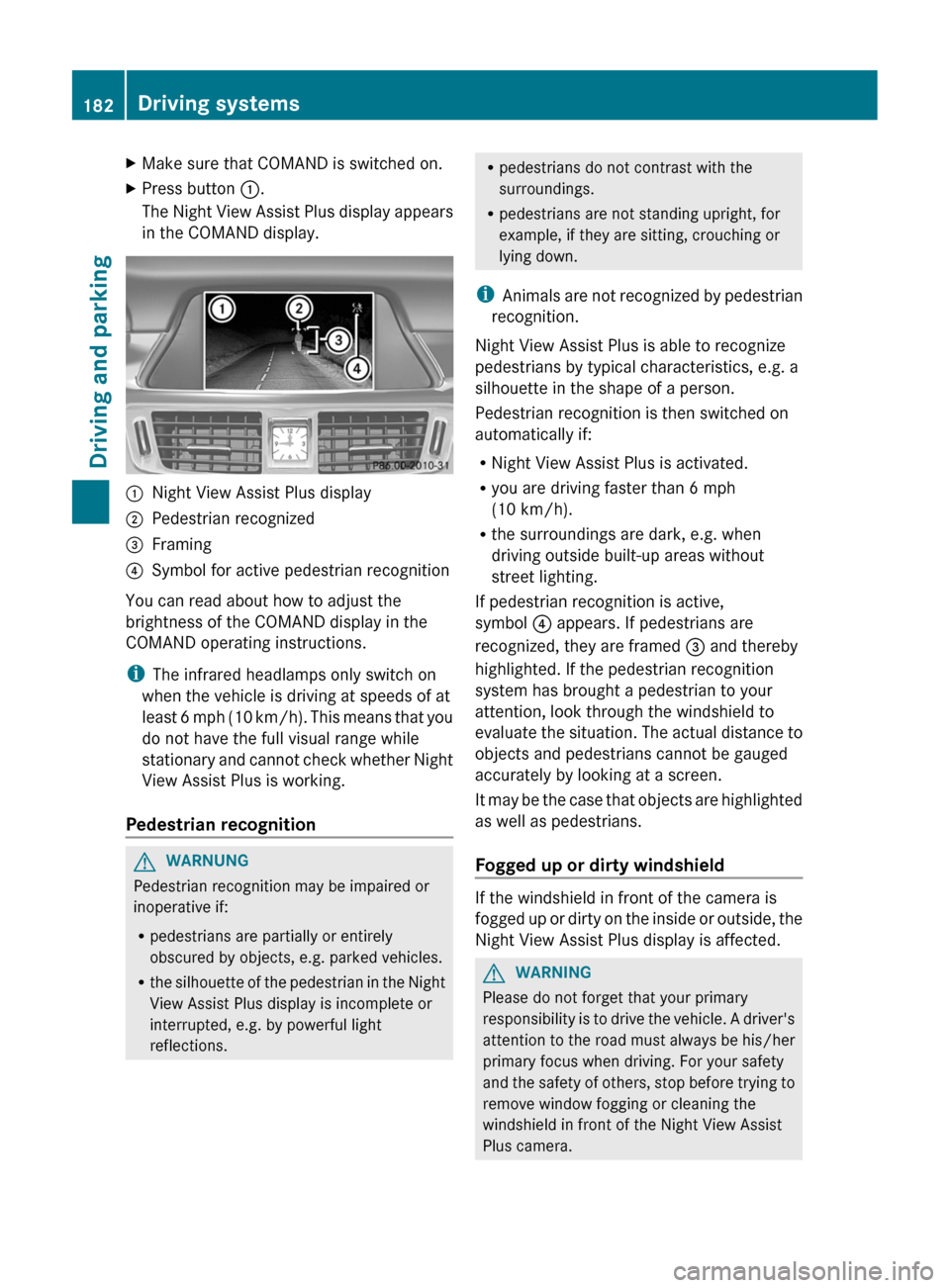
XMake sure that COMAND is switched on.XPress button :.
The Night View Assist Plus display appears
in the COMAND display.:Night View Assist Plus display;Pedestrian recognized=Framing?Symbol for active pedestrian recognition
You can read about how to adjust the
brightness of the COMAND display in the
COMAND operating instructions.
i The infrared headlamps only switch on
when the vehicle is driving at speeds of at
least 6 mph (10 km/h). This means that you
do not have the full visual range while
stationary and cannot check whether Night
View Assist Plus is working.
Pedestrian recognition
GWARNUNG
Pedestrian recognition may be impaired or
inoperative if:
R pedestrians are partially or entirely
obscured by objects, e.g. parked vehicles.
R the silhouette of the pedestrian in the Night
View Assist Plus display is incomplete or
interrupted, e.g. by powerful light
reflections.
R pedestrians do not contrast with the
surroundings.
R pedestrians are not standing upright, for
example, if they are sitting, crouching or
lying down.
i Animals are not recognized by pedestrian
recognition.
Night View Assist Plus is able to recognize
pedestrians by typical characteristics, e.g. a
silhouette in the shape of a person.
Pedestrian recognition is then switched on
automatically if:
R Night View Assist Plus is activated.
R you are driving faster than 6 mph
(10 km/h).
R the surroundings are dark, e.g. when
driving outside built-up areas without
street lighting.
If pedestrian recognition is active,
symbol ? appears. If pedestrians are
recognized, they are framed = and thereby
highlighted. If the pedestrian recognition
system has brought a pedestrian to your
attention, look through the windshield to
evaluate the situation. The actual distance to
objects and pedestrians cannot be gauged
accurately by looking at a screen.
It may be the case that objects are highlighted
as well as pedestrians.
Fogged up or dirty windshield
If the windshield in front of the camera is
fogged up or dirty on the inside or outside, the
Night View Assist Plus display is affected.
GWARNING
Please do not forget that your primary
responsibility is to drive the vehicle. A driver's
attention to the road must always be his/her
primary focus when driving. For your safety
and the safety of others, stop before trying to
remove window fogging or cleaning the
windshield in front of the Night View Assist
Plus camera.
182Driving systemsDriving and parking
Page 211 of 356
Lights
Setting the brightness of the instrument
cluster lighting and switches
XPress the = or ; button on the
steering wheel to select the Settings
menu.XPress the : or 9 button to select the
Lights submenu.XPress the a button to confirm.XPress the : or 9 button to select the
Brightness Display/Switches:
function.
You will see the selected setting.XPress the a button to confirm.XPress the : or 9 button to adjust the
brightness to any level from Level 1 to
Level 5 (bright).XPress the a or % button to save the
setting.
Switching the daytime running lamps on/
off
This function is not available in Canada.
If you have activated the Day Lights
function and the light switch is set to Ã,
the daytime running lamps are automatically
switched on during daylight hours when the
engine is running.
In the dark, the following also light up:
R the low-beam headlamps
R the parking lamps
R the tail lamps
R the license plate lamp
R the side marker lamps
XPress the = or ; button on the
steering wheel to select the Settings
menu.XPress the : or 9 button to select the
Lights submenu.XPress the a button to confirm.XPress the : or 9 button to select the
Day Lights function.
If the Daytime Running Lights have
been switched on, the cone of light and the
W symbol in the multifunction display
are shown in red.XPress the a button to save the setting.
Switching Adaptive Highbeam Assist on/
off
XPress the = or ; button on the
steering wheel to select the Sett. menu.XPress the : or 9 button to select the
Lights submenu.XPress the a button to confirm.XPress : or 9 to select the Adapt.
Highbeam function.
If the Adapt. Highbeam function has been
switched on, the cone of light and the
_ symbol in the multifunction display
are shown in red.XPress the a button to save the setting.
Setting the brightness of the ambient
lighting
XPress the = or ; button on the
steering wheel to select the Settings
menu.XPress the : or 9 button to select the
Lights submenu.XPress the a button to confirm.XPress the : or 9 button to select
Amb. light +/- .XPress the a button to confirm.XPress the : or 9 button to adjust the
brightness to any level from Off to Level
5 (bright).XPress the a or % button to save the
setting.Menus and submenus209On-board computer and displaysZ
Page 212 of 356
Setting the ambient lighting colorXPress the = or ; button on the
steering wheel to select the Settings
menu.XPress the : or 9 button to select the
Light submenu.XPress the a button to confirm.XPress the : or 9 button to select the
Amb. color function.XPress the a button to confirm.XPress the : or 9 button to set the
color to SOLAR, NEUTRAL or POLAR .XPress the a or % button to save the
setting.
Activating/deactivating surround
lighting and exterior lighting delayed
switch-off
If you have activated the Surround
Lighting function and the light switch is in
the à position,
R if it is dark, the exterior lighting remains on
for another 40 seconds after you unlock the
vehicle using the SmartKey.
the exterior lighting switches off if you open
the driver’s door.
R if it is dark, the exterior lighting remains on
for another 15 seconds when the doors are
closed.
If the engine is switched off and then none
of the doors are opened, or if an open door
is not closed, the exterior lighting goes out
after 60 seconds.
If you activate the Surround Lighting
function, the following light up depending on
the vehicle's equipment:
R the parking lamps
R the low-beam headlamps
R the daytime running lamps
R the side marker lamps
R the surround lighting in the exterior mirrors
XPress the = or ; button on the
steering wheel to select the Settings
menu.XPress the : or 9 button to select the
Lights submenu.XPress the a button to confirm.XPress the : or 9 button to select the
Surround lighting function.
When the Surround Lighting function is
activated, the light cone and the area
around the vehicle are displayed in red in
the multifunction display.XPress the a button to save the setting.
Deactivating delayed switch-off of the
exterior lighting temporarily:
XBefore leaving the vehicle, turn the
SmartKey to position 0 in the ignition lock.XTurn the SmartKey to position 2 in the
ignition lock and back to position 0.
The exterior lighting delayed switch-off is
deactivated.
Delayed switch-off of the exterior lighting is
reactivated the next time you start the
engine.
Activating/deactivating the interior
lighting delayed switch-off
If you activate the Light. delay function,
the interior lighting remains on for 20
seconds after you remove the SmartKey from
the ignition lock.
XPress the = or ; button on the
steering wheel to select the Settings
menu.XPress the : or 9 button to select the
Lights submenu.XPress the a button to confirm.XPress the : or 9 button to select the
Light. Delay function.
When the Light. Delay function is
activated, the vehicle interior is displayed
in red in the multifunction display.XPress the a button to save the setting.210Menus and submenusOn-board computer and displays
Page 228 of 356
Display messagesPossible causes/consequences and M Solutionsb
Active Headlamps
InoperativeThe active light function is defective.XVisit a qualified specialist workshop.b
Malfunction See
Operator's ManualThe exterior lighting is defective.XVisit a qualified specialist workshop.b
AUTO Lamp Function
InoperativeThe light sensor is defective.XVisit a qualified specialist workshop.b
Switch Off LightsThe lights are still switched on when you leave the vehicle. A
warning tone also sounds.XTurn the light switch to Ã.Adaptive Highbeam
Assist InoperativeAdaptive Highbeam Assist is defective.XVisit a qualified specialist workshop.Adaptive Highbeam
Assist Currently
Unavailable See
Operator's ManualAdaptive Highbeam Assist is deactivated and temporarily
inoperative, if:
R the windshield is dirty in the camera's field of vision.
R visibility is impaired due to heavy rain, snow or fog.XClean the windshield.
Adaptive Highbeam Assist is available again, if:
R the dirt (e.g. slush) drops away while the vehicle is in motion.
R the system recognizes that the camera is fully operational again.
The Adaptive Highbeam Assist Now Available message is
displayed.
Engine
Display messagesPossible causes/consequences and M Solutions+
Check Coolant
Level See
Operator's ManualThe coolant level is too low.XAdd coolant, observing the warning notes when doing so
( Y page 282).XIf the coolant needs to be refilled more often than usual, have
the engine coolant system checked at a qualified specialist
workshop.226Display messagesOn-board computer and displays
Page 291 of 356
Cleaning the wiper bladesGWARNING
Before cleaning the windshield or wiper
blades, switch off the windshield wipers and
remove the SmartKey from the ignition lock.
On vehicles with KEYLESS-GO, press the
Start/Stop button repeatedly until all
indicator lamps in the instrument cluster have
gone out. The windshield wipers could
otherwise move and injure you.
! Do not pull the wiper blade. Otherwise,
the wiper blade could be damaged.
! Do not clean wiper blades too often and
do not rub them too hard. Otherwise, the
graphite coating could be damaged. This
could cause wiper noise.
XFold the wiper arms away from the
windshield.XCarefully clean the wiper blades with a
damp cloth.XFold the windshield wipers back again
before switching on the ignition.
! Hold the wiper arm securely when folding
back. The windshield could be damaged if
the wiper arm smacks against it suddenly.
Cleaning the exterior lighting
XClean the plastic lenses of the exterior
lights with a wet sponge and a mild cleaning
agent, e.g. Mercedes-Benz car shampoo or
cleaning cloths.
! Only use cleaning agents or cleaning
cloths which are suitable for plastic light
lenses. Unsuitable cleaning agents or
cleaning cloths could scratch or damage
the plastic light lenses.
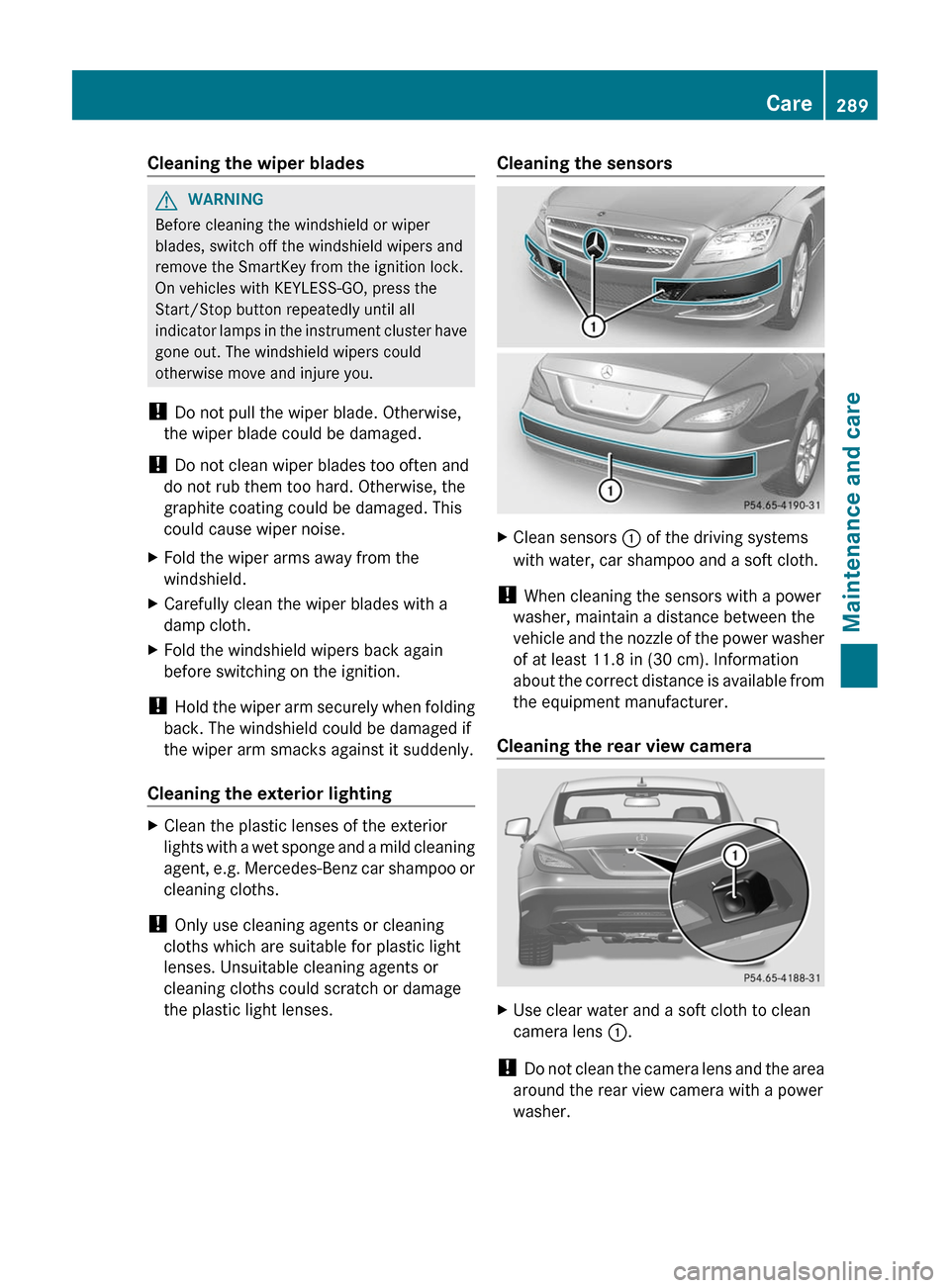
Cleaning the sensorsXClean sensors : of the driving systems
with water, car shampoo and a soft cloth.
! When cleaning the sensors with a power
washer, maintain a distance between the
vehicle and the nozzle of the power washer
of at least 11.8 in (30 cm). Information
about the correct distance is available from
the equipment manufacturer.
Cleaning the rear view camera
XUse clear water and a soft cloth to clean
camera lens :.
!
Do not clean the camera lens and the area
around the rear view camera with a power
washer.
Care289Maintenance and careZ