tail light MERCEDES-BENZ CLS-Class 2012 W218 Owner's Manual
[x] Cancel search | Manufacturer: MERCEDES-BENZ, Model Year: 2012, Model line: CLS-Class, Model: MERCEDES-BENZ CLS-Class 2012 W218Pages: 356, PDF Size: 14.25 MB
Page 8 of 356
C
Calling up a malfunction see Display messages
Capacities
see Technical data
Car
see Vehicle
Care
Carpets .......................................... 292
Car wash ........................................ 286
Display ........................................... 290
Exterior lights ................................ 289
Gear or selector lever ....................291
Matte finish ................................... 288
Night View Assist Plus ...................290
Notes ............................................. 285
Paint .............................................. 287
Plastic trim .................................... 290
Power washer ................................ 287
Rear view camera .......................... 289
Roof lining ...................................... 292
Seat belt ........................................ 292
Seat cover ..................................... 291
Sensors ......................................... 289
Steering wheel ............................... 291
Tail pipes ....................................... 290
Trim pieces .................................... 291
Washing by hand ........................... 287
Wheels ........................................... 287
Windows ........................................ 288
Wiper blades .................................. 289
Wooden trim .................................. 291
Cargo tie down rings ......................... 260
Car wash (care) ................................. 286
CD player/CD changer (on-board
computer) .......................................... 203
Cell phone see Mobile phone
Center console
Lower section .................................. 31
Lower section (AMG vehicles) ..........32
Upper section .................................. 30
Central locking
Automatic locking (on-board
computer) ...................................... 211
Locking/unlocking (SmartKey) ........72Changing bulbs
Important safety notes ..................112
Overview of bulb types ..................113
Reversing lamps ............................ 113
Child-proof locks
Important safety notes ....................59
Rear doors ....................................... 59
Children
In the vehicle ................................... 55
Restraint systems ............................ 55
Child seat
LATCH-type (ISOFIX ) child seat
anchors ............................................ 57
Special seat belt retractor ...............57
Top Tether ....................................... 58
Cigarette lighter ................................ 265
Classification system for
occupants (OCS) Faults ............................................... 47
Operation ......................................... 43
System self-test ............................... 46
Climate control
3-zone automatic climate control ..121
Controlling automatically ...............123
Cooling with air dehumidification ..122
Defrosting the windshield ..............125
Demisting the windows .................. 126
Dual-zone automatic climate
control ........................................... 119
Important safety notes ..................118
Indicator lamp ................................ 123
Maximum cooling .......................... 125
Notes on using automatic climate
control ................................... 120, 122
Overview of systems ......................118
Problems with cooling with air
dehumidification ............................ 123
Problem with the rear window
defroster ........................................ 126
Rear control panel .........................121
Refrigerant ..................................... 350
Setting the air distribution .............124
Setting the airflow .........................124
Setting the air vents ......................127
Setting the climate mode (AIR
FLOW) ............................................ 123
Setting the temperature ................1236Index
Page 11 of 356
E
EASY-ENTRY feature Activating/deactivating .................212
Function/notes ................................ 99
EASY-EXIT feature
Crash-responsive ........................... 100
Function/notes ................................ 99
Switching on/off ........................... 212
EBD (electronic brake force
distribution) Display message ............................ 218
Function/notes ................................ 67
ECO start/stop function
Deactivating/activating .................137
General information .......................135
Electrical fuses
see Fuses
Electronic brake force distribution
see EBD (Electronic Brake force
Distribution)
Electronic Stability Program
see ESP ®
(Electronic Stability Program)
Electronic Traction System
see ETS/4ETS (Electronic
Traction System)
Emergency release
Driver's door .................................... 81
Fuel filler flap ................................. 149
Trunk ............................................... 85
Vehicle ............................................. 81
Emergency spare wheel
Storage location ............................ 295
Stowing .......................................... 295
Emergency Tensioning Devices
Function ........................................... 54
Safety guidelines ............................. 37
Emissions purification
Service and warranty information ....21
Engine
Check Engine warning lamp ........... 248
Display message ............................ 226
ECO start/stop function ................135
Emergency starting ........................309
Engine number ............................... 346
Irregular running ............................ 138
Starting problems ..........................138Starting the engine with the
SmartKey ....................................... 134
Starting with KEYLESS-GO .............134
Switching off .................................. 150
Engine electronics
Problem (malfunction) ...................138
Engine oil
Adding ........................................... 282
Additives ........................................ 349
Checking the oil level ..................... 281
Display message ............................ 228
Filling capacity ............................... 347
Notes about oil grades ................... 349
Notes on oil level/consumption ....281
Temperature (on-board computer) . 213
Viscosity ........................................ 349
ESP ®
(Electronic Stability
Program) AMG menu (on-board computer) ...213
Deactivating/activating (AMG
vehicles) .......................................... 65
Deactivating/activating (except
AMG vehicles) ................................ 206
Deactivating/activating (notes;
except AMG vehicles) ......................64
Display message ............................ 217
ETS/4ETS ........................................ 64
Function/notes ................................ 63
Important safety information ...........63
Warning lamp ................................. 245
ETS/4ETS (Electronic Traction
System) ................................................ 64
Exhaust tail pipe (cleaning
instructions) ...................................... 290
Exterior lighting see Lights
Exterior mirrors
Adjusting ....................................... 100
Dipping (automatic) .......................101
Folding in/out (automatically) .......101
Folding in/out (electrically) ...........101
Folding in when locking (on-board
computer) ...................................... 212
Out of position (troubleshooting) ...101
Setting ........................................... 101
Storing settings (memory
function) ........................................ 102
Storing the parking position ..........102Index9
Page 19 of 356
Supplement Restraint Systemsee SRS (Supplemental Restraint
System)
Surround lighting (on-board
computer) .......................................... 210
Suspension tuning AIRMATIC ...................................... 169
AMG adaptive sport suspension
system ........................................... 170
SETUP (on-board computer) ..........213
Switching air-recirculation mode
on/off ................................................. 126
Switching off the alarm (ATA) ............ 69
T
Tachometer ........................................ 197
Tail lamps Display message ............................ 225
see Lights
Tank
see Fuel tank
Tank content
Fuel gauge ....................................... 27
Technical data
CLS 550 4MATIC
BlueEFFICIENCY ............................ 351
CLS 550 BlueEFFICIENCY ..............351
CLS 63 AMG .................................. 352
Tires/wheels ................................. 339
TELEAID
Call priority .................................... 271
Display message ............................ 220
Downloading destinations
(COMAND) ..................................... 272
Emergency call .............................. 269
Important safety notes ..................267
Locating a stolen vehicle ...............273
MB info call button ........................271
Remote vehicle locking ..................273
Roadside Assistance button ..........270
Search & Send ............................... 272
Self-test ......................................... 268
System .......................................... 268
Vehicle remote unlocking ..............272
Telephone
Accepting a call ............................. 205
Menu (on-board computer) ............204
Number from the phone book ........ 205
Redialing ........................................ 205
Rejecting/ending a call .................205
Temperature
Coolant .......................................... 196
Coolant (on-board computer) ......... 213
Engine oil (on-board computer) ...... 213
Outside temperature ...................... 197
Setting (climate control) ................123
Theft deterrent locking system
Immobilizer ...................................... 69
Through-loading feature ................... 259
Tilt/sliding sunroof see Sliding sunroof
Timing (RACETIMER) ......................... 213
Tiredness assistant see ATTENTION ASSIST
Tire pressure
Calling up (on-board computer) .....322
Checking manually ........................321
Display message ............................ 234
Maximum ....................................... 320
Notes ............................................. 318
Pressure loss warning ....................321
Recommended ............................... 317
Tire pressure monitoring system
Function/notes ............................. 322
Restarting ...................................... 324
Warning lamp ................................. 252
Tires
Aspect ratio (definition) .................337
Average weight of the vehicle
occupants (definition) ....................335
Bar (definition) ............................... 335
Characteristics .............................. 335
Checking ........................................ 315
Definition of terms .........................335
Direction of rotation ......................338
Display message ............................ 234
Distribution of the vehicle
occupants (definition) ....................338
DOT, Tire Identification Number
(TIN) ............................................... 334
DOT (Department of
Transportation) (definition) ............335
GAWR (Gross Axle Weight Rating)
(definition) ..................................... 336Index17
Page 88 of 356
Side windows
Important safety notes
GWARNING
When opening or closing the door windows,
make sure that there is no danger of anyone
being harmed by the opening/closing
procedure.
The door windows are equipped with
automatic operation and the anti-entrapment
feature. If in automatic mode a door window
encounters an obstruction that blocks its
path, the anti-entrapment feature will stop the
door window and open it slightly.
The door windows operate differently when
the switch is pulled. See the "Problems with
door windows" section for details.
The closing of the door windows can be
immediately halted by releasing the switch or,
if the switch was pulled past the resistance
point and released, by either pressing or
pulling the respective switch.
If a door window encounters an obstruction
that blocks its path in a circumstance where
you are closing the windows by pressing and
holding the & button on the SmartKey or
by pressing and holding the lock button
(vehicles with KEYLESS-GO) on an outside
door handle, the anti-entrapment feature will
not operate.
Activate the override switch when children
are riding in the back seats of the vehicle. The
children may otherwise injure themselves,
e.g. by becoming trapped in the door window
opening.
GWARNING
Do not keep any part of your body up against
the window pane when opening a window. The
downward motion of the pane may pull that
part of your body down between the window
pane and the door frame and trap it there. If
there is a risk of entrapment, release the
switch and pull it to close the window.
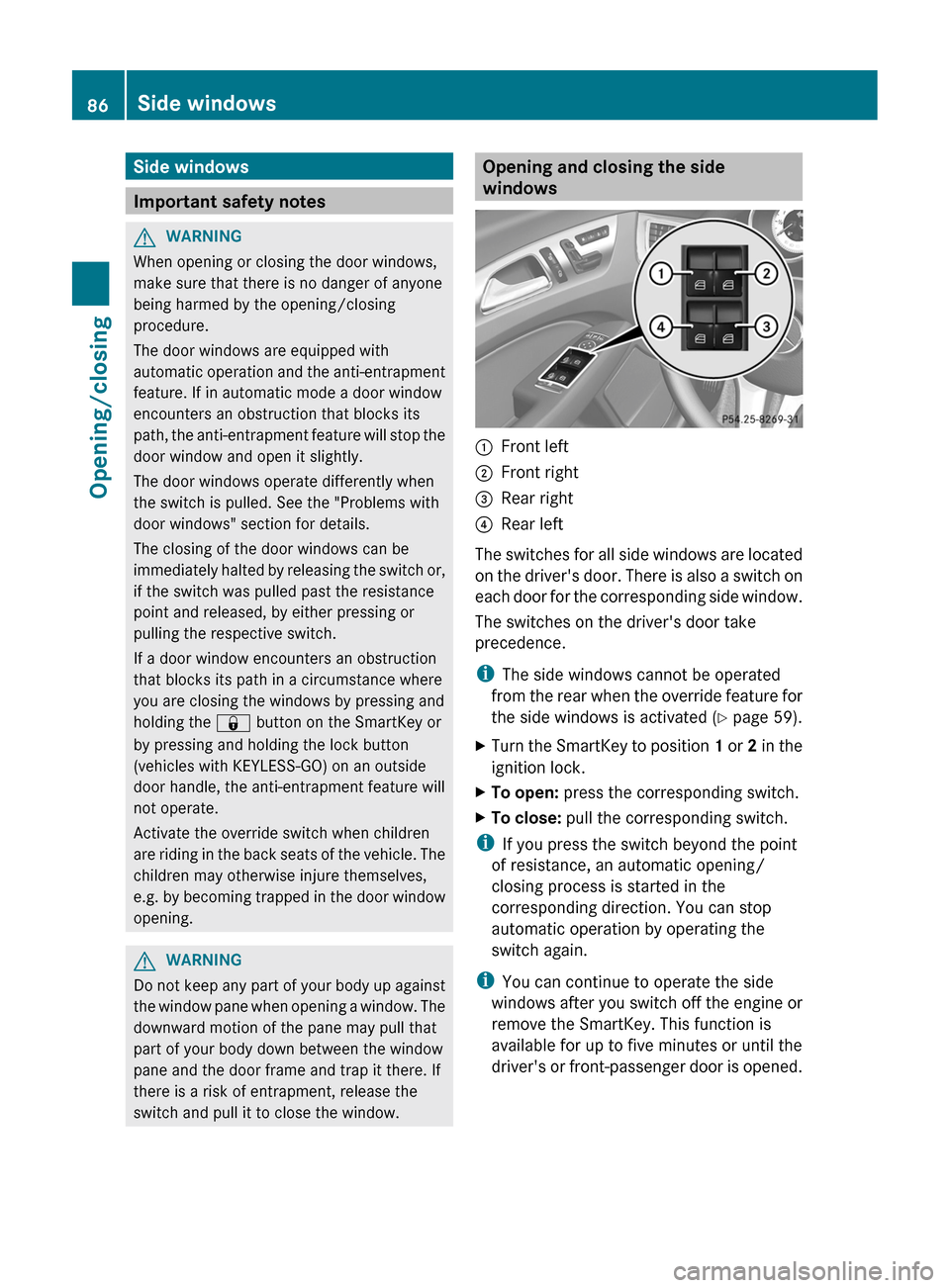
Opening and closing the side
windows:Front left;Front right=Rear right?Rear left
The switches for all side windows are located
on the driver's door. There is also a switch on
each door for the corresponding side window.
The switches on the driver's door take
precedence.
i The side windows cannot be operated
from the rear when the override feature for
the side windows is activated ( Y page 59).
XTurn the SmartKey to position 1 or 2 in the
ignition lock.XTo open: press the corresponding switch.XTo close: pull the corresponding switch.
i
If you press the switch beyond the point
of resistance, an automatic opening/
closing process is started in the
corresponding direction. You can stop
automatic operation by operating the
switch again.
i You can continue to operate the side
windows after you switch off the engine or
remove the SmartKey. This function is
available for up to five minutes or until the
driver's or front-passenger door is opened.
86Side windowsOpening/closing
Page 90 of 356
XTo interrupt convenience closing:
release recessed sensor surface : on the
door handle.
Resetting the side windows
You must reset each side window if a side
window can no longer be closed fully.
XClose all the doors.XTurn the SmartKey to position 1 or 2 in the
ignition lock.XPull the corresponding switch on the door
control panel until the side window is
completely closed. ( Y page 86)XHold the switch for an additional second.
If the side window opens again slightly:
XImmediately pull the corresponding switch
on the door control panel until the side
window is completely closed ( Y page 86).XHold the switch for an additional second.XIf the corresponding side window remains
closed after the button has been released,
the side window has been reset correctly.
If this is not the case, repeat the steps
above again.
Problems with the side windows
Problem: a side window cannot be closed
because it is blocked by objects, e.g.
leaves in the window guide.
XRemove the objects.XClose the side window.
Problem: a side window cannot be closed
and you cannot see the cause.
GWARNING
Closing the side windows with increased force
or without the anti-entrapment feature could
lead to serious or even fatal injury. Make sure
that nobody can become trapped when
closing the side windows.
If a side window is obstructed during closing
and reopens again slightly:XImmediately after the window blocks, pull
the corresponding switch again until the
side window has closed.
The side window is closed with increased
force.
If a side window is obstructed again during
closing and reopens again slightly:
XImmediately after the window blocks, pull
the corresponding switch again until the
side window has closed.
The side window is closed without the anti-
entrapment feature.GWARNING
Pulling and holding the switch to close the
door window immediately after it had been
blocked two times will cause the door window
to close without the anti-entrapment feature
for as long as you hold the switch.
Sliding sunroof
Important safety notes
GWARNING
When opening or closing the sliding sunroof,
make sure that there is no danger of anyone
being harmed by the opening/closing
procedure.
The sliding sunroof is equipped with
automatic operation and the anti-entrapment
feature. If the movement of the sliding sunroof
is blocked during the closing procedure, the
sliding sunroof will stop and open slightly.
The sliding sunroof operates differently when
the sliding sunroof switch is pressed and held.
See the "Problems with the sliding sunroof"
section for more details.
The opening/closing procedure of the sliding
sunroof can be immediately halted by
releasing the sliding sunroof switch or, if the
sliding sunroof switch was moved past the
88Sliding sunroofOpening/closing
Page 115 of 356
that these function correctly at all times.
Have the headlamp setting checked regularly.
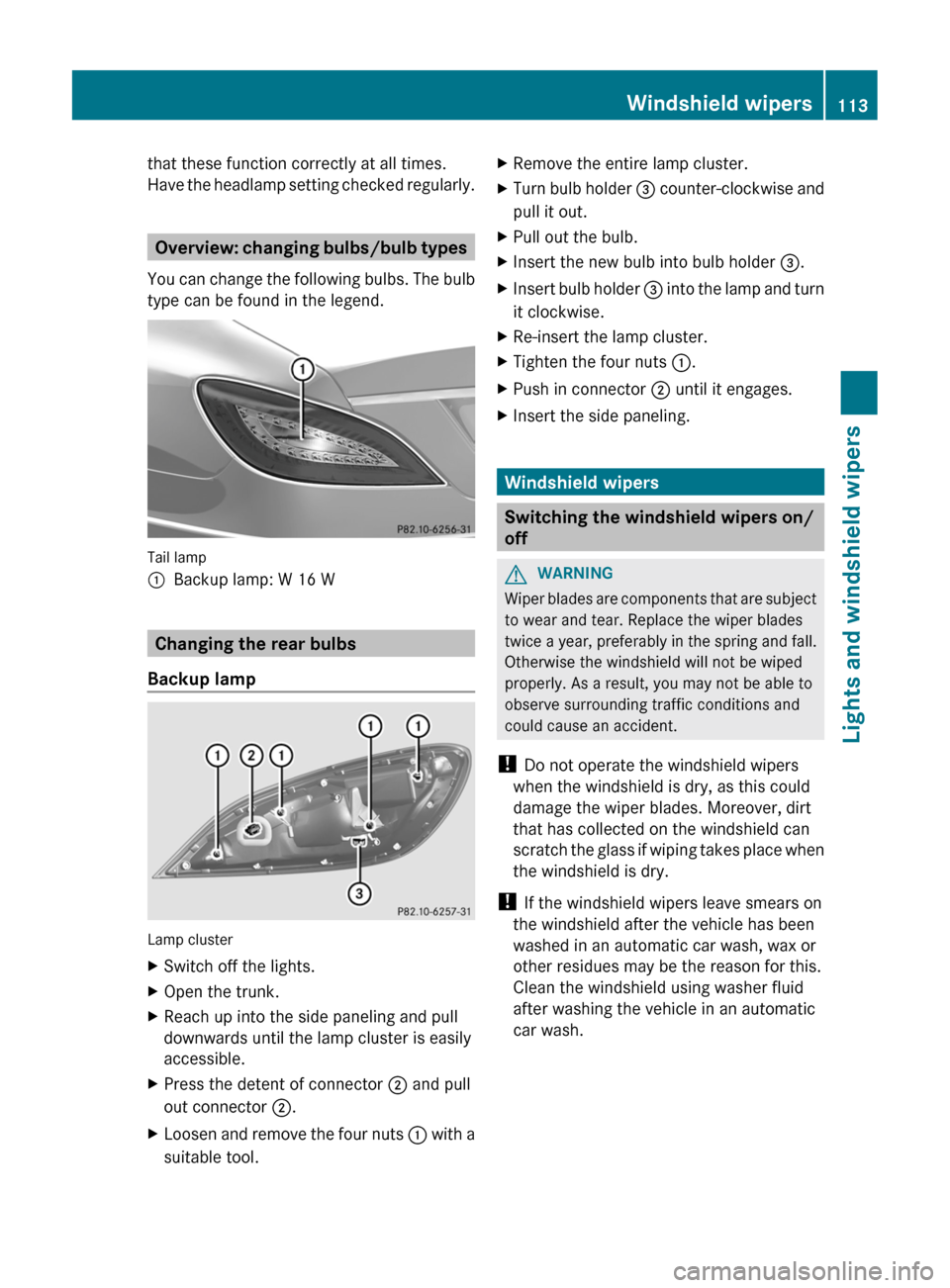
Overview: changing bulbs/bulb types
You can change the following bulbs. The bulb
type can be found in the legend.
Tail lamp
:Backup lamp: W 16 W
Changing the rear bulbs
Backup lamp
Lamp cluster
XSwitch off the lights.XOpen the trunk.XReach up into the side paneling and pull
downwards until the lamp cluster is easily
accessible.XPress the detent of connector ; and pull
out connector ;.XLoosen and remove the four nuts : with a
suitable tool.XRemove the entire lamp cluster.XTurn bulb holder = counter-clockwise and
pull it out.XPull out the bulb.XInsert the new bulb into bulb holder =.XInsert bulb holder = into the lamp and turn
it clockwise.XRe-insert the lamp cluster.XTighten the four nuts :.XPush in connector ; until it engages.XInsert the side paneling.
Windshield wipers
Switching the windshield wipers on/
off
GWARNING
Wiper blades are components that are subject
to wear and tear. Replace the wiper blades
twice a year, preferably in the spring and fall.
Otherwise the windshield will not be wiped
properly. As a result, you may not be able to
observe surrounding traffic conditions and
could cause an accident.
! Do not operate the windshield wipers
when the windshield is dry, as this could
damage the wiper blades. Moreover, dirt
that has collected on the windshield can
scratch the glass if wiping takes place when
the windshield is dry.
! If the windshield wipers leave smears on
the windshield after the vehicle has been
washed in an automatic car wash, wax or
other residues may be the reason for this.
Clean the windshield using washer fluid
after washing the vehicle in an automatic
car wash.
Windshield wipers113Lights and windshield wipersZ
Page 211 of 356
Lights
Setting the brightness of the instrument
cluster lighting and switches
XPress the = or ; button on the
steering wheel to select the Settings
menu.XPress the : or 9 button to select the
Lights submenu.XPress the a button to confirm.XPress the : or 9 button to select the
Brightness Display/Switches:
function.
You will see the selected setting.XPress the a button to confirm.XPress the : or 9 button to adjust the
brightness to any level from Level 1 to
Level 5 (bright).XPress the a or % button to save the
setting.
Switching the daytime running lamps on/
off
This function is not available in Canada.
If you have activated the Day Lights
function and the light switch is set to Ã,
the daytime running lamps are automatically
switched on during daylight hours when the
engine is running.
In the dark, the following also light up:
R the low-beam headlamps
R the parking lamps
R the tail lamps
R the license plate lamp
R the side marker lamps
XPress the = or ; button on the
steering wheel to select the Settings
menu.XPress the : or 9 button to select the
Lights submenu.XPress the a button to confirm.XPress the : or 9 button to select the
Day Lights function.
If the Daytime Running Lights have
been switched on, the cone of light and the
W symbol in the multifunction display
are shown in red.XPress the a button to save the setting.
Switching Adaptive Highbeam Assist on/
off
XPress the = or ; button on the
steering wheel to select the Sett. menu.XPress the : or 9 button to select the
Lights submenu.XPress the a button to confirm.XPress : or 9 to select the Adapt.
Highbeam function.
If the Adapt. Highbeam function has been
switched on, the cone of light and the
_ symbol in the multifunction display
are shown in red.XPress the a button to save the setting.
Setting the brightness of the ambient
lighting
XPress the = or ; button on the
steering wheel to select the Settings
menu.XPress the : or 9 button to select the
Lights submenu.XPress the a button to confirm.XPress the : or 9 button to select
Amb. light +/- .XPress the a button to confirm.XPress the : or 9 button to adjust the
brightness to any level from Off to Level
5 (bright).XPress the a or % button to save the
setting.Menus and submenus209On-board computer and displaysZ
Page 227 of 356
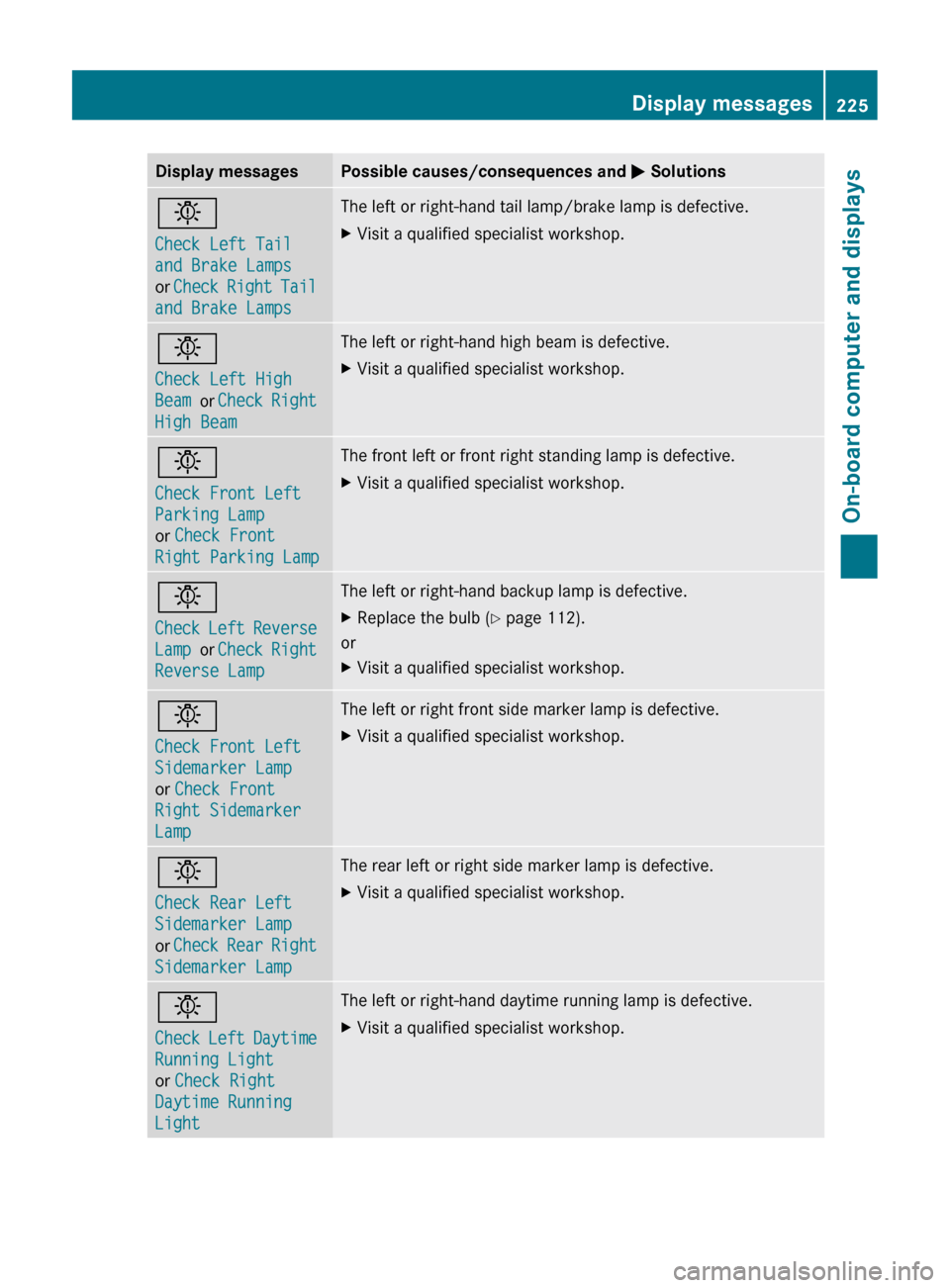
Display messagesPossible causes/consequences and M Solutionsb
Check Left Tail
and Brake Lamps
or Check Right Tail
and Brake LampsThe left or right-hand tail lamp/brake lamp is defective.XVisit a qualified specialist workshop.b
Check Left High
Beam or Check Right
High BeamThe left or right-hand high beam is defective.XVisit a qualified specialist workshop.b
Check Front Left
Parking Lamp
or Check Front
Right Parking LampThe front left or front right standing lamp is defective.XVisit a qualified specialist workshop.b
Check Left Reverse
Lamp or Check Right
Reverse LampThe left or right-hand backup lamp is defective.XReplace the bulb ( Y page 112).
or
XVisit a qualified specialist workshop.b
Check Front Left
Sidemarker Lamp
or Check Front
Right Sidemarker
LampThe left or right front side marker lamp is defective.XVisit a qualified specialist workshop.b
Check Rear Left
Sidemarker Lamp
or Check Rear Right
Sidemarker LampThe rear left or right side marker lamp is defective.XVisit a qualified specialist workshop.b
Check Left Daytime
Running Light
or Check Right
Daytime Running
LightThe left or right-hand daytime running lamp is defective.XVisit a qualified specialist workshop.Display messages225On-board computer and displaysZ
Page 336 of 356
Manufacturers Association (RMA) and the
Rubber Association of Canada (RAC)
regarding the tire traction on snow and
have been especially developed for driving
on snow.
An electronic speed limiter prevents your
vehicle from exceeding the following speeds:
R All vehicles (except AMG vehicles):
130 mph (210 km/h)
R AMG vehicles: 155 mph (250 km/h)
R AMG vehicles with Performance Package:
186 mph (300 km/h)
The speed index of tires mounted at the
factory may be higher than the maximum
speed that the electronic speed limiter
permits.
Make sure that your tires have the required
speed index as specified in the "tires" section
( Y page 339), e.g. if you buy new tires.
More information on reading the tire data can
be obtained at any qualified specialist
workshop, e.g. at an authorized Mercedes-
Benz Center.
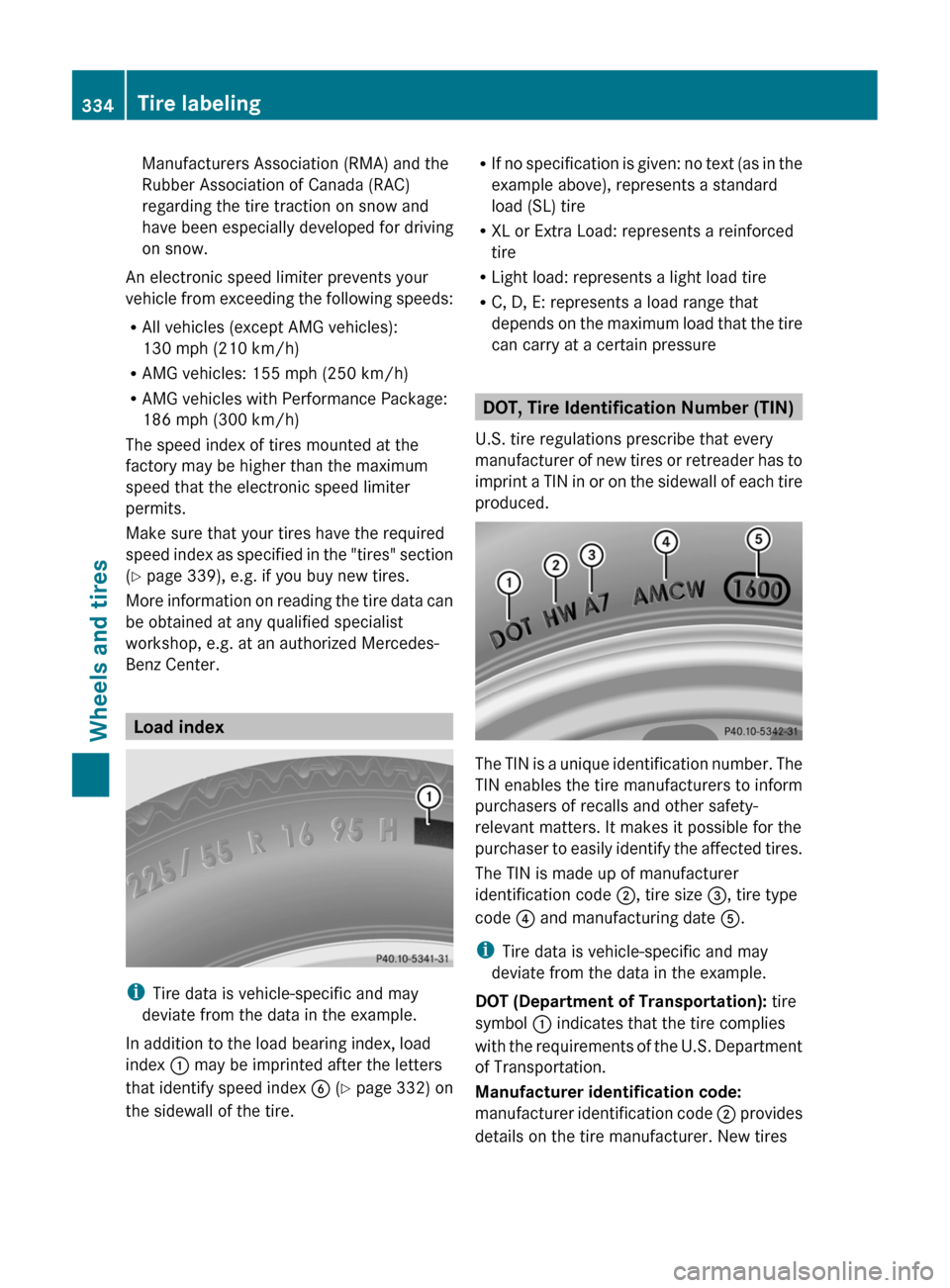
Load index
i Tire data is vehicle-specific and may
deviate from the data in the example.
In addition to the load bearing index, load
index : may be imprinted after the letters
that identify speed index B (Y page 332) on
the sidewall of the tire.
R If no specification is given: no text (as in the
example above), represents a standard
load (SL) tire
R XL or Extra Load: represents a reinforced
tire
R Light load: represents a light load tire
R C, D, E: represents a load range that
depends on the maximum load that the tire
can carry at a certain pressure
DOT, Tire Identification Number (TIN)
U.S. tire regulations prescribe that every
manufacturer of new tires or retreader has to
imprint a TIN in or on the sidewall of each tire
produced.
The TIN is a unique identification number. The
TIN enables the tire manufacturers to inform
purchasers of recalls and other safety-
relevant matters. It makes it possible for the
purchaser to easily identify the affected tires.
The TIN is made up of manufacturer
identification code ;, tire size =, tire type
code ? and manufacturing date A.
i Tire data is vehicle-specific and may
deviate from the data in the example.
DOT (Department of Transportation): tire
symbol : indicates that the tire complies
with the requirements of the U.S. Department
of Transportation.
Manufacturer identification code:
manufacturer identification code ; provides
details on the tire manufacturer. New tires
334Tire labelingWheels and tires
Page 350 of 356
Direct skin contact with fuels and the
inhalation of fuel vapors are damaging to your
health.
Premium-grade unleaded gasoline
! To ensure the longevity and full
performance of the engine, only premium-
grade unleaded gasoline must be used.
If no premium-grade unleaded gasoline is
available and regular unleaded gasoline
must be used, observe the following
precautions:
R only fill the fuel tank to half full with
regular unleaded gasoline and fill the rest
with premium-grade unleaded gasoline
as soon as possible.
R do not drive at the maximum speed.
R avoid sudden acceleration.
R when the vehicle is carrying a light load,
e.g. two passengers without luggage, do
not allow the engine to rev above
3000 rpm.
R when the vehicle is fully loaded or in
mountainous terrain, do not depress the
accelerator pedal further than ⅔ of the
pedal travel.
Fuel requirements
Use only premium-grade unleaded gasoline.
The octane number should be at least 91.
Details can be found on the gas pump. The
octane number is the average value of the
Research Octane Number (RON) and the
Motor Octane Number (MON): (RON +
MON) / 2, also known as knock resistance.
Reformulated Gasoline (RFG) and/or
unleaded gasoline with additives can be used
if the concentration of the additives in the fuel
does not exceed 10%, e.g.:
R Ethanol
R TAME
R ETBE
R IPA
R TBA
For MTBE, the concentration should not
exceed 15%.
The concentration of methanol in gasoline
including other additives must not exceed 3%.
Using mixtures of methanol and ethanol is not
permitted. Gasohol, a mixture of 10% ethanol
and 90% unleaded gasoline, can be used.
All of these mix fuels must fulfill the fuel
requirements, e.g.:
R knock resistance
R boiling point
R vapor pressure
Additives in gasoline
One of the major problems with poor quality
fuels is the creation of carbon deposits during
the combustion process. Mercedes-Benz
recommends that you use fuel brands
containing additives that prevent the build-up
of carbon deposits.
If you use fuels without these additives for an
extended period of time, there may be a build
up of carbon deposits, especially on the inlet
valves and in the combustion chamber.
This could lead to engine running problems,
e.g.:
R longer engine warm-up phase
R uneven idle
R engine noise
R misfiring
R loss of power
In areas where the availability of gasoline with
relevant additives is not adequate, carbon
deposits can form. In this case, Mercedes-
Benz recommends the use of additives that
have been approved for Mercedes-Benz
vehicles.
Consult an authorized Mercedes-Benz Center
or go to the Internet site
http://www.mbusa.com (USA only) for a list
of approved products. Observe the
instructions for use on the product label.
348Service products and capacitiesTechnical data