cd playe MERCEDES-BENZ CLS-Class 2013 W218 Owner's Guide
[x] Cancel search | Manufacturer: MERCEDES-BENZ, Model Year: 2013, Model line: CLS-Class, Model: MERCEDES-BENZ CLS-Class 2013 W218Pages: 376, PDF Size: 13.45 MB
Page 225 of 376
X
Press the : or 9 button to select the
Acoustic Lock function.
If the Acoustic Lock function is activated,
the & symbol in the multifunction
display lights up red.
X Press the a button to save the setting.
Activating/deactivating the radar sensor
system
X Press the = or ; button on the
steering wheel to select the Sett. menu.
X Press : or 9 to select the Vehicle
submenu.
X Press a to confirm.
X Press the 9 or : button to select
Radar Sensor (See Oper. Manual):.
You will see the selected setting: On or
Off.
X Press the a button to save the setting.
The following systems are switched off when
the radar sensor system is deactivated:
R DISTRONIC PLUS (Y page 167)
R BAS PLUS
(Y page 65)
R PRE-SAFE ®
Brake (Y page 69)
R Blind Spot Assist (Y page 195)
R Active Blind Spot Assist (Y page 199)
Convenience Activating/deactivating the EASY-
ENTRY/EXIT feature
G
WARNING
You must make sure no one can become
trapped or injured by the moving steering
wheel when the easy-entry/exit feature is
activated.
To stop steering wheel movement, move
steering
wheel adjustment lever or press one
of the memory position buttons.
Do not leave children unattended in the
vehicle, or with access to an unlocked vehicle.
Children could open the driver's door and
unintentionally activate the easy-entry/exit feature, which could result in an accident
and/or serious personal injury.
X Press the = or ; button on the
steering wheel to select the Sett. menu.
X Press the :
or 9 button to select the
Convenience submenu.
X Press a to confirm.
X Press : or 9 to select the Easy
Entry/Exit: function.
If the Easy Entry/Exit function is
activated, the vehicle steering wheel is
displayed in red in the multifunction
display.
X Press the a button to save the setting.
Further information on the EASY-ENTRY/EXIT
feature ( Y page 104).
Switching the belt adjustment on/off
X Press the = or ; button on the
steering wheel to select the Sett. menu.
X Press the :
or 9 button to select the
Convenience submenu.
X Press a to confirm.
X Press the :
or 9 button to select the
Belt Adjustment function.
When the Belt Adjustment function is
activated, the vehicle seat belt is displayed
in red in the multifunction display.
X Press the a button to save the setting.
For further information on belt adjustment,
see ( Y page 56).
Switching the fold-in mirrors when
locking feature on/off
This
function is only available on vehicles with
the memory function ( Y page 107).
When you activate the Auto. Mirror
Folding function, the exterior mirrors are
folded in when the vehicle is locked. If you
unlock the vehicle and then open a door, the
exterior mirrors fold out again. Menus and submenus
223
On-board computer and displays Z
Page 226 of 376
X
Press the = or ; button on the
steering wheel to select the Sett. menu.
X Press the : or 9 button to select the
Convenience submenu.
X Press a to confirm.
X Press : or 9 to select the Auto.
Mirror Folding function.
If the Auto. Mirror Folding function is
activated, the vehicle's exterior mirror is
displayed in red in the multifunction
display.
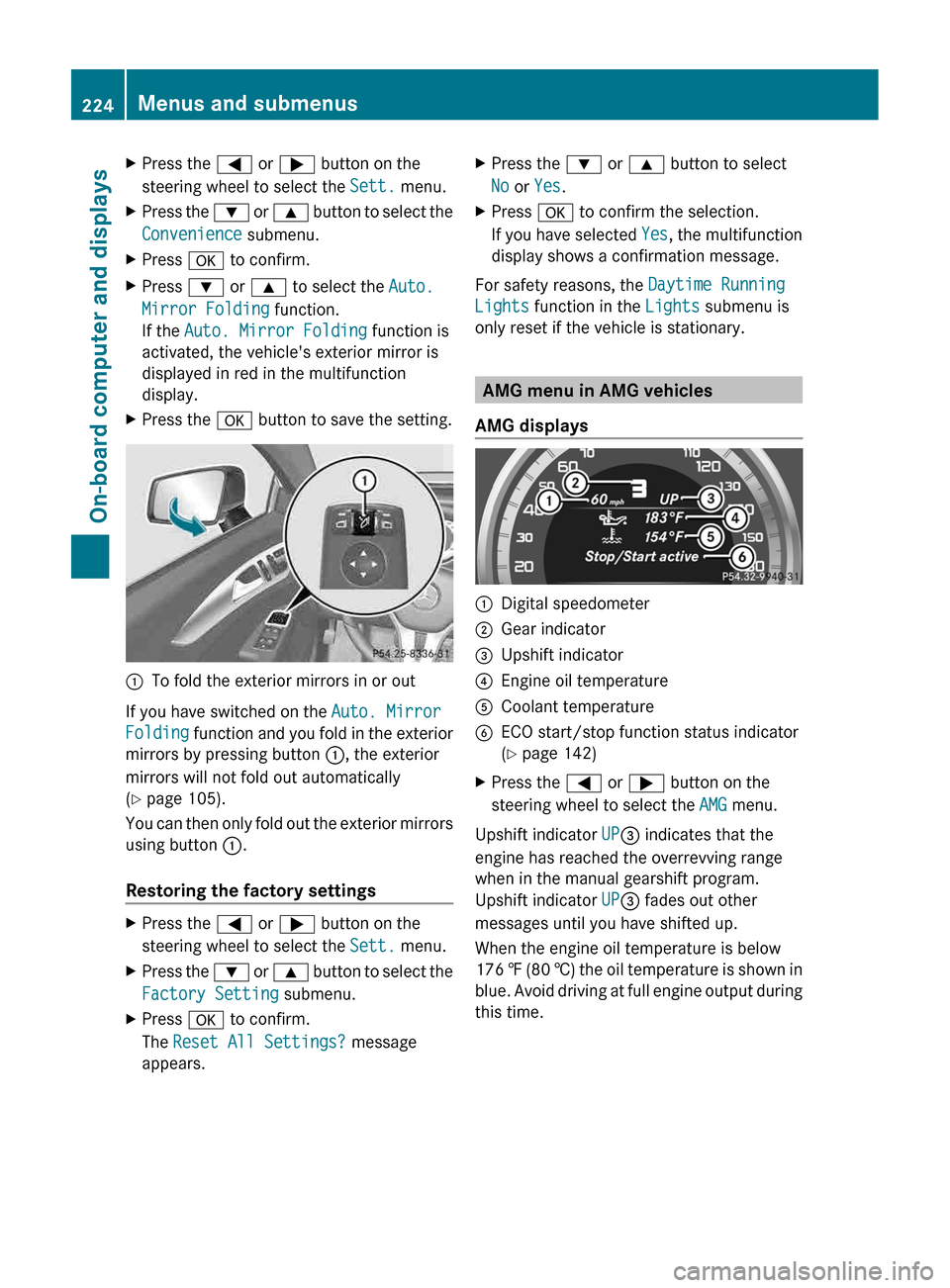
X Press the a button to save the setting. :
To fold the exterior mirrors in or out
If you have switched on the Auto. Mirror
Folding
function and you fold in the exterior
mirrors by pressing button :, the exterior
mirrors will not fold out automatically
(Y page 105).
You can then only fold out the exterior mirrors
using button :.
Restoring the factory settings X
Press the = or ; button on the
steering wheel to select the Sett. menu.
X Press the :
or 9 button to select the
Factory Setting submenu.
X Press a to confirm.
The Reset All Settings? message
appears. X
Press the : or 9 button to select
No or Yes.
X Press a to confirm the selection.
If
you have selected Yes, the multifunction
display shows a confirmation message.
For safety reasons, the Daytime Running
Lights function in the Lights submenu is
only reset if the vehicle is stationary. AMG menu in AMG vehicles
AMG displays :
Digital speedometer
; Gear indicator
= Upshift indicator
? Engine oil temperature
A Coolant temperature
B ECO start/stop function status indicator
(Y page 142)
X Press the = or ; button on the
steering wheel to select the AMG menu.
Upshift indicator UP= indicates that the
engine has reached the overrevving range
when in the manual gearshift program.
Upshift indicator UP= fades out other
messages until you have shifted up.
When the engine oil temperature is below
176 ‡
(80 †) the oil temperature is shown in
blue. Avoid driving at full engine output during
this time. 224
Menus and submenus
On-board computer and displays
Page 227 of 376
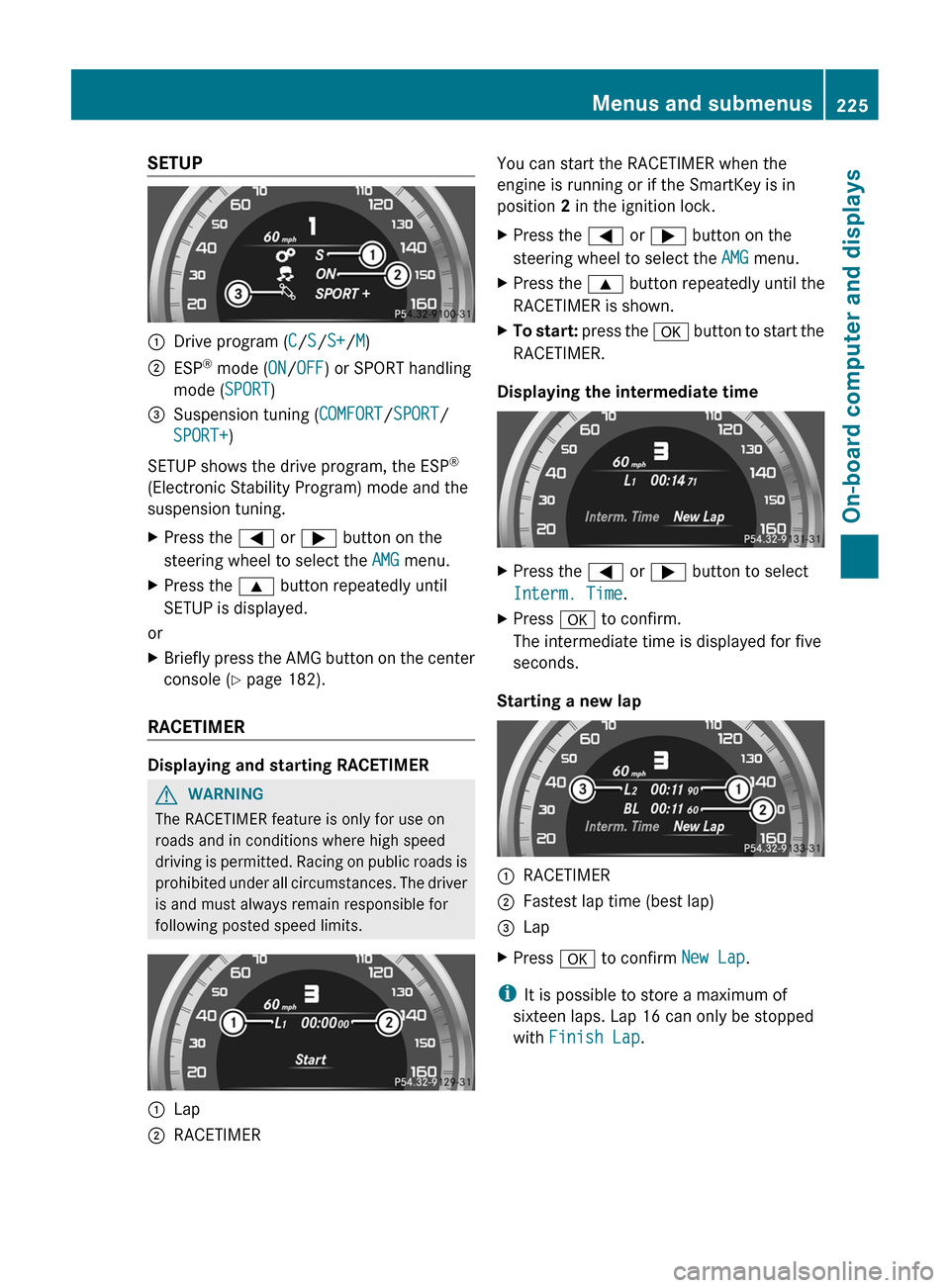
SETUP
:
Drive program (C/S/S+/M)
; ESP ®
mode ( ON/OFF) or SPORT handling
mode ( SPORT)
= Suspension tuning (COMFORT/SPORT/
SPORT+)
SETUP shows the drive program, the ESP ®
(Electronic Stability Program) mode and the
suspension tuning.
X Press the = or ; button on the
steering wheel to select the AMG menu.
X Press the 9 button repeatedly until
SETUP is displayed.
or
X Briefly press the AMG button on the center
console (Y page 182).
RACETIMER Displaying and starting RACETIMER
G
WARNING
The RACETIMER feature is only for use on
roads and in conditions where high speed
driving
is permitted. Racing on public roads is
prohibited under all circumstances. The driver
is and must always remain responsible for
following posted speed limits. :
Lap
; RACETIMER You can start the RACETIMER when the
engine is running or if the SmartKey is in
position 2 in the ignition lock.
X
Press the = or ; button on the
steering wheel to select the AMG menu.
X Press the 9 button repeatedly until the
RACETIMER is shown.
X To start:
press the a button to start the
RACETIMER.
Displaying the intermediate time X
Press the = or ; button to select
Interm. Time.
X Press a to confirm.
The intermediate time is displayed for five
seconds.
Starting a new lap :
RACETIMER
; Fastest lap time (best lap)
= Lap
X Press a to confirm New Lap.
i It is possible to store a maximum of
sixteen laps. Lap 16 can only be stopped
with Finish Lap. Menus and submenus
225
On-board computer and displays Z
Page 231 of 376
Safety systems
Display messages Possible causes/consequences and
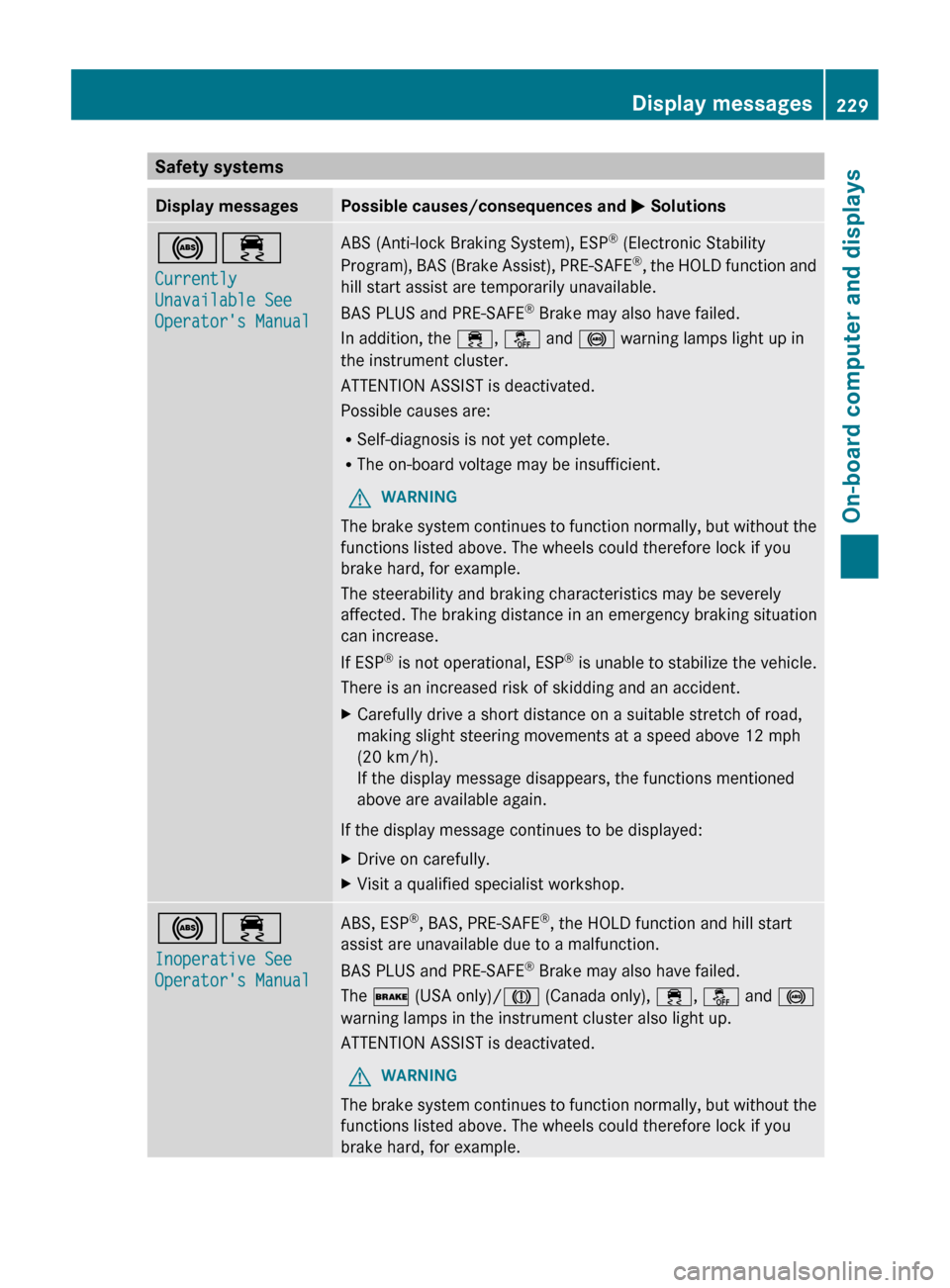
M Solutions!÷
Currently
Unavailable See
Operator's Manual ABS (Anti-lock Braking System), ESP
®
(Electronic Stability
Program), BAS (Brake Assist), PRE-SAFE ®
, the HOLD function and
hill start assist are temporarily unavailable.
BAS PLUS and PRE-SAFE ®
Brake may also have failed.
In addition, the ÷, å and ! warning lamps light up in
the instrument cluster.
ATTENTION ASSIST is deactivated.
Possible causes are:
R Self-diagnosis is not yet complete.
R The on-board voltage may be insufficient.
G WARNING
The brake system continues to function normally, but without the
functions listed above. The wheels could therefore lock if you
brake hard, for example.
The steerability and braking characteristics may be severely
affected. The braking distance in an emergency braking situation
can increase.
If ESP ®
is not operational, ESP ®
is unable to stabilize the vehicle.
There is an increased risk of skidding and an accident.
X Carefully drive a short distance on a suitable stretch of road,
making slight steering movements at a speed above 12 mph
(20 km/h
).
If the display message disappears, the functions mentioned
above are available again.
If the display message continues to be displayed:
X Drive on carefully.
X Visit a qualified specialist workshop. !÷
Inoperative See
Operator's Manual ABS, ESP
®
, BAS, PRE-SAFE ®
, the HOLD function and hill start
assist are unavailable due to a malfunction.
BAS PLUS and PRE-SAFE ®
Brake may also have failed.
The $ (USA only)/J (Canada only), ÷, å and !
warning lamps in the instrument cluster also light up.
ATTENTION ASSIST is deactivated.
G WARNING
The brake system continues to function normally, but without the
functions listed above. The wheels could therefore lock if you
brake hard, for example. Display messages
229
On-board computer and displays Z
Page 232 of 376
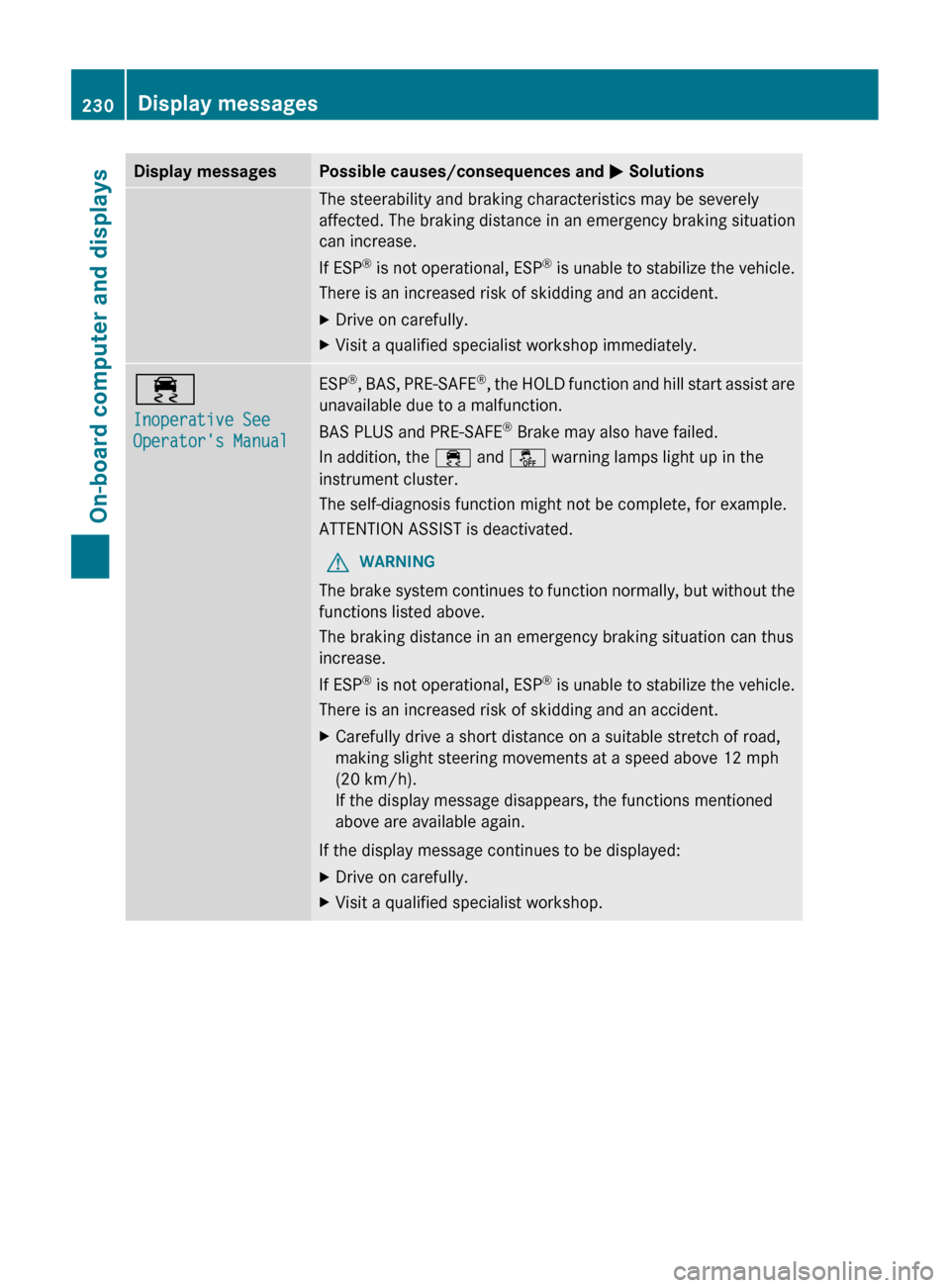
Display messages Possible causes/consequences and
M SolutionsThe steerability and braking characteristics may be severely
affected. The braking distance in an emergency braking situation
can increase.
If ESP
®
is not operational, ESP ®
is unable to stabilize the vehicle.
There is an increased risk of skidding and an accident.
X Drive on carefully.
X Visit a qualified specialist workshop immediately. ÷
Inoperative See
Operator's Manual ESP
®
,
BAS, PRE-SAFE ®
, the HOLD function and hill start assist are
unavailable due to a malfunction.
BAS PLUS and PRE-SAFE ®
Brake may also have failed.
In addition, the ÷ and å warning lamps light up in the
instrument cluster.
The self-diagnosis function might not be complete, for example.
ATTENTION ASSIST is deactivated.
G WARNING
The brake system continues to function normally, but without the
functions listed above.
The braking distance in an emergency braking situation can thus
increase.
If ESP ®
is not operational, ESP ®
is unable to stabilize the vehicle.
There is an increased risk of skidding and an accident.
X Carefully drive a short distance on a suitable stretch of road,
making slight steering movements at a speed above 12 mph
(20 km/h
).
If the display message disappears, the functions mentioned
above are available again.
If the display message continues to be displayed:
X Drive on carefully.
X Visit a qualified specialist workshop.230
Display messages
On-board computer and displays
Page 241 of 376
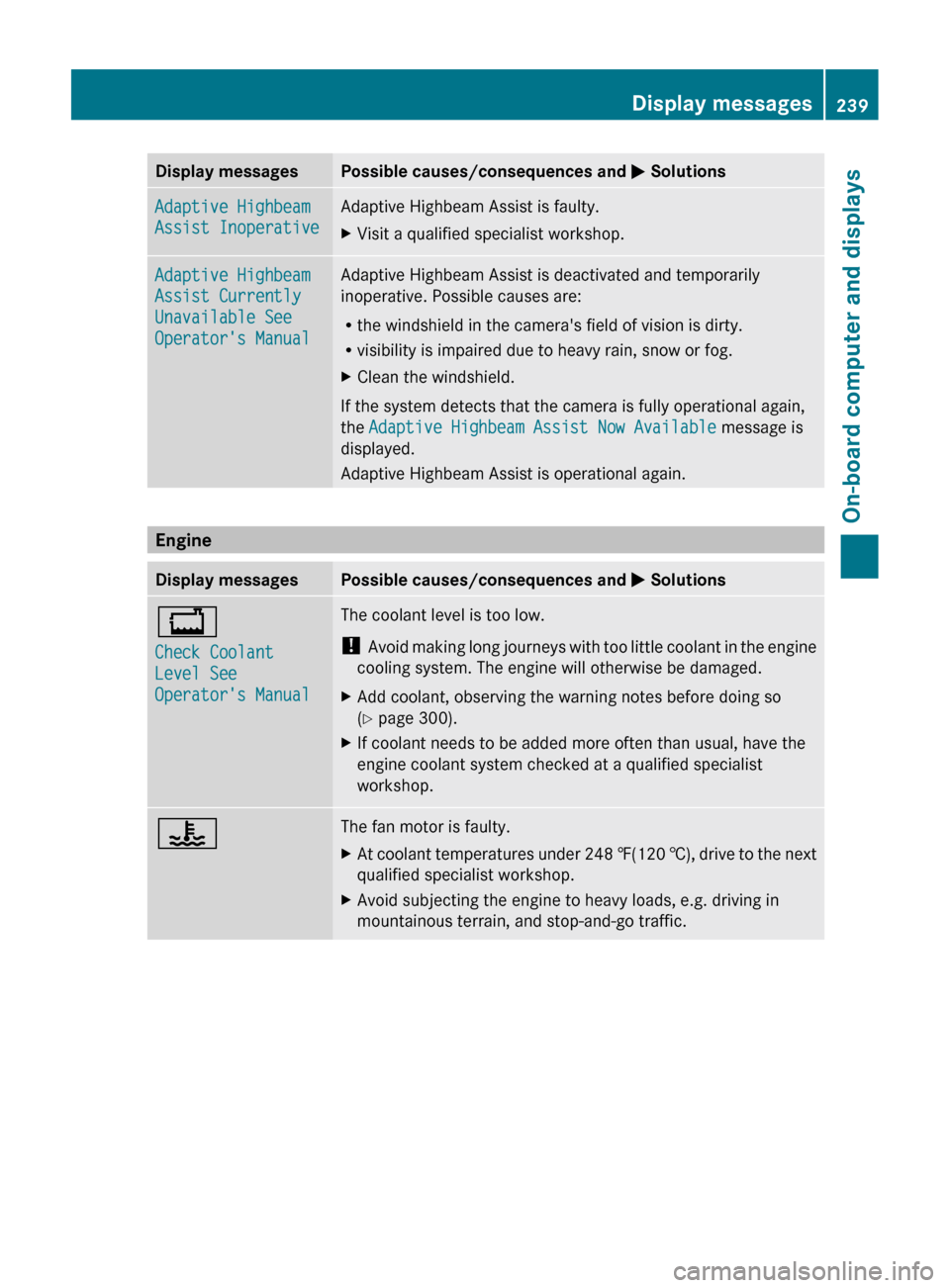
Display messages Possible causes/consequences and
M SolutionsAdaptive Highbeam
Assist Inoperative Adaptive Highbeam Assist is faulty.
X
Visit a qualified specialist workshop. Adaptive Highbeam
Assist Currently
Unavailable See
Operator's Manual Adaptive Highbeam Assist is deactivated and temporarily
inoperative. Possible causes are:
R
the windshield in the camera's field of vision is dirty.
R visibility is impaired due to heavy rain, snow or fog.
X Clean the windshield.
If the system detects that the camera is fully operational again,
the Adaptive Highbeam Assist Now Available message is
displayed.
Adaptive Highbeam Assist is operational again. Engine
Display messages Possible causes/consequences and
M Solutions+
Check Coolant
Level See
Operator's Manual The coolant level is too low.
!
Avoid
making long journeys with too little coolant in the engine
cooling system. The engine will otherwise be damaged.
X Add coolant, observing the warning notes before doing so
(Y page 300).
X If coolant needs to be added more often than usual, have the
engine coolant system checked at a qualified specialist
workshop. ? The fan motor is faulty.
X
At coolant temperatures under 248 ‡(120 †),
drive to the next
qualified specialist workshop.
X Avoid subjecting the engine to heavy loads, e.g. driving in
mountainous terrain, and stop-and-go traffic. Display messages
239
On-board computer and displays Z
Page 248 of 376
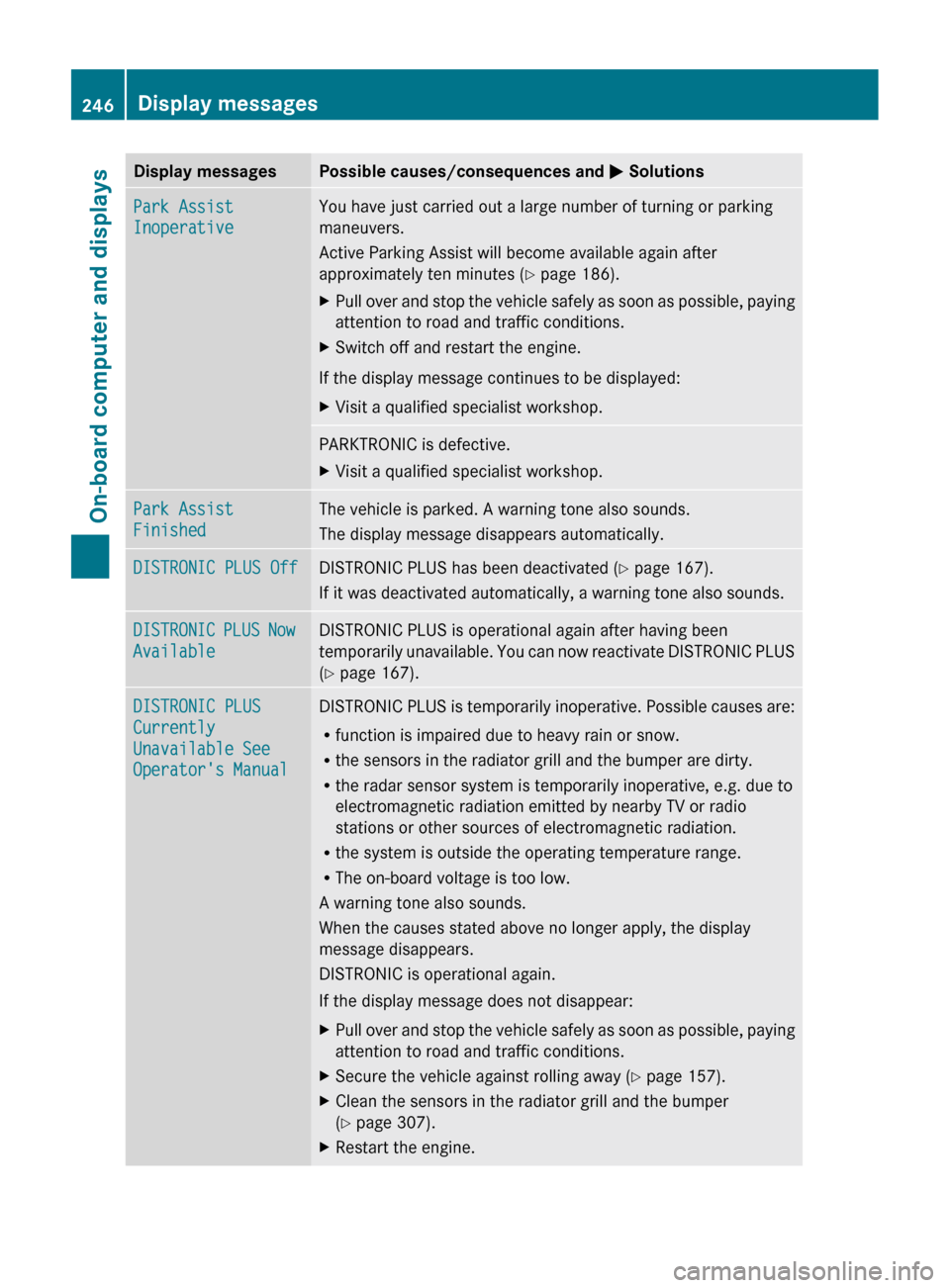
Display messages Possible causes/consequences and
M SolutionsPark Assist
Inoperative You have just carried out a large number of turning or parking
maneuvers.
Active Parking Assist will become available again after
approximately ten minutes (
Y page 186).
X Pull over and stop the vehicle safely as soon as possible, paying
attention to road and traffic conditions.
X Switch off and restart the engine.
If the display message continues to be displayed:
X Visit a qualified specialist workshop. PARKTRONIC is defective.
X
Visit a qualified specialist workshop. Park Assist
Finished The vehicle is parked. A warning tone also sounds.
The display message disappears automatically.
DISTRONIC PLUS Off DISTRONIC PLUS has been deactivated (
Y page 167).
If it was deactivated automatically, a warning tone also sounds. DISTRONIC PLUS Now
Available DISTRONIC PLUS is operational again after having been
temporarily
unavailable. You can now reactivate DISTRONIC PLUS
(Y page 167). DISTRONIC PLUS
Currently
Unavailable See
Operator's Manual DISTRONIC PLUS is temporarily inoperative. Possible causes are:
R
function is impaired due to heavy rain or snow.
R the sensors in the radiator grill and the bumper are dirty.
R the radar sensor system is temporarily inoperative, e.g. due to
electromagnetic radiation emitted by nearby TV or radio
stations or other sources of electromagnetic radiation.
R the system is outside the operating temperature range.
R The on-board voltage is too low.
A warning tone also sounds.
When the causes stated above no longer apply, the display
message disappears.
DISTRONIC is operational again.
If the display message does not disappear:
X Pull over and stop the vehicle safely as soon as possible, paying
attention to road and traffic conditions.
X Secure the vehicle against rolling away ( Y page 157).
X Clean the sensors in the radiator grill and the bumper
(Y page 307).
X Restart the engine.246
Display messages
On-board computer and displays
Page 250 of 376
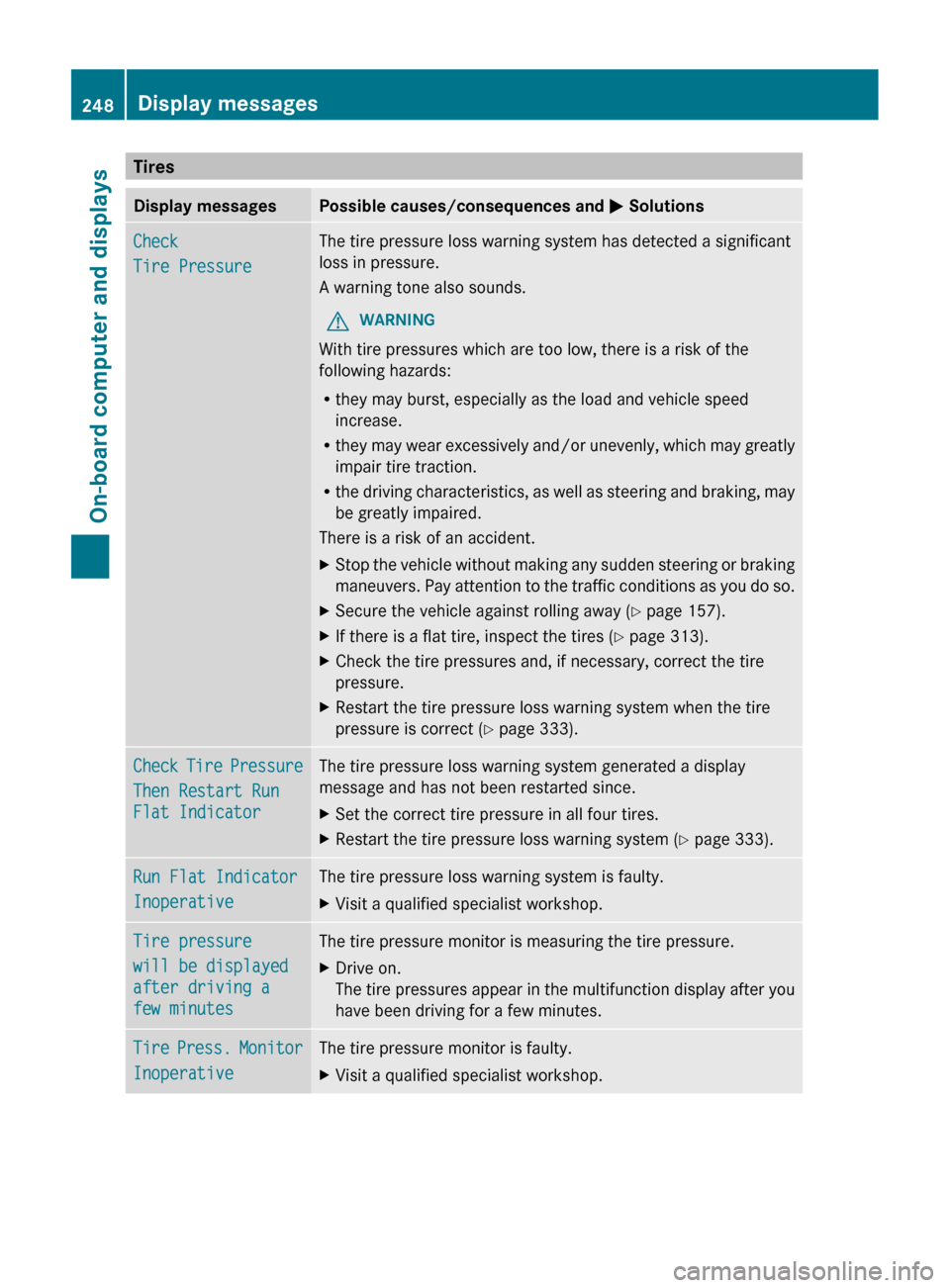
Tires
Display messages Possible causes/consequences and
M SolutionsCheck
Tire Pressure The tire pressure loss warning system has detected a significant
loss in pressure.
A warning tone also sounds.
G WARNING
With tire pressures which are too low, there is a risk of the
following hazards:
R they may burst, especially as the load and vehicle speed
increase.
R they
may wear excessively and/or unevenly, which may greatly
impair tire traction.
R the driving characteristics, as well as steering and braking, may
be greatly impaired.
There is a risk of an accident.
X Stop the vehicle without making any sudden steering or braking
maneuvers.
Pay attention to the traffic conditions as you do so.
X Secure the vehicle against rolling away ( Y page 157).
X If there is a flat tire, inspect the tires ( Y page 313).
X Check the tire pressures and, if necessary, correct the tire
pressure.
X Restart the tire pressure loss warning system when the tire
pressure is correct (Y page 333). Check Tire Pressure
Then Restart Run
Flat Indicator The tire pressure loss warning system generated a display
message and has not been restarted since.
X
Set the correct tire pressure in all four tires.
X Restart the tire pressure loss warning system ( Y page 333).Run Flat Indicator
Inoperative The tire pressure loss warning system is faulty.
X
Visit a qualified specialist workshop. Tire pressure
will be displayed
after driving a
few minutes The tire pressure monitor is measuring the tire pressure.
X
Drive on.
The
tire pressures appear in the multifunction display after you
have been driving for a few minutes. Tire Press. Monitor
Inoperative The tire pressure monitor is faulty.
X
Visit a qualified specialist workshop.248
Display messages
On-board computer and displays
Page 251 of 376
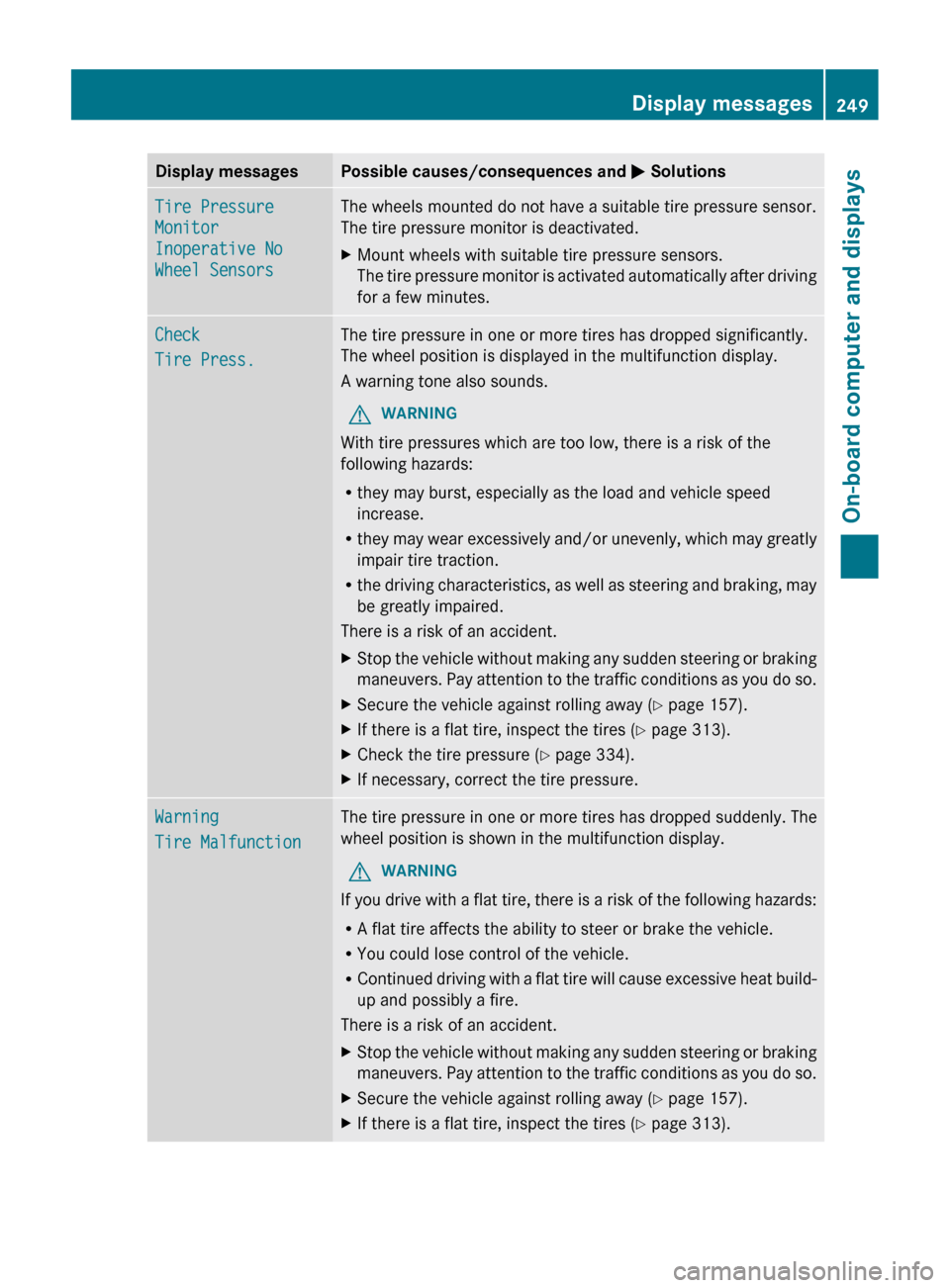
Display messages Possible causes/consequences and
M SolutionsTire Pressure
Monitor
Inoperative No
Wheel Sensors The wheels mounted do not have a suitable tire pressure sensor.
The tire pressure monitor is deactivated.
X
Mount wheels with suitable tire pressure sensors.
The
tire pressure monitor is activated automatically after driving
for a few minutes. Check
Tire Press. The tire pressure in one or more tires has dropped significantly.
The wheel position is displayed in the multifunction display.
A warning tone also sounds.
G WARNING
With tire pressures which are too low, there is a risk of the
following hazards:
R they may burst, especially as the load and vehicle speed
increase.
R they
may wear excessively and/or unevenly, which may greatly
impair tire traction.
R the driving characteristics, as well as steering and braking, may
be greatly impaired.
There is a risk of an accident.
X Stop the vehicle without making any sudden steering or braking
maneuvers.
Pay attention to the traffic conditions as you do so.
X Secure the vehicle against rolling away ( Y page 157).
X If there is a flat tire, inspect the tires ( Y page 313).
X Check the tire pressure (Y page 334).
X If necessary, correct the tire pressure. Warning
Tire Malfunction The tire pressure in one or more tires has dropped suddenly. The
wheel position is shown in the multifunction display.
G WARNING
If you drive with a flat tire, there is a risk of the following hazards:
R A flat tire affects the ability to steer or brake the vehicle.
R You could lose control of the vehicle.
R Continued
driving with a flat tire will cause excessive heat build-
up and possibly a fire.
There is a risk of an accident.
X Stop the vehicle without making any sudden steering or braking
maneuvers.
Pay attention to the traffic conditions as you do so.
X Secure the vehicle against rolling away ( Y page 157).
X If there is a flat tire, inspect the tires ( Y page 313). Display messages
249
On-board computer and displays Z
Page 252 of 376
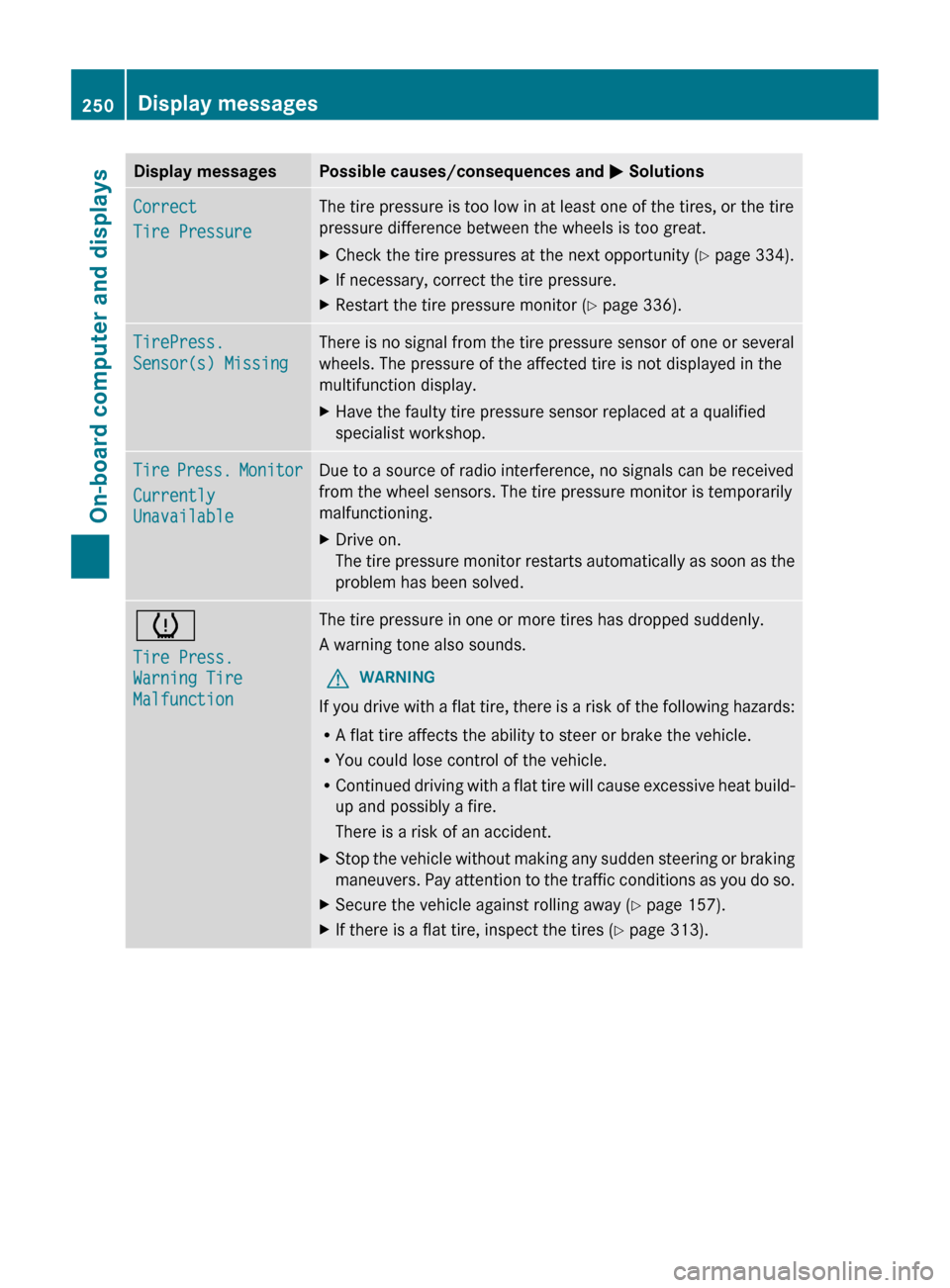
Display messages Possible causes/consequences and
M SolutionsCorrect
Tire Pressure The tire pressure is too low in at least one of the tires, or the tire
pressure difference between the wheels is too great.
X
Check the tire pressures at the next opportunity (Y page 334).
X If necessary, correct the tire pressure.
X Restart the tire pressure monitor (Y page 336). TirePress.
Sensor(s) Missing There is no signal from the tire pressure sensor of one or several
wheels. The pressure of the affected tire is not displayed in the
multifunction display.
X
Have the faulty tire pressure sensor replaced at a qualified
specialist workshop. Tire Press. Monitor
Currently
Unavailable Due to a source of radio interference, no signals can be received
from the wheel sensors. The tire pressure monitor is temporarily
malfunctioning.
X
Drive on.
The
tire pressure monitor restarts automatically as soon as the
problem has been solved. h
Tire Press.
Warning Tire
Malfunction The tire pressure in one or more tires has dropped suddenly.
A warning tone also sounds.
G WARNING
If you drive with a flat tire, there is a risk of the following hazards:
R A flat tire affects the ability to steer or brake the vehicle.
R You could lose control of the vehicle.
R Continued
driving with a flat tire will cause excessive heat build-
up and possibly a fire.
There is a risk of an accident.
X Stop the vehicle without making any sudden steering or braking
maneuvers.
Pay attention to the traffic conditions as you do so.
X Secure the vehicle against rolling away ( Y page 157).
X If there is a flat tire, inspect the tires ( Y page 313).250
Display messages
On-board computer and displays