low beam MERCEDES-BENZ CLS-Class 2014 W218 User Guide
[x] Cancel search | Manufacturer: MERCEDES-BENZ, Model Year: 2014, Model line: CLS-Class, Model: MERCEDES-BENZ CLS-Class 2014 W218Pages: 382, PDF Size: 5.36 MB
Page 224 of 382
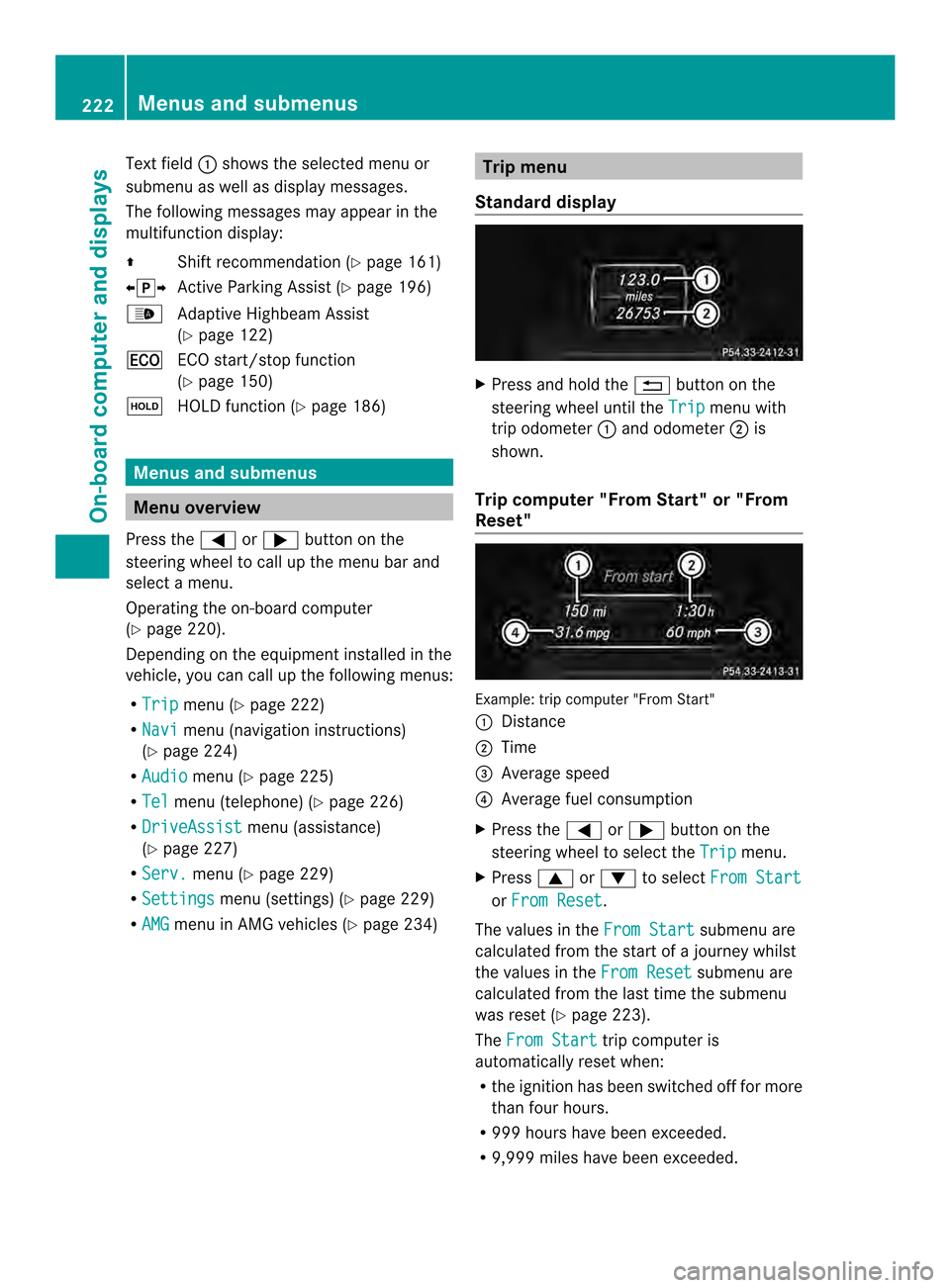
Text field
001Ashows the selected menu or
submenu as well as display messages.
The following messages may appear in the
multifunction display:
000A Shift recommendation (Y page 161)
000300080009 Active Parking Assist (Y page 196)
0010 Adaptive Highbeam Assist
(Ypage 122)
000C ECO start/stop function
(Ypage 150)
0007 HOLD function (Y page 186)Menus and submenus
Menu overview
Press the 000Aor0004 button on the
steerin gwheel to call up the menu bar and
select amenu.
Operating the on-board computer
(Y page 220).
Dependin gonthe equipment installed in the
vehicle, you can call up the following menus:
R Trip menu (Y
page 222)
R Navi menu (navigation instructions)
(Y page 224)
R Audio menu (Y
page 225)
R Tel menu (telephone) (Y
page 226)
R DriveAssist menu (assistance)
(Y page 227)
R Serv. menu (Y
page 229)
R Settings menu (settings) (Y
page 229)
R AMG menu in AMG vehicles (Y
page 234) Trip menu
Standard display X
Press and hold the 0002button on the
steerin gwheel until the Trip menu with
trip odometer 001Aand odometer 0010is
shown.
Trip computer "From Start" or "From
Reset" Example: trip computer "From Start"
001A
Distance
0010 Time
0024 Average speed
0021 Average fuel consumption
X Press the 000Aor0004 button on the
steerin gwheel to select the Trip menu.
X Press 0006or0005 to select From Start or
From Reset .
The values in the From Start submenu are
calculated from the start of ajourney whilst
the values in the From Reset submenu are
calculated from the last time the submenu
was reset (Y page 223).
The From Start trip computer is
automatically reset when:
R the ignition has been switched off for more
than four hours.
R 999 hours have been exceeded.
R 9,999 miles have been exceeded. 222
Menus and submenusOn-board computer and displays
Page 234 of 382

switch-off exterior lighting are on, the
following light up:
R
Parking lamps
R Low-beam headlamps
R Daytime running lamps
R Side marker lamps
R Surround lighting in the exterior mirrors
Activating/deactivating the interior
lighting delayed switch-off
If you activate the Interior LightingDelay function,t
he interior lighting remains
on for 20seconds after you remove the
SmartKey from the ignition lock.
X Press the 000Aor0004 button on the
steering wheel to select the Sett. menu.
X Press the 0005or0006 button to select the
Lights submenu.
X Press 000Cto confirm.
X Press 0005or0006 to select the Light. Delay function.
When the Interior Lighting Delay function is activated, the vehicle interior is
displayed in red in the multifunction
display.
X Press the 000Cbutton to save the setting.
Vehicle Activating/deactivating the automatic
door locking mechanism
X Press the 000Aor0004 button on the
steering wheel to select the Sett. menu.
X Press 0005or0006 to select the Vehicle submenu.
X Press 000Cto confirm.
X Press 0005or0006 to select the Auto. Door Locks function.
When the Automatic Door Lock function
is activated, the vehicle doors are displayed
in red in the multifunction display.
X Press the 000Cbutton to save the setting. If you activate the
Automatic Door Lock function,t
he vehicle is centrally locked above
as peed of around 9mph (15 km/h).
For further information on the automatic
locking feature, see (Y page 83).
Activating/deactivating the acoustic
locking verification signal
If you switch on the Acoustic Lock function,
an acoustic signal sounds when you lock the
vehicle.
X Press the 000Aor0004 button on the
steering wheel to select the Sett. menu.
X Press 0005or0006 to select the Vehicle submenu.
X Press 000Cto confirm.
X Press the 0005or0006 button to select the
Acoustic Lock function.
If the Acoustic Lock function is activated,
the 000F symbol in the multifunction
displayl ights up red.
X Press the 000Cbutton to save the setting.
Activating/deactivating the radar sensor
system
X Press the 000Aor0004 button on the
steering wheel to select the Sett. menu.
X Press 0005or0006 to select the Vehicle submenu.
X Press 000Cto confirm.
X Press the 0006or0005 button to select
Radar Sensor (See Oper. Manual): .
You will see the selected setting: Enabled or
Disabled .
X Press the 000Cbutton to save the setting.
The following systems are switched off when
the radar sensor system is deactivated:
R DISTRONIC PLUS (Y page 177)
R BAS PLUS (Y page 67)
R PRE-SAFE ®
Brake (Y page 72)
R Blind Spot Assist (Y page 207)
R Active Blind Spot Assist (Y page 211)232
Menus and submenusOn-board computer and displays
Page 247 of 382
Display messages Possible causes/consequences and
000B Solutions
Operator'
sManual display message
smustn ot be shown in
the multifunction display.
X Wait for aperiod of at least 60 seconds until the necessary
system checksh ave been completed.
X Make sure that the display messages do not appear in the
multifunction display.
If these conditions are fulfilled, the front-passenger seat can be
occupied again. Whether the PASSENGER AIR BAG OFF indicator
lamp remains lit or goes out depends on how OCS classifies the
occupant.
If the conditions are not fulfilled, the system is not operating
correctly.
X Visit aqualified specialist workshop immediately.
For further information about the Occupant Classification System,
see (Y page 47). Lights
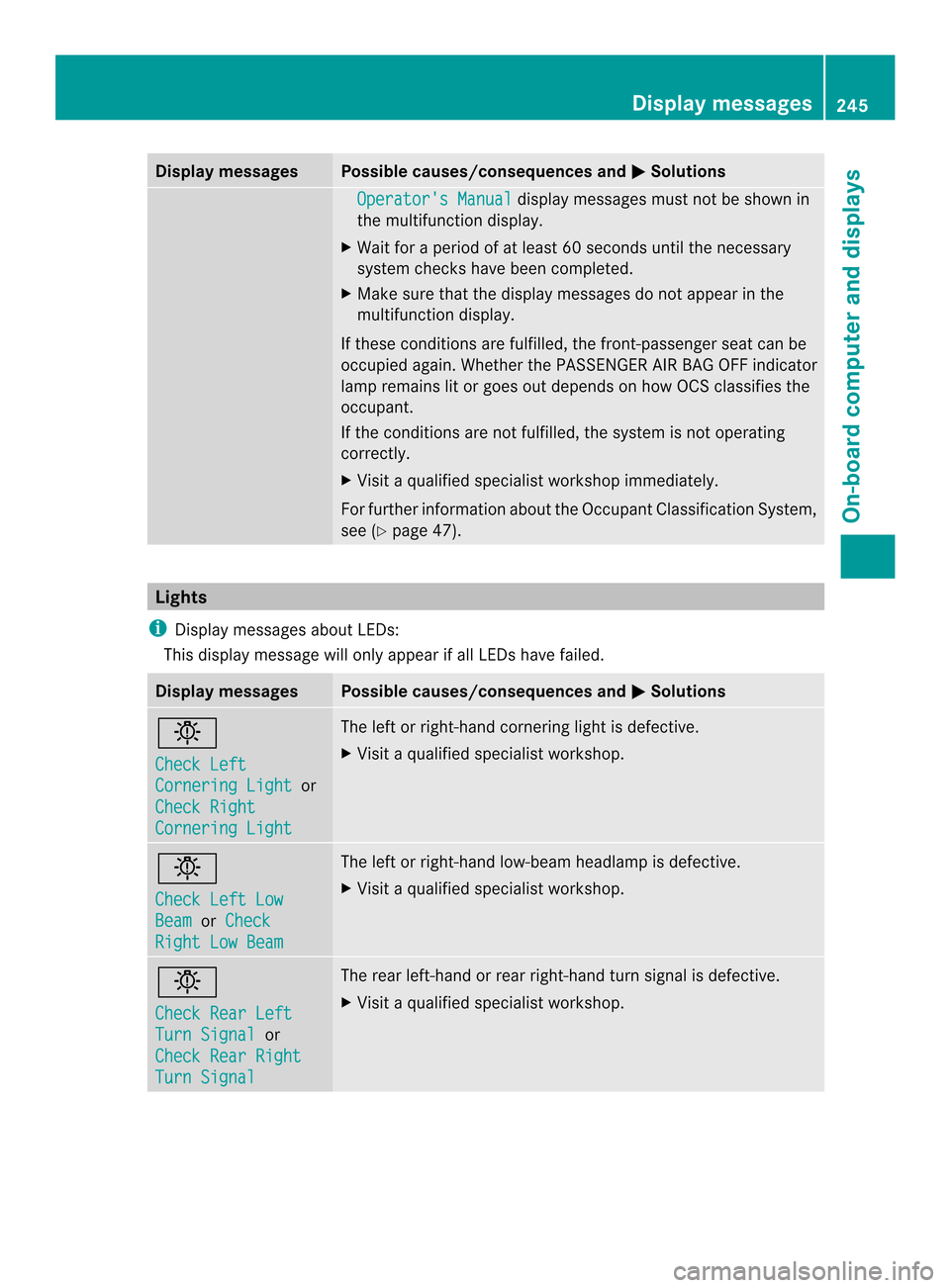
i Display messages about LEDs:
This display message will only appear if all LEDsh ave failed.Display messages Possible causes/consequences and
000B Solutions
0019
Check Left
Cornering Light or
Check Right Cornering Light The left or right-hand cornering light is defective.
X
Visit aqualified specialist workshop. 0019
Check Left Low
Beam or
Check Right Low Beam The left or right-hand low-beam headlamp is defective.
X
Visit aqualified specialist workshop. 0019
Check Rear Left
Turn Signal or
Check Rear Right Turn Signal The rear left-hand or rear right-hand turn signal is defective.
X
Visit aqualified specialist workshop. Display messages
245On-board computer and displays Z
Page 250 of 382
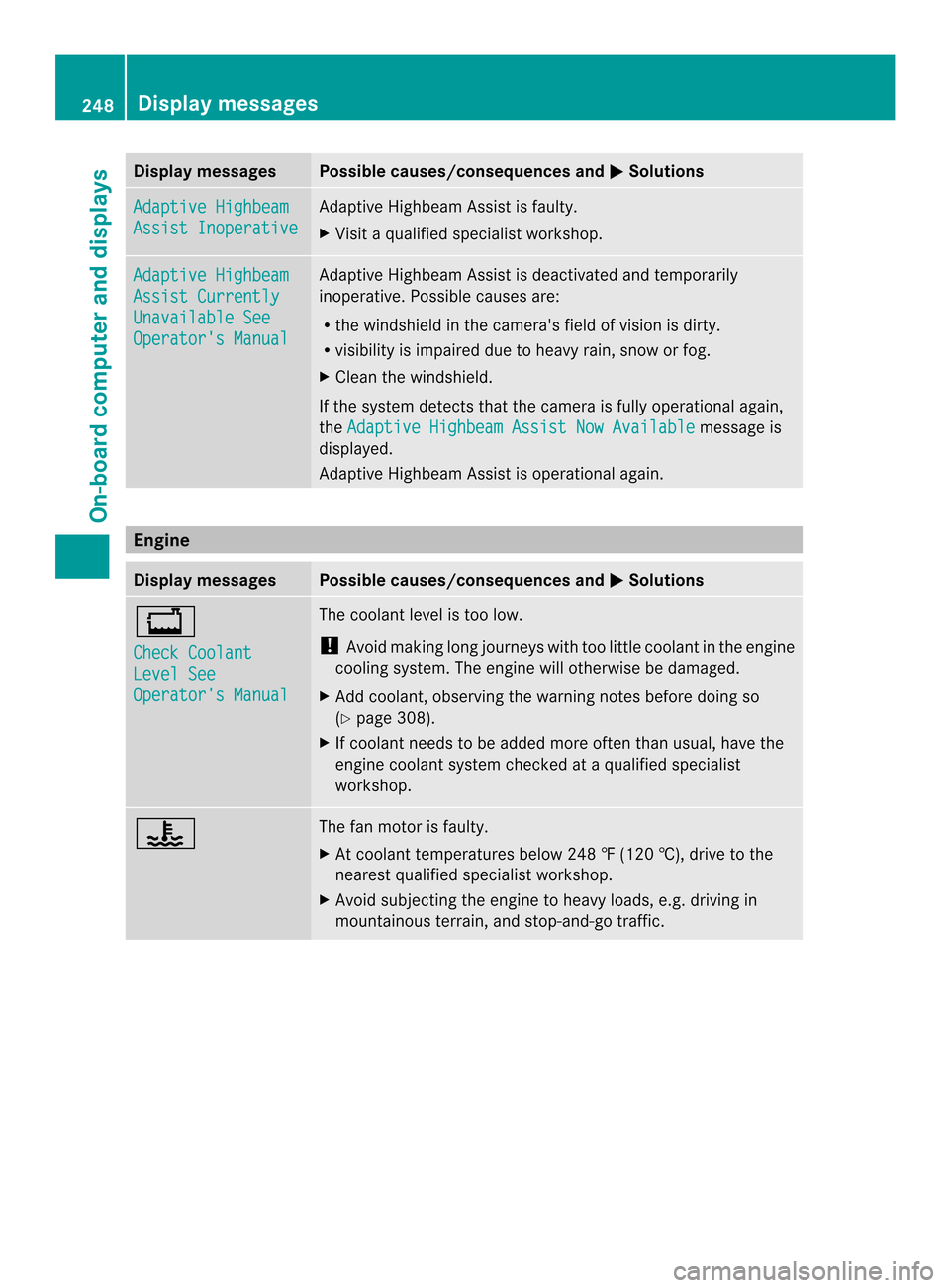
Display messages Possible causes/consequences and
000B Solutions
Adaptive Highbeam
Assist Inoperative Adaptive Highbeam Assis
tisfaulty.
X Visit aqualified specialist workshop. Adaptive Highbeam
Assist Currently
Unavailable See
Operator's Manual Adaptive Highbeam Assist is deactivated and temporarily
inoperative. Possible causes are:
R
the windshieldint he camera's field of vision is dirty.
R visibility is impaired due to heavy rain, snow or fog.
X Cleant he windshield.
If the system detectst hat the camera is fully operational again,
the Adaptive Highbeam Assist Now Available message is
displayed.
Adaptive Highbeam Assist is operational again. Engine
Display messages Possible causes/consequencesa
nd000B Solutions
0016
Check Coolant
Level See
Operator's Manual The coolant level is too low.
!
Avoid making long journeys with too little coolant in the engine
cooling system. The engine will otherwise be damaged.
X Add coolant, observing the warning notes before doing so
(Y page 308).
X If coolant needs to be added more often than usual, have the
engine coolant system checked at aqualified specialist
workshop. 0017 The fan motor is faulty.
X
At coolant temperatures below 248 ‡(120 †), drive to the
nearest qualified specialist workshop.
X Avoid subjecting the engine to heavy loads, e.g. driving in
mountainous terrain, and stop-and-go traffic. 248
Display messagesOn-board computer and displays
Page 266 of 382
Display messages Possible causes/consequences and
000B Solutions
0002
Remove 'Start'
Button and Insert
Key The KEYLESS-GO ke
ycan continuousl ynotbe detected.
KEYLESS-GO is temporarily malfunctionin gorisdefective. A
warnin gtonea lso sounds.
X Inser tthe SmartKey into th eignition loc kand tur nittot he
desire dposition.
X Visit aqualified specialist workshop. 0002
Close Doors to
Loc
kV ehicle At leas
tone door is open. Awarning tone also sounds.
X Close all door sand loc kthe vehicle again. Indicator and warning lamps in the
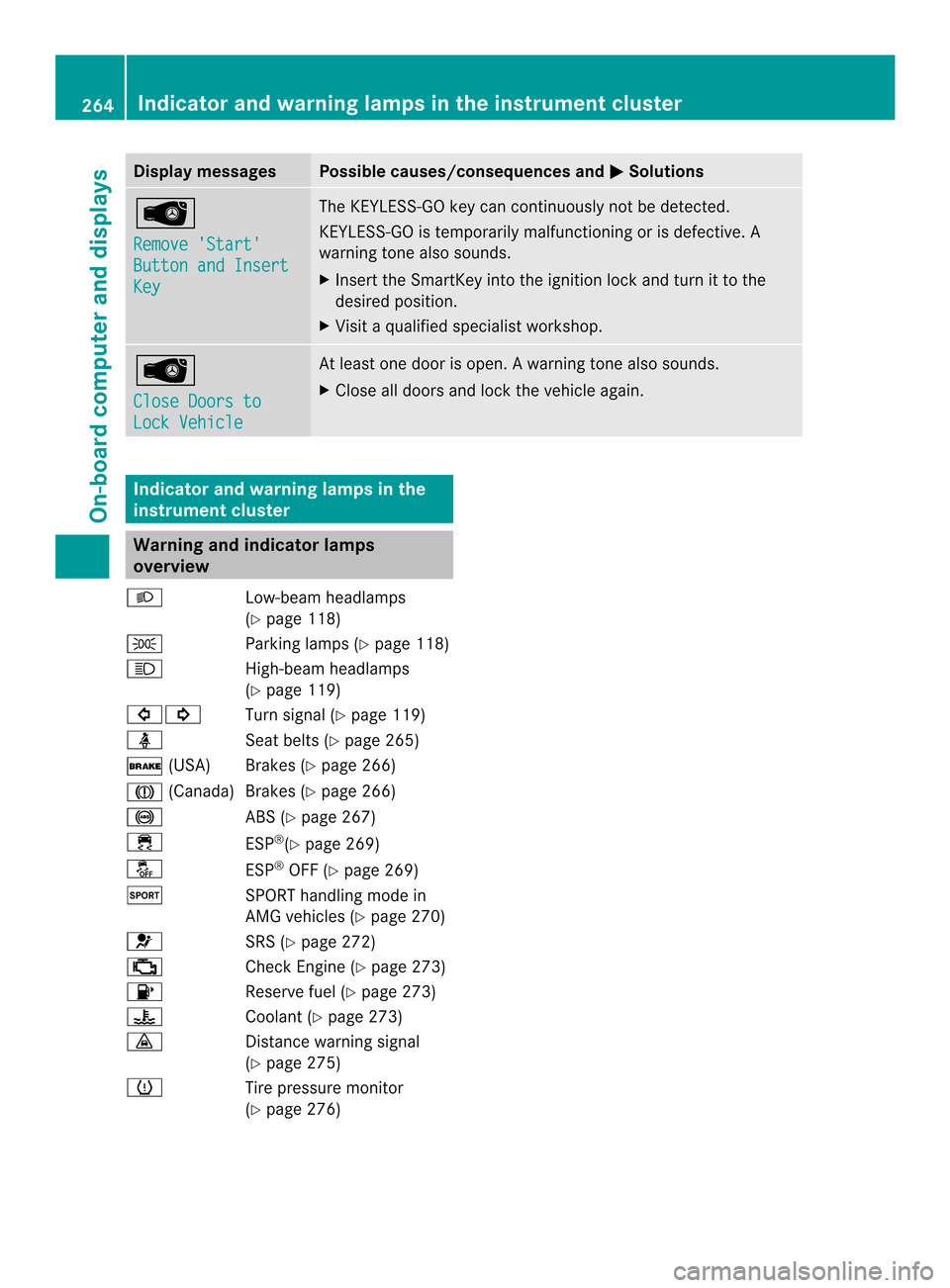
instrument cluster Warning and indicator lamps
overview
001D Low-beam headlamps
(Ypage 118)
0008 Parking lamps (Y page 118)
0015 High-beam headlamps
(Ypage 119)
00020001 Turn signal (Ypage 119)
0006 Seat belts (Ypage 265)
0004 (USA) Brakes (Y page 266)
0001 (Canada)B rakes (Ypage266)
001C ABS (Ypage267)
0011 ESP®
(Y page2 69)
0009 ESP®
OFF (Y page269)
0005 SPORT handling mode in
AMG vehicles (Y page270)
0012 SRS (Ypage272)
000A Check Engine (Y page273)
0007 Reserve fuel (Ypage273)
0017 Coolant (Ypage273)
0008 Distance warning signal
(Ypage2 75)
0008 Tire pressure monitor
(Ypage2 76) 264
Indicator and warnin
glamps in the instrument clusterOn-board computer and displays