warning light MERCEDES-BENZ CLS-Class 2014 W218 Repair Manual
[x] Cancel search | Manufacturer: MERCEDES-BENZ, Model Year: 2014, Model line: CLS-Class, Model: MERCEDES-BENZ CLS-Class 2014 W218Pages: 382, PDF Size: 5.36 MB
Page 197 of 382
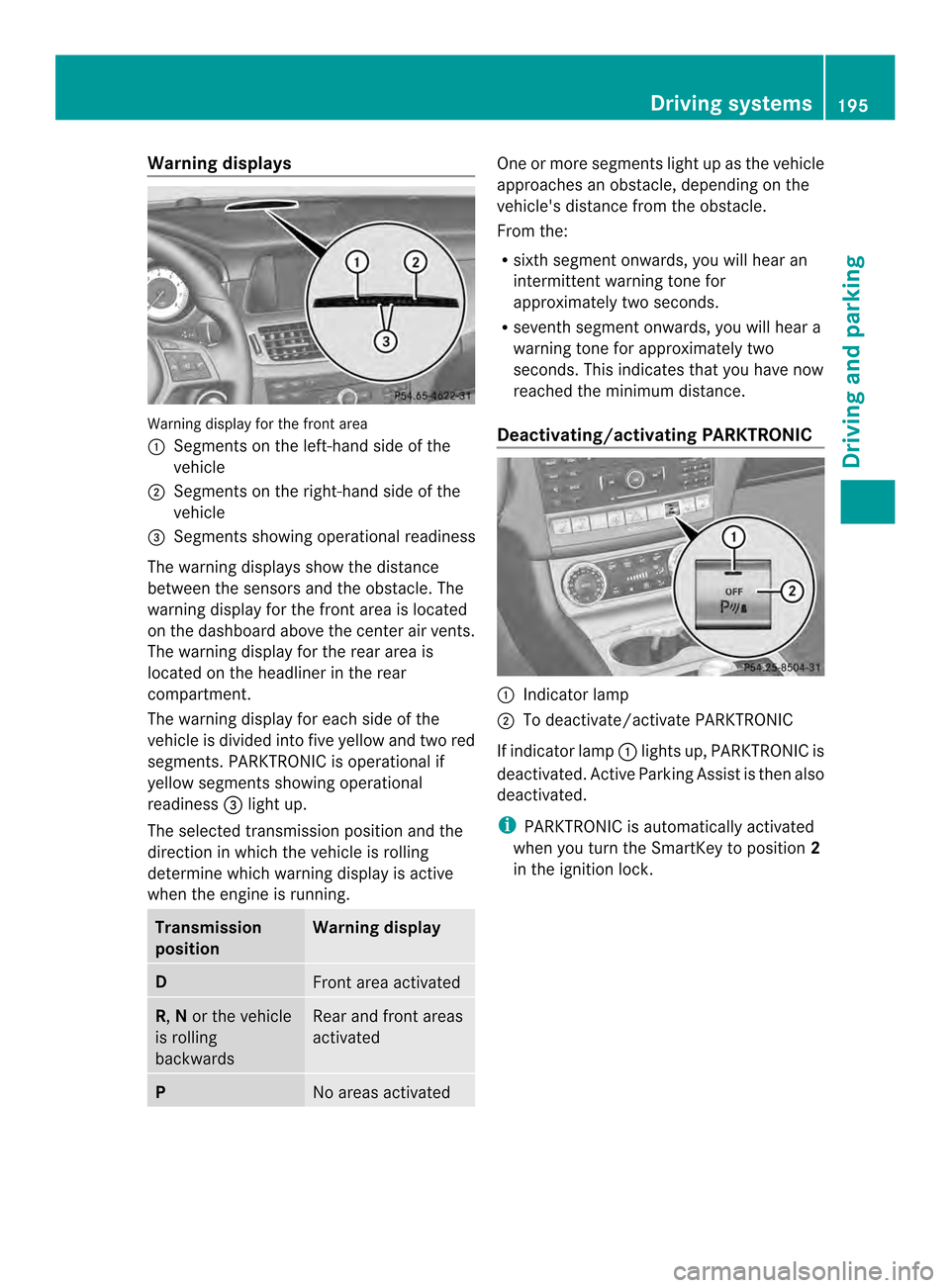
Warning displays
Warning display for the front area
001A
Segments on the left-hand side of the
vehicle
0010 Segments on the right-hand side of the
vehicle
0024 Segments showing operational readiness
The warning displays show the distance
between the sensors and the obstacle. The
warning displayf or the front area is located
on the dashboard above the center airv ents.
The warning display for the rear area is
located on the headliner in the rear
compartment.
The warning display for each side of the
vehicle is divided intof ive yellow and two red
segments. PARKTRONIC is operational if
yellow segments showing operational
readiness 0024light up.
The selected transmission position and the
direction in which the vehicle is rolling
determine which warning display is active
when the engin eisrunning. Transmission
position Warning display
D
Fron
tarea activated R,
Nor the vehicle
is rolling
backwards Rear and fron
tareas
activated P
No areas activated One or more segments light up as the vehicle
approaches an obstacle, depending on the
vehicle's distanc
efrom the obstacle.
From the:
R sixt hsegmen tonwards ,you will hea ran
intermitten twarnin gtonef or
approximately two seconds.
R sevent hsegment onwards, you will hear a
warning tonef or approximately two
seconds. This indicates that you have now
reached the minimum distance.
Deactivating/activating PARKTRONIC 001A
Indicator lamp
0010 To deactivate/activate PARKTRONIC
If indicator lamp 001Alights up, PARKTRONIC is
deactivated. Active Parking Assist is then also
deactivated.
i PARKTRONIC is automatically activated
when you turn the SmartKey to position 2
in the ignition lock. Driving systems
195Driving and parking Z
Page 198 of 382
Problems with PARKTRONIC
Problem Possible causes/consequences and
000B Solutions
Only the red segments
in the PARKTRONIC
warning displaysa
re lit.
You also hear awarning
tone for approximately
two seconds.
PARKTRONIC is then
deactivated and the
indicator lamp on the
PARKTRONIC button
lights up. PARKTRONIC has malfunctioned and has switched off.
X
If problems persist, have PARKTRONIC checked at aqualified
specialist workshop. Only the red segments
in the PARKTRONIC
warning displaysa
re lit.
PARKTRONIC is then
deactivated. The PARKTRONIC sensors are dirty or there is interference.
X
Cleant he PARKTRONIC sensors (Y page 315).
X Switch the ignition back on. The problem may be caused by an external source of radio or
ultrasound waves.
X
See if PARKTRONIC functions in adifferent location. Active Parking Assist
General notes Active Parking Assist is an electronic parking
aid with ultrasound. It measures the road on
both sides of the vehicle. Aparking symbol
indicates asuitable parking space. Active
steering interventio ncan assis tyou during
parking. You may also use PARKTRONIC
(Y page 193).
Important safety notes Active Parking Assist is merely an aid. It is not
ar
eplacement for your attention to your
immediate surroundings. You are always
responsible for safe maneuvering, parking
and exitin gaparking space. Make sure that
no persons, animals or object sare in the
maneuvering range.
When PARKTRONIC is switched off, Active
Parking Assist is also unavailable. G
WARNING
The vehicle swings out when parking and in
doing so could cross into the opposite lane.
This could result in acollision with another
road user. There is arisk of an accident.
Pay attention to other road users when
parking. Stop the vehicle if necessary or
cancel the Active Parking Assist parking
procedure.
! If unavoidable, you should drive over
obstacles such as curbs slowly and not at
as harp angle. Otherwise, you may damage
the wheels or tires.
Active Parking Assist may possibly indicate
parking spaces which are not suitable for
parking, for example:
R where parking or stopping is prohibited
R in front of driveways or entrances and exits
R on unsuitable surfaces 196
Driving systemsDriving and parking
Page 201 of 382
The
Park Assist Active Select R Observe Surroundings message appears in
the multifunction display.
Further transmission shifts may be
necessary.
As soon as the parking procedure is
complete, the Park Assist Finished message appears in the multifunction
display .PARKTRONI Ccontinue stobe
available.
X Maneuver if necessary.
X Always observe the warning messages
displayed by PARKTRONIC (Y page 195).
Parking tips:
R The way your vehicle is positioned in the
parking space after parking is dependent
on various factors. These include the
position and shape of the vehicles parked
in front and behind it and the conditions of
the location. It may be the case that Active
Parking Assist guides you too far into a
parking space, or not far enough into it. In
some cases, it may also lead you across or
ontot he curb. If necessary, you should
cancel the parking procedure with Active
Parking Assist.
R You can also engage forward gear
prematurely. The vehicle redirects and
does not drive as far into the parking space.
Should agear be changed too early, the
parking procedure will be canceled. A
sensible parking position can no longer be
achieved from this position.
Cancelin gActive Parking Assist You can cancel Active Parking Assist at any
time.
X Stop the movemen tofthe multifunction
steerin gwheel or steer yourself.
Active Parking Assist will be canceled at
once. The Park Assist Canceled message appears in the multifunction
display.
or
X Press the PARKTRONIC button on the
center console (Y page 195).
PARKTRONIC is switched off and Active
Parking Assist is immediately canceled.
The Park Assist Canceled message
appears in the multifunction display.
Active Parking Assist is canceled
automatically if:
R the transmission is shifted too early.
R parking using Active Parking Assist is no
longer possible.
R you are driving faster than 6mph
(10 km/h).
R aw heel spins, ESP ®
intervenes or fails. The
0011 warning lamp lights up in the
instrument cluster.
Aw arning tone sounds. The parking symbol
disappears and th emultifunction display
shows the ParkA ssist Canceled message.
If Activ
eParking Assist is canceled, you must
steer again yourself. Rea
rview camera
Important safety notes The rear view camera is only an aid. It is not
ar
eplacemen tfor your attentio ntoyour
immediat esurroundings. You are always
responsible for safe maneuvering and
parking .When maneuvering or parking, make
sure that there are no persons, animals or
objectsint he area in which you are
maneuvering.
Under the following circumstances, the rear
view camera will not function, or will function
in alimited manner:
R if the trunk lid/tailgate is open
R in heavy rain, snow or fog
R at night or in very dark places Driving systems
199Driving and parking Z
Page 203 of 382
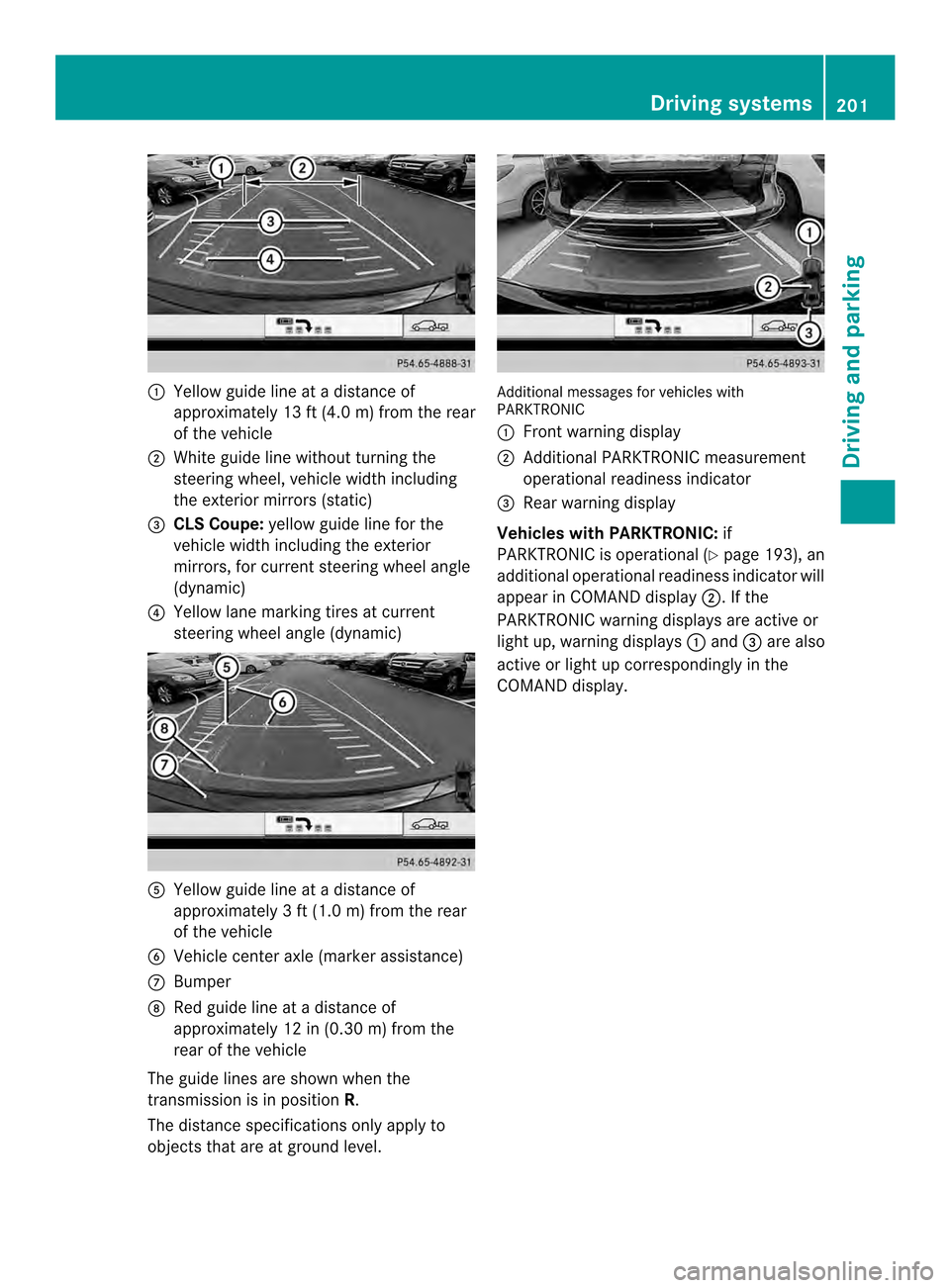
001A
Yellow guide line at adistanc eof
approximately 13 ft (4.0 m) from the rear
of the vehicle
0010 White guide line without turning the
steering wheel, vehicle width including
the exterior mirrors (static)
0024 CLSC oupe: yellow guide line for the
vehicle width including the exterior
mirrors ,for current steering wheel angle
(dynamic)
0021 Yellow lane marking tires at current
steering wheel angl e(dynamic) 001E
Yellow guide line at adistance of
approximately 3ft(1.0 m) from the rear
of the vehicle
0025 Vehicle center axle (marker assistance)
0009 Bumper
0016 Red guide line at adistance of
approximately 12 in (0.30 m) from the
rear of the vehicle
The guide line sare show nwhen the
transmission is in position R.
The distance specifications only apply to
objectst hat are at ground level. Additional messages for vehicles with
PARKTRONIC
001A
Front warning display
0010 Additional PARKTRONIC measurement
operational readiness indicator
0024 Rear warning display
Vehicles with PARKTRONIC: if
PARKTRONIC is operational (Y page 193), an
additional operational readiness indicator will
appearinC OMAND display 0010.Ifthe
PARKTRONIC warning displays are active or
light up, warning displays 001Aand 0024are also
active or light up correspondingly in the
COMAND display. Driving systems
201Driving and parking Z
Page 206 of 382
Warning and display messages in the
multifunction display X
Activate ATTENTION ASSIST using the on-
board computer (Y page228).
If ATTENTION ASSIST is active, you wil lbe
warned no sooner than 20 minutes after
you rjourney has begun. You then hear an
intermittent warning tonet wice and the
Attention Assist :Drowsiness detected message appears in the
multifunction display.
X If necessary, tak eabreak.
X Pres sthe 000C button to confir mthe
message.
On lon gjou rneys, tak eregular break singood
tim etoa llow yourself to rest properly. If you
do not tak eabreak,you will be warned again
after 15 minutes at th eearliest. The
preconditio nfor this is that
ATTENTION ASSIST still detect stypical
indicators of fatigue or increasing lapses in
concentration.
When ATTENTION ASSIST is deactivated, the
0001 symbol and OFF appear in the
multifunction display in the assistance
graphics display when the engine is running.
ATTENTION ASSIST is reset when you
continue your journey and startsa ssessing
your tiredness again if:
R you switch off the engine.
R you take off your seat belt and open the
driver's door, e.g. for achange of drivers or
to take abreak. Night View Assist Plus
Important safety notes Night View Assist Plus is only an aid and is not
as ubstitute for attentive driving. Do not rely
on the Night View Assist Plus display .You are
responsible for the distance to the vehicle in
front,f or vehicle speed and for braking in
good time. Drive carefully and always adapt your driving style to suit the prevailing road
and traffic conditions.
The system may be impaired or may not
function if:
R
there is poor visibility, e.g. due to snow,
rain, fog or spray
R the windshield is dirty, fogged up or
covered, for instance by asticker, in the
vicinit yofthe camera
R on bends, on uphill gradients or downhill
gradients
Pedestrian recognition may be impaired or
inoperative if:
R pedestrians are partially or entirely
obscured by objects, e.g. parked vehicles
R the silhouette of the pedestrian in the Night
View Assist Plus display is incomplet eor
interrupted, e.g. by powerful light
reflections
R pedestrians do not contrast adequately
from the background
R pedestrians are not in an upright position,
e.g. sitting, squatting or lying In addition to the illumination provided by the
normal headlamps, Night View Assist Plus
uses infrared light to illuminate the road.
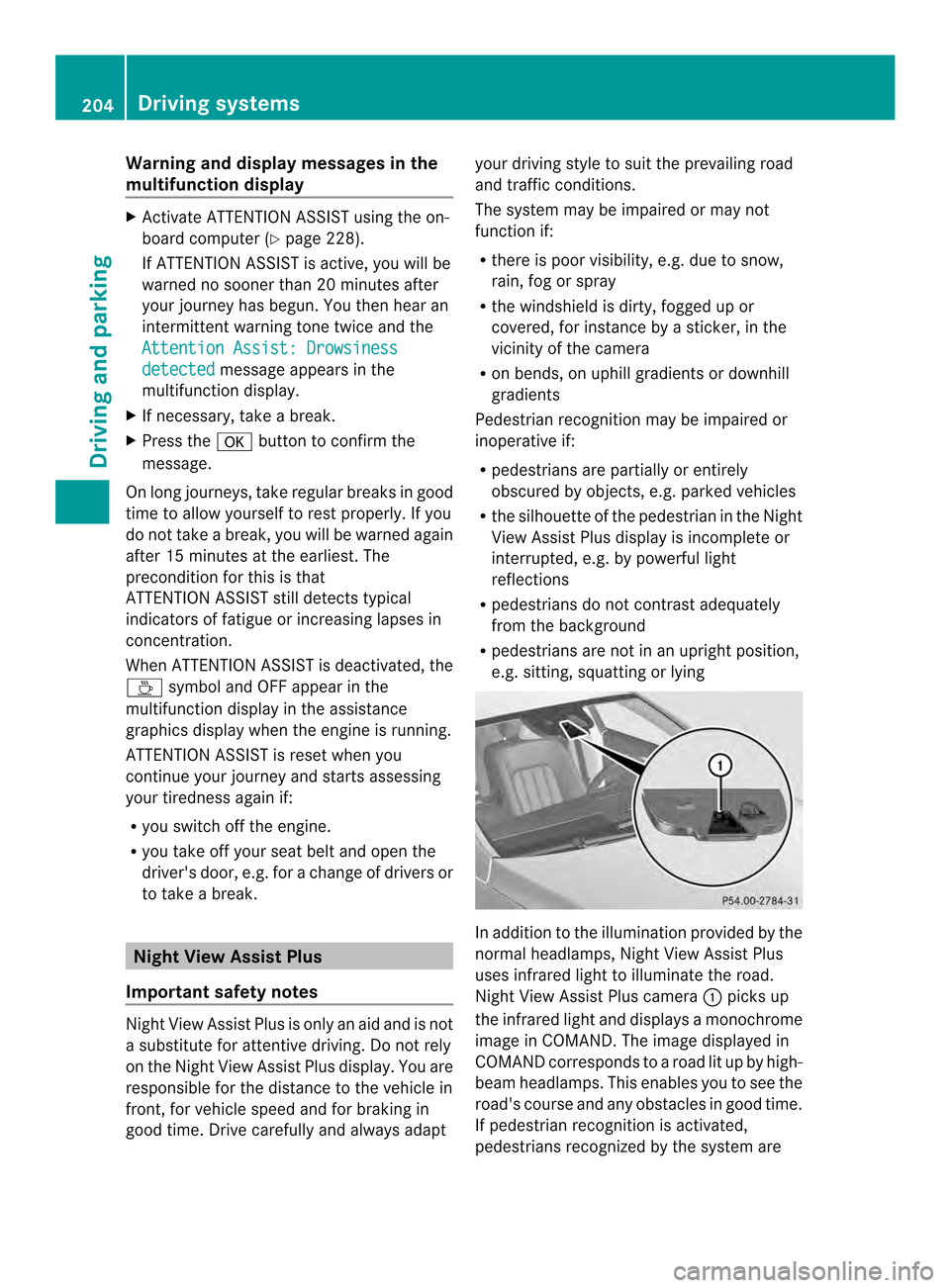
Night View Assist Plus camera
001Apicks up
the infrared light and display samonochrome
image in COMAND. The image displayed in
COMAND corresponds to aroad lit up by high-
beam headlamps. This enables you to see the
road's course and any obstacles in good time.
If pedestrian recognition is activated,
pedestrians recognized by the system are 204
Driving systemsDriving and parking
Page 208 of 382
pedestrians cannot be gaged accurately by
lookin
gatas creen.
It may be the case that objects are highlighted
as well as pedestrians.
Fogged up or dirty windshield G
WARNING
Always remembe rthat you must concentrate
primarily on driving the vehicle. Adriver's
attention to the road must always be his/her
primary focus when driving. For your safety
and the safety of others: stop the vehicle
before attempting to clean fogged up
windows or the windshield area in front of the
Night View Assist Plus camera.
Please remember that when your vehicle is
traveling at aspeed of only 30 mph
(approximately 50 km/h )itcovers adistance
of 44 ft (approximately 14 m) per second.
If the windshield in front of the camera is
fogged up or dirty on the inside or outside, the
Night View Assist Plus displayisa ffected.
X To defrost: check the automatic air
conditioning settings (Y page 140) and fold
down the camera cover (Y page 316).
X To defrost the inside of the windshield:
fold down the camera cover (Y page 316)
and clean the windshield( Ypage 314).206
Driving systemsDriving and parking
Page 210 of 382

This device has been approved by the FCC
as
a"Vehicular RadarS ystem". The radar
sensor is intended fo ruse in an automotive
radar system only. Removing, tampering
with, or altering the device will void any
warranties, and is not permitted by the
FCC. Do not tamper with, alter, or use in
any non-approved way.
Any unauthorized modification to this
device could void the user’s authority to
operate the equipment.
Monitoring range of the sensors
In particular, the detection of obstacles can
be impaired if:
R dirt on the sensors or anything else
covering the sensors
R poor visibility, e.g. due to fog, heavy rain,
snow or spray
R narrow vehicles, e.g. motorcycles or
bicycles
R the road has very wide lanes
R the road has narrow lanes
R you are not driving in the middle of the lane
R there are barriers or similarl ane borders
Vehicle sinthemonitorin grang eare then not
indicated. Blin
dSpotA ssist monitors the area up to
10 ft (3 m) behind your vehicle and directly
next to your vehicle, as shown in the diagram. If the lanes are narrow, vehicles driving in the
lane beyond the lane next to your vehicle may
be indicated, especially if the vehicles are not
driving in the middle of their lane. This may
be the case if there are vehicles driving at the
inner edge of their lanes.
Due to the nature of the system:
R
warnings may be issued in error when
driving close to crash barriers or similar
solid lane borders.
R the warning is canceled when driving for an
extended period next to long vehicles, such
as trucks.
The two radar sensors for Blind Spot Assist
are integrated into the sides of the rear
bumper. Make sure that the bumper is free of
dirt, ice or slush in the vicinity of the sensors.
The sensors must not be covered, for
example by cycle racks or overhanging loads.
Following asevere impact or in the event of
damage to the bumpers, have the function of
the sensors checked at aqualified specialist
workshop. Blind Spot Assist may otherwise
not work properly.
Indicator and warning display 001A
Yellowi ndicator lamp/red warning lamp
Active Blind Spot Assist is not active at
speeds below approximately 20 mph
(30 km/h). Vehicles in the monitoring range
are then not indicated.
When Blind Spot Assist is activated, indicator
lamp 001Ain the exterior mirrors lights up
yellow at speeds of up to 20 mph (30k m/h).
At speeds above 20 mph (30 km/h) the 208
Driving systemsDriving and parking
Page 211 of 382
indicator lamp goes out and Blin
dSpot Assist
is operational.
If av ehicle is detected within the monitoring
rang eofB lindS pot Assist at speeds above
20 mph (30 km/h), warnin glamp 001Aon the
correspondin gside light supred. This warning
is always emitted when avehicle enters the
blind spot monitoring rang efrom behind or
from the side .When you overtake avehicle,
the warning only occurs if the difference in
speed is less than 7mph (12km/h).
The yellow indicator lamp goes out if reverse
gear is engaged. In this event ,Blind Spot
Assist is no longer active.
The brightness of the indicator/warning
lamps is adjusted automatically according to
the ambient light.
Collision warning
If av ehicle is detected in the monitoring range
of Blind Spot Assist and you switc honthe
correspondin gturn signal, adouble warning
ton esounds. Red warning lamp 001Aflashes. If
the turn signal remains on, vehicles detected
are indicated by the flashing of red warning
lamp 001A.There are no further warning tones.
Switching on Blind Spot Assist
X Make sure that Blind Spot Assist
(Y page 228) is activated in the on-board
computer.
X Turn the SmartKey to position 2in the
ignition lock.
Warning lamps 001Ain the exterior mirrors
light up red for approximately
1.5 seconds and then turn yellow.
Lane Keeping Assist Important safety notes
G
WARNING
Lane Keeping Assist may not always clearly
recognizel ane markings. In this case, Lane Keeping Assist may:
R
give an unnecessary warning
R not give awarning
There is arisk of an accident.
Always pay particular attention to the traffic
situation and stay in lane, in particular if
warned by Lane Keeping Assist. G
WARNING
The Lane Keeping Assist warning does not
return the vehicle to the original lane. There
is ar isk of an accident.
You should always steer, brake or accelerate
yourself, in particular if warned by Lane
Keeping Assist.
If you fail to adapt your driving style, Lane
Keeping Assist can neither reduce the risk of
an accident nor override the laws of physics.
Lane Keeping Assist cannot take into account
the road, traffic and weather conditions. Lane
Keeping Assist is merely an aid. You are
responsible for the distance to the vehicle in
front,f or vehicle speed, for braking in good
time and for staying in your lane.
The Lane Keeping Assist does not keep the
vehicle in the lane.
The system may be impaired or may not
function if:
R there is poor visibility, e.g. due to
insufficient illumination of the road, or due
to snow, rain, fog or spray
R there is glare, e.g. from oncomingt raffic,
the sun or reflections (e.g. when the road
surface is wet)
R the windshield is dirty, fogged up, damaged
or covered, for instancebyas ticker, in the
vicinity of the camera
R there are no, several or unclear lane
markings for alane, e.g. in areas with road
construction work
R the lane markings are worn away,d ark or
covered up, e.g. by dirt or snow Driving systems
209Driving and parking Z
Page 214 of 382

specialist workshop. Active Blind Spot Assist
may otherwise no longer work properly.
Monitoring area G
WARNING
Active Blind Spot Assist does not detect all
traffic situations and road users. There is a
risk of an accident.
Always make sure that there is sufficient
distance on the side for other traffic or
obstacles. Active Blind Spot Assist monitors the area up
to 10 ft (3.0 m) behind your vehicle and
directly next to your vehicle, as shown in the
diagram.
The detection of obstacles can be impaired in
the case of:
R dirt on the sensors or anything else
covering the sensors
R poor visibility, e.g. due to rain, snow or
spray
Vehicles in the monitoring range are then not
indicated or indicated with adelay.
Active Blind Spot Assist may not detect
narrow vehicles, such as motorcycles or
bicycles, or may only detect them too late.
If the lanes are narrow, vehicles driving in the
lane beyond the lane next to your vehicle may
be indicated, especially if the vehicles are not driving in the middle of their lane. This may
be the case if there are vehicles at the edge
of their lane.
Due to the nature of the system:
R warnings may be issued in error when
driving close to crash barriers or similar
solid lane borders.
R the warning is canceled when driving for an
extended period next to long vehicles, such
as trucks.
Indicator and warning display 001A
Yellowi ndicator lamp/red warning lamp
Active Blind Spot Assist is not active at
speeds below approximately 20 mph
(30 km/h). Vehicles in the monitoring range
are then not indicated.
When active Blind Spot Assist is activated,
indicator lamp 001Ain the exterior mirrors lights
up yellow at speeds of up to
20 mph(30 km/h). At speeds above 20 mph
(30 km/h), the indicator lamp goes out and
active Blind Spot Assist is operational.
If av ehicle is detected within the monitoring
range of Blind Spot Assist at speeds above
20 mph (30 km/h), warning lamp 001Aon the
corresponding side lights up red. This warning
is always given when avehicle enters the
blind spot monitoring range from behind or
from the side. When you overtake avehicle,
the warning only occurs if the difference in
speed is less than 7mph (12km/h).
The yellow indicator lamp goes out if reverse
gear is engaged. In this event ,Active Blind
Spot Assist is no longer active. 212
Driving systemsDriving and parking
Page 215 of 382

The brightness of the indicator/warning
lamps is adjusted automatically accordin gto
the ambient light.
Visual and acoustic collision warning
If you switch on the turn signals to change
lanes and avehicle is detected in the side
monitoring range, you receive avisual and
acoustic collision warning. You then hear a
double warning tonea nd red warning
lamp 001Aflashes. If the turn signal remains on,
detected vehicles are indicated by the
flashing of red warning lamp 001A.There are no
further warning tones.
Course-correcting brake application G
WARNING
Ac ourse-correctingb rake application cannot
alwaysp reventacollision. There is arisk of
an accident.
Always steer, brake or accelerate yourself,
especially if Active Blind Spot Assist warns
you or makes acourse-correcting brake
application. Always maintain asafe distance
at the sides. If Active Blind Spot Assist detect
sarisk of a
lateral collision in the monitoring range, a course-correcting brake application is carried
out. This is meant to assist you in avoiding a
collision.
If
ac ourse-correcting brake application
occurs, red warning lamp 001Aflashes in the
exterior mirror and adual warning tone
sounds. In addition, the display shown in the
lower image appears in the multifunction
display.
In very rare cases, the system may make an
inappropriate brake application. An
inappropriate course-correcting brake
application may be interrupted at any time if
you steer slightly in the opposite direction or
accelerate, for example.
The course-correcting brake application is
available in the speed range between
20 mph (30 km/h) and 120 mph (200 km/h).
Either no braking application, or acourse-
correcting brake application adapted to the
driving situation occurs if:
R there are vehicles or obstacles, e.g. crash
barriers, located on both sides of your
vehicle.
R av ehicle approaches you too closely at the
side.
R you have adopted asporty driving style with
high cornering speeds.
R you clearly brake or accelerate.
R ad riving safety system intervenes, e.g.
ESP ®
or PRE-SAFE ®
Brake.
R ESP ®
is switched off.
R al oss of tire pressure or adefectiv etire is
detected.
Switching on Active Blind Spot Assist
X Make sure that the radar sensor system
(Y page 232) and Active Blind Spot Assist
(Y page 228) are activated in the on-board
computer.
X Turn the SmartKey to position 2in the
ignition lock.
Warning lamps 001Ain the exterior mirrors
light up red for approximately
1.5 seconds and then turn yellow. Driving systems
213Driving and parking Z