warning MERCEDES-BENZ CLS-Class 2014 W218 Manual PDF
[x] Cancel search | Manufacturer: MERCEDES-BENZ, Model Year: 2014, Model line: CLS-Class, Model: MERCEDES-BENZ CLS-Class 2014 W218Pages: 382, PDF Size: 5.36 MB
Page 106 of 382
You can adjust the contour of the front seat
backrest sindividually to provide optimum
support for your back. Switchin
gthe seat heating on/off
Activating/deactivating G
WARNING
Repeatedly switching on the seat heatin gcan
cause the seat cushio nand backres tpads to
become ver yhot.T he health of persons with
limited temperature sensitivity or alimited
ability to react to excessively high
temperatures may be affected or they may
even suffer burn-like injuries. There is arisk
of injury.
Therefore, do not switch the seat heating on
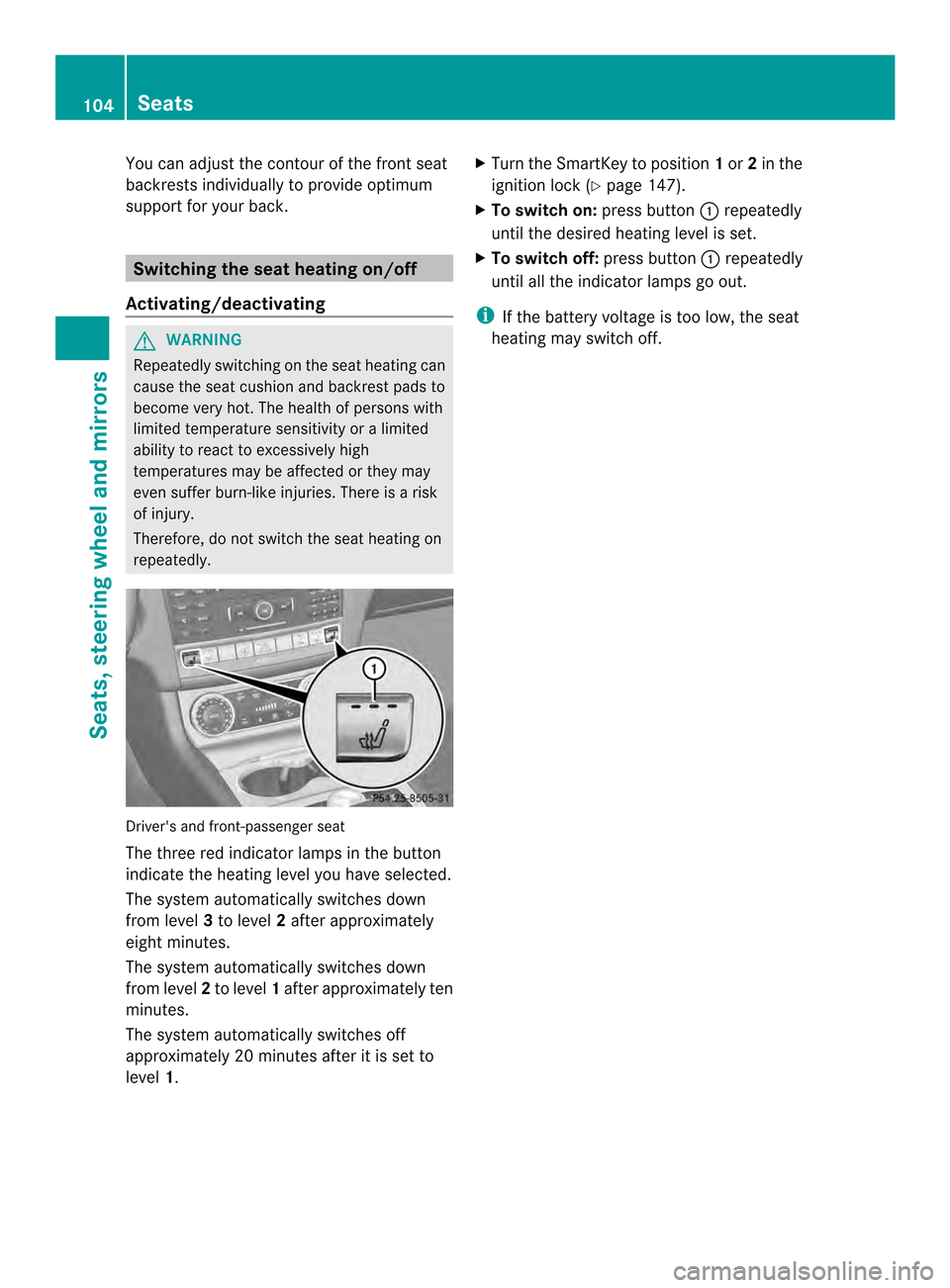
repeatedly. Driver's and front-passenger seat
The three red indicator lamps in the button
indicate the heating level you have selected.
The system automatically switches down
from level
3to level 2after approximately
eight minutes.
The system automatically switches down
from level 2to level 1after approximately ten
minutes.
The system automatically switches off
approximately 20 minutes after it is set to
level 1. X
Turn the SmartKey to position 1or 2in the
ignition lock (Y page 147).
X To switch on: press button001Arepeatedly
until the desired heating level is set.
X To switch off: press button001Arepeatedly
until all the indicator lamps go out.
i If the battery voltage is too low, the seat
heating may switch off. 104
SeatsSeats, steering wheela
nd mirrors
Page 108 of 382

Problems with the seat ventilation
Problem Possible causes/consequences and
000B Solutions
The seat ventilation has
switched off
prematurely or cannot
be switched on. The on-board voltage is too low because too many electrical
consumers are switched on.
X
Switch off electrical consumers that you do not need, such as
the rear window defroster or interior lighting.
Once the battery is sufficiently charged, the seat ventilation will
switch back on automatically. Steering wheel
Important safety notes
G
WARNING
You could lose control of your vehicle if you
do the following while driving:
R adjust the driver's seat, head restraint,
steering wheel or mirrors
R fasten the seat belt
There is arisk of an accident.
Adjust the driver's seat, head restraint,
steering wheel and mirror and fasten your
seat belt before startingt he engine.G
WARNING
Children could injure themselves if they
adjust the steering wheel. There is arisk of
injury.
When leaving the vehicle, always take the
SmartKey with you and lock the vehicle. Never
leave children unsupervised in the vehicle. Adjusting the steering wheel
electrically
001A
To adjust the steering wheel height
0010 To adjust the steering wheel position
(fore-and-aft adjustment)
i Further related subjects:
R EASY-ENTRY/EXIT feature
(Y page 108)
R Storing settings (Y page 112)106
Steering wheelSeats, steering wheela
nd mirrors
Page 110 of 382
Problems with the steering wheel heating
Problem Possible causes/consequences and
000B Solutions
If the steering wheel
heating indicator lamp
is flashing, the steering
wheel heating has
switched off
automatically. The on-board voltage is too low because too many electrical
consumers are switched on.
X
Switch off electrical consumers that you do not need, such as
the rear window defroster or interior lighting.
Once the battery is sufficiently charged, the steering wheel
heating will switch back on automatically. EASY-ENTRY/EXIT feature
Important safety notes G
WARNING
When the EASY-ENTRY/EXIT feature adjusts
the steering wheel, you and other vehicle
occupants –particularly childre n–could
become trapped. There is arisk of injury.
While the EASY-ENTRY/EXIT feature is
making adjustments, make sure that no one
has any body parts in the sweep of the
steering wheel.
If somebody becomes trapped:
R press one of the memory function position
buttons, or
R move the switch for steering wheel
adjustmen tinthe opposite direction to that
in which the steering wheel is moving.
The adjustment process is stopped. G
WARNING
If children activate the EASY-ENTRY/EXIT
feature, they can become trapped,
particularly when unattended. There is arisk
of injury.
When leaving the vehicle, always take the
SmartKey with you and lock the vehicle. Never
leave children unsupervised in the vehicle. G
WARNING
If you drive off while the EASY-ENTRY/EXIT
feature is making adjustments, you could lose control of the vehicle. There is
arisk of an
accident.
Always wait until the adjustment process is
complete before driving off.
The EASY-ENTRY/EXITf eature makes getting
in and out of your vehicle easier.
You can activate and deactivate the EASY-
ENTRY/EXIT feature in the on-board
computer (Y page 233).
Position of the steering wheel when the
EASY-ENTRY/EXIT featureisa ctive The steerin
gwheel swings upwards when
you:
R remove the SmartKey from the ignition lock
R with KEYLESS-GO: open the driver's door;
KEYLESS-GO must be in position 1in the
ignition lock
R with the SmartKey: open the driver's
door; the SmartKey must be in position 0
or 1in the ignition lock (Y page 147)
i The steerin gwheel only moves upwards if
it has not already reached the upper end
stop. 108
Steering wheelSeats, steering wheel and mirrors
Page 111 of 382
Position of the steering wheel for
driving
The steering wheel is moved to the last
selected position when:
R the driver's door is closed
R with KEYLESS-GO: you press the Start/
Stop button once on vehicles with
KEYLESS-GO
or
R with the SmartKey: you insert the
SmartKey into the ignition lock.
When you close the driver's door with the
ignition switched on, the steering wheel is
also automatically moved to the previously
set position.
The last position of the steering wheel is
stored when you switch off the ignition or
when you store the settingw ith the memory
function (Y page 112).
Crash-responsive EASY-EXIT feature If the crash-responsiv
eEASY-EXI Tfeature is
triggere dinana ccident,the steerin gcolumn
will mov eupwards when the driver's door is
opened. This occurs irrespective of the
position of the SmartKey in the ignition lock.
This makes it easier to exit the vehicle and
rescue the occupants.
The crash-responsiv eEASY-EXI Tfeature is
only operational if the EASY-EXIT/ENTRY
feature is activated in the on-board computer.
(Y page 233) Mirrors
Exterior mirrors
Adjusting th eexterior mirrors G
WARNING
You could lose control of your vehicle if you
do the followin gwhile driving:
R adjust the driver's seat ,head restraint,
steerin gwheel or mirrors
R fasten the seat belt
There is arisk of an accident.
Adjust the driver's seat, head restraint,
steerin gwheel and mirror and fasten your
seat belt before starting the engine. G
WARNING
The exterior mirror on the front-passenger
side reduces the size of the image. Visible
objects are actually closer than they appear.
This means that you could misjudge the
distanc efrom road users travelin gbehind,
e.g. when changin glane. There is arisk of an
accident.
For this reason, alway smake sure of the
actual distanc efrom the road users traveling
behind by glancin gover your shoulder. X
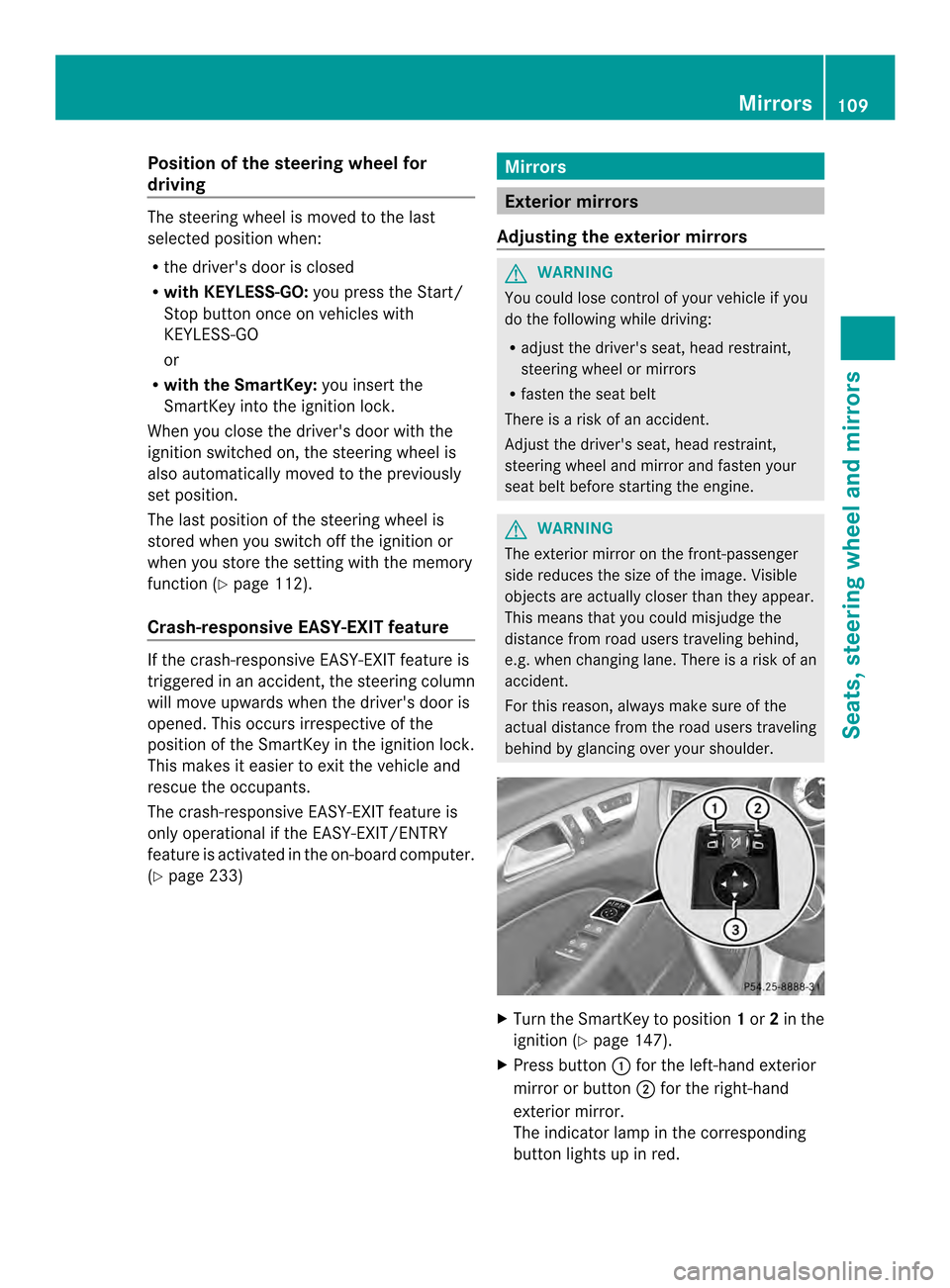
Turn the SmartKey to position 1or 2in the
ignition (Y page 147).
X Press button 001Afor the left-hand exterior
mirror or button 0010for the right-hand
exterior mirror.
The indicator lamp in the corresponding
button lights up in red. Mirrors
109Seats, steering wheel and mirrors Z
Page 114 of 382
X
Press memory button M0021 and one of the
arrows on adjustmen tbutton 0024within
three seconds.
The parking position is stored if the exterior
mirror does not move.
X If the exterior mirror moves out of position,
repeat the steps.
Calling up astored parking position
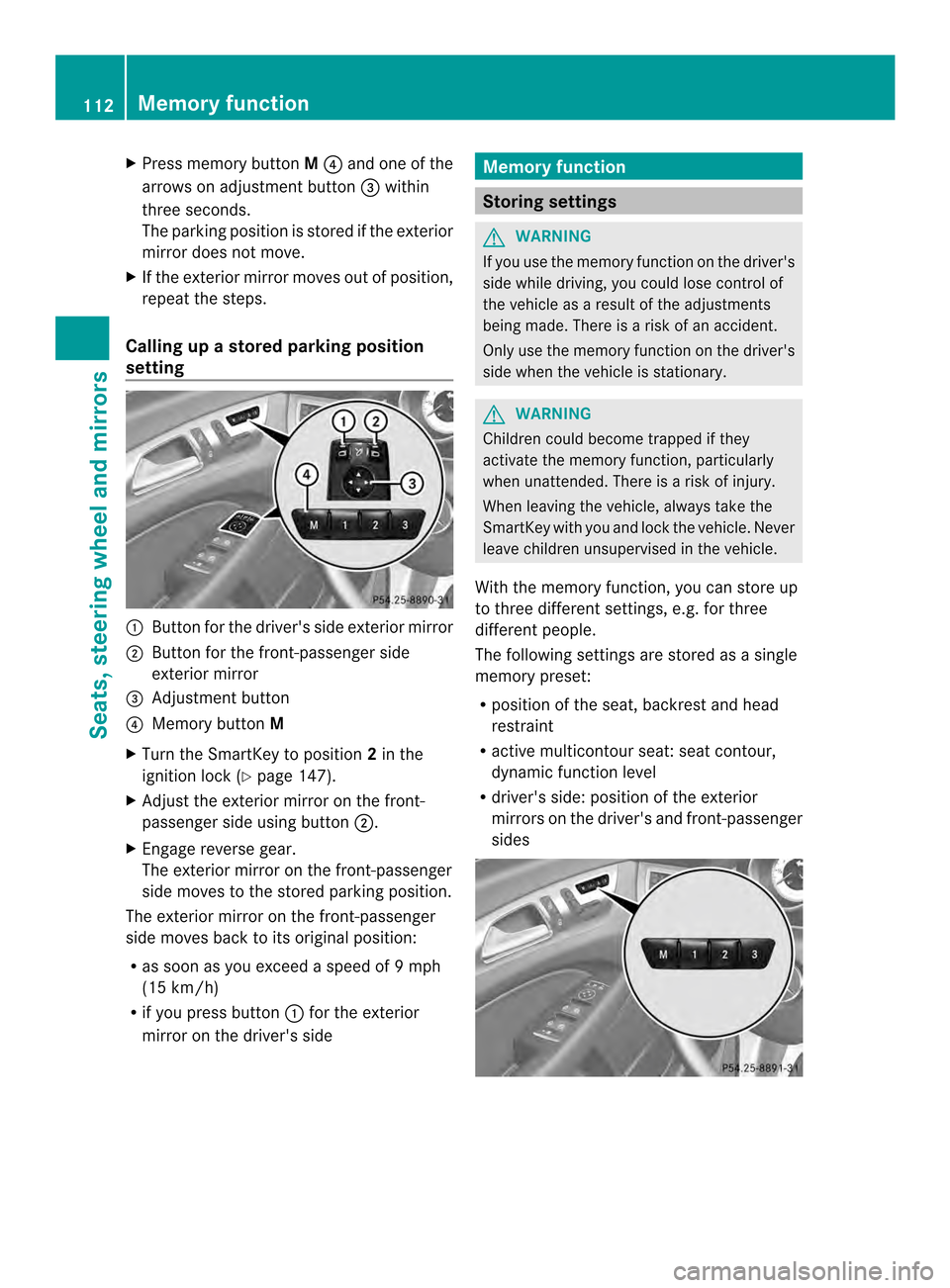
setting 001A
Button for the driver's side exterior mirror
0010 Button for the front-passenger side
exterior mirror
0024 Adjustmen tbutton
0021 Memory button M
X Turn the SmartKey to position 2in the
ignition lock (Y page 147).
X Adjust the exterior mirror on the front-
passenger side using button 0010.
X Engage reverse gear.
The exterior mirror on the front-passenger
side moves to the stored parking position.
The exterior mirror on the front-passenger
side moves back to its original position:
R as soon as you exceed aspeed of 9mph
(15 km/h)
R if you press button 001Afor the exterior
mirror on the driver' sside Memor
yfunction Storing settings
G
WARNING
If you use the memor yfunctio nonthe driver's
side while driving, you could lose control of
the vehicle as aresult of the adjustments
being made. There is arisk of an accident.
Only use the memory function on the driver's
side when the vehicle is stationary. G
WARNING
Children could become trapped if they
activate the memory function, particularly
when unattended. There is arisk of injury.
When leavin gthe vehicle, always tak ethe
SmartKey with you and lock the vehicle. Never
leave children unsupervised in the vehicle.
With the memory function ,you can store up
to three differen tsettings, e.g. for three
differen tpeople.
The following settings are stored as asingle
memory preset:
R position of the seat, backrest and head
restraint
R active multicontour seat: seat contour,
dynamic function level
R driver's side: position of the exterior
mirror sonthe driver's and front-passenger
sides 112
Memor
yfunctionSeats, steering wheel and mirrors
Page 119 of 382

The exterior lighting (except the parking/
standin
glamps) switches off automatically if
you:
R remove the SmartKey from the ignition lock
R open the driver's door with the SmartKey
in position 0.
Automatic headlam pmode G
WARNING
When the light switch is set to 000D,the low-
beam headlamps may not be switched on
automatically if there is fog, snow or other
causes of poor visibility due to the weather
conditions such as spray. There is arisk of an
accident.
In such situations, turn the light switch to
001D.
The automatic headlamp feature is only an
aid. The driver is responsible for the vehicle's
lighting at all times. 00010018
Left-hand standin glamps
0002000A Right-hand standin glamps
00030008 Parking lamps, license plate and
instrument cluster lighting
0005000D Automatic headlamp mode,
controlled by the light sensor
0019001D Low-beam/high-beam headlamps 000D
is the favored light switch setting. The
light setting is automatically selected
accordin gtothe brightness of the ambient
light (exception: poor visibility due to weather
conditions such as fog, snow or spray):
R SmartKey in position 1in the ignition lock:
the parking lamps are switched on or off
automatically depending on the brightness
of the ambient light.
R With the engine running: if you have
activated the daytime runnin glamps
function via the on-board computer ,the
daytime runnin glamps or the low-beam
headlamps and parking lamps are switched
on or off automatically depending on the
brightness of the ambient light.
X To switch on automatic headlamp
mode: turn the light switch to 000D.
Only for Canada:
The daytime runnin glamps improve the
visibility of your vehicle during the day. The
daytime runnin glamps function is required by
law in Canada. It cannot therefore be
deactivated.
When the engine is runnin gand the vehicle is
stationary: if you move the selector lever from
ad rive position to P,the daytime running
lamps/low-beam headlamps go out after
three minutes.
When the engine is running, the vehicle is
stationary and in high ambient light: if you
turn the light switch to 0008,the daytime
runnin glamps and parking lamps switch on.
If the engine is runnin gand you turn the light
switch to 001D,the manual settings take
precedenc eover the daytime runnin glamps.
USA only:
The daytime runnin glamps improve the
visibility of your vehicle during the day. To do
this, the daytime runnin glamps function must
be switched on using the on-board computer
(Y page 230).
If the engine is runnin gand you turn the light
switch to 0008or001D,t he manual settings Exterior lighting
117Lights and windshield wipers Z
Page 120 of 382

take precedence ove
rthe daytime running
lamps.
Low-beam headlamps G
WARNING
When the ligh tswitc hiss et to 000D,t helow-
beam headlamp smay not be switche don
automatically if there is fog, snow or other
causes of poor visibility due to th eweather
conditions such as spray. Ther eisarisk of an
accident.
In such situations, tur nthe light switch to
001D. 00010018
Left-hand standing lamps
0002000A Right-hand standing lamps
00030008 Parking lamps, license plate and
instrumentc luster lighting
0005000D Automatic headlamp mode,
controlled by the light sensor
0019001D Low-beam/high-beam headlamps
Even if the light sensor does not detect that
it is dark ,the parking lamps and low-beam
headlamps switc honwhen the ignition is
switched on and the light switc hisset to the
001D position. This is aparticularly useful
function in the even tofrain and fog.
X To switch on th elow-beam headlamps:
tur nthe SmartKey in the ignition lock to
position 2or start the engine.
X Turn the light switc hto001D.
The green 001Dindicator lamp in the
instrumen tcluster light sup. Parking lamps
!
If the battery has been excessively
discharged, the parking lamps or standing
lamps are automatically switched off to
enable the nex tengine start. Alway spark
your vehicl esafelya nd sufficiently lit
according to lega lstandards .Avoid the
continuou suse of the 0008parking lamps
for severa lhours .Ifpossible, switch on the
000A right or the 0018left standin glamp. 00010018
Left-hand standin glamps
0002000A Right-hand standin glamps
00030008 Parking lamps, license plate and
instrument cluster lighting
0005000D Automatic headlamp mode,
controlled by the light sensor
0019001D Low-beam/high-beam headlamps
X To switch on: turn the light switch to
0008.
The green 0008indicator lamp in the
instrument cluster lights up. 118
Exterior lightingLights and windshiel
dwipers
Page 122 of 382

The blue
0015indicator lamp in the
instrument cluster lights up when the high-
beam headlamps are switched on.
X To switch off the high-beam
headlamps: move the combination switch
back to its normal position.
The blue 0015indicator lamp in the
instrument cluster goes out.
i Vehicles with Adaptive Highbeam Assist:
when Adaptive Highbeam Assist is active,
it controls activation of the high-beam
headlamps (Y page 121).
High-beam flasher 001A
High-beam headlamps
0010 Turn signal, right
0024 High-beam flasher
0021 Turn signal, left
X To switch on: turn the SmartKey in the
ignition lock to position 1or 2,ors tart the
engine.
X Pull the combination switch in the direction
of arrow 0024. Hazard warning lamps
X
To switch on the hazard warning lamps:
press button 001A.
All turn signals flash. If you now switch on
at urn signal using the combination switch,
only the turn signal lamp on the
corresponding side of the vehicle will flash.
X To switch off the hazard warning
lamps: press button 001A.
The hazard warning lamps automatically
switch on if:
R an air bag is deployed
R the vehicle decelerates rapidly from a
speed of more than 45 mph (70 km/h) and
comes to astandstill
The hazard warning lamps switch off
automatically if the vehicle reaches aspeed
of over 6mph (10 km/h) again after afull
brake application.
i The hazard warning lamps still operate if
the ignition is switched off. Headlam
pcleaning system
The headlamps are cleaned automatically if
the "Wipe with washer fluid" function is
operated five times (Y page 125)while the
light sare on and the engin eisrunning. When
you switc hoff the ignition, the automatic
headlamp cleaning syste misreset and
counting is resumed from 0. 120
Exterior lightingLights and windshield wipers
Page 123 of 382
Cornering ligh
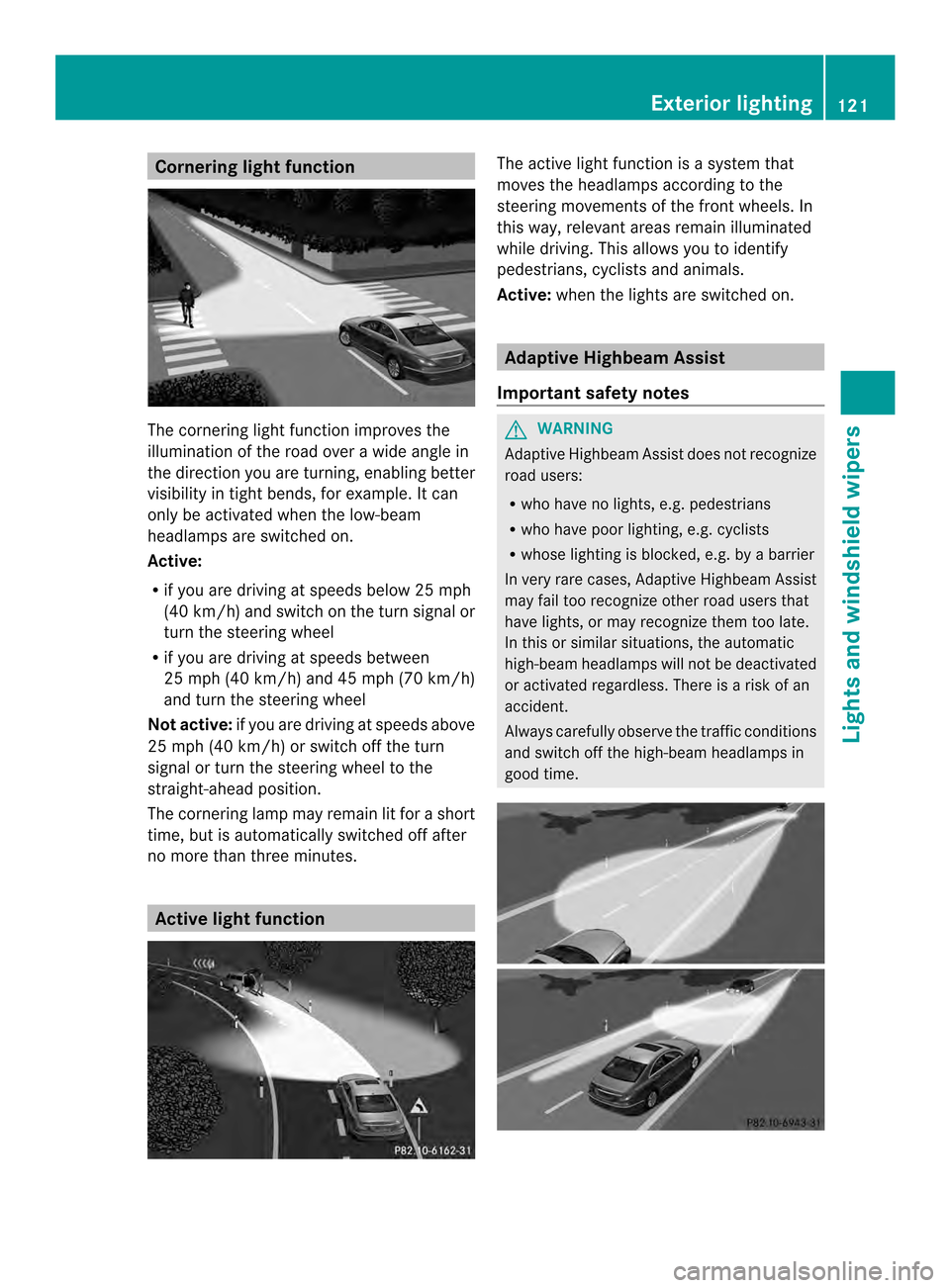
tfunction The cornering light function improves the
illumination of the road over awidea nglein
the direction you are turning, enabling better
visibility in tight bends, for example. It can
only be activated whe nthe low-beam
headlamps are switched on.
Active:
R if you are driving at speeds below 25 mph
(40 km/h )and switch on the turn signal or
turn the steering wheel
R if you are driving at speeds between
25 mph (40k m/h )and 45 mph (70k m/h)
and turn the steering wheel
Not active: if you are driving at speeds above
25 mph (40 km/h) or switch off the turn
signa lorturn the steering wheel to the
straight-ahead position.
The cornering lamp may remain lit for ashort
time, but is automatically switched off after
no more than three minutes. Active light function The active light function is
asystem that
moves the headlamps according to the
steering movements of the front wheels .In
this way, relevant area sremain illuminated
while driving. Thi sallow syou to identify
pedestrians, cyclists and animals.
Active: whenthe lights are switched on. Adaptive Highbeam Assist
Important safety notes G
WARNING
Adaptive Highbeam Assist does not recognize
road users:
R who have no lights, e.g. pedestrians
R who have poor lighting, e.g. cyclists
R whose lighting is blocked, e.g. by abarrier
In very rare cases, Adaptive Highbeam Assist
may fail too recognize other road users that
have lights, or may recognize them too late.
In this or similar situations, the automatic
high-beam headlamps will not be deactivated
or activated regardless. There is arisk of an
accident.
Always carefully observe the traffic conditions
and switch off the high-beam headlamps in
good time. Exterior lighting
121Lights and windshield wipers Z
Page 126 of 382
The interior lighting automatically switches
on if you:
R unlock the vehicle
R open adoor
R remove the SmartKey from the ignition lock
The interior light is activated for ashort while
when the SmartKey is removed from the
ignition lock. You can activat ethis delayed
switch-off using the on-board computer
(Y page 232).
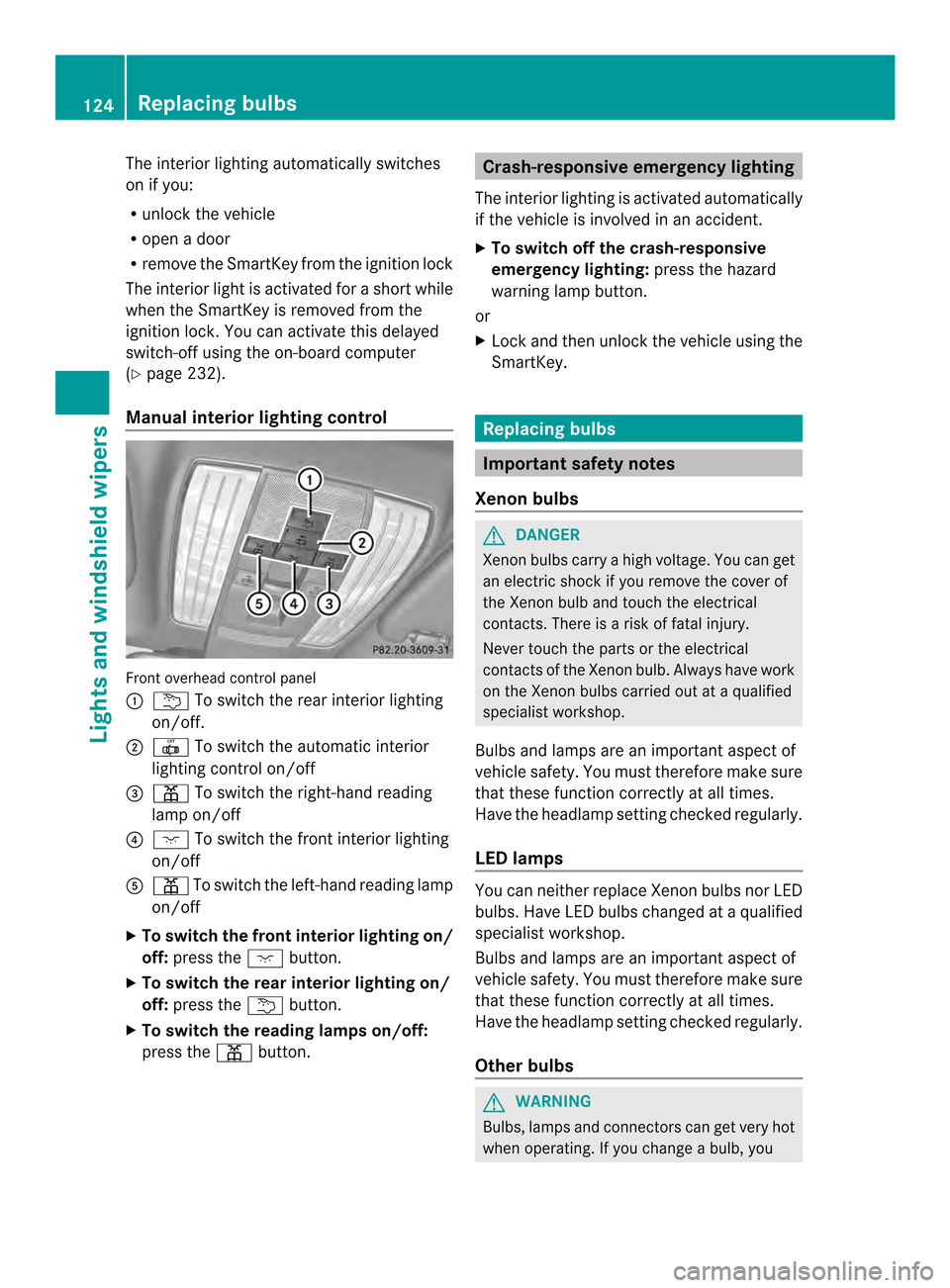
Manua linterior lighting control Fronto
verhead control panel
001A 001A To switch the rear interior lighting
on/off.
0010 001B To switch the automatic interior
lighting control on/off
0024 0007 To switch the right-hand reading
lamp on/off
0021 000D To switch the fronti nterior lighting
on/off
001E 0007 To switch the left-hand reading lamp
on/off
X To switch the front interior lighting on/
off: press the 000Dbutton.
X To switch the rear interior lighting on/
off: press the 001Abutton.
X To switch the reading lampso n/off:
press the 0007button. Crash-responsive emergency lighting
The interior lighting is activated automatically
if the vehicle is involved in an accident.
X To switch off the crash-responsive
emergency lighting: press the hazard
warning lamp button.
or
X Lock and then unlock the vehicle using the
SmartKey. Replacing bulbs
Important safety notes
Xenon bulbs G
DANGER
Xenon bulbs carry ahigh voltage. You can get
an electric shock if you remove the cover of
the Xenon bulb and touch the electrical
contacts. There is arisk of fatal injury.
Never touch the parts or the electrical
contacts of the Xenon bulb. Always have work
on the Xenon bulbs carried out at aqualified
specialist workshop.
Bulbs and lamps are an importan taspect of
vehicle safety. You must therefore make sure
that these function correctly at all times.
Have the headlamp setting checked regularly.
LED lamps You can neither replace Xenon bulbsn
or LED
bulbs. Have LED bulbsc hanged ataqualified
specialist workshop.
Bulbs and lamps are an important aspect of
vehicle safety. You must therefore make sure
that these function correctly at all times.
Have the headlamp setting checked regularly.
Other bulbs G
WARNING
Bulbs, lamps and connectors can get very hot
when operating. If you change abulb, you 124
Replacing bulbsLights and windshield wipers