clock MERCEDES-BENZ CLS-Class 2014 W218 Owner's Manual
[x] Cancel search | Manufacturer: MERCEDES-BENZ, Model Year: 2014, Model line: CLS-Class, Model: MERCEDES-BENZ CLS-Class 2014 W218Pages: 382, PDF Size: 5.36 MB
Page 86 of 382

You could therefore lock yourself out if:
R
the vehicle is being pushed.
R the vehicle is being towed.
R the vehicle is on aroller dynamometer.
You can also switc hthe automatic locking
function on and off using the on-board
computer (Y page 232). Unlocking th
edriver' sdoor
(mechanical key)
If the vehicle can no longer be unlocked with
the SmartKey, use the mechanical key.
X Take the mechanical key out of the
SmartKey (Y page 78).
X Insert the mechanical key int othe lock of
the driver's door as far as it will go. 0001
To unlock
X Turn the mechanical key counter-clockwise
to position 0001.
The door is unlocked.
X Turn the mechanical key back and remove
it.
X Insert the mechanical key int othe
SmartKey.
If you use the mechanical key to unloc kand
open the driver's door, the anti-thef talarm
system will be triggere d(Ypage 74). Locking th
evehicle (mechanical key)
If the vehicle can no longer be locked with the
SmartKey, use the mechanical key. X
Open the driver's door.
X Close the front-passenger door, the rear
doors and the trunk lid.
X Press the locking button (Y page 83).
X Check whether the locking knobs on the
front-passenger door and the rear doors
are still visible. Press down the locking
knobs manually, if necessary ( Ypage 82).
X Close the driver's door.
X Take the mechanical key out of the
SmartKey (Y page 78).
X Insert the mechanical key int othe lock of
the driver's door as far as it will go. 0001
To lock
X Turn the mechanical key clockwise as far
as it will go to position 0001.
X Turn the mechanical key back and remove
it.
X Make sure that the doors and the trunk lid
are locked.
X Insert the mechanical key int othe
SmartKey. Trunk
Important safety notes
G
WARNING
Combustion engines emit poisonous exhaust
gases such as carbon monoxide .Exhaust
gases can enter the vehicl einterio rifthe
trunk li disopenw hen the engine is running, 84
TrunkOpening and closing
Page 90 of 382

0001
Neutral position.
0002 To unlock
X Turn the mechanical key counter-clockwise
from position 0001as far as it willgoto
position 0002.
The trunk is unlocked.
X Turn the mechanical key back to position
0001 and remove it.
X Insert the mechanical key into the
SmartKey. Trunk emergencyr
elease
You can open th etrunk lid from inside the
vehicle with th eemergency releas ebutton. X
Pres semergency releas ebutton 001Abriefly.
The trunk lid unlock sand opens.
The trunk lid can be unlocked and opened
with th etrunk lid emergency releas ewhen
th ev ehicle is stationar yorwhile driving.
The trunk lid emergency releas edoes not
open th etrunk lid if th ebattery is
disconnecte dordischarged. Trun
klid emergency release light:
R emergency release button 001Aflashes for
30 minutes after the trunk lid is opened
R emergency release button 001Aflashes for
60 minutes after the trunk lid is closed Side windows
Important safety notes
G
WARNING
While opening the side windows ,body parts
could become trapped between the side
window and the door fram easthe side
window moves. There is arisk of injury.
Make sure that nobody touches the side
window durin gthe opening procedure. If
somebody becomes trapped, release the
switc horp ull the switc htoclosethe side
window again. G
WARNING
While opening the side windows ,body parts
in the closing area could become trapped.
There is arisk of injury.
Make sure that no body part sare in close
proximit ydurin gthe closing procedure. If
somebody becomes trapped, release the
switc horp ress the switc htoopen the side
window again. G
WARNING
If children operat ethe side windows they
could become trapped, particularly if the yare
left unsupervised. There is arisk of injury.
Activate the override feature for the rear side
windows .When leaving the vehicle, always
take the SmartKey with you and lock the
vehicle. Never leave children unsupervised in
the vehicle. Side window reversing feature
The side windows are equipped with an
automatic reversing feature. If asolid object 88
Side windowsOpening and closing
Page 127 of 382
could burn yoursel
fonthese components.
There is arisk of injury.
Allow these components to cool down before
changing abulb.
There are bulbs other than Xenon and LED
bulbs that you cannot replace. Replace only
the bulbs listed (Y page 125). Have the bulbs
that you cannot replace yourself changed at
aq ualified specialist workshop.
If you require assistance changing bulbs,
consult aqualified specialist workshop.
Do not touch the glass tube of new bulbs with
your bare hands. Even minor contamination
can burn into the glass surface and reduce
the service life of the bulbs. Always use alint-
free cloth or only touch the base of the bulb
when installing.
Only use bulbs of the correct type.
If the new bulb still does not light up, consult
aq ualified specialist workshop.
Bulbs and lamps are an important aspect of
vehicle safety. You must therefore make sure
that these function correctly at all times.
Have the headlamp settingc hecked regularly.Overview: changing bulbs/bulb types
You can change the following bulbs. The bulb
type can be found in the legend. Tail lamp
001A
Backup lamp: W16W Changing the rear bulbs
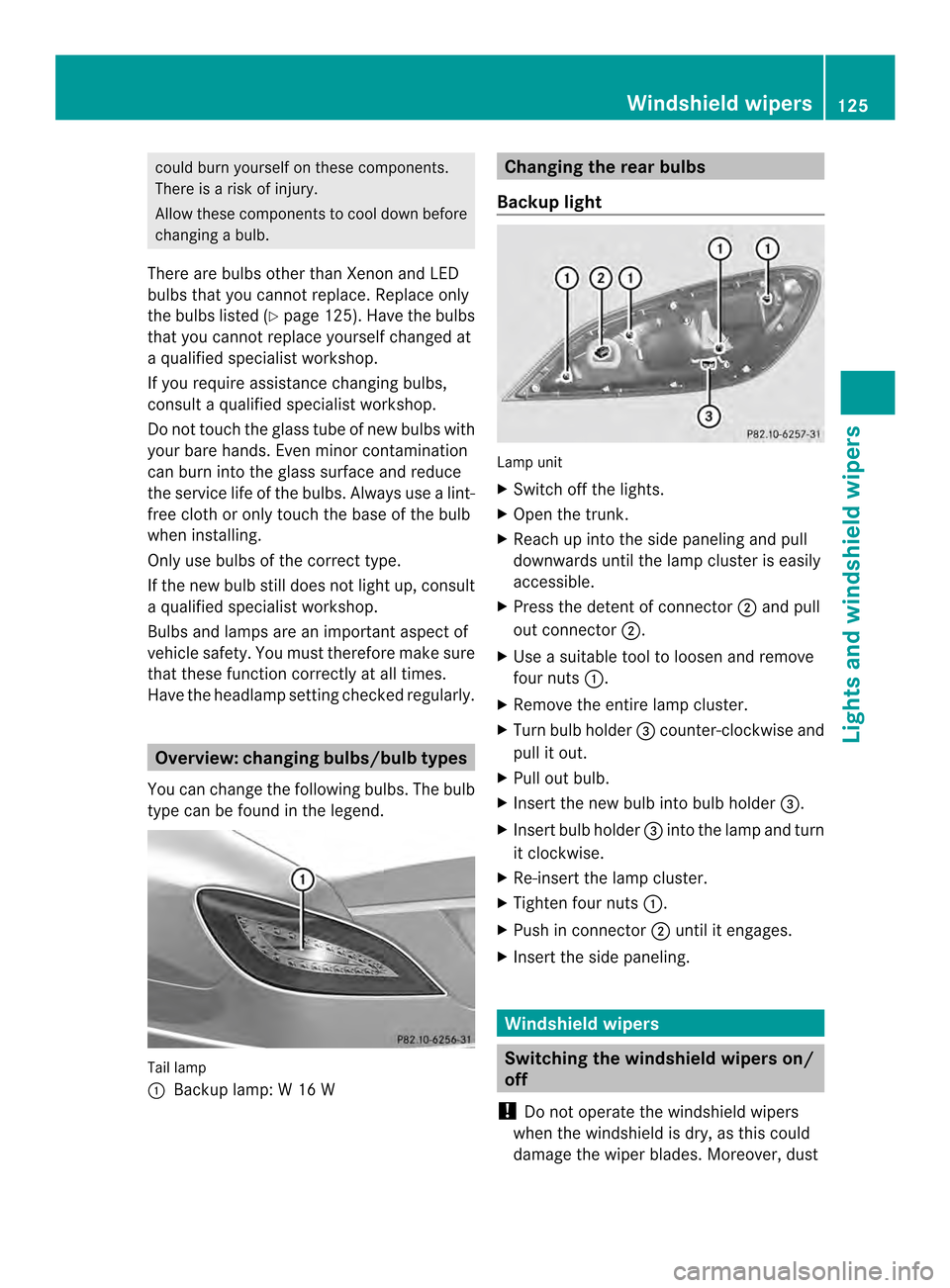
Backup light Lamp unit
X
Switch off the lights.
X Open the trunk.
X Reach up into the side paneling and pull
downwards until the lamp cluster is easily
accessible.
X Press the detent of connector 0010and pull
out connector 0010.
X Use asuitable tool to loosen and remove
four nuts 001A.
X Remove the entire lamp cluster.
X Turn bulb holder 0024counter-clockwise and
pull it out.
X Pull out bulb.
X Insert the new bulb into bulb holder 0024.
X Insert bulb holder 0024into the lamp and turn
it clockwise.
X Re-insert the lamp cluster.
X Tighten four nuts 001A.
X Push in connector 0010until it engages.
X Insert the side paneling. Windshield wipers
Switching the windshield wipers
on/
off
! Do not operat ethe windshield wipers
when the windshield is dry, as this could
damage the wiper blades. Moreover, dust Windshield wipers
125Lights and windshield wipers Z
Page 140 of 382

Setting the temperature
Dual-zone automatic climate control Differen
ttemperatures can be set for the
driver's and front-passenger sides.
X Turn the SmartKey to position 2in the
ignition lock (Y page 147).
X To increase/reduce: turn temperature
control 001Aor0025 clockwise or counter-
clockwise (Y page 131).
Only change the temperature settingin
small increments. Start at 72 ‡(22 †).
3-zone automatic climate control Automatic climate control zones
You can select different temperature settings
for the driver's and front-passenger sides as
well as for the rear compartment.
X Turn the SmartKey to position 2in the
ignition lock (Y page 147).
X To increase/reduce the temperature in
the front compartment: turn temperature
control 001Aor0025 clockwise or counter-
clockwise (Y page 134).
Only change the temperature settingin
small increments. Start at 72 ‡(22 †).
X To increase/reduce the temperature in
the rear compartment using the front
control panel: press the0010button.
The indicator lamp in the 0010button goes
out.
X Turn temperature control 001Aclockwise or
counter-clockwise (Y page 134). Only change the temperature settingin
small increments. Start at 72
‡(22 †).
The temperature settingf or the driver's
side is adopted for the rear compartment
and the front-passenger side.
X To increase/reduce the temperature in
the rear compartment using the rear
control panel: press the0003or0002
button on the rear control panel.
Only change the temperature settingin
small increments. Start at 72 ‡(22 †). Setting the air distribution
Air distribution settings 000E
Directsa ir through the center and side
air vents
001A Directsa ir through the footwell air
vents
0012 Directsa ir through the center, side and
footwell vents
0001 Directsa ir through the defroster vents
001B Directst he airflow through the
defroster, center and side air vents
(Canada only)
0015 Directsa ir through the defroster and
footwell vents
000F Directst he airflow through the
defroster, center and side air vents, as
well as the footwell air vents( Canada
only)
i Regardless of the air distribution setting,
airflow is always directed through the side
air vents. The side air ventsc an only be
closed when the controls on the side air
ventsa re turned downwards.
Setting the air distribution X
Turn the SmartKey to position 2in the
ignition lock (Y page 147).
X Press the 000Fbutton repeatedly until the
desired symbol appears in the display. 138
Operating the climate control systemsClimate control
Page 141 of 382
Setting the airflow
X Turn the SmartKey to position 2in the
ignition lock (Y page 147).
X To increase: press the000Bbutton.
X To reduce: press the0004button.
i You can use 3-zone automatic climate
control to set the airflow in the rear
compartmen tseparately.
If the batter yisnot sufficiently charged,
blower output may be reduced. As soon as
the batter yissufficiently charged, full blower
output will be available. Switching the ZONE function on/off
X To activate: press the0010button.
The indicator lamp above the 0010button
lights up.
Dual-zone automatic climate control: the
temperature setting for the driver's side is
not adopted for the front-passenger side.
3-zone automatic climate control: the
temperature setting for the driver's side is
not adopted for the front-passenger side
and the rear compartment.
X To deactivate: press the0010button.
The indicator lamp above the 0010button
goes out.
Dual-zone automatic climate control: the
temperature setting for the driver's side is
adopted for the front-passenger side.
3-zone automatic climate control: the
temperature setting for the driver's side is
adopted for the front-passenger side and
the rear compartment. Defrosting the windshield
You can use this function to defrost the
windshield or to defrost the inside of the
windshield and the side windows. Switc
hoff the "Windshield defrosting"
function as soon as the windshield is clear
again.
X Turn the SmartKey to position 2in the
ignition lock (Y page 147).
X To activate: press the0013button.
The indicator lamp in the 0013button lights
up.
The climate control system switches to the
following functions:
R high airflow
R high temperature
R air distribution to the windshield and
fron tside windows
R air-recirculation mode off
If the battery is not sufficiently charged,
blower output may be reduced. Onc ethe
battery is sufficiently charged again, full
blower output will be available again.
X To deactivate: press the0013button.
The indicator lamp in the 0013button goes
out. The previously selected settings are
restored. Air-recirculation mode remains
deactivated.
or
X Press the 000Dbutton.
The indicator lamp in the 0013button goes
out. Airflow and air distribution are set to
automatic mode.
or
X Dual-zon eautomatic climate control: turn
temperature controls 001Aor0025 clockwise
or counter-clockwise (Y page 131).
3-zon eautomatic climate control: turn
temperature controls 001Aor0025 clockwise
or counter-clockwise (Y page 134).
or
X Press the 000Bor0004 button. MAX COOL maximum cooling
The MAX COOL function is only available in
vehicles for the USA. Operating thec
limate control systems
139Climate control
Page 145 of 382

dehumidification" function
.Otherwise,
temperature-sensitive items stored in the
glove bo xcould be damaged. 001A
Air vent thumbwheel
0010 Air vent
When automatic climate control is activated,
the glove box can be ventilated, for instance
to cool its contents.T he level of airflow
depends on the airflow and air distribution
settings.
X To open/close: turn thumbwheel 001A
clockwise or counter-clockwise. Setting the rear-compartment air
vents
Setting the center vents in the rear
compartment 001A
Rear-compartment air vent thumbwheel
0010 Rear-compartment air vent,r ight0024
Rear control panel, only for Canada with
3-zone automatic climate control
0021 Rear-compartment air vent,l eft
X To open/close: turn thumbwheel 001Aup or
down. Setting the air vents
143Climatecontrol Z
Page 167 of 382

!
Do not use diesel to refuel vehicles with a
gasoline engine. Do not switch on the
ignition if you accidentally refuel with the
wrong fuel. Otherwise, the fuel will enter
the fuel system. Even small amounts of the
wrong fuel could result in damage to the
fuel system and the engine. The repair
costs are high. Notify aqualified specialist
worksho pand have th efuel tan kand fuel
lines draine dcompletely.
! Overfilling the fuel tank could damage the
fuel system.
! Take car enot to spill any fuel on painted
surfaces .You could otherwise damage the
paintwork.
! Use afilter when refueling from afuel can.
Otherwise, the fuel lines and/or injection
system could be blocked by particles from
the fuel can.
Do not get into the vehicle again during the
refueling process. Otherwise, electrostatic
charge could build up again.
If you overfill the fuel tank,f uel could spray
out when the fuel pump nozzle is removed.
For further information on fuel and fuel quality
(Y page 374). Refueling
Opening/closing the fuel filler flap 001A
To open the fuel filler flap
0010 To insert the fuel filler cap 0024
Tire pressure table
0021 Fuel type to be used
The fuel filler flap is unlocked or locked
automatically when you open or close the
vehicle with the SmartKey or with KEYLESS-
GO.
The position of the fuel filler cap is displayed
0007 in the instrument cluster. The arrow
next to the filling pump indicates the side of
the vehicle.
Opening the fuel filler flap 001A
To open the fuel filler flap
0010 To insert the fuel filler cap
0024 Tire pressure table
0021 Fuel type to be used
X Switch the engine off.
X Remove the SmartKey from the ignition
lock.
X KEYLESS-GO: open the driver’s door.
This corresponds to key position 0:"key
removed".
The driver’s door can be closed again.
X Press the fuel filler flap in the direction of
arrow 001A.
The fuel filler flap opens slightly.
X Open the fuel filler flap fully.
X Turn the fuel filler flap counter-clockwise
and remove it. Refueling
165Driving and parking Z
Page 168 of 382

X
insert the fuel filler cap int othe holder on
the insid eoffuel filler flap 0010.
X Completely insert the filler nec kofthe fuel
pump nozzle into the tank,h ook in place
and refuel.
X Only fill the tank until the pump nozzle
switches off.
i Do not add any more fuel after the pump
stops filling for the first time. Otherwise,
fuel may leak out.
Closing the fuel filler flap X
Replace the cap on the filler neck and turn
clockwise until it engages audibly.
X Close the fuel filler flap.
i Close the fuel filler flap before locking the
vehicle. Otherwise, the locking pin of the
central locking prevents the fuel filler flap
from closing.
i If you are driving with the fuel filler cap
open, the 0007reserve fuel warning lamp
flashes. Amessage appears in the
multifunction display (Y page 251).
In addition, the 000ACheck Engine warning
lamp may light up (Y page 273).
For further information on warning and
indicator lamps in the instrument cluster,
see (Y page 273). Fuel filler flap emergency release
X
open the trun klid.
X Slide down the parcel net. X
Open the right-han dside trim panel.
X Remove the first-aid kit (Y page 320).
X Detach the emergenc yrelease from
retainer 001A.
X Pull the emergency release in the direction
of arrow 0010.
The fuel filler flap is unlocked.
X Open the fuel filler flap. 166
RefuelingDriving and parking
Page 190 of 382
RAC
ESTART
Important safety notes i
Observe the safety notes for the SPORT
handling mod e(Ypage 70).
RAC ESTART is intended solely for activation
on dedicated race circuits.
RACE START enables optimal acceleration
from astandin gstart .The precondition for
this is asuitable high-grip road surface.
i RACE START is only available in AMG
vehicles.
Conditions for activation You can activat
eRACE START if:
R the doors are closed.
R the engine is runnin gand it has reached an
operating temperature of approximately
176 ‡(80 †). This is the case when the
engine oil temperature in the multifunction
display stops flashing.
R SPORT handling mode is activated.
(Y page 70)
R the steerin gwheel is in the straight-ahead
position
R the vehicle is stationary and the brake
pedal is depressed (left foot).
R the transmission is in position D.
Activating RACE START X
Depress the brake pedal with your left foot
and keep it depressed.
X Turn the drive program selector clockwise
(Y page 159) until the RSlamp lights up.
The RACE START Confirm: Paddle UP Cancel: Paddle DOWN message appears
in the multifunction display.
i If the activation conditions are no longer
fulfilled, RACE START is canceled. The
START Canceled message appears in the
multifunction display. X
To cancel: pull the left steerin gwheel
paddle shifter (Y page 160).
or
X To confirm: pull the right steerin gwheel
paddle shifter (Y page 160).
The RACE START Available Depress gas pedal message appears in the
multifunction display.
i If you do not depress the accelerator
pedal fully within two seconds, RACE
START is canceled. The RACE START Not Possible See Operator's Manual
message appears in the multifunction
display.
X Fully depress the accelerator pedal.
The engine speed rises to approximately
3,500 rpm.
The RACE START Release brake to start message appears in the
multifunction display.
i If you do not release the brake pedal
within five seconds, RACE START is
canceled. The RACE START Canceled message appears in the multifunction
display.
X Take your foot off the brake, but keep the
accelerator pedal depressed.
The vehicle pulls away at maximum
acceleration.
The RACE START Active message appears
in the multifunction display.
RACE START is deactivated when the vehicle
reaches aspeed of approximately 30 mph
(Canada: 50 km/h) .Drive program S+is
activated. SPORT handling mode remains
activated.
RACE START is deactivated immediately if
you release the accelerator pedal during
RACE START or if any of the activation
conditions are no longer fulfilled. The RACE START Not Possible See Operator's
Manual message appears in the multifunction
display.
i If RACE START is used repeatedly within
as hort period of time, it is only available 188
Driving systemsDriving and parking
Page 281 of 382

R
Alway sstor eo bjects so tha tthey cannot be
flung around in these or in similar
situations.
R Always make sure that objectsdon ot
protrude from stowage compartments,
parcel nets or stowage nets.
R Close lockable stowage compartments
while driving.
R Stow and secure objectst hat are heavy,
hard, pointy, sharp-edged, fragile or too
large in the trunk.
Observe the loading guidelines (Y page 278).
Glove box X
To open: pull handle 001Aand open glove box
flap 0010.
X To close: fold glove box flap 0010upwards
until it engages.
i The glove box can be ventilated
(Y page 142). The glove box can only be locked and
unlocked using the mechanical key. X
To lock: insert the mechanical key into the
lock and turn it 90° clockwise to position
0002.
X To unlock: insert the mechanical key into
the lock and turn it 90° counter-clockwise
to position 0001.
Eyeglassesc ompartment There is
acompartmen ttostow eyeglasses
in the headliner on the driver's side.
X To open: pull down eyeglasses
compartment 001Aby the handle.
Stowage compartments in the front
center console All models except AMG vehicles
X
To open: slide the cover forwards by
handle 001Ain the direction of the arrow until
it engages.
X To close: briefly press the front of
handle 001A. Stowage areas
279Stowage and features Z