reset MERCEDES-BENZ CLS-Class 2016 W218 Comand Manual
[x] Cancel search | Manufacturer: MERCEDES-BENZ, Model Year: 2016, Model line: CLS-Class, Model: MERCEDES-BENZ CLS-Class 2016 W218Pages: 246, PDF Size: 6.72 MB
Page 60 of 246
XTo selectReset: turn and press the con-
troller.
XTo select a seat: slide 1the controller.
XTo reset: press the controller.
A prompt appears.
XTo select YesorNo: turn and press the con-
troller.
If you select No
the process is canceled.
After selecting Yes
all seat adjustments are
reset to the default values (factory setting).
360° camera
General notes
The 360° camera surveys the vehicle sur-
roundings and assists you, for example when
parking or at exits with reduced visibility.
The 360° camera is only an aid. It is not a
replacement for your attention to your imme-
diate surroundings. You are always responsi-
ble for safe maneuvering and parking. Make
sure that no persons or animals are in the
maneuvering range.
Further information on the 360°camera can
be found in the vehicle Operator's Manual.
Displaying the 360° camera image
The 360° camera image can be displayed if:
Ryour vehicle is equipped with a 360° cam-
era
Rthe 360° Camerafunction is activated;
(see the vehicle Operator's Manual)
XPress the Øbutton on the COMAND
control panel.
or
XPress Vehiclein the main function bar.
The vehicle menu is displayed.
XSelect 360° Camera.
The 360° camera image appears in split-
screen mode. You will see the previous view on the display
if, when the function is switched on:
Ryou turn the SmartKey to position
1in the
ignition lock
Ryou select transmission position P
Rwhen you are driving at moderate speeds
Switching the display off manually
XTo select &: slide 6and press the con-
troller.
Switching the display on automatically
XYou can automatically switch the 360 cam-
era display using reverse gear
(
Ypage 58).
Switching the 360° camera auto-
matic mode on/off
This function activates the 360° camera
when reverse gear is engaged.
XPress the Øbutton on the COMAND
control panel.
or
XPress Vehiclein the main function bar.
The vehicle menu is displayed.
XTo switch to the menu bar: slide6the
controller.
XTo select System Settings: turn and
press the controller.
XTo select 360°Camera: turn and press the
controller.
The 360° Camera
menu appears.
XSelect Activation by R gear.
The function is switched on Oor off ª,
depending on the previous status.
Opening the camera cover for clean-
ing
XTo select OpenCameraCoverin the 360°
camera menu: turn the controller and press
to confirm.
The Please
Wait...message appears for
approximately three seconds.
58360° camera
Vehicle functions
Page 122 of 246

Using call lists
XTo call up the telephone menu: press the
%button.
XTo switch to the menu bar: slide 6the
controller.
XTo select Call Lists: turn and press the
controller.
XTo select Calls ReceivedorCalls
Dialed: turn and press the controller.
The relevant list is displayed.
XTo select an entry and make a call: turn and
press the controller.
Further information about ending a call
(
Ypage 123).
Using the phone book
XTo call up the telephone menu: press the
% button.
XTo select Namein the telephone menu: turn
and press the controller.
XSearch for and call a contact (Ypage 124).
Further information about ending a call
(
Ypage 123).
Using speed dial
Option 1
XTo call up the telephone menu: press the
% button.
XTo highlight a number from the character
bar: turn the controller.
XPress the controller for longer than two
seconds.
The telephone menu displays the selected
entry. The number is dialed.
Option 2
XTo call up the telephone menu: press the
% button.
XTo switch to the menu bar: slide 6the
controller.
XTo select Call Lists: turn and press the
controller.
XTo select Speed Dial Preset List: turn
and press the controller.
The speed dial list is displayed.
XTo select an entry and make a call: turn and
press the controller.
The telephone menu displays the selected
entry. The number is dialed.
Further information on setting up speed dial
(
Ypage 137).
Further information about ending a call
(
Ypage 123).
Functions available during a call
Overview
:To add a call (Ypage 121)
;Person you are calling
=Symbol for active telephone connection
?To end a call
ATo switch the microphone on/off
(
Ypage 121)
BTo send DTMF tones (not possible with all
mobile phones) (
Ypage 121)
Other functions:
RAccepting a waiting call (Ypage 122)
RMaking a second call (Ypage 121)
RCall waiting (Ypage 121)
Availability depends on the network (only pos-
sible in the GSM network) and on the Blue-
tooth
®mobile phone.
120Using the telephone
Telephone
Page 130 of 246
iThe address book can store a total of
5000 contacts.
R2000 entries are reserved for perma-
nently saved contacts.
R3000 entries are reserved for contacts
that you can load from the mobile phone.
iBefore selling your vehicle, delete the
contacts saved in COMAND using the reset function (
Ypage 51).
Calling up the address book
XTo call up the telephone menu: press the
% button.
XTo switch to the menu bar: slide 5the
controller.
XTo select Tel: turn the controller and press
to confirm.
XTo select Address Book: turn and press
the controller.
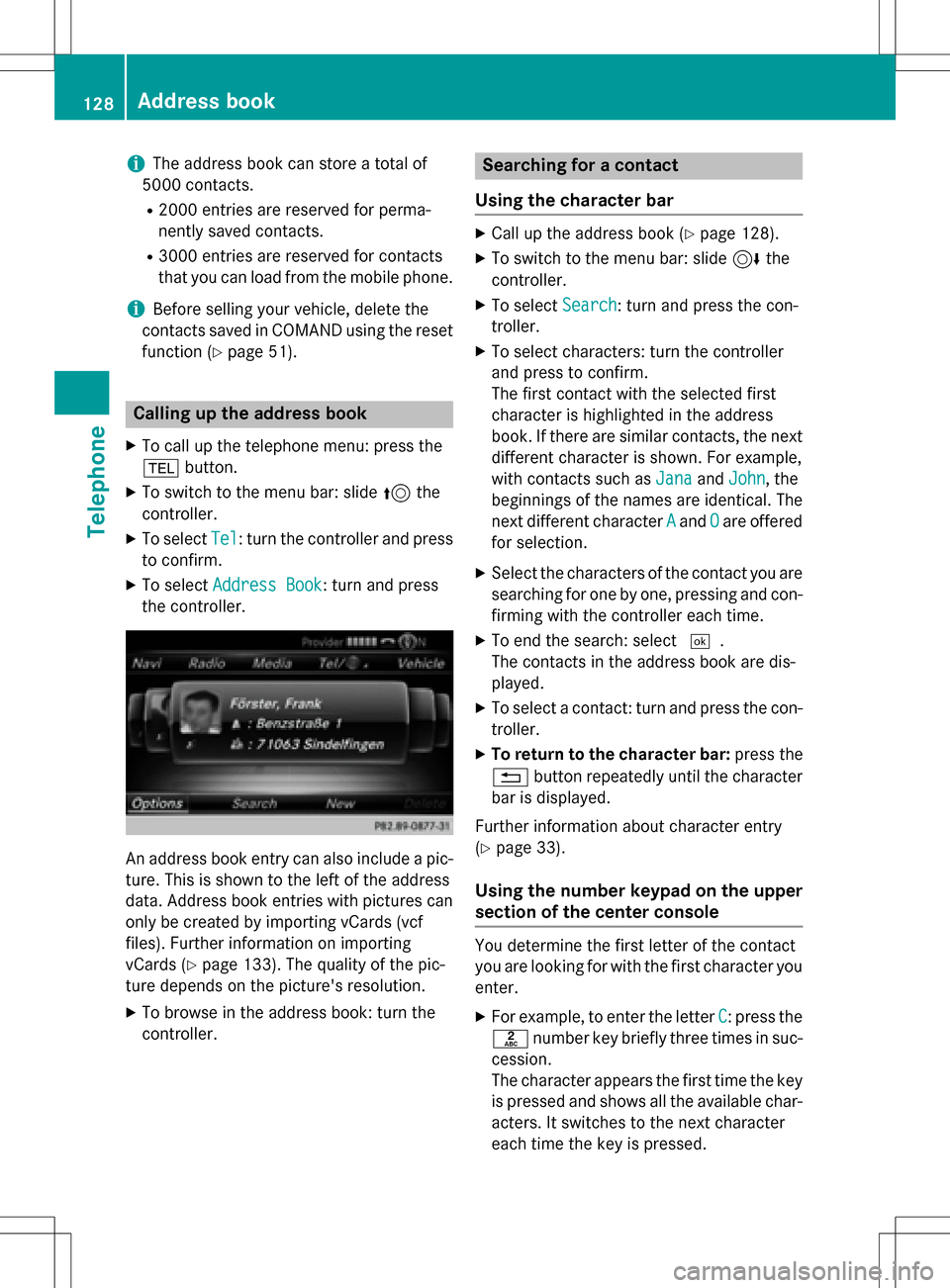
An address book entry can also include a pic-
ture. This is shown to the left of the address
data. Address book entries with pictures can
only be created by importing vCards (vcf
files). Further information on importing
vCards (
Ypage 133). The quality of the pic-
ture depends on the picture's resolution.
XTo browse in the address book: turn the
controller.
Searching for a contact
Using the character bar
XCall up the address book (Ypage 128).
XTo switch to the menu bar: slide 6the
controller.
XTo select Search: turn and press the con-
troller.
XTo select characters: turn the controller
and press to confirm.
The first contact with the selected first
character is highlighted in the address
book. If there are similar contacts, the next
different character is shown. For example,
with contacts such as Jana
andJohn, the
beginnings of the names are identical. The
next different character A
andOare offered
for selection.
XSelect the characters of the contact you are
searching for one by one, pressing and con- firming with the controller each time.
XTo end the search: select ¬.
The contacts in the address book are dis-
played.
XTo select a contact: turn and press the con-
troller.
XTo return to the character bar: press the
% button repeatedly until the character
bar is displayed.
Further information about character entry
(
Ypage 33).
Using the number keypad on the upper
section of the center console
You determine the first letter of the contact
you are looking for with the first character you
enter.
XFor example, to enter the letter C: press the
l number key briefly three times in suc-
cession.
The character appears the first time the key
is pressed and shows all the available char-
acters. It switches to the next character
each time the key is pressed.
128Address book
Telephone
Page 133 of 246

Displaying sub-entry information
XCall up theaddress boo k (Ypage 128).
XSelectan entry: turn and press th econtrol-
ler .
The details fo rth econtact are displayed .
XTo highlight thedesire dentry: turn th econ-
troller.
XTo selec tG: slide9 thecontroller .
XTo selectDetail s:turn and press th econ-
troller.
The display is shown in full .
XTo close thedetailed display :press th e
% button.
Editing acontact
XCall up th eaddress boo k (Ypage 128).
XTo select acontact :turn and press th econ-
troller.
The details fo rth econtact are displayed .
XTo highlight thedesire dentry: turn th econ-
troller.
XTo selec tG: slide9 thecontroller .
XTo selectEdi t:turn and press th econtrol-
ler .
The entr yfield fo rth eselecte dentr yis dis -
played .
Further information about characte rentr y
(
Ypage 33).
Changin gth ecategor yof an entry
XCall up th eaddress boo k (Ypage 128).
XSelectan entry: turn and press th econtrol-
ler .
The details fo rth econtact are displayed .
XTo highlight thedesire dentry: turn th econ-
troller.
XTo selec tG: slide9 thecontroller .
XTo selectChange Category:turn and
press th econtroller .
XTo select acategory: turn th econtroller and
press to confirm .
Storing thephone number as aspeed
dial number
XCall up th eaddress boo k (Ypage 128).
XSelectan entry: turn and press th econtrol-
ler .
The details fo rth econtact are displayed .
XTo highlight thedesire dtelephon enumber :
turn th econtroller .
XTo selectG: slide9 thecontroller .
XTo selectSpeed Dia l:turn and press th e
controller .
XTo selectAssign Speed Dia lPreset:
turn and press th econtroller .
XTo select amemor yposition fo rth espeed
dial: turn and press th econtroller .
The phone number has been saved as a
speed dial.
Voice tags
Introduction
You can ente rvoic etags via th eVoice Control
Syste m(se eth eseparat eoperatin ginstruc -
tions). Once you hav eassigned avoic eta gto
an address boo kentry, you can cal lup this
entr ywit h a voic ecommand and dial aphone
number ,fo rexample. You can add on evoic e
ta gper address boo kentry.
Address book13 1
Telephone
Z
Page 139 of 246

XSelectContinue.
The address book is displayed.
XSearch for the desired contact and high-
light (
Ypage 128).
XTo save a telephone number: press the con-
troller.
A maximum of five telephone numbers can
be saved for one contact.
If five numbers are already stored for the con-
tact you are searching for, a prompt will
appear asking whether you wish to overwrite
one of the existing numbers.
If you wish to overwrite one of the phone
numbers:
XTo select Yes: turn and press the controller.
A list of the existing five phone numbers is
displayed.
XTo select the phone number to be overwrit-
ten from the list: turn the controller and
press to confirm.
The entry is overwritten with the new tele-
phone number.
If you do not wish to overwrite any of the
phone numbers:
XTo select No: turn and press the controller.
The process is canceled.
Speed dial lists
Setting up
XTo call up the telephone menu: press the
% button.
XTo call up the menu bar: slide 6the con-
troller.
XTo select Call Lists: turn and press the
controller.
XSelect Speed Dial Preset List.
The speed dial list is displayed.
XTo highlight a memory position for the
speed dial: turn the controller.
If you highlight an entry that already exists
in the speed dial list, this is overwritten with
the new entry.
XTo select G: slide 9the controller.
XSelect Assign Speed Dial Preset.
The phone book is displayed.
XSearch for a contact (Ypage 124).
XTo select a contact: turn and press the con-
troller.
The phone number has been saved as a
speed dial.
Deleting
Deleting a speed dial preset
XTo call up the telephone menu: press the
% button.
XTo call up the menu bar: slide 6the con-
troller.
XTo select Call Lists: turn and press the
controller.
XSelect Speed Dial Preset List.
The speed dial list is displayed.
XTo highlight the memory position you want
to delete: turn the controller.
XTo select G: slide 9the controller.
XTo select Delete Speed Dial Preset:
turn and press the controller.
XTo select Yes: turn and press the controller.
The speed dial preset has been deleted.
or
XTo select No: turn and press the controller.
The process is canceled.
Deleting all speed dial presets
XTo call up the telephone menu: press the
% button.
XTo call up the menu bar: slide 6the con-
troller.
XTo select Call Lists: turn and press the
controller.
XSelect Speed Dial Preset List.
The speed dial list is displayed.
Speed dial lists137
Telephone
Z
Page 161 of 246

Closing Mercedes-Benz Apps
XPress the%button.
The Internet menu appears.
or
XPress the %button for longer than two
seconds.
The Mercedes-Benz Apps menu or the
Internet menu appears.
Resetting adjustments
With the reset function, all Mercedes-Benz
Apps settings are reset to the factory set-
tings.
XTo call up the telephone menu: press the
% button.
XTo switch to the main function bar: slide
5the controller.
XTo select TEL/®: press the controller.
XTo selectInternet: turn and press the
controller.
The menu with the Internet functions is dis-
played.
XTo select Mercedes-Benz Apps: turn and
press the controller.
The available Mercedes-Benz Apps
are
displayed.
XTo select G: slide 9the controller.
XTo select Reset: turn and press the con-
troller.
A prompt appears asking whether you
really wish to reset.
XTo select Yes: turn and press the controller.
The settings are reset.
or
XTo select No: turn and press the controller.
The process is canceled.
Web browser
Calling up a website
Function restrictions
Internet pages cannot be shown while the
vehicle is in motion.
Entering a web address
XTo call up the telephone menu: press the
% button.
XTo switch to the main function bar: slide
5the controller.
XTo select TEL/®: press the controller.
XTo selectInternet: turn and press the
controller.
The menu with the Internet functions is dis-
played.
XTo select www: turn and press the controller.
An input menu for the web address is dis-
played.
XEnter characters using the controller or the
number keypad.
XTo finish entry and call up a website: select
¬.
Selecting a web address from the list
XWhen the character bar is displayed, slide
5 the controller.
XTo select the desired web address: turn and
press the controller.
The web address can still be changed as
desired.
XTo call up a website: select ¬.
The website is called up.
Web browser159
Online and Internet functions
Z
Page 168 of 246
Your COMANDequipment
i
These operatin ginstruction sdescribe all
th estandar dan doptional equipmen tof
your COMAN Dsystem, as available at th e
time of going to print .Country-specifi cdif -
ference sare possible. Bear in min dthat
your vehicle may no tfeature all function s
described here. Thi salso applies to safety-
relevant systems an dfunctions.
iRead th einformation on qualified special-
ist workshop sin th evehicle Operator's
Manual.
Switchin gon th eradi o
XPress th e$ button.
The radio display appears .You will hear th e
last station playe don th elast waveban d
selected.
Switching HD Radi oon/of f
XIn radio mode: slid e6 thecontroller .
XSelectOption s.
XBy selecting Oorª befor eHDRadi o,you
determin ewhether HD radio is switched on
or off.
If HD radio is switched off, th esyste mdoe s
no tswitch to digita lradio an dit is no tpossible
to selec tan ysub-channels.
iHD Radio ™Technology Manufactured
Under License From iBiquit yDigital Corp.
U.S. an dForeign Patents .The HD an dHD
Radio logos are proprietary trademark sof
iBiquit yDigital Corp.
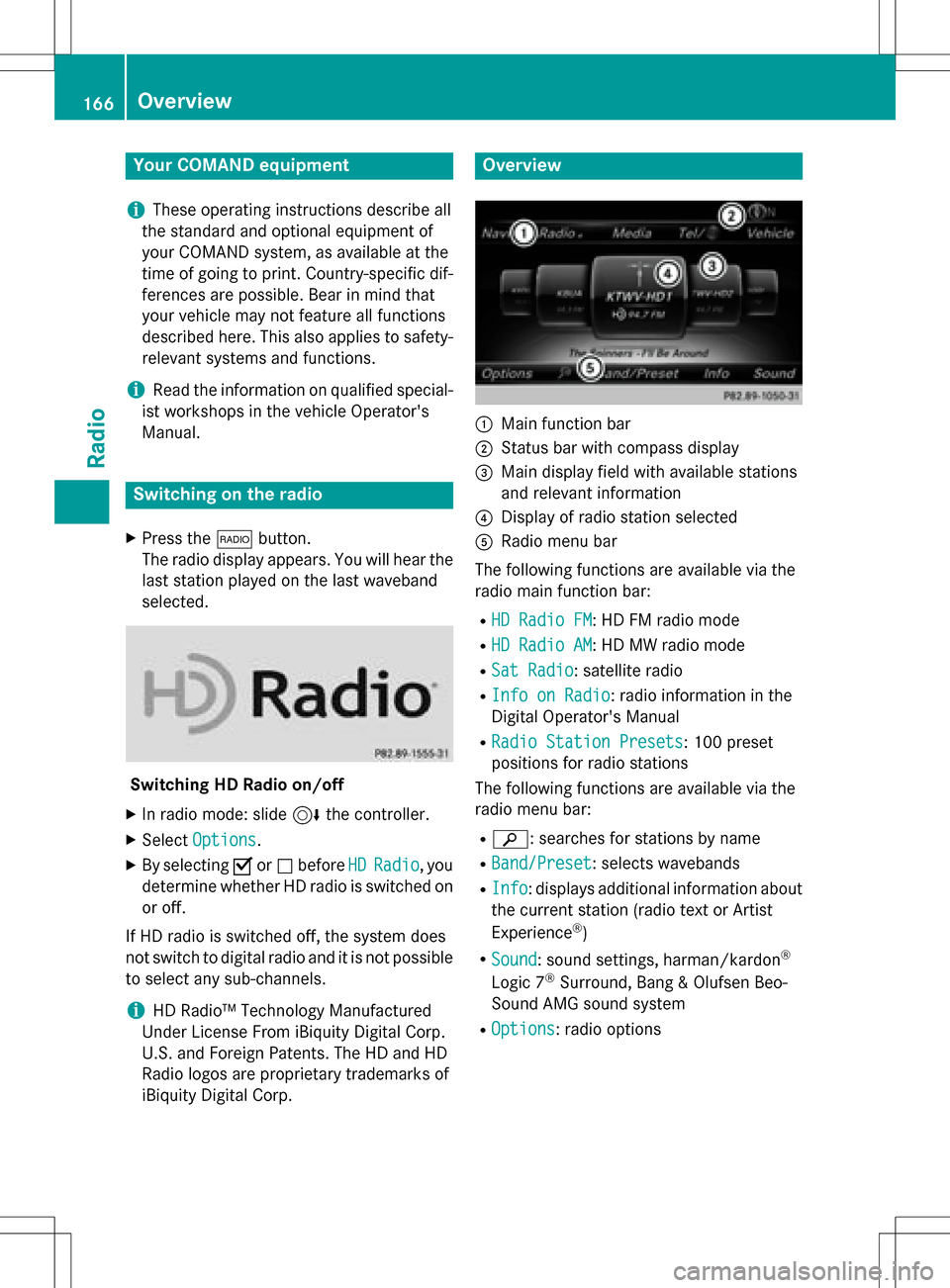
Overview
:Main function bar
;Status bar wit hcompass display
=Main display field wit havailable station s
an drelevant information
?Display of radio station selecte d
ARadio menubar
The followin gfunction sare available via th e
radio main function bar :
RHD RadioFM:HD FM radio mode
RHD Radi oAM:HD MW radio mode
RSa tRadi o:satellite radio
RInfo on Radi o:radio information in th e
Digital Operator's Manual
RRadi oStatio nPreset s:10 0preset
position sfo rradio station s
The followin gfunction sare available via th e
radio men ubar :
Rè: searches fo rstation sby name
RBand/Prese t:selects wavebands
RInfo:displays additional information about
th ecurren tstation (radio text or Artist
Experience
®)
RSoun d:soun dsettings, harman/kardon®
Logic 7®Surround ,Ban g & Olufsen Beo-
Sound AM Gsoun dsyste m
ROption s:radio option s
166Overview
Radio
Page 170 of 246
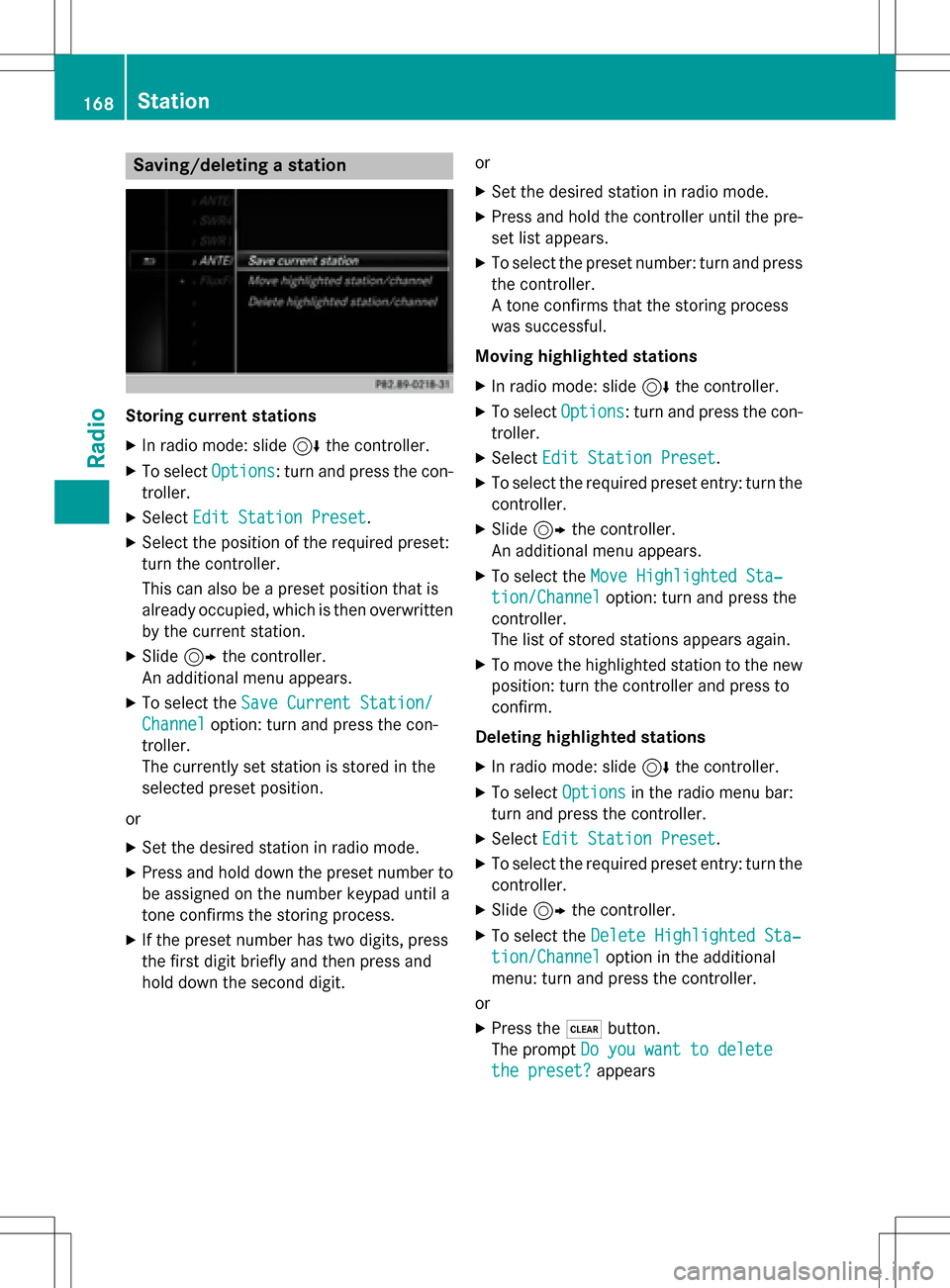
Saving/deleting a station
Storing current stations
XIn radio mode: slide6the controller.
XTo select Options: turn and press the con-
troller.
XSelect Edit Station Preset.
XSelect the position of the required preset:
turn the controller.
This can also be a preset position that is
already occupied, which is then overwritten
by the current station.
XSlide9the controller.
An additional menu appears.
XTo select the Save Current Station/
Channeloption: turn and press the con-
troller.
The currently set station is stored in the
selected preset position.
or
XSet the desired station in radio mode.
XPress and hold down the preset number to
be assigned on the number keypad until a
tone confirms the storing process.
XIf the preset number has two digits, press
the first digit briefly and then press and
hold down the second digit. or
XSet the desired station in radio mode.
XPress and hold the controller until the pre-
set list appears.
XTo select the preset number: turn and press
the controller.
A tone confirms that the storing process
was successful.
Moving highlighted stations
XIn radio mode: slide 6the controller.
XTo select Options: turn and press the con-
troller.
XSelect Edit Station Preset.
XTo select the required preset entry: turn the
controller.
XSlide9the controller.
An additional menu appears.
XTo select the Move Highlighted Sta‐
tion/Channeloption: turn and press the
controller.
The list of stored stations appears again.
XTo move the highlighted station to the new position: turn the controller and press to
confirm.
Deleting highlighted stations
XIn radio mode: slide 6the controller.
XTo select Optionsin the radio menu bar:
turn and press the controller.
XSelect Edit Station Preset.
XTo select the required preset entry: turn the
controller.
XSlide9the controller.
XTo select the Delete Highlighted Sta‐
tion/Channeloption in the additional
menu: turn and press the controller.
or
XPress the $button.
The prompt Do you want to delete
the preset?appears
168Station
Radio
Page 171 of 246

XTo selectYes: turn and press the controller.
The highlighted station is deleted.
or
XTo select No: press the controller.
The process is canceled.
iFrequencies are already stored in
COMAND. There are 100 preset positions
available.
Tagging music tracks
This function allows you to transfer the music
track currently playing to an Apple®device
and then purchase it in the iTunes store®.
XIn radio mode: slide 6the controller.
XTo select Options: turn and press the con-
troller.
XSelect Tag This Track.
A message appears in COMAND about stor-
ing the track information.
Displaying the artist and track
XIn radio mode: slide 6the controller.
XTo select Options: turn and press the con-
troller.
XWith Oorª in front of Show Station
Informationyou can determine whether
the station name should be displayed.
If the function is active, the artist and track
will also be displayed in the main display
field.
Calling up sound settings
XIn radio mode: slide 6the controller.
XTo select Soundin the radio menu bar: turn
and press the controller.
The sound menu appears (
Ypage 206).
Displaying information
This function is available in HD FM radio and
HD AM radio mode.
Reception is only possible if the radio stations
provide the relevant information.
XTo select Infoin the radio menu bar: turn
and press the controller.
Information on the currently received pro-
gram is displayed.
If available, you will see:
Rthe track that is currently being played
Rthe artist of the track that is currently being
played
Rthe album name
Rthe channel abbreviation
Rthe logo of the station or Artist Experience®
Back to radio display:
XTo select Info: slide6and press the
controller.
or
XPress the %button.
Satellite radio
General notes
The satellite radio mode requires satellite
radio equipment and registration with a sat-
ellite radio provider.
Note that the categories and channels shown
in the illustrations depend on the program
content offered by the provider. The illustra-
tions and descriptions in these operating
Satellite radio169
Radio
Page 173 of 246

Switching to satellite radio
XTo show the main function bar: slide5
the controller.
XTo select Radio: turn and press the con-
troller.
The radio display appears. You will hear the
last station played on the last waveband
selected.
XTo select Radioin radio mode: slide 5
and press the controller.
The menu appears with the available radio
modes.
XTo select Sat Radio: turn and press the
controller.
The No Service
message appears if there is
no signal.
Satellite radio overview
:Main function bar
;Preset
=Channel name and channel number
?Channel information
ACategory list
BKeyword search
COptions menu
Channel information ?can be viewed in
detail (
Ypage 174).
Selecting a category
Satellite radio channels are sorted into vari-
ous categories. You can choose between var-
ious categories such as News/Discussions, Sports and Country (if available). The cate-
gory list is sorted alphabetically. The content
of the categories is sorted by channel num-
bers.
XTo call up the category list:
selectCat‐
egoryin the menu bar by turning and
pressing the controller.
The category list appears.
XTo select a category: turn the controller
and press to confirm.
The category selected is shown in the dis-
play. You hear the station last selected for
this category.
The #dot indicates the current setting.
When you select a specific category, the
channels are filtered exclusively according
to this category. Select the All Channels
category in order to see all of the available
channels. Only this category enables you to
browse all available stations.
Selecting a channel
Changing channels
XWhen the display/selection window in the
satellite radio display is selected, slide
1 or turn the controller.
COMAND switches to the next available
channel.
Entering channel numbers directly
XTo select Optionsin the radio menu bar:
turn and press the controller.
The satellite radio menu appears.
XTo select Enter Channel: turn and press
the controller.
An input menu appears.
XEnter the frequency of the desired station
in the entry field.
or
XPress the gkey on the number keypad.
An input menu appears.
XEnter the frequency of the desired station
in the entry field.
Satellite radio171
Radio