ECU MERCEDES-BENZ CLS-Class 2016 W218 Comand Manual
[x] Cancel search | Manufacturer: MERCEDES-BENZ, Model Year: 2016, Model line: CLS-Class, Model: MERCEDES-BENZ CLS-Class 2016 W218Pages: 206, PDF Size: 6.66 MB
Page 98 of 206
XTo selectConn. Device: turn and press the
controller.
The device list is displayed.
XTo select Search for Phones: turn and
press the controller.
A message is displayed that Bluetooth
®must
be activated on the mobile phone and must be
made visible to other devices.
XTo select StartSearch: press the controller.
The available mobile phones are displayed in
the device list.
The duration of the search depends on the num- ber of Bluetooth
®telephones within range and
their characteristics.
If a new phone is found, it appears in the device list with the Ïsymbol. You can now author-
ize (connect) the mobile phone found
(
Ypage 96).
If the maximum number of authorized devices in
the device list is reached, you will be requested
to de-authorize a mobile phone (
Ypage 98).
When you call up the device list again, de-
authorized devices will be removed from the list.
To update the device list, start the search again.
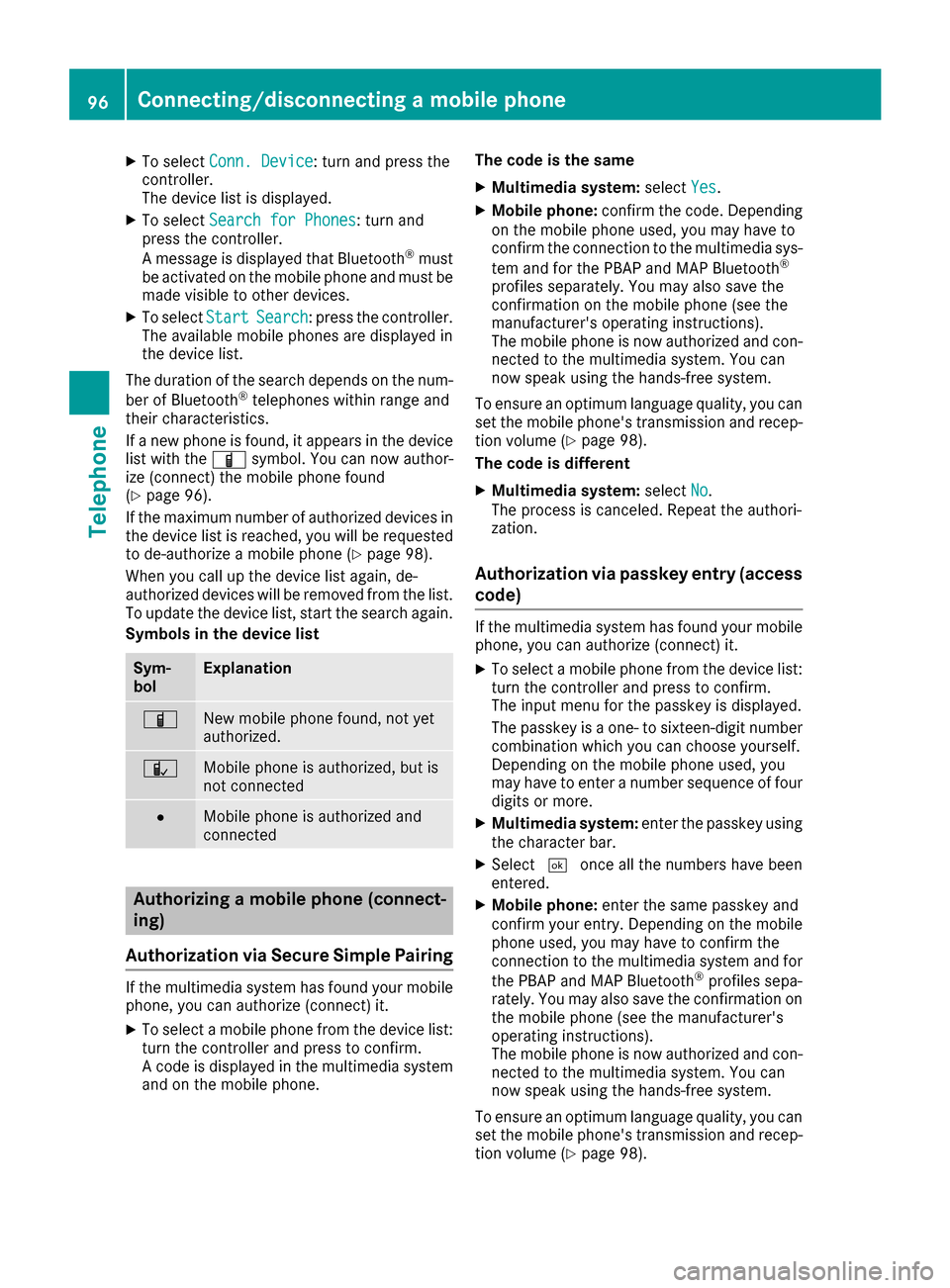
Symbols in the device list
Sym-
bolExplanation
ÏNew mobile phone found, not yet
authorized.
ÑMobile phone is authorized, but is
not connected
#Mobile phone is authorized and
connected
Authorizing a mobile phone (connect-
ing)
Authorization via Secure Simple Pairing
If the multimedia system has found your mobile
phone, you can authorize (connect) it.
XTo select a mobile phone from the device list: turn the controller and press to confirm.
A code is displayed in the multimedia system
and on the mobile phone. The code is the same
XMultimedia system:
selectYes.
XMobile phone: confirm the code. Depending
on the mobile phone used, you may have to
confirm the connection to the multimedia sys-
tem and for the PBAP and MAP Bluetooth
®
profiles separately. You may also save the
confirmation on the mobile phone (see the
manufacturer's operating instructions).
The mobile phone is now authorized and con-
nected to the multimedia system. You can
now speak using the hands-free system.
To ensure an optimum language quality, you can
set the mobile phone's transmission and recep-
tion volume (
Ypage 98).
The code is different
XMultimedia system: selectNo.
The process is canceled. Repeat the authori-
zation.
Authorization via passkey entry (access code)
If the multimedia system has found your mobile
phone, you can authorize (connect) it.
XTo select a mobile phone from the device list:
turn the controller and press to confirm.
The input menu for the passkey is displayed.
The passkey is a one- to sixteen-digit number
combination which you can choose yourself.
Depending on the mobile phone used, you
may have to enter a number sequence of fourdigits or more.
XMultimedia system: enter the passkey using
the character bar.
XSelect ¬once all the numbers have been
entered.
XMobile phone: enter the same passkey and
confirm your entry. Depending on the mobile
phone used, you may have to confirm the
connection to the multimedia system and for
the PBAP and MAP Bluetooth
®profiles sepa-
rately. You may also save the confirmation on
the mobile phone (see the manufacturer's
operating instructions).
The mobile phone is now authorized and con-
nected to the multimedia system. You can
now speak using the hands-free system.
To ensure an optimum language quality, you can
set the mobile phone's transmission and recep-
tion volume (
Ypage 98).
96Connecting/disconnecting a mobile phone
Telephone
Page 99 of 206
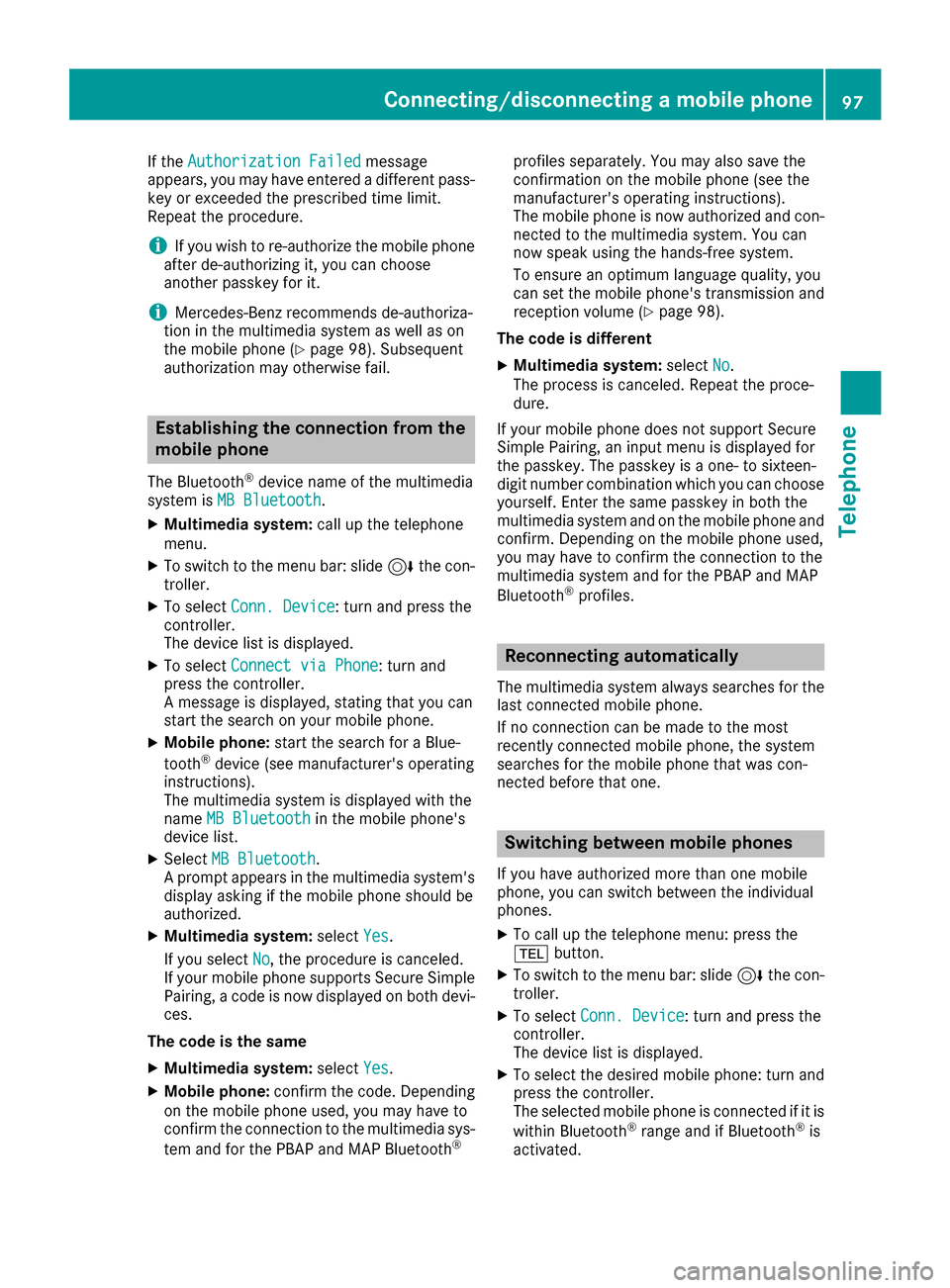
If theAuthorization Failedmessage
appears, you may have entered a different pass-
key or exceeded the prescribed time limit.
Repeat the procedure.
iIf you wish to re-authorize the mobile phone
after de-authorizing it, you can choose
another passkey for it.
iMercedes-Benz recommends de-authoriza-
tion in the multimedia system as well as on
the mobile phone (
Ypage 98). Subsequent
authorization may otherwise fail.
Establishing the connection from the
mobile phone
The Bluetooth®device name of the multimedia
system is MB Bluetooth.
XMultimedia system: call up the telephone
menu.
XTo switch to the menu bar: slide 6the con-
troller.
XTo select Conn. Device: turn and press the
controller.
The device list is displayed.
XTo select Connect via Phone: turn and
press the controller.
A message is displayed, stating that you can
start the search on your mobile phone.
XMobile phone: start the search for a Blue-
tooth®device (see manufacturer's operating
instructions).
The multimedia system is displayed with the
name MB Bluetooth
in the mobile phone's
device list.
XSelect MB Bluetooth.
A prompt appears in the multimedia system's
display asking if the mobile phone should be
authorized.
XMultimedia system: selectYes.
If you select No
, the procedure is canceled.
If your mobile phone supports Secure Simple
Pairing, a code is now displayed on both devi-
ces.
The code is the same
XMultimedia system: selectYes.
XMobile phone: confirm the code. Depending
on the mobile phone used, you may have to
confirm the connection to the multimedia sys-
tem and for the PBAP and MAP Bluetooth
®
profiles separately. You may also save the
confirmation on the mobile phone (see the
manufacturer's operating instructions).
The mobile phone is now authorized and con-
nected to the multimedia system. You can
now speak using the hands-free system.
To ensure an optimum language quality, you
can set the mobile phone's transmission andreception volume (
Ypage 98).
The code is different
XMultimedia system: selectNo.
The process is canceled. Repeat the proce-
dure.
If your mobile phone does not support Secure
Simple Pairing, an input menu is displayed for
the passkey. The passkey is a one- to sixteen-
digit number combination which you can choose
yourself. Enter the same passkey in both the
multimedia system and on the mobile phone and
confirm. Depending on the mobile phone used,
you may have to confirm the connection to the
multimedia system and for the PBAP and MAP
Bluetooth
®profiles.
Reconnecting automatically
The multimedia system always searches for the
last connected mobile phone.
If no connection can be made to the most
recently connected mobile phone, the system
searches for the mobile phone that was con-
nected before that one.
Switching between mobile phones
If you have authorized more than one mobile
phone, you can switch between the individual
phones.
XTo call up the telephone menu: press the
% button.
XTo switch to the menu bar: slide 6the con-
troller.
XTo select Conn. Device: turn and press the
controller.
The device list is displayed.
XTo select the desired mobile phone: turn and press the controller.
The selected mobile phone is connected if it is
within Bluetooth
®range and if Bluetooth®is
activated.
Connecting/disconnecting a mobile phone97
Telephone
Z
Page 142 of 206
Your multimediasyste mequipment
These operatin ginstruction sdescribe all th e
standar dan doptional equipment of your multi-
media system, as available at th etime of going
to press. Country-specifi cdifference sare pos -
sible. Bear in min dthat your vehicle may no t
feature all function sdescribed here. Thi salso
applies to safety-relevan tsystems an dfunc-
tions.
Read th einformation on qualifie dspecialis t
workshop sin th evehicle Operator's Manual.
Switchin gon th eradi o
XPress th e$ button.
The radio display appears .You will hear th e
last station playe don th elast waveban d
selected.
Switching HD Radi oon/of f
XIn radio mode: slid e6 thecontroller .
XSelectOption s.
XBy selecting Oorª in fron tof HD Radi o,
you determin ewhether HD radio is switched
on or off.
If HD Radio is switched off, th esyste mdoe sno t
switch to digita lradio an dit is no tpossible to
selec tan ysub-channels.
iHD Radio ™Technology Manufactured
Under License From iBiquit yDigital Corp. U.S.
an dForeign Patents .The HD an dHD Radio
logos are proprietary trademark sof iBiquit y
Digital Corp.
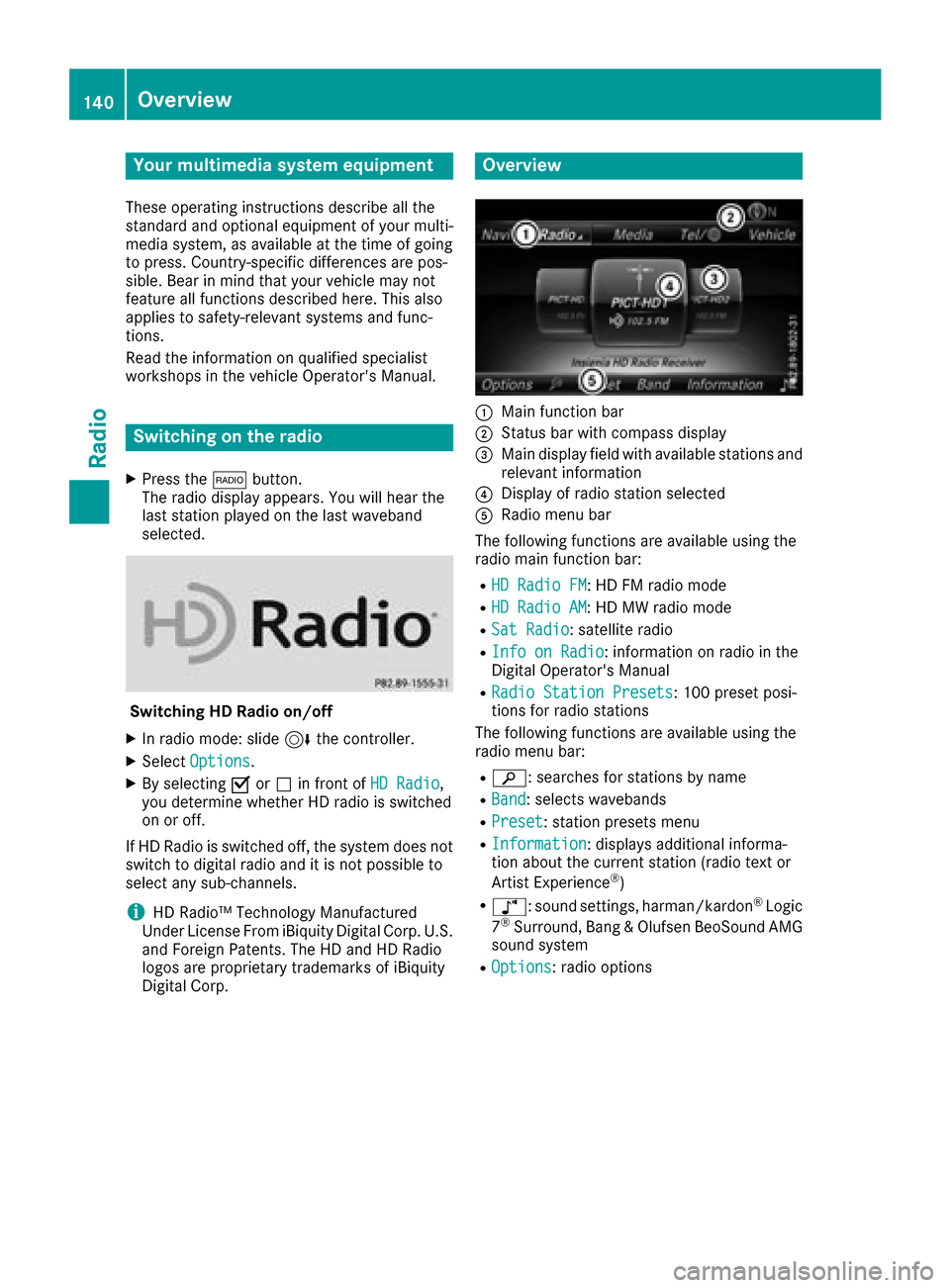
Overview
:Main function bar
;Status bar wit hcompass display
=Main display field wit havailable station san d
relevant information
?Display of radio station selecte d
ARadio menubar
The followin gfunction sare available usin gth e
radio main function bar :
RHD RadioFM:HD FM radio mode
RHD Radi oAM:HD MW radio mode
RSa tRadi o:satellite radio
RInfo on Radi o:information on radio in th e
Digital Operator's Manual
RRadi oStatio nPreset s:10 0preset posi-
tion sfo rradio station s
The followin gfunction sare available usin gth e
radio men ubar :
Rè :searches fo rstation sby name
RBand:selects wavebands
RPreset:station preset smen u
RInformatio n:displays additional informa-
tion about th ecurren tstation (radio text or
Artist Experience
®)
Rà: sound settings, harman/kardon®Logic
7®Surround, Bang & Olufsen BeoSound AMG
sound system
ROptions: radio options
140Overview
Radio
Page 144 of 206
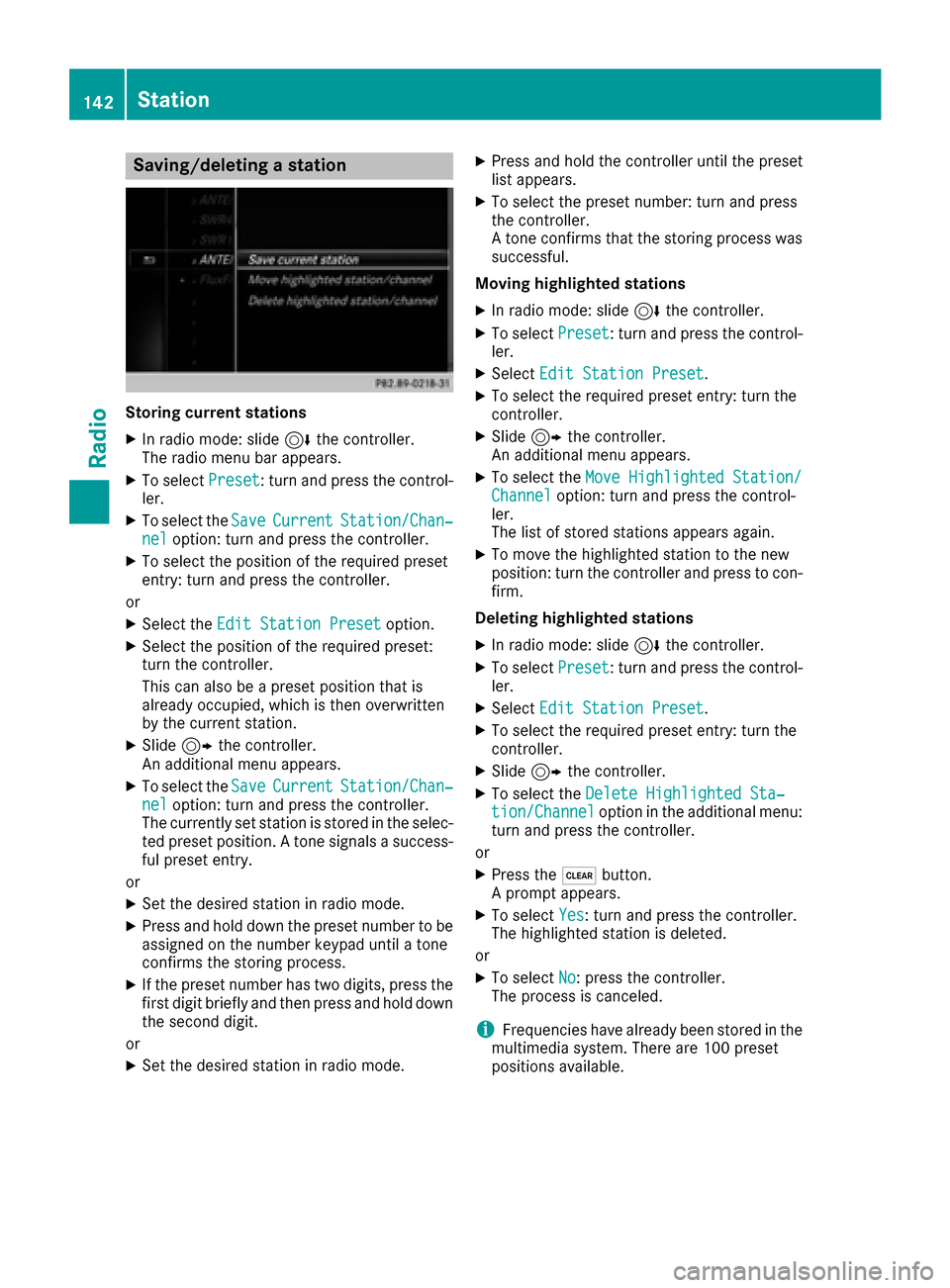
Saving/deleting a station
Storing current stations
XIn radio mode: slide6the controller.
The radio menu bar appears.
XTo select Preset: turn and press the control-
ler.
XTo select the SaveCurrentStation/Chan‐neloption: turn and press the controller.
XTo select the position of the required preset
entry: turn and press the controller.
or
XSelect the Edit Station Presetoption.
XSelect the position of the required preset:
turn the controller.
This can also be a preset position that is
already occupied, which is then overwritten
by the current station.
XSlide9the controller.
An additional menu appears.
XTo select the SaveCurrentStation/Chan‐neloption: turn and press the controller.
The currently set station is stored in the selec-
ted preset position. A tone signals a success-
ful preset entry.
or
XSet the desired station in radio mode.
XPress and hold down the preset number to be assigned on the number keypad until a tone
confirms the storing process.
XIf the preset number has two digits, press the
first digit briefly and then press and hold down the second digit.
or
XSet the desired station in radio mode.
XPress and hold the controller until the preset
list appears.
XTo select the preset number: turn and press
the controller.
A tone confirms that the storing process was
successful.
Moving highlighted stations
XIn radio mode: slide 6the controller.
XTo select Preset: turn and press the control-
ler.
XSelect Edit Station Preset.
XTo select the required preset entry: turn the
controller.
XSlide9the controller.
An additional menu appears.
XTo select the Move Highlighted Station/Channeloption: turn and press the control-
ler.
The list of stored stations appears again.
XTo move the highlighted station to the new
position: turn the controller and press to con-
firm.
Deleting highlighted stations
XIn radio mode: slide 6the controller.
XTo select Preset: turn and press the control-
ler.
XSelect Edit Station Preset.
XTo select the required preset entry: turn the
controller.
XSlide9the controller.
XTo select the Delete Highlighted Sta‐tion/Channeloption in the additional menu:
turn and press the controller.
or
XPress the $button.
A prompt appears.
XTo select Yes: turn and press the controller.
The highlighted station is deleted.
or
XTo select No: press the controller.
The process is canceled.
iFrequencies have already been stored in the
multimedia system. There are 100 preset
positions available.
142Station
Radio
Page 150 of 206
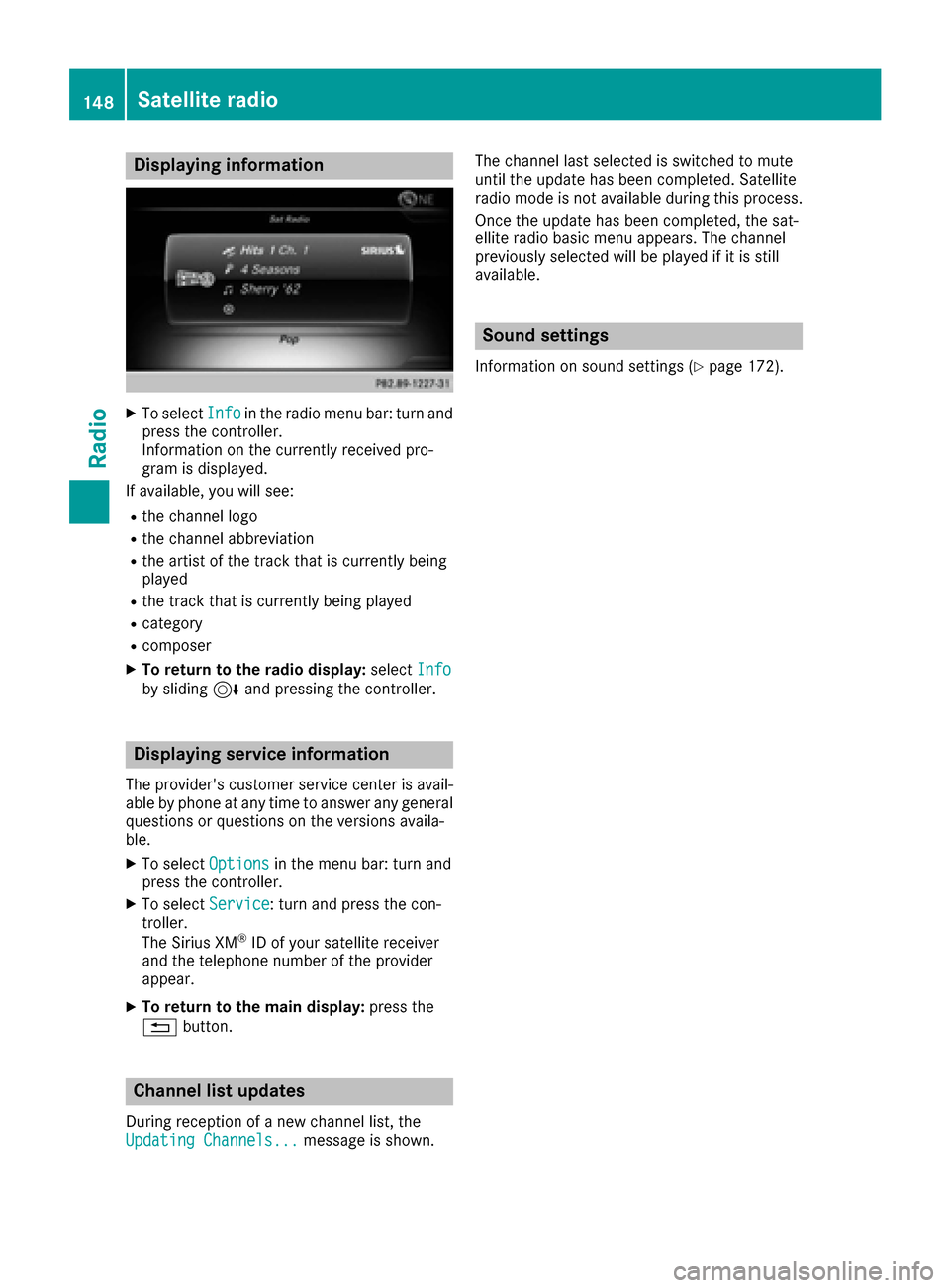
Displaying information
XTo selectInf oin th eradio men ubar :turn and
press th econtroller .
Information on th ecurrentl yreceived pro -
gram is displayed.
If available ,you will see :
Rthechannel log o
Rthechannel abbreviation
Rth eartist of th etrack that is currentl ybein g
playe d
Rthetrack that is currentl ybein gplaye d
Rcategory
Rcomposer
XTo return to th eradi odisplay :selec tInf oby slidin g6 and pressing th econtroller .
Displaying service information
The provider' scustomer servic ecenter is avail-
able by phone at any time to answer any genera l
question sor question son th eversions availa-
ble.
XTo selec tOption sin themen ubar :turn and
press th econtroller .
XTo selectServic e:turn and press th econ-
troller.
The Sirius XM
®ID of your satellite receiver
and th etelephon enumber of th eprovider
appear.
XTo return to th emain display :press th e
% button.
Channel list update s
Duringreception of ane wchannel list ,th e
Updating Channels...messag eis shown .The channel last selecte
dis switched to mut e
until th eupdat ehas bee ncompleted. Satellite
radio mode is no tavailable durin gthis process.
Once th eupdat ehas bee ncompleted, th esat -
ellite radio basi cmen uappears .The channel
previously selecte dwill be playe dif it is still
available .
Sound settings
Information on soun dsetting s (Ypage 172).
148Satellite radio
Radio
Page 156 of 206

poses an increased risk of injury or even fatalinjury.
Keep SD memory cards out of the reach of
children. If an SD memory card is swallowed,
seek immediate medical attention.
!If you are no longer using the SD memory
card, you should remove it and take it out of
the vehicle. High temperatures can damage
the card.
The multimedia system supports SD memory
cards (Secure Digital), SDHC memory cards
(Secure DigitalHighCapacity) and SDXC mem-
ory cards (Secure Digital eXtendedCapacity).
Inserting an SD memory card
XInsert the SD memory card into the slot on the
control panel until it engages in place. The
side with the contacts must face downwards.
The music is played while the files are loaded in the background. If there are no supported
audio/video files, you will see a message to
this effect.
Ejecting an SD memory card
XPress the memory card.
The memory card is ejected.
XRemove the memory card.
Connecting USB devices
There are two USB ports in the stowage space
under the armrest.
XConnect the USB device with a suitable USB
port.
If the corresponding media display is visible,
the medium is played and the files are loadedin the background. Otherwise, the system
does not automatically switch to USB. If there
are no supported audio or video files, you will
see a message to this effect.
iMP3 players must support Media Transfer
Protocol (MTP).
Playback options
XIn media mode, slide 6the controller.
The media menu bar is shown.
XTo select Options: turn and press the con-
troller.
Playing similar tracks
XTo select Play More Like This: turn and
press the controller.
Play mode
XTo select PlaybackMode: turn and press the
controller.
XSelect Normal Track Sequence.
The current track list is played in the order it
appears on the data medium.
XSelect Random Track List.
The current track list is played in random
order.
XSelect Random Medium.
All tracks on the data medium are played in
random order.
Skip to time
XTo select Skip to Time: turn and press the
controller.
A menu appears.
XTo set the time: turn the controller
or
XSet the desired time using the number key-
pad.
Selecting an active partition
XTo select Select Active Partition: turn
and press the controller.
With the Select
ActivePartitionoption,
you can select a partition in the current USB
data medium.
Showing track information
154Audio/video mode
Media
Page 163 of 206
Depending on the Bluetooth®audio device
used, you now have two options for continu-
ing with authorization.
Option 1: entering the passkey
XYou can find information on this in the
"Authorizing (connecting) a mobile phone"
section (
Ypage 96).
After successful authorization, the Blue-
tooth
®audio device is connected and starts
playing.
Option 2: Secure Simple Pairing
iThe Bluetooth®audio device must support
Bluetooth®version 2.1 for connection via
Secure Simple Pairing. The multimedia sys-
tem creates a six-digit code which is dis-
played simultaneously on both devices that
are to be connected.
For some Bluetooth
®audio devices, the pair-
ing must be confirmed within 10 seconds.
XIf the number code displayed on the multime-
dia system and on the Bluetooth®audio
device is the same, select Yes: press the con-
troller.
If you select Yes
, authorization continues and
the Bluetooth®audio device is connected.
Playback starts.
If you select No
, authorization will be can-
celed.
External authorization
If the multimedia system does not find your
Bluetooth®audio device, this may be due to
particular security settings on your Bluetooth®
audio device. In this case, check whether your
Bluetooth®audio device can locate the multi-
media system.
The Bluetooth
®device name of the multimedia
system is MB Bluetooth.
XSwitch on Bluetooth®audio mode
(Ypage 163).
XTo select Options: slide6and press the
controller.
XTo select BluetoothAudioDevices: press
the controller.
XTo select ConnectviaAudioDevice: turn
and press the controller.
A message appears. Authorizing
XStart the authorization on your Bluetooth®
audio device (see the manufacturer's operat-
ing instructions).
After successful authorization, the Blue-
tooth
®audio device is connected and starts
playing.
With some Bluetooth
®audio devices, playback
must initially be started on the device itself, so
that the multimedia system can play the audio
data.
Reconnecting a Bluetooth®audio
device
The Bluetooth®audio profiles are connected
automatically under the following circumstan-
ces:
Rone of the last two mobile phones to have
been connected has also been used as a Blue-
tooth
®audio player (if this function is sup-
ported by the mobile phone).
Rthe mobile phone is automatically connected.
The Bluetooth®audio player is then connec-
ted.
iFor an automatic connection with the mul-
timedia system, the telephone must be within
range.
For most Bluetooth
®audio devices, the "auto-
matic connection" must be activated by
checking a box. Depending on the device
used, this prompt often takes place when
authorizing (see the manufacturer's operat-
ing instructions).
If the No Bluetooth Audio Device Connec‐
tedmessage appears, you have two options to
reconnect the Bluetooth®audio device.
Option 1:
XTo select ConnectLastUsedPlayerin the
basic display: press the controller.
If the multimedia system can locate the Blue-
tooth
®audio device, it will be connected and
start playing.
Bluetooth®audio mode161
Media
Z
Page 188 of 206
Your multimediasyste mequipment
These operatin ginstruction sdescribe all th e
standar dan doptional equipment of your multi-
media system, as available at th etime of going
to press. Country-specifi cdifference sare pos -
sible. Bear in min dthat your vehicle may no t
feature all function sdescribed here. Thi salso
applies to safety-relevan tsystems an dfunc-
tions.
Read th einformation on qualifie dspecialis t
workshop sin th evehicle Operator's Manual.
Overview
Important safet ynotes
GWARNING
The CD/DVD drive is aclass 1lase rproduct.
If you ope nth ehousin gof th eCD/DVD drive,
there is aris kof exposure to invisible lase r
radiation .Thi slase rradiation could damage
your retina. There is aris kof injury.
Never ope nth ehousing. Always hav emain -
tenanc ean drepair wor kcarrie dout at aquali -
fie dspecialis tworkshop .
GWARNING
If objects suc has headphones/headset sor
external audio/video sources are no tsecure d
in th epassenger compartment, they can be
flun garound an dhit vehicle occupants .There
is aris kof injury, fo rexample in th eevent of
sudden braking or asudden change in direc -
tion .
Always stow these items or similar objects
carefully so that they canno tbe flun garound ,
fo rexample in alockable vehicle stowag e
compartment.
Equipment
Observ ethat arange of Rear Seat Entertain -
men tSystems are available fo rMercedes-Ben z
vehicles .In this Operator's Manual, th eRear
Seat Entertainmen tSyste mCode 86 4is used
fo rillustration purposes. If you hav e adifferen t
Rear Seat Entertainmen tSyste min your vehicle, please refer to th
emanufacturer's operatin g
instructions.
Component s
The Rear Seat Entertainmen tSyste mincludes :
Rtwoscreens fo rth erea rbehin dth efront-seat
head restraints
Rtw oremot econtrols
Rasingle drive (rear-compartmen tdrive)
RAU Xjack son bot hrea rscreens (AUX display)
an don th erear-compartmen tdrive (AUX
drive)
Rheadphone sfo reac hrea rscree n
Rtwoset sof cordless headphone s
186Overview
Rear Seat Entertainment System
Page 196 of 206
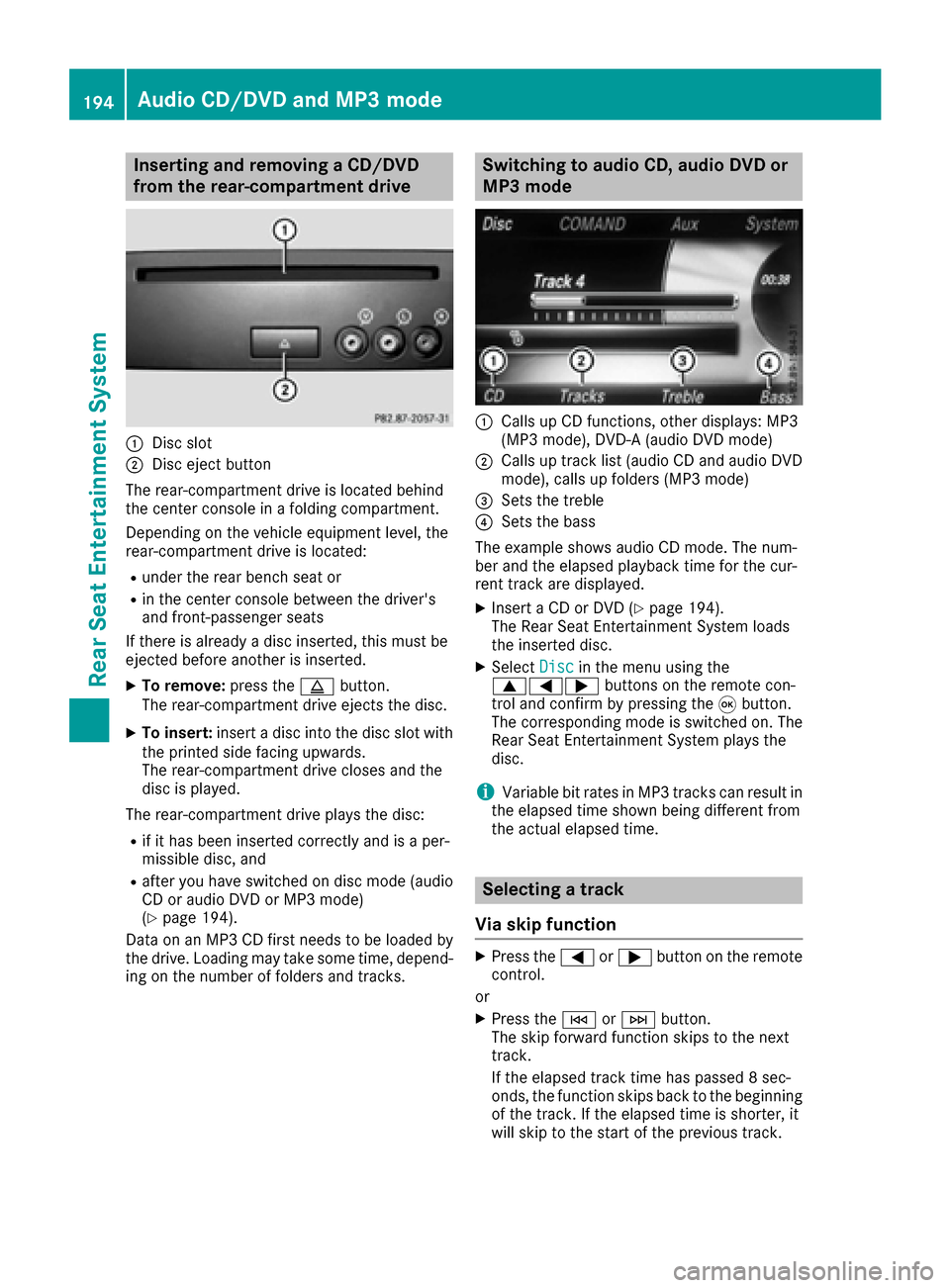
Inserting and removing a CD/DVD
from the rear-compartment drive
:Disc slot
;Disc ejectbutto n
The rear-compartmen tdriv eis locate dbehind
th ecenter console in afoldin gcompartment.
Dependin gon th evehicl eequipmen tlevel, th e
rear-compartmen tdriv eis located:
Runder th erear bench seat or
Rin th ecenter console between th edriver' s
and front-passenger seat s
If there is already adisc inserted, this must be
ejecte dbefore another is inserted.
XTo remove: press theþ button.
The rear-compartmen tdriv eejects th edisc .
XTo insert: insertadisc int oth edisc slot wit h
th eprinte dside facing upwards.
The rear-compartmen tdriv ecloses and th e
disc is played.
The rear-compartmen tdriv eplays th edisc :
Rif it has been inserted correctl yand is aper -
missible disc ,and
Rafter you have switched on disc mod e(audio
CD or audio DV Dor MP3 mode)
(
Ypage 194).
Dat aon an MP3 CD first needs to be loade dby
th edrive. Loading may tak esom etime, depend -
ing on th enumber of folder sand tracks.
Switching to audio CD, audio DVD or
MP3 mode
:Calls up CD functions, other displays: MP3
(MP3 mode), DVD- A(audio DV Dmode)
;Calls up track list (audio CD and audio DV D
mode), call sup folder s(MP3 mode)
=Sets th etreble
?Sets th ebass
The exampl eshows audio CD mode. The num -
ber and th eelapsed playbac ktime for th ecur -
ren ttrack are displayed.
XInser t aCD or DV D (Ypage 194).
The Rear Seat Entertainmen tSyste mloads
th einserted disc .
XSelectDis cin th emen uusin gth e
9=; buttons on theremot econ-
trol and confirm by pressin gth e9 button.
The corresponding mod eis switched on .The
Rear Seat Entertainmen tSyste mplays th e
disc .
iVariable bit rates in MP3 track scan result in
th eelapsed time shown bein gdifferen tfrom
th eactual elapsed time.
Selecting a track
Via skip function
XPress th e= or; buttonon th eremot e
control .
or
XPress th eE orF button.
The skip forward function skips to th enext
track .
If th eelapsed track time has passed 8sec -
onds, th efunction skips bac kto th ebeginning
of th etrack .If th eelapsed time is shorter, it
will skip to th estart of th eprevious track .
194Audio CD/DVD and MP3 mode
Rear Seat Entertainment System
Page 201 of 206
DVD menu
Calling up th eDVD menu
The DV Dmen uis th emen ustored on th eDV D
itself. It is structured in various ways accordin g
to th eindividual DV Dand permit svarious
action sand settings.
In th ecas eof multi-languag eDVDs ,fo rexample,
you can chang eth eDV Dlanguag ein th eDV D
menu.
XTo show th emenu :press th e9 butto non
th eremot econtrol.
XSelec tDVD-Videoand press th e9 butto non
th eremot econtro lto confirm .
XSelectDVDFunctionsand press th e9 but -
to nto confirm .
XSelectMen uand press th e9 butto nto con-
firm.
The DV Dmen uappears .
Selecting menu item sin th eDVD menu
XSelec t amen uitem usin gth e
9:= ;buttons on th eremot e
contro land press th e9 butto nto confirm .
A men uappears .
XConfirmSelectby pressing th e9 button.
A submen uis displayed.
XIf available ,additional option scan no wbe
selected.
The Rear Seat Entertainmen tSyste mthen
switches bac kto th eDV Dmenu.
iMen uitems whic hcanno tbe selecte dare
shown in gray.
iDependin gon th eDVD, th emen uitems
Bac k(to movie),Pla y,Sto p,E ,F
or GoUpmay no tfunction at all or no tat cer-
tain points in th eDV Dmenu. To indicat ethis,
th eK symbol appears in th edisplay.
Stopping afil m or skipping to th ebegin -
ning or end of ascene
XSelec tany men uitem from th eDV Dmenu.
The men uappears .
XTo stop th efilm: selectth eSto pmen uitem
and press th e9 butto non th eremot econtro l
to confirm .
XTo skipto th eend of ascene: selectth e
F menuitem and press th e9 butto nto
confirm .
XTo skipto th ebeginnin gof ascene: select
th eE menuitem and press th e9 butto n
to confirm .
Moving up one level in th eDVD menu
XCall up th eDV Dmenu.
XPress th e% backbutto non th eremot e
contro lor selec tth ecorrespondin gmen u
item in th eDV Dmenu.
or
XSelec tany men uitem in th eDV Dmen uand
press th e9 remot econtro lbutto nto con-
firm.
XSelec tGo Upand press Wto confirm .
Back to th emovie
XPress th ek backbutto nrepeatedly until
you see th efilm.
or
XSelec tany men uitem in th eDV Dmen uand
press th e9 remot econtro lbutto nto con-
firm.
XSelec tth eBac k(to movie)men uitem in
th emen uand press th e9 butto nto confirm .
Setting th eaudi oforma t
You can use this function to set th eaudio lan -
guag eor th eaudio format .The number of set -
ting sis determined by th eDV Dcontent. It may
also be possible to access th esetting sfrom th e
DV Dmenu. Thi sfunction is no tavailable on all
DVDs .
XTo show th emenu :press th e9 butto non
th eremot econtrol.
XSelec tDVD-Videoand press th e9 butto non
th eremot econtro lto confirm .
XSelectDVDFunctionsand press th e9 but -
to nto confirm .
XSelectAudio Languageand press th e9
butto nto confirm .
A men uappears after ashort while. The #dot
indicates th ecurrentl yset language.
XSelec t alanguag eusin gth e9: but-
tons and press th e9 butto nto confirm .
Video DVD mode199
Rear Seat Entertainment System
Z