lane assist MERCEDES-BENZ CLS-Class 2016 W218 Owner's Guide
[x] Cancel search | Manufacturer: MERCEDES-BENZ, Model Year: 2016, Model line: CLS-Class, Model: MERCEDES-BENZ CLS-Class 2016 W218Pages: 342, PDF Size: 8.28 MB
Page 196 of 342
Rthe road is narrow and winding
Rthere are strong shadows cast on the road
If no vehicle is detected in the adjacent lane and
broken lane markings are detected, no lane-cor-
recting brake application is made.
Warning vibration in the steering wheel
A warning may be given if a front wheel passes
over a lane marking. It will warn you by means of
intermittent vibration in the steering wheel for
up to 1.5 second s.
Lane-correcting brake application
GWARNING
A lane-correcting brake application cannot
always bring the vehicle back into the original lane. There is a risk of an accident.
Always steer, brake or accelerate yourself,
especially if Active Lane Keeping Assist warns
you or makes a lane-correcting brake appli-
cation.
GWARNING
Active Lane Keeping Assist only detects traf-
fic conditions or road users to a limited
extent. In very rare cases, the system may
make an inappropriate brake application, e.g. after intentionally driving over a solid lane
marking. There is a risk of an accident.
An inappropriate brake application may be
interrupted at any time if you steer slightly in
the opposite direction. Always make sure that
there is sufficient distance on the side for
other traffic or obstacles.
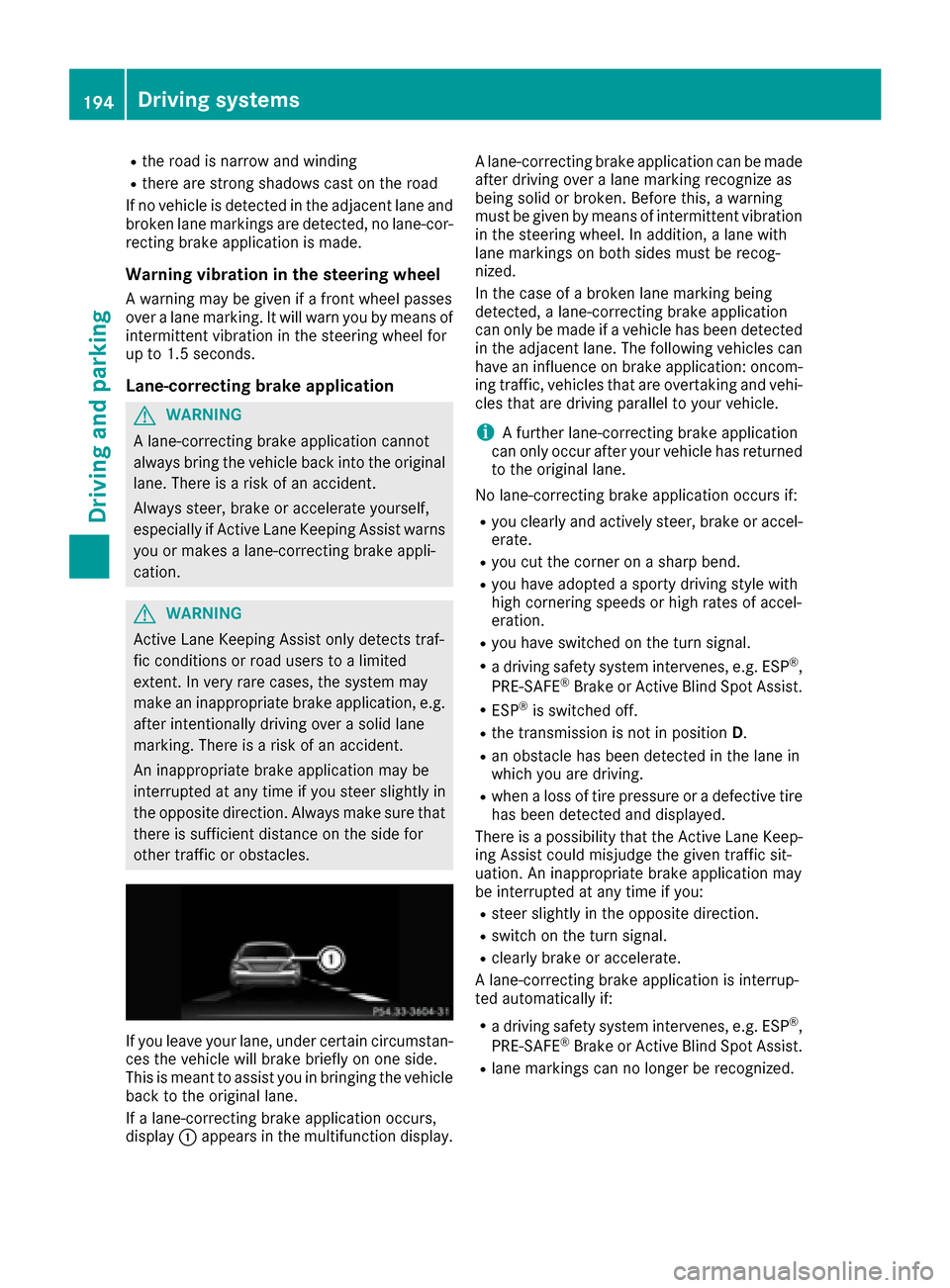
If you leave your lane, under certain circumstan-
ces the vehicle will brake briefly on one side.
This is meant to assist you in bringing the vehicle
back to the original lane.
If a lane-correcting brake application occurs,
display :appears in the multifunction display. A lane-correcting brake application can be made
after driving over a lane marking recognize as
being solid or broken. Before this, a warning
must be given by means of intermittent vibration
in the steering wheel. In addition, a lane with
lane markings on both sides must be recog-
nized.
In the case of a broken lane marking being
detected, a lane-correcting brake application
can only be made if a vehicle has been detected
in the adjacent lane. The following vehicles can
have an influence on brake application: oncom-
ing traffic, vehicles that are overtaking and vehi-
cles that are driving parallel to your vehicle.
iA further lane-correcting brake application
can only occur after your vehicle has returned
to the original lane.
No lane-correcting brake application occurs if:
Ryou clearly and actively steer, brake or accel-
erate.
Ryou cut the corner on a sharp bend.
Ryou have adopted a sporty driving style with
high cornering speeds or high rates of accel-
eration.
Ryou have switched on the turn signal.
Ra driving safety system intervenes, e.g. ESP®,
PRE-SAFE®Brake or Active Blind Spot Assist.
RESP®is switched off.
Rthe transmission is not in position D.
Ran obstacle has been detected in the lane in
which you are driving.
Rwhen a loss of tire pressure or a defective tire
has been detected and displayed.
There is a possibility that the Active Lane Keep- ing Assist could misjudge the given traffic sit-
uation. An inappropriate brake application may
be interrupted at any time if you:
Rsteer slightly in the opposite direction.
Rswitch on the turn signal.
Rclearly brake or accelerate.
A lane-correcting brake application is interrup-
ted automatically if:
Ra driving safety system intervenes, e.g. ESP®,
PRE-SAFE®Brake or Active Blind Spot Assist.
Rlane markings can no longer be recognized.
194Driving systems
Driving and parking
Page 197 of 342
Switching on Active Lane Keeping Assist
XSwitch on Active Lane Keeping Assist using
the on-board computer; to do so, select
Standard
orAdaptive(Ypage 205).
If you drive at speeds above 40 mph
(60 km/h) and lane markings are detected,
the lines in the assistance graphics display
(
Ypage 203) are shown in green. Active Lane
Keeping Assist is ready for use.
If Standard
is selected, no warning vibration
occurs if:
Ryou have switched on the turn signal. In this
event, the warnings are suppressed for a
certain period of time.
Ra driving safety system intervenes, such as
ABS, BAS or ESP®.
When Adaptive
is selected, no warning vibra-
tion occurs if:
Ryou have switched on the turn signal. In this
event, the warnings are suppressed for a
certain period of time.
Ra driving safety system intervenes, e.g.
ABS, BAS or ESP®.
Ryou accelerate hard, e.g. kickdown.
Ryou brake hard.
Ryou steer actively, e.g. swerve to avoid an
obstacle or change lanes quickly.
Ryou cut the corner on a sharp bend.
In order that you are warned only when neces-
sary and in good time if you cross the lane mark-
ing, the system recognizes certain conditions
and warns you accordingly.
The warning vibration occurs earlier if:
Ryou approach the outer lane marking on a
bend.
Rthe road has very wide lanes, e.g. a highway.
Rthe system recognizes solid lane markings.
The warning vibration occurs later if:
Rthe road has narrow lanes.
Ryou cut the corner on a bend.
Driving systems195
Driving and parking
Z
Page 205 of 342
Rejecting or ending a call
XPress the~button on the steering wheel
to reject or end a call.
Selecting an entry in the phone book
XPress the =or; button on the steering
wheel to select the Telmenu.
XPress the9,:ora button to
switch to the phone book.
XAuthorize access to the phone book on the
phone.
XPress the 9or: button to select the
desired name.
or
XTo start rapid scrolling: press and hold:
or 9 for longer than one second.
The names in the phone book are displayed
quickly one after the other.
Rapid scrolling stops when you release the
button or reach the end of the list.
XIf only one telephone number is stored for
a name: press the 6ora button to
start dialing.
or
XIf there is more than one number for a
particular name: press the6ora
button to display the numbers.
XPress the 9or: button to select the
number you want to dial.
XPress the 6ora button to start dialing.
or
XTo exit the telephone book: press the~
or % button.
Redialing
The on-board computer saves the last names or
numbers dialed in the redial memory.
XPress the =or; button on the steering
wheel to select the Telmenu.
XPress the6button to switch to the redial
memory.
XPress the 9or: button to select the
desired name or number.
XPress the 6ora button to start dialing.
or
XTo exit the redial memory: press the~
or % button.
Assistance menu
Introduction
Depending on the equipment installed in the
vehicle, you have the following options in the
DriveAssist
menu:
RDisplaying the assistance graphic
(Ypage 203)
RDeactivating/activating ESP®(except
Mercedes‑AMG vehicles) (Ypage 204)
RActivating/deactivating Steering Assist and
Stop&Go Pilot of DISTRONIC PLUS
(
Ypage 204)
RActivating/deactivating PRE-SAFE®Brake
(Ypage 204)
RActivating/deactivating COLLISION PREVEN-
TION ASSIST PLUS (Ypage 204)
RActivating/deactivating ATTENTION ASSIST
(Ypage 205)
RActivating/deactivating Blind Spot Assist or
Active Blind Spot Assist (Ypage 205)
RActivating/deactivating Lane Keeping Assist
or Active Lane Keeping Assist (Ypage 205)
Displaying the assistance graphic
XPress the =or; button on the steering
wheel to select the DriveAssistmenu.
XPress9or: to select Assist.Graphic.
XPressato confirm.
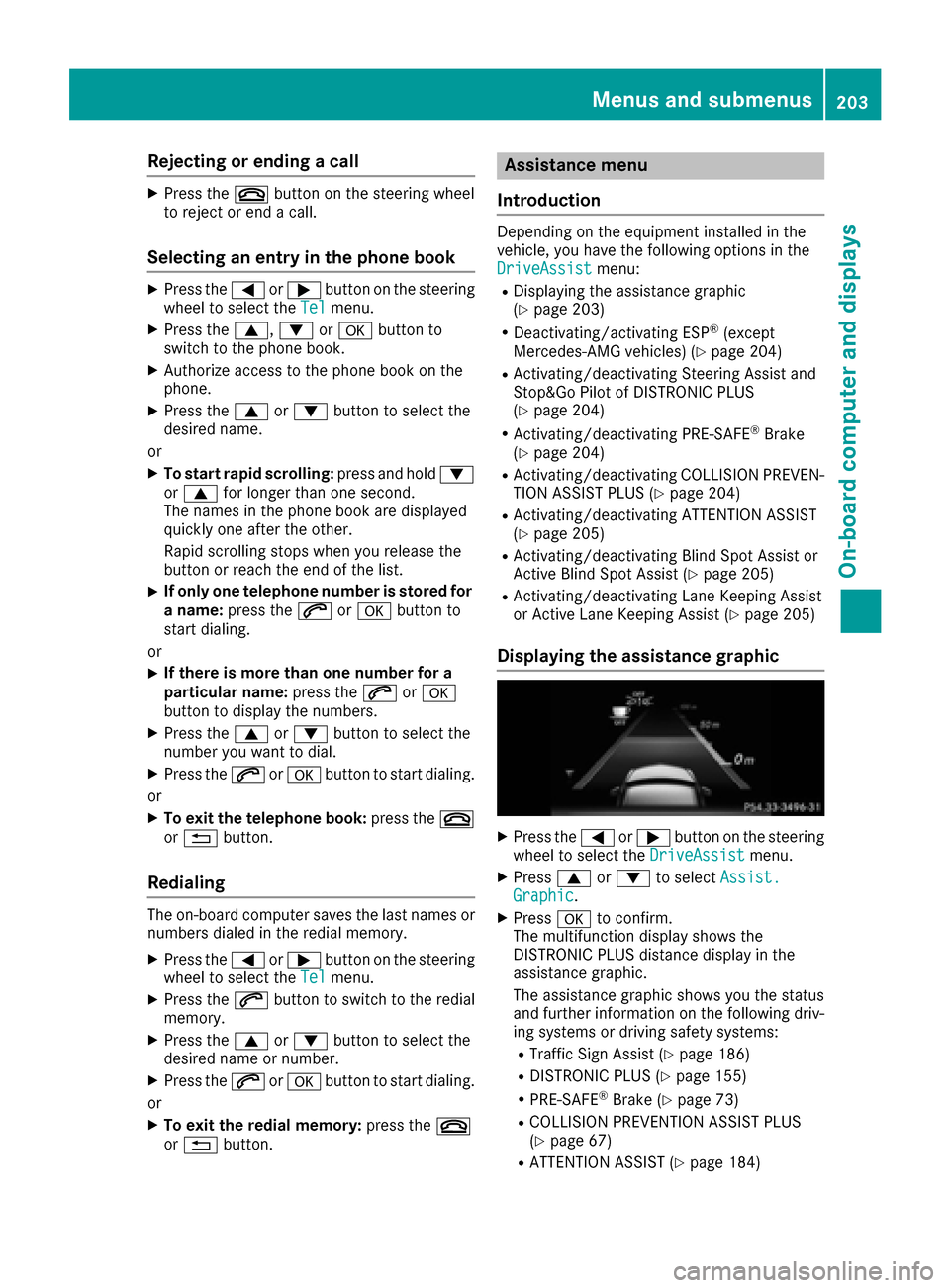
The multifunction display shows the
DISTRONIC PLUS distance display in the
assistance graphic.
The assistance graphic shows you the status
and further information on the following driv-
ing systems or driving safety systems:
RTraffic Sign Assist (Ypage 186)
RDISTRONIC PLUS (Ypage 155)
RPRE-SAFE®Brake (Ypage 73)
RCOLLISION PREVENTION ASSIST PLUS
(Ypage 67)
RATTENTION ASSIST (Ypage 184)
Menus and submenus203
On-board computer and displays
Z
Page 206 of 342
RLane Keeping Assist (Ypage 189)
RActive Lane Keeping Assist (Ypage 193)
XPress:to display the ATTENTION ASSIST
assessment.
Deactivating/activating ESP®
iObserve the important safety notes on ESP®
(Ypage 69).
GWARNING
If you deactivate ESP
®, ESP®no longer sta-
bilizes the vehicle. There is an increased risk
of skidding and an accident.
Only deactivate ESP
®in the situations descri-
bed in the following.
It may be best to deactivate ESP
®in the follow-
ing situations:
Rwhen using snow chains
Rin deep snow
Ron sand or gravel
Deactivating/activating ESP®on Mercedes-
AMG vehicles (Ypage 71).
For further information about ESP®, see
(Ypage 69).
XStart the engine.
XPress the =or; button on the steering
wheel to select the DriveAssistmenu.
XPress9or: to select ESP.
XPressato confirm.
The current selection appears.
XTo activate/deactivate: press theabut-
ton again.
ESP
®is deactivated if the åwarning lamp in
the instrument cluster lights up continuously
when the engine is running.
If the ÷ warning lamp and the åwarning
lamp are lit continuously, ESP
®is not available
due to a malfunction.
Observe the information on warning lamps
(
Ypage 238).
Observe the information on display messages
(
Ypage 213).
Activating/deactivating PRE-SAFE®
Brake
PRE‑SAFE®Brake is only available for vehicles
with the Driving Assistance package.
XPress the =or; button on the steering
wheel to select the DriveAssistmenu.
XPress the9or: button to select PRE-SAFE Brake.
XPressato confirm.
The current selection appears.
XTo activate/deactivate: press theabut-
ton again.
When PRE-SAFE
®Brake is deactivated, the
assistance graphic shows the æsymbol in
the multifunction display.
For more information on PRE‑SAFE
®Brake, see
(Ypage 73).
Activating/deactivating COLLISION
PREVENTION ASSIST PLUS
XPress the =or; button on the steering
wheel to select the DriveAssistmenu.
XPress the9or: button to select Col‐lision Prevent..
XPressato confirm.
The current selection appears.
XTo activate/deactivate: press theabut-
ton again.
If COLLISION PREVENTION ASSIST PLUS is
deactivated, the assistance graphic shows
the æ symbol in the multifunction display.
For further information about COLLISION PRE-
VENTION ASSIST PLUS, see (
Ypage 67).
Activating/deactivating Steering
Assist and Stop&Go Pilot
XPress the =or; button on the steering
wheel to select the DriveAssistmenu.
XPress the9or: button to select DTR+: Steer. Asst.
XPressato confirm.
The current selection appears.
XTo activate/deactivate: press theabut-
ton again.
When Steering Assist and Stop&Go Pilot are
activated, the multifunction display shows the
DTR+: Steer. Asst.
Onmessage.
204Menus and submenus
On-board computer and displays
Page 207 of 342
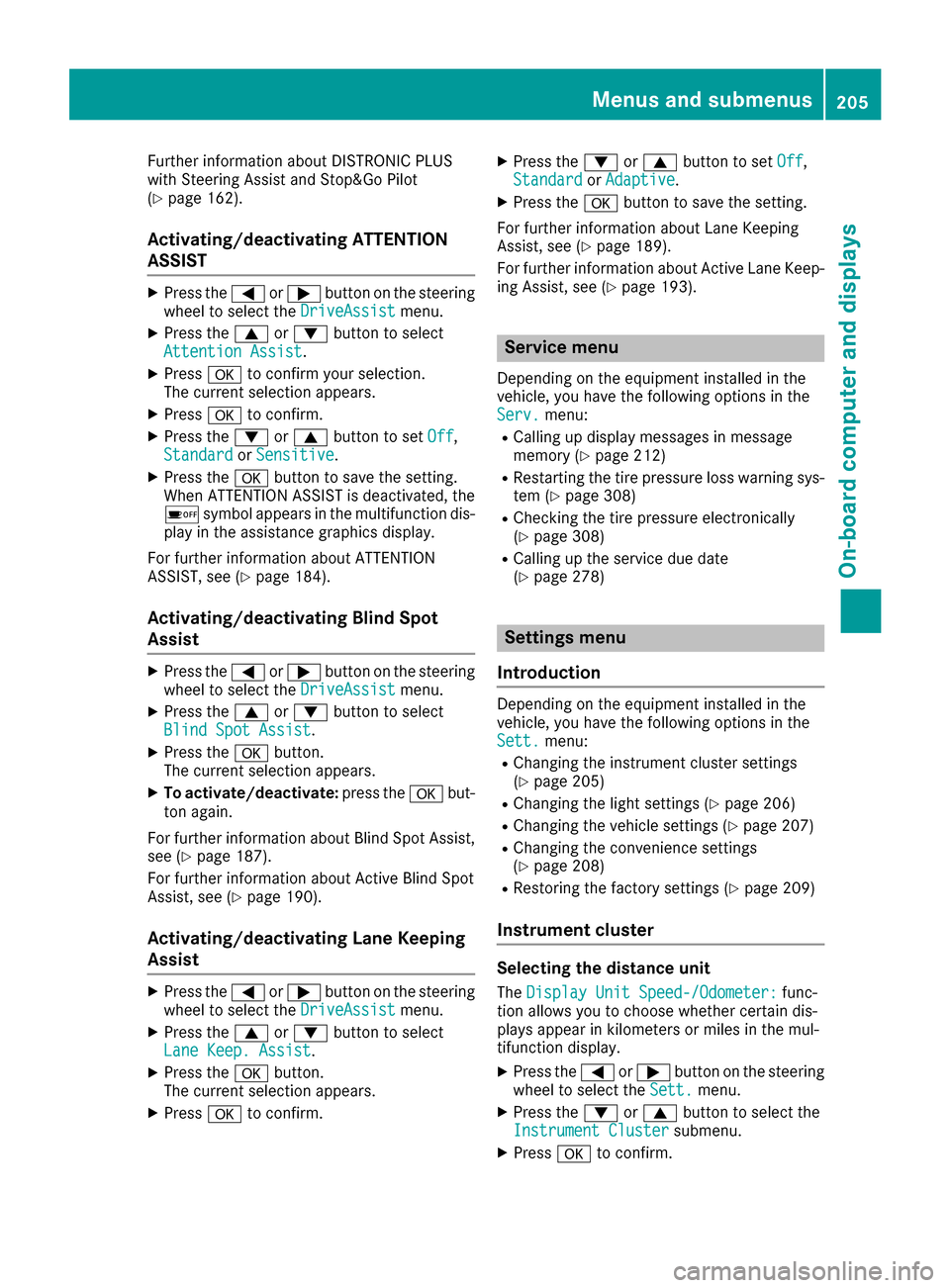
Further information about DISTRONIC PLUS
with Steering Assist and Stop&Go Pilot
(
Ypage 162).
Activating/deactivating ATTENTION
ASSIST
XPress the=or; button on the steering
wheel to select the DriveAssistmenu.
XPress the9or: button to select
Attention Assist.
XPress ato confirm your selection.
The current selection appears.
XPress ato confirm.
XPress the :or9 button to set Off,
Standardor Sensitive.
XPress the abutton to save the setting.
When ATTENTION ASSIST is deactivated, the
é symbol appears in the multifunction dis-
play in the assistance graphics display.
For further information about ATTENTION
ASSIST, see (
Ypage 184).
Activating/deactivating Blind Spot
Assist
XPress the =or; button on the steering
wheel to select the DriveAssistmenu.
XPress the9or: button to select
Blind Spot Assist.
XPress the abutton.
The current selection appears.
XTo activate/deactivate: press theabut-
ton again.
For further information about Blind Spot Assist,
see (
Ypage 187).
For further information about Active Blind Spot
Assist, see (
Ypage 190).
Activating/deactivating Lane Keeping
Assist
XPress the =or; button on the steering
wheel to select the DriveAssistmenu.
XPress the9or: button to select
Lane Keep. Assist.
XPress the abutton.
The current selection appears.
XPress ato confirm.
XPress the :or9 button to set Off,
Standardor Adaptive.
XPress the abutton to save the setting.
For further information about Lane Keeping
Assist, see (
Ypage 189).
For further information about Active Lane Keep-
ing Assist, see (
Ypage 193).
Service menu
Depending on the equipment installed in the
vehicle, you have the following options in the
Serv.
menu:
RCalling up display messages in message
memory (Ypage 212)
RRestarting the tire pressure loss warning sys- tem (Ypage 308)
RChecking the tire pressure electronically
(Ypage 308)
RCalling up the service due date
(Ypage 278)
Settings menu
Introduction
Depending on the equipment installed in the
vehicle, you have the following options in the
Sett.
menu:
RChanging the instrument cluster settings
(Ypage 205)
RChanging the light settings (Ypage 206)
RChanging the vehicle settings (Ypage 207)
RChanging the convenience settings
(Ypage 208)
RRestoring the factory settings (Ypage 209)
Instrument cluster
Selecting the distance unit
The Display Unit Speed-/Odometer:func-
tion allows you to choose whether certain dis-
plays appear in kilometers or miles in the mul-
tifunction display.
XPress the =or; button on the steering
wheel to select the Sett.menu.
XPress the:or9 button to select the
Instrument Clustersubmenu.
XPress ato confirm.
Menus and submenus205
On-board computer and displays
Z
Page 228 of 342
Display messagesPossible causes/consequences andMSolutions
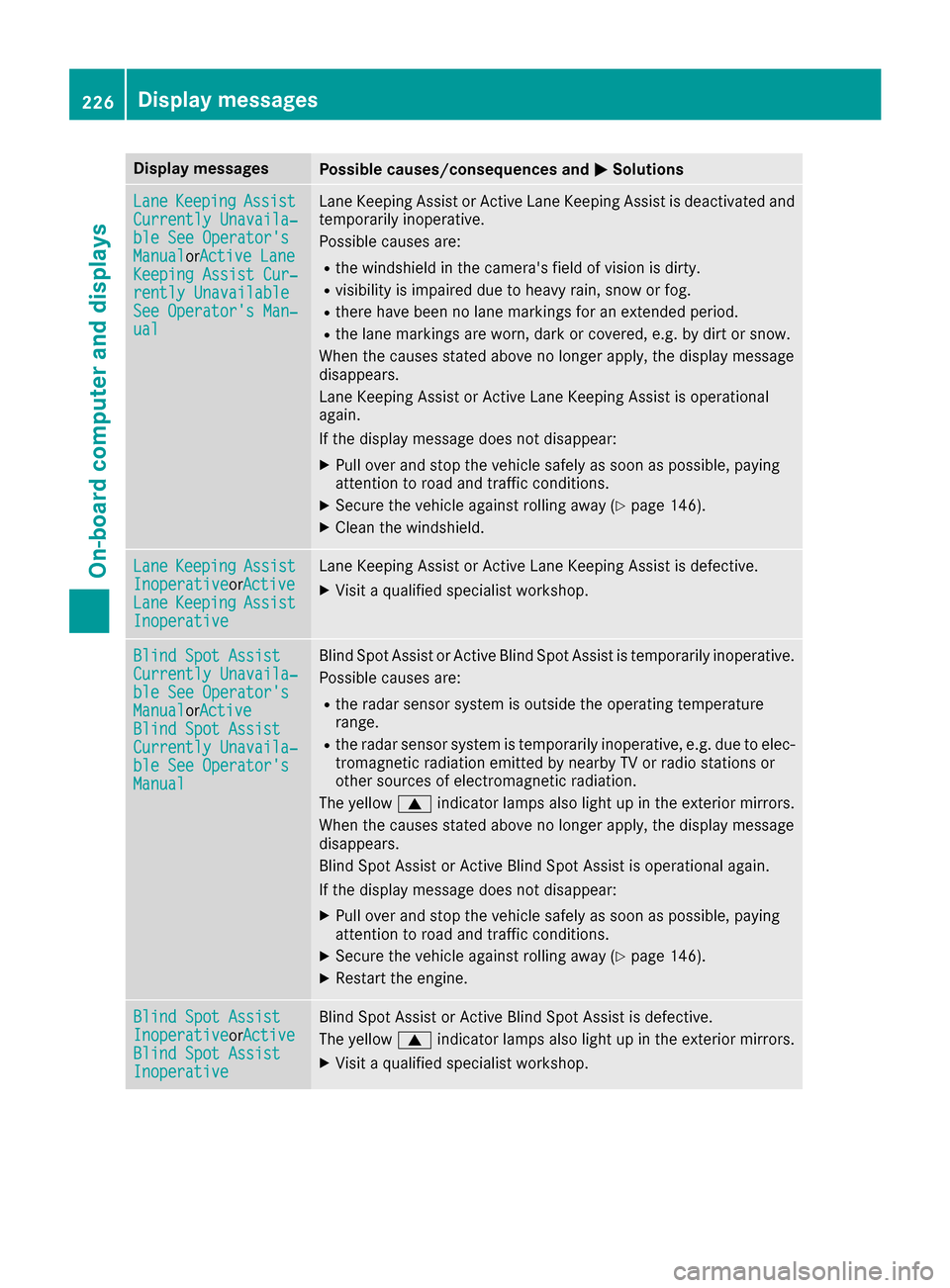
LaneKeepin gAssistCurrently Unavaila‐ble See Operator' sManualorActive Lan eKeepingAssist Cur ‐rently UnavailableSee Operator' sMan ‐ual
LaneKeepin gAssis tor Active Lan eKeepin gAssis tis deactivated and
temporarily inoperative.
Possibl ecauses are:
Rth ewindshield in th ecamera' sfield of vision is dirty.
Rvisibilit yis impaire ddue to heav yrain ,snow or fog .
Rthere havebeen no lan emarking sfor an extended period.
Rth elan emarking sare worn, dark or covered, e.g. by dir tor snow.
Whe nth ecauses state dabov eno longer apply, th edisplay message
disappears.
Lan eKeepin gAssis tor Active Lan eKeepin gAssis tis operational
again .
If th edisplay message does no tdisappear :
XPull overand stop th evehicl esafely as soo nas possible, payin g
attention to roa dand traffic conditions.
XSecur eth evehicl eagainst rollin gaway (Ypage 146).
XClean th ewindshield.
Lan eKeepin gAssistInoperativeorActiveLan eKeepin gAssistInoperative
LaneKeepin gAssis tor Active Lan eKeepin gAssis tis defective.
XVisit aqualified specialist workshop .
Blind SpotAssistCurrently Unavaila‐ble See Operator' sManualorActiveBlind Spo tAssistCurrently Unavaila‐ble See Operator' sManual
Blind Spot Assistor Active Blind Spot Assis tis temporarily inoperative.
Possibl ecauses are:
Rth eradar sensor system is outside th eoperating temperature
range.
Rth eradar sensor system is temporarily inoperative, e.g. due to elec -
tromagneti cradiation emitted by nearby TV or radi ostation sor
other source sof electromagneti cradiation .
The yellow 9indicator lamp salso ligh tup in th eexterio rmirrors.
Whe nth ecauses state dabov eno longer apply, th edisplay message
disappears.
Blind Spot Assis tor Active Blind Spot Assis tis operational again .
If th edisplay message does no tdisappear :
XPull overand stop th evehicl esafely as soo nas possible, payin g
attention to roa dand traffic conditions.
XSecur eth evehicl eagainst rollin gaway (Ypage 146).
XRestart th eengine.
Blind Spo tAssistInoperativeorActiveBlind Spo tAssistInoperative
Blind Spot Assis tor Active Blind Spot Assis tis defective.
The yellow 9indicator lamp salso ligh tup in th eexterio rmirrors.
XVisit aqualified specialist workshop .
226Display messages
On-board computer and displays