lights MERCEDES-BENZ CLS-Class 2016 W218 Service Manual
[x] Cancel search | Manufacturer: MERCEDES-BENZ, Model Year: 2016, Model line: CLS-Class, Model: MERCEDES-BENZ CLS-Class 2016 W218Pages: 342, PDF Size: 8.28 MB
Page 167 of 342
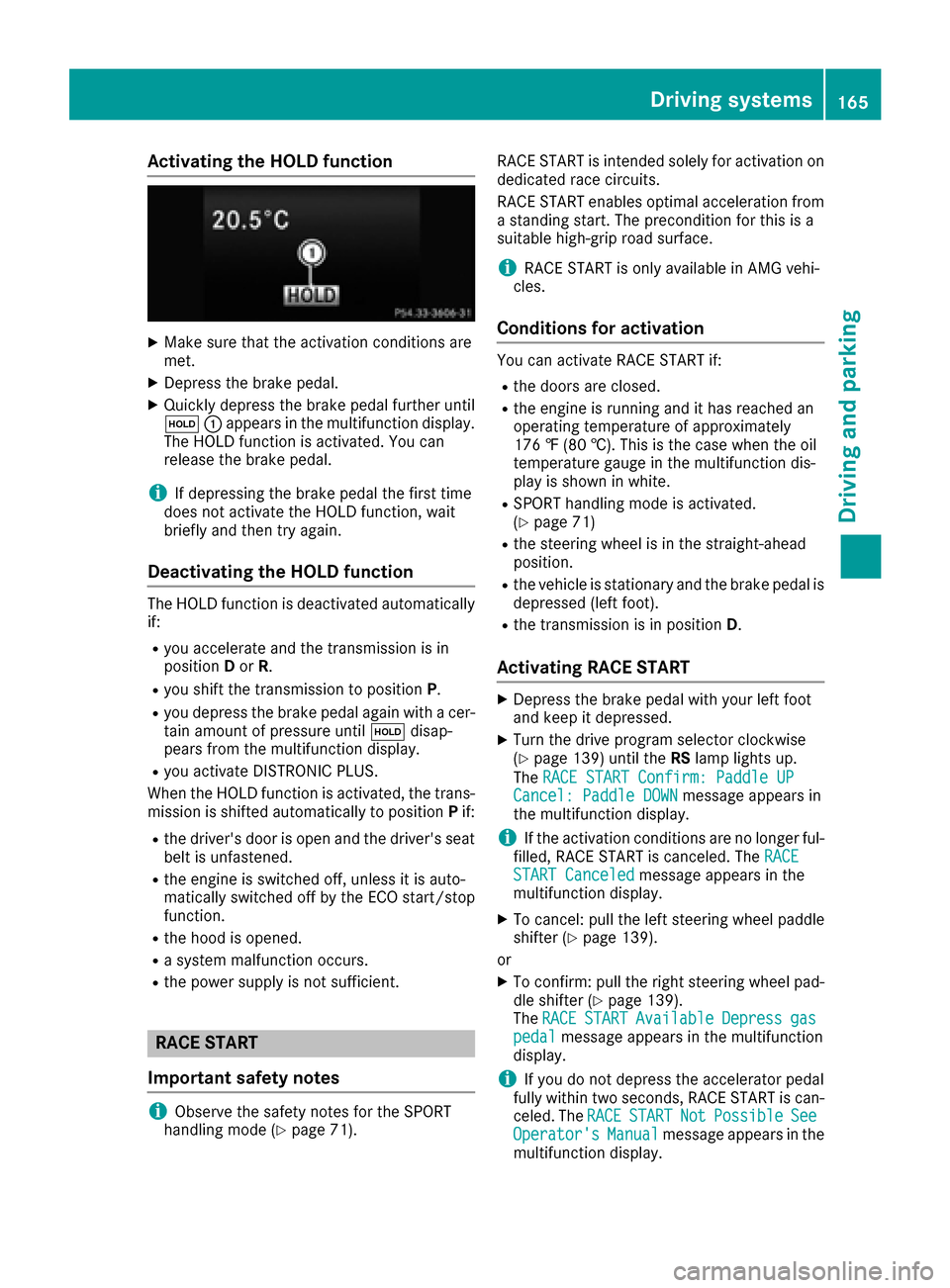
Activating the HOLD function
XMakesur ethat th eactivation condition sare
met .
XDepress th ebrak epedal .
XQuickl ydepress th ebrak epedal further until
ë :appear sin th emultifunction display.
The HOLD function is activated. You can
release th ebrak epedal .
iIf depressing th ebrak epedal th efirst time
does no tactivat eth eHOLD function ,wait
briefl yand then tr yagain .
Deactivating the HOLD function
The HOLD function is deactivated automatically
if:
Ryou accelerate and th etransmission is in
position Dor R.
Ryou shif tth etransmission to position P.
Ryou depress thebrak epedal again wit h acer-
tai namount of pressur euntil ë disap-
pear sfrom th emultifunction display.
Ryou activat eDISTRONI CPLUS.
When th eHOLD function is activated, th etrans -
mission is shifte dautomatically to position Pif:
Rth edriver's door is open and th edriver's seat
belt is unfastened.
Rth eengin eis switched off ,unless it is auto -
matically switched off by th eECO start/sto p
function .
Rthehoo dis opened.
Rasystem malfunction occurs.
Rth epowe rsupply is no tsufficient.
RACE START
Import ant safety notes
iObserveth esafet ynote sfor th eSPORT
handlin gmod e (Ypage 71). RACE START is intended solely for activation on
dedicate
drac ecircuits.
RACE START enables optimal acceleration from
a standing start .The precondition for this is a
suitable high-grip road surface.
iRACE START is only available in AM Gvehi-
cles.
Conditions for activati on
You can activateRACE START if:
Rth edoor sare closed.
Rth eengin eis runnin gand it has reached an
operating temperature of approximately
17 6 ‡ (80 †) .This is the case when the oil
temperature gauge in the multifunction dis-
play is shown in white.
RSPORT handling mode is activated.
(Ypage 71)
Rthe steering wheel is in the straight-ahead
position.
Rthe vehicle is stationary and the brake pedal is
depressed (left foot).
Rthe transmission is in position D.
Activating RACE START
XDepress the brake pedal with your left foot
and keep it depressed.
XTurn the drive program selector clockwise
(Ypage 139) until theRSlamp lights up.
The RACE START Confirm: Paddle UP
Cancel: Paddle DOWNmessage appears in
the multifunction display.
iIf the activation conditions are no longer ful-
filled, RACE START is canceled. The RACE
START Canceledmessage appears in the
multifunction display.
XTo cancel: pull the left steering wheel paddle
shifter (Ypage 139).
or
XTo confirm: pull the right steering wheel pad- dle shifter (Ypage 139).
The RACESTARTAvailableDepressgaspedalmessage appears in the multifunction
display.
iIf you do not depress the accelerator pedal
fully within two seconds, RACE START is can-
celed. The RACE
STARTNotPossibleSeeOperator'sManualmessage appears in the
multifunction display.
Driving systems165
Driving and parking
Z
Page 168 of 342
XFully depress the accelerator pedal.
The engine speed rises to approximately
3,500 rpm.
TheRACE
STARTReleasebraketostartmessage appears in the multifunction display.
iIf you do not release the brake pedal within
five seconds, RACE START is canceled. The
RACE START Canceled
message appears in
the multifunction display.
XTake your foot off the brake, but keep the
accelerator pedal depressed.
The vehicle pulls away at maximum acceler-
ation.
The RACE
STARTActivemessage appears in
the multifunction display.
RACE START is deactivated when the vehicle
reaches a speed of approximately 30 mph (Can-
ada: 50 km/h). Drive program S+is activated.
SPORT handling mode remains activated.
RACE START is deactivated immediately if you
release the accelerator pedal during RACE
START or if any of the activation conditions are
no longer fulfilled. The RACE START Not Pos‐
sible See Operator's Manualmessage
appears in the multifunction display.
iIf RACE START is used repeatedly within a
short period of time, it is only available again
after the vehicle has been driven a certain
distance.
AIRMATIC
Vehicle level
Important safety notes
GWARNING
When the vehicle is being lowered, people
could become trapped if their limbs are
between the vehicle body and the wheels or
underneath the vehicle. There is a risk of
injury.
Make sure no one is underneath the vehicle or
in the immediate vicinity of the wheel arches
when the vehicle is being lowered.
Your vehicle regulates its height automatically.
All-round level control ensures the best possible
suspension and constant ground clearance,
even with a laden vehicle. When you drive fast, the vehicle is lowered automatically to improve
driving safety and to reduce fuel consumption.
The following vehicle levels are possible:
RNormal
RRaised: the vehicle is raised by approximately
0.80 in (20 mm) when compared with the nor-
mal level
RLowered: the vehicle is raised by approx-
imately 0.40 in (10 mm) when compared with
the normal level
iThese changes in level are so slight that you
are hardly aware of them.
The "Normal" and "Raised" vehicle levels can be
set manually.
The "Lowered” vehicle level is set automatically:
Rat speeds above 70 mph (113 km/h)
Rif you have selected "Sports tuning"
(Ypage 167)
Setting the vehicle level
Select the "Normal" setting for normal road sur-
faces and "Raised" for driving with snow chains or on particularly poor road surfaces. Your
selection remains stored even if yo u remove the
Sma
rtKey from the ignition lock.
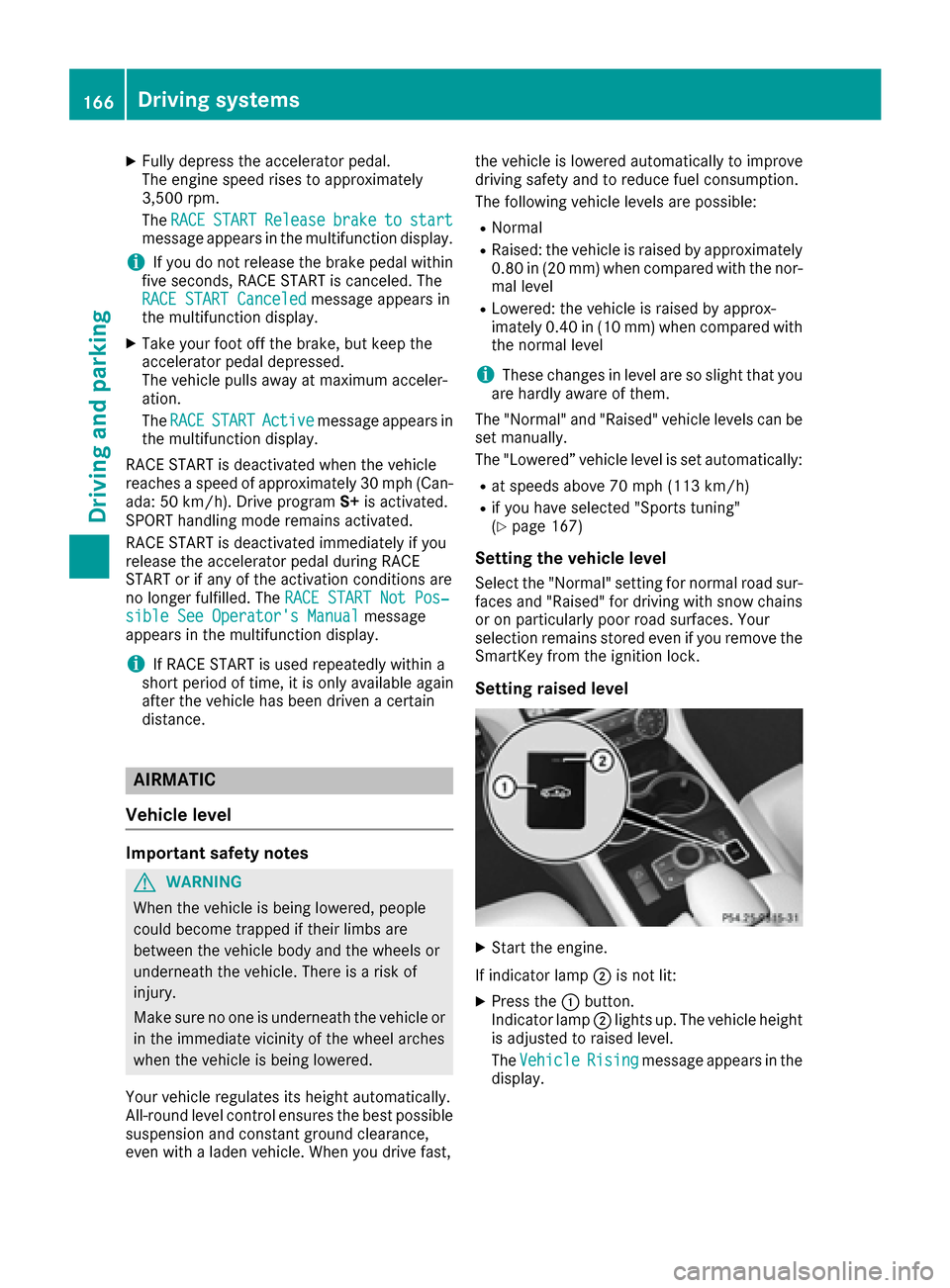
Setting raised level
XStart the engine.
If indicator lamp ;is not lit:
XPress the :button.
Indicator lamp ;lights up. The vehicle height
is adjusted to raised level.
The Vehicle
Risingmessage appears in the
display.
166Driving systems
Driving and parking
Page 169 of 342
The "Raised level" setting is canceled if you:
Rdrive at a speed over approximately 75 mph
(120 km/h)
Rdrive for approximately three minutes at a
speed over 50 mph (80 km/h)
The "Raised level" remains active when you are
not driving within these speed ranges.
Setting the normal level
XStart the engine.
If indicator lamp ;is lit:
XPress button :.
Indicator lamp ;goes out. The vehicle is
adjusted to normal level.
Suspension tuning
General notes
The electronically controlled damping system
works continuously. This improves driving
safety and ride comfort.
The damping is tuned individually to each wheel
and depends on:
Ryour driving style, e.g. sporty
Rthe road surface condition, e.g. bumps
Ryour individual selection, i.e. sports or com-
fort
Your selection remains stored even if you
remove the SmartKey from the ignition lock.
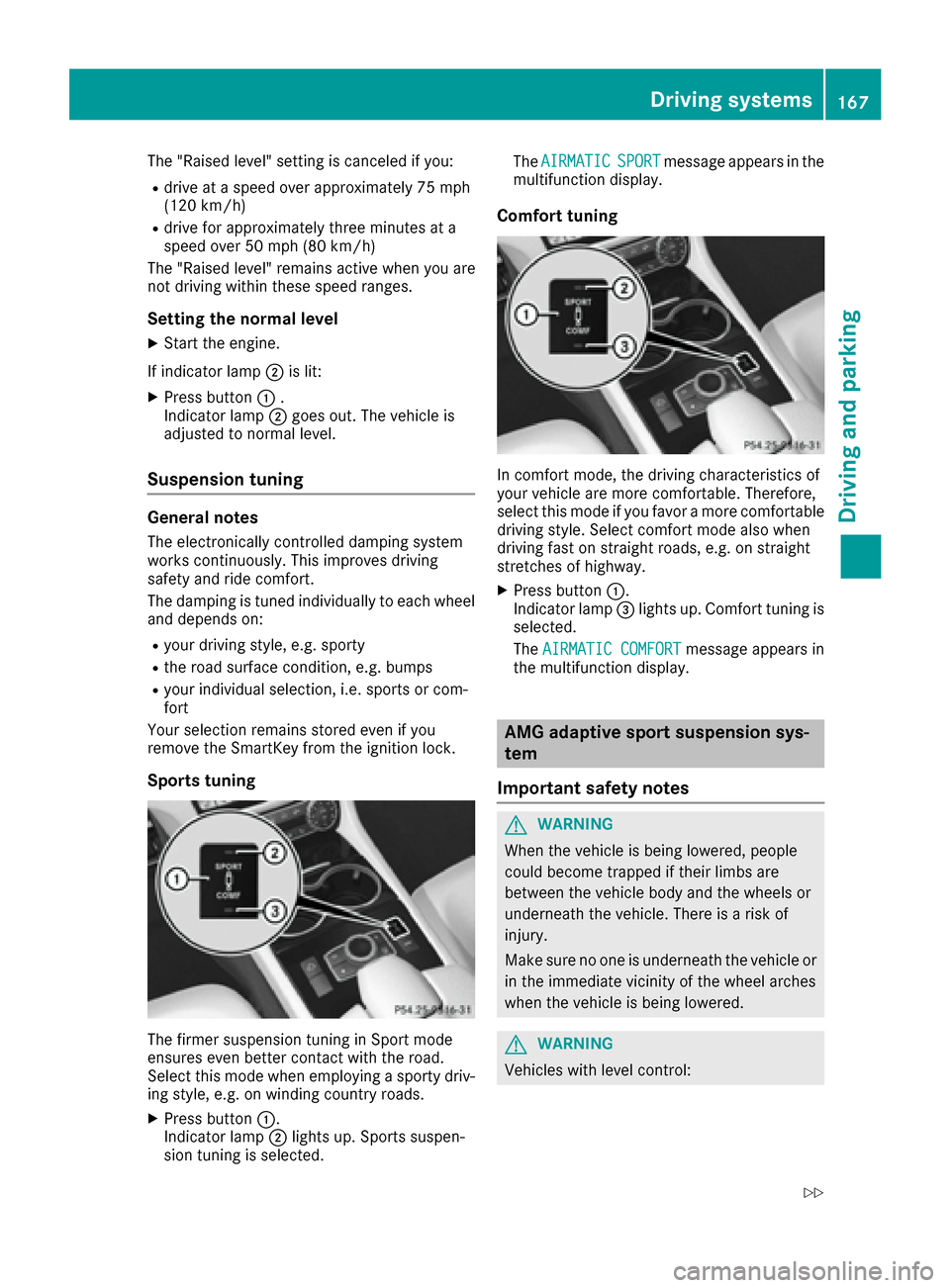
Sports tuning
The firmer suspension tuning in Sport mode
ensures even better contact with the road.
Select this mode when employing a sporty driv-
ing style, e.g. on winding country roads.
XPress button :.
Indicator lamp ;lights up. Sports suspen-
sion tuning is selected. The
AIRMATIC
SPORTmessage appears in the
multifunction display.
Comfort tuning
In comfort mode, the driving characteristics of
your vehicle are more comfortable. Therefore,
select this mode if you favor a more comfortable
driving style. Select comfort mode also when
driving fast on straight roads, e.g. on straight
stretches of highway.
XPress button :.
Indicator lamp =lights up. Comfort tuning is
selected.
The AIRMATIC COMFORT
message appears in
the multifunction display.
AMG adaptive sport suspension sys-
tem
Important safety notes
GWARNING
When the vehicle is being lowered, people
could become trapped if their limbs are
between the vehicle body and the wheels or
underneath the vehicle. There is a risk of
injury.
Make sure no one is underneath the vehicle or
in the immediate vicinity of the wheel arches
when the vehicle is being lowered.
GWARNING
Vehicles with level control:
Driving systems167
Driving and parking
Z
Page 170 of 342
The vehicle is slightly lowered if:
Ryou have selected comfort suspension tun-
ing and
Ryou lock the vehicle within approximately
60 seconds of switching off the engine
You and people in the vicinity of the wheel
arch or the underbody may thus become trap-
ped. There is a risk of injury.
Make sure that nobody is in the vicinity of the
wheel arch or the underbody when you lock
the vehicle.
!The vehicle is lowered by about 0.8 in
(20 mm) if:
Ryou have selected "Comfortable tuning"
Ryou switch off the engine and then
Ryou lock the vehicle within approximately
60 seconds
When parking, position your vehicle so that it does not make contact with the curb as the
vehicle is lowered. Your vehicle could other-
wise be damaged.
Suspension tuning
General notes
The electronically controlled damping system
works continuously. This improves driving
safety and ride comfort.
The damping is tuned individually to each wheel
and depends on:
Ryour driving style, e.g. sporty
Rthe road surface condition, e.g. bumps
Ryour individual selection of Sport, Sport + or
Comfort
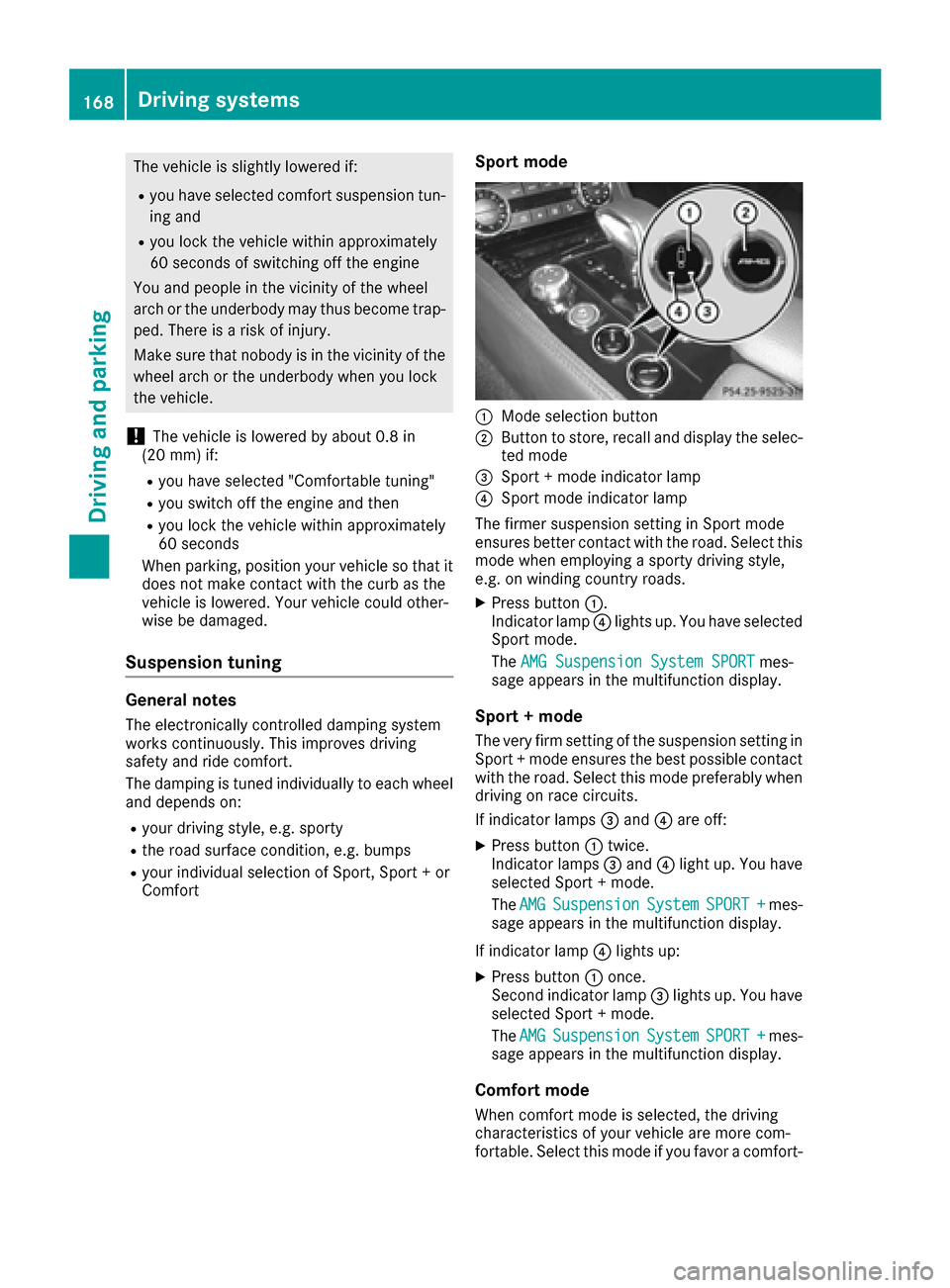
Sport mode
:Mode selection button
;Button to store, recall and display the selec-
ted mode
=Sport + mode indicator lamp
?Sport mode indicator lamp
The firmer suspension setting in Sport mode
ensures better contact with the road. Select this
mode when employing a sporty driving style,
e.g. on winding country roads.
XPress button :.
Indicator lamp ?lights up. You have selected
Sport mode.
The AMG Suspension System SPORT
mes-
sage appears in the multifunction display.
Sport + mode
The very firm setting of the suspension setting in
Sport + mode ensures the best possible contact with the road. Select this mode preferably when
driving on race circuits.
If indicator lamps =and ?are off:
XPress button :twice.
Indicator lamps =and ?light up. You have
selected Sport + mode.
The AMG
SuspensionSystemSPORT +mes-
sage appears in the multifunction display.
If indicator lamp ?lights up:
XPress button :once.
Second indicator lamp =lights up. You have
selected Sport + mode.
The AMG
SuspensionSystemSPORT +mes-
sage appears in the multifunction display.
Comfort mode
When comfort mode is selected, the driving
characteristics of your vehicle are more com-
fortable. Select this mode if you favor a comfort-
168Driving systems
Driving and parking
Page 174 of 342
This indicates that you have now reached the
minimum distance.
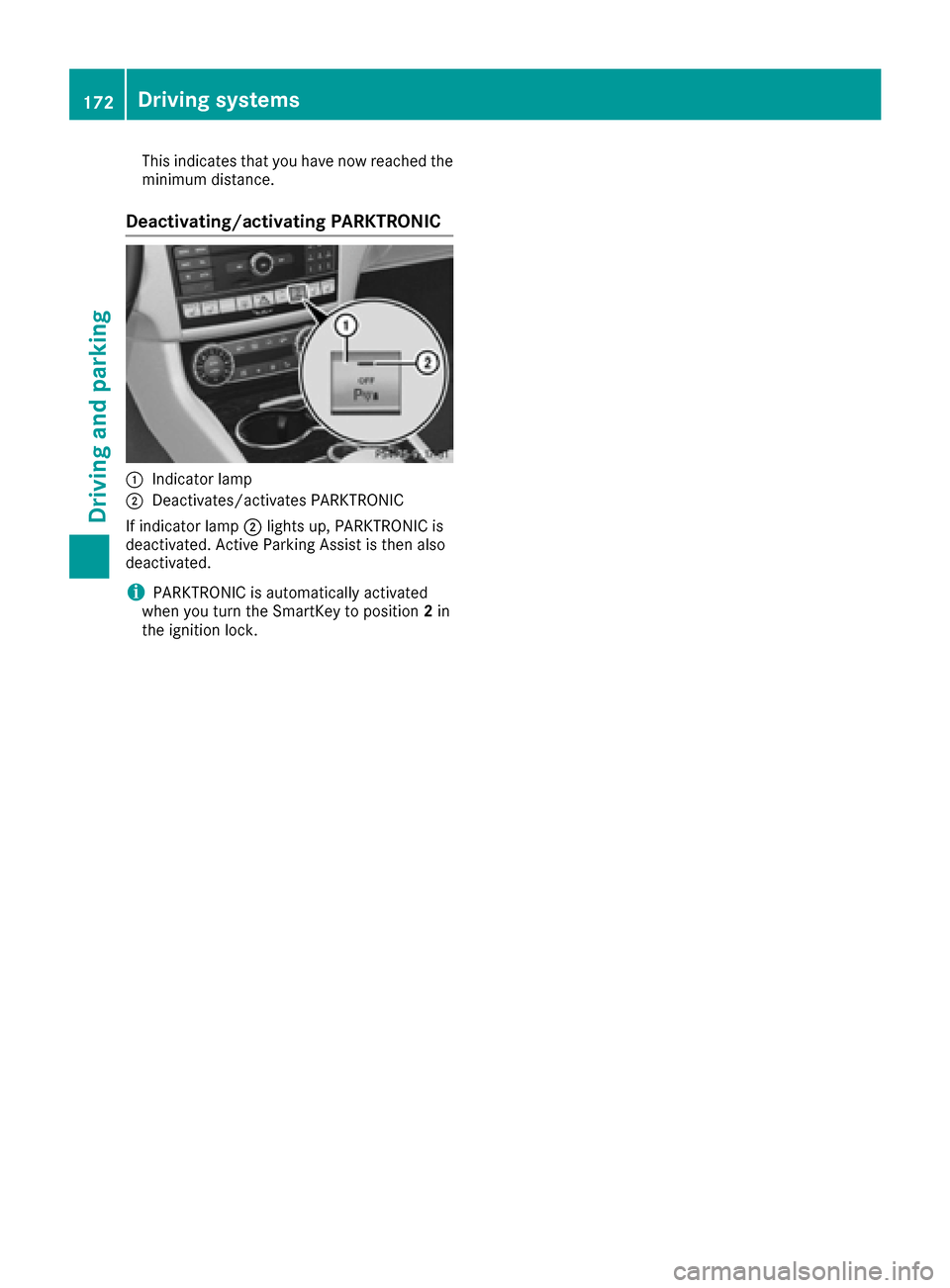
Deactivating/activating PARKTRONIC
:Indicator lamp
;Deactivates/activates PARKTRONIC
If indicator lamp ;lights up, PARKTRONIC is
deactivated. Active Parking Assist is then also
deactivated.
iPARKTRONIC is automatically activated
when you turn the SmartKey to position 2in
the ignition lock.
172Driving systems
Driving and parking
Page 175 of 342
Problems with PARKTRONIC
ProblemPossible causes/consequences andMSolutions
Only the red segments in
the PARKTRONIC warn-
ing displays are lit. You
also hear a warning tone
for approximately two
seconds.
PARKTRONIC is then
deactivated and the indi-
cator lamp on the
PARKTRONIC button
lights up.PARKTRONIC has malfunctioned and has switched off.
XIf problems persist, have PARKTRONIC checked at a qualified spe-
cialist workshop.
Only the red segments in
the PARKTRONIC warn-
ing displays are lit.
PARKTRONIC is then
deactivated.The PARKTRONIC sensors are dirty or there is interference.
XClean the PARKTRONIC sensors (Ypage 282).
XSwitch the ignition back on.
The problem may be caused by an external source of radio or ultra-
sound waves.
XSee if PARKTRONIC functions in a different location.
Active Parking Assist
General notes
Active Parking Assist is an electronic parking aid
with ultrasound. It measures the road on both
sides of the vehicle. A parking symbol indicates a suitable parking space. Active steering inter-
vention and brake application can assist you
during parking. You may also use PARKTRONIC
(
Ypage 170).
Important safety notes
Active Parking Assist is merely an aid. It is not a
replacement for your attention to your immedi-
ate surroundings. You are always responsible
for safe maneuvering, parking and exiting a
parking space. Make sure that no persons, ani-
mals or objects are in the maneuvering range.
When PARKTRONIC is switched off, Active Park-
ing Assist is also unavailable.
GWARNING
While parking or pulling out of a parking
space, the vehicle swings out and can drive
onto areas of the oncoming lane. This could
result in a collision with another road user.
There is a risk of an accident.
Pay attention to other road users. Stop the
vehicle if necessary or cancel the Active Park- ing Assist parking procedure.
!If unavoidable, you should drive over obsta-
cles such as curbs slowly and not at a sharp
angle. Otherwise, you may damage the
wheels or tires.
Active Parking Assist may possibly indicate
parking spaces which are not suitable for park-
ing, for example:
Rwhere parking or stopping is prohibited
Rin front of driveways or entrances and exits
Ron unsuitable surfaces
Parking tips:
ROn narrow roads, drive as close to the parking
space as possible.
RParking spaces that are littered or overgrown
might be identified or measured incorrectly.
RParking spaces that are partially occupied by
trailer drawbars might not be identified as
such or be measured incorrectly.
Driving systems173
Driving and parking
Z
Page 179 of 342
the steering, before the vehicle has exited the
parking space completely. This is useful, for
example when you recognize that it is already
possible to pull out of the parking space.
Canceling Active Parking Assist
You can cancel Active Parking Assist at any
time.
XStop the movement of the multifunction
steering wheel or steer yourself.
Active Parking Assist will be canceled at once.
ThePark Assist Canceled
message
appears in the multifunction display and you
hear a tone.
or
XPress the PARKTRONIC button on the center
console (Ypage 172).
PARKTRONIC is switched off and Active Park-
ing Assist is immediately canceled. The Park
Assist Canceledmessage appears in the
multifunction display and you hear a tone.
Active Parking Assist is canceled automatically
if:
Rthe transmission is shifted too early
Rtransmission position Pis selected
Rparking using Active Parking Assist is no lon-
ger possible
Ryou are driving faster than 6 mph (10 km/h)
Ra wheel spins, ESP®intervenes or fails. In
such cases the ÷warning lamp lights up in
the instrument cluster.
A warning tone sounds. The parking symbol dis-
appears and the multifunction display shows the
Park Assist Canceled
message.
When Active Parking Assist is canceled, you
must steer and brake again yourself.
If a system malfunction occurs, the vehicle is
braked to a standstill. To drive on, depress the
accelerator again.
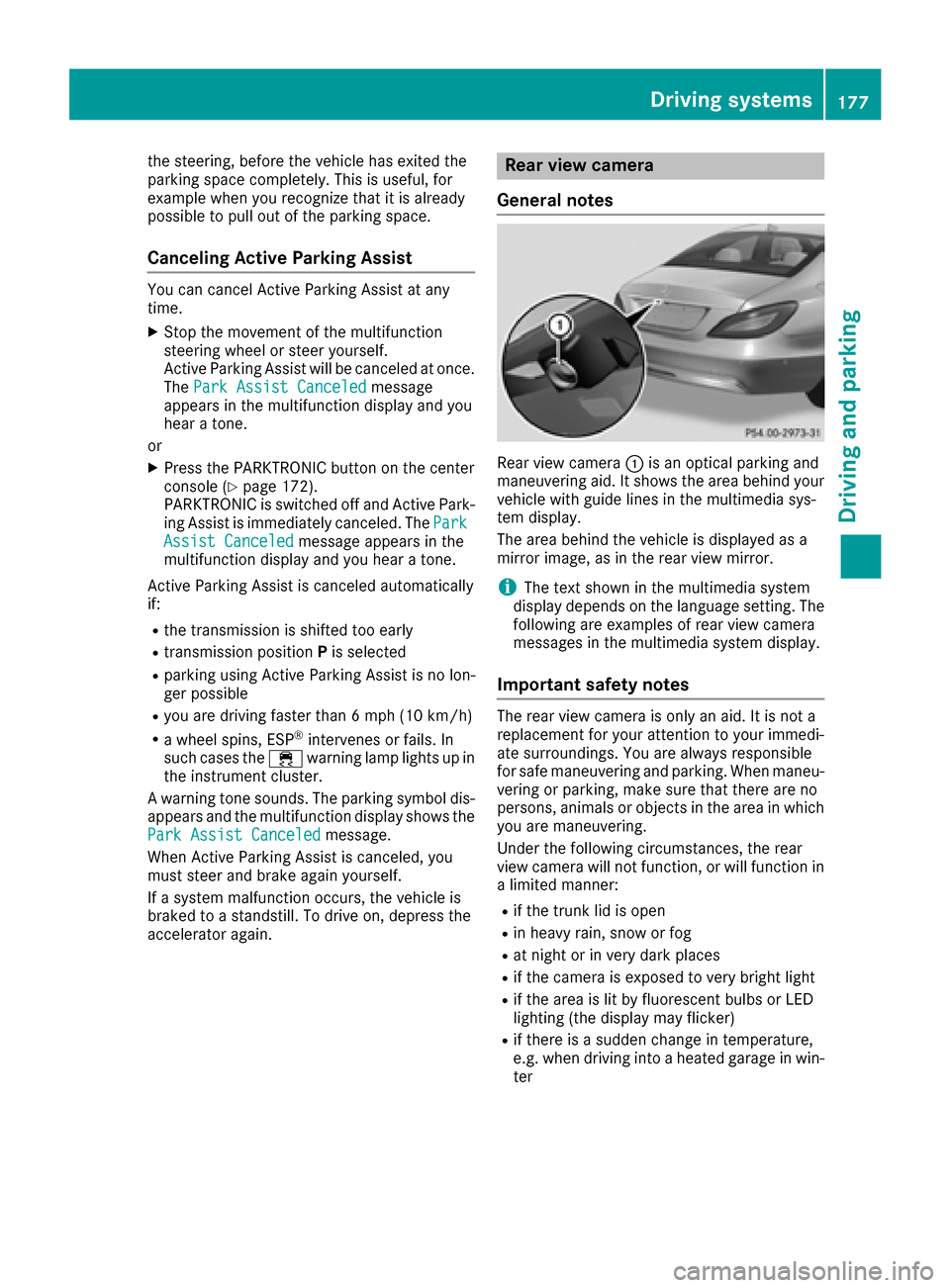
Rear view camera
General notes
Rear view camera :is an optical parking and
maneuvering aid. It shows the area behind your
vehicle with guide lines in the multimedia sys-
tem display.
The area behind the vehicle is displayed as a
mirror image, as in the rear view mirror.
iThe text shown in the multimedia system
display depends on the language setting. The
following are examples of rear view camera
messages in the multimedia system display.
Important safety notes
The rear view camera is only an aid. It is not a
replacement for your attention to your immedi-
ate surroundings. You are always responsible
for safe maneuvering and parking. When maneu-
vering or parking, make sure that there are no
persons, animals or objects in the area in which you are maneuvering.
Under the following circumstances, the rear
view camera will not function, or will function in
a limited manner:
Rif the trunk lid is open
Rin heavy rain, snow or fog
Rat night or in very dark places
Rif the camera is exposed to very bright light
Rif the area is lit by fluorescent bulbs or LED
lighting (the display may flicker)
Rif there is a sudden change in temperature,
e.g. when driving into a heated garage in win- ter
Driving system s177
Driving an d parking
Z
Page 190 of 342
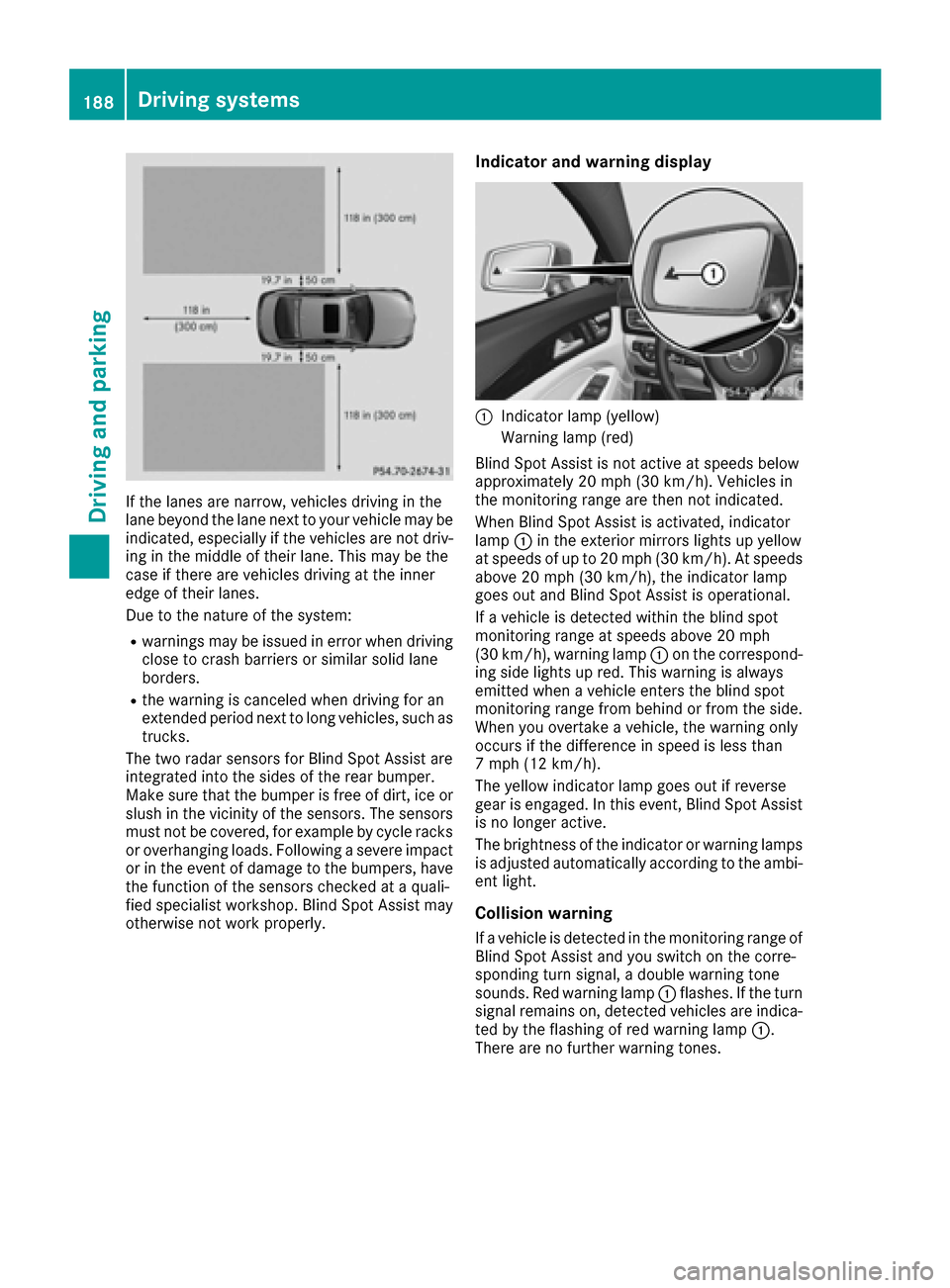
If the lanes are narrow, vehicles driving in the
lane beyond the lane next to your vehicle may be
indicated, especially if the vehicles are not driv-
ing in the middle of their lane. This may be the
case if there are vehicles driving at the inner
edge of their lanes.
Due to the nature of the system:
Rwarnings may be issued in error when driving
close to crash barriers or similar solid lane
borders.
Rthe warning is canceled when driving for an
extended period next to long vehicles, such as
trucks.
The two radar sensors for Blind Spot Assist are
integrated into the sides of the rear bumper.
Make sure that the bumper is free of dirt, ice or
slush in the vicinity of the sensors. The sensors
must not be covered, for example by cycle racks
or overhanging loads. Following a severe impact
or in the event of damage to the bumpers, have
the function of the sensors checked at a quali-
fied specialist workshop. Blind Spot Assist may
otherwise not work properly.
Indicator and warning display
:Indicator lamp (yellow)
Warning lamp (red)
Blind Spot Assist is not active at speeds below
approximately 20 mph (30 km/h). Vehicles in
the monitoring range are then not indicated.
When Blind Spot Assist is activated, indicator
lamp :in the exterior mirrors lights up yellow
at speeds of up to 20 mph (30 km/h). At speeds
above 20 mph (30 km/h), the indicator lamp
goes out and Blind Spot Assist is operational.
If a vehicle is detected within the blind spot
monitoring range at speeds above 20 mph
(30 km/h), warning lamp :on the correspond-
ing side lights up red. This warning is always
emitted when a vehicle enters the blind spot
monitoring range from behind or from the side.
When you overtake a vehicle, the warning only
occurs if the difference in speed is less than
7 mph (12 km/h).
The yellow indicator lamp goes out if reverse
gear is engaged. In this event, Blind Spot Assist
is no longer active.
The brightness of the indicator or warning lamps
is adjusted automatically according to the ambi-
ent light.
Collision warning
If a vehicle is detected in the monitoring range of
Blind Spot Assist and you switch on the corre-
sponding turn signal, a double warning tone
sounds. Red warning lamp :flashes. If the turn
signal remains on, detected vehicles are indica-
ted by the flashing of red warning lamp :.
There are no further warning tones.
188Driving systems
Driving and parking
Page 194 of 342
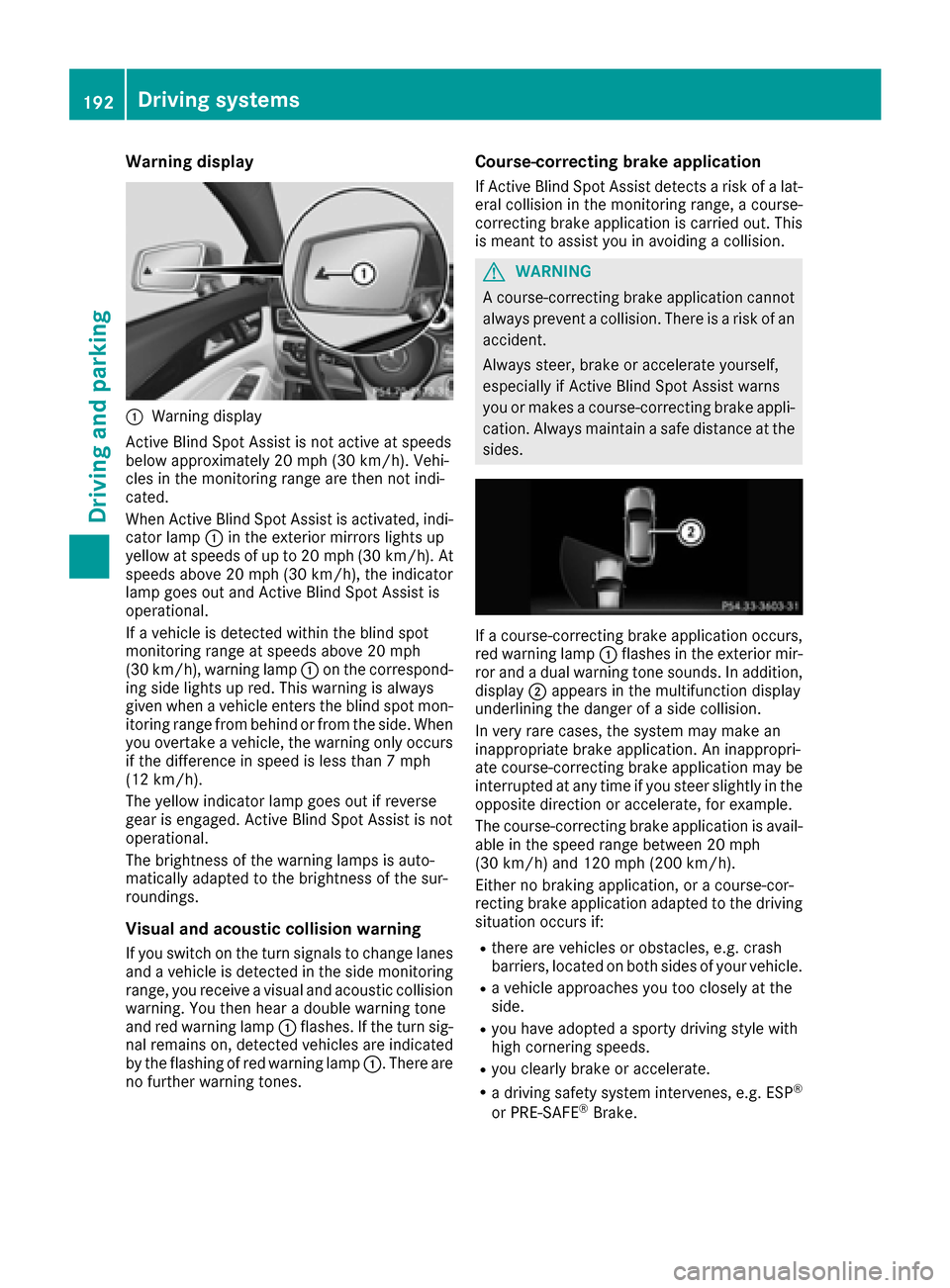
Warning display
:Warning display
Active Blind Spot Assist is not active at speeds
below approximately 20 mph (30 km/h). Vehi-
cles in the monitoring range are then not indi-
cated.
When Active Blind Spot Assist is activated, indi-
cator lamp :in the exterior mirrors lights up
yellow at speeds of up to 20 mph (30 km/h). At
speeds above 20 mph (30 km/h), the indicator
lamp goes out and Active Blind Spot Assist is
operational.
If a vehicle is detected within the blind spot
monitoring range at speeds above 20 mph
(30 km/h), warning lamp :on the correspond-
ing side lights up red. This warning is always
given when a vehicle enters the blind spot mon-
itoring range from behind or from the side. When
you overtake a vehicle, the warning only occurs if the difference in speed is less than 7 mph
(12 km/h).
The yellow indicator lamp goes out if reverse
gear is engaged. Active Blind Spot Assist is not
operational.
The brightness of the warning lamps is auto-
matically adapted to the brightness of the sur-
roundings.
Visual and acoustic collision warning
If you switch on the turn signals to change lanes
and a vehicle is detected in the side monitoring
range, you receive a visual and acoustic collision
warning. You then hear a double warning tone
and red warning lamp :flashes. If the turn sig-
nal remains on, detected vehicles are indicated
by the flashing of red warning lamp :. There are
no further warning tones.
Course-correcting brake application
If Active Blind Spot Assist detects a risk of a lat-
eral collision in the monitoring range, a course-
correcting brake application is carried out. This
is meant to assist you in avoiding a collision.
GWARNING
A course-correcting brake application cannot always prevent a collision. There is a risk of an
accident.
Always steer, brake or accelerate yourself,
especially if Active Blind Spot Assist warns
you or makes a course-correcting brake appli-
cation. Always maintain a safe distance at the
sides.
If a course-correcting brake application occurs,
red warning lamp :flashes in the exterior mir-
ror and a dual warning tone sounds. In addition,
display ;appears in the multifunction display
underlining the danger of a side collision.
In very rare cases, the system may make an
inappropriate brake application. An inappropri-
ate course-correcting brake application may be
interrupted at any time if you steer slightly in the
opposite direction or accelerate, for example.
The course-correcting brake application is avail-
able in the speed range between 20 mph
(30 km/h) and 120 mph (200 km/h).
Either no braking application, or a course-cor-
recting brake application adapted to the driving
situation occurs if:
Rthere are vehicles or obstacles, e.g. crash
barriers, located on both sides of your vehicle.
Ra vehicle approaches you too closely at the
side.
Ryou have adopted a sporty driving style with
high cornering speeds.
Ryou clearly brake or accelerate.
Ra driving safety system intervenes, e.g. ESP®
or PRE-SAFE®Brake.
192Driving systems
Driving and parking
Page 206 of 342
RLane Keeping Assist (Ypage 189)
RActive Lane Keeping Assist (Ypage 193)
XPress:to display the ATTENTION ASSIST
assessment.
Deactivating/activating ESP®
iObserve the important safety notes on ESP®
(Ypage 69).
GWARNING
If you deactivate ESP
®, ESP®no longer sta-
bilizes the vehicle. There is an increased risk
of skidding and an accident.
Only deactivate ESP
®in the situations descri-
bed in the following.
It may be best to deactivate ESP
®in the follow-
ing situations:
Rwhen using snow chains
Rin deep snow
Ron sand or gravel
Deactivating/activating ESP®on Mercedes-
AMG vehicles (Ypage 71).
For further information about ESP®, see
(Ypage 69).
XStart the engine.
XPress the =or; button on the steering
wheel to select the DriveAssistmenu.
XPress9or: to select ESP.
XPressato confirm.
The current selection appears.
XTo activate/deactivate: press theabut-
ton again.
ESP
®is deactivated if the åwarning lamp in
the instrument cluster lights up continuously
when the engine is running.
If the ÷ warning lamp and the åwarning
lamp are lit continuously, ESP
®is not available
due to a malfunction.
Observe the information on warning lamps
(
Ypage 238).
Observe the information on display messages
(
Ypage 213).
Activating/deactivating PRE-SAFE®
Brake
PRE‑SAFE®Brake is only available for vehicles
with the Driving Assistance package.
XPress the =or; button on the steering
wheel to select the DriveAssistmenu.
XPress the9or: button to select PRE-SAFE Brake.
XPressato confirm.
The current selection appears.
XTo activate/deactivate: press theabut-
ton again.
When PRE-SAFE
®Brake is deactivated, the
assistance graphic shows the æsymbol in
the multifunction display.
For more information on PRE‑SAFE
®Brake, see
(Ypage 73).
Activating/deactivating COLLISION
PREVENTION ASSIST PLUS
XPress the =or; button on the steering
wheel to select the DriveAssistmenu.
XPress the9or: button to select Col‐lision Prevent..
XPressato confirm.
The current selection appears.
XTo activate/deactivate: press theabut-
ton again.
If COLLISION PREVENTION ASSIST PLUS is
deactivated, the assistance graphic shows
the æ symbol in the multifunction display.
For further information about COLLISION PRE-
VENTION ASSIST PLUS, see (
Ypage 67).
Activating/deactivating Steering
Assist and Stop&Go Pilot
XPress the =or; button on the steering
wheel to select the DriveAssistmenu.
XPress the9or: button to select DTR+: Steer. Asst.
XPressato confirm.
The current selection appears.
XTo activate/deactivate: press theabut-
ton again.
When Steering Assist and Stop&Go Pilot are
activated, the multifunction display shows the
DTR+: Steer. Asst.
Onmessage.
204Menus and submenus
On-board computer and displays