door lock MERCEDES-BENZ CLS-Class 2016 W218 Owner's Manual
[x] Cancel search | Manufacturer: MERCEDES-BENZ, Model Year: 2016, Model line: CLS-Class, Model: MERCEDES-BENZ CLS-Class 2016 W218Pages: 342, PDF Size: 8.28 MB
Page 8 of 342
Cargo tie down rings.........................255
CD
see also Digital Operator's Man-
ual ..................................................2 45
CD player (on-board computer) ........201
Center console
Lower section .................................. 37
Lower section (AMG vehicles) .......... 38
Upper section .................................. 36
Central locking
Automatic locking (on-board com-
puter) ............................................. 207
Locking/unlocking (SmartKey) ........7 6
Child
Restraint system .............................. 59
Child seat
Forward-facing restraint system ...... 62
LATCH-type (ISOFIX) child seat
anchors ............................................ 60
On the front-passenger seat ............ 62
Rearward-facing restraint system .... 62
Top Tether ...................................... .61
Child-proof locks
Important safety notes .................... 62
Rear doors ...................................... .63
Children
Special seat belt retractor .............. .59
Cigarette lighter ................................ 261
Cleaning
Mirror turn signal .......................... .282
Climate control
Automatic climate control (3-
zone) .............................................. 117
Controlling automatically ...............1 20
Cooling with air dehumidification .. 120
Defrosting the windows ................. 122
Defrosting the windshield ....... ....... 122
Du
al-zone automatic climate con-
trol ................................................. 115
General notes ................................ 114
Indicator lamp ................................ 120
Information about using auto-
matic climate control ..................... 118
Maximum cooling .......................... 122
Overview of systems ......................1 14
Problem with the rear window
defroster ........................................ 124 Problems with cooling with air
dehumidification ............................ 120
Rear control panel ......................... 117
Refrigerant ..................................... 335
Refrigerant filling capacity ............. 336
Setting the air distribution ............. 121
Setting the air vents ......................1
25
Setting the airflow ......................... 122
Setting the climate mode (AIR
FLOW) ............................................ 121
Setting the temperature ................ 121
Setting the temperature with 3-
zone automatic climate control ..... 121
Setting the temperature with dual-
zone automatic climate control ..... 121
Switching air-recirculation mode
on/off ............................................ 124
Switching on/off ........................... 119
Switching residual heat on/off ...... 124
Switching the rear window
defroster on/off ............................ 123
Switching the ZONE function on/
off ..................................................1 22
Cockpit
Overview .......................................... 33
see Instrument cluster
Collapsible spare wheel
Inflating ......................................... 327
see Emergency spare wheel
COLLISION PREVENTION ASSIST
PLUS
Activating/deactivating ................. 204
Display message ............................ 215
Operation/notes .............................. 67
COMAND
Switching on/off ........................... 246
COMAND display
Cleaning ......................................... 283
Combination switch .......................... 108
Connecting a USB device
see also Digital Operator's Ma
n-
ual ..................................................2 45
Consumption statistics (on-board
computer) .......................................... 199
Controller ...........................................2 46
Convenience box ............................... 255
Convenience closing feature .............. 88
6Index
Page 9 of 342
Convenience opening feature............ 88
Coolant (engine)
Checking the level ........................ .276
Display message ............................ 222
Filling capacity ............................... 335
Important safety notes .................. 334
Temperature (on-board computer,
Mercedes-AMG vehicles) ...............2 09
Temperature gauge ........................ 196
Warning lamp ................................. 241
Cooling
see Climate control
Copyright ............................................. 32
Cornering light function
Display message ............................ 221
Function/notes .............................1 09
Cruise control
Activation conditions ..................... 154
Cruise control lever ....................... 153
Deactivating ................................... 155
Display message ............................ 229
Driving system ............................... 153
Function/notes .............................1 53
Important safety notes .................. 153
Setting a speed .............................. 154
Storing and maintaining current
speed ............................................. 154
Cup holder
Center console .............................. 258
Center console in the rear com-
partment ........................................ 258
Important safety notes .................. 257
Rear compartment ......................... 258
Customer Assistance Center
(CAC) ..................................................... 29
Customer Relations Department ....... 29
D
Dashboard
see Instrument cluster
Data
see Technical data
Data carrier
Selecting ........................................ 201
Daytime running lamps
Display message ............................ 221
Function/notes .............................1 07Switching on/off (on-board com-
puter) ............................................. 206
Declarations of conformity ................. 28
Delayed switch-off
Exterior lighting (on-board com-
puter) ............................................. 207
Interior lighting .............................. 207
Diagnostics connection ......................29
Digital Operator's Manua l
Help ................................................ .23
Introduction .....................................2 3
Digital speedomete r........................ .199
DIRECT SELECT lever
Automatic transmission ................. 135
Display messages
ASSYST PLUS ................................ 277
Calling up (on-board computer) ..... 212
Driving systems .............................2 24
Engine ............................................ 222
General notes ................................ 212
Hiding (on-board computer) ........... 212
KEYLESS-GO .................................. 234
Lights ............................................. 221
Safety systems .............................. 213
SmartKey ....................................... 234
Tires ............................................... 230
Vehicle ...........................................2 32
Distance recorder .............................1 98
Distance warning (warning lamp) .... 243
Distance warning function
Function/notes ................................ 67
DISTRONIC PLUS
Activating ....................................... 157
Activation conditions ..................... 157
Deactivating ................................... 161
Display message ............................ 227
Displays in the multifunction dis-
play ................................................ 160
Function/note s ............................. 155
Imp
ortant safety notes .................. 156
Setting the specified minimum
distance ......................................... 159
Stopping ........................................ 159
Doors
Automatic locking (on-board com-
puter) ............................................. 207
Automatic locking (switch) ............... 82
Index7
Page 10 of 342
Central locking/unlocking
(SmartKey) .......................................76
Control panel .................................. .40
Display message ............................ 233
Emergency locking ........................... 83
Emergency unlocking ....................... 83
Important safety notes .................... 81
Opening (from inside) ...................... 81
Drinking and driving ......................... 149
Drive program
Automatic ...................................... 139
Display ........................................... 134
Display (DIRECT SELECT lever) ...... 135
Manual ........................................... 140
Manual (Mercedes-AMG vehi-
cles) ............................................... 141
Manual (vehicles with Sports
package AMG) ............................... 141
SETUP (on-board computer) .......... 209
Drive program selector ..................... 139
Driver's door
see Doors
Driving abroad
Mercedes-Benz Service ................. 278
Driving on flooded roads .................. 152
Driving safety systems
ABS (Anti-lock Braking System) ....... 64
ADAPTIVE BRAKE ............................. 72
Adaptive Brake Assist ...................... 68
BAS (Brake Assist System) .............. 65
BAS PLUS with Cross-Traffic
Assist ............................................... 65
COLLISION PREVENTION ASSIST
PLUS ................................................ 67
Distance warning function ............... 67
EBD (electronic brake force distri-
bution) ............................................. 72
ESP
®(Electronic Stability Pro-
gram) ............................................... 69
Important safety information ........... 64
Overview .......................................... 64
PRE-SAFE
®Brake ............................. 73
Driving system
RACE START (Mercedes-AMG
vehicles) ........................................ 165
Driving systems
360°camera .................................. 181 Active Blind Spot Assist ................. 190
Active Driving Assistance pack-
age ................................................. 190
Active Lane Keeping Assist
............ 193
Acti
ve Parking Assist ..................... 173
AIRMATIC ...................................... 166
AMG adaptive sport suspension
system ........................................... 167
ATTENTION ASSIST ........................ 184
Blind Spot Assist ............................ 187
Cruise control ................................ 153
Display message ............................ 224
DISTRONIC PLUS ........................... 155
DISTRONIC PLUS with Steering
Assist and Stop&Go Pilot ............... 162
HOLD function ............................... 164
Lane Keeping Assist ...................... 189
Lane Tracking package .................. 187
PARKTRONIC ................................. 170
Rear view camera .......................... 177
Traffic Sign Assist .......................... 186
Driving tips
AMG ceramic brakes ..................... 151
Automatic transmission ................. 137
Brakes ........................................... 150
Break-in period .............................. 126
Downhill gradient ........................... 150
Drinking and driving ....................... 149
Driving in winter ............................. 152
Driving on flooded roads ................ 152
Driving on wet roads ...................... 152
Exhaust check ............................... 149
Fuel ................................................ 149
General .......................................... 148
Hydroplaning ................................. 152
Icy road surfaces ........................... 152
Limited braking efficiency on sal-
ted roads ....................................... 151
Snow chains .................................. 303
Wet road surface ........................... 151
DVD video
Operating (on-board computer) ..... 202
see also Digital Operator's Man-
ual .................................................. 245
8Index
Page 12 of 342
Warning lamp ................................. 238
ETS/4ETS (Electronic Traction Sys-
tem) ...................................................... 69
Exhaust check ................................... 149
Exhaust pipe (cleaning instruc-
tions) .................................................. 283
Exterior lighting
Setting options .............................. 107
see Lights
Exterior mirrors
Adjusting ....................................... 103
Dipping (automatic) ....................... 104
Folding in when locking (on-board
computer) ...................................... 208
Folding in/out (automatically) .......1 04
Folding in/out (electrically) ........... 104
Out of position (troubleshooting) ... 104
Setting ...........................................1 04
Storing settings (memory func-
tion) ............................................... 105
Storing the parking position .......... 105
Eyeglasses compartment ................. 252
F
Favorites
Overview ........................................ 247
Filler cap
see Refueling
Flat tire
MOExtended tires .......................... 287
Preparing the vehicle ..................... 287
TIREFIT kit ...................................... 288
see Emergency spare wheel
Floormats ...........................................2 72
Frequencies
Mobile phone ................................. 329
Two-way radio ................................ 329
Fuel
Consumption statistics .................. 199
Displaying the current consump-
tion ................................................ 199
Displaying the range ......................1 99
Driving tips ....................................1 49
Fuel gauge ....................................... 34
Grade (gasoline) ............................ 332
Important safety notes .................. 332
Problem (malfunction) ................... 146 Refueling ........................................ 143
Tank content/reserve fuel ............. 332
Fuel filler flap
Emergency release ........................ 145
Opening ......................................... 144
Fuel level
Calling up the range (on-board
computer) ...................................... 199
Fuel tank
Capacity ........................................ 332
Problem (malfunction) ................... 146
Fuse allocation chart (vehicle tool
kit) ...................................................... 286
Fuses
Allocation chart .............................2 99
Before changing .............................2 99
Fuse box in the engine compart-
ment .............................................. 300
Fuse box in the trunk ..................... 300
Important safety notes .................. 299
G
Garage door opener
Clearing the memory ..................... 272
General notes ................................ 269
Important safety notes .................. 270
Opening/closing the garage door .. 272
Problems when programming ........2 72
Programming (button in the rear-
view mirror) ................................... 270
Synchronizing the rolling code ....... 271
Gasoline ............................................. 332
Gear indicator (on-board com-
puter, Mercedes-AMG vehicles) ....... 209
Genuine parts ...................................... 25
Glove box ...........................................2 52
Google™ Local Search
see also Digital Operator's Man-
ual ..................................................2 45
H
Handbrake
see Parking brake
Hazard warning lamps ......................109
Head bags
Display message ............................ 218
10Index
Page 14 of 342
L
Lampssee Warning and indicator lamps
Lane Keeping Assist
Activating/deactivating ................ .205
Display message ............................ 226
Function/information .................... 189
Lane Tracking package ..................... 187
Lap time (RACETIMER) ...................... 210
LATCH-type (ISOFIX) child seat
anchors ................................................ 60
License plate lamp (display mes-
sage) ................................................... 221
Light function, active
Display message ............................ 221
Light sensor (display message) ....... 221
Lights
Activating/deactivating the inte-
rior lighting delayed switch-off ....... 207
Adaptive Highbeam Assist ............. 109
Automatic headlamp mode ............ 107
Cornering light function ................. 109
Hazard warning lamps ................... 109
High beam flasher .......................... 108
High-beam headlamps ................... 108
Light switch ................................... 107
Low-beam headlamps .................... 108
Parking lamps ................................ 108
Setting the brightness of the
ambient lighting (on-board com-
puter) ............................................. 206
Setting the brightness of the dis-
play/switch (on-board computer) .. 206
Setting the color of the ambient
lighting (on-board computer) ......... 207
Standing lamps .............................. 108
Switching the daytime running
lamps on/off (on-board com-
puter) ............................................. 206
Switching the exterior lighting
delayed switch-off on/off (on-
board computer) ............................ 207
Switching the surround lighting
on/off (on-board computer) .......... 207
Turn signals ................................... 108
see Interior lighting
Loading guidelines ............................ 251 Locking
see Central locking
Locking (doors)
Automatic ........................................ 82
Emergency locking ........................... 83
From inside (centra
l locking but-
ton) .................................................. 82
Locking centrally
see Central locking
Locking verification signal (on-
board computer) ............................... 208
Low-beam headlamps
Display message ............................ 221
Switching on/off ........................... 108
Lumbar support
Adjusting the 4-way lumbar sup-
port .................................................. 98
Luxury head restraints ....................... 96
M
M+S tires............................................ 303
Malfunction message
see Display messages
Matte finish (cleaning instruc-
tions) .................................................. 281
mbrace
Call priority .................................... 266
Display message ............................ 215
Downloading destinations
(COMAND) ..................................... 266
Downloading routes ....................... 269
Emergency call .............................. 264
General notes ................................ 263
Geo fencing ................................... 269
Locating a stolen vehicle ............... 268
MB info call button ........................ 265
Remote fault diagnosis .................. 268
Remote vehicle locking .................. 268
Roadside Assistance button .......... 265
Search & Send ............................... 267
Self-test ......................................... 263
Speed alert .................................... 269
System .......................................... 263
Triggering the vehicle alarm ........... 269
Vehicle remote unlocking .............. 267
Mechanical key
Function/notes ................................ 78
12Index
Page 15 of 342
General notes .................................. 78
Inserting .......................................... 78
Locking vehicle ................................ 83
Removing .........................................78
Unlocking the driver's door .............. 83
Media Interface
USB port in the armrest of the
center console ...............................2 53
see Separate operating instructions
Memory card (audio) ......................... 201
Memory function ............................... 105
Mercedes-Benz Intelligent Drive
360°camera .................................. 181
Active Blind Spot Assist ................. 190
Active Lane Keeping Assist ............ 193
Active Parking Assist ..................... 173
ATTENTION ASSIST ........................ 184
Blind Spot Assist ............................ 187
Cruise control ................................ 153
DISTRONIC PLUS ........................... 155
DISTRONIC PLUS with Steering
Assist and Stop&Go Pilot ...............1 62
General notes ................................ 153
Lane Keeping Assist ......................1 89
PARKTRONIC ................................. 170
PRE-SAFE
®(anticipatory occu-
pant protection) ............................... 56
PRE-SAFE
®PLUS (anticipatory
occupant protection PLUS) .............. 57
Rear view camera .......................... 177
Traffic Sign Assist .......................... 186
Message memory (on-board com-
puter) ..................................................2 12
Messages
see Display messages
Mirrors
see Exterior mirrors
see Vanity mirror (in the sun visor)
Mobile phone
Connecting (Bluetooth
®inter-
face) .............................................. 248
Connecting another mobile
phone ............................................ 250
Frequencies ................................... 329
Installation ............................ ......... 329
Menu (on-board computer) ............ 202
Tra
nsmission output (maximum) .... 329 Modifying the programming
(SmartKey)
...........................................7 7
MOExtended tires .............................. 287
Mounting wheels
Lowering the vehicle ...................... 324
Mounting a new wheel ................... 324
Preparing the vehicle .....................3 21
Raising the vehicle ......................... 322
Removing a wheel .......................... 323
Securing the vehicle against roll-
ing away ........................................ 321
MP3
Operation ....................................... 201
see also Digital Operator's Man-
ual ..................................................2 45
Multicontour seat
Adjusting (on the seat) ..................... 97
Multifunction display
Function/notes .............................1 98
Permanent display ......................... 206
Multifunction steering wheel
Operating the on-board computer .. 197
Overview .......................................... 35
Multimedia system
see Separate operating instructions
Music files
see also Digital Operator's Man-
ual ..................................................2 45
N
Navigation
Menu (on-board computer) ............ 200
see also Digital Operator's Man-
ual ..................................................2 45
NECK-PRO head restraints
Operation ......................................... 55
Resetting triggered .......................... 56
NECK-PRO luxury head restraints
Important safety notes .................... 55
Operation ......................................... 55
Resetting when triggered ................. 56
Notes on breaking-in a new vehi-
cle ....................................................... 126
Index13
Page 19 of 342
Service menu (on-board com-
puter).................................................. 205
Service message
see ASSYST PLUS
Service products
Brake fluid .....................................3 34
Coolant (engine) ............................ 334
Engine oil ....................................... 333
Fuel ................................................ 332
Important safety notes .................. 331
Refrigerant (air-conditioning sys-
tem) ............................................... 335
Washer fluid ................................... 335
Setting the air distribution ...............121
Setting the airflow ............................ 122
Setting the date/time format
see also Digital Operator's Man-
ual ..................................................2 45
Setting the language
see also Digital Operator's Man-
ual ..................................................2 45
Setting the time
see also Digital Operator's Man-
ual ..................................................2 45
Settings
Factory (on-board computer) ......... 209
On-board computer ....................... 205
SETUP (on-board computer) ............. 209
Side impact air bag .............................4 8
Side marker lamp (display mes-
sage) ................................................... 221
Side windows
Cleaning ......................................... 281
Convenience closing feature ............ 88
Convenience opening feature ..........8 8
Important safety information ........... 86
Opening/closing .............................. 87
Problem (malfunction) .....................9 0
Resettin g........................................ .89
Reversin gfeature ............................ .87
SIRIUS services
see also Digital Operator's Man-
ual ................................. ................. 245
Sliding sunroof
Important safet
y notes .................... 90
Opening/closing .............................. 91
Problem (malfunction) ..................... 93 Resetting ......................................... 91
SmartKey
Changing the battery ....................... 79
Changing the programming .............7 7
Checking the battery ...................... .79
Convenience closing feature ............ 88
Convenience opening feature .......... 88
Dis play message ............................ 234
Door central locking/unlocking ...... .76
Important safety notes .................... 76
Loss .................................................8 0
Mechanical key ................................ 78
Overview .......................................... 76
Positions (ignition lock) ................. 127
Problem (malfunction) ..................... 80
Starting the engine ........................ 129
SMS
see also Digital Operator's Man-
ual .................................................. 245
Snow chains ...................................... 303
Sockets
Center console .............................. 262
General notes ................................ 262
Rear compartment .........................2 63
Sound
Switching on/off ........................... 246
Spare wheel
Stowing .......................................... 327
Special seat belt retractor .................. 59
Specialist workshop ............................ 29
Speed, controlling
see Cruise control
Speedometer
Digital ............................................ 199
In the Instru
ment cluster ................. 34
Segments ...................................... 196
Selecting the display unit ...............2 05
SPORT handling mode
Deactivating/activating
(Mercedes-AMG vehicles) ................ 71
Warning lamp ................................. 240
Standing lamps
Display message ............................ 221
Switching on/off ........................... 108
Start/stop function
see ECO start/stop function
Starting (engine) ................................ 128
Index17
Page 42 of 342
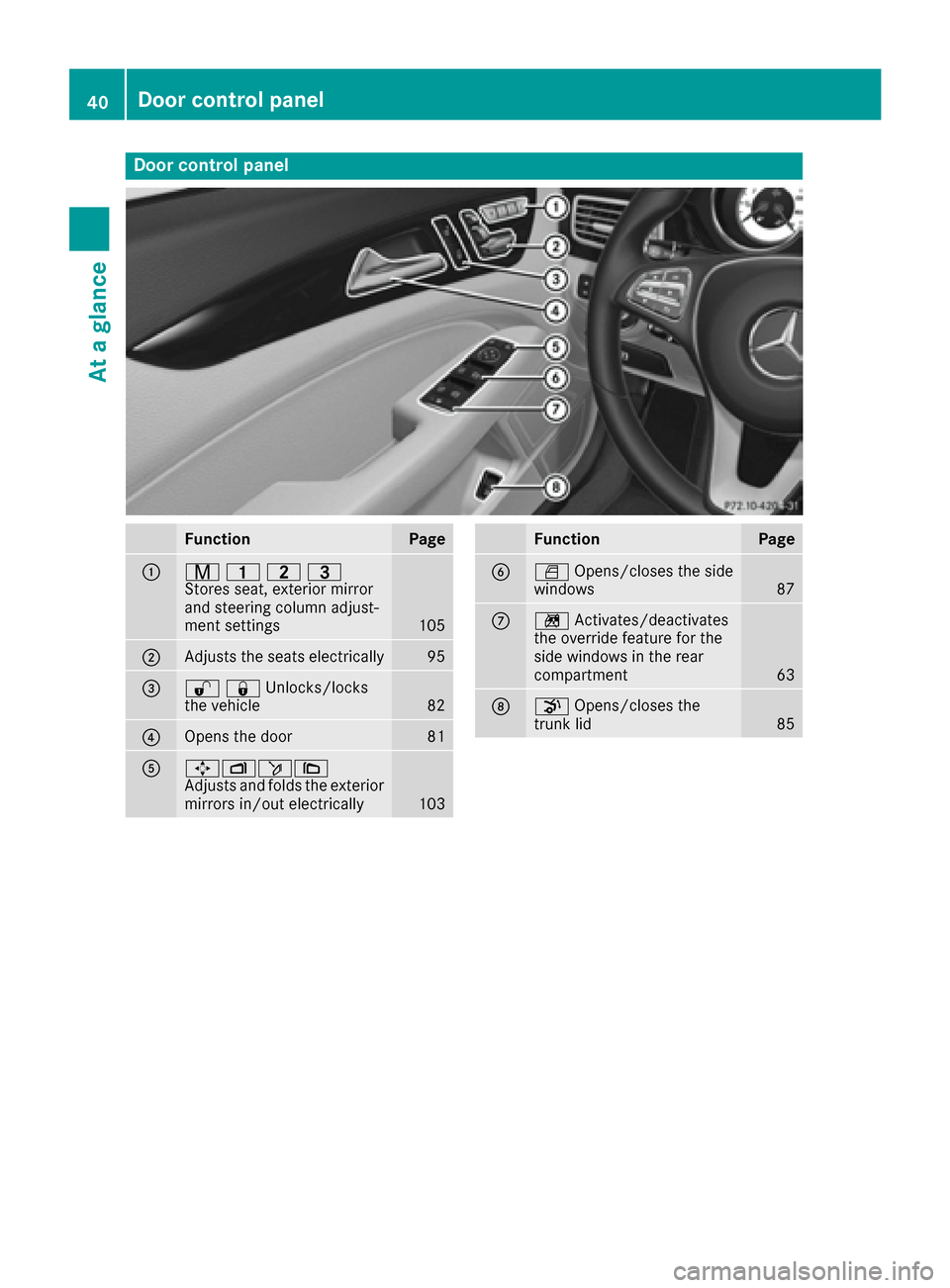
Door controlpanel
FunctionPage
:r 45=
Stores seat, exterior mirror
and steering column adjust-
ment settings
105
;Adjusts the seats electrically95
=%&Unlocks/locks
the vehicle82
?Opens the door81
A7Zö\
Adjusts and folds the exterior
mirrors in/out electrically
103
FunctionPage
BW Opens/closes the side
windows87
Cn Activates/deactivates
the override feature for the
side windows in the rear
compartment
63
Dp Opens/closes the
trunk lid85
40Door control panel
At a glance
Page 60 of 342
If the hazardous situation passes without result-
ing in an accident, the original settings are
restored.
Automatic measures after an acci-
dent
Immediately after an accident, the following
measures are implemented, depending on the
type and severity of the impact:
Rthe hazard warning lamps are activated
Rthe emergency lighting is activated
Rthe vehicle doors are unlocked
Rthe front side windows are lowered
Rvehicles with a memory function: the electri-
cally adjustable steering wheel is raised
Rthe engine is switched off and the fuel supply
is cut off
Rvehicles with mbrace: automatic emergency
call
Children in the vehicle
Important safety notes
Accident statistics show that children secured
in the rear seats are safer than children secured
in the front-passenger seat. For this reason,
Mercedes-Benz strongly advises that you install
a child restraint system on a rear seat. Children
are generally better protected there.
If a child younger than twelve years old and
under 5 ft (1.50 m)in height is traveling in the
vehicle:
Ralways secure the child in a child restraint
system suitable for Mercedes-Benz vehicles.
The child restraint system must be appropri-
ate to the age, weight and size of the child
Rbe sure to observe the instructions and safety
notes in this section in addition to the child
restraint system manufacturer's installation
instructions
Rbe sure to observe the instructions and safety
notes on the "Occupant classification system
(OCS)" (
Ypage 49)
GWARNING
If you leave children unsupervised in the vehi-
cle, they could set it in motion by, for example:
Rrelease the parking brake.
Rshift the automatic transmission out of the
parking position P.
Rstart the engine.
In addition, they may operate vehicle equip-
ment and become trapped. There is a risk of
an accident and injury.
When leaving the vehicle, always take the
SmartKey with you and lock the vehicle. Never
leave children unsupervised in the vehicle.
GWARNING
If persons, particularly children are subjected to prolonged exposure to extreme heat or
cold, there is a risk of injury, possibly even
fatal. Never leave children unattended in the
vehicle.
GWARNING
If the child restraint system is subjected to
direct sunlight, parts may get very hot. Chil-
dren may burn themselves on these parts,
particularly on the metal parts of the child
restraint system. There is a risk of injury.
If you leave the vehicle, taking the child with
you, always ensure that the child restraint
system is not exposed to direct sunlight. Pro- tect it with a blanket, for example. If the child
restraint system has been exposed to direct
sunlight, let it cool down before securing the
child in it. Never leave children unattended in
the vehicle.
Always ensure that all vehicle occupants have
their seat belts fastened correctly and are sitting
properly. Particular attention must be paid to
children.
Observe the safety notes on the seat belt
(
Ypage 43) and the notes on correct use of seat
belts (Ypage 44).
A booster seat may be necessary to achieve
proper seat belt positioning for children over
41 lbs (18 kg) until they reach a height where a
58Children in the vehicle
Safety
Page 64 of 342
Child restraint system on the front-
passenger seat
General notes
Accident statistics show that children secured
in the rear seats are safer than children secured
in the front-passenger seat. For this reason,
Mercedes-Benz strongly advises that you install
the child restraint system on a rear seat.
If it is absolutely necessary to install a child
restraint system on the front-passenger seat,
always observe the instructions and safety
notes on the "Occupant Classification System
(OCS)" (
Ypage 49).
You can thus avoid the risks that could arise as a result of:
Ran incorrectly categorized person in the front-
passenger seat
Rthe unintentional deactivation of the front-
passenger front air bag
Rthe unsuitable positioning of the child
restraint system, e.g. too close to the dash-
board
Rearward-facing child restraint system
If it is absolutely necessary to install a rearward-
facing child restraint system on the front-
passenger seat, always make sure that the
front-passenger front air bag is deactivated.
Only if the PASSENGER AIR BAG OFF indicator
lamp is permanently lit (
Ypage 42) is the front-
passenger front air bag deactivated.
Always observe the child restraint system man-
ufacturer's installation and operating instruc-
tions.
Forward-facing child restraint system
If it is absolutely necessary to install a forward-
facing child restraint system on the front-
passenger seat, always move the front-
passenger seat as far back as possible. The
entire base of the child restraint system must
always rest on the seat cushion of the front-
passenger seat. The backrest of the child
restraint system must lie as flat as possible
against the backrest of the front-passenger
seat. The child restraint system must not touch
the roof or be subjected to a load by the head
restraint. Adjust the angle of the seat backrest
and the head restraint position accordingly.
Always make sure that the shoulder belt strap is correctly routed from the vehicle belt outlet to
the shoulder belt guide on the child restraint
system. The shoulder belt strap must be routed
forwards and downwards from the vehicle belt
outlet. If necessary, adjust the vehicle belt out-
let and the front-passenger seat accordingly.
Always observe the child restraint system man-
ufacturer's installation and operating instruc-
tions.
Child-proof locks
Important safety notes
GWARNING
If children are traveling in the vehicle, they
could:
Ropen doors, thus endangering other people
or road users
Rexit the vehicle and be caught by oncoming
traffic
Roperate vehicle equipment and become
trapped
There is a risk of an accident and injury.
Always activate the child-proof locks and
override feature if children are traveling in the vehicle. When leaving the vehicle, always take
the key with you and lock the vehicle. Never
leave children unattended in the vehicle.
Override feature for:
Rthe rear doors (Ypage 63)
Rthe rear side windows (Ypage 63)
GWARNING
If you leave children unsupervised in the vehi-
cle, they could set it in motion by, for example:
Rrelease the parking brake.
Rshift the automatic transmission out of the
parking position P.
Rstart the engine.
In addition, they may operate vehicle equip-
ment and become trapped. There is a risk of
an accident and injury.
62Children in the vehicle
Safety