stop start MERCEDES-BENZ CLS-Class 2016 W218 Owner's Manual
[x] Cancel search | Manufacturer: MERCEDES-BENZ, Model Year: 2016, Model line: CLS-Class, Model: MERCEDES-BENZ CLS-Class 2016 W218Pages: 342, PDF Size: 8.28 MB
Page 6 of 342
Alarm systemsee ATA (Anti-Theft Alarm system)
Amb ient lighting
Se tting the brightness (on-board
computer) ...................................... 206
Se tting the color (on-board com-
puter) ............................................ .207
AMG adaptive sport suspension
system ................................................ 167
Anti-lock braking system
see ABS (Anti-lock Braking System)
Anti-Theft Alarm system
see ATA (Anti-Theft Alarm system)
Ashtray ............................................... 260
Assistance display (on-board com-
puter) ..................................................2 03
Assistance menu (on-board com-
puter) ..................................................2 03
ASSYST PLUS
Displaying a service message ........2 78
Hiding a service message .............. 278
Resetting the service interval dis-
play ................................................ 278
Service message ............................ 277
Special service requirements ......... 278
ATA (Anti-Theft Alarm system)
Activating/deactivating ................... 75
Function ...........................................7 5
Switching off the alarm .................... 75
ATTENTION ASSIST
Activating/deactivating ................. 205
Display message ............................ 224
Function/notes ............................. 184
Audio 20
Switching on/off ........................... 246
Audio system
see separate operating instructions
Authorized Mercedes-Benz Center
see Qualified specialist workshop
Authorized workshop
see Qualified specialist workshop
AUTO lights
Display message ............................ 221
see Lights
Automatic car wash (care) ............... 279
Automatic engine start (ECO start/
stop functio n)
.................................... 131 A
utomatic engine switch-off (ECO
start/stop function) .......................... 130
Automatic headlamp mode .............. 107
Automatic transmission
Accelerator pedal position ............. 137
Automatic drive program ............... 139
Changing gear ............................... 137
DIRECT SELECT lever ..................... 135
Display message ............................ 232
Drive program display .................... 135
Driving tips .................................... 137
Emergency running mode .............. 143
Engaging drive position .................. 136
Engaging neutral ............................ 136
Engaging park position
(Mercedes-AMG vehicles) .............. 134
Engaging park position automati-
cally ............................................... 135
Engaging reverse gear ................... 135
Engaging the park position ............ 135
Kickdown ....................................... 138
Manual drive program .................... 140
Manual drive program (Mercedes-
AMG vehicles) ................................ 141
Manual drive program (vehicles
with Sports package AMG) ............ 141
Overview ........................................ 134
Problem (malfunction) ................... 143
Program selector button ................ 138
Pulling away ................................... 129
Selector lever ................................ 134
Starting the engine ........................ 129
Steering wheel paddle shifters ...... 139
Transmission position display ........ 134
Transmission position display
(DIRECT SELECT lever) ................... 135
Transmission positions .................. 137
Automatic transmission emer-
gency mode ....................................... 143
B
Back button ....................................... 246
BAS (Brake Assist System) ................. 65
BAS PLUS (Brake Assist System
PLUS) with Cross-Traffic Assist
Function/notes ................................ 65
4Index
Page 10 of 342
Central locking/unlocking
(SmartKey) .......................................76
Control panel .................................. .40
Display message ............................ 233
Emergency locking ........................... 83
Emergency unlocking ....................... 83
Important safety notes .................... 81
Opening (from inside) ...................... 81
Drinking and driving ......................... 149
Drive program
Automatic ...................................... 139
Display ........................................... 134
Display (DIRECT SELECT lever) ...... 135
Manual ........................................... 140
Manual (Mercedes-AMG vehi-
cles) ............................................... 141
Manual (vehicles with Sports
package AMG) ............................... 141
SETUP (on-board computer) .......... 209
Drive program selector ..................... 139
Driver's door
see Doors
Driving abroad
Mercedes-Benz Service ................. 278
Driving on flooded roads .................. 152
Driving safety systems
ABS (Anti-lock Braking System) ....... 64
ADAPTIVE BRAKE ............................. 72
Adaptive Brake Assist ...................... 68
BAS (Brake Assist System) .............. 65
BAS PLUS with Cross-Traffic
Assist ............................................... 65
COLLISION PREVENTION ASSIST
PLUS ................................................ 67
Distance warning function ............... 67
EBD (electronic brake force distri-
bution) ............................................. 72
ESP
®(Electronic Stability Pro-
gram) ............................................... 69
Important safety information ........... 64
Overview .......................................... 64
PRE-SAFE
®Brake ............................. 73
Driving system
RACE START (Mercedes-AMG
vehicles) ........................................ 165
Driving systems
360°camera .................................. 181 Active Blind Spot Assist ................. 190
Active Driving Assistance pack-
age ................................................. 190
Active Lane Keeping Assist
............ 193
Acti
ve Parking Assist ..................... 173
AIRMATIC ...................................... 166
AMG adaptive sport suspension
system ........................................... 167
ATTENTION ASSIST ........................ 184
Blind Spot Assist ............................ 187
Cruise control ................................ 153
Display message ............................ 224
DISTRONIC PLUS ........................... 155
DISTRONIC PLUS with Steering
Assist and Stop&Go Pilot ............... 162
HOLD function ............................... 164
Lane Keeping Assist ...................... 189
Lane Tracking package .................. 187
PARKTRONIC ................................. 170
Rear view camera .......................... 177
Traffic Sign Assist .......................... 186
Driving tips
AMG ceramic brakes ..................... 151
Automatic transmission ................. 137
Brakes ........................................... 150
Break-in period .............................. 126
Downhill gradient ........................... 150
Drinking and driving ....................... 149
Driving in winter ............................. 152
Driving on flooded roads ................ 152
Driving on wet roads ...................... 152
Exhaust check ............................... 149
Fuel ................................................ 149
General .......................................... 148
Hydroplaning ................................. 152
Icy road surfaces ........................... 152
Limited braking efficiency on sal-
ted roads ....................................... 151
Snow chains .................................. 303
Wet road surface ........................... 151
DVD video
Operating (on-board computer) ..... 202
see also Digital Operator's Man-
ual .................................................. 245
8Index
Page 11 of 342
E
E10see Fuel
EASY-ENTRY feature
Activating/deactivating ................ .208
Function/notes .............................1 02
EASY-EXIT feature
Crash-responsive ........................... 103
Function/notes .............................1 02
Switching on/off ........................... 208
EASY-PACK trunk box ....................... 255
EBD (electronic brake force distri-
bution)
Display message ............................ 214
Function/notes ................................ 72
ECO display
Function/notes .............................1 49
On-board computer ....................... 199
ECO start/stop function
Automatic engine start .................. 131
Automatic engine switch-off .......... 130
Deactivating/activating ................. 131
General information ....................... 130
Important safety notes .................. 130
Introduction ................................... 130
Electronic Stability Program
see ESP
®(Electronic Stability Program)
Emergency
Automatic measures after an acci-
dent ................................................. 58
Emergency release
Driver's door ....................................8 3
Fuel filler flap ................................. 145
Trunk ............................................... 86
Vehicle ............................................. 83
Emergency spare wheel
General notes ................................ 326
Important safety notes .................. 326
Removing ....................................... 326
Storage location ............................ 326
Stowing .......................................... 327
Technical data ............................... 326
Emergency Tensioning Devices
Activation ......................................... 53
Emissions control
Service and warranty information .... 26 Engine
Check Engine warning lamp ........... 241
Display message ............................ 222
ECO start/stop function ................ 130
Engine number ............................... 331
Irregular running ............................ 133
Jump-starting ................................. 294
Starting problems .......................... 133
Starting the engine with the
SmartKey ....................................... 129
Starting with KEYLESS-GO ............. 129
Switching off .................................. 147
Tow-starting (vehicle) ..................... 299
E
ngine electronics
Problem (malfunction) ................... 133
Engine jump starting
see Jump starting (engine)
Engine oil
Adding ........................................... 276
Additives ........................................ 334
Checking the oil level ..................... 275
Checking the oil level using the
dipstick .......................................... 275
Display message ............................ 223
Filling capacity ............................... 334
Notes about oil grades ................... 333
Notes on oil level/consumption .... 275
Temperature (on-board computer,
Mercedes-AMG vehicles) ............... 209
Entering an address
see also Digital Operator's Man-
ual .................................................. 245
ESP
®(Electronic Stability Pro-
gram)
AMG menu (on-board computer) ... 209
Characteristics ................................. 70
Deactivating/activating (button
in Mercedes-AMG vehicles) ............. 71
Deactivating/activating (except
Mercedes‑ AMG vehicles) ................. 70
Deactivating/activating (on-
board computer, except
Mercedes-AMG vehicles) ............... 204
Display message ............................ 213
Function/notes ................................ 69
General notes .................................. 69
Important safety information ........... 69
Trailer stabilization ........................... 72
Index9
Page 13 of 342
Head restraintsAdjusting .........................................9 6
Adjusting (electrically) ..................... 96
Adjusting (rear) ................................ 96
Installing/removing (rear) ................ 97
Luxury .............................................. 96
see NECK-PRO head restraints
see NECK-PRO luxury head restraints
Headlamps
Cleaning system (notes) ................ 335
Fogging up .....................................1 10
see Automatic headlamp mode
Heating
see Climate control
High beam flasher .............................1 08
High-beam headlamps
Adaptive Highbeam Assist ............. 109
Display message ............................ 221
Switching on/off ........................... 108
Hill start assist .................................. 130
HOLD function
Activating ....................................... 165
Deactivating ................................... 165
Display message ............................ 225
Function/notes .............................1 64
Home address
see also Digital Operator's Man-
ual ..................................................2 45
Hood
Closing ...........................................2 75
Display message ............................ 233
Important safety notes .................. 274
Opening ......................................... 274
Horn ...................................................... 33
Hydroplaning ..................................... 152
I
Ignition lock
see Key positions
Immobilizer .......................................... 74
Indicator and warning lamps
COLLISION PREVENTION ASSIST
PLUS .............................................. 243
Indicator lamps
see Warning and indicator lamps
Indicators
see Turn signals Instrument cluster
Overview .......................................... 34
Settings ......................................... 205
Warning and indicator lamps ........... 34
Instrument cluster lighting .............. 206
Interior lighting
Automatic control .......................... 111
Delayed switch-off (on-board
computer) ...................................... 207
Overview ........................................ 110
Reading lamp ................................. 110
Setting the brightness of the
ambient lighting (on-board com-
puter) ............................................. 206
Setting the brightness of the dis-
play/switch (on-board computer) .. 206
Setting the color of the ambient
lighting (on-board computer) ......... 207
iPod
®
see also Digital Operator's Man-
ual ..................................................2 45
J
Jack
Storage location ............................ 286
Using ............................................. 322
Jump starting (engine) ......................294
K
Key positions
KEYLESS-GO .................................. 127
SmartKey ....................................... 127
KEYLESS-GO
Convenience closing feature ............ 88
Deactivation ..................................... 76
Display message ............................ 234
Locking ............................................ 76
Removing the Start/Stop button ... 128
Start/Stop button .......................... 127
Starting the engine ........................ 129
Unlocking ......................................... 76
Kickdown
Driving tips ....................................1 38
Manual drive program .................... 142
Knee bag .............................................. 47
Index11
Page 19 of 342
Service menu (on-board com-
puter).................................................. 205
Service message
see ASSYST PLUS
Service products
Brake fluid .....................................3 34
Coolant (engine) ............................ 334
Engine oil ....................................... 333
Fuel ................................................ 332
Important safety notes .................. 331
Refrigerant (air-conditioning sys-
tem) ............................................... 335
Washer fluid ................................... 335
Setting the air distribution ...............121
Setting the airflow ............................ 122
Setting the date/time format
see also Digital Operator's Man-
ual ..................................................2 45
Setting the language
see also Digital Operator's Man-
ual ..................................................2 45
Setting the time
see also Digital Operator's Man-
ual ..................................................2 45
Settings
Factory (on-board computer) ......... 209
On-board computer ....................... 205
SETUP (on-board computer) ............. 209
Side impact air bag .............................4 8
Side marker lamp (display mes-
sage) ................................................... 221
Side windows
Cleaning ......................................... 281
Convenience closing feature ............ 88
Convenience opening feature ..........8 8
Important safety information ........... 86
Opening/closing .............................. 87
Problem (malfunction) .....................9 0
Resettin g........................................ .89
Reversin gfeature ............................ .87
SIRIUS services
see also Digital Operator's Man-
ual ................................. ................. 245
Sliding sunroof
Important safet
y notes .................... 90
Opening/closing .............................. 91
Problem (malfunction) ..................... 93 Resetting ......................................... 91
SmartKey
Changing the battery ....................... 79
Changing the programming .............7 7
Checking the battery ...................... .79
Convenience closing feature ............ 88
Convenience opening feature .......... 88
Dis play message ............................ 234
Door central locking/unlocking ...... .76
Important safety notes .................... 76
Loss .................................................8 0
Mechanical key ................................ 78
Overview .......................................... 76
Positions (ignition lock) ................. 127
Problem (malfunction) ..................... 80
Starting the engine ........................ 129
SMS
see also Digital Operator's Man-
ual .................................................. 245
Snow chains ...................................... 303
Sockets
Center console .............................. 262
General notes ................................ 262
Rear compartment .........................2 63
Sound
Switching on/off ........................... 246
Spare wheel
Stowing .......................................... 327
Special seat belt retractor .................. 59
Specialist workshop ............................ 29
Speed, controlling
see Cruise control
Speedometer
Digital ............................................ 199
In the Instru
ment cluster ................. 34
Segments ...................................... 196
Selecting the display unit ...............2 05
SPORT handling mode
Deactivating/activating
(Mercedes-AMG vehicles) ................ 71
Warning lamp ................................. 240
Standing lamps
Display message ............................ 221
Switching on/off ........................... 108
Start/stop function
see ECO start/stop function
Starting (engine) ................................ 128
Index17
Page 35 of 342
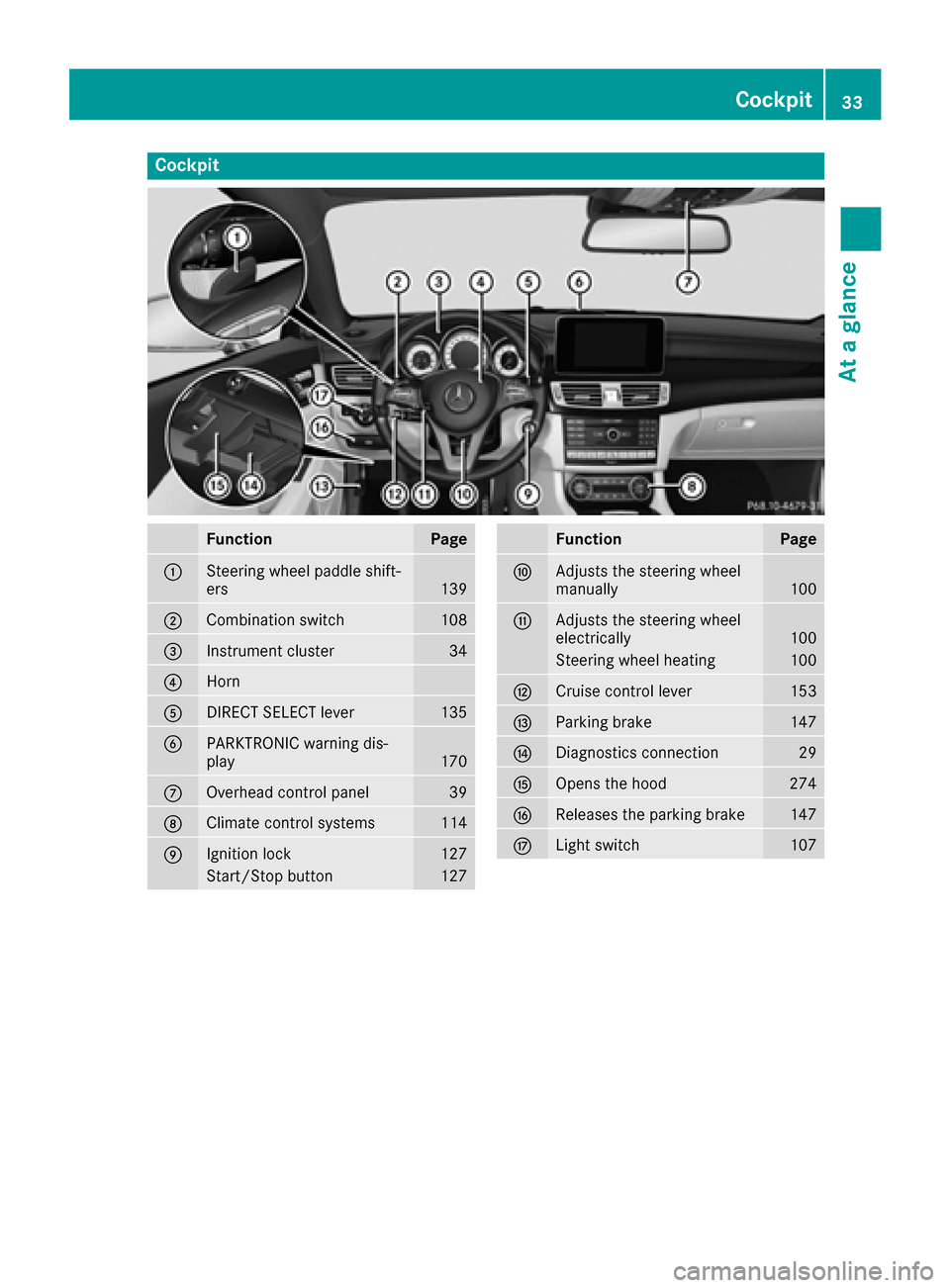
Cockpit
FunctionPage
:Steering wheel paddle shift-
ers139
;Combination switch108
=Instrument cluster34
?Horn
ADIRECT SELECT lever135
BPARKTRONIC warning dis-
play170
COverhead control panel39
DClimate control systems114
EIgnition lock127
Start/Stop button127
FunctionPage
FAdjusts the steering wheel
manually100
GAdjusts the steering wheel
electrically100
Steering wheel heating100
HCruise control lever153
IParking brake147
JDiagnostics connection29
KOpens the hood274
LReleases the parking brake147
MLight switch107
Cockpit33
At a glance
Page 38 of 342
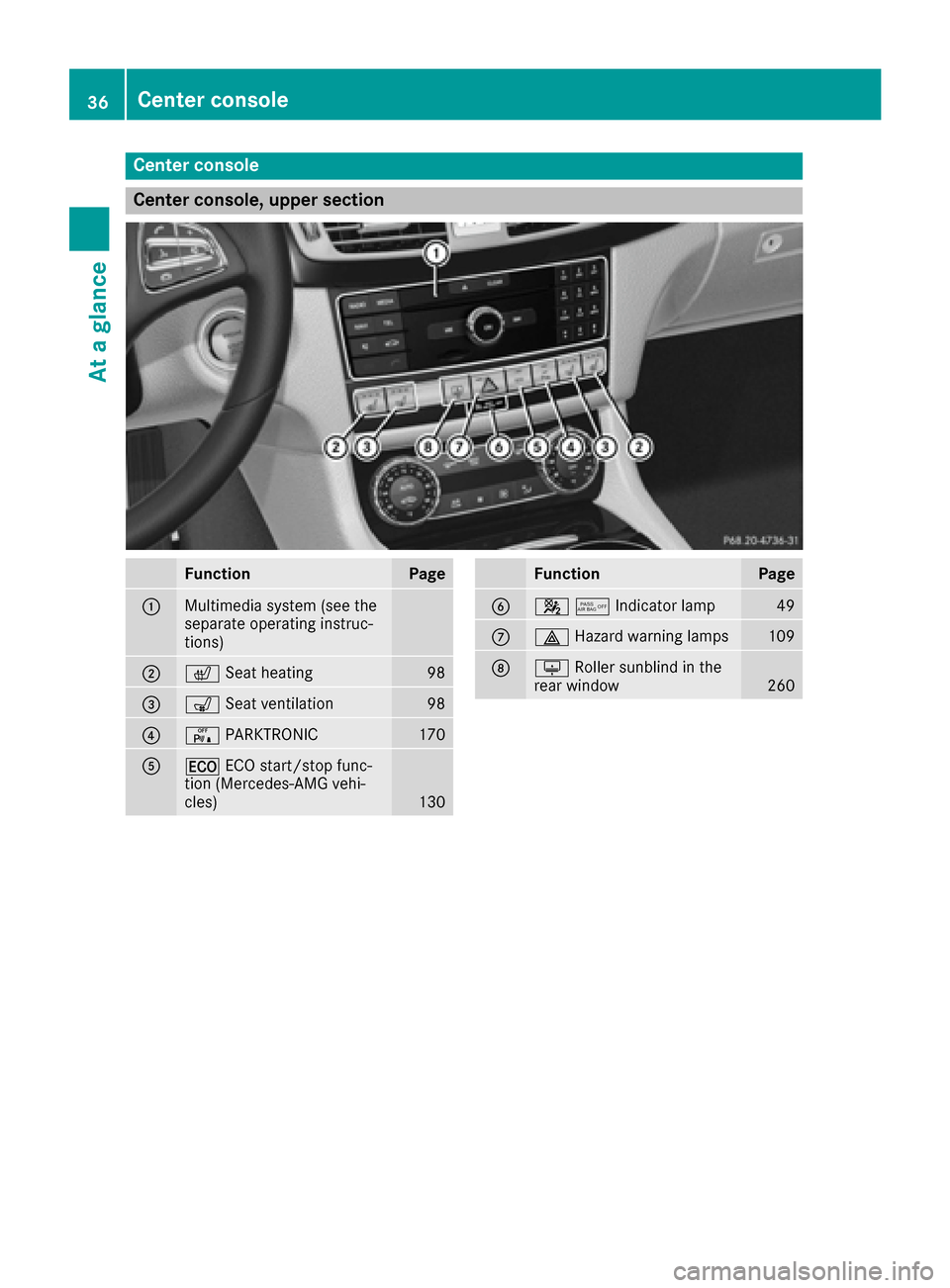
Center console
Center console, upper section
FunctionPage
:Multimedia system (see the
separate operating instruc-
tions)
;cSeat heating98
=sSeat ventilation98
?cPARKTRONIC170
A¤ECO start/stop func-
tion (Mercedes-AMG vehi-
cles)
130
FunctionPage
B45Indicator lamp49
C£ Hazard warning lamps109
DuRoller sunblind in the
rear window260
36Center console
At a glance
Page 43 of 342
Panic alarm
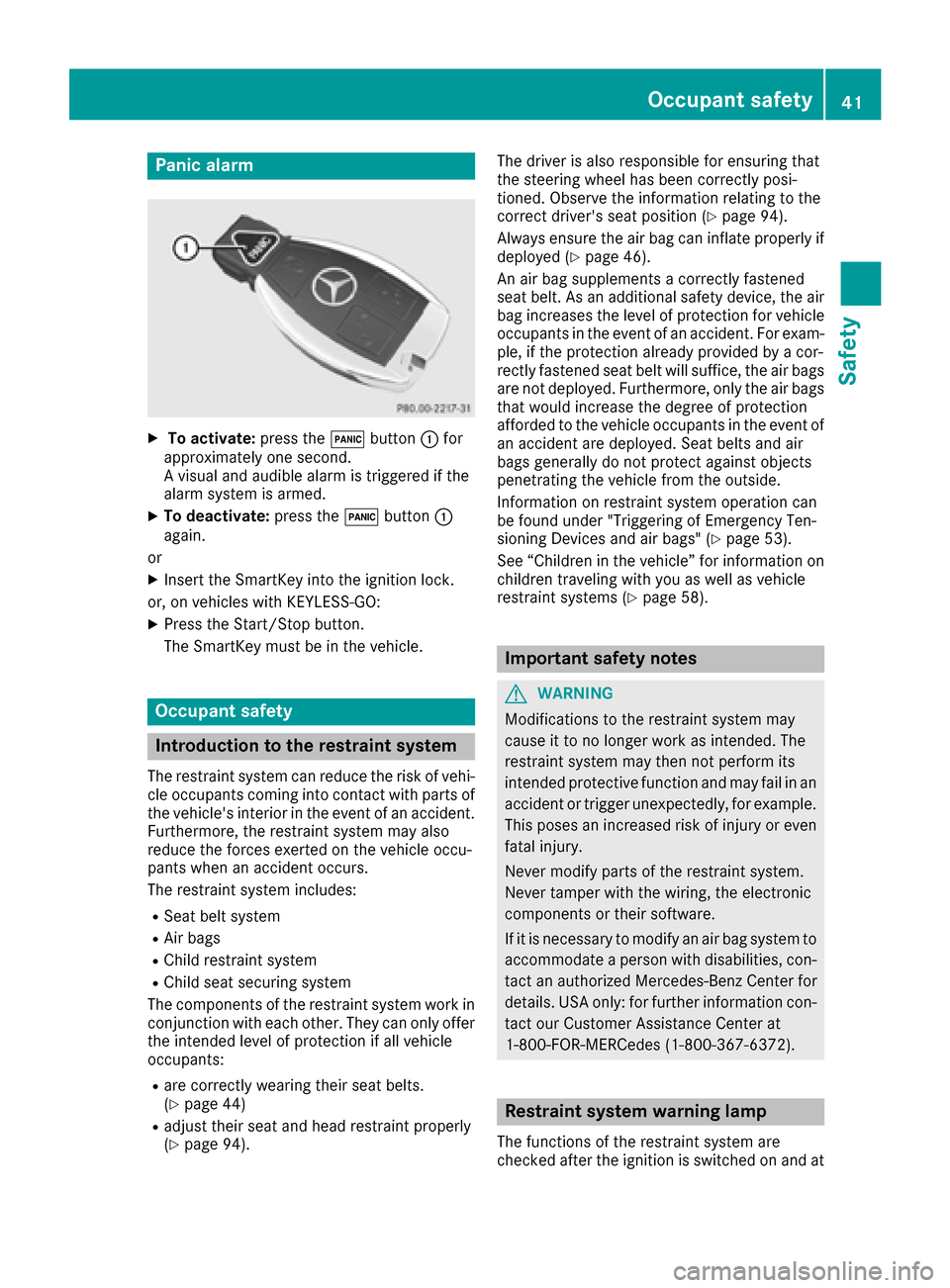
XTo activate:press the!button :for
approximately one second.
A visual and audible alarm is triggered if the
alarm system is armed.
XTo deactivate: press the!button :
again.
or
XInsert the SmartKey into the ignition lock.
or, on vehicles with KEYLESS‑GO:
XPress the Start/Stop button.
The SmartKey must be in the vehicle.
Occupant safety
Introduction to the restraint system
The restraint system can reduce the risk of vehi- cle occupants coming into contact with parts of
the vehicle's interior in the event of an accident.
Furthermore, the restraint system may also
reduce the forces exerted on the vehicle occu-
pants when an accident occurs.
The restraint system includes:
RSeat belt system
RAir bags
RChild restraint system
RChild seat securing system
The components of the restraint system work in
conjunction with each other. They can only offer
the intended level of protection if all vehicle
occupants:
Rare correctly wearing their seat belts.
(Ypage 44)
Radjust their seat and head restraint properly
(Ypage 94). The driver is also responsible for ensuring that
the steering wheel has been correctly posi-
tioned. Observe the information relating to the
correct driver's seat position (
Ypage 94).
Always ensure the air bag can inflate properly if
deployed (
Ypage 46).
An air bag supplements a correctly fastened
seat belt. As an additional safety device, the air
bag increases the level of protection for vehicle
occupants in the event of an accident. For exam-
ple, if the protection already provided by a cor-
rectly fastened seat belt will suffice, the air bags
are not deployed. Furthermore, only the air bags that would increase the degree of protection
afforded to the vehicle occupants in the event of
an accident are deployed. Seat belts and air
bags generally do not protect against objects
penetrating the vehicle from the outside.
Information on restraint system operation can
be found under "Triggering of Emergency Ten-
sioning Devices and air bags" (
Ypage 53).
See “Children in the vehicle” for information on
children traveling with you as well as vehicle
restraint systems (
Ypage 58).
Important safety notes
GWARNING
Modifications to the restraint system may
cause it to no longer work as intended. The
restraint system may then not perform its
intended protective function and may fail in an
accident or trigger unexpectedly, for example.
This poses an increased risk of injury or even fatal injury.
Never modify parts of the restraint system.
Never tamper with the wiring, the electronic
components or their software.
If it is necessary to modify an air bag system to
accommodate a person with disabilities, con-
tact an authorized Mercedes-Benz Center for
details. USA only: for further information con-
tact our Customer Assistance Center at
1-800-FOR-MERCedes (1‑800‑367‑6372).
Restraint system warning lamp
The functions of the restraint system are
checked after the ignition is switched on and at
Occupant safety41
Safety
Z
Page 52 of 342
PASSENGER AIRBAG OFF indicator lamp:
indicates whether the front-passenger front air
bag is disabled.
XTurn the SmartKey to position 1or 2in the
ignition lock, or in vehicles with KEYLESS-GO, press the start/stop button once or twice.
The system carries out a self-diagnosis test.
The PASSENGER AIR BAG OFF indicator lamp
must light up for about six seconds.
The PASSENGER AIR BAG OFF indicator lamp
then shows the status of the front-passenger
front air bag. If the status of the front-passenger
front air bag changes whilst the vehicle is in
motion, an air bag display message may appear
in the instrument cluster (
Ypage 219). Always
observe the PASSENGER AIR BAG OFF indicator
lamp when the front-passenger seat is occu-
pied. Make sure that the status of the front-
passenger front air bag is correct before and
during a journey.
If the PASSENGER AIRBAG OFF indicator
lamp:
Rlights up, the front-passenger front air bag is
disabled. It will then not be deployed in the
event of an accident.
Rdoes not light up, the front-passenger front
air bag is enabled. If, in the case of an acci-
dent, all deployment criteria are met, the
front-passenger front air bag is deployed.
GWARNING
If the PASSENGER AIR BAG OFF indicator
lamp is lit, the front-passenger front air bag is
disabled. It will not be deployed in the event of
an accident and cannot perform its intended
protective function. A person in the front-
passenger seat could then, for example, come
into contact with the vehicle's interior, espe-
cially if the person is sitting too close to the
dashboard. This poses an increased risk of
injury or even fatal injury.
When the front-passenger seat is occupied,
always ensure that:
Rthe classification of the person in the front- passenger seat is correct and the front-
passenger front air bag is enabled or disa-
bled in accordance with the person in the
front-passenger seat
Rthe front-passenger seat has been moved
back as far back as possible.
Rthe person is seated correctly.
Make sure, both before and during the jour-
ney, that the status of the front-passenger
front air bag is correct.
GWARNING
If you secure a child in a child restraint system on the front-passenger seat and the
PASSENGER AIR BAG OFF indicator lamp is
off, the front-passenger front air bag can
deploy in the event of an accident. The child
could be struck by the air bag. This poses an
increased risk of injury or even fatal injury.
Make sure that the front-passenger front air
bag has been disabled. The PASSENGER AIR
BAG OFF indicator lamp must be lit.
GWARNING
If you secure a child in a forward-facing child
restraint system on the front-passenger seat
and you position the front-passenger seat too close to the dashboard, the child could, in the
event of an accident:
Rcome into contact with the vehicle's inte-
rior if the PASSENGER AIR BAG OFF indi-
cator lamp is lit, for example
Rbe struck by the air bag if the PASSENGER
AIR BAG OFF indicator lamp is off
This poses an increased risk of injury or even
fatal injury.
Move the front-passenger seat as far back as
possible. Always make sure that the shoulder
belt strap is correctly routed from the vehicle
belt sash guide to the shoulder belt guide on
the child restraint system. The shoulder belt
strap must be routed forwards and down-
wards from the vehicle belt sash guide. If nec- essary, adjust the vehicle belt sash guide and
the front-passenger seat accordingly. Always
observe the child restraint system manufac-
turer's installation instructions.
50Occupant safety
Safety
Page 70 of 342
There is a risk of an accident.
Always pay careful attention to the traffic sit-uation and do not rely solely on the distance
warning function.
Function
Starting at a speed of around 4 mph (7 km/h),
the distance warning function warns you if you
rapidly approach a vehicle in front. An intermit-
tent warning tone will then sound, and the ·
distance warning lamp will light up in the instru-
ment cluster.
XBrake immediately in order to increase the
distance from the vehicle in front.
or
XTake evasive action, provided it is safe to do
so.
Due to the nature of the system, particularly
complicated but non-critical driving conditions
may also cause the system to display a warning.
With the help of the radar sensor system, the
distance warning function can detect obstacles
that are in the path of your vehicle for an exten-
ded period of time.
Up to a speed of around 44 mph (70 km/h), the
distance warning function can also react to sta-
tionary obstacles, such as stopped or parked
vehicles.
Autonomous braking function
If the driver does not react to the distance warn-
ing signal in a critical situation, COLLISION PRE-
VENTION ASSIST PLUS can assist with the
autonomous braking function.
The autonomous braking function:
Rgives the driver more time to react to critical
driving situations
Rcan help the driver to avoid an accident or
Rreduces the effects of an accident
The autonomous braking function is available in
the following speed ranges:
Rfrom 4 mph (7 km/h) to approx. 65 mph
(105 km/h) for moving objects
Rfrom 4 mph (7 km/h) to approx. 31 mph
(50 km/h) for stationary objects
Due to the nature of the system, particularly
complicated but non-critical driving conditions
may also cause the Autonomous Braking Func-
tion to intervene. If the autonomous braking function requires a
particularly high braking force, preventative
passenger protection measures (PRE-SAFE
®)
are activated simultaneously.
Adaptive Brake Assist
General information
iObserve the "Important safety notes" sec-
tion (Ypage 64).
With the help of adaptive Brake Assist, the dis-
tance warning signal can detect obstacles that
are in the path of your vehicle for an extended
period of time.
If adaptive Brake Assist detects a risk of colli-
sion with the vehicle in front, it calculates the
braking force necessary to avoid a collision. If
you apply the brakes forcefully, adaptive Brake
Assist will automatically increase the braking
force to a level suitable for the traffic conditions.
Adaptive Brake Assist provides braking assis-
tance in hazardous situations at speeds above
4 mph (7 km/h). It uses radar sensor technology
to assess the traffic situation.
Up to a speed of approximately 155 mph
(250 km/h), adaptive Brake Assist is capable of
reacting to moving objects that have already
been detected as such at least once over the
period of observation.
Up to a speed of approximately 44 mph
(70 km/h), adaptive Brake Assist reacts to sta-
tionary obstacles.
If adaptive Brake Assist demands particularly
high braking force, preventative passenger pro- tection measures (PRE-SAFE
®) are activated
simultaneously (Ypage 56).
XKeep the brake pedal depressed until the
emergency braking situation is over.
ABS prevents the wheels from locking.
The brakes will work normally again if:
Ryou release the brake pedal.
Rthere is no longer any danger of a collision.
Rno obstacle is detected in front of your vehi-
cle.
Adaptive Brake Assist is then deactivated.
Important safety notes
iObserve the "Important safety notes" sec-
tion for driving safety systems (Ypage 64).
68Driving safety systems
Safety