warning light MERCEDES-BENZ CLS-Class 2016 W218 Owner's Manual
[x] Cancel search | Manufacturer: MERCEDES-BENZ, Model Year: 2016, Model line: CLS-Class, Model: MERCEDES-BENZ CLS-Class 2016 W218Pages: 342, PDF Size: 8.28 MB
Page 7 of 342
BAS PLUS with Cross-Traffic Assist
(Brake Assist PLUS with Cross-
Traffic Assist)Important safety notes .................... 65
Battery (SmartKey)
Checking .......................................... 79
Important safety notes .................... 78
Replacing ......................................... 79
Battery (vehicle)
Charging ........................................ 293
Display message ............................ 223
Important safety notes .................. 291
Jump starting ................................. 294
Belt
see Seat belts
Blind Spot Assist
Activating/deactivating (on-
board computer) ............................ 205
Display message ............................ 226
Notes/function .............................. 187
see Active Blind Spot Assist
Bluetooth
®
Connecting another mobile
phone ............................................ 250
Searching for a mobile phone ........ 249
see also Digital Operator's Man-
ual .................................................. 245
Telephony ...................................... 248
Box (trunk) ......................................... 255
Brake Assist
see BAS (Brake Assist System)
Brake fluid
Display message ............................ 215
Notes ............................................. 334
Brake force distribution
see EBD (electronic brake force
distribution)
Brake lamps
Display message ............................ 221
Brakes
ABS .................................................. 64
Adaptive Brake Assist ...................... 68
BAS .................................................. 65
BAS PLUS with Cross-Traffic
Assist ............................................... 65
Brake fluid (notes) ......................... 334
Display message ............................ 213
High-performance brake system .... 151 HOLD function ............................... 164
Important safety notes .................. 150
Maintenance .................................. 151
Parking brake ................................ 147
Riding tips ...................................... 150
Warning lamp ................................. 237
Breakdown
Where will I find...? ........................ 286
see Flat tire
see Towing away
Brightness control (instrument
cluster lighting) ................................... 34
C
California
Important notice for retail cus-
tomers and lessees .......................... 26
Calling up a malfunction
see Display messages
Car
see Vehicle
Care
360° camera ................................. 283
Car wash ........................................ 279
Carpets .......................................... 285
Display ........................................... 283
Exhaust pipe .................................. 283
Exterior lights ................................ 282
Gear or selector lever .................... 284
Interior ........................................... 283
Matte finish ................................... 281
Notes ............................................. 279
Paint .............................................. 280
Plastic trim .................................... 283
Power washer ................................ 280
Rear view camera .......................... 282
Roof lining ...................................... 285
Seat belt ........................................ 284
Seat cover ..................................... 284
Sensors ......................................... 282
Steering wheel ............................... 284
Trim pieces .................................... 284
Washing by hand ........................... 280
Wheels ........................................... 281
Windows ........................................ 281
Wiper blades .................................. 282
Wooden trim .................................. 284
Index5
Page 9 of 342
Convenience opening feature............ 88
Coolant (engine)
Checking the level ........................ .276
Display message ............................ 222
Filling capacity ............................... 335
Important safety notes .................. 334
Temperature (on-board computer,
Mercedes-AMG vehicles) ...............2 09
Temperature gauge ........................ 196
Warning lamp ................................. 241
Cooling
see Climate control
Copyright ............................................. 32
Cornering light function
Display message ............................ 221
Function/notes .............................1 09
Cruise control
Activation conditions ..................... 154
Cruise control lever ....................... 153
Deactivating ................................... 155
Display message ............................ 229
Driving system ............................... 153
Function/notes .............................1 53
Important safety notes .................. 153
Setting a speed .............................. 154
Storing and maintaining current
speed ............................................. 154
Cup holder
Center console .............................. 258
Center console in the rear com-
partment ........................................ 258
Important safety notes .................. 257
Rear compartment ......................... 258
Customer Assistance Center
(CAC) ..................................................... 29
Customer Relations Department ....... 29
D
Dashboard
see Instrument cluster
Data
see Technical data
Data carrier
Selecting ........................................ 201
Daytime running lamps
Display message ............................ 221
Function/notes .............................1 07Switching on/off (on-board com-
puter) ............................................. 206
Declarations of conformity ................. 28
Delayed switch-off
Exterior lighting (on-board com-
puter) ............................................. 207
Interior lighting .............................. 207
Diagnostics connection ......................29
Digital Operator's Manua l
Help ................................................ .23
Introduction .....................................2 3
Digital speedomete r........................ .199
DIRECT SELECT lever
Automatic transmission ................. 135
Display messages
ASSYST PLUS ................................ 277
Calling up (on-board computer) ..... 212
Driving systems .............................2 24
Engine ............................................ 222
General notes ................................ 212
Hiding (on-board computer) ........... 212
KEYLESS-GO .................................. 234
Lights ............................................. 221
Safety systems .............................. 213
SmartKey ....................................... 234
Tires ............................................... 230
Vehicle ...........................................2 32
Distance recorder .............................1 98
Distance warning (warning lamp) .... 243
Distance warning function
Function/notes ................................ 67
DISTRONIC PLUS
Activating ....................................... 157
Activation conditions ..................... 157
Deactivating ................................... 161
Display message ............................ 227
Displays in the multifunction dis-
play ................................................ 160
Function/note s ............................. 155
Imp
ortant safety notes .................. 156
Setting the specified minimum
distance ......................................... 159
Stopping ........................................ 159
Doors
Automatic locking (on-board com-
puter) ............................................. 207
Automatic locking (switch) ............... 82
Index7
Page 12 of 342
Warning lamp ................................. 238
ETS/4ETS (Electronic Traction Sys-
tem) ...................................................... 69
Exhaust check ................................... 149
Exhaust pipe (cleaning instruc-
tions) .................................................. 283
Exterior lighting
Setting options .............................. 107
see Lights
Exterior mirrors
Adjusting ....................................... 103
Dipping (automatic) ....................... 104
Folding in when locking (on-board
computer) ...................................... 208
Folding in/out (automatically) .......1 04
Folding in/out (electrically) ........... 104
Out of position (troubleshooting) ... 104
Setting ...........................................1 04
Storing settings (memory func-
tion) ............................................... 105
Storing the parking position .......... 105
Eyeglasses compartment ................. 252
F
Favorites
Overview ........................................ 247
Filler cap
see Refueling
Flat tire
MOExtended tires .......................... 287
Preparing the vehicle ..................... 287
TIREFIT kit ...................................... 288
see Emergency spare wheel
Floormats ...........................................2 72
Frequencies
Mobile phone ................................. 329
Two-way radio ................................ 329
Fuel
Consumption statistics .................. 199
Displaying the current consump-
tion ................................................ 199
Displaying the range ......................1 99
Driving tips ....................................1 49
Fuel gauge ....................................... 34
Grade (gasoline) ............................ 332
Important safety notes .................. 332
Problem (malfunction) ................... 146 Refueling ........................................ 143
Tank content/reserve fuel ............. 332
Fuel filler flap
Emergency release ........................ 145
Opening ......................................... 144
Fuel level
Calling up the range (on-board
computer) ...................................... 199
Fuel tank
Capacity ........................................ 332
Problem (malfunction) ................... 146
Fuse allocation chart (vehicle tool
kit) ...................................................... 286
Fuses
Allocation chart .............................2 99
Before changing .............................2 99
Fuse box in the engine compart-
ment .............................................. 300
Fuse box in the trunk ..................... 300
Important safety notes .................. 299
G
Garage door opener
Clearing the memory ..................... 272
General notes ................................ 269
Important safety notes .................. 270
Opening/closing the garage door .. 272
Problems when programming ........2 72
Programming (button in the rear-
view mirror) ................................... 270
Synchronizing the rolling code ....... 271
Gasoline ............................................. 332
Gear indicator (on-board com-
puter, Mercedes-AMG vehicles) ....... 209
Genuine parts ...................................... 25
Glove box ...........................................2 52
Google™ Local Search
see also Digital Operator's Man-
ual ..................................................2 45
H
Handbrake
see Parking brake
Hazard warning lamps ......................109
Head bags
Display message ............................ 218
10Index
Page 13 of 342
Head restraintsAdjusting .........................................9 6
Adjusting (electrically) ..................... 96
Adjusting (rear) ................................ 96
Installing/removing (rear) ................ 97
Luxury .............................................. 96
see NECK-PRO head restraints
see NECK-PRO luxury head restraints
Headlamps
Cleaning system (notes) ................ 335
Fogging up .....................................1 10
see Automatic headlamp mode
Heating
see Climate control
High beam flasher .............................1 08
High-beam headlamps
Adaptive Highbeam Assist ............. 109
Display message ............................ 221
Switching on/off ........................... 108
Hill start assist .................................. 130
HOLD function
Activating ....................................... 165
Deactivating ................................... 165
Display message ............................ 225
Function/notes .............................1 64
Home address
see also Digital Operator's Man-
ual ..................................................2 45
Hood
Closing ...........................................2 75
Display message ............................ 233
Important safety notes .................. 274
Opening ......................................... 274
Horn ...................................................... 33
Hydroplaning ..................................... 152
I
Ignition lock
see Key positions
Immobilizer .......................................... 74
Indicator and warning lamps
COLLISION PREVENTION ASSIST
PLUS .............................................. 243
Indicator lamps
see Warning and indicator lamps
Indicators
see Turn signals Instrument cluster
Overview .......................................... 34
Settings ......................................... 205
Warning and indicator lamps ........... 34
Instrument cluster lighting .............. 206
Interior lighting
Automatic control .......................... 111
Delayed switch-off (on-board
computer) ...................................... 207
Overview ........................................ 110
Reading lamp ................................. 110
Setting the brightness of the
ambient lighting (on-board com-
puter) ............................................. 206
Setting the brightness of the dis-
play/switch (on-board computer) .. 206
Setting the color of the ambient
lighting (on-board computer) ......... 207
iPod
®
see also Digital Operator's Man-
ual ..................................................2 45
J
Jack
Storage location ............................ 286
Using ............................................. 322
Jump starting (engine) ......................294
K
Key positions
KEYLESS-GO .................................. 127
SmartKey ....................................... 127
KEYLESS-GO
Convenience closing feature ............ 88
Deactivation ..................................... 76
Display message ............................ 234
Locking ............................................ 76
Removing the Start/Stop button ... 128
Start/Stop button .......................... 127
Starting the engine ........................ 129
Unlocking ......................................... 76
Kickdown
Driving tips ....................................1 38
Manual drive program .................... 142
Knee bag .............................................. 47
Index11
Page 14 of 342
L
Lampssee Warning and indicator lamps
Lane Keeping Assist
Activating/deactivating ................ .205
Display message ............................ 226
Function/information .................... 189
Lane Tracking package ..................... 187
Lap time (RACETIMER) ...................... 210
LATCH-type (ISOFIX) child seat
anchors ................................................ 60
License plate lamp (display mes-
sage) ................................................... 221
Light function, active
Display message ............................ 221
Light sensor (display message) ....... 221
Lights
Activating/deactivating the inte-
rior lighting delayed switch-off ....... 207
Adaptive Highbeam Assist ............. 109
Automatic headlamp mode ............ 107
Cornering light function ................. 109
Hazard warning lamps ................... 109
High beam flasher .......................... 108
High-beam headlamps ................... 108
Light switch ................................... 107
Low-beam headlamps .................... 108
Parking lamps ................................ 108
Setting the brightness of the
ambient lighting (on-board com-
puter) ............................................. 206
Setting the brightness of the dis-
play/switch (on-board computer) .. 206
Setting the color of the ambient
lighting (on-board computer) ......... 207
Standing lamps .............................. 108
Switching the daytime running
lamps on/off (on-board com-
puter) ............................................. 206
Switching the exterior lighting
delayed switch-off on/off (on-
board computer) ............................ 207
Switching the surround lighting
on/off (on-board computer) .......... 207
Turn signals ................................... 108
see Interior lighting
Loading guidelines ............................ 251 Locking
see Central locking
Locking (doors)
Automatic ........................................ 82
Emergency locking ........................... 83
From inside (centra
l locking but-
ton) .................................................. 82
Locking centrally
see Central locking
Locking verification signal (on-
board computer) ............................... 208
Low-beam headlamps
Display message ............................ 221
Switching on/off ........................... 108
Lumbar support
Adjusting the 4-way lumbar sup-
port .................................................. 98
Luxury head restraints ....................... 96
M
M+S tires............................................ 303
Malfunction message
see Display messages
Matte finish (cleaning instruc-
tions) .................................................. 281
mbrace
Call priority .................................... 266
Display message ............................ 215
Downloading destinations
(COMAND) ..................................... 266
Downloading routes ....................... 269
Emergency call .............................. 264
General notes ................................ 263
Geo fencing ................................... 269
Locating a stolen vehicle ............... 268
MB info call button ........................ 265
Remote fault diagnosis .................. 268
Remote vehicle locking .................. 268
Roadside Assistance button .......... 265
Search & Send ............................... 267
Self-test ......................................... 263
Speed alert .................................... 269
System .......................................... 263
Triggering the vehicle alarm ........... 269
Vehicle remote unlocking .............. 267
Mechanical key
Function/notes ................................ 78
12Index
Page 16 of 342
O
Occupant Classification System
(OCS)Conditions ....................................... 49
Faults ............................................... 53
Operation ......................................... 49
System self-test .............................. .51
Occupant safety
Air bags .......................................... .46
Automatic measures after an acci-
dent ................................................. 58
Children in the vehicle ..................... 58
Important safety notes .................... 41
Introduction to the restraint sys-
tem .................................................. 41
Occupant Classification System
(OCS) ............................................... 49
PASSENGER AIR BAG indicator
lamps ............................................... 42
Pets in the vehicle ........................... 63
PRE-SAFE
®(anticipatory occu-
pant protection) ............................... 56
PRE-SAFE
®PLUS (anticipatory
occupant protection PLUS) .............. 57
Restraint system warning lamp ........ 41
OCS
Conditions ....................................... 49
Faults ............................................... 53
Operation ......................................... 49
System self-test ............................... 51
Odometer ........................................... 198
Oil
see Engine oil
On-board computer
AMG menu ..................................... 209
Assistance menu ........................... 203
Audio menu ................................... 201
Convenience submenu .................. 208
Display messages .......................... 212
Displaying a service message ........ 278
DISTRONIC PLUS ........................... 160
Factory settings submenu ............. 209
Important safety notes .................. 196
Instrument cluster submenu .......... 205
Lighting submenu .......................... 206
Menu overview .............................. 198
Message memory .......................... 212 Navigation menu ............................ 200
Operation ....................................... 197
RACETIMER ................................... 210
Service menu ................................. 205
Settings menu ............................... 205
Standard display ............................ 198
Telephone menu ............................ 202
Trip menu ...................................... 198
Vehicl
e su
bmenu ........................... 207
Video DVD operation ..................... 202
Operating safety
Declaration of conformity ................ 28
Important safety notes .................... 28
Operating system
see On-board computer
Operation
Digital Operator's Manual ................ 23
Operator's Manual
Vehicle equipment ........................... 26
Outside temperature display ........... 196
Overhead control panel ...................... 39
Override feature
Rear side windows ........................... 63
P
Paint code number ............................ 330
Paintwork (cleaning instructions) ... 280
Panic alarm .......................................... 41
Parking
Important safety notes .................. 146
Parking brake ................................ 147
Position of exterior mirror, front-
passenger side ............................... 105
Rear view camera .......................... 177
see PARKTRONIC
Parking aid
Active Parking Assist ..................... 173
see Exterior mirrors
see PARKTRONIC
Parking assistance
see PARKTRONIC
Parking brake
Display message ............................ 214
Notes/function .............................. 147
Warning lamp ................................. 237
Parking lamps
Switching on/off ........................... 108
14Index
Page 35 of 342
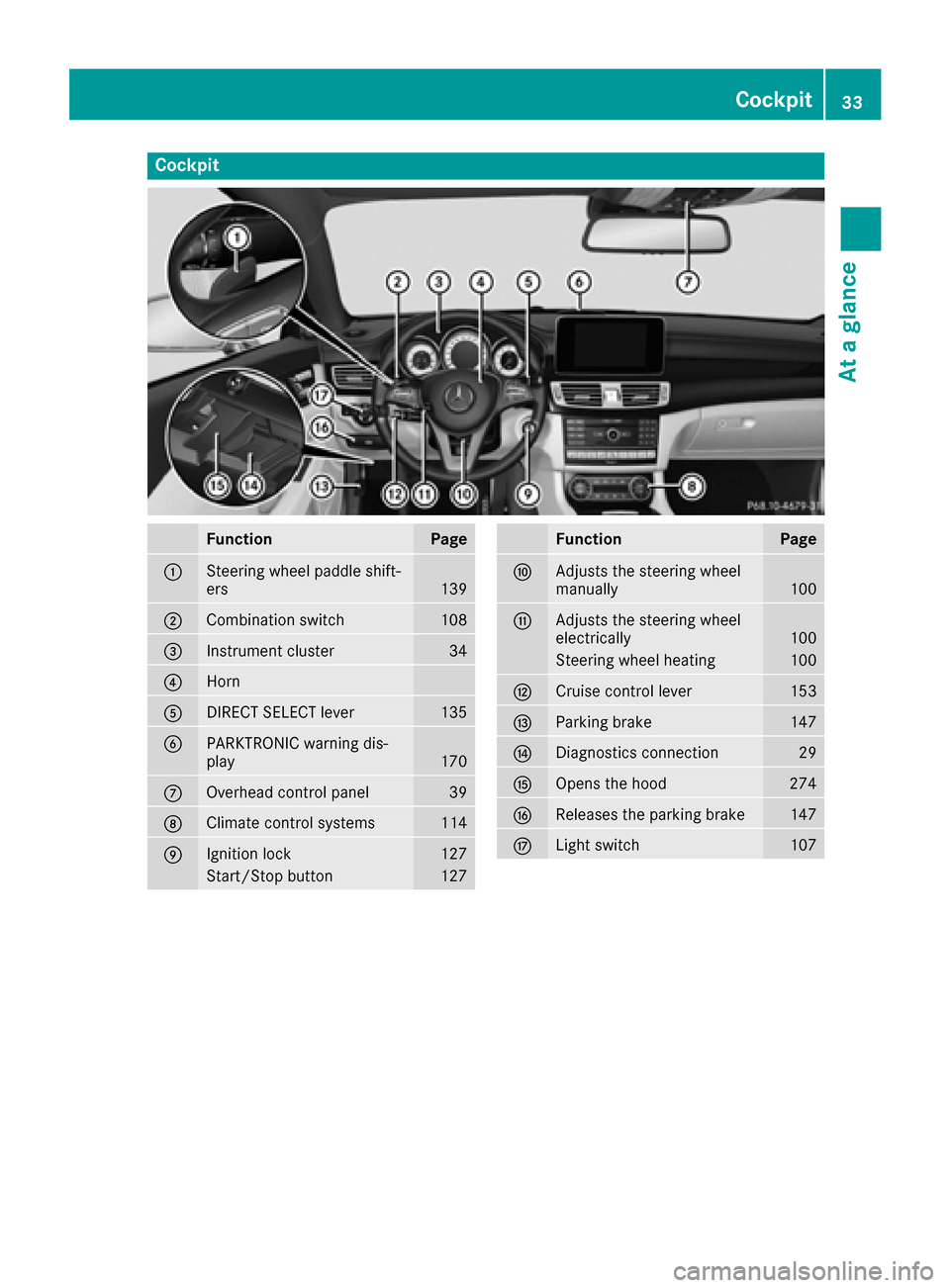
Cockpit
FunctionPage
:Steering wheel paddle shift-
ers139
;Combination switch108
=Instrument cluster34
?Horn
ADIRECT SELECT lever135
BPARKTRONIC warning dis-
play170
COverhead control panel39
DClimate control systems114
EIgnition lock127
Start/Stop button127
FunctionPage
FAdjusts the steering wheel
manually100
GAdjusts the steering wheel
electrically100
Steering wheel heating100
HCruise control lever153
IParking brake147
JDiagnostics connection29
KOpens the hood274
LReleases the parking brake147
MLight switch107
Cockpit33
At a glance
Page 36 of 342
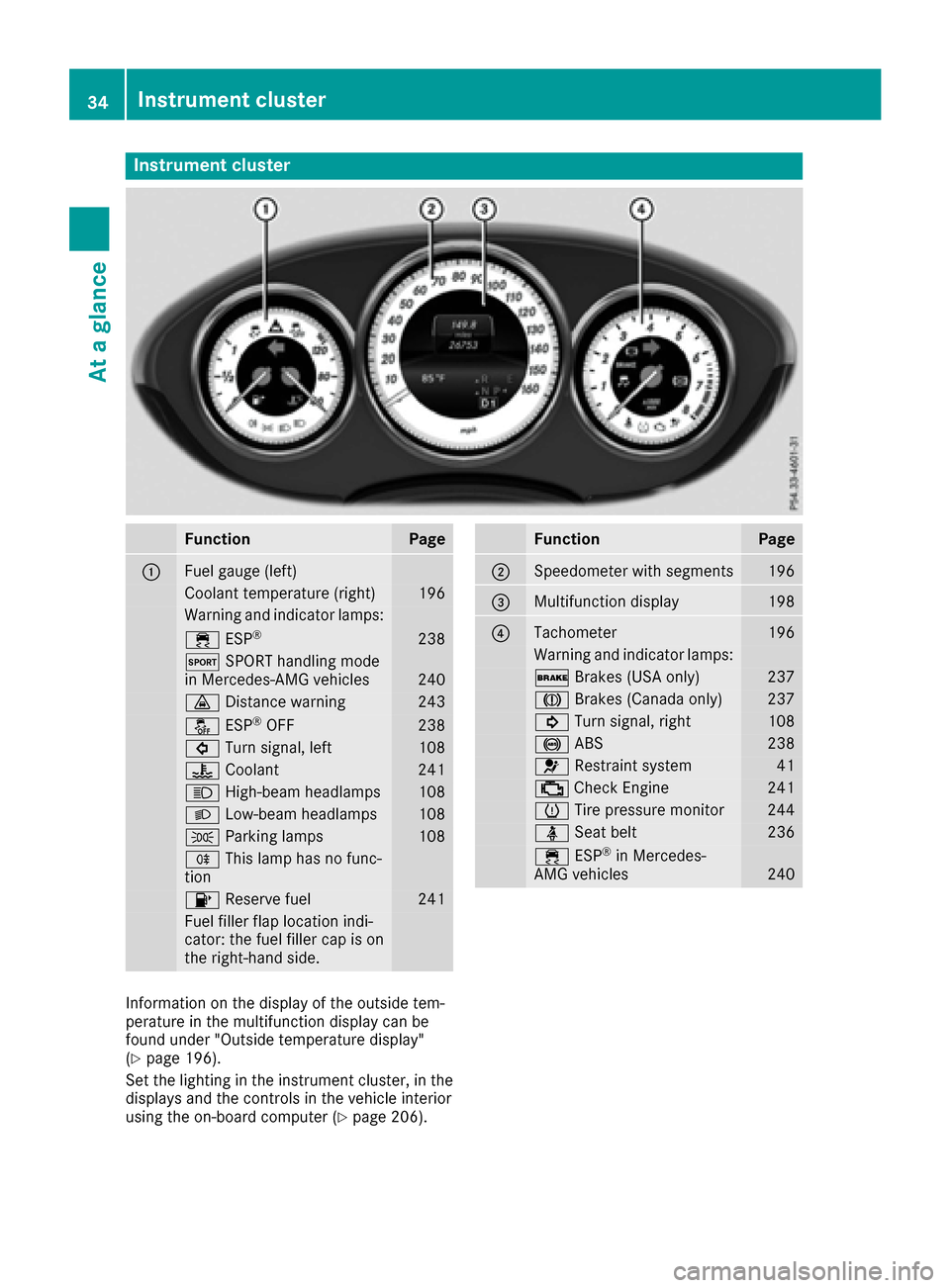
Instrument cluster
FunctionPage
:Fuelgauge (left)
Coolan ttemperature (right )196
Warning and indicator lamps:
÷ ESP®23 8
M SPORT handlin gmod e
in Mercedes-AM Gvehicles24 0
· Distanc ewarning24 3
å ESP®OF F238
# Turn signal, lef t108
? Coolan t241
K High-beam headlamps108
L Low-beam headlamps108
T Parking lamp s108
R This lamp has no func-
tion
8 Reserve fuel241
Fue lfiller flap location indi-
cator: th efuel filler cap is on
th eright-hand side .
FunctionPage
;Speedometer wit hsegments19 6
=Multifunction display198
?Tachometer196
Warning and indicator lamps:
$ Brakes(US Aonly)23 7
J Brakes(Canada only)23 7
! Turn signal, right108
! ABS238
6 Restrain tsystem41
; CheckEngin e241
h Tirepressur emonitor24 4
ü Seat belt236
÷ ESP®in Mercedes-
AM Gvehicles24 0
Information on th edisplay of th eoutside tem-
peratur ein th emultifunction display can be
foun dunder "Outside temperature display"
(
Ypage 196).
Se tth elighting in th einstrumen tcluster, in th e
displays and th econtrol sin th evehicl einterior
usin gth eon-board computer (
Ypage 206).
34Instrument cluster
At a glance
Page 44 of 342
regular intervals while the engine is running.
Therefore, malfunctions can be detected in
good time.
The6 restraint system warning lamp in the
instrument cluster lights up when the ignition is
switched on. It goes out no later than a few sec-
onds after the vehicle is started. The compo-
nents of the restraint system are in operational
readiness.
A malfunction has occurred if the 6restraint
system warning lamp:
Rdoes not light up after the ignition is switched
on
Rdoes not go out after a few seconds with the
engine running
Rlights up again while the engine is running
GWARNING
If restraint system is malfunctioning, restraint
system components may be triggered unin-
tentionally or might not be triggered at all in
the event of an accident with a high rate of
vehicle deceleration. This can affect the Emer- gency Tensioning Device or air bag, for exam-
ple. This poses an increased risk of injury or
even fatal injury.
Have the restraint system checked and
repaired in a qualified specialist workshop as
soon as possible.
PASSENGER AIR BAG OFF indicator
lamp
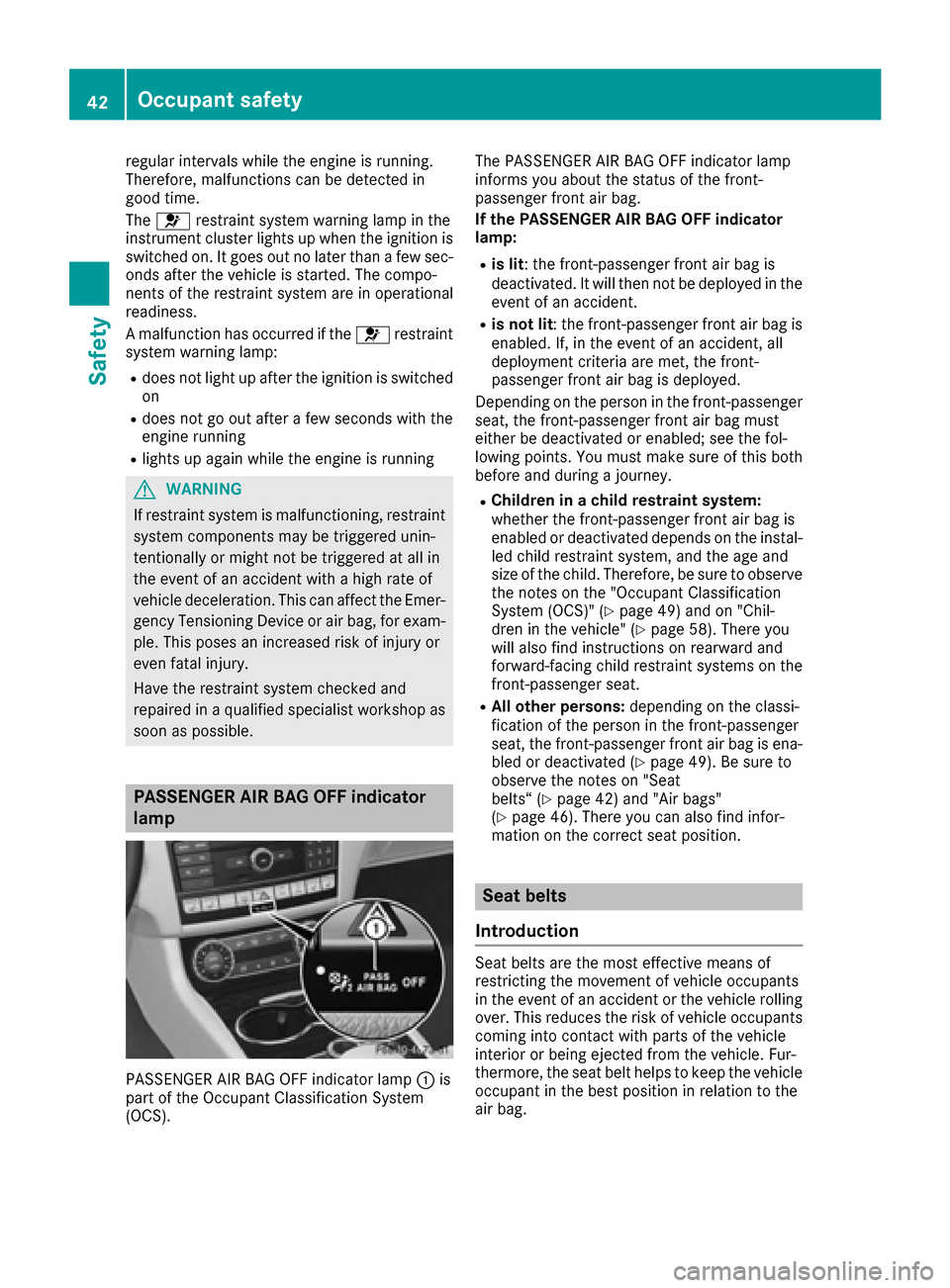
PASSENGER AIR BAG OFF indicator lamp :is
part of the Occupant Classification System
(OCS). The PASSENGER AIR BAG OFF indicator lamp
informs you about the status of the front-
passenger front air bag.
If the PASSENGER AIR BAG OFF indicator
lamp:
Ris lit: the front-passenger front air bag is
deactivated. It will then not be deployed in the
event of an accident.
Ris not lit
: the front-passenger front air bag is
enabled. If, in the event of an accident, all
deployment criteria are met, the front-
passenger front air bag is deployed.
Depending on the person in the front-passenger
seat, the front-passenger front air bag must
either be deactivated or enabled; see the fol-
lowing points. You must make sure of this both
before and during a journey.
RChildren in a child restraint system:
whether the front-passenger front air bag is
enabled or deactivated depends on the instal-
led child restraint system, and the age and
size of the child. Therefore, be sure to observe the notes on the "Occupant Classification
System (OCS)" (
Ypage 49) and on "Chil-
dren in the vehicle" (Ypage 58). There you
will also find instructions on rearward and
forward-facing child restraint systems on the
front-passenger seat.
RAll other persons: depending on the classi-
fication of the person in the front-passenger
seat, the front-passenger front air bag is ena-
bled or deactivated (
Ypage 49). Be sure to
observe the notes on "Seat
belts“ (
Ypage 42) and "Air bags"
(Ypage 46). There you can also find infor-
mation on the correct seat position.
Seat belts
Introduction
Seat belts are the most effective means of
restricting the movement of vehicle occupants
in the event of an accident or the vehicle rolling
over. This reduces the risk of vehicle occupants coming into contact with parts of the vehicle
interior or being ejected from the vehicle. Fur-
thermore, the seat belt helps to keep the vehicle
occupant in the best position in relation to the
air bag.
42Occupant safety
Safety
Page 47 of 342
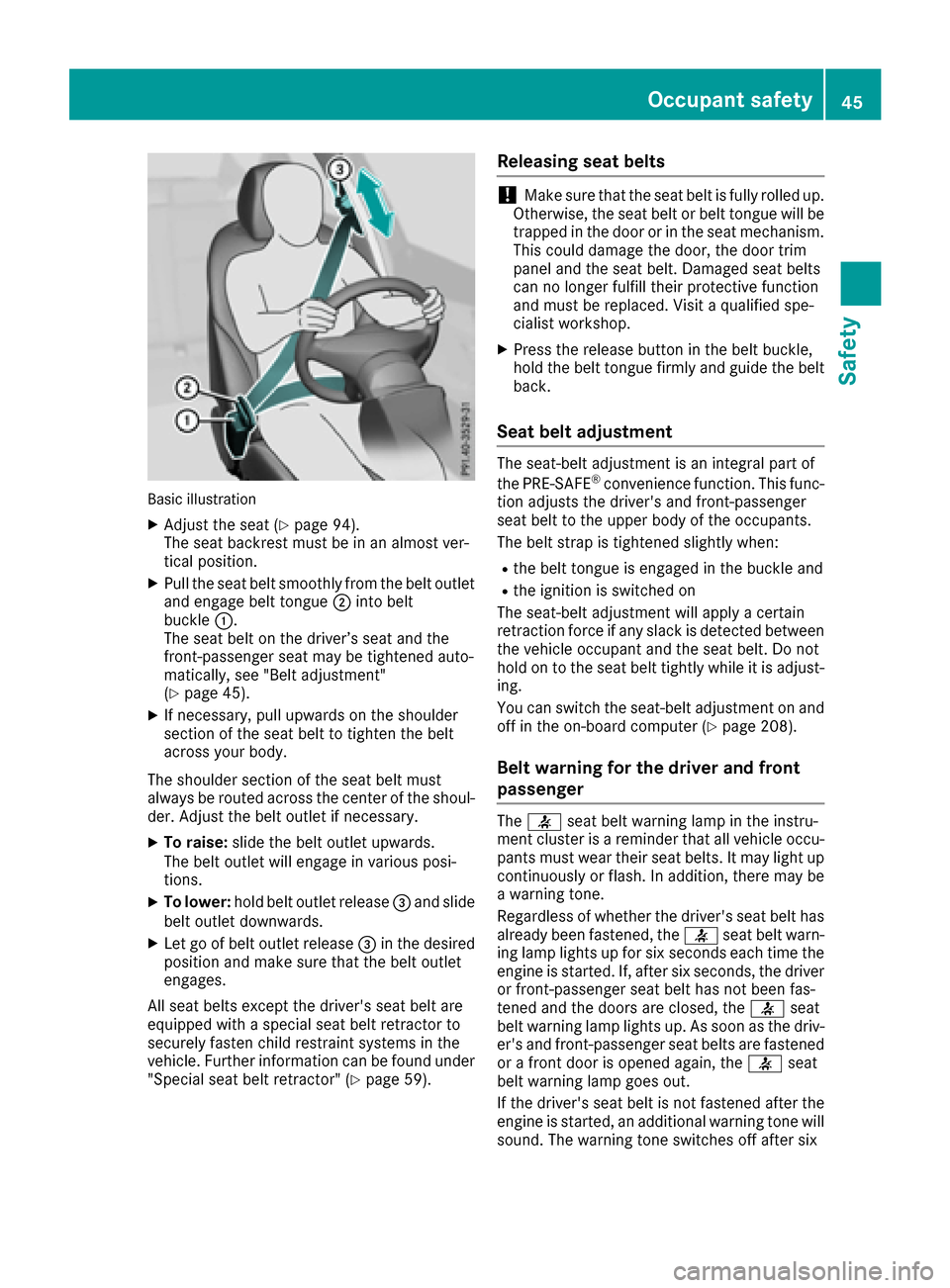
Basic illustration
XAdjust the seat (Ypage 94).
The seat backrest must be in an almost ver-
tical position.
XPull the seat belt smoothly from the belt outlet
and engage belt tongue ;into belt
buckle :.
The seat belt on the driver’s seat and the
front-passenger seat may be tightened auto-
matically, see "Belt adjustment"
(
Ypage 45).
XIf necessary, pull upwards on the shoulder
section of the seat belt to tighten the belt
across your body.
The shoulder section of the seat belt must
always be routed across the center of the shoul-
der. Adjust the belt outlet if necessary.
XTo raise: slide the belt outlet upwards.
The belt outlet will engage in various posi-
tions.
XTo lower: hold belt outlet release =and slide
belt outlet downwards.
XLet go of belt outlet release =in the desired
position and make sure that the belt outlet
engages.
All seat belts except the driver's seat belt are
equipped with a special seat belt retractor to
securely fasten child restraint systems in the
vehicle. Further information can be found under
"Special seat belt retractor" (
Ypage 59).
Releasing seat belts
!Make sure that the seat belt is fully rolled up.
Otherwise, the seat belt or belt tongue will be
trapped in the door or in the seat mechanism.
This could damage the door, the door trim
panel and the seat belt. Damaged seat belts
can no longer fulfill their protective function
and must be replaced. Visit a qualified spe-
cialist workshop.
XPress the release button in the belt buckle,
hold the belt tongue firmly and guide the belt
back.
Seat belt adjustment
The seat-belt adjustment is an integral part of
the PRE-SAFE®convenience function. This func-
tion adjusts the driver's and front-passenger
seat belt to the upper body of the occupants.
The belt strap is tightened slightly when:
Rthe belt tongue is engaged in the buckle and
Rthe ignition is switched on
The seat-belt adjustment will apply a certain
retraction force if any slack is detected between
the vehicle occupant and the seat belt. Do not
hold on to the seat belt tightly while it is adjust-
ing.
You can switch the seat-belt adjustment on and
off in the on-board computer (
Ypage 208).
Belt warning for the driver and front
passenger
The 7 seat belt warning lamp in the instru-
ment cluster is a reminder that all vehicle occu-
pants must wear their seat belts. It may light up
continuously or flash. In addition, there may be
a warning tone.
Regardless of whether the driver's seat belt has
already been fastened, the 7seat belt warn-
ing lamp lights up for six seconds each time the engine is started. If, after six seconds, the driver
or front-passenger seat belt has not been fas-
tened and the doors are closed, the 7seat
belt warning lamp lights up. As soon as the driv-
er's and front-passenger seat belts are fastened
or a front door is opened again, the 7seat
belt warning lamp goes out.
If the driver's seat belt is not fastened after the
engine is started, an additional warning tone will
sound. The warning tone switches off after six
Occupant safety45
Safety
Z