bonnet MERCEDES-BENZ CLS COUPE 2008 User Guide
[x] Cancel search | Manufacturer: MERCEDES-BENZ, Model Year: 2008, Model line: CLS COUPE, Model: MERCEDES-BENZ CLS COUPE 2008Pages: 329, PDF Size: 29.26 MB
Page 197 of 329
Engine compartment
194 The electronic ignition system uses high
voltage. For this reason you must never
touch components of the ignition system
(ignition coil, ignition cable, spark plug con-
nector or test socket) when:
R
the engine is running
R the engine is being started
R the ignition is switched on and the engine
is being cranked by hand
Vehicles with a diesel engine:
The electronic injection control uses high
voltage. Therefore, never touch fuel injec-
tion system components when:
R the engine is running
R the engine is being started
R the ignition is switched on
X Make sure that the windscreen wipers are
switched off. G
Risk of injury
The windscreen wipers and wiper rods
could be set in motion.
When the bonnet is open, you or others
could be injured by the wiper rods. Make sure that the windscreen wipers are
switched off and that the key has been
pulled out of the ignition lock before open-
ing the bonnet.
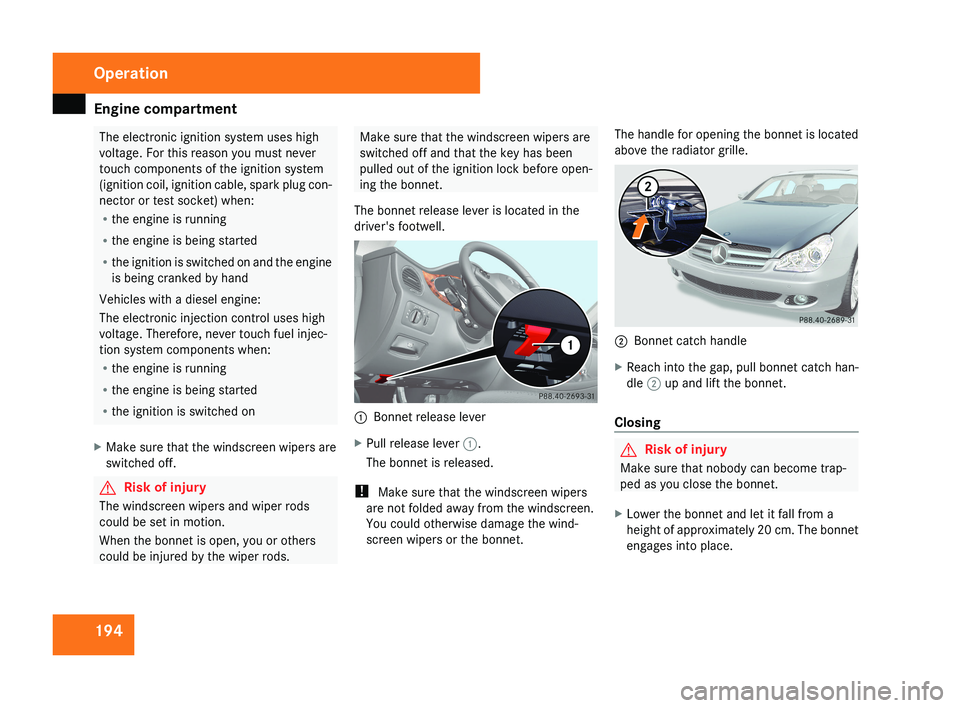
The bonnet release lever is located in the
driver's footwell.1 Bonnet release lever
X Pull release lever 1.
The bonnet is released.
! Make sure that the windscreen wipers
are not folded away from the windscreen.
You could otherwise damage the wind-
screen wipers or the bonnet. The handle for opening the bonnet is located
above the radiator grille.
2
Bonnet catch handle
X Reach into the gap, pull bonnet catch han-
dle 2 up and lift the bonnet.
Closing
G Risk of injury
Make sure that nobody can become trap-
ped as you close the bonnet.
X Lower the bonnet and let it fall from a
height of approximately 20 cm. The bonnet
engages into place.
Operation
219_AKB; 2; 4, en-GB
mkalafa,
2007-11-13T09:28:36+01:00 - Seite 194
Page 215 of 329
Care
212
!
Only fold the windscreen wipers away
from the windscreen when vertical, other-
wise you will damage the bonnet.
X Fold the wiper arms away from the wind-
screen until you feel them engage.
X Clean the windscreen and the wiper blades.
X Fold the windscreen wipers back again
before the ignition is switched on.
! Do not clean the wiper blades too often,
as otherwise the coating may come off.
This could cause wiper noise.
Cleaning the windows !
Do not use dry cloths, abrasive products,
solvents or cleaning agents containing sol-
vents to clean the inside of the windows.
Clean the insides of the windows with a
damp cloth or commercially-available glass
cleaner. Avoid touching the inside of the
rear windscreen and the side windows with
hard objects, e.g. ice scrapers or rings. You
could otherwise cause damage to the win-
dows, rear window heating or aerial on the
rear window. i
Anti-glare
film retrofitted to the insides of
the windows could interfere with radio or
mobile phone reception, especially if it is
conductive or metal-coated film. Informa-
tion about anti-glare film can be obtained
from any Mercedes-Benz Service Centre.
Cleaning the headlamps X
Clean the headlamp lenses with a wet
sponge.
! Only use washer fluid which is suitable
for plastic lenses. Unsuitable washer fluid
could damage the plastic lenses of the
headlamps.
Therefore, do not use the following:
R dry cloths
R abrasive cleaning agents
R solvents
R cleaning agents containing solvent
You
could otherwise scratch or damage the
surface of the lenses. Plastic trim !
Do
not use dry, coarse or hard cloths and
do not scrub. Doing so will scratch or dam-
age the surfaces.
X Wipe plastic parts with a damp, lint-free
cloth (e.g. a microfibre cloth).
X Light soiling:
use a low-foaming soap (e.g.
a light liquid hand soap) diluted in water.
X Heavy soiling:
use a cleaning agent that is
solvent-free and non-corrosive. Mercedes-
Benz recommends that you use a
Mercedes-Benz cleaning product for this
purpose.
Cleaning the steering wheel boss and
dashboard X
Moisten a clean lint-free cloth with water.
X Clean the plastic parts and the dashboard.
X If particularly dirty, use a mild detergent. G
Risk of injury
Do not use cleaners and cockpit care
sprays containing solvents to clean the
cockpit and steering wheel boss. Cleaners
containing solvents cause the surface to
become porous and in the event of an air- Operation
219_AKB; 2; 4, en-GB
mkalafa,
2007-11-13T09:28:36+01:00 - Seite 212
Page 226 of 329
Display messages
223Display messages Possible cause/consequence Possible solution
P Selector lever in
park position You have switched off the engine with the
KEYLESS
GO button* and opened the driv-
er's door.
or
With HOLD activated, you have either:
R opened the driver’s door and released
the seat belt or
R switched off the engine or
R opened the bonnet
The horn may also sound at regular inter-
vals. The horn becomes louder if you
attempt to lock the vehicle.
The engine cannot be started. X
Move the selector lever to P.
The engine can be started again. P Selector lever in
park position You have tried to switch off the engine
with the KEYLESS GO button*
while the
selector lever is in position R or D. X
Move the selector lever to P. Please shift to P or N You have attempted to start the engine
while the selector lever is not in position
P or N. X
Move the selector lever to P or N. PRE-SAFE inoperative See
Owner's Manual
PRE-SAFE
®
has failed. All other occupant
safety
systems, e.g. airbags, remain avail-
able. X
Visit a qualified specialist workshop. Practical advice
* optional
219_AKB; 2; 4, en-GB
mkalafa,
2007-11-13T09:28:36+01:00 - Seite 223 Z
Page 230 of 329
Display messages
227Display messages Possible cause/consequence Possible solution
HOLD cannot be activa-
ted See Owner's
Manual A condition for activating HOLD has not
been met. Check the conditions for activating HOLD
(Y page 144).
X
Close the bonnet.
X Close the driver's door.
X Start the engine.
X Release the parking brake.
X Switch off all consumers that are not required.
HOLD can be reactivated as soon as the on-
board voltage is sufficient. HOLD inoperative See
Owner's Manual A malfunction has occurred. X
Visit a qualified specialist workshop. Cruise control
and SPEEDTRONIC inoperative Speedtronic and cruise control or Dis-
tronic* are not operational. X
Visit a qualified specialist workshop. SRS Restraint system
malfunction Con-
sult workshop The restraint systems are faulty. X
Visit a qualified specialist workshop immedi-
ately. Cruise control - - - A condition for activating cruise control
has not been met. X
Activate ESP ®
(Y page 59)
X If conditions permit, drive faster than
30 km/h
and store the speed (Y page 132). Practical advice
* optional
219_AKB; 2; 4, en-GB
mkalafa,
2007-11-13T09:28:36+01:00 - Seite 227
Page 231 of 329
Display messages
228 Symbol messages
G
Risk of accident and injury
Always have maintenance work carried out at a qualified specialist workshop which has the necessary specialist knowledge and tools to
carry out the work required.
Mercedes-Benz recommends that you use a Mercedes-Benz Service Centre for this purpose.
In
particular, work relevant to safety or on safety-related systems must be carried out at a qualified specialist workshop. If this work is not
carried out correctly, the operating safety of your vehicle could be compromised. There is a risk of accident and injury. Display messages Possible cause/consequence Possible solution
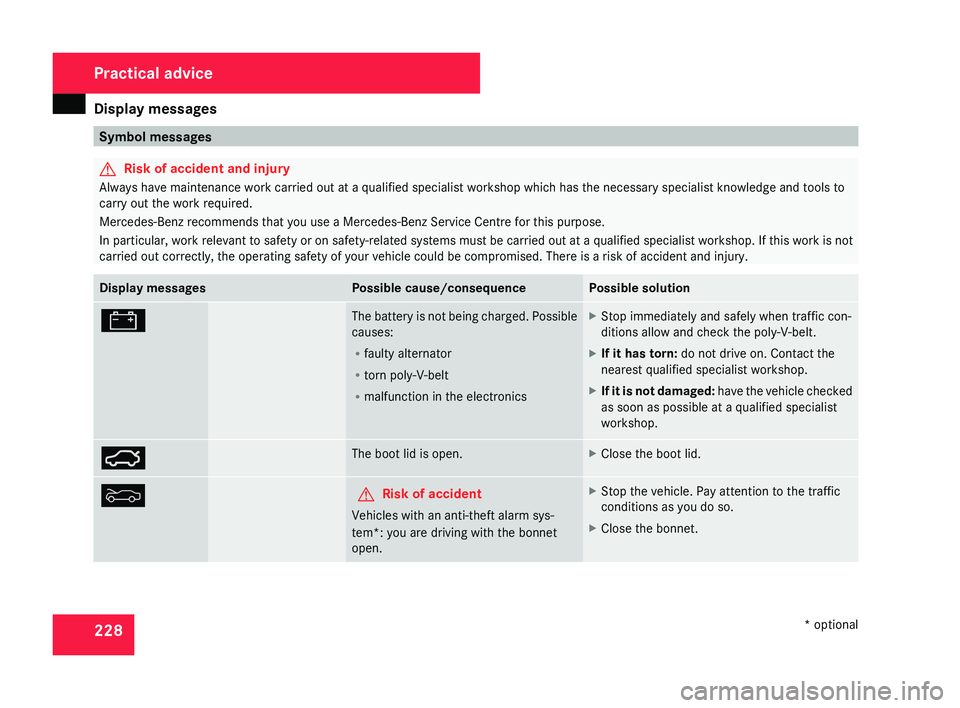
# The battery is not being charged. Possible
causes:
R
faulty alternator
R torn poly-V-belt
R malfunction in the electronics X
Stop immediately and safely when traffic con-
ditions allow and check the poly-V-belt.
X If it has torn: do not drive on. Contact the
nearest qualified specialist workshop.
X If it is not damaged:
have the vehicle checked
as soon as possible at a qualified specialist
workshop. Ê The boot lid is open. X
Close the boot lid. Y G
Risk of accident
Vehicles with an anti-theft alarm sys-
tem*: you are driving with the bonnet
open. X
Stop the vehicle. Pay attention to the traffic
conditions as you do so.
X Close the bonnet. Practical advice
* optional
219_AKB; 2; 4, en-GB
mkalafa,
2007-11-13T09:28:36+01:00 - Seite 228
Page 254 of 329
Troubleshooting
251Warning tones
Problem Possible cause/consequence Suggested solutions
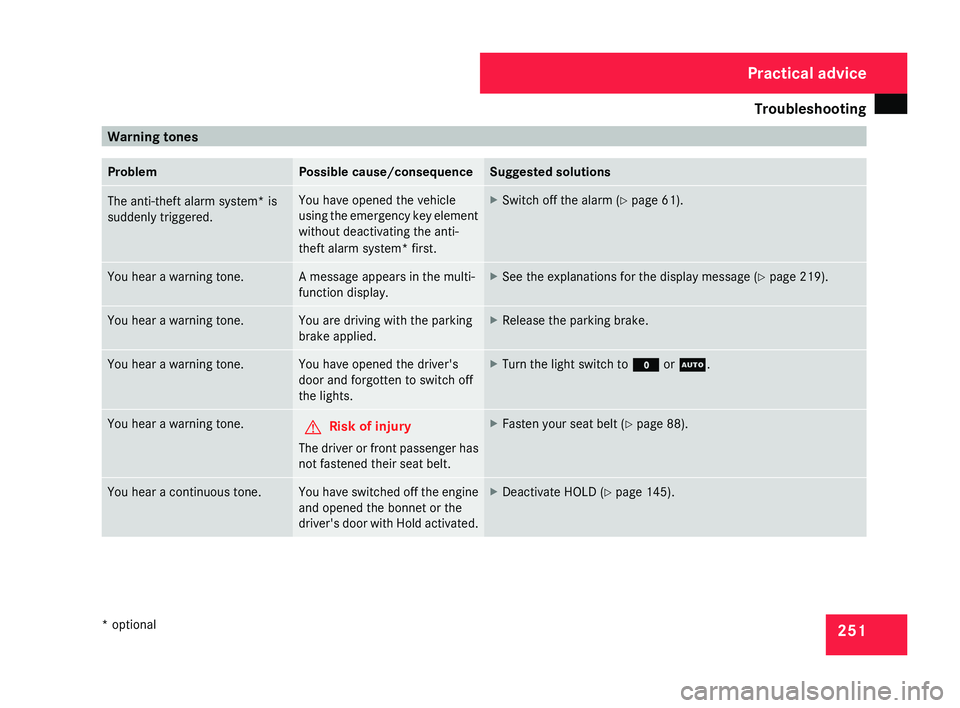
The anti-theft alarm system* is
suddenly triggered. You have opened the vehicle
using
the emergency key element
without deactivating the anti-
theft alarm system* first. X
Switch off the alarm (Y page 61). You hear a warning tone. A message appears in the multi-
function display. X
See the explanations for the display message ( Y page 219).You hear a warning tone. You are driving with the parking
brake applied. X
Release the parking brake. You hear a warning tone. You have opened the driver's
door and forgotten to switch off
the lights. X
Turn the light switch to M or U.You hear a warning tone.
G
Risk of injury
The driver or front passenger has
not fastened their seat belt. X
Fasten your seat belt ( Y page 88).You hear a continuous tone. You have switched off the engine
and opened the bonnet or the
driver's
door with Hold activated. X
Deactivate HOLD (Y page 145). Practical advice
* optional
219_AKB; 2; 4, en-GB
mkalafa,
2007-11-13T09:28:36+01:00 - Seite 251
Page 276 of 329
Changing the bulbs
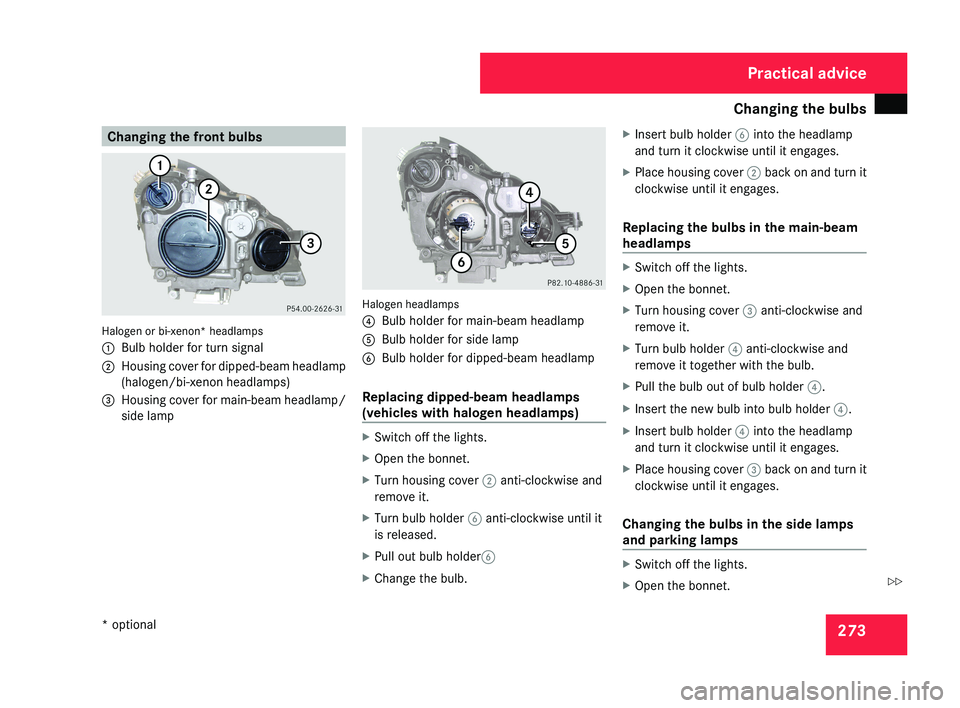
273Changing the front bulbsHalogen or bi-xenon* headlamps
1
Bulb holder for turn signal
2 Housing cover for dipped-beam headlamp
(halogen/bi-xenon headlamps)
3 Housing cover for main-beam headlamp/
side lamp
Halogen headlamps
4Bulb holder for main-beam headlamp
5 Bulb holder for side lamp
6 Bulb holder for dipped-beam headlamp
Replacing dipped-beam headlamps
(vehicles with halogen headlamps)
X Switch off the lights.
X Open the bonnet.
X Turn housing cover 2 anti-clockwise and
remove it.
X Turn bulb holder 6 anti-clockwise until it
is released.
X Pull out bulb holder 6
X Change the bulb. X
Insert bulb holder 6 into the headlamp
and turn it clockwise until it engages.
X Place housing cover 2 back on and turn it
clockwise until it engages.
Replacing the bulbs in the main-beam
headlamps
X Switch off the lights.
X Open the bonnet.
X Turn housing cover 3 anti-clockwise and
remove it.
X Turn bulb holder 4 anti-clockwise and
remove it together with the bulb.
X Pull the bulb out of bulb holder 4.
X Insert the new bulb into bulb holder 4.
X Insert bulb holder 4 into the headlamp
and turn it clockwise until it engages.
X Place housing cover 3 back on and turn it
clockwise until it engages.
Changing the bulbs in the side lamps
and parking lamps
X Switch off the lights.
X Open the bonnet.
Practical advice
* optional
219_AKB; 2; 4, en-GB
mkalafa,
2007-11-13T09:28:36+01:00 - Seite 273
Z
Page 277 of 329
Changing the bulbs
274
X
Turn housing cover 3 anti-clockwise and
remove it.
X Turn main-beam headlamp bulb holder 4
anti-clockwise until it disengages and then
remove it together with the bulb.
X Turn the bulb anti-clockwise, applying
slight pressure, and remove it from bulb
holder 5.
X Insert the new bulb into bulb holder 5 and
turn it clockwise.
X Pull out bulb holder 5.
X Insert main-beam headlamp bulb
holder 4 into the headlamp and turn it
clockwise until it engages.
X Place housing cover 3 back on and turn it
clockwise until it engages.
Replacing the turn signal lamps X
Switch off the lights.
X Open the bonnet.
X Turn bulb holder 1 anti-clockwise and
remove it along with the bulb.
X Turn the bulb anti-clockwise, applying
slight pressure, and remove it from bulb
holder 1. X
Insert the new bulb into bulb holder 1 and
turn it clockwise.
X Insert bulb holder 1 into the headlamp
and turn it clockwise until it engages. Changing the rear bulbs
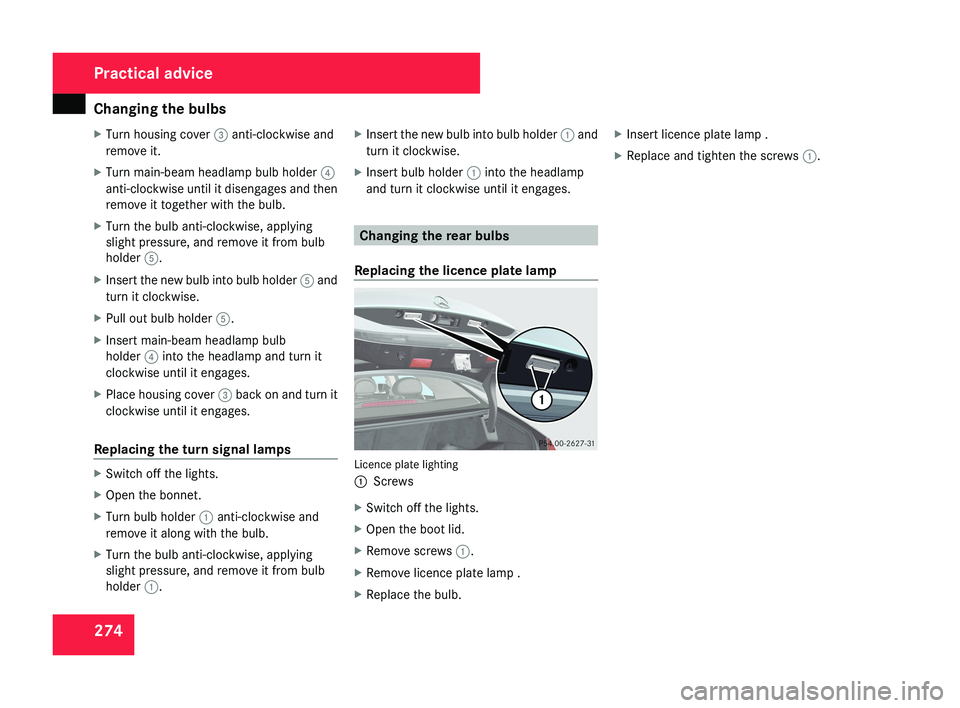
Replacing the licence plate lamp Licence plate lighting
1
Screws
X Switch off the lights.
X Open the boot lid.
X Remove screws 1.
X Remove licence plate lamp .
X Replace the bulb. X
Insert licence plate lamp .
X Replace and tighten the screws 1.Practical advice
219_AKB; 2; 4, en-GB
mkalafa,
2007-11-13T09:28:36+01:00 - Seite 274