display MERCEDES-BENZ CLS COUPE 2008 User Guide
[x] Cancel search | Manufacturer: MERCEDES-BENZ, Model Year: 2008, Model line: CLS COUPE, Model: MERCEDES-BENZ CLS COUPE 2008Pages: 329, PDF Size: 29.26 MB
Page 16 of 329
13
Vehicle dimensions
. . . . . . . . . . . . 309
Vehicle weights . . . . . . . . . . . . . . . 310
Wheels . . . . . . . . . . . . . . . . . . . . . . 305
Telephone
see Mobile phone
Temperature
Engine oil (on-board computer) . . . 116
Outside temperature . . . . . . . . . . . 111
Thermatic
Malfunction indicator lamp . . . . . . 242
Thermotronic
Malfunction indicator lamp . . . . . . 242
Third brake lamp
Display message . . . . . . . . . . . . . . 234
Tightening torque . . . . . . . . . . . . . . . 286
Time Lap time (on-board computer) . . . . 117
Setting (on-board computer) . . . . . 124
Setting the time (on-board com-
puter) . . . . . . . . . . . . . . . . . . . . . . . 124
Timer (on-board computer) . . . . . . . 117
TIREFIT kit Storage location . . . . . . . . . . . . . . . 217
Using . . . . . . . . . . . . . . . . . . . . . . . 277
Total distance recorder
. . . . . . . . . . . . . . . . . . . . . . . . . . . . . 27, 29
Resetting the trip meter . . . . . . . . . 110
Tow-away protection . . . . . . . . . . . . . . 62
Towing . . . . . . . . . . . . . . . . . . . . . . . . 294 Towing eye
Fitting . . . . . . . . . . . . . . . . . . . . . . . 294
Removing . . . . . . . . . . . . . . . . . . . . 295
Transmission output (maximum)
Telephone/two-way radio . . . . . . . 299
Transport (vehicle) . . . . . . . . . . . . . . 295
Trip computer
Menu (on-board computer) . . . . . . 129
Trip meter . . . . . . . . . . . . . . . . . . . . . . 115
Resetting . . . . . . . . . . . . . . . . . . . . 110
Turn signal lamps
Display message . . . . . . . . . . 233, 234
TV
Operation (on-board computer) . . . 119
Two-way radio
Installation . . . . . . . . . . . . . . . . . . . 299
Tyre grip . . . . . . . . . . . . . . . . . . . . . . . 207
Tyre pressure . . . . . . . . . . . . . . . . . . 200
Calling up (on-board computer) . . 202
Display message . . . . . . . . . . 224, 237
Tyre pressure loss warning system 201
Tyre pressure monitor Warning lamp . . . . . . . . . . . . . . . . . 248
Tyre pressures
Table . . . . . . . . . . . . . . . . . . . . . . . 304
Tyres
Direction of rotation . . . . . . . . . . . . 199
General notes . . . . . . . . . . . . . . . . . 198
Technical data . . . . . . . . . . . . . . . . 305
Tyre tread . . . . . . . . . . . . . . . . . . . . . . 200 U
Unit for distance Setting (on-board computer)
. . . . . 123
Unladen weight . . . . . . . . . . . . . . . . . 310
Unlocking Emergency unlocking . . . . . . . . . . . 266
From the inside (central unlocking
button) . . . . . . . . . . . . . . . . . . . . . . . 70
Up (display message) . . . . . . . . . . . . 116 V
Variable Speedtronic . . . . . . . . . . . . .
142
Vehicle Emergency unlocking . . . . . . . 266, 267
Individual settings (on-board com-
puter) . . . . . . . . . . . . . . . . . . . . . . . 121
Leaving parked up . . . . . . . . . . . . . 265
Towing . . . . . . . . . . . . . . . . . . . . . . 294
Transporting . . . . . . . . . . . . . . . . . . 295
Vehicle battery . . . . . . . . . . . . . . . . . 288
Vehicle dimensions . . . . . . . . . . . . . . 309
Vehicle electronics . . . . . . . . . . . . . . 299
Vehicle identification plates . . . . . . 300
Vehicle level Display message . . . . . . . . . . . . . . 229
Setting (AIRMATIC DC) . . . . . . . . . 146
Vehicle tool kit . . . . . . . . . . . . . . . . . . 217
Vehicle weights . . . . . . . . . . . . . . . . . 310 Index
219_AKB; 2; 4, en-GB
mkalafa,
2007-11-13T09:28:36+01:00 - Seite 13
Page 17 of 329
14 W
Warning and indicator lamp ABS (yellow)
. . . . . . . . . . . . . . . . . . 244
Warning signal
Audible . . . . . . . . . . . . . . . . . . . . . . 251
Warning triangle . . . . . . . . . . . . . . . . 216
Washer fluid Display message . . . . . . . . . . . . . . 240
Wearing seat belts . . . . . . . . . . . . . . . . 88
Wheel bolts
Tightening torque . . . . . . . . . . . . . . 286
Wheels
General notes . . . . . . . . . . . . . . . . . 198
Technical data . . . . . . . . . . . . . . . . 305
Windowbags . . . . . . . . . . . . . . . . . . . . . 48
Windows Cleaning . . . . . . . . . . . . . . . . . . . . . 212
Cleaning the windscreen . . . . . . . . 211
Side windows . . . . . . . . . . . . . . . . . . 98
Windscreen
Cleaning . . . . . . . . . . . . . . . . . . . . . 211
Windscreen washer fluid . . . . . . . . . 317
Topping up . . . . . . . . . . . . . . . . . . . 197
Windscreen washer fluid reservoir
. . . . . . . . . . . . . . . . . . . . . . . . . . 197, 317
Windscreen washer reservoir
Capacity . . . . . . . . . . . . . . . . . . . . . 317
Windscreen washer system . . . . . . . 317Windscreen wipers
. . . . . . . . . . . . . . . 97
Cleaning . . . . . . . . . . . . . . . . . . . . . 211
Malfunction . . . . . . . . . . . . . . . . . . 259
Replacing the wiper blades . . . . . . 275
Winter diesel . . . . . . . . . . . . . . . . . . . 193
Winter driving . . . . . . . . . . . . . . 204, 205
Winter tyres . . . . . . . . . . . . . . . . . . . . 204
Limiting the speed (on-board com-
puter) . . . . . . . . . . . . . . . . . . . . . . . 144 Index
219_AKB; 2; 4, en-GB
mkalafa,
2007-11-13T09:28:36+01:00 - Seite 14
Page 30 of 329
Instrument cluster
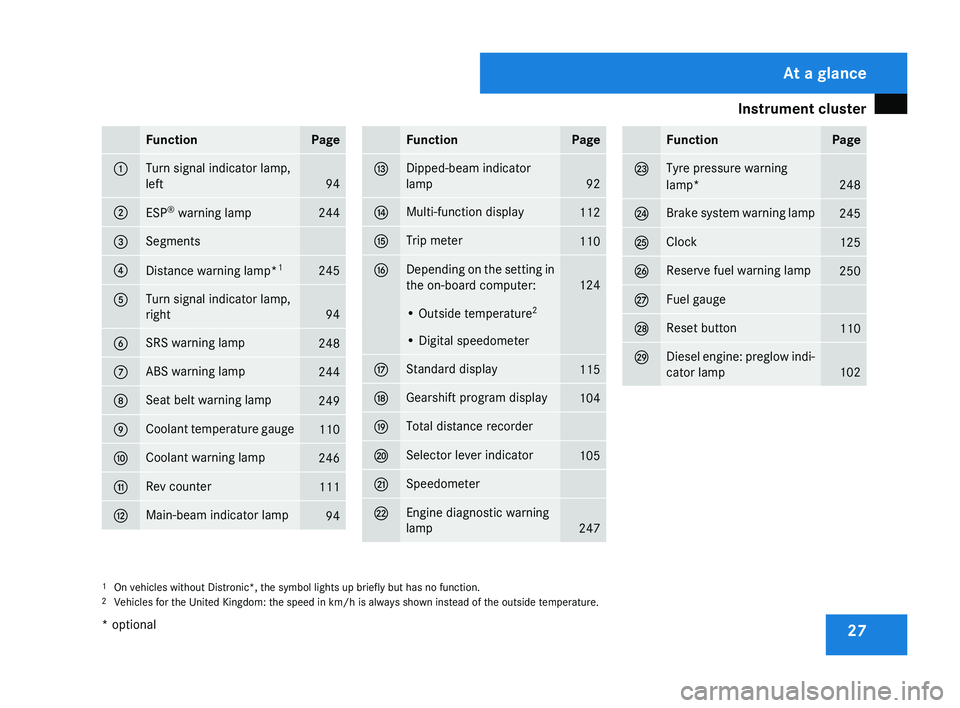
27Function Page
1 Turn signal indicator lamp,
left
94
2
ESP
®
warning lamp 244
3 Segments
4
Distance warning lamp*
1 245
5 Turn signal indicator lamp,
right
94
6 SRS warning lamp
248
7 ABS warning lamp
244
8 Seat belt warning lamp
249
9 Coolant temperature gauge
110
a Coolant warning lamp
246
b Rev counter
111
c Main-beam indicator lamp
94 Function Page
d Dipped-beam indicator
lamp
92
e Multi-function display
112
f Trip meter
110
g Depending on the setting in
the on-board computer:
124
• Outside temperature
2 • Digital speedometer
h Standard display
115
j Gearshift program display
104
k Total distance recorder
l Selector lever indicator
105
m Speedometer
n Engine diagnostic warning
lamp
247 Function Page
o Tyre pressure warning
lamp*
248
p Brake system warning lamp
245
q Clock
125
r Reserve fuel warning lamp
250
s Fuel gauge
t Reset button
110
u Diesel engine: preglow indi-
cator lamp
102
1
On vehicles without Distronic*, the symbol lights up briefly but has no function.
2 Vehicles for the United Kingdom: the speed in km/h
is always shown instead of the outside temperature. At a glance
* optional
219_AKB; 2; 4, en-GB
mkalafa,
2007-11-13T09:28:36+01:00 - Seite 27
Page 32 of 329
Instrument cluster
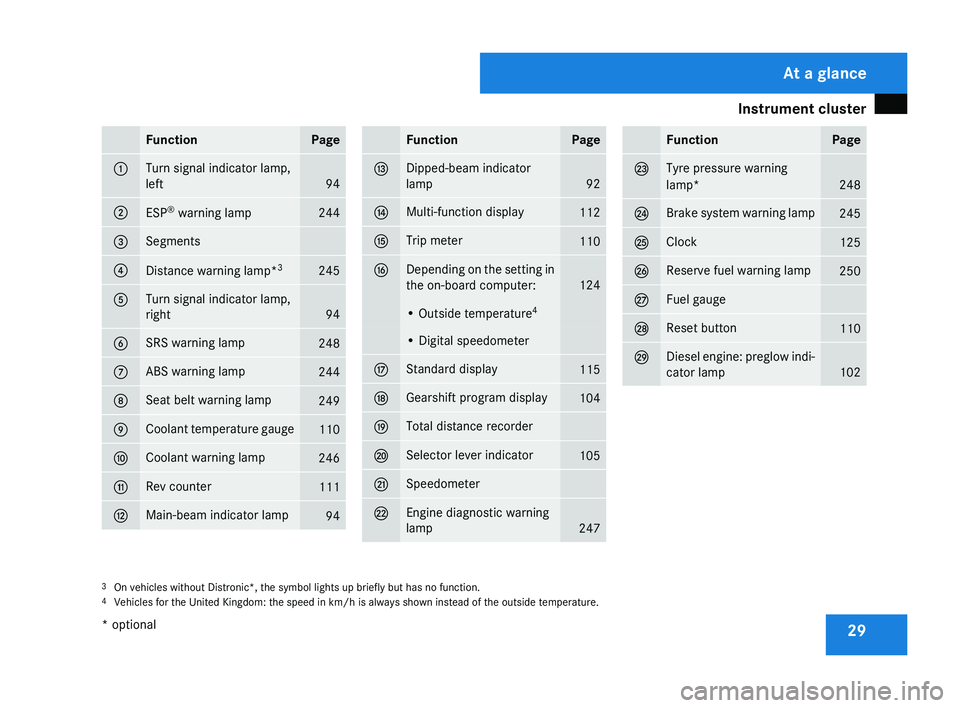
29Function Page
1 Turn signal indicator lamp,
left
94
2
ESP
®
warning lamp 244
3 Segments
4
Distance warning lamp*
3 245
5 Turn signal indicator lamp,
right
94
6 SRS warning lamp
248
7 ABS warning lamp
244
8 Seat belt warning lamp
249
9 Coolant temperature gauge
110
a Coolant warning lamp
246
b Rev counter
111
c Main-beam indicator lamp
94 Function Page
d Dipped-beam indicator
lamp
92
e Multi-function display
112
f Trip meter
110
g Depending on the setting in
the on-board computer:
124
• Outside temperature
4 • Digital speedometer
h Standard display
115
j Gearshift program display
104
k Total distance recorder
l Selector lever indicator
105
m Speedometer
n Engine diagnostic warning
lamp
247 Function Page
o Tyre pressure warning
lamp*
248
p Brake system warning lamp
245
q Clock
125
r Reserve fuel warning lamp
250
s Fuel gauge
t Reset button
110
u Diesel engine: preglow indi-
cator lamp
102
3
On vehicles without Distronic*, the symbol lights up briefly but has no function.
4 Vehicles for the United Kingdom: the speed in km/h
is always shown instead of the outside temperature. At a glance
* optional
219_AKB; 2; 4, en-GB
mkalafa,
2007-11-13T09:28:36+01:00 - Seite 29
Page 33 of 329
Multi-function steering wheel
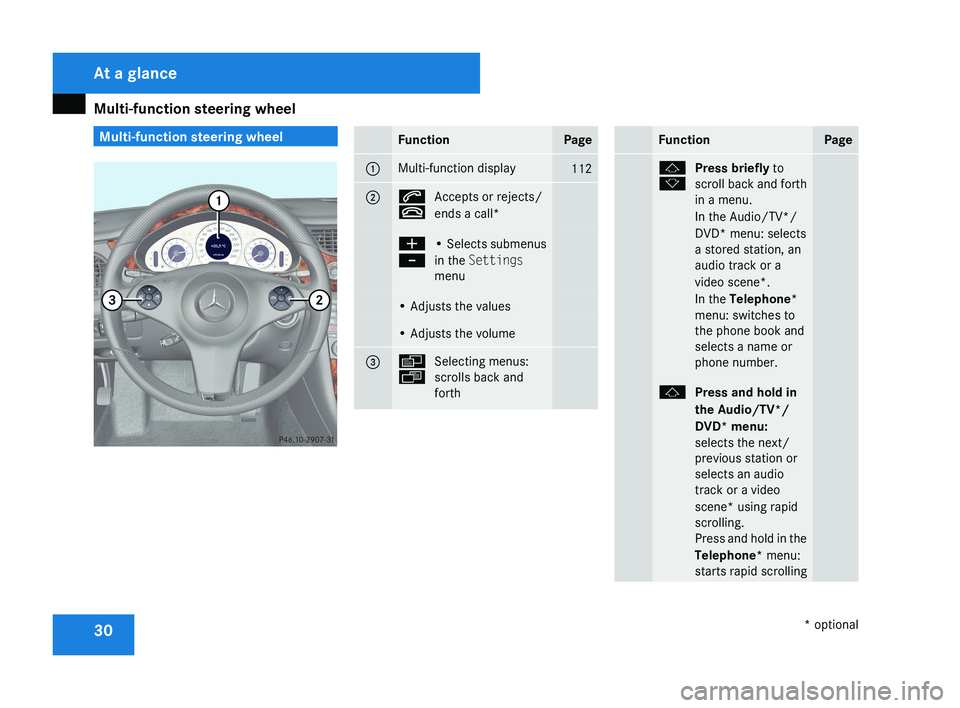
30 Multi-function steering wheelFunctionPage
1Multi-function display112
2s
t
Accepts or rejects/
ends a call*
æ
-• Selects submenus
in the Settings
menu
• Adjusts the values
• Adjusts the volume
3è
ÿ
Selecting menus:
scrolls back and
forth
FunctionPage
j
kPress briefly
to
scroll back and forth
in a menu.
In the Audio/TV*/
DVD* menu: selects
a stored station, an
audio track or a
video scene*.
In the Telephone*
menu: switches to
the phone book and
selects a name or
phone number.
j Press and hold in
the Audio/TV*/
DVD* menu:
selects the next/
previous station or
selects an audio
track or a video
scene* using rapid
scrolling.
Press and hold in the
Telephone* menu:
starts rapid scrolling
At a glance
* optional
219_AKB; 2; 4, en-GB
mkalafa,
2007-11-13T09:28:36+01:00 - Seite 30
Page 71 of 329
Opening and closing
68
Important notes R
If the KEYLESS GO key is removed from the
vehicle (in luggage or an article of clothing,
for instance), it will no longer be possible
to lock or start the vehicle.
R If the KEYLESS GO key is removed from the
vehicle while the engine is running, e.g. if
the front passenger leaves the vehicle with
the KEYLESS GO key, the following mes-
sage will appear in the multi-function dis-
play as you pull away: Key not detec-
ted.
R If the KEYLESS GO key is in the vehicle, the
vehicle can be started at any time. If you
have left the KEYLESS GO key in the vehi-
cle, you will see the following message in
the multi-function display when you lock
the vehicle: Key still in vehicle.
Factory settings X
To unlock centrally: pull the door handle.
The turn signals flash once. The locking
knobs in the doors pop up. The anti-theft
alarm system* is deactivated.
When it is dark, the surround lighting also
comes on if it is activated in the on-board
computer. i
If you do not open either a door or the
boot lid after you have unlocked the vehi-
cle, it will automatically relock after approx-
imately 40 seconds.
i When a door is opened, the side window
on that side opens slightly. When the door
is closed, the side window closes again.
! The side windows will not open or close
if the battery is discharged or if the side
windows have iced up. It will not be possi-
ble to close the door. Do not attempt to
force the door closed. You could otherwise
damage the door or the window.
i There is a danger of the vehicle being
unlocked accidentally. This could happen if
the KEYLESS GO key is within one metre of
the vehicle and the door handle is splashed
by water. This could also happen when you
are cleaning the door handle. 1
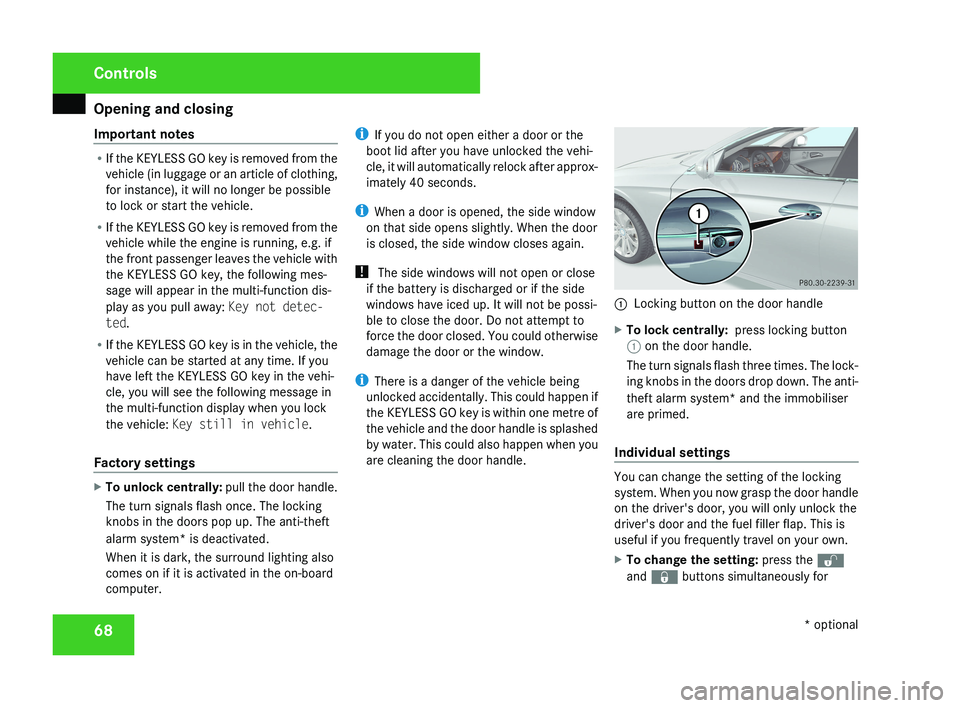
Locking button on the door handle
X To lock centrally: press locking button
1 on the door handle.
The turn signals flash three times. The lock-
ing knobs in the doors drop down. The anti-
theft alarm system* and the immobiliser
are primed.
Individual settings You can change the setting of the locking
system. When you now grasp the door handle
on the driver's door, you will only unlock the
driver's door and the fuel filler flap. This is
useful if you frequently travel on your own.
X
To change the setting: press the k
and j buttons simultaneously for Controls
* optional
219_AKB; 2; 4, en-GB
mkalafa,
2007-11-13T09:28:36+01:00 - Seite 68
Page 83 of 329
Seats
80
3
Massage function
4 Upper back support
5 Lumbar region support
6 Seat cushion length
X To activate/deactivate: press button 1.
The indicator lamp in the button lights up/
goes out.
When switched on, the message Driving
dynamics seat adjustment appears in
the multi-function display for five seconds.
Massage function (PULSE) The massage function helps you to prevent
muscle tension on long journeys.
X
Press button 3.
The indicator lamp in the button lights up.
The air cushions in the lumbar region
vibrate for approximately five minutes. Seat ventilation*
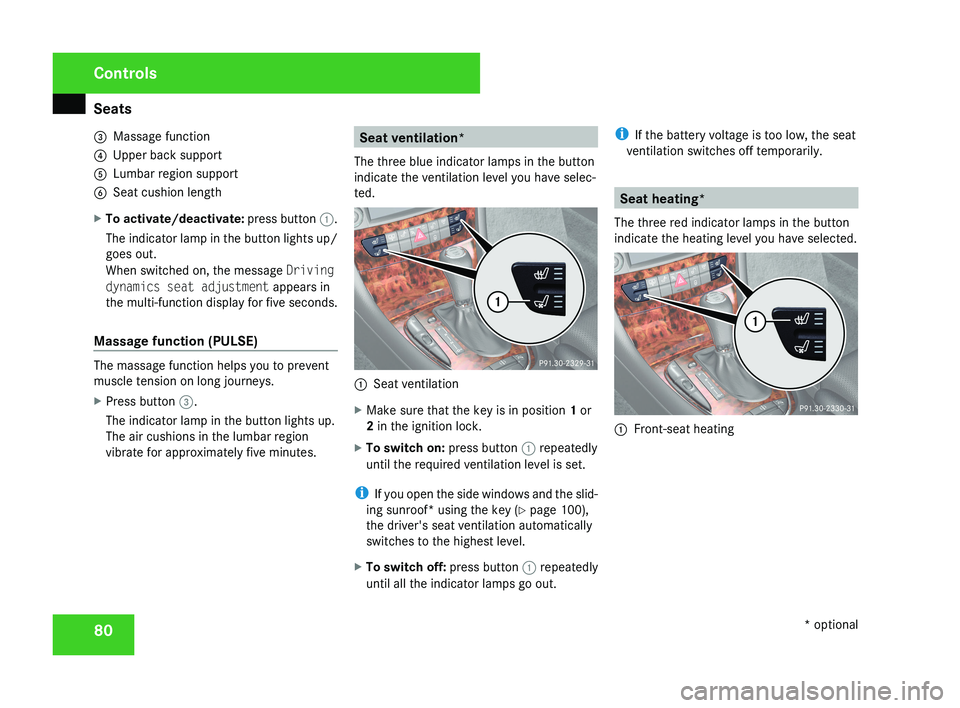
The three blue indicator lamps in the button
indicate the ventilation level you have selec-
ted. 1
Seat ventilation
X Make sure that the key is in position 1 or
2 in the ignition lock.
X To switch on: press button 1 repeatedly
until the required ventilation level is set.
i If you open the side windows and the slid-
ing sunroof* using the key ( Y page 100),
the driver's seat ventilation automatically
switches to the highest level.
X To switch off: press button 1 repeatedly
until all the indicator lamps go out. i
If the battery voltage is too low, the seat
ventilation switches off temporarily. Seat heating*
The three red indicator lamps in the button
indicate the heating level you have selected. 1
Front-seat heating Controls
* optional
219_AKB; 2; 4, en-GB
mkalafa,
2007-11-13T09:28:36+01:00 - Seite 80
Page 85 of 329
Steering wheel
82
R
the steering wheel can be reached with
your arms slightly bent
R you can move your legs freely
R you can see all the displays in the instru-
ment cluster clearly Adjusting the steering wheel man-
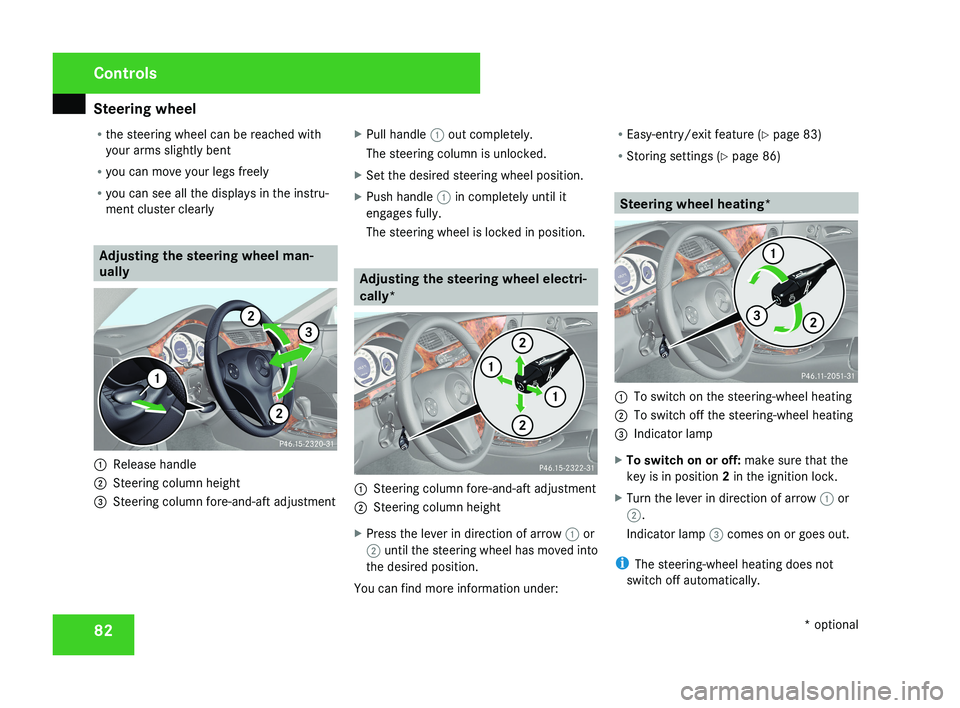
ually1
Release handle
2 Steering column height
3 Steering column fore-and-aft adjustment X
Pull handle 1 out completely.
The steering column is unlocked.
X Set the desired steering wheel position.
X Push handle 1 in completely until it
engages fully.
The steering wheel is locked in position.
Adjusting the steering wheel electri-
cally*
1 Steering column fore-and-aft adjustment
2 Steering column height
X Press the lever in direction of arrow 1 or
2 until the steering wheel has moved into
the desired position.
You can find more information under: R
Easy-entry/exit feature ( Y page 83)
R Storing settings ( Y page 86)
Steering wheel heating*
1
To switch on the steering-wheel heating
2 To switch off the steering-wheel heating
3 Indicator lamp
X To switch on or off: make sure that the
key is in position 2 in the ignition lock.
X Turn the lever in direction of arrow 1 or
2.
Indicator lamp 3 comes on or goes out.
i The steering-wheel heating does not
switch off automatically.
Controls
* optional
219_AKB; 2; 4, en-GB
mkalafa,
2007-11-13T09:28:36+01:00 - Seite 82
Page 94 of 329
Lights
91a result of the seat moving. This could
cause an accident.
G
Risk of accident
Only adjust the steering wheel when the
vehicle is stationary and do not pull away
until the steering wheel adjustment mech-
anism is locked in position. You might oth-
erwise drive without the steering wheel
adjustment mechanism being locked in
position.
As a result you could be distracted
from road and traffic conditions by an unex-
pected movement of the steering wheel
and thereby cause an accident.
However, the steerability of the vehicle is
not affected.
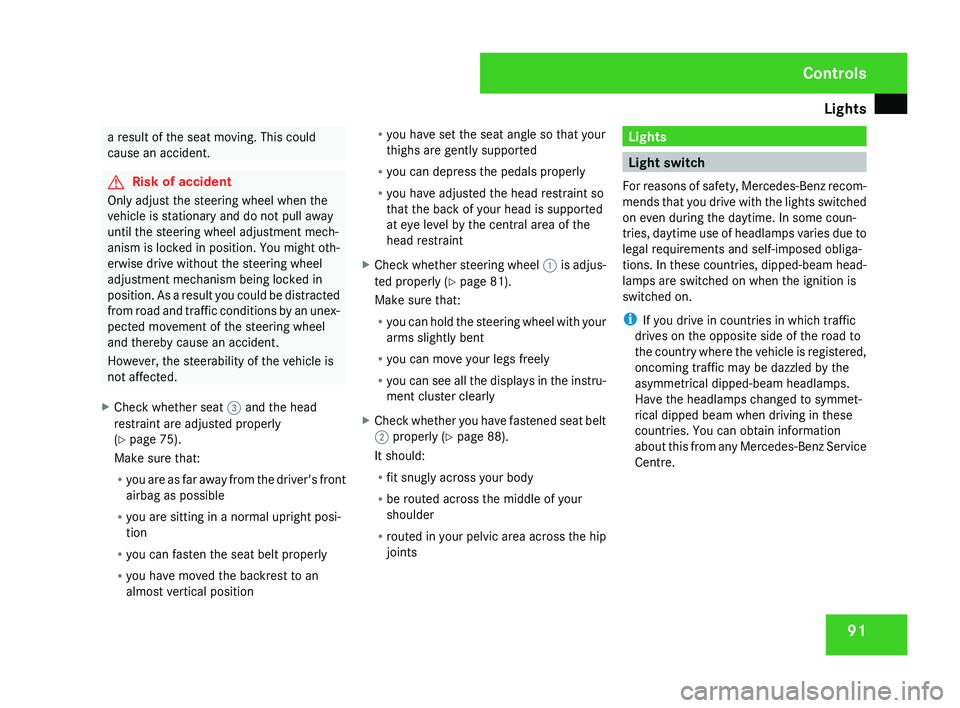
X Check whether seat 3 and the head
restraint are adjusted properly
(Y page 75).
Make sure that:
R
you
are as far away from the driver's front
airbag as possible
R you are sitting in a normal upright posi-
tion
R you can fasten the seat belt properly
R you have moved the backrest to an
almost vertical position R
you have set the seat angle so that your
thighs are gently supported
R you can depress the pedals properly
R you have adjusted the head restraint so
that the back of your head is supported
at eye level by the central area of the
head restraint
X Check whether steering wheel 1
is adjus-
ted properly (Y page 81).
Make sure that:
R you can hold the steering wheel with your
arms slightly bent
R you can move your legs freely
R you can see all the displays in the instru-
ment cluster clearly
X Check whether you have fastened seat belt
2 properly
(Y page 88).
It should:
R fit snugly across your body
R be routed across the middle of your
shoulder
R routed in your pelvic area across the hip
joints Lights
Light switch
For
reasons of safety, Mercedes-Benz recom-
mends that you drive with the lights switched
on even during the daytime. In some coun-
tries, daytime use of headlamps varies due to
legal requirements and self-imposed obliga-
tions. In these countries, dipped-beam head-
lamps are switched on when the ignition is
switched on.
i If you drive in countries in which traffic
drives on the opposite side of the road to
the country where the vehicle is registered,
oncoming traffic may be dazzled by the
asymmetrical dipped-beam headlamps.
Have the headlamps changed to symmet-
rical dipped beam when driving in these
countries. You can obtain information
about this from any Mercedes-Benz Service
Centre. Controls
219_AKB; 2; 4, en-GB
mkalafa,
2007-11-13T09:28:36+01:00 - Seite 91
Page 108 of 329
Transmission
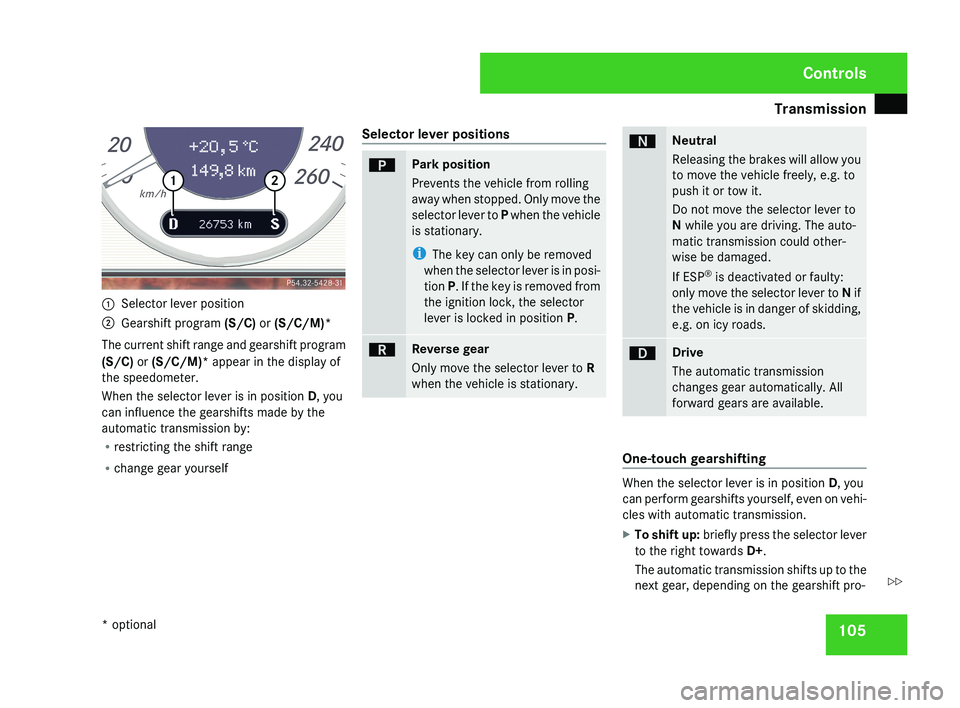
1051
Selector lever position
2 Gearshift program (S/C) or (S/C/M)*
The current shift range and gearshift program
(S/C) or (S/C/M)* appear in the display of
the speedometer.
When the selector lever is in position D, you
can influence the gearshifts made by the
automatic transmission by:
R restricting the shift range
R change gear yourself Selector lever positions
ìPark position
Prevents the vehicle from rolling
away when stopped. Only move the
selector lever to
P when the vehicle
is stationary.
i The key can only be removed
when the selector lever is in posi-
tion P. If the key is removed from
the ignition lock, the selector
lever is locked in position P.
íReverse gear
Only move the selector lever to R
when the vehicle is stationary.
ëNeutral
Releasing the brakes will allow you
to move the vehicle freely, e.g. to
push it or tow it.
Do not move the selector lever to
N while you are driving. The auto-
matic transmission could other-
wise be damaged.
If ESP®
is deactivated or faulty:
only move the selector lever to N if
the vehicle is in danger of skidding,
e.g. on icy roads.
êDrive
The automatic transmission
changes gear automatically. All
forward gears are available.
One-touch gearshifting
When the selector lever is in position D, you
can perform gearshifts yourself, even on vehi-
cles with automatic transmission.
X To shift up: briefly press the selector lever
to the right towards D+ .
The automatic transmission shifts up to the
next gear, depending on the gearshift pro-
Controls
* optional
219_AKB; 2; 4, en-GB
mkalafa,
2007-11-13T09:28:36+01:00 - Seite 105
Z