sensor MERCEDES-BENZ CLS COUPE 2008 User Guide
[x] Cancel search | Manufacturer: MERCEDES-BENZ, Model Year: 2008, Model line: CLS COUPE, Model: MERCEDES-BENZ CLS COUPE 2008Pages: 329, PDF Size: 29.26 MB
Page 66 of 329
Anti-theft systems
63
To deactivate the interior motion sen-
sor To prevent a false alarm, deactivate the inte-
rior motion sensor if you lock your vehicle and
R
people or animals remain in the vehicle
R the windows remain open
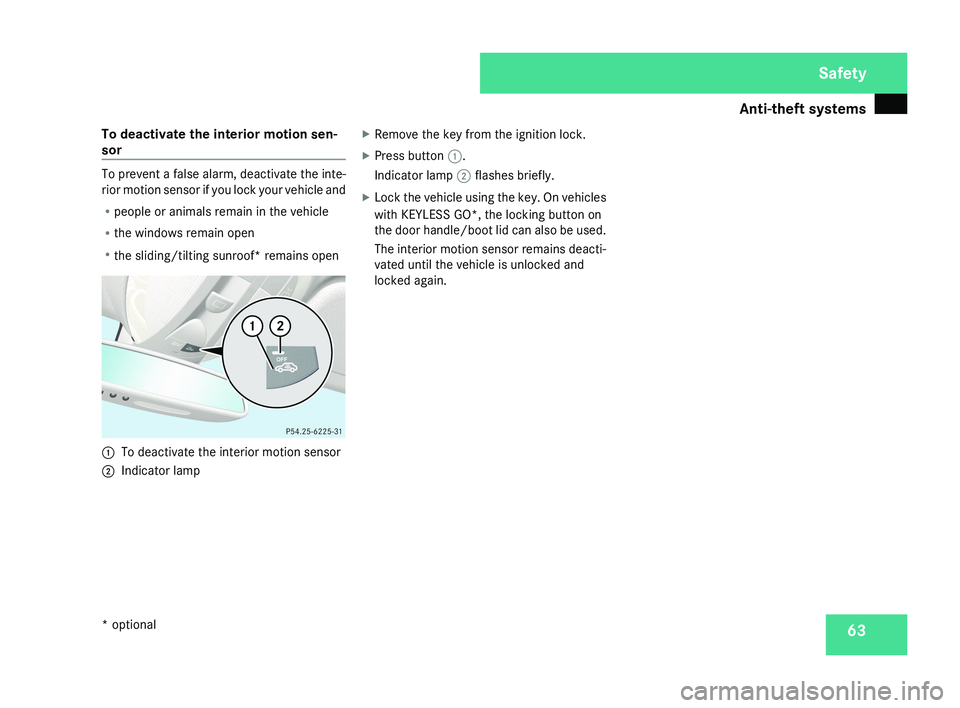
R the sliding/tilting sunroof* remains open 1
To deactivate the interior motion sensor
2 Indicator lamp X
Remove the key from the ignition lock.
X Press button 1.
Indicator lamp 2 flashes briefly.
X Lock the vehicle using the key. On vehicles
with KEYLESS GO*, the locking button on
the door handle/boot lid can also be used.
The interior motion sensor remains deacti-
vated until the vehicle is unlocked and
locked again. Safety
* optional
219_AKB; 2; 4, en-GB
mkalafa,
2007-11-13T09:28:36+01:00 - Seite 63
Page 88 of 329
Mirrors
85
R
The exterior mirrors fold in automatically as
soon as you lock the vehicle from the out-
side.
R The exterior mirrors fold out again auto-
matically as soon as you unlock the vehicle
and then open the driver's or front-
passenger door.
i If you have activated this function and fold
in the exterior mirrors using button 1, they
will not be folded out automatically. You
can then only fold out the exterior mirrors
using button 1. Automatic anti-dazzle mirrors*
The rear-view mirror and the exterior mirror
on the driver's side automatically go into anti-
dazzle mode if the ignition is switched on and
incident light from headlamps strikes the sen-
sor in the rear-view mirror.
The mirrors do not go into anti-dazzle mode if
reverse gear is engaged and the interior light-
ing is switched on. G
Risk of accident
If the incident light from headlamps cannot
strike the sensor in the rear-view mirror, for
instance when the rear window blind* is extended, the mirrors' automatic anti-daz-
zle function will not operate.
Incident light could then dazzle you. This
may prevent you from observing the traffic
conditions, thereby causing an accident. In
this case, adjust the rear-view mirror man-
ually.
G
Risk of injury
Electrolyte may escape if the glass in an
automatic anti-dazzle mirror breaks.
Electrolyte is an aggressive irritant and
must not be allowed to come into contact
with your skin, eyes or respiratory organs.
If electrolyte comes into contact with your
eyes or skin, rinse thoroughly with clean
water immediately. Consult a doctor if nec-
essary.
! If electrolyte comes into contact with the
vehicle paintwork, immediately rinse off
the undried liquid completely with clean
water. It will otherwise result in damage to
the paintwork. Parking aid*
The exterior mirror on the front-passenger
side moves into the parking position as soon
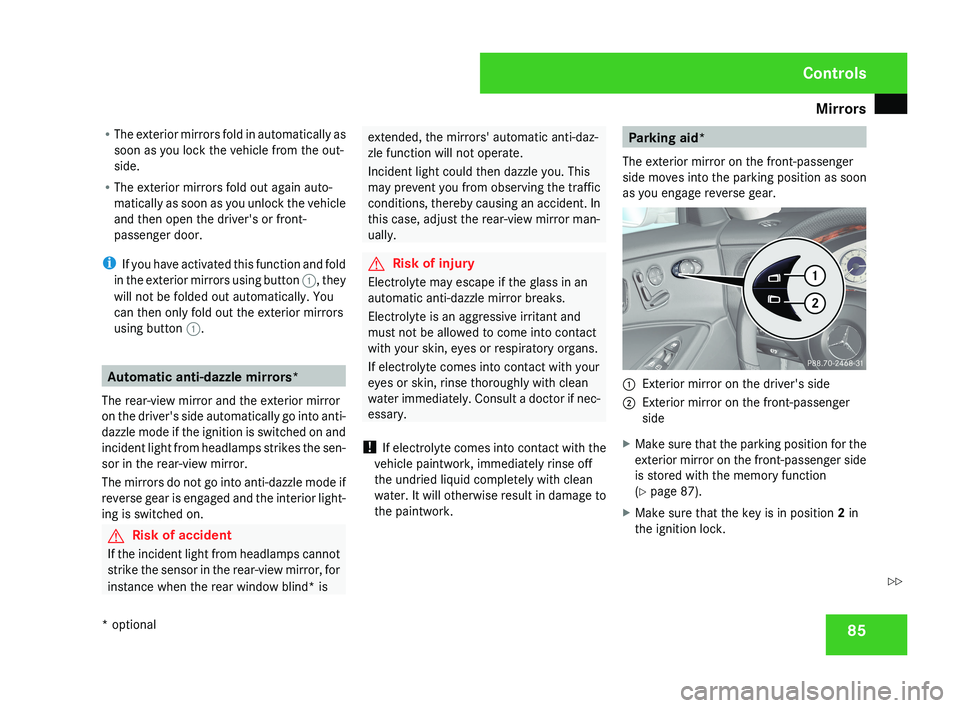
as you engage reverse gear.1 Exterior mirror on the driver's side
2 Exterior mirror on the front-passenger
side
X Make sure that the parking position for the
exterior mirror on the front-passenger side
is stored with the memory function
(Y page 87).
X Make sure that the key is in position 2 in
the ignition lock.
Controls
* optional
219_AKB; 2; 4, en-GB
mkalafa,
2007-11-13T09:28:36+01:00 - Seite 85
Z
Page 100 of 329
Windscreen wipers
97
Rear-compartment overhead control
panel
Rear-compartment overhead control panel
1
X To switch the left-hand reading lamp
on/off
2 X To switch the right-hand reading
lamp on/off
Rear-compartment reading lamps
X To switch on/off: press the X button. Windscreen wipers
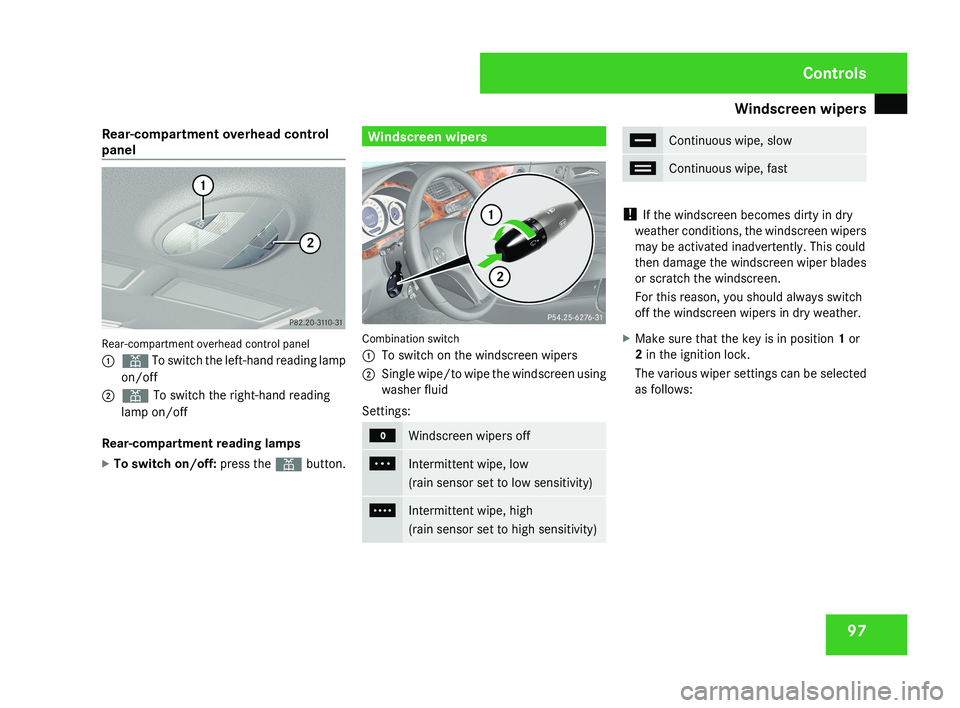
Combination switch
1
To switch on the windscreen wipers
2 Single wipe/to wipe the windscreen using
washer fluid
Settings: M
Windscreen wipers off
U
Intermittent wipe, low
(rain sensor set to low sensitivity)
V
Intermittent wipe, high
(rain sensor set to high sensitivity) u
Continuous wipe, slow
t
Continuous wipe, fast
!
If the windscreen becomes dirty in dry
weather conditions, the windscreen wipers
may be activated inadvertently. This could
then damage the windscreen wiper blades
or scratch the windscreen.
For this reason, you should always switch
off the windscreen wipers in dry weather.
X Make sure that the key is in position 1 or
2 in the ignition lock.
The various wiper settings can be selected
as follows: Controls
219_AKB; 2; 4, en-GB
mkalafa,
2007-11-13T09:28:36+01:00 - Seite 97
Page 101 of 329
Side windows
98 Single wipe
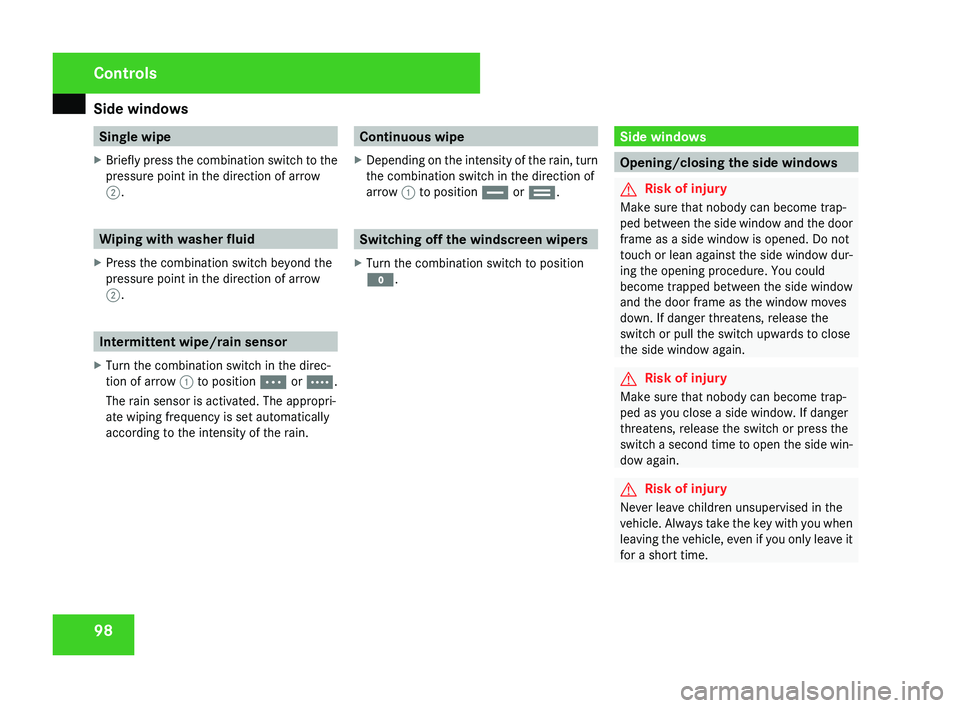
X Briefly press the combination switch to the
pressure point in the direction of arrow
2. Wiping with washer fluid
X Press the combination switch beyond the
pressure point in the direction of arrow
2. Intermittent wipe/rain sensor
X Turn the combination switch in the direc-
tion of arrow 1 to position U or V.
The rain sensor is activated. The appropri-
ate wiping frequency is set automatically
according to the intensity of the rain. Continuous wipe
X Depending on the intensity of the rain, turn
the combination switch in the direction of
arrow 1 to position u or t. Switching off the windscreen wipers
X Turn the combination switch to position
M. Side windows
Opening/closing the side windows
G
Risk of injury
Make sure that nobody can become trap-
ped between the side window and the door
frame as a side window is opened. Do not
touch or lean against the side window dur-
ing the opening procedure. You could
become trapped between the side window
and the door frame as the window moves
down. If danger threatens, release the
switch or pull the switch upwards to close
the side window again. G
Risk of injury
Make sure that nobody can become trap-
ped as you close a side window. If danger
threatens, release the switch or press the
switch
a second time to open the side win-
dow again. G
Risk of injury
Never leave children unsupervised in the
vehicle.
Always take the key with you when
leaving the vehicle, even if you only leave it
for a short time. Controls
219_AKB; 2; 4, en-GB
mkalafa,
2007-11-13T09:28:36+01:00 - Seite 98
Page 139 of 329
Driving systems
136 R
when changing to a lane with faster mov-
ing traffic
R in complex driving situations or where
the lanes are diverted, e.g. in motorway
roadworks
Distronic cannot take account of weather
conditions. Deactivate, or do not activate,
Distronic:
R if the roads are slippery, snow-covered or
icy. The wheels could lose their grip
under braking or acceleration. The vehi-
cle could start to skid.
R if the sensors are dirty or there is poor
visibility, e.g. due to snow, rain or fog.
Distance control may be impaired.
Always pay attention to traffic conditions
even when Distronic is activated. You may
not otherwise recognise dangers in time,
could cause an accident and injure yourself
and others.
If there is no vehicle in front, Distronic oper-
ates in the same way as cruise control. Dis-
tronic functions in the 30 km/h to 180 km/
h range. G
Risk of accident
Distronic brakes your vehicle at a maximum
of 2 m/s 2
depending on its speed. This cor-
responds to approximately 20% of your
vehicle's maximum braking power. You
must also apply the brakes yourself if this
braking power is not sufficient to avoid a
collision.
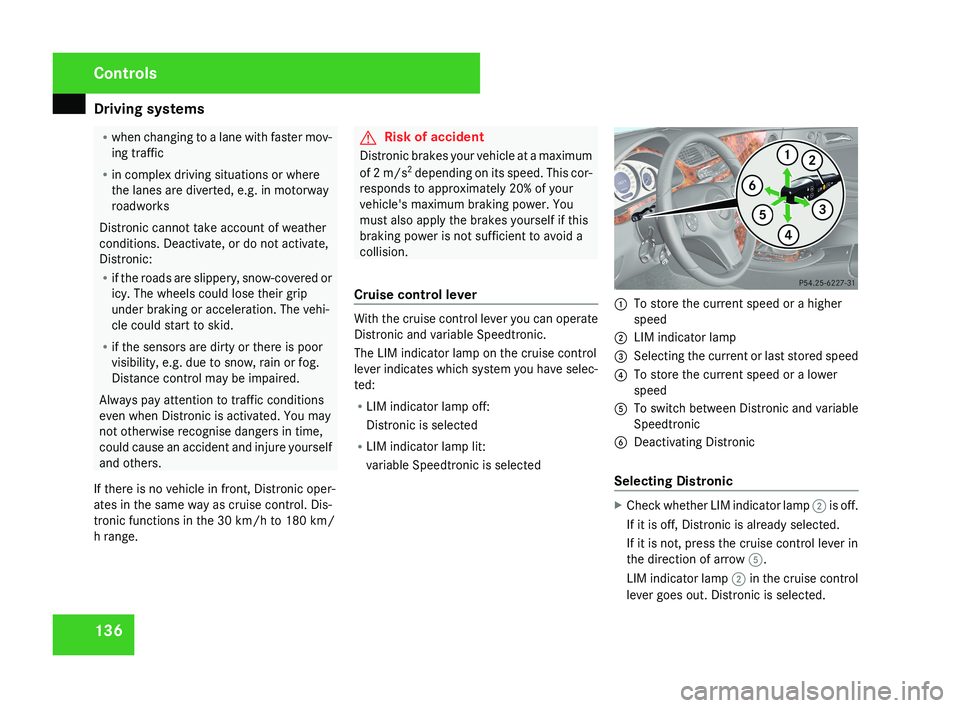
Cruise control lever With the cruise control lever you can operate
Distronic and variable Speedtronic.
The LIM indicator lamp on the cruise control
lever indicates which system you have selec-
ted:
R
LIM indicator lamp off:
Distronic is selected
R LIM indicator lamp lit:
variable Speedtronic is selected 1
To store the current speed or a higher
speed
2 LIM indicator lamp
3 Selecting the current or last stored speed
4 To store the current speed or a lower
speed
5 To switch between Distronic and variable
Speedtronic
6 Deactivating Distronic
Selecting Distronic X
Check whether LIM indicator lamp 2 is off.
If it is off, Distronic is already selected.
If it is not, press the cruise control lever in
the direction of arrow 5.
LIM indicator lamp 2 in the cruise control
lever goes out. Distronic is selected. Controls
219_AKB; 2; 4, en-GB
mkalafa,
2007-11-13T09:28:36+01:00 - Seite 136
Page 151 of 329
Driving systems
148 Parktronic*
G
Risk of accident
Parktronic is only an aid and may not detect
all obstacles. It does not relieve you of the
responsibility to pay attention.
You are always responsible for safety and
must continue to pay attention to your
immediate surroundings when parking and
manoeuvring. You could otherwise endan-
ger yourself and others. G
Risk of injury
Make sure that no persons or animals are
in the manoeuvring range. Otherwise, they
could be injured.
Parktronic is an electronic parking aid. It indi-
cates visually and audibly the distance
between your vehicle and an object.
Parktronic is automatically activated when
you switch on the ignition and release the
parking brake.
Parktronic is deactivated at speeds above
18 km/h. It is reactivated at lower speeds.
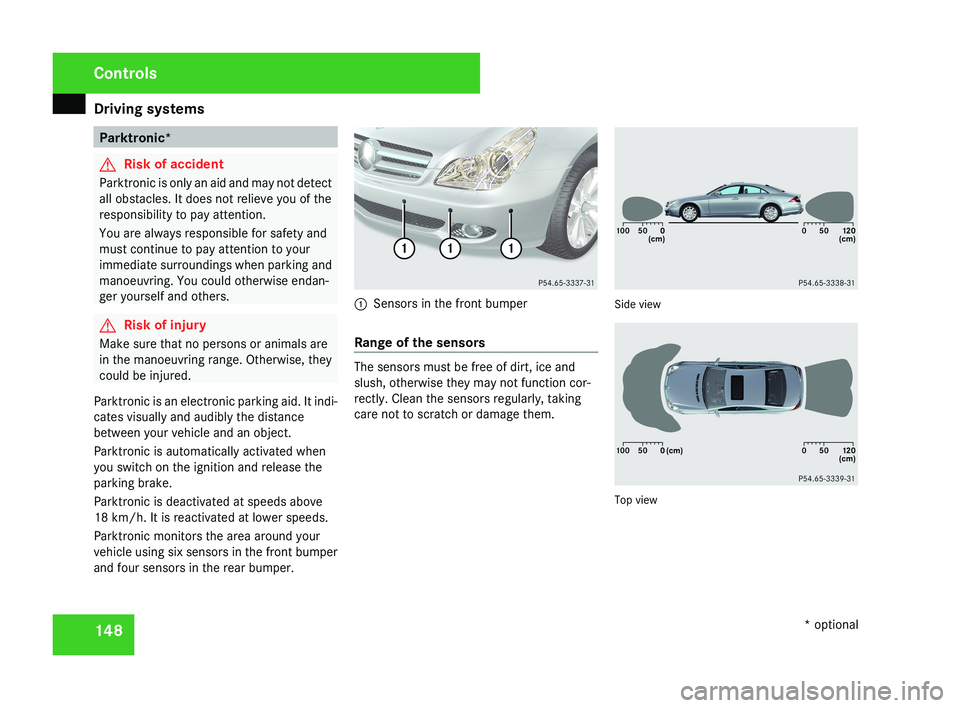
Parktronic monitors the area around your
vehicle using six sensors in the front bumper
and four sensors in the rear bumper.1 Sensors in the front bumper
Range of the sensors
The sensors must be free of dirt, ice and
slush, otherwise they may not function cor-
rectly. Clean the sensors regularly, taking
care not to scratch or damage them.
Side view
Top view
Controls
* optional
219_AKB; 2; 4, en-GB
mkalafa,
2007-11-13T09:28:36+01:00 - Seite 148
Page 152 of 329
Driving systems
149
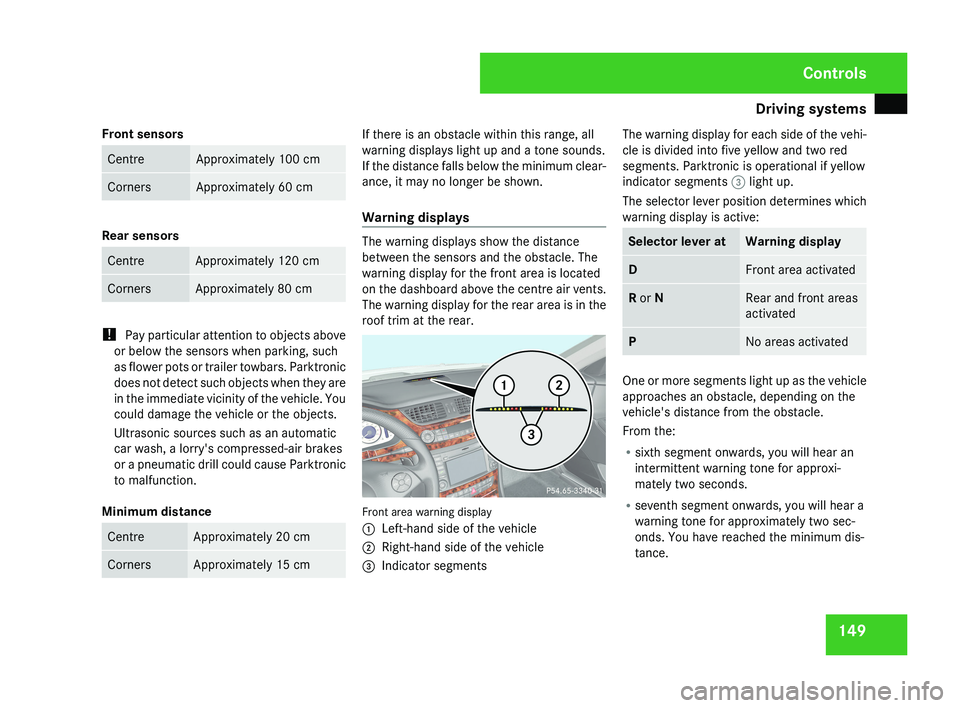
Front sensors Centre Approximately 100 cm
Corners Approximately 60 cm
Rear sensors
Centre Approximately 120 cm
Corners Approximately 80 cm
!
Pay particular attention to objects above
or below the sensors when parking, such
as flower pots or trailer towbars. Parktronic
does not detect such objects when they are
in the immediate vicinity of the vehicle. You
could damage the vehicle or the objects.
Ultrasonic sources such as an automatic
car wash, a lorry's compressed-air brakes
or a pneumatic drill could cause Parktronic
to malfunction.
Minimum distance Centre Approximately 20 cm
Corners Approximately 15 cm If there is an obstacle within this range, all
warning displays light up and a tone sounds.
If the distance falls below the minimum clear-
ance, it may no longer be shown.
Warning displays
The warning displays show the distance
between the sensors and the obstacle. The
warning display for the front area is located
on the dashboard above the centre air vents.
The warning display for the rear area is in the
roof trim at the rear.
Front area warning display
1
Left-hand side of the vehicle
2 Right-hand side of the vehicle
3 Indicator segments The warning display for each side of the vehi-
cle is divided into five yellow and two red
segments. Parktronic is operational if yellow
indicator segments
3 light up.
The selector lever position determines which
warning display is active: Selector lever at Warning display
D Front area activated
R or N Rear and front areas
activated
P No areas activated
One or more segments light up as the vehicle
approaches an obstacle, depending on the
vehicle's distance from the obstacle.
From the:
R
sixth segment onwards, you will hear an
intermittent warning tone for approxi-
mately two seconds.
R seventh segment onwards, you will hear a
warning tone for approximately two sec-
onds. You have reached the minimum dis-
tance. Controls
219_AKB; 2; 4, en-GB
mkalafa,
2007-11-13T09:28:36+01:00 - Seite 149
Page 214 of 329
Care
211
Automatic car wash G
Risk of accident
The vehicle is braked when HOLD is activa-
ted. Therefore, deactivate HOLD before the
vehicle is washed in an automatic car wash.
You can wash the vehicle in an automatic car
wash from the very start.
! Do not use a touch-free automatic car
wash that uses chemical agents to wash
the vehicle.
Preferably use one with high-pressure jets for
prewashing.
If the vehicle is very dirty, prewash it before
cleaning it in an automatic car wash.
! Make sure that the automatic car wash is
suitable for the size of the vehicle. Fold in
the exterior mirrors before the vehicle is
washed. There is otherwise a risk of dam-
age to the exterior mirrors.
! Make sure the side windows are com-
pletely closed, the ventilation/heater
blower is fully turned off and the wind-
screen wiper switch is set to 0. The rain
sensor may otherwise be activated, for
instance, leading to inadvertent wiper sweeps being triggered. This could cause
damage to the vehicle.
After using an automatic car wash, wipe off
wax from the windscreen and the wiper
blades. This will prevent smears and reduce
wiping
noises caused by residue on the wind-
screen.
High-pressure cleaners G
Risk of accident
Do not use high-pressure cleaners with cir-
cular-jet nozzles (dirt grinders) to clean
your vehicle or - especially - the tyres. You
could otherwise damage the tyres and
cause an accident.
! Observe the instructions issued by the
equipment manufacturer concerning the
distance to be maintained between the
nozzle
of the high-pressure cleaner and the
vehicle (at least 30 cm).
Move the high-pressure cleaner nozzle
around when cleaning your vehicle.
Do not aim directly at any of the following:
R Tyres
R Door joint
R Electrical components R
Battery
R Connectors
R Bulbs
R Seals
Damaged seals or electrical components
can lead to failures or leaks.
Cleaning the wiper blades and the out-
side of the windscreen G
Risk of injury
Turn the key to position 0 in the ignition
lock
before cleaning the windscreen or the
wiper blades. There is otherwise a risk of
the windscreen wipers being set in motion
and causing injury.
X Turn the key to position 1 in the ignition
lock (Y page 74).
X Set the windscreen wipers to the u
position on the combination switch
(Y page 97).
X Turn the key to position 0
or remove it when
the wiper arms are vertical ( Y page 74). Operation
219_AKB; 2; 4, en-GB
mkalafa,
2007-11-13T09:28:36+01:00 - Seite 211
Page 217 of 329
Care
214
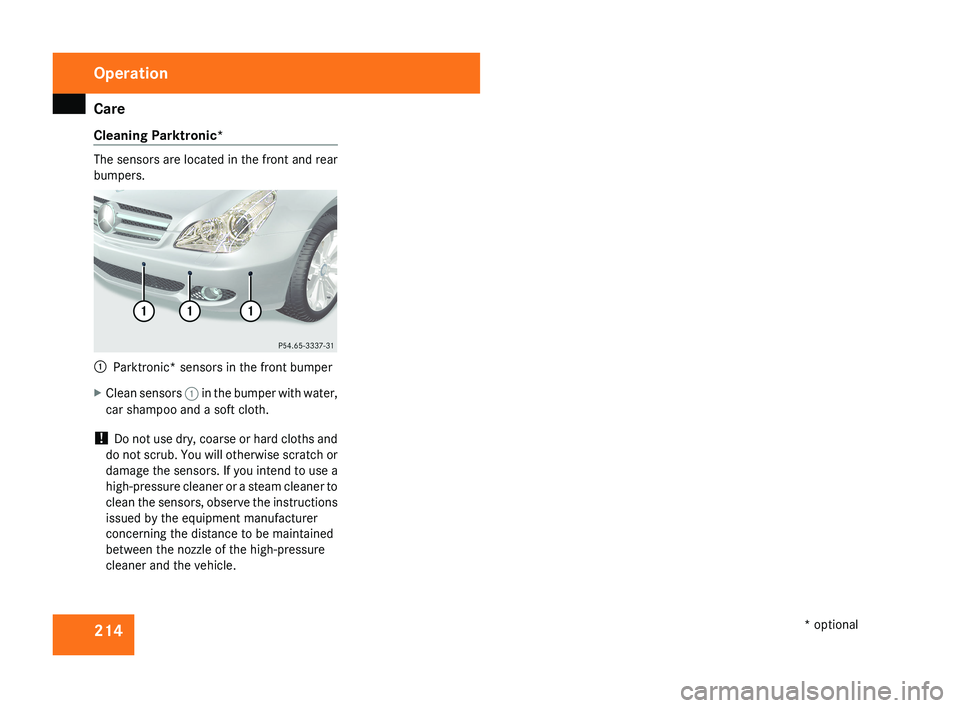
Cleaning Parktronic* The sensors are located in the front and rear
bumpers.
1
Parktronic* sensors in the front bumper
X Clean sensors 1 in the bumper with water,
car shampoo and a soft cloth.
! Do not use dry, coarse or hard cloths and
do not scrub. You will otherwise scratch or
damage the sensors. If you intend to use a
high-pressure cleaner or a steam cleaner to
clean the sensors, observe the instructions
issued by the equipment manufacturer
concerning the distance to be maintained
between the nozzle of the high-pressure
cleaner and the vehicle. Operation
* optional
219_AKB; 2; 4, en-GB
mkalafa,
2007-11-13T09:28:36+01:00 - Seite 214
Page 225 of 329
Display messages
222 Display messages Possible cause/consequence Possible solution
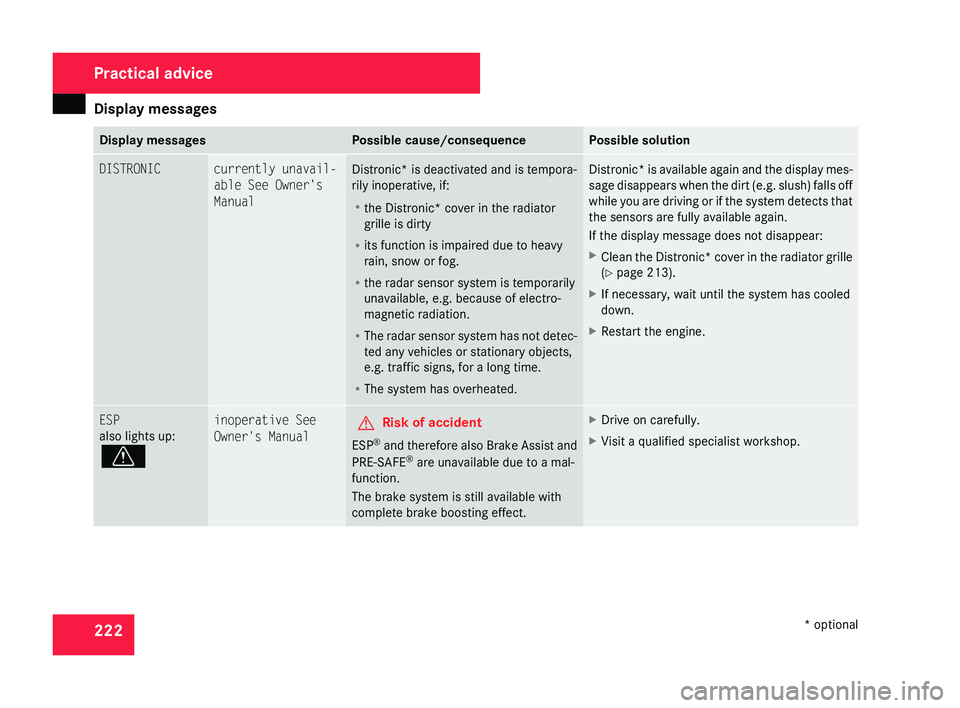
DISTRONIC currently unavail-
able See Owner's
Manual
Distronic* is deactivated and is tempora-
rily inoperative, if:
R
the Distronic*
cover in the radiator
grille is dirty
R its function is impaired due to heavy
rain, snow or fog.
R the radar sensor system is temporarily
unavailable, e.g. because of electro-
magnetic radiation.
R The radar sensor system has not detec-
ted any vehicles or stationary objects,
e.g. traffic signs, for a long time.
R The system has overheated. Distronic* is available again and the display mes-
sage disappears when the dirt (e.g. slush) falls off
while you are driving or if the system detects that
the sensors are fully available again.
If the display message does not disappear:
X
Clean the Distronic* cover in the radiator grille
(Y page 213).
X If necessary, wait until the system has cooled
down.
X Restart the engine. ESP
also lights up:
v inoperative See
Owner's Manual
G
Risk of accident
ESP ®
and therefore also Brake Assist and
PRE-SAFE ®
are unavailable due to a mal-
function.
The brake system is still available with
complete brake boosting effect. X
Drive on carefully.
X Visit a qualified specialist workshop. Practical advice
* optional
219_AKB; 2; 4, en-GB
mkalafa,
2007-11-13T09:28:36+01:00 - Seite 222