warning MERCEDES-BENZ CLS COUPE 2008 Owner's Guide
[x] Cancel search | Manufacturer: MERCEDES-BENZ, Model Year: 2008, Model line: CLS COUPE, Model: MERCEDES-BENZ CLS COUPE 2008Pages: 329, PDF Size: 29.26 MB
Page 93 of 329
Seat belts
90
already secured, the
< seat belt warning
lamp lights up for six seconds after the engine
has been started. The < seat belt warning
lamp then goes out if both the driver and the
front passenger have fastened their seat belt.
i Further information about the < seat
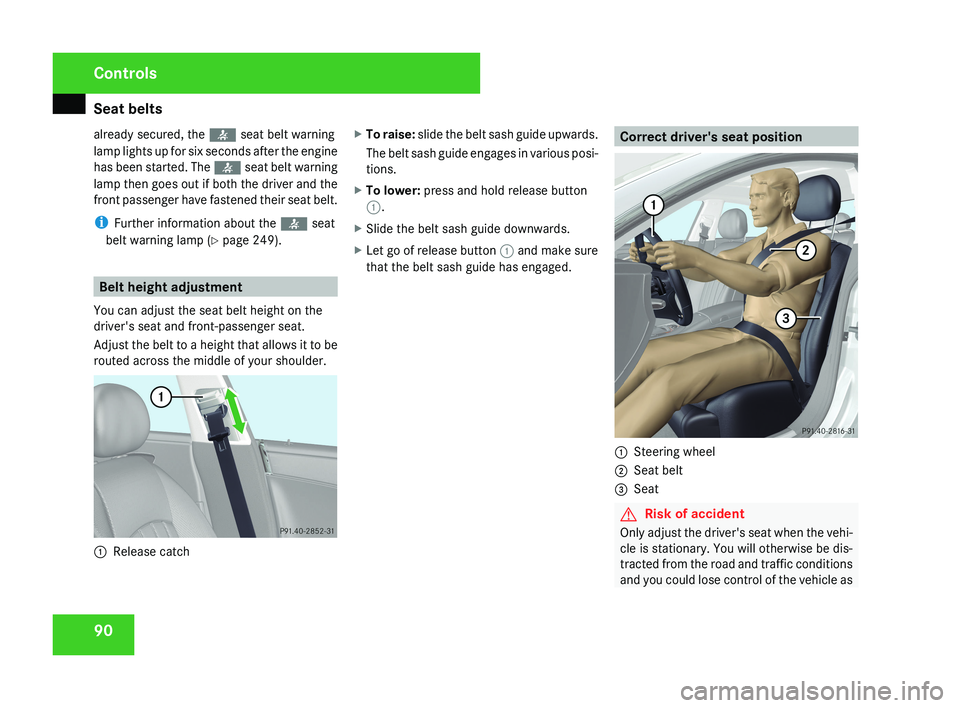
belt warning lamp (Y page 249). Belt height adjustment
You can adjust the seat belt height on the
driver's seat and front-passenger seat.
Adjust the belt to a height that allows it to be
routed across the middle of your shoulder.1 Release catch X
To raise: slide the belt sash guide upwards.
The belt sash guide engages in various posi-
tions.
X To lower: press and hold release button
1.
X Slide the belt sash guide downwards.
X Let go of release button 1 and make sure
that the belt sash guide has engaged.
Correct driver's seat position
1 Steering wheel
2 Seat belt
3 Seat
G Risk of accident
Only adjust the driver's seat when the vehi-
cle is stationary. You will otherwise be dis-
tracted from the road and traffic conditions
and you could lose control of the vehicle as
Controls
219_AKB; 2; 4, en-GB
mkalafa,
2007-11-13T09:28:36+01:00 - Seite 90
Page 97 of 329
Lights
94 Combination switch (turn signals,
main-beam headlamps and headlamp
flasher)
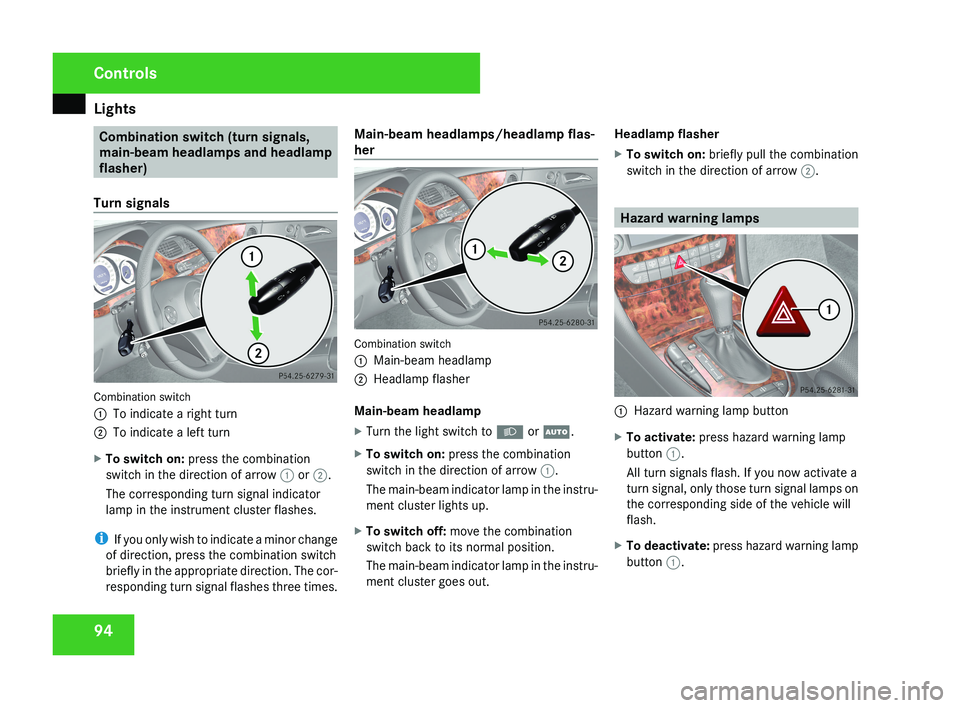
Turn signals Combination switch
1
To indicate a right turn
2 To indicate a left turn
X To switch on: press the combination
switch in the direction of arrow 1 or 2.
The corresponding turn signal indicator
lamp in the instrument cluster flashes.
i If you only wish to indicate a minor change
of direction, press the combination switch
briefly in the appropriate direction. The cor-
responding turn signal flashes three times. Main-beam headlamps/headlamp flas-
her
Combination switch
1
Main-beam headlamp
2 Headlamp flasher
Main-beam headlamp
X Turn the light switch to B or U.
X To switch on: press the combination
switch in the direction of arrow 1.
The main-beam indicator lamp in the instru-
ment cluster lights up.
X To switch off: move the combination
switch back to its normal position.
The main-beam indicator lamp in the instru-
ment cluster goes out. Headlamp flasher
X
To switch on: briefly pull the combination
switch in the direction of arrow 2. Hazard warning lamps
1
Hazard warning lamp button
X To activate: press hazard warning lamp
button 1.
All turn signals flash. If you now activate a
turn signal, only those turn signal lamps on
the corresponding side of the vehicle will
flash.
X To deactivate: press hazard warning lamp
button 1. Controls
219_AKB; 2; 4, en-GB
mkalafa,
2007-11-13T09:28:36+01:00 - Seite 94
Page 112 of 329
Instrument cluster
109
When the AMG display is switched on, the
display
colour changes to red and UP appears
next to the gear indicator, instructing you to
shift up.
Downshifting G
Risk of accident
Do not change down for additional engine
braking on a slippery road surface. This
could cause the drive wheels to lose their
grip and the vehicle could skid.
X Briefly press the selector lever to the left
towards D-
or
X Pull the left-hand paddle on the steering
wheel
(Y page 107).
The automatic transmission shifts down to
the next gear.
i For maximum acceleration, pull the left-
hand gearshift paddle until the transmis-
sion selects the optimum gear depending
on the speed. Kickdown
i
It is not possible to use kickdown in the
manual gearshift program M on vehicles
with AMG engines.
You can also use kickdown for maximum
acceleration in manual gearshift program M.
X Depress the accelerator pedal beyond the
pressure point.
The transmission shifts to a lower gear
depending on the engine speed.
i It is not possible to shift gears using the
steering wheel gearshift paddles during
kickdown. Instrument cluster
Points to remember
You
will find a full overview of the instrument
cluster in the "At a glance" section
(Y page 26). G
Risk of accident
No further messages can be displayed if
there is a malfunction in the instrument
cluster and/or the multi-function display.
This
means that you will not see information
about the driving situation, such as the
speed, outside temperature, warning/indi-
cator lamps, display messages or system
failures. The vehicle's handling character-
istics may be affected. Adjust your driving
style and speed accordingly.
Immediately consult a qualified specialist
workshop which has the necessary special-
ist knowledge and tools to carry out the
work required. Mercedes-Benz recom-
mends that you use a Mercedes-Benz
Service Centre for this purpose. In particu-
lar, work relevant to safety or on safety-
related systems must be carried out at a
qualified specialist workshop. Controls
219_AKB; 2; 4, en-GB
mkalafa,
2007-11-13T09:28:36+01:00 - Seite 109
Page 118 of 329
On-board computer
115Function
1 Basic display menu (Y page 115)
R
Digital speedometer 12
(Y page 116)
R Outside tempera-
ture 12
(Y page 116)
R ASSYST PLUS service display
(Y page 209)
R Tyre pressure loss warning system
(Y page 201) or tyre pressure mon-
itor* (Y page 202) 2
AMG* menu (Y page 116)
3
Audio/TV*/DVD*
(Y page 118)
menu
R Radio station ( Y page 119)
R Audio drive or media ( Y page 119)
R TV* (Y page 119)
R DVD video* (Y page 120) 4
Navigation* menu (Y page 120) Function
5
Distronic
* menu (distance display)
(Y page 135) 6
Message memory menu
13
(fault and
warning messages) ( Y page 121) 7 Settings menu (Y page 121)
R
Resetting to factory settings
(Y page 121)
R Selecting a submenu ( Y page 122) 8 Trip computer
menu
R Consumption statistics
(Y page 130)
R Range ( Y page 130) 9
Telephone*
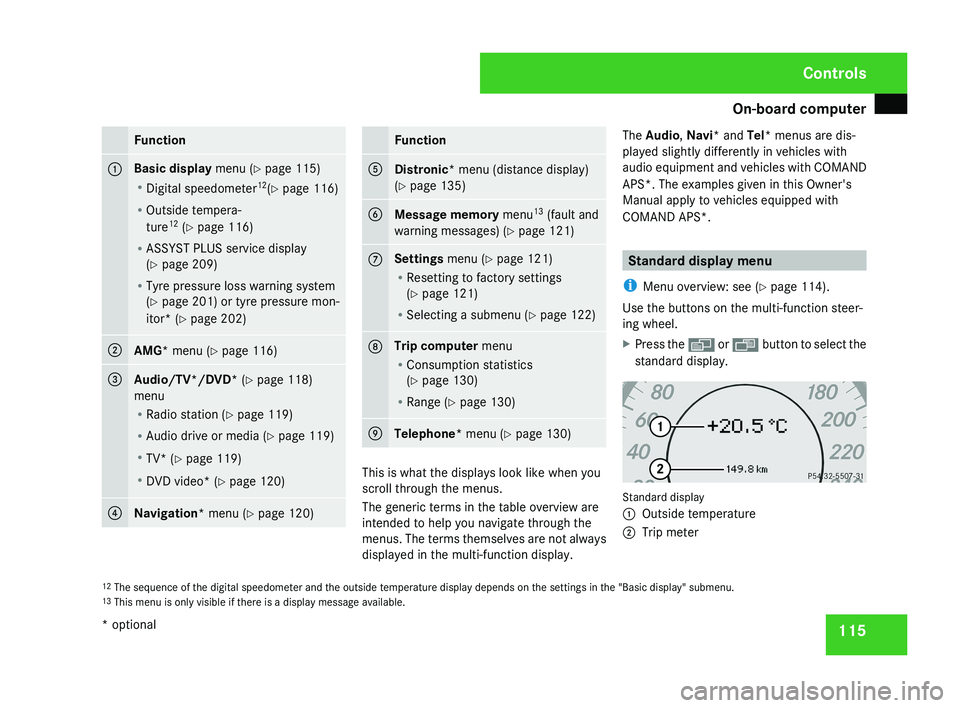
menu (Y page 130) This is what the displays look like when you
scroll through the menus.
The generic terms in the table overview are
intended to help you navigate through the
menus. The terms themselves are not always
displayed in the multi-function display.The Audio
, Navi* and Tel* menus are dis-
played slightly differently in vehicles with
audio equipment and vehicles with COMAND
APS*. The examples given in this Owner's
Manual apply to vehicles equipped with
COMAND APS*. Standard display menu
i Menu overview: see ( Y page 114).
Use the buttons on the multi-function steer-
ing wheel.
X Press the è or · button to select the
standard display. Standard display
1
Outside temperature
2 Trip meter
12 The sequence of the digital speedometer and the outside temperature display depends on the settings in the "Basic display" submenu.
13 This menu is only visible if there is a display message available. Controls
* optional
219_AKB; 2; 4, en-GB
mkalafa,
2007-11-13T09:28:36+01:00 - Seite 115
Page 119 of 329
On-board computer
116
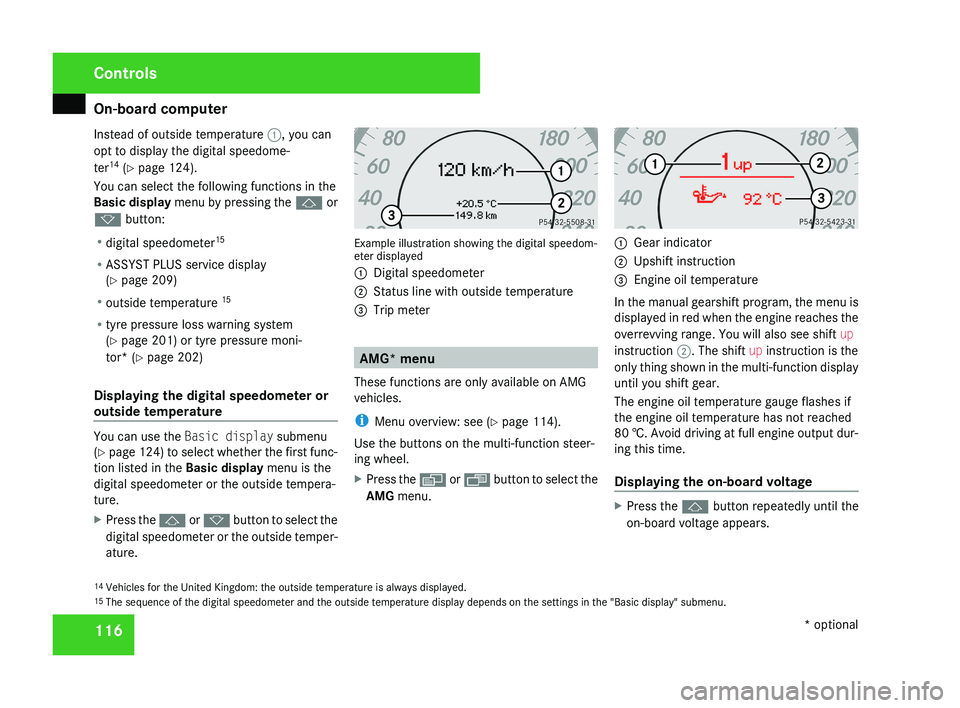
Instead of outside temperature
1, you can
opt to display the digital speedome-
ter 14
(Y page 124).
You can select the following functions in the
Basic display menu by pressing the j or
k button:
R digital speedometer 15
R ASSYST PLUS service display
(Y page 209)
R outside temperature 15
R tyre pressure loss warning system
(Y page 201) or tyre pressure moni-
tor* (Y page 202)
Displaying the digital speedometer or
outside temperature You can use the
Basic display submenu
(Y page 124) to select whether the first func-
tion listed in the Basic display menu is the
digital speedometer or the outside tempera-
ture.
X Press the j or k button to select the
digital speedometer or the outside temper-
ature. Example illustration showing the digital speedom-
eter displayed
1
Digital speedometer
2 Status line with outside temperature
3 Trip meter AMG* menu
These functions are only available on AMG
vehicles.
i Menu overview: see ( Y page 114).
Use the buttons on the multi-function steer-
ing wheel.
X Press the è or · button to select the
AMG menu. 1
Gear indicator
2 Upshift instruction
3 Engine oil temperature
In the manual gearshift program, the menu is
displayed in red when the engine reaches the
overrevving range. You will also see shift up
instruction 2. The shift up instruction is the
only thing shown in the multi-function display
until you shift gear.
The engine oil temperature gauge flashes if
the engine oil temperature has not reached
80 †. Avoid driving at full engine output dur-
ing this time.
Displaying the on-board voltage X
Press the j button repeatedly until the
on-board voltage appears.
14 Vehicles for the United Kingdom: the outside temperature is always displayed.
15 The sequence of the digital speedometer and the outside temperature display depends on the settings in the "Basic display" submenu. Controls
* optional
219_AKB; 2; 4, en-GB
mkalafa,
2007-11-13T09:28:36+01:00 - Seite 116
Page 124 of 329
On-board computer
121Distronic* menu
You can read the current Distronic settings in
the Distronic menu. (Y page 135)
i Menu overview: see ( Y page 114).Message memory menu
Previous display messages can be called up
in
the Message memory menu. You will only
see the Message memory menu if there are
any display messages. G
Risk of accident
The on-board computer only records and
displays messages and warnings from cer-
tain systems. For this reason, you should
always make sure that your vehicle is safe
to
drive. You could otherwise cause an acci-
dent by driving an unsafe vehicle.
Switching off the ignition clears the Message
memory except for the highest priority dis-
play messages. The on-board computer will
delete these display messages only after the
reason for the message has been rectified.
i Menu overview: see ( Y page 114). Displaying messages Use the buttons on the multi-function steer-
ing wheel.
X
Press the è or · button repeatedly
until either the original menu or the Mes-
sage memory menu appears.
If the Message memory menu does not
appear, there are no display messages.
If there are messages, the following mes-
sage may appear in the multi-function dis-
play, for example: 2 messages.
X Press the j or k
button to call up a
display message.
You can scroll through the display mes-
sages in sequence. The possible display
messages are explained in the "Practical
advice" section ( Y page 219). Settings menu
There are two functions in the Settings...
menu:
the To reset: Press reset button
for 3 seconds function, which you can use
to reset most settings to the factory settings.
There are also submenus in which you can
make individual settings for your vehicle.
i Menu overview: see ( Y page 114).
Use the buttons on the multi-function steer-
ing wheel.
Resetting to factory settings For safety reasons, not all functions are reset:
permanent
Speedtronic can only be set in the
Vehicle menu. The Headlamp mode function
in the Lighting submenu is only reset if the
vehicle is stationary.
X Press the è
or · button to select the
Settings... menu.
X Press and hold the reset button on the left-
hand side of the instrument cluster for
approximately three seconds.
A
prompt appears in the multi-function dis-
play asking you to press the reset button
again to confirm. Controls
* optional
219_AKB; 2; 4, en-GB
mkalafa,
2007-11-13T09:28:36+01:00 - Seite 121 Z
Page 138 of 329
Driving systems
135
X
Briefly press the cruise control lever in the
direction of arrow 5.
Variable Speedtronic is selected. LIM indi-
cator lamp 2 in the cruise control lever
lights up.
Cruise control is automatically deactivated if,
for example:
R you depress the parking brake
R you are driving at less than
30 km/h
R ESP ®
(Y page 59) is intervening or you
deactivate ESP ®
R you move the selector lever to N while driv-
ing
If cruise control is deactivated, you will hear
a warning tone. You will see the Cruise con-
trol off message in the multi-function dis-
play for approximately five seconds.
i The last speed stored is cleared when you
switch off the engine. Distronic*
Distronic regulates the speed and automati-
cally maintains the distance to the vehicle in
front.
It brakes automatically in order to avoid
exceeding the set speed. On long and steep
downhill gradients, especially if the vehicle is
laden, you must select shift range 1, 2 or 3 in
good time. In this way you will make use of
the braking effect of the engine, which
relieves the load on the brake system and
prevents the brakes from overheating and
wearing too quickly. G
Risk of accident
Do not change down for additional engine
braking on a slippery road surface. This
could cause the drive wheels to lose their
grip and the vehicle could skid. G
Risk of accident
Distronic is only an aid designed to assist
driving.
The driver remains fully responsible
for the vehicle's distance from other vehi-
cles, the vehicle's speed and braking in
good time. Distronic does not react to: R
pedestrians
R stationary
obstacles on the road, e.g. sta-
tionary or parked vehicles
R oncoming and crossing traffic
Distronic may not detect narrow vehicles
driving in front, e.g. motorcycles, or vehi-
cles driving on a different line. Therefore,
always pay attention to traffic conditions
even when Distronic is activated. Other-
wise, you may fail to recognise dangers in
time, could cause an accident and injure
yourself and others.
If a slower-moving vehicle is detected in front,
Distronic causes your vehicle to brake and
maintain a preset distance to the vehicle in
front. G
Risk of accident
Distronic cannot take account of road and
traffic conditions. Deactivate, or do not
activate, Distronic in situations in which
Distronic maintains the speed or acceler-
ates
to the set speed because it has lost the
vehicle in front, in particular:
R before corners
R on filter lanes Controls
* optional
219_AKB; 2; 4, en-GB
mkalafa,
2007-11-13T09:28:36+01:00 - Seite 135 Z
Page 141 of 329
Driving systems
138
X
Briefly pull the cruise control lever towards
you 3.
X Remove your foot from the accelerator
pedal.
Distronic is activated and adjusts the vehi-
cle's speed to the last speed stored.
Setting the specified minimum distance
for Distronic You can set the specified minimum distance
for Distronic by varying the time span
between 1.0 and 2.0 seconds. This time span
determines the distance that Distronic should
maintain from the vehicle in front, depending
on the road speed. You can read this distance
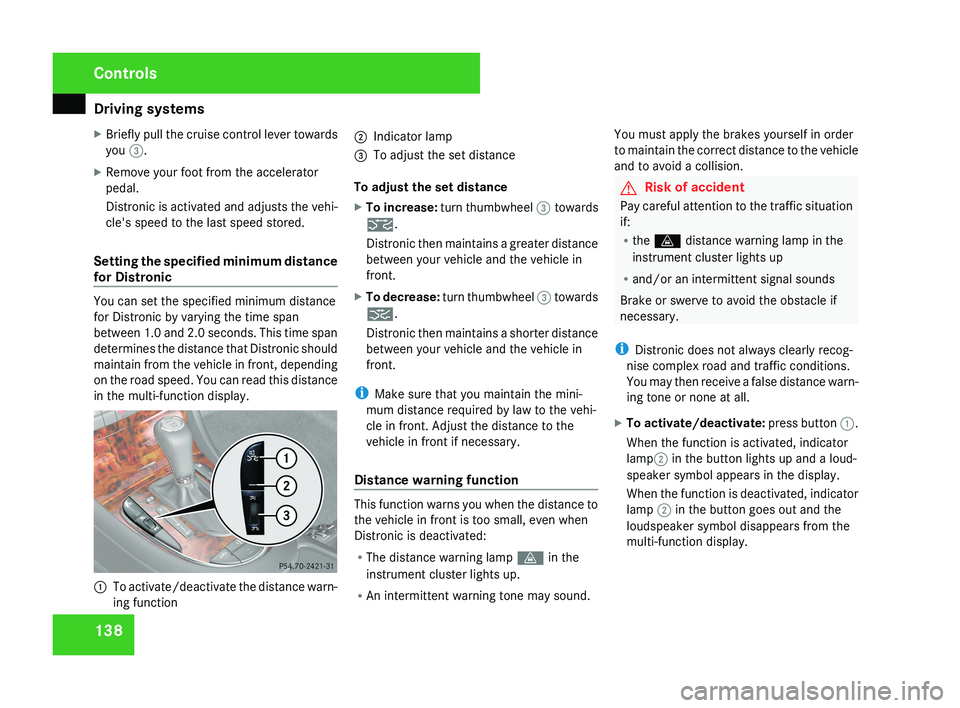
in the multi-function display.
1
To activate/deactivate the distance warn-
ing function 2
Indicator lamp
3 To adjust the set distance
To adjust the set distance
X To increase: turn thumbwheel 3 towards
¯.
Distronic then maintains a greater distance
between your vehicle and the vehicle in
front.
X To decrease: turn thumbwheel 3 towards
®.
Distronic then maintains a shorter distance
between your vehicle and the vehicle in
front.
i Make sure that you maintain the mini-
mum distance required by law to the vehi-
cle in front. Adjust the distance to the
vehicle in front if necessary.
Distance warning function This function warns you when the distance to
the vehicle in front is too small, even when
Distronic is deactivated:
R
The distance warning lamp l in the
instrument cluster lights up.
R An intermittent warning tone may sound. You must apply the brakes yourself in order
to maintain the correct distance to the vehicle
and to avoid a collision. G
Risk of accident
Pay careful attention to the traffic situation
if:
R the l distance warning lamp in the
instrument cluster lights up
R and/or an intermittent signal sounds
Brake or swerve to avoid the obstacle if
necessary.
i Distronic does not always clearly recog-
nise complex road and traffic conditions.
You may then receive a false distance warn-
ing tone or none at all.
X To activate/deactivate: press button 1.
When the function is activated, indicator
lamp 2 in the button lights up and a loud-
speaker symbol appears in the display.
When the function is deactivated, indicator
lamp 2 in the button goes out and the
loudspeaker symbol disappears from the
multi-function display. Controls
219_AKB; 2; 4, en-GB
mkalafa,
2007-11-13T09:28:36+01:00 - Seite 138
Page 142 of 329
Driving systems
139
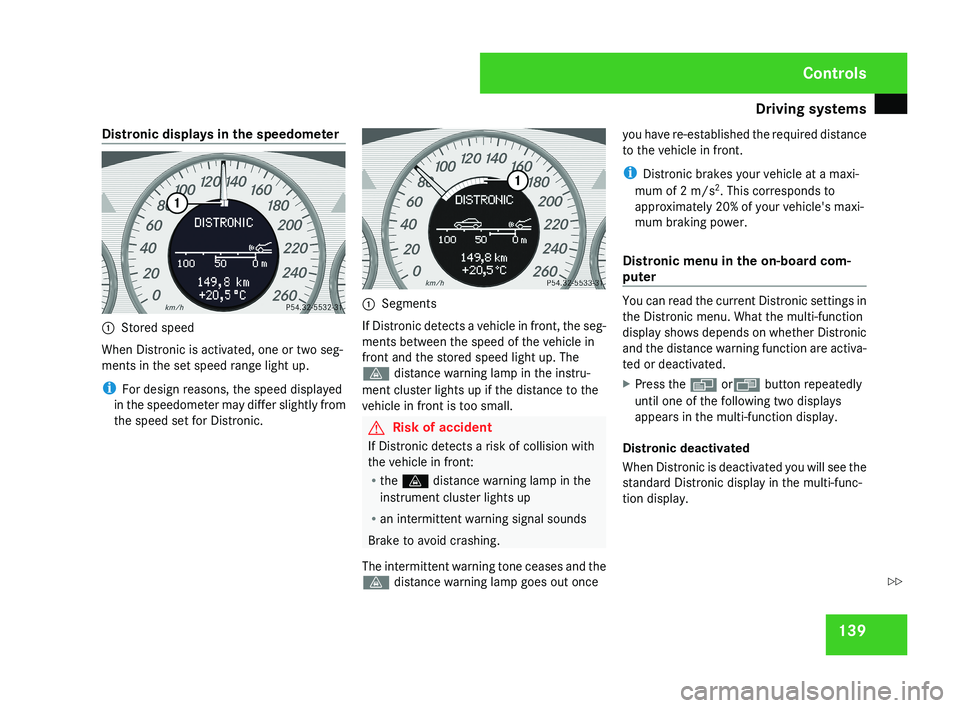
Distronic displays in the speedometer
1
Stored speed
When Distronic is activated, one or two seg-
ments in the set speed range light up.
i For design reasons, the speed displayed
in the speedometer may differ slightly from
the speed set for Distronic. 1
Segments
If Distronic detects a vehicle in front, the seg-
ments between the speed of the vehicle in
front and the stored speed light up. The
l distance warning lamp in the instru-
ment cluster lights up if the distance to the
vehicle in front is too small. G
Risk of accident
If Distronic detects a risk of collision with
the vehicle in front:
R the l distance warning lamp in the
instrument cluster lights up
R an intermittent warning signal sounds
Brake to avoid crashing.
The intermittent warning tone ceases and the
l distance warning lamp goes out once you have re-established the required distance
to the vehicle in front.
i
Distronic brakes your vehicle at a maxi-
mum of 2 m/s 2
. This corresponds to
approximately 20% of your vehicle's maxi-
mum braking power.
Distronic menu in the on-board com-
puter You can read the current Distronic settings in
the Distronic menu. What the multi-function
display shows depends on whether Distronic
and the distance warning function are activa-
ted or deactivated.
X
Press the è orÿ button repeatedly
until one of the following two displays
appears in the multi-function display.
Distronic deactivated
When Distronic is deactivated you will see the
standard Distronic display in the multi-func-
tion display. Controls
219_AKB; 2; 4, en-GB
mkalafa,
2007-11-13T09:28:36+01:00 - Seite 139 Z
Page 143 of 329
Driving systems
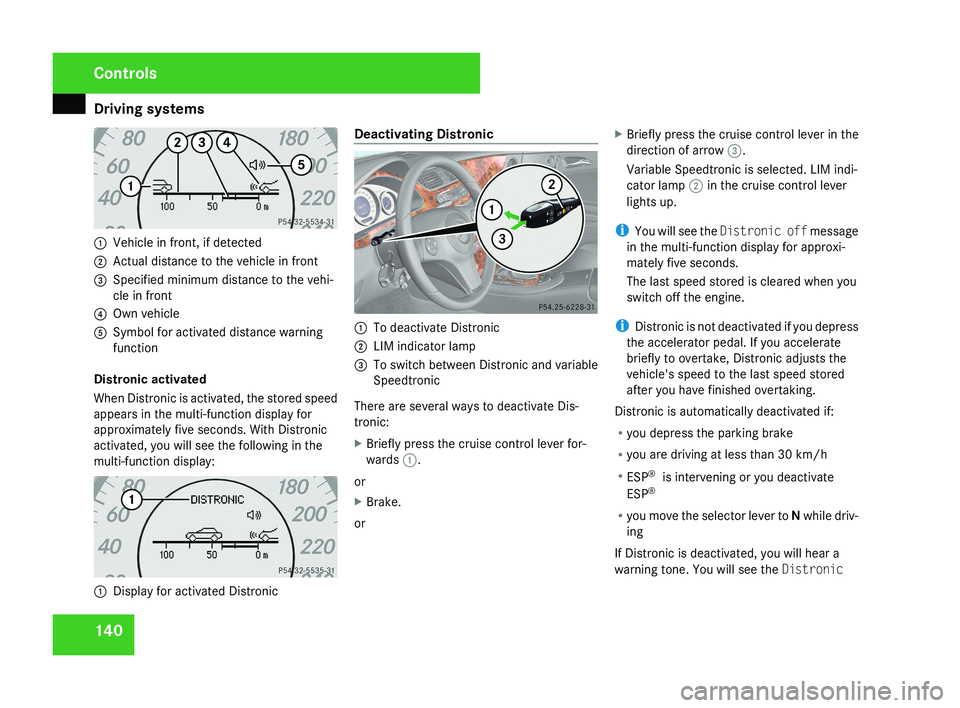
1401
Vehicle in front, if detected
2 Actual distance to the vehicle in front
3 Specified minimum distance to the vehi-
cle in front
4 Own vehicle
5 Symbol for activated distance warning
function
Distronic activated
When Distronic is activated, the stored speed
appears in the multi-function display for
approximately five seconds. With Distronic
activated, you will see the following in the
multi-function display:
1 Display for activated Distronic Deactivating Distronic
1
To deactivate Distronic
2 LIM indicator lamp
3 To switch between Distronic and variable
Speedtronic
There are several ways to deactivate Dis-
tronic:
X Briefly press the cruise control lever for-
wards 1.
or
X Brake.
or X
Briefly press the cruise control lever in the
direction of arrow 3.
Variable Speedtronic is selected. LIM indi-
cator lamp 2 in the cruise control lever
lights up.
i You will see the Distronic off message
in the multi-function display for approxi-
mately five seconds.
The last speed stored is cleared when you
switch off the engine.
i Distronic is not deactivated if you depress
the accelerator pedal. If you accelerate
briefly to overtake, Distronic adjusts the
vehicle's speed to the last speed stored
after you have finished overtaking.
Distronic is automatically deactivated if:
R you depress the parking brake
R you are driving at less than 30 km/h
R ESP ®
is intervening or you deactivate
ESP ®
R you move the selector lever to N while driv-
ing
If Distronic is deactivated, you will hear a
warning tone. You will see the Distronic
Controls
219_AKB; 2; 4, en-GB
mkalafa,
2007-11-13T09:28:36+01:00 - Seite 140