change wheel MERCEDES-BENZ CLS COUPE 2008 Owners Manual
[x] Cancel search | Manufacturer: MERCEDES-BENZ, Model Year: 2008, Model line: CLS COUPE, Model: MERCEDES-BENZ CLS COUPE 2008Pages: 329, PDF Size: 29.26 MB
Page 19 of 329
Operating safety
16 Operating safety
Safety notes
G
Risk of accident and injury
All work on the vehicle and, in particular,
work relevant to safety or on safety-related
systems must be carried out at a qualified
specialist workshop. The specialist work-
shop must have the necessary specialist
knowledge and tools to carry out the work
required. Mercedes-Benz recommends
that you use a Mercedes-Benz Service
Centre for this purpose. G
Risk of accident and injury
Some safety systems only function when
the
engine is running. You should therefore
never switch off the engine when driving.
Otherwise the safety systems of your vehi-
cle may no longer protect you and other
persons as intended. In addition, there is
the danger that you may lose control of your
vehicle and thus cause an accident. G
Risk of accident and injury
Work carried out incorrectly, or alterations
made
to the vehicle, e.g. rerouting of cables
under coverings, could cause the safety
systems of your vehicle to stop working properly. The safety systems would thus no
longer protect you and other persons as
intended. In addition, there is the danger
that you may lose control of your vehicle
and thus cause an accident.
All
work and alterations to the vehicle, e.g.
installations or modifications, should there-
fore be carried out at a qualified specialist
workshop. G
Risk of accident
A heavy impact to the underbody, tyres or
wheels,
for example when bottoming out on
rough terrain or driving over an obstacle at
high speed, could damage your vehicle. As
a result, you could cause an accident. This
also applies to vehicles which are equipped
with underbody protection.
For this reason, drive slowly over obstacles,
avoid bottoming out the vehicle in rough
terrain and, if necessary, have your vehicle
checked at a qualified specialist workshop. G
Risk of accident
If work on electronic equipment and its
software is carried out incorrectly, this
equipment could stop working. The elec-
tronic systems are networked via interfa-
ces. Tampering with these electronic sys- tems could cause malfunctions in systems
which have not been modified. Malfunc-
tions such as these can seriously jeopard-
ise the vehicle's operating safety and
therefore your own safety.
You should thus have all work and modifi-
cations to electronic components carried
out at a qualified specialist workshop.
Vehicle registration
Mercedes-Benz may ask its Service Centres
to carry out technical inspections on certain
vehicles to improve their quality or safety.
If you did not purchase your vehicle from an
authorised specialist dealer and your vehicle
has never been inspected at a Mercedes-
Benz Service Centre, it is possible that your
vehicle is not registered in your name with
Mercedes-Benz. Mercedes-Benz can only
inform
you about vehicle checks if it has your
registration data.
It is advisable to register your vehicle with a
Mercedes-Benz Service Centre.
Inform Mercedes-Benz as soon as possible
about any change in address or vehicle own-
ership. Introduction
219_AKB; 2; 4, en-GB
mkalafa,
2007-11-13T09:28:36+01:00 - Seite 16
Page 94 of 329
Lights
91a result of the seat moving. This could
cause an accident.
G
Risk of accident
Only adjust the steering wheel when the
vehicle is stationary and do not pull away
until the steering wheel adjustment mech-
anism is locked in position. You might oth-
erwise drive without the steering wheel
adjustment mechanism being locked in
position.
As a result you could be distracted
from road and traffic conditions by an unex-
pected movement of the steering wheel
and thereby cause an accident.
However, the steerability of the vehicle is
not affected.
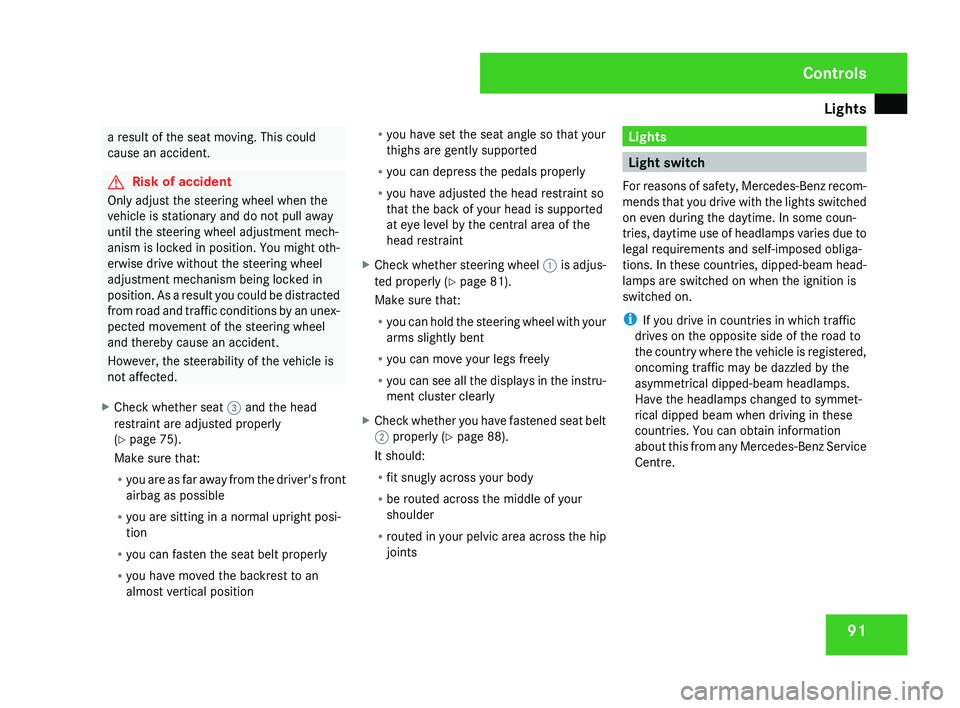
X Check whether seat 3 and the head
restraint are adjusted properly
(Y page 75).
Make sure that:
R
you
are as far away from the driver's front
airbag as possible
R you are sitting in a normal upright posi-
tion
R you can fasten the seat belt properly
R you have moved the backrest to an
almost vertical position R
you have set the seat angle so that your
thighs are gently supported
R you can depress the pedals properly
R you have adjusted the head restraint so
that the back of your head is supported
at eye level by the central area of the
head restraint
X Check whether steering wheel 1
is adjus-
ted properly (Y page 81).
Make sure that:
R you can hold the steering wheel with your
arms slightly bent
R you can move your legs freely
R you can see all the displays in the instru-
ment cluster clearly
X Check whether you have fastened seat belt
2 properly
(Y page 88).
It should:
R fit snugly across your body
R be routed across the middle of your
shoulder
R routed in your pelvic area across the hip
joints Lights
Light switch
For
reasons of safety, Mercedes-Benz recom-
mends that you drive with the lights switched
on even during the daytime. In some coun-
tries, daytime use of headlamps varies due to
legal requirements and self-imposed obliga-
tions. In these countries, dipped-beam head-
lamps are switched on when the ignition is
switched on.
i If you drive in countries in which traffic
drives on the opposite side of the road to
the country where the vehicle is registered,
oncoming traffic may be dazzled by the
asymmetrical dipped-beam headlamps.
Have the headlamps changed to symmet-
rical dipped beam when driving in these
countries. You can obtain information
about this from any Mercedes-Benz Service
Centre. Controls
219_AKB; 2; 4, en-GB
mkalafa,
2007-11-13T09:28:36+01:00 - Seite 91
Page 107 of 329
Transmission
104
Parking brake
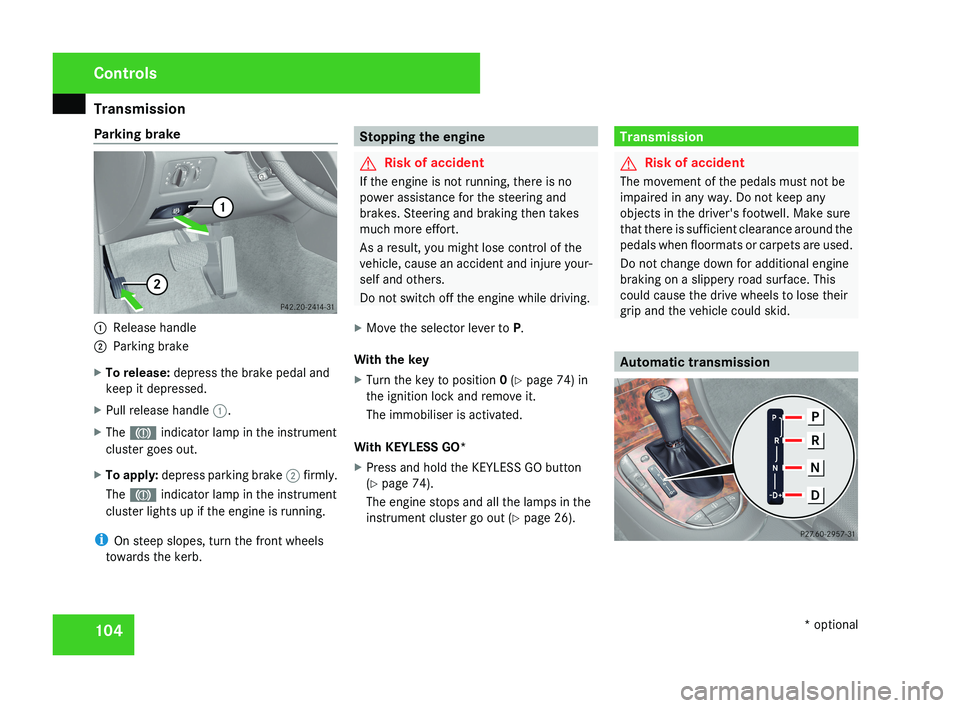
1
Release handle
2 Parking brake
X To release: depress the brake pedal and
keep it depressed.
X Pull release handle 1.
X The 3 indicator lamp in the instrument
cluster goes out.
X To apply: depress parking brake 2 firmly.
The 3 indicator lamp in the instrument
cluster lights up if the engine is running.
i On steep slopes, turn the front wheels
towards the kerb. Stopping the engine
G
Risk of accident
If the engine is not running, there is no
power assistance for the steering and
brakes. Steering and braking then takes
much more effort.
As a result, you might lose control of the
vehicle, cause an accident and injure your-
self and others.
Do not switch off the engine while driving.
X Move the selector lever to P.
With the key
X Turn the key to position 0 (Y page 74) in
the ignition lock and remove it.
The immobiliser is activated.
With KEYLESS GO*
X Press and hold the KEYLESS GO button
(Y page 74).
The engine stops and all the lamps in the
instrument cluster go out ( Y page 26). Transmission
G
Risk of accident
The movement of the pedals must not be
impaired in any way. Do not keep any
objects in the driver's footwell. Make sure
that there is sufficient clearance around the
pedals when floormats or carpets are used.
Do not change down for additional engine
braking on a slippery road surface. This
could cause the drive wheels to lose their
grip and the vehicle could skid. Automatic transmissionControls
* optional
219_AKB; 2; 4, en-GB
mkalafa,
2007-11-13T09:28:36+01:00 - Seite 104
Page 111 of 329
Transmission
108
Downshifting G
Risk of accident
Do not change down for additional engine
braking on a slippery road surface. This
could cause the drive wheels to lose their
grip and the vehicle could skid.
X Pull left-hand paddle 1.
The automatic transmission shifts down to
the next gear. If you are not driving in man-
ual gearshift program M, the shift range will
be restricted.
i When the selector lever is in position P,
N or R, you cannot change gear using the
steering wheel gearshift paddles.
If the manual gearshift program M has been
selected and you restart the engine, the
automatic transmission will switch to an
automatic gearshift program. If the auto-
matic gearshift program S or C has been
selected, the automatic transmission will
resume the relevant gearshift program
when you restart the engine.
Manual gearshift program In the manual gearshift program
M, you can
change gear using the steering wheel gear- shift paddles or the selector lever. The man-
ual gearshift program
M can be selected
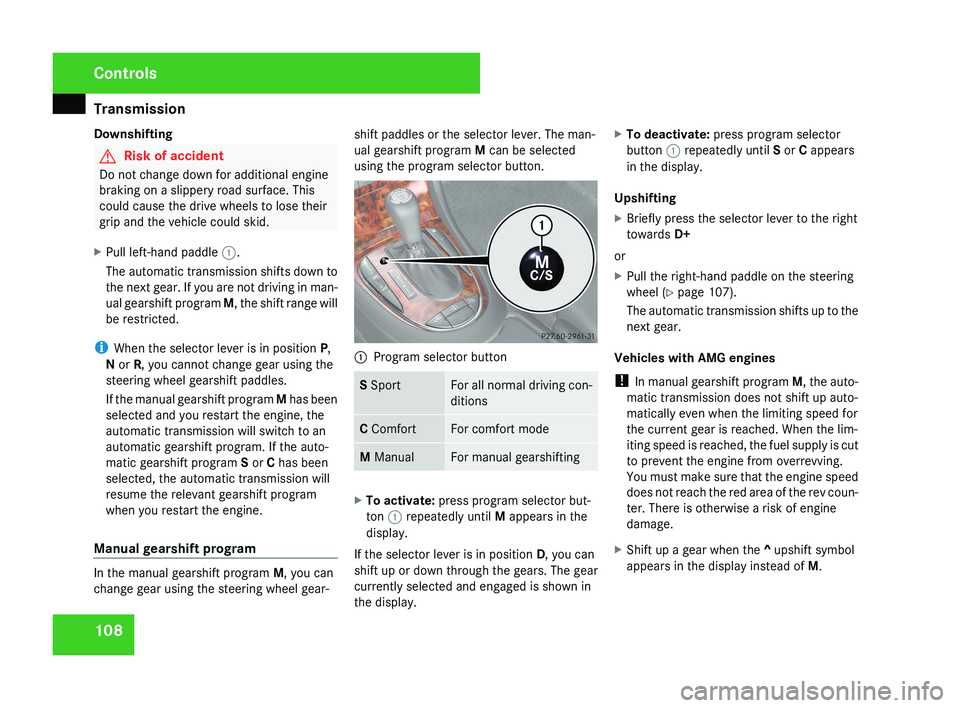
using the program selector button. 1
Program selector button S Sport For all normal driving con-
ditions
C Comfort For comfort mode
M Manual For manual gearshifting
X
To activate: press program selector but-
ton 1 repeatedly until M appears in the
display.
If the selector lever is in position D, you can
shift up or down through the gears. The gear
currently selected and engaged is shown in
the display. X
To deactivate: press program selector
button 1 repeatedly until S or C appears
in the display.
Upshifting
X Briefly press the selector lever to the right
towards D+
or
X Pull the right-hand paddle on the steering
wheel (Y page 107).
The automatic transmission shifts up to the
next gear.
Vehicles with AMG engines
! In manual gearshift program M, the auto-
matic transmission does not shift up auto-
matically even when the limiting speed for
the current gear is reached. When the lim-
iting speed is reached, the fuel supply is cut
to prevent the engine from overrevving.
You must make sure that the engine speed
does not reach the red area of the rev coun-
ter. There is otherwise a risk of engine
damage.
X Shift up a gear when the ^ upshift symbol
appears in the display instead of M.Controls
219_AKB; 2; 4, en-GB
mkalafa,
2007-11-13T09:28:36+01:00 - Seite 108
Page 112 of 329
Instrument cluster
109
When the AMG display is switched on, the
display
colour changes to red and UP appears
next to the gear indicator, instructing you to
shift up.
Downshifting G
Risk of accident
Do not change down for additional engine
braking on a slippery road surface. This
could cause the drive wheels to lose their
grip and the vehicle could skid.
X Briefly press the selector lever to the left
towards D-
or
X Pull the left-hand paddle on the steering
wheel
(Y page 107).
The automatic transmission shifts down to
the next gear.
i For maximum acceleration, pull the left-
hand gearshift paddle until the transmis-
sion selects the optimum gear depending
on the speed. Kickdown
i
It is not possible to use kickdown in the
manual gearshift program M on vehicles
with AMG engines.
You can also use kickdown for maximum
acceleration in manual gearshift program M.
X Depress the accelerator pedal beyond the
pressure point.
The transmission shifts to a lower gear
depending on the engine speed.
i It is not possible to shift gears using the
steering wheel gearshift paddles during
kickdown. Instrument cluster
Points to remember
You
will find a full overview of the instrument
cluster in the "At a glance" section
(Y page 26). G
Risk of accident
No further messages can be displayed if
there is a malfunction in the instrument
cluster and/or the multi-function display.
This
means that you will not see information
about the driving situation, such as the
speed, outside temperature, warning/indi-
cator lamps, display messages or system
failures. The vehicle's handling character-
istics may be affected. Adjust your driving
style and speed accordingly.
Immediately consult a qualified specialist
workshop which has the necessary special-
ist knowledge and tools to carry out the
work required. Mercedes-Benz recom-
mends that you use a Mercedes-Benz
Service Centre for this purpose. In particu-
lar, work relevant to safety or on safety-
related systems must be carried out at a
qualified specialist workshop. Controls
219_AKB; 2; 4, en-GB
mkalafa,
2007-11-13T09:28:36+01:00 - Seite 109
Page 114 of 329
On-board computer
111Rev counter
The red band in the rev counter indicates the
engine's overrevving range. The fuel supply is
interrupted to protect the engine when the
red band is reached.
! Do not drive in the overrevving range.
Doing so will damage the engine. H
Environmental note
Avoid driving at high engine speeds, as this
increases your vehicle's consumption
unnecessarily and pollutes the environ-
ment through increased emissions. Outside temperature display
G
Risk of accident
The road surface may be icy, especially in
wooded areas or on bridges, even if tem-
peratures are just above freezing point. The
vehicle could skid if you fail to adapt your
driving style. You should therefore always
adapt your driving style and speed to suit
the weather conditions.
There is a short delay before a change in out-
side temperature is displayed. On-board computer
Points to remember
The on-board computer is activated as soon
as the key is turned to position 1 in the igni-
tion lock. You can use the on-board computer
to call up information relating to your vehicle
and to make and adjust settings.
You can call up the next service due date,
select the display language for the instrument
cluster and set other functions. G
Risk of accident
Only use the on-board computer when road
and traffic conditions permit. You would
otherwise be distracted and unable to con-
centrate properly on driving, and could
cause an accident.
The on-board computer shows information in
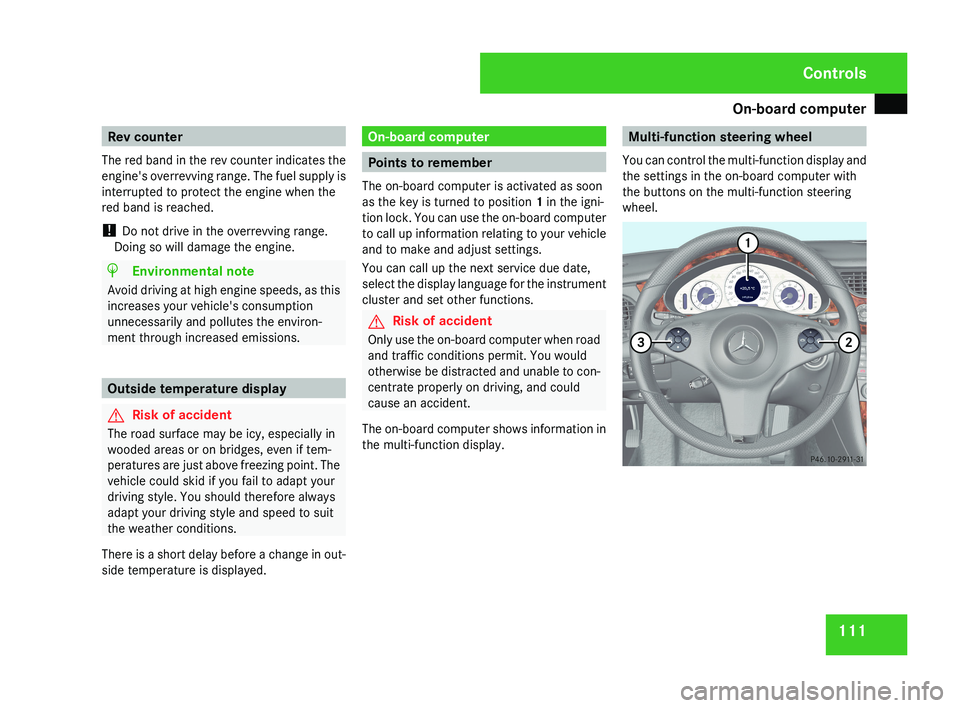
the multi-function display. Multi-function steering wheel
You can control the multi-function display and
the settings in the on-board computer with
the buttons on the multi-function steering
wheel.Controls
219_AKB; 2; 4, en-GB
mkalafa,
2007-11-13T09:28:36+01:00 - Seite 111
Page 123 of 329
On-board computer
120
X
To select a channel from the channel
list: press and hold the j or k but-
ton.
X To select a channel with the channel
search (only if COMAND is not receiving a
channel list): press and hold the j or
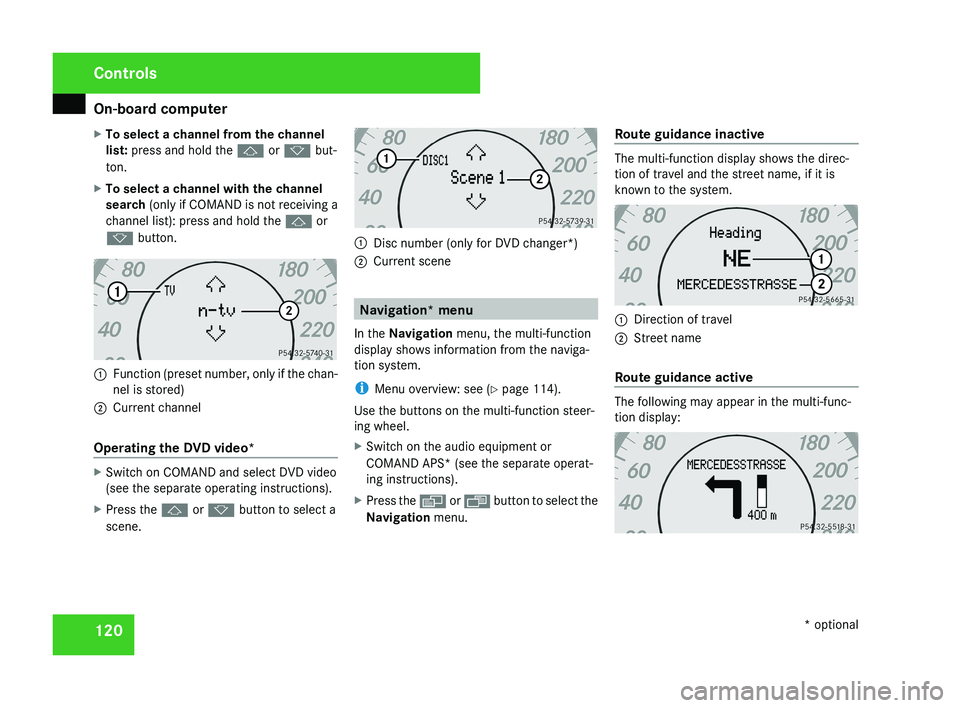
k button.1 Function (preset number, only if the chan-
nel is stored)
2 Current channel
Operating the DVD video*
X Switch on COMAND and select DVD video
(see the separate operating instructions).
X Press the j or k button to select a
scene.
1 Disc number (only for DVD changer*)
2 Current scene
Navigation* menu
In the Navigation menu, the multi-function
display shows information from the naviga-
tion system.
i Menu overview: see ( Y page 114).
Use the buttons on the multi-function steer-
ing wheel.
X Switch on the audio equipment or
COMAND APS* (see the separate operat-
ing instructions).
X Press the è or · button to select the
Navigation menu. Route guidance inactive
The multi-function display shows the direc-
tion of travel and the street name, if it is
known to the system.
1
Direction of travel
2 Street name
Route guidance active
The following may appear in the multi-func-
tion display:
Controls
* optional
219_AKB; 2; 4, en-GB
mkalafa,
2007-11-13T09:28:36+01:00 - Seite 120
Page 135 of 329
Driving systems
132
X
Press the s button to call up the most
recently dialled number in the redial mem-
ory.
X Press the j or k button to select the
desired name or number.
X Press the s button to start dialling. Driving systems
Your vehicle's driving systems are described
on the following pages:
R Cruise
control, Distronic* and Speedtronic,
which you can use to control the speed of
the vehicle
R HOLD, which makes pulling away easier,
particularly on steep uphill gradients
R Vehicle level setting and Airmatic DC*,
which can be used to adjust your vehicle's
chassis
R Parktronic*, which assists you in parking
and manoeuvring
The ABS, BAS, adaptive brake lights, ESP ®
,
EBV (electronic brake-power distribution) and
ADAPTIVE BRAKE driving safety systems are
described in the "Driving safety systems" sec-
tion (Y page 57). Cruise control
Cruise control maintains a constant road
speed
for you. It brakes automatically in order
to avoid exceeding the set speed. On long and
steep downhill gradients, especially if the
vehicle is laden, you must select shift range
1, 2 or 3 in good time. In this way you will
make use of the braking effect of the engine,
which relieves the load on the brake system
and prevents the brakes from overheating
and wearing too quickly. G
Risk of accident
Do not change down for additional engine
braking on a slippery road surface. This
could cause the drive wheels to lose their
grip and the vehicle could skid.
Use
cruise control only if road and traffic con-
ditions make it appropriate to maintain a
steady speed for a prolonged period. You can
store any road speed above 30 km/h. G
Risk of accident
Cruise control
cannot take account of road
and traffic conditions.
Always pay attention to traffic conditions
even when cruise control is activated. Controls
* optional
219_AKB; 2; 4, en-GB
mkalafa,
2007-11-13T09:28:36+01:00 - Seite 132
Page 138 of 329
Driving systems
135
X
Briefly press the cruise control lever in the
direction of arrow 5.
Variable Speedtronic is selected. LIM indi-
cator lamp 2 in the cruise control lever
lights up.
Cruise control is automatically deactivated if,
for example:
R you depress the parking brake
R you are driving at less than
30 km/h
R ESP ®
(Y page 59) is intervening or you
deactivate ESP ®
R you move the selector lever to N while driv-
ing
If cruise control is deactivated, you will hear
a warning tone. You will see the Cruise con-
trol off message in the multi-function dis-
play for approximately five seconds.
i The last speed stored is cleared when you
switch off the engine. Distronic*
Distronic regulates the speed and automati-
cally maintains the distance to the vehicle in
front.
It brakes automatically in order to avoid
exceeding the set speed. On long and steep
downhill gradients, especially if the vehicle is
laden, you must select shift range 1, 2 or 3 in
good time. In this way you will make use of
the braking effect of the engine, which
relieves the load on the brake system and
prevents the brakes from overheating and
wearing too quickly. G
Risk of accident
Do not change down for additional engine
braking on a slippery road surface. This
could cause the drive wheels to lose their
grip and the vehicle could skid. G
Risk of accident
Distronic is only an aid designed to assist
driving.
The driver remains fully responsible
for the vehicle's distance from other vehi-
cles, the vehicle's speed and braking in
good time. Distronic does not react to: R
pedestrians
R stationary
obstacles on the road, e.g. sta-
tionary or parked vehicles
R oncoming and crossing traffic
Distronic may not detect narrow vehicles
driving in front, e.g. motorcycles, or vehi-
cles driving on a different line. Therefore,
always pay attention to traffic conditions
even when Distronic is activated. Other-
wise, you may fail to recognise dangers in
time, could cause an accident and injure
yourself and others.
If a slower-moving vehicle is detected in front,
Distronic causes your vehicle to brake and
maintain a preset distance to the vehicle in
front. G
Risk of accident
Distronic cannot take account of road and
traffic conditions. Deactivate, or do not
activate, Distronic in situations in which
Distronic maintains the speed or acceler-
ates
to the set speed because it has lost the
vehicle in front, in particular:
R before corners
R on filter lanes Controls
* optional
219_AKB; 2; 4, en-GB
mkalafa,
2007-11-13T09:28:36+01:00 - Seite 135 Z
Page 145 of 329
Driving systems
142 Speedtronic
Speedtronic brakes automatically so that you
do not exceed the set speed. On long and
steep downhill gradients, especially if the
vehicle is laden, you must select shift range
1, 2 or 3 in good time. In this way you will
make use of the braking effect of the engine,
which relieves the load on the brake system
and prevents the brakes from overheating
and wearing too quickly. If you need addi-
tional braking, depress the brake pedal
repeatedly rather than continuously. G
Risk of accident
Never depress the brake pedal continu-
ously while the vehicle is in motion, e.g.
never cause the brakes to rub by applying
constant slight pedal pressure. This causes
the brake system to overheat, increases
the braking distance and can lead to the
brakes failing completely. G
Risk of accident
Do not change down for additional engine
braking on a slippery road surface. This
could cause the drive wheels to lose their
grip and the vehicle could skid. You can set a variable or permanent limit
speed:
R
Variable for speed limits, e.g. in built-up
areas
R Permanent for long-term speed restric-
tions, e.g. for driving on winter tyres
(Y page 144) G
Risk of accident
Speedtronic is only an aid designed to
assist driving. You are responsible for the
vehicle's speed and for braking in good
time.
i The speed indicated in the speedometer
may differ slightly from the limit speed
stored.
Variable Speedtronic With the cruise control lever you can operate
cruise control, Distronic* and variable
Speedtronic.
The LIM indicator lamp on the cruise control
lever indicates which system you have selec-
ted:
R
LIM indicator lamp off: Cruise control or Distronic* is selected
R LIM indicator lamp lit:
variable Speedtronic is selected
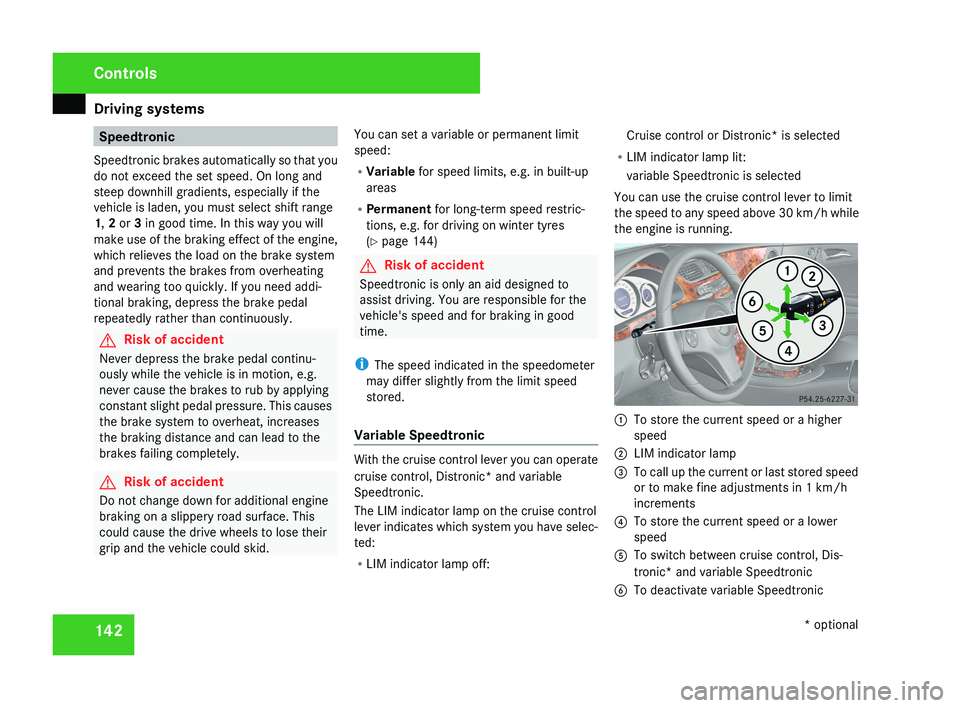
You can use the cruise control lever to limit
the speed to any speed above 30 km/h while
the engine is running. 1
To store the current speed or a higher
speed
2 LIM indicator lamp
3 To call up the current or last stored speed
or to make fine adjustments in 1 km/h
increments
4 To store the current speed or a lower
speed
5 To switch between cruise control, Dis-
tronic* and variable Speedtronic
6 To deactivate variable Speedtronic Controls
* optional
219_AKB; 2; 4, en-GB
mkalafa,
2007-11-13T09:28:36+01:00 - Seite 142