radio MERCEDES-BENZ CLS COUPE 2008 Owners Manual
[x] Cancel search | Manufacturer: MERCEDES-BENZ, Model Year: 2008, Model line: CLS COUPE, Model: MERCEDES-BENZ CLS COUPE 2008Pages: 329, PDF Size: 29.26 MB
Page 13 of 329
10 N
Navigation . . . . . . . . . . . . . . . . . . . . . 120
Navigation menu (on-board com-
puter) . . . . . . . . . . . . . . . . . . . . . . . 120
NECK-PRO head restraint . . . . . . . . . . 49
Resetting triggered NECK-PRO
head restraints . . . . . . . . . . . . . . . . 269 O
Oil topping up
. . . . . . . . . . . . . . . . . . . 195
On-board computer . . . . . . . . . . . . . . 111
AMG menu . . . . . . . . . . . . . . . . . . . 116
Audio menu . . . . . . . . . . . . . . . . . . 118
Convenience submenu . . . . . . . . . . 123
Display message . . . . . . . . . . . . . . 219
DVD menu . . . . . . . . . . . . . . . . . . . 120
Dynamic driving seat submenu . . . 129
Factory settings . . . . . . . . . . . . . . . 121
Heater submenu . . . . . . . . . . . . . . 123
Instrument cluster submenu . . . . . 122
Lighting submenu . . . . . . . . . . . . . 122
Message memory menu . . . . . . . . . 121
Navigation menu . . . . . . . . . . . . . . 120
Settings menu . . . . . . . . . . . . . . . . 121
Standard display menu . . . . . . . . . 115
Telephone menu . . . . . . . . . . . . . . 130
Time/Date submenu . . . . . . . . . . . 122
Trip computer menu . . . . . . . . . . . . 129 TV menu
. . . . . . . . . . . . . . . . . . . . . 119
Vehicle submenu . . . . . . . . . . . . . . 123
One-touch gearshifting . . . . . . . . . . . 105
Operating system see On-board computer
Outside temperature
Display (on-board computer) . 111, 116
Overhead control panel
Overview . . . . . . . . . . . . . . . . . . . . . 36
Own number sending (mobile
phone) . . . . . . . . . . . . . . . . . . . . . . . . . 184 P
Paint code number
. . . . . . . . . . . . . . 300
Parking . . . . . . . . . . . . . . . . . . . . . . . . 103
Parking aid . . . . . . . . . . . . . . . . . . . . . . 85 Parktronic . . . . . . . . . . . . . . . . . . . 148
Parking brake . . . . . . . . . . . . . . . . . . . 104
Display message . . . . . . . . . . . . . . 231
Parking lamps
Display message . . . . . . . . . . . . . . 236
Parking lock
Releasing manually (automatic
transmission) . . . . . . . . . . . . . . . . . 268
Parking position
Exterior mirror . . . . . . . . . . . . . . . . . 85
Parktronic . . . . . . . . . . . . . . . . . . . . . . 148
Activating/deactivating . . . . . . . . . 150
Malfunction . . . . . . . . . . . . . . . . . . 258 Range of the sensors
. . . . . . . . . . . 148
Warning display . . . . . . . . . . . . . . . 149
PASSENGER AIRBAG OFF warning
lamp . . . . . . . . . . . . . . . . . . . . . . . 51, 242
Performance . . . . . . . . . . . . . . . . . . . 303
Permanent Speedtronic . . . . . . . . . . 144
Petrol Minimum grade . . . . . . . . . . . . . . . 191
Plastic trim
Cleaning . . . . . . . . . . . . . . . . . . . . . 212
Power windows
see Side window
PRE-SAFE ®
system . . . . . . . . . . . . . . . . 48
PRE-SAFE ®
System
Display message . . . . . . . . . . . . . . 223
Preventive occupant safety system
see PRE-SAFE ®
Program selector button
Automatic transmission . . . . . . . . . 106
Pulling away . . . . . . . . . . . . . . . . . . . . 103 R
RACETIMER (on-board computer)
. . 117
Radio Changing a station (on-board
computer) . . . . . . . . . . . . . . . . . . . 119
see separate operating instructions
Rain closing feature (sliding/tilt-
ing sunroof) . . . . . . . . . . . . . . . . . . . . 171 Index
219_AKB; 2; 4, en-GB
mkalafa,
2007-11-13T09:28:36+01:00 - Seite 10
Page 15 of 329
12
Side windows
Cleaning . . . . . . . . . . . . . . . . . . . . . 212
Skibag . . . . . . . . . . . . . . . . . . . . . . . . . 174
Sliding/tilting sunroof . . . . . . . . . . . 169
Rain closing feature . . . . . . . . . . . . 171
Resetting . . . . . . . . . . . . . . . . . . . . 171
Sliding sunroof
see Sliding/tilting sunroof
Snow chains . . . . . . . . . . . . . . . . . . . . 205
Socket Cockpit . . . . . . . . . . . . . . . . . . . . . . 182
Rear compartment . . . . . . . . . . . . . 182
Spare wheel
Fitting . . . . . . . . . . . . . . . . . . . . . . . 282
Storage location . . . . . . . . . . . . . . . 217
Technical data . . . . . . . . . . . . . . . . 308
Speed
Technical data . . . . . . . . . . . . . . . . 303
Speed limiter
Speedtronic . . . . . . . . . . . . . . . . . . 142
Speedometer
Digital speedometer (on-board
computer) . . . . . . . . . . . . . . . . . . . 116
Segments . . . . . . . . . . . . . . . . . . . . 110
Setting the unit (on-board com-
puter) . . . . . . . . . . . . . . . . . . . . . . . 123
Speedtronic . . . . . . . . . . . . . . . . . . . . 142
Display message . . . . . . . . . . . . . . 227
Permanent . . . . . . . . . . . . . . . . . . . 144
Variable . . . . . . . . . . . . . . . . . . . . . 142 SRS (Supplemental Restraint Sys-
tem)
. . . . . . . . . . . . . . . . . . . . . . . . . . . . 43
warning lamp . . . . . . . . . . . . . . . . . . 43
Standard display (on-board com-
puter) . . . . . . . . . . . . . . . . . . . . . . . . . 115
Selecting the display . . . . . . . . . . . 124
Station
see Radio
Status line (on-board computer) . . . 112
Selecting the display . . . . . . . . . . . 124
Steering wheel
Adjusting . . . . . . . . . . . . . . . . . . 81, 82
Buttons (on-board computer) . . . . . 111
Storing settings . . . . . . . . . . . . . . . . 86
Steering wheel gearshift paddles . . 107
Steering wheel heating . . . . . . . . . . . . 82
Malfunction indicator lamp . . . . . . 242
Stowage compartment . . . . . . . . . . . 177
Armrest (in front) . . . . . . . . . . . . . . 178
Armrest (under) . . . . . . . . . . . . . . . 178
Centre console . . . . . . . . . . . . . . . . 177
Centre console (rear) . . . . . . . . . . . 178
Driver's seat . . . . . . . . . . . . . . . . . . 179
Glove compartment . . . . . . . . . . . . 177
Rear seat armrest . . . . . . . . . . . . . 179
Ventilating . . . . . . . . . . . . . . . . . . . 178
Stowage compartments
Overview . . . . . . . . . . . . . . . . . . . . . 38
Stowage space
Cup holder . . . . . . . . . . . . . . . . . . . 172 Submenu (on-board computer)
. . . . 122
Convenience . . . . . . . . . . . . . . . . . 123
Dynamic driving seat . . . . . . . . . . . 129
Heating . . . . . . . . . . . . . . . . . . . . . 123
Instrument cluster . . . . . . . . . . . . . 122
Lighting . . . . . . . . . . . . . . . . . . . . . 122
Time/Date . . . . . . . . . . . . . . . . . . . 122
Vehicle . . . . . . . . . . . . . . . . . . . . . . 123
Summer opening . . . . . . . . . . . . . . . . 100
Sun visor . . . . . . . . . . . . . . . . . . . . . . . 180
Supplemental Restraint System
see SRS
Supplemental Restraint System (SRS)
Display message . . . . . . . . . . . . . . 227
Warning lamp . . . . . . . . . . . . . . . . . 248
Surround lighting
Switching on/off (on-board com-
puter) . . . . . . . . . . . . . . . . . . . . . . . 125
Switching off the alarm
ATA . . . . . . . . . . . . . . . . . . . . . . . . . . 61 T
Tail lamps Display message
. . . . . . . . . . . . . . 236
Tank capacity . . . . . . . . . . . . . . . . . . . 311
Technical data Acceleration . . . . . . . . . . . . . . . . . . 303
Engine . . . . . . . . . . . . . . . . . . . . . . 302
Tyres . . . . . . . . . . . . . . . . . . . . . . . 305 Index
219_AKB; 2; 4, en-GB
mkalafa,
2007-11-13T09:28:36+01:00 - Seite 12
Page 16 of 329
13
Vehicle dimensions
. . . . . . . . . . . . 309
Vehicle weights . . . . . . . . . . . . . . . 310
Wheels . . . . . . . . . . . . . . . . . . . . . . 305
Telephone
see Mobile phone
Temperature
Engine oil (on-board computer) . . . 116
Outside temperature . . . . . . . . . . . 111
Thermatic
Malfunction indicator lamp . . . . . . 242
Thermotronic
Malfunction indicator lamp . . . . . . 242
Third brake lamp
Display message . . . . . . . . . . . . . . 234
Tightening torque . . . . . . . . . . . . . . . 286
Time Lap time (on-board computer) . . . . 117
Setting (on-board computer) . . . . . 124
Setting the time (on-board com-
puter) . . . . . . . . . . . . . . . . . . . . . . . 124
Timer (on-board computer) . . . . . . . 117
TIREFIT kit Storage location . . . . . . . . . . . . . . . 217
Using . . . . . . . . . . . . . . . . . . . . . . . 277
Total distance recorder
. . . . . . . . . . . . . . . . . . . . . . . . . . . . . 27, 29
Resetting the trip meter . . . . . . . . . 110
Tow-away protection . . . . . . . . . . . . . . 62
Towing . . . . . . . . . . . . . . . . . . . . . . . . 294 Towing eye
Fitting . . . . . . . . . . . . . . . . . . . . . . . 294
Removing . . . . . . . . . . . . . . . . . . . . 295
Transmission output (maximum)
Telephone/two-way radio . . . . . . . 299
Transport (vehicle) . . . . . . . . . . . . . . 295
Trip computer
Menu (on-board computer) . . . . . . 129
Trip meter . . . . . . . . . . . . . . . . . . . . . . 115
Resetting . . . . . . . . . . . . . . . . . . . . 110
Turn signal lamps
Display message . . . . . . . . . . 233, 234
TV
Operation (on-board computer) . . . 119
Two-way radio
Installation . . . . . . . . . . . . . . . . . . . 299
Tyre grip . . . . . . . . . . . . . . . . . . . . . . . 207
Tyre pressure . . . . . . . . . . . . . . . . . . 200
Calling up (on-board computer) . . 202
Display message . . . . . . . . . . 224, 237
Tyre pressure loss warning system 201
Tyre pressure monitor Warning lamp . . . . . . . . . . . . . . . . . 248
Tyre pressures
Table . . . . . . . . . . . . . . . . . . . . . . . 304
Tyres
Direction of rotation . . . . . . . . . . . . 199
General notes . . . . . . . . . . . . . . . . . 198
Technical data . . . . . . . . . . . . . . . . 305
Tyre tread . . . . . . . . . . . . . . . . . . . . . . 200 U
Unit for distance Setting (on-board computer)
. . . . . 123
Unladen weight . . . . . . . . . . . . . . . . . 310
Unlocking Emergency unlocking . . . . . . . . . . . 266
From the inside (central unlocking
button) . . . . . . . . . . . . . . . . . . . . . . . 70
Up (display message) . . . . . . . . . . . . 116 V
Variable Speedtronic . . . . . . . . . . . . .
142
Vehicle Emergency unlocking . . . . . . . 266, 267
Individual settings (on-board com-
puter) . . . . . . . . . . . . . . . . . . . . . . . 121
Leaving parked up . . . . . . . . . . . . . 265
Towing . . . . . . . . . . . . . . . . . . . . . . 294
Transporting . . . . . . . . . . . . . . . . . . 295
Vehicle battery . . . . . . . . . . . . . . . . . 288
Vehicle dimensions . . . . . . . . . . . . . . 309
Vehicle electronics . . . . . . . . . . . . . . 299
Vehicle identification plates . . . . . . 300
Vehicle level Display message . . . . . . . . . . . . . . 229
Setting (AIRMATIC DC) . . . . . . . . . 146
Vehicle tool kit . . . . . . . . . . . . . . . . . . 217
Vehicle weights . . . . . . . . . . . . . . . . . 310 Index
219_AKB; 2; 4, en-GB
mkalafa,
2007-11-13T09:28:36+01:00 - Seite 13
Page 115 of 329
On-board computer
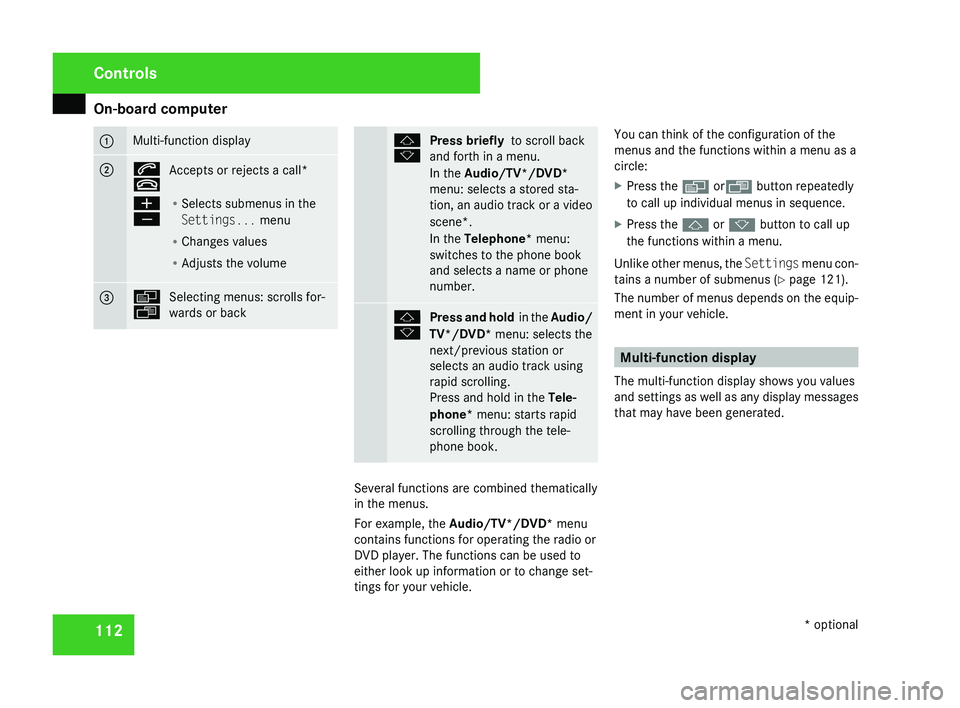
112 1 Multi-function display
2 s
t
Accepts or rejects a call*
æ
ç R
Selects submenus in the
Settings... menu
R Changes values
R Adjusts the volume 3 è
ÿ
Selecting menus: scrolls for-
wards or back j
k
Press briefly
to scroll back
and forth in a menu.
In the Audio/TV*/DVD*
menu: selects a stored sta-
tion,
an audio track or a video
scene*.
In the Telephone* menu:
switches to the phone book
and selects a name or phone
number. j
k
Press and hold
in the Audio/
TV*/DVD* menu: selects the
next/previous station or
selects an audio track using
rapid scrolling.
Press and hold in the Tele-
phone* menu: starts rapid
scrolling through the tele-
phone book. Several functions are combined thematically
in the menus.
For example, the Audio/TV*/DVD*
menu
contains functions for operating the radio or
DVD player. The functions can be used to
either look up information or to change set-
tings for your vehicle. You can think of the configuration of the
menus and the functions within a menu as a
circle:
X
Press the è orÿ button repeatedly
to call up individual menus in sequence.
X Press the j or k button to call up
the functions within a menu.
Unlike other menus, the Settings
menu con-
tains a number of submenus ( Y page 121).
The number of menus depends on the equip-
ment in your vehicle. Multi-function display
The multi-function display shows you values
and
settings as well as any display messages
that may have been generated. Controls
* optional
219_AKB; 2; 4, en-GB
mkalafa,
2007-11-13T09:28:36+01:00 - Seite 112
Page 118 of 329
On-board computer
115Function
1 Basic display menu (Y page 115)
R
Digital speedometer 12
(Y page 116)
R Outside tempera-
ture 12
(Y page 116)
R ASSYST PLUS service display
(Y page 209)
R Tyre pressure loss warning system
(Y page 201) or tyre pressure mon-
itor* (Y page 202) 2
AMG* menu (Y page 116)
3
Audio/TV*/DVD*
(Y page 118)
menu
R Radio station ( Y page 119)
R Audio drive or media ( Y page 119)
R TV* (Y page 119)
R DVD video* (Y page 120) 4
Navigation* menu (Y page 120) Function
5
Distronic
* menu (distance display)
(Y page 135) 6
Message memory menu
13
(fault and
warning messages) ( Y page 121) 7 Settings menu (Y page 121)
R
Resetting to factory settings
(Y page 121)
R Selecting a submenu ( Y page 122) 8 Trip computer
menu
R Consumption statistics
(Y page 130)
R Range ( Y page 130) 9
Telephone*
menu (Y page 130) This is what the displays look like when you
scroll through the menus.
The generic terms in the table overview are
intended to help you navigate through the
menus. The terms themselves are not always
displayed in the multi-function display.The Audio
, Navi* and Tel* menus are dis-
played slightly differently in vehicles with
audio equipment and vehicles with COMAND
APS*. The examples given in this Owner's
Manual apply to vehicles equipped with
COMAND APS*. Standard display menu
i Menu overview: see ( Y page 114).
Use the buttons on the multi-function steer-
ing wheel.
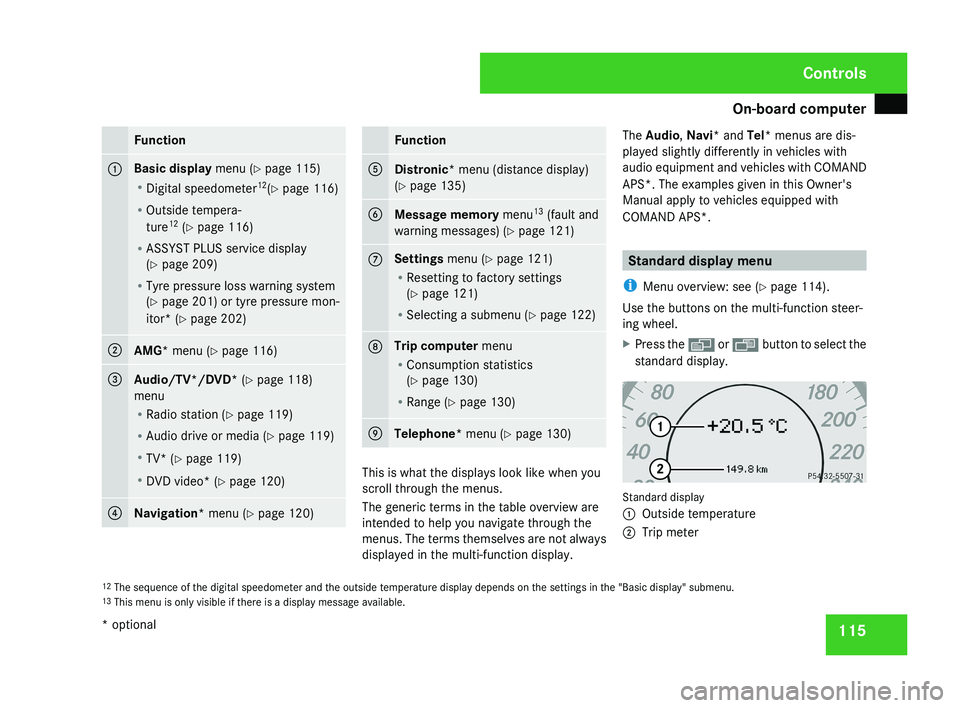
X Press the è or · button to select the
standard display. Standard display
1
Outside temperature
2 Trip meter
12 The sequence of the digital speedometer and the outside temperature display depends on the settings in the "Basic display" submenu.
13 This menu is only visible if there is a display message available. Controls
* optional
219_AKB; 2; 4, en-GB
mkalafa,
2007-11-13T09:28:36+01:00 - Seite 115
Page 122 of 329
On-board computer
119
X
Use the è or · button to select the
Audio/TV/DVD menu.
Selecting a radio station You can only store new stations using the
audio system or COMAND APS*. Please refer
to the separate operating instructions for
notes on how to do this.
X
Switch on the audio equipment or
COMAND APS* and select Radio (see the
separate operating instructions).
X To select a stored station: briefly press
the j or k button.
X To select a channel from the channel
list: press and hold the j or k but-
ton.
X To select a station using the station
search (only if no station list is being
received): press and hold the j or
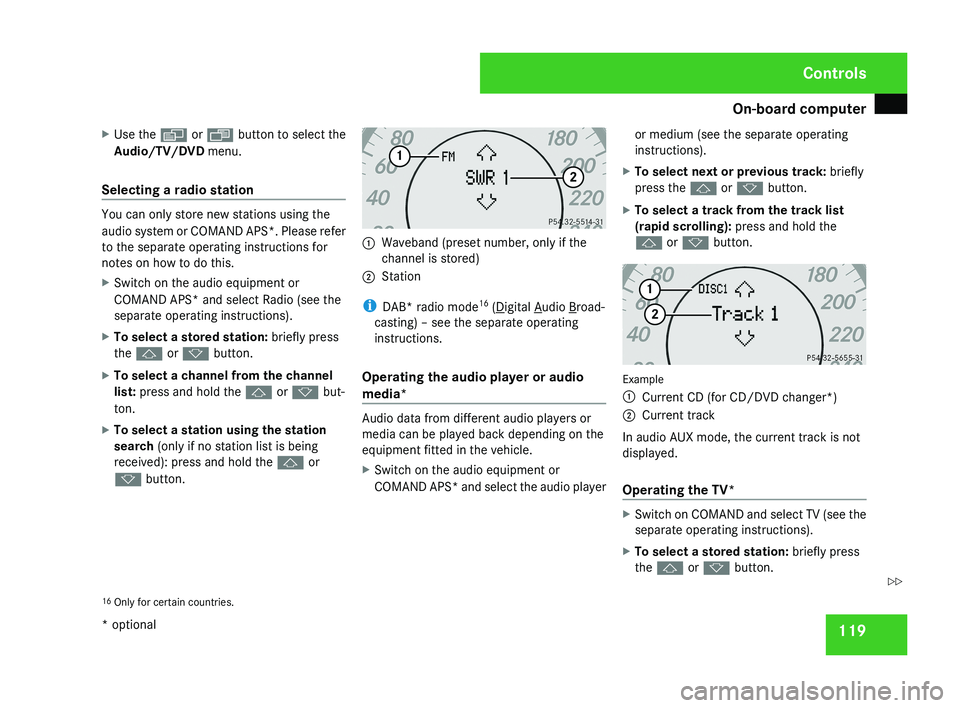
k button. 1
Waveband (preset number, only if the
channel is stored)
2 Station
i DAB* radio mode 16
( Digital Audio Broad-
casting) – see the separate operating
instructions.
Operating the audio player or audio
media* Audio data from different audio players or
media can be played back depending on the
equipment fitted in the vehicle.
X
Switch on the audio equipment or
COMAND APS* and select the audio player or medium (see the separate operating
instructions).
X To select next or previous track: briefly
press the j or k button.
X To select a track from the track list
(rapid scrolling): press and hold the
j or k button. Example
1
Current CD (for CD/DVD changer*)
2 Current track
In audio AUX mode, the current track is not
displayed.
Operating the TV* X
Switch on COMAND and select TV (see the
separate operating instructions).
X To select a stored station: briefly press
the j or k button.
16 Only for certain countries. Controls
* optional
219_AKB; 2; 4, en-GB
mkalafa,
2007-11-13T09:28:36+01:00 - Seite 119 Z
Page 170 of 329
Air conditioning
167
Activating the auxiliary heating/ventila-
tion
If the key is in position 1 or 2:
X
Press and hold button 1 for at least two
seconds.
The red or blue indicator lamp in the button
lights up.
If the key is removed or in position 0:
X Briefly press button 1.
The red or blue indicator lamp in the button
lights up.
Deactivating the auxiliary heating/venti-
lation
X Briefly press button 1.
The red or blue indicator lamp in the button
goes out.
Remote control
Your vehicle comes with one remote control.
You may use two additional remote controls
for your vehicle. For further information, con-
sult a qualified specialist workshop, e.g. a
Mercedes-Benz Service Centre. The remote control has a maximum range of
approximately 300 metres. This range may be
reduced by:
R
sources of radio interference
R solid objects between the remote control
and the vehicle
R the remote control being in an unfavoura-
ble position in relation to the vehicle
R transmitting from an enclosed space
i The optimum range can be achieved if you
hold the remote control vertically, pointing
upwards when you press one of the but-
tons.
i A battery symbol appears in the display
when the batteries in the remote control
are low. Replace the remote control bat-
teries (Y page 270).
i More information about the auxiliary
heating can be found in the "Practical
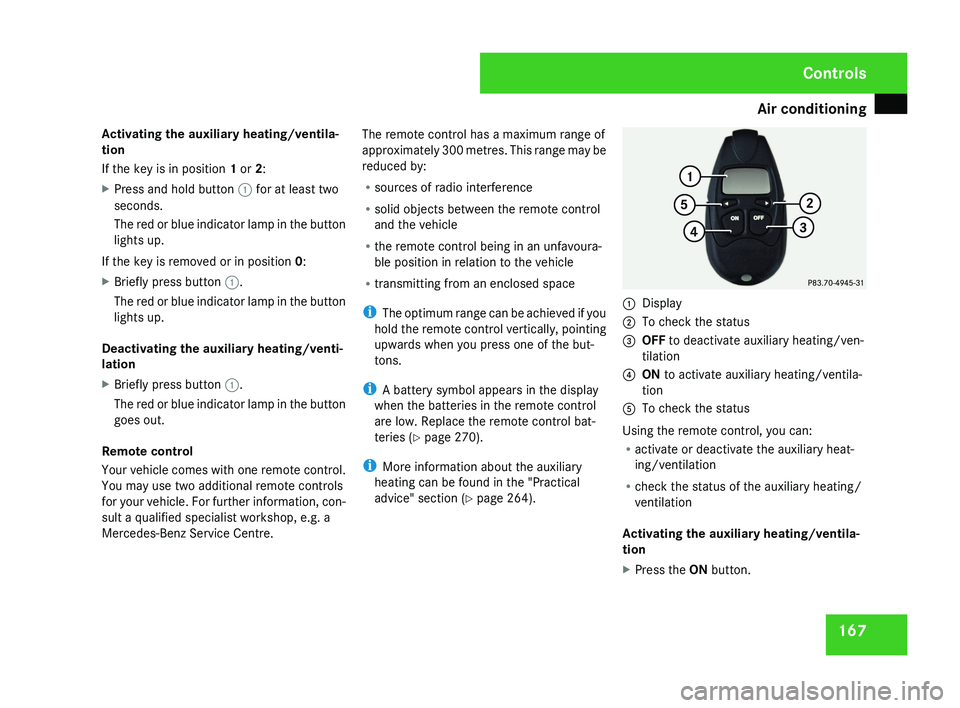
advice" section ( Y page 264).1
Display
2 To check the status
3 OFF to deactivate auxiliary heating/ven-
tilation
4 ON to activate auxiliary heating/ventila-
tion
5 To check the status
Using the remote control, you can:
R activate or deactivate the auxiliary heat-
ing/ventilation
R check the status of the auxiliary heating/
ventilation
Activating the auxiliary heating/ventila-
tion
X Press the ON button.
Controls
219_AKB; 2; 4, en-GB
mkalafa,
2007-11-13T09:28:36+01:00 - Seite 167
Page 186 of 329
Features
183Mobile phone*
G
Risk of accident
Observe the legal requirements of the
country in which you are currently driving
regarding operating mobile communica-
tions equipment in a vehicle.
If
it is permitted by law to operate commu-
nications equipment while the vehicle is in
motion, you must only do so when the traf-
fic situation allows. You could otherwise be
distracted from the traffic conditions,
cause an accident and injure yourself and
others.
Two-way radios and fax equipment used
without low-reflection exterior aerials can
interfere with the vehicle's electronics and
thereby jeopardise the operating safety of
the vehicle and your safety. You must there-
fore only use this equipment if it is correctly
connected to a separate reflection-free
exterior aerial. G
Risk of injury
Excessive electromagnetic radiation may
cause
damage to your health and the health
of others. Using an exterior aerial takes into
account current scientific discussions relating to the possible health risk posed by
electromagnetic fields.
i In
order to ensure optimum signal quality
for mobile phones and to minimise mutual
interference between the vehicle electron-
ics and mobile phones, Mercedes-Benz rec-
ommends the use of an approved exterior
aerial. An exterior aerial conducts the elec-
tromagnetic fields generated by a wireless
device to the exterior of the vehicle; the
field strength within the vehicle interior is
lower than in a vehicle that does not have
an exterior aerial.
i There are various mobile phone brackets
that may be fitted to your vehicle; in some
cases these are country-specific. You can
obtain these mobile phone brackets from a
qualified specialist workshop, e.g. a
Mercedes-Benz Service Centre. The func-
tions and services available when you use
the phone depend on your mobile phone
model and service provider.
The mobile phone bracket is in the armrest.
X Open the telephone compartment
(Y page 178). Inserting the mobile phone into the
mobile phone bracket If the mobile phone is inserted into the mobile
phone
bracket, you can only speak to the per-
son you are calling using the hands-free sys-
tem.
! Do not attempt to remove the mobile
phone and the telephone bracket together.
You could otherwise damage the mobile
phone bracket.
X Remove the cover of the aerial plug from
the
back of the mobile phone and keep it in
a safe place. Controls
* optional
219_AKB; 2; 4, en-GB
mkalafa,
2007-11-13T09:28:36+01:00 - Seite 183
Page 205 of 329
Tyres and wheels
202tyres is set correctly for the operating con-
ditions concerned.
X Also observe the notes in the section on
tyre pressures ( Y page 200). G
Risk of accident
The tyre pressure loss warning system can
only give reliable warnings if you have set
the correct tyre pressure.
If an incorrect tyre pressure is set, these
incorrect values will be monitored.
A tyre with insufficient pressure results in
an instability of the vehicle when driving,
thus increasing the risk of an accident.
X Make sure that the key is in position 2 in
the ignition lock.
The standard display appears in the multi-
function display ( Y page 115).
X Press k or j to select the tyre pres-
sure function:
Run Flat Indicator active
Menu: R-Button æ
X Press the reset button on the left of the
instrument cluster.
The following message appears in the
multi-function display:
Restart Run Flat Indicator? Yes Cancel
If you wish to confirm the restart:
X Press the æ button.
The following message appears in the
multi-function display:
Run Flat Indicator restarted
After a teach-in period, the tyre pressure
loss warning system will monitor the set
tyre pressures of all four tyres.
If you wish to cancel the restart:
X Press the ç button.
or
X Wait until the message
Restart Run Flat Indicator?
Yes Cancel disappears.
The tyre pressure values stored at the last
restart will continue to be monitored. Checking the tyre pressure electroni-
cally*
The tyre pressure monitor only functions if
the correct wheel electronics are fitted to all
wheels.
These monitor the pressure in all four
tyres, which you have set when restarting the
tyre pressure monitor. The monitor warns you
when the pressure drops in one or more of
the tyres. G
Risk of accident
The tyre pressure monitor does not warn
you
of an incorrectly set tyre pressure. The
table on the inside of the fuel filler flap will
help you decide whether the tyre pressures
should be corrected.
The tyre pressure monitor is not able to
warn you of a sudden loss of pressure, e.g.
if the tyre is penetrated by a foreign object.
In the event of a sudden loss of pressure,
bring the vehicle to a halt by braking care-
fully. Do not make any sudden steering
movements when doing so.
i The operation of the tyre pressure moni-
tor can be affected by interference from
radio transmitting equipment (e.g. radio
headphones, two-way radios) that may be
being operated in or near the vehicle. Operation
* optional
219_AKB; 2; 4, en-GB
mkalafa,
2007-11-13T09:28:36+01:00 - Seite 202
Page 215 of 329
Care
212
!
Only fold the windscreen wipers away
from the windscreen when vertical, other-
wise you will damage the bonnet.
X Fold the wiper arms away from the wind-
screen until you feel them engage.
X Clean the windscreen and the wiper blades.
X Fold the windscreen wipers back again
before the ignition is switched on.
! Do not clean the wiper blades too often,
as otherwise the coating may come off.
This could cause wiper noise.
Cleaning the windows !
Do not use dry cloths, abrasive products,
solvents or cleaning agents containing sol-
vents to clean the inside of the windows.
Clean the insides of the windows with a
damp cloth or commercially-available glass
cleaner. Avoid touching the inside of the
rear windscreen and the side windows with
hard objects, e.g. ice scrapers or rings. You
could otherwise cause damage to the win-
dows, rear window heating or aerial on the
rear window. i
Anti-glare
film retrofitted to the insides of
the windows could interfere with radio or
mobile phone reception, especially if it is
conductive or metal-coated film. Informa-
tion about anti-glare film can be obtained
from any Mercedes-Benz Service Centre.
Cleaning the headlamps X
Clean the headlamp lenses with a wet
sponge.
! Only use washer fluid which is suitable
for plastic lenses. Unsuitable washer fluid
could damage the plastic lenses of the
headlamps.
Therefore, do not use the following:
R dry cloths
R abrasive cleaning agents
R solvents
R cleaning agents containing solvent
You
could otherwise scratch or damage the
surface of the lenses. Plastic trim !
Do
not use dry, coarse or hard cloths and
do not scrub. Doing so will scratch or dam-
age the surfaces.
X Wipe plastic parts with a damp, lint-free
cloth (e.g. a microfibre cloth).
X Light soiling:
use a low-foaming soap (e.g.
a light liquid hand soap) diluted in water.
X Heavy soiling:
use a cleaning agent that is
solvent-free and non-corrosive. Mercedes-
Benz recommends that you use a
Mercedes-Benz cleaning product for this
purpose.
Cleaning the steering wheel boss and
dashboard X
Moisten a clean lint-free cloth with water.
X Clean the plastic parts and the dashboard.
X If particularly dirty, use a mild detergent. G
Risk of injury
Do not use cleaners and cockpit care
sprays containing solvents to clean the
cockpit and steering wheel boss. Cleaners
containing solvents cause the surface to
become porous and in the event of an air- Operation
219_AKB; 2; 4, en-GB
mkalafa,
2007-11-13T09:28:36+01:00 - Seite 212