brake sensor MERCEDES-BENZ CLS COUPE 2010 Owners Manual
[x] Cancel search | Manufacturer: MERCEDES-BENZ, Model Year: 2010, Model line: CLS COUPE, Model: MERCEDES-BENZ CLS COUPE 2010Pages: 337, PDF Size: 7.36 MB
Page 8 of 337
Setting the centre air vents
...........124
Setting the side air vents ...............124
Alarm system
see ATA
Alertness Assistant
see ATTENTION ASSIST
Ambient lighting
Setting the brightness (on-board
computer) ...................................... 208
Setting the colou r(on-board com-
puter) ............................................ .208
AMGMenu (on-board computer) ....... 212
AMG RIDE CONTROL sports sus-
pension (CLS 63 AMG) ......................169
Anti-glare film .................................... 264
Anti-lock Brake System see ABS
Anti-Theft Alarm system
see ATA
Anti-theft system
ATA (Anti-Theft Alarm system) .........63
Immobiliser ...................................... 63
Interior motion sensor .....................64
Tow-away protection ........................ 64
Aquaplaning ....................................... 151
Ashtray ............................................... 257
Assistance menu (on-board com-
puter) ................................................. .203
ASSYST PLUS see ASSYST PLUS service interval
display
ASSYST PLUS service interval dis-
play ..................................................... 269
Displaying a service message (on-
board computer) ............................ 270
ATA (Anti-Theft Alarm system)
Activating/deactivating ...................63
Function .......................................... .63
Switching off the alarm ....................63
ATTENTIO NASSIST
Activating/deactivating (on-
board computer) ............................ 204
Display message ............................ 226
Function/notes ............................. 177
Audio menu (on-board computer) ....200
Automatic car wash ..........................271Automatic engine start
With ECO start/stop function ........133
Automatic engine switch-off
With ECO start/stop function ........132
Automatic transmission
DIRECT SELECT leve r..................... 136
Display message ............................ 234
Driving tips .................................... 138
Emergency running mode ..............142
Kickdow n....................................... 138
Malfunction ................................... .142
Progra mselecto rbutton ................ 138
Pulling away ................................... 131
Selector leve r................................ 136
Starting .......................................... 130
Auxiliary heating ............................... 119
Adjusting (on-board computer) ......210
Display message ............................ 236
Important safety information .........119
Auxiliary heating/ventilation ...........120
Display message ............................ 123
Remote control .............................. 120
Auxiliary ventilation ..........................119 B
Bag hook ............................................ 252
BAS (Brake Assist System) .................57
BAS PLUS (Brake Assist System
Plus) ...................................................... 57
Battery Changing (auxiliary heating
remote control) .............................. 121
Changing (key )................................. 71
Charging ........................................ 292
Checking (key )................................. 70
Disconnecting ................................ 292
Display message ............................ 225
Important safety guidelines (key )..... 70
Installatio nlocation ....................... 291
Jump-starting ................................. 294
Reconnecting ................................. 293
Removing/fitting ........................... 292
Safety notes .................................. 290
Belt
see Seat belt Index
5
Page 9 of 337
Bel
ttensioner
Activation ........................................ .35
Function ........................................... 45
Blin dSpot Assist
Activating/deactivating (on-
board computer) ............................ 204
Display message ............................ 229
Function/notes ............................. 183
Bonnet
Closing .......................................... .267
Display message ............................ 235
Opening ......................................... 266
Boot
Automatic opening ........................... 76
Emergency release ..........................77
Important safety guidelines .............75
Opening automatically from
insid e............................................... 77
Boot lid
Display message ............................ 235
Opening dimensions ......................326
Boot load (maximum) ........................ 323
Bottle holder ...................................... 256
Box (boot) .......................................... .252
Brake fluid Notes ............................................. 322
Brake lamps
Adaptive .......................................... .58
Display message ............................ 222
Brakes
ABS .................................................. 57
BAS .................................................. 57
BAS PLUS ........................................ 57
Brake fluid (notes) .........................322
Display message ............................ 220
High-performance brake system ....150
Important safety notes ..................149
Parking brake ................................ 148
Warning lamp ................................. 238
Breakdown
see Flat tyre
Bulbs
Overview ........................................ 105 C
Care Automatic car wash .......................271
Display ........................................... 274
Exterior lighting ............................. 273
High-pressure cleaner .................... 272
Matt paintwork .............................. 272
Nigh tView Assist Plus ...................274
Notes ............................................. 270
Paint .............................................. 272
Plastic trim .................................... 275
Reversing camera ..........................274
Seat bel t........................................ 276
Seat covers .................................... 275
Sensors ......................................... 274
Tai lpipes ....................................... 274
Trim strips ..................................... 275
Wheels ........................................... 272
Windows ........................................ 273
Wiper blades .................................. 273
Wooden trim .................................. 275
CD player/CD changer(on-board
computer) .......................................... 201
Central locking Automatic locking (on-board com-
puter) ............................................. 209
Key .................................................. 68
Central unlocking
Key .................................................. 68
Centre console ..................................... 30
Changing bulbs Headlamps ..................................... 104
Changing gears .................................. 138
Child-proof locks Rea rdoors ....................................... 55
Children
In the vehicle ................................... 46
Restraint systems ............................ 46
Child seat
Automatic recognition .....................48
Display message ............................ 217
ISOFIX .............................................. 49
On the front-passenger sea t............ 47
Recommendations ...........................54
Suitable positions ............................ 52
Troubleshooting ............................... 51
Cigarette lighter ................................ 2586
Index
Page 16 of 337
NECK-PRO luxury head restraints
Operatio n......................................... 41
Reset ting after being triggered ........41
Night View Assist Plus
Activating/deactivating .................181
Cleaning ......................................... 274
Function/notes ............................. 180
Malfunction ................................... .183
Problem ......................................... 183
Notes on running in anew vehicle ..128 O
Occupant safety Childre ninthe vehicle ..................... 46
Important safety guidelines .............34
Odometer ........................................... 198
Oil see Engine oil
On-board computer
AMG menu ..................................... 212
Assistance menu ........................... 203
Audi omenu ................................... 200
Convenience submenu ..................211
Display messages ..........................215
Factory settings ............................. 212
Heating submenu ........................... 210
Important safety notes ..................194
Instrument cluster submenu ..........205
Ligh tsubmenu ............................... 207
Menu overview .............................. 197
Message memory .......................... 215
Navigation menu ............................ 199
Operating the TV ............................ 201
Operating vide oDVD ..................... 201
Operation ....................................... 195
Service menu ................................. 205
Settings menu ............................... 205
Standard display submenu ............198
Telephone menu ............................ 201
Time/Date submenu .....................206
Trip menu ...................................... 198
Vehicle submenu ........................... 209
Operating system
see On-board computer
Outside temperature
Display ........................................... 195Overhead control panel
Overview .......................................... 31
Override feature
Rea rside windows ........................... 56 P
Pain tcode .......................................... 318
Paintwork (cleaning instructions) ...272
Parking ............................................... 147
Parking aid Active Parking Assist .....................173
Display message ............................ 229
PARKTRONI C................................. 170
Reversing camera ..........................176
Parking brake .................................... 148
Display message ............................ 220
Parking lamp (display message) ......222
Parking position Exterior mirror on the front-
passenger side ................................. 94
PARKTRONIC
Activating/deactivating .................172
Function/notes ............................. 170
Malfunction ................................... .173
Problem ......................................... 173
Sensor range ................................. 170
Warning displa y............................. 171
PASSENGE RAIRBAG OFF warning
lamp ...................................................... 48
Permanent display (on-board com-
puter) .................................................. 206
Permanent Speedtronic ....................164
Plastic trim (cleaning instructions) .275
Power windows see Side windows
Pre-emptive occupant safety sys-
tem
see PRE-SAFE ®
PRE-SAFE ®
Brake (vehicles with
DISTRONIC PLUS) Activating/deactivating (on-
board computer) ............................ 204
Display message ............................ 217
Function/notes ................................ 61
PRE-SAFE ®
Brake (vehicles with
DISTRONIC PLUS) Warning lamp ................................. 246 Index
13
Page 18 of 337
Seat belts
Adjusting the height .........................44
Warning lamp ................................. 239
Seats
Adjusting (electrically) .....................86
Adjusting lumba rsuppor t................ 89
Adjusting the 4-way lumba rsup-
por t.................................................. 89
Adjusting the head restraint ............86
Cleaning the cover .........................275
Correct driver's seat position ........... 84
Important safety instructions ...........85
Multicontour sea t............................ 87
Storing settings (memory func-
tion) ................................................. 95
Switching sea theating on/off .........89
Switching the sea tventilation on/
off .................................................... 90
Seat ventilation
Malfunction indicator lamp ..............90
Sensors (cleaning instructions) .......274
Service indicator see ASSYST PLUS service interval
display
Service menu (on-board computer) .205
Service products Brake fluid ..................................... 322
Coolant (engine) ............................ 322
Engine oil ....................................... 320
Fuel ................................................ 319
Important safety notes ..................319
Notes ............................................. 319
Settings
Factory (on-board computer) .........212
On-board computer .......................205
Shift ranges ....................................... 140
Showing the distance display (on-
board computer) ............................... 203
Sidebag ................................................ 38
Side window Important safety notes ....................78
Side windows
Convenience closing ........................79
Convenience opening ......................79
Opening/closing .............................. 78
resetting .......................................... 80
Troubleshooting ............................... 80Sliding sunroof
Important safety information ...........80
Opening/closing .............................. 81
Rain closing feature .........................81
Resetting ......................................... 81
Troubleshooting ............................... 81
Snow chains ...................................... 304
Socket ................................................ 258
Cockpi t.......................................... 258
Rea rcompartmen t......................... 259
Spare wheel
Notes/data .................................... 313
Storage location ............................ 280
Storing ........................................... 280
see Emergency spare wheel
Spee dLimit Assist
Activating/deactivating message
function (on-board computer )........ 203
Displaying (on-board computer) ..... 203
Display message ............................ 227
Function/notes ............................. 178
Spee dlimiter
SPEEDTRONIC ............................... 162
Speedometer
Digital speedometer (on-board
computer) ...................................... 198
Segments ...................................... 195
Setting the unit (on-board com-
puter) ............................................. 205
Speedtronic
Display message ............................ 231
Permanent ..................................... 164
Variabl e......................................... 163
SPEEDTRONIC
Function/notes ............................. 162
SPORT handling mode
Activating/deactivating (AMG
vehicles) .......................................... 60
Warning lamp ................................. 243
SRS (Supplemental Restraint Sys-
tem)
Display message ............................ 218
Introduction ..................................... 35
Warning lamp ................................. 243
Warning lamp (function) ................... 35
Standard display (on-board com-
puter) ................................................. .198 Index
15
Page 43 of 337
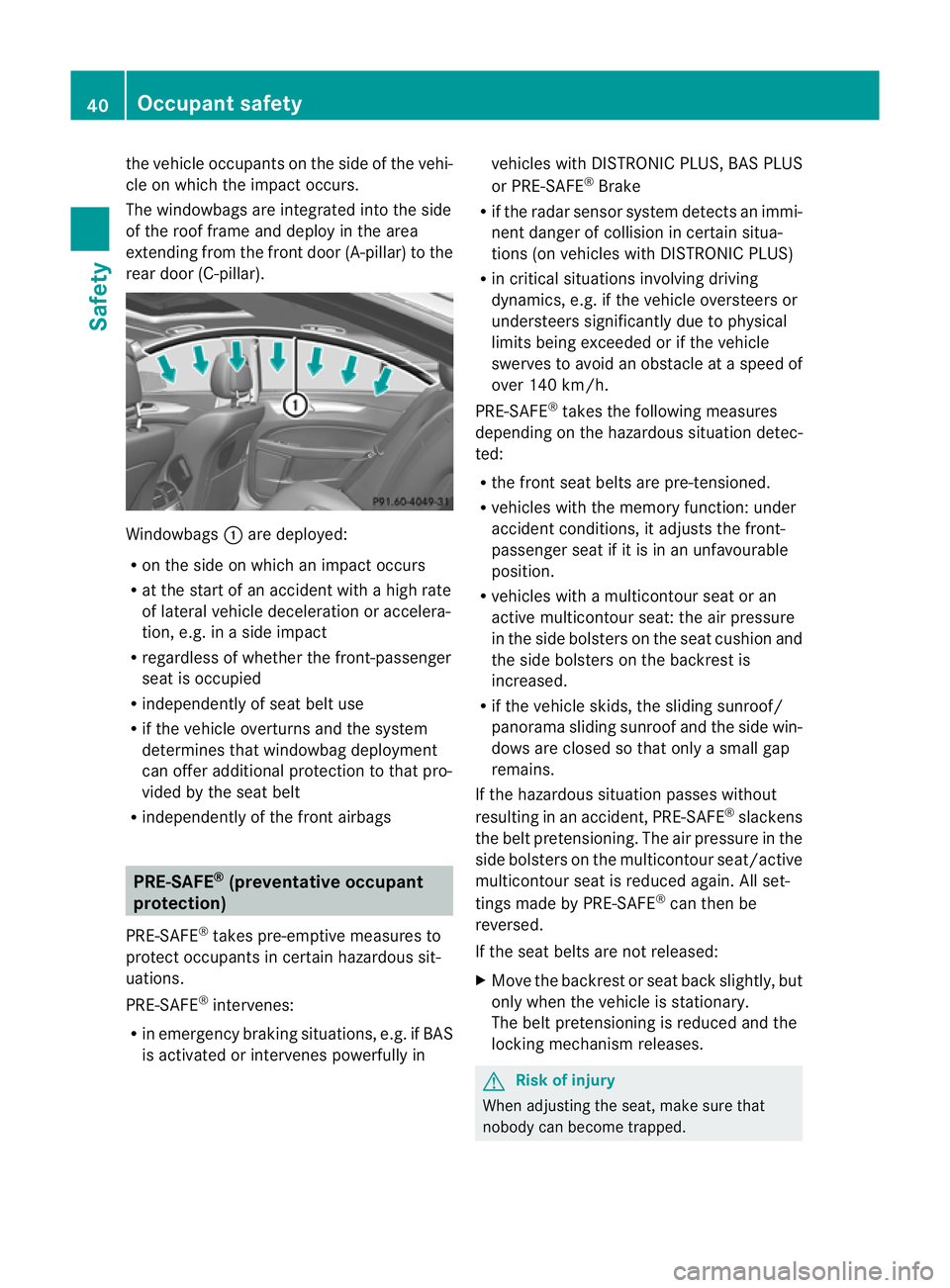
the vehicle occupants on the side of the vehi-
cle on which the impact occurs.
The windowbags are integrated into the side
of the roo
fframe and deploy in the area
extending from the front door (A-pillar) to the
rear door (C-pillar). Windowbags
:are deployed:
R on the side on which an impact occurs
R at the start of an accident with a high rate
of lateral vehicle deceleratio noraccelera-
tion, e.g. in a side impact
R regardless of whethe rthe front-passenger
seat is occupied
R independently of seat belt use
R if the vehicle overturns and the system
determines that windowbag deployment
can offer additional protection to that pro-
vided by the seat belt
R independently of the front airbags PRE-SAFE
®
(preventative occupant
protection)
PRE-SAFE ®
takes pre-emptive measures to
protect occupants in certain hazardous sit-
uations.
PRE-SAFE ®
intervenes:
R in emergency braking situations, e.g. if BAS
is activated or intervenes powerfully in vehicles with DISTRONIC PLUS, BAS PLUS
or PRE-SAFE ®
Brake
R if the radar sensor system detects an immi-
nent danger of collision in certain situa-
tions (on vehicles with DISTRONIC PLUS)
R in critical situations involving driving
dynamics, e.g. if the vehicle oversteers or
understeers significantly due to physical
limits being exceeded or if the vehicle
swerves to avoid an obstacle at a speed of
over 140 km/h.
PRE-SAFE ®
takes the following measures
depending on the hazardous situation detec-
ted:
R the front seat belts are pre-tensioned.
R vehicles with the memory function: under
accident conditions, it adjusts the front-
passenger seat if it is in an unfavourable
position.
R vehicles with a multicontour seat or an
active multicontour seat: the air pressure
in the side bolsters on the seat cushion and
the side bolsters on the backrest is
increased.
R if the vehicle skids, the sliding sunroof/
panorama sliding sunroof and the side win-
dows are closed so that only a small gap
remains.
If the hazardous situation passes without
resulting in an accident, PRE-SAFE ®
slackens
the belt pretensioning. The air pressure in the
side bolsters on the multicontour seat/active
multicontour seat is reduced again. All set-
tings made by PRE-SAFE ®
can then be
reversed.
If the seat belts are not released:
X Move the backrest or seat back slightly, but
only when the vehicle is stationary.
The belt pretensioning is reduced and the
locking mechanism releases. G
Risk of injury
When adjusting the seat, make sure that
nobody can become trapped. 40
Occupant safetySafety
Page 60 of 337
ABS (Anti-lock Braking System)
Important safety guidelines G
Ris
kofa ccident
Do no tdepress the brake pedal several times
in quick succession (pumping). Pumping the
brake pedal reduces the braking effect. You
might otherwise not be able to stop the vehi-
cle in time and could cause an accident.
Depress the brake pedal firmly and smoothly.
ABS regulates brake pressure in such a way
that the wheels do not lock when you brake.
This allows you to continue steering the vehi-
cle when braking.
ABS works from a speed of about 8 km/h
upwards, regardless of road-surface condi-
tions. ABS works on slippery surfaces, even
when you only brake gently.
Braking If ABS intervenes when braking, you will feel
a pulsing in the brake pedal.
X If ABS intervenes: continue to depress the
brake pedal with force until the braking sit-
uation is over.
X To make a full brake application:
depress the brake pedal with full force. G
Risk of accident
If ABS is faulty, the wheels could lock when
braking .This limits the steerability of the vehi-
cle when braking and the braking distance
may increase.
If ABS is deactivated due to a malfunction,
then BAS and ESP are also deactivated. There
is an increased risk of your vehicle skidding in
certain situations.
You should always adapt your driving style to
suit the prevailing road and weather condi-
tions.
The pulsating brake pedal can be an indica-
tion of hazardous road conditions and func-
tions as a reminder to take extra care while
driving. BAS (Brake Assist)
BAS operates in emergency braking situa-
tions. If you depress the brake pedal quickly,
BAS automatically boosts the braking force,
thus shortening the stopping distance.
X Keep the brake pedal firmly depressed until
the emergency braking situation is over.
ABS prevents the wheels from locking.
The brakes will function as usual once you
release the brake pedal. BAS is deactivated. G
Risk of accident
If BAS has malfunctioned, the braking system
remains available with full brake boosting
effect. However, braking force is not auto-
matically increased in emergency braking sit-
uations and the stopping distance may
increase. BAS PLUS (Brake Assist PLUS)
BAS PLUS is only available in vehicles with
DISTRONIC PLUS.
BAS PLUS assists you in braking during haz-
ardous situations at speeds above 30 km/h
and uses the radar sensor system to evaluate
the traffic situation. G
Risk of accident
BAS PLUS is only an aid to assist you when
driving. You are responsible for maintaining a
safe distance from other vehicles, for the vehi-
cle's speed and for braking in good time.
Always pay attention to the traffic conditions.
Otherwise, you may recognise dangers too
late, cause an accident and injure yourself
and others.
BAS PLUS can detect obstacles that are in the
path of your vehicle for an extended period of
time. Should you approach a detected obsta-
cle quickly, BAS PLUS calculates the braking
force necessary to avoid a rear-end collision.
Should you additionally apply the brakes, BAS
PLUS will automatically increase the braking Driving safety systems
57Safety Z
Page 61 of 337
force to a level suitable for the traffic condi-
tions.
If BAS PLUS demands particularly high brak-
ing force, PRE-SAFE
®
is activated simultane-
ously.
X Keep the brake pedal depressed until the
emergency braking situation is over.
ABS prevents the wheels from locking.
The brakes will work normally again if:
R you release the brake pedal.
R no obstacle is detected in front of your
vehicle.
R there is no longe rany dange rofarear-end
collision.
BAS PLUS is then deactivated.
At speeds up to approximately 70 km/h, BAS
PLUS may also detect stationary obstacles,
for example, stopped or parked vehicles.
Vehicles without COMAND and a navigation
system and vehicles for Australia: the radar
sensor system and on-board computer must
be switched off in the vicinity of radio tele-
scope facilities (Y page 210).
For BAS PLUS to assist you when driving, the
rada rsensor system must be switched on and
operational. You can chec kthis by activating
DISTRONIC PLUS(Y page 154) or via the
"radars ensor" function in the on-board com-
puter (Y page 210). G
Risk of accident
Only clearly identified obstacles will initiate
braking assistance by BAS PLUS.
In particular, the detection of obstacles can
be restricted if there is:
R dirt on the sensors or anything else cover-
ing the sensors
R snow or heavy rain
R interference by other radar sources
R strong radar reflections, for example in
multi-storey car parks
BAS PLUS does not react to people or ani-
mals, oncoming vehicles and crossing traffic,
or when cornering. BAS PLUS may not detect narrow vehicles
such as motorcycles and vehicles driving on
a different line.
Following a collision or accident-related dam-
age to the fron tend of the vehicle, have the
configuratio nand operatio nofthe radar sen-
sors checked at a Mercedes-Benz Service
Centre.
If BAS PLUS is not available due to a malfunc-
tion in the radar sensor system, the brake
system remains available with full brake
boosting effect and BAS. Adaptive brake lamps
i Adaptive brake lamps are only available in
certain countries.
If you brake sharply from a speed of more
than 50 km/h or if braking is assisted by BAS
or BAS PLUS, the brake lamps flash rapidly.
In this way, traffic travelling behind you is
warned in an even more noticeable manner.
If you brake sharply from a speed of more
than 70 km/h to a standstill, the hazard warn-
ing lamps are activated automatically .Ifthe
brakes are applied again, the brake lamps
light up continuously.T he hazard warning
lamps switch off automatically if you travel
faster than 10 km/h .You can also switch off
the hazard warning lamps using the hazard
warning switch button . ESP
®
(Electronic Stability Program)
Important safety notes If ESP
®
detects that the vehicle is deviating
from the direction desired by the driver, one
or more wheels are braked to stabilise the
vehicle. If necessary, the engine output is also
modified to keep the vehicle on the desired
course within physical limits. ESP ®
assists
the driver when pulling away on wet or slip-
pery roads. ESP ®
can also stabilise the vehi-
cle during braking. 58
Driving safety systemsSafety
Page 65 of 337
This function will issue a warning at speeds of
around 30 km/h or more if:
R
for a period of several seconds, the dis-
tance to the vehicle in fronti s too short for
the speed at which you are travelling. The
· distance warning lamp in the instru-
ment cluster will light up.
R you are rapidly approaching the vehicle in
front. An intermittent warning tone will
then sound and the ·distance warning
lamp will light up in the instrument cluster.
Due to the nature of the system, particularly
complicated driving conditions may cause the
system to display an unnecessary warning. G
Risk of accident
Pay particular attention to the traffic condi-
tions if the ·distance warning lamp in the
instrument cluster lights up or an intermittent
warning tone sounds. If necessary, brake or
manoeuvre to avoid an obstacle.
If the driver and passengers have fastened
their seat belts, PRE-SAFE ®
Brake can also
can also perform the following at speeds of
above approximately 30 km/h:
R brake the vehicle automatically from a
speed of up to approximately 200 km/h
R trigger preventative passenger protection
measures (PRE-SAFE ®
) G
Risk of accident
PRE-SAFE ®
Brake is only an aid to assist you
when driving. You are responsible for main-
taining a safe distance from other vehicles,
the vehicle's speed and for braking in good
time. Always pay attention to the traffic con-
ditions. Otherwise, you may recognise dan-
gers too late, cause an accident and injure
yourselfa nd others.
With the help of the rada rsensor system,
PRE-SAFE ®
Brake can detect obstacles that
are in front of your vehicle for an extended
period of time. If you approach an obstacle
and PRE-SAFE ®
Brake detects a risk of a col-
lision, the system will initially alert you both visually and acoustically. If you do not brake
or steer, the vehicle will at first automatically
brake slightly. In the event of an increased
risk of a collision, PRE-SAFE
®
is activated
(Y page 40). If the risk of collision remains
and you do not brake, take evasive action or
accelerate significantly, the vehicle may per-
form automatic emergency braking. G
Risk of accident
Only clearly detected obstacles will trigger a
warning and initiate braking assistance by
PRE-SAFE ®
Brake.
In particular, the detection of obstacles can
be impaired if there is:
R dirt on the sensors or the sensors are cov-
ered
R snow or heavy rain
R interference by other radar sources
R the possibility of strong radar reflections,
for example in multi-storey car parks
PRE-SAFE ®
Brake does not react to persons,
animals, oncoming vehicles, crossing traffic
or when cornering.
PRE-SAFE ®
Brake may not detect narrow
vehicles such as motorcycles and vehicles
driving on a different line. G
Risk of accident
Depending on the current speed, PRE-SAFE ®
Brake decelerates your vehicle by up to
4 m/s 2
before performing possible emer-
gency braking. This is equivalent to approx-
imately 40 % of the maximum braking power
of the vehicle. You must additionally apply the
brakes yourself in order to preven tacollision
or minimis ean impact. Automatic emergency
braking is not performed until immediately
prior to an accident in the event that you are
unable to avoid one by, for instance, taking
evasive action.
In order to maintain the appropriate distance
to the vehicle in front and thus prevent a col-
lision, you must apply the brakes yourself. 62
Driving safety systemsSafety
Page 66 of 337
At speeds up to approximately 70 km/h,
PRE-SAFE ®
Brake may also detect stationary
obstacles, for example stoppe dorparked
vehicles. G
Ris
kofa ccident
If, in a critical driving situation, you do not
receive a visual and acoustic warning:
R PRE-SAFE ®
Brake did no tdetec tthe risk of
a collision
R PRE-SAFE ®
Brake is switched off
R PRE-SAFE ®
Brake has failed
You must then brake to avoid a collision.
X To activate/deactivate: activate or deac-
tivate PRE-SAFE ®
Brake in the on-board
computer (Y page 204).
After activation, the Äsymbol is dis-
played on the left in the instrumentc luster.
The radar sensor system is switched off auto-
matically in the vicinity of radio telescope
facilities ( Ypage 327).
Vehicles without COMAND and navigation,
and vehicles for Australia: near radio tele-
scope installations, the radar sensor system
must be switched off with the on-board com-
puter (Y page 210).
For PRE-SAFE ®
Brake to assist you when driv-
ing, the radar sensor system must be
switched on (Y page 210) and operational.
PRE-SAFE ®
Brake does not always detect
complex traffic situations properly. You can
terminate the braking action of PRE-SAFE ®
Brake in a non-critical driving situation at any
time if:
R an acoustic and visual warning occurs.
R the vehicle brakes.
To end this, you can either depress the accel-
erator pedal further, activate kickdown or
release the brake pedal. The braking action of PRE-SAFE
®
Brake is
ended automatically if:
R you manoeuvre to avoid the obstacle.
R you drive slower than approximately
15 km/h.
R there is no longer an obstacle detected in
front of your vehicle.
R there is no longer any dange rofacollision.
Following a collisio norcollision-related dam-
age to the front end of the vehicle, have the
configuration and operation of the radar sen-
sors checked. Choose a qualified specialist
workshop which has the necessary specialist
knowledge and tools for the work required.
Mercedes-Benz recommends that you use a
Mercedes-Benz Service Centre for this pur-
pose. Anti-theft systems
Immobiliser
The immobiliser prevents your vehicle from
being started without the correc tkey.
X To activate with the key: remove the key
from the ignition lock.
X To activate with KEYLESS-GO: switch the
ignition off and open the driver's door.
X To deactivate: switch on the ignition.
i The immobiliser is always deactivated
when you start the engine. ATA (Anti-Theft Alarm system)
Av isual and audible alarm is triggered if the
alarm system is primed and you open:
R a door
R the vehicle with the emergency key ele-
ment
R the boot lid
R the bonnet
The alarm is not switched off, even if you
close the open door that has triggered it, for
example. Anti-theft systems
63Safety Z
Page 71 of 337
Vehicle equipment
i This manual describes all the standard
and optional equipment of your vehicle
available at the time of publicatio nofthe
Owner's Manual. Country-specific differen-
ces are possible. Please note that your
vehicle may not be equipped with all fea-
tures described. This also applies to safety-
relevant systems and functions. Key
Key functions
Locking and unlocking centrally The key centrally locks/unlocks:
R
the doors
R the boot lid
R the fuel filler flap G
Risk of injury
Only for the United Kingdom: if the vehicle
has been locked with the key, the double lock
function is activated as standard. It is then not
possible to open the doors from inside the
vehicle.
Therefore, do not leave any people behind in
the vehicle, particularly children, elderly peo-
ple or people requiring special assistance, if
the vehicle has been locked with the key. As
a result, they may not be able to free them-
selves in the event of an emergency. They
could be seriously or even fatally injured by
prolonged exposure to extremely high or low
temperatures, for example. In this case, res-
cuing people from outside the vehicle is diffi-
cult.
Deactivate the interior motion sensor before
you lock the vehicle with the key. The doors
can then be opened from the inside after the
vehicle has been locked from the outside with
the key. If the vehicle has been locked with KEYLESS-
GO, the doors can be opened from inside the
vehicle. G
Risk of accident
If children are left unsupervised in the vehicle,
they could:
R open a door from inside the vehicle at any
time, even if it has been locked
R start the vehicle using akey which has been
left in the vehicle
R release the parking brake
They could thereby endanger themselves and
others. Never leave children unsupervised in
the vehicle. Always take the key with you
when leaving the vehicle, even if you are only
leaving it for a short time. :
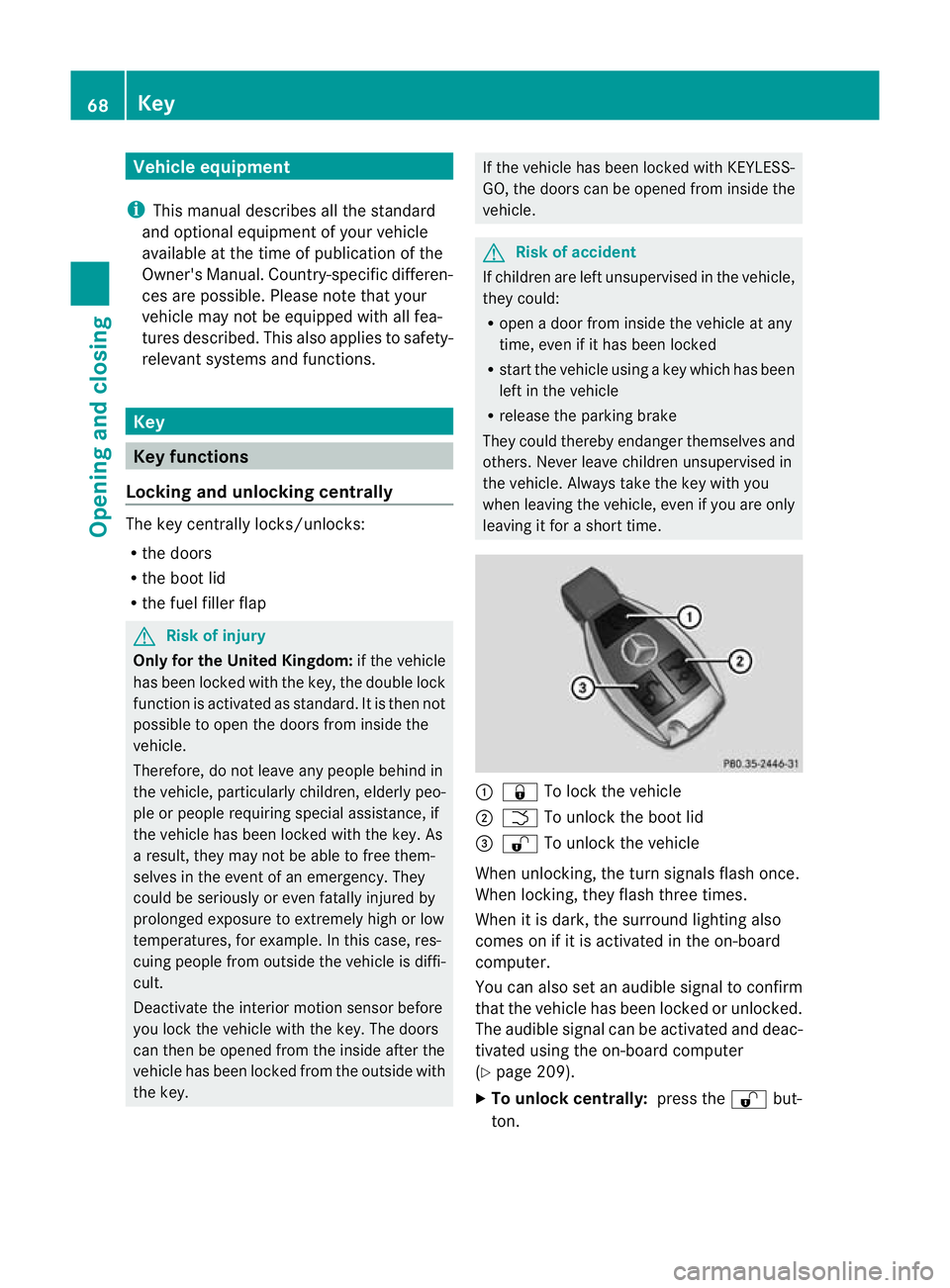
& To lock the vehicle
; F To unlock the boot lid
= % To unlock the vehicle
When unlocking, the turn signals flash once.
When locking, they flash three times.
When it is dark, the surround lighting also
comes on if it is activated in the on-board
computer.
You can also set an audible signal to confirm
that the vehicle has been locked or unlocked.
The audible signal can be activated and deac-
tivated using the on-board computer
(Y page 209).
X To unlock centrally: press the%but-
ton. 68
KeyOpening and closing