lumbar support MERCEDES-BENZ CLS COUPE 2010 Owners Manual
[x] Cancel search | Manufacturer: MERCEDES-BENZ, Model Year: 2010, Model line: CLS COUPE, Model: MERCEDES-BENZ CLS COUPE 2010Pages: 337, PDF Size: 7.36 MB
Page 15 of 337
Setting the ambient lighting col-
our (on-board computer) ................ 208
Switching the Adaptive Highbeam
Assist on/off (on-board com-
puter) ............................................. 208
Switching the daytime driving
lights on/off (on-board computer) .207
Switching the exterio rlighting
delayed switch-off on/off (on-
board computer )............................ 208
Switching the Intelligent Light
System on/off (on-board com-
puter) ............................................. 207
Switching the surround lighting
on/off (on-board computer) ..........208
Light sensor (display message) .......223
LIM indicator lamp Cruise control ................................ 152
DISTRONI CPLUS ........................... 155
Variabl eSPEEDTRONIC .................163
Loading guidelines ............................248
Locking Automatic ........................................ 74
Emergency locking ........................... 75
From the inside (central locking
button) ............................................. 74
Locking verification signal (on-
board computer) ............................... 209
Lubricant additives see Additives
Luggage net ....................................... 250
Lumbar support ................................... 89
4-way lumba rsuppor t...................... 89
Luxury head restraint .........................87 M
M+S tyres ........................................... 303
Main-beam headlamps Display message ............................ 222
Malfunctions
see Display messages
Manual drive program ......................141
Massage function (PULSE) .................88
Matt finish (cleaning instructions) ..272
Memory card (on-board computer) .201
Memory function ................................. 95Menu (on-board computer)
AMG ............................................... 212
Assistance ..................................... 203
Audi o............................................. 200
DISTRONI CPLUS ........................... 160
DVD ............................................... 201
Menu overview .............................. 197
Navigation ..................................... 199
Service .......................................... .205
Settings ......................................... 205
Telephone ...................................... 201
Trip ................................................ 198
TV .................................................. 201
Message memory (on-board com-
puter) ................................................. .215
Messages see Display messages
Mirrors
Sun visor ........................................ 257
see Exterior mirrors or Rear-view mirror
Mobile phone ..................................... 259
Frequencies ................................... 317
Installatio n..................................... 317
Menu (on-board computer) ............201
Transmission output (maximum) .... 317
Mobile telephone
see Mobile phone .......................... 259
Modifying the programming
Key .................................................. 69
MP3
Operating (on-board computer) .....201
see separate operating instructions
Multicontour seat ................................ 87
Multifunction display ........................196
Multifunction steering wheel Operating the on-board computer .195
Overview .......................................... 29 N
Navigation On-board computer .......................199
see separate operating instructions
NECK-PRO head restraints
Operation ........................................ .41
Resetting after being triggered ........41 12
Index
Page 91 of 337
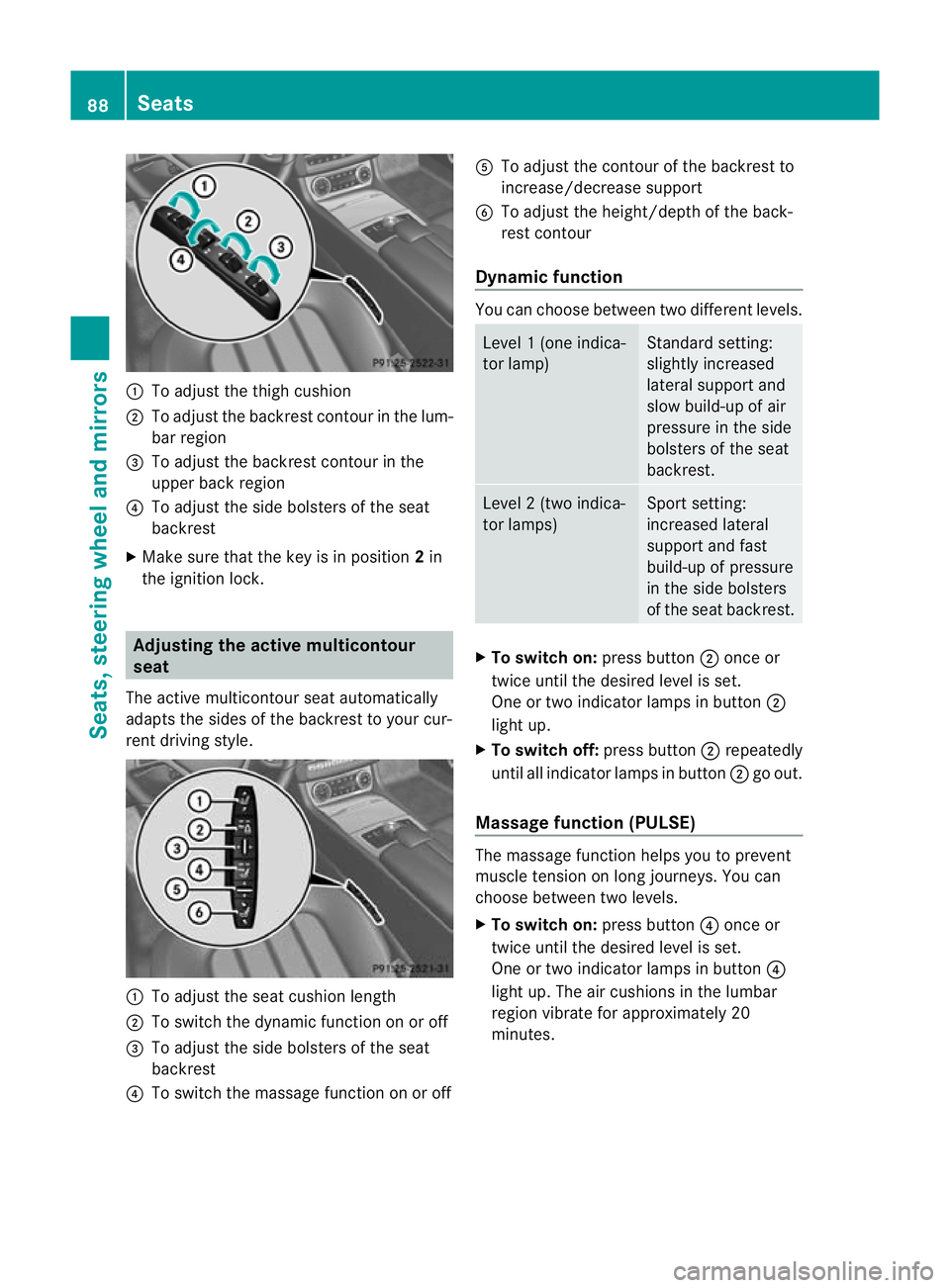
:
To adjust the thigh cushion
; To adjust the backrest contour in the lum-
bar region
= To adjust the backrest contour in the
upper back region
? To adjust the side bolsters of the seat
backrest
X Make sure that the key is in position 2in
the ignition lock. Adjusting the active multicontour
seat
The active multicontour seat automatically
adapts the sides of the backrest to your cur-
rent driving style. :
To adjust the seat cushion length
; To switch the dynamic function on or off
= To adjust the side bolsters of the seat
backrest
? To switch the massage function on or off A
To adjust the contour of the backrest to
increase/decrease support
B To adjust the height/depth of the back-
rest contour
Dynamic function You can choose between two different levels.
Level
1(one indica-
tor lamp) Standard setting:
slightly increased
lateral support and
slow build-up of air
pressure in the side
bolsters of the seat
backrest. Level
2(two indica-
tor lamps) Sport setting:
increased lateral
support and fast
build-up of pressure
in the side bolsters
of the seat backrest.
X
To switc hon:press button ;once or
twice until the desired level is set.
One or two indicator lamps in button ;
light up.
X To switch off: press button;repeatedly
until all indicator lamps in button ;go out.
Massage function (PULSE) The massage function helps you to prevent
muscle tension on long journeys. You can
choose between two levels.
X To switch on: press button?once or
twice until the desired level is set.
One or two indicator lamps in button ?
light up. The air cushions in the lumbar
region vibrate for approximately 20
minutes. 88
SeatsSeats, steering wheel and mirrors
Page 92 of 337
Adjusting lumbar support
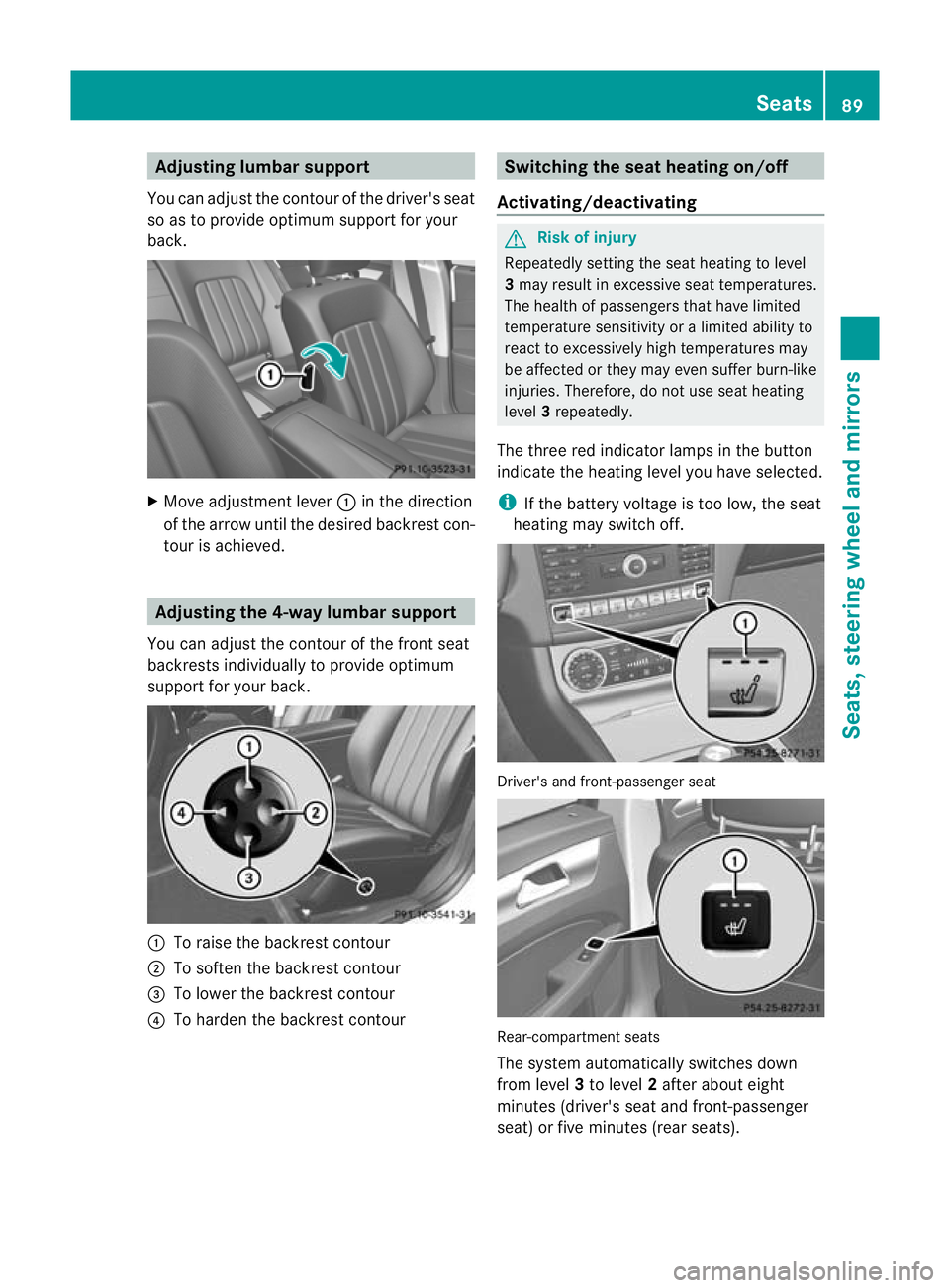
You can adjust the contour of the driver's seat
so as to provide optimum support for your
back. X
Move adjustmen tlever :in the direction
of the arrow until the desired backrest con-
tour is achieved. Adjusting the 4-way lumbar support
You can adjust the contour of the front seat
backrests individually to provide optimum
support for your back. :
To raise the backrest contour
; To soften the backrest contour
= To lower the backrest contour
? To harden the backrest contour Switching the seat heating on/off
Activating/deactivating G
Risk of injury
Repeatedly setting the seat heating to level
3 may result in excessive seat temperatures.
The health of passengers that have limited
temperature sensitivity or a limited ability to
react to excessively high temperatures may
be affected or they may even suffer burn-like
injuries. Therefore, do not use seat heating
level 3repeatedly.
The three red indicator lamps in the button
indicate the heating level you have selected.
i If the battery voltage is too low, the seat
heating may switch off. Driver's and front-passenger seat
Rear-compartment seats
The system automatically switches down
from level
3to level 2after about eight
minutes (driver's seat and front-passenger
seat) or five minutes (rear seats). Seats
89Seats, steering wheel and mirrors Z