manual transmission MERCEDES-BENZ CLS COUPE 2010 Owners Manual
[x] Cancel search | Manufacturer: MERCEDES-BENZ, Model Year: 2010, Model line: CLS COUPE, Model: MERCEDES-BENZ CLS COUPE 2010Pages: 337, PDF Size: 7.36 MB
Page 15 of 337
Setting the ambient lighting col-
our (on-board computer) ................ 208
Switching the Adaptive Highbeam
Assist on/off (on-board com-
puter) ............................................. 208
Switching the daytime driving
lights on/off (on-board computer) .207
Switching the exterio rlighting
delayed switch-off on/off (on-
board computer )............................ 208
Switching the Intelligent Light
System on/off (on-board com-
puter) ............................................. 207
Switching the surround lighting
on/off (on-board computer) ..........208
Light sensor (display message) .......223
LIM indicator lamp Cruise control ................................ 152
DISTRONI CPLUS ........................... 155
Variabl eSPEEDTRONIC .................163
Loading guidelines ............................248
Locking Automatic ........................................ 74
Emergency locking ........................... 75
From the inside (central locking
button) ............................................. 74
Locking verification signal (on-
board computer) ............................... 209
Lubricant additives see Additives
Luggage net ....................................... 250
Lumbar support ................................... 89
4-way lumba rsuppor t...................... 89
Luxury head restraint .........................87 M
M+S tyres ........................................... 303
Main-beam headlamps Display message ............................ 222
Malfunctions
see Display messages
Manual drive program ......................141
Massage function (PULSE) .................88
Matt finish (cleaning instructions) ..272
Memory card (on-board computer) .201
Memory function ................................. 95Menu (on-board computer)
AMG ............................................... 212
Assistance ..................................... 203
Audi o............................................. 200
DISTRONI CPLUS ........................... 160
DVD ............................................... 201
Menu overview .............................. 197
Navigation ..................................... 199
Service .......................................... .205
Settings ......................................... 205
Telephone ...................................... 201
Trip ................................................ 198
TV .................................................. 201
Message memory (on-board com-
puter) ................................................. .215
Messages see Display messages
Mirrors
Sun visor ........................................ 257
see Exterior mirrors or Rear-view mirror
Mobile phone ..................................... 259
Frequencies ................................... 317
Installatio n..................................... 317
Menu (on-board computer) ............201
Transmission output (maximum) .... 317
Mobile telephone
see Mobile phone .......................... 259
Modifying the programming
Key .................................................. 69
MP3
Operating (on-board computer) .....201
see separate operating instructions
Multicontour seat ................................ 87
Multifunction display ........................196
Multifunction steering wheel Operating the on-board computer .195
Overview .......................................... 29 N
Navigation On-board computer .......................199
see separate operating instructions
NECK-PRO head restraints
Operation ........................................ .41
Resetting after being triggered ........41 12
Index
Page 17 of 337
PRE-SAFE
®
system
Display message ............................ 216
Operation ........................................ .40
Program selector ...............................1 39
Program selector button ..................138
Pulling away Automatic transmission .................131 R
RACE START (AMG vehicles) .............166
RACETIMER (on-board computer) ....212
Radar sensor system Country overview ........................... 327
Display message ............................ 227
Radar system sensors
Switching on/off (on-board com-
puter) ............................................. 210
Radio
Changing a statio n(on-board
computer) ...................................... 200
see separate operating instructions
Rain closing feature
Sliding sunroo f................................. 81
Range (on-board computer) .............198
Rear compartment Setting the airv ents...................... 124
Setting the temperature ................115
Rear-compartment seat belt sta-
tus indicator ........................................ 44
Rear foglamp (display message) ...... 222
Rear-view mirror Anti-dazzle mode (automatic) ..........94
Dipping (manual) .............................. 92
Rear window blind ............................257
Rear window heating Malfunction ................................... .117
Switching on/off ........................... 117
Refuelling ........................................... 142
Remote control Auxiliary heating ............................ 120
Changing the batteries (auxiliary
heating) ......................................... 121
Reserve (fuel tank)
see Fuel
Reserve fuel
Display message ............................ 225
Warning lamp ................................. 244 Residual heat
Switching on/off ........................... 118
Restraint systems
see SRS
Rev counter ........................................ 194
Reversing camera Function/notes ............................. 176
Reversing camera (cleaning
instructions) ...................................... 274
Reversing lamp (display message) ..223
Reversing lamps (changing bulbs) ..106
Roller sunblind Rea rwindow .................................. 257
Roof carrier ........................................ 254
Roof load (maximum) ........................323
Route see Route guidance (on-board
computer)
Route guidance (on-board com-
puter) ................................................. .199 S
Safety Childre ninthe vehicle ..................... 46
Child restraint systems ....................46
Safety systems
see Driving safety systems
Seat
Active multicontour sea t.................. 88
Seat backrest (rear)
Folding forwards/back ..................251
Seat belt
Adjusting the driver's and front-
passenger sea tbelt ......................... 43
Belt force limiter .............................. 45
Belt tensioner .................................. 45
Cleaning ......................................... 276
Display message ............................ 215
Fastening ......................................... 43
Important safety guidelines .............42
Rea rseat belt status indicator .........44
Releasing ......................................... 44
Switching belt adjustment on/off
(on-board computer) ......................211
Warning lamp (function) ................... 44 14
Index
Page 22 of 337
Protection of the environment
Notes
H
Environmental note
Daimler's declared policy is one of integrated
environmental protection.
The objectives are for the natural resources
which form the basis of our existence on this
planet to be used sparingly and in a manner
which takes the requirements of both nature
and humanity into account.
You too can help to protect the environment
by operating your vehicle in an environmen-
tally responsible manner.
Fuel consumption and the rate of engine,
transmission, brake and tyre wear depend on
the following factors:
R operating conditions of your vehicle
R your personal driving style
You can influence both factors. You should
bear the following in mind:
Operating conditions
R avoid short trips as these increase fuel con-
sumption.
R make sure that the tyre pressures are
always correct.
R do not carry any unnecessary weight.
R keep an eye on the vehicle's fuel consump-
tion.
R remove roof racks once you no longer need
them.
R a regularly serviced vehicle will contribute
to environmental protection. You should
therefore adhere to the service intervals.
R always have maintenance work carried out
at a qualified specialist workshop, e.g. a
Mercedes-Benz Service Centre.
Personal driving style
R do not depress the accelerator pedal when
starting the engine.
R do not warm up the engine with the vehicle
stationary. R
drive carefully and maintain a safe distance
from the vehicle in front.
R avoid frequent, sudden acceleration.
R change gear in good time and use each gear
only up to ⅔ofits maximum engine speed.
R switch off the engine in stationary traffic. Returning use
dvehicles
Mercedes-Ben zwill take back your
Mercedes-Ben zto dispose of it in an environ-
mentally responsible manner ,inaccordance
with the European Union (EU) End of Life
Vehicles Directive.
The End of Life Vehicles Directive applies to
vehicles of up to 3.5 tgross vehicle weight, in
accordance with national regulations. For
several years, Mercedes-Benz has been
meeting all the legal requirements for a
design which allows for recycling and reuse.
There is a network of return points and dis-
assembly plants which can recycle yourv ehi-
cle in an environmentally-responsible man-
ner. The options for recycling vehicles and
parts are constantly being developed and
improved. This means that your Mercedes-
Benz will also continue to meet even the
increased recycling quotas in the future in
good time. You can obtain further information
from your national Mercedes-Benzh omepage
or your national hotline number. Vehicle equipment
This manual describes all the standard and
optional equipment of your vehicle available
at the time of publication of the Owner's Man-
ual. Country-specific differences are possi-
ble. Bear in mind that your vehicle may not
feature all functions described here. This also
refers to safety-related systems and func-
tions. The equipment in your vehicle may
therefore differ from that shown in the
descriptions and illustrations. All the systems
found in your vehicle are listed in the original Introduction
19 Z
Page 97 of 337
i
The mirrors do not fold out if they have
been folded in manually.
Exterior mirror out of position If an exterior mirror has been pushed out of
position, proceed as follows:
X Vehicles without electrically folding
exterior mirrors: move the exterior mirror
into the correc tposition manually.
X Vehicles with electrically folding exte-
rior mirrors: press the mirror-folding but-
ton (Y page 93) repeatedly until you hear
the mirror engage in position.
The mirror housing is engaged again and
you can adjust the exterior mirrors as usual
(Y page 93). Automatic anti-dazzle mirrors
G
Risk of accident
If the incident light from headlamps cannot
strike the sensor in the rear-view mirror, for
instance, when the rear window roller sun-
blind is extended, the mirror's automatic anti-
dazzle function will not operate.
Incident light could then blind you. This may
distract you from the traffic conditions and,
as a result, you may cause an accident .Inthis
case, adjust the rear-view mirror manually.
The rear-view mirror and the exterior mirror
on the driver's side automatically go into anti-
dazzle mode if the ignition is switched on and
incident light from headlamps strikes the sen-
sor in the rear-view mirror.
The mirrors do not go into anti-dazzle mode if
reverse gear is engaged or the interior lighting
is switched on. Parking position for the exterior mir-
ror on the front-passenger side
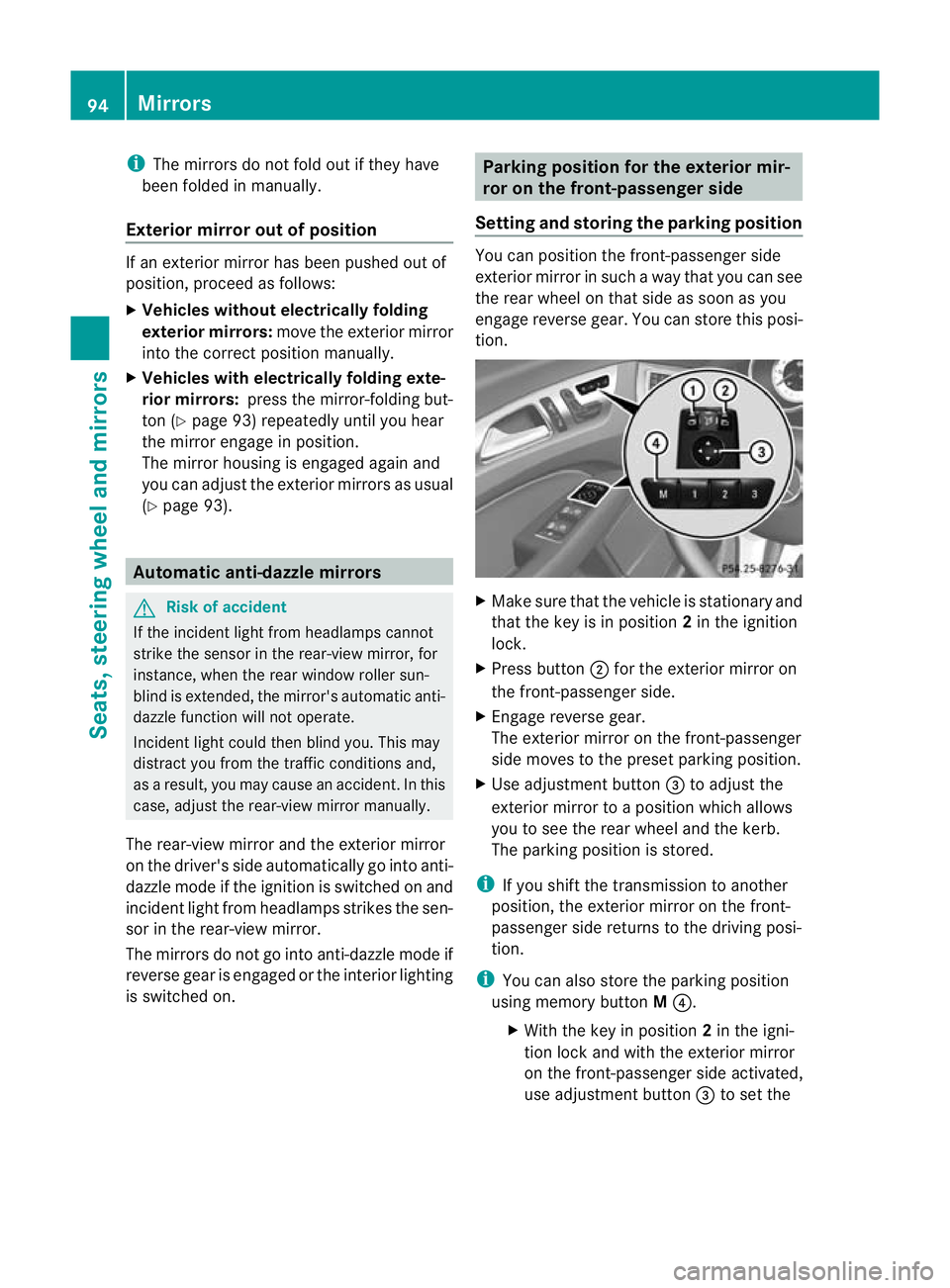
Setting and storing the parking position You can position the front-passenger side
exterior mirror in such a way that you can see
the rear wheel on that side as soon as you
engage reverse gear. You can store this posi-
tion.
X
Make sure that the vehicle is stationary and
that the key is in position 2in the ignition
lock.
X Press button ;for the exterior mirror on
the front-passenger side.
X Engage reverse gear.
The exterior mirror on the front-passenger
side moves to the preset parking position.
X Use adjustment button =to adjust the
exterior mirror to a position which allows
you to see the rear wheel and the kerb.
The parking position is stored.
i If you shift the transmission to another
position, the exterior mirror on the front-
passenger side returns to the driving posi-
tion.
i You can also store the parking position
using memory button M?.
X With the key in position 2in the igni-
tion lock and with the exterior mirror
on the front-passenger side activated,
use adjustment button =to set the 94
MirrorsSeats, steering wheel and mirrors
Page 133 of 337
is open, the power supply is deactivated
again.
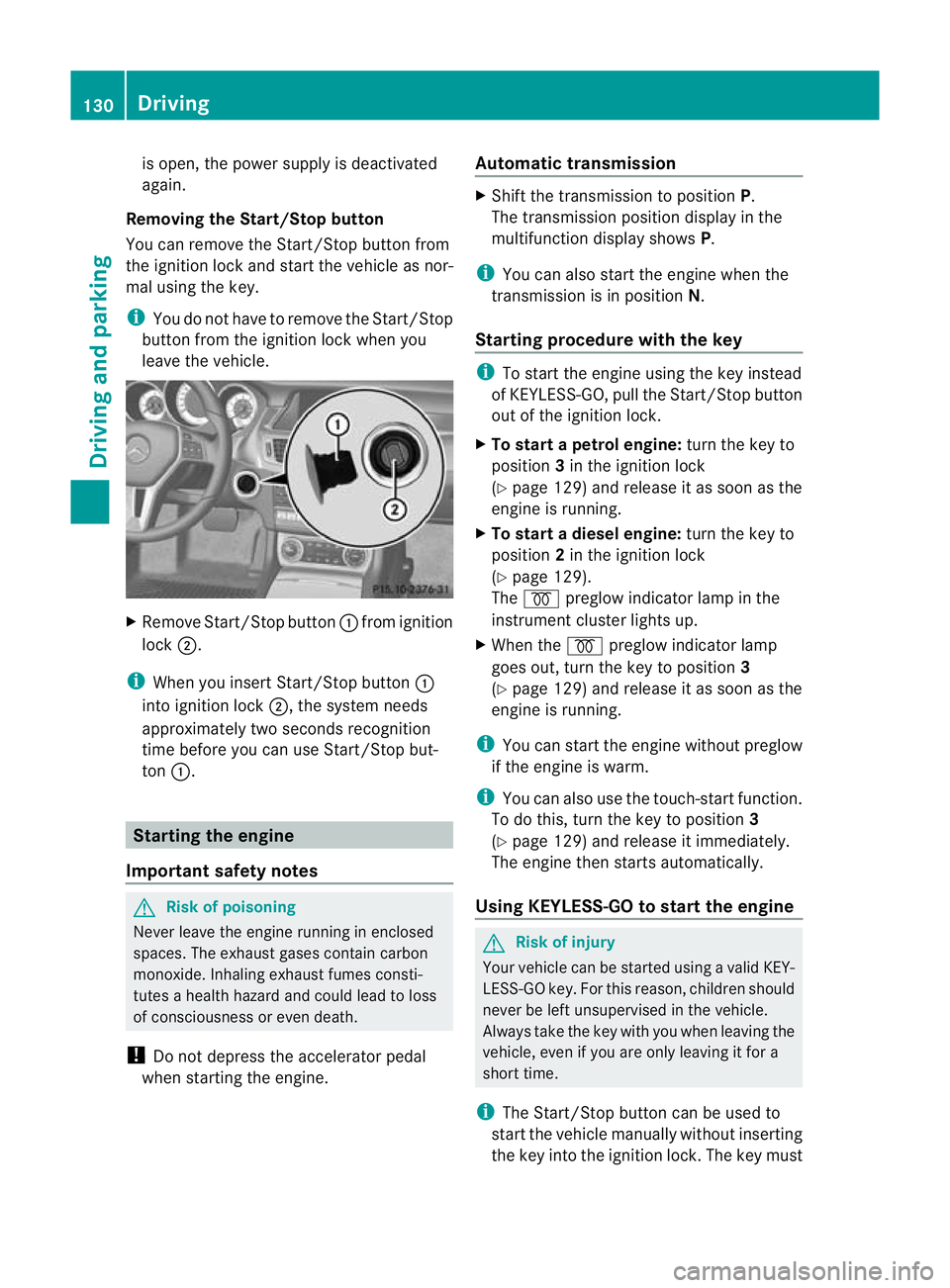
Removing the Start/Stop button
You can remove the Start/Stop button from
the ignition lock and start the vehicle as nor-
mal using the key.
i You do not have to remove the Start/Stop
button from the ignition lock when you
leave the vehicle. X
Remove Start/Stop button :fromi gnition
lock ;.
i When you insert Start/Stop button :
into ignition lock ;, the system needs
approximately two seconds recognition
time before you can use Start/Stop but-
ton :. Starting the engine
Important safety notes G
Risk of poisoning
Never leave the engine running in enclosed
spaces. The exhaust gases contain carbon
monoxide. Inhaling exhaust fumes consti-
tutes a health hazard and could lead to loss
of consciousness or even death.
! Do not depress the accelerator pedal
when starting the engine. Automatic transmission X
Shift the transmission to position P.
The transmission position display in the
multifunction display shows P.
i You can also start the engine when the
transmission is in position N.
Starting procedure with the key i
To start the engine using the key instead
of KEYLESS-GO, pull the Start/Stop button
out of the ignition lock.
X To start a petrol engine: turn the key to
position 3in the ignition lock
(Y page 129) and release it as soon as the
engine is running.
X To startad iesel engine: turn the key to
position 2in the ignition lock
(Y page 129).
The % preglow indicator lamp in the
instrumen tcluster lights up.
X When the %preglow indicator lamp
goes out, tur nthe key to position 3
(Y page 129) and release it as soon as the
engine is running.
i You can start the engine without preglow
if the engine is warm.
i You can also use the touch-start function.
To do this, turn the key to position 3
(Y page 129) and release it immediately.
The engine then starts automatically.
Using KEYLESS-GO to startt he engine G
Risk of injury
You rvehicle can be started using a valid KEY-
LESS-GO key. For this reason, children should
never be left unsupervised in the vehicle.
Always take the key with you when leaving the
vehicle, even if you are only leaving it for a
short time.
i The Start/Stop button can be used to
start the vehicle manually without inserting
the key into the ignition lock. The key must 130
DrivingDriving and parking
Page 136 of 337
Automatic engine start
The engine is started automatically if you:
R release the brake pedal when HOLD is not
activated and the transmission is in posi-
tion Dor N
R shif tthe transmission to position R
R depress the accelerator pedal
R switch off the ECO start/stop function by
pressing the ECO button (except for AMG
vehicles)
R change to drive program S,S+ orM(AMG
vehicles)
R unfasten your seat belt or open the driver's
door
The engine is also started automatically if:
R the vehicle starts to roll.
R the brake system requires this.
R the system detects moisture on the wind-
screen when the air-conditioning system is
switched on.
R the temperature in the vehicle interior devi-
ates from the set range.
R the battery's charge status is too low.
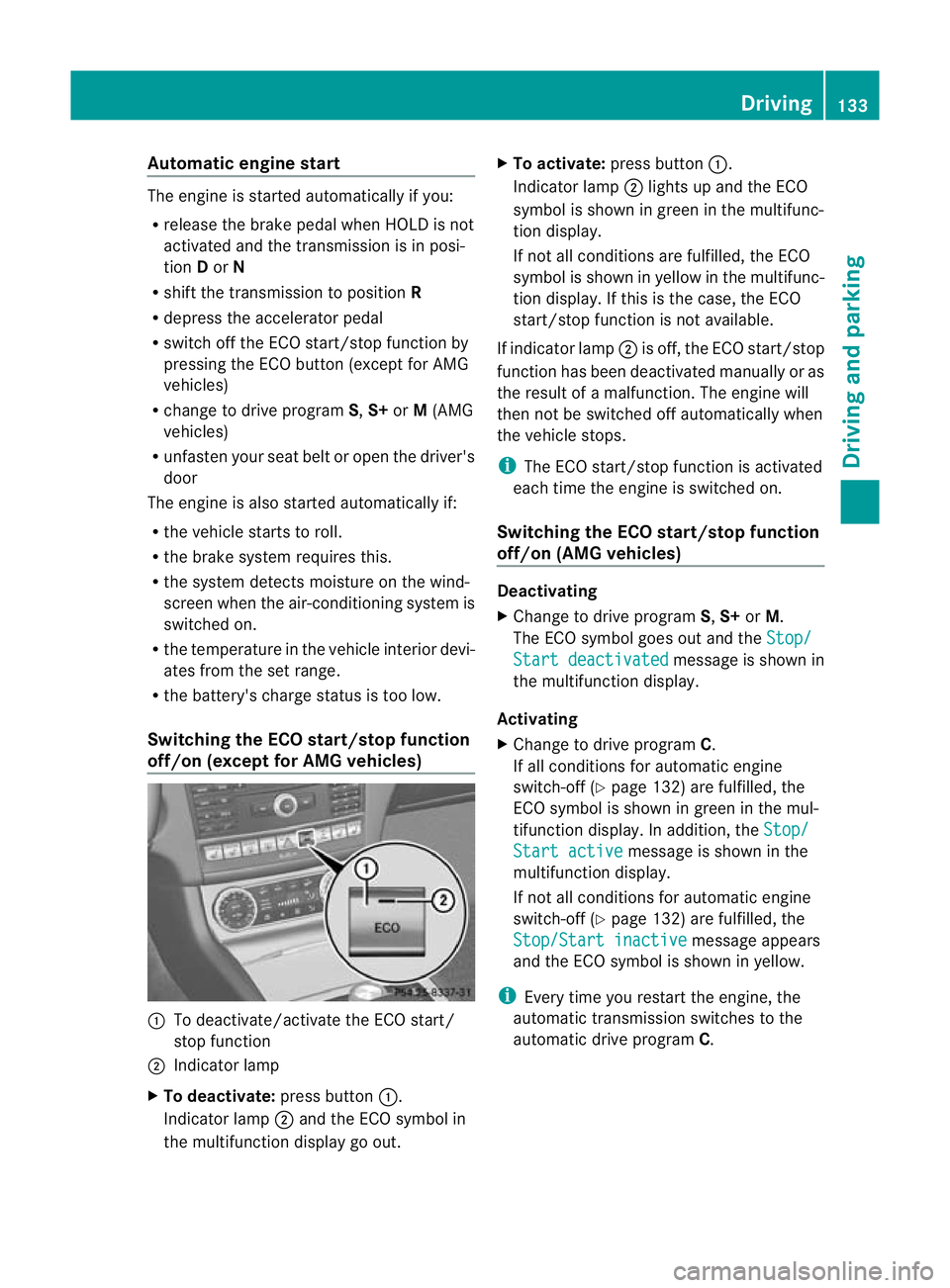
Switching the ECO start/stop function
off/on (except for AMG vehicles) :
To deactivate/activate the ECO start/
stop function
; Indicator lamp
X To deactivate: press button:.
Indicator lamp ;and the ECO symbol in
the multifunction display go out. X
To activate: press button :.
Indicator lamp ;lights up and the ECO
symbol is shown in green in the multifunc-
tion display.
If not all conditions are fulfilled, the ECO
symbol is shown in yellow in the multifunc-
tion display. If this is the case, the ECO
start/stop function is not available.
If indicator lamp ;is off, the ECO start/stop
function has been deactivated manually or as
the result of a malfunction. The engine will
then not be switched off automatically when
the vehicle stops.
i The ECO start/stop function is activated
each time the engine is switched on.
Switching the ECO start/stop function
off/on (AMG vehicles) Deactivating
X
Change to drive program S,S+ orM.
The ECO symbol goes out and the Stop/ Start deactivated message is shown in
the multifunction display.
Activating
X Change to drive program C.
If all conditions for automatic engine
switch-off (Y page 132) are fulfilled, the
ECO symbol is shown in green in the mul-
tifunction display. In addition, the Stop/ Start active message is shown in the
multifunction display.
If not all conditions for automatic engine
switch-off (Y page 132) are fulfilled, the
Stop/Start inactive message appears
and the ECO symbol is shown in yellow.
i Every time you restart the engine, the
automatic transmission switches to the
automatic drive program C. Driving
133Driving and parking Z
Page 141 of 337
A
Neutral
Do not shift the transmission to
N
while driving. Otherwise, the auto-
matic transmission could be dam-
aged.
If ESP ®
is deactivated or faulty:
only shift the transmission to posi-
tion Nif the vehicle is in dange rof
skidding, e.g. on icy roads.
If you switch off the engine using
the key or the Start/Stop button,
the automatic transmission shifts
to neutral Nautomatically.
! Rolling in neutral Ncan lead to
damage to the transmission. 7
Drive
The automatic transmission
changes gear automatically. All
forward gears are available.
Changing gears
The automatic transmission shifts to the indi-
vidual gears automatically when it is in trans-
mission position D.This automatic gearshift-
ing behaviouri s determined by:
R a shift range restriction, if selected
R the selected drive program (Y page 138)
R the position of the accelerator pedal
R the road speed Driving tips
Accelerator pedal position Your style of driving influences how the auto-
matic transmission shifts gear:
R little throttle: early upshifts
R more throttle: late upshifts AMG vehicles When shifting down, the double-clutch func-
tion is active regardless of the currently selec-
ted drive program. The double-clutch function
reduces load change reactions and is condu-
cive to a sporty driving style. The sound gen-
erated by the double-clutch function depends
on the drive program selected.
Kickdown
Use kickdown for maximum acceleration.
X
Depress the accelerator pedal beyond the
pressure point.
The transmission shifts to a lower gear
depending on the engine speed.
X Ease off the accelerator pedal once the
desired speed is reached.
The automatic transmission shifts back up. Program selector button
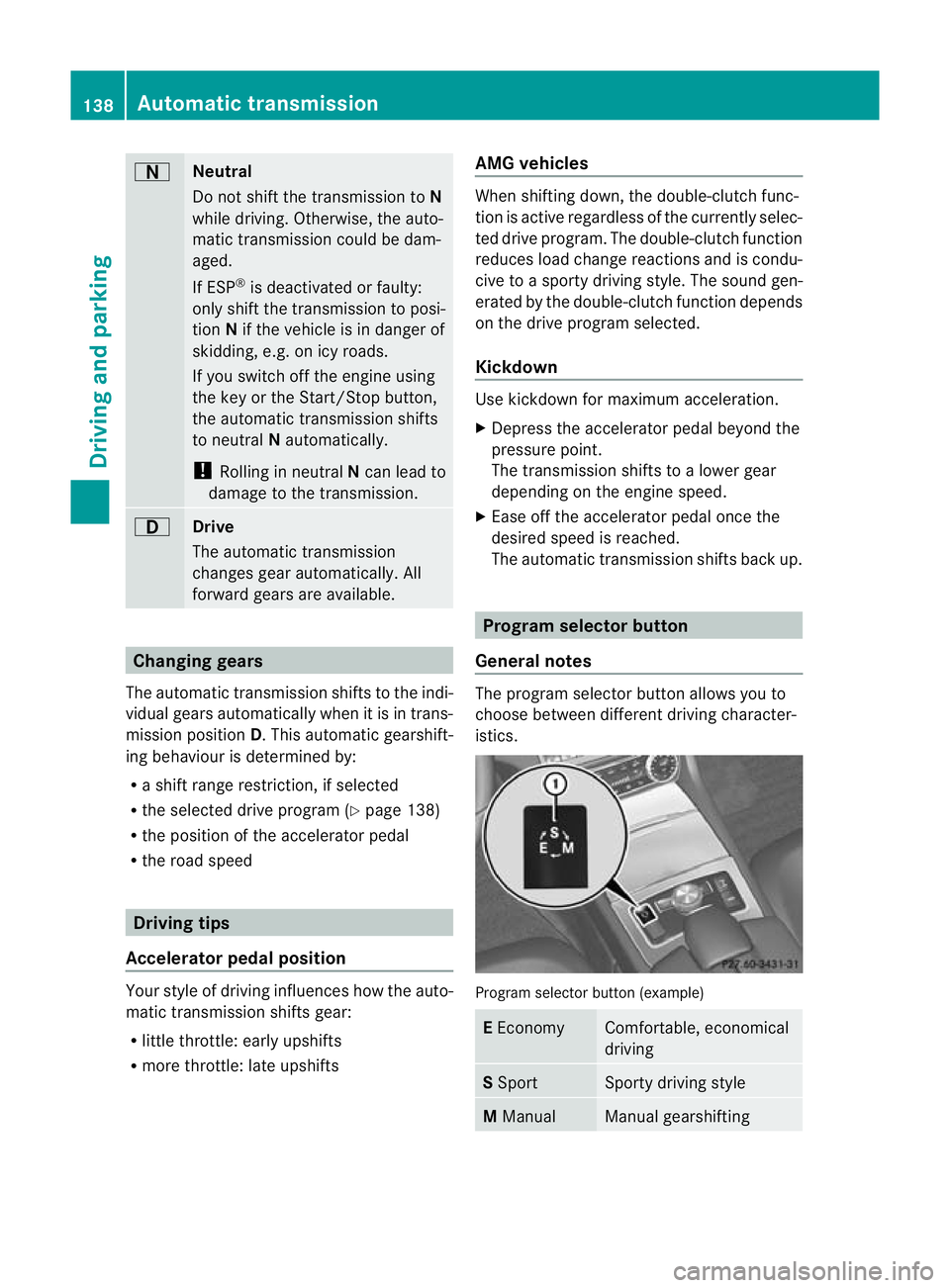
General notes The program selector button allows you to
choose between different driving character-
istics.
Program selector button (example)
E
Economy Comfortable, economical
driving
S
Sport Sporty driving style
M
Manual Manual gearshifting138
Automatic transmissionDriving and parking
Page 142 of 337
i
Further information on the "Automatic
drive program" (Y page 139).
X Press program selector button :repeat-
edly until the letter for the desired gearshift
program appears in the multifunction dis-
play.
i The automatic transmission switches to
automatic drive program Eeach time the
engine is started.
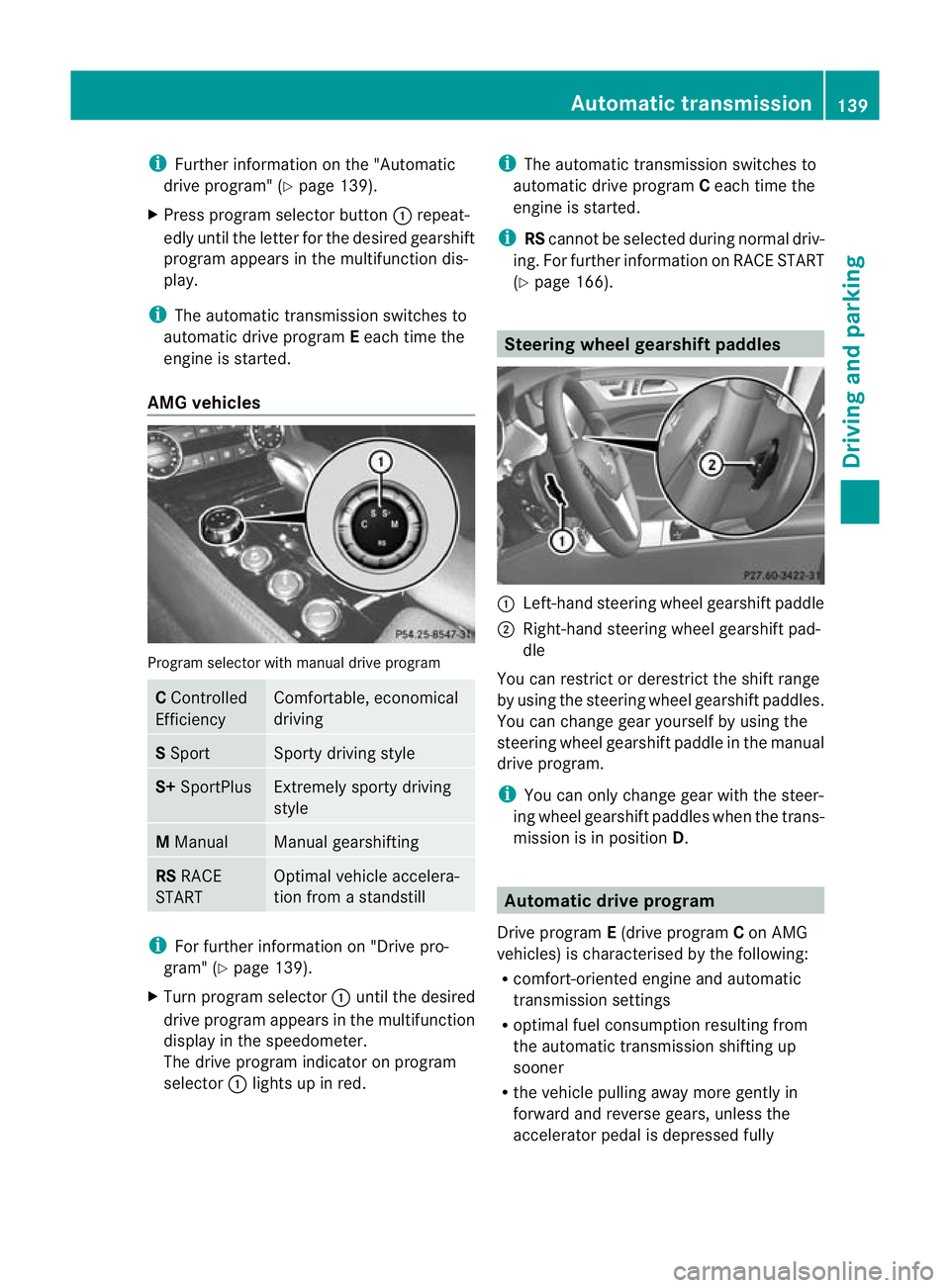
AMG vehicles Program selector with manual drive program
C
Controlled
Efficiency Comfortable, economical
driving
S
Sport Sporty driving style
S+
SportPlus Extremely sporty driving
style
M
Manual Manual gearshifting
RS
RACE
START Optimal vehicle accelera-
tion from a standstill
i
For further information on "Drive pro-
gram" (Y page 139).
X Turn program selector :until the desired
drive program appears in the multifunction
display in the speedometer.
The drive program indicator on program
selector :lights up in red. i
The automatic transmission switches to
automatic drive program Ceach time the
engine is started.
i RScannot be selected during normal driv-
ing. For further information on RACE START
(Y page 166). Steering wheel gearshif
tpaddles :
Left-hand steering wheel gearshift paddle
; Right-hand steering wheel gearshift pad-
dle
You can restrict or derestrict the shift range
by using the steering wheel gearshift paddles.
You can change gea ryourself by using the
steering wheel gearshift paddle in the manual
drive program.
i You can only change gear with the steer-
ing wheel gearshift paddles when the trans-
mission is in position D. Automatic drive program
Drive program E(drive program Con AMG
vehicles) is characterised by the following:
R comfort-oriented engine and automatic
transmission settings
R optimal fuel consumption resulting from
the automatic transmission shifting up
sooner
R the vehicle pulling away more gently in
forward and reverse gears, unless the
accelerator pedal is depressed fully Automatic transmission
139Driving and parking Z
Page 144 of 337
Selecting the ideal shift range
X
Pull the left-hand steering wheel gearshift
paddle and hold it in position.
The automatic transmission shifts to the
gear which allows optimum acceleration
and deceleration. To do this, the automatic
transmission shifts down one or more
gears. Manual drive program
Switching on the manual drive program AMG vehicles and vehicles with
aDIRECT
SELECT lever: you can select manual drive
program Musing the program selector or the
program selector button. In manual drive pro-
gram M, you can change gear yourself using
the steering wheel gearshif tpaddles if the
transmission is in position D.
X Press the program selecto rbutton
(Y page 138) repeatedly until Mappears in
the multifunction display.
X AMG vehicles: turn the program selector
(Y page 139) until Mappears in the multi-
function display.
The indicator Mon the program selector
lights up in red.
Upshifting X
Pull the right-hand steering wheel gearshift
paddle (Y page 139).
The automatic transmission shifts up to the
next gear.
Vehicles with AMG engines
! In manual gearshif tprogram M, the auto-
matic transmission does not shift up auto-
matically even when the engine limiting
speed for the current geari s reached.
When the engine limiting speed is reached,
the fuel supply is cut to prevent the engine
from overrevving. You must make sure that
the engine speed does not reach the red area of the rev counter. Otherwise, there is
a risk of engine damage.
X Shift up a gear if the colour in the multi-
function display in the speedometer
changes to red and UP appears in the rev
counter.
Downshifting X
Pull the left-hand steering wheel gearshift
paddle (Y page 139).
The automatic transmission shifts down to
the next gear.
i If you slow down or stop without shifting
down, the automatic transmission auto-
matically shifts down.
i For maximum acceleration, pull the left-
hand steering wheel gearshift paddle until
the transmission selects the optimum gear
for the current speed.
Kickdown i
Vehicles with an AMG engine: it is not
possible to use kickdown in manual drive
program M.
You can also use kickdown for maximum
acceleration in manual drive program M.
X Depress the accelerator pedal beyond the
pressure point.
The transmission shifts to a lower gear
depending on the engine speed.
X Shift back up once the desired speed is
reached.
Switching off the manual drive program X
Standard vehicles with the DIRECT
SELECT lever: press the program selector
button (Y page 138) until Eor Sis shown
in the multifunction display.
X AMG vehicles: turn the program selector
(Y page 139) until C,Sor S+ appears in the
multifunction display. Automatic transmission
141Driving and parking Z
Page 238 of 337
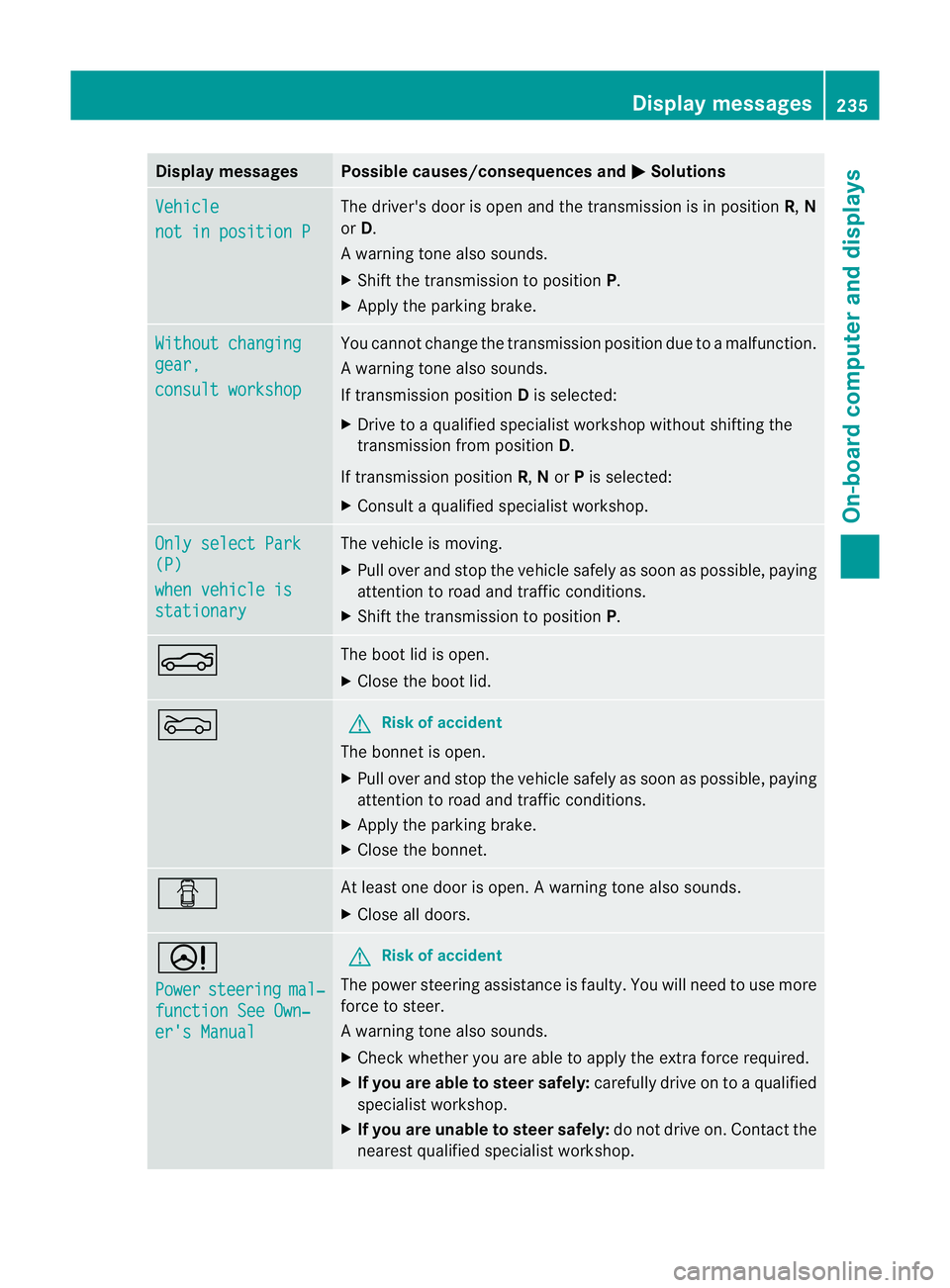
Display messages Possible causes/consequences and
M Solutions
Vehicle
not in position P The driver's doo
ris open and the transmission is in position R,N
or D.
Aw arning tone also sounds.
X Shift the transmission to position P.
X Apply the parking brake. Without changing
gear,
consult workshop You canno
tchange the transmission position due to a malfunction.
Aw arning tone also sounds.
If transmission position Dis selected:
X Drive to a qualified specialist workshop without shifting the
transmission from position D.
If transmission position R,Nor Pis selected:
X Consult a qualified specialist workshop. Only select Park
(P)
when vehicle is
stationary The vehicle is moving.
X
Pull ove rand stop the vehicle safely as soo nas possible, paying
attention to road and traffic conditions.
X Shift the transmission to position P.N The boot lid is open.
X
Close the boot lid. M G
Risk of accident
The bonnet is open.
X Pull over and stop the vehicle safely as soon as possible, paying
attention to road and traffic conditions.
X Apply the parking brake.
X Close the bonnet. C At least one door is open.
Awarning tone also sounds.
X Close all doors. D
Power
steering mal‐
function See Own‐
er's Manual G
Ris
kofa ccident
The power steering assistance is faulty. You will need to use more
force to steer.
Aw arning tone also sounds.
X Chec kwhether you are able to apply the extra force required.
X If you are able to steer safely: carefully drive on to a qualified
specialist workshop.
X If you are unable to steer safely: do not drive on. Contact the
nearest qualified specialist workshop. Display messages
235On-board computer and displays Z