navigation system MERCEDES-BENZ CLS COUPE 2011 User Guide
[x] Cancel search | Manufacturer: MERCEDES-BENZ, Model Year: 2011, Model line: CLS COUPE, Model: MERCEDES-BENZ CLS COUPE 2011Pages: 337, PDF Size: 7.37 MB
Page 213 of 337

Activating/deactivating the rada
rsensor
system
i You must deactivate the radar sensor sys-
tem in certain countries and near radio
telescope facilities. Further information
(Y page 327).
Vehicles with a navigation system: the radar
sensor system is deactivated automatically if
you are close to radio telescope facilities.
The following systems are switched off when
the radar sensor system is deactivated:
R DISTRONIC PLUS (Y page 154)
R BAS PLUS (Y page 57)
R PRE-SAFE ®
Brake (Y page 61)
R Blind Spo tAssist (Y page 183)
R Active Blind Spot Assist (Y page 186)
X Press the =or; button on the steer-
ing wheel to select the Settings menu.
X Press the :or9 button to select the
Vehicle submenu.
X Press the abutton to confirm.
X Press the 9or: button to select
Radar sensor (See Owner's Man.): .
You will see the selected setting: on or
off .
X Press the abutton to save the setting.
Heating menu Auxiliary heating departure time
This function is only available on vehicles with
auxiliary heating (Y
page 119).
In the Heating submenu, you can select a
stored departure time or change a departure
time.
The auxiliary heating timer function calcu-
lates the switch-on time according to the out-
side temperature so that the vehicle is pre-
heated by the departure time. When the
departure time is reached, the auxiliary heat-
ing continues to heat for a further five
minutes and then switches off. The auxiliary
heating adopts the THERMATIC or THERMA-
TRONIC temperature setting. You can switch off the auxiliary heating by
using the remote control or the auxiliary heat-
ing button on the centre console. G
Risk of poisoning
Exhaust fumes are produced when the auxili-
ary heating is in operation. Inhaling these
exhaust fumes can be poisonous. You should
therefore switch off the auxiliary heating in
confined spaces without an extraction sys-
tem, e.g. a garage. G
Risk of fire
When operating the auxiliary heating parts of
the vehicle can get very hot. Make sure that
the exhaust system does not under any cir-
cumstances come into contact with easily
ignitable material such as dry grass or fuels.
The material could otherwise ignite and set
the vehicle alight. Choose your parking spot
accordingly.
Operating the auxiliary heating is thus pro-
hibited at filling stations or when your vehicle
is being refuelled.Y ou must therefore switch
off the auxiliary heating at filling stations.
! Operating the auxiliary heating/ventila-
tion draws on the vehicle battery. After you
have heated or ventilated the vehicle a
maximum of two times, drive for a longer
distance.
i Switch the auxiliary heating on regularly
once a month for about ten minutes.
Selecting the departure time or deactivat-
ing a selected departure time
X Press the =or; button on the steer-
ing wheel to select the Settings menu.
X Press the :or9 button to select the
Heating submenu.
X Press the abutton to confirm.
You will see the selected setting.
X Press the abutton to confirm. 210
Menus and submenusOn-board computer and displays
Page 231 of 337

Display messages Possible causes/consequences and
M Solutions
Radar sensor
deactivated autom.
See Owner's Manual Vehicles with a navigation system: the vehicle is close to a radio
telescope facility and is therefore prohibited from transmitting any
rada
rsignals .The radar sensor system has switched off automat-
ically.
DISTRONIC PLUS (Y page 154) is switched off automatically if it
is activated. Awarning tone also sounds.
If Blind Spot Assist (Y page 183) or Active Blind Spot Assist
(Y page 186) are activated, they are switched off automatically.
The yellow 9indicator lamps also light up in the exterior mir-
rors.
BAS PLUS (Brake Assist PLUS) (Y page 57) and the
PRE-SAFE ®
Brake (Y page 61) are also no tavailable.
X Drive on.
These functions are available again as soon as the vehicle is far
enough away from the radio telescope facility (Y page 327).Lane Keeping
Assist currently
unavailable. see
Owner's Manual
or
Active Lane Keep‐
ing Assist cur‐
rently unavailable
see Owner's Manual Lane Keeping Assist or Active Lane Keeping Assist is deactivated
and temporarily inoperative if:
R
the windscreen is dirty in the camera's field of vision.
R visibility is impaired due to heavy rain, snow or fog.
R there are no lane markings for a longer period.
R the lane markings are worn, dark or covered, for example by dirt
or snow.
Lane Keeping Assist or Active Lane Keeping Assist is operational
again and the display message disappears if:
R the dirt (e.g. slush) drops away while the vehicle is in motion.
R the system detects that the camera is fully operational again.
If the display message continues to be displayed:
X Clean the windscreen. Lane Keeping
Assist inoperative
or
Active Lane Keep‐
ing Assist inoper‐
ative Lane Keeping Assist or Active Lane Keeping Assist is faulty.
X
Visi taqualified specialist workshop. 228
Display messagesOn-board computer and displays
Page 330 of 337
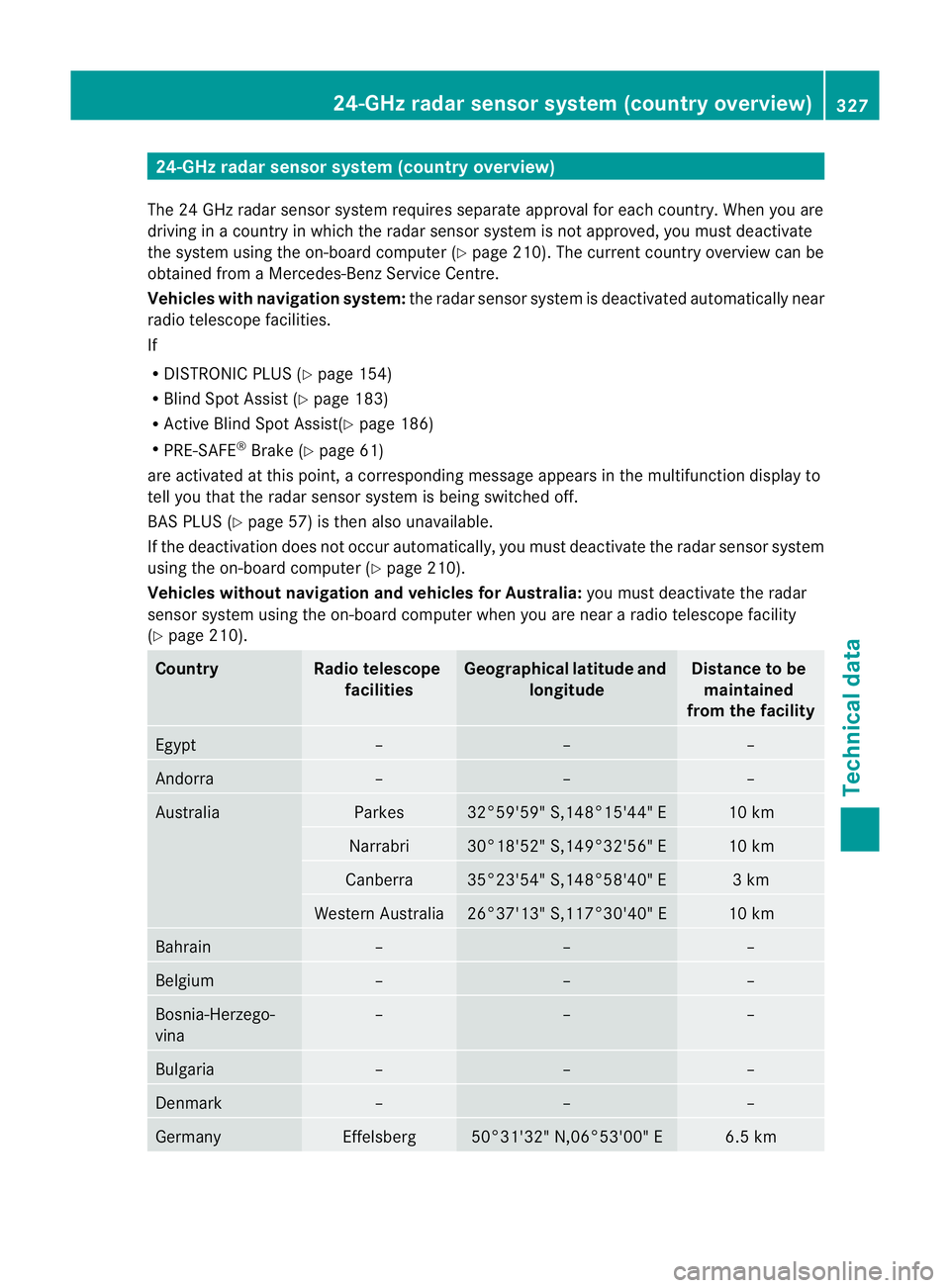
24-GHz radar sensor system (country overview)
The 24 GHz radar senso rsystem requires separate approval fo reach country. When you are
driving in a country in which the radar sensor system is no tapproved, you must deactivate
the system using the on-board computer (Y page 210). The current country overview can be
obtained from a Mercedes-Benz Service Centre.
Vehicles with navigation system: the radar sensorsystem is deactivated automatically near
radio telescope facilities.
If
R DISTRONIC PLUS (Y page 154)
R Blind Spot Assist (Y page 183)
R Active Blind Spot Assist(Y page 186)
R PRE-SAFE ®
Brake (Y page 61)
are activated at this point, a corresponding message appears in the multifunction display to
tell you that the rada rsensor system is being switched off.
BAS PLUS (Y page 57) is then also unavailable.
If the deactivation does not occur automatically, you must deactivate the radar sensor system
using the on-board computer (Y page 210).
Vehicles without navigation and vehicles for Australia: you must deactivate the radar
sensor system using the on-board computer when you are near a radio telescope facility
(Y page 210). Country Radio telescope
facilities Geographical latitude and
longitude Distance to be
maintained
from the facility Egypt – – –
Andorra – – –
Australia Parkes 32°59'59" S,148°15'44" E 10 km
Narrabri 30°18'52" S,149°32'56" E 10 km
Canberra 35°23'54" S,148°58'40" E 3 km
Wester
nAustralia 26°37'13" S,117°30'40" E 10 km
Bahrain – – –
Belgium – – –
Bosnia-Herzego-
vina – – –
Bulgaria – – –
Denmark – – –
Germany Effelsberg 50°31'32" N,06°53'00" E 6.5 km24-GHz radar sensor system (country overview)
327Technical data Z