height MERCEDES-BENZ CLS COUPE 2011 Owners Manual
[x] Cancel search | Manufacturer: MERCEDES-BENZ, Model Year: 2011, Model line: CLS COUPE, Model: MERCEDES-BENZ CLS COUPE 2011Pages: 337, PDF Size: 7.37 MB
Page 18 of 337
Seat belts
Adjusting the height .........................44
Warning lamp ................................. 239
Seats
Adjusting (electrically) .....................86
Adjusting lumba rsuppor t................ 89
Adjusting the 4-way lumba rsup-
por t.................................................. 89
Adjusting the head restraint ............86
Cleaning the cover .........................275
Correct driver's seat position ........... 84
Important safety instructions ...........85
Multicontour sea t............................ 87
Storing settings (memory func-
tion) ................................................. 95
Switching sea theating on/off .........89
Switching the sea tventilation on/
off .................................................... 90
Seat ventilation
Malfunction indicator lamp ..............90
Sensors (cleaning instructions) .......274
Service indicator see ASSYST PLUS service interval
display
Service menu (on-board computer) .205
Service products Brake fluid ..................................... 322
Coolant (engine) ............................ 322
Engine oil ....................................... 320
Fuel ................................................ 319
Important safety notes ..................319
Notes ............................................. 319
Settings
Factory (on-board computer) .........212
On-board computer .......................205
Shift ranges ....................................... 140
Showing the distance display (on-
board computer) ............................... 203
Sidebag ................................................ 38
Side window Important safety notes ....................78
Side windows
Convenience closing ........................79
Convenience opening ......................79
Opening/closing .............................. 78
resetting .......................................... 80
Troubleshooting ............................... 80Sliding sunroof
Important safety information ...........80
Opening/closing .............................. 81
Rain closing feature .........................81
Resetting ......................................... 81
Troubleshooting ............................... 81
Snow chains ...................................... 304
Socket ................................................ 258
Cockpi t.......................................... 258
Rea rcompartmen t......................... 259
Spare wheel
Notes/data .................................... 313
Storage location ............................ 280
Storing ........................................... 280
see Emergency spare wheel
Spee dLimit Assist
Activating/deactivating message
function (on-board computer )........ 203
Displaying (on-board computer) ..... 203
Display message ............................ 227
Function/notes ............................. 178
Spee dlimiter
SPEEDTRONIC ............................... 162
Speedometer
Digital speedometer (on-board
computer) ...................................... 198
Segments ...................................... 195
Setting the unit (on-board com-
puter) ............................................. 205
Speedtronic
Display message ............................ 231
Permanent ..................................... 164
Variabl e......................................... 163
SPEEDTRONIC
Function/notes ............................. 162
SPORT handling mode
Activating/deactivating (AMG
vehicles) .......................................... 60
Warning lamp ................................. 243
SRS (Supplemental Restraint Sys-
tem)
Display message ............................ 218
Introduction ..................................... 35
Warning lamp ................................. 243
Warning lamp (function) ................... 35
Standard display (on-board com-
puter) ................................................. .198 Index
15
Page 46 of 337
installation instructions when fitting a child
restraint system.
R Do not secure any objects with a seat belt
if the seat belt is also being used by one of
the vehicle's occupants. G
Risk of injury
The seat belt does not offer the intended level
of protection unless the backrest is almost
vertical. Under certain circumstances, this
could cause severe or even fatal injuries in the
event of an accident.
Before starting a journey, make sure that the
seat is properly adjusted and that the back-
rest is almost vertical. G
Risk of injury
Ad irty or damaged seat belt or a seat belt that
has been subjected to a load in an accident
or which has been modified no longer offers
the intended level of protection. Under certain
circumstances, this could cause severe or
even fatal injuries in the even tofanaccident.
For this reason, check regularly that the seat
belts are not damaged or dirty.
Always have damaged sea tbelts or seat belts
that have been subjected to a load in an acci-
dent replaced at a qualified specialist work-
shop. Consult a qualified specialist workshop
which has the necessary specialist knowledge
and tools to carry out the work required.
Mercedes-Benz recommends that you use a
Mercedes-Benz Service Centre for this pur-
pose.
For safety reasons, Mercedes-Benz recom-
mends that you only use seat belts which have
been approved by Mercedes-Benz for your
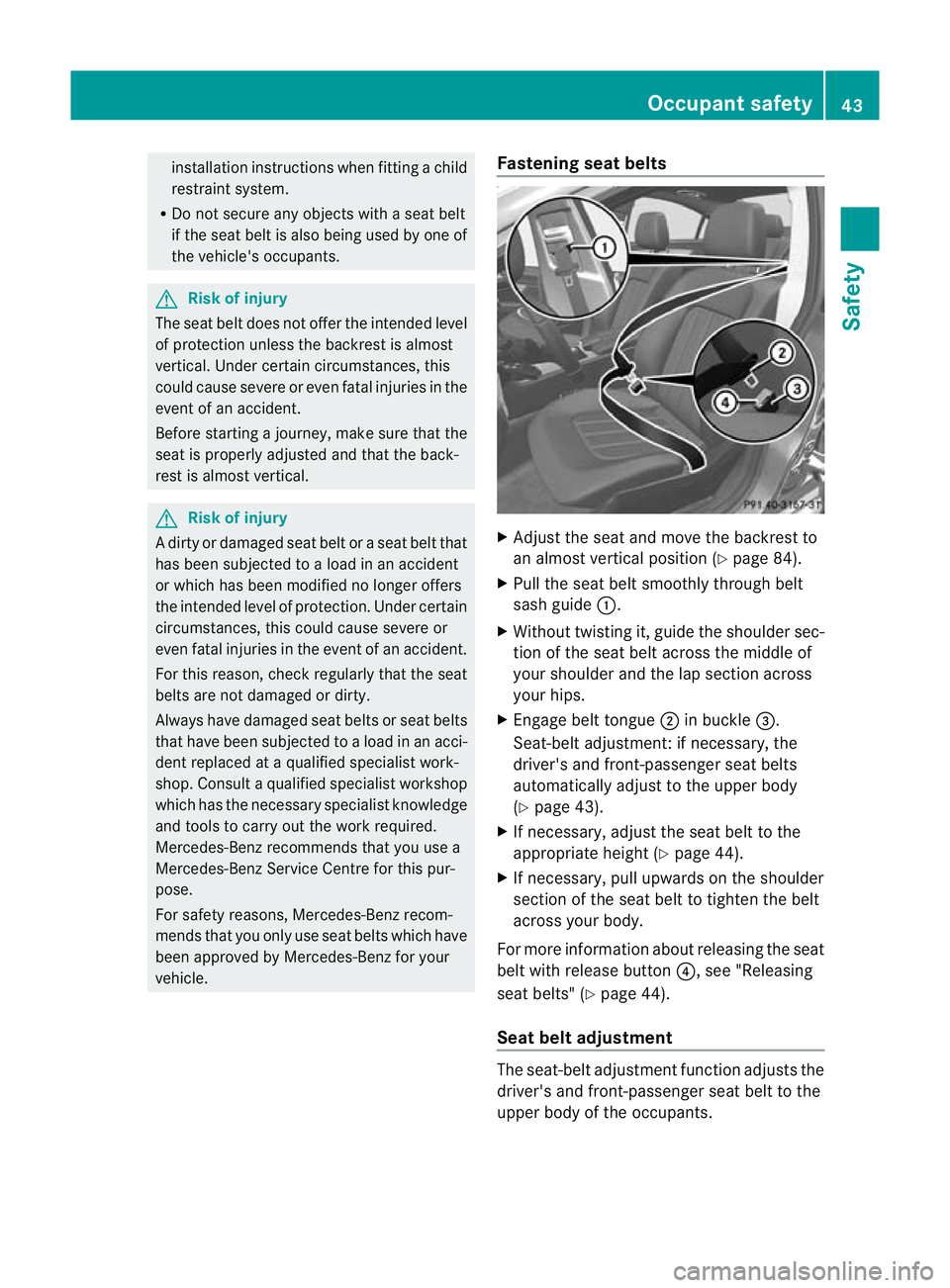
vehicle. Fastening seat belts
X
Adjust the seat and move the backrest to
an almost vertical position (Y page 84).
X Pull the seat belt smoothly through belt
sash guide :.
X Without twisting it, guide the shoulder sec-
tion of the seat belt across the middle of
your shoulder and the lap section across
your hips.
X Engage belt tongue ;in buckle =.
Seat-belt adjustment:ifn ecessary, the
driver's and front-passenger seat belts
automatically adjust to the upper body
(Y page 43).
X If necessary, adjust the seat belt to the
appropriate height (Y page 44).
X If necessary, pull upwards on the shoulder
section of the seat belt to tighten the belt
across your body.
For more information about releasing the seat
belt with release button ?, see "Releasing
seat belts" (Y page 44).
Seat belt adjustment The seat-belt adjustment function adjusts the
driver's and front-passenger seat belt to the
upper body of the occupants. Occupant safety
43Safety Z
Page 47 of 337
The belt strap is tightened slightly when:
R you engage the belt tongue in the belt
buckle and you then turn the key to position
2in the ignition lock.
R the key is in position 2in the ignition lock
and you then engage the belt tongue in the
buckle.
The seat-belt adjustmen twill apply a certain
tightening force if any slack is detected
between the occupant and the seat belt. Do
not hold on to the seat belt tightly while it is
adjusting. You can switch the seat-belt
adjustment on and off in the on-board com-
puter (Y page 211).
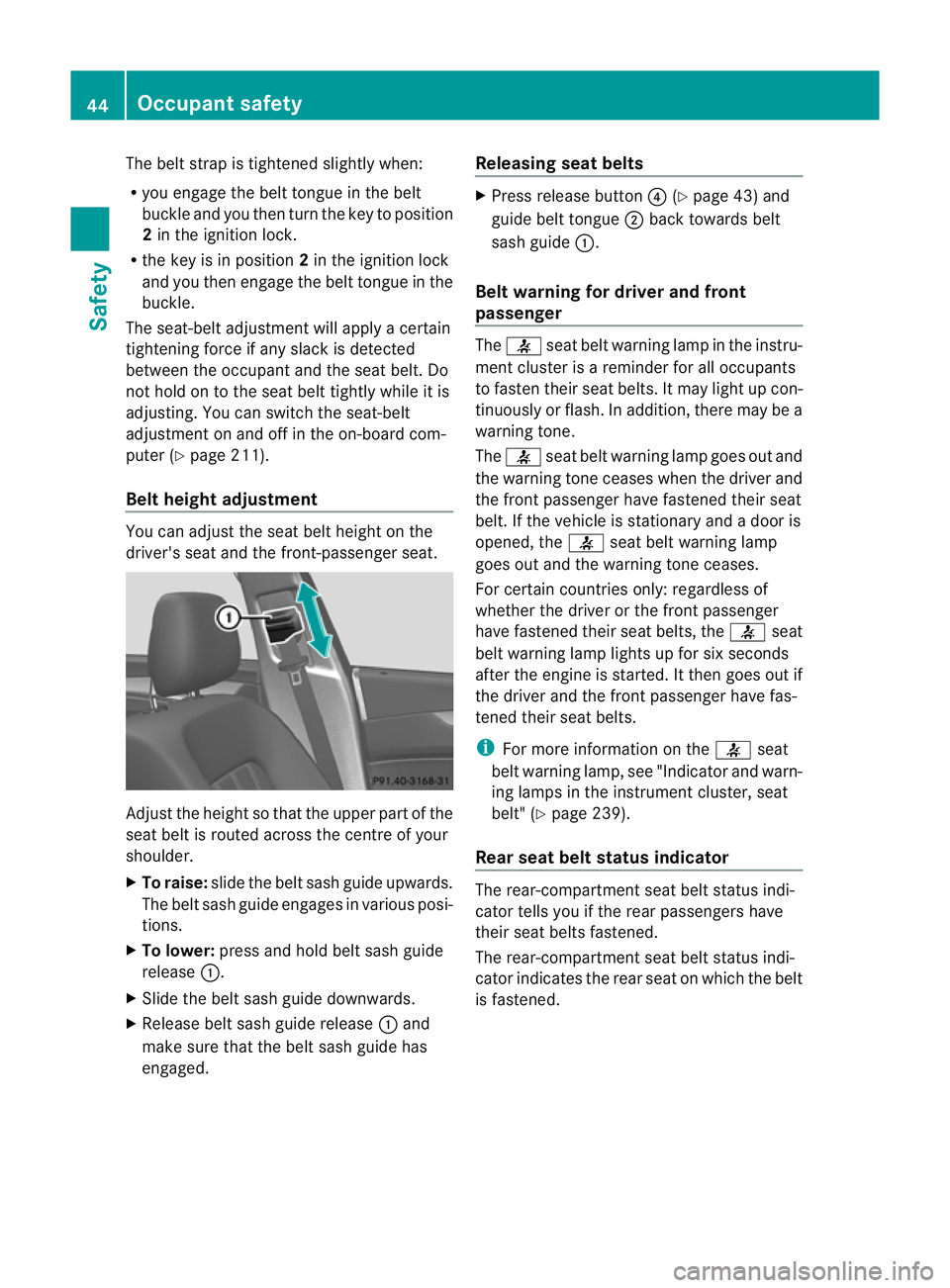
Belt height adjustment You can adjust the seat belt height on the
driver's seat and the front-passenger seat.
Adjust the height so that the upper part of the
seat belt is routed across the centre of your
shoulder.
X
To raise: slide the belt sash guide upwards.
The belt sash guide engages in various posi-
tions.
X To lower: press and hold belt sash guide
release :.
X Slide the belt sash guide downwards.
X Release belt sash guide release :and
make sure that the belt sash guide has
engaged. Releasing seat belts X
Press release button ?(Ypage 43) and
guide belt tongue ;back towards belt
sash guide :.
Belt warning for driver and front
passenger The
7 seat belt warning lamp in the instru-
ment cluster is a reminder for all occupants
to fasten their seat belts .Itmay light up con-
tinuously or flash. In addition, there may be a
warning tone.
The 7 seat belt warning lamp goes out and
the warning tone ceases when the driver and
the fron tpassenger have fastened their seat
belt .Ift he vehicle is stationary and a door is
opened, the 7seat belt warning lamp
goes out and the warning tone ceases.
For certain countries only: regardless of
whether the driver or the front passenger
have fastened their seat belts, the 7seat
belt warning lamp lights up for six seconds
after the engine is started. It then goes out if
the driver and the front passenger have fas-
tened their seat belts.
i For more information on the 7seat
belt warning lamp, see "Indicator and warn-
ing lamps in the instrumentc luster, seat
belt" (Y page 239).
Rear seat belt status indicator The rear-compartmen
tseat belt status indi-
cator tells you if the rear passengers have
their seat belts fastened.
The rear-compartment seat belt status indi-
cator indicates the rear seat on which the belt
is fastened. 44
Occupant safetySafety
Page 55 of 337

Suitable positioning of the child restraint system
Weight categories
Seat positions Group 0: up to
10 kg Group 0+: up to
13 kg Group I: 9 to 18 kg
Front-passenger
seat (the front-
passenger airbag
is not disabled)
X
3 X
UF
4, 5, 6 Front-passenger
seat (the front-
passenger airbag
is disabled)
7
) U
5, 6, 8 U
5, 6, 8 U
5, 6, 8 Rear seats
U
6, 8 U
6, 8 U
6, 8 Weight categories
Seat positions Group II: 15 to 25 kg Group III: 22 to 36 kg
Front-passenger seat (the
front-passenger airbag is not
disabled)
UF
9, 10, 11 UF
9, 10, 11 Front-passenger seat (the
front-passenger airbag is dis-
abled)
12
) U
10, 11, 13 U
10, 11, 13 Rear seats
U
11, 13 U
11, 13 "Universal" category child restraint systems can be recognised by their orange approval label.
3 X: seat unsuitable for children in this weight category.
4 UF: suitable for forward-facing child seat securing systems in the Universal category approved for use in this
weight category.
5 Adjust the front-passenger seat to the rearmost position and the belt outlet height to the lowest position.
6 As recommended; see the following table "Recommended child restraint systems".
7 Vehicles with automatic child seat recognition on the front-passenger seat: a child restraint system of the
"Universal" category with automatic child seat recognition must be fitted. The 4PASSENGER AIRBAG
OFF indicator lamp must be lit.
8 U: suitable for child seat securing systems in the Universal category approved for use in this weight category.
9 UF: suitable for forward-facing child seat securing systems in the "Universal" category approved for use in
this weight category.
10 Adjust the front-passenger seat to the rearmost position and the belt outlet height to the lowest position.
11 As recommended; see the following table "Recommended child restraint systems".
12 Vehicles with automatic child seat recognition on the front-passenger seat: a child restraint system of the
"Universal" category with automatic child seat recognition must be fitted. The 4PASSENGER AIRBAG
OFF indicator lamp must be lit.
13 U: suitable for child seat securing systems in the Universal category approved for use in this weight category. 52
Children in the vehicleSafety
Page 89 of 337
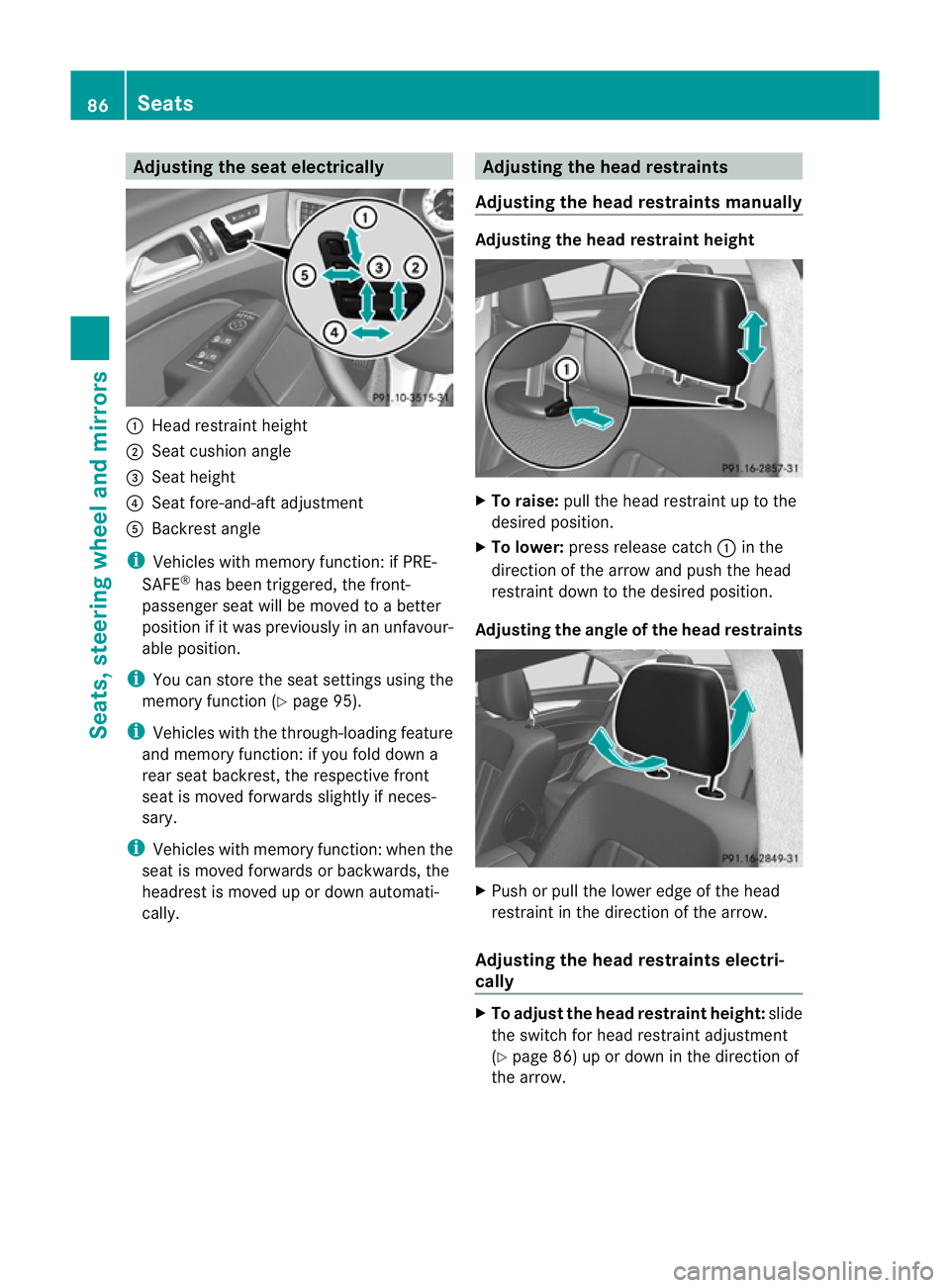
Adjusting the sea
telectrically :
Head restraint height
; Seat cushio nangle
= Sea theight
? Seat fore-and-aft adjustment
A Backrest angle
i Vehicles with memory function: if PRE-
SAFE ®
has been triggered, the front-
passenger seat will be moved to a better
position if it was previously in an unfavour-
able position.
i You can store the seat settings using the
memory function (Y page 95).
i Vehicles with the through-loading feature
and memory function: if you fold down a
rear seat backrest, the respective front
seat is moved forwards slightly if neces-
sary.
i Vehicles with memory function :when the
seat is moved forwards or backwards, the
headrest is moved up or down automati-
cally. Adjusting the head restraints
Adjusting the head restraints manually Adjusting the head restraint height
X
To raise: pull the head restraint up to the
desired position.
X To lower: press release catch :in the
direction of the arrow and push the head
restraint down to the desired position.
Adjusting the angle of the head restraints X
Push or pull the lower edge of the head
restraint in the direction of the arrow.
Adjusting the head restraints electri-
cally X
To adjust the head restraint height: slide
the switch for head restraint adjustment
(Y page 86) up or down in the direction of
the arrow. 86
SeatsSeats, steering wheel and mirrors
Page 91 of 337
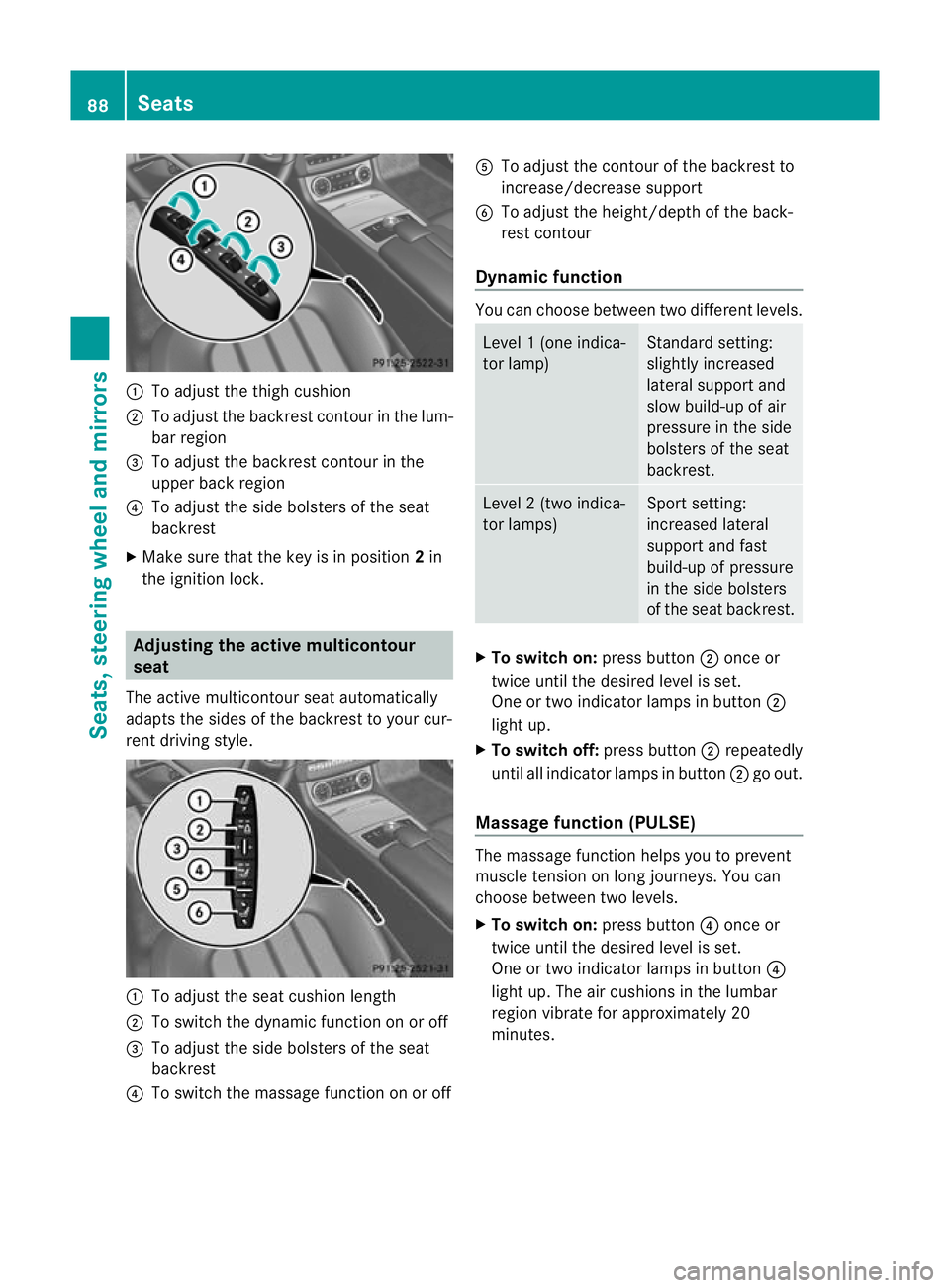
:
To adjust the thigh cushion
; To adjust the backrest contour in the lum-
bar region
= To adjust the backrest contour in the
upper back region
? To adjust the side bolsters of the seat
backrest
X Make sure that the key is in position 2in
the ignition lock. Adjusting the active multicontour
seat
The active multicontour seat automatically
adapts the sides of the backrest to your cur-
rent driving style. :
To adjust the seat cushion length
; To switch the dynamic function on or off
= To adjust the side bolsters of the seat
backrest
? To switch the massage function on or off A
To adjust the contour of the backrest to
increase/decrease support
B To adjust the height/depth of the back-
rest contour
Dynamic function You can choose between two different levels.
Level
1(one indica-
tor lamp) Standard setting:
slightly increased
lateral support and
slow build-up of air
pressure in the side
bolsters of the seat
backrest. Level
2(two indica-
tor lamps) Sport setting:
increased lateral
support and fast
build-up of pressure
in the side bolsters
of the seat backrest.
X
To switc hon:press button ;once or
twice until the desired level is set.
One or two indicator lamps in button ;
light up.
X To switch off: press button;repeatedly
until all indicator lamps in button ;go out.
Massage function (PULSE) The massage function helps you to prevent
muscle tension on long journeys. You can
choose between two levels.
X To switch on: press button?once or
twice until the desired level is set.
One or two indicator lamps in button ?
light up. The air cushions in the lumbar
region vibrate for approximately 20
minutes. 88
SeatsSeats, steering wheel and mirrors
Page 94 of 337
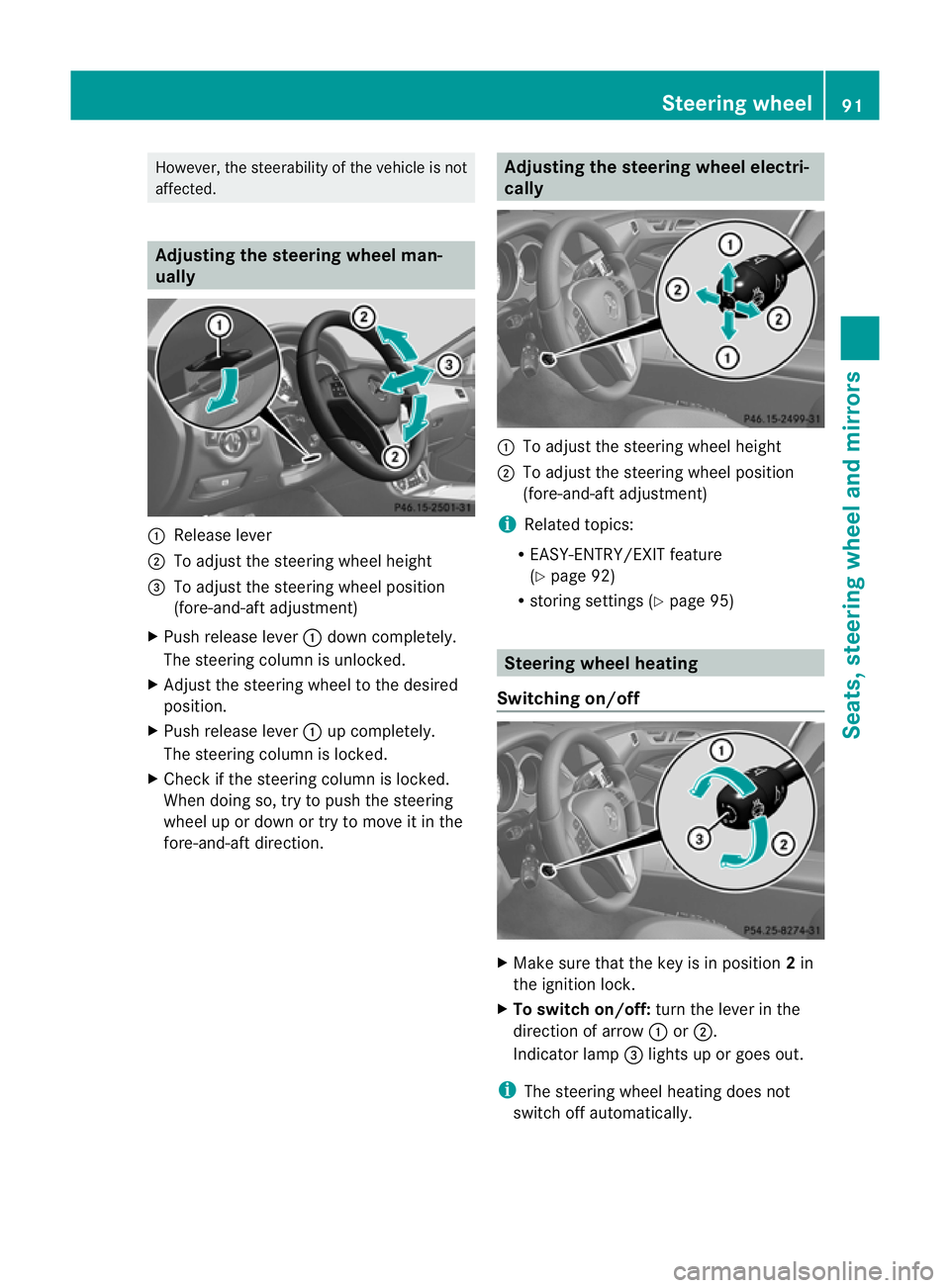
However, the steerability of the vehicle is not
affected. Adjusting the steering wheel man-
ually
:
Release lever
; To adjust the steering wheel height
= To adjust the steering wheel position
(fore-and-aft adjustment)
X Push release lever :dow ncompletely.
The steering column is unlocked.
X Adjust the steering wheel to the desired
position.
X Push release lever :up completely.
The steering column is locked.
X Check if the steering column is locked.
When doing so, try to push the steering
wheel up or down or try to move it in the
fore-and-aft direction. Adjusting the steering wheel electri-
cally
:
To adjust the steering wheel height
; To adjust the steering wheel position
(fore-and-aft adjustment)
i Related topics:
R EASY-ENTRY/EXIT feature
(Y page 92)
R storing settings (Y page 95) Steering wheel heating
Switching on/off X
Make sure that the key is in position 2in
the ignition lock.
X To switch on/off: turn the lever in the
direction of arrow :or;.
Indicator lamp =lights up or goes out.
i The steering wheel heating does not
switch off automatically. Steering wheel
91Seats, steering wheel and mirrors Z
Page 170 of 337
X
To cancel: pull the left steering wheel shift
paddle (Y page 139).
or
X To confirm: pull the right steering wheel
shift paddle (Y page 139).
The RACE START available Depress accelerator message appears in the mul-
tifunction display.
i If you do not depress the accelerator
pedal fully within two seconds, RACE
START is cancelled. The RACE START not
possible See Owner's Manual message
appears in the multifunction display.
X Depress the accelerator pedal fully.
The engine speed rises to approximately
4000 rpm.
The RACE START Release brake to start message appears in the multifunc-
tion display.
i If you do not release the brake pedal
within seven seconds, RACE START is can-
celled. The RACE START cancelled mes-
sage appears in the multifunction display.
X Take your foot off the brake, but keep the
accelerator pedal depressed.
The vehicle pulls away at maximum accel-
eration.
The RACE START active message appears
in the multifunction display.
RACE START is deactivated when the vehicle
reaches a speed of approximately 50 km/h.
Drive program S+is activated. SPORT han-
dling mode remains activated.
RACE START is deactivated immediately if
you release the accelerator pedal during
RACE START or if any of the activation condi-
tions are no longer fulfilled. The RACE START
not possible See Owner's Manual mes-
sage appears in the multifunction display.
i If RACE START is used repeatedly in a
short period of time, it is only available
again after having driven the vehicle a cer-
tain distance. AIRMATIC
Vehicle level Important safety notes
Your vehicle regulates its height automati-
cally. All-round self-levelling ensures the best
possible suspension and constant ground
clearance, even with a laden vehicle. When
you drive fast, the vehicle is lowered auto-
matically to improve driving safety and to
reduce fuel consumption.
The following vehicle levels are possible:
R
normal
R raised: the vehicle is raised by about 25 mm
when compared with the normal level.
R lowered: the vehicle is lowered by about
10 mm when compared with the normal
level.
The "Normal" and "Raised" vehicle levels can
be set manually.
The "Lowered” vehicle level is set automati-
cally:
R at speeds above 140 km/h
R if you have selected "Comfort tuning"
(Y page 168) and then lock the vehicle
within 60 seconds of the engine being
switched off
R if you have selected "Sports tuning"
(Y page 168) G
Risk of injury
If you have selected "Comfort tuning", the
vehicle will be lowered if you lock it within 60
seconds of the engine being switched off.
Make sure, therefore, that nobody is in the
vicinity of the wheel housing or under the
vehicle when you lock the vehicle. Otherwise,
limbs could become trapped.
! The vehicle is lowered by about 15 mm if:
R you have selected "Comfort tuning"
R you switch off the engine and
R you lock the vehicle within approximately
60 seconds Driving systems
167Driving and parking Z
Page 171 of 337
Make sure when parking that you position
your vehicle so that it does not make con-
tact with the kerb as the vehicle is lowered.
Your vehicle could otherwise be damaged.
Setting the vehicle level
Select the "Normal" setting for normal road
surfaces and "Raised" for driving with snow
chains or on particularly poor road surfaces.
Your selection remains stored even if you
remove the key from the ignition lock. G
Risk of injury
Make sure that nobody is in the vicinity of the
wheel housing or under the vehicle while low-
ering the vehicle when it is stationary. Other-
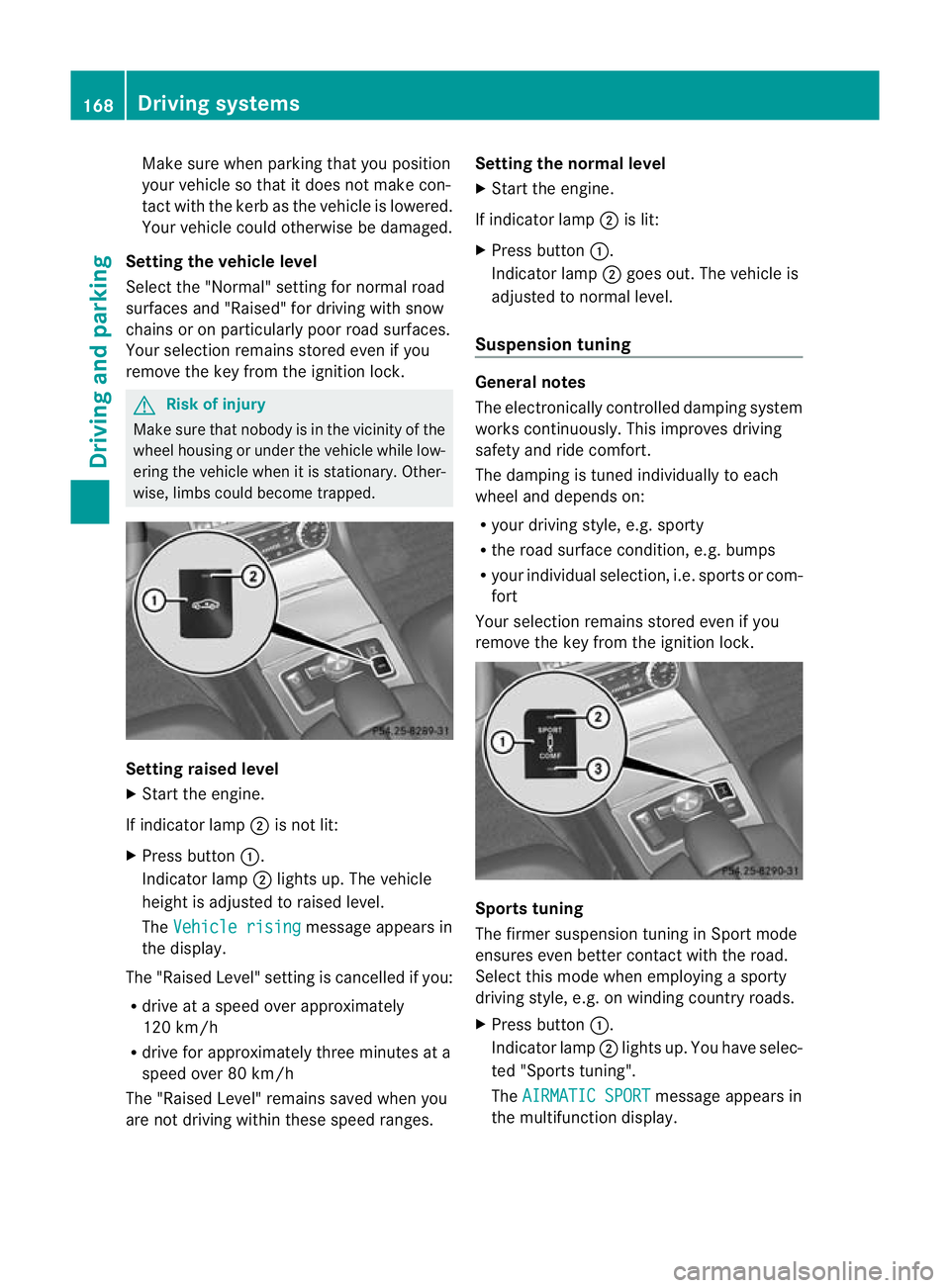
wise, limbs could become trapped. Setting raised level
X
Start the engine.
If indicator lamp ;is not lit:
X Press button :.
Indicator lamp ;lights up. The vehicle
height is adjusted to raised level.
The Vehicle rising message appears in
the display.
The "Raised Level" setting is cancelled if you:
R drive at a speed over approximately
120 km/h
R drive for approximately three minutes at a
speed over 80 km/h
The "Raised Level" remains saved when you
are not driving within these speed ranges. Setting the normal level
X
Start the engine.
If indicator lamp ;is lit:
X Press button :.
Indicator lamp ;goes out. The vehicle is
adjusted to normal level.
Suspension tuning General notes
The electronically controlled damping system
works continuously.T
his improves driving
safety and ride comfort.
The damping is tuned individually to each
wheel and depends on:
R your driving style, e.g. sporty
R the road surface condition,e .g. bumps
R your individual selection, i.e .sports or com-
fort
Your selection remains stored even if you
remove the key from the ignition lock. Sports tuning
The firmer suspension tunin
ginSport mode
ensures even better contact with the road.
Select this mode when employing a sporty
driving style, e.g. on winding country roads.
X Press button :.
Indicator lamp ;lights up. You have selec-
ted "Sports tuning".
The AIRMATIC SPORT message appears in
the multifunction display. 168
Driving systemsDriving and parking
Page 176 of 337
Problems with PARKTRONIC
Problem Possible causes/consequences and
M Solutions
Only the red segments
in the PARKTRONIC
warning displays are lit.
You also hear a warning
tone for approximately
two seconds.
PARKTRONIC is deacti-
vated after approx-
imately 20 seconds,
and the indicator lamp
in the PARKTRONIC
button lights up. PARKTRONIC has malfunctioned and has switched off.
X
If problems persist, have PARKTRONIC checked at a qualified
specialist workshop. Only the red segments
in the PARKTRONIC
warning displays are lit.
PARKTRONIC is deacti-
vated after approx-
imately 20 seconds. The PARKTRONIC sensors are dirty or there is interference.
X
Cleant he PARKTRONIC sensors (Y page 274).
X Switch the ignition back on. The problem may be caused by an external source of radio or
ultrasound waves.
X See if PARKTRONIC functions in a different location. Active Parking Assist
Important safety notes Active Parking Assist is an electronic parking
aid with ultrasound. Ultrasound is used to
measure the road on both sides of the vehicle.
As uitable parking space is indicated by the
parking symbol. Active steering intervention
can assis tyou during parking. You may also
use PARKTRONIC (Y page 170). When PARK-
TRONIC is switched off, Active Parking Assist
is also unavailable. G
Risk of accident
Active Parking Assist is merely an aid and may
sometimes recommend parking spaces that
are not suitable for parking. For example,
these might be spaces where parking is pro-
hibited, driveways, unsuitable surfaces, etc.
Active Parking Assist measures the parking
space as you drive past it. Any later changes to the parking space are not taken into
account. For instance, this may be the case
when the vehicle parked in front of or behind
the space changes its position or when an
obstacle is moved into the parking space.
Active Parking Assist does not relieve you of
the responsibility of paying attention. If you
rely solely on Active Parking Assist, you could
cause an accident and injure yourself and oth-
ers.
You are always responsible for safety and
must continue to pay attention to your imme-
diate surroundings when parking and
manoeuvring.
G
Risk of accident
Objects located above the height range of
Active Parking Assist will not be detected
when the parking space is measured. These
are not taken into account when the parking Driving systems
173Driving and parking
Z