brake sensor MERCEDES-BENZ CLS COUPE 2012 User Guide
[x] Cancel search | Manufacturer: MERCEDES-BENZ, Model Year: 2012, Model line: CLS COUPE, Model: MERCEDES-BENZ CLS COUPE 2012Pages: 373, PDF Size: 9.12 MB
Page 180 of 373
=
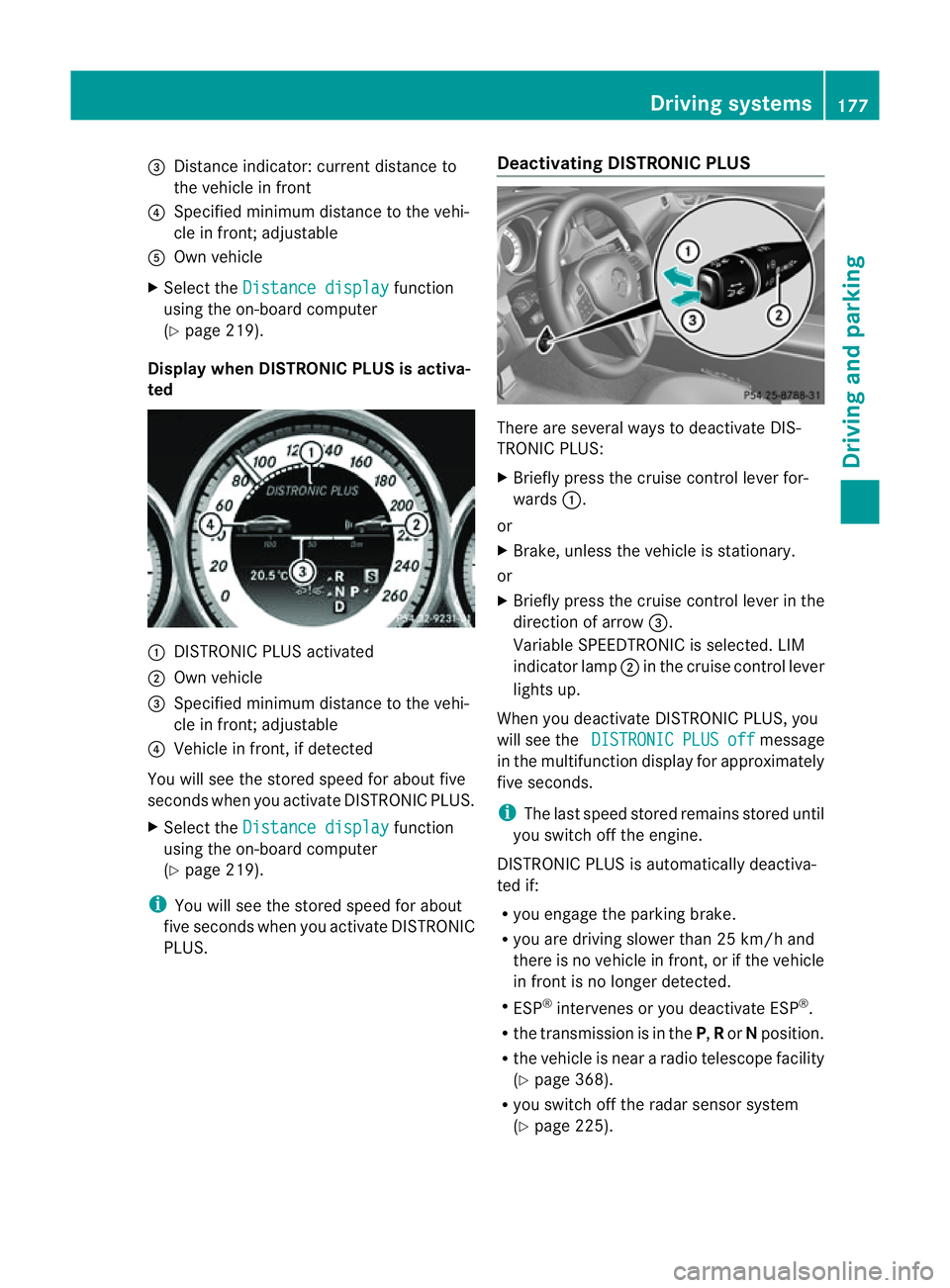
Distance indicator: current distance to
the vehicl einfront
? Specifie dminimum distance to the vehi-
cle in front; adjustable
A Ownvehicle
X Select the Distancedisplay function
using the on-board computer
(Y page 219).
Display when DISTRONIC PLUS is activa-
ted :
DISTRONIC PLUS activated
; Own vehicle
= Specified minimum distanc etothe vehi-
cle in front; adjustable
? Vehicle in front, if detected
You will see the stored speed for about five
seconds when you activat eDISTRONIC PLUS.
X Select the Distancedisplay function
using the on-board computer
(Y page 219).
i You will see the stored speed for about
five seconds when you activat eDISTRONIC
PLUS. Deactivating DISTRONIC PLUS There are several ways to deactivat
eDIS-
TRONIC PLUS:
X Briefly press the cruise control lever for-
wards :.
or
X Brake, unless the vehicle is stationary.
or
X Briefly press the cruise control lever in the
direction of arrow =.
Variable SPEEDTRONIC is selected. LIM
indicator lamp ;in the cruise control lever
lights up.
When you deactivat eDISTRONIC PLUS, you
will see the DISTRONIC PLUS off message
in the multifunction display for approximately
five seconds.
i The last speed stored remains stored until
you switch off the engine.
DISTRONIC PLUS is automatically deactiva-
ted if:
R you engage the parkin gbrake.
R you are driving slower than 25 km/ha nd
ther eisnov ehicle in front, or if the vehicle
in fron tisnol onger detected.
R ESP ®
intervenes or you deactivat eESP®
.
R the transmission is in the P,Ror Nposition.
R the vehicle is near aradio telescope facility
(Y page 368).
R you switch off the radar sensor system
(Y page 225). Driving systems
177Driving and parking Z
Page 188 of 373
PARKTRONIC
Important safety notes G
WARNING
PARKTRONIC is only an aid and may not
detect all obstacles. It is not asubstitute for
attentive driving.
You are always responsible for safety and
must continue to pay attention to your imme-
diate surroundings when parking and
manoeuvring. You could otherwise endanger
yourself and others. G
WARNING
Make sure that no persons or animals are in
the manoeuvring range. Otherwise, they
could be injured.
PARKTRONIC is an electronic parking aid with
ultrasonic sensors. It indicates visuallya nd
audibly the distance between your vehicle
and an object.
PARKTRONIC is activated automatically if
you:
R switch on the ignition
R shift the transmission to position D,Ror N
R release the parking brake
PARKTRONIC is deactivated at speeds above
18 km/h. It is reactivated at lower speeds.
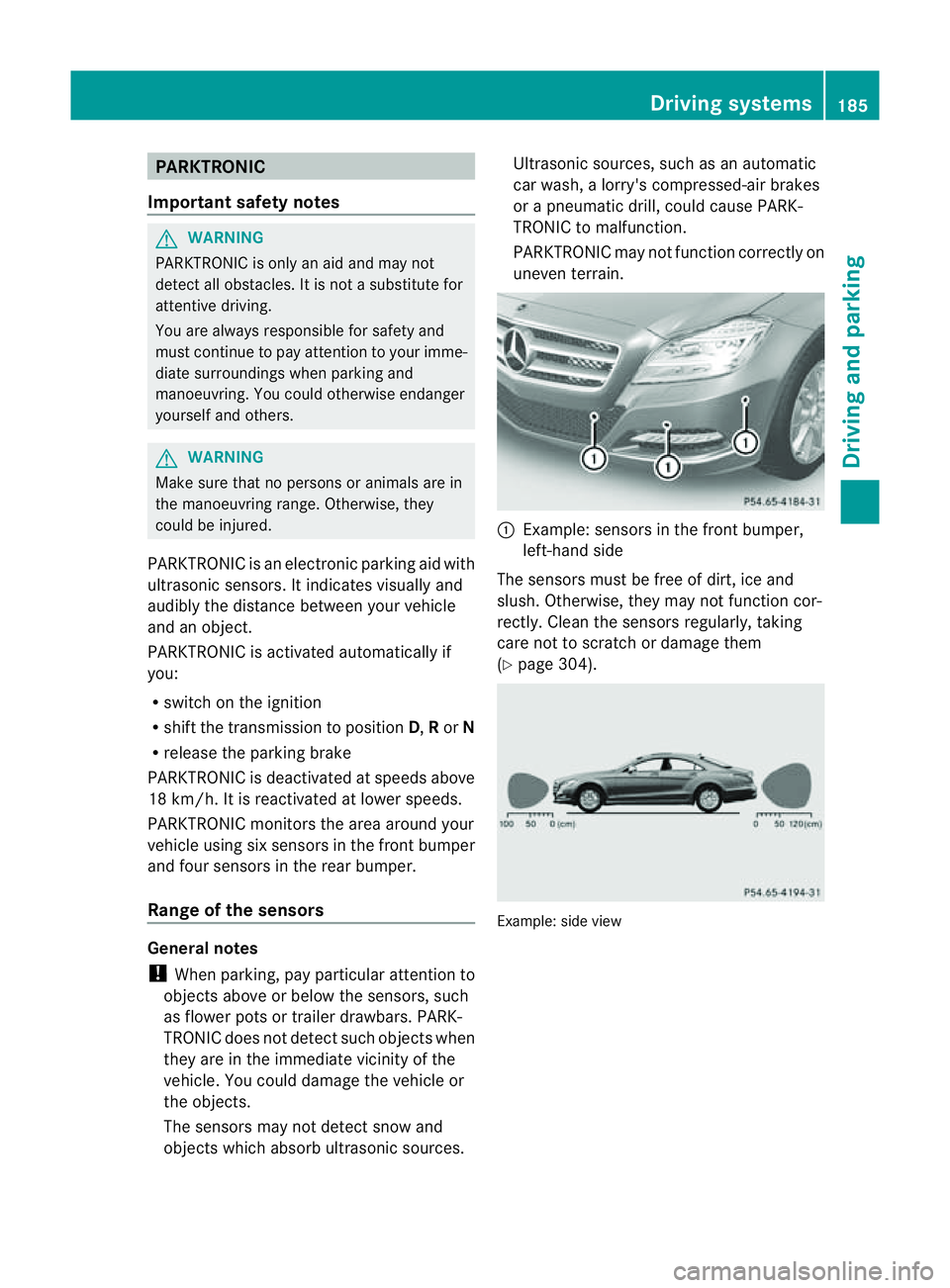
PARKTRONIC monitorst he area around your
vehicle using six sensors in the front bumper
and four sensors in the rear bumper.
Range of the sensors General notes
!
When parking, pay particular attention to
objectsa bove or below the sensors, such
as flower pots or trailer drawbars. PARK-
TRONIC does not detect such objectsw hen
they are in the immediate vicinity of the
vehicle. You could damage the vehicle or
the objects.
The sensors may not detect snow and
objectsw hich absorb ultrasonic sources. Ultrasonic sources, such as an automatic
car wash,
alorry's compressed-air brakes
or ap neumatic drill, could cause PARK-
TRONIC to malfunction.
PARKTRONIC may not function correctly on
uneven terrain. :
Example: sensors in the front bumper,
left-han dside
The sensors must be free of dirt, ice and
slush. Otherwise, they may not function cor-
rectly. Cleant he sensors regularly,t aking
care not to scratchord amage them
(Y page 304). Example: side view Driving systems
185Driving and parking Z
Page 204 of 373
Active Driving Assistance package
Genera lnotes The Active Drivin
gAssistance packag econ-
sists of DISTRONI CPLUS(Ypage 170), Active
Blind Spot Assist (Y page 201)and Active
Lane Keeping Assist (Y page 204).
Active Blind Spot Assist Important safet
ynotes G
WARNING
Active Blind Spot Assist is only an aid and may
detec tvehicles/obstacles incorrectly or not
at all.
The system may be impaired or may not func-
tion if:
R there is poor visibility, e.g. due to snow,
rain, fog or spray.
R the rear and/or fron tsensor sare dirty.
Active Blind Spot Assist may not detect nar-
row vehicles, such as motorcycles or bicycles,
or only detect them too late. It cannot detect
vehicles which are overtaken at asmall dis-
tanc eand then enter the blind spot area.
Active Blind Spot Assist cannot detect road
and traffic conditions .Itisnotas ubstitute for
attentive driving. You are responsible for the
vehicle's speed, braking in good time, and
steering correctly. Always adapty our driving
style to suit the prevailing road and weather
conditions. Always pay attention to traffic
conditions and your surroundings. Otherwise,
you may fail to recognise dangers in time,
cause an accident and injure yourself and oth-
ers.
General notes
Active Blind Spot Assist uses aradar sensor
system to monitor the area to the sides of
your vehicle which are behind the driver. A
warning display in the exterior mirrors draws
your attention to vehicles detected in the
monitored area. If you then switch on the cor-
responding turn signal to change lane, you
will also receive an optical and audible warn- ing. If
arisk of lateral collision is detected,
corrective braking may help you avoid acol-
lision. To support the course-correcting brake
application, Active Blind Spot Assist uses the
forward-facin gradar sensor system. The free
space in the direction of travel is then evalu-
ated.
Active Blind Spot Assist supports you from a
speed of approximately 30 km/h.
The radar sensor system is switched off auto-
matically in the vicinit yofradio telescope
facilities (Y page 368).
For Active Blind Spot Assist to assist you
when driving, the radar sensor system must
be activated (Y page 225) and operational.
Monitoring range G
WARNING
Active Blind Spot Assist monitors certain
areas in the immediate vicinit yofyour vehicle.
Vehicles that approach and drive past at high
speeds are not detected. No visual nor audi-
ble warnings are emitted and the system does
not brake the vehicle to correc tyour course.
If the lanes are very wide, it may not be pos-
sible to monitor the complete width of the
neighbouring lane. For this reason, vehicles in
the next lane may not be detected, especially
if they are driving in astaggered formation.
This may be the case if vehicles are driving at
the edge of their lane that is furthest away
from your vehicle.
Always pay attention to traffic conditions and
your surroundings. Otherwise, you may fail to
recognise dangers in time, cause an accident
and injure yourself and others. Driving systems
201Driving and parking Z
Page 207 of 373
R
ESP ®
is deactivated.
R al os soft yrep ressure or adefective tyr eis
detected.
Activatin gActiveB lind Spo tAssist
X Make sure that the radar sensor system
(Y page 225) and Active Blind Spot Assist
(Y page 220) are activated in the on-board
computer.
X Turn the key to position 2in the ignition
lock.
Warning lamps :in the exterior mirrors
light up red for approximately
1.5 seconds and then turn yellow.
Active Lane Keeping Assist Important safety notes
G
WARNING
Active Lane Keeping Assist does not keep
your vehicle in its lane. It is only an aid and
may detect the lane markings on the road
incorrectly or not at all.
The system may be impaired or may not func-
tion if:
R there is poor visibility, e.g. due to inade-
quate illumination of the road surface,
snow, rain, fog or spray.
R there is glare, e.g. from oncoming traffic,
the sun, or reflection from other vehicles.
R the windscreen is dirty, fogged up or cov-
ered, for instance by asticker, in the vicinity
of the camera.
R several or no lane markings for asingle lane
are present.
R the lane markings are worn away, dark or
covered up, e.g. by dirt or snow.
R the distanc etothe vehicle in fron tistoo
small and as aresult the lane markings can-
not be recognised.
R the lane markings on the road are unclear,
e.g. near roadworks. R
the lane markings change quickly, e.g.
branch off, cross, or merge.
R the road is narrow and winding.
Active Lane Keeping Assist cannot detect
road and traffic conditions. It is not asubsti-
tute for attentive driving. You are responsible
for the vehicle's speed, braking in good time,
and steerin gcorrectly. Always adapt your
driving style to suit the prevailing road and
weather conditions. Always pay attention to
traffic conditions and your surroundings. Oth-
erwise, you may fail to recognise dangers in
time, cause an accident and injure yourself
and others.
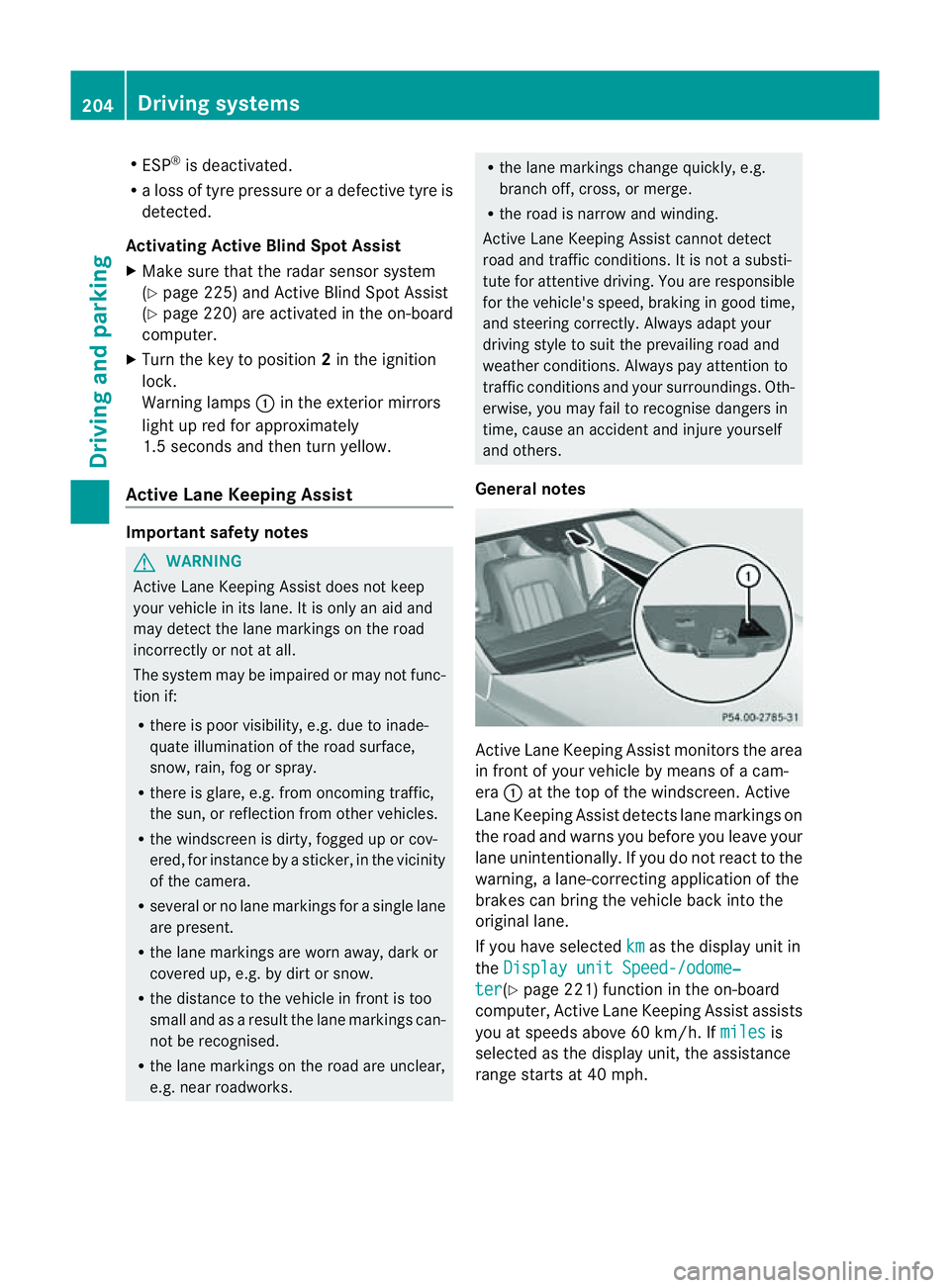
General notes Active Lane Keeping Assist monitors the area
in fron
tofyour vehicle by means of acam-
era :at the top of the windscreen .Active
Lane Keeping Assist detect slane markings on
th er oad and warn syou before you leave your
lane unintentionally. If you do no treact to the
warning, alane-correctinga pplication of the
brakes can bring the vehicle back intot he
original lane.
If you have selected km as the display unit in
the Display unit Speed-/odome‐ ter (Y
page 221)f unction in the on-board
computer, Active Lane Keeping Assist assists
you at speeds above 60 km/h. If miles is
selected as the display unit, the assistance
range start sat40mph. 204
Driving systemsDriving and parking
Page 222 of 373
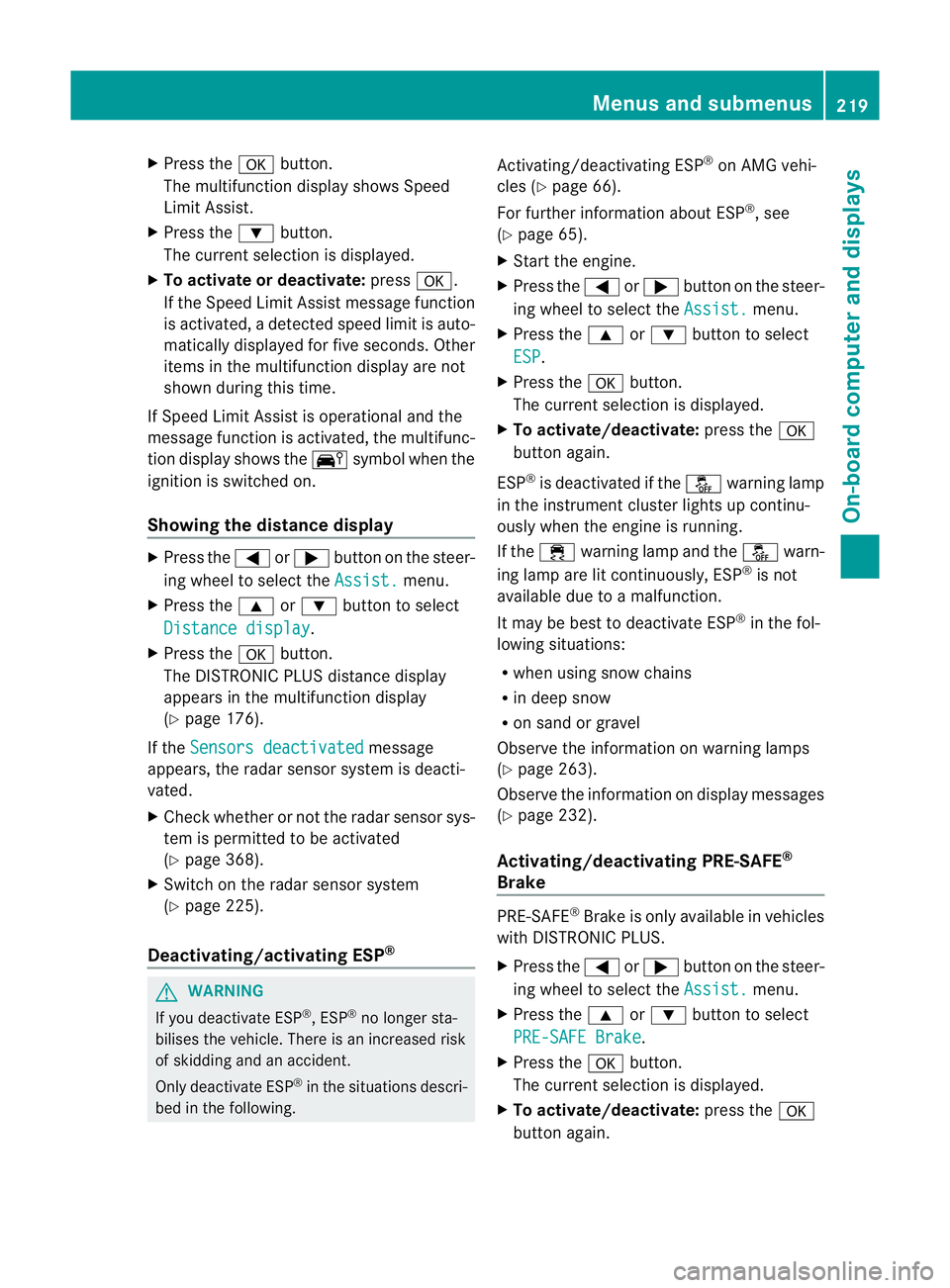
X
Press the abutton.
The multifunction display shows Speed
Limit Assist.
X Press the :button.
The curren tselection is displayed.
X To activate or deactivate: pressa.
If the Speed Limit Assist message function
is activated, adetected speed limit is auto-
matically displayed for five seconds. Other
items in the multifunction display are not
shown during this time.
If Speed Limit Assist is operational and the
message function is activated, the multifunc-
tion display shows the Äsymbol when the
ignition is switched on.
Showing the distance display X
Press the =or; button on the steer-
ing wheel to select the Assist. menu.
X Press the 9or: button to select
Distanc edisplay .
X Press the abutton.
The DISTRONIC PLUS distanc edisplay
appears in the multifunction display
(Y page 176).
If the Sensors deactivated message
appears, the radar sensor system is deacti-
vated.
X Check whether or not the radar sensor sys-
tem is permitted to be activated
(Y page 368).
X Switc hont he radar sensor system
(Y page 225).
Deactivating/activating ESP ®G
WARNING
If you deactivat eESP®
,E SP ®
no longer sta-
bilises the vehicle. There is an increased risk
of skidding and an accident.
Only deactivat eESP®
in the situation sdescri-
bed in the following. Activating/deactivating ESP
®
on AMG vehi-
cles (Y page 66).
For further information about ESP ®
,s ee
(Y page 65).
X Start the engine.
X Press the =or; button on the steer-
ing wheel to select the Assist. menu.
X Press the 9or: button to select
ESP .
X Press the abutton.
The curren tselection is displayed.
X To activate/deactivate: press thea
button again.
ESP ®
is deactivated if the åwarning lamp
in the instrument cluster lights up continu-
ously when the engin eisrunning.
If the ÷ warning lamp and the åwarn-
ing lamp are lit continuously, ESP ®
is not
available due to amalfunction.
It may be best to deactivat eESP®
in the fol-
lowing situations:
R when using snow chains
R in deep snow
R on sand or gravel
Observe the information on warning lamps
(Y page 263).
Observe the information on display messages
(Y page 232).
Activating/deactivating PRE-SAFE ®
Brake PRE-SAFE
®
Brak eiso nly available in vehicles
with DISTRONIC PLUS.
X Press the =or; button on the steer-
ing wheel to select the Assist. menu.
X Press the 9or: button to select
PRE-SAF EBrake .
X Press the abutton.
The curren tselection is displayed.
X To activate/deactivate: press thea
button again. Menus and submenus
219On-boardcomputer and displays Z
Page 223 of 373
When PRE-SAFE
®
Brak eisa ctivated, the mul-
tifunction display shows the Äsymbol as
long as the HOLD function is not activated
(Y page 179).
Vehicles with Active Parking Assist: if
PARKTRONIC is activated and you are driving
at as peed under 35 km/h, the jActive
Parking Assist symbol is shown instead of the
Ä symbol ( Ypage 187).
If the PRE-SAFE Brake: Sensors deacti‐ vated message appears, the radar sensor
system is deactivated.
X Check whether or not the radar sensor sys-
tem may be activated (Y page 368).
X Activate the radar sensor system
(Y page 225).
For more information on PRE-SAFE ®
Brake,
see (Y page 68).
Activating/deactivating ATTENTION
ASSIST X
Press the =or; button on the steer-
ing wheel to select the Assist. menu.
X Press the 9or: button to select
Attentio nAssist .
X Press the abutton.
The curren tselection is displayed.
X To activate/deactivate: press thea
button again.
When ATTENTION ASSISTisa ctivated, the
À symbol appears in the multifunction
display when the ignition is on.
For further information about ATTENTION
ASSIST, see (Y page 192).
Activating/deactivating Blind Spot
Assist X
Press the =or; button on the steer-
ing wheel to select the Assist. menu.
X Press the 9or: button to select
Blind Spot Asst. .X
Press the abutton.
The curren tselection is displayed.
X To activate/deactivate: press thea
button again.
If the Blind Spot Assist Sensors deac‐ tivated or
Active blind spot assist. sensor system deactivated message
appears, the radar sensor system is deacti-
vated.
X Check whether or not the radar sensor sys-
tem may be activated (Y page 368).
X Activat ethe radar sensor system
(Y page 225).
For further information about Blind Spot
Assist ,see (Y page 197).
For further information about Active Blind
Spot Assist ,see (Y page 201).
Activating/deactivating Lane Keeping
Assist X
Press the =or; button on the steer-
ing wheel to select the Assist. menu.
X Press the 9or: button to select
Lane Keep. Asst. X
Press the abutton.
The curren tselection is displayed.
X Press ato confirm.
When Lane Keeping Assist or Active Lane
Keeping Assist is activated, the Ãsymbol
appears in the multifunction display when the
ignition is on.
For further information about Active Lane
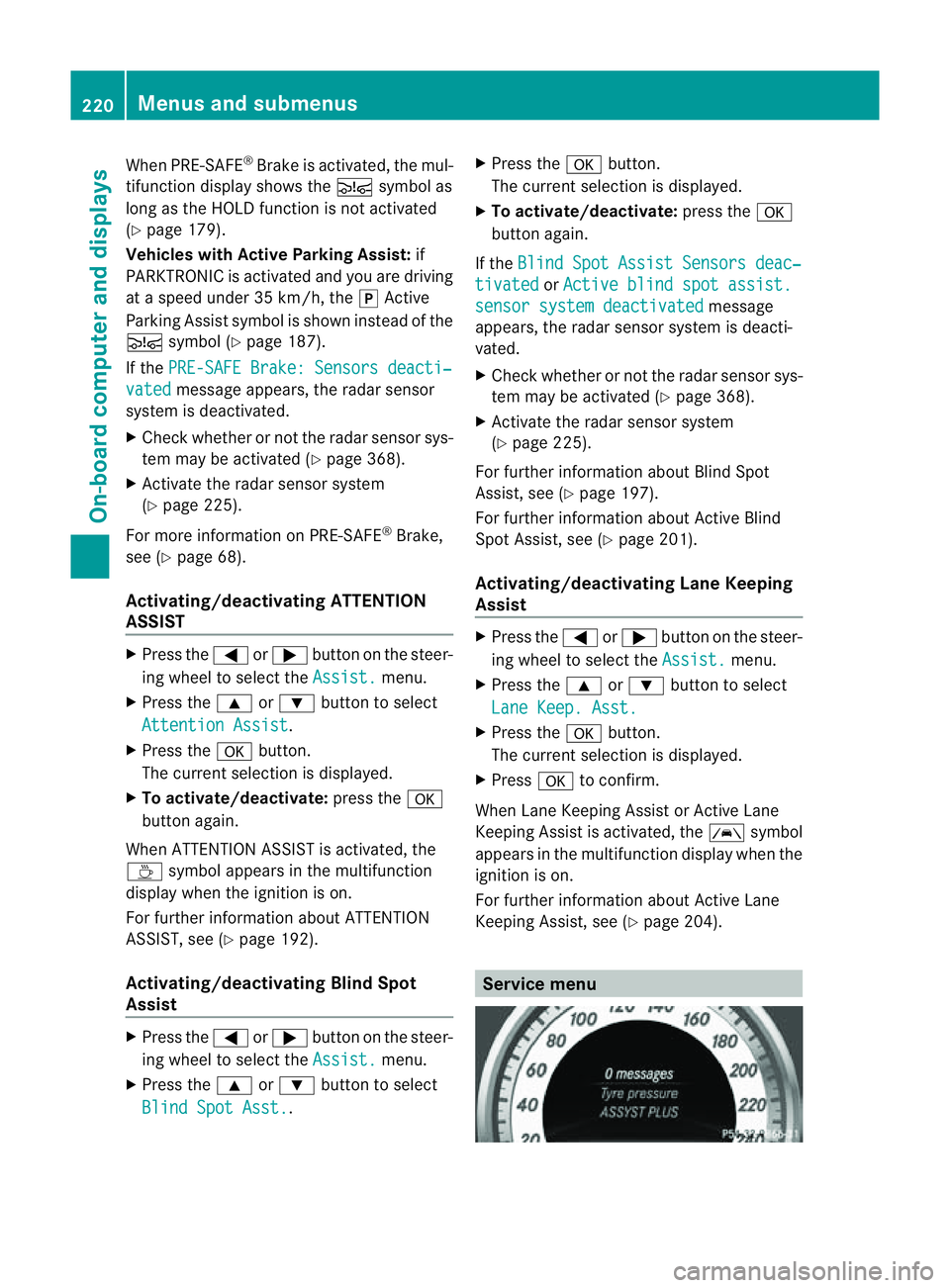
Keeping Assist ,see (Y page 204). Service menu220
Menus and submenusOn-boar
dcomputer and displays
Page 228 of 373
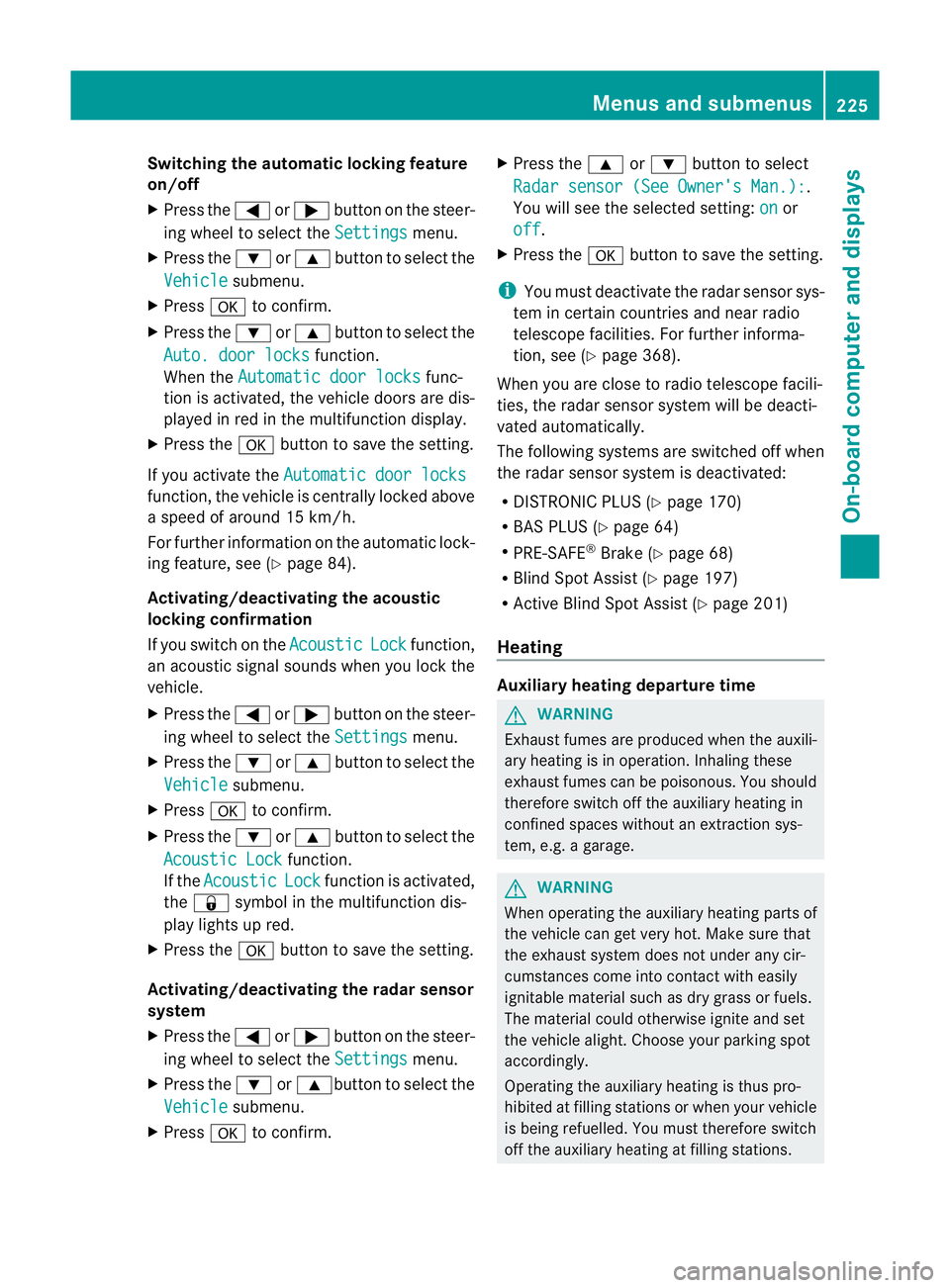
Switching the automatic locking feature
on/off
X
Press the =or; button on the steer-
ing wheel to select the Settings menu.
X Press the :or9 button to select the
Vehicle submenu.
X Press ato confirm.
X Press the :or9 button to select the
Auto. door locks function.
When the Automatic door locks func-
tion is activated, the vehicle doors are dis-
played in red in the multifunction display.
X Press the abutton to save the setting.
If you activate the Automatic door locks function, the vehicle is centrally locked above
as
peed of around 15 km/h.
For further information on the automatic lock-
ing feature, see (Y page 84).
Activating/deactivating the acoustic
locking confirmation
If you switch on the Acoustic Lock function,
an acoustic signal sounds when you lock the
vehicle.
X Press the =or; button on the steer-
ing wheel to select the Settings menu.
X Press the :or9 button to select the
Vehicle submenu.
X Press ato confirm.
X Press the :or9 button to select the
Acoustic Lock function.
If the Acoustic Lock function is activated,
the & symbol in the multifunction dis-
play lights up red.
X Press the abutton to save the setting.
Activating/deactivating the radar sensor
system
X Press the =or; button on the steer-
ing wheel to select the Settings menu.
X Press the :or9button to select the
Vehicle submenu.
X Press ato confirm. X
Press the 9or: button to select
Radar sensor (See Owner's Man.): .
You will see the selected setting: on or
off .
X Press the abutton to save the setting.
i You must deactivate the radar sensor sys-
tem in certain countries and near radio
telescope facilities. For further informa-
tion, see (Y page 368).
When you are close to radio telescope facili-
ties, the radar sensor system will be deacti-
vated automatically.
The following systems are switched off when
the radar sensor system is deactivated:
R DISTRONIC PLUS (Y page 170)
R BAS PLUS (Y page 64)
R PRE-SAFE ®
Brake (Y page 68)
R Blind Spot Assist (Y page 197)
R Active Blind Spot Assist (Y page 201)
Heating Auxiliary heating departuret
ime G
WARNING
Exhaust fumes are produced when the auxili-
ary heating is in operation. Inhaling these
exhaust fumes can be poisonous. You should
therefore switch off the auxiliary heating in
confined spaces without an extraction sys-
tem, e.g. agarage. G
WARNING
When operating the auxiliary heating parts of
the vehicle can get very hot. Make sure that
the exhaust system does not under any cir-
cumstances come into contact with easily
ignitable material such as dry grass or fuels.
The material could otherwise ignite and set
the vehicle alight. Choose your parking spot
accordingly.
Operating the auxiliary heating is thus pro-
hibited at filling stations or when your vehicle
is being refuelled. You must therefore switch
off the auxiliary heating at filling stations. Menus and submenus
225On-board computer and displays Z
Page 238 of 373
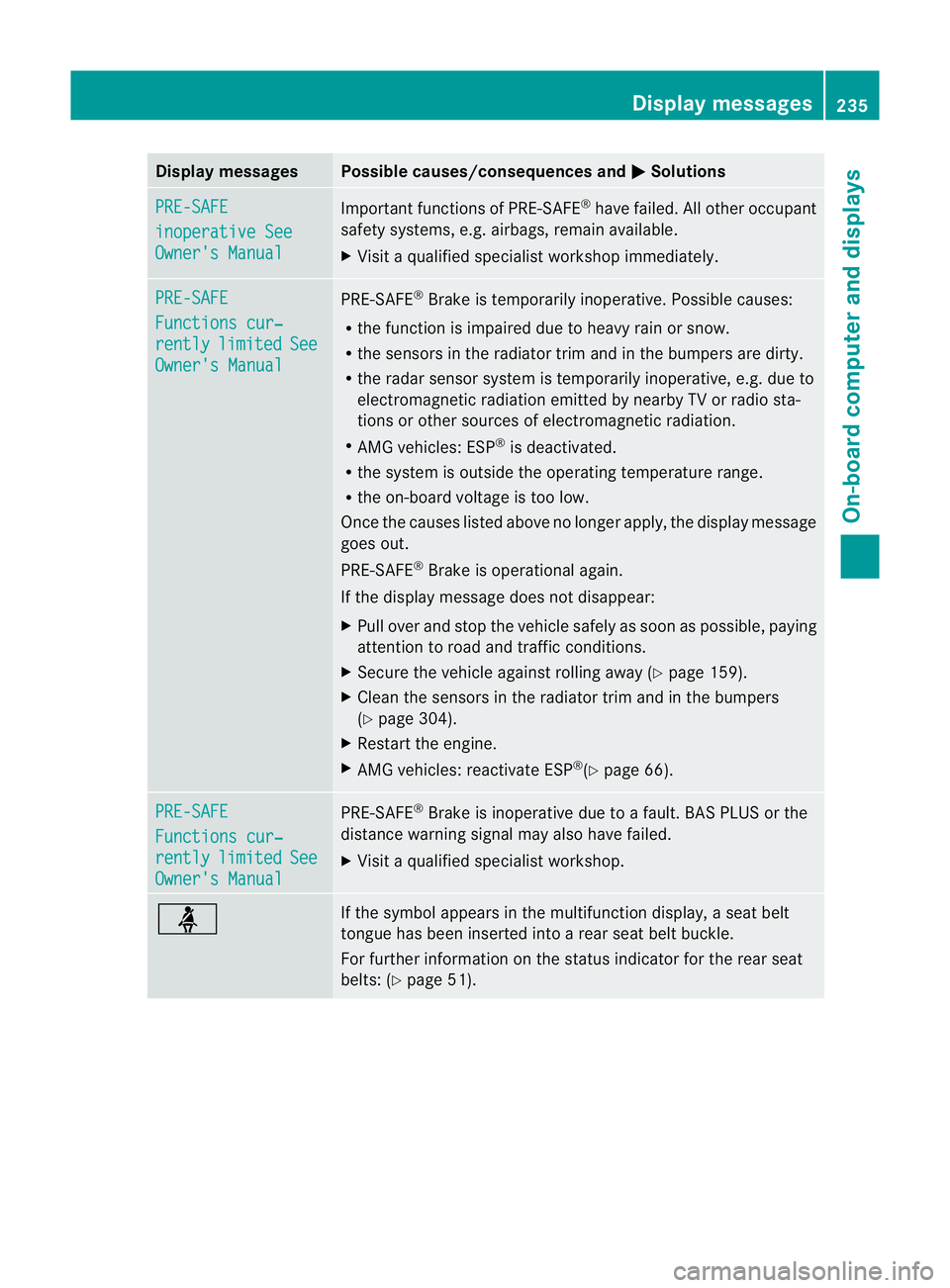
Display messages Possible causes/consequences and
M Solutions
PRE-SAFE
inoperative See
Owner'
sManual Importan
tfunction sofPRE-SAFE ®
have failed .All other occupant
safet ysystems, e.g. airbags, remain available.
X Visit aqualified specialist workshop immediately. PRE-SAFE
Function
scur‐ rently limited See
Owner's Manual PRE-SAFE
®
Brake is temporarily inoperative. Possible causes:
R the function is impaired due to heavy rain or snow.
R the sensors in the radiator trim and in the bumper sare dirty.
R the radar sensor system is temporarily inoperative, e.g. due to
electromagnetic radiation emitted by nearby TV or radio sta-
tion soro ther sources of electromagnetic radiation.
R AMG vehicles: ESP ®
is deactivated.
R the system is outside the operating temperature range.
R the on-board voltage is too low.
Onc ethe causes listed above no longer apply, the display message
goes out.
PRE-SAFE ®
Brake is operational again.
If the display message does not disappear:
X Pull over and stop the vehicle safely as soon as possible ,paying
attention to road and traffic conditions.
X Secure the vehicle against rollin gaway (Y page 159).
X Clean the sensors in the radiator trim and in the bumpers
(Y page 304).
X Restar tthe engine.
X AMG vehicles: reactivate ESP ®
(Y page 66). PRE-SAFE
Functions cur‐
rently limited See
Owner's Manual PRE-SAFE
®
Brake is inoperative due to afault. BAS PLUS or the
distance warning signal may also have failed.
X Visit aqualified specialist workshop. ü If the symbol appears in the multifunction display,
aseat belt
tongue has been inserted intoar ear seat belt buckle.
For further information on the status indicator for the rear seat
belts: (Y page 51). Display messages
235On-boardcomputer and displays Z
Page 248 of 373
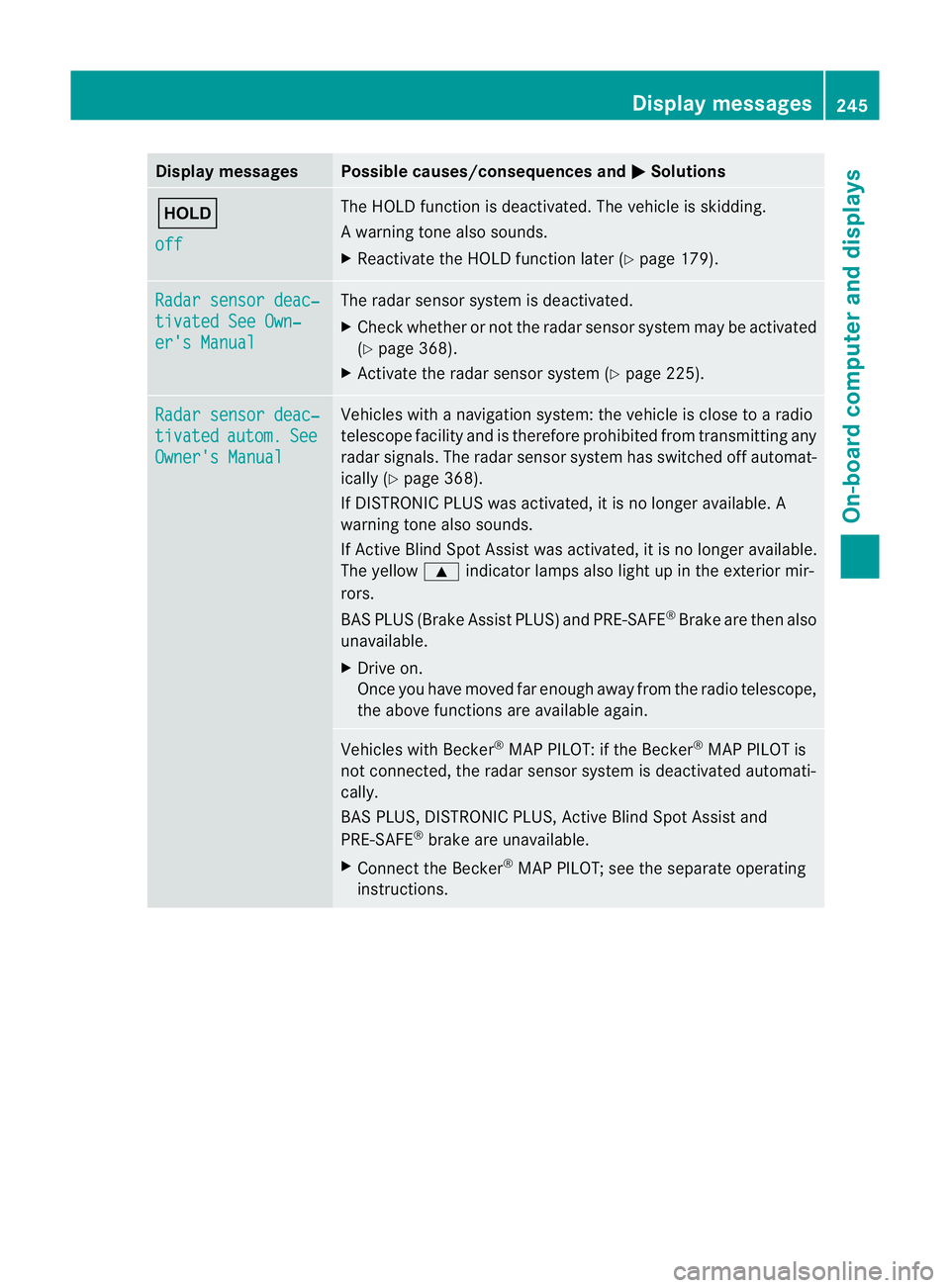
Display messages Possible causes/consequences and
M Solutions
ë
off The HOLD function is deactivated. The vehicl
eisskidding.
Aw arning tone also sounds.
X Reactivat ethe HOLD function late r(Ypage 179). Radar sensor deac‐
tivate
dSee Own‐ er'
sM anual The radar sensor system is deactivated.
X
Chec kwhether or not the radar sensor system may be activated
(Y page 368).
X Activate the radar sensor system (Y page 225).Radar sensor deac‐
tivated autom. See
Owner's Manual Vehicles with
anavigation system: the vehicle is close to aradio
telescope facility and is therefore prohibited from transmitting any
radar signals. The radar sensor system has switched off automat-
ically (Y page 368).
If DISTRONIC PLUS was activated, it is no longer available. A
warning tone also sounds.
If Active Blind Spot Assist was activated, it is no longer available.
The yellow 9indicator lamps also light up in the exterior mir-
rors.
BAS PLUS (Brake Assist PLUS) and PRE-SAFE ®
Brake are then also
unavailable.
X Drive on.
Once you have moved far enough away from the radio telescope,
the above functions are available again. Vehicles with Becker
®
MAP PILOT: if the Becker ®
MAP PILOT is
not connected, the radar sensor system is deactivated automati-
cally.
BAS PLUS, DISTRONIC PLUS, Active Blind Spot Assist and
PRE-SAFE ®
brake are unavailable.
X Connect the Becker ®
MAP PILOT; see the separate operating
instructions. Display messages
245On-board computer and displays Z
Page 255 of 373
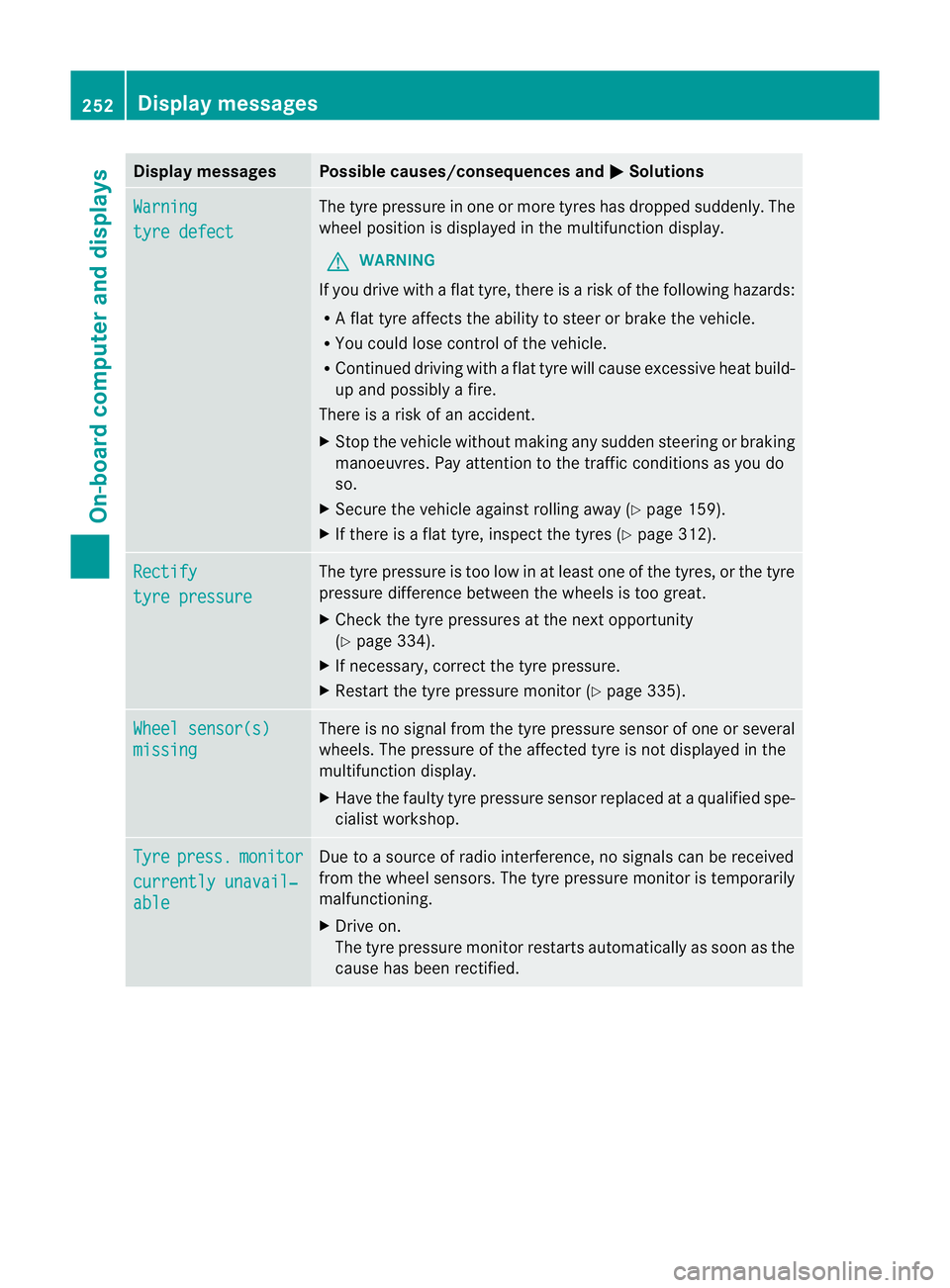
Display messages Possible causes/consequences and
M Solutions
Warning
tyr
ed efect The tyr
epressur einone or more tyre shas dropped suddenly. The
wheel position is displayed in the multifunction display.
G WARNING
If you drive with aflat tyre, there is arisk of the following hazards:
R Af lat tyre affect sthe ability to steer or brake the vehicle.
R You could lose control of the vehicle.
R Continued driving with aflat tyre will cause excessive heat build-
up and possibly afire.
There is arisk of an accident.
X Stop the vehicle without making any sudden steerin gorbraking
manoeuvres. Pay attention to the traffic conditions as you do
so.
X Secure the vehicle against rolling away (Y page 159).
X If there is aflat tyre, inspect the tyres (Y page 312).Rectify
tyre pressure The tyre pressure is too low in at least one of the tyres, or the tyre
pressure differenc
ebetween the wheels is too great.
X Check the tyre pressures at the next opportunity
(Y page 334).
X If necessary, correc tthe tyre pressure.
X Restart the tyre pressure monitor (Y page 335).Wheel sensor(s)
missing There is no signal from the tyre pressure sensor of one or several
wheels. The pressure of the affected tyre is not displayed in the
multifunction display.
X
Have the faulty tyre pressure sensor replaced at aqualified spe-
cialist workshop. Tyre press. monitor
currently unavail‐
able Due to
asource of radio interference, no signals can be received
from the wheel sensors. The tyre pressure monitor is temporarily
malfunctioning.
X Drive on.
The tyre pressure monitor restart sautomatically as soon as the
cause has been rectified. 252
Display messagesOn-board computer and displays