sensor MERCEDES-BENZ CLS COUPE 2012 User Guide
[x] Cancel search | Manufacturer: MERCEDES-BENZ, Model Year: 2012, Model line: CLS COUPE, Model: MERCEDES-BENZ CLS COUPE 2012Pages: 373, PDF Size: 9.12 MB
Page 67 of 373
BAS PLUS (Brak
eAssis tSystem Plus)
i Observ ethe "Important safety notes "sec-
tio n(Ypage 62).
BAS PLU Sisonly available on vehicles with
DISTRONIC PLUS.
BAS PLUS provides braking assistance in haz-
ardous situations at speeds greater than
7k m/h and uses rada rsensor technology to
assess the traffic situation.
With the help of the radar sensor system, BAS
PLUS can detec tobstacles that are in the
path of your vehicle for an extended period of
time.
At speeds up to approximately 70 km/h, BAS
PLUS may also detect stationar yobstacles,
for example, stopped or parked vehicles.
To prevent afront-end collision, BAS PLUS
calculates the brake force necessary if:
R yo ua pproach an obstacle, and
R BAS PLUS ha sdetected arisk of collision
If you ar edriving at aspeed over
30 km/h:ify ou depress the brake sharply,
BAS PLUS automatically raises the brake
pressure to avalue adapted to the traffic sit-
uation.
If you are driving at aspeed under
30 km/h:ify ou depress the brake, BAS PLUS
is activated. Brakin gwill be carried out at the
last possible moment.
If BAS PLUS demands particularly high brak-
ing force, preventative passenger protection
measures (PRE-SAFE ®
)a re activated simul-
taneously.
X Keep the brake pedal depressed until the
emergenc ybraking situation is over.
ABS prevent sthe wheels from locking.
BAS PLUS is deactivated and the brakes func-
tion as usual,i f:
R you release the brake pedal.
R there is no longer any danger of arear-end
collision.
R no obstacle is detected in front of your
vehicle. The radar sensor system is switched off auto-
matically in the vicinit
yofradio telescope
facilities in the following vehicles:
R vehicles with COMAND Online and naviga-
tion
R vehicles with Audio 20 and Becker ®
MAP
PILOT
Becker ®
MAP PILOT must be connected;
see the separate operating instructions.
The radar sensor system must be switched off
using the on-board computer in the vicinit yof
radio telescope facilities in the following vehi-
cles:
R vehicles without COMAND Online and nav-
igation
R vehicles without Audio 20 and Becker ®
MAP PILOT
R vehicles for Australia
For information on switching off the radar
sensor system using the on-board computer,
see (Y page 225).
For BAS PLUS to assist you when driving, the
radar sensor system must:
R be switched on (Y page 225)
R be operational (Y page 245)
If the radar sensor system is malfunctioning,
BAS PLUS will not be available. The brake
system is still available with complete brake
boosting effect and BAS. G
WARNING
BAS PLUS cannot alwaysc learly identify
object sand complex traffic situations. BAS
PLUS cannot intervene in these cases. There
is ar isk of an accident.
Always pay careful attention to the traffic sit-
uation and be ready to brake.
In particular, the detection of obstacles can
be impaired if there is:
R dirt on the sensors or anything else cover-
ing the sensors
R snow or heavy rain
R interference by other radar sources 64
Driving safety systemsSafety
Page 68 of 373
R
the possibility of strong rada rreflections,
for example, in multi-storey car parks
R an arrow vehicle travellin ginfront, e.g. a
motorcycle
R av ehicle travellin ginfrontonad ifferent
line G
WARNING
BAS PLUS does not react:
R to people or animals
R to oncoming vehicles
R to crossing traffic
R when cornering
As aresult, BAS PLUS may not intervene in all
critical situations. There is arisk of an acci-
dent.
Always pay careful attention to the traffic sit-
uation and be ready to brake.
Following damage to the fron tend of the vehi-
cle ,havet he configuratio nand operatio nof
the rada rsensor schecked at aqualified spe-
cialist workshop. This also applies to colli-
sions at slow speeds where ther eisnovisible
damage to the fron tofthe vehicle. Adaptive brake lamps
If you brake sharply from aspeed of more
than 50 km/h or if braking is assisted by BAS
or BAS PLUS, the brake lamps flash rapidly.
In this way,t raffic travelling behind you is
warned in an even more noticeable manner.
If you brake sharply from aspeed of more
than 70 km/h to astandstill, the hazard warn-
ing lamps are activated automatically .Ifthe
brakes are applied again, the brake lamps
light up continuously.T he hazard warning
lamps switch off automatically if you travel
faster than 10 km/h .You can also switch off
the hazard warning lamps using the hazard
warning button (Y page 114). ESP
®
(Electronic Stability Program)
Important safety notes i
Observe the "Important safety notes" sec-
tion (Y page 62). G
WARNING
If ESP ®
is malfunctioning, ESP ®
is unable to
stabilise the vehicle. In addition, other driving
safety systems are switched off. This increa-
ses the risk of skidding and an accident.
Drive on carefully. Have ESP ®
checked at a
qualified specialist workshop.
! Vehicles with 4MATIC: switch off the igni-
tion when the parking brake is being tested
using adynamometer.
Application of the brakes by ESP ®
may oth-
erwise destroy the brake system.
Vehicles without 4MATIC: observe the notes
on ESP ®
if the vehicle is being towed with the
rear axle raised (Y page 322).
ESP ®
is deactivated if the åwarning lamp
in the instrument cluster lights up continu-
ously when the engine is running.
If the ÷ warning lamp and the åwarn-
ing lamp are lit continuously, ESP ®
is not
available due to amalfunction.
Observe the information on warning lamps
(Y page 263) and display messages which
may be shown in the instrument cluster
(Y page 232).
If ESP ®
detect sthat the vehicle is deviating
from the direction desired by the driver, one
or more wheels are braked to stabilise the
vehicle. The engine output is also modified to
keep the vehicle on the desired course within
physical limits. ESP ®
assists the driver when
pulling away on wet or slippery roads. ESP ®
can also stabilise the vehicle during braking.
If ESP ®
intervenes, the ÷ESP®
warning
lamp flashes in the instrument cluster. Driving safety systems
65Safety Z
Page 72 of 373
This function will issue
awarning if:
R at speeds of around 30 km/ho rmore, over
several seconds, the distance maintained
to the vehicle travelling in front is insuffi-
cient.
The · distance warning lamp then lights
up in the instrument cluster.
R at as peed of approximately 7km/h or
higher, you very quickly approach avehicle
in front.
An intermittent warning tone willt hen
sound and the ·distance warning lamp
willl ight up in the instrument cluster.
X Brake immediately in order to increase the
distance from the vehicl einfront.
or
X Take evasive action provided it is safe to do
so.
From aspee dofa pproximatel y7km/h,ifthe
driver and passengers have fastened their
seat belts, PRE-SAFE ®
Brake can brake the
vehicl eautomatically at speeds up to approx-
imatel y200 km/h.
Due to the nature of the system, particularly
complicate ddriving conditions may cause
unnecessary warnings or the unnecessary
interventio nofPRE-SAFE ®
Brake.
You can prevent the interventio nofthe PRE-
SAFE ®
Brake at any time by:
R depressing the accelerato rpedal further
R activating kickdown
R releasing the brake pedal.
The brakin gaction of PRE-SAFE ®
Brak eis
ended automatically if:
R you manoeuvre to avoid the obstacle.
R ther eisnol onger any danger of arear-end
collision.
R ther eisnol onger an obstacle detected in
fron tofy our vehicle.
With the help of the radar sensor system,
PRE-SAFE ®
Brak ecan detec tobstacles that
are in fron tofyour vehicle for an extended
period of time. At speeds up to approximately 70 km/h, PRE-
SAFE
®
Brak ecan also detec tstationary
obstacles such as stopped or parked vehi-
cles.
If you approach an obstacle and PRE-SAFE ®
Brak edetects arisk of acollision, the system
will alert you both visually and acoustically. If
you do not brake or take evasive action ,the
system will warn you by automatically braking
the vehicle gently. If ther eisanincreased risk
of collision, preventativ epassenger protec-
tion measures (PRE-SAFE ®
)a re activated
(Y page 48). If, at speeds over 30 km/h, arisk
of collision remains and you do not brake,
take evasive action or significantly acceler-
ate, automatic brakin gmay be performed up
to alevel of automatic emergency braking.
Automatic emergency brakin gisnot per-
formed until immediately prior to an accident
that can no longer be avoided. G
WARNING
PRE-SAFE ®
Brak ewill initially brake your vehi-
cle by apartial application of the brakes if a
danger of collision is detected. There may be
ac ollision unless you also brake. Automatic
emergency braking cannot preven tacolli-
sion. There is arisk of an accident.
Always apply the brakes yourself and try to
take evasive action. G
WARNING
PRE-SAFE ®
Brak ecannot alway sclearly iden-
tify objects and complex traffic conditions.
In these cases, PRE-SAFE ®
Brak emay:
R give an unnecessary warning and then
brake the vehicle
R neither give awarning nor intervene
There is arisk of an accident.
Always pay particular attention to the traffic
situation and be ready to brake, especially if
PRE-SAFE ®
Brak ewarns you. Terminate the
intervention in anon-critical driving situation. Driving safet
ysystems
69Safety Z
Page 73 of 373
In particular, the detection of obstacle
scan
be impaired if there is:
R dirt on the sensors or anything else cover-
ing the sensors
R snow or heavy rain
R interference by other radars ources
R the possibility of strongr adar reflections,
for example, in multi-storey car parks
R an arrow vehicle travelling in front,e .g. a
motorcycle
R av ehicle travelling in front on adifferent
line G
WARNING
PRE-SAFE ®
Brake does not react:
R to people or animals
R to oncoming vehicles
R to crossin gtraffic
R when cornering
As aresult, PRE-SAFE ®
Brake may neither
give warnings nor intervene in all critical sit-
uations. There is arisk of an accident.
Always pay careful attention to the traffic sit-
uation and be ready to brake.
In order to maintain the appropriate distance
to the vehicle in front and thus prevent acol-
lision, you must apply the brakes yourself.
X To activate/deactivate: activate or deac-
tivate PRE-SAFE ®
Brake in the on-board
computer (Y page 219).
When PRE-SAFE ®
Brake is activated, the
Ä symbol appears in multifunction dis-
play, as long as the HOLD function is deac-
tivated (Y page 179). On vehicles with the
Active Parking Assist driving system, the
Ä symbol is displayed when position P
is engaged or you are driving faster than
35 km/h.
For PRE-SAFE ®
Brake to assist you when driv-
ing, the radar sensor system must be
switched on (Y page 225) and be opera-
tional. The radar sensor system is switched off auto-
matically in the vicinit
yofradio telescope
facilities in the following vehicles:
R vehicles with COMAND Online and naviga-
tion
R vehicles with Audio 20 and Becker ®
MAP
PILOT
Becker ®
MAP PILOT must be connected;
see the separate operating instructions.
The radar sensor system must be switched off
using the on-board computer in the vicinit yof
radio telescope facilities in the following vehi-
cles:
R vehicles without COMAND Online and nav-
igation
R vehicles without Audio 20 and Becker ®
MAP PILOT
R vehicles for Australia
For information on switching off the radar
sensor system using the on-board computer,
see (Y page 225).
Following damage to the front end of the vehi-
cle, have the configuration and operation of
the radar sensors checked at aqualified spe-
cialist workshop. This also applies to colli-
sions at slow speeds where there is no visible
damage to the front of the vehicle. Anti-theft systems
Immobiliser
X To activat ewith th ekey: remove th ekey
fro mt heignitio nlock.
X To activat ewith KEYLESS-GO: switch the
ignitio noff and open the driver's door.
X To deactivate: switch on the ignition.
The immobiliser prevents you rvehicle from
being started without the correct key.
When leaving the vehicle, alway stake the key
with you and lock the vehicle. Anyone can
start the engin eifavalid key has been left
inside the vehicle. 70
Anti-theft systemsSafety
Page 75 of 373
X
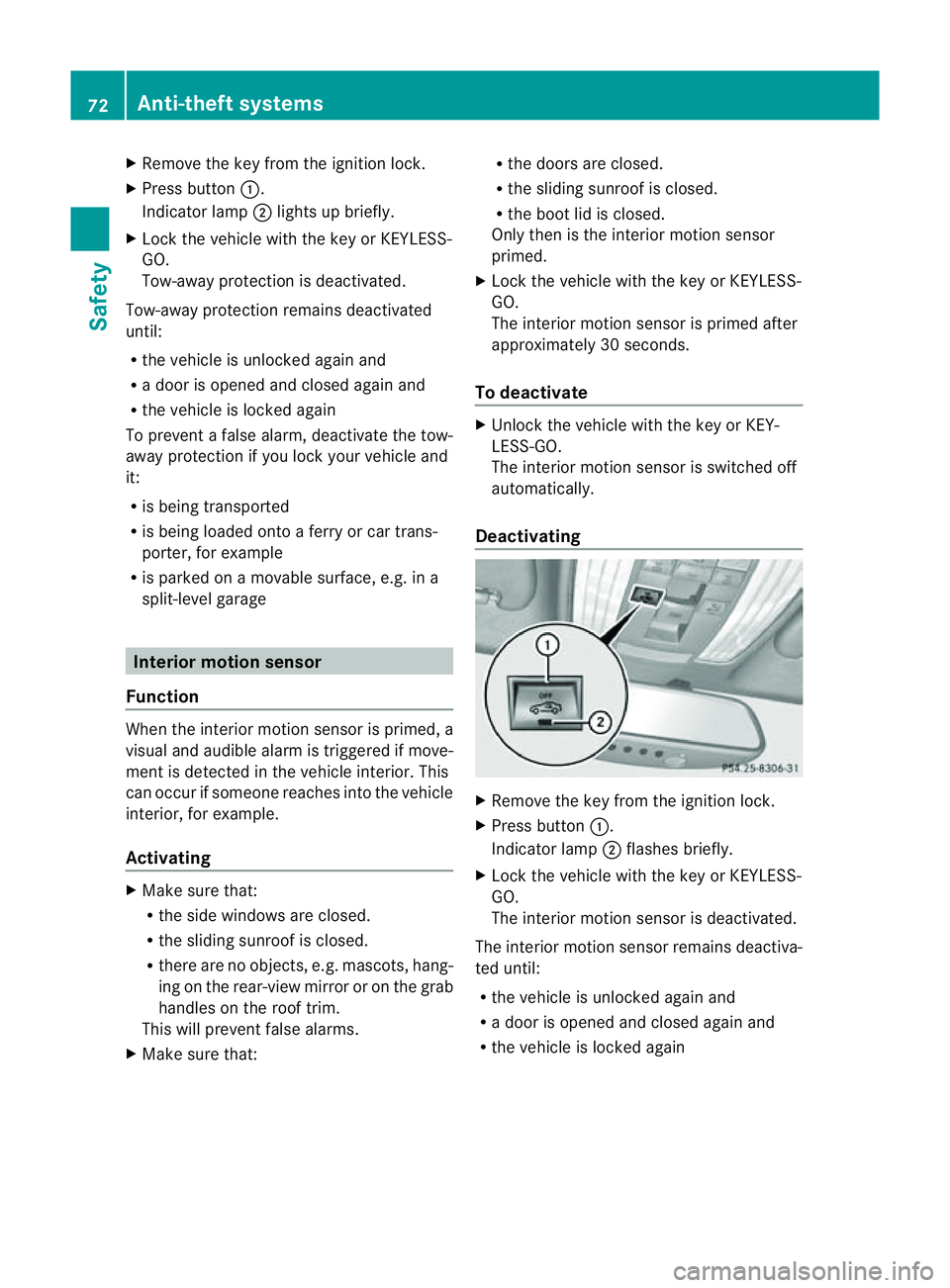
Remove th ekeyfrom th eignition lock.
X Press button :.
Indicato rlamp ;light supb riefly.
X Loc kthe vehicle wit hthe keyorK EYLESS-
GO.
Tow-away protection is deactivated.
Tow-away protection remains deactivated
until:
R thev ehicle is unlocked again and
R ad oor is opened and closed again and
R thev ehicle is locke dagain
To preven tafalse alarm, deactivate the tow-
away protection if you lock you rvehicle and
it:
R is being transported
R is being loaded ontoaf erry or car trans-
porter ,for example
R is parked on amovable surface, e.g. in a
split-level garage Interior motion sensor
Function When the interior motion sensor is primed, a
visual and audible alarm is triggered if move-
ment is detected in the vehicle interior. This
can occur if someon ereaches intot he vehicle
interior, for example.
Activating X
Make sure that:
R
the side windows are closed.
R the sliding sunroof is closed.
R ther eare no objects, e.g. mascots, hang-
ing on the rear-view mirror or on the grab
handles on the roof trim.
This will preven tfalse alarms.
X Mak esure that: R
thed oor sare closed.
R thes lidin gsunroo fisclosed.
R the boot lid is closed.
Only then is the interior motion sensor
primed.
X Lock the vehicle with the key or KEYLESS-
GO.
The interior motion sensor is primed after
approximately 30 seconds.
To deactivate X
Unlock the vehicle with the key or KEY-
LESS-GO.
The interior motion sensor is switched off
automatically.
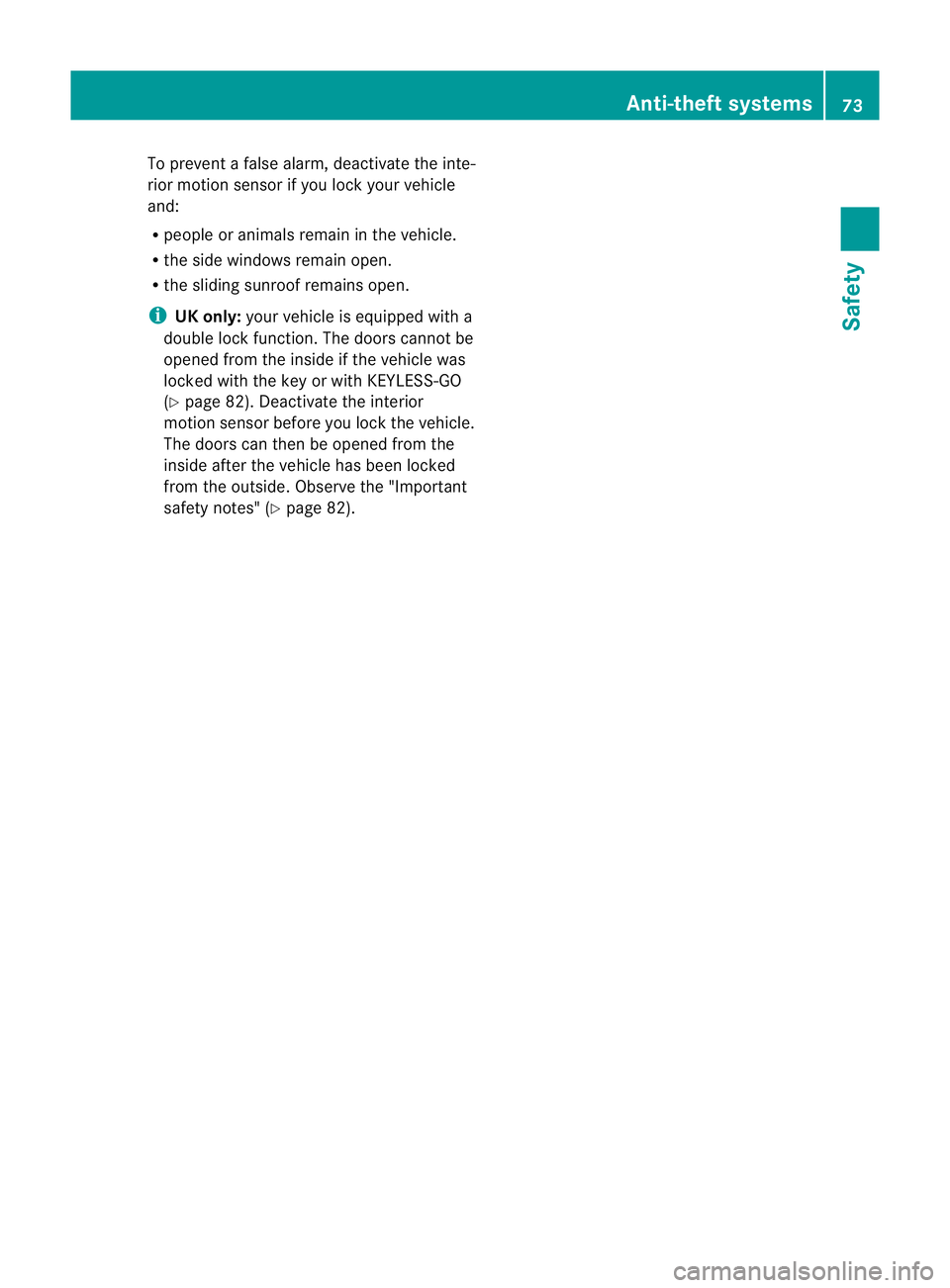
Deactivating X
Remove the key from the ignition lock.
X Press button :.
Indicator lamp ;flashes briefly.
X Lock the vehicle with the key or KEYLESS-
GO.
The interior motion sensor is deactivated.
The interior motion sensor remains deactiva-
ted until:
R the vehicle is unlocked againa nd
R ad ooriso peneda nd closed agai nand
R the vehicl eislocked again 72
Anti-theft systemsSafety
Page 76 of 373
To prevent
afalse alarm, deactivate the inte-
rior motion sensor if you lock your vehicle
and:
R people or animals remain in the vehicle.
R the side windows remain open.
R the sliding sunroof remains open.
i UK only: your vehicle is equipped with a
double lock function. The doors cannot be
opened from the inside if the vehicle was
locked with the key or with KEYLESS-GO
(Y page 82). Deactivate the interior
motion sensor before you lock the vehicle.
The doors can then be opened from the
inside after the vehicle has been locked
from the outside. Observe the "Important
safety notes" (Y page 82). Anti-theft systems
73Safety Z
Page 80 of 373
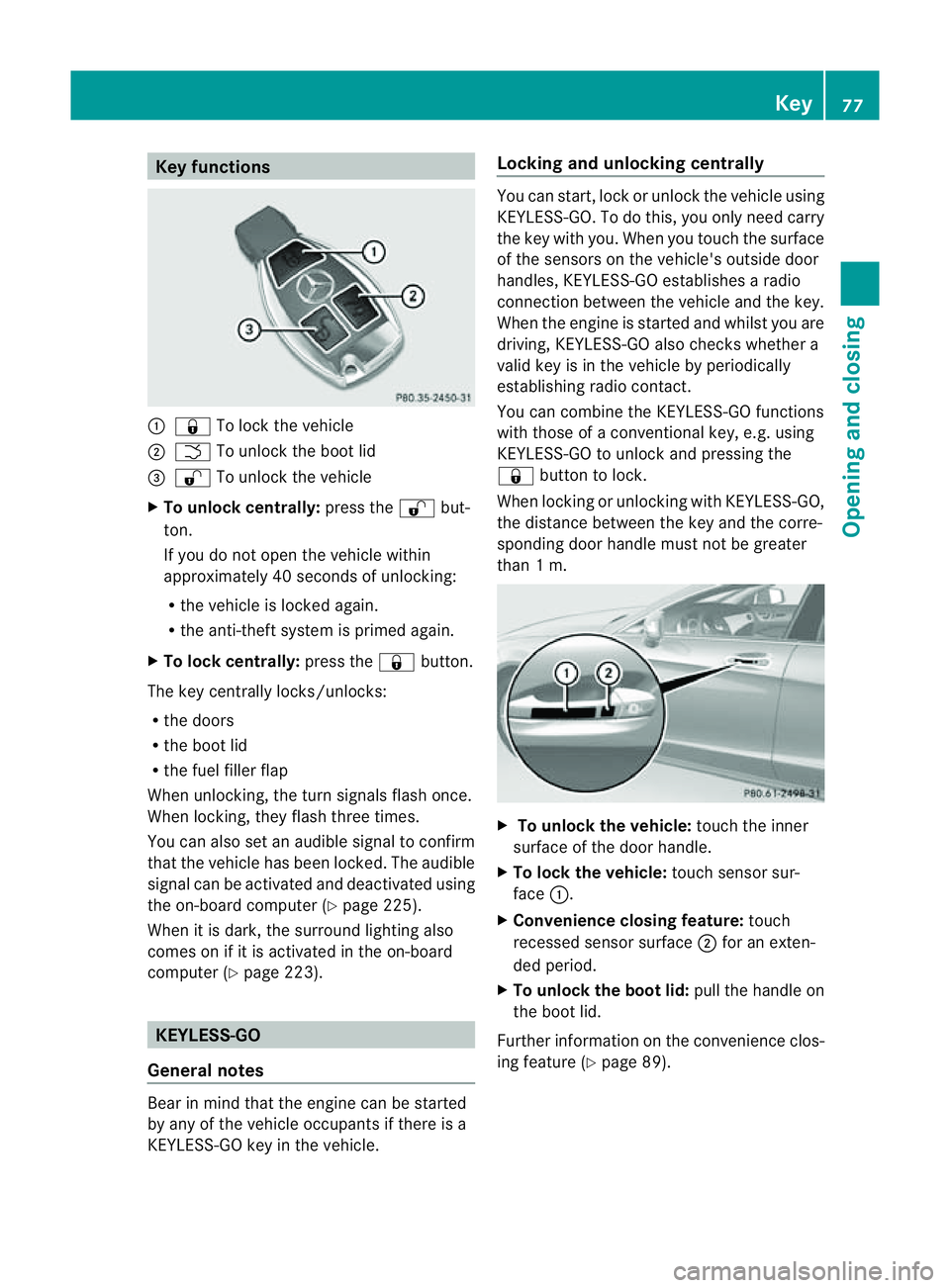
Key functions
:
& To loc kthe vehicle
; F To unlock the boot lid
= % To unlock the vehicle
X To unlock centrally: press the%but-
ton.
If you do not open the vehicle within
approximately 40 seconds of unlocking:
R the vehicle is locked again.
R the anti-theft system is primed again.
X To lock centrally: press the&button.
The key centrally locks/unlocks:
R the doors
R the boot lid
R the fuel filler flap
When unlocking, the turn signals flash once.
When locking, they flash three times.
You can also set an audible signal to confirm
that the vehicle has been locked. The audible
signal can be activated and deactivated using
the on-board computer (Y page 225).
When it is dark, the surround lighting also
comes on if it is activated in the on-board
computer (Y page 223). KEYLESS-GO
General notes Bear in mind that the engine can be started
by any of the vehicle occupants if there is a
KEYLESS-GO key in the vehicle. Locking and unlocking centrally You can start, lock or unlock the vehicle using
KEYLESS-GO. To do this, you only need carry
the key with you. When you touch the surface
of the sensors on the vehicle's outside door
handles, KEYLESS-GO establishes
aradio
connection between the vehicle and the key.
When the engine is started and whilst you are
driving, KEYLESS-GO also checksw hether a
valid key is in the vehicle by periodically
establishing radio contact.
You can combine the KEYLESS-GO functions
with those of aconventional key, e.g. using
KEYLESS-GO to unlock and pressing the
& button to lock.
When locking or unlocking with KEYLESS-GO,
the distance between the key and the corre-
sponding door handle must not be greater
than 1m. X
To unlock the vehicle: touch the inner
surface of the door handle.
X To lock the vehicle: touch sensor sur-
face :.
X Convenience closing feature: touch
recessed sensor surface ;for an exten-
ded period.
X To unlock the boot lid: pull the handle on
the boot lid.
Further information on the convenience clos-
ing feature (Y page 89). Key
77Opening and closing Z
Page 81 of 373
Changing th
esettings of th elocking
system
You can chang ethe settings of th elocking
system. This mean stha tonlyt he driver' sdoor
and th efuel fille rflap are unlocked when the
vehicle is unlocked. This is useful if you fre-
quently travel on your own.
X To chang ethe setting: press and hold
down the %and& buttons on the
key simultaneously for approximately six
seconds until the battery chec klamp
flashes twice ( Ypage 79).
i If th esettin goft helockin gsystem is
changed within th esignal range of th evehi-
cle ,pressin gthe & or% button:
R locks or
R unlock sthe vehicle
The ke ynow function sasfollows:
X To unlock th edriver's door: pressthe
% buttononce.
X To unlock centrally: pressthe % but-
to nt wice.
X To lock centrally: pressthe & button.
The KEYLESS-GO function is changed as fol-
lows:
X To unlock th edriver's door: touch the
inner surface of th edoor handle on the
driver' sdoor.
X To unlock centrally: touch theinner sur-
fac eoft hedoor handle on th efront-
passenger door or th erear door.
X To lock centrally: touch theouter sensor
surface on on eofthedoor handles.
X To restor ethe factor ysettings: press
and hold down the %and& buttons
simultaneousl yfor approximately six sec-
onds until th ebattery check lamp flashes
twice (Y page 79). Emergency key element
General notes If th
evehicle can no longer be locke dor
unlocked wit hthe key, use th eemergency
ke ye lement.
If you use th eemergenc ykey element to
unlock and open the driver's door or the boot
lid, the anti-thef talarm system will be trig-
gered (Y page 71).
There are several ways to tur noff the alarm:
X To turn the alarm off with the key: press
the % or& button on the key.
or
X Insert the key into the ignition lock.
or
X To deactivate the alarm with KEYLESS-
GO: press the Start/Stop button in the igni-
tion lock. The key must be in the vehicle.
or
X Lock or unlock the vehicle using KEYLESS-
GO. The key must be outside the vehicle.
If you unlock the vehicle using the emergency
key element, the fuel filler fla pwilln ot be
unlocked automatically.
X To unlock the fuel filler flap: insert the
key into the ignition lock.
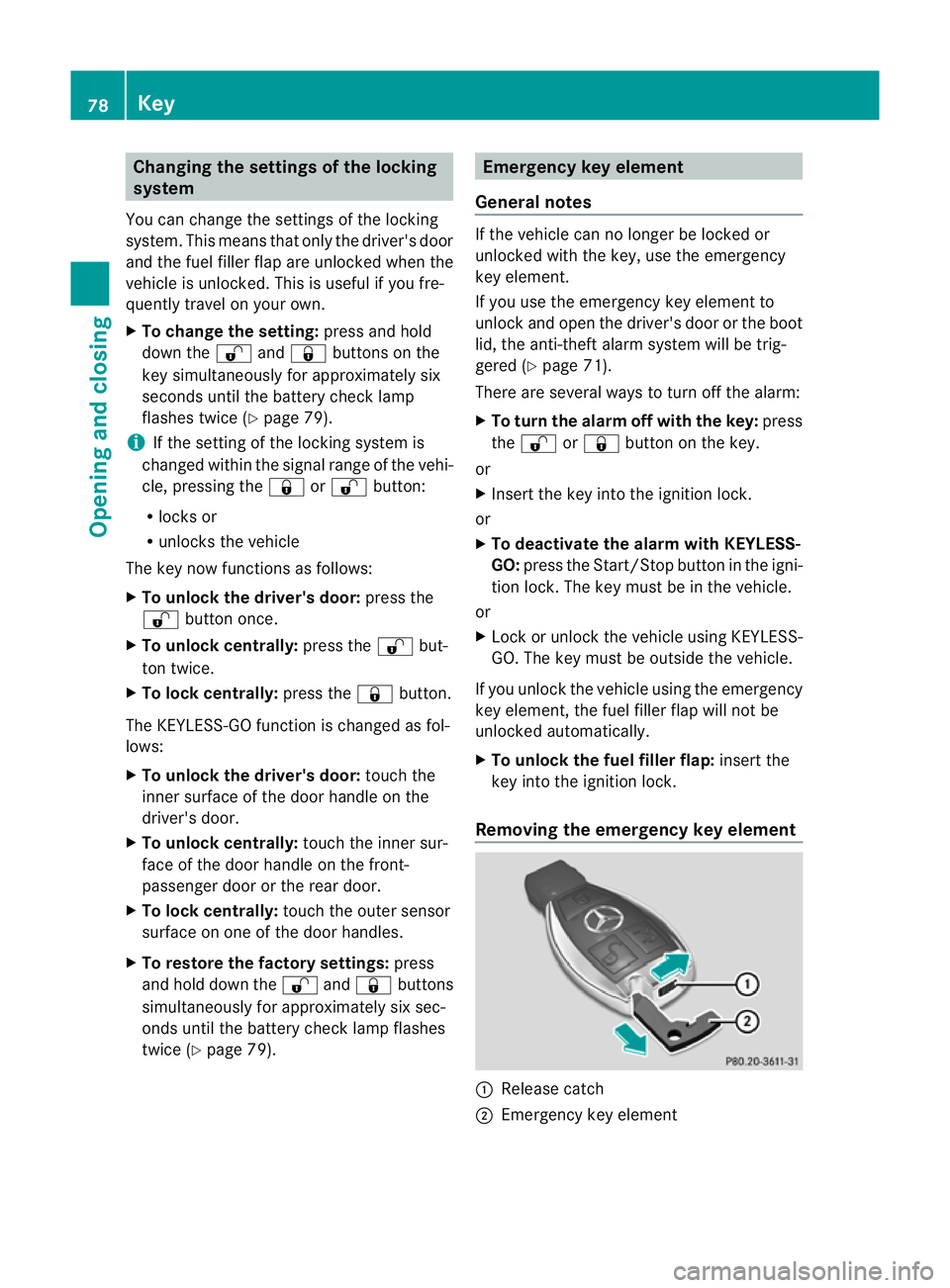
Removing the emergency key element :
Releas ecatch
; Emergency key element 78
KeyOpening and closing
Page 85 of 373
Problem Possible causes/consequences and
M Solutions
The engine cannot be
started using the key. the on-board voltage is too low.
X
Switch off non-essential consumers, e.g. seat heating or interior
lighting, and try to start the engine again.
If this does not work:
X Check the starter battery and charge it if necessary
(Y page 318).
or
X Jump-start the vehicle (Y page 319).
or
X Consult aqualified specialist workshop. The engine cannot be
started using KEYLESS-
GO. The key is in the
vehicle. Ad
oor is open. Therefore, the key cannot be detected as easily.
X Close the door and try to start the vehicle again. There is interferenc
efrom apowerful source of radio waves.
X Start your vehicle with the key in the ignition lock. Doors
Important safety notes
G
WARNING
Only for the United Kingdom: if the vehicle
has been locked with the key or with KEY-
LESS-GO, the double lock function is activa-
ted as standard. It is then not possible to open
the doors from inside the vehicle.
Therefore, do not leave any people behind in
the vehicle, particularly children, elderly peo-
ple or people requiring special assistance. As
ar esult, they may not be able to free them-
selves in the event of an emergency. They
could be seriously or even fatally injured by
prolonged exposure to extremely high or low
temperatures, for example. In this case, res-
cuing people from outside the vehicle is diffi-
cult.
Deactivate the interior motion sensor before
you lock the vehicle. The doors can then be
opened from the inside after the vehicle has
been locked from the outside. G
WARNING
If children are left unsupervised in the vehicle,
they could:
R open adoor from inside the vehicle at any
time, even if it has been locked
R start the vehicle using akey which has been
left in the vehicle
R release the parking brake
They could thereby endanger themselves and
others. Never leave children unsupervised in
the vehicle. Always take the key with you
when leaving the vehicle, even if you are only
leaving it for ashort time. Unlocking and opening the doors
from the inside
For all countries except the United King-
dom: you can open adoor from inside the
vehicle even if it has been locked. If the vehi-
cle has previously been locked with the key
or with KEYLESS-GO, opening adoor from the
inside will trigger the anti-theft alarm system.
Switch off the alarm (Y page 71).82
DoorsOpening and closing
Page 89 of 373
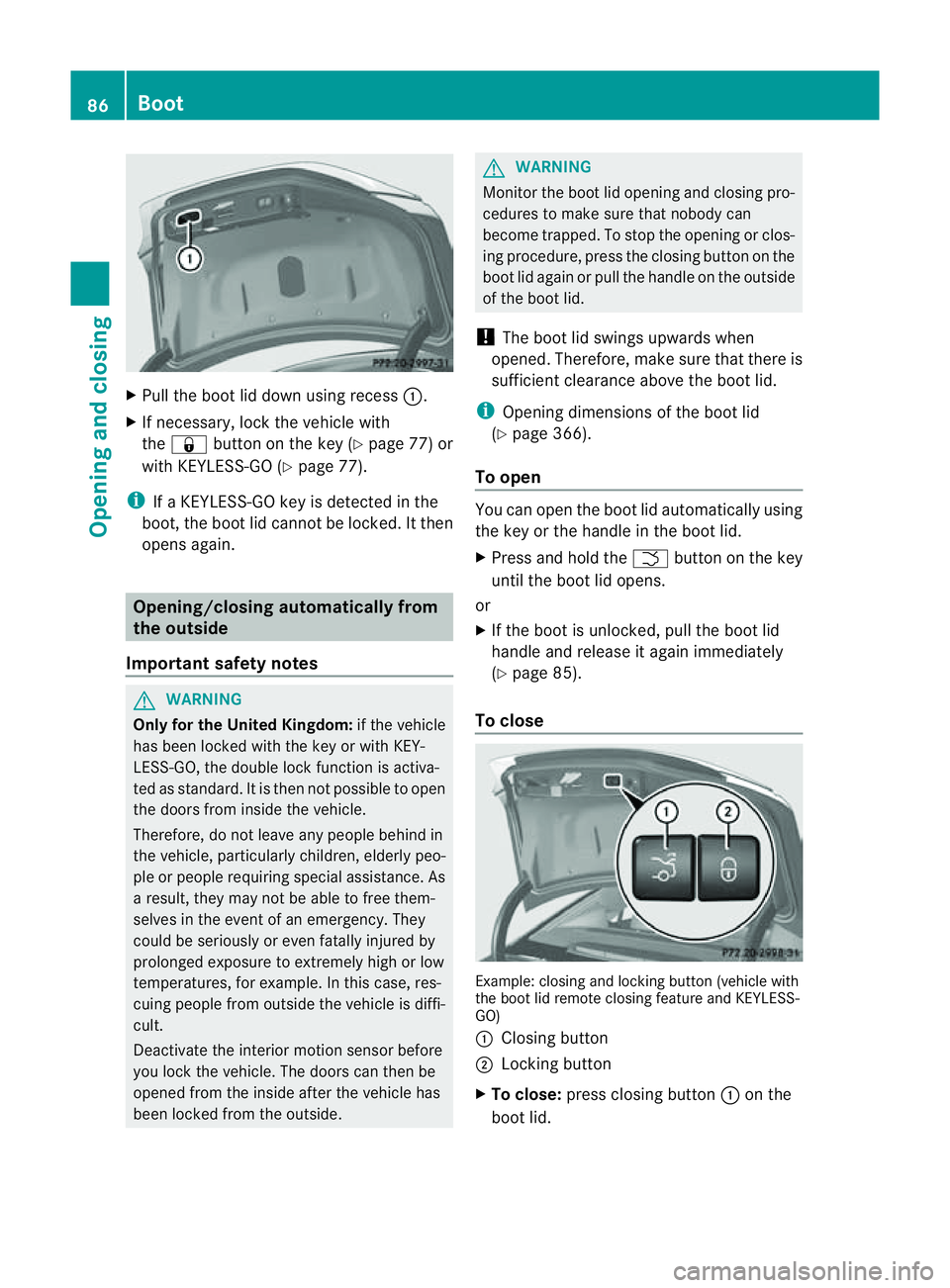
X
Pull the boot lid down using recess :.
X If necessary, lock the vehicle with
the & button on the key (Y page 77) or
with KEYLESS-GO (Y page 77).
i IfaK EYLESS-GO key is detected in the
boot, the boot lid cannot be locked. It then
opens again. Opening/closing automatically from
the outside
Important safety notes G
WARNING
Only for the United Kingdom: if the vehicle
has been locked with the key or with KEY-
LESS-GO, the double lock function is activa-
ted as standard. It is then not possible to open
the doors from inside the vehicle.
Therefore, do not leave any people behind in
the vehicle, particularly children, elderly peo-
ple or people requiring special assistance. As
ar esult, they may not be able to free them-
selves in the event of an emergency. They
could be seriously or even fatally injured by
prolonged exposure to extremely high or low
temperatures, for example. In this case, res-
cuing people from outside the vehicle is diffi-
cult.
Deactivate the interior motion sensor before
you lock the vehicle. The doors can then be
opened from the inside after the vehicle has
been locked from the outside. G
WARNING
Monito rthe boot lid opening and closing pro-
cedures to make sure that nobody can
become trapped. To stop the opening or clos-
ing procedure, press the closing button on the
boot lid again or pull the handle on the outside
of the boot lid.
! The boot lid swings upwards when
opened. Therefore, make sure that there is
sufficient clearance above the boot lid.
i Opening dimensions of the boot lid
(Y page 366).
To open You can open the boot lid automatically using
the key or the handle in the boot lid.
X
Press and hold the Fbutton on the key
until the boot lid opens.
or
X If the boot is unlocked, pull the boot lid
handle and release it again immediately
(Y page 85).
To close Example: closing and locking button (vehicle with
the boot lid remote closing feature and KEYLESS-
GO)
:
Closing button
; Lockingb utton
X To close: press closing button :on the
boot lid. 86
BootOpening and closing