battery MERCEDES-BENZ CLS COUPE 2012 Owner's Manual
[x] Cancel search | Manufacturer: MERCEDES-BENZ, Model Year: 2012, Model line: CLS COUPE, Model: MERCEDES-BENZ CLS COUPE 2012Pages: 373, PDF Size: 9.12 MB
Page 149 of 373
R
the se ttemperature for the vehicle interior
has been reached.
R the batter yissufficiently charged.
R the system detects that the windscreen is
not misted up when the air-conditioning
system is switched on.
R the bonnet is closed.
R the driver's door is closed and the driver's
seat belt is fastened.
If conditions for automatic engin eswitch-off
have not been fulfilled, the ¤symbol will
be shown in yellow.
AMG vehicles: the AMG menu in the multi-
function display additionally shows the Stop/Start inactive message.
i If you shift the transmission from Rto D,
the ECO start/stop function is available
again oncet he¤ symbol reappears in
green in the multifunction display.
i All vehicles (except AMG vehicles):
automatic engin eswitch-off can take place
am aximum of four times consecutively (ini-
tial stop and three subsequent stops). The
¤ symbol is shown in yellow in the mul-
tifunction display after the engin ehas been
started automatically for the fourt htime.
The automatic engin eswitch-off is availa-
ble oncea gain when the ¤symbol is
shown in green in the multifunction display.
i AMG vehicles: times which the engine
can be automatically switched off.
i You can also activat ethe HOLD function
when the vehicle is stationary if the engine
has been switched off automatically. It is
then not necessary to continue applying
the brakes during the automatic stop
phase. When you depress the accelerator
pedal, the engin estart sautomatically and
the brakin geffec toft he HOLD function is
deactivated. Depress the accelerator pedal
gently, as the engin emust be started first.
i Durin gautomatic engin eswitch-off ,the
climate control system only operates at a
reduced capacity. If you require full climate control capacity, the ECO start/stop func-
tion can be deactivated by pressing the
ECO button (Y
page 145).
Automatic engine start The engin
eisstarted automatically if:
R you switch off the ECO start/stop function
by pressing the ECO button.
R you release the brakes when in transmis-
sion position Dor N,w hen the HOLD func-
tion is not active.
R you depress the accelerator pedal.
R you engage revers egear R.
R you move the transmission out of position
P.
R you switch to drive program S,S+ orM
(AMG vehicles).
R you unfasten your seat belt or open the
driver's door.
R the vehicle start storoll.
R the brake system requires this.
R the temperature in the vehicle interior devi-
ates from the set range.
R the system detects moisture on the wind-
screen when the air-conditionin gsystem is
switched on.
R the battery's charge status is too low.
i Shifting the transmission to position P
does not start the engine. 146
DrivingDriving and parking
Page 150 of 373
Problems with the engine
Problem Possible causes/consequences and
M Solutions
The engine does not
start. The HOLD function or DISTRONIC PLUS is activated.
X
Deactivat ethe HOLD function (Y page 179) or DISTRONIC
PLUS (Y page 177).
X Try to start the engine again. The engine does not
start. The starter motor
can be heard. R
There is amalfunction in the engine electronics.
R There is amalfunction in the fuel supply.
X Before attempting to start the engine again, turn the key in the
ignition back to position 0or press the Start/Stop button
repeatedly until all indicator lamps in the instrumen tcluster go
out.
X Try to start the engine again (Y page 142). Avoid excessively
long and frequent attempt stostart the engine, as this will drain
the battery.
If the engine does not start after several attempts:
X Consult aqualified specialist workshop. The engine does not
start
.The starter motor
can be heard. The
reserve fuel warning
lamp is lit and the fuel
gauge displays hows0. The fuel tank is empty.
X
Refuel the vehicle. The engine does not
start. You cannot hear
the starter motor. The on-board voltage is too low because the battery is too weak
or discharged.
X
Jump-start the vehicle (Y page 319).
If the engine does not start despite attemptstoj ump-start it:
X Consult aqualified specialist workshop. The starter motor was exposed to
athermal load that was too high.
X Allow the starter motor to cool down for approximately two
minutes.
X Try to start the engine again.
If the engine still does not start:
X Consult aqualified specialist workshop. Driving
147Driving and parking Z
Page 162 of 373
Problem Possible causes/consequences and
M Solutions
The fuel filler flap can-
not be opened. The fuel filler flap is not unlocked.
or
The key battery is discharged.
X
Unlock the vehicle using the emergency key element
(Y page 78).
X Open the boot lid or the tailgate.
X open the boot lid.
X Manuallyu nlock the fuel filler flap using the emergency release
(Y page 157). The fuel filler flap is unlocked, but the opening mechanism is jam-
med.
X
Consult aqualified specialist workshop. Parking
Important safety notes
G
WARNING
If flammable materials such as leaves, grass
or twigs are exposed to prolonged contact to
parts of the exhaust system that heat up, they
could ignite. There is arisk of fire.
Park the vehicle so that no flammable mate-
rials come into contact with parts of the vehi-
cle which are hot. Take particular care not to
park on dry grassland or harvested grain
fields. G
WARNING
If you switch off the ignition while driving,
safety-relevant functions are only available
with limitations, or not at all. This could affect,
for example, the power steering and the brake
boosting effect.Y ou will require considerably
more effort to steer and brake. There is arisk
of an accident.
Do not switch off the ignition while driving. G
WARNING
If you leave children unsupervised in the vehi-
cle, they could set it in motion by, for example:
R releasing the parking brake
R shifting the automatic transmission out of
the parking position P
R starting the engine.
They could also operate the vehicle's equip-
ment.T here isarisk of an accident and injury.
When leaving the vehicle, always take the key
with you and lock the vehicle. Never leave
children unsupervised in the vehicle.
! Am oving vehicle can lead to damage to
the vehicle or damage to the drive train.
To ensure that the vehicle is secured against
rolling away unintentionally:
R the parking brake must be applied.
R the transmission must be in position Pand
the key must be removed from the ignition
lock.
R on uphill or downhill gradients, the front
wheels must be turned towards the kerb. Parking
159Driving and parking Z
Page 177 of 373
tanc
ebetween your vehicl eand the vehicl ein
front become stoo small.
i Whe nchanging lanes, DISTRONIC PLUS
monitors the left lane for left-hand-drive
vehicles and the right lane for right-hand-
drive vehicles.
Vehicles with COMAND Online
i The following function is not operational
in all countries.
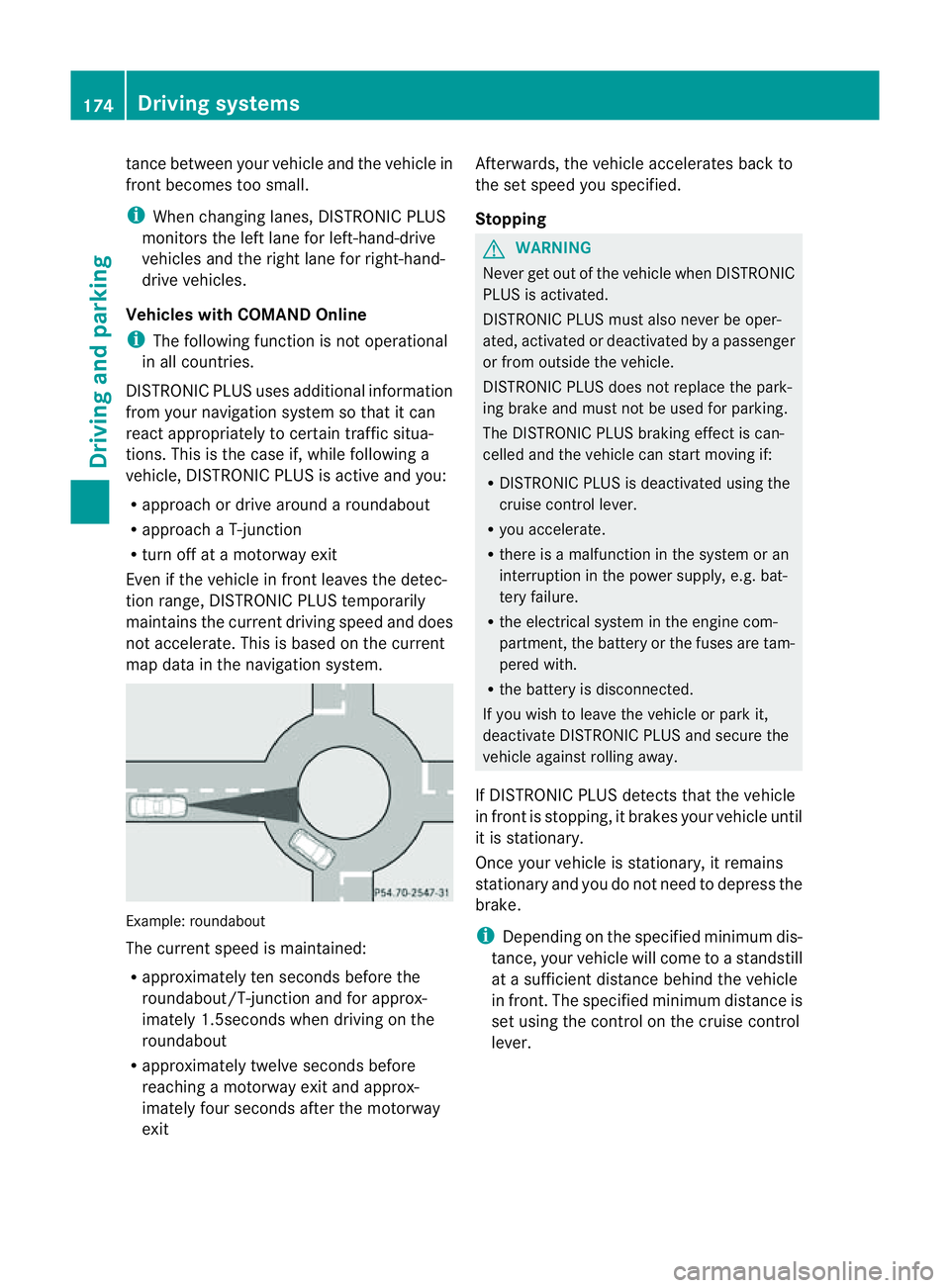
DISTRONIC PLUS uses additional information
from your navigation system so that it can
react appropriately to certain traffic situa-
tions. This is the case if, while following a
vehicle, DISTRONIC PLUS is active and you:
R approach or drive around aroundabout
R approach aT-junction
R turn off at amotorway exit
Even if the vehicle in front leaves the detec-
tion range, DISTRONIC PLUS temporarily
maintains the current driving speed and does
not accelerate. This is based on the current
map data in the navigation system. Example: roundabout
The current speed is maintained:
R
approximately ten seconds before the
roundabout/T-junction and for approx-
imately 1.5seconds when driving on the
roundabout
R approximately twelve seconds before
reaching amotorway exit and approx-
imately four seconds after the motorway
exit Afterwards, the vehicle accelerates back to
the set speed you specified.
Stopping G
WARNING
Never get out of the vehicle when DISTRONIC
PLUS is activated.
DISTRONIC PLUS must also never be oper-
ated, activated or deactivated by apassenger
or from outside the vehicle.
DISTRONIC PLUS does not replace the park-
ing brake and must not be used for parking.
The DISTRONIC PLUS braking effect is can-
celled and the vehicle can start moving if:
R DISTRONIC PLUS is deactivated using the
cruise control lever.
R you accelerate.
R there is amalfunction in the system or an
interruption in the power supply,e .g. bat-
tery failure.
R the electrical system in the engine com-
partment,t he battery or the fuses are tam-
pered with.
R the battery is disconnected.
If you wish to leave the vehicle or park it,
deactivate DISTRONIC PLUS and secure the
vehicle against rolling away.
If DISTRONIC PLUS detectst hat the vehicle
in front is stopping, it brakes your vehicle until
it is stationary.
Once your vehicle is stationary, it remains
stationary and you do not need to depress the
brake.
i Depending on the specified minimum dis-
tance, your vehicle will come to astandstill
at as ufficient distance behind the vehicle
in front.T he specified minimum distance is
set using the control on the cruise control
lever. 174
Driving systemsDriving and parking
Page 229 of 373
!
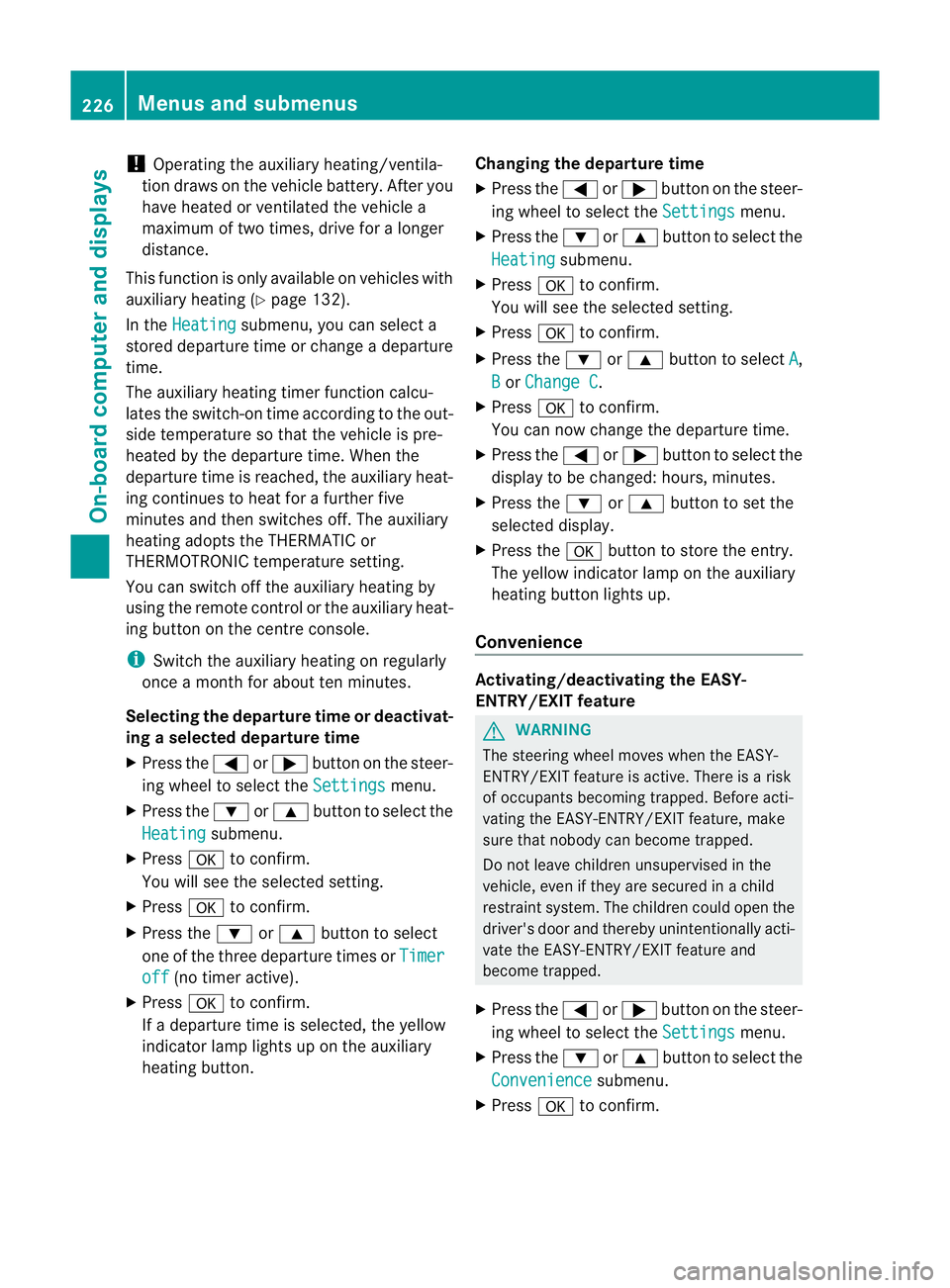
Operating the auxiliary heating/ventila-
tion draws on the vehicle battery. After you
have heated or ventilated the vehicle a
maximum of two times, drive for alonger
distance.
This function is only available on vehicles with
auxiliary heating (Y page 132).
In the Heating submenu, you can select a
stored departure time or change adeparture
time.
The auxiliary heating timer function calcu-
lates the switch-on time according to the out-
side temperature so that the vehicle is pre-
heated by the departure time. When the
departure time is reached, the auxiliary heat-
ing continues to heat for afurther five
minutes and then switches off. The auxiliary
heating adopts the THERMATIC or
THERMOTRONIC temperature setting.
You can switch off the auxiliary heating by
using the remote control or the auxiliary heat-
ing button on the centre console.
i Switch the auxiliary heating on regularly
once amonth for aboutt en minutes.
Selecting the departure time or deactivat-
ing aselected departure time
X Press the =or; button on the steer-
ing wheel to select the Settings menu.
X Press the :or9 button to select the
Heating submenu.
X Press ato confirm.
You will see the selected setting.
X Press ato confirm.
X Press the :or9 button to select
one of the three departure times or Timeroff (no timer active).
X Press ato confirm.
If ad eparture time is selected, the yellow
indicator lamp lights up on the auxiliary
heating button. Changing the departure time
X
Press the =or; button on the steer-
ing wheel to select the Settings menu.
X Press the :or9 button to select the
Heating submenu.
X Press ato confirm.
You will see the selected setting.
X Press ato confirm.
X Press the :or9 button to select A ,
B or
Change C .
X Press ato confirm.
You can now change the departure time.
X Press the =or; button to select the
displaytobec hanged: hours, minutes.
X Press the :or9 button to set the
selected display.
X Press the abutton to store the entry.
The yellow indicator lamp on the auxiliary
heating button lights up.
Convenience Activating/deactivating the EASY-
ENTRY/EXIT feature
G
WARNING
The steering wheel moves when the EASY-
ENTRY/EXIT feature is active. There is arisk
of occupants becoming trapped. Before acti-
vating the EASY-ENTRY/EXIT feature, make
sure that nobody can become trapped.
Do not leave children unsupervised in the
vehicle, even if they are secured in achild
restraint system. The children could open the
driver's door and thereby unintentionally acti-
vate the EASY-ENTRY/EXIT feature and
become trapped.
X Press the =or; button on the steer-
ing wheel to select the Settings menu.
X Press the :or9 button to select the
Convenience submenu.
X Press ato confirm. 226
Menus and submenusOn-board computer and displays
Page 245 of 373
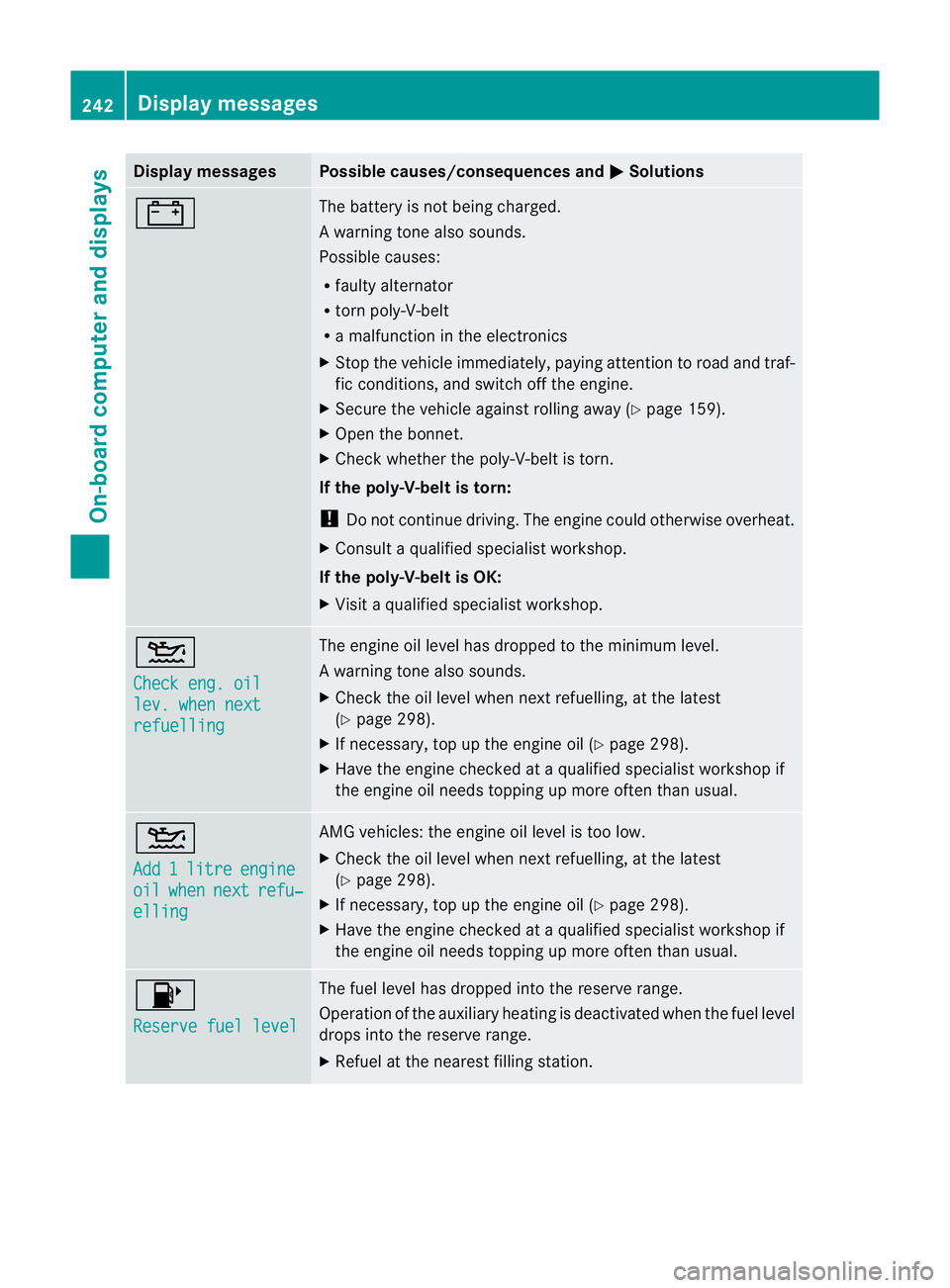
Display messages Possible causes/consequences and
M Solutions
# The battery is no
tbeing charged.
Aw arning tone also sounds.
Possible causes:
R fault yalternator
R torn poly-V-belt
R am alfunctio nintheelectronics
X Stop th evehicle immediately, payin gattentio ntoroad and traf-
fic conditions, and switch off the engine.
X Secure the vehicle against rolling away (Y page 159).
X Open the bonnet.
X Check whether the poly-V-belt is torn.
If the poly-V-belt is torn:
! Do not continue driving. The engine could otherwise overheat.
X Consult aqualified specialist workshop.
If the poly-V-belt is OK:
X Visit aqualified specialist workshop. 4
Check eng. oil
lev. when next
refuelling The engine oil level has dropped to the minimum level.
Aw
arning tone also sounds.
X Chec kthe oil level when next refuelling, at the latest
(Y page 298).
X If necessary, top up the engine oil (Y page 298).
X Have the engine checked at aqualified specialist workshop if
the engine oil needs topping up more often than usual. 4
Add
1 litre engine
oil when next refu‐
elling AMG vehicles: the engine oil level is too low.
X
Check the oil level when next refuelling, at the latest
(Y page 298).
X If necessary, top up the engine oil (Y page 298).
X Have the engine checked at aqualified specialist workshop if
the engine oil needs topping up more often than usual. 8
Reserve fuel level The fuel level has dropped into the reserve range.
Operation of the auxiliary heating is deactivated when the fuel level
drops into the reserve range.
X
Refuel at the nearest filling station. 242
Display messagesOn-board computer and displays
Page 257 of 373
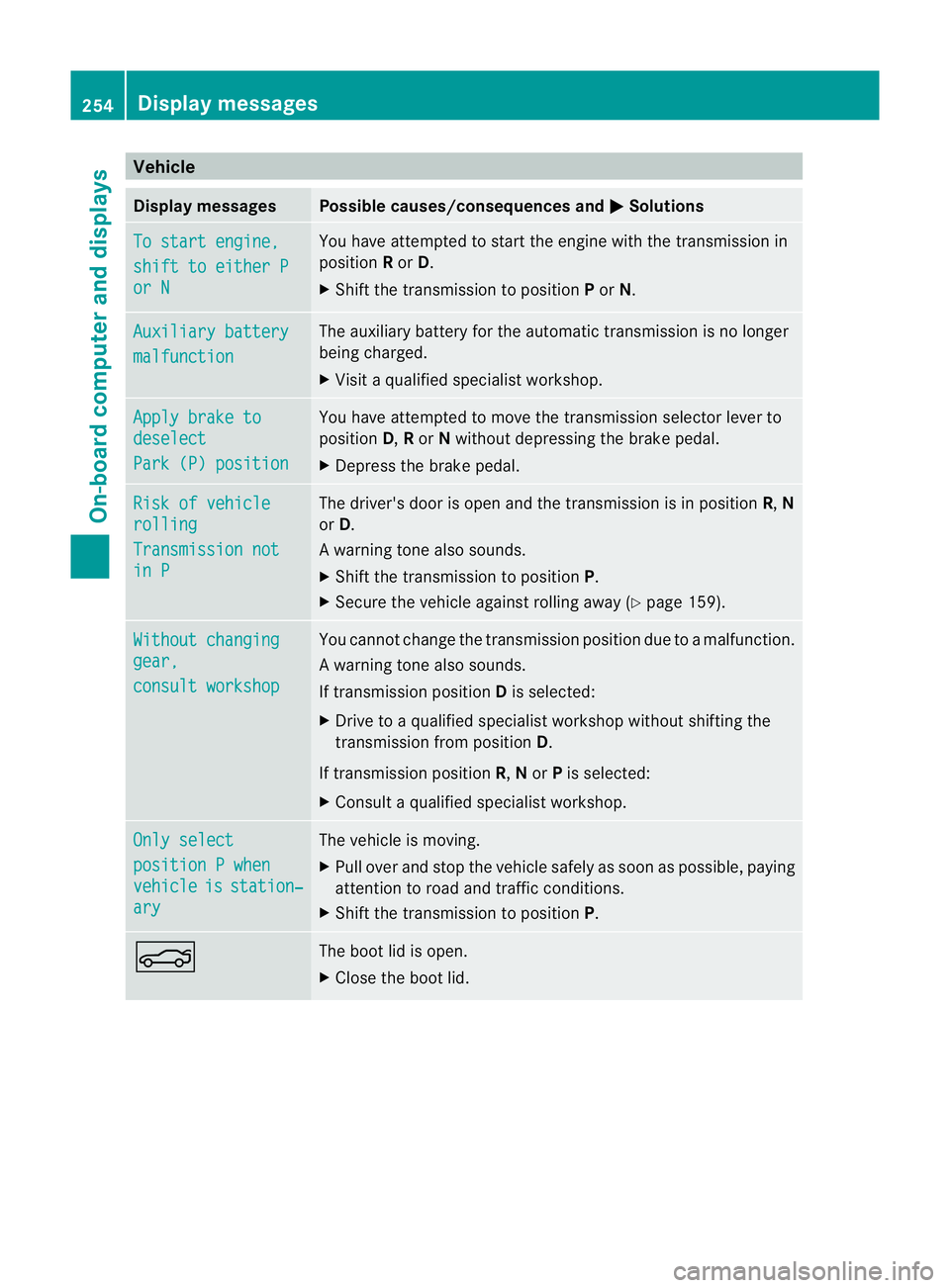
Vehicle
Display messages Possible causes/consequences and
M Solutions
To start engine,
shift to either P
or N Yo
uh avea ttempte dtostart the engine with the transmission in
position Ror D.
X Shift the transmission to position Por N. Auxiliary battery
malfunction The auxiliary battery for the automatic transmission is no longer
being charged.
X
Visit aquali fied specialist workshop. Apply brake to
deselect
Par
k(P) position Yo
uh avea ttempte dtomove the transmission selector lever to
position D,Ror Nwithou tdepressing the brake pedal.
X Depress the brake pedal. Risk of vehicle
rolling
Transmission not
in P The driver's door is open and the transmission is in position
R,N
or D.
Aw arning tone also sounds.
X Shift th etransmission to position P.
X Secure th evehicle against rolling away ( Ypage 159). Withou
tchanging gear,
consul
tworkshop You canno
tchange the transmission position due to amalfunction.
Aw arning tone also sounds.
If transmission position Dis selected:
X Drive to aqualified specialist worksho pwithout shiftin gthe
transmission from position D.
If transmission position R,Nor Pis selected:
X Consult aqualified specialist workshop. Onl
ys elect position
Pwhen vehicle is station‐
ary The vehicle is moving.
X
Pull ove rand stop the vehicl esafelyass oonasp ossible,p aying
attention to road and traffic conditions.
X Shift the transmission to position P.N The boot lid is open.
X
Close the boot lid. 254
Display messagesOn-board computer and displays
Page 258 of 373
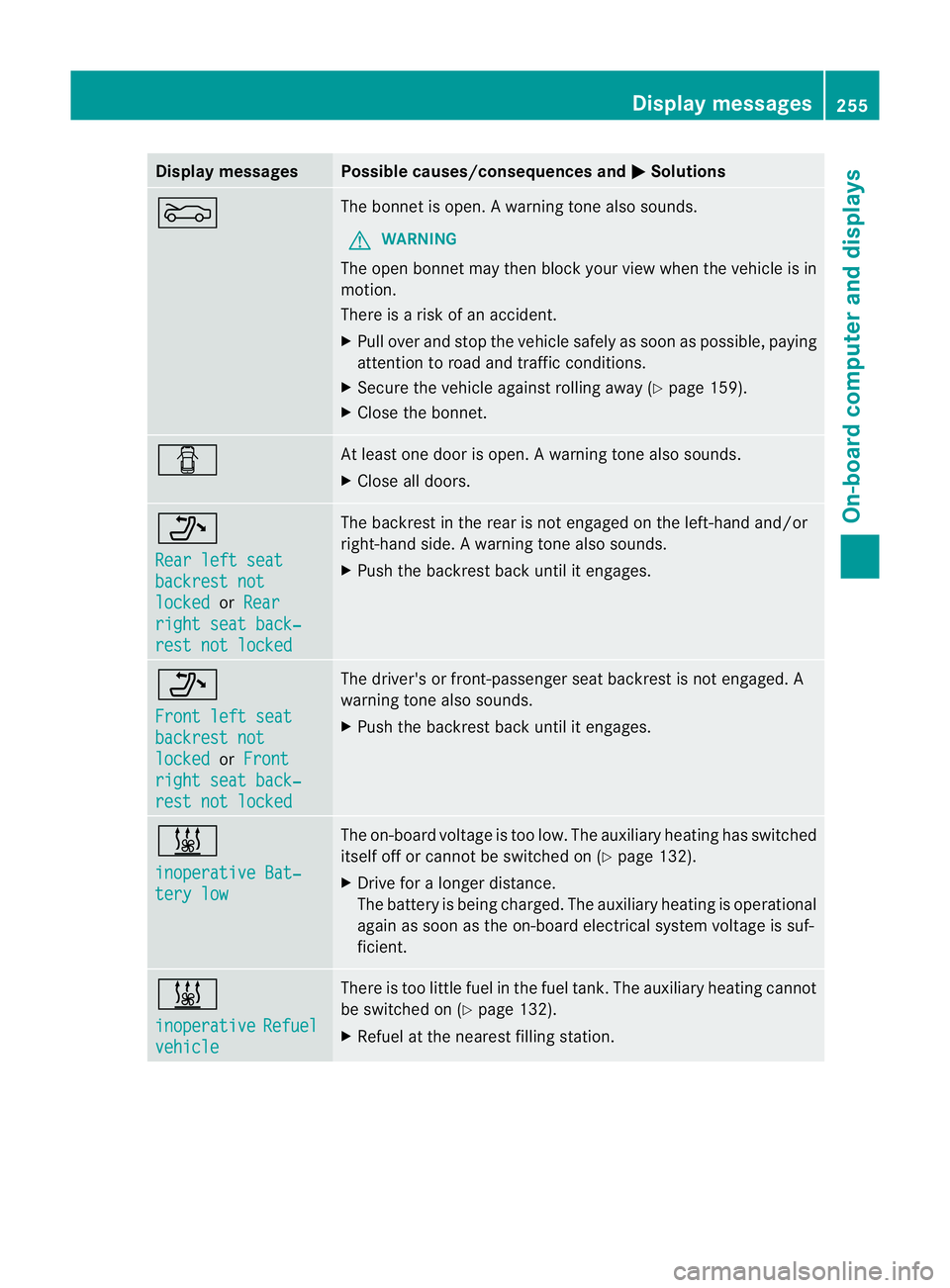
Display messages Possible causes/consequences and
M Solutions
M The bonne
tisopen. Awarning tone also sounds.
G WARNING
The open bonne tmay then bloc kyour view when the vehicle is in
motion.
There is arisk of an accident.
X Pull over and stop the vehicle safely as soon as possible, paying
attention to road and traffic conditions.
X Secure the vehicle against rolling away (Y page 159).
X Close the bonnet. C At least one door is open.
Awarning tone also sounds.
X Close all doors. _
Rea
rl efts eat backrest not
locked or
Rear right sea
tback‐ res
tn ot locked The backres
tinthe rear is not engaged on the left-hand and/or
right-hand side. Awarning tone also sounds.
X Push th ebackres tback until it engages. _
Front lef
tseat backrest not
locked or
Front right sea
tback‐ res
tn ot locked The driver'
sorfront-pa ssenger seat backres tisnot engaged. A
warning tone also sounds.
X Push the backrest back until it engages. &
inoperative Bat‐
tery low The on-board voltage is too low. The auxiliary heating has switched
itself off or cannot be switched on (Y
page 132).
X Drive for alonger distance.
The battery is being charged. The auxiliary heating is operational
againass oon as the on-board electrical system voltage is suf-
ficient. &
inoperative
Refuel
vehicle There is too little fuel in the fuel tank. The auxiliary heating cannot
be switched on (Y
page 132).
X Refuel at the nearest filling station. Display messages
255On-board computer and displays Z
Page 286 of 373
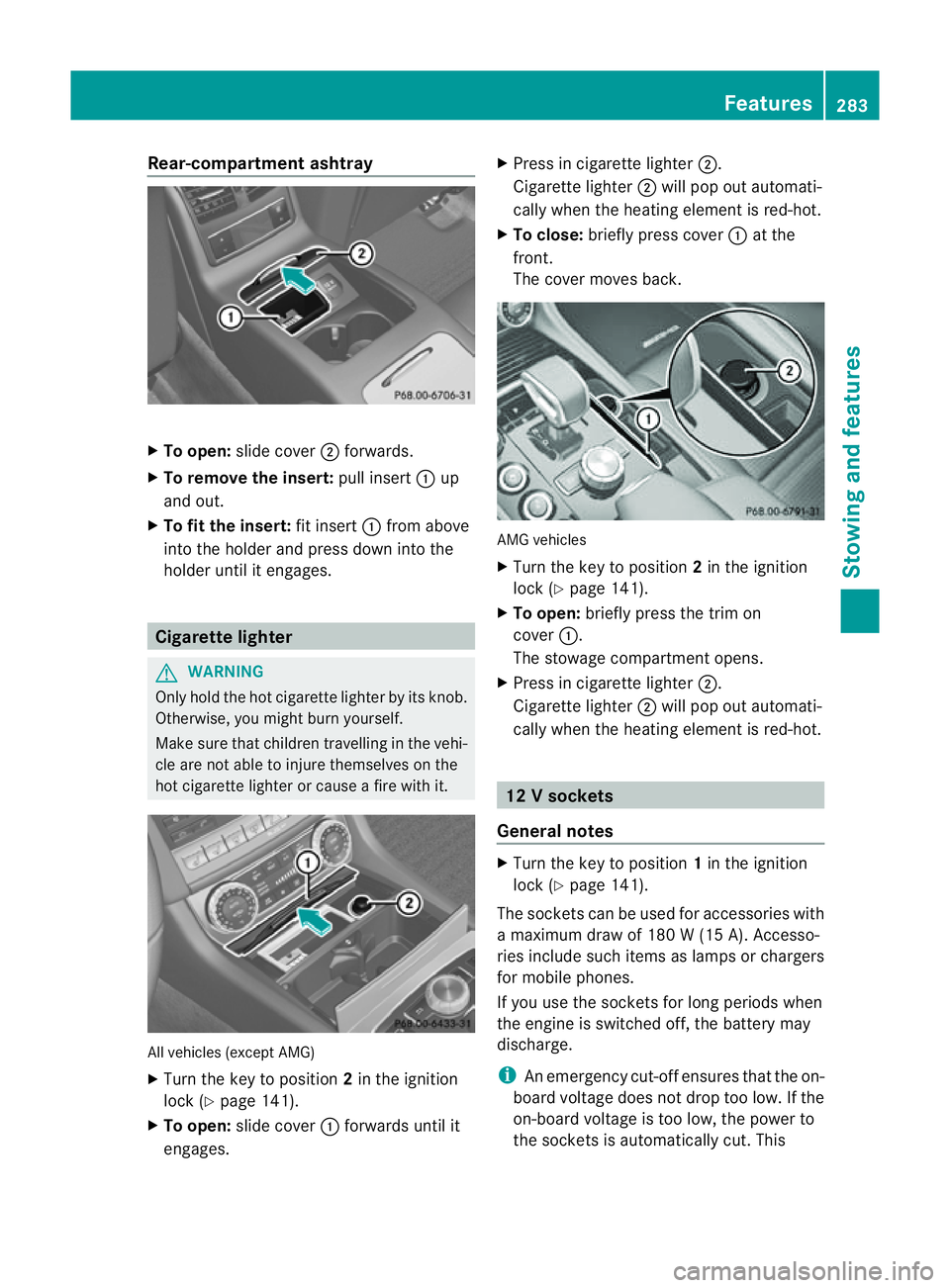
Rear-compartmen
tashtray X
To open: slide cover ;forwards.
X To remove the insert: pull insert:up
and out.
X To fit the insert: fit insert:from above
into the holder and press dow ninto the
holde runtil it engages. Cigarette lighter
G
WARNING
Onl yholdt he hot cigarette lighte rbyitsknob.
Otherwise ,you might burn yourself.
Mak esuret hatc hildren travellin ginthevehi-
cle are no table to injure themselves on the
hot cigarette lighter or cause afire with it. All vehicles (excep
tAMG)
X Turn the key to position 2in the ignition
lock (Y page 141).
X To open: slide cover :forwards until it
engages. X
Press in cigarette lighter ;.
Cigarette lighter ;will pop out automati-
cally when the heating element is red-hot.
X To close: briefly press cover :at the
front.
The cover moves back. AMG vehicles
X
Turn the key to position 2in the ignition
lock (Y page 141).
X To open: briefly press the trim on
cover :.
The stowage compartmento pens.
X Press in cigarette lighter ;.
Cigarett elighter ;will pop out automati-
cally when the heatin gelement is red-hot. 12
Vsockets
General notes X
Turn th ekey to position 1in th eignition
lock (Y page 141).
The socket scan be used for accessories with
am aximum draw of 18 0W(15 A). Accesso-
ries include such items as lamps or chargers
for mobil ephones.
If you use th esocket sfor lon gperiods when
th ee ngine is switche doff,t he battery may
discharge.
i An emergency cut-offe nsures thatthe on-
board voltage does not drop too low. If the
on-board voltage is too low, the power to
the socketsisa utomatically cut. This Features
283Stowing and features Z
Page 303 of 373
The washer fluid reservoir is used for both the
windscreen washer system and the headlamp
cleaning system.
Further information on windscreen washer
fluid/antifreeze (Y page 366).Service
ASSYST PLUS
Service messages The ASSYST PLUS service interval display
inform syou of the next service due date.
Information on the type of service and service
intervals (see separate Servic eBooklet).
You can obtain further information from a
Mercedes-Benz Servic eCentre.
i The ASSYST PLUS service interval display
does not show any information on the
engine oil level. Observe the notes on the
engine oil level (Y page 297).
The multifunction display shows aservice
message for afew seconds, e.g.:
Next service Ain..days Service
Adue Service
Aoverdue by ... days The letter indicates which service is due.
Astands for
aminor service and B for
am ajor
service. Anumber or another letter may be
displayed after the letter .This figure indicates
any necessary additional maintenancew ork
to be performed.
If you notify aqualified specialist workshop of
this display, you will receive astatementon
the associated costs.
Th eA SSYS TPLUSs ervice interval display
does not take intoa ccountany periods of
time during which the battery is disconnec-
ted. Maintaining the time-dependent service
schedule:
X Note down the servic eduedate displayed
in the multifunctio ndisplay befor ediscon-
nectin gthe battery.
or
X After reconnecting the battery, subtract
the battery disconnection periods fro mthe
service date shown on the display.
Hiding aservice message X
Pres sthe % ora button on th esteer-
ing wheel.
Displaying service messages X
Switch th eignitio non.
X Press the =or; button on the steer-
ing whee ltoselect the Serv. menu.
X Press the 9or: button to select the
ASSYST PLUS submenu and confirm with
a.
The servic eduedate appear sinthe multi-
functio ndisplay.
Information about Service Resetting th
eASSYST PLUS service inter-
val display
! If the ASSYS TPLUS service interval dis-
play has been inadvertently reset ,this set-
tin gc an be corrected at aqualified special-
ist workshop.
Have service work carried out as described
in the Servic eBooklet. This may otherwise
lead to increased wear and damage to the
major assemblies or the vehicle.
Aq ualified specialist workshop, e.g. a
Mercedes-Ben zService Centre, will reset the
ASSYST PLUS servic einterval display after
the servic ework has been carried out. You
can also obtain further information on main-
tenance work, for example. 300
ServiceMaintenance and care