lights MERCEDES-BENZ CLS COUPE 2014 Workshop Manual
[x] Cancel search | Manufacturer: MERCEDES-BENZ, Model Year: 2014, Model line: CLS COUPE, Model: MERCEDES-BENZ CLS COUPE 2014Pages: 417, PDF Size: 14.15 MB
Page 164 of 417
X
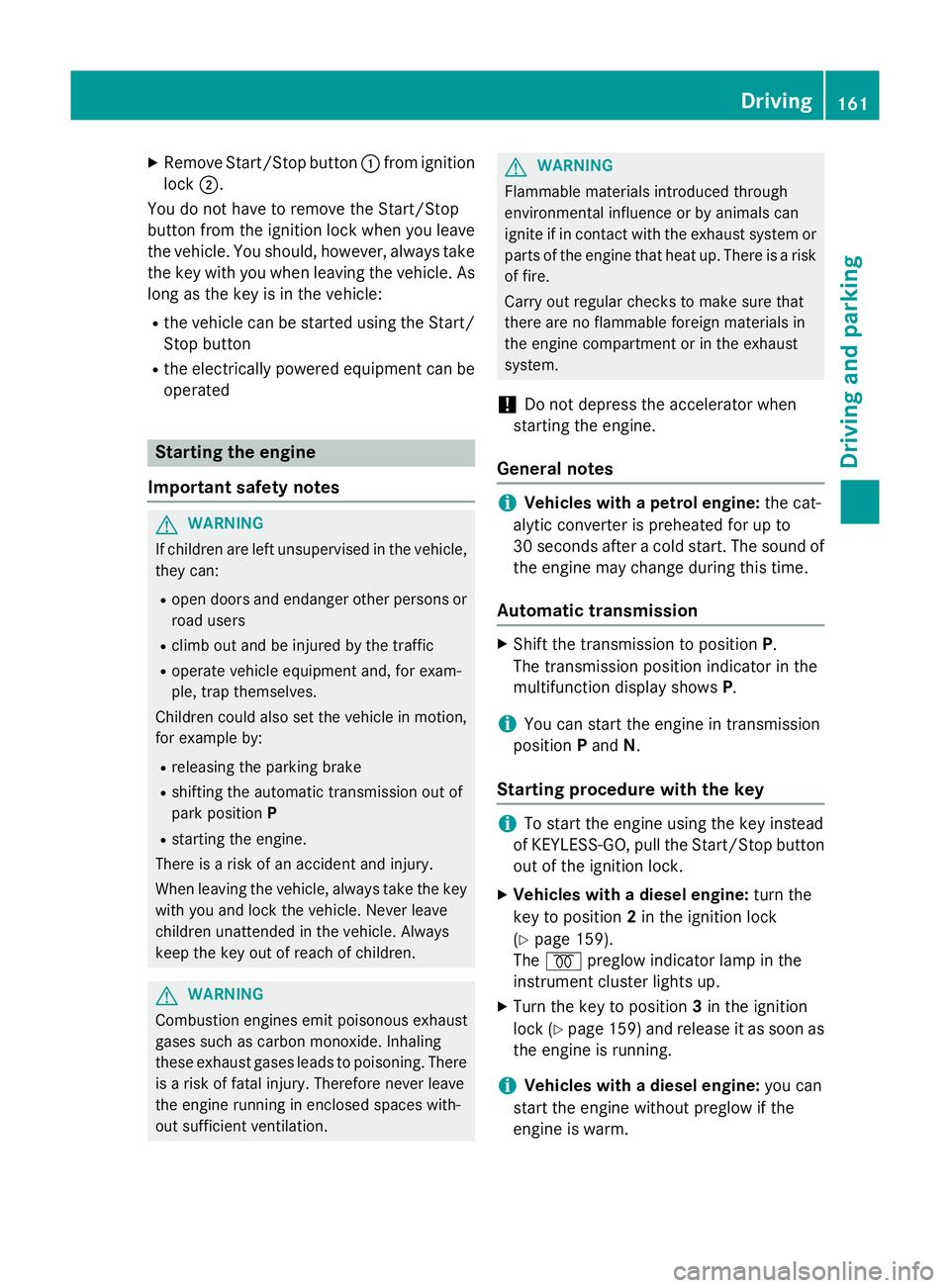
Remove Start/Stop button :from ignition
lock ;.
You do not have to remove the Start/Stop
button from the ignition lock when you leave
the vehicle. You should, however, always take the key with you when leaving the vehicle. As
long as the key is in the vehicle:
R the vehicle can be started using the Start/
Stop button
R the electrically powered equipment can be
operated Starting the engine
Important safety notes G
WARNING
If children are left unsupervised in the vehicle, they can:
R open doors and endanger other persons or
road users
R climb out and be injured by the traffic
R operate vehicle equipment and, for exam-
ple, trap themselves.
Children could also set the vehicle in motion, for example by:
R releasing the parking brake
R shifting the automatic transmission out of
park position P
R starting the engine.
There is a risk of an accident and injury.
When leaving the vehicle, always take the key
with you and lock the vehicle. Never leave
children unattended in the vehicle. Always
keep the key out of reach of children. G
WARNING
Combustion engines emit poisonous exhaust
gases such as carbon monoxide. Inhaling
these exhaust gases leads to poisoning. There is a risk of fatal injury. Therefore never leave
the engine running in enclosed spaces with-
out sufficient ventilation. G
WARNING
Flammable materials introduced through
environmental influence or by animals can
ignite if in contact with the exhaust system or parts of the engine that heat up. There is a risk
of fire.
Carry out regular checks to make sure that
there are no flammable foreign materials in
the engine compartment or in the exhaust
system.
! Do not depress the accelerator when
starting the engine.
General notes i
Vehicles with a petrol engine:
the cat-
alytic converter is preheated for up to
30 seconds after a cold start. The sound of the engine may change during this time.
Automatic transmission X
Shift the transmission to position P.
The transmission position indicator in the
multifunction display shows P.
i You can start the engine in transmission
position Pand N.
Starting procedure with the key i
To start the engine using the key instead
of KEYLESS-GO, pull the Start/Stop button
out of the ignition lock.
X Vehicles with a diesel engine: turn the
key to position 2in the ignition lock
(Y page 159).
The % preglow indicator lamp in the
instrument cluster lights up.
X Turn the key to position 3in the ignition
lock (Y page 159) and release it as soon as
the engine is running.
i Vehicles with a diesel engine:
you can
start the engine without preglow if the
engine is warm. Driving
161Driving and pa rking Z
Page 167 of 417
i
All vehicles (except AMG vehicles):
automatic engine switch-off can take place a maximum of four times consecutively (ini-
tial stop, then three subsequent stops). The ¤ symbol is shown in yellow in the mul-
tifunction display after the engine has been
started automatically for the fourth time.
When the ¤symbol is lit green in the
multifunction display, automatic engine
switch-off is again possible.
i AMG vehicles:
the number of consecu-
tive automatic engine stops is unlimited.
i The HOLD function can also be activated
if the engine has been switched off auto-
matically. It is then not necessary to con-
tinue applying the brakes during the auto-
matic stop phase. When you depress the
accelerator pedal, the engine starts auto-
matically and the braking effect of the
HOLD function is deactivated.
Automatic engine start The engine is started automatically if:
R you switch off the ECO start/stop function
by pressing the ECO button
R in transmission position Dor N, the brake
pedal is released and the HOLD function is not active
R you depress the accelerator pedal
R you engage reverse gear R
R you move the transmission out of position
P
R you switch to drive program S,S+ orM
(AMG vehicles)
R you unfasten your seat belt or open the
driver's door
R the vehicle starts to roll
R the brake system requires this
R the temperature in the vehicle interior devi-
ates from the set range R
the system detects moisture on the wind-
screen when the air-conditioning system is
switched on
R the battery's charge status is too low
i Shifting the transmission to position
P
does not start the engine.
i If you shift the transmission from
Rto D,
the ECO start/stop function is available
again once the ¤symbol reappears in
green in the multifunction display.
Deactivating/activating the ECO start/
stop function All vehicles (except AMG vehicles)
X
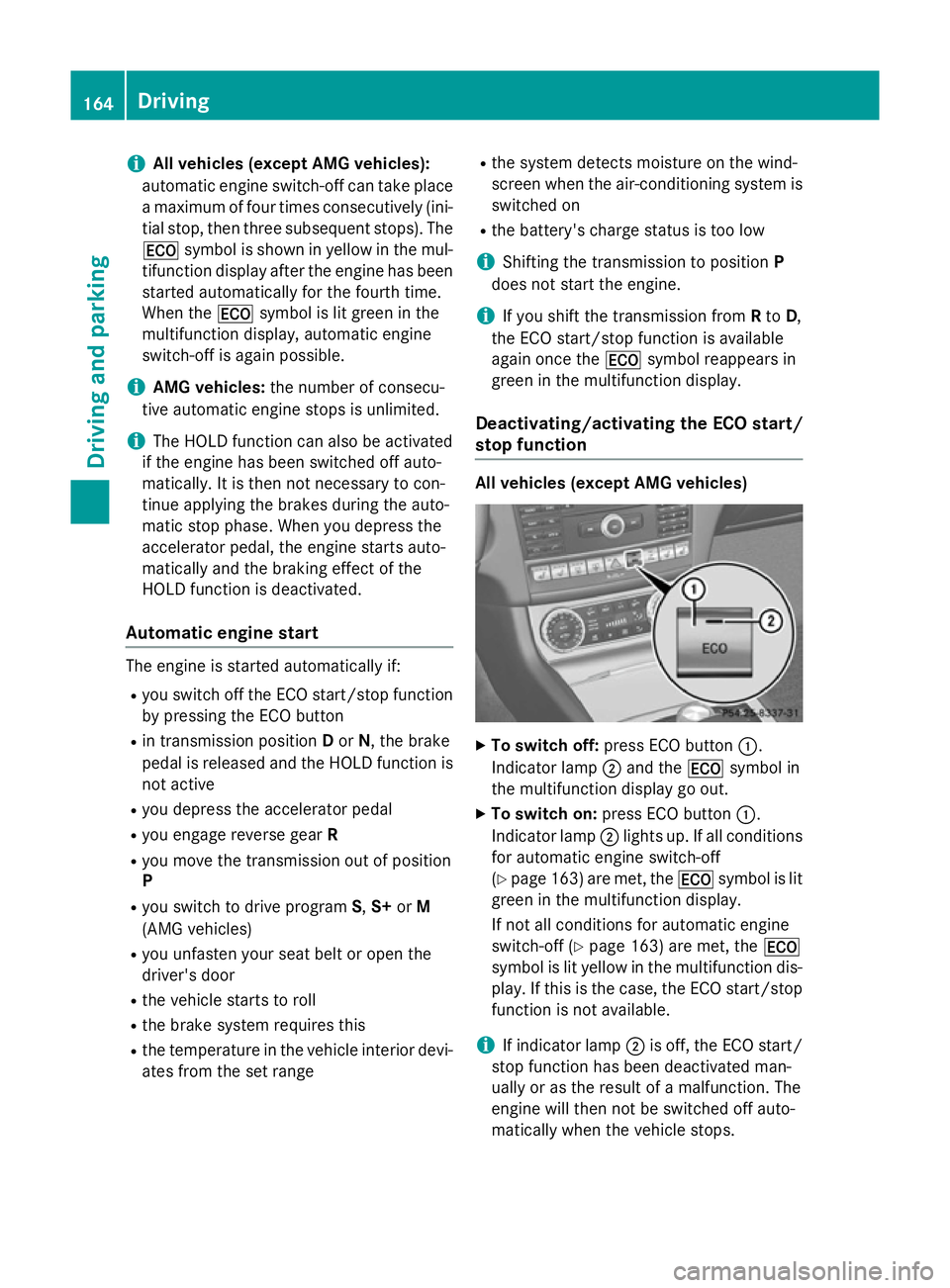
To switch off: press ECO button :.
Indicator lamp ;and the ¤symbol in
the multifunction display go out.
X To switch on: press ECO button :.
Indicator lamp ;lights up. If all conditions
for automatic engine switch-off
(Y page 163) are met, the ¤symbol is lit
green in the multifunction display.
If not all conditions for automatic engine
switch-off (Y page 163) are met, the ¤
symbol is lit yellow in the multifunction dis- play. If this is the case, the ECO start/stop
function is not available.
i If indicator lamp
;is off, the ECO start/
stop function has been deactivated man-
ually or as the result of a malfunction. The
engine will then not be switched off auto-
matically when the vehicle stops. 164
DrivingDriving and pa
rking
Page 168 of 417
AMG vehicles
X
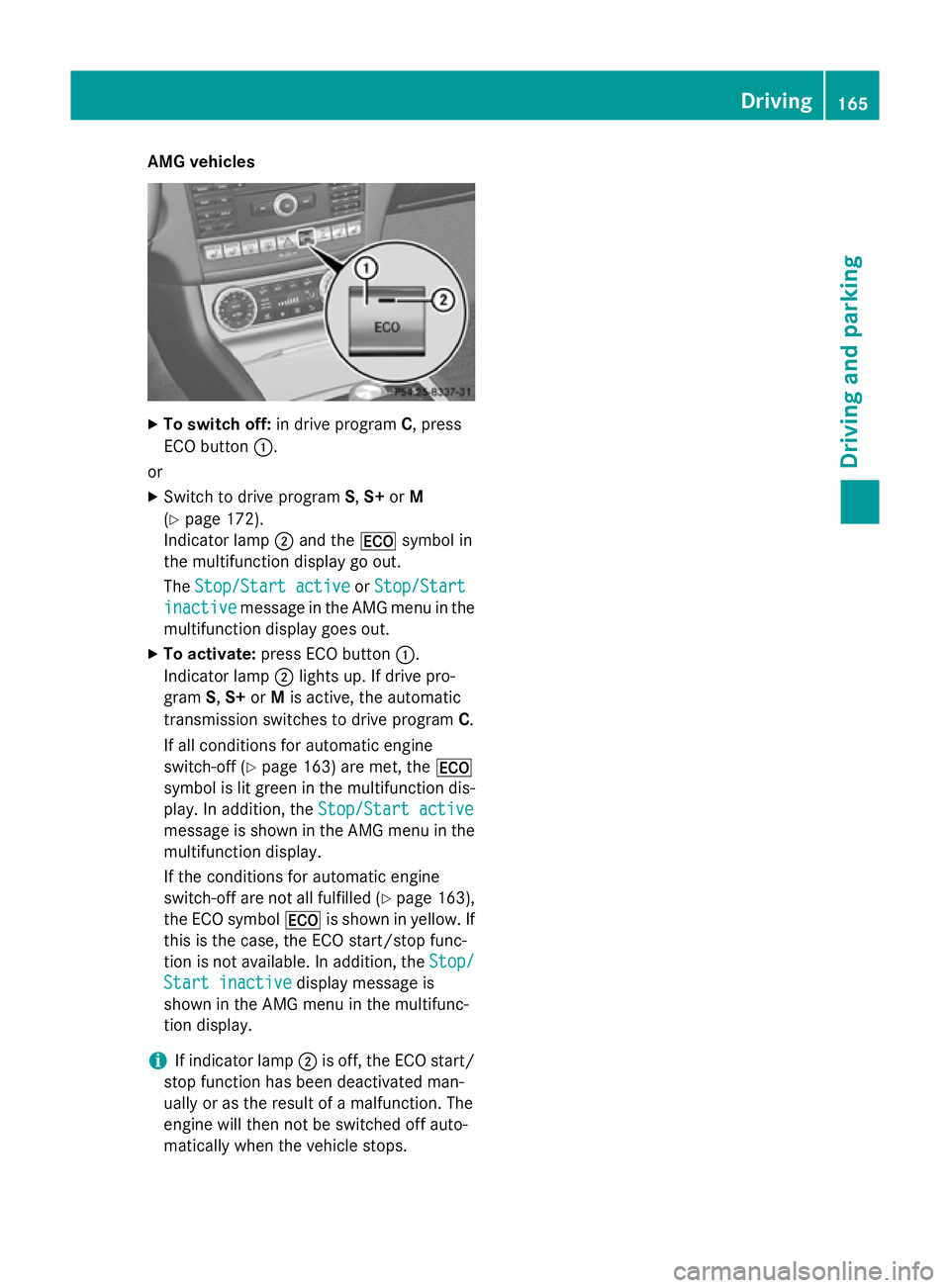
To switch off: in drive program C, press
ECO button :.
or X Switch to drive program S,S+ orM
(Y page 172).
Indicator lamp ;and the ¤symbol in
the multifunction display go out.
The Stop/Start active Stop/Start active orStop/Start
Stop/Start
inactive
inactive message in the AMG menu in the
multifunction display goes out.
X To activate: press ECO button :.
Indicator lamp ;lights up. If drive pro-
gram S,S+ orMis active, the automatic
transmission switches to drive program C.
If all conditions for automatic engine
switch-off (Y page 163) are met, the ¤
symbol is lit green in the multifunction dis-
play. In addition, the Stop/Start active Stop/Start active
message is shown in the AMG menu in the multifunction display.
If the conditions for automatic engine
switch-off are not all fulfilled (Y page 163),
the ECO symbol ¤is shown in yellow. If
this is the case, the ECO start/stop func-
tion is not available. In addition, the Stop/ Stop/
Start inactive
Start inactive display message is
shown in the AMG menu in the multifunc-
tion display.
i If indicator lamp
;is off, the ECO start/
stop function has been deactivated man-
ually or as the result of a malfunction. The
engine will then not be switched off auto-
matically when the vehicle stops. Driving
165Driving and pa rking Z
Page 175 of 417
CLS 350
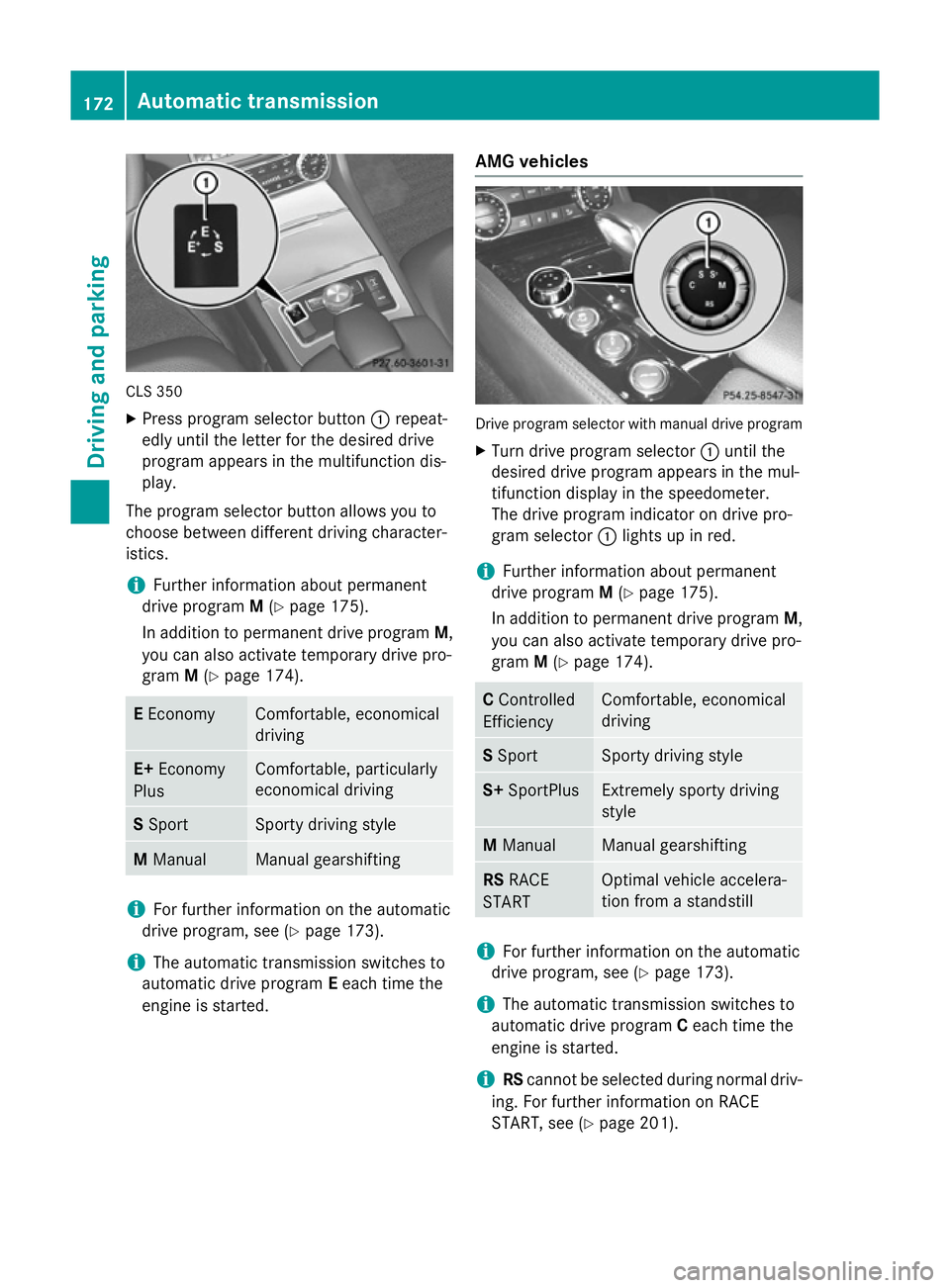
X Press program selector button :repeat-
edly until the letter for the desired drive
program appears in the multifunction dis-
play.
The program selector button allows you to
choose between different driving character-
istics.
i Further information about permanent
drive program M(Y page 175).
In addition to permanent drive program M,
you can also activate temporary drive pro-
gram M(Y page 174). E
Economy Comfortable, economical
driving
E+
Economy
Plus Comfortable, particularly
economical driving
S
Sport Sporty driving style
M
Manual Manual gearshifting
i
For further information on the automatic
drive program, see (Y page 173).
i The automatic transmission switches to
automatic drive program Eeach time the
engine is started. AMG vehicles Drive program selector with manual drive program
X Turn drive program selector :until the
desired drive program appears in the mul-
tifunction display in the speedometer.
The drive program indicator on drive pro-
gram selector :lights up in red.
i Further information about permanent
drive program M(Y page 175).
In addition to permanent drive program M,
you can also activate temporary drive pro-
gram M(Y page 174). C
Controlled
Efficiency Comfortable, economical
driving
S
Sport Sporty driving style
S+
SportPlus Extremely sporty driving
style
M
Manual Manual gearshifting
RS
RACE
START Optimal vehicle accelera-
tion from a standstill
i
For further information on the automatic
drive program, see (Y page 173).
i The automatic transmission switches to
automatic drive program Ceach time the
engine is started.
i RS
cannot be selected during normal driv-
ing. For further information on RACE
START, see (Y page 201).172
Automatic transmissionDriving and parking
Page 178 of 417
If manual drive program
Mhas been deacti-
vated, the automatic transmission shifts into
the automatic drive program that was last
selected, i.e. E,E+ (CLS 350) or S.
You can also deactivate manual drive pro-
gram Myourself:
X Pull on the right-hand steering wheel gear-
shift paddle and hold it in place
(Y page 173).
or
X Use the DIRECT SELECT lever to switch the
transmission position.
or
X Use the program selector button to change
the drive program (Y page 171).
Manual drive program Mis deactivated.
The automatic transmission switches into
the automatic drive program that was last
selected, i.e. E,E+ (CLS 350) or S. Manual drive program (AMG vehicles
and vehicles with the AMG Sports
package)
General notes In this drive program, you can permanently
change gear yourself by using the steering
wheel gearshift paddles. The transmission
must be in position D.
i As well as this permanent drive program
M, you can also activate temporary drive
program M(Y page 174).
Activating the manual drive program X
Press the program selector button
(Y page 171) until Mappears in the multi-
function display.
X AMG vehicles: turn the drive program
selector (Y page 172) until Mappears in the
multifunction display.
The indicator Mon the drive program selec-
tor lights up in red. Manual drive program
Mcan be selected
using the program selector button or the drive
program selector. In manual drive program M,
you can change gear yourself using the steer- ing wheel gearshift paddles if the transmis-
sion is in position D.
Upshifting (all vehicles except AMG
vehicles) X
Pull the right-hand steering wheel gearshift
paddle.
The automatic transmission shifts up to the
next gear.
Upshifting (AMG vehicles) !
In manual gearshift program
M, the auto-
matic transmission does not shift up auto-
matically even when the engine limiting
speed for the current gear is reached.
When the engine limiting speed is reached, the fuel supply is cut to prevent the engine
from overrevving. You must make sure that the engine speed does not reach the red
area of the rev counter. Otherwise, there is
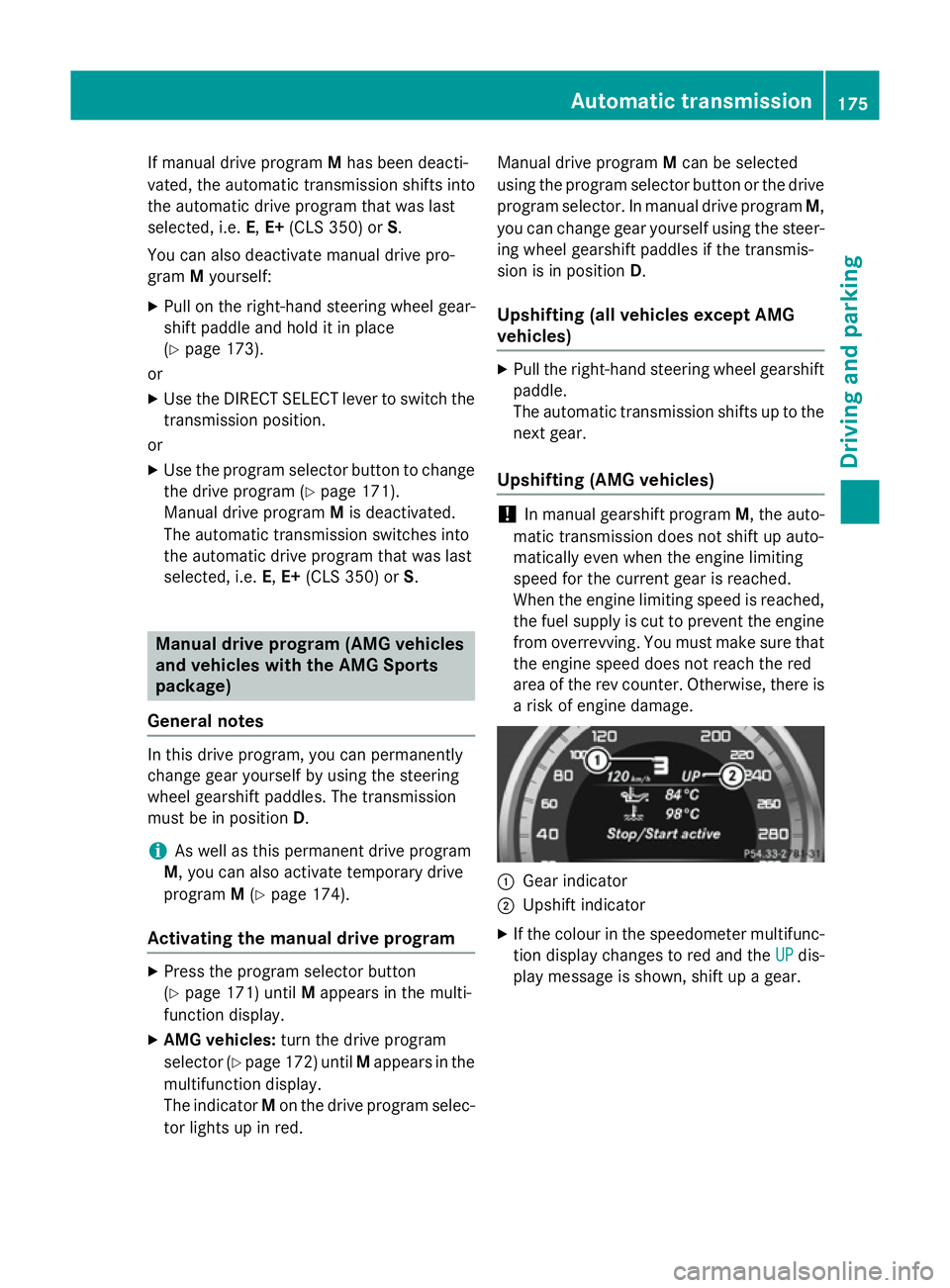
a risk of engine damage. :
Gear indicator
; Upshift indicator
X If the colour in the speedometer multifunc-
tion display changes to red and the UP UPdis-
play message is shown, shift up a gear. Automatic transmission
175Driving and parking Z
Page 185 of 417
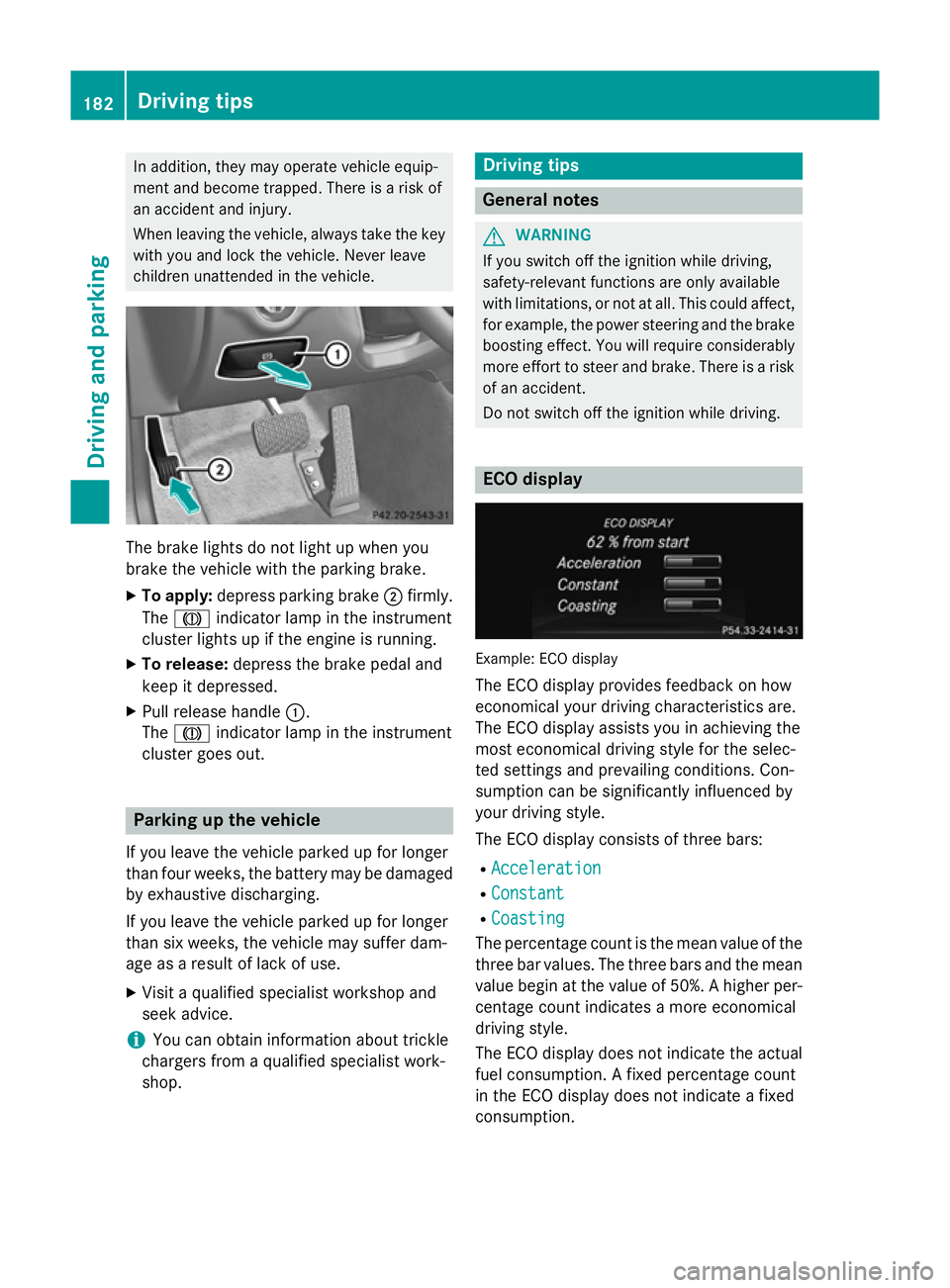
In addition, they may operate vehicle equip-
ment and become trapped. There is a risk of
an accident and injury.
When leaving the vehicle, always take the key with you and lock the vehicle. Never leave
children unattended in the vehicle. The brake lights do not light up when you
brake the vehicle with the parking brake.
X To apply: depress parking brake ;firmly.
The J indicator lamp in the instrument
cluster lights up if the engine is running.
X To release: depress the brake pedal and
keep it depressed.
X Pull release handle :.
The J indicator lamp in the instrument
cluster goes out. Parking up the vehicle
If you leave the vehicle parked up for longer
than four weeks, the battery may be damaged
by exhaustive discharging.
If you leave the vehicle parked up for longer
than six weeks, the vehicle may suffer dam-
age as a result of lack of use.
X Visit a qualified specialist workshop and
seek advice.
i You can obtain information about trickle
chargers from a qualified specialist work-
shop. Driving tips
General notes
G
WARNING
If you switch off the ignition while driving,
safety-relevant functions are only available
with limitations, or not at all. This could affect, for example, the power steering and the brake
boosting effect. You will require considerably
more effort to steer and brake. There is a risk of an accident.
Do not switch off the ignition while driving. ECO display
Example: ECO display
The ECO display provides feedback on how
economical your driving characteristics are.
The ECO display assists you in achieving the
most economical driving style for the selec-
ted settings and prevailing conditions. Con-
sumption can be significantly influenced by
your driving style.
The ECO display consists of three bars:
R Acceleration Acceleration
R Constant
Constant
R Coasting
Coasting
The percentage count is the mean value of the three bar values. The three bars and the mean
value begin at the value of 50%. A higher per- centage count indicates a more economical
driving style.
The ECO display does not indicate the actual
fuel consumption. A fixed percentage count
in the ECO display does not indicate a fixed
consumption. 182
Driving tipsDriving and parking
Page 191 of 417
X
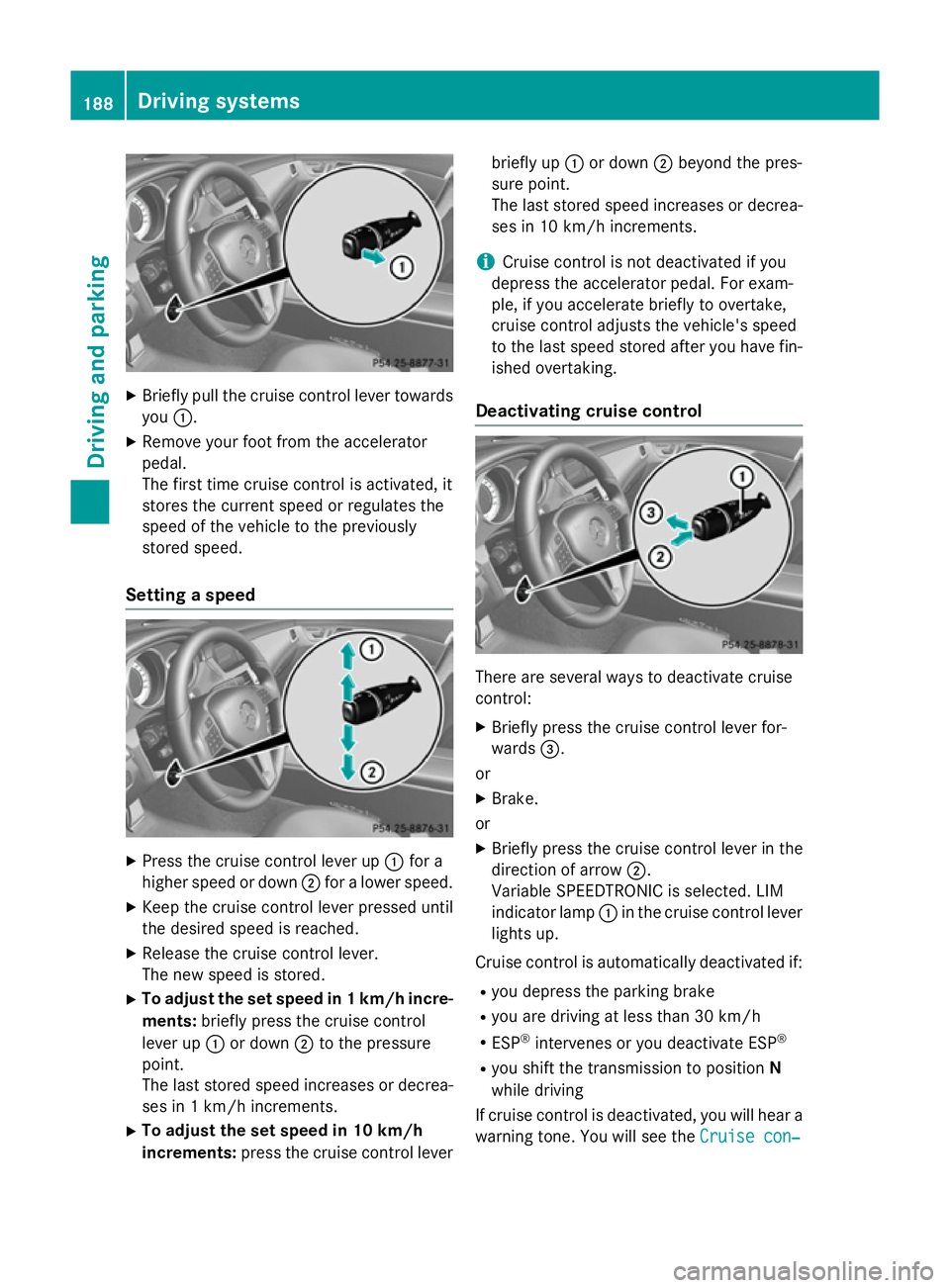
Briefly pull the cruise control lever towards
you :.
X Remove your foot from the accelerator
pedal.
The first time cruise control is activated, it
stores the current speed or regulates the
speed of the vehicle to the previously
stored speed.
Setting a speed X
Press the cruise control lever up :for a
higher speed or down ;for a lower speed.
X Keep the cruise control lever pressed until
the desired speed is reached.
X Release the cruise control lever.
The new speed is stored.
X To adjust the set speed in 1 km/h incre-
ments: briefly press the cruise control
lever up :or down ;to the pressure
point.
The last stored speed increases or decrea- ses in 1 km/h increments.
X To adjust the set speed in 10 km/h
increments: press the cruise control lever briefly up
:or down ;beyond the pres-
sure point.
The last stored speed increases or decrea- ses in 10 km/h increments.
i Cruise control is not deactivated if you
depress the accelerator pedal. For exam-
ple, if you accelerate briefly to overtake,
cruise control adjusts the vehicle's speed
to the last speed stored after you have fin- ished overtaking.
Deactivating cruise control There are several ways to deactivate cruise
control:
X Briefly press the cruise control lever for-
wards =.
or
X Brake.
or X Briefly press the cruise control lever in the
direction of arrow ;.
Variable SPEEDTRONIC is selected. LIM
indicator lamp :in the cruise control lever
lights up.
Cruise control is automatically deactivated if: R you depress the parking brake
R you are driving at less than 30 km/h
R ESP ®
intervenes or you deactivate ESP ®
R you shift the transmission to position N
while driving
If cruise control is deactivated, you will hear a warning tone. You will see the Cruise con‐ Cruise con‐188
Driving systemsDriving and parking
Page 201 of 417
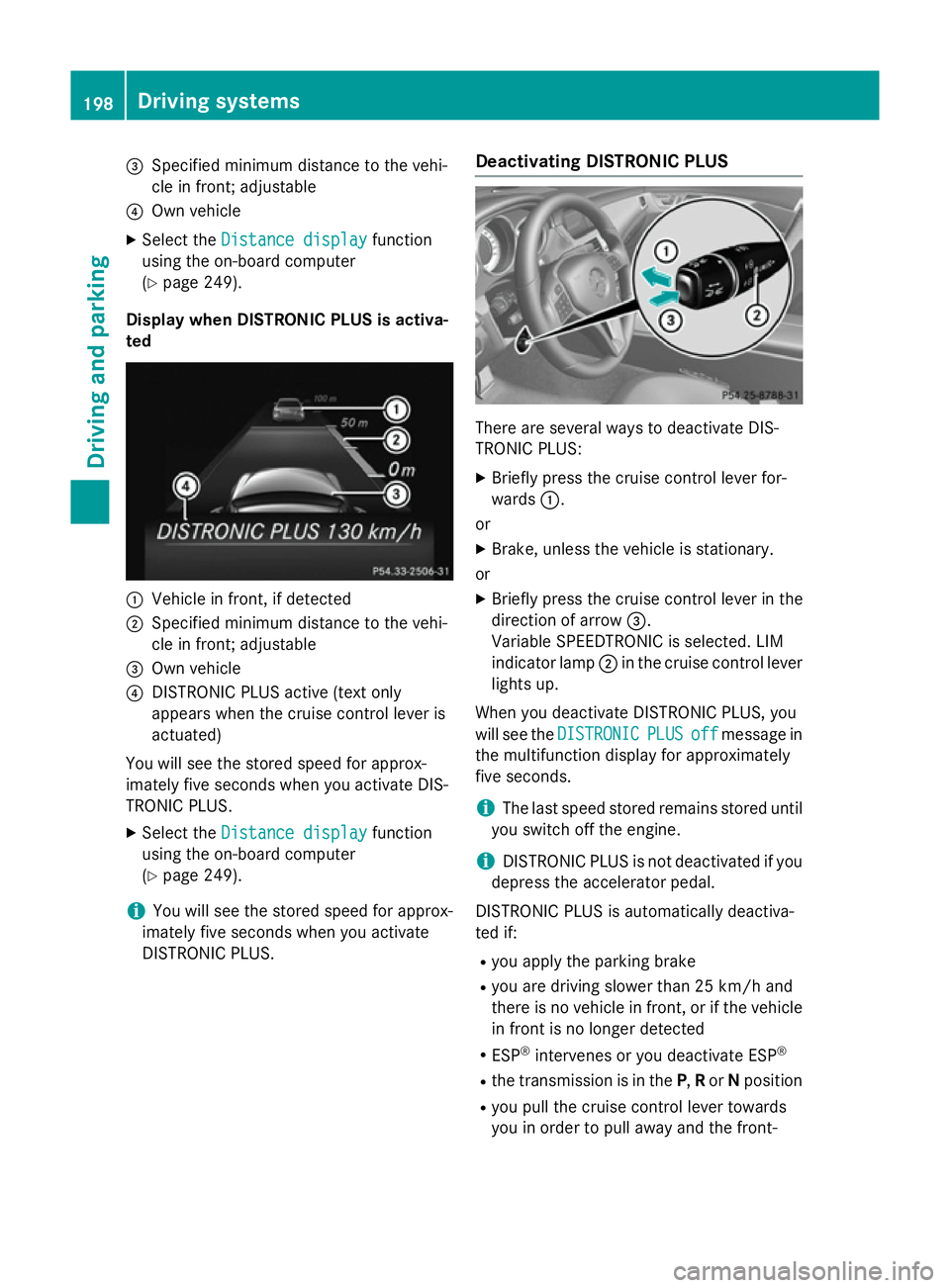
=
Specified minimum distance to the vehi-
cle in front; adjustable
? Own vehicle
X Select the Distance display
Distance display function
using the on-board computer
(Y page 249).
Display when DISTRONIC PLUS is activa-
ted :
Vehicle in front, if detected
; Specified minimum distance to the vehi-
cle in front; adjustable
= Own vehicle
? DISTRONIC PLUS active (text only
appears when the cruise control lever is
actuated)
You will see the stored speed for approx-
imately five seconds when you activate DIS-
TRONIC PLUS.
X Select the Distance display
Distance display function
using the on-board computer
(Y page 249).
i You will see the stored speed for approx-
imately five seconds when you activate
DISTRONIC PLUS. Deactivating DISTRONIC PLUS There are several ways to deactivate DIS-
TRONIC PLUS:
X Briefly press the cruise control lever for-
wards :.
or
X Brake, unless the vehicle is stationary.
or X Briefly press the cruise control lever in the
direction of arrow =.
Variable SPEEDTRONIC is selected. LIM
indicator lamp ;in the cruise control lever
lights up.
When you deactivate DISTRONIC PLUS, you
will see the DISTRONIC DISTRONIC PLUS
PLUSoff
offmessage in
the multifunction display for approximately
five seconds.
i The last speed stored remains stored until
you switch off the engine.
i DISTRONIC PLUS is not deactivated if you
depress the accelerator pedal.
DISTRONIC PLUS is automatically deactiva-
ted if: R you apply the parking brake
R you are driving slower than 25 km/h and
there is no vehicle in front, or if the vehicle
in front is no longer detected
R ESP ®
intervenes or you deactivate ESP ®
R the transmission is in the P,Ror Nposition
R you pull the cruise control lever towards
you in order to pull away and the front- 198
Driving systemsDriving and parking
Page 203 of 417
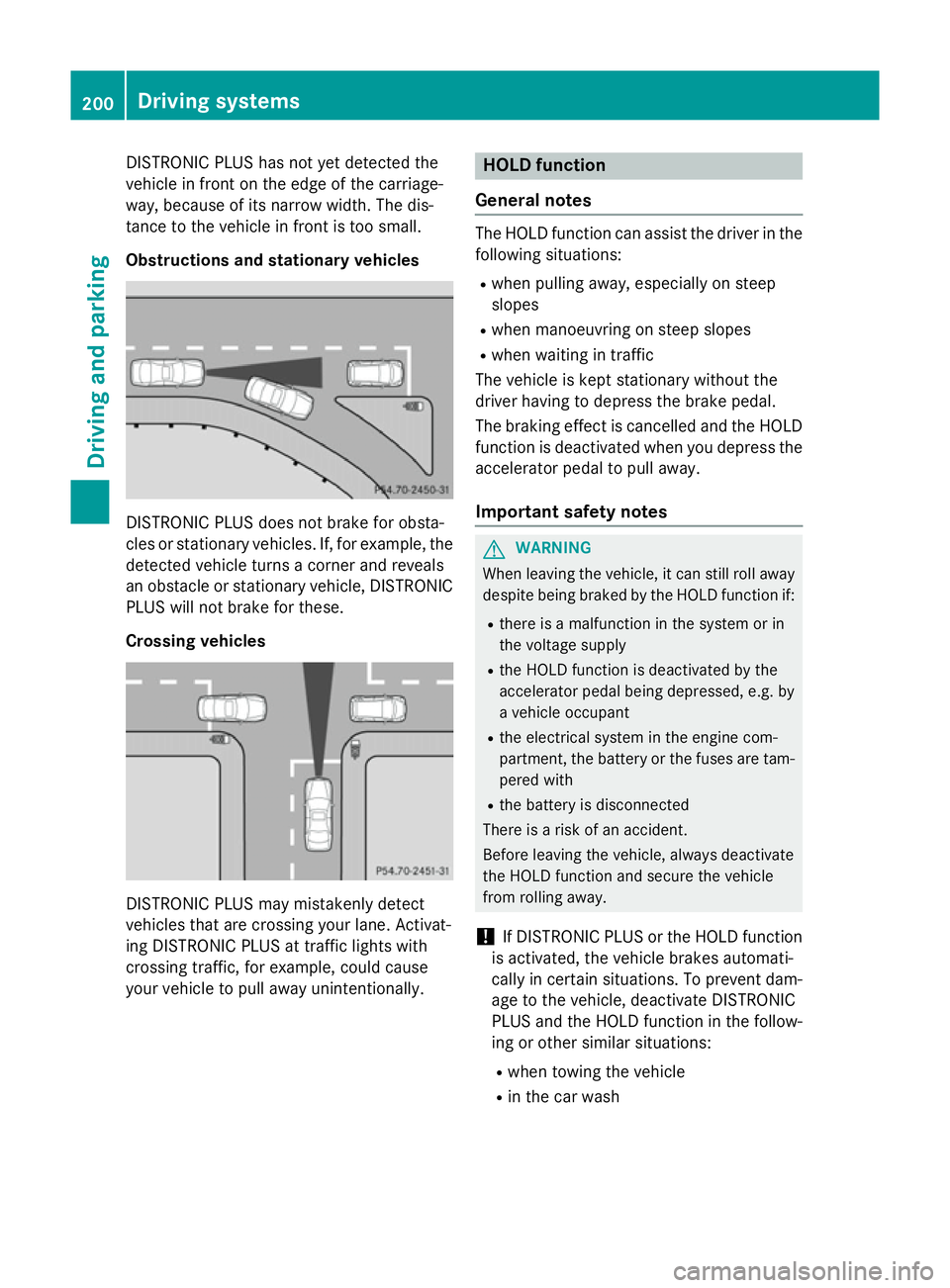
DISTRONIC PLUS has not yet detected the
vehicle in front on the edge of the carriage-
way, because of its narrow width. The dis-
tance to the vehicle in front is too small.
Obstructions and stationary vehicles DISTRONIC PLUS does not brake for obsta-
cles or stationary vehicles. If, for example, the
detected vehicle turns a corner and reveals
an obstacle or stationary vehicle, DISTRONIC PLUS will not brake for these.
Crossing vehicles DISTRONIC PLUS may mistakenly detect
vehicles that are crossing your lane. Activat-
ing DISTRONIC PLUS at traffic lights with
crossing traffic, for example, could cause
your vehicle to pull away unintentionally. HOLD function
General notes The HOLD function can assist the driver in the
following situations:
R when pulling away, especially on steep
slopes
R when manoeuvring on steep slopes
R when waiting in traffic
The vehicle is kept stationary without the
driver having to depress the brake pedal.
The braking effect is cancelled and the HOLD function is deactivated when you depress the
accelerator pedal to pull away.
Important safety notes G
WARNING
When leaving the vehicle, it can still roll away despite being braked by the HOLD function if:
R there is a malfunction in the system or in
the voltage supply
R the HOLD function is deactivated by the
accelerator pedal being depressed, e.g. by
a vehicle occupant
R the electrical system in the engine com-
partment, the battery or the fuses are tam-
pered with
R the battery is disconnected
There is a risk of an accident.
Before leaving the vehicle, always deactivate
the HOLD function and secure the vehicle
from rolling away.
! If DISTRONIC PLUS or the HOLD function
is activated, the vehicle brakes automati-
cally in certain situations. To prevent dam-
age to the vehicle, deactivate DISTRONIC
PLUS and the HOLD function in the follow-
ing or other similar situations:
R when towing the vehicle
R in the car wash 200
Driving systemsDriving an
d parking
Page 205 of 417
R
the vehicle is stationary and the brake
pedal is depressed (left foot)
R the transmission is in position D
Activating RACE START X
Depress the brake pedal with your left foot
and keep it depressed.
X Turn the drive program selector clockwise
(Y page 172) until the RSlamp lights up.
The RACE START Confirm: Paddle UP
RACE START Confirm: Paddle UP
Cancel: Paddle DOWN Cancel: Paddle DOWN message appears
in the multifunction display.
i If the activation conditions are no longer
fulfilled, RACE START is cancelled. The
RACE
RACE START
START cancelled
cancelled message appears
in the multifunction display.
X To cancel: pull the left steering wheel shift
paddle (Y page 173).
or
X To confirm: pull the right steering wheel
shift paddle (Y page 173).
The RACE START available Depress
RACE START available Depress
accelerator
accelerator message appears in the mul-
tifunction display.
i If you do not depress the accelerator
pedal fully within two seconds, RACE
START is cancelled. The RACE
RACE START
START not
not
possible
possible See
SeeOwner's
Owner's Manual
Manualmessage
appears in the multifunction display.
X Fully depress the accelerator pedal.
The engine speed rises to approximately
3,500 rpm.
The RACE START Release brake to
RACE START Release brake to
start start message appears in the multifunc-
tion display.
i If you do not release the brake pedal
within five seconds, RACE START is cancel-
led. The RACE
RACESTART
START cancelled
cancelled message
appears in the multifunction display.
X Take your foot off the brake, but keep the
accelerator pedal depressed.
The vehicle pulls away at maximum accel-
eration. The
RACE RACE START
START active
active message appears
in the multifunction display.
RACE START is deactivated when the vehicle
reaches a speed of approximately 50 km/h.
Drive program S+is activated. SPORT han-
dling mode remains activated.
RACE START is deactivated immediately if
you release the accelerator pedal during
RACE START or if any of the activation condi- tions are no longer fulfilled. The RACE
RACE START START
not possible See Owner's Manual
not possible See Owner's Manual mes-
sage appears in the multifunction display.
i After using it several times in short suc-
cession, RACE START will be unavailable
until a certain distance has been driven. AIRMATIC
Vehicle level Important safety notes
G
WARNING
People's limbs may become trapped if they
are located underneath the vehicle or
between the vehicle body and the tyres when the vehicle is lowering. There is a danger of
injury.
When lowering the vehicle, make sure no one
is underneath the vehicle or in the immediate vicinity of the wheel arches. G
WARNING
Vehicles with level control:
The vehicle is slightly lowered if you:
R have selected comfort suspension tuning
and
R you lock the vehicle within approximately
60 second s of switching off the engine
You and people in the vicinity of the wheel
arch or the underbody may thus become trap- ped. There is a risk of injury.
Make sure that nobody is in the vicinity of thewheel arch or the underbody when you lock
the vehicle. 202
Driving systemsDriving and parking