display MERCEDES-BENZ CLS COUPE 2018 Owner's Manual
[x] Cancel search | Manufacturer: MERCEDES-BENZ, Model Year: 2018, Model line: CLS COUPE, Model: MERCEDES-BENZ CLS COUPE 2018Pages: 589, PDF Size: 10.95 MB
Page 131 of 589
Ad
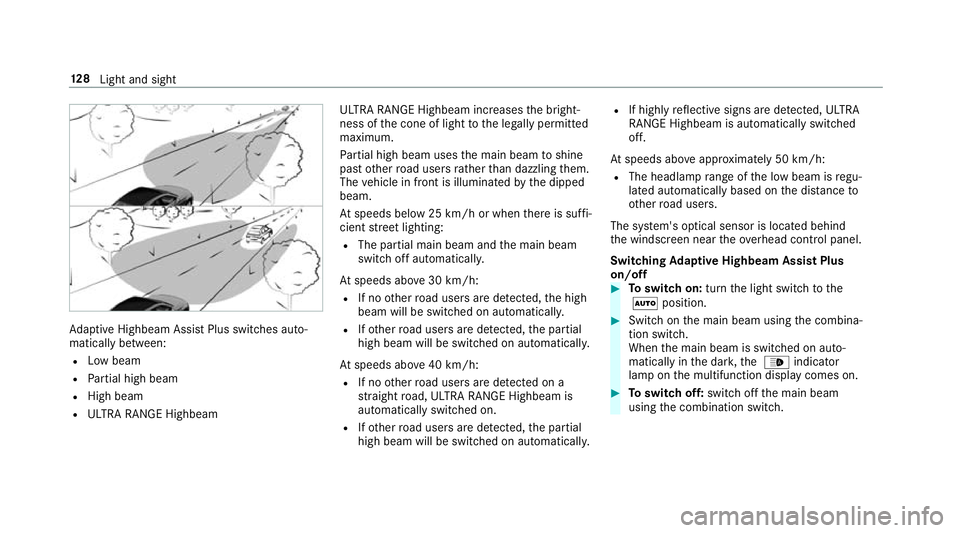
aptive Highbeam Assist Plus swit ches auto‐
matically between:
R Low beam
R Partial high beam
R High beam
R ULTRA RANGE Highbeam ULTRA RANGE Highbeam inc
reases the bright‐
ness of the cone of light tothe legally permitted
maximum.
Pa rtial high beam uses the main beam toshine
past other road users rath er than dazzling them.
The vehicle in front is illuminated bythe dipped
beam.
At speeds below 25 km/h or when there is suf fi‐
cient stre et lighting:
R The partial main beam and the main beam
switch off automaticall y.
At speeds abo ve30 km/h:
R If no other road users are de tected, the high
beam will be switched on automaticall y.
R Ifot her road users are de tected, the partial
high beam will be switched on automaticall y.
At speeds abo ve40 km/h:
R If no other road users are de tected on a
st ra ight road, ULTRA RANGE Highbeam is
automatically swit ched on.
R Ifot her road users are de tected, the partial
high beam will be switched on automaticall y.R
If highly reflective signs are de tected, ULTRA
RANGE Highbeam is au tomatically switched
off.
At speeds abo veappr oximately 50 km/h:
R The headlamp range of the low beam is regu‐
lated automatically based on the dis tance to
ot her road users.
The sy stem's optical sensor is located behind
th e windscreen near theove rhead control panel.
Switching Adaptive Highbeam Assist Plus
on/off #
Toswitch on: turnthe light switch tothe
à position. #
Switch on the main beam using the combina‐
tion switch.
When the main beam is switched on auto‐
matically in the dar k,the _ indicator
lamp on the multifunction display comes on. #
Toswitch off: switch offthe main beam
using the combination switch. 12 8
Light and sight
Page 133 of 589
Ad
justing the ambient lighting Multimedia sy
stem:
, Vehicle .
÷ Light settings .
Ambi-
ent lighting
Setting the colour #
Select Colour. #
Set a colour.
Ad justing the brightness #
Select Brightness . #
Set a brightness value.
Ac tivating the brightness for zones #
Select Brightness zones .#
Activate Oor deacti vate ª the function.
The Display ,Front andRear zones can be set
separately.
Ac tivating multi-coloured lighting #
Select Multi-colour. #
Activate Oor deacti vate ª the function.
There are ten preset colour combinations
av ailable. Ac
tivating multi-coloured animation #
Select Multi-colour anim.. #
Activate Oor deacti vate ª the function.
The chosen colour combination changes at
predefined inter vals.
Ac tivating dependency on air conditioning
settings #
Select Climate. #
Activate or deacti vate the function.
If ch anges are made tothete mp erature set‐
ting in theve hicle, the colour of the ambient
lighting changes brief ly.
Ac tivating welcome lighting #
Select Welcome. #
Activate Oor deacti vate ª the function.
When theve hicle is unloc ked, a special inte‐
ri or lighting sequence runs. Setting the in
terior lighting switch-off delay
time Multimedia sy
stem:
, Vehicle .
÷ Light settings .
Inte-
rior light shut-off #
Set the switch-off delay time. 13 0
Light and sight
Page 135 of 589
#
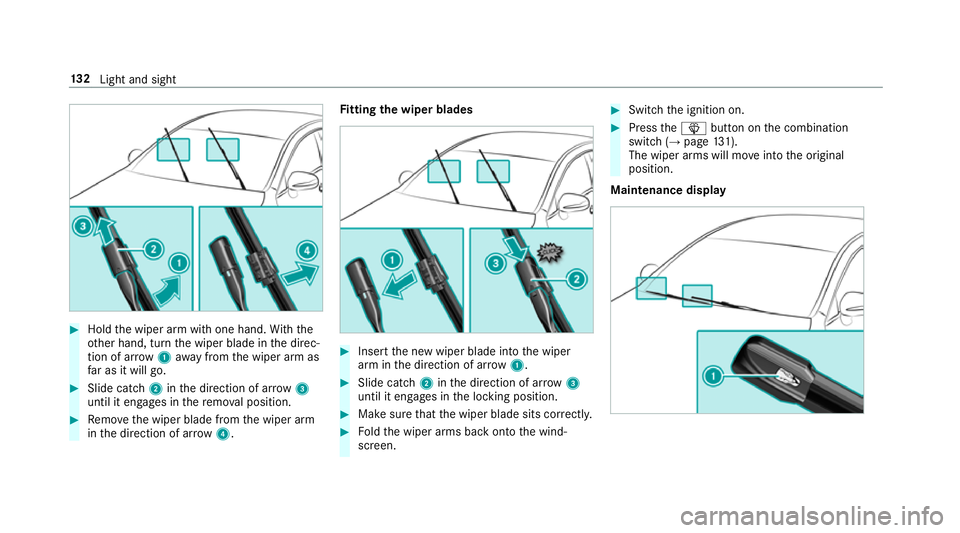
Hold the wiper arm with one hand. With the
ot her hand, turn the wiper blade in the direc‐
tion of ar row1away from the wiper arm as
fa r as it will go. #
Slide catch 2inthe direction of ar row 3
until it engages in there mo val position. #
Remo vethe wiper blade from the wiper arm
in the direction of ar row4. Fi
tting the wiper blades #
Inse rtthe new wiper blade into the wiper
arm in the direction of ar row1. #
Slide catch 2inthe direction of ar row 3
until it engages in the locking position. #
Make sure that the wiper blade sits cor rectly. #
Foldthe wiper arms back onto the wind‐
screen. #
Switch the ignition on. #
Press theî button on the combination
switch (→ page131).
The wiper arms will mo veinto the original
position.
Maintenance display 13 2
Light and sight
Page 136 of 589
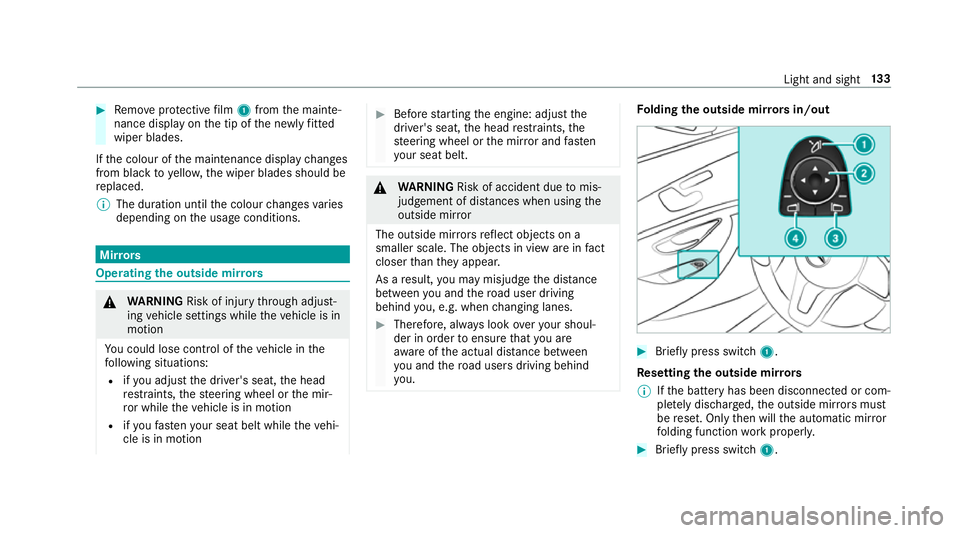
#
Remo veprotective film 1 from the mainte‐
nance display on the tip of the newly fitted
wiper blades.
If th e colour of the maintenance display changes
from black to yellow, the wiper blades should be
re placed.
% The duration until the colour changes varies
depending on the usage conditions. Mir
rors Operating
the outside mir rors &
WARNING Risk of inju rythro ugh adjust‐
ing vehicle settings while theve hicle is in
motion
Yo u could lose cont rol of theve hicle in the
fo llowing situations:
R ifyo u adjust the driver's seat, the head
re stra ints, thesteering wheel or the mir‐
ro r while theve hicle is in motion
R ifyo ufast enyour seat belt while theve hi‐
cle is in motion #
Before starting the engine: adjust the
driver's seat, the head restra ints, the
st eering wheel or the mir ror and fasten
yo ur seat belt. &
WARNING Risk of accident due tomis‐
judgement of dis tances when using the
outside mir ror
The outside mir rors reflect objects on a
smaller scale. The objects in view are in fact
closer than they appear.
As a result, you may misjud gethe dis tance
between you and thero ad user driving
behind you, e.g. when changing lanes. #
Therefore, alw ays look over your shoul‐
der in order toensure that you are
aw are of the actual dis tance between
yo u and thero ad users driving behind
yo u. Fo
lding the outside mir rors in/out #
Brief lypress switch 1.
Re setting the outside mir rors
% Ifth e battery has been disconnected or com‐
ple tely discharged, the outside mir rors must
be reset. Only then will the automatic mir ror
fo lding function workproperly. #
Brief lypress switch 1. Light and sight
13 3
Page 141 of 589
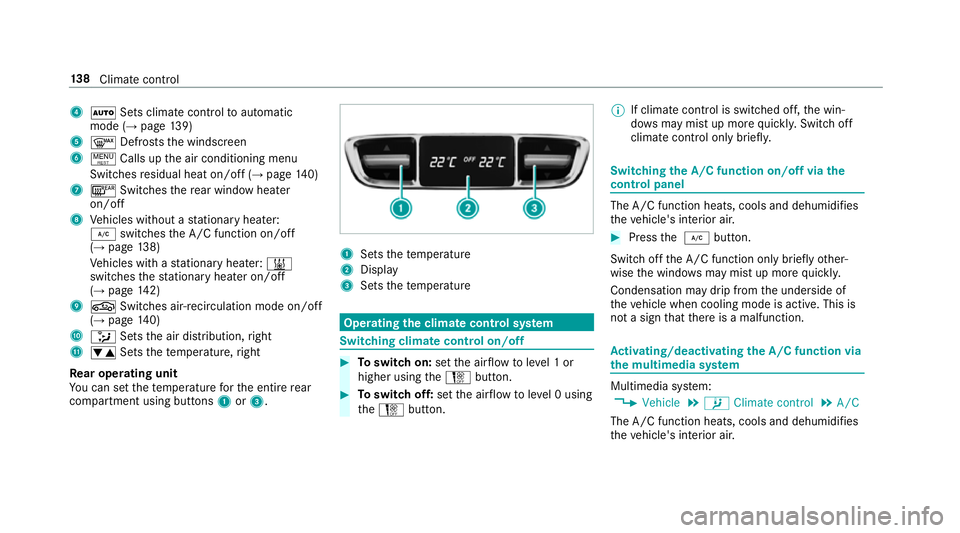
4
à Sets climate control toautomatic
mode (→ page139)
5 ¬ Defrosts the windscreen
6 ! Calls up the air conditioning menu
Switches residual heat on/off (→ page140)
7 ¤ Switches there ar wind owheater
on/off
8 Vehicles without a stationary heater:
¿ switches the A/C function on/off
(→ page 138)
Ve hicles with a stationary heater: &
swit ches thest ationary heater on/off
(→ page 142)
9 g Switches air- recirculation mode on/off
(→ page 140)
A _ Setsthe air distribution, right
B w Setsthete mp erature, right
Re ar operating unit
Yo u can set thete mp erature forth e entire rear
compartment using buttons 1or3. 1
Sets thete mp erature
2 Display
3 Sets thete mp erature Operating
the clima tecont rol sy stem Switching clima
tecont rol on/off #
Toswitch on: setthe air flow toleve l 1 or
higher using theH button. #
Toswitch off: setthe air flow toleve l 0 using
th eH button. %
If climate control is switched off, the win‐
do ws may mist up more quickl y.Switch off
climate control only brie fly. Switching
the A/C function on/off via the
cont rol panel The A/C function heats, cools and dehumidifies
th eve hicle's interior air. #
Press the ¿ button.
Switch off the A/C function only brief lyother‐
wise the windo wsmay mist up more quickl y.
Condensation may drip from the underside of
th eve hicle when cooling mode is active. This is
not a sign that there is a malfunction. Ac
tivating/deactivating the A/C function via
the multimedia sy stem Multimedia sy
stem:
, Vehicle .
b Climate control .
A/C
The A/C function heats, cools and dehumidifies
th eve hicle's interior air. 13 8
Climate cont rol
Page 142 of 589
#
Activate Oor deacti vate ª the function. Setting climate control
toautomatic mode In auto
matic mode, the set temp erature is con‐
trolled and maintained at a const ant levelby the
air suppl y. #
Press the à button. #
Toswitch tomanual mode: pressthe H
or _ button. Climate
style Climate
style function
In automatic mode, you can select thefo llowing
climate style settings forth e driver's and front
passenger areas:
R FOCUS: high air flow , slightly cooler setting
R MEDIUM: medium air flow ,st andard setting
R DIFFUSE: low airflow , slightly warmer and
draught-f ree setting Setting
the clima testyle
Multimedia sy stem:
, Vehicle .
b Climate control .
Cli-
mate mode #
Select FOCUS, MEDIUM orDIFFUSE .
% Tofeel the ef fect of the climate style, the
à function must be active (→ page139). Overvi
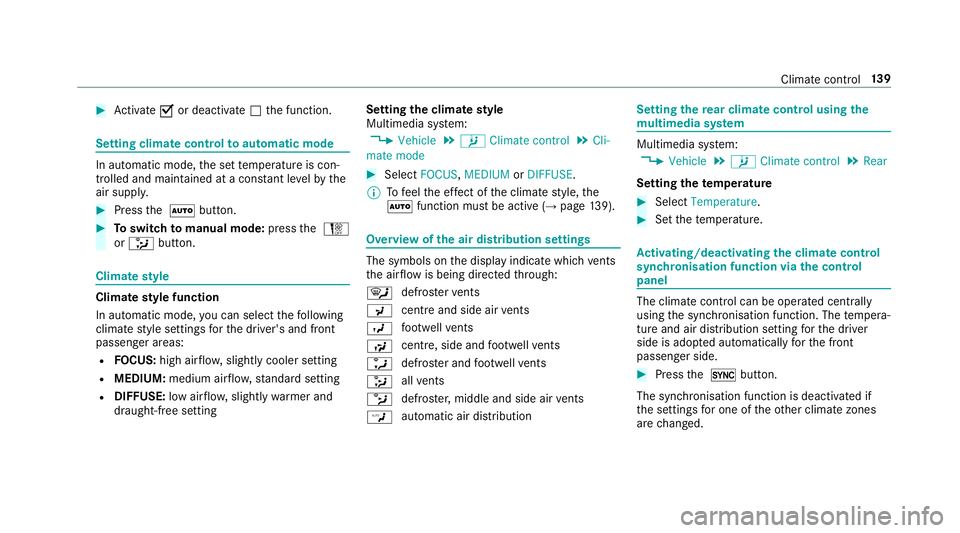
ewofthe air distribution settings The symbols on
the display indicate which vents
th e air flow is being directed thro ugh:
¯ def
rost ervents
P centre and side air
vents
O fo
ot we llve nts
S centre, side and
foot we llve nts
a defros
ter and foot we llve nts
_ all
vents
b defros
ter,middle and side air vents
W au
tomatic air distribution Setting
there ar climate control using the
mu ltimedia sy stem Multimedia sy
stem:
, Vehicle .
b Climate control .
Rear
Setting thetemp erature #
Select Temperature. #
Set thete mp erature. Ac
tivating/deactivating the climate control
syn chro nisation function via the control
panel The climate control can be operated centrally
using
the synchronisation function. The temp era‐
ture and air distribution setting forth e driver
side is adop ted automatically forth e front
passenger side. #
Press the 0 button.
The synchronisation function is deactivated if
th e settings for one of theot her climate zones
are changed. Climate control
13 9
Page 153 of 589
R
or: a Digital Vehicle Key is located in the
mar ked space (→ page151).
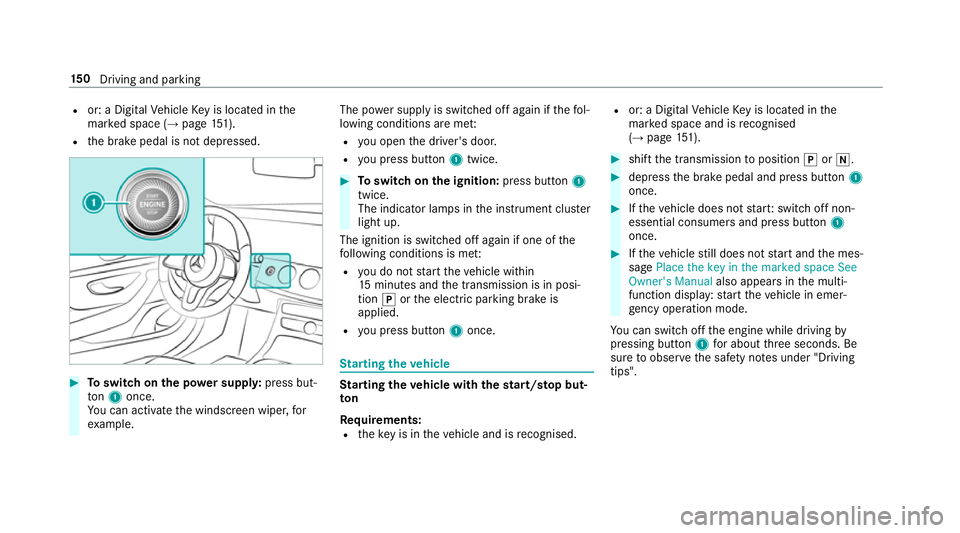
R the brake pedal is not depressed. #
Toswitch on the po wer supp ly:press but‐
to n1 once.
Yo u can activate the windscreen wiper, for
ex ample. The po
wer supp lyis switched off again if thefo l‐
lowing conditions are me t:
R you open the driver's door.
R you press but ton1 twice. #
Toswitch on the ignition: press button 1
twice.
The indicator lamps in the instrument clus ter
light up.
The ignition is switched off again if one of the
fo llowing conditions is me t:
R you do not start theve hicle within
15 minutes and the transmission is in posi‐
tion jorthe electric parking brake is
applied.
R you press but ton1 once. St
arting theve hicle St
arting theve hicle with thest art/s top but‐
ton
Requ irements:
R theke y is in theve hicle and is recognised. R
or: a Digi talVe hicle Key is located in the
mar ked space and is recognised
(→ page 151). #
shif tth e transmission toposition jori. #
depress the brake pedal and press button 1
once. #
Ifth eve hicle does not star t:switch off non-
essential consumers and press button 1
once. #
Ifth eve hicle still does not start and the mes‐
sage Place the key in the marked space See
Owner's Manual also appears inthe multi‐
function display: start theve hicle in emer‐
ge ncy operation mode.
Yo u can swit choff the engine while driving by
pressing button 1for about thre e seconds. Be
sure toobser vethe saf ety no tes under "Driving
tips". 15 0
Driving and pa rking
Page 159 of 589
Limited braking ef
fect on salt-trea tedro ads:
R due tosalt build-up on the brake disks and
brakepads, the braking dis tance can increase
conside rably or result in braking only on one
side
R maintain a much greater safe dis tance tothe
ve hicle in front
To preve nt salt build-up:
R brake occasionally while paying attention to
th e tra ffic conditions
R carefully depress the brake pedal at the end
of the journey and when starting the next
journey ECO
start/s top function Ope
ration of the ECO start/s top function
Ve hicles without a 48 V on-board electrical
sy stem (EQ Boost technology)
Mercedes-AMG vehicles: observeth e no tes in
th e Supplement. Otherwise, you may failto rec‐
ognise dangers. The engine is au
tomatically switched off if the
fo llowing conditions are me t:
R you brake theve hicle toast andstill in trans‐
mission position hori.
R if all vehicle conditions for an auto matic
engine stop are met.
The è symbol appears in the multifunction
display when theve hicle is stationar y.If not all
th eve hicle conditions are met, theç symbol
appears in the multifunction displa y.
The engine is restar ted automatically if:
R youre lease the brake pedal in transmission
position hwhen the HOLD function is not
active.
R you shift from transmission position j.
R you en gage transmission position hork.
R you depress the accelera tor pedal.
R an auto matic engine start is necessar y.
If th e engine was switched off bythe ECO start/
st op function and you lea vetheve hicle, a warn‐
ing tone sounds. The Vehicle is operational
Switch off the ignition before exiting display messa
gealso appears in the multifunction dis‐
pla y.Ifyo u do not swit choff the ignition, the
ignition is automatically switched off af ter one
minute.
Ve hicles with a 48 V on-board electrical sys‐
te m (EQ Boo sttech nology)
The engine is switched off automatically in the
fo llowing situations if all vehicle conditions for
an automatic engine stop are me t:
R you brake theve hicle toast andstill in trans‐
mission position hori.
R you en gage transmission position j.
R you depress the brake pedal when driving at
speeds below 20 km/h.
The needle of there v counter points tozero in
th e multifunction displa y.
If yo u swit chon the HOLD function or select
transmission position j,the engine will auto‐
matically stop in thefo llowing situations:
R youstop behind a vehicle that is pulling
aw ay. 15 6
Driving and pa rking
Page 160 of 589
R
youstop at a stop sign when there is no vehi‐
cle in front of you.
R you turn thesteering wheel hard at a low
speed.
The engine is restar ted automatically if:
R youre lease the brake pedal in transmission
position hwhen the HOLD function is not
active and theve hicle is not in drive program
A or; andtheve hicle does not start
to mo ve.
R you en gage transmission position hork.
R youre lease the brake pedal, theve hicle is
not in Glide mode and it starts tomo veon a
ge ntle downhill gradient at a speed below
3 km/h.
R you depress the accelera tor pedal.
R an auto matic engine start is necessar y.
If th e engine was switched off bythe ECO start/
st op function and you lea vetheve hicle, a warn‐
ing tone sounds. The Vehicle is operational
Switch off the ignition before exiting display
messa gealso appears in the multifunction dis‐
pla y.Ifyo u do not swit choff the ignition, the ignition is automatically switched off af
ter one
minute.
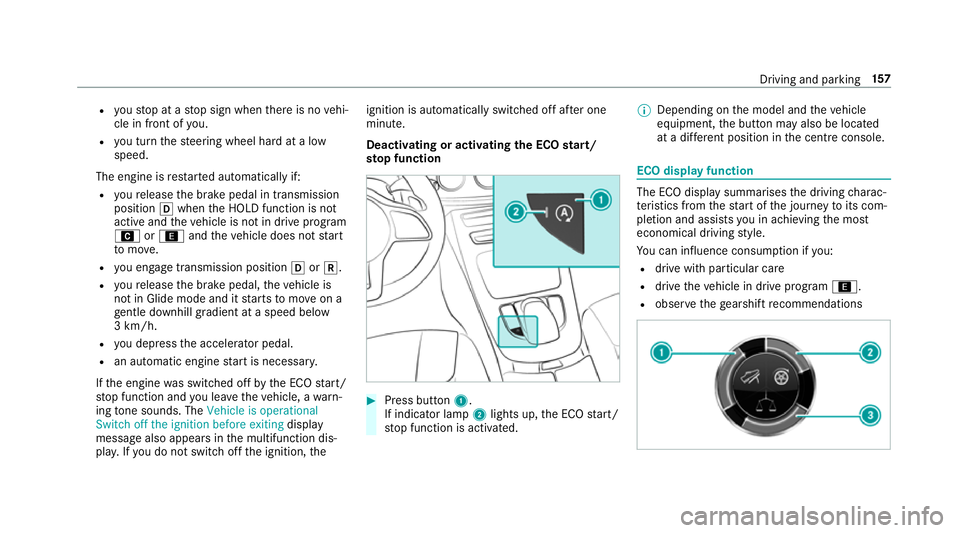
Deactivating or activating the ECO start/
st op function #
Press button 1.
If indicator lamp 2lights up, the ECO start/
st op function is activated. %
Depending on the model and theve hicle
equipment, the button may also be located
at a dif fere nt position in the cent reconsole. ECO displ
ayfunction The ECO display summa
rises the driving charac‐
te rist ics from thest art of the journey toits com‐
pletion and assists you in achieving the most
economical driving style.
Yo u can influence consum ption if you:
R drive with particular care
R drive theve hicle in drive program ;.
R obser vethege arshift recommendations Driving and pa
rking 157
Page 161 of 589
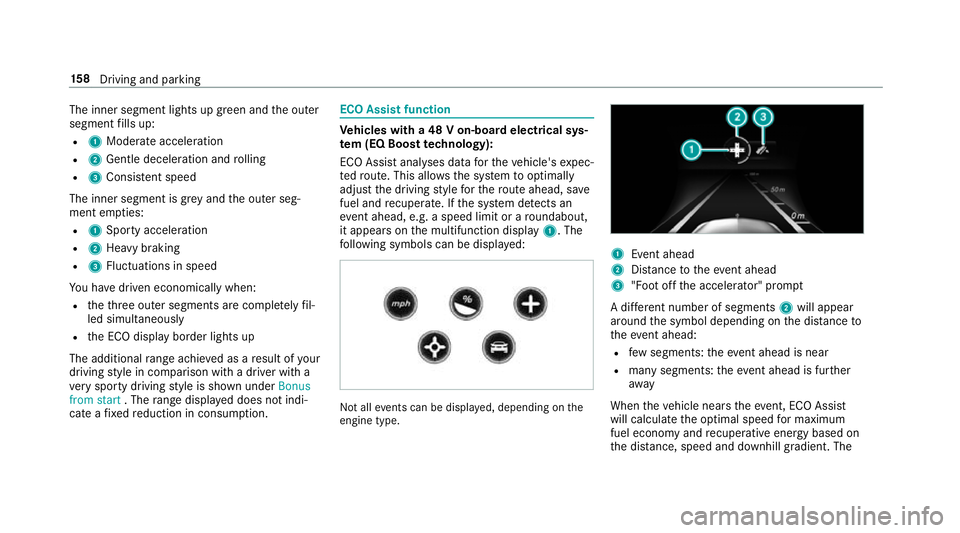
The inner segment lights up green and
the outer
segment fills up:
R 1 Moderate acceleration
R 2 Gentle decele ration and rolling
R 3 Consis tent speed
The inner segment is gr eyand the outer seg‐
ment em pties:
R 1 Sporty acceleration
R 2 Heavy braking
R 3 Fluctuations in speed
Yo u ha vedriven economically when:
R theth re e outer segments are comple tely fil‐
led simultaneously
R the ECO display border lights up
The additional range achi eved as a result of your
driving style in comparison with a driver with a
ve ry sporty driving style is shown under Bonus
from start . Therange displ ayed does not indi‐
cate a fixe dre duction in consum ption. ECO Assist function
Ve
hicles with a 48 V on-board electrical sys‐
te m (EQ Boo sttech nology):
ECO Assist analyses data forth eve hicle's expec‐
te dro ute. This allo wsthe sy stem tooptimally
adjust the driving style fo rth ero ute ahead, sa ve
fuel and recuperate. If the sy stem de tects an
eve nt ahead, e.g. a speed limit or a roundabout,
it appears on the multifunction display 1. The
fo llowing symbols can be displa yed: Not all
events can be displa yed, depending on the
engine type. 1
Event ahead
2 Distance totheeve nt ahead
3 "Foot off the accelerator" prom pt
A di fferent number of segments 2will appear
around the symbol depending on the dis tance to
th eeve nt ahead:
R few segments: theeve nt ahead is near
R manysegments: theeve nt ahead is fur ther
aw ay
When theve hicle nears theeve nt, ECO Assi st
will calculate the optimal speed for maximum
fuel economy and recuperati veenergy based on
th e dis tance, speed and downhill gradient. The 15 8
Driving and pa rking