fog light MERCEDES-BENZ CLS COUPE 2018 Owners Manual
[x] Cancel search | Manufacturer: MERCEDES-BENZ, Model Year: 2018, Model line: CLS COUPE, Model: MERCEDES-BENZ CLS COUPE 2018Pages: 589, PDF Size: 10.95 MB
Page 14 of 589
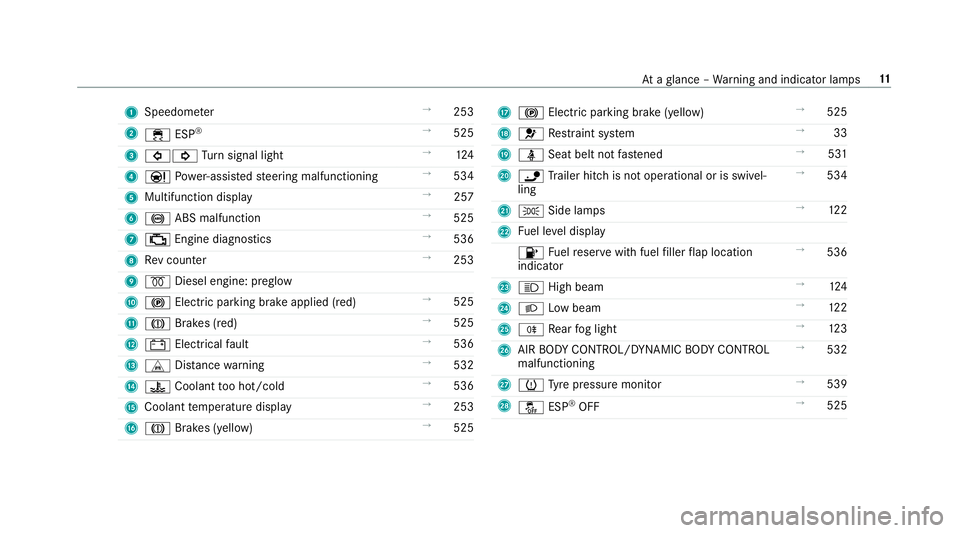
1
Speedom eter →
253
2 ÷ ESP®
→
525
3 #! Turn signal light →
124
4 Ð Powe r-assis tedsteering malfunctioning →
534
5 Multifunction display →
257
6 ! ABS malfunction →
525
7 ; Engine diagnostics →
536
8 Rev counter →
253
9 % Diesel engine: preglow
A ! Electric parking brake applied (red) →
525
B J Brakes (red) →
525
C # Electrical fault →
536
D L Distance warning →
532
E ? Coolant too hot/cold →
536
F Coolant temp erature display →
253
G J Brakes (yellow) →
525 H
! Electric pa rking brake (yellow) →
525
I 6 Restra int sy stem →
33
J ü Seat belt not fastened →
531
K ï Trailer hit chis not operational or is swivel‐
ling →
534
L T Side lamps →
12 2
M Fuel le vel display
8 Fuelreser vewith fuel filler flap location
indicator →
536
N K High beam →
124
O L Low beam →
12 2
P R Rear fog light →
12 3
Q AIR BODY CONTROL/DYNAMIC BODY CONTROL
malfunctioning →
532
R h Tyre pressure monitor →
539
S å ESP®
OFF →
525 At
aglance – Warning and indicator lamps 11
Page 16 of 589
1
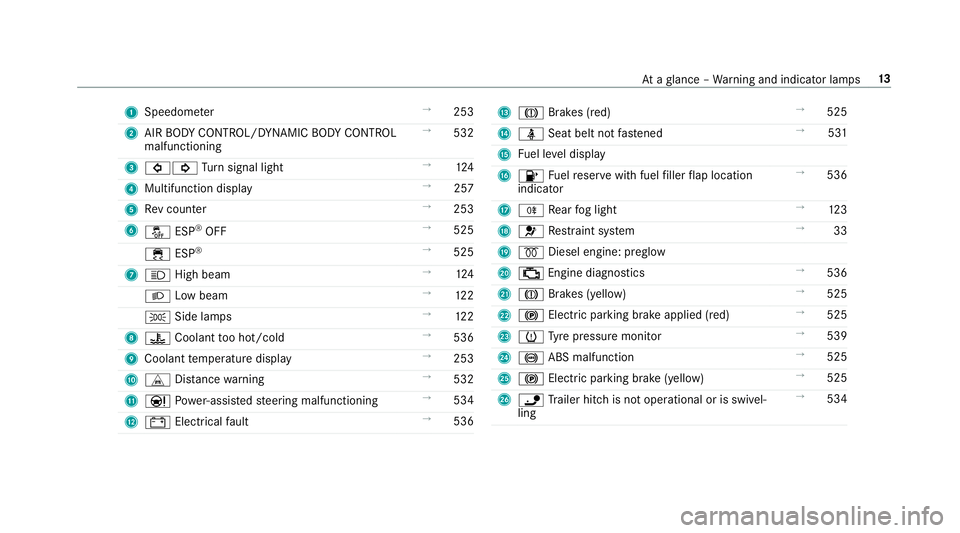
Speedom eter →
253
2 AIR BODY CONTROL/DYNAMIC BODY CONTROL
malfunctioning →
532
3 #! Turn signal light →
124
4 Multifunction display →
257
5 Rev counter →
253
6 å ESP®
OFF →
525
÷ ESP®
→
525
7 K High beam →
124
L Low beam →
12 2
T Side la mps →
12 2
8 ? Coolant too hot/cold →
536
9 Coolant temp erature display →
253
A L Distance warning →
532
B Ð Powe r-assis tedsteering malfunctioning →
534
C # Electrical fault →
536 D
J Brakes (red) →
525
E ü Seat belt not fastened →
531
F Fuel le vel display
G 8 Fuelreser vewith fuel filler flap location
indicator →
536
H R Rear fog light →
12 3
I 6 Restra int sy stem →
33
J % Diesel engine: preglow
K ; Engine diagnostics →
536
L J Brakes (yellow) →
525
M ! Electric pa rking brake applied (red) →
525
N h Tyre pressure monitor →
539
O ! ABS malfunction →
525
P ! Electric pa rking brake (yellow) →
525
Q ï Trailer hit chis not operational or is swivel‐
ling →
534 At
aglance – Warning and indicator lamps 13
Page 125 of 589
Exterior lighting
Note
s onchanging the lights when driving
abroad Ve
hicles with static LED headlamps: it is not
necessa ryto change the headlamps. The legal
re qu irements are also met in countries in which
traf fic drives on theot her side of thero ad.
Ve hicles with Intelligent Light Sy stem: before
crossing the border into count ries in which traf‐
fi c drives on theot her side of thero ad, it is nec‐
essary toset the headlamps tosymmetrical
dipped beam (→ page129).
On ce the headlamps ha vebeen changed:
R oncoming traf fic will not be dazzled
R the edge of thero ad will not be illuminated
as far or as high
R the "mo torw ay mode" and "enhanced fog
light" functions will not be available
The headlamps must be reset toasymm etrical
low beam when youre turn from ab road. Information about lighting sy
stems and your
re sponsibility The
various lighting sy stems of theve hicle are
only aids. The driver of theve hicle is responsible
fo r cor rect vehicle illumination in accordance
with the pr evailing light and visibility conditions,
legal requirements and traf fic situation. Light switch
Ope
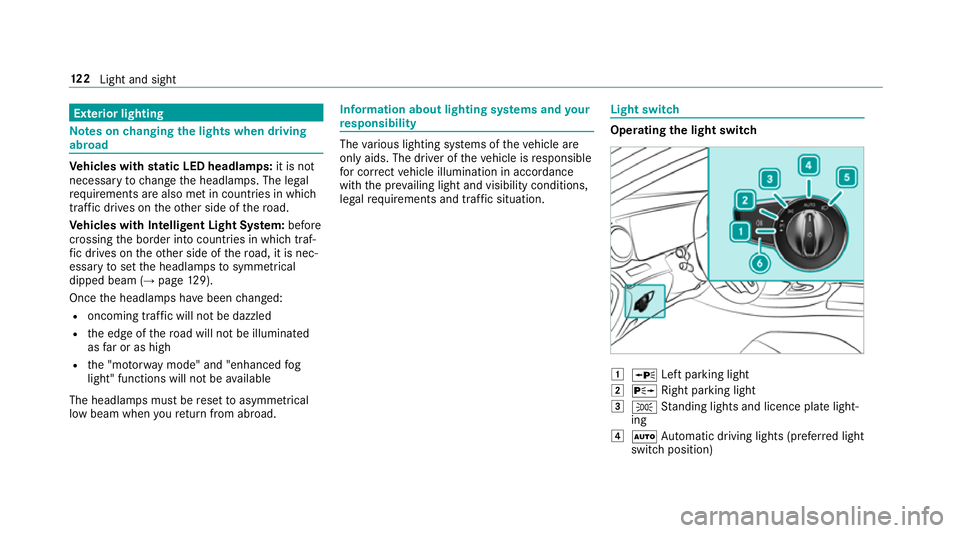
rating the light switch 1
W Left pa rking light
2 X Right parking light
3 T Standing lights and licence plate light‐
ing
4 Ã Automatic driving lights (prefer red light
switch position) 12 2
Light and sight
Page 126 of 589
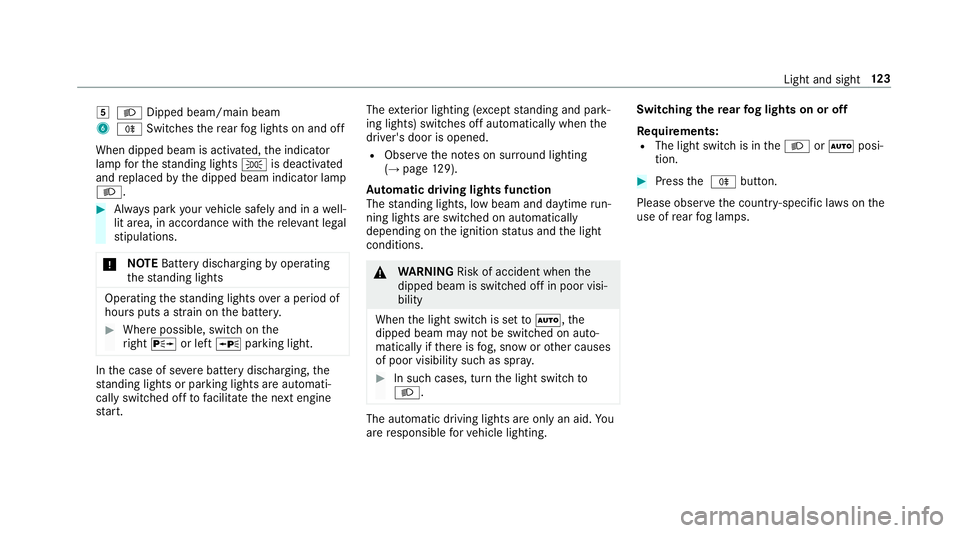
5
L Dipped beam/main beam
6 R Switches there ar fog lights on and off
When dipped beam is activated, the indicator
lamp forth est anding lights Tis deactivated
and replaced bythe dipped beam indicator lamp
L. #
Alw ays park your vehicle safely and in a well-
lit area, in accordance with there leva nt le gal
st ipulations.
* NO
TEBattery discharging byoperating
th est anding lights Operating
thest anding lights over a period of
hours puts a stra in on the batter y. #
Where possible, switch on the
ri ght X or left Wparking light. In
the case of se vere battery discharging, the
st anding lights or parking lights are automati‐
cally swit ched off tofacilitate the next engine
st art. The
exterior lighting (e xcept standing and park‐
ing lights) swit ches off automatically when the
driver's door is opened.
R Obser vethe no tes on sur round lighting
(→ page 129).
Au tomatic driving lights function
The standing lights, low beam and daytime run‐
ning lights are switched on au tomatically
depending on the ignition status and the light
conditions. &
WARNING Risk of accident when the
dipped beam is switched off in poor visi‐
bility
When the light switch is set toà ,the
dipped beam may not be switched on auto‐
matically if there is fog, snow or other causes
of poor visibility such as spr ay. #
In such cases, turn the light switch to
L . The automatic driving lights are only an aid.
Yo u
are responsible forve hicle lighting. Switching
there ar fog lights on or off
Re quirements:
R The light switch is in theL orà posi‐
tion. #
Press the R button.
Please obser vethe count ry-specific la wsonthe
use of rear fog lamps. Light and sight
12 3
Page 128 of 589
Ac
tivating/deactivating the hazard warning
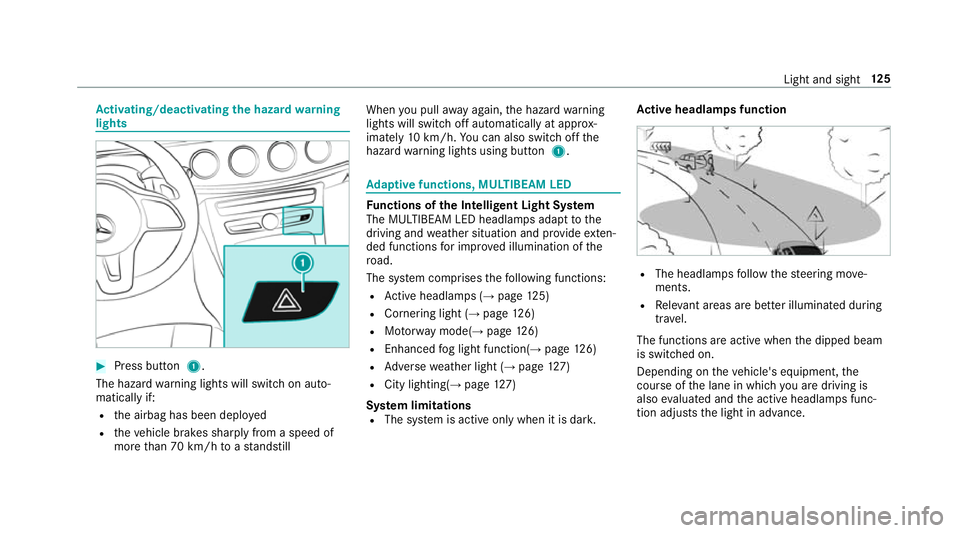
lights #
Press button 1.
The hazard warning lights will switch on auto‐
matically if:
R the airbag has been deplo yed
R theve hicle brakes sharply from a speed of
more than 70 km/h toast andstill When
you pull away again, the hazard warning
lights will switch off automatically at appr ox‐
imately 10km/h. You can also swit choff the
hazard warning lights using button 1. Ad
aptive functions, MULTIBEAM LED Fu
nctions of the Intelligent Light Sy stem
The MULTIBEAM LED headlamps adapt tothe
driving and weather situation and pr ovide exten‐
ded functions for impr oved illumination of the
ro ad.
The sy stem comprises thefo llowing functions:
R Active headla mps (→ page 125)
R Cornering light (→ page126)
R Motorw ay mode(→ page126)
R Enhanced fog light function(→ page126)
R Adversewe ather light (→ page127)
R City lighting(→ page127)
Sy stem limitations
R The sy stem is active only when it is dar k.Ac
tive headlamps function R
The headlamps follow thesteering mo ve‐
ments.
R Releva nt areas are better illumina ted during
tra vel.
The functions are active when the dipped beam
is switched on.
Depending on theve hicle's equipment, the
cou rse of the lane in which you are driving is
also evaluated and the active headlamps func‐
tion adjusts the light in advance. Light and sight
12 5
Page 129 of 589
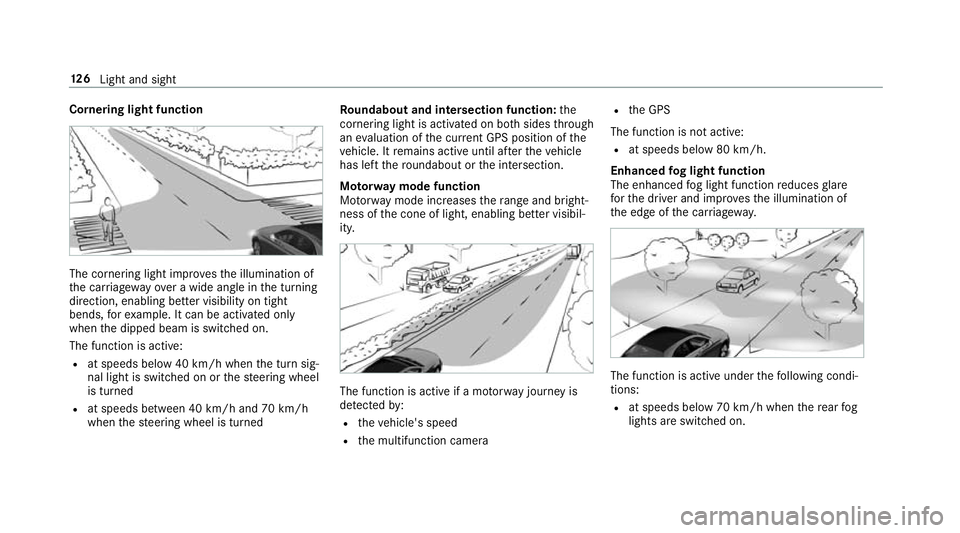
Cornering light function
The cornering light impr
ovesth e illumination of
th e car riag ewa yove r a wide angle in the turning
direction, enabling better visibility on tight
bends, forex ample. It can be activated on ly
when the dipped beam is switched on.
The function is active:
R at speeds below 40 km/h when the turn sig‐
nal light is switched on or thesteering wheel
is turned
R at speeds between 40 km/h and 70 km/h
when thesteering wheel is turned Ro
undabout and intersection function: the
cornering light is acti vated on bo thsides thro ugh
an evaluation of the cur rent GPS position of the
ve hicle. It remains active until af terth eve hicle
has left thero undabout or the intersection.
Mo torw ay mode function
Mo torw ay mode increases thera nge and bright‐
ness of the cone of light, enabling better visibil‐
ity. The function is active if a mo
torw ay jou rney is
de tected by:
R theve hicle's speed
R the multifunction camera R
the GPS
The function is not active: R at speeds below 80 km/h.
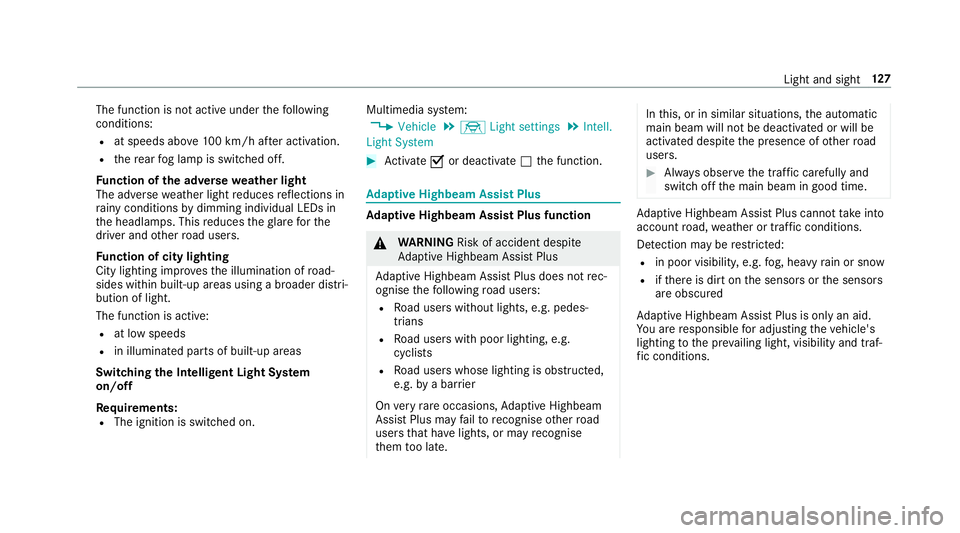
Enhanced fog light function
The enhanced fog light function reduces glare
fo rth e driver and impr ovesth e illumination of
th e edge of the car riag ewa y. The function is active under
thefo llowing condi‐
tions:
R at speeds below 70 km/h when there ar fog
lights are switched on. 12 6
Light and sight
Page 130 of 589
The function is not active under
thefo llowing
conditions:
R at speeds abo ve100 km/h af ter activation.
R there ar fog lamp is switched off.
Fu nction of the ad versewe ather light
The adverse weather light reduces reflections in
ra iny conditions bydimming individual LEDs in
th e headlamps. This reduces theglare forthe
driver and other road users.
Fu nction of city lighting
City lighting impr ovesth e illumination of road‐
sides within built-up areas using a broader distri‐
bution of light.
The function is active:
R at low speeds
R in illuminated parts of built-up areas
Swit ching the Intelligent Light Sy stem
on/off
Requ irements:
R The ignition is switched on. Multimedia sy
stem:
, Vehicle .
÷ Light settings .
Intell.
Light System #
Activate Oor deacti vate ª the function. Ad
aptive Highbeam Assist Plus Ad
aptive Highbeam Assist Plus function &
WARNING Risk of accident despi te
Ad aptive Highbeam Assist Plus
Ad aptive Highbeam Assist Plus does not rec‐
ognise thefo llowing road users:
R Road users without lights, e.g. pedes‐
trians
R Road users with poor lighting, e.g.
cyclists
R Road users whose lighting is obstructed,
e.g. bya bar rier
On very rare occasions, Adaptive Highbeam
Assist Plus may failto recognise other road
users that ha velights, or may recognise
th em too late. In
this, or in similar situations, the automatic
main beam will not be deactivated or will be
activated despite the presence of other road
users. #
Alw ays obser vethe tra ffic carefully and
switch off the main beam in good time. Ad
aptive Highbeam Assist Plus cannot take into
account road, weather or traf fic conditions.
De tection may be restricted:
R in poor visibility, e.g. fog, heavy rain or snow
R ifth ere is dirt on the sensors or the sensors
are obscured
Ad aptive Highbeam Assist Plus is on lyan aid.
Yo u are responsible for adju sting theve hicle's
lighting tothe pr evailing light, visibility and traf‐
fi c conditions. Light and sight
127
Page 162 of 589
Foot off the accelerator
message will appear on
th e multifunction displa y.Ifth e driver lifts off the
accelerator pedal in good time, there maining
segments on the display will turn green until the
eve nt shown is reached. The driv etra in will be
set for maximum fuel econom y.The vehicle will
coast, with the combustion engine switched off
if necessar y,and recuperate on its own using
th e electric mo tor.Re cuperation will charge the
batter y.
If th ere is no response totheFoot off the accel-
erator prompt,th e segments will remain white.
The event will be shown for a short time af ter it
has been passed.
If th eeve nt in volves a vehicle ahead and when
th e coast-down recommendation is given, all
segments will immediately turn green once there
is a response totheFoot off the accelerator
prom pt.
Fo rAc tive ECO Assi stin drive program ;,
symbol 3will appear on the multifunction dis‐
play and on the head-up display beside transmis‐
sion position h. Symbol3will also appear
when the assis tant displ ayis not selec ted. ECO Assist is active only in drive programs
;
and A.
Sy stem limitations
ECO Assist can function more precisely if the
ro ute is main tained when route guidance is
active. The basic function is also available with‐
out active route guidance. Notall information
and traf fic situations can be fore seen. The qual‐
ity depends on the map data.
ECO Assist is only an aid. The driver is responsi‐
ble forke eping a safe dis tance totheve hicle in
front, forve hicle speed and for braking in good
time. The driver must be ready tobrake at all
times ir respective of whe ther the sy stem inter‐
ve nes.
The sy stem may be impaired or may not function
in thefo llowing situations:
R Ifth ere is poor visibility, e.g. due toinsuf fi‐
cient illumination of thero ad, high lyvariable
shade conditions, rain, sno w,fog or heavy
spr ay.
R Ifth ere is glare, e.g. from oncoming traf fic,
di re ct sunlight or reflections. R
Ifth ere is dirt on the windscreen in the vicin‐
ity of the multifunction camera or the camera
is mis ted up, damaged or obscured.
R Ifth e traf fic signs are ha rdtodetect, e.g. due
to dirt or snow or insuf ficient lighting, or
because they are co vered.
R Ifth e information on the navigation sy stem's
digital map is incor rect or out of da te.
R Ifth e signs are ambiguous, e.g. traf fic signs
on construction sites or in adjacent lanes. Displaying ECO Assist
On-board compu
ter:
, Assistance #
Select ECO Assist . DY
NA MIC SELECT switch Fu
nction of theDY NA MIC SELECT switch Mercedes-AMG
vehicles: observeth e no tes in
th e Supplement. Otherwise, you may failto rec‐
ognise dangers. Driving and pa
rking 15 9
Page 194 of 589
&
WARNING Risk of an accident despi te
Evasive Steering Assist
Evasive Steering Assist cann otalw ays clearly
identify objects and complex traf fic situa‐
tions.
In addition, thesteering support of Evasive
St eering Assist is general lynot su fficient to
avo id a collision.
In such cases Evasive Steering Assist can:
R give an unnecessary warning or pr ovide
assis tance
R not gi veawa rning or not pr ovide assis‐
ta nce #
Alw ays pay careful attention tothe traf‐
fi c situation; do not rely on Ev asive
St eering Assist alone. #
Beready tobrake and take evasive
action, if necessar y. #
Preve ntthe assis tance byactively steer‐
ing in non-critical driving situations. #
Drive at an appropriate speed if pedes‐
trians are close tothe path of your vehi‐
cle. Sy
stem limitations
Fu ll sy stem per form ance is not available for a
fe w seconds af ter switching on the ignition or
af te r driving off.
The sy stem may be impaired or may not function
in thefo llowing situations:
R In sno w,rain, fog, heavy spr ay, if there is
gl are, in direct sunlight or in greatlyvarying
light conditions.
R Ifth e sensors are dirty, mis ted up, damaged
or co vered.
R Ifth e sensors are impaired due tointer fer‐
ence from other radar sources, e.g. strong
ra dar reflections in multi-s torey car par ks.
R If a loss of tyre pressure or a defective tyre
has been de tected and displ ayed.
R In complex traf fic situations whe reobjects
cannot always be clearly identified. R
For pede strians or vehicles if they mo ve
qu ickly into the sensor de tection range.
R For pede strians who are hidden by other
objects.
R Ifth e typical outline of a pedestrian cann ot
be distinguished from the bac kground.
R If a pedestrian is not de tected as su ch, e.g.
due tospecial clo thing or other objects.
R On bends with a tight radius. Setting
Active Brake Assi st Multimedia sy
stem:
, Vehicle .
k Assistance .
Active
Brake Assist
Ve hicles without Driving Assistance Pack‐
age: the settings can be made af terst arting the
ve hicle.
Ve hicles with Driving Assistance Package:
th e settings can be made when the ignition is
switched on.
The following settings are available:
R Early Driving and parking
191
Page 200 of 589
th
eve hicle in front driving off again within 30
seconds. If a critical situation is de tected when
driving off, a visual and acoustic warning is given
indicating that the driver must now take control
of theve hicle. The vehicle is not accelerated any
fur ther.
Ac tive Dis tance Assi stDISTRONIC is only an aid.
The driver is responsible forke eping a safe dis‐
ta nce totheve hicle in front, forve hicle speed
and for braking in good time.
Sy stem limitations
The sy stem may be impaired or may not function
in thefo llowing ins tances:
R In sno w,rain, fog, heavy spr ay, if there is
gl are, in direct sunlight or in great lyvarying
light conditions.
R The windsc reen in the area of the camera is
dirty, mis ted up, damaged or co vered.
R Ifth era dar sensors are dirty or co vered.
R On slippery roads, braking or accelerating
can cause one or se veral wheels tolose trac‐
tion and theve hicle could then skid. R
In multi-s torey car par ksor on roads with
st eep uphill or downhill gradients.
R Narrow vehicles, such as bicycles and mo tor‐
cycles, are not de tected.
Do not use Active Dis tance Assi stDISTRONIC in
th ese situations. &
WARNING Risk of accident from acceler‐
ation or braking byActive Dis tance
Assi stDISTRONIC
Ac tive Dis tance Assi stDISTRONIC may accel‐
erate or brake in thefo llowing cases, for
ex ample:
R Ifth eve hicle pulls away using Active Dis‐
ta nce Assi stDISTRONIC.
R Ifth estored speed is called up and is
considerably faster or slo werth an the
cur rently driven speed.
R IfAc tive Dis tance Assi stDISTRONIC no
longer de tects a vehicle in front or does
not react toreleva nt objects. #
Alw ays carefully obser vethe traf fic con‐
ditions and be ready tobrake at all
times. #
Take into account the tra ffic situation
before calling up thestored speed. &
WARNING Risk of accident due toinsuf‐
fi cient decele ration byActive Dis tance
Assi stDISTRONIC
Ac tive Dis tance Assi stDISTRONIC brakes
yo ur vehicle with up to50 % of the maximum
possible deceleration. If this decele ration is
not su fficient, Active Dis tance Assi st
DISTRONIC alerts you with a visual and
acoustic warning. #
Inthese cases, adjust your speed and
ke ep a suf ficient di stance. #
Brake theve hicle yourself and/or take
ev asive action. Driving and parking
197