ESP MERCEDES-BENZ CLS COUPE 2020 Repair Manual
[x] Cancel search | Manufacturer: MERCEDES-BENZ, Model Year: 2020, Model line: CLS COUPE, Model: MERCEDES-BENZ CLS COUPE 2020Pages: 469, PDF Size: 8.47 MB
Page 232 of 469
Ac
tivating/deactivating audio fadeout
Yo u can specify whe ther thevo lume of a media
source in the multimedia sy stem is tobe
re duced when Parking Assist PARKTRONIC
sounds a warning tone. #
Select Audio fadeout during warning tones. #
Activate or deacti vate the function. Ac
tive Parking Assist Fu
nction of Active Parking Assist
Ac tive Parking Assist is an elect ronic pa rking
assis tance sy stem, which uses ultrasound with
th e assis tance of there ve rsing camera and 360°
Camera. When you are driving forw ards up to
appr oximately 35 km/h, the sy stem automati‐
cally measures parking spaces on bo thsides of
th eve hicle.
As soon as all requ irements are met for sear ch‐
ing for parking spaces, theÇ display appears
in the multifunction displa y.
When Active Parking Assist has de tected pa rking
spaces, theÈ display appears in the multi‐
function displa y.The ar rowsshow on which side of
thero ad de tected pa rking spaces are located.
They are then shown in the media displa y.
The parking space can be selected as desired.
Depending on the location of the parking space,
th e parking direction (rear wards or forw ards)
can also be selec ted as desired.
When Active Parking Assist is activated, the turn
signal indicators are activated based on the cal‐
culated path of your vehicle.
When you are en tering or exiting a parking
space, the procedure is assis tedby acceleration,
braking, steering and gear changes.
Ac tive Parking Assist is only an aid. It is not a
substitute foryo ur attention tothe sur roundings.
The responsibility for safe manoeuvring and
parking remains with you. Make sure that no
persons, animals or objects etc. are in the
manoeuvring range.
Ac tive Parking Assist will be cancelled in thefo l‐
lowing situations:
R Parking Assist PARKTRONIC is deacti vated.
R You begin steering.
R You apply the parking brake. R
You en gage transmission position j.
R ESP ®
inter venes.
R You open the doors or the boot lid while driv‐
ing.
Sy stem limits
If th eex terior lighting is malfunctioning, Active
Pa rking Assist is not available.
Objects located abo veor below the de tection
ra nge of the sensors, e.g. overhanging loads,
ov erhangs or loading ramp s of goods vehicles, or
th e borders of parking spaces, are not de tected
du ring measu rement of the parking space. These
are also then not take n into account when calcu‐
lating the parking procedure. In some circum‐
st ances, Active Parking Assist may therefore
guide you into the parking space incor rectl y. Driving and pa
rking 229
Page 234 of 469
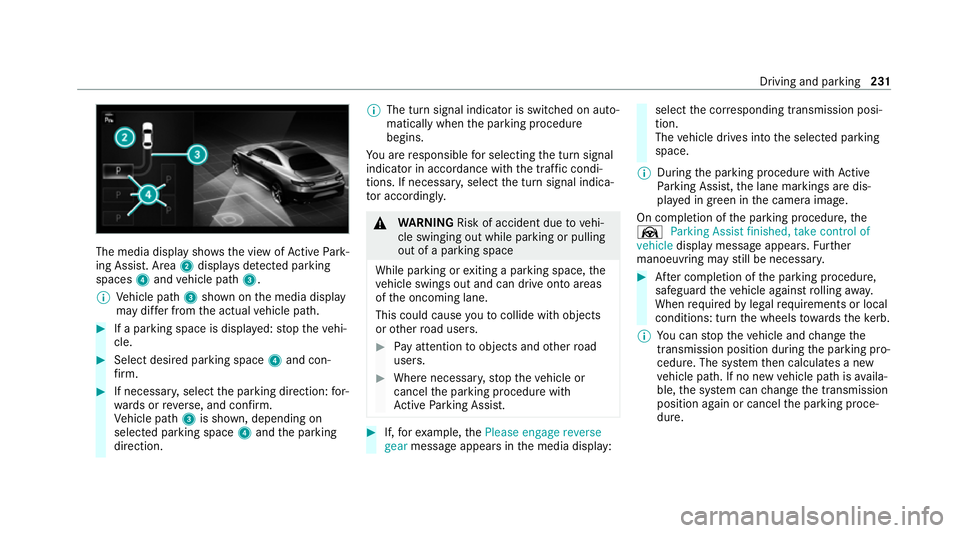
The media display sho
ws the view of Active Park‐
ing Assist. Area 2displa ysdetected pa rking
spaces 4and vehicle path 3.
% Vehicle path 3shown on the media display
may dif fer from the actual vehicle path. #
If a parking space is displa yed: stop theve hi‐
cle. #
Select desired parking space 4and con‐
fi rm. #
If necessar y,select the parking direction: for‐
wa rds or reve rse, and confi rm.
Ve hicle path 3is shown, depending on
selected parking space 4and the parking
direction. %
The turn signal indicator is switched on auto‐
matically when the parking procedure
begins.
Yo u are responsible for selecting the turn signal
indicator in accordance with the traf fic condi‐
tions. If necessar y,select the turn signal indica‐
to r according ly. &
WARNING Risk of accident due tovehi‐
cle swinging out while parking or pulling
out of a parking space
While parking or exiting a parking space, the
ve hicle swings out and can drive onto areas
of the oncoming lane.
This could cause youto collide wi thobjects
or other road users. #
Pay attention toobjects and other road
users. #
Where necessar y,stop theve hicle or
cancel the parking procedure with
Ac tive Parking Assist. #
If,forex ample, thePlease engage reverse
gear message appears in the media display: select
the cor responding transmission posi‐
tion.
The vehicle drives into the selected parking
space.
% During the parking procedure with Active
Pa rking Assist, the lane markings are dis‐
pla yed in green in the camera image.
On completion of the parking procedure, the
Ø Parking Assist finished, take control of
vehicle display message appears. Further
manoeuvring may still be necessar y. #
After completion of the parking procedure,
safeguard theve hicle against rolling away.
When requ ired bylegal requirements or local
conditions: turn the wheels towa rdsth eke rb.
% You can stop theve hicle and change the
transmission position du ring the parking pro‐
cedure. The sy stem then calculates a new
ve hicle path. If no new vehicle path is availa‐
ble, the sy stem can change the transmission
position again or cancel the parking proce‐
dure. Driving and parking
231
Page 235 of 469
Exiting a pa
rking space with Active Parking
Assist
Re quirements:
R The vehicle has been par ked with Active
Pa rking Assist.
% Depending on theve hicle's equipment, the
button may also be located at a dif fere nt
position in the cent reconsole.
Please no tethat you are responsible forth eve hi‐
cle and sur roundings during the entire parking
procedure. #
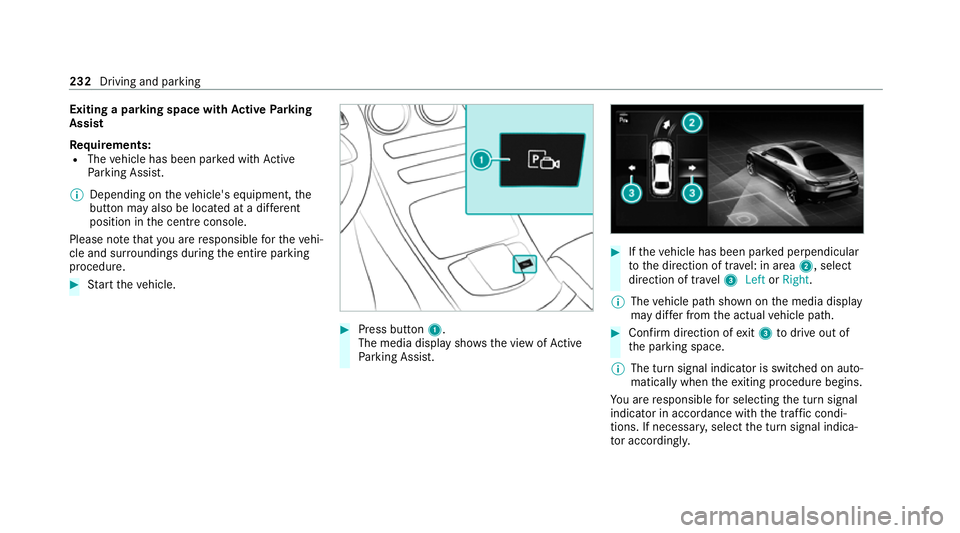
Start theve hicle. #
Press button 1.
The media display sho wsthe view of Active
Pa rking Assist. #
Ifth eve hicle has been par ked perpendicular
to the direction of tra vel: in area 2, select
direction of tra vel3 Left orRight .
% The vehicle path shown on the media display
may dif fer from the actual vehicle path. #
Confirm direction of exit3 todrive out of
th e parking space.
% The turn signal indicator is switched on auto‐
matically when theex iting procedure begins.
Yo u are responsible for selecting the turn signal
indicator in accordance with the traf fic condi‐
tions. If necessar y,select the turn signal indica‐
to r according ly. 232
Driving and parking
Page 236 of 469
&
WARNING Risk of accident due tovehi‐
cle swinging out while parking or pulling
out of a parking space
While parking or exiting a parking space, the
ve hicle swings out and can drive onto areas
of the oncoming lane.
This could cause youto collide wi thobjects
or other road users. #
Pay attention toobjects and other road
users. #
Where necessar y,stop theve hicle or
cancel the parking procedure with
Ac tive Parking Assist. #
If,forex ample, thePlease engage forward
gear message appears in the media display:
select the cor responding transmission posi‐
tion.
The vehicle mo ves out of the parking space.
The turn signal indicator is switched off auto‐
maticall y.
Af terth e parking space has been exited, a warn‐
ing tone and theØ Parking Assist finished, take control of vehicle
message promptyouto
ta ke control of theve hicle.
The vehicle is not automatically braked and can
ro llaw ay.Yo u ha vetoaccelerate, brake, steer
and change gear yourself again. Manoeuv
ring assistant Fu
nction of Drive Away Assist
Drive AwayAssi stcan reduce the se verity of an
impact when pulling away. If an obs tacle is
de tected in the direction of tr avel, theve hicle's
speed is brief lyreduced toappr ox. 2 km/h. If a
critical situation is de tected, theÉ symbol
appears in the media displa y.
% You can cancel an inter vention byDrive
Aw ayAssi stat any time bydeactivating
Pa rking Assist PARKTRONIC (/ page 227). &
WARNING Risk of accident caused by
limited de tection per form ance of Drive
Aw ayAssi st
Drive AwayAssi stcannot al ways clearly iden‐
tify objects and traf fic situations. #
Alw ays pay careful attention tothe traf‐
fi c situation; do not rely on Drive Away
Assi stalone. #
Be prepared tobrake or swer veas nec‐
essar y,prov ided the tra ffic situation
permits and that it is safe totake eva‐
sive action. Drive
AwayAssi stis only an aid. It is not a sub‐
st itute foryo ur attention tothe sur roundings.
The responsibility for safe manoeuvring and
parking remains with you. Make sure that no
persons, animals or objects etc. are in the
manoeuvring range.
A risk of a collision may arise in thefo llowing sit‐
uations, forex ample:
R Ifth e accelera tor and brake pedals are inter‐
ch anged.
R If an incor rect transmission position is
engaged.
Drive AwayAssi stis active under thefo llowing
conditions:
R IfPa rking Assist PARKTRONIC is activated. Driving and parking
233
Page 240 of 469

R
The trailer cables or adap ter plugs ha vebeen
re mo ved.
Multimedia sy stem:
4 © 5
Settings 5
Quick access
Extending the ball neck fully electrically #
Select Ü.
The Trailer coupling extending… display mes‐
sage will appear on the multifunction displa y.
The ball neck will extend fully electrically. #
Wait until the ball neck has loc ked in place.
If th e ball neck is not securely loc ked in place,
th eCheck trailer hitch lock message will appear
on the multifunction displa y.
Re tracting the ball ne ckfully electrical ly #
Select Ü.
The Trailer coupling extending… displaymes‐
sage will appear on the multifunction displa y.
The ball neck will retract fully electrically. #
Wait until the ball neck has loc ked in place. If
th e ball neck is not securely loc ked in place,
th eCheck trailer hitch lock message will appear
on the multifunction displa y. Coupling/uncoupling a trailer
&
WARNING Risk of inju ryfrom theve hicle
le ve l being changed
Ve hicles with le vel control sy stem: the
ve hicle le vel may be changed unin tentional ly,
e.g. by ot her persons. You may become trap‐
ped if you couple up or uncouple a trailer
while theve hicle le vel is changing. In addi‐
tion, other people could become trapped if
th eir limbs are between theve hicle body and
th e tyres or underneath theve hicle.
When coupling up or uncoupling a trailer,
make sure that: #
The doors or tailgate are not opened or
closed. #
You do not initiate the le vel control sys‐
te m and do not operate theDY NA MIC
SELECT switch. #
Do not lock or unlock theve hicle. Re
quirements:
R The ball neck is extended and engaged in a
secu rely loc ked position.
Tr ailers with a 7-pin plug can be connec tedto
th eve hicle with thefo llowing adap ters:
R Adapter plug
R Adapter cable
The trailer will be cor rectly de tected bytheve hi‐
cle only if thefo llowing conditions are me t:
R The trailer is connected cor rectl y.
R The trailer lighting sy stem is in working
order.
The functions of thefo llowing sy stems will be
af fected bya cor rectly connected traile r:
R ESP ®
trailer stabilisation
R Active Lane Keeping Assist
R Parking Assist PARKTRONIC
R Active Parking Assist
R Blind Spot Assist or Active Blind Spot Assi st Driving and pa
rking 237
Page 250 of 469
Fu
ll-screen menus
Yo u can displ aythefo llowing menus full-screen
on the instrument display:
R Assistance
R Trip
R Navigation #
Onthe cor responding menu, use the left-
hand Touch Control toscroll tothe end of the
list. #
Press the left-hand Touch Control.
The selected menu will be displ ayed full-
screen. Overview of displa
yson the multifunction
display
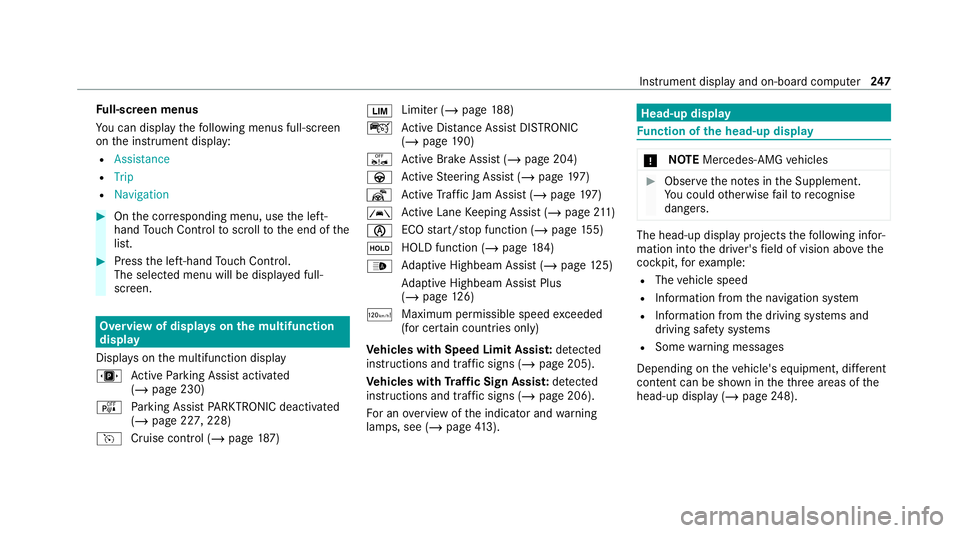
Displa yson the multifunction display
u Active Parking Assist activated
(/ page 230)
é Parking Assist PARKTRONIC deacti vated
( / page 227, 228)
h Cruise control (/ page187) È
Limi
ter (/ page188)
ç Active Dis tance Assi stDISTRONIC
(/ page 190)
ê Active Brake Assi st (/ page 204)
à Active Steering Assist (/ page197)
¬ Active Traf fic Jam Assi st (/ page 197)
à Ac
tive Lane Keeping Assist (/ page211)
è ECO
start/ stop function (/ page155)
ë HOLD fu
nction (/ page 184)
_ Ad
aptive Highbeam Assist (/ page125)
Ad aptive Highbeam Assist Plus
(/ page 126)
ð Maximum pe rmissible speed exceeded
(for cer tain countries only)
Ve hicles with Speed Limit Assis t:de tected
instructions and traf fic signs (/ page 205).
Ve hicles with Traf fic Sign Assis t:de tected
instructions and traf fic signs (/ page 206).
Fo r an overview of the indicator and warning
lamps, see (/ page413). Head-u
p display Fu
nction of the head-up display *
NO
TEMercedes-AMG vehicles #
Obser vethe no tes in the Supplement.
Yo u could otherwise failto recognise
dangers. The head-up displ
ayprojects thefo llowing infor‐
mation into the driver's field of vision abo vethe
cockpit, forex ample:
R The vehicle speed
R Information from the navigation sy stem
R Information from the driving sy stems and
driving saf ety sy stems
R Some warning messages
Depending on theve hicle's equipment, dif fere nt
content can be shown in theth re e areas of the
head-up display (/ page248). In
stru ment display and on-board computer 247
Page 279 of 469
#
Select Yes.
Re leva nt identi fication da tais transmitted
automaticall y.
More information on Mercedes me: https://
www.mercedes.me
Tr ansfer red data during a Mercedes me call
When you make a service call via Mercedes me,
data is transmitted. This enables targeted advice
and a smoo thservice.
The following requ irements must be fulfilled for
th e transfer of the data:
R The ignition is switched on.
R The requ ired data transfer tech nology is sup‐
po rted bythe mobile phone network pro‐
vider.
R The quality of the mobile connection is suf fi‐
cient.
Multi-s tage trans fer depends on thefo llowing
fa ctors:
R Reason forth e initiation of the call
R The available mobile phone transmission
te ch nology. R
The acti vated Mercedes me connect serv‐
ices.
R The service selected in thevo ice control sys‐
te m.
% A prom ptfor consent tothe data transmis‐
sion only occurs if the cor responding
Mercedes me connect service is not activa‐
te d.
Data transfer if Mercedes me connect serv‐
ices are not activated
If no Mercedes me connect services are activa‐
te d and the data pr otection prom pthas been
confirmed thefo llowing data is transmitted:
R Vehicle identification number
R Time of the call
R Reason forth e initiation of the call
R Confirmation of the data pr otection prom pt
R Country indicator of theve hicle
R Set language forth e multimedia sy stem
R Telephone number of the communication
platform ins talled in theve hicle If a call is made
for a service appointment via
th e service reminder, thefo llowing data is also
transmitte d:
R Cur rent milea geand main tenance da ta
If a call is made af ter auto matic accident or
breakdown de tection using the multimedia sys‐
te m, thefo llowing data is also transmitted:
R Cur rent milea geand main tenance da ta
R Cur rent vehicle location
If Ac cident and Breakdown Management is
called via thevo ice control sy stem and no
service has been activated, but the data pr otec‐
tion query has been confi rmed, thefo llowing
data can also be called up from theve hicle by
th e Mercedes-Benz Cus tomer Centre:
R Curr entvehicle location
If th e data pr otection prom pthas been rejected,
th efo llowing data is transmitte dto enable targe‐
te d advice and an ef ficient service:
R Reason forth e initiation of the call
R Rejection of the data pr otection prom pt
R Country indicator of theve hicle 276
MBUX multimedia sy stem
Page 283 of 469
Apps
for Smartphone Integration
R Mercedes-Benz Link (implementation of the
function using the Mercedes-Benz Link con‐
trol box)
R Apple CarPlay ®
R Android Auto
Yo u can start Smartphone In tegr ation using the
Mercedes me & Apps menu.
Yo u can end Smartphone In tegration bydiscon‐
necting the connecting cable between the
mobile phone and multimedia sy stem.
% Mercedes-Benz recommends disconnecting
th e connecting cable only when theve hicle
is stationar y.
Overview of transfer redve hicle data
When using Smartphone Integration, cer tain
ve hicle data is transfer redto the mobile phone.
This enables youto getth e best out of selected
mobile phone services. Vehicle data is not
directly accessible.
The following sy stem information is transmit ted:
R Software release of the multimedia sy stem R
System ID (anonymised)
The transfer of this data is used toalter how
con tent is displ ayed tocor respond tothe driving
situation.
The following position data is transmitte d:
R Coordinates
R Speed
R Compass direction
R Acceleration di rection
This da tais used bythe mobile phone to
impr ovethe accuracy of the navigation (e.g. for
continuation in a tunnel). Mercedes-Benz eme
rgency call sy stem Information on
the Mercedes-Benz emer‐
ge ncy call sy stem The Mercedes-Benz emer
gency call sy stem only
functions in areas where mobile phone co verage
is available from there leva nt contract pa rtner.
Insu fficient network co verage from there leva nt contract pa
rtner may result in an emergency call
not being transmitted.
The ignition must be switched on before an auto‐
matic emergency call can be made.
% The Mercedes-Benz emer gency call sy stem
is activated at thefa ctor y.Using the
Mercedes-Benz emer gency call sy stem is
free of charge. Overview of
the Mercedes-Benz emer gency
call sy stem The Mercedes-Benz emer
gency call sy stem can
help todecisively reduce the time between an
accident and the ar riva l of emer gency services
at the site of the accident. It helps locate an
accident site in places that are dif ficult to
access.
The emer gency call can be made au tomatical ly
( / page 281) or manually (/ page 282). Only
make emer gency calls if you or others are in
need of rescue. Do not make an emer gency call
in theeve nt of a breakdown or a similar situa‐
tion. 280
MBUX multimedia sy stem
Page 284 of 469
Yo
u can find more information on there gional
av ailability of eCall at: https://www.mercedes-
benz-mobile.com/ext ra/ecall/
Messages on the displ ay
The following messages appear in the display:
R SOS NOT READY :th e ignition is not on or
th ere is a malfunction with the emer gency
call sy stem . This does not necessarily indi‐
cate comple tefailure of the emer gency call
sy stem. Emer gency calls call still be trans‐
mit ted.
The display only refers to theve hicle and
does not take account of theav ailability of
mobile phone networ ksand the Mercedes-
Benz emer gency call centre.
The functional readiness of the emer gency
call sy stem on theve hicle can be seen when
th eSOS NOT READY display disappears once
th e ignition is switched on.
R G: The icon appears in the display during
an active emer gency call.
% Ifth ere is a malfunction in the Mercedes-
Benz emer gency call sy stem (e.g. a fault with th
e speaker, microphone, airbag, SOS but‐
to n), a cor responding message appears in
th e multifunction display of the instrument
clus ter. Tr
iggering an automatic Mercedes‑Benz
emer gency call Re
quirements:
R The ignition is switched on.
R The star ter battery is suf ficiently charge d.
The Mercedes‑Benz emer gency call sy stem trig‐
ge rs an emer gency call au tomatical lyin thefo l‐
lowing cases:
R After activation of there stra int sy stems such
as airbags or seat belt tensioners af ter an
accident
The emergency call has been made:
R Avo ice connection is made tothe
Mercedes‑Benz emer gency call centre.
R A messa gewith accident data is transmitted
to the Mercedes‑Benz emer gency call centre. The Mercedes‑Benz emergency call centre
can transmit
theve hicle position data toone
of the public emer gency services call cen‐
tres.
R Under cer tain circums tances da tais also
transmitte d inthevo ice channel tothe
Mercedes‑Benz emer gency call centre.
This allo wsmeasu resfo rre scue, reco very or
to wing toa Mercedes‑Benz Service Cent reto
be initiated quickl y.
The SOS button in theove rhead control panel
fl ashes until the emer gency call is finished.
It is not possible toimmediately end an auto‐
matic emer gency call.
If th e Mercedes‑Benz emer gency call sy stem
cann otconnect tothe Mercedes‑Benz emer‐
ge ncy call centre, the emer gency call is au tomat‐
ically sent tothe public emer gency services call
centre.
If no connection can be made tothe public
emer gency services, a cor responding message
appears inthe displa y. MBUX multimedia sy
stem 281
Page 285 of 469
#
Dial the emer gency number 11 2onyour
mobile phone.
If an eme rgency call has been initiated:
R Remain in theve hicle if thero ad and traf fic
conditions permit youto do so until a voice
connection is es tablished with the emer‐
ge ncy call centre operator.
R Based on the call, the operator decides
whe ther it is necessary tocall rescue teams
and/or the police tothe accident site.
R If no vehicle occupant answers, an ambu‐
lance is sent totheve hicle immediately. Tr
iggering a manual Mercedes-Benz emer‐
ge ncy call #
Touse the SOS but ton in theov erhead
control panel: press and holdthe SOS but‐
to nfo r at least one second (/ page273). #
Touse voice control: usethe LINGUA‐
TRONIC voice commands . The emer
gency call has been made:
R Avo ice connection is made tothe Mercedes-
Benz emer gency call centre.
R A messa gewith accident data is transmit ted
to the Mercedes-Benz emer gency call centre.
The Mercedes-Benz eme rgency call cent re
can transmit theve hicle position data toone
of the public emer gency services call cen‐
tres.
R Under cer tain circums tances da tais also
transmitte d inthevo ice channel tothe
Mercedes-Benz emer gency call centre.
This allo wsmeasu resfo rre scue, reco very or
to wing toa Mercedes-Benz Service Cent reto
be initiated quickl y.
R Remain in theve hicle if thero ad and traf fic
conditions permit youto do so until a voice
connection is es tablished with the emer‐
ge ncy call centre operator.
R Based on the call, the operator decides
whe ther it is necessary tocall rescue teams
and/or the police tothe accident site. If
th e Mercedes-Benz emer gency call sy stem
cann otconnect tothe Mercedes-Benz emer‐
ge ncy call centre, the emer gency call is au tomat‐
ical lysent tothe public emer gency services call
centre.
If no connection can be made tothe public
emer gency services, a cor responding message
appears inthe media displa y. #
Dial the emer gency number 11 2onyour
mobile phone.
Ending an unin tentionally triggered manual
Mercedes-Benz emer gency call #
On the multifunction steering wheel:
select ~. Data transfer of
the Mercedes-Benz emer‐
ge ncy call sy stem In
theeve nt of an au tomatic or manual emer‐
ge ncy call thefo llowing data is transmitte d,for
ex ample:
R Vehicle's GPS position data
R GPS position data on thero ute
(a few hund red metres before the incident) 282
MBUX multimedia sy stem