ignition MERCEDES-BENZ CLS COUPE 2020 Repair Manual
[x] Cancel search | Manufacturer: MERCEDES-BENZ, Model Year: 2020, Model line: CLS COUPE, Model: MERCEDES-BENZ CLS COUPE 2020Pages: 469, PDF Size: 8.47 MB
Page 385 of 469
Display messages
Possible causes/consequences and M
MSolutions #
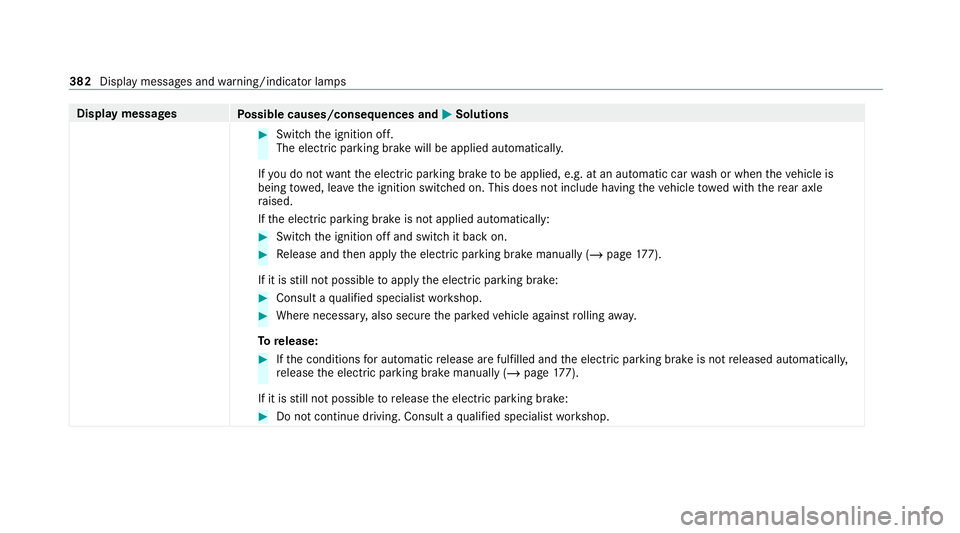
Switch the ignition off.
The electric parking brake will be applied automaticall y.
If yo u do not wantthe electric parking brake tobe applied, e.g. at an automatic car wash or when theve hicle is
being towe d, lea vethe ignition switched on. This does not include having theve hicle towe d with there ar axle
ra ised.
If th e electric parking brake is not applied automatically: #
Switch the ignition off and switch it back on. #
Release and then apply the electric parking brake manually (/ page177).
If it is still not possible toapply the electric parking brake: #
Consult a qualified specialist workshop. #
Where necessar y,also secure the par kedve hicle against rolling away.
To release: #
Ifth e conditions for auto matic release are fulfilled and the electric parking brake is not released automaticall y,
re lease the electric parking brake manually (/ page177).
If it is still not possible torelease the electric parking brake: #
Do not continue driving. Consult a qualified specialist workshop. 382
Display messages and warning/indicator lamps
Page 386 of 469
Display messages
Possible causes/consequences and M
MSolutions
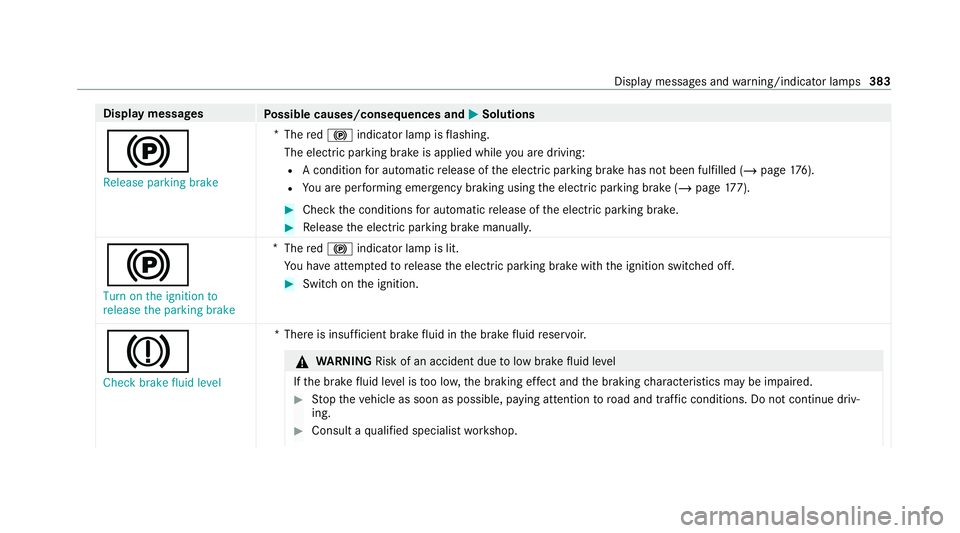
! Release parking brake *
The red! indicator lamp is flashing.
The electric parking brake is applied while you are driving:
R A condition for auto matic release of the electric parking brake has not been fulfilled (/ page176).
R You are per form ing emer gency braking using the electric parking brake (/ page177). #
Chec kth e conditions for auto matic release of the electric parking brake. #
Release the electric parking brake manually.
!
Turn on the ignition to
release the parking brake *
The red! indicator lamp is lit.
Yo u ha veattem ptedto release the electric parking brake with the ignition switched off. #
Switch on the ignition.
J Check brake fluid level *T
here is insuf ficient brake fluid in the brake fluid reser voir. &
WARNING Risk of an accident due tolow brake fluid le vel
If th e brake fluid le vel is too lo w,the braking ef fect and the braking characteristics may be impaired. #
Stop theve hicle as soon as possible, paying attention toroad and traf fic conditions. Do not continue driv‐
ing. #
Consult a qualified specialist workshop. Display messages and
warning/indicator lamps 383
Page 391 of 469
Display messages
Possible causes/consequences and M
MSolutions
ð Maximum speed exceeded *Y
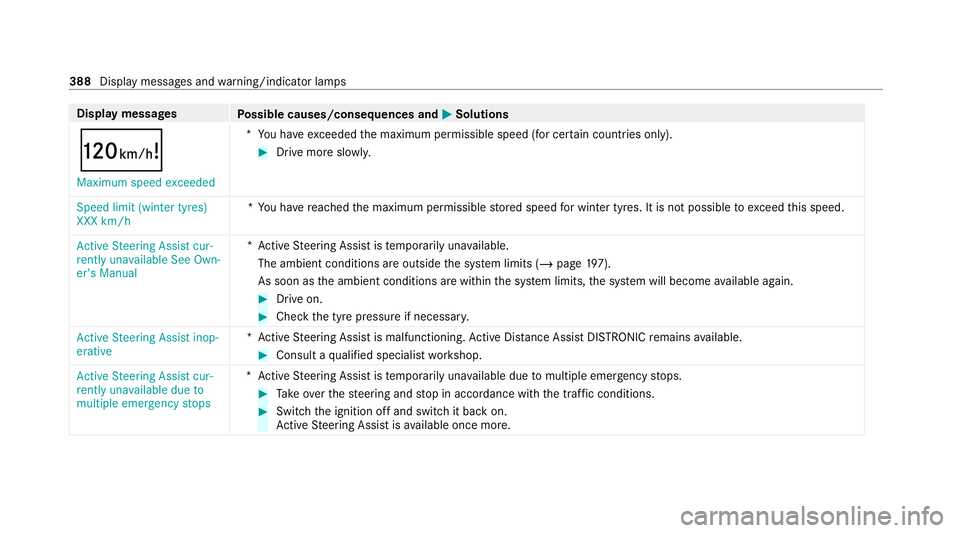
ou ha veexceeded the maximum permissible speed (for cer tain countries only). #
Drive more slowl y.
Speed limit (winter tyres)
XXX km/h *Y
ou ha vereached the maximum permissible stored speed for winter tyres. It is not possible toexceed this speed.
Active Steering Assist cur-
rently unavailable See Own-
er's Manual *A
ctive Steering Assist is temp orarily una vailable.
The ambient conditions are outside the sy stem limits (/ page197).
As soon as the ambient conditions are within the sy stem limits, the sy stem will become available again. #
Drive on. #
Check the tyre pressure if necessar y.
Active Steering Assist inop-
erative *A
ctive Steering Assist is malfunctioning. Active Dis tance Assi stDISTRONIC remains available. #
Consult a qualified specialist workshop.
Active Steering Assist cur-
rently unavailable due to
multiple emergency stops *A
ctive Steering Assist is temp orarily una vailable due tomultiple emergency stops. #
Take ove rth esteering and stop in accordance with the tra ffic conditions. #
Swit chthe ignition off and switch it back on.
Ac tive Steering Assist is available once more. 388
Display messages and warning/indicator lamps
Page 406 of 469
Display messages
Possible causes/consequences and M
MSolutions
Ý Please wait 48 V battery
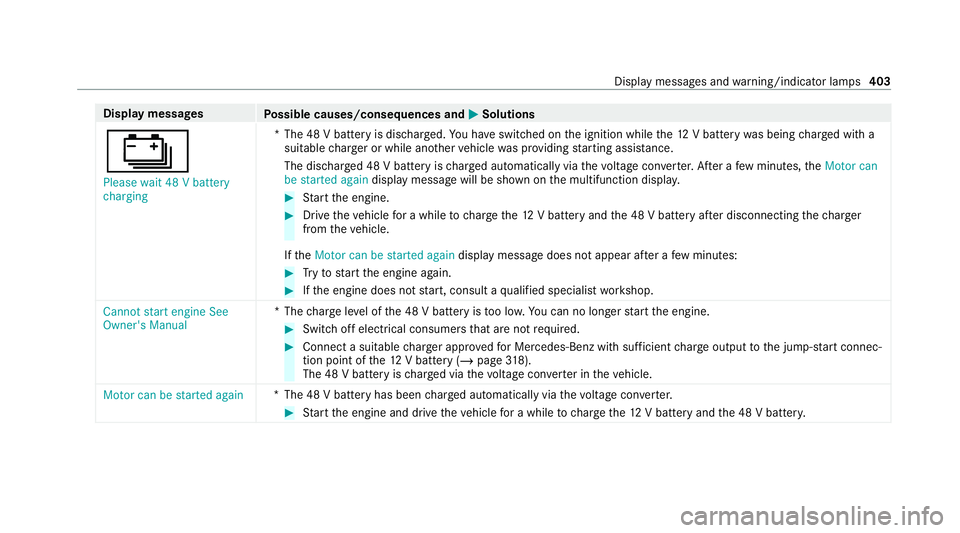
charging *T
he 48 V battery is dischar ged. You ha veswitched on the ignition while the12 V battery was being charge d with a
suitable charge r or while ano ther vehicle was pr oviding starting assis tance.
The discha rged 48 V battery is charge d automatically via thevo ltage con verter. Af ter a few minutes, theMotor can
be started again display message will be shown on the multifunction displa y. #
Start the engine. #
Drive theve hicle for a while tocharge the12 V battery and the 48 V battery af ter disconnecting thech arger
from theve hicle.
If th eMotor can be started again display message does not appear af ter a few minutes: #
Tryto start the engine again. #
Ifth e engine does not start, consult a qualified specialist workshop.
Cannot start engine See
Owner's Manual *T
hecharge leve l of the 48 V battery is too lo w.You can no lon gerst art the engine. #
Switch off electrical consumers that are not required. #
Connect a suitable charge r appro vedfo r Mercedes-Benz with suf ficient charge output tothe jump-s tart connec‐
tion point of the12 V battery (/ page318).
The 48 V bat tery isch arge d via thevo ltage con verter in theve hicle.
Motor can be started again *T
he 48 V battery has been charge d automatically via thevo ltage con verter. #
Start the engine and drive theve hicle for a while tocharge the12 V battery and the 48 V batter y. Displ
aymessa ges and warning/indicator lamps 403
Page 412 of 469
Display messages
Possible causes/consequences and M
MSolutions
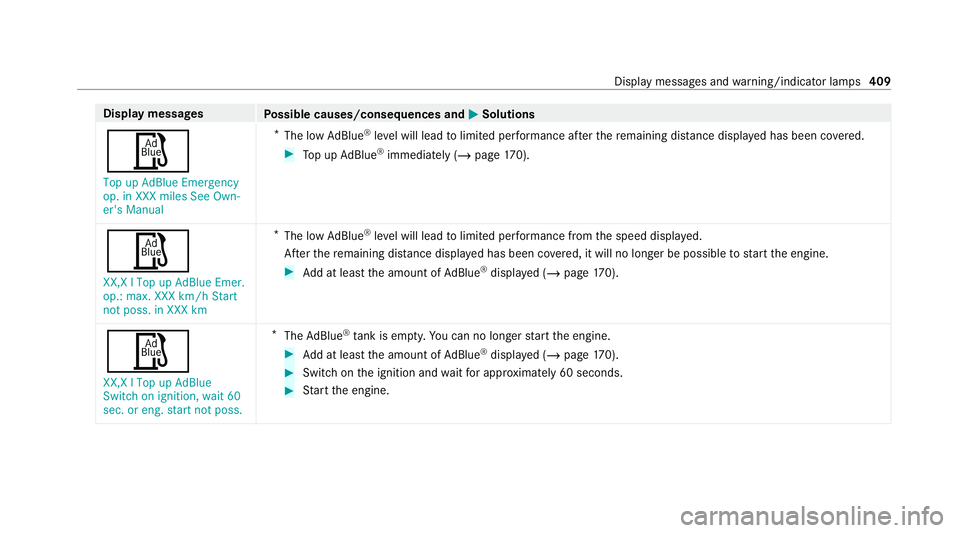
Ø Top up AdBlue Emergency
op. in XXX miles See Own-
er's Manual *
The low AdBlue ®
leve l will lead tolimited per form ance af terth ere maining dis tance displ ayed has been co vered. #
Top up AdBlue ®
immediately (/ page 170).
Ø XX,X l Top up AdBlue Emer.
op.: max. XXX km/h Start
not poss. in XXX km *
The low AdBlue ®
leve l will lead tolimited per form ance from the speed displa yed.
Af terth ere maining dis tance displ ayed has been co vered, it will no longer be possible tostart the engine. #
Add at least the amount of AdBlue ®
displ ayed (/ page170).
Ø
XX,X l Top up AdBlue
Switch on ignition, wait 60
sec. or eng. start not poss. *
The AdBlue ®
tank is em pty. Yo u can no lon gerst art the engine. #
Add at least the amount of AdBlue ®
displ ayed (/ page170). #
Switch on the ignition and waitfor appro ximately 60 seconds. #
Start the engine. Display messages and
warning/indicator lamps 409
Page 416 of 469
Display messages
Possible causes/consequences and M
MSolutions
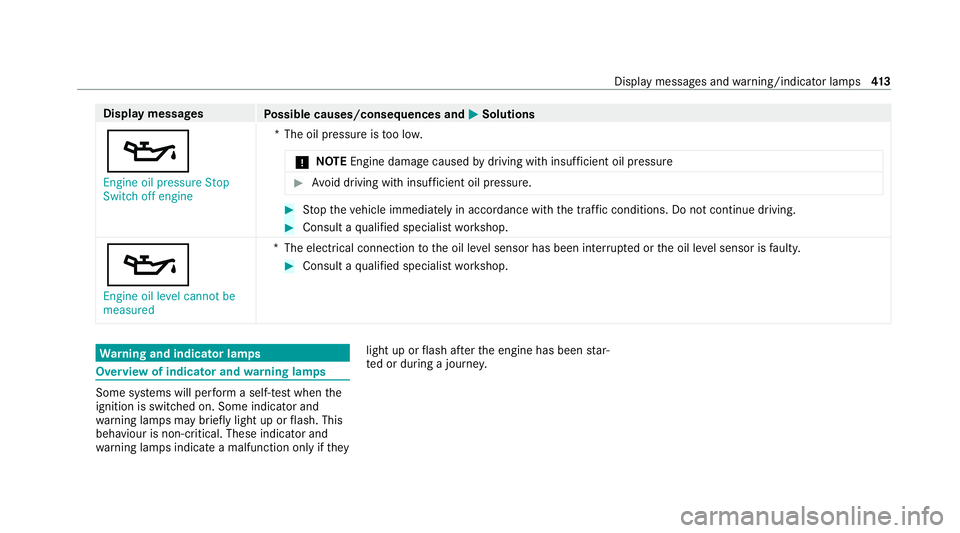
5 Engine oil pressure Stop
Switch off engine *T
he oil pressure is too lo w.
* NO
TEEngine dama gecaused bydriving with insuf ficient oil pressure #
Avoid driving with insuf ficient oil pressure. #
Stop theve hicle immediately in accordance with the traf fic conditions. Do not continue driving. #
Consult a qualified specialist workshop.
5 Engine oil level cannot be
measured *T
he electrical connection tothe oil le vel sensor has been inter rupte d or the oil le vel sensor is faulty. #
Consult a qualified specialist workshop. Wa
rning and indicator lamps Overview of indicator and
warning lamps Some sy
stems will per form a self-test when the
ignition is switched on. Some indicator and
wa rning lamps may briefly light up or flash. This
behaviour is non-critical. These indicator and
wa rning lamps indicate a malfunction only if they light up or
flash af terth e engine has been star‐
te d or during a journe y. Displ
aymessa ges and warning/indicator lamps 413
Page 441 of 469
Á
Key not de tected (white displ ay
messa ge).............................................3 64
: Left dipped beam (e xamp le) ...... .366
6 Left wind owbag malfunction
Consult workshop (e xample)................ 361
¢ Lowe ring .................................... 395
: Malfunction See Owner's Man‐
ual ....................................................... 366
ð Maximum speed exceeded ......... 388
Ø ................................................... 409
ç Off..............................................3 87
ë Off..............................................3 84
ï Operation only possible in
transmission position P .......................370
! Parking brake See Owner's
Manual ................................................ 380
É Please reduce speed .................. 395
Ý Please wait 48 V battery charg‐
ing ...................................................... .403 _
Rear left seat backrest not
loc ked (Example) .................................3 74
h Rectify tyre pressure .................. 405
Ø Refill Ad Blue See Owne r’s
Manual ................................................ 408
! Release parking brake ................ 383
¸ Replace air cleaner .....................377
Á Replace key ................................ 364
8 Reser vefuel le vel...................... .376
6 Restra int sys. malfunction Con‐
sult workshop ...................................... 361
# See Owner's Manual .................. 401
Ù Steering malfunction Incre ased
ph ysical ef fort See Owner's Manual ....372
Ù Steering malfunction Stop
immediately See Owner's Manual .......372
# Stop vehicle Lea veengine run‐
ning ..................................................... 402
# Stop vehicle See Owner's Man‐
ual .......................................................4 02É
Stop vehicle Vehicle too low .......3 94
ç suspended ................................. 386
: Switch off lights .........................3 67
: Switch on headlamps ................. 367
Ø Top up AdBlue Emergency op.
in XXX miles See Owner's Manual ....... 409
+ Top up coolant See Owner ’s
Manual ................................................ 375
¥ Top up washer fluid .................... .374
ï Trailer coupling extending… ........370
! Turn on the ignition torelease
th e parking brake ................................ 383
d Vehicle is operational Switch
off ignition before exiting .................... 370
É Vehicle rising Please wait.......... .395
É Vehicle rising .............................. 395
h Warning tyre defect .................... 406
h Wheel sensor(s) missing ............ 404438
Index
Page 442 of 469
Ø
XX,X l Top up AdBlue Switch on
ignition, wait 60 sec. or eng. start
not poss. ............................................ .409
Ac tive Blind Spot Assi stcur rently
una vailable See Owner's Manual .........391
Ac tive Blind Spot Assi stinope rative .... 391
Ac tive Blind Spot Assi stnot available
when towing a trailer See Owner's
Manual ................................................ 391
Ac tive bonnet malfunction See Own‐
er's Manual .......................................... 373
Ac tive Brake Assi stFunctions cur‐
re ntly limited See Owner's Manual ...... 399
Ac tive Brake Assi stFunctions limited
See Owner's Manual ........................... 400
Ac tive Dis tance Assi stavailable
again .................................................. .387
Ac tive Dis tance Assi stcur rently
una vailable See Owner's Manual .........387
Ac tive Dis tance Assi stinope rative ....... 387 Ac
tive Lane Keeping Assist cur rently
una vailable See Owner's Manual .........391
Ac tive Lane Keeping Assist inopera‐
tive ...................................................... 392
Ac tive Parking Assist and
PA RKTRONIC inoperati veSee Own‐
er's Manual ......................................... 396
Ac tive Steering Assist cur rently
una vailable due tomultiple emer‐
ge ncy stops ......................................... 388
Ac tive Steering Assist cur rently
una vailable See Owner's Manual .........388
Ac tive Steering Assist inoperative .......388
Ac tive Stop-and-Go Assist cur rently
una vailable see Owner's Manual .........389
Ac tive Stop-and-Go Assist inopera‐
tive See Owner's Manual ..................... 389
Ad aptive Highbeam Assist cur rently
una vailable See Owner's Manual .........368 Ad
aptive Highbeam Assist inopera‐
tive ...................................................... 368
Ad aptive Highbeam Assist Plus cur‐
re ntly una vailable See Owner's Man‐
ual ...................................................... .368
Ad aptive Highbeam Assist Plus inop‐
erative ................................................ .368
Apply brake todeselect Park (P)
position ...............................................3 77
App lybrake toselect D or R ................378
App lybrake toselect R ........................ 378
Au xilia rybattery malfunction ...............379
Beginning emer gency stop .................. 389
Blind Spot Assist cur rently una vaila‐
ble See Owner's Manual ...................... 390
Blind Spot Assist inope rative ............... 390
Blind Spot Assi stnot available when
to wing a trailer See Owner's Manual ...3 90
Cannot start engine See Owner's
Manual ................................................ 403 Index
439
Page 448 of 469
Help call
see Mercedes-Benz emergency call sy stem
High beam Activating/deactivating ...................... .122
Ad aptive Highbeam Assist .................. .125
Ad aptive Highbeam Assist Plus .......... .126
High-pressure cleaner (care) ................. 300
Hill Start Assist ....................................... 185
HOLD function ......................................... 184
Fu nction/no tes ................................... 184
Switching on/off ................................. 184
Home screen (media display) Overview .............................................. 251
Hooking the luggage net .........................113 I
i-Size child seat securing sy stem
Fitting .................................................... 59
i‑Size child seat securing sy stem
Seats suitable for attaching ................... 59
Identification plate Engine ................................................. 345
vehicle .................................................3 45Ignition
Switching on (S tart/S top button) ........ 14 8
Ignition key
see Key
Immobiliser ................................................ 90
Implied warranty
Ve hicle ................................................... 31
In-Car Of fice ............................................ .277
Fe atures .............................................. 277
Indicator lamps see Warning/indicator lamps
Individual drive prog ram
Con figuring .......................................... 16 0
Selecting ............................................. 16 0
Inspection see AS SYST PLUS
Instrument clus ter
Fu nction/no tes ........................... 243, 24 4
Instrument display Function/no tes ................................... 24 4
Instrument clus ter ................................. 10
Wa rning/indicator lamps .................... .413 Instrument display and on-board
compu
ter
Fu nction/no tes ................................... 24 3
Intelligent Light Sy stem
Ac tive headla mps ................................ 12 3
Ad aptive Highbeam Assist .................. .125
Ad aptive Highbeam Assist Plus .......... .126
Ad versewe ather light .......................... 12 5
City lighting ........................................ .125
Cornering light ..................................... 12 3
Fo g light (extended range) ................... 124
Mo torw ay mode ................................... 124
Overview ............................................. 12 3
Switching on/off ................................. 12 5
Interior lighting ........................................ 12 9
Ad justing ............................................. 12 9
Ambient lighting .................................. 12 9
Re ading lamp ...................................... .129
Switch-off del aytime ........................... 13 0
Interior pr otection
Fu nction ................................................ 92
Priming/deactivating ............................. 92
In tern etradio
see TuneIn Index
445
Page 458 of 469
Closing ..................................................
87
Closing using theke y ............................ 85
Opening ................................................ .87
Opening with theke y ............................ .85
Problem .................................................89
Ra in-closing feature .............................. .88
Smartphone see Smartphone integration
see Telephone
Sma rtphone integ ration ......................... 279
Overview ............................................. 279
Snow chains ............................................ 327
Soc ket (12 V) ............................................ 11 5
Fr ont centre console ............................ 11 5
Soc ket (230 V) .......................................... 11 5
Re ar .................................................... .115
Software update System updates ................................... 259
Sound PRE-SAFE ®
Sound ................................. 49
Wheels and tyres ................................. 327
Sound menu Functions overview .............................. 290 Spare wheel
see Emer gency spa rewheel
Specific absor ption rate ........................... 24
Speed Limit Assist ..................................2 05
Fu nction/no tes ................................... 205
Setting .................................................2 06
Sy stem limitations ...............................2 05
Speed limit for winter tyres
Setting ................................................. 19 0
St andby mode
Ac tivating/deactivating ...................... .178
Fu nction ............................................... 178
St anding lights ........................................ 12 0
St art-off assi st
see Optimised acceleration
St art/s top button
Pa rking theve hicle .............................. 172
St arting theve hicle ............................. 14 9
Switching on the po wer supply or
ignition ................................................ 14 8
St art/s top function
see ECO start/ stop function St
arter battery
Charging (Remo teOnline) .................... 15 0
St arting assi stance
see Jump -sta rt connection
St arting the engine
see Vehicle
St arting-o ffaid
see Hill Start Assist
St ationary heater/ventilation
Displ ays (remo tecontrol) .................... 14 4
Problems (remo tecontrol) ................... 14 6
Re placing the battery (remo tecon‐
trol) ...................................................... 14 5
Setting (MBUX multimedia sy stem) ..... 14 3
Setting (remo tecontrol) ...................... 14 3
Switching on/off (control panel) ......... 14 2
ST EER CONT ROL
Fu nction/no tes ................................... 183
Ste ering wheel ........................................ .245
Ad justing (electrically) ........................ .103
Ad justing (manually) ............................ 102
Buttons ................................................ 24 5
Care .................................................... 304
Operating the memory function ..........1 06 Index
455