buttons MERCEDES-BENZ E-Class 2001 W210 User Guide
[x] Cancel search | Manufacturer: MERCEDES-BENZ, Model Year: 2001, Model line: E-Class, Model: MERCEDES-BENZ E-Class 2001 W210Pages: 421, PDF Size: 20.52 MB
Page 124 of 421
121 Multifunction steering wheel, multifunction display
Te ch n ica l
data Instruments
and controlsOperationDrivingInstrument
cluster displayPractical hints Car care Index Depending on your vehicle’s equipment, you may use
the buttons on the multifunction steering wheel to call
up, control and set the following systems in the
multifunction display:
1Trip odometer and main odometer, see page 119 and
page 124
Flexible service system (FSS), see page 147
Tire inflation pressure monitor, see page 150
Engine oil level indicator, see page 154
2Audio systems, see page 125
Radio, see page 125
CD player, see page 126
Cassette player, see page 127
3Telephone, see page 1284Navigation system, see page 133
5Distronic (DTR), see page 256
6Trip computer, see page 135
After start
After reset
Fuel tank content
7Malfunction message memory, see page 136
8Individual settings, see page 138
Press the è or ÿ button repeatedly until the
required system is displayed.
The display advances by one system each time the
button is pressed.
You may call up additional displays within some of these
categories by pressing the j or k button.
Page 173 of 421
170 Automatic climate control
Te ch n ica l
data Instruments
and controlsOperationDrivingInstrument
cluster displayPractical hints Car care Index
Defrosting
Press the P button. The display shows P.
The fan is set to a higher speed and the warm air is
directed to the defroster and windshield air outlets.
Pressing the switch again returns the system to the
previous setting.Windows fogged on the inside
Switch off the economy mode, if selected: Press
buttonS. The indicator lamp in the button will go
out.
Switch off air recirculation, if selected: Press
buttonO. The indicator lamp in the button will go
out.
Adjust left and right air outlets upwards.
Set blower to the maximum blower speed.
Increase temperature setting.
Open the side air outlets and direct them onto the side
windows.
P83.40-2009-21
Page 174 of 421
171 Automatic climate control
Te ch n ica l
data Instruments
and controlsOperationDrivingInstrument
cluster displayPractical hints Car care Index Windshield fogged on the outside
Switch on the windshield wiper.
Press on both U buttons until they click in. The
h, j and k symbols will no longer be visible.
Air recirculation
Select air recirculation:
The indicator lamp in the O button is off.
Press button O briefly. The indicator lamp in the
button illuminates.
To switch off the air recirculation:
The indicator lamp in the O button is on.
Press button O briefly. The indicator lamp in the
button will go out.
Switching on air recirculation and activating
convenience closing:
The indicator lamp in the O button is off.
Press button O for more than 2 seconds, the side
windows and the sliding / pop-up roof will be closed. The
indicator lamp in the button lights up.
Switching off air recirculation and activating
convenience opening:The indicator lamp in the O button is on.
Press button O for more than 2 seconds, the side
windows and the sliding / pop-up roof return to the
position they were in before closing.
A window or the sliding / pop-up roof opened manually
after convenience closing will no longer be returned to
the position it was in before closing when convenience
opening is selected.
The system automatically switches from air
recirculation to fresh air:
•after 30 minutes if the outside temperature is above
about 40°F(5°C),
•after 5 minutes if the outside temperature is below
about 40°F(5°C),
•after 5 minutes if economy mode S is selected.
The system switches automatically to air recirculation at
high outside temperatures. A quantity of outside air is
added after about 30 minutes.
If the windows should fog up from the inside, switch
from recirculated air back to fresh air.
Page 178 of 421
175 Automatic climate control
Te ch n ica l
data Instruments
and controlsOperationDrivingInstrument
cluster displayPractical hints Car care Index Switching the automatic climate control on and off
To s wi tch o f f:
Press button 0. The display shows “0”.
The fresh air supply to the vehicle interior is shut off.
While driving, use this setting only temporarily,
otherwise the windshield could fog up.
To s wi tch o n :
Press button 0 or P or at least one of the U
buttons so that it pops out and then click it back in. Front center console storage compartment
ventilation
The front center console compartment has its own air
outlet.
To open: Slide the lever up.
To close: Slide the lever down.
The air volume is dependent on the setting of:
•air distribution control,
•air volume control,
•air outlets in the dashboard.
The air temperature is about the same as that of the
dashboard air outlets. It cannot be regulated separately.
Note:
The compartment can get very warm due to its confined
space. When storing heat sensitive objects in the
compartment, close the air outlet while heating the
passenger compartment.
Do not allow articles to obstruct the air outlet in the
storage compartment.
Page 199 of 421
196 Interior equipment
Te ch n ica l
data Instruments
and controlsOperationDrivingInstrument
cluster displayPractical hints Car care Index
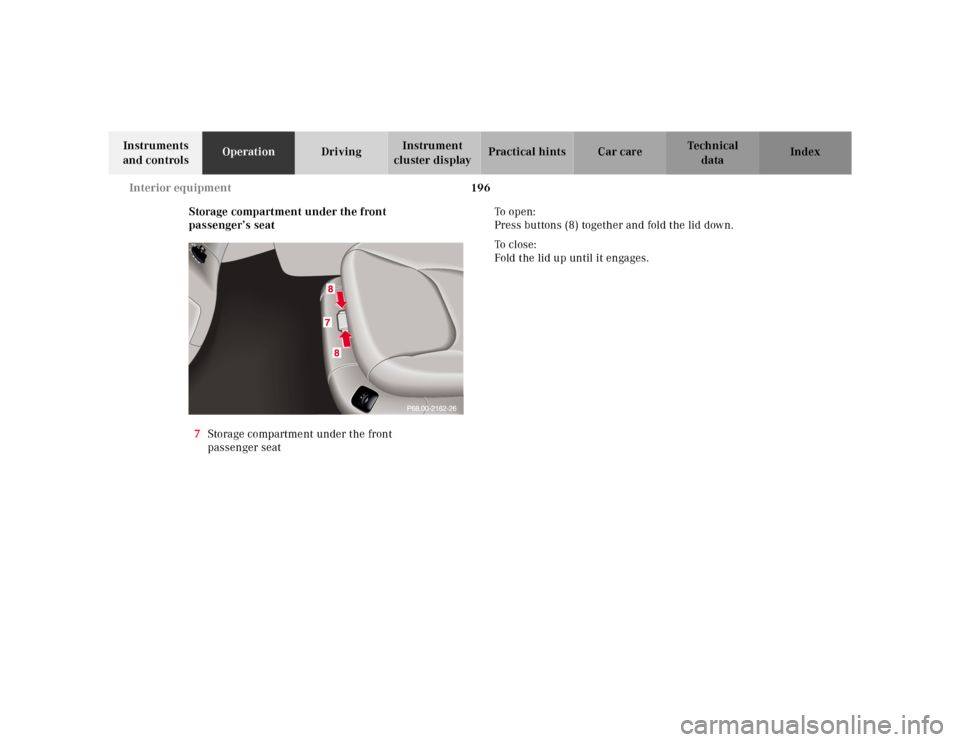
Storage compartment under the front
passenger’s seat
7Storage compartment under the front
passenger seatTo o p e n :
Press buttons (8) together and fold the lid down.
To c l o s e :
Fold the lid up until it engages.
Page 210 of 421
207 Garage door opener
Te ch n ica l
data Instruments
and controlsOperationDrivingInstrument
cluster displayPractical hints Car care Index For operation in the USA only: This device complies
with Part 15, Subpart C, Section 209 of the FCC Rules.
Operation is subject to the following two conditions:
(1) This device may not cause harmful interference, and
(2) this device must accept any interference received,
including interference that may cause undesired
operation.
WARNING: Changes or modification not expressly
approved by party responsible for compliance could void
the user’s authority to operate the equipment.
Programming or reprogramming the integrated
remote control:
1. Turn electronic key in starter switch to position 1
or 2.
2. Hold the end of the hand-held transmitter of the
device you wish to train approximately 2 to 5 inches
(5 cm to 12 cm) away from the surface of the
integrated remote control located on the inside rear
view mirror, keeping the indicator lamp in view.3. Using both hands, simultaneously push the hand-
held transmitter button and the desired integrated
remote control button. Do not release the buttons
until completing step 4.
4. The indicator lamp on the integrated remote control
will flash, first slowly and then rapidly. When the
indicator lamp flashes rapidly, both buttons may be
released (the rapid flashing lamp indicates
successful programming of the new frequency
signal). To program the remaining two buttons,
follow ste ps 1 through 4.
Note:
If, after repeated attempts, you do not successfully
program the integrated remote control device to learn
the signal of the hand-held transmitter, the garage door
opener could be equipped with the “rolling code
feature”.
Page 212 of 421
209 Garage door opener
Te ch n ica l
data Instruments
and controlsOperationDrivingInstrument
cluster displayPractical hints Car care Index Operation of remote control:
1. Turn electronic key in starter switch to position 1
or 2.
2. Select and press the appropriate button to activate
the remote controlled device. The integrated remote
control transmitter continues to send the signal as
long as the button is pressed – up to 20 seconds.Erasing the remote control memory:
1. Turn electronic key in starter switch to position 1
or 2.
2. Simultaneously holding down the left and right side
buttons for approximately 20 seconds, or until the
control lamp blinks rapidly, will erase the codes of
all three channels.
Page 223 of 421
220 Tele Aid
Te ch n ica l
data Instruments
and controlsOperationDrivingInstrument
cluster displayPractical hints Car care Index
Notes:
The indicator lamp in the Information button¡
remains illuminated in red for approx. 10 seconds
during the system self-check after turning electronic
key in starter switch to position 2 (together with the
“SOS” button and the Roadside Assistance button•).
See system self-check on page 214 when the indicator
lamp does not light up in red or stays on longer than
approximately 10 seconds.
If the indicator lamp in the Information button¡ is
illuminated continuously and there was no voice
connection to the Response Center established, then the
Tele Aid system could not initiate an Information call
(e.g. the relevant cellular phone network is not
available). The message “INFO – CALL FAILED” appears
in the multifunction display.
Information calls can be terminated using the
ìbutton on the multifunction steering wheel.Important!
If the indicator lamps do not start flashing after
pressing one of the buttons or remain illuminated (in
red) at any time, the Tele Aid system has detected a fault
or the service is not currently active, and may not
initiate a call. Visit your Mercedes-Benz Center and
have the system checked or contact the Response Center
at 1-800-756-9018 (in the USA) or 1-888-923-8367 (in
Canada) as soon as possible.
Upgrade Signals
Tele Aid system processes calls using the following
priority.
•Automatic emergency – First priority
•Manual emergency – Second priority
•Roadside assistance – Third priority
•Information – Fourth priority
Should a higher priority call be initiated while you are
connected, an upgrade (alternating) tone will be heard,
and the appropriate indicator lamp will flash. If certain
information such as vehicle identification number or
client information is not available, the operator may
need to retransmit.
Page 331 of 421
328 First aid kit
Te ch n ica l
data Instruments
and controlsOperation DrivingInstrument
cluster displayPractical hintsCar care Index
First aid kit
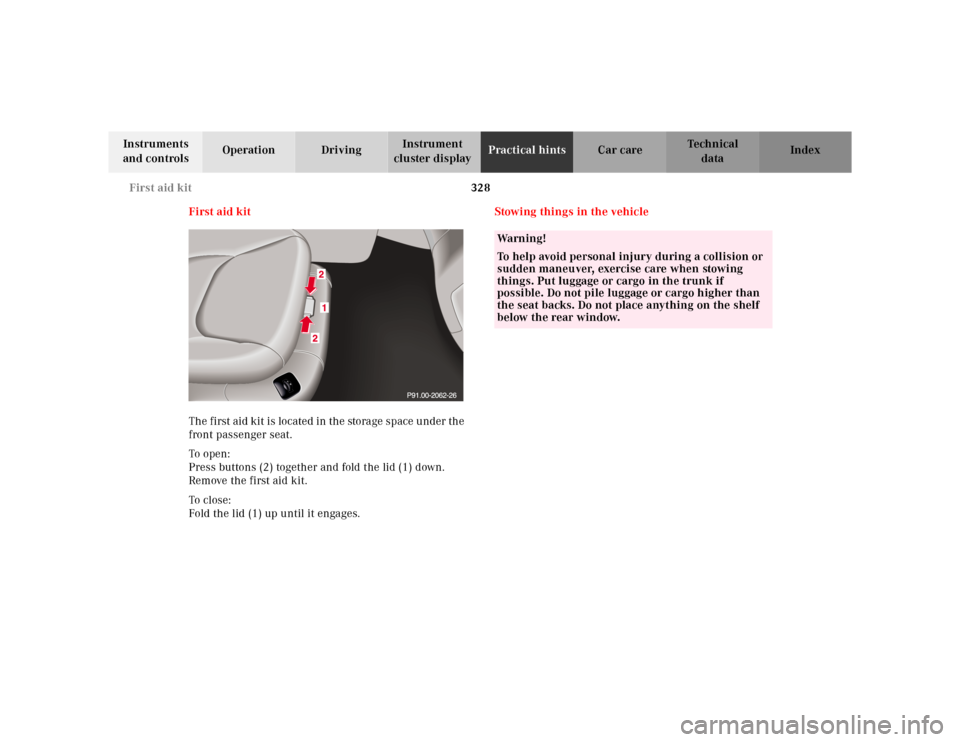
The first aid kit is located in the storage space under the
front passenger seat.
To o pen :
Press buttons (2) together and fold the lid (1) down.
Remove the first aid kit.
To cl os e:
Fold the lid (1) up until it engages.Stowing things in the vehicle
Wa r n i n g !
To help avoid personal injury during a collision or
sudden maneuver, exercise care when stowing
things. Put luggage or cargo in the trunk if
possible. Do not pile luggage or cargo higher than
the seat backs. Do not place anything on the shelf
below the rear window.
Page 366 of 421
363 Electronic main key
Te ch n ica l
data Instruments
and controlsOperation DrivingInstrument
cluster displayPractical hintsCar care Index Changing batteries in the electronic main key
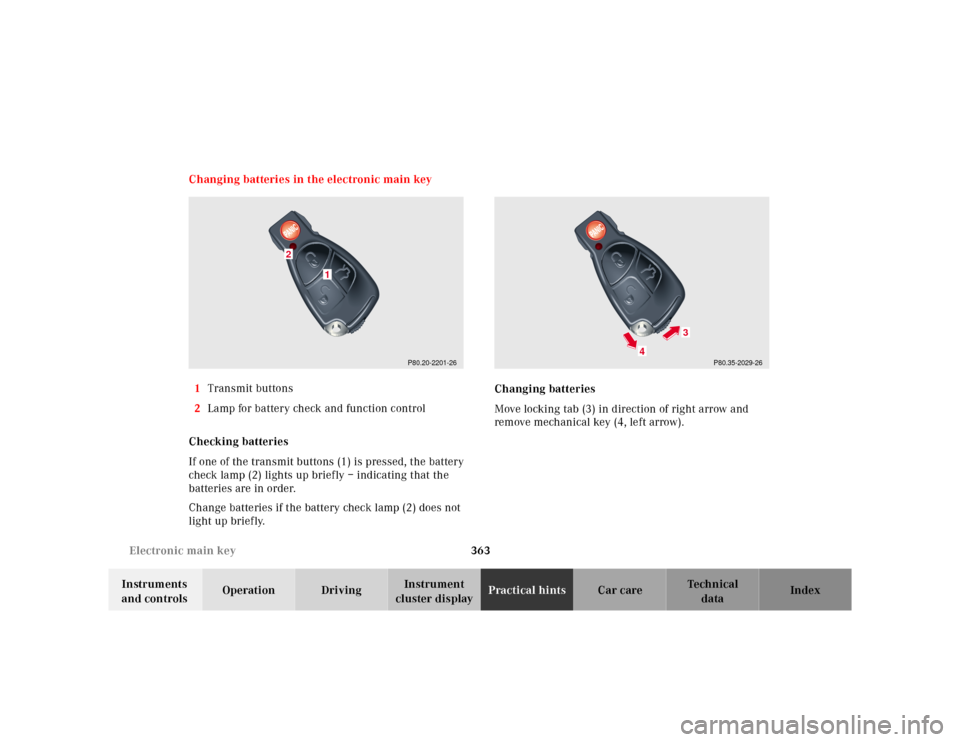
1Transmit buttons
2Lamp for battery check and function control
Checking batteries
If one of the transmit buttons (1) is pressed, the battery
check lamp (2) lights up briefly – indicating that the
batteries are in order.
Change batteries if the battery check lamp (2) does not
light up briefly.Changing batteries
Move locking tab (3) in direction of right arrow and
remove mechanical key (4, left arrow).
P80.20-2201-26
1
2
P80.35-2029-26
4
3