Interior MERCEDES-BENZ E-Class 2001 W210 Owner's Manual
[x] Cancel search | Manufacturer: MERCEDES-BENZ, Model Year: 2001, Model line: E-Class, Model: MERCEDES-BENZ E-Class 2001 W210Pages: 421, PDF Size: 20.52 MB
Page 5 of 421

2 Contents
Infant and child restraint
systems ....................................... 102
Steering wheel adjustment .......... 105
Rear view mirrors .......................... 106
Memory function ............................111
Instrument cluster ..........................114
Multifunction steering wheel,
multifunction display ............... 120
Trip and main odometer,
FSS, tire inflation pressure
monitor and engine oil level
indicator ..................................... 124
Audio systems ............................. 125
Radio ............................................ 125
CD player ..................................... 126
Cassette player ........................... 127
Telephone ........................................ 128
Telephone book .......................... 128
Redialing ..................................... 130
Incoming call .............................. 132
Navigation system .......................... 133
Distronic (DTR) ............................... 134
Trip computer ................................. 135Malfunction / warning
message memory ......................136
Individual settings .........................138
Setting the audio volume ............. 146
Flexible service system
(FSS) ........................................... 147
Tire inflation
pressure monitor .......................150
Engine oil level indicator ..............154
Engine oil consumption ................155
Exterior lamp switch ......................156
Night security illumination ..........158
Headlamp cleaning system ...........159
Combination switch .......................160
Hazard warning flasher
switch ..........................................163
Automatic climate control .............164
Display and controls ..................166
Basic setting ................................168
Special Settings ..........................169
Activated charcoal filter ........... 172
Economy mode ........................... 173
Residual engine heat
utilization .....................................174Switching the automatic
climate control on and off ......... 175
Front center console storage
compartment ventilation .......... 175
Front center console storage
compartment ventilation .......... 175
Rear passenger compartment
climate control .......................... 177
Power windows ............................... 181
Sliding/pop-up roof ....................... 184
Interior lighting ............................. 187
Rear window sunshade ................. 190
Rear door window sunshade ........ 191
Sun visors ....................................... 191
Vanity mirrors ................................ 192
Interior ............................................ 193
Storage compartments and
armrests ..................................... 193
Glove box ..................................... 194
Cup holder ...................................... 199
Ashtrays .......................................... 201
Lighter .............................................203
Parcel net in front
passenger footwell ....................204
Page 24 of 421
21 Instruments and controls
Te ch n ica l
data Instruments
and controlsOperation DrivingInstrument
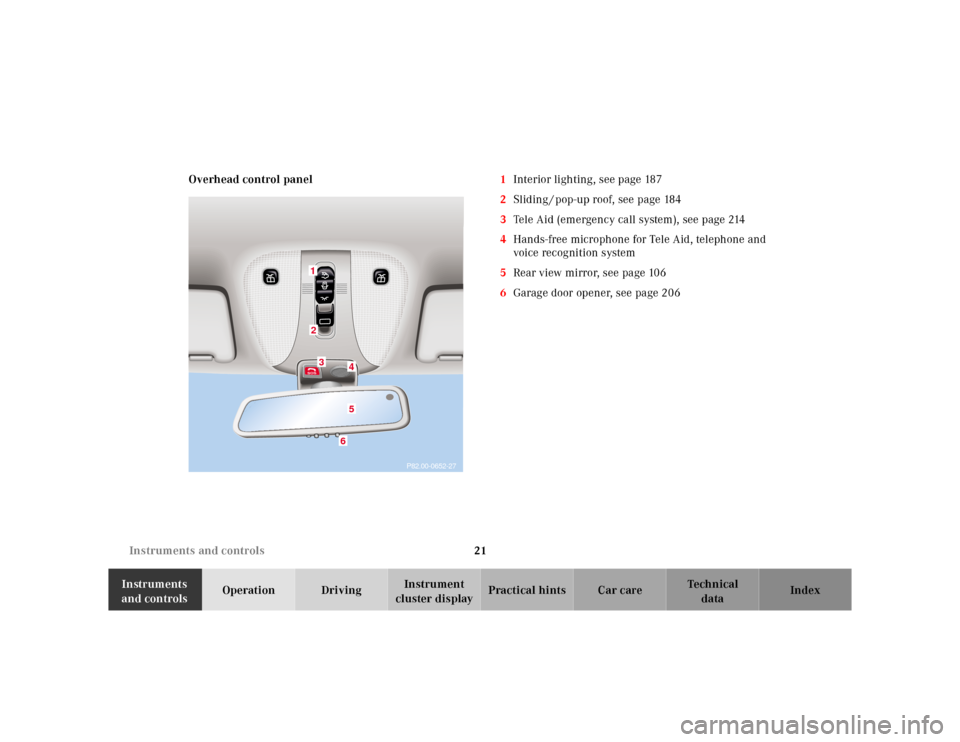
cluster displayPractical hints Car care Index Overhead control panel1Interior lighting, see page 187
2Sliding / pop-up roof, see page 184
3Tele Aid (emergency call system), see page 214
4Hands-free microphone for Tele Aid, telephone and
voice recognition system
5Rear view mirror, see page 106
6Garage door opener, see page 206
P82.00-0652-27
123
456
Page 30 of 421
27 Contents - Operation
Te ch n ica l
data Instruments
and controlsOperationDrivingInstrument
cluster displayPractical hints Car care Index Radio ............................................ 125
CD player ..................................... 126
Cassette player ........................... 127
Telephone ........................................ 128
Telephone book .......................... 128
Redialing ..................................... 130
Incoming call .............................. 132
Navigation system .......................... 133
Distronic (DTR) ............................... 134
Trip computer ................................. 135
Malfunction / warning
message memory ...................... 136
Individual settings ......................... 138
Setting the audio volume .............. 146
Flexible service system
(FSS) ............................................ 147
Tire inflation
pressure monitor ...................... 150
Engine oil level indicator .............. 154
Engine oil consumption ................ 155
Exterior lamp switch ..................... 156Night security illumination ..........158
Headlamp cleaning system ...........159
Combination switch .......................160
Hazard warning flasher
switch ..........................................163
Automatic climate control .............164
Display and controls ..................166
Basic setting ................................168
Special Settings ..........................169
Activated charcoal filter ........... 172
Economy mode ........................... 173
Residual engine heat
utilization .....................................174
Switching the automatic
climate control on and off ........ 175
Front center console storage
compartment ventilation .......... 175
Front center console storage
compartment ventilation .......... 175
Rear passenger compartment
climate control .......................... 177Power windows ............................... 181
Sliding/pop-up roof ....................... 184
Interior lighting ............................. 187
Rear window sunshade ................. 190
Rear door window sunshade ........ 191
Sun visors ....................................... 191
Vanity mirrors ................................ 192
Interior ............................................ 193
Storage compartments and
armrests ..................................... 193
Glove box ..................................... 194
Cup holder ...................................... 199
Ashtrays .......................................... 201
Lighter .............................................203
Parcel net in front
passenger footwell ....................204
Parcel net in trunk ........................204
Telephone, general ........................205
Garage door opener .......................206
Infrared reflecting
windshield ................................. 210
Page 71 of 421
68 Seats
Te ch n ica l
data Instruments
and controlsOperationDrivingInstrument
cluster displayPractical hints Car care Index
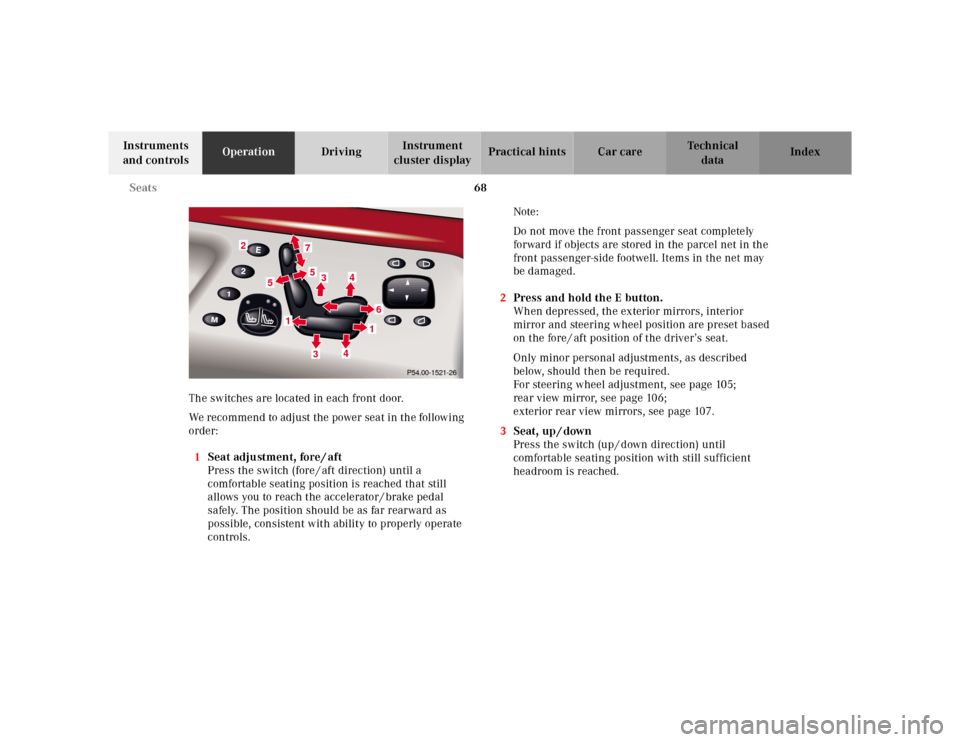
The switches are located in each front door.
We recommend to adjust the power seat in the following
order:
1Seat adjustment, fore / aft
Press the switch (fore / aft direction) until a
comfortable seating position is reached that still
allows you to reach the accelerator / brake pedal
safely. The position should be as far rearward as
possible, consistent with ability to properly operate
controls.Note:
Do not move the front passenger seat completely
forward if objects are stored in the parcel net in the
front passenger-side footwell. Items in the net may
be damaged.
2Press and hold the E button.
When depressed, the exterior mirrors, interior
mirror and steering wheel position are preset based
on the fore / aft position of the driver’s seat.
Only minor personal adjustments, as described
below, should then be required.
For steering wheel adjustment, see page 105;
rear view mirror, see page 106;
exterior rear view mirrors, see page 107.
3Seat, up / down
Press the switch (up / down direction) until
comfortable seating position with still sufficient
headroom is reached.
2
7533
4
61
4
1
5
P54.00-1521-26
Page 89 of 421
86 Restraint systems
Te ch n ica l
data Instruments
and controlsOperationDrivingInstrument
cluster displayPractical hints Car care Index
Wa r n i n g !
Failure to wear and properly fasten and position
your seat belt greatly increases your risk of
injuries and their likely severity in an accident.
You and your passengers should always wear seat
belts.If you are ever in an accident, your injuries can be
considerably more severe without your seat belt
properly buckled. Without your seat belt buckled,
you are much more likely to hit the interior of the
vehicle or be ejected from it. You can be seriously
injured or killed.In the same crash, the possibility of injury or death
is lessened if you are wearing your seat belt.
Wa r n i n g !
Never let more people ride in the vehicle than there
are seat belts available. Be sure everyone riding in
the vehicle is correctly restrained with a separate
seat belt.
Page 109 of 421
106 Rear view mirrors
Te ch n ica l
data Instruments
and controlsOperationDrivingInstrument
cluster displayPractical hints Car care Index
Rear view mirrors
Inside rear view mirror
Manually adjust the mirror.
Storing interior rear view mirror positions
The seat, exterior rear view mirror and steering wheel
positions are stored together with the interior rear view
mirror position. See page 111 for notes on the memory
function.
Rear view mirror, automatic antiglare
Antiglare mode:
With the electronic key in starter switch position 2, the
mirror reflection brightness responds to changes in
light sensitivity.
With the gear selection lever in position “R”, or with the
interior light switched on, the mirror brightness does
not respond to changes in light sensitivity.Note:
The automatic antiglare function does not react, if
incoming light is not aimed directly at sensors in the
mirror.
Wa r n i n g !
In the case of an accident liquid electrolyte may
escape the mirror housing when the mirror glass
breaks.Electrolyte has an irritating effect. Do not allow the
liquid come into contact with eyes, skin, clothing,
or respiratory system. In cases it does, immediately
flush affected area with water, and seek medical
help if necessary.
Page 110 of 421
107 Rear view mirrors
Te ch n ica l
data Instruments
and controlsOperationDrivingInstrument
cluster displayPractical hints Car care Index Exterior rear view mirrors
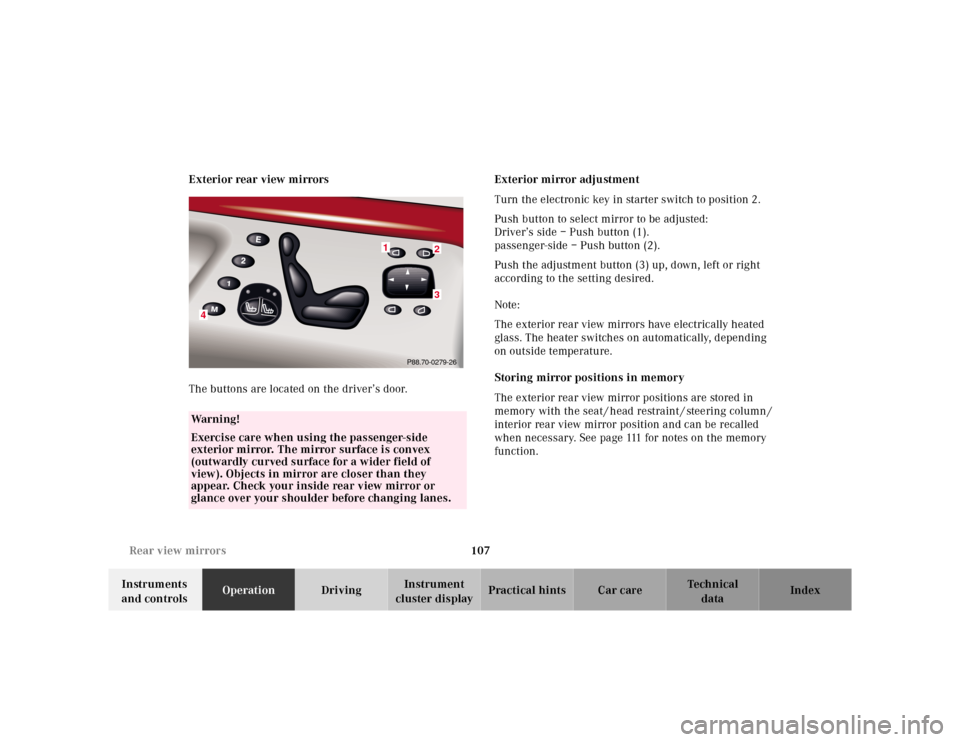
The buttons are located on the driver’s door.Exterior mirror adjustment
Turn the electronic key in starter switch to position 2.
Push button to select mirror to be adjusted:
Driver’s side – Push button (1).
passenger-side – Push button (2).
Push the adjustment button (3) up, down, left or right
according to the setting desired.
Note:
The exterior rear view mirrors have electrically heated
glass. The heater switches on automatically, depending
on outside temperature.
Storing mirror positions in memory
The exterior rear view mirror positions are stored in
memory with the seat / head restraint / steering column /
interior rear view mirror position and can be recalled
when necessary. See page 111 for notes on the memory
function.
Wa r n i n g !
Exercise care when using the passenger-side
exterior mirror. The mirror surface is convex
(outwardly curved surface for a wider field of
view). Objects in mirror are closer than they
appear. Check your inside rear view mirror or
glance over your shoulder before changing lanes.
23
4
1
P88.70-0279-26
Page 113 of 421
110 Rear view mirrors
Te ch n ica l
data Instruments
and controlsOperationDrivingInstrument
cluster displayPractical hints Car care Index
Driver’s side exterior mirror, antiglare mode
Antiglare mode:
With the electronic key in starter switch position 2, the
mirror reflection brightness responds to changes in
light sensitivity.
With the gear selector lever in position “R”, or with the
interior light switched on, the mirror brightness does
not respond to changes in light sensitivity.
Note:
The automatic antiglare function does not react, if
incoming light is not aimed directly at sensors in the
mirror.Important!
Electrolyte drops coming into contact with the vehicle
paint finish can only be completely removed while in
their liquid state, by applying plenty of water.
Wa r n i n g !
In the case of an accident liquid electrolyte may
escape the mirror housing when the mirror glass
breaks.Electrolyte has an irritating effect. Do not allow the
liquid come into contact with eyes, skin, clothing,
or respiratory system. In cases it does, immediately
flush affected area with water, and seek medical
help if necessary.
Page 115 of 421
112 Memory function
Te ch n ica l
data Instruments
and controlsOperationDrivingInstrument
cluster displayPractical hints Car care Index
Storing positions into memory:
Driver’s seat: with the electronic key in starter switch
position 1 or 2 or with the driver’s door open and the
electronic key inserted in the starter switch.
Front passenger seat and rear seats: with electronic key
in starter switch position 1 or 2 or the relevant doors
open.
Adj ust t he seat a nd mul ticontou r back re st to t he d esired
position. You can also adjust the steering wheel, the
exterior mirrors electrically and the interior rear-view
mirror by hand for the driver’s seat. See page 107 for
exterior mirror adjustment and page 105 for steering
wheel adjustment.
Push memory button “M”, release and push a stored
position button “1”, or “2” within 3 seconds.Recalling positions from memory:
To recall a seat / head restraint / steering wheel and
exterior rear view mirror position, push and hold
button “1” or “2” until seat / head restraint / steering
wheel and exterior rear view mirror movement has
sto pp ed.
The seat / head restraint / steering wheel and exterior
rear view mirror movement stops when the button is
released.
Caution!
Do not operate the power seats using the memory
button if the seat backrest is in an excessively reclined
position. Doing so could cause damage to front or rear
seats.
First move backrest to an upright position.
Page 146 of 421
143 Multifunction steering wheel, multifunction display
Te ch n ica l
data Instruments
and controlsOperationDrivingInstrument
cluster displayPractical hints Car care Index 1Preliminary display of the individual settings
2“SETTINGS” – the menu “LIGHTING” can be called
up in this option menu.
3Selection marker
Pressing buttonæ orç on the multifunction
steering wheel controls the selection marker.
4“LIGHT CIRCUIT HEADLAMP MODE”
1, see
page 157.
5“LOCATOR LIGHTING”, see page 159.
6“HEADLAMPS DELAYED SWITCH-OFF”, see “Night
security illumination” on page 158.
7“INT. ILLUMINATION DELAYED SWITCH-OFF”, see
“Interior lighting” on page 187.
8Returning the setting menu “LIGHTING” to the
factory setting.
9Acknowledgment
1Except CanadaPress the è or ÿ button repeatedly until the
individual setting preliminary display (1) appears.
Press the j or k button until the setting menu
“SETTINGS” (2) is displayed.Press buttonæ orç until the menu “LIGHTING”
is selected by the selection marker (3).
Press the j or k button until the required
display (4 to 7) is displayed. Pressing the æ orç
button controls the selection marker. The settings made
are stored and applied immediately.
The individual setting preliminary display (1) will
appear again after you have run through all the setting
menus. Pressing the è or ÿ button displays the
next or previous system.
To return menu “LIGHTING” (4 to 7) to its factory
setting:
•Call up menu (4 to 7).
•Press the Jbutton in the instrument cluster for
approximately 3 seconds. Display (8) will appear.
•Press the Jbutton once more. The menu
“LIGHTING” is reset to factory settings,
acknowledged by display (9).
The individual setting display “SETTINGS” (2) will
appear if you do not press the Jbutton within
about 5 seconds. The setting menus will not be
reset.