phone MERCEDES-BENZ E-Class 2012 W212 Comand Manual
[x] Cancel search | Manufacturer: MERCEDES-BENZ, Model Year: 2012, Model line: E-Class, Model: MERCEDES-BENZ E-Class 2012 W212Pages: 234, PDF Size: 6.74 MB
Page 23 of 234
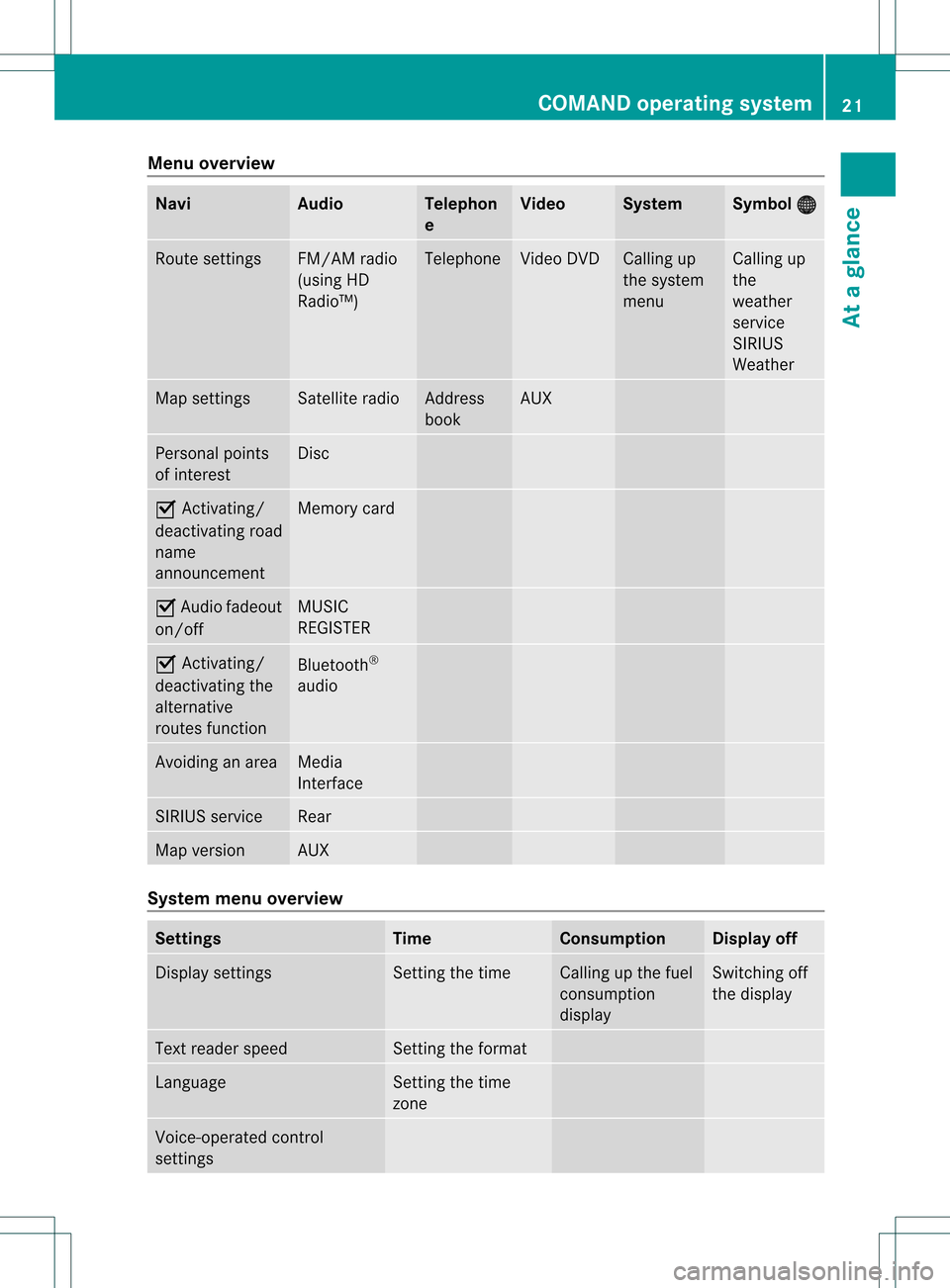
Menu
overview Navi Audio Tele
phon
e Video System Symbol
® Rou
tesettings FM/AM
radio
(us ing HD
Ra dio ™) Tele
phone Vide
oDVD Ca
lling up
the system
menu Ca
lling up
the
wea ther
service
SIRIUS
Wea ther Map
settings Satell
iteradi o Address
book AUX
Persona
lpoi nts
of interest Disc
O
Activating/
dea ctivating road
name
announceme nt Memory
card O
Audi ofade out
on/off MUSIC
REGISTER O
Activating/
dea ctivating the
alterna tive
routes function Blue
tooth ®
au dio Avoidi
nganarea Medi
a
Interface SIRIUS
service Rea
r Map
versio n AUX
System
menuoverview Setting
s Time Co
nsumption Di
splay off Displ
aysettings Setting
thetime Ca
lling up the fuel
consumpti on
disp lay Switching
off
the disp lay Text
readerspee d Setting
theformat Langu
age Setting
thetime
zone Voice-op
eratedcontrol
settings COMA
NDoperating system
21Ataglan ce
Page 25 of 234
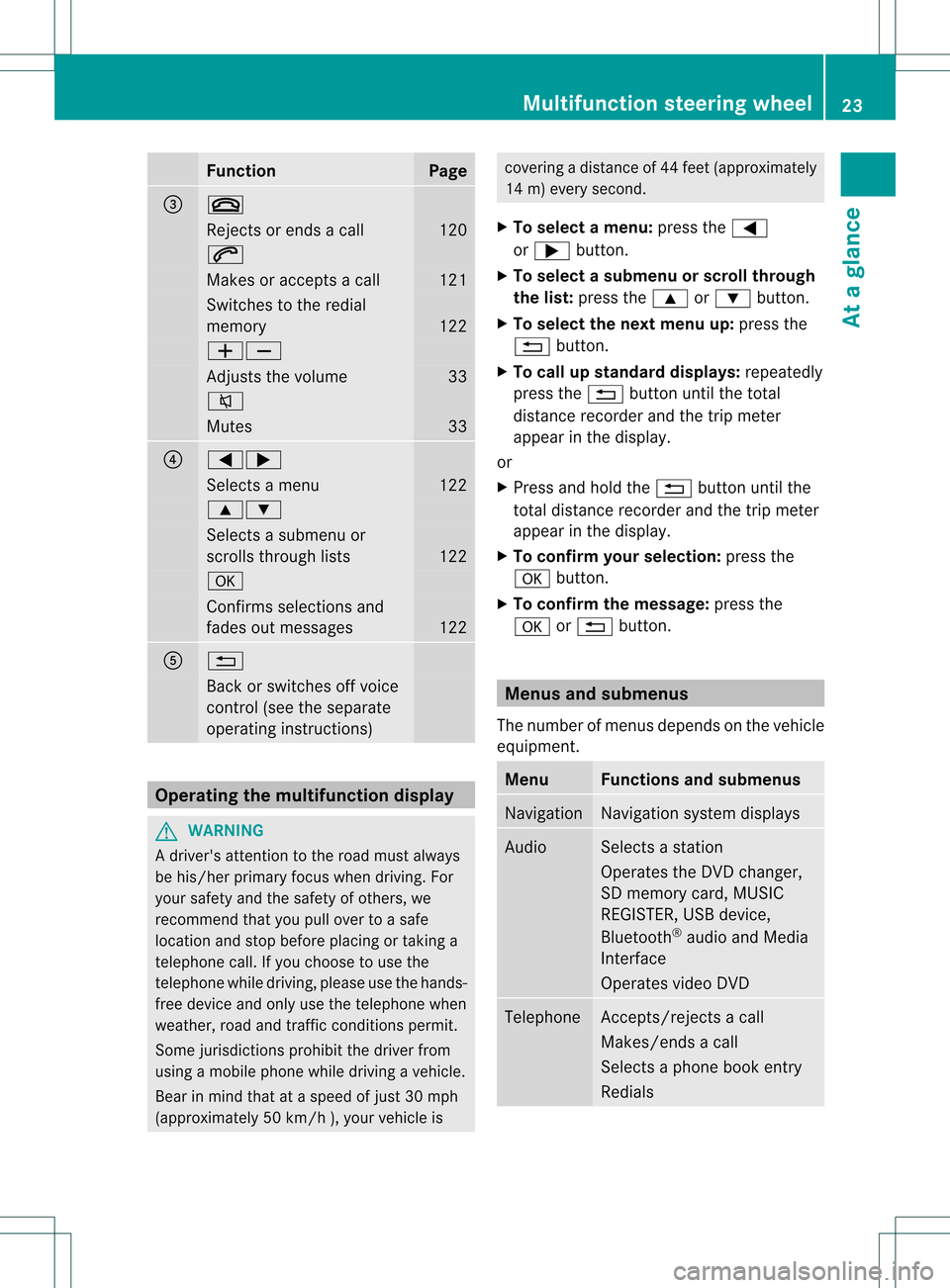
Funct
ion Pag
e =
~
Rej
ectsor ends acall 12
0 6
Mak
esoracc eptsa call 12
1 Swit
ches tothered ial
mem ory 12
2 WX
Ad
jus tsthevolum e 33
8
Mut
es 33
?
=;
Sel
ect sa men u 12
2 9:
Sel
ect sa subm enuor
sc roll sth roug hlist s 12
2 a
Con
firms sele ction sand
fade sout mes sages 12
2 A
%
Bac
kor swit ches off voic e
co ntrol (see thesepar ate
oper atingins truct ions) Ope
ratin gth emu ltifu nct ion displa y G
WAR
NING
A driv er'satt entio nto theroad must always
be his/ herprim aryfocuswhen driving.For
your safety andthesafety ofothers, we
recommen dthat youpull over toasafe
location andstop before placing ortaking a
telephone call.Ifyou choose touse the
telephone whiledriving, pleaseusethehands-
free device andonly usethetelephone when
weather, roadandtraffic conditionspermit.
Some jurisdiction sprohibit thedriver from
using amobile phonewhiledriving avehicle.
Bear inmind thatataspeed ofjust 30mph
(approximately 50km/ h),your vehic leis cove
ringadistan ceof44 feet (approxim ately
14 m)every second.
X To select amenu: pressth e=
or ; button.
X To select asubm enuorscrol lth rou gh
th elist :pres sth e9 or: button.
X To select thenext menu up:pres sth e
% button.
X To call upsta nda rddisp lays:repeat edly
pres sth e% buttonunt ilth eto tal
dist ancerec orde rand thetrip met er
appear inthedisplay.
or
X Pres sand hold the% buttonunt ilth e
to tal dist ancerec orde rand thetrip met er
appear inthedisplay.
X To confir myour selecti on:pres sth e
a button.
X To confir mthemessag e:press the
a or% button. Menus
andsubmen us
The numbe rofm enus depends onthe vehicle
equipment. Menu Functions
andsubmenu s Navigation Navigation
systemdisplays Audio Select
sa stat ion
Operates theDVD changer ,
SD memory card,MUSIC
REGISTE R,USB device,
Bluetoot h®
audio andMedia
Int erface
Operates videoDVD Telephone Ac
cept s/rej ectsa call
Makes/ endsacall
Select sa phone bookentry
Redials Mult
ifunction steeringwheel
23Ataglance Z
Page 27 of 234
Opera
tingvideo DVD X
Switc hon COMAND (Ypage 33).
X Switc hon DVD-Vid eo (Y
page 187).
X In the multifunc tiondisplay, selectthe
audio menu withthe= or; button .
X To select thenext/pr eviousscene:
briefly pressthe: or9 button . Telephone
menu G
WARN
ING
A driver's attentiontothe road must alway s
be his/her primary focuswhendriving. For
your safety andthesafety ofother s,we
recom mendthatyoupull over toasafe
location andstop before placing ortakin ga
telephon ecall. Ifyou choose touse themobile
phone whiledriving, pleaseusethehandsfr ee
device andonly usethemobile phonewhen
weather, road,andtrafficcon ditions permit.
Some jurisdict ionsprohibit thedriver from
using acellular mobilephonewhiledriving a
vehicle.
Bear inmind thatataspeed ofjust 30mph
(approximat ely50km/ h),your vehicle is
cover ingadistanc eof 44 feet (approximat ely
14 m)every second.
Opera tingthetelephone X
Switc hon COMAND (Ypage 33).
X Call upthe telephon ebasic menu
(Y page 119).
If the telephon ehas notyetbeen authorized,
the Bluetoo thReady message
appearsin
the multifunc tiondisplay.
If the telephon eis switched onand
authorized, thePhone Ready message
appears inthe multifunc tiondisplay.
Acce pting acall X
Press the6 button. Mul
tifunctio ndisplay (example)
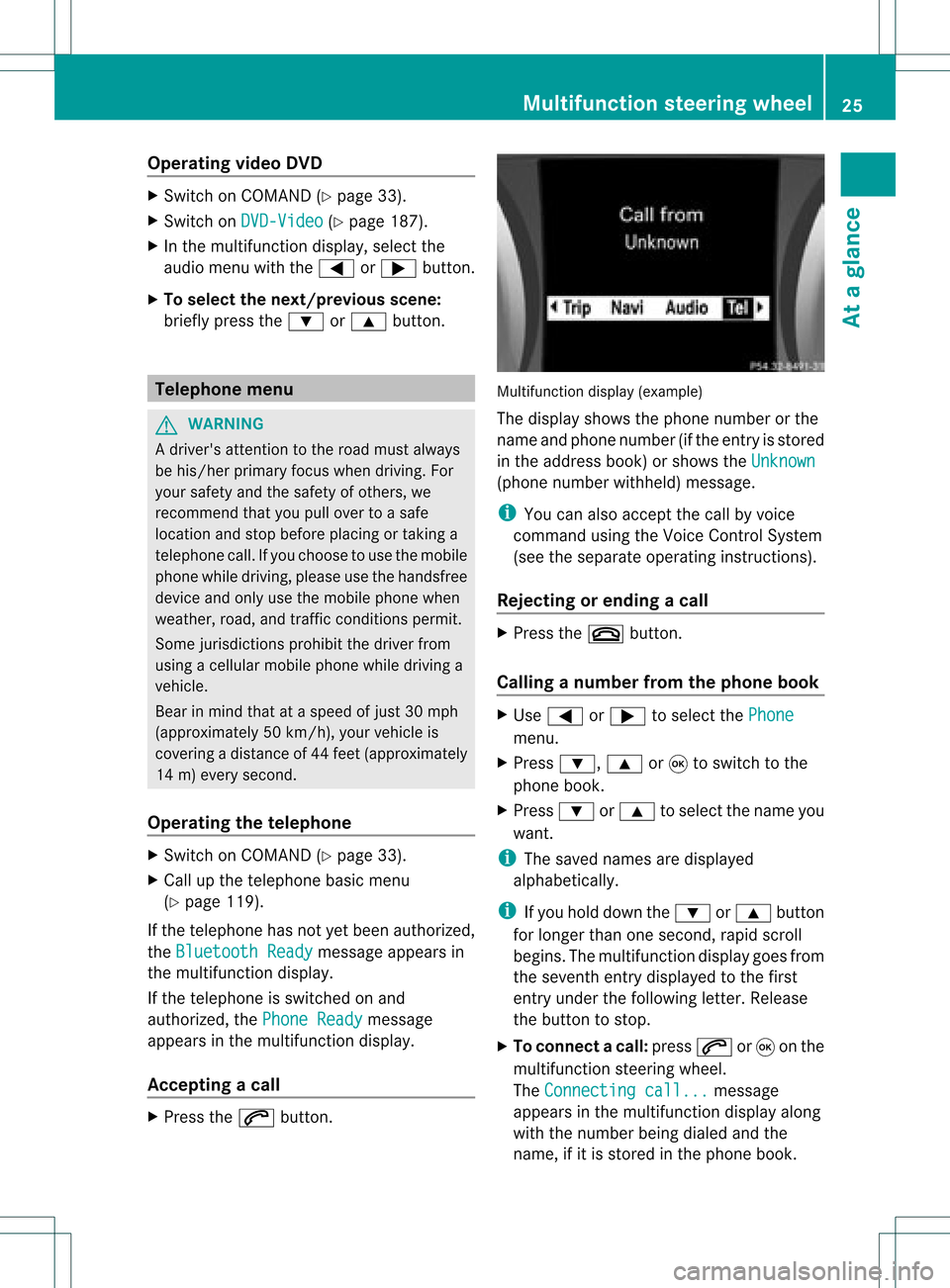
The display showsthephon enumbe rorthe
name andphone number (ifthe entr yis stored
in the address book)orshows theUnknown (phone
number withheld) message.
i You canalso accept thecall byvoice
command usingtheVoice Control System
(see theseparate operating instructions).
Rejecting orending acall X
Press the~ button.
Cal linganumbe rfrom thephone book X
Use = or; tosel ect the Phone menu.
X Press :, 9or9 toswi tch tothe
phone book.
X Press :or9 tosel ect the name you
wa nt.
i The save dnames aredispla yed
al pha betica lly.
i Ifyou holddow nthe : or9 button
for longer thanonesecond, rapidscroll
begins. Themultifunction displaygoes from
the seventh entrydispla yedtothe first
entr yunder thefollowing letter.Release
the button tostop.
X To conne ctac all: press 6or9 onthe
mul tifunctio nstee ring wheel.
Th eCon nectingcal l... mes
sage
ap pe arsin the multifu nctio ndisplay along
with thenumb erbeing dialed andthe
name ,if it is stored inthe phon ebook . Mult
ifunction steeringwheel
25Ataglance Z
Page 28 of 234
The
number dialedisstored inthe
correspon dingcalllist.
i Ifthere areseveral numbers forthis
name, youseealist ofsub-ent ries.
X Press :or9 toselect the
phone number youwant.
X Press the6 or9 button againto
place thecall.
Redialing COMAND
savesthelast phone numbers or
names dialed.
X Press the=; buttonsto select the
Phone menu.
X Press the; button toopen thelistof
dialed numbers.
X Press the:9 buttonsto select the
desired nameorphone number.
X To connec tacall:press 6or9 onthe
mul tifunctio nstee ring wheel. Ope
ratin gCO MA ND Se
lecti ng am ainfunc tion
Ini tial situatio n You
wouldlike toswi tch from navigation
mode (addre ssentry menu) tothe system
settings, forexamp le.
X To switch onnavi gatio nmode: pressthe
Ø function button.
X To show themenu: pressW the COM AND
controll er.
X Sele ctDesti nation by
sliding VÆand
turning cVdtheCOM AND controll erand
pres sW toconfirm.
X Sele ctAddre ssEntry and
pres sW to
confirm.
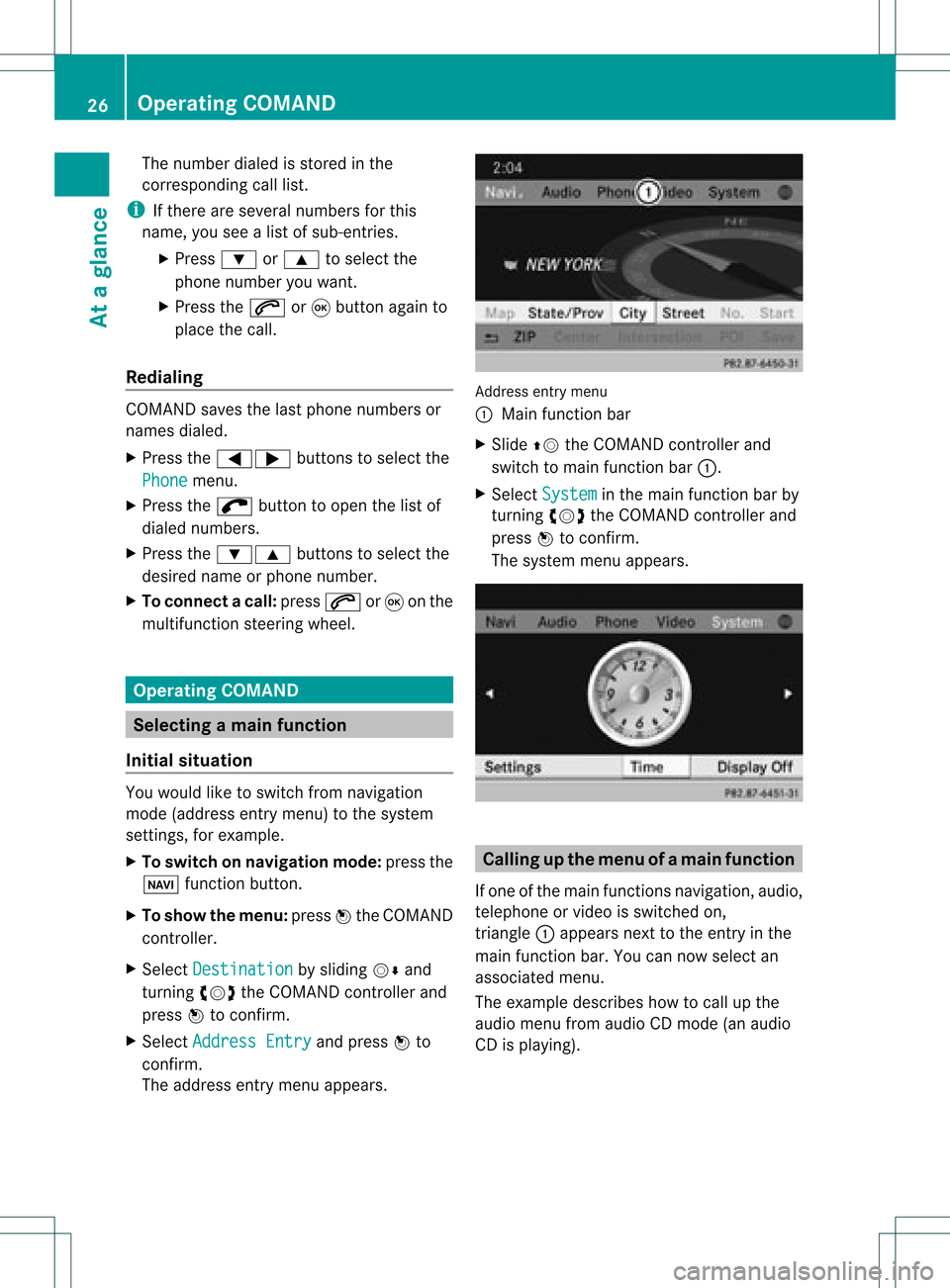
The address entry menu appears. Addre
ssentry menu
: Mai nfunc tion bar
X Sli de ZV theCOMA NDcontrol ler and
swit chtomain function bar :.
X Se lec tSys tem in
themain function bar by
tur nin gcVd theCOMA NDcontrol ler and
pre ssW toconfirm .
The systemmen uappear s. Calli
ngup themen uofam ainfunc tion
If one ofthe mainfunc tion snav igat ion,audio,
te leph oneor vide ois swit ched on,
tr iang le: appear sne xt to theen try in the
main function bar. Youcannowsele ctan
asso ciatedmen u.
The example describeshow tocall upthe
audio menufrom audio CDmod e(an audio
CD isplayin g). 26
Op
era ting COMAN DAtaglan ce
Page 33 of 234
i
You willfindfurt her informat ioninthe
"Dest inationentry" sect ion(Ypage 53). Enter
ingchar acters inthead dress
book andintheph one book
Intr oduct ion The
followin gsect iondesc ribes howtoent er
char acters inthe phon ebook (Ypage 125)
and inthe address book(Ypage 137)when
cre atin ganew entry.
Creat inganew entr yint he phone book X
Ca llup the inpu tmenu with data fields
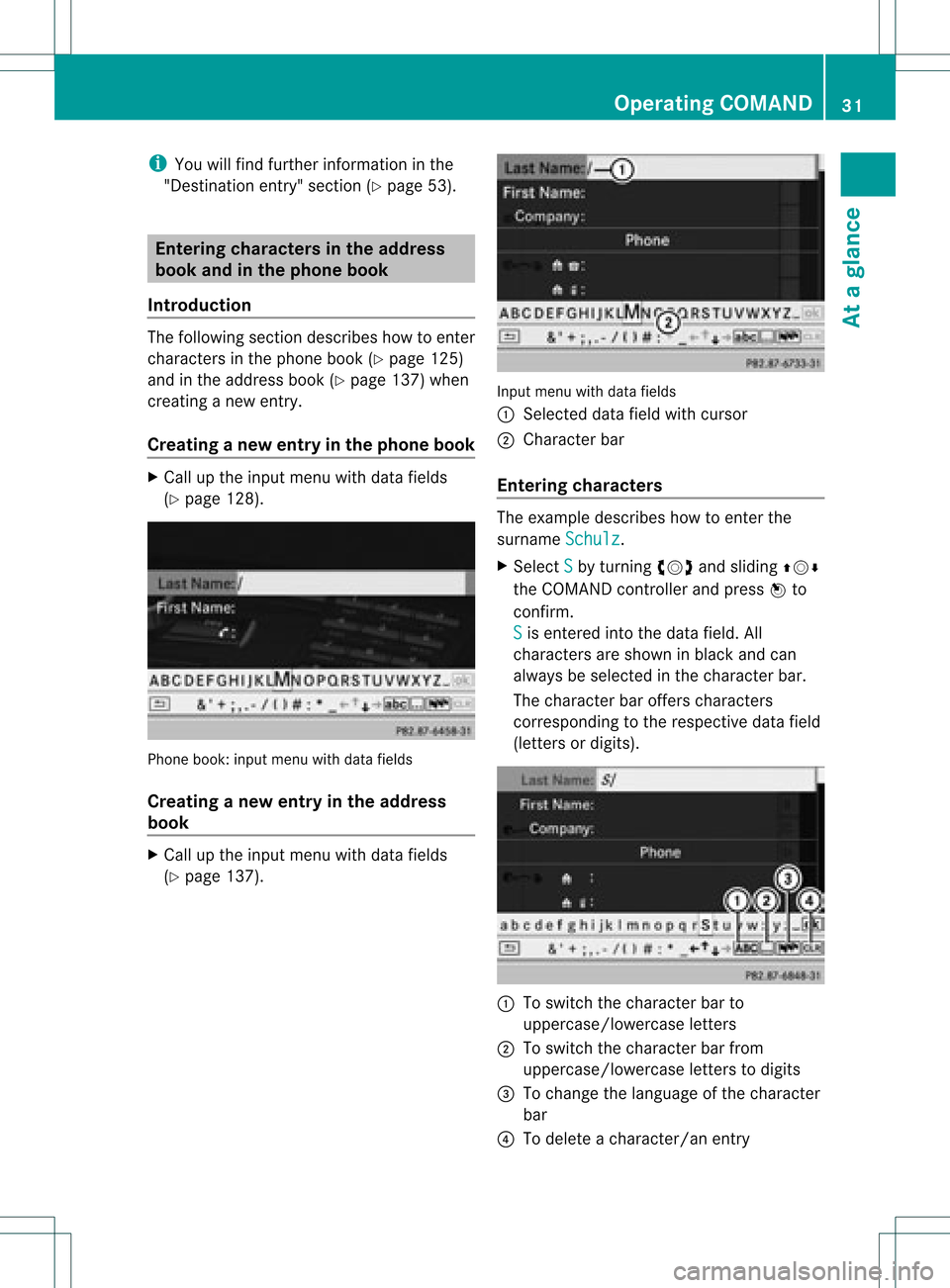
(Y page 128). Phone
book:inputmenu withdata fields
Creat inganew entry inthe address
book X
Call upthe input menu withdata fields
(Y page 137). Input
menu withdata fields
: Select eddata fieldwithcursor
; Character bar
Entering character s The
example describes howtoent erthe
surname Schulz .
X Select S by
turn ingcVd andsliding ZVÆ
the COMAND controller andpress Wto
con firm.
S is
ent ered intothe data field. All
charact ersare shown inblack andcan
alway sbe select edinthe charact erbar.
The charact erbar offer scharact ers
corr espondin gto the respect ivedata field
(lett ersordigits). :
Toswitch thecharact erbar to
uppercase/lowerc aseletters
; Toswitch thecharact erbar from
uppercase/lowerc aseletters todigits
= Tochange thelanguage ofthe charact er
bar
? Todelete acharact er/anentry Opera
tingCOMAND
31Ataglance Z
Page 35 of 234
Basi
cfunc tions ofCO MA ND Sw
itchin gCO MA ND on/o ff
X Pre ssthe qcontro lknob.
Aw arning mes sage appear s.COMA ND
calls uptheprev iously selectedmen u.
i Ifyou switchoff COMA ND,playbac kof
the curre ntaudio or vide os ource willalso
be switched off. Switching
theCOMAND displayon/
off
X Press theW functionbutton .
or
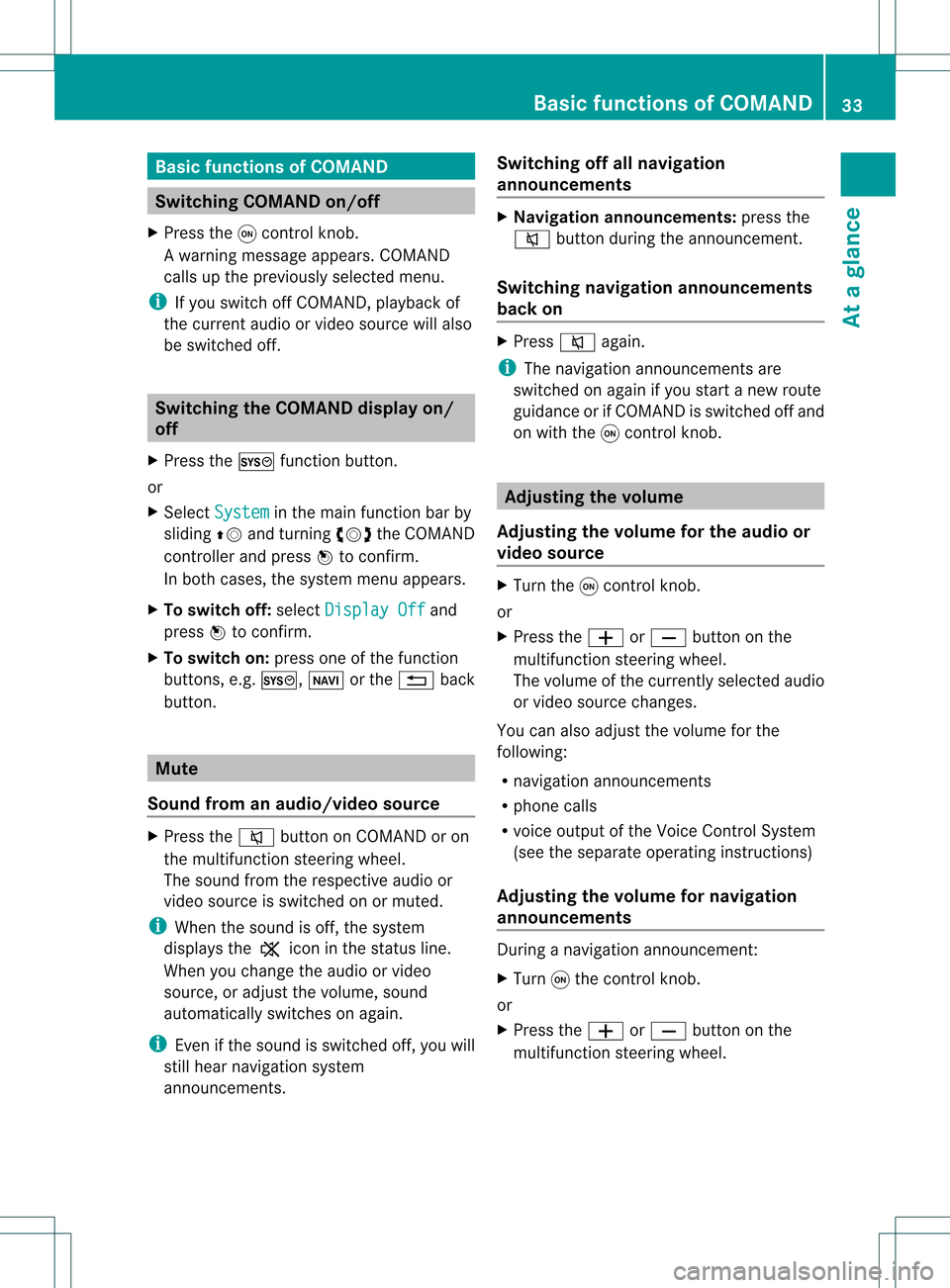
X Select System in
the main functionbar by
sliding ZVandturnin gcVd theCOMAND
cont roller andpress Wtoconf irm.
In both cases, thesystem menuappears.
X To switch off:select Display Off and
press Wtoconf irm.
X To switch on:press oneofthe funct ion
button s,e.g. W, Øorthe % back
button . Mut
e
Sound fromanaudio/video source X
Press the8 button onCOMAND oron
the multifunct ionsteerin gwheel.
The sound fromtherespect iveaudio or
video source isswitched onormuted.
i When thesound isoff, thesystem
display sthe , icon inthe status line.
When youchange theaudio orvideo
source, oradjust thevolume, sound
automatically switchesonagain.
i Even ifthe sound isswitched off,you will
still hear navigation system
announc ements. Switching
offallnavigation
announcements X
Navigat ionannouncements: pressthe
8 button duringtheannounc ement.
Switching navigation announcements
back on X
Press 8again.
i The navigation announcementsare
swi tched onaga inifyou start anew route
gui dance orifCOMAND isswi tched offand
on with theqcontrol knob. Adjusting
thevolume
Adjusting thevolume forthe audio or
video source X
Turn theqcontrol knob.
or
X Press theW orX button onthe
multi function steeringwheel.
The volumeofthe currently selected audio
or vide osource changes.
You canalsoadju stthe volu meforthe
foll owi ng:
R naviga tionannouncements
R phone calls
R voice outputofthe Voice Control System
(see theseparate operating instructions)
Adjust ingthe volume fornavigation
announcements During
anavigation announcemen t:
X Turn qthe cont rolknob.
or
X Press theW orX button onthe
multifunction steeringwheel. Basic
functions ofCOMAND
33Ataglance Z
Page 36 of 234
Adj
usting thevolu meforphone calls You
canadjust thevol ume forhan ds-free
mod eduri ngate leph onecall .
X Turn theq control knob.
or
X Pre sstheW orX buttonon the
mult ifunction steer ing whee l. Adj
usting thesoun dsettings
Callin gup thesound menu You
canmak evari ous soun dset tings for the
diff eren taudio andvide osour ces.This mean s
th at itis poss ibletoset mor ebass forradio
mod eth an for audio CDmod e,for example .
You cancalluptheres pec tive soun dmen u
fr om themen uof thedesi redmod e.
The example describeshow tocall upthe
soun dmen uin radio mode.
X Pre ssthe$ function button.
The radio displayappear s.You willhear the
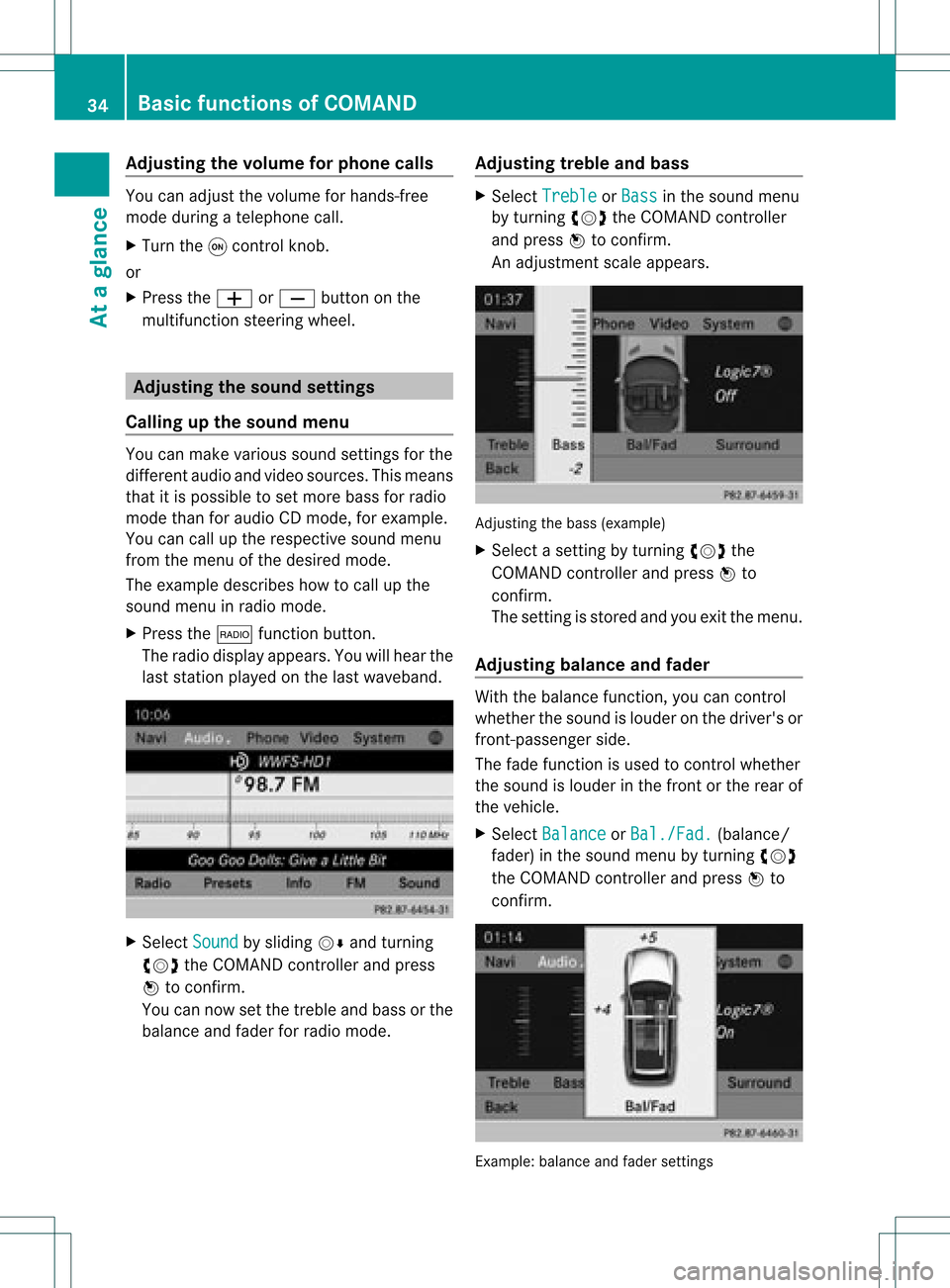
last stati on played onthelast waveb and. X
Se lec tSou nd by
slidi ngVÆ andturnin g
cVd theCOMA NDcontrol ler and press
W toconfirm .
You cannowset thetreble andbass orthe
balan ceand fade rfor radio mode. Adjust
ingtreble andbass X
Select Treble or
Bass in
the sound menu
by turnin gcVd theCOMAND controller
and press Wtoconf irm.
An adjustmen tscal eap pea rs. Adju
sting thebass (exa mple)
X Sel ect asetti ngbyturni ngcVd the
CO MAND controllera nd pre ssW to
confi rm.
The setti ngisstor edand youexi tthe menu.
Adjust ingbalance andfader With
thebala nce funct ion,youcan cont rol
whether thesound islouder onthe driver's or
front -passenger side.
The fade funct ionisused tocont rolwhether
the sound islouder inthe front orthe rear of
the vehicle.
X Select Balance or
Bal./Fad. (bala
nce/
fader) inthe sound menubyturning cVd
the COMAND controller andpress Wto
confirm . Example:
balanceandfader settings 34
Basic
functions ofCOMANDAt aglance
Page 46 of 234
X
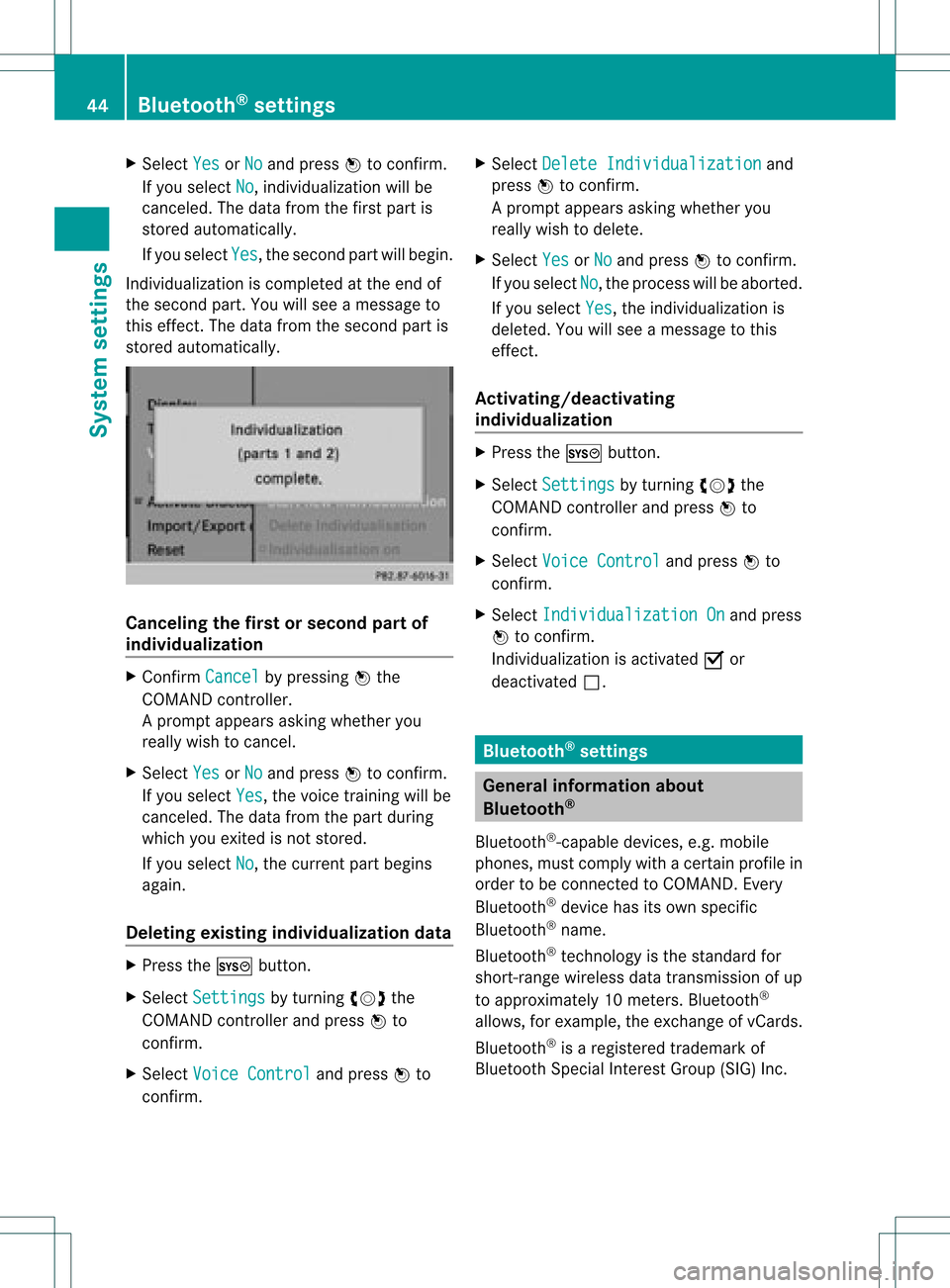
Sel ect Yes or
No and
pressW toconfi rm.
If yo usel ect No ,
ind ividu aliza tion willbe
cance led. The data from thefirst partis
store dau toma tically.
If yo usel ect Yes ,
the seco ndpartwi llbe gin.
Indi vidualizati oniscomp leted atthe end of
the seco ndpart. Youwi llsee ames sage to
this effect.The data from theseco ndpartis
store dau toma tically. Can
celing the firstorsecond partof
indi vidualiza tion X
Conf irmCancel by
pres singW the
COMA NDcontroller .
Ap rompt appears asking whethe ryou
really wishtocancel.
X Select Yes or
No and
press Wtoconf irm.
If you select Yes ,
the voice trainin gwill be
canceled. Thedata from thepart during
which youexited isnot stored.
If you select No ,
the current partbegins
again.
Dele ting existing individualiza tiondata X
Press theW button .
X Select Settings by
turnin gcVd the
COMAND controller andpress Wto
conf irm.
X Select Voice Control and
press Wto
conf irm. X
Select Delete Individualiz ation and
press Wtoconf irm.
Ap rompt appears asking whethe ryou
really wishtodelete.
X Select Yes or
No and
press Wtoconf irm.
If you select No ,
the process willbeaborted.
If you select Yes ,
the individuali zationis
deleted. Youwillsee amessage tothis
effect .
<00340003001400090016000100140009000E0007002100040005000100030014
0009001600010014H ing
individualiza tion X
Press theW button .
X Select Settings by
turnin gcVd the
COMAND controller andpress Wto
conf irm.
X Select Voice Control and
press Wto
conf irm.
X Select Individualiz ationOn and
press
W toconf irm.
<001E000E0004000900160009000400150001000C0009001C000100140009000F
000EV isactivated Oor
deactivated ª. Bluetooth
®
settings General
informationabout
Bluetooth ®
Bluetooth ®
-capable devices,e.g.mobile
phones, mustcomply withacert ainprofile in
order tobe conn ected toCOMAND. Every
Bluetooth ®
device hasitsown specific
Bluetooth ®
name.
Bluetooth ®
techn ology isthe standard for
short- range wireless datatrans mission ofup
to approximately 10meters. Bluetooth ®
allows, forexample, theexchan geofvCards.
Bluetooth ®
is aregistered trademark of
Bluetooth SpecialInterest Group (SIG)Inc. 44
Bluetooth ®
settingsSystem settings
Page 67 of 234
Selec
tion Step
From
POIs X
Ent erapoint of
interest
(Y page 66). From
Personal POIs X
Ent era
destination from
the personal
points ofinterest
(Y page 75). Using
Map X
Ent era
destination using
the map
(Y page 61). Using
Geo- Coordinates X
Ent era
destination using
the geo-
coordinates
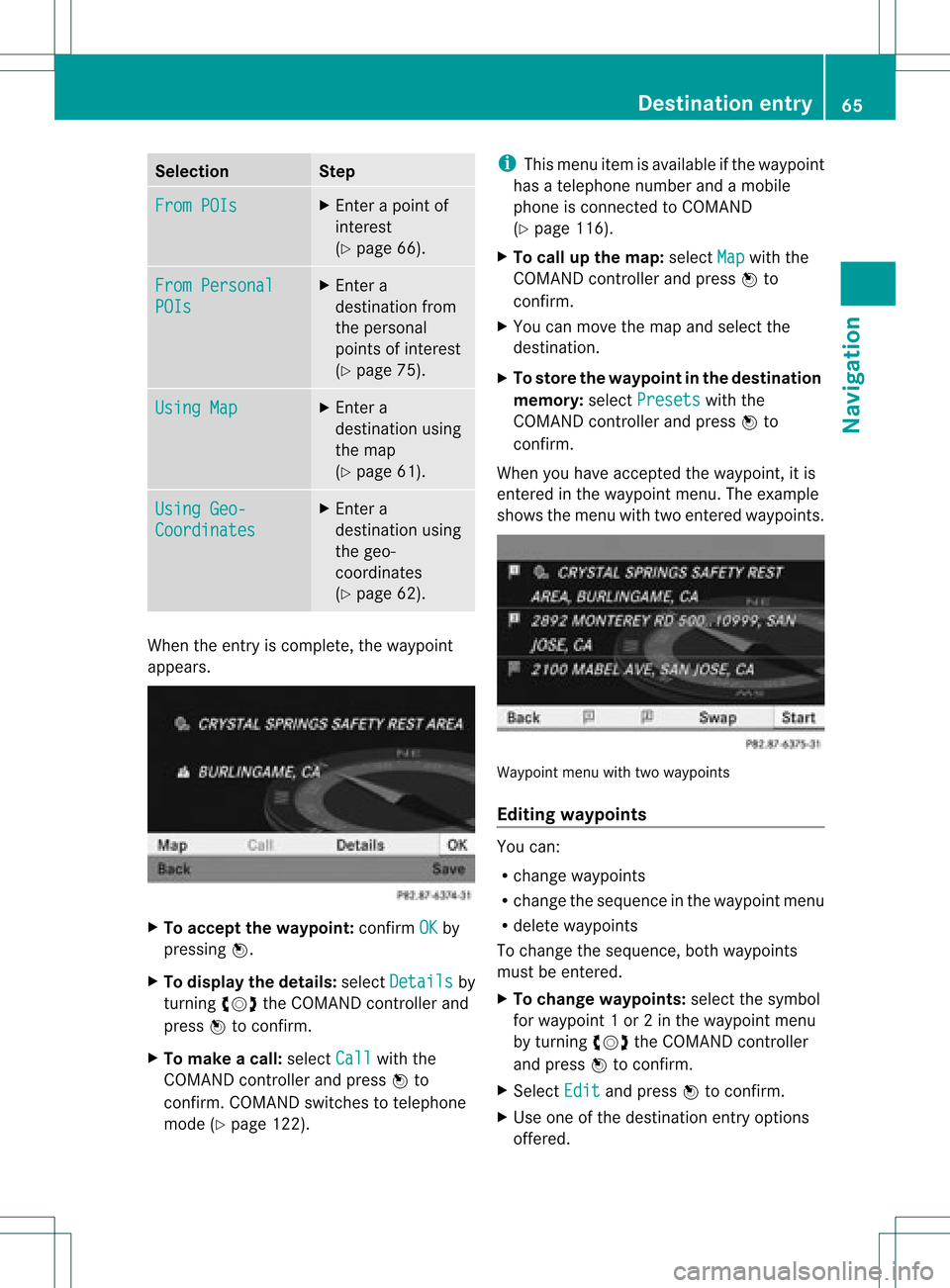
(Y page 62). When
theentr yis complete, theway point
appea rs. X
To accept thewaypoint: confirmOK by
pressing W.
X To display thedetails: selectDetails by
turnin gcVd theCOMAND controller and
press Wtoconf irm.
X To make acall: select Call with
the
COMAND controller andpress Wto
conf irm. COMAND switchestotelephone
mode (Ypage 122). i
This menu itemisavaila bleifthe way point
has atelephone numberandamobile
phone isconn ected toCOMAND
(Y page 116).
X To call upthe map :select Map with
the
COMAND controller andpress Wto
conf irm.
X You canmove themap andselect the
destination.
X To store thewaypoint inthe destination
memory :select Presets with
the
COMAND controller andpress Wto
conf irm.
When youhave accepted theway point, itis
entered inthe way point menu. Theexample
shows themenu withtwoentered waypoints. Waypoi
ntmenu withtwowayp oints
Editing waypoints You
can:
R change waypoints
R change thesequence inthe way point menu
R delete waypoints
To change thesequence, bothwaypoints
must beentered.
X To change waypoints: selectthesymbol
for way point 1or 2in the way point menu
by turnin gcVd theCOMAND controller
and press Wtoconf irm.
X Select Edit and
press Wtoconf irm.
X Use oneofthe destination entryoptions
offered. Des
tinat ionentry
65Navigat ion Z
Page 68 of 234
X
To chang ethe seque nceof the
wa ypo ints: select Swap in
the waypoint
menu byturning cVd theCOMAND
contro ller and pressW toconfi rm.
The entri esaresw appe d.
X To del ete waypo ints: select the symbo l
for waypoint 1or 2in the waypoint menu
by turning cVd theCOMAND controller
and pressW toconfi rm.
X Sel ect Delete and
pressW toconfi rm.
i Youcan delete awa ypoint directl yaf ter
entry using thismenu item.
Ac ceptin gwa ypo ints forthe route X
Sel ect Start in
the waypoint menu by
tur ning cVd theCOMAND controller and
pre ssW toconfi rm.
The routeiscal cul ate dwi th the ente red
wa ypoints.
i Con t. is
displ ayed instea dof Sta rt wh
en
Cal culate AlternativeRoutes is
acti vated inthe navigati on menu
(Y page 82) ,op tio n2 . In
the exampl e,there areboth waypoints 1
and 2. Enterin
gap oint ofint eres t Callin
gup thepoint sof int eres tmenu
Poin tsof int eres tare prede fineddestina tions
withi ncate gor ies, e.g.ag asstatio nint he
AUTOMOTIVE category. You
canlook forpoints ofinterest :
R in the vicinity ofthe destination
R near thecurrent vehicleposition
R in the vicinity ofanother city
R using itsname
R using aphone number
You canalso select points ofinterest inthe
map thatareavaila bleonthe map view
shown.
X To switch onnavigation mode:pressthe
Ø functionbutton.
X To show themenu: pressWthe COMAND
cont roller.
X Select Destination in
the navigation
system menubarbyturning cVdthe
COMAND controller andpress Wto
confirm .
X Select From POIs and
press Wtoconfirm .
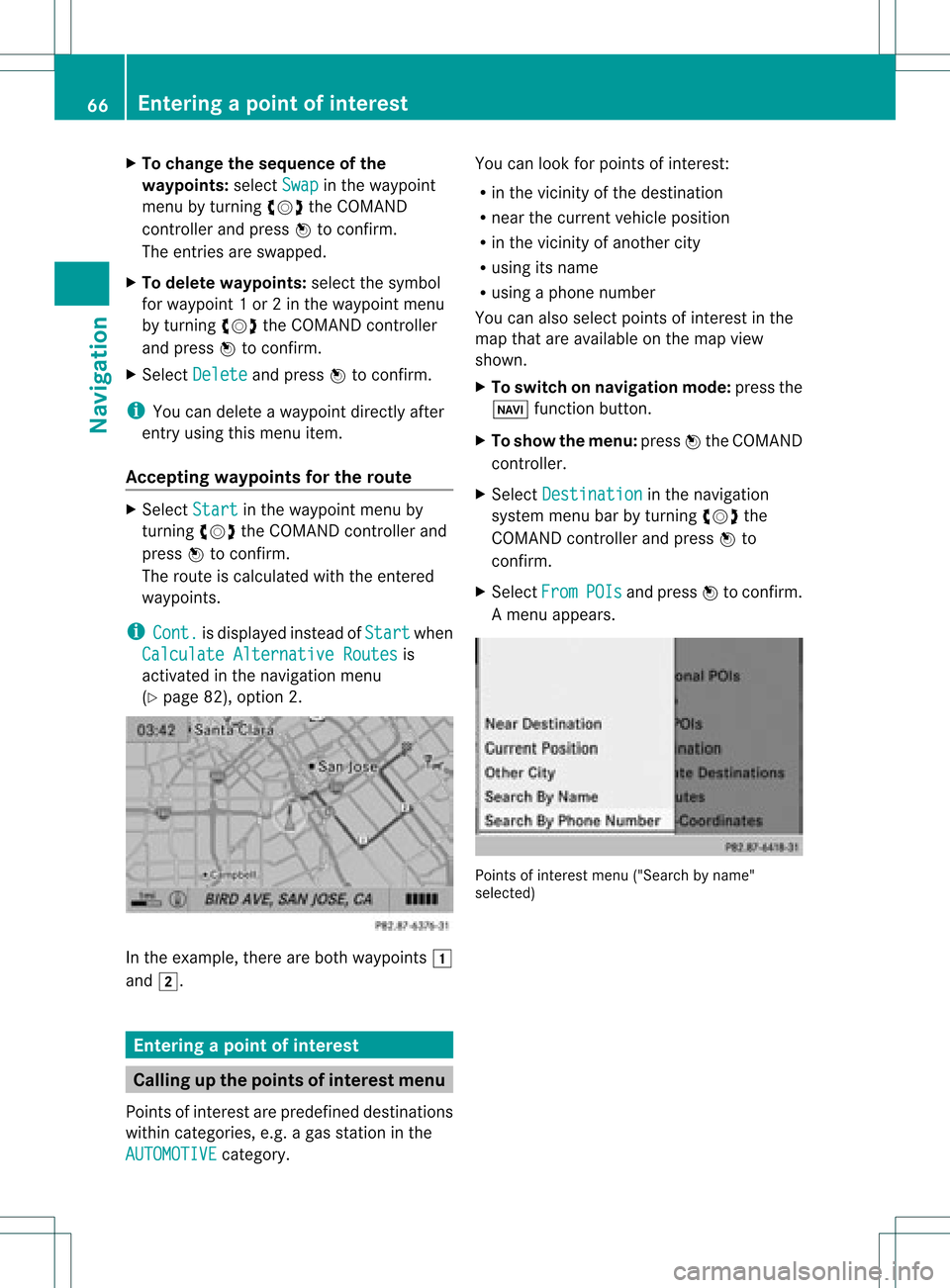
Am enu appears. Point
sof inter estmenu ("Search byname"
select ed) 66
Entering
apoint ofint eres tNavi gatio n