Comand MERCEDES-BENZ E-Class 2012 W212 Comand Manual
[x] Cancel search | Manufacturer: MERCEDES-BENZ, Model Year: 2012, Model line: E-Class, Model: MERCEDES-BENZ E-Class 2012 W212Pages: 234, PDF Size: 6.74 MB
Page 58 of 234
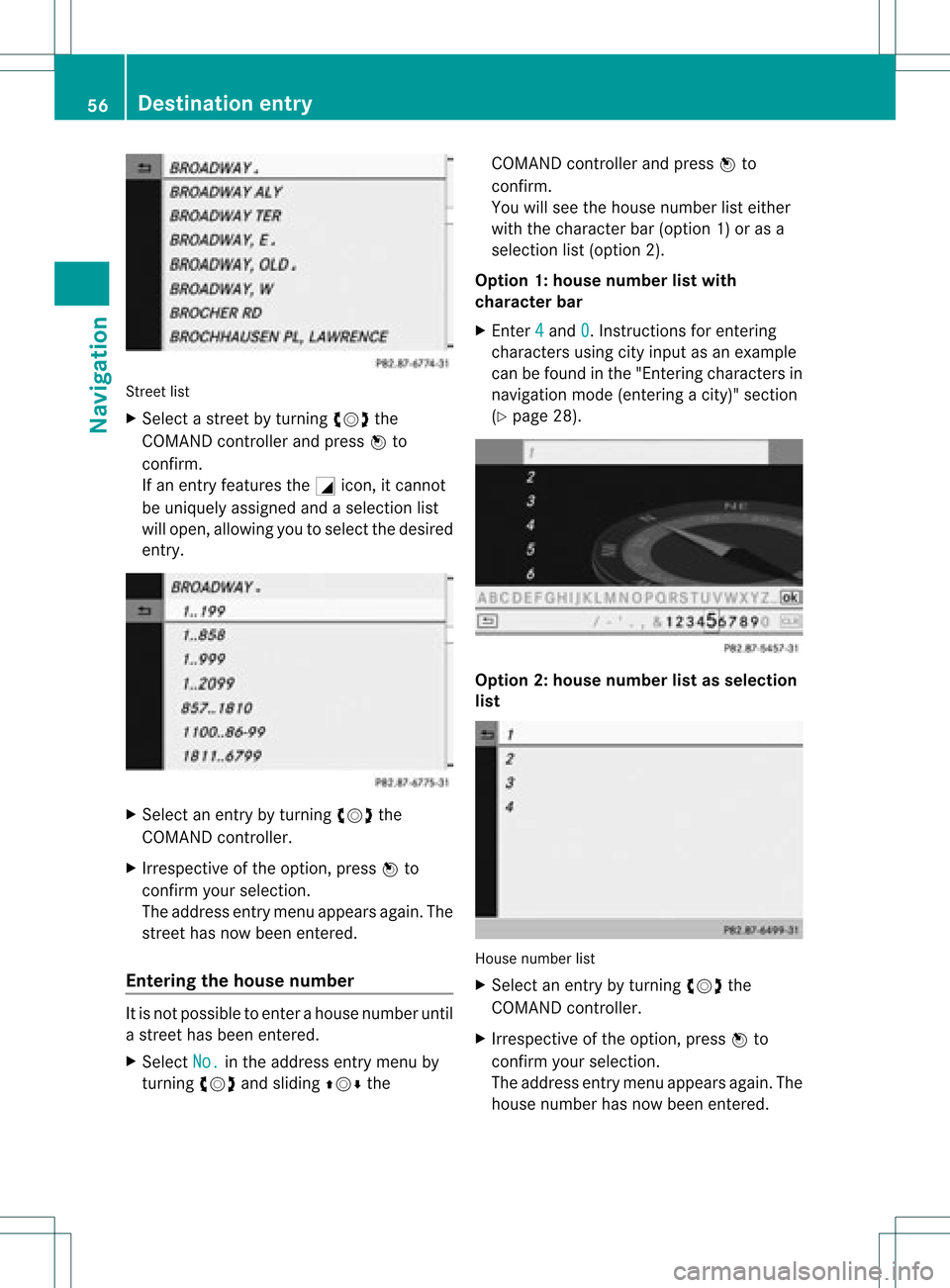
Street
list
X Sel ect astree tby turni ngcVd the
CO MAND controllera nd pre ssW to
confi rm.
If an entry features the Gicon,itcanno t
be uniquelyas signe dand asel ecti onlist
wi llop en, allo wi ng youto sel ect the desired
entry . X
Sel ect anentry byturning cVd the
CO MAND controller.
X Irre spe ctive ofthe optio n,pre ssW to
confi rmyour sel ecti on.
The addre ssentry menu appe arsag ain. The
stre ethasnow been ente red.
En teri ngthe housenumb er It
is not possi bleto ente rahouse numberuntil
a street hasbeen entered.
X Select No. in
the address entrymenu by
turning cVdandsliding ZVÆthe COMAND
controller andpress Wto
confirm .
You willsee thehouse number listeither
with thecharacter bar(option 1)or as a
selection list(option 2).
Option 1:house number listwith
character bar
X Ent er4 and
0 .
Inst ructions forenterin g
characters usingcityinput asan example
can befound inthe "Ent ering characters in
navigation mode(entering acity)" section
(Y page 28). Opt
ion 2:house numberlistasselection
list House
numberlist
X Selec tan ent ryby turnin gcVd the
COMA NDcontroller.
X Irr espec tiveof the option, press Wto
con firm your selec tion.
The address entrymen uappears again.The
house numberhas now been entered. 56
Destina
tionentryNavigat ion
Page 59 of 234
Star
ting route calculation You
cannow have COMAND calculatethe
route tothe address enteredorsave the
address first,e.g.asyour home address (My
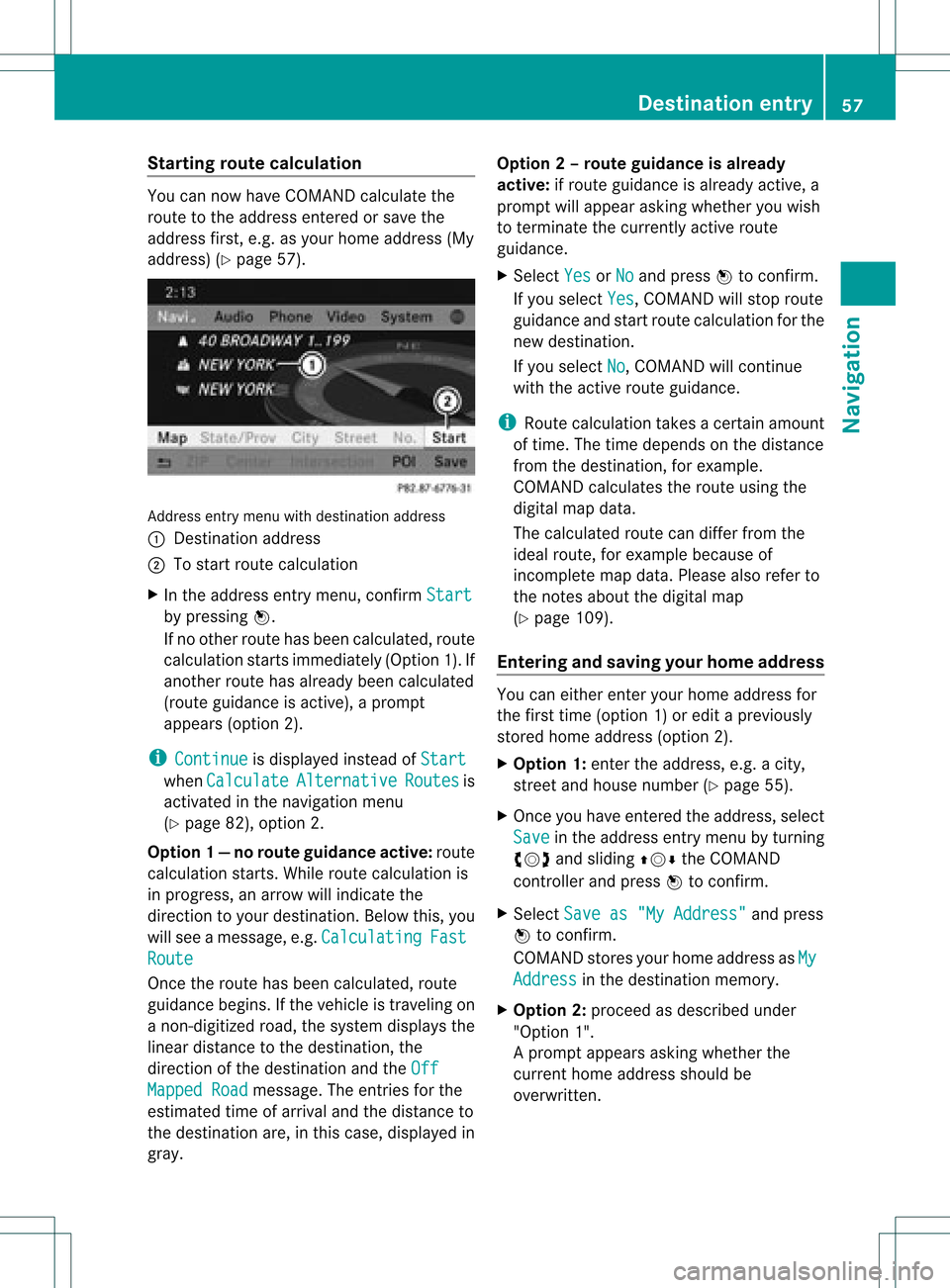
address) (Ypage 57). Address
entrymenu withdestination address
: Destin ationaddress
; Tostart route calculation
X In the address entrymenu, confirmStart by
pressing W.
If no other routehasbeen calculated, route
calculation startsimmediately (Option1).If
another routehasalready beencalculated
(route guidanceisactive), aprompt
appears (option2).
i Continue is
display edinstead ofStart when
Calculate Alternative Routes is
activated inthe navigation menu
(Y page 82),option 2.
Option 1—n orou teguid ance active: route
calc ulatio nstarts. Wh ile rou tecal culatio nis
in progr ess,anarrow willindic atethe
direc tiontoyour destination. Below this,you
will see amess age,e.g.Calc ulating Fast
Rout
e Onc
ethe rout ehas been calculated, route
guidanc ebegin s.Ifthe vehic leistravelin gon
a non -digit izedroad, thesyst emdisplays the
linear distanceto the dest ination, the
direc tionofthe dest inationand theOff Mapp
edRoad mess
age.Theentries forthe
est imat edtim eof arriv aland thedistanceto
the dest inationare, inthis case, displayed in
gray. Opt
ion 2–rou teguid ance isalr ead y
act ive: ifrout eguidanc eis already active, a
prom ptwill appear askingwhet heryou wish
to ter min ate the curr entlyact ive rout e
guidanc e.
X Selec tYes or
No and
press Wtocon firm .
If you selec tYes ,
COMA NDwill stop rout e
guidanc eand start rout ecalc ulation forthe
new destination.
If you selec tNo ,
COMA NDwill continue
with theactive rout eguidanc e.
i Route calculation takesacer tain amoun t
of tim e.The timedepen dson the distance
fro mt hedestination, forexample.
COMAND calculates theroute using the
digital mapdata.
The calculated routecandiffer fromthe
ideal route, forexample becauseof
incomplete mapdata. Please alsorefer to
the notes about thedigital map
(Y page 109).
Entering andsaving yourhome address You
caneither enteryourhome address for
the first time (option 1)or edit apreviously
stored homeaddress (option2).
X Option 1:enter theaddress, e.g.acity,
street andhouse number (Ypage 55).
X Once youhave entered theaddress, select
Save in
the address entrymenu byturning
cVd andsliding ZVÆtheCOMAND
cont roller andpress Wtoconfirm .
X Select Saveas"My Address" and
press
W toconfirm .
COMAND storesyourhome address asMy Address in
the destination memory.
X Option 2:proceed asdescribed under
"Option 1".
Ap rompt appears asking whethe rthe
current homeaddress shouldbe
overwritten . Des
tination entry
57Navigat ion Z
Page 60 of 234
X
Sel ect Yes and
pressW toconfi rm.
After selecti ngYes ,
the Saving Pro
cedure Successful mes
sage
ap pe ars .
En teri ngaZIPcode X
Se lec tZIP in
theaddr essentry men uby
tur nin gcVd andslidingZVÆ the
COMA NDcontrol ler and pressW to
co nfirm .
You willsee thezip co de list either withth e
ch arac terb ar(opt ion1)or as aselec tion
list (opt ion2).
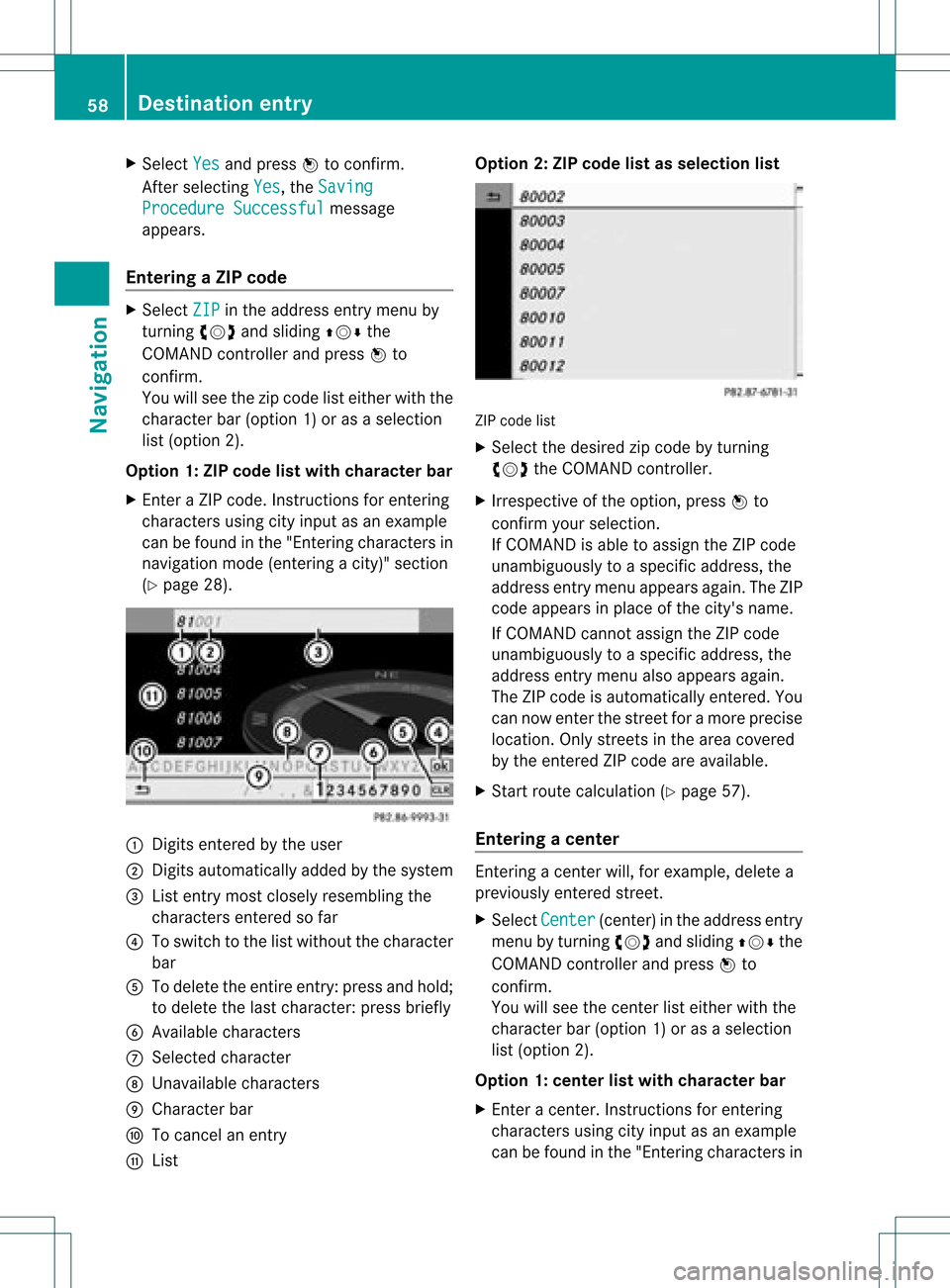
Opt ion 1:ZIP code listwith character bar
X En tera ZIP code. Inst ruc tions for enterin g
ch arac ters usin gcit yinp utas an example
can befoun din the"En terin gch arac ters in
nav igat ionmod e(en terin gac ity)" section
(Y page 28). :
Digit sent ered bythe user
; Digit sautom atically added bythe syst em
= List entrymost closelyresem blingthe
char acters entered sofar
? Toswitc hto the listwitho utthe char acter
bar
A Todelet ethe entireent ry:press andhold;
to delet ethe last char acter: press briefly
B Available characters
C Selec tedchar acter
D Unav ailable characters
E Charact erbar
F Tocan celanent ry
G List Opt
ion 2:ZIP code listasselection list ZIP
code list
X Selec tthe desired zipcode byturning
cVd theCOMAND controller.
X Irrespect iveofthe option, pressWto
confirm yourselection.
If COMAND isable toassign theZIPcode
unambiguou slytoaspecific address, the
address entrymenu appea rsagain. TheZIP
code appea rsinplace ofthe city's name.
If COMAND cannotassigntheZIPcode
unambiguou slytoaspecific address, the
address entrymenu alsoappea rsagain.
The ZIPcode isautomatically entered.You
can now enter thestreet foramore precise
location. Onlystreet sin the area covered
by the entered ZIPcode areavaila ble.
X Start route calculation (Ypage 57).
Entering acenter En
terin gacen terw ill,for exam ple,delet ea
prev iously entered street .
X Selec tCent er (cen
ter)in the address entry
men uby turnin gcVd andslidin gZVÆ the
COMA NDcontroller andpress Wto
con firm .
You willsee thecenterlist eith erwith the
char acterbar (opt ion1)or as aselec tion
list (opt ion2).
Opt ion 1:center listwith characterbar
X En ter acen ter.In st ruct ions forenterin g
char acters using cityinput asan exam ple
can befoun din the "Entering char acters in 58
Destina
tionentryNavigat ion
Page 62 of 234

Selec
tingadesti nation from the
dest inationmem ory(e.g. Myaddress)
Intr odu ction The
dest inationmem oryalways contain san
ent rynam ed"My addre ss".You may wish to
assign yourhomeaddres sto this ent ry,for
exam ple(Ypage 57),and selec tit for rout e
guidan ce.This entryisalways locatedatthe
to pof thelist inthedest inationmem ory.
X To switch onnav igat ionmod e:pres sth e
Ø function butt on.
X To show themen u:pres sW theCOMA ND
con troller .
X Sele ctDes tination in
thenav igat ion
syst emmen ubar byturnin gcVd the
COMA NDcontroller andpres singW to
con firm.
X Sele ctFro mMem ory and
pres sW to
con firm.
You willsee thedest inationmem orylist
eit her with thechar acterbar (opt ion1)or
as aselec tionlist (op tion 2).
Op tion 1:dest inationmem orylistwith
cha racter bar X
En teradestinat ion,e.g. "My address".
Ins truc tionsfor entering charac tersusing
cit yinput asan example canbefound inthe
"Ent ering charac tersinnavigat ionmode
(ent ering acit y)" sect ion(Ypage 31). :
Character entered bythe user
; Character sautomatic allyadded bythe
system
= List entrymost closely resemblin gthe
charac tersentered sofar
? Toswitc hto the select ionlist
A Todelete anent ry
B Character snot curren tlyavailable
C Character bar
D Current lyselect edcharac ter
E Tocanc elan ent ry
F Character scurren tlyavailable
Opt ion 2:destina tionmem orylistas
selection list Dest
ination memorylist
X Select MyAddres s by
turn ingcVd the
COMAND controller.
X Irres pectiveofthe option ,press Wto
con firm your select ion.
The address entrymenu appears again.
"My address" hasbeen entered. 60
Destinat
ionentr yNavigat ion
Page 63 of 234
X
To start route calculati on:sel ect Start and
pressW toconfi rm. En
teri ngadesti nation from thelist of
last dest inations
X To switch onnav igat ionmod e:pres sth e
Ø function butt on.
X To show themen u:pres sW theCOMA ND
con troller .
X Sele ctDes tin ation in
thenav igat ion
syst emmen ubar byturnin gcVd the
COMA NDcontroller andpres singW to
con firm.
X Sele ctFro mLas tDes tinations and
pres sW tocon firm. X
Sele ctthedesir eddest inationbyturnin g
cVd theCOMA NDcontroller andpres sing
W tocon firm.
The addres sent rymen uappears again.The
destination addressselected hasbeen
entered.
X To star troute calculation: selectStart and
press Wtoconfirm .
Once theroute hasbeen calculated, route
guida ncebegins (Ypage 77).
i Further information onthe "Last
destinations" memorycanbefound on
(Y page 97). Entering
adesti nation usin gthe map
Call ingupthe map X
To swi tch onnavig ation mode: pressthe
Ø function button.
X To show themenu: pressWthe COMAND
controlle r.
X Select Destin ation in
the navig ation
sys tem menu barbyturning cVdthe
COMAND controllerand pre ssing W to
confi rm.
X Sel ect Usi ng Map and
pressW toconfi rm.
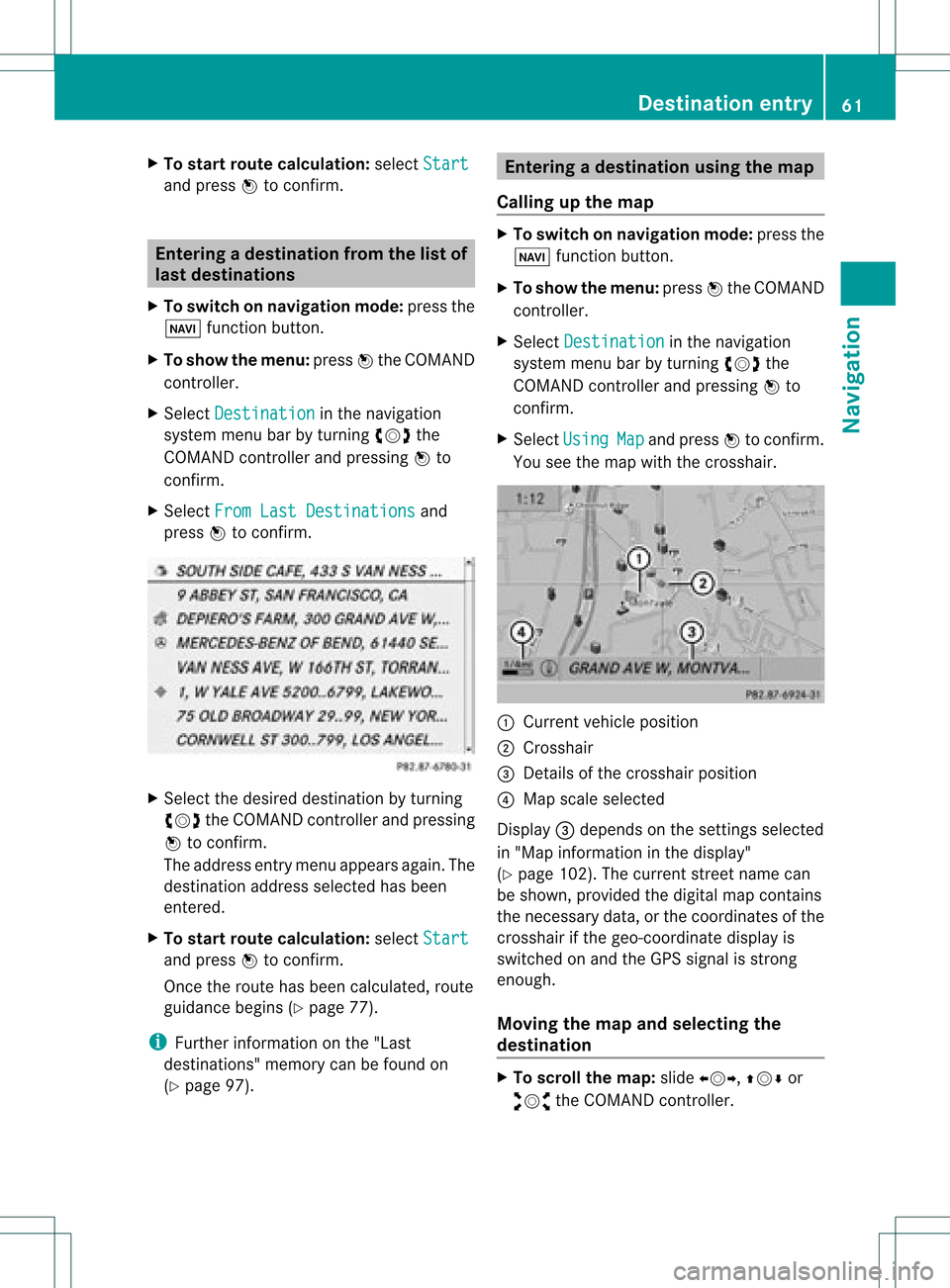
Yo usee themapwi th the cros shair. :
Curre ntveh iclepo sitio n
; Cross hair
= Deta ils of the cros shairpo sitio n
? Mapsca lesel ecte d
Dis play = depends onthe setti ngsselecte d
in "M ap info rma tionint he displa y"
(Y page 102). Thecurrent streetnamecan
be shown, provided thedigital mapcontains
the necessary data,orthe coordinates ofthe
crosshair ifthe geo-coordinate displayis
switched onand theGPS signal isstron g
enough.
Moving themap andselec tingthe
destination X
To scroll themap :slide XVY, ZVÆor
aVb theCOMAND controller. Des
tination entry
61Navigat ion Z
Page 64 of 234
X
To setthe map scale:as soon asyou turn
cVd theCOMAND controller,the scal ebar
app ears .
X Turn cVd untilthedesi redscal eis set.
Turni ngclockwi sezooms outfrom themap;
turning counter-clockwi sezooms in.
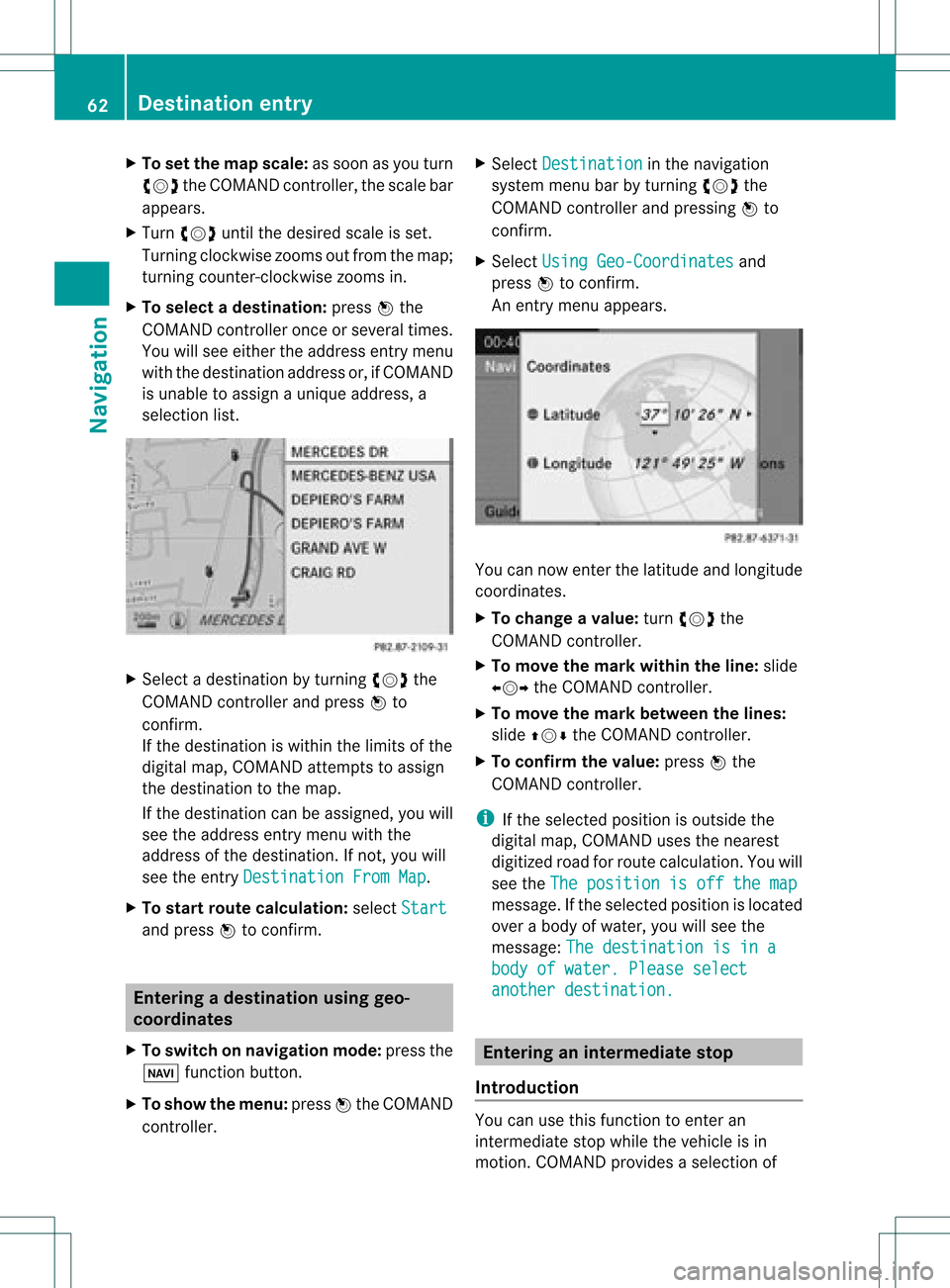
X To selectad estination: pressW the
COMA NDcontroller onceor seve raltim es.
You willsee either theaddres sent rymen u
with thedest inationaddres sor, ifCOMA ND
is unable toassign aunique address,a
selec tionlist. X
Selec tadestination byturn ingcVd the
COMAND controller and press Wto
con firm.
If the destin ationiswithin thelimits ofthe
digital map,COMAND attempts toassign
the destin ationtothe map.
If the destin ationcanbeassigned, youwill
see theaddress entrymenu withthe
address ofthe destin ation. Ifnot ,you will
see theentryDestin ationFromMap .
X To sta rtrout ecalculat ion:select Start and
press Wtocon firm. Entering
adesti nation usin ggeo-
coord inates
X To switch onnav igat ionmod e:pres sth e
Ø function butt on.
X To show themen u:pres sW theCOMA ND
con troller . X
Sele ctDes tination in
thenav igat ion
syst emmen ubar byturnin gcVd the
COMA NDcontroller andpres singW to
con firm.
X Sele ctUsi ngGeo-Coordinates and
pres sW tocon firm.
An entrymen uappears . You
cannowent erthelatit ude andlongitude
coo rdin ates .
X To cha nge avalu e:tur ncVd the
COMA NDcontroller .
X To mov eth ema rkwith intheline: slide
XVY theCOMA NDcontroller .
X To mov eth ema rkbetween thelines:
slide ZVÆ theCOMA NDcontroller .
X To confir mthevalu e:pres sW the
COMA NDcontroller .
i Ifth eselec tedposit ionisout side the
digit almap, COMA NDuses then earest
digitized roadforroute calculation .You will
see theThe position isoff themap message.
Ifthe selected positionislocated
over abody ofwater, youwillsee the
message: Thedestination isina body
ofwater. Pleaseselect another
destination. Entering
aninterm ediate stop
Introdu ction You
canusethis funct iontoenter an
interm ediate stopwhile thevehicle isin
motion .COMAND provides aselection of 62
Destination
entryNavigation
Page 65 of 234
predefin
eddestin ations ineight categories
for this purpose, e.g.FILLIN GSTATIO N or
CAFÉ .
When youhave entered yourintermediate
stop, COMAND automaticallyrecalc ulates
the route tothe main destin ation.
Entering predefined destinations X
To switch onnavigat ionmode: pressthe
Ø function button.
X To show themenu: pressWthe COMAND
con troller.
X Select Destin ation in
the navigat ion
system menubarbyturn ingcVd the
COMAND controller and pressin gW to
con firm.
X Select Stopov er and
press Wtocon firm.
Opt ion 1:the rout edoes nothave an
inter media testop. Int
ermediat estop categ ories
X Select acateg ory;seeoption 2.
Opt ion 2:the rout ealrea dyhas an
inter media testop.
X Select Change Stopover and
press Wto
con firm.
X To select acatego ry:select acatego ryby
turning cVdtheCOM AND controll erand
press ingWtoconfirm.
COM AND firstsearches inthe selected
catego ryfor desti nations along theroute .
COM AND thensearches fordesti nations ina
rad iusof app roxima tely60mifrom the
current vehicleposi tion.
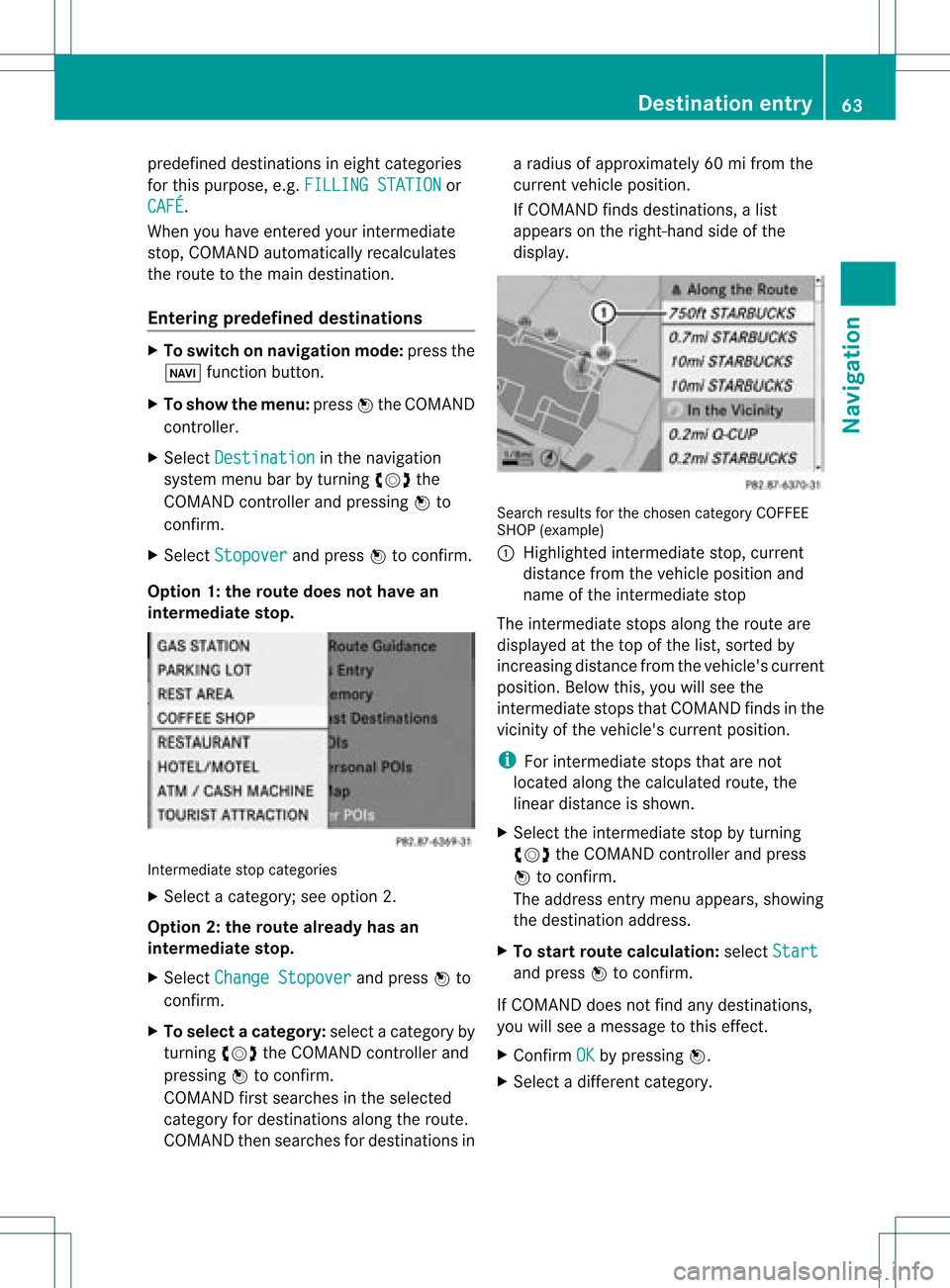
If COM AND finds destinations, alis t
app ears onthe right-hand sideof the
dis pla y. Search
resultsfor the chosen categoryCOFFEE
SHOP (example )
: Highl ighted intermed iate stop, current
dis tance fromthevehi cleposi tion and
name ofthe intermed iate stop
The intermed iate stops along theroute are
dis pla yedat the top ofthe list,sorted by
increa singdistance fromthevehi cle's current
posi tion. Belowthis, youwillsee the
intermed iate stops thatCOM AND finds inthe
vicini tyof the vehi cle's current position.
i For intermed iate stops thatarenot
loca tedalong thecalcu lated route ,the
line ardis tance isshow n.
X Sele ctthe intermed iate stop byturning
cVd theCOM AND controll erand press
W toconfirm.
The address entry menu appears ,show ing
the desti nation address.
X To start route calcul ation :sel ect Start and
press Wtoconfirm.
If COM AND doesnot find anydesti nations,
you willsee amessa getothis effect.
X Confi rmOK by
press ingW.
X Sele ctadiffe rent catego ry. De
stinati onentry
63Navigatio n Z
Page 66 of 234
Delet
inganinterme diat est op If
an inte rm ediat est op has already been
en tered ,you can dele teit.
X To swit chon navig ation mode: pressthe
Ø function button.
X To show theme nu:pre ssW theCOM AND
co ntro ller .
X Se lec tDes tination in
thenav igat ion
syst emmen ubar byturn ing cVd the
COM ANDc ontroller andpressing Wto
conf irm.
X Select Stopover and
press Wtoconf irm.
X Select Delete Stopover and
press Wto
conf irm.
COMAND deletestheinter mediate stop
and recalculates theroute tothe main
destinat ion. Entering
waypoints
Introdu ction You
canmap theroute yourself byenter ing
up totwo wayp oints. Thesequence ofthe
wayp oints canbechanged atany time.
i Aninter mediate stopisalwa ysbetween
the current position ofthe vehicle andthe
first wayp oint.
Creating waypoints X
To switch onnavigation mode:pressthe
Ø functionbutton .
X To show themenu: pressWthe COMAND
cont roller.
X Select Dest. in
the navigation system
menu barbyturnin gcVd theCOMAND
cont roller andpressing Wtoconf irm.
X Select Intermediate Destinations and
press Wtoconf irm.
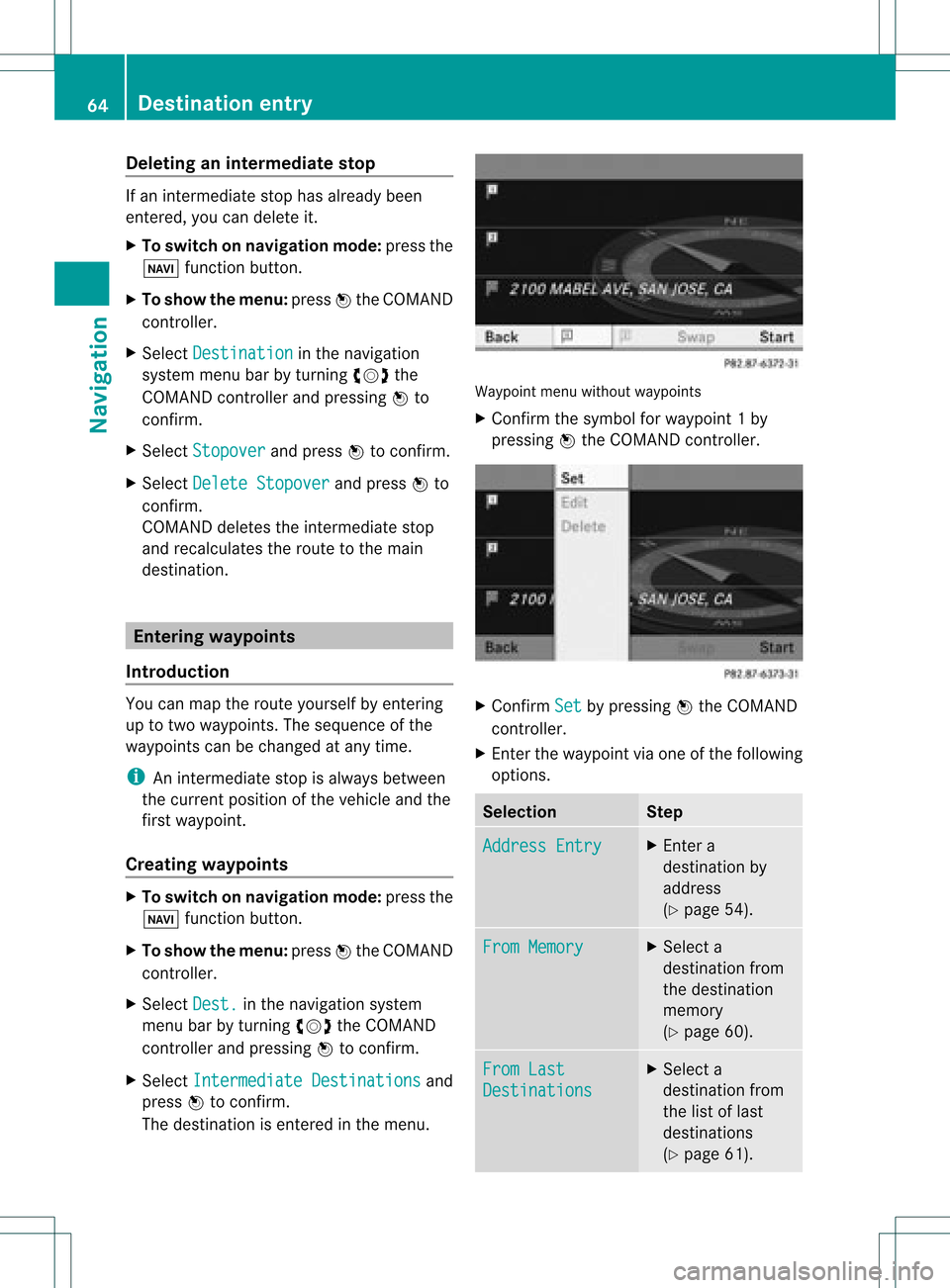
The destinat ionisenter edinthe menu. Waypoint
menuwithout waypoints
X Confirm thesymbol forwayp oint1by
pressin gW the COMAND controller. X
Confirm Set by
pressin gW the COMAND
con troller.
X En ter the waypoint viaone ofthe following
option s. Selection Step
Addres
sEntry X
En ter a
destin ationby
address
(Y page 54). From
Memory X
Select a
destin ationfrom
the destin ation
memor y
(Y page 60). From
Last Destin
ations X
Select a
destin ationfrom
the listoflast
destin ations
(Y page 61). 64
Destinat
ionentr yNavigat ion
Page 67 of 234
Selec
tion Step
From
POIs X
Ent erapoint of
interest
(Y page 66). From
Personal POIs X
Ent era
destination from
the personal
points ofinterest
(Y page 75). Using
Map X
Ent era
destination using
the map
(Y page 61). Using
Geo- Coordinates X
Ent era
destination using
the geo-
coordinates
(Y page 62). When
theentr yis complete, theway point
appea rs. X
To accept thewaypoint: confirmOK by
pressing W.
X To display thedetails: selectDetails by
turnin gcVd theCOMAND controller and
press Wtoconf irm.
X To make acall: select Call with
the
COMAND controller andpress Wto
conf irm. COMAND switchestotelephone
mode (Ypage 122). i
This menu itemisavaila bleifthe way point
has atelephone numberandamobile
phone isconn ected toCOMAND
(Y page 116).
X To call upthe map :select Map with
the
COMAND controller andpress Wto
conf irm.
X You canmove themap andselect the
destination.
X To store thewaypoint inthe destination
memory :select Presets with
the
COMAND controller andpress Wto
conf irm.
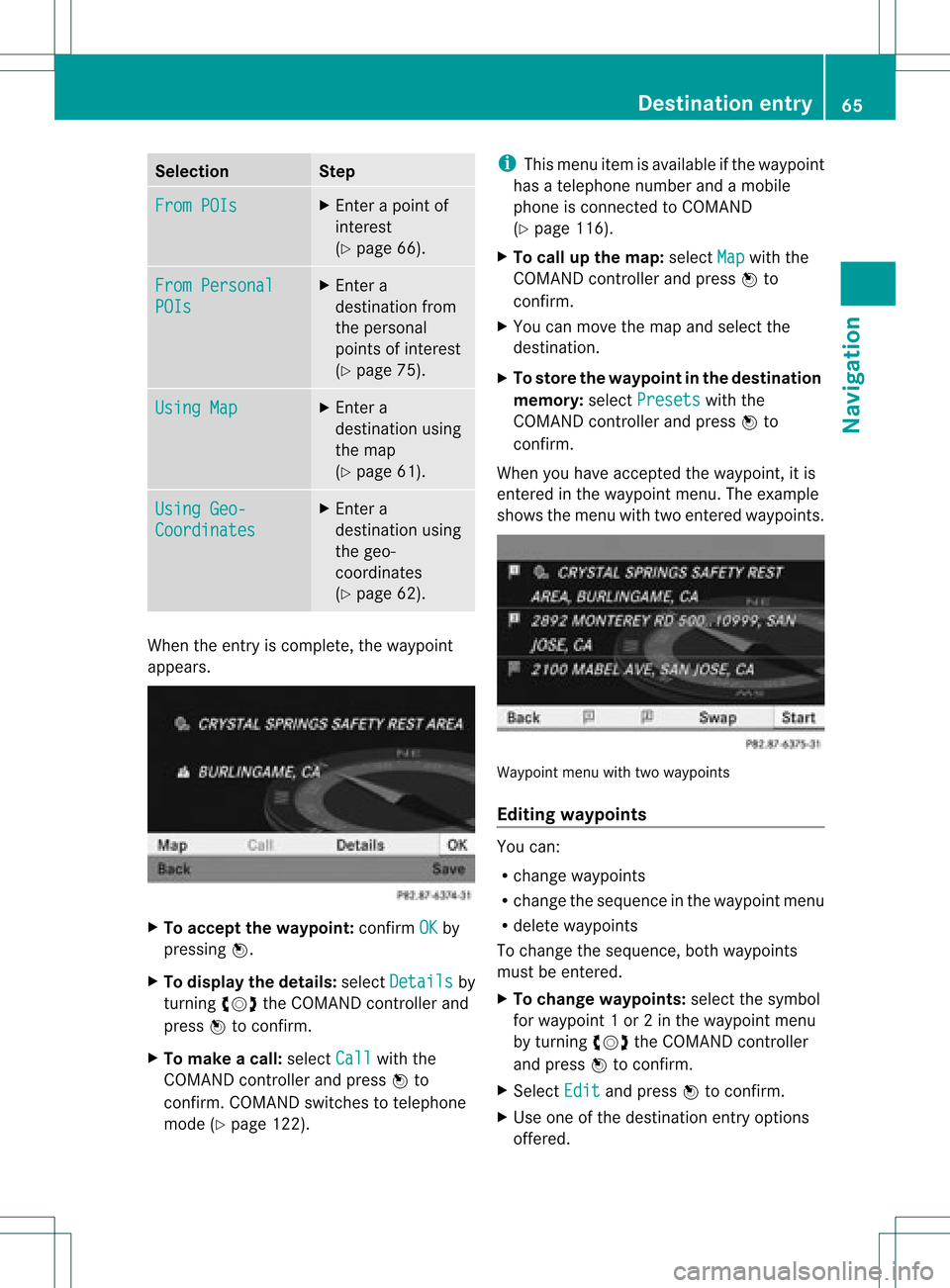
When youhave accepted theway point, itis
entered inthe way point menu. Theexample
shows themenu withtwoentered waypoints. Waypoi
ntmenu withtwowayp oints
Editing waypoints You
can:
R change waypoints
R change thesequence inthe way point menu
R delete waypoints
To change thesequence, bothwaypoints
must beentered.
X To change waypoints: selectthesymbol
for way point 1or 2in the way point menu
by turnin gcVd theCOMAND controller
and press Wtoconf irm.
X Select Edit and
press Wtoconf irm.
X Use oneofthe destination entryoptions
offered. Des
tinat ionentry
65Navigat ion Z
Page 68 of 234
X
To chang ethe seque nceof the
wa ypo ints: select Swap in
the waypoint
menu byturning cVd theCOMAND
contro ller and pressW toconfi rm.
The entri esaresw appe d.
X To del ete waypo ints: select the symbo l
for waypoint 1or 2in the waypoint menu
by turning cVd theCOMAND controller
and pressW toconfi rm.
X Sel ect Delete and
pressW toconfi rm.
i Youcan delete awa ypoint directl yaf ter
entry using thismenu item.
Ac ceptin gwa ypo ints forthe route X
Sel ect Start in
the waypoint menu by
tur ning cVd theCOMAND controller and
pre ssW toconfi rm.
The routeiscal cul ate dwi th the ente red
wa ypoints.
i Con t. is
displ ayed instea dof Sta rt wh
en
Cal culate AlternativeRoutes is
acti vated inthe navigati on menu
(Y page 82) ,op tio n2 . In
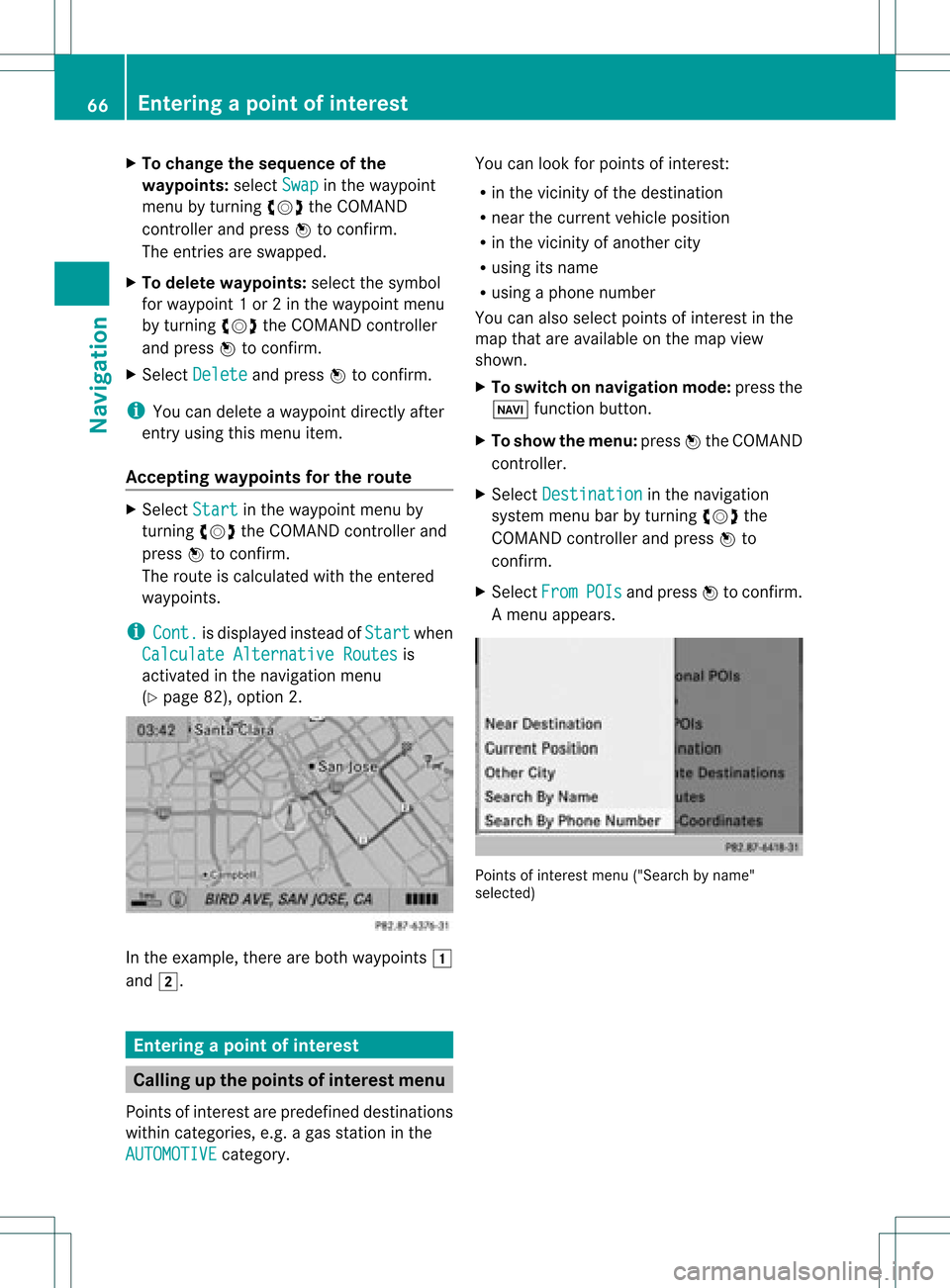
the exampl e,there areboth waypoints 1
and 2. Enterin
gap oint ofint eres t Callin
gup thepoint sof int eres tmenu
Poin tsof int eres tare prede fineddestina tions
withi ncate gor ies, e.g.ag asstatio nint he
AUTOMOTIVE category. You
canlook forpoints ofinterest :
R in the vicinity ofthe destination
R near thecurrent vehicleposition
R in the vicinity ofanother city
R using itsname
R using aphone number
You canalso select points ofinterest inthe
map thatareavaila bleonthe map view
shown.
X To switch onnavigation mode:pressthe
Ø functionbutton.
X To show themenu: pressWthe COMAND
cont roller.
X Select Destination in
the navigation
system menubarbyturning cVdthe
COMAND controller andpress Wto
confirm .
X Select From POIs and
press Wtoconfirm .
Am enu appears. Point
sof inter estmenu ("Search byname"
select ed) 66
Entering
apoint ofint eres tNavi gatio n