rear entertainment MERCEDES-BENZ E-Class 2016 W213 Comand Manual
[x] Cancel search | Manufacturer: MERCEDES-BENZ, Model Year: 2016, Model line: E-Class, Model: MERCEDES-BENZ E-Class 2016 W213Pages: 246, PDF Size: 6.7 MB
Page 5 of 246
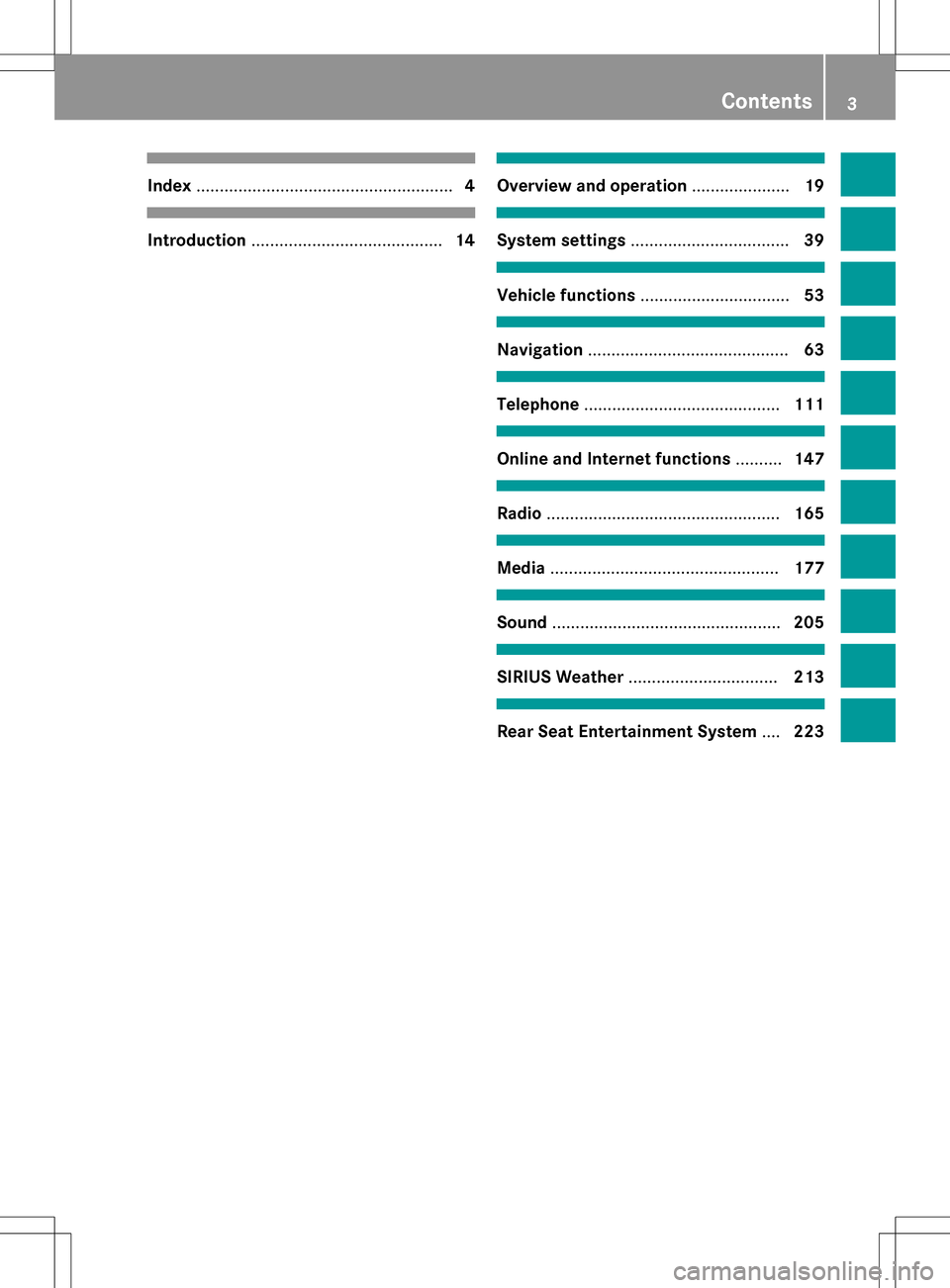
Index....................................................... 4
Introduction......................................... 14
Overview and operation.....................19
System settings .................................. 39
Vehicle functions................................ 53
Navigation........................................... 63
Telephone.......................................... 111
Online and Internet functions ..........147
Radio.................................................. 165
Media................................................. 177
Sound................................................. 205
SIRIUS Weather................................ 213
Rear Seat Entertainment System ....223
Contents3
Page 7 of 246
Starting playback if the Blue-
tooth®audio device has been
stopped ......................................... 194
Telephony ...................................... 114
Telephony notes ............................ 112
Buttons and controller ........................ 24
C
Call lists
Displaying details ........................... 135
Opening and selecting an entry ..... 135
Saving an entry in the address
book .............................................. 136
Camera
360° camera (COMAND) ................. 58
Rear view camera ............................ 59
Car pool lanes ...................................... 68
Category list (music search) ............ 188
CD
Fast forward/fast rewind ............... 185
Inserting ........................................ 182
Inserting/loading (DVD changer) ... 182
Inserting/loading (Rear Seat
Entertainment System) .................. 232
Notes on discs ............................... 181
Removing/ejecting (Rear Seat
Entertainment System) .................. 232
Selecting a track ............................ 185
Sound settings (balance, bass,
fader, treble) .................................. 206
CD mode
Playback options ........................... 184
Character entry
Phone book ...................................... 32
Characters
Entering (navigation) ........................ 33
Clear button ......................................... 25
Climate control
Ionization (COMAND) ....................... 56
COMAND
Active multicontour seat .................. 56
Basic functions ................................ 30
Components .................................... 20
Control panel ................................... 23
Controller ......................................... 24
Display ............................................. 21
Functions ......................................... 20 Multicontour seat ............................ 56
Seat functions .................................. 56
Switching on/off .............................. 30
COMAND display
Cleaning instructions ....................... 22
Setting ............................................. 40
Contacts
Deleting ......................................... 133
Importing ....................................... 133
Controller ............................................. 24
Cordless headphones
Changing batteries ........................ 229
Indicator lamp ................................ 227
Rear Seat Entertainment System ... 227
Selecting the screen ...................... 228
D
Date format, setting ............................ 43
Day design, setting ............................. 40
Delayed switch-off
Interior lighting ................................ 55
Delayed switch-off time
Setting (COMAND) ........................... 55
Destination
Saving to SD memory card .............. 99
Storing in the address book ............. 98
Destination (navigation)
Entering a destination using the
map ................................................. 78
Entering a point of interest .............. 74
Entering using geo-coordinates ....... 82
Entering using Mercedes-Benz
Apps ................................................ 82
Keyword search ............................... 72
Saving .............................................. 98
Selecting an address book con-
tact as a destination ........................ 74
Selecting from the list of last des-
tinations ........................................... 74
Destination/route download
Deleting a destination from the
server ............................................ 157
Displaying destinations in the
vehicle ........................................... 156
Displaying the vehicle identifica-
tion number (VIN) .......................... 157
Importing destinations ................... 157
Index5
Page 8 of 246
Placing a call at the destination ..... 156
Procedure and general informa-
tion ................................................ 155
Sending destinations to the
server ............................................ 155
Using a destination for route guid-
ance ............................................... 156
Using destinations .........................156
Dialing a number (telephone) ........... 119
Display
Selecting the design ........................ 40
Switching on/off .............................. 41
Displaying energy consumption
and generated electrical energy
(COMAND) ............................................ 55
DVD
Inserting/loading (DVD changer) ... 182
Inserting/loading (Rear Seat
Entertainment System) .................. 232
Notes on discs ............................... 181
Removing/ejecting (DVD
changer) ........................................ 183
Removing/ejecting (Rear Seat
Entertainment System) .................. 232
DVD video
Rear Seat Entertainment System ... 235
DYNAMIC SELECT
Configuration via the controller ....... 60
Configuration via the DYNAMIC
SELECT controller ............................ 60
Configuring individual drive pro-
gram ................................................ 59
Setting options ................................ 60
E
E-mailAnswering ...................................... 143
Calling up the settings menu ......... 138
Changing the name of the e-mail
account .......................................... 139
Configuring an e-mail account ....... 139
Configuring the e-mails displayed .. 139
Deactivating the e-mail function .... 139
Deleting ......................................... 145
Displaying details ........................... 141
Downloading e-mails manually ...... 140
Editing text templates .................... 144 Forwarding ..................................... 143
Inbox .............................................. 140
Reading .......................................... 140
Settings ......................................... 138
Storing the sender as a new entry
in the address book ....................... 144
Using a phone number in the text .. 144
Using text templates ...................... 143
Writing ........................................... 142
Entering the address (example) ......... 70
Entering the city .................................. 70
F
Factory setting (reset function) ......... 51
Favorites
Adding ............................................. 35
Deleting ........................................... 36
Displaying and calling up ................. 35
Moving ............................................. 36
Overview .......................................... 35
Renaming ......................................... 36
Favorites (Internet) ........................... 162
Favorites button .................................. 49
Fuel consumption (COMAND) ............ 56
G
Google™ Local Search
Calling up Local Search ................. 153
Entering a search position and
search term ................................... 154
Importing a destination/route ....... 154
Popular Searches ........................... 155
Search history ............................... 155
Using as the destination ................ 154
GPS reception ...................................... 64
Gracenote
®Media Database ............ 186
H
Handwriting recognition
Touchpad ......................................... 27
Harman kardon
®Logic 7®sur-
round sound system
Balance/Fader ............................... 208
Calling up the sound menu ............ 207
Equalizer ........................................ 208
Features ........................................ 207
6Index
Page 11 of 246
Settings for personal POIs ............... 83
Phone book
Adding a new contact .................... 125
Adding information to a contact .... 125
Automatically importing contacts
from the mobile phone .................. 126
Calling up ....................................... 123
Deleting a contact ......................... 127
Displaying the details of an entry ... 125
Entering characters ......................... 32
Saving a contact ............................ 126
Searching for a contact ................. 124
Symbol overview ............................ 124
Phone call
Dialing ........................................... 119
Picture viewer
Changing view ............................... 204
Displaying pictures ........................ 203
Exiting the picture viewer .............. 204
POI (navigation)
Category .......................................... 77
Defining the position for the POI
search .............................................. 76
Entering ........................................... 74
Selecting .......................................... 77
Previous destinations (navigation) .... 99
Q
Quick access for audio and tele-
phone
Changing the audio source .............. 30
Changing the station/music
track ................................................ 30
Sending DTMF tones ........................ 30
R
RadioDeleting a station .......................... 168
Displaying information ................... 169
Displaying station information ....... 169
Displaying the artist and track ....... 169
Overview ........................................ 166
Setting the waveband .................... 167
Sound settings (balance, bass,
treble) ............................................ 169
Storing stations ............................. 168
Switching on .................................. 166 Tagging music tracks (download-
ing/purchasing tracks from the
iTunes Store
®) ............................... 169
Radio station
Storing ........................................... 168
Read-aloud function
Automatic ........................................ 97
Read-aloud function for e-mails ....... 141
Reading out
Traffic reports on the route .............. 97
Real-time traffic reports ..................... 94
Rear Seat Entertainment System
Active COMAND source ................. 239
Adjusting sound settings ............... 230
Adjusting the brightness ................ 230
Adjusting the color ........................ 230
Adjusting the contrast ................... 230
AUX mode ...................................... 241
CD/DVD audio and MP3 mode ...... 232
Changing the batteries .................. 228
Changing the picture format .......... 231
Control menu ................................. 236
Cordless headphones .................... 227
Multiple users ................................ 230
Operating with the headphones ..... 229
Picture settings .............................. 230
System settings ............................. 231
Using the main loudspeaker .......... 229
Video DVD mode ........................... 235
Rear view camera
Displaying the image ........................ 59
Switching on/off (COMAND) ........... 59
Rear-compartment screens .............. 225
Receiving vCards ............................... 134
Redialing (telephone) ........................ 119
Remote control
Button lighting ............................... 226
Changing batteries ........................ 228
Rear Seat Entertainment System ... 225
Reserve fuel level
Switching the function on/off in
COMAND ......................................... 68
Resetting (fac
tory settings)
............... 51
Route (navigation)
Selecting an alternative route .......... 92
Index9
Page 12 of 246
Setting route options (avoiding:
highways, toll roads, tunnels, fer-
ries) ................................................. 67
Setting the route type (short
route, fast route, dynamic route or
economic route) ............................... 66
Starting calculation .......................... 71
Route guidance
Continue .......................................... 91
Freeway information ........................ 89
General notes .................................. 87
Lane recommendations ................... 88
Off-road ........................................... 93
Traffic reports .................................. 94
S
Safety notesAudio CD and MP3 mode ............... 179
Using the telephone ....................... 112
Satellite radio
Displaying information ................... 174
Overview ........................................ 171
Registering .................................... 170
Switching to ................................... 171
SatRadio
Channel list updates ...................... 174
Memory functions .......................... 172
Music and sports alerts ................. 173
Notes ............................................. 169
Selecting a category ...................... 171
Selecting a channel ....................... 171
Tagging music tracks ..................... 174
Screen
Selecting for the remote control .... 225
SD memory card
Ejecting .......................................... 184
Inserting ........................................ 183
Inserting/removing ........................ 183
Seat cushion
Adjusting (COMAND) ....................... 57
Seats
Active multicontour seat
(COMAND) ....................................... 57
Adjusting the lumbar support
(COMAND) ....................................... 56
Balance (seat heating) ..................... 57
Massage function (COMAND) .......... 57 Massage programs (COMAND) ........ 57
Resetting settings ............................ 58
Seat functions (COMAND) ............... 56
Selecting for adjustment
(COMAND) ....................................... 56
Setting the driving dynamics
(COMAND) ....................................... 57
Selecting stations
Radio ............................................. 167
Sending DTMF tones ......................... 121
Setting access data
Online and Internet ........................ 150
Setting the audio format
Rear Seat Entertainment System ... 238
Setting the language
COMAND ......................................... 48
Rear Seat Entertainment System ... 238
Setting the night design ..................... 40
Setting the text reader speed ............ 44
Setting the volume
Telephone calls ................................ 31
Settings
Sound settings ............................... 206
Short message
see Text messages (SMS)
SIRIUS weather display
5-day forecast ................................ 215
Daily forecast ................................. 215
Detail information .......................... 215
Information chart ........................... 215
Selecting a loca
tion for the
weather forecast ............................ 216
Switching on/off ........................... 215
Weather map ................................. 218
SIRIUS weather map
Storm Guide .................................. 222
Storm Watch Box ........................... 221
Sound
Switching on/off .............................. 31
Sound settings
Balance/fader ............................... 206
Calling up the sound menu ............ 206
Equalizer ........................................ 206
Speed dial
Deleting ......................................... 137
Setting up ...................................... 137
State/province
Selecting .......................................... 70
10Index
Page 225 of 246
Your COMAND equipment................224
Overview ............................................ 224
Basic functions ................................ .229
Syste msettings ................................ 231
Audio CD/DV Dan dMP 3mode ........ 232
Video DVD mode .............................. .235
Active COMAND medi asource
mode .................................................. 239
AUX mode .......................................... 241
223
Rear Seat Entertainment System
Page 226 of 246
Your COMANDequipment
These operatin ginstruction sdescribe all
standar dan doptional equipmen tavailable
fo ryour COMAN Dsyste mat th etime of pur -
chase. Country-specifi cdifference sare pos -
sible. Please note that your COMAN Dsyste m
may no tbe equipped wit hall th efeature s
described .Thi salso applies to safety-relevan t
systems an dfunctions. Therefore, th eequip -
men ton your COMAN Dsyste mmay diffe r
from that in th edescription san dillustrations.
Should you hav ean yquestion sconcernin g
equipmen tan doperation ,pleas econsult an
authorized Mercedes-Ben zCenter.
Overview
Important safet ynotes
GWARNING
The CD/DVD drive is aclass 1lase rproduct.
If you ope nth ehousin gof th eCD/DVD drive,
there is aris kof exposure to invisible lase r
radiation .Thi slase rradiation could damage
your retina. There is aris kof injury.
Never ope nth ehousing. Always hav emain -
tenanc ean drepair wor kcarrie dout at aquali -
fie dspecialis tworkshop .
GWARNING
If objects suc has headphones/headset sor
external audio/video sources are no tsecure d
in th epassenger compartment, they can be
flun garound an dhit vehicle occupants .There
is aris kof injury, fo rexample in th eevent of
sudden braking or asudden change in direc -
tion .
Always stow these items or similar objects
carefully so that they canno tbe flun garound ,
fo rexample in alockable vehicle stowag e
compartment.
Equipment
Observ ethat arange of Rear Seat Entertain -
men tSystems are available fo rMercedes -
Benz vehicles .In this Operator's Manual, th e
Rear Seat Entertainmen tSyste mCode 86 4is
used fo rillustration purposes. If you hav e a
differen tRear Seat Entertainmen tSyste min
your vehicle, pleas erefer to th emanufactur-
er' soperatin ginstructions.
Component s
The Rear Seat Entertainmen tSyste m
includes :
Rtwoscreens fo rth erea rbehin dth efront-
seat head restraints
Rtw oremot econtrols
RaCD/DVD drive
RAU Xjack son bot hrea rscreens (AUX dis -
play) an don th eCD/DVD drive (AUX drive)
Rheadphone sfo reac hrea rscree n
Rtwoset sof cordless headphone s
224Overview
Rear Seat Entertainment System
Page 227 of 246
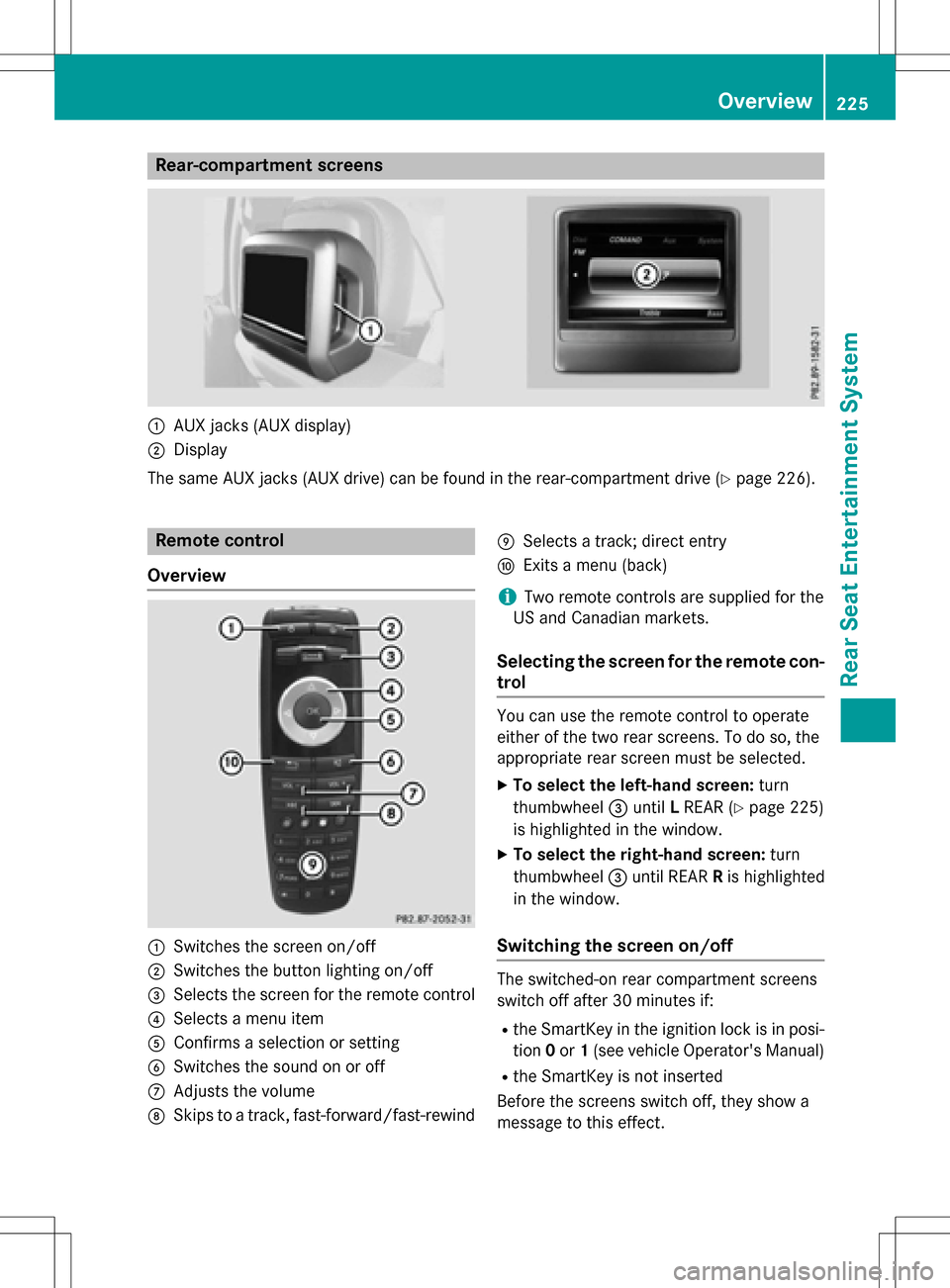
Rear-compartment screens
:AUX jacks (AUX display)
;Display
The same AUX jacks (AUX drive) can be found in the rear-compartment drive (
Ypage 226).
Remote control
Overview
:Switches the screen on/off
;Switches the button lighting on/off
=Selects the screen for the remote control
?Selects a menu item
AConfirms a selection or setting
BSwitches the sound on or off
CAdjusts the volume
DSkips to a track, fast-forward/fast-rewind
ESelects a track; direct entry
FExits a menu (back)
iTwo remote controls are supplied for the
US and Canadian markets.
Selecting the screen for the remote con-
trol
You can use the remote control to operate
either of the two rear screens. To do so, the
appropriate rear screen must be selected.
XTo select the left-hand screen: turn
thumbwheel =until LREAR (
Ypage 225)
is highlighted in the window.
XTo select the right-hand screen: turn
thumbwheel =until REAR Ris highlighted
in the window.
Switching the screen on/off
The switched-on rear compartment screens
switch off after 30 minutes if:
Rthe SmartKey in the ignition lock is in posi-
tion 0or 1(see vehicle Operator's Manual)
Rthe SmartKey is not inserted
Before the screens switch off, they show a
message to this effect.
Overview225
Rear Seat Entertainment System
Z
Page 228 of 246
You can switch the screens back on. How-
ever, this will discharge the starter battery.
XPoint the remote control at the rear-com-
partment screen which has been selected
for remote operation.
XPress button:on the remote control
(
Ypage 225).
The rear screen switches on or off.
Switching the button lighting on/off
XPress button ;on the remote control
(
Ypage 225).
Depending on the previous status, the but-
ton lighting is switched on or off.
iIf you do not use the remote control for
about 15 seconds, the button lighting
switches off automatically.
Switching the sound on or off
XPress button Bon the remote control
(
Ypage 225).
The sound is switched on/off.
Selecting a menu/menu item and con-
firming your selection
XSelect a menu/menu item using the
=;9: buttons on the
remote control and press the 9button to
confirm.
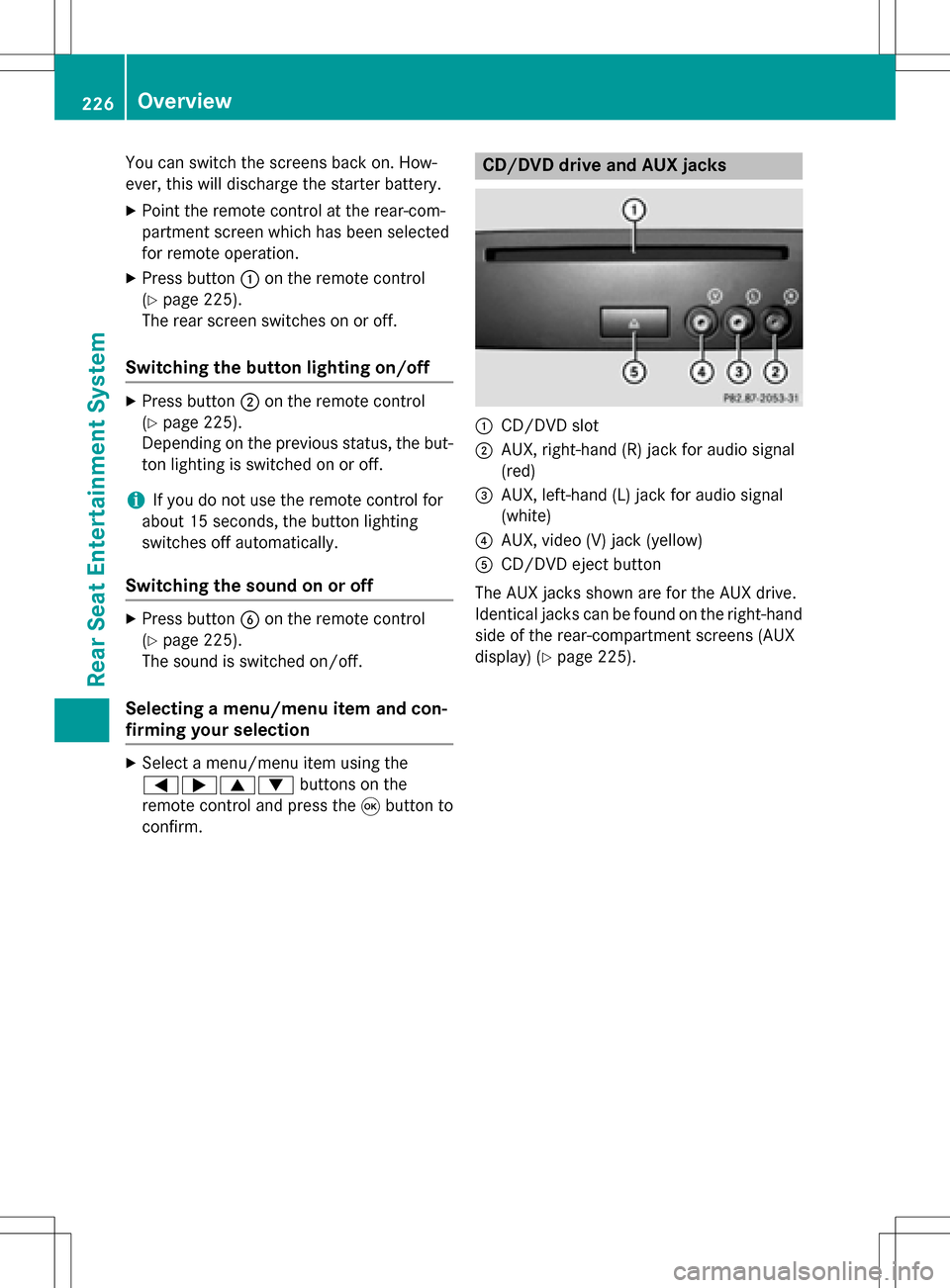
CD/DVD drive and AUX jacks
:CD/DVD slot
;AUX, right-hand (R) jack for audio signal
(red)
=AUX, left-hand (L) jack for audio signal
(white)
?AUX, video (V) jack (yellow)
ACD/DVD eject button
The AUX jacks shown are for the AUX drive.
Identical jacks can be found on the right-hand
side of the rear-compartment screens (AUX
display) (
Ypage 225).
226Overview
Rear Seat Entertainment System
Page 229 of 246
Cordless headphones
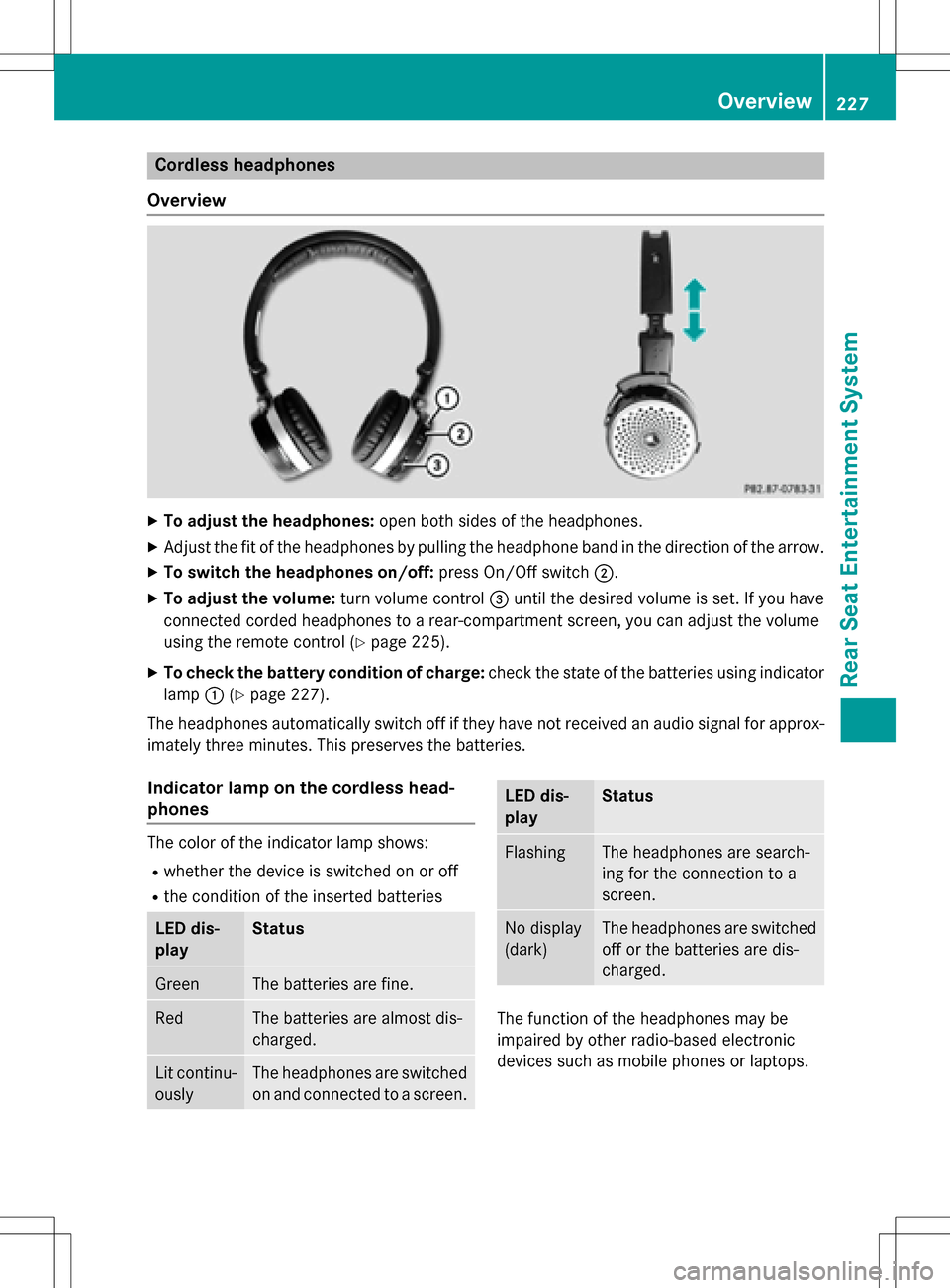
Overview
XTo adjust the headphones: open both sides of the headphones.
XAdjust the fit of the headphones by pulling the headphone band in the direction of the arrow.
XTo switch the headphones on/off: press On/Off switch;.
XTo adjust the volume: turn volume control=until the desired volume is set. If you have
connected corded headphones to a rear-compartment screen, you can adjust the volume
using the remote control (
Ypage 225).
XTo check the battery condition of charge: check the state of the batteries using indicator
lamp :(
Ypage 227).
The headphones automatically switch off if they have not received an audio signal for approx-
imately three minutes. This preserves the batteries.
Indicator lamp on the cordless head-
phones
The color of the indicator lamp shows:
Rwhether the device is switched on or off
Rthe condition of the inserted batteries
LED dis-
playStatus
GreenThe batteries are fine.
RedThe batteries are almost dis-
charged.
Lit continu-
ouslyThe headphones are switched
on and connected to a screen.
LED dis-
playStatus
FlashingThe headphones are search-
ing for the connection to a
screen.
No display
(dark)The headphones are switched
off or the batteries are dis-
charged.
The function of the headphones may be
impaired by other radio-based electronic
devices such as mobile phones or laptops.
Overview227
Rear Seat Entertainment System
Z