ECO mode MERCEDES-BENZ E CLASS 2020 User Guide
[x] Cancel search | Manufacturer: MERCEDES-BENZ, Model Year: 2020, Model line: E CLASS, Model: MERCEDES-BENZ E CLASS 2020Pages: 550, PDF Size: 20.08 MB
Page 163 of 550
Plug-in
hybrid: obser vetheno tesin theSupple‐
ment .Ot her wise, youma yfa ilto recogni zedan‐
ge rs.
Mer cede s-AMG vehicl es:obse rveth eno tesin
th eSupplement .Ot her wise, youma yfa ilto rec‐
ogni zedangers. Gear
shiftrecomm endation Mer
cedes -AMG vehicl es:obse rveth eno tesin
th eSupplement .Ot her wise, youma yfa ilto rec‐
ogni zedangers.
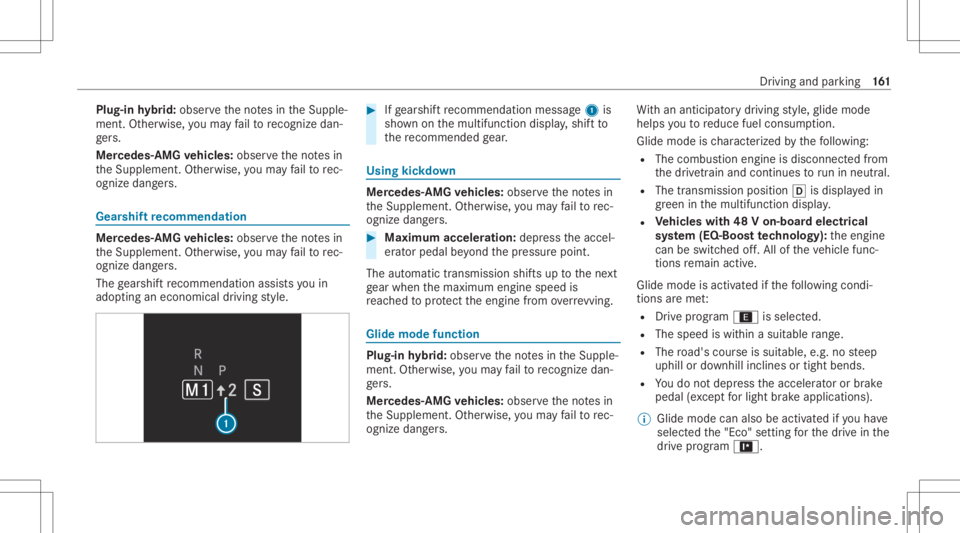
The gearshif tre comme ndation assists youin
adop tingan eco nomic aldrivin gst yle. #
Ifge arshif tre comme ndation mess age1 is
sho wnonthemultifunc tiondispla y,shif tto
th ere comme ndedgear. Using
kickdow n Mer
cede s-AMG vehicl es:obse rveth eno tesin
th eSupplement .Ot her wise, youma yfa ilto rec‐
ogni zedangers. #
Maxi mum acceler atio n:dep ress theaccel‐
er ator pedal beyond thepr essur epoint .
The automatic transmiss ionshiftsup tothene xt
ge ar when themaximum enginespeedis
re ac hed toprotect theengine from overrev ving. Glide
mode functio n Plug-i
nhy brid: obser vetheno tesin theSupple‐
ment .Ot her wise, youma yfa ilto recogni zedan‐
ge rs.
Mer cede s-AMG vehicl es:obse rveth eno tesin
th eSupplement .Ot her wise, youma yfa ilto rec‐
ogni zedangers. Wi
th an ant icip ator ydr ivin gst yle, glide mode
helps youto reduce fuelconsum ption.
Glide mode isch aract erize dby thefo llo wing:
R The com bustion engin eis disco nnect edfrom
th edr ivet ra in and continues torunin neu tral .
R The trans mis sion positio n005B isdispl ayed in
gr een inthemultifunc tiondispla y.
R Vehicl eswith 48Von-b oard electrical
sy stem (EQ-B oostte ch nology): theengine
can beswitc hedoff.All oftheve hicle func‐
tions remain active.
Gli de mode isactiv ated ifth efo llo wing condi‐
tion sar eme t:
R Drive pr ogr am ; isse lect ed .
R The spee dis within asuit able rang e.
R The road's courseissuit able, e.g.no steep
uphill ordownhill inclinesortight bends.
R Youdo notdepr esstheaccelera toror brak e
peda l(e xc ep tfo rlig ht brak eapp lications).
% Glide mode canalsobe activ ated ifyo uha ve
select edthe"Eco" setting forth edr ive in the
dr ive pr og ram =. Dr
iving andparking 16
1
Page 175 of 550

Inf
orma tion ondetectin gda ma geon a
pa rked vehicl e If
acolli sion isde tected whe nth eto w- aw ay
alar misarmed onaloc kedve hicle, youwill
re cei veano tificat ion inthemultimedia system
when youswit chon theignition .
Yo uwill recei veinformatio nabout thefo llo wing
point s:
R The area oftheve hicle that ma yha ve been
damag ed.
R The forc eof theim pact.
The follo wing situat ionscanlead toinadv ertent
acti vatio n:
R The parked vehicle ismo ved, e.g. inatw o-
st or yga rage .
% Dea ctivateth eto w- aw ay alar minorder to
pr eve ntina dvertent acti vatio n.Ifyo udeac ti‐
va te theto w- aw ay alar m,damag ede tection
wi llal so be dea ctivated.
% Inthecase ofsevere batt erydisc harging,
th efunc tion forde tecting damag eon a pa
rked vehicle isaut omaticall ydeactiv ated
to facil itat eth ene xt engine star t.
Sy stem limit s
De tection maybe restrict ed inthefo llo wing sit‐
uation s:
R The vehicle isdamag edwithout impact, e.g.
if an outside mirroris torn offor thepaint is
damag edbyake y.
R Impact occur sat low speed .
R The electr icpar king brak eis no tappl ied. No
teson par king theve hicl efo ran extended
per iod If
yo ulea vetheve hicle parkedfo rlong erthan six
we eks,itma ysuf ferdama gethro ugh disus e.
The 12Vbatt eryma yalso beimpair edordam‐
ag ed byhea vydisc harging.
% Further information canbeobt ained ata
qu alif ied spec ialistwo rkshop.
Plug-in hybrid: obser vetheno teson thehigh-
vo ltag ebatt eryin theSupplement .Ot her wise,
yo uma yfa ilto recogni zedangers. St
andb ymode (ext ens ion ofthe star terbat‐
te ry 's per iod out ofuse) St
andb ymode function
% This function isno tav ailable forall model s.
If standb ymode isact ivat ed, energyloss willbe
min imiz eddur ing ex tende dpe riods ofnon- oper‐
ation.
St andb ymode isch aract erize dby thefo llo wing:
R thest ar terbatt eryis preser ved.
R themaximum non-opera tionaltime appear s
in themedia display.
R thecon nect iontoonline services isint erru p‐
te d.
R theAT A(anti-t heftal ar m system) isno tav ail‐
able.
R theint erior motion sensor andtow- aw ay
alar mfun ction sar eno tav ailable.
R thefunc tion forde tecting damag eon a
pa rked vehicle isno tav ailable. Dr
ivin gand parking 17
3
Page 193 of 550
The
driven speed isadjus tedwhen theve hicle is
le ve lwit hth etraf fic sig nat thelat est.In the
case ofsig ns indi cati ngentr yint oan urb anarea ,
th espeed isadap tedaccor dingtothespeed
per mitt edwithin theurban area. The speed limit
displa yin theIns trument Displayis alw aysupda ‐
te dwhen theve hicle isleve lwit hth etra ffic sign .
If th er eis no speed restriction onanunlimited
st re tchof road (e.g.on afree wa y), there com‐
mend edspe edisau tomatical lyadop tedas the
st or ed speed. Thesystem uses thespeed stor ed
on anunlimit edstre tchof road asthere com‐
mend edspe ed. Ifyo udo notalt er thestor ed
speed onanunlimit edstre tchof road, there c‐
omme ndedspeedis80 mph(1 30 km/h) .
If Ac tiveDis tance AssistDIS TRONI Cha sbe en
pu tint opa ssi ve mode bypressing theacceler a‐
to rpeda l,onl yspee dlimi tswhi charehigh er
th an these tspeed areadop ted.
Ac tiveSpe edLimi tAssi stisonl yan aid. The
dr iver isresponsible forke eping asaf edis tance
fr om theve hicle infront, forve hicle speed and
fo rbr aking ingood time. Themaximu mper missi ‐
ble spee dals odepe ndsonfact or ssu ch asthe
ro ad sur face and traf fic condi tions. Sy
stem limit s
Te mp oraryspeed restrictions (e.g.fo ra cer tain
tim eor due towe ather condition s)can notbe
pr oper lyde tected bythesy stem. Themaximum
per missible speedapplying toave hicle witha
tr ailer isno tde tected bythesy stem. Inthese sit‐
uations youmus tadj ustyo ur spee dyo urself . &
WARNIN GRisk ofacci dent dueto Active
Spe edLimi tAssi stadap tingth eve hicle's
speed
The speed adoptedby ActiveSpe edLimi t
Assi stma ybe toohigh orincor rect insome
indi vidualcase s,su ch as:
R Inthewe tor infog
R When towing atrailer #
Ensur eth at thedr iven speed complies
wit htraf fic re gulations. #
Adjus tth edr iving speed tosuit current
tr af fic and weather condition s. Fu
nction ofrout e-base dspee dadap tation %
The follo wing function iscoun try- dependen t
and onlyav ailable incon junction withth e
Dr iving Assi stanc ePa ckag e.
When ActiveDis tance AssistDIS TRONI Cis acti ‐
va ted, theve hicle speed willbeadjus tedaccor d‐
ing lyto thero uteev ent sahead. Dependingon
th edr ive pr og ram sele cted, theve hicle negoti‐
at es aro uteeve ntaheadin afue l-saving, com ‐
fo rtable ordynam icman ner.When thero ute
eve nthasbe en passe d,theve hicle acceler ates
ag ain tothestor ed speed. Thesetdis tance to
th eve hicle infront, vehicles detected aheadand
spe edrestrictions aheadar eta ke nint oacco unt.
Ro ute-based speedadap tatio ncan beconf ig‐
ur ed inthemultimedia system (/ page19 2).
The follo wing routeeve nts areta ke nint o
acco unt:
R Bend s
R T-int ersect ions,tr af fic cir cle sand tollst a‐
tio ns
R Turnsand exits Dr
ivin gand parking 19
1
Page 195 of 550
Ac
tiv eSte ering Assis t Fu
nction ofActiv eSte ering Assis t
% The follo wing function iscoun try- dependen t
and onlyav ailable incon junction withth e
Dr iving Assi stanc ePa ckag e.
Ac tiveSt eer ing Assis tis onl yav ailable uptoa
speed of130mp h(210 km/h) .The system helps
yo uto stay inthecent erofthelane bymeans of
moder atesteer ing interve ntio ns.Dep endingon
th espeed driven, ActiveSt eer ing Assis tuses the
ve hicles ahead andlane markings asare fer‐
ence.
% Dependi ngon thecount ry,in thelowe r
speed rang eAc tiveSt eer ing Assis tcan use
th esur round ingtraf fic as are fere nce. Ifnec‐
ess ary, Ac tiveSt eer ing Assis tcan then also
pr ov ide assis tance when drivi ng outsid eth e
cent erofthelane toform are scue lane, for
ex am ple.
When thesy stem isactiv elysteer ing, theà
symbol issho wningreen inthemultifunc tion
displa y.
If th ede tection oflane mar kings andvehicles
ahead isim pair ed,ActiveSt eer ing Assis t switc
hestopassiv emode. Thesystem prov ides
no suppor tin this case. During thetra nsit ion
fr om activ eto passiv est atus ,th eà symbol is
sho wnasenlar gedand flashin g.On ce thesy s‐
te m ispass ive, theà symbol issho wnas
gr ay inthemultifunc tiondispla y.
Ste ering and touc hde tection
The driver isrequ ired tokeep their hands onthe
st eer ing wheel atall times andbeable tointer‐
ve ne atanytime tocor rect thecour seofthe
ve hicle andkeep itin lane. Thedriver mus t
ex pect ach ang efrom active to passiv emode or
vice versaat anytim e. If
th esy stem detects that thedr iver has not
st eer edtheve hicle fora consider ableper iod of
time orhas remo vedth eir hands from thesteer‐
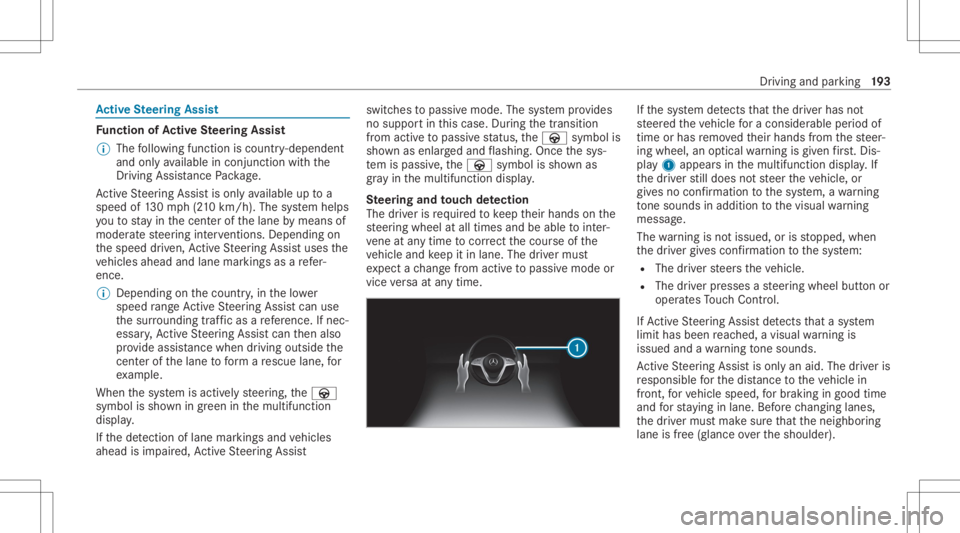
ing wheel, anoptical warning isgiv en firs t. Dis ‐
pl ay 1 appear sin themultifunc tiondispla y.If
th edr iver still does notst eer theve hicle, or
giv es no conf irmation tothesy stem, awa rning
to ne sou nds inad ditio nto thevisual warning
mess age.
The warning isno tissued, orisstopped, when
th edr iver giv es con firm atio nto thesy stem:
R The driver steer sth eve hicle.
R The driver presses ast eer ing wheel buttonor
oper ates Touc hCon trol.
If Ac tiveSt eer ing Assis tde tects that asy stem
limit hasbeen reac hed, avisual warning is
issued andawa rning tone sou nds.
Ac tiveSt eer ing Assis tis onl yan aid. Thedriver is
re sponsible forth edis tance totheve hicle in
fr ont, forve hicle speed, forbr aking ingood time
and forst ay ing inlane. Beforech ang inglane s,
th edr iver mus tmak esur eth at theneighbor ing
lane isfree (glance overth eshoulder). Dr
iving andparking 19
3
Page 238 of 550
St
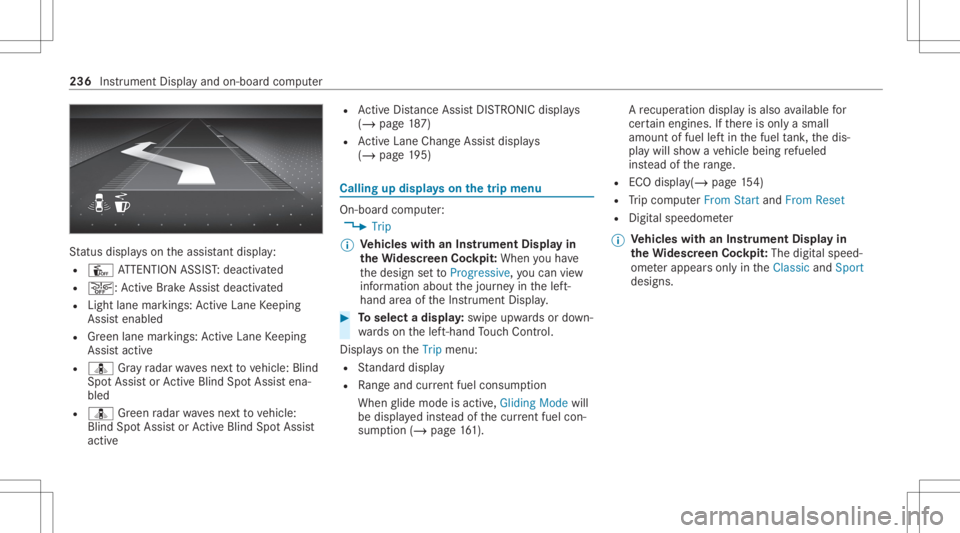
atus displa yson theassis tant displ ay:
R Û ATTENTION ASSIST: deactiv ated
R 00D4: ActiveBr ak eAssi stdeactiv ated
R Light lanemarkings: ActiveLa ne Keeping
Assis tenabled
R Green lane marking s:Ac tiveLa ne Keeping
Assis tactiv e
R ¸ Gray radar wavesnext to vehicle: Blind
Spo tAssis tor ActiveBli nd Spo tAssi stena‐
bled
R ¸ Green radar wavesne xt to vehicle:
Blind SpotAssis tor ActiveBli nd Spo tAssi st
act ive R
ActiveDis tance AssistDIS TRONI Cdisp lays
( / pag e18 7)
R ActiveLa ne Chang eAssi stdispla ys
( / pag e19 5) Ca
lling up displ ayson thetrip menu On
-bo ardcom puter:
4 Trip
% Ve
hicl eswith anIns trument Displayin
th eWi des cree nCo ckpit: Whe nyo uha ve
th edesign setto Progressive ,yo ucan view
inf ormat ionabout thejour neyin thelef t-
hand area oftheIns trument Display. #
Toselect adispla y:swipe upwards ordown‐
wa rdson thelef t-hand Touc hCon trol.
Dis playson theTrip menu:
R Standar ddispla y
R Rangeand current fue lconsu mption
Wh englide mode isact ive, Gliding Modewill
be displa yedins tead ofthecur rent fue lcon‐
su mp tion(/ page 161). A
recup erati on displ ayisalso available for
cer tain engin es.Ifth er eis onl ya small
amount offuel leftin thefuel tank ,th edis‐
pla ywill showave hicle being refuel ed
ins tead ofthera ng e.
R ECOdispl ay(/ pag e15 4)
R Trip com puterFro mStart and FromReset
R Digit alspeedom eter
% Ve
hicl eswith anIns trument Displayin
th eWi des cree nCo ckpit: The digit alspe ed‐
ome terapp earsonly intheClassic andSport
designs. 236
Instrument Displayand on-boar dcom puter
Page 244 of 550
#
Toselect ase tting: swipe upwards ordown‐
wa rdson thelef t-hand Touc hCon trol. #
Press thelef t-hand Touc hCon trol. #
Toadjus ta va lue: swipe upwards ordown‐
wa rdson thelef t-hand Touc hCon trol. #
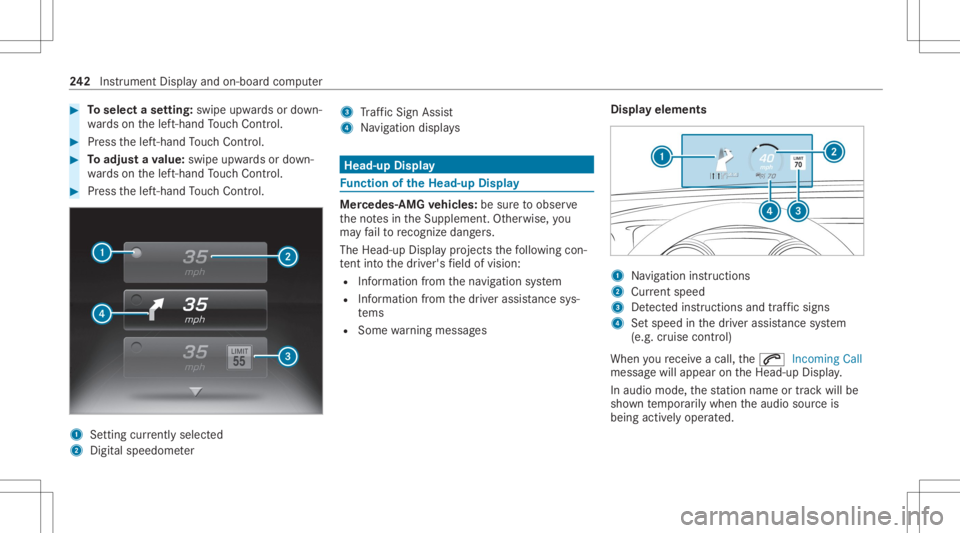
Press thelef t-hand Touc hCon trol. 1
Setting currently select ed
2 Digital spe edome ter 3
Traf fic Sign Assist
4 Navig ation displays Head-up
Display Fu
nction oftheHead -upDispla y Mer
cedes- AMGvehicl es:besur eto obser ve
th eno tesin theSupplement .Ot her wise, you
ma yfa ilto recogni zedangers.
The Head-upDisp lay pr ojects thefo llo wing con‐
te nt intoth edr iver's field ofvision:
R Information from thena vig ation system
R Information from thedr iver assis tance sys‐
te ms
R Some warning mess ages Displa
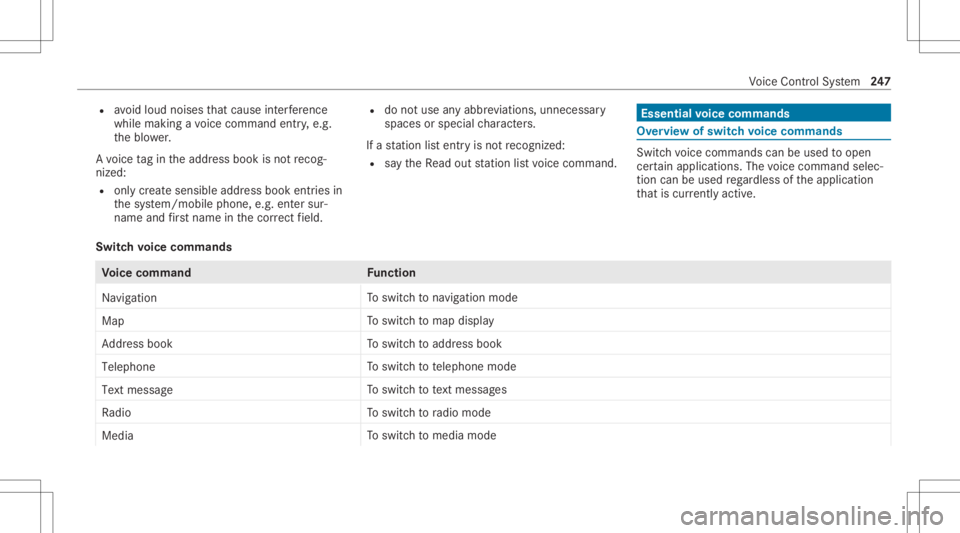
yelement s 1
Navig ation instructions
2 Current speed
3 Detected instructi ons and traf fic sig ns
4 Setspe edinthedr iver assis tance system
(e.g. cruise control)
When youre cei veacall, the0061 Incoming Call
messag ewill appear ontheHead-up Display.
In aud iomode, thest atio nnam eor trac kwill be
sho wntemp orarily when theaudio sourceis
being activelyoper ated. 24
2
Instrument Displayand on-boar dcom puter
Page 249 of 550
R
avoid loud noises that caus eint erfere nce
wh ile ma king avo ice com mand entry,e.g.
th eblo wer.
A vo ice tagin theaddr essbook isno tre cog‐
nized :
R only crea te sensible addressbook entriesin
th esy stem/mo bilephone, e.g.entersur‐
name andfirs tnam ein thecor rect field. R
donotuse anyabbr eviation s,unn eces sary
spaces orspec ialcharact ers.
If ast atio nlis tent ryisno tre cogni zed:
R sayth eRead outstationlistvoice com mand . Essentia
lvo ice comm ands Ov
ervie wof switc hvo ice comm ands Swit
chvoice com mand scan beused toopen
cer tain applicat ions.The voice com mand selec‐
tion canbeused rega rdless oftheapplication
th at iscur rently active.
Switc hvo ice comm ands Vo
ice comm and Function
Navigation To
switc hto navig ation mod e
Ma p To
switc hto map display
Address book To
switc hto addr essbook
Telep hone To
switc hto telephon emode
Text mess age To
switc hto text mes sage s
Radio To
switc hto radio mode
Media To
switc hto media mode Vo
ice Cont rolSy stem 24
7
Page 291 of 550
The
EmpireSt ateBuild inghas this languag e
depen dent3wo rdaddr ess:
R English: parade.he lp.bleat
R Frenc h:commu n.verbe.bisq uer
R Spanish: suertes.dig a.pesca
3 wo rdaddr esse sar euniq ue,easy to
re member andsuffice formos tro utin eappli‐
cat ions.
Yo ucan conve rtaddr esse sto 3wo rd
addr esse sand backag ain:
R atthewe bsit ehtt p:// what3w ords.c om
R inthewhat3w ords apps
Selecting ades tinat iononthema p
Multi media system:
4 Navigation 5
Z Option s #
Select MapMenu.
or #
Ifth emap isdispla yedin full screen mode,
pr ess thecent ralcon trol elemen t.
The map menuappear s. #
Selec t"mo vemap" inmap menu 2
(/ page30 1). #
Swipe inanydir ection ontheTo uc hCon trol
or touc hpad.
or #
Slid eth econ troller inanydir ect ion.
The map movesin thecor responding direc‐
tion under thecr osshair .The moreyo umo ve
yo ur fing er aw ay from thest ar tin gposit ion
on theto uc hpad, thefa ster themap moves. #
Press theTo uc hCon trol, thecon troller orthe
to uc hpad.
If se veraldes tination sar elocat edaround the
cr oss hair,a list sho wstheav ailable POIsand
ro ads.
If ades tinatio nis loc ated exact lyon the
cr oss hair,th edes tinat ionaddr essisdis‐
pla yed. #
Select thedes tinat ioninthelis t.
The destinat ionaddr essissho wn.
Se tting thema por ientat ionto2D or3D #
Highlight MapOrient ation: 2D/3D. #
Press theTo uc hCon trol, theto uc hpad orthe
contr oller.
The map willbe displ ayed intheselect ed
map orient ation.
Sho wing traf fic mes sagesinthevicinit yof
th ema p #
Sele ctTraf ficMess agesfortheVic init y.
The map appear s. #
Swipe leftor right ontheto uc hpad.
or #
Slid eth econ troller tothelef tor right.
The prev ious ornext traf fic inci dent ishig h‐
li ght edon themap. Information onthetra ffic
inc ident isdispla yed.
% Traf fic re por tsareno tav ailable inall coun ‐
tr ies.
Sho wing POIsinthevicinit yof thema p #
Sele ctPOIs intheVic init y. #
Swipe leftor right ontheto uc hpad.
or Mult
imed iasystem 289
Page 296 of 550
R
Incom pletedigit almap data
No teson GPS recep tion
The correct functi onofthena vig ation system
depends amongstot her things onGPS recep‐
tion. Incer tain situat ionsGPS recep tion canbe
im paired, defectiv eor eve nno tpo ssi ble, e.g .in
tunne lsor inpa rking garage s.
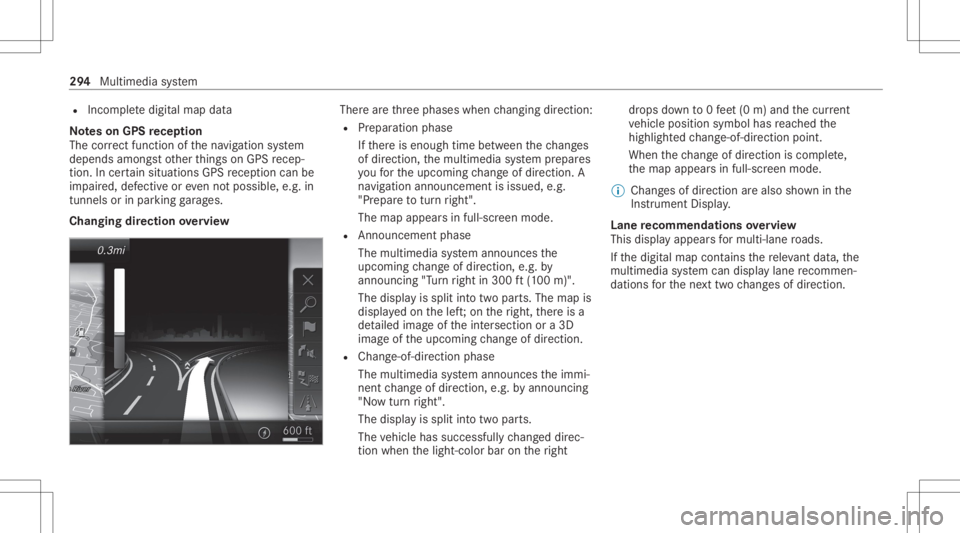
Changing direction overview Ther
ear eth re ephases whenchang ingdirect ion:
R Preparation phase
If th er eis enough timebetween thech ang es
of dir ect ion,th emultimedia system prepar es
yo ufo rth eupcoming chang eof dir ect ion.A
na vig atio nann oun cem entisissue d,e.g .
"Pr epar eto tur nright".
The map appear sin full-scr eenmode.
R Ann ouncemen tphase
The multimedia system announ cesthe
upco mingch ang eof dir ect ion,e.g .by
ann oun cing"T ur nright in300 ft(100 m)".
The displa yis split intotw opar ts.The map is
displa yedon thelef t;on theright, ther eis a
de tailed imag eof theint ersect ionora3D
imag eof theupcoming chang eof dir ect ion.
R Chan ge-of-d irecti onpha se
The multimed iasystem announ cestheimmi‐
nen tch ang eof dir ect ion,e.g .by ann oun cing
"No wtur nright".
The displa yis split intotw opar ts.
The vehicle hassuccessfull ych ang eddirec‐
tio nwhen thelight- color barontheright dr
ops down to0feet (0 m) and thecur rent
ve hicle position symbolhasreac hed the
highlight edchang e-of-dir ect ion poin t.
When thech ang eof dir ect ion iscom plete,
th emap appear sin full-scr eenmode.
% Chang esofdir ect ion arealso showninthe
Ins trument Display.
Lane recomm endationsov ervie w
This displa yappear sfo rmulti -lane roads.
If th edigit almap contains there leva nt data,th e
multime diasystem can displa ylane recomme n‐
da tions forth ene xt twoch ang esofdir ect ion. 29
4
Mult imed iasystem
Page 299 of 550
Ov
ervie wof routeguidanc eto an off-r oad
des tinatio n
An off-r oad destinatio nis wit hin thedigit almap.
The map contains noroads that lead tothedes‐
tinat ion.
Yo ucan enterge o-coor dinatesorath re ewo rd
addr essforof f-r oad destinations onthemap.
Ro uteguidan ceguides youfo ras long aspossi ‐
ble withna vig ation announcements anddisplays
on roads that arekn ow nto themultimedia sys‐
te m.
Shor tlybef oreyo ure ac hth elas tkn ow npo sitio n
on themap, youwill hear the"Please follo wthe
dir ect ion arrow "ann oun cem ent.The displ ay
sho wsadir ect ion arrow and thelinear distance
to thedes tinat ion.
Ov ervie wof routeguidanc efrom anoff-r oad
loc ation toades tinatio n
Of f-road position: thecur rent vehicle position is
locat edwithin thedigit almap onroads that are
no tav ailable.
When routeguidan cebegin sth efo llo wing dis‐
pla ysappear :
R The Road NotMapped messageis sho wn. R
Adir ect ion arro w sho wing thelinear direc‐
tion tothePOI.
When theve hicle isbac kon aro ad know nto the
multime diasystem, routeguidan cecontinue sas
no rm al.
Ov ervie wof off-ro ad status during route
guidanc e
Due toroadw orks ,fo rex am ple, ther ema ybe dif‐
fe re nces betwee nth edat aon thedigit almap
and theactual courseofthero ad. Insuc hcas es,
th emultimedia system will temp orarily be
unable tolocat eth eve hicle's current positio non
th edigit almap. Thevehicle isoff-r oad.
When theve hicle isoff-r oad, thefo llo wing dis‐
pla ysaresho wn:
R theRoad NotMapped message
R adir ect ion arrow showing thelinear direct ion
to thePOI
When theve hicle isbac kon aro ad know nto the
multime diasystem, routeguidan cecontinue sas
no rm al. Des
tination Sa
ving thecur rent vehicl eposi tion
Mul timedi asy stem:
4 Navigation #
Ifth emap isdispla yedin full screen mode,
pr ess thecent ralcon trol elemen t.
The map menuappear s. #
Selec t1 onthemap menu (/page30 1).
The current vehicle position issave dto the
"Pr evious destination s"memo ry.
St oring ama pposit ion
Mult imedia system:
4 Navigation
The map isin full-scr eenmode. #
Press theTo uc hCon trol, thecon troller orthe
to uc hpad. #
Select "mo vemap" inmap menu 2
(/ page30 1). #
Select aposi tion onthemap.
If multiple entries areav ailable fora map
posi tion, alis tapp ears. #
Highl ightanentr y. Multimedia
system 29
7