tow MERCEDES-BENZ E CLASS 2020 Workshop Manual
[x] Cancel search | Manufacturer: MERCEDES-BENZ, Model Year: 2020, Model line: E CLASS, Model: MERCEDES-BENZ E CLASS 2020Pages: 550, PDF Size: 20.08 MB
Page 168 of 550
#
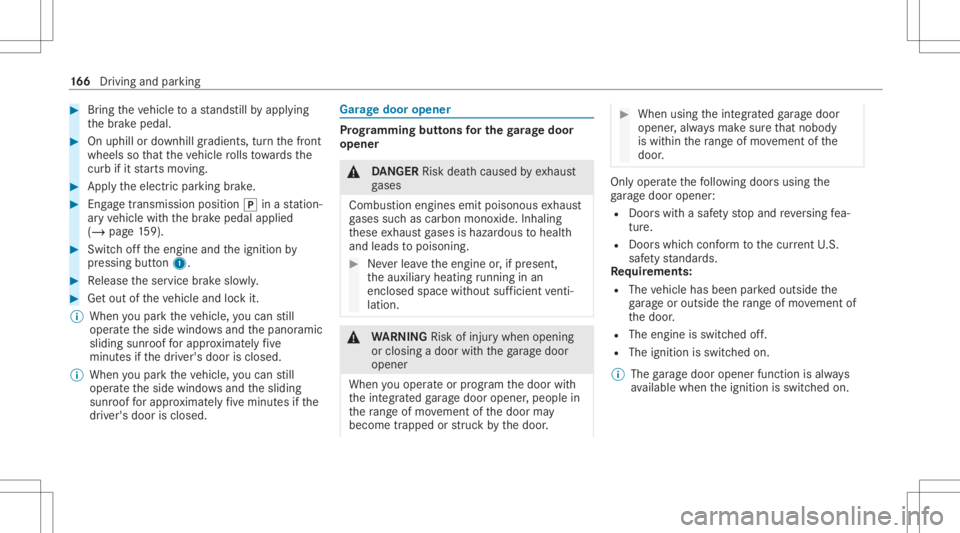
Bring theve hicle toast ands tillby appl ying
th ebr ak epedal. #
Onuphill ordownhill gradients, turnth efront
wheels sothat theve hicle rolls towa rdsth e
curb ifit star ts mo ving. #
App lytheelectr icpar king brak e. #
Engage trans missi on positio n005D inast atio n‐
ar yve hicle withth ebr ak epedal applied
(/ page15 9). #
Swi tchof fth eengine andtheignition by
pr essing button1. #
Release theser vice brak eslo wly. #
Getout oftheve hicle andlockit.
% When youpar kth eve hicle, youcan still
opera tetheside windo wsand thepanor amic
sliding sunroofforapp roxima tely five
minut esifth edr iver's door isclosed.
% When youpar kth eve hicle, youcan still
opera tetheside windo wsand thesliding
sunr oofforapp roxima tely five minut esifth e
dr iver's door isclosed. Gar
agedoor opener Pr
og rammin gbutt onsfo rthe garage doo r
ope ner &
DANG ER Risk deathcause dby exhaus t
ga ses
Combus tionengines emitpoisonous exhaus t
ga ses suchas carbon monoxide.Inhaling
th ese exhaus tga ses ishazar dous tohealt h
and leads topoisonin g. #
Neverlea vetheengine or,if pr esent ,
th eauxiliar yheating running inan
encl osedspa cewithout sufficie ntventi‐
la tio n. &
WARNIN GRisk ofinju rywhen opening
or clos ingadoor withth ega rage door
opener
When youoper ateor program thedoor with
th eint egr ated garage door opener ,people in
th era ng eof mo vement ofthedoor may
become trapped orstru ck bythedoor . #
When usingtheint egr ated garage door
opener ,alw aysmak esur eth at nobody
is wit hin thera ng eof mo vement ofthe
door . Onl
yoper ateth efo llo wing doorsusing the
ga rage door opener :
R Door swit hasaf etyst op and reve rsing fea‐
tur e.
R Doorswhic hcon form tothecur rent U.S.
sa fety standar ds.
Re quirement s:
R The vehicle hasbeen parkedoutside the
ga rage oroutside thera ng eof mo vement of
th edoor .
R The engine isswitc hedoff.
R The ignition isswitc hedon.
% The garage door opener function isalw ays
av ailable whentheignition isswitc hedon. 16
6
Driving and parking
Page 169 of 550
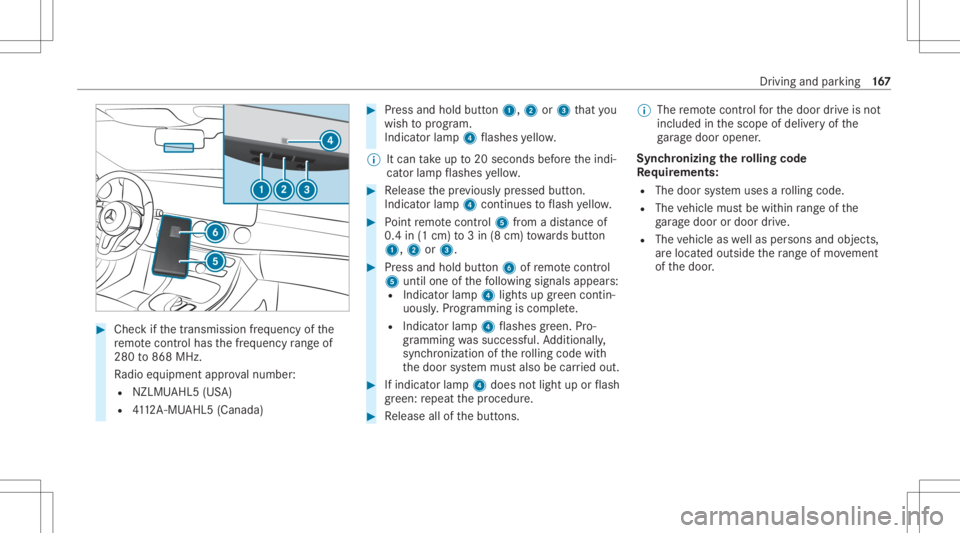
#
Chec kif th etra nsmiss ionfreq uency ofthe
re mo tecontr olha sth efreq uency rang eof
280 to868 MHz.
Ra dio equipment approval num ber:
R NZLM UAHL5 (USA)
R 4112 A-MU AHL5 (Canada ) #
Press and hold button1, 2or3 that you
wish toprog ram.
Indicat orlam p4 flashes yello w.
% Itcan take up to20 seconds beforeth eindi‐
cat orlam pflashes yello w. #
Release thepr ev iousl ypr essed button.
Ind icat orlam p4 con tinues toflash yello w. #
Point remo tecontr ol5 from adi st anc eof
0. 4in (1 cm )to 3in (8 cm) towa rdsbutt on
1, 2or3. #
Press and hold button6 ofremo tecontr ol
5 unti lone ofthefo llo wing signalsappear s:
R Indicat orlam p4 light sup green contin‐
uousl y.Progr amming iscom plete.
R Indicat orlam p4 flashes green .Pr o‐
gr ammi ngwassuccessful. Addition ally,
sync hronization ofthero lling code with
th edoor system mus talso becar ried out. #
Ifindicat orlam p4 does notlight uporflash
gr ee n: repeat thepr ocedur e. #
Release allofthebutt ons. %
The remo tecontr olforth edoor drive is no t
included inthescope ofdeliv eryof the
ga rage door opener .
Sync hronizing thero lling code
Re quirement s:
R The door system uses aro lling code.
R The vehicle mustbe within rang eof the
ga rage door ordoor drive.
R The vehicle aswellas per son sand obje cts,
ar elocat edouts idethera ng eof mo vement
of thedoor . Dr
iving andparking 16
7
Page 175 of 550

Inf
orma tion ondetectin gda ma geon a
pa rked vehicl e If
acolli sion isde tected whe nth eto w- aw ay
alar misarmed onaloc kedve hicle, youwill
re cei veano tificat ion inthemultimedia system
when youswit chon theignition .
Yo uwill recei veinformatio nabout thefo llo wing
point s:
R The area oftheve hicle that ma yha ve been
damag ed.
R The forc eof theim pact.
The follo wing situat ionscanlead toinadv ertent
acti vatio n:
R The parked vehicle ismo ved, e.g. inatw o-
st or yga rage .
% Dea ctivateth eto w- aw ay alar minorder to
pr eve ntina dvertent acti vatio n.Ifyo udeac ti‐
va te theto w- aw ay alar m,damag ede tection
wi llal so be dea ctivated.
% Inthecase ofsevere batt erydisc harging,
th efunc tion forde tecting damag eon a pa
rked vehicle isaut omaticall ydeactiv ated
to facil itat eth ene xt engine star t.
Sy stem limit s
De tection maybe restrict ed inthefo llo wing sit‐
uation s:
R The vehicle isdamag edwithout impact, e.g.
if an outside mirroris torn offor thepaint is
damag edbyake y.
R Impact occur sat low speed .
R The electr icpar king brak eis no tappl ied. No
teson par king theve hicl efo ran extended
per iod If
yo ulea vetheve hicle parkedfo rlong erthan six
we eks,itma ysuf ferdama gethro ugh disus e.
The 12Vbatt eryma yalso beimpair edordam‐
ag ed byhea vydisc harging.
% Further information canbeobt ained ata
qu alif ied spec ialistwo rkshop.
Plug-in hybrid: obser vetheno teson thehigh-
vo ltag ebatt eryin theSupplement .Ot her wise,
yo uma yfa ilto recogni zedangers. St
andb ymode (ext ens ion ofthe star terbat‐
te ry 's per iod out ofuse) St
andb ymode function
% This function isno tav ailable forall model s.
If standb ymode isact ivat ed, energyloss willbe
min imiz eddur ing ex tende dpe riods ofnon- oper‐
ation.
St andb ymode isch aract erize dby thefo llo wing:
R thest ar terbatt eryis preser ved.
R themaximum non-opera tionaltime appear s
in themedia display.
R thecon nect iontoonline services isint erru p‐
te d.
R theAT A(anti-t heftal ar m system) isno tav ail‐
able.
R theint erior motion sensor andtow- aw ay
alar mfun ction sar eno tav ailable.
R thefunc tion forde tecting damag eon a
pa rked vehicle isno tav ailable. Dr
ivin gand parking 17
3
Page 193 of 550
The
driven speed isadjus tedwhen theve hicle is
le ve lwit hth etraf fic sig nat thelat est.In the
case ofsig ns indi cati ngentr yint oan urb anarea ,
th espeed isadap tedaccor dingtothespeed
per mitt edwithin theurban area. The speed limit
displa yin theIns trument Displayis alw aysupda ‐
te dwhen theve hicle isleve lwit hth etra ffic sign .
If th er eis no speed restriction onanunlimited
st re tchof road (e.g.on afree wa y), there com‐
mend edspe edisau tomatical lyadop tedas the
st or ed speed. Thesystem uses thespeed stor ed
on anunlimit edstre tchof road asthere com‐
mend edspe ed. Ifyo udo notalt er thestor ed
speed onanunlimit edstre tchof road, there c‐
omme ndedspeedis80 mph(1 30 km/h) .
If Ac tiveDis tance AssistDIS TRONI Cha sbe en
pu tint opa ssi ve mode bypressing theacceler a‐
to rpeda l,onl yspee dlimi tswhi charehigh er
th an these tspeed areadop ted.
Ac tiveSpe edLimi tAssi stisonl yan aid. The
dr iver isresponsible forke eping asaf edis tance
fr om theve hicle infront, forve hicle speed and
fo rbr aking ingood time. Themaximu mper missi ‐
ble spee dals odepe ndsonfact or ssu ch asthe
ro ad sur face and traf fic condi tions. Sy
stem limit s
Te mp oraryspeed restrictions (e.g.fo ra cer tain
tim eor due towe ather condition s)can notbe
pr oper lyde tected bythesy stem. Themaximum
per missible speedapplying toave hicle witha
tr ailer isno tde tected bythesy stem. Inthese sit‐
uations youmus tadj ustyo ur spee dyo urself . &
WARNIN GRisk ofacci dent dueto Active
Spe edLimi tAssi stadap tingth eve hicle's
speed
The speed adoptedby ActiveSpe edLimi t
Assi stma ybe toohigh orincor rect insome
indi vidualcase s,su ch as:
R Inthewe tor infog
R When towing atrailer #
Ensur eth at thedr iven speed complies
wit htraf fic re gulations. #
Adjus tth edr iving speed tosuit current
tr af fic and weather condition s. Fu
nction ofrout e-base dspee dadap tation %
The follo wing function iscoun try- dependen t
and onlyav ailable incon junction withth e
Dr iving Assi stanc ePa ckag e.
When ActiveDis tance AssistDIS TRONI Cis acti ‐
va ted, theve hicle speed willbeadjus tedaccor d‐
ing lyto thero uteev ent sahead. Dependingon
th edr ive pr og ram sele cted, theve hicle negoti‐
at es aro uteeve ntaheadin afue l-saving, com ‐
fo rtable ordynam icman ner.When thero ute
eve nthasbe en passe d,theve hicle acceler ates
ag ain tothestor ed speed. Thesetdis tance to
th eve hicle infront, vehicles detected aheadand
spe edrestrictions aheadar eta ke nint oacco unt.
Ro ute-based speedadap tatio ncan beconf ig‐
ur ed inthemultimedia system (/ page19 2).
The follo wing routeeve nts areta ke nint o
acco unt:
R Bend s
R T-int ersect ions,tr af fic cir cle sand tollst a‐
tio ns
R Turnsand exits Dr
ivin gand parking 19
1
Page 202 of 550
*
NO
TEDama gefrom automatic braking If
one ofthefo llo wing functionsis switc hed
on, theve hicle brak es aut omatically incer‐
ta in situat ions:
R ActiveBr ak eAssi st
R ActiveDis tance AssistDIS TRONI C
R HOLD functio n
R ActivePa rking Assist
To avo iddamag eto theve hicle, deactiv ate
th ese systems inthefo llo wing orsimilar sit‐
uation s: #
Dur ing towing #
Inacar wash Re
quirement s:
R The vehicle isstatio nary.
R The driver's door isclosed ortheseat belton
th edr iver's side isfastened.
R The engine isrunning orhasbe en automati‐
cally switc hedoffby theEC Ostar t/ stop
funct ion. R
The electr icpar king brak eis released.
R ActiveDis tance AssistDIS TRONI Cis de acti ‐
va ted.
R The transmis sionisin position 005B,005Eor005C.
Ac tiv atin gthe HOL Dfunc tion #
Dep ress thebr ak epedal andafte ra shor t
time quickl ydepr essfurther until the00D9
displa yappear sin themultifunc tiondispla y. #
Release thebr ak epedal.
Deactiv atingtheHOLD function #
Depr esstheacceler ator pedal topull away.
or #
Depr essthebr ak epedal untilthe00D9 dis‐
pla ydisappear sfrom themultifunc tiondis‐
pla y.
The HOLD functionisdeactiv ated inthefo llo w‐
ing situat ions:
R ActiveDis tance AssistDIS TRONI Cis acti va‐
te d.
R The transmission isswitc hedtoposition 005D.R
The vehicle issecur edwithth eelectr icpar k‐
ing brak e.
In thefo llo wing situat ions,th eve hicle isheld by
tr ans missi on positio n005D and /or bytheelectr ic
par king brak e:
R The seat beltisunf astened andthedr iver's
door isopened.
R The vehicle isswitc hedoff.
R Ther eis amalfunction inthesy stem orthe
po we rsupp lyis insuf ficie nt. AI
RBO DY CONT ROL AIR
BODY CONT ROLfun ction
AI R BO DY CONTR OLisan air suspe nsion system
wit hva riable dampingfo rim prov ed driving com‐
fo rt.The all-r ou nd leve lcon trol system ensur es
th ebes tpossible suspension andconstant
gr ou nd clea rance, evenwi th aladen vehicle.
When driving atspeed, theve hicle islowe red
aut omat icallyto improve driving safetyand to
re duce fuelconsum ption. Youalso have the
op tion ofmanuall yadjus tingtheve hicle leve l. 200
Drivin gand parking
Page 219 of 550
#
Con firm select edpar king space 4.
% The turnsignal indicat orisswitc hedonaut o‐
matically whenthepar king procedur e
begins. Theturnsignal indicat orisswitc hed
of faut omaticall ywhen youswit chto005B .
Yo uar ere sponsible forsele cting thetur nsignal
indicat orinaccor dance withth etraf fic condi ‐
tions .If neces sary,select thetur nsignal indica‐
to raccor dingly. &
WARNIN GRisk ofacci dent dueto vehi‐
cle swinging outwhile parking orpulli ng
out ofapar king space
While parking orexitin gapar kingspace, the
ve hicle swings outand candrive ont oar eas
of theonc oming lane.
This could cause youto coll ide wi th object s
or other road user s. #
Payatt ention toobject sand other road
user s. #
Wher enec essar y,stop theve hicle or
cancel thepar king procedur ewit h
Ac tivePa rking Assist. #
If,forex am ple, thePlease Engage Reverse
Gear messag eappear sin themedia display:
select thecor responding transmission posi‐
tion.
The vehicle drives intoth eselect edpar king
space.
On com pletion ofthepar king procedur e,the
Parking AssistFinished, TakeContr olof Vehicle
displa ymessag eappear s.Fu rther maneuv ering
ma yst ill be nec essar y. #
Aftercom pletion ofthepar king procedur e,
saf eguar dth eve hicle agains tro lling away.
When requ ired bylegalrequ iremen tsor local
con dition s:tur nth ewheels towa rdsth ecurb.
% Youcan stop theve hicle andchang eth e
tr ans missi on positio ndu ring thepar king pro‐
cedur e.The system then calculat esane w
ve hicle path.The parking procedur ecan
th en be con tinued. Ifno newvehicle pathis
av ailable, thetransmission positionwillbe
ch ang edagain. Ifth eve hicle hasnotye t
re ac hed thepar king space, thepar king pro‐
cedur ewill becanc eled, should age ar be
ch ang ed. Exit
ingapa rking spacewit hAc tiv ePa rking
Assis t
Re quirement s:
R The vehicle hasbeen parkedwit hAc tive
Pa rking Assist.
% Depe ndingon theve hicle's equipment, the
butt onmayalso belocat edatadif fere nt
po sitio nin thecent ercon sole.
Please note that youar ere sponsible forth eve hi‐
cle and surround ingsdur ing theent ire par king
pr ocedur e. #
Startth eve hicle. Dr
iving andparking 217
Page 231 of 550
Be
sureto obser vethesy stem limit ations of
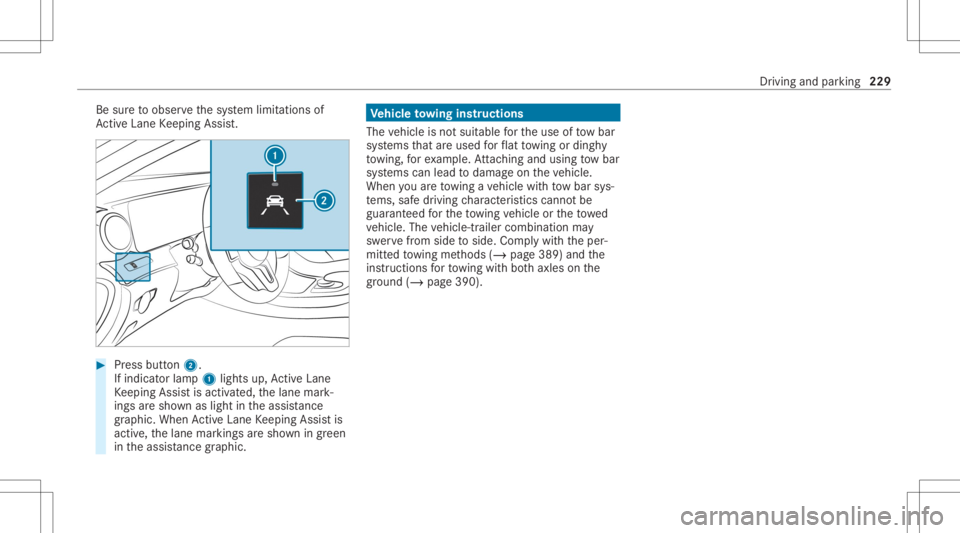
Ac tiveLa ne Keeping Assist. #
Press butt on2.
If indicat orlam p1 lights up,ActiveLa ne
Ke eping Assistis activ ated, thelane mark‐
ings aresho wnaslight intheassis tance
gr ap hic. Whe nAc tiveLa ne Keeping Assistis
activ e,thelane marking sar esho wningreen
in theassis tance grap hic. Ve
hicl eto wing instruct ions
The vehicle isno tsuit able forth euse oftow bar
sy stems that areused forflat towing ording hy
to wing, forex am ple. Attach ing and using tow bar
sy stems canlead todamag eon theve hicle.
When youar eto wing ave hicle withto w bar sys‐
te ms, safedr iving charact eristic scan notbe
guar anteed forth eto wing vehicle ortheto we d
ve hicle. Thevehicle-tr ailercombination may
sw erve from side toside. Complywithth eper‐
mitt edtowing methods (/page389) andthe
ins truct ions forto wing withbo th axle son the
gr ou nd (/ page 390). Dr
iving andparking 229
Page 240 of 550
Re
setting values onthetrip menu oftheon-
boar dcom puter On-boar
dcom puter:
4 Trip
% The spelli ngofthemain menu displayedma y
dif fer. Ther efor e, obser vethemenu overview
fo rth eIns trument Display(/ page232).
Yo ucan rese tth eva lues ofthefo llo wing func‐
tion s:
R Trip dis tance
R Trip com puterFro mStart and FromReset
R ECOdispla y(/ page15 4) #
Toselect thefun ction tobe rese t:swipe
upw ards ordown wardson thelef t-hand
To uc hCon trol. #
Press thelef t-hand Touc hCon trol. #
Select Yes . #
Press thelef t-hand Touc hCon trol.
If yo upr ess and hold thelef t-hand Touc hCon ‐
tr ol, theva lues ofthefunc tion willberese t
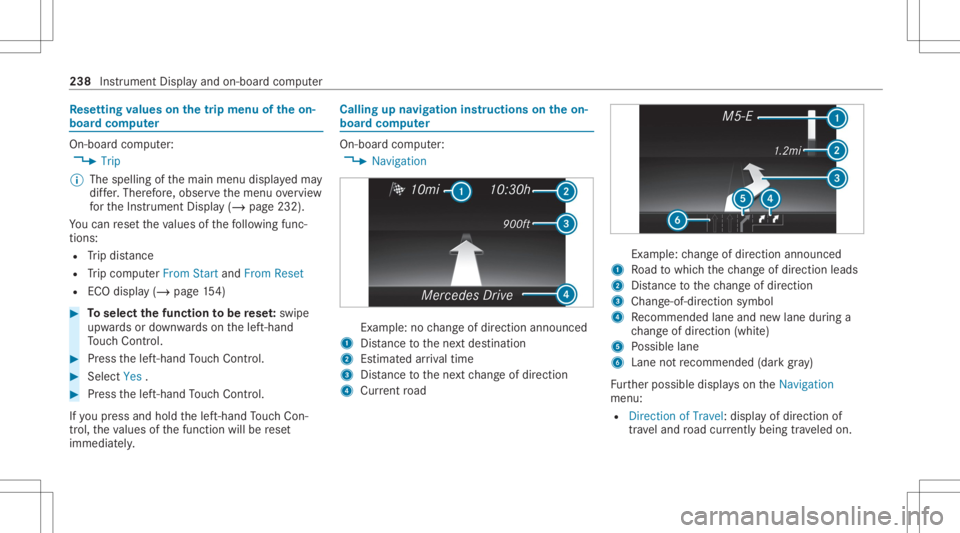
immediat ely. Callin
gup navig ation instruct ions ontheon-
boar dcom puter On-boar
dcom puter:
4 Navigation Ex
am ple: nochang eof dir ect ion ann oun ced
1 Distance tothene xt des tinat ion
2 Estimat edarriva ltim e
3 Distance tothene xt chang eof dir ect ion
4 Current road Ex
am ple: chang eof dir ect ion ann oun ced
1 Road towhic hth ech ang eof dir ect ion leads
2 Distance tothech ang eof dir ect ion
3 Chan ge-of-d irection symbo l
4 Recomme ndedlane and newlane during a
ch ang eof dir ect ion (whit e)
5 Possible lane
6 Lane notre comme nded(darkgray )
Fu rther possible displayson theNavigation
menu:
R Direc tionofTravel: displayof dir ect ion of
tra veland road cur rentl ybe ing trave led on. 238
Instrumen tDisp lay and on-boar dcom puter
Page 246 of 550
No
teson oper ating safety &
WARNIN GRisk ofdist ra ction from infor‐
mati onsystems andcomm unication s
eq uipment
If yo uoper ateinf ormat ionand comm unic a‐
tio neq uipme ntintegratedin theve hicle
when driving, youwill bedistract ed from the
tr af fic situ ation. Thiscou ldalso cau seyouto
lose control of theve hicle. #
Onlyoper ateth is eq uipmen twhen the
tr af fic situ ation per mits. #
Ifyo ucan notbe sur eof this, stop the
ve hicle whilstpa ying attention toroad
and traffic condi tions andoperate the
eq uipment withth eve hicle statio nary. &
WARNIN GRisk ofan acci dent from
ope rating mob ile comm unicati onequip ‐
ment while th eve hicle isin mo tion
Mobile communication sde vices distract the
dr iver from thetraf fic situ ation. Thiscou ld al
so cau sethedr iver tolose control of the
ve hicle. #
Asthedr iver ,onl yoper atemobile com‐
municat ionsdevices when theve hicle is
st atio nary. #
Asave hicle occupant, onlyuse mobile
communication sde vices inthear eas
int ended forth is pur pose, e.g.inthe
re ar passe nger com partment . &
WARNIN GRisk ofinju rydue toobject s
being stowe dincor rectl y
If obje ctsintheve hicle interior arestowe d
inc orrectly ,th ey can slide orbe throw n
ar oun dand hitvehicle occupants. Inaddi‐
tion, cupholder s,open stow agespac esand
mobi lephon ere cep tacle scanno tal wa ys
re tain all obje ctsth ey cont ain.
The reisarisk ofinjur y,par ticular lyin the
ev ent ofsudden braking orasudden chang e
in dir ect ion. #
Alw aysst ow object sso that they can‐
no tbe throw nar ou nd insuch situa‐
tions. #
Alw aysmak esur eth at obj ect sdo not
pr otru de from stow agespac es,lugg age
ne ts or stow agene ts. #
Close theloc kable stow agespac es
bef orest ar tin gajo ur ne y. #
Alw aysst ow and securehea vy,har d,
poin ted, shar p-edg ed,fragile orbulky
objec tsinthetrunk/ loadcompartmen t. Fo
ryo ur ow nsa fety,al wa ys obser vethefo llo w‐
ing point swhen operatingmobile communic a‐
tion seq uipmen tand espec iallyyo ur voice con ‐
tr ol system:
R Obser vetheleg alrequ iremen tsforth ecoun‐
tr y in whic hyo uar edr ivin g.
R While drivin g,on lyop eratemobi lecom mun i‐
cat ionseq uipme ntand your voice con trol
sy stem when thetra ffic con dition sper mit it.
Yo uma yot her wise bedistract ed from the
tr af fic condi tions andcausean acci dent,
inju ring yourself and other s. 24
4
Voice Cont rolSy stem
Page 314 of 550
%
Ifane wmobil ephone isconnect edand
def ined asPhone 1,forex am ple, this ov er‐
wr ites thepr ev iousl ycon nectedmobile
phone inthefo re grou nd ofthesy stem.
Disconnec tingamobile phone
Multimedia system:
4 Phone 5
00A5 Devic es #
Select thei symbol intheline ofthe
mobil ephone.
The disconnection ofthemobile phonetake s
place without acon firm atio npr om pt.The
mob ile pho neremains author ized inthesy s‐
te m.
De -aut horizing amobil ephone
Mul timedi asy stem:
4 Phone 5
00A5 Devic es #
Select the% symbol intheline ofthe
mobil ephone. #
Answ erthecon firm atio npr om ptwit hYes.
The mobile phoneis de- aut hor ized and
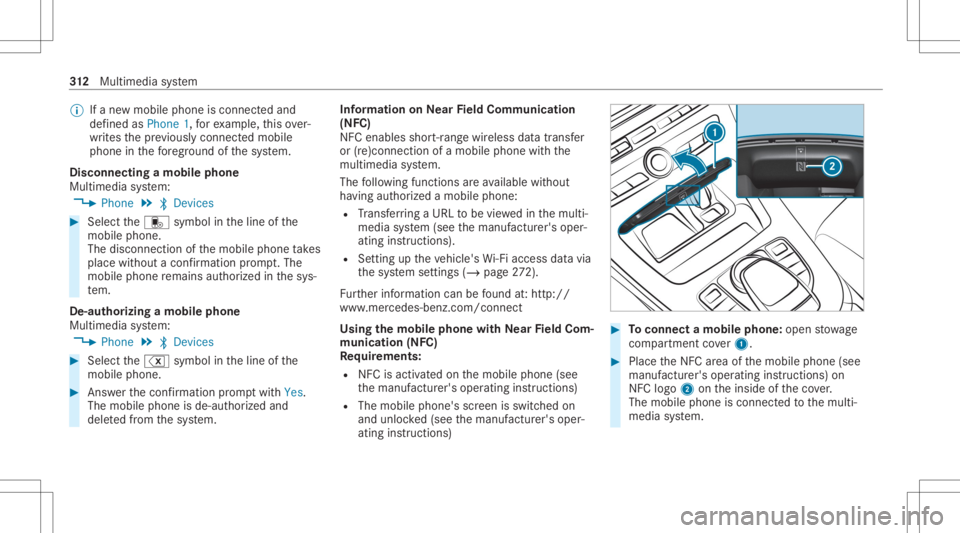
dele tedfrom thesy stem. Inf
ormat iononNearField Comm unication
(NFC)
NFC enabl esshor t-ra ng ewi reless datatransf er
or (re)con nection ofamobile phonewit hth e
multime diasystem.
The follo wing functionsar eav ailable without
ha vin gaut hor izedamobi lephon e:
R Trans ferring aURL tobe viewe din themulti‐
media system (see themanuf acturer'soper‐
ating instruction s).
R Setting uptheve hicle's Wi-Fi acce ssdata via
th esy stem settings (/page27 2).
Fu rther information canbefound at:ht tp :/ /
www .merced es-ben z.co m/ conn ect
Using themobil eph one withNe arField Com‐
mu nicat ion(NFC)
Re quirement s:
R NFC isact ivat ed on themobile phone(see
th emanuf acturer'soper ating instruction s)
R The mobile phone's screen isswitc hedon
and unloc ked(see themanuf acturer'soper‐
ating instruction s) #
Toconnect amob ilephone: open stow age
com partment cover1. #
PlacetheNFC area ofthemobile phone(see
manuf acturer'soper ating instruction s)on
NFC logo2ontheinside oftheco ver.
The mobile phoneisconn ectedtothemulti‐
media system. 31
2
Multimedia system