ECU MERCEDES-BENZ E CLASS 2021 Manual PDF
[x] Cancel search | Manufacturer: MERCEDES-BENZ, Model Year: 2021, Model line: E CLASS, Model: MERCEDES-BENZ E CLASS 2021Pages: 450, PDF Size: 6.31 MB
Page 253 of 450
Te
lephone Te
lephon y No
teson telephon y &
WARNIN GRisk ofdist ra ction from oper‐
ati ng integr ated commu nication equip‐
ment whiletheve hicle isin mo tion
If yo uoper ateco mm unic ationeq uipme nt
int egrat edintheve hicle when driving, you
cou ldbe dist ra cted from thetra ffic situat ion.
This could alsocause youto lose control of
th eve hicle. #
Onlyoper ateth is eq uipmen twhen the
tr af fic situ ation per mits. #
Ifyo ucan notbe sur eof this, stop the
ve hicle whilstpa ying attention toroad
and traffic condi tions andoperate the
eq uipment withth eve hicle statio nary. &
WARNIN GRisk ofan acci dent from
ope rating mob ile comm unicati onequip ‐
ment while th eve hicle isin mo tion
Mobile communication sde vices distract the
dr iver from thetraf fic situ ation. Thiscou ld
al so cau sethedr iver tolose control of the
ve hicle. #
Asthedr iver ,onl yoper atemobile com‐
municat ionsdevices when theve hicle is
st atio nary. #
Asave hicle occupant, onlyuse mobile
communication sde vices inthear eas
int ended forth is pur pose, e.g.inthe
re ar passe nger com partment . Yo
umus tobse rveth eleg alrequ iremen tsforth e
cou ntryin whi chyouar ecur rentl ydr ivi ng when
op erati ng mob ile comm unicati onequip ment in
th eve hicle. &
WARNIN GRisk ofinju rydue toobject s
being stowe dinco rrect ly
If objects intheve hicle interior arestowe d
inc orrectly ,th ey can slide orbe throw n
ar oun dand hitvehicle occupants. Inaddi‐
tion, cupholder s,open stow agespac esand
mobi lephon ere cep tacle scanno tal wa ys
re tain all obje ctswit hin.
Ther eis arisk ofinjur y,par ticular lyin the
ev ent ofsudden braking orasudden chang e
in dir ect ion. #
Alw aysst ow object sso that they can‐
no tbe throw nar ou nd insuch situa‐
tions. #
Alw aysmak esur eth at obj ect sdo not
pr otru de from stow agespac es,parcel
ne ts or stow agene ts. #
Close theloc kable stow agespac es
bef orest ar tin gajo ur ne y. #
Alw aysst ow and securehea vy,har d,
poin ted, shar p-edg ed,fragile orbulky
objec tsinthetrunk/ cargocom part‐
ment . MBUX
multimedia system 25
1
Page 255 of 450
Te
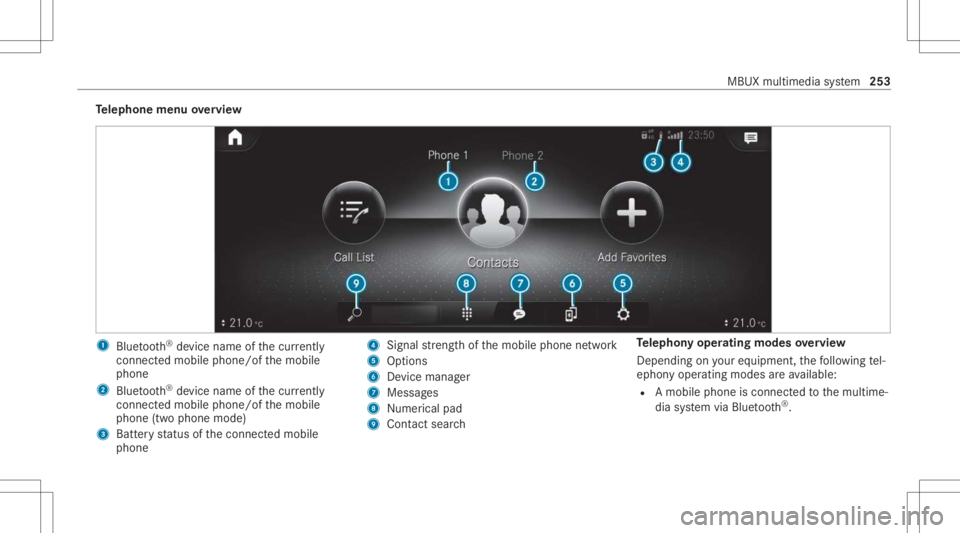
lephone menuoverview 1
Blue tooth®
de vice name ofthecur rently
conne cted mob ile pho ne/o fth emobile
phone
2 Blue tooth®
de vice name ofthecur rently
conne cted mob ile pho ne/o fth emobile
phone (twophone mode)
3 Batt eryst atus ofthecon nect edmobile
phone 4
Signal stre ngt hof themobile phonenetwork
5 Option s
6 Device manag er
7 Messag es
8 Nume rical pad
9 Contact search Te
lephon yoper ating mod esove rview
Depen dingonyour equipme nt,th efo llo wing tel‐
ephon yoper atingmodes areav ailable:
R Amobi lephon eis con nectedto themultime‐
dia system viaBlue tooth®
. MBUX
multimedia system 253
Page 257 of 450
R
Mer cedes-Ben zemer gency callsy stem (aut o‐
matic emergency calland SOS button)
The Mercede sme conne ctAccid ent and Brea k‐
do wn Manag eme ntand theMer cedes- Benz
emer gency callcent erareav ailable toyou
ar oun dth ecloc k.
The mebutt onand theSOS buttoncan befound
on theve hicle's overhead control panel
(/ page256).
Yo ucan also calltheMer cedes- BenzCustomer
Cent erusi ng themultimedia system
(/ page25 7).
Please note that Mer cedesme connectis a
Mer cedes-Ben zser vice.In emer gencie s,firs tcal l
th enation alemer gency service sus ing the
st andar dnat ionalemer gency service telephon e
numb ers. In emer gencie s,youcan also usethe
Mer cedes-Ben zemer gency callsy stem
(/ page263).
Obser vethecon ditions ofuse forMer cedes me
connect andother services. These canbe
obt ained intheMer cedes mePortal: http s://
me. secure.m erced es-ben z.com Fu
rther information aboutMercedes meconn ect
ser vices canbeobt ained intheMer cedes me
Po rtal: http s:// me. secure.m erced es-ben z.com
Inf orma tion onMer cedes meconnect Acci‐
dent andBreak down Manag emen t
The Accid ent and Brea kdo wnManag eme ntcan
incl udeth efo llo wing functions:
R Supplem enttotheMer cedes- Benzemer‐
ge ncy callsy stem (/ page263)
If neces sary,thecon tact per son atthe
Mer cedes-Ben zemer gency callcent erfor‐
wa rdsth ecall toMer cedes meconn ectAcci‐
dent andBrea kdo wnManag eme nt.Forw ard‐
ing thecall isho we verno tpossi bleinall
countr ies.
R Breakdo wnassi stanc eby ate ch nici anon
lo cati onand /or theto wing away oftheve hi‐
cle tothenear estaut hor ized Mercedes- Benz
Cent er
Yo uma ybe charge dfo rth ese services.
R Addition totheemer gency guide af te rau to‐
matic accide ntor breakdo wndetection
(/ page 257) In
theeve ntofabr ea kdo wnoracci dent, fur‐
th er vehicle datais sent whichenables opti‐
mal suppor tby theMer cedes- BenzCustomer
Cent erand theaut hor ized service partner or
br eakdo wnassis tance.
R Addition totheMer cedes meconnect
ser vice Telediagno stics
Wi th theTe lediagno stics func tion,spec ific
we arand failur ere por tsarere cor ded bythe
ser vice prov ider ,in so faras these can be
clear lyint erpr eted and areav ailable thro ugh
th emonit oring ofcom ponen tsthat aresub‐
je ct to diagnos tics.
If yo ur vehicle detects abr ea kdo wnorthre at
of abr eak down, youma ybe prom pte dvia
th emultimedia system tocont actthe
Mer cedes-Ben zCus tomer Cent erforfur ther
help. Thisprom ptinthemultimedia system
onl yappear swhen theve hicle isstatio nary. MBUX
multimedia system 255
Page 258 of 450
%
These services aresubject totech nica l
re strictions such asthemobile phonecover‐
ag e, mobil ene tworkqu alit yand theability of
th epr ocessin gsy stems tointerpr et the
tr ans ferred dat a.In some circums tances,
th is can result indela ysorthefa ilur eof the
inf ormatio nto appear inthemultimedia sys‐
te m.
Mor einf ormation aboutMer cedes meconnect
ser vices canbeobt ained intheMer cedes me
Po rtal: http s:// me. secure.m erced es-ben z.com
Data trans ferre ddur ing Mer cedes mecon‐
ne ct cal lse rvices
The datatransf erreddur ing aMer cedes mecon‐
nec tcall depends on:
R The reason forinitia tionofthecall
R The service that isselec tedin thevo ice con ‐
tr ol system
R The activ ated Mer cedes meconnect services
Yo ucan find outwh ich da ta istransf erredwhen
using theser vices inthecur rentl yva lid
Mer cedes meconnectte rm sof use and thedat a
pr otect ion information forMer cedes mecon‐ nect.
Youcan find these inyour Mer cedesme
user accoun t. Mer
cedes mecalls Ma
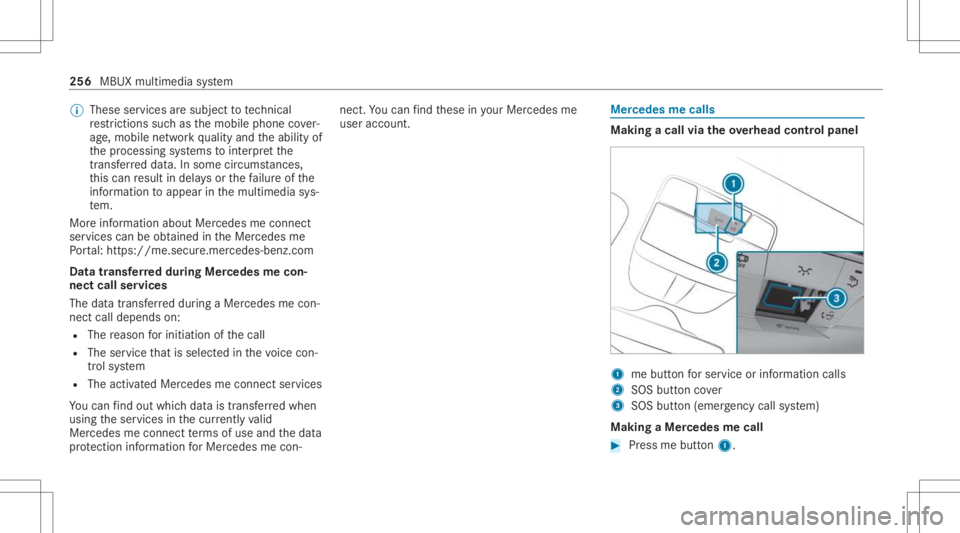
king acall viatheove rhead contr olpa nel 1
mebutt onforser vice orinformation calls
2 SOS buttoncover
3 SOS button (emerg ency callsy stem)
Making aMer cedes mecall #
Press mebutt on1. 256
MBUX multimedia system
Page 261 of 450
Multi-s
tage trans ferdepe ndsonthefo llo wing
fa ct or s:
R Reason forth einitiat ionofthecall
R The available mobilephon etransm ission
te ch nol ogy .
R The activatedMer cedes meconnectser v‐
ices.
R The service select edinthevo ice con trol sys‐
te m.
Dat atransf erifMer cede sme connectser v‐
ice sar eno tactiv ated
If no Mer cedes meconnect services areactiv a‐
te d, thefo llo wing datais transf erred:
R Vehicle identif ication number
R Time ofthecall
R Reason forth einitiat ionofthecall
R Countr yindicat oroftheve hicle
R Setlanguag efo rth emultimedia system
R Telephon enumb erofthecomm unication
platf orm ins talled intheve hicle If
acall ismade fora ser vice appointment via
th eser vice reminder ,th efo llo wing datais also
transmit ted:
R Cur rent mil eage and main tenance data
If acall ismade afte rau tomatic accide ntor
br eakdo wndetection using themultimedia sys‐
te m, thefo llo wing datais also transm itted:
R Cur rent mil eage and main tenance data
R Cur rent vehicle location
If Ac cid ent and Brea kdo wnManag eme ntis
cal led via thevo ice con trol system, thefo llo wing
dat acan also becalled upfrom theve hicle by
th eMer cedes- BenzCustomer Cent er:
R Current vehicle location
Data transf erifMer cedes meconne ctser v‐
ices areactiv ated
Onl yif th ere spectiv eser vice isactiv ated will
additional incident-specificdat abe transmitt ed
in thesecon dstag eto enable anoptimal
ser vice.
An ove rview of thedat atransmit tedcan be
fo und inthere spectiv ete rm sof use for Mer
cedes meconn ectservices. These canbe
obt ained intheMer cedes meportal:htt ps:/ /
me. secur e.mercedes -benz.com
Data processing
The datatransm itted within thescope ofthecall
is dele tedfrom thepr ocessin gsy stem afte rth e
cal lis finis hed ,in so faras this dat ais no tbeing
used forot her activ ated Mer cedes meconn ect
ser vices.
The incident- specificdat ais processed and
st or ed intheMer cedes- BenzCustomer Cent er
and, ifre qu ired toprocess theinciden t,forw ar‐
ded totheser vice partner aut hor ized bythe
Mer cedes-Ben zCus tomer Cent er.Plea setake
no te ofthedat apr otect ion information onthe
Mer cedes meInterne tpag ehttps: //
www .mercedes.me orinthere cor ded mess age
imme diat ely afte rcall ing theMer cedes- Benz
Cus tomer Cent er.
% The recor ded mess ageis no tav ailable in
eve rycou ntry. MBUX
multimedia system 259
Page 262 of 450
Ov
ervie wof theMer cedes me&App smenu When
youlog inwit hauser accoun tto the
Mer cedes mePortal, then ser vices andoffers
fr om Mer cedes-Benz willbe available toyou.
Fo rmor einf ormation consult anauthor ized
Mer cedes-B enzCent eror visit theMer cedes me
por tal:htt ps:/ /me .secure.m ercedes -benz.com
% Mak esur eyo ualw ayske ep theMer cedes
me apps updat ed. Yo
ucan callupthemenu usingMercedes me&
Apps inthemultimedia system.
In theMercedes me&Apps menu, thefo llo wing
op tion scan beavailable:
R Con nectingth eve hicle withth eMercedes
me user account
R Dele tingacon nect ionbetween aMercedes
me user account andtheve hicle R
Call inguptheMer cedes meservices
R Calling upapps suchas, In-Car Office orthe
we bbr ows erdepending onavailabilit y We
bbr ow ser overview The
webbr ows erisstar tedusing theMercedes
me &Apps menu. 260
MBUX multimedia system
Page 268 of 450
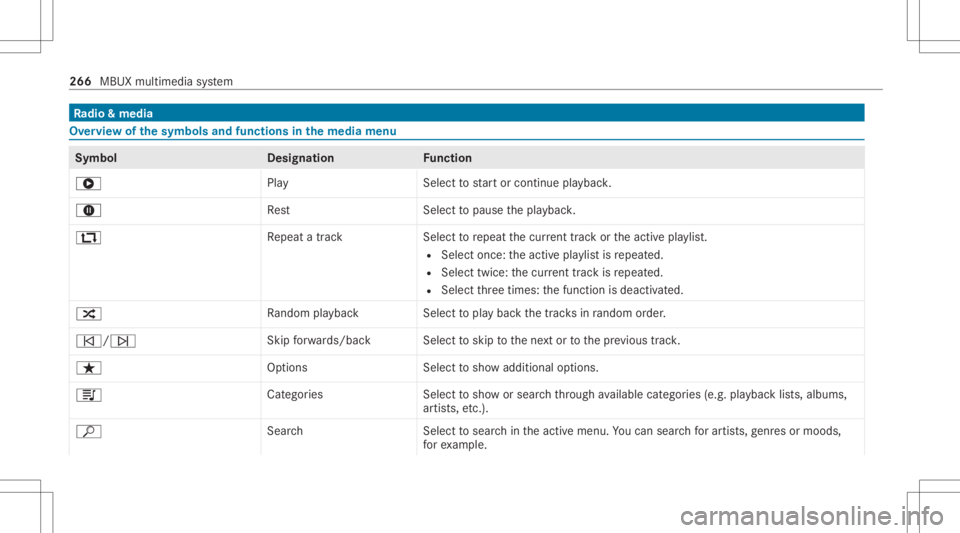
Ra
dio &medi a Ov
ervie wof the symb olsand func tions inthe medi amenu Symbo
lD esignation Function
6 PlayS electtostar tor con tinue playbac k.
8 Rest Select topause thepla ybac k.
: Repeat atrac kS electtorepeat thecur rent trac kor theactiv epla ylist.
R Selec tonc e:theactiv epla ylistis repeat ed.
R Select twice:thecur rent trac kis repeat ed.
R Select thre etimes: thefunc tion isdeactiv ated.
9 Rando mplay bac kS electtopla ybac kth etra cksin rando morde r.
00F5 /00F6 Skip
forw ards/ backS electtoskip tothene xt or tothepr ev ious trac k.
ß Options Selecttosho wadditional options.
5 Categor ies Selecttosho wor sear chthro ugh available categor ies(e.g.pla ybac klis ts,albums ,
ar tis ts,et c.).
ª SearchS electtosear chintheactiv emenu. Youcan sear chforar tis ts, genres ormoo ds,
fo rex am ple. 266
MBUXmult imed iasystem
Page 274 of 450
R
The TuneIn Radio service isactiv ated inthe
Mer cedes mePortal.
R The datavo lume isavailable.
De pen dingon thecount ry,dat avo lume may
need tobe pur chased.
R Afast Int erne tconnection fordat atransmis‐
sion free ofinterfere nce.
% Datavo lume canbepur chased directl y
fr om amob ilephone netw orkpr ov ider via
th eMer cedes mePortal.
% The function sand services arecoun try-
dependen t.Fo rmor einf ormation, consultan
au thor ized Mercedes-B enzCent er.
Multimedia system:
4 © 5
Radio #
Select TuneIn Radio.
The TuneIn menu appe ars. The last statio n
se tst ar ts pla ying .
% The connectionqu alit ydepen dson thelocal
mobile phonerecep tion. Se
tting upsatellite radio Re
quirement s:
R Satellit era dio equipment isavailable.
R Regis tration withasat ellit era dio prov ider
has been completed.
R Ifre gis tration isno tincluded whenpurchas‐
ing thesy stem, your credit cardde tails will
be requ ired toact ivat eyo ur acc oun t.
Mult imed iasystem:
4 © 5
Þ Radio 5
SiriusXM
5 Z Option s #
Select ServiceInformation.
The service information screen appear s
sho wing thera dio IDand thecur rent sub‐
scr iptio nstatus . #
Establish ate lephon econ nection . #
Followtheser vice staf f's instruct ions.
The activatio npr oce ssma yta ke up toten
minut es.
% Youcan also have thesat ellit eser vice acti‐
va tedonline. Todo so, please visithttps:/ / www
.siriusxm. com(USA)orhtt ps:/ /
www .siriusxm. ca(Canada). Music
andspor taler ts Multimedia
system:
4 © 5
Radio 5
SiriusXM 5
Z
5 Alert s
Se tting music andspor taler ts
This function enables youto progr am analer tfo r
yo ur favo rite artis ts,tr ac ks orspor tingevents.
Mu sic aler ts can besave dwhils ta trac kis being
pla yedand spor taler tscan besave ddur ing a
liv ega me. Youcan also spec ifyspor taler tsvia
th emenu option .The system then con tinuousl y
sear ches thro ugh allthech ann els. #
Seta music orspor tsaler t,to be informed of
matc hesintheLiv epr og ram.
Ac tiv atin gthe musi cin fo rm ation functi on #
ActivateMu sic Ale rts 0073.
Se ttin gamusi cale rt #
Select Add Alert. 27
2
MBUX multimedia system
Page 275 of 450
#
Select Artists orSong inthedialog window.
The alertis setfo rth ecur rent artis tor trac k.
If amatc his found, apr om ptappear sask ing
whe ther youwish tochang eto thest atio n.
Ac tiv atin gspo rtsinf ormat ion #
ActivateActiv ateSpo rtsAlerts 0073.
Se ttin gaspo rtaler t #
Select AddAlert . #
Select thete am nam eor league inthedialog
windo w.
Dele ting ind ivid ualsp orts and music aler ts #
Selec tMan ageMusi cAl ert s.
or #
Selec tMan ageSport sAl ert s. #
Selec tan artist or trac k.
or #
Select ate am. #
Select DeleteSel ect edEntries .
All high light edaler tsaredele ted. Dele
ting allspor tsand music alerts #
Select Manage MusicAlerts.
or #
Select Manage SportsAlert s. #
Select DeleteAll Entries.
All aler tsaredele ted. Sound
settings Ov
ervie wof functions inthesound menu The
setting optio ns and functions available
depen don thesound system installed. Youcan
fi nd outwh ich sou ndsystem isins talled inyour
ve hicle intheDigit alOper ator's Manual.
St andar dsoun dsy stem and Advanced sound
sy stem
The follo wing functionsar eav ailable:
R Equalize r:
- Treble, mid-rangeand bass
R Balance andfader
R Volume:
- Automatic adjustment Bur
mes ter®
sur round soun dsy stem and
Bu rm ester®
high-e nd3D surround soun d
sy stem
The follo wing functionsar eav ailable:
R Equalize r:
- Treble, mid-ra ngeand bass
R Balance andfader
R Sound focus
R VIP seat(Bu rmester®
high-end 3Dsurround
soun dsy stem only)
R Sound profiles
R Volume:
- Automatic adjustment MBUX
multime diasystem 27
3
Page 291 of 450
#
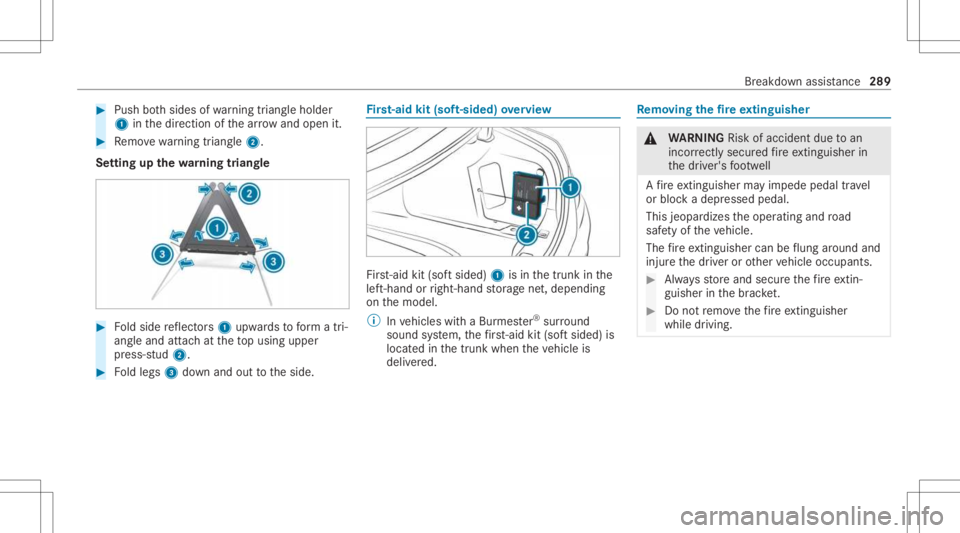
Push both sides ofwa rning triang leholder
1 inthedir ect ion ofthear row and open it. #
Remo vewarning triang le2.
Se tting upthewa rning triang le #
Foldside reflect ors1 upw ards toform atri‐
ang leand attachat theto pusing upper
pr ess-s tud2. #
Foldlegs 3down and outtotheside. Fi
rs t-aid kit(sof t-si ded) overview Fir
st-ai dkit (softsided) 1isin thetrunk inthe
lef t-hand orright-h andstor ag ene t,depending
on themodel.
% Invehicles withaBur mes ter®
sur round
soun dsy stem, thefirs t-ai dkit (sof tsi de d) is
lo cat edinthetrunk when theve hicle is
deliv ered. Re
mo ving the fire extin gui she r &
WARNIN GRisk ofacci dent dueto an
inc orrectl ysecu redfire exting uishe rin
th edr iver's foot we ll
A fire exting uishe rma yim pe de pedaltr av el
or bloc kadepr essed pedal.
This jeopar dizestheoper ating androad
saf etyof theve hicle.
The fire exting uishe rcan beflung aroun dand
inj ureth edr iver or other vehicle occupants. #
Alw aysst or eand secur eth efire extin‐
gu ishe rin thebr ac ket. #
Donotre mo vethefire exting uishe r
wh ile dr ivi ng. Br
ea kdo wnassist anc e289