cruise control MERCEDES-BENZ E-CLASS CABRIOLET 2010 User Guide
[x] Cancel search | Manufacturer: MERCEDES-BENZ, Model Year: 2010, Model line: E-CLASS CABRIOLET, Model: MERCEDES-BENZ E-CLASS CABRIOLET 2010Pages: 333, PDF Size: 7.64 MB
Page 166 of 333
X
Briefly pull the cruise contro llev er towards
you ?or press it up :or down Ato the
pressure point.
DISTRONIC PLU Sisselected.
X Keep the cruise control lever pressed
up : or down Auntil the desired speed
is set.
X Remove your foot from the acc elerator
pedal.
You rvehicle adapts its speed to that of the
vehicle in front, but only up to the desired
stored speed.
i If you do not fully release the accelera tor
pedal, the DISTRONICP LUS suspen‐
ded message appears in th emultifunction
display. The set distance to aslower-mov-
ing vehicle in fron twill then not be main-
tained. You will be drivin gatthe speed you
deter mine by the positio nofthe accelera-
tor pedal.
Activating when driving towards asta-
tionary vehicle
If the vehicl einfront of yo uisstationary, you
can onl yactivate DISTRONI CPLUSo nce your
vehicl eisstationary as well.
X Briefl ypullt he cruis econtr ollever towards
you ?.
DISTRONIC PLUS is selected.
i DISTRONIC PLUS can onl ybeactivate dat
under 30 km/h if avehicle in front has been
detected. Therefore, the DISTRONIC PLUS
distance display in the instrumen tcluster
should be activated.
X Keep the cruise control lever pressed
up : or down Auntil the desired speed
is set.
i You can use the cruise control lever to set
the stored speed and the thumbwheel on
the cruise control lever to set the specified
minimum distance (Y page 166). Pulling away
X
If the vehicle in front pulls away: remove
your foot from the brake pedal.
X Briefly pull the cruise control lever towards
you ?.
or
X Accelerate briefly.
Your vehicle pull sawaya nd adapts its
speed to that of the vehicl einfront.
Driving
If there is no vehicl einfront, DISTRONIC
PLUS operates in th esame way as cruise
control.
If as lower-moving vehicle is detected in front,
DISTRONIC PLU Scauses your vehicle to
brake and maintain apreset distance to the
vehicl einfront.
If DISTRONIC PLUS detects afaster-moving
vehicle in front ,itincrease sthe drivin gspeed,
but only up to the desired speed you have
stored. G
Risk of accident
If you depress the brake, DISTRONIC PLU Sis
deactivated unless your vehicl eisstationary.
DISTRONIC PLUS then no longe rbrake syour
vehicle. In such cases, control the distance
from vehicles travelling in front with the brake
alone. You coul dotherwis ecause an accident
and thereby injure yoursel fand others. The
driver rema insf ully responsibl efor the vehi-
cle's distance from other vehicles ,the speed
being driven and for brakin gingood time.
Changing lanes
If you wish to change to the passing lane (in
left -hand-drive vehicles, the passing lane is
the left-hand lane), DISTRONIC PLUS sup-
ports you if:
R you are driving faster than 60 km/h
R DISTRONIC PLUS is maintaining the dis-
tanc etoav ehicle in front
R you switc honthe appropriate tur nsignals
R DISTRONIC PLU Sdoes not detec tadanger
of collision Driving systems
163Driving and parking
BA 207 ECE ÄJ 2010/1a; 1; 2, en-GB
mkalafa Version: 3.0.2.11 2010-01-26T13:03:22+01:00-Seite 163 Z
Page 168 of 333
If yo
uwish to leave the vehicle or park it,
deactivate DISTRONIC PLU Sand secure the
vehicl eagainst rolling away.
If DISTRONIC PLU Sdetect sthat the vehicle
in front is stopping, it brakes your vehicle until
it is stationary.
Onc eyour vehicle is stationary, it remains
stationar yand you do not need to depress the
brake.
i Depe nding on the specified minimum dis-
tance, your vehicle will come to astandstill
at as ufficien tdistanc ebehin dthe vehi cle
in fron t.The specifie dminimum distance is
set using the thumbwheel on the cruise-
control lever.
When DISTRONIC PLU Sisa ctivate dand the
vehicl eisatas tandstill, the following warning
message appe arsint he multifunction display
if:
R the driver's door is open and the driver's
seat belt is unfastened
R the engin eisswitched off, unless it is auto-
matically switched off by the ECO start/
stop func tion
R the bonnet is opened
Select Park (P)
X Move the selector leve rtoPto prevent the
vehicle from rolling away.
DISTRONIC PLUS is deactivated .The warn-
ing message in the multifunction display
disappears.
The horn will also sound at regular intervals if
DI ST RONIC PLUS is activated and you:
R switch the engine off, open the driver's
doo rand take off your sea tbelt
R open the bonnet
The soundin gofthe horn alerts you to the fact
that the vehicle has been parked while DI S-
TRONIC PLU Siss till activated. The sound
becomes louder if you attempt to lock the
vehicle .The vehicle is not locked until DI S-
TRONIC PLU Sisd eactivated. i
If the ignition has been switched off ,the
engin ecannot be started again until DIS-
TRONIC PLUS has been deactivated.
If DISTRONIC PLUS is activated and afault
occurs in the system or there is adisruption
in the power supply while the vehicle is sta-
tionary ,the Brak eimmediately message is
show ninthe multifunction display. Immedi-
atel ydepress the brak efirmly until the warn-
ing message in the multifunction displa ygoes
out or mov ethe selector lever to P.DIS-
TRONIC PLUS is then deactivated.
Setting aspeed X
Press the cruise control lever to the pres-
sure point, up :for ahigher speed or
down Afora lower speed.
X Keep the cruise contro llever pressed until
the desired speed is reached.
X Release the cruise control lever.
The new speed is stored. DI STRONIC PLUS
is activated and adjusts the vehicle's speed
to the new speed stored.
Making adjustments in 1km/h incre-
ments X
Briefly press the cruise contro llever to the
pressur epoint ,up :for ahigher speed or
down Afor alower speed.
The last speed stored is inc reased or
reduced.
Making adjustments in 10 km/h incre-
ments X
Briefly press the cruise contro llever
beyond the pressur epoint ,up :for a
higher spee dordownAfor alower speed.
The last speed stored is inc reased or
reduced. Driving systems
165Driving and parking
BA 207 ECE ÄJ 2010/1a; 1; 2, en-GB
mkalafa Version: 3.0.2.11 2010-01-26T13:03:22+01:00-Seite 165 Z
Page 169 of 333
Storing th
ecurrent speed or calling up
the stored speed G
Ris
kofa ccident
Only call up astored speed if you know what
that speed is and if it is suitable for the current
traffic and driving situation. You can other-
wise endanger yoursel forothers by uninten-
tionall ytriggering sudden acceleration or
braking.
X Briefly pull th ecruis econtrol leve rtowards
you ?.
X Remove your foot from the accelerator
pedal.
DIST RONIC PLUS is activated. The first
time it is activated, the current speed is
stored. Otherwise, it sets the vehicle cruise
speed to the previousl ystored value.
Settin gthe specified minimum distance Yo
uc an set the specified minimum distance
for DISTRONIC PLUS by varying the time span
between one and two seconds .With this func-
tion, you can set the minimum distance that
DISTRONIC PLU Skeeps to the vehicle in
front ,dependent on vehicle speed. You can
see this distance in the multifunc tion display
(Y page 166). X
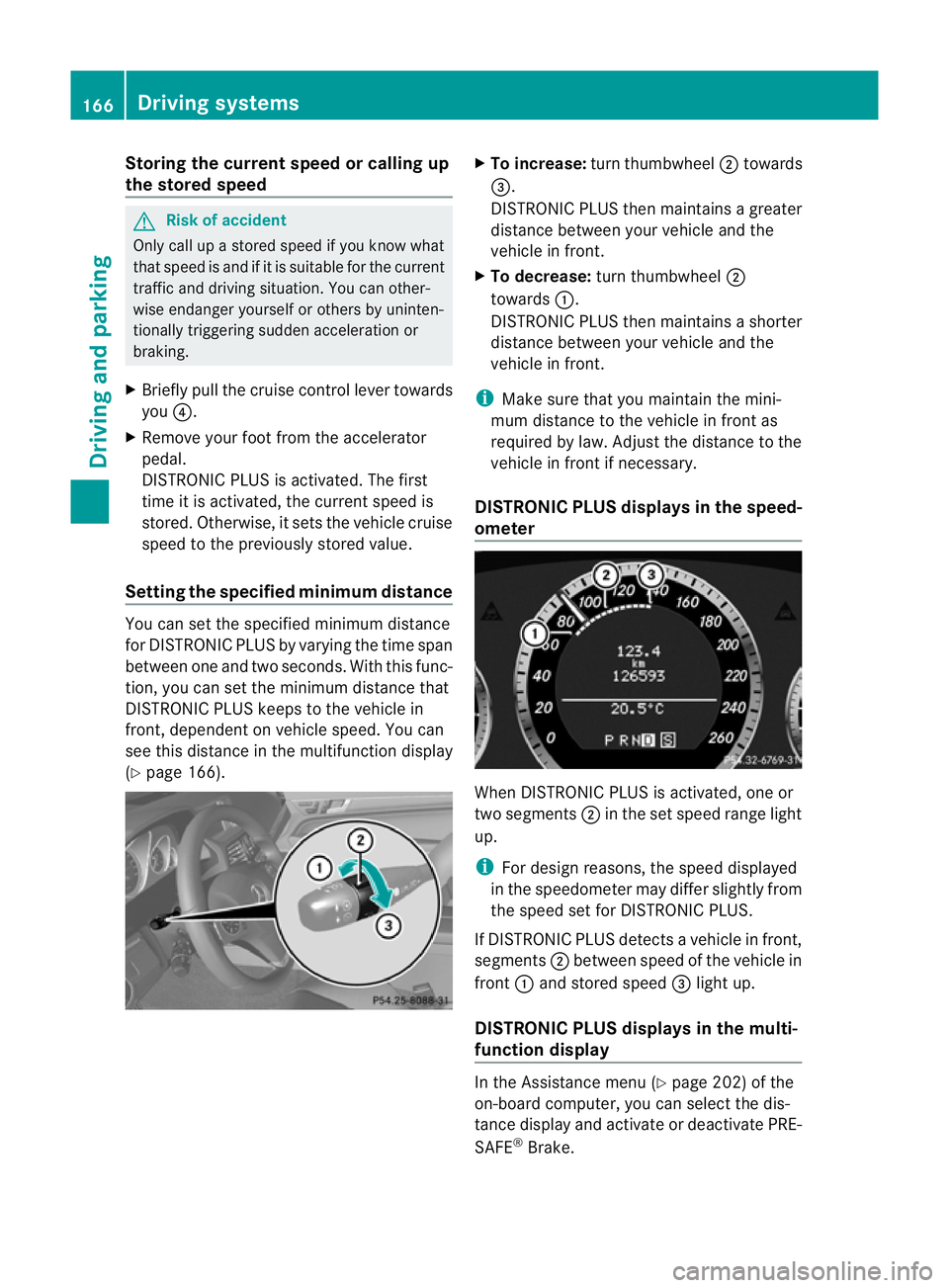
To increase: turnthumbwheel ;towards
=.
DI ST RONIC PLUS then maintains agreater
distance between your vehicl eand the
vehicl einfront.
X To decrease: turn thumbwheel ;
towards :.
DISTRONIC PLUS then maintains ashorter
distanc ebetween your vehicle and the
vehicle in front.
i Make sure that you maintai nthe mini-
mu md istance to the vehicle in front as
required by law. Adjust the distance to the
vehicle in front if necessary.
DISTRONIC PLUS display sinthe speed-
ometer When DISTRONIC PLUS is activated, one or
two segments
;in th eset speed range light
up.
i For design reasons, the speed displayed
in the speedometer may differ slightly from
the speed set for DI STRONIC PLUS.
If DISTRONIC PLUS detects avehicle in front,
segments ;between speed of the vehicle in
front :and stored speed =light up.
DISTRONIC PLUS displays in the mul ti-
functio ndisplay In the Assistance menu (Y
page 202)of the
on-boar dcompu ter,you can select the dis-
tanc edisplay and activat eordeactivate PRE-
SAFE ®
Brake. 166
Driving systemsDriving and parking
BA 20
7ECE ÄJ 2010/1a; 1; 2, en-GB
mkalafa Version:3.0.2.11
2010-01-26T13:03:22+01:0
0-Seite 166
Page 170 of 333
Displa
ywhen DIS TRONIC PLUS is deacti-
vated
X Selec tthe Distance display function
using the on-boar dcomputer
(Y page 202).
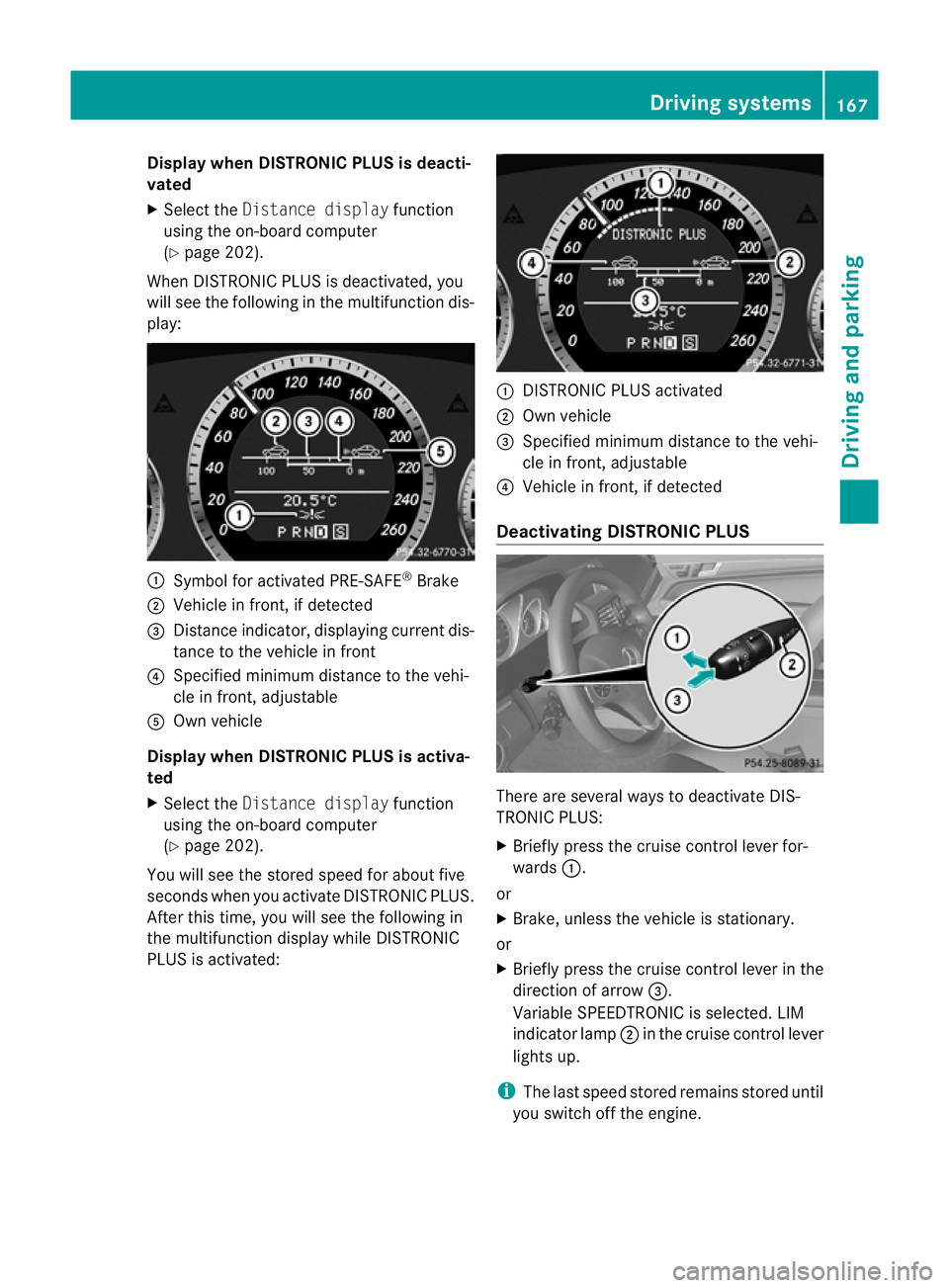
When DI STRONIC PLUS is deactivated, you
will see the following in the multifunction dis-
play: :
Symbol for activated PRE-SAFE ®
Brake
; Vehicle in front ,ifdetected
= Distan ceindicator ,displaying current dis-
tance to the vehicle in front
? Specified minimum distance to the vehi-
cle in front ,adjustable
A Own vehicle
Displa ywhen DISTRONIC PLUS is activa-
ted
X Select the Distance display function
using th eon-board computer
(Y pag e202).
Yo uw ill see the stored speed for about five
seconds when you activate DISTRONIC PLUS.
After this time, you will see the following in
the multifunction displa ywhile DI STRONIC
PLUS is activated: :
DISTRONIC PLUS activated
; Own vehicle
= Specified minimum distance to the vehi-
cle in front ,adjustable
? Vehicle in front ,ifdetected
Deactivating DISTRONIC PLUS There are several ways to deactivate DI
S-
TRONIC PLUS:
X Briefl ypres sthe cruise con trollever for-
wards :.
or
X Brake, unless the vehicle is stationary.
or
X Briefly press the cruise control lever in the
direction of arrow =.
Variable SPEEDTRONIC is selected. LIM
indicator lamp ;in the cruise control lever
lights up.
i The last speed stored remains stored until
you switch off the engine. Driving systems
167Driving and parking
BA 207ECE ÄJ 2010 /1a;1;2,e n-GB
mkalafa Version: 3.0.2.11 2010-01-26T13:03:22+01:00-Seite 167 Z
Page 171 of 333
i
DISTRONIC PLUS is no tdeactivated if you
depress the accelerator pedal. If you accel-
erate to overtake, DISTRONI CPLUS
adjusts th evehicle' sspeed to the last
speed stored after you have finished over-
taking.
DI ST RONIC PLUS is automatically deactiva-
ted if:
R you apply the parking brake
R you are driving slower than 25 km/ hand
there is no vehicl einfront, or if th evehicle
in front is no longer detected
R ESP ®
intervenes or you deactivate ESP ®
R the transmission is in the P,Ror Nposition
R the vehicle is near aradio telescop efacility
(Y page 324)
R you switch off the radar senso rsystem
(Y page 208)
R you pull the cruise control lever towards
you in order to pull away and the front-
passenger doo riso pen
If DI STRONIC PLUS is deactivated, you will
hear awarning tone. You will see the DIS‐
TRONIC PLUS off message in the multifunc-
tion display for approximately five seconds.
If the vehicle has been stopped by DISTRONIC
PLUS and afault occurs in the system, the
Brak eimmediately message appears in the
multifunction displa y.Depre ss the brake
pedal immediately so that the vehicle does
not rol laway. DISTRONIC PLUS is then deac-
tivated, and the message disappears.
Tips for driving with DISTRONIC PLUS The following contains descriptions of certain
road and traf ficc ondition sinwhich you must
be particularly attentive. In such situations,
brake if necessary. DI STRONIC PLUS is then
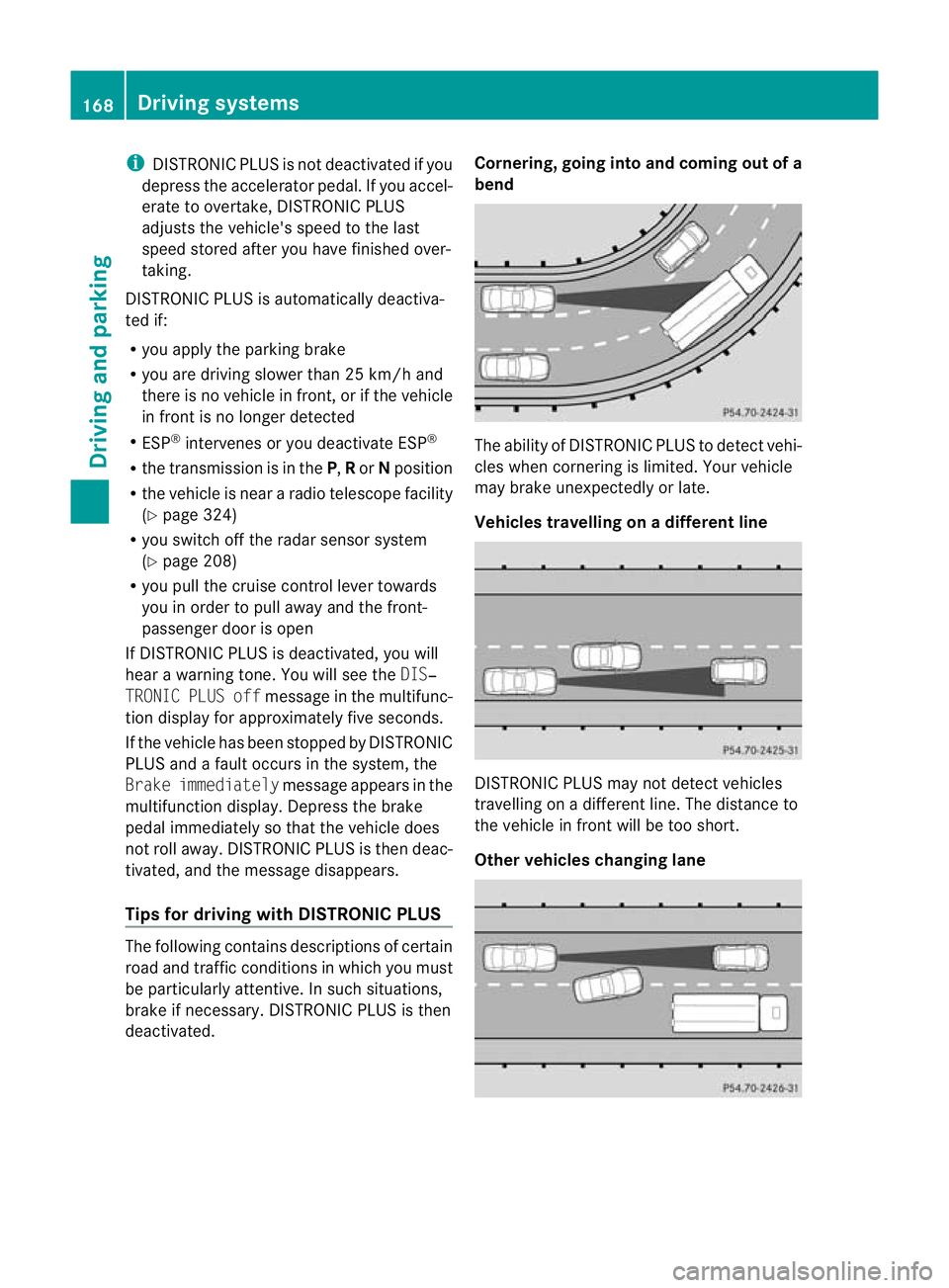
deactivated. Cornering, going into and coming out of a
bend The ability of DISTRONIC PLUS to detect vehi-
cles when cornering is limited. Your vehicle
may brake unexpectedly or late.
Vehicles travellin
gonadifferent line DISTRONIC PLU
Smay not detec tvehicles
travelling on adifferent line. The distance to
the vehicle in fron twill be too short.
Other vehicles changing lane 168
Drivin
gsystemsDrivin gand parking
BA 20 7ECE ÄJ 2010/1a; 1; 2, en-GB
mkalafa Version: 3.0.2.11 2010-01-26T13:03:22+01:00-Seite1 68
Page 173 of 333
cause the drive wheel
stoloset heir grip and
the vehicle coul dskid.
You can set avariable or permanent limit
speed:
R Variable for speedlimits, e.g. in built-up
areas
R permanent for long-term speed restric-
tions, e.g. when drivin gwith winter tyres
fitted (Y page 171) G
Risk of accident
Speedtronic is only an aid designed to assist
driving. You are responsible for the vehicle's
speed and for brakin gingood time.
i The speed indicated in the speedometer
may differ slightly from the limi tspeed
stored.
Variable SPEEDTRONIC General notes
With the cruise control lever
,you can operate
cruise con trolorD ISTRONIC PLUS and vari-
able SPEEDTRONIC.
Th eL IM indicato rlamp on the cruise control
lever indicates which system you have selec-
ted:
R LIM indicator lamp off: cruise control or
DISTRONIC PLUS is selected
R LIM indicator lamp on: variable SPEED-
TRONIC is selected.
You can use the cruise control lever to limit
the spee dtoany speed above 30 km/h while
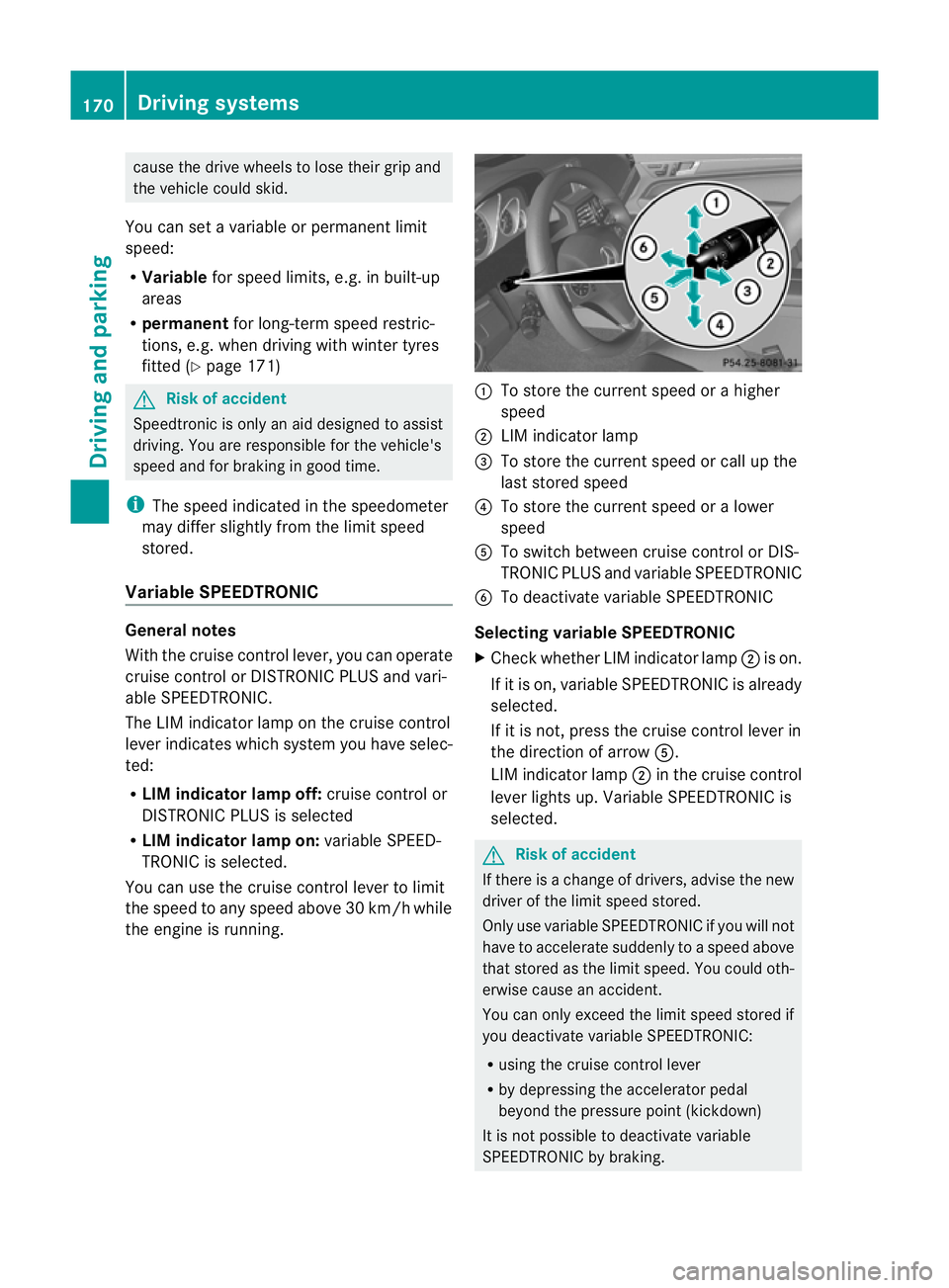
the engine is running. :
To store the current speed or ahigher
speed
; LIMi ndicato rlamp
= To store the current spee dorcall up the
last stored speed
? To store the current spee doral ower
speed
A To switc hbetween cruise control or DI S-
TRONIC PLU Sand variable SPEEDTRONIC
B To deactivate variable SPEEDTRONIC
Selecting variabl eSPEEDTRONIC
X Chec kwhether LI Mindicato rlamp ;is on.
If it is on, variable SPEEDTRONIC is already
selected.
If it is not, press the cruise control lever in
the direction of arrow A.
LIM indicator lamp ;in the cruise control
lever lights up. Variable SPEEDTRONIC is
selected. G
Risk of accident
If there is achange of drivers, advise the new
driver of the limit speed stored.
Only use variable SPE EDTRONI Cifyou will not
have to accelerate suddenl ytoaspeed above
that stored as the limit speed. You could oth-
erwise cause an accident.
You can only exceed the limit speed stored if
you deactivate variable SPE EDTRONIC:
R using the cruise control lever
R by depressin gthe accelerator pedal
beyon dthe pressure point (kickdown)
It is not possible to deactivate variable
SPE EDTRONI Cbybraking. 170
Dri
ving systemsDriving and pa rking
BA 20 7ECE ÄJ 2010/1a; 1; 2, en-GB
mkalafa Version: 3.0.2.11 2010-01-26T13:03:22+01:00 -Seite 170
Page 174 of 333
Storing th
ecurren tspeed
You can use the cruise control leve rtolimit
the speed to any speed above 30 km/ hwhile
the engin eisrunning.
X Briefly press the cruise control lever
up : or down ?to the pressure point.
The current spee disstored and shown in
the multifunction display.
The segments in the multifunction display
ligh tupf rom th estart of the scale up to the
stored speed.
Storin gthe current speed or callin gupthe
las tstored speed G
Risk of accident
Only select astored speed if you know what
that speed is and whether it is suitable for the
current driving and traffic situation. Other-
wise ,sudden braking could endanger you or
others.
X Briefly pull the cruise control lever towards
you =.
Making adjustments in 10 km/h incre-
ments
X Briefly press the cruise control lever
beyond the pressure point, up :for a
higher spee dordown ?for alower speed.
or
X Keep the cruise con trollever pressed
beyond the pressur epoint until the desired
speed is set. Press the cruise con trollever
up : for ahigher speed or down ?for a
lower speed.
Making adjustments in 1km/h incre-
ments
X Briefly press the cruise control lever to the
pressure point, up :for ahigher speed or
down ?for alower speed.
or
X Keep the cruise con trollever pressed to the
pressur epoint until the desire dspeed is
set. Press the cruise control lever up :for ah
igher speed or down ?for alower
speed.
Deactivating variabl eSPEEDTRONIC
There ar eseveral ways to deactivate variable
SPEEDTRONIC:
X Briefly press the cruise control lever for-
wards B.
or
X Briefly press the cruise control lever in the
direction of arrow A.
LI Mi ndicato rlamp ;in the cruise control
lever goes out. Variable SPEEDTRONIC is
deactivated.
Cruise control or DISTRONIC PLUS is selec-
ted.
Variable SPEEDTRONIC is automatically
deactivated:
R when you depress the accelerator pedal
beyond the pressure point (kickdown), but
only if your current spee ddoes not differ by
mor ethan 20 km/h from the stored speed.
You will hear awarning tone if this is the
case.
R on vehicles with manual transmission, if
you shift to ahigher gear and as aresult the
engine speed is too low. G
Risk of accident
It is not possible to deactivate variable Speed-
tronic by braking.
i The last speed stored is cleared when you
switc hoff th eengine.
Permanent SPEEDTRONIC i
Permanent SPEEDTRONIC is only availa-
ble for certain countries.
You can use the on-board compute rtolimit
the speed permanently to avalue between
16 0k m/ h(e.g. for driving on winter tyres)
and th emaximum speed ( Ypage 207).
Shor tlyb efore th estore dspeed is reached, it
appear sinthe multifunction display. Driving systems
171Driving and parking
BA 207ECE ÄJ 2010/1a; 1; 2, en-GB
mkalafa Version:3.0.2.11
2010-01-26T13:03:22+01:0
0-Seite 171 Z
Page 191 of 333
Gen
eral information i
When towing atrail er,s et the tyr epres-
sure on th erear axle of the towing vehicle
for am aximum load; se ethe tyr epressure
table in th efuel filler flap.
You will find installatio ndimensions and loads
in the "Technical data” section
(Y page 322).
The maximum permissible trailer drawbar
noseweight on the ball coupling is 75 kg.
However ,the actual noseweight must not
exceed the value given on the trailer tow hitch
and trailer identification plates. The lowest
weight applies.
! Use anoseweight as close as possible to
the maximum permissible noseweight .Do
not use anoseweight of less than 50 kg,
otherwise the trailer ma ycome loose.
Bear in min dthat the payload and the rear
axl eload ar ereduced by the actual nose-
weight.
Please not ethat when towing atrailer, PARK-
TRONIC (Y page 174) and parkin gguidance
(Y page 177 )are onl yavail ablew ith limita-
tions, or not at all.
i The height of the ball coupling changes
with the load of the vehicle. If necessary,
use atrailer wit haheight-adjustable draw-
bar.
Driving tips i
Observ ethe notes on ESP ®
trailer stabi-
lisation (Y page 58).
In Germany, the maximum permissible speed
for vehicle/ trailer combinations depends on
the type of trailer and is either 80 km/ hor
100 km/h. In some countries ,higher maxi-
mum speeds are permissible for vehicle/
trailer combinations. Befor ebeginnin gthe
journey ,check the trailer's documen tsto see
what the maximum permitted speed is.
For certain Mercedes-Benz vehicles, the max-
imum permissible rear axle load is increased
when towing atrailer. Refer to th e"Technical data
"section to fin dout whether this applies
to your vehicle. If you utilise any of the added
maximum rear axle load when towing atrailer,
th ev ehicle/ trailer combination may not
exceed amaximum spee dof100 km/h for
reasons concerning the operating permit.
This als oapplies in countries in which the
permissible maximum speed for vehicle/
trailer combinations is above 10 0km/h.
When towing atrailer, your vehicle's handling
characteristics wil lbedifferent in comparison
to when drivin gwithout atrailer.
Th ev ehicle/ trailer combination:
R is heavier
R is restricted in its acceleration and gradi-
ent-climbin gcapability
R has an increased braking distance
R is affected more by stron gcrosswinds
R demand smore sensitive steering
R consume smore fuel
On long and steep downhil lgradients ,you
must shift to alower gear in good time, or on
vehicles with automatic transmission ,select
the shift range 1,2or 3.
i This also applies if you have activated
cruise control, SPEEDTRONIC or DI S-
TRONIC PLUS.
This will use the brakin geffect of th eengine,
so les sbraking wil lberequired to maintain
the speed. This relieves the load on the brake
system and prevent sthe brakes from over-
heating and wearing too quickly .Ifyou need
additional braking, depress the brake pedal
repeatedly rather than con tinuously.
Driving tips R
Maintain agreater distance from th evehi-
cle in front than when driving without a
trailer.
R Avoid braking abruptly. If possible, brake
gently at first to allow the trailer to run on.
Then increase the braking force rapidly.
R The values given for gradient-climbing
capabilities from astandstill refer to sea 188
Trailer towingDrivin
gand pa rking
BA 20 7ECE ÄJ 2010 /1a; 1; 2, en-GB
mkalafa Version: 3.0.2.11 2010-01-26T13:03:22+01:00 -Seite 188
Page 196 of 333
Outsid
etemperature display
The outside temperature display is in the mul-
tifunction display. G
Risk of accident
At temperatures just above freezing point ,the
str eetm ay be icy, especially in woode dareas
or on bridges .Ifyou do not adapt your driving
style to the conditions, th evehicle could skid.
For this reason ,adapt your driving style and
speed to the weather conditions.
Changes in the outside temperatur eare dis-
played afte rashort delay. Speedomete
rwith segments
The segments in the speedometer indicate
which speed range is available.
Cruise control mode:
The segments light up from the stored speed
to the maximum speed.
Variable SPEEDTRONI Cmode:
The segments light up from the star tofthe
scal etot he selected limit speed.
DI ST RONIC PLUS mode:
One or two segments around the stored
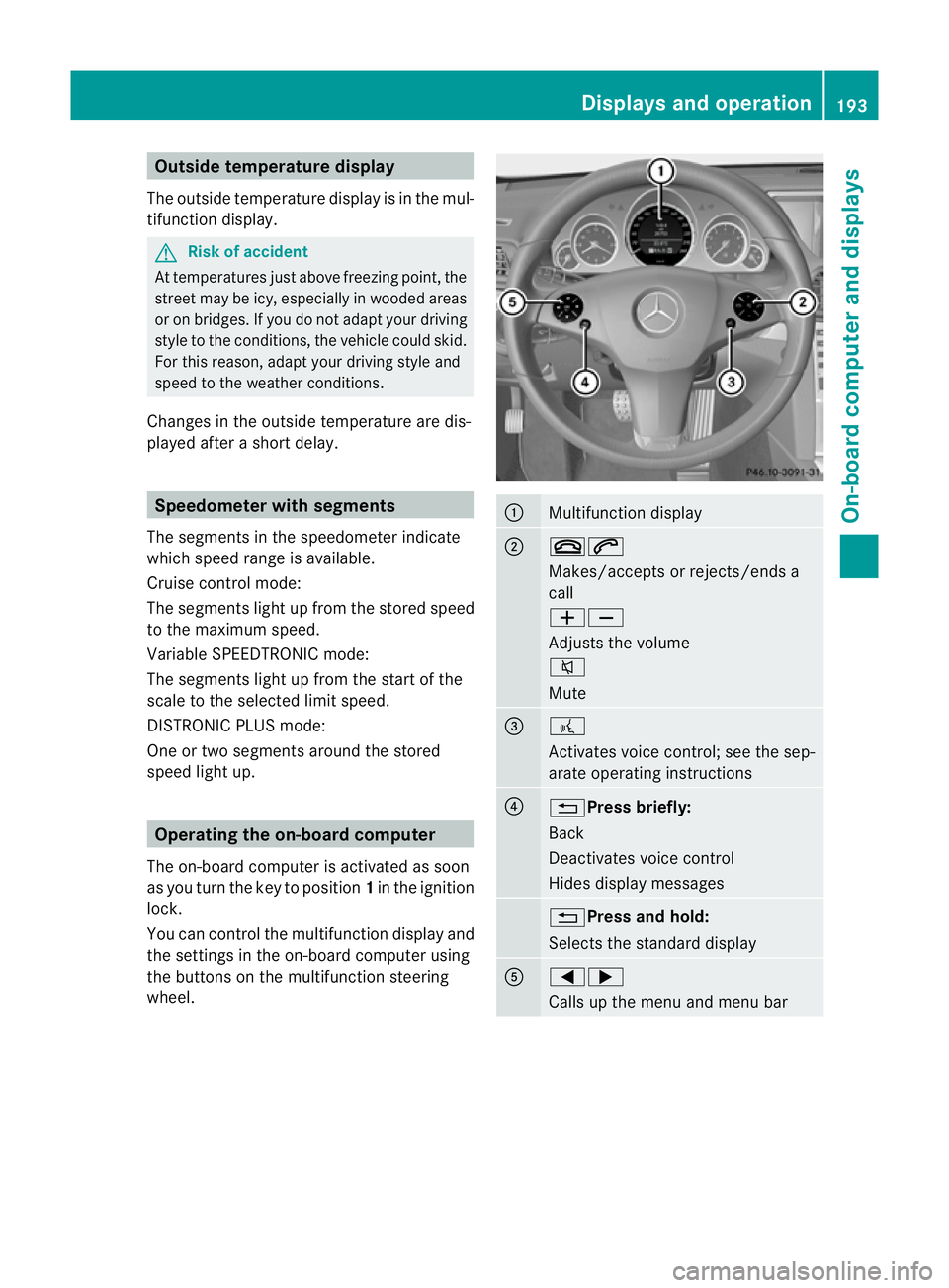
speed ligh tup. Opera
ting th eon-board computer
The on-board computer is activated as soon
as you tur nthe key to position 1in the ignition
lock.
You can con trolthe multifunction display and
the setti ngsint he on-boar dcomputer using
the buttons on the multifunction steering
wheel. :
Multifunction display
;
~6
Makes/accepts or rejects/ends a
call
WX
Adjusts the volume
8
Mute
=
?
Activates voic
econtrol; see the sep-
arate operatin ginstructions ?
%Press briefly:
Back
Deactivate
svoice con trol
Hide sdispla ymessages %Press and hold:
Selects the standard display
A
=;
Calls up the men
uand menu bar Displays and operation
193On-board computer and displays
BA 207 ECE ÄJ 2010/1a; 1; 2, en-GB
mkalafa Version: 3.0.2.11 2010-01-26T13:03:22+01:00 -Seite 193 Z
Page 207 of 333
X
Press the =or; button on the steer-
ing wheel to select the Assist.menu.
X Press the 9or: button to select
Blin dSpot Asst..
X Press a.
Th ec urren tselection is displayed.
X To activate/deac tivate: press a
again. Servic
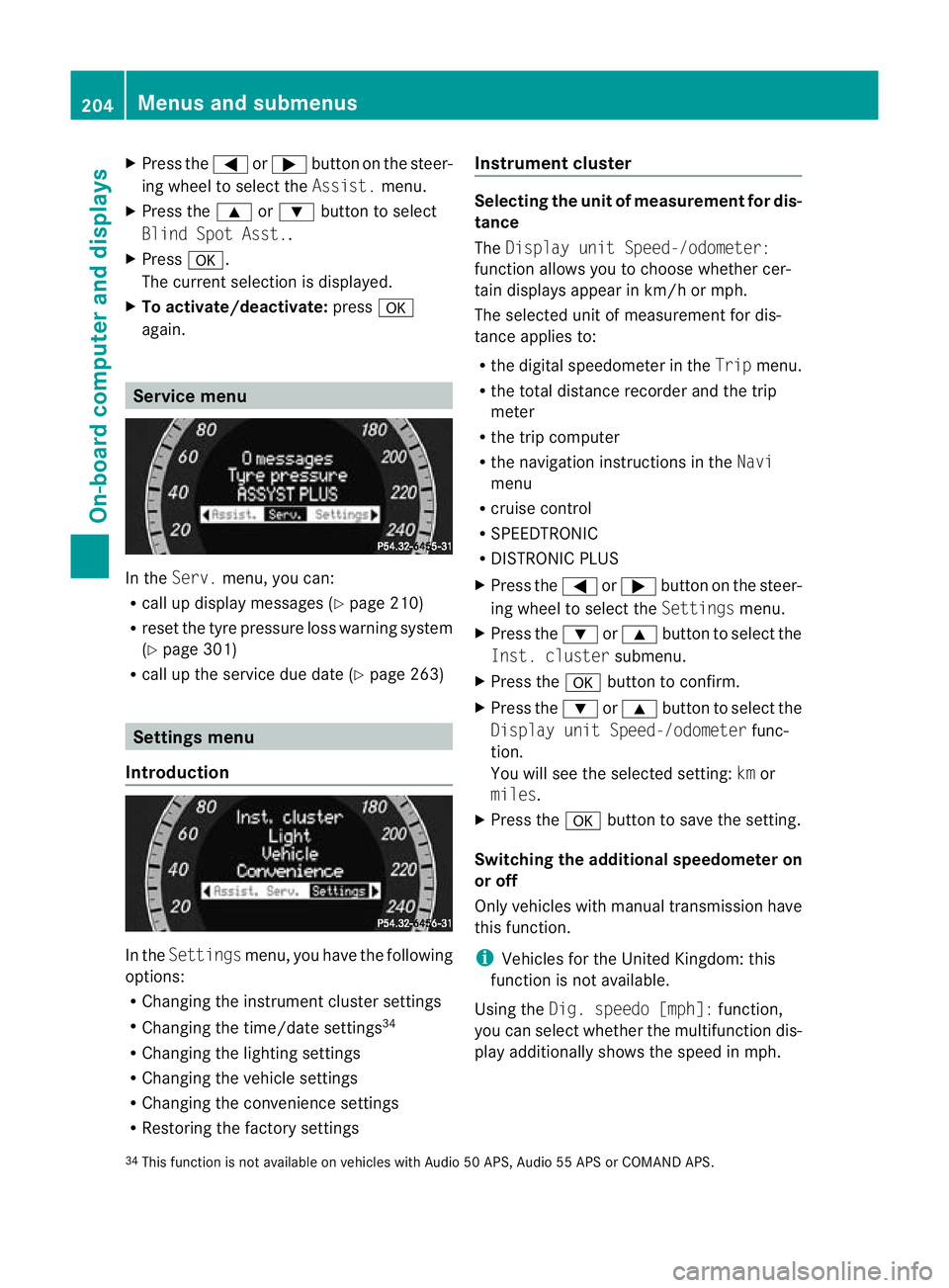
emenu In the
Serv. menu, you can:
R call up display messages (Y page 210)
R reset the tyre pressure loss warnin gsystem
(Y page 301)
R call up the service due date (Y page 263)Settings menu
Introduction In the
Settin gsmenu ,you have the following
options:
R Changing the instrumen tcluster settings
R Changing the time/date settings 34
R Changing the lighting settings
R Changing the vehicle settings
R Changing the convenience settings
R Restorin gthe factory settings Instr
ument cluster Selecting the unit of measurement for dis-
tance
The
Displa yunit Speed-/odometer:
functio nallows you to choose whether cer-
tain displays appear in km/ horm ph.
The selected unit of measuremen tfor dis-
tan ceapplies to:
R the digital speedometer in the Tripmenu.
R the total distance recorder and the trip
meter
R the trip computer
R the navigation instructions in the Navi
menu
R cruise control
R SPEEDTRONIC
R DISTRONIC PLUS
X Press the =or; button on the steer-
ing wheel to select the Settingsmenu.
X Press the :or9 button to select the
Inst .cluster submenu.
X Press the abuttontoc onfirm.
X Press the :or9 button to select the
Displa yunit Speed-/odometer func-
tion.
Yo uw ill see the selected setting: kmor
miles.
X Press the abutton to save the setting.
Switching the additional speedometer on
or off
Only vehicles with manual transmission have
this func tion.
i Vehicles for the United Kingdom: this
func tion is not available.
Usin gthe Dig. speedo [mph]: function,
you can select whether the multifunc tion dis-
play additionally shows the speed in mph.
34 This func tion is not available on vehicles with Audio 50 APS, Audio 55 APS or COMAN DAPS. 204
Menus and submenusOn-board computer and displays
BA 20
7ECE ÄJ 2010 /1a; 1; 2, en-GB
mkalafa Version: 3.0.2.11 2010-01-26T13:03:22+01:00 -Seite 204