fog light MERCEDES-BENZ E-CLASS CABRIOLET 2010 User Guide
[x] Cancel search | Manufacturer: MERCEDES-BENZ, Model Year: 2010, Model line: E-CLASS CABRIOLET, Model: MERCEDES-BENZ E-CLASS CABRIOLET 2010Pages: 333, PDF Size: 7.64 MB
Page 210 of 333
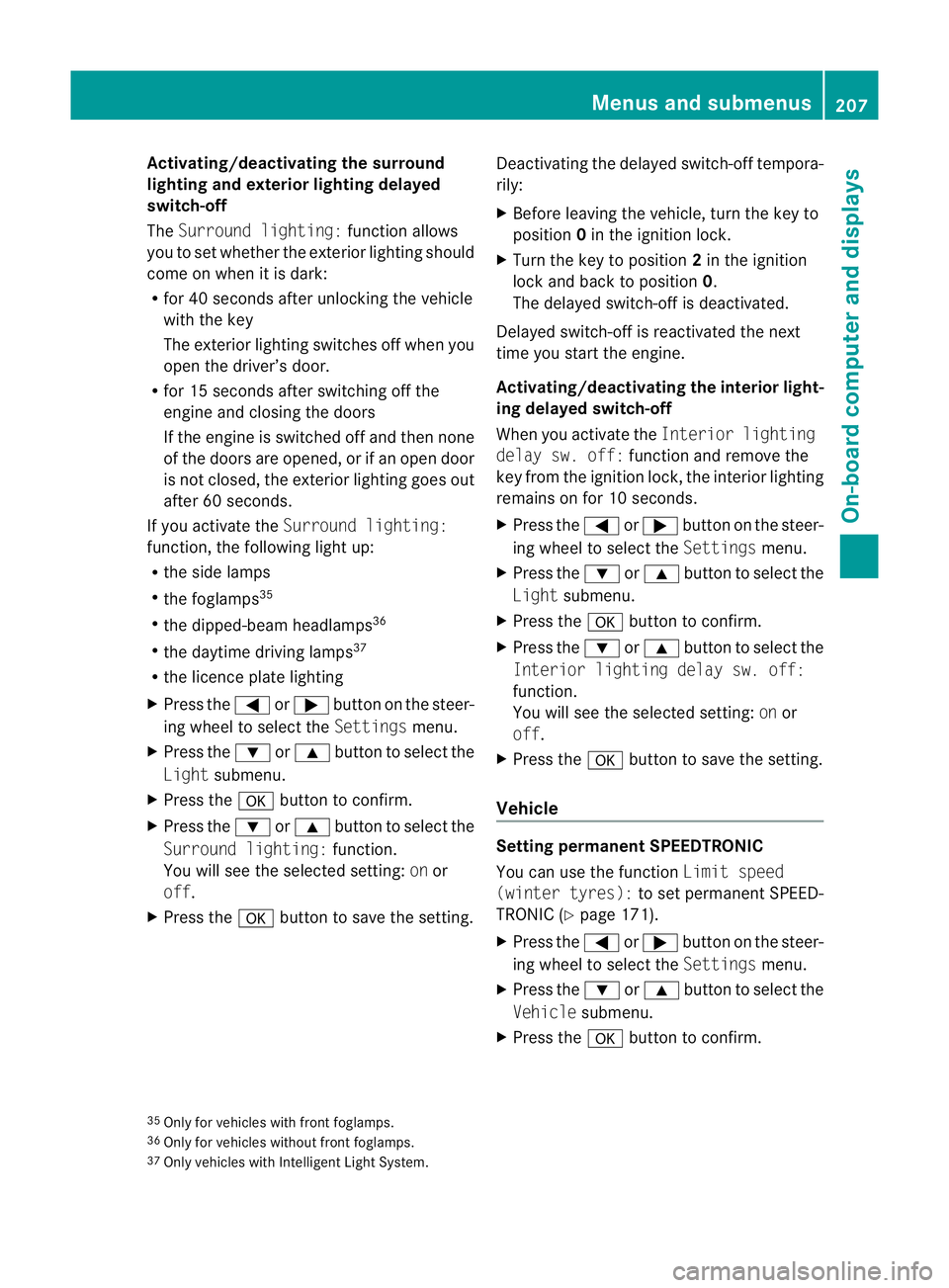
Activating/deactivating th
esurround
lighting and ex terior lightin gdelayed
switch-off
The Surround lighting: function allows
yo utos et whether th eexterior lighting should
com eonw hen it is dar k:
R for 40 se conds after unlockin gthe ve hicle
with th ekey
The exterior lighting switche soff wh en you
open the driver’s door.
R for 15 seconds after switching off the
engine and closing the doors
If the engine is switched off and then none
of the doors are opened, or if an ope ndoor
is not closed, the exte rior lightin ggoes out
after 60 seconds.
If you activate the Surround lighting:
func tion, the following light up:
R the side lamps
R the foglamps 35
R the dipped-beam headlamps 36
R the daytime drivin glamps 37
R the licence plate lighting
X Press the =or; button on the steer-
ing wheel to select the Settingsmenu.
X Press the :or9 button to select the
Light submenu.
X Press the abutton to confirm.
X Press the :or9 button to select the
Surround lighting: function.
You will see the selected setting: onor
off.
X Press the abutton to save the setting. Deactivating the delayed switch-off tempora-
rily:
X
Before leaving the vehicle, turn the key to
position 0in the ignition lock.
X Turn the key to position 2in the ignition
lock and back to position 0.
The delayed switch-off is deactivated.
Delayed switch-off is reactivated the next
time you start the engine.
Activating/deactivating the interior light-
ing delayed switch-off
When you activate the Interior lighting
dela ysw. off: function and remov ethe
key from the ignition lock ,the interior lighting
remain sonfor 10 seconds.
X Press the =or; button on the steer-
ing wheel to select the Settingsmenu.
X Press the :or9 button to select the
Light submenu.
X Press the abutton to con firm.
X Press the :or9 buttontos elect the
Interior lighting dela ysw. off:
function.
Yo uw ill see the selected setting: onor
off.
X Press the abutton to save the setting.
Vehicle Setting permanent SPEEDTRONIC
You can use the func
tion Limi tspeed
(winter tyres): to setpermanen tSPEED-
TRONI C(Ypage 171).
X Press the =or; button on the steer-
ing wheel to select the Settingsmenu.
X Press the :or9 button to select the
Vehicle submenu.
X Press the abutton to confirm.
35 Only for vehicles with front foglamps.
36 Only for vehicles withou tfront foglamps.
37 Onl yvehicles with Intelligent Light System. Menus and submenus
207On-board computer and displays
BA 207ECE ÄJ 2010 /1a; 1; 2, en-GB
mkalafa Version: 3.0.2.11 2010-01-26T13:03:22+01:00 -Seite 207 Z
Page 223 of 333
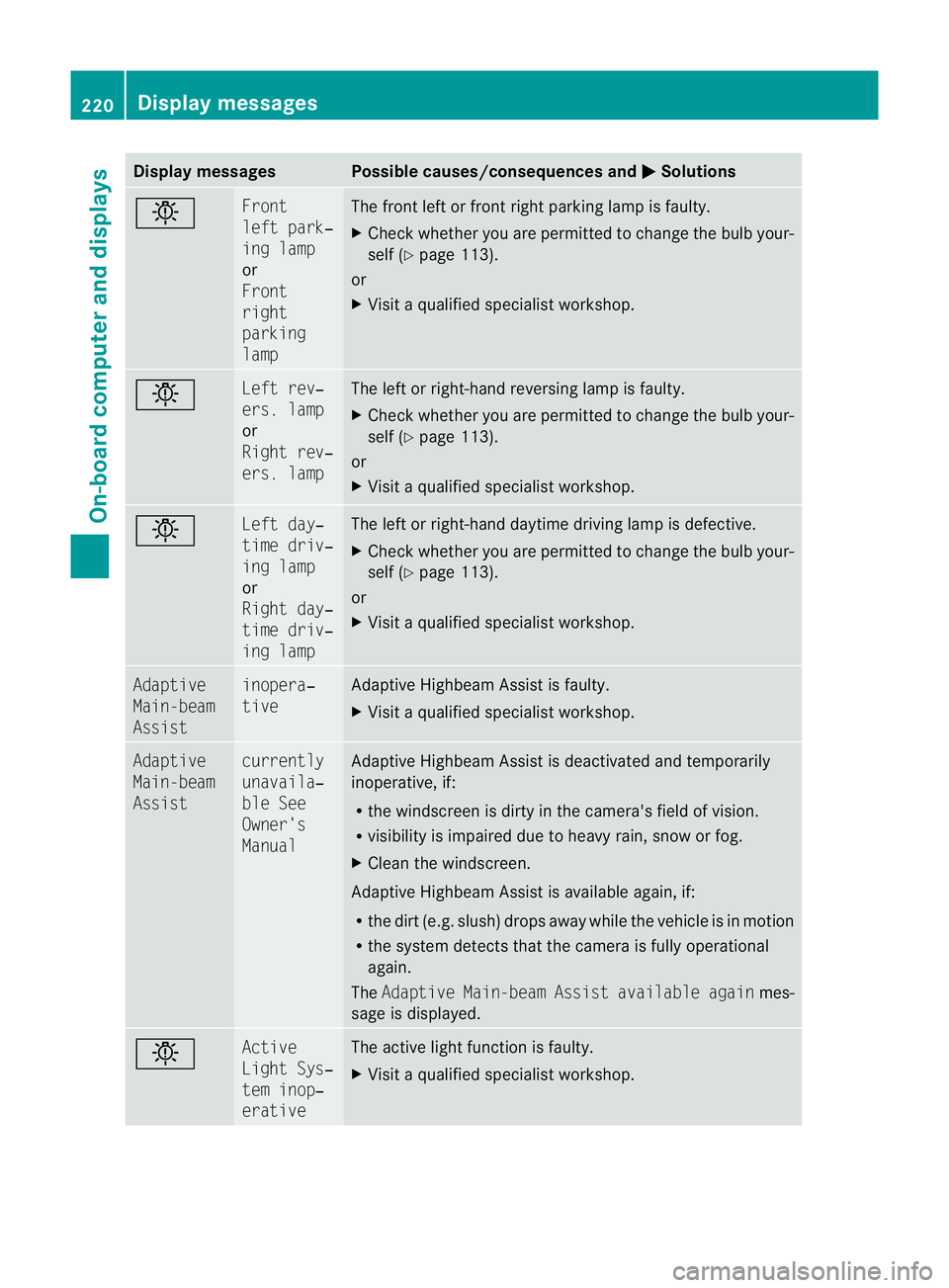
Displa
ymessages Possible causes/consequences and
M Solutions
b Fr
ont
lef tp ark‐
ing lamp
or
Front
right
parking
lamp Th
ef ront leftorf rontright parking lamp is faul ty.
X Chec kwhether you ar epermitted to change the bulb your-
self (Y page 113).
or
X Visit aqualified specialist workshop. b Left rev‐
ers. lamp
or
Righ
trev‐
ers. lamp Th
eleft or right-hand reversin glamp is faulty.
X Check whethe ryou ar epermitted to change the bulb your-
self (Y page 113).
or
X Visit aqualified specialist workshop. b Left day‐
time driv‐
in
gl amp
or
Right day‐
time driv‐
ing lamp Th
eleft or right-hand daytime driving lam pisdefective.
X Check whether you are permitted to change the bulb your-
self (Y page 113).
or
X Visit aqualified specialist workshop. Adaptive
Main-beam
Assist inopera‐
tive Adaptive Highbeam Assis
tisf aulty.
X Visit aqualified specialist workshop. Adaptive
Main-beam
Assist currently
unavaila‐
bl
eS ee
Owner's
Manual Adaptive Highbea
mAssist is deactivate dand temporarily
inoperative, if:
R the windscreen is dirty in the camera's field of vision.
R visibility is impaired due to heavy rain, sno worfog.
X Clean the windscreen.
Adaptive Highbea mAssist is available again, if:
R the dir t(e.g. slush) drops away while the vehicle is in motion
R the system detect sthat the camera is fully operational
again.
The Adaptive Main-bea mAssist available again mes-
sage is displayed. b Active
Light Sys‐
tem inop‐
erative Th
ea ctive light function is faulty.
X Visi taq ualified specialist workshop. 220
Display messagesOn-board computer and displays
BA 207 ECE ÄJ 2010/1a; 1; 2, en-GB
mkalaf
aV ersion: 3.0.2.11
2010-01-26T13:03:22+01:0
0-Seite 220