phone MERCEDES-BENZ E-CLASS CABRIOLET 2010 User Guide
[x] Cancel search | Manufacturer: MERCEDES-BENZ, Model Year: 2010, Model line: E-CLASS CABRIOLET, Model: MERCEDES-BENZ E-CLASS CABRIOLET 2010Pages: 333, PDF Size: 7.64 MB
Page 203 of 333
Audio player or audio media operation
Audio dat
afromv arious audio device sor
media can be played, depending on the equip-
ment fitted in the vehicle.
X Switch on the audio system or COMAND
APS and select the audi odrive or medium
(see th eseparate operating instructions).
X Press the =or; button on the steer-
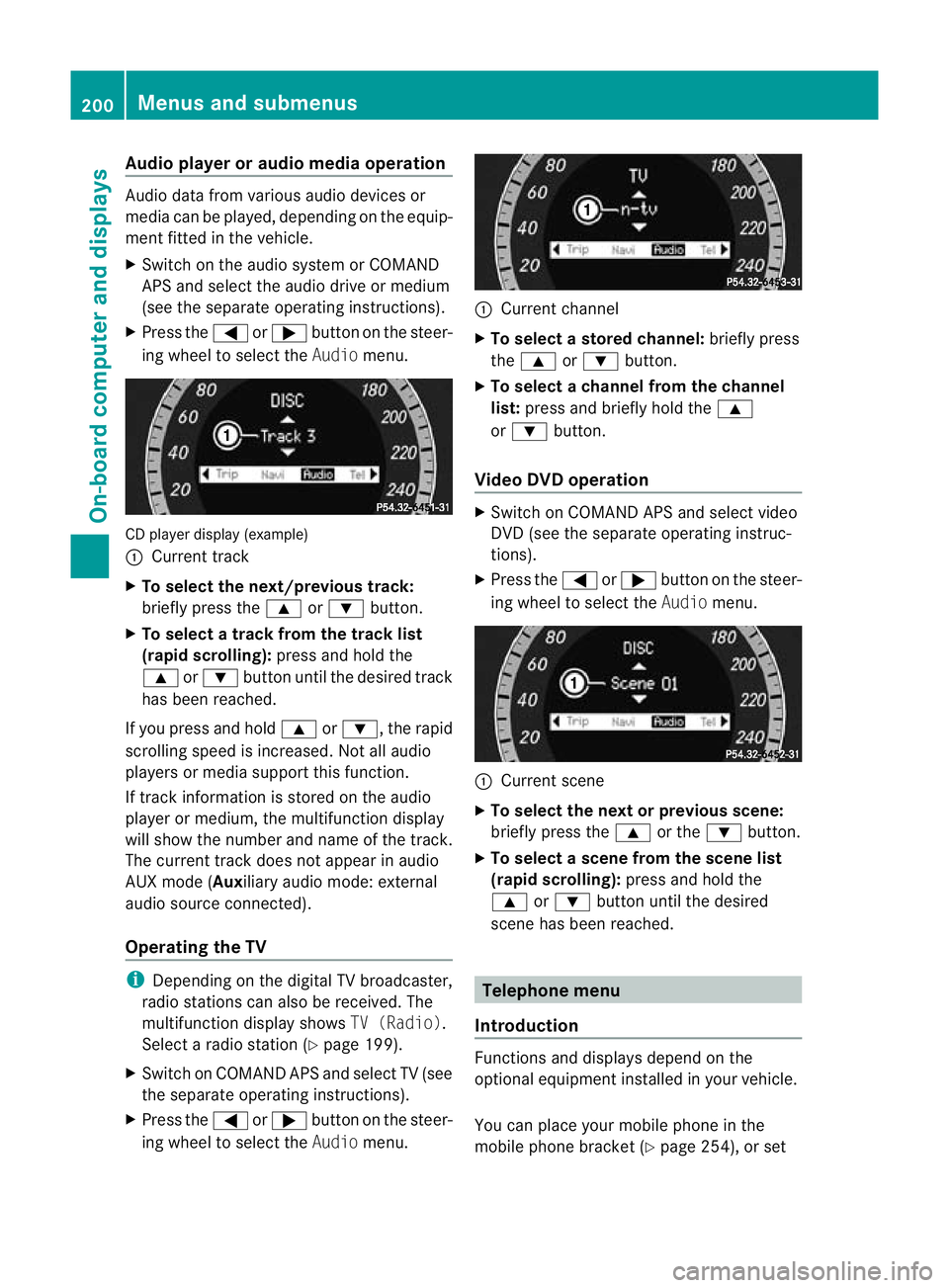
ing whee ltoselect the Audiomenu. CD player display (example)
:
Current track
X To select the next/previous track:
briefl ypress the 9or: button.
X To select atrack from the track list
(rapi dscrolling): press and hold the
9 or: button until th edesired track
ha sb eenr eached.
If yo upress and ho ld9 or:,t he rapid
scr olling speed is incre ased.Not allaudio
players or media support this function.
If track information is stored on the audio
playe rorm edium ,the multifunction display
will show the number and nam eofthe track.
The curren ttrack does not ap pear in audio
AUX mode (Auxiliar yaudi om ode: external
audio sourc econnected).
Operating th eTV i
Depending on the digital TV broadcaster,
radi ostations can als obereceived.The
multifunction display shows TV (Radio).
Select aradi ostation (Y page199).
X Switch on COMAND APS and select TV (see
the separate operating instructions).
X Press the =or; button on the steer-
ing whee ltoselect the Audiomenu. :
Curren tchannel
X To select astore dchann el:briefly press
the 9 or: button.
X To select achann elfrom the chan nel
list: press and briefly hold the 9
or : button.
Video DVD operation X
Switc honC OMAN DAPS and select video
DV D(see the separate oper ating instruc-
tions).
X Press the =or; button on the steer-
ing wheel to select the Audiomenu. :
Current scene
X To select th enext or previous scene:
briefly press the 9or the :button.
X To select ascene from th escene list
(rapid scrolling): press and hold the
9 or: button until th edesired
scene ha sbeenr eached. Telephon
emenu
Introdu ction Functions and display
sdepen dont he
optional equipment installe dinyourvehicle.
Yo uc an place your mobil ephone in the
mobil ephone bracket (Y page 254), or set200
Menus and submenusOn-board computer and displays
BA 207 ECE ÄJ 2010/1a; 1; 2, en-GB
mkalafa
Version: 3.0.2.11 2010-01-26T13:03:22+01:00-Seite 200
Page 204 of 333
up
aB luetooth ®
connection to th eaudio sys-
tem or COMAN DAPS (see the separate oper-
atin ginstructions). G
Risk of accident
Observe the legal requirements of the country
in which you are currently driving regarding
the use of mobile phones in the vehicle.
If it is permitted to use mobile phones while
the vehicle is in motion, you should only use
them whe nthe roa dand traffic conditions
allo w. Ot herwise, you may be distracte dfrom
th et raffi cconditions, cause an accident and
inj urey oursel fand others.
X Switch on the mobil ephone and audi osys-
tem or COMAND APS (see the separate
operating instructions).
X Press the =or; button on the steer-
ing whee ltoselectthe Tel men u.
Yo uw ills ee on eofthe following display mes-
sage sint he multifunctio ndisplay:
R Please ente rPIN:The mobile phone has
been placed in the mobile phone bracket
and the PIN has not been entered.
X Enter the PIN usin gthe mobile phone, LIN-
GUATRONIC ,the audio system or
COMAN DAPS.
The mobil ephone will search for anetwor k.
In the meantime, the Telephone No
Service displaymessage appears in the
multifunction display.
R Telephon eready or thename of the net-
work provider: the mobile phone has found
an etwor kand is ready to receive.
R No Service:Non etworkisa vail able.
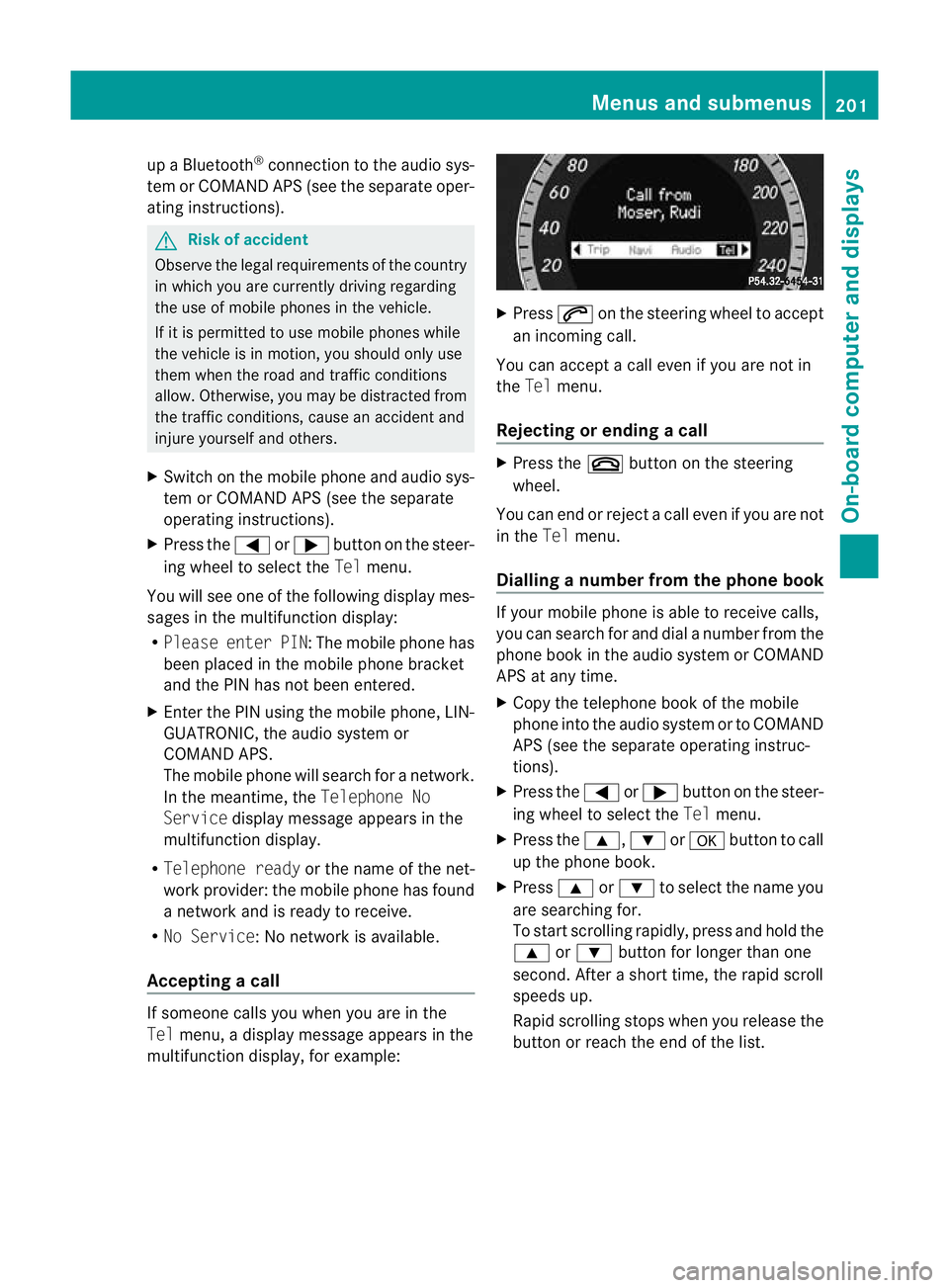
Accepting acall If someone call
syou when you are in the
Tel menu, adisplay message appears in the
multifunction display ,for example: X
Press 6on the steerin gwheel to accept
an incomi ngcall.
You can accep tacall even if you are not in
the Tel menu.
Rejectin gorending acall X
Press the ~buttonont he steering
wheel.
You can end or reject acall even if you are not
in the Telmenu.
Dialling anumbe rfrom the phone book If you
rmobile phone is able to receive calls,
you can search for and dial anumber from the
phone book in the audio system or COMAND
APS at any time.
X Copy the telephone book of the mobile
phone into the audio system or to COMAND
APS (see the separate operating instruc-
tions).
X Press the =or; button on the steer-
ing wheel to select the Telmenu.
X Press the 9,:ora button to call
up the phone book.
X Press 9or: to select the name you
are searching for.
To start scrolling rapidly ,pres sand hol dthe
9 or: button for longer than one
second. After ashort time, the rapid scroll
speeds up.
Rapid scrolling stops when you release the
button or reach the end of the list. Menu
sand submenus
201On-board computer and displays
BA 207ECE ÄJ 2010/1a; 1; 2, en-GB
mkalafa Version: 3.0.2.11 2010-01-26T13:03:22+01:00-Seite 201 Z
Page 236 of 333

Displa
ymessages Possible causes/consequences and
M Solutions
D Po
wer
steering
malfunc‐
tio nS ee
Owner's
Manual G
Risk of accident
Th ep owe rsteering assistance is fau lty. Yo uwilln eedtou se
mor eforce to steer.
Aw arning ton ealso sounds.
X Chec kwhether you ar eable to apply the extr aforce
required.
X If yo uare able to steer safely: carefully drive on to a
qualified specialis tworkshop.
X If yo uare unable to steer safely: do not drive on. Contact
the nearest qualified specialis tworkshop. No
service No service Your vehicle is outside the network provider's transmitter/
receive
rrange.
X Wait until the mobile phone operational readiness symbol
appears in the multifunction displ ay.K Converti‐
ble Top
Operation
possible
to 40 km/h If yo
udrive at speeds of more than 40 km/h ,you cannot open
or close the roof.
X Fully open or close the soft top (Y page 77).K To
pl ower‐
ing Th
es oft top is not fully opened or closed. The hydraulics are
depressurised.
X Fully open or close the soft top (Y page 77).K Open/
clos
etop
completely Th
er oof is not locked. If you driv eatspeeds of mor ethan
40 km/h, you cannot open or close the roof.
X If you ar edriving at speeds of more than 40 km/h ,reduce
your speed.
X Push or pull the soft-top switch (Y page 77)until the soft
top is fully ope norclosed. Display messages
233On-board computer and displays
BA 207ECE ÄJ 2010 /1a;1;2,e n-GB
mkalafa Version: 3.0.2.11 2010-01-26T13:03:22+01:00-Seite 233 Z
Page 248 of 333
i
The glove compar tment can be ventilated
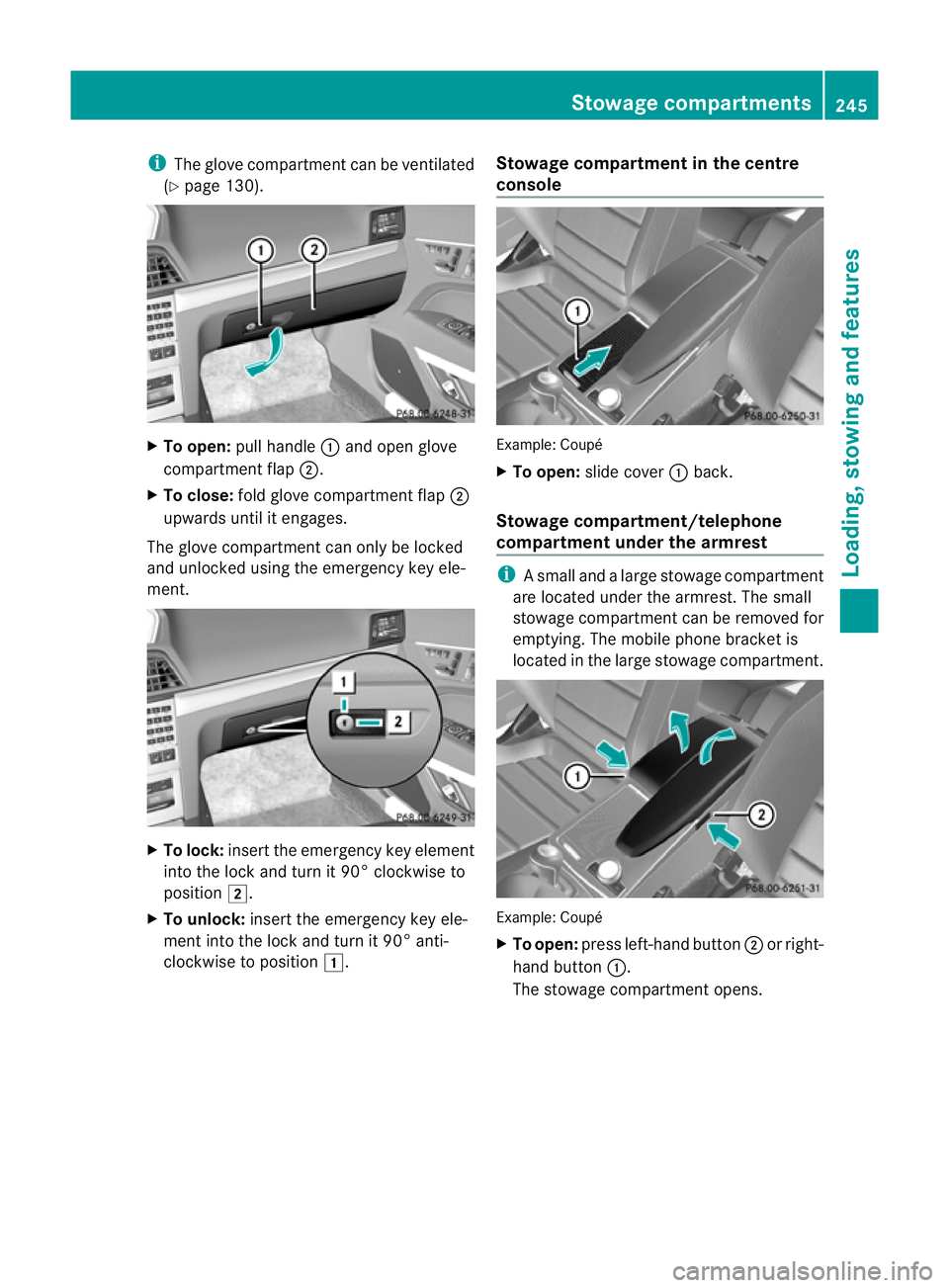
(Y pag e130). X
To open: pullhandle :and open glove
compartment flap ;.
X To close: fold glove compartment flap ;
upwards until it engages.
The glove compartment can only be locked
and unlocked using the emergenc ykey ele-
men t. X
To lock: insert the emergenc ykey element
into the lock and tur nit90° clockwise to
position 2.
X To unlock: insert the emergency key ele-
ment into the lock and turn it 90° anti-
clockwise to position 1. Stowage compartmen
tinthe centre
conso le Example: Coupé
X
To open: slide cover :back.
Stowag ecompartment/telephone
compartment under the armrest i
Asmall and alarg estowage compartment
are located under the armrest. The small
stow agecompartment can be removed for
empty ing. The mobi lephone bracket is
located in the large stowage compartment. Example: Coupé
X
To open: press left-hand button ;or right-
hand button :.
The stowage compartment opens. Stowage compa
rtments
245Loading, stowing and features
BA 207 ECE ÄJ 2010/1a; 1; 2, en-GB
mkalafa Version: 3.0.2.11 2010-01-26T13:03:22+01:00-Seite 245 Z
Page 256 of 333
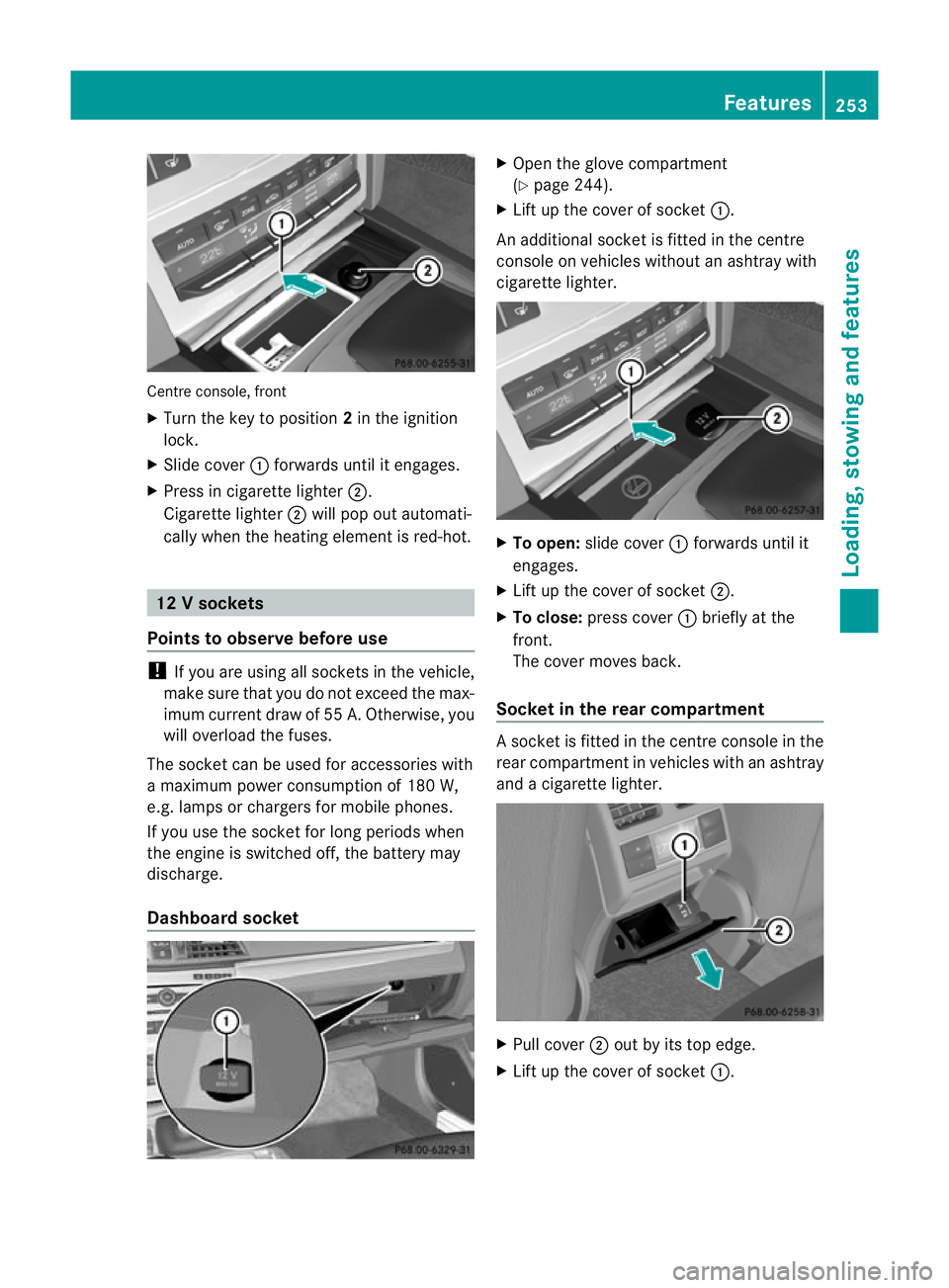
Centre console, front
X
Turn the key to position 2in the ignition
lock.
X Slide cover :forwards until it engages.
X Press in cigarette ligh ter;.
Cigarett elighter ;will pop out automati-
cally when th eheating element is red-hot. 12
Vsockets
Point stoo bserve befo reuse !
If you are using all so cketsi nt he vehicle,
make surethat yo udonot excee dthe max-
im um current dra wof55A.O therwise, you
wil loverl oadt he fuses.
The socket can be used for accessories with
am aximum power consumptio nof180 W,
e.g .lamp sorc hargers for mobi lephones.
If you use the socket for long periods when
the engine is switched off ,the battery may
discharge.
Dashboar dsocket X
Open the glove compartment
(Y pag e244).
X Lift up the cove rofsocket :.
An additional socket is fitted in the centre
console on vehicles without an ashtray with
cigarette lighter. X
To open: slide cover :forwards until it
engages.
X Lif tu pt he cover of socket ;.
X To close: press cover :briefly at the
front.
The cover moves back.
Socket in th erear compartment As
ocke tisf itted in the centre console in the
rear compartment in vehicles with an ashtray
and acigarett elighter. X
Pull cover ;out by its top edge.
X Lif tu pt he cover of socket :. Featu
res
253Loading, stowing and features
BA 207ECE ÄJ 2010 /1a; 1; 2, en-GB
mkalafa Version: 3.0.2.11 2010-01-26T13:03:22+01:00 -Seite 253 Z
Page 257 of 333
Mob
ilep hone G
Ris
kofa ccident
Observe the lega lrequirements of the country
in which you are currently driv ingr egarding
operating mobile communications equipment
in av ehicle.
If it is permitted by law to operate communi-
cations equipment while the vehic leis in
motion, you must only do so if the traffic sit-
uation permits. Otherwise, you could be dis-
tracted from the traffic conditions, cause an
accident and injur eyourself and others.
Two-way rad iosa nd fax equipment use dwith-
out low-reflection exter iora erials can inter-
fere with the vehicle's electronics and thereby
jeopardis ethe operating safety of the vehicle
and your safety. Therefore, you must only use
this equipment if it is correctly connected to
as eparate reflection-free exterior aerial. G
Risk of injury
Excessive levels of electromagnetic radiation
may cause damage to your health and the
health of others. Usin ganexterior aerial takes
into account current scientific discussions
relating to the possible health risk posed by
electromagnetic fields.
To ensure optimum reception quality for
mobil ephones in the vehicle and to minimise
mutua linfluences between the vehicl eelec-
tronics and mobile phones, Mercedes-Benz
recommends the use of an approved exterior
aerial. An exterior aerial conduct sthe elec-
tromagnetic fields generated by awireless
device to the exterior of the vehicle; the field
strength within the vehicle interior is lower
than in avehicle that does not have an exte-
rior aerial.
i There are various mobile phone brackets
that may be fit tedtoy our vehicle; in some
cases, these ar ecountry-specific. You can
obtain these mobile phone bracke ts from a
qualified specialist workshop, e.g. a
Mercedes-Benz Servic eCentre. The functions and services available when
you use the phone depend on your mobile
phone model and service provider.
Inserting the mobile phone
X Open the telephone compart ment
(Y page 245).
X Place the mobil ephone bracket int othe
pre-installed bracket ;see the separate
mobile phone bracket installation instruc-
tions.
X Insert the mobile phone into the mobile
phone bracket ;see the separate mobile
phone bracket installation instructions.
If the mobile phone is inser tedint he mobile
phone bracket ,you can speak to the person
you ar ecalling using the hands-free system.
You can operate the telephone using the
6 and~ button sonthe multifunc tion
steerin gwheel. You can operate other mobile
phone func tions via the on-boar dcomputer
(Y page 200).
When you tak ethe key out of the ignition lock,
the mobile phone stay sonb ut you can no
longer use the hands-free system.
If you are making acall and you would like to
take the key out of the ignition lock, first
remove the mobile phone from the bracket.
Otherwise, the call will be ended. Floormat on the driver'
sside G
Risk of accident
Make sure that there is sufficien tclearance
around the pedals when floormats are used,
and that the floormats are properly secured.
The floormats must be correctly secured at all
times using retainer sand press-s tuds.
Befor eyou driv eoff, check the floormat sand
secure if necessary. Afloormat which is not
properly secured can slip and, thereby, inter-
fere with the movemen tofthe pedals.
Do not plac efloormats on top of one another. 254
FeaturesLoading
,stowin gand features
BA 20 7ECE ÄJ 2010/1a; 1; 2, en-GB
mkalafa Version: 3.0.2.11 2010-01-26T13:03:22+01:00 -Seite 254
Page 258 of 333
X
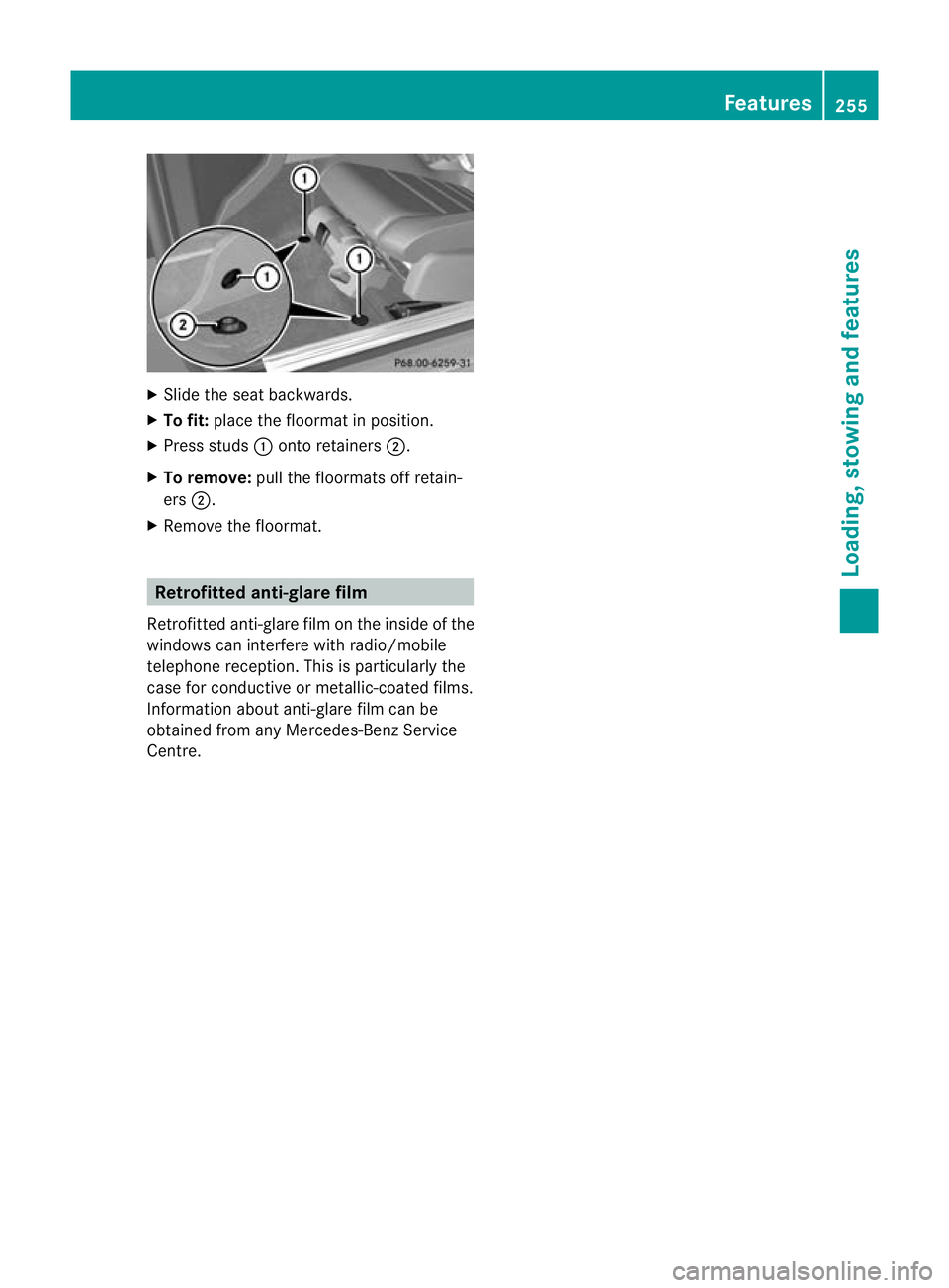
Slide the se at backwards.
X To fit: placethe floormat in position.
X Press studs :onto retainers ;.
X To remove: pull the floormats off retain-
ers ;.
X Remove the floormat. Retrofitted anti-glar
efilm
Retrofitted anti-glare film on th einside of the
windows can interfere with radio/mobile
telephone reception. This is particularly the
case for conduc tiveor metallic-coated films.
Infor mation about anti-glare film can be
obtained from any Mercedes-Benz Service
Centre. Features
255Loading,stowin gand features
BA 20 7ECE ÄJ 2010 /1a;1;2,e n-GB
mkalafa Version: 3.0.2.11 2010-01-26T13:03:22+01:00-Seite 255 Z
Page 264 of 333
Adding engine oil
H
Environmenta
lnote
When toppin guptheoil, tak ecaren ot to spill
any .Ifo il enter sthe soil or waterways, it is
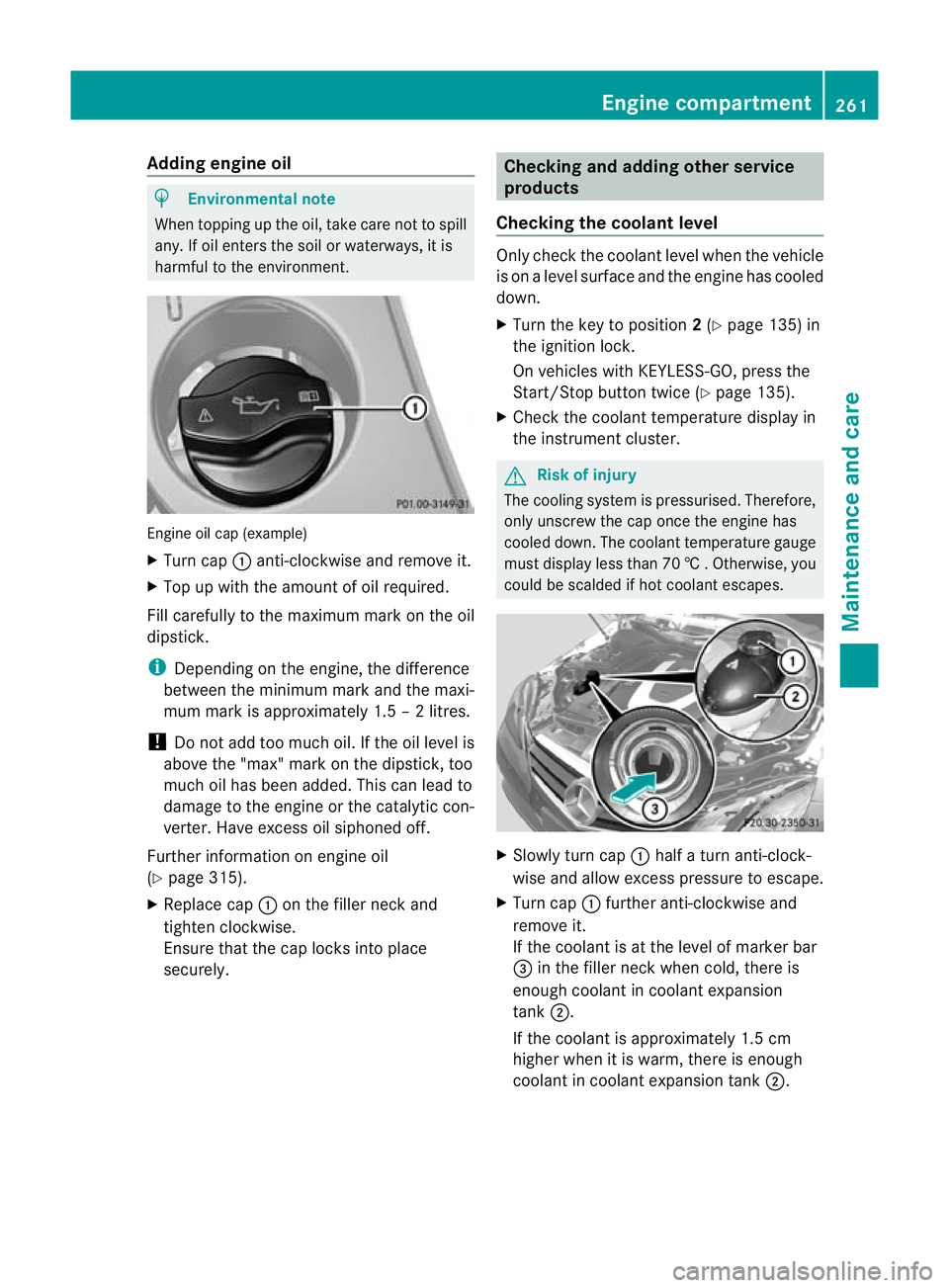
harmful to the environmen t.Engine oil cap (example)
X
Turn cap :anti-clockwise and remove it.
X Top up with the amount of oil required.
Fill carefully to the maximum mark on the oil
dipstick.
i Depending on the engine, the difference
between the minimum mark and the maxi-
mum mark is approximately 1.5 –2litres.
! Do not add too muc hoil. If the oil level is
above the "max "mark on the dipstick, too
much oil has been added. This can lead to
damage to the engine or the catalytic con-
verter .Have excess oil siphoned off.
Further information on engin eoil
(Y page 315).
X Replac ecap : on the filler nec kand
tighten clockwise.
Ensure that the cap locks int oplace
securely. Checking and addin
gother service
products
Checking th ecoolan tlevel Only check th
ecoolant leve lwhen th evehicle
is on alevel surface and th eengine has cooled
dow n.
X Tur nthe ke ytop osition 2(Y page 135) in
th ei gnitio nlock.
On vehicles with KEYLESS -GO, press the
Star t/Stop butto ntwice (Y page 135).
X Check the coolant temperature display in
the instrument cluster. G
Risk of injury
The cooling system is pressurised. Therefore,
only unscrew the cap once the engine has
cooled down. The coolant temperature gauge
must display less than 70 †.Otherwi se,you
could be scalded if ho tcoolant escapes. X
Slowl yturn cap :half aturna nti-clock-
wis eand allo wexcess pressure to escape.
X Turn cap :further anti-clockwis eand
remove it.
If the coolant is at the level of marker bar
= in the filler neck when cold, ther eis
enough coolan tincoolant expansion
tank ;.
If the coolant is approximately 1. 5cm
higher when it is warm, ther eisenough
coolant in coolant expansion tank ;. Engin
ecompartment
261Maintenance and care
BA 207ECE ÄJ 2010/1a; 1; 2, en-GB
mkalafa Version:3.0.2.11
2010-01-26T13:03:22+01:0
0-Seite 261 Z
Page 314 of 333
ist workshop, e.g.
aMercedes-Ben zService
Cent re.V ehicle component smay other-
wise wear mor equickly and the vehicle's
operatin gpermit may be invalidated. Retrofitting of two-way radios and
mobile phones (RF transmitter)
Use th eTechnical Specification
ISO/TS 21609 55
implementation regulation
when retrofitting RF (radi ofrequency) trans-
mitters.
If your vehicle has fittings for two-way radio
equipmen t(e.g. taxis, hire car sorofficial vehi-
cles) ,use the power suppl yoraeria lconnec-
tion sintended for use with the basic wiring.
Be sure to observe the manufacturer's addi-
tional instructions whe ninstalling the fittings.
! Have aftermarket radio frequency trans-
mitting equipment installed at aqualified
specialist workshop. Mercedes -Ben zrec-
ommends that you use aMercedes-Benz
Ser vice Centre for thi spurpose.
The transmission output at the aerial base
must not exceed the maximum values below. Waveband Maximum trans-
mission output
(PEAK)
Short wave (f <
54 MHz) 100 W
4mw
aveband 30 W
2mw
aveband 50 W
Trunked radio/Tetra 35 W
70 cm waveband 35 W
GSM 900/AMPS 10 W
GSM 1800 10 W
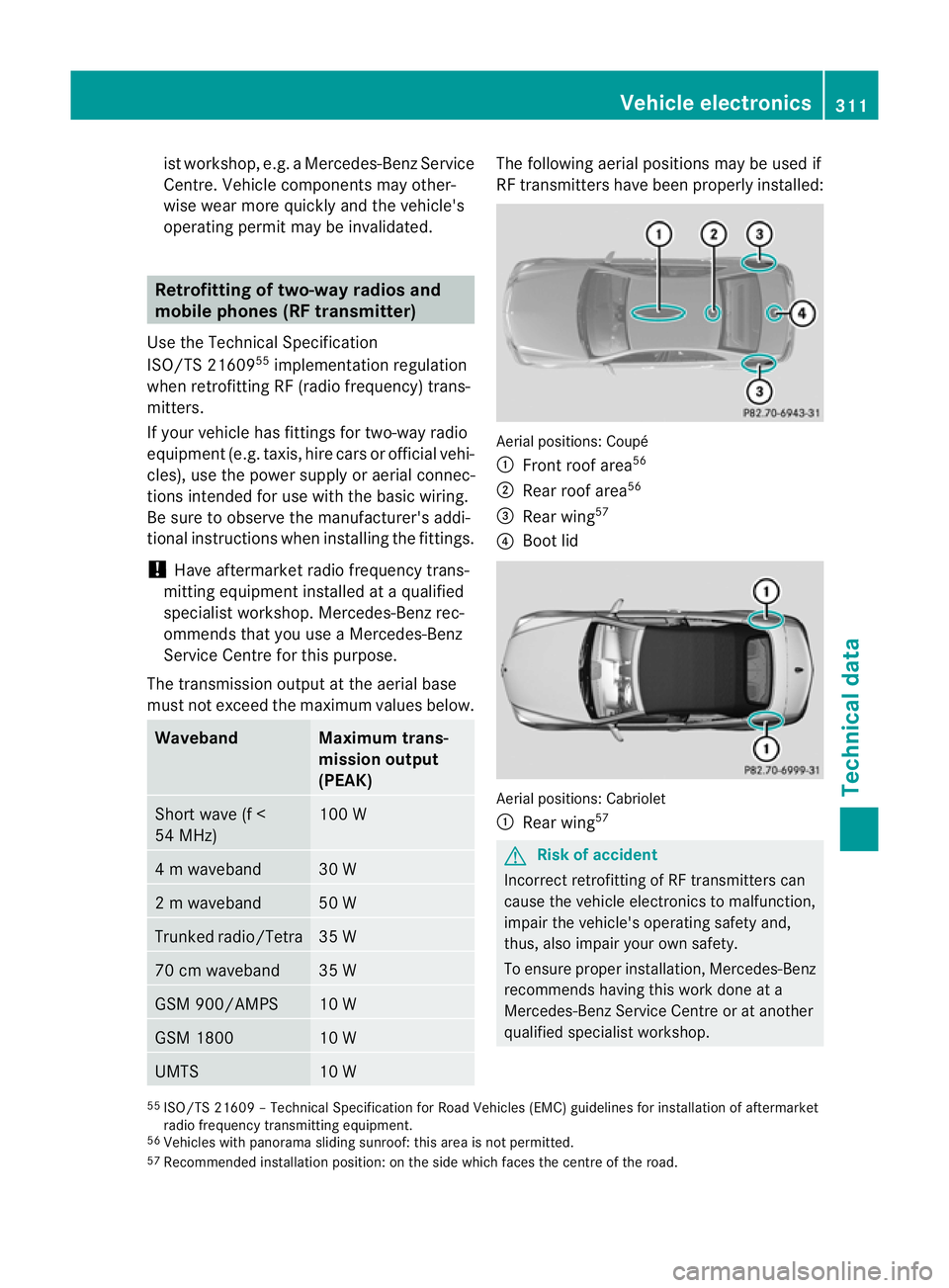
UMTS 10 W The following aerial positions may be used if
RF transmitters have been properly installed:
Aerial positions: Coupé
:
Fron troof area 56
; Rear roof area 56
= Rear wing 57
? Boot lid Aerial positions: Cabriolet
:
Rear wing 57 G
Risk of accident
In co rrect retrofit ting of RF transmitters can
cause the vehicl eelectronics to malfunction,
impair the vehicle's operatin gsafety and,
thus, also impair your own safety.
To ensure proper installation, Mercedes-Benz
recommends having this work done at a
Mercedes-Benz Service Centr eoratanother
qualified specialis tworkshop.
55 ISO/TS 2160 9–Technical Specification for Road Vehicles (EMC) guidelines for installation of aftermarket
radio frequenc ytransmitting equipment.
56 Vehicles wit hpanorama sliding sunroof: this area is not permitted.
57 Recommended installation position: on the side which faces the centre of the road. Vehicl
eelectronics
311Technical da ta
BA 207 ECE ÄJ 2010/1a; 1; 2, en-GB
mkalafa Version: 3.0.2.11 2010-01-26T13:03:22+01:00-Seite 311 Z