reset MERCEDES-BENZ E-CLASS CABRIOLET 2010 User Guide
[x] Cancel search | Manufacturer: MERCEDES-BENZ, Model Year: 2010, Model line: E-CLASS CABRIOLET, Model: MERCEDES-BENZ E-CLASS CABRIOLET 2010Pages: 333, PDF Size: 7.64 MB
Page 164 of 333
the brakes from overhe
ating and wearing too
quickly.
If as lower-moving vehicle is detected in front,
DISTRONIC PLU Scauses you rvehicle to
brak eand maintain apreset distance to the
vehicl einfront. G
Ris
kofa ccident
Do not change down for additional engine
brakin gonas lippery road surface. This could
cause the drive wheels to lose their grip and
the vehicle could skid. G
Risk of accident
DISTRONIC PLU Siso nly an aid designe dto
assis tdriving. Th edrive rremain sfully respon-
sible for the vehicle's distance from other
vehicles, the vehicle's spee dand for braking
in goo dtime.
DISTRONIC PLU Sdoes not react in particular
to:
R pedestrians
R stationar yobstacles on the road, e.g. stop-
ped or parked vehicles
R oncoming and crossin gtraffic
DISTRONIC PLUS may not detect narro wvehi-
cles driving in front, e.g. motorcycles, or vehi-
cles driving on adifferen tline. Therefore,
always pay attention to traffic condition seven
when DISTRO NICP LUS is activated. Other-
wise ,you may fai ltorecognise danger sin
time, cause an accident and injure yourself
and others. G
Risk of accident
DISTRONI CPLUS cannot take account of road
and traffi cconditions. If DISTRONI Cdoesn ot
recognise or no longer recognises the vehicle
in front ,donot activate DI STRONIC or, if it is
already active, deactivate it. This is especially
the case:
R before corners
R on filter lanes R
when changing to alane with faster moving
traffic
R in complex driving situations or where lanes
are diverted, e.g. at roadworks on amotor-
way
DI ST RONIC PLUS otherwis emaintains the
current spee dset by you or accelerates up to
the set speed.
DI ST RONIC PLUS cannot take account of
weathe rconditions. Deac tivate, or do not
activate, DISTRONIC PLUS:
R if the roads are slippery, snow-covered or
icy. The wheels could los etheir grip when
brakin goraccelerating .The vehicle could
star ttos kid.
R if the sensors are dirty or there is poo rvis-
ibility, e.g. due to snow, rain or fog. Dis-
tanc econtrol may be impaired.
Always pay attention to traffic conditions
even when DI STRONIC PLUS is activated.
Otherwise, you may fail to recognise dangers
in time, cause an accident and injure yourself
and others.
The radar sensor syste misautomatically
deactivated near radio telescope facilities
(Y page 324).
If you want DISTRONIC PLUS to assis tyou,
the radar sensor system must be activated
(Y page 208) and operational.
If ther eisnov ehicle in front ,DISTRONIC
PLUS operate sinthe sam eway as cruise
control in the spee drange between
30 km/ hand 200 km/h .Ifavehicle is driving
in front of you, DI STRONIC operates in the
speed range betwee n0km/h and
200 km/h.
Do no tuse DISTRONI CPLUS wh iled riving on
roa dswith steep gradients. G
Risk of accident
DISTRONIC PLUS brakes you rvehicle up to a
maximu mof4m /s2
depending on its speed.
This corresponds to approximately 40% of
your vehicle's maximum braking power. You Driving systems
161Driving and parking
BA 207 ECE ÄJ 2010/1a; 1; 2, en-GB
mkalafa Version: 3.0.2.11 2010-01-26T13:03:22+01:00-Seite 161 Z
Page 166 of 333
X
Briefly pull the cruise contro llev er towards
you ?or press it up :or down Ato the
pressure point.
DISTRONIC PLU Sisselected.
X Keep the cruise control lever pressed
up : or down Auntil the desired speed
is set.
X Remove your foot from the acc elerator
pedal.
You rvehicle adapts its speed to that of the
vehicle in front, but only up to the desired
stored speed.
i If you do not fully release the accelera tor
pedal, the DISTRONICP LUS suspen‐
ded message appears in th emultifunction
display. The set distance to aslower-mov-
ing vehicle in fron twill then not be main-
tained. You will be drivin gatthe speed you
deter mine by the positio nofthe accelera-
tor pedal.
Activating when driving towards asta-
tionary vehicle
If the vehicl einfront of yo uisstationary, you
can onl yactivate DISTRONI CPLUSo nce your
vehicl eisstationary as well.
X Briefl ypullt he cruis econtr ollever towards
you ?.
DISTRONIC PLUS is selected.
i DISTRONIC PLUS can onl ybeactivate dat
under 30 km/h if avehicle in front has been
detected. Therefore, the DISTRONIC PLUS
distance display in the instrumen tcluster
should be activated.
X Keep the cruise control lever pressed
up : or down Auntil the desired speed
is set.
i You can use the cruise control lever to set
the stored speed and the thumbwheel on
the cruise control lever to set the specified
minimum distance (Y page 166). Pulling away
X
If the vehicle in front pulls away: remove
your foot from the brake pedal.
X Briefly pull the cruise control lever towards
you ?.
or
X Accelerate briefly.
Your vehicle pull sawaya nd adapts its
speed to that of the vehicl einfront.
Driving
If there is no vehicl einfront, DISTRONIC
PLUS operates in th esame way as cruise
control.
If as lower-moving vehicle is detected in front,
DISTRONIC PLU Scauses your vehicle to
brake and maintain apreset distance to the
vehicl einfront.
If DISTRONIC PLUS detects afaster-moving
vehicle in front ,itincrease sthe drivin gspeed,
but only up to the desired speed you have
stored. G
Risk of accident
If you depress the brake, DISTRONIC PLU Sis
deactivated unless your vehicl eisstationary.
DISTRONIC PLUS then no longe rbrake syour
vehicle. In such cases, control the distance
from vehicles travelling in front with the brake
alone. You coul dotherwis ecause an accident
and thereby injure yoursel fand others. The
driver rema insf ully responsibl efor the vehi-
cle's distance from other vehicles ,the speed
being driven and for brakin gingood time.
Changing lanes
If you wish to change to the passing lane (in
left -hand-drive vehicles, the passing lane is
the left-hand lane), DISTRONIC PLUS sup-
ports you if:
R you are driving faster than 60 km/h
R DISTRONIC PLUS is maintaining the dis-
tanc etoav ehicle in front
R you switc honthe appropriate tur nsignals
R DISTRONIC PLU Sdoes not detec tadanger
of collision Driving systems
163Driving and parking
BA 207 ECE ÄJ 2010/1a; 1; 2, en-GB
mkalafa Version: 3.0.2.11 2010-01-26T13:03:22+01:00-Seite 163 Z
Page 185 of 333
ognise danger
sintime, cause an accident and
injur eyoursel fand others.
ATTE NTION ASSIST assesses your level of
fatigu eorlapses in concentration by taking
the following criteria into account:
R your personal driving style, e.g. steering
characteristics
R journey conditions, e.g. time of day and
length of journey
The functionality of ATTENTION ASSIST is
restricted and warnings may be delayed or
not occur at all:
R if the road condition is poor, e.g. the sur-
face is uneven or there are potholes
R if there is astron gside wind
R if you have adopted asporty driving style
with high cor nering speeds or hig hrates of
acceleration
R if you are predominantly driving slower
than 80 km/ horfaster than 180 km/h
R if you are currently using COMAND APS or
making atelephone call with it
R if the tim ehas been set incorrectly
R in active driving situations, such as when
you change lanes or change your speed
Warning and display messages in the
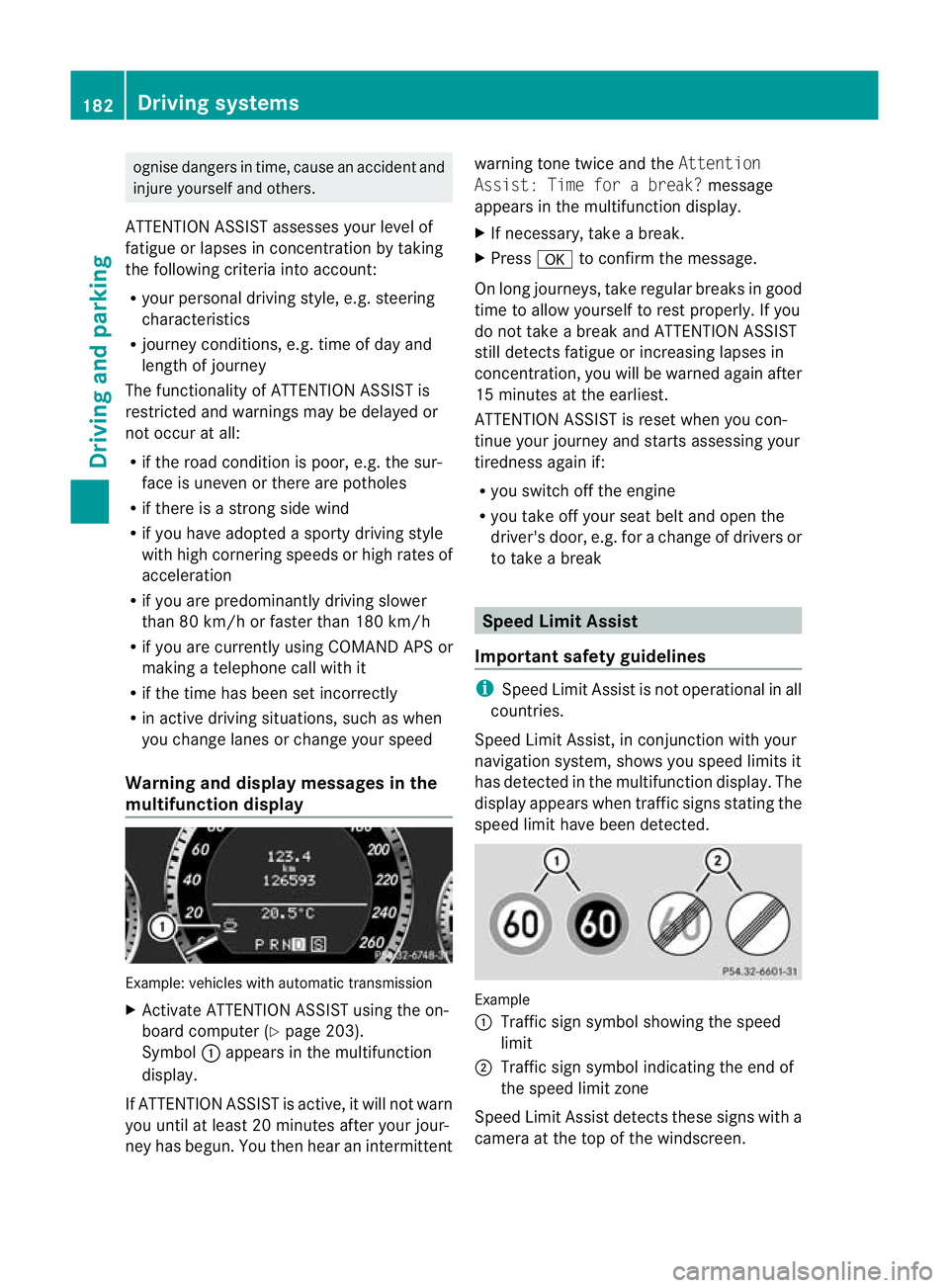
multifunction display Example: vehicles with automatic transmission
X Activate ATTENTION ASSIST using the on-
board computer (Y page 203).
Symbol :appears in the multifunc tion
display.
If ATTENTION ASSIS Tisactive, it wil lnot warn
you until at least 20 minutes after your jour-
ney has begun. You then hear an intermittent warnin
gtonet wice and the Attention
Assist :Time for abreak? message
appears in th emultifunction display.
X If necessary, take abreak.
X Press ato con firm th emessage.
On long journeys, take regula rbreaks in good
time to allow yoursel ftorest properly. If you
do not take abrea kand ATTENTION ASSIST
stil ldetect sfatigue or increasing lapses in
concentration, you will be warned again after
15 minutes at the earliest.
ATTENTION ASSIST is reset when you con-
tinue your journey and start sassessing your
tiredness agai nif:
R you switch off th eengine
R you take off your sea tbelt and open the
driver' sdoor, e.g. for achange of driver sor
to take abreak Spee
dLimit Assist
Impor tant safety guidelines i
Speed Limit Assist is not operational in all
coun tries.
Speed Limit Assist ,inconjunc tion with your
navigation system ,shows you speed limits it
has detec tedint he multifunc tion display. The
display appears when traffic signs stating the
speed limit hav ebeen detected. Example
:
Traffic sign symbol showing the speed
limit
; Traffic sign symbol indicatin gthe end of
the speed limit zone
Speed Limi tAssist detec ts these signs with a
camera at the top of the windscreen. 182
Driving systemsDriving and parking
BA 20
7ECE ÄJ 2010 /1a;1;2,e n-GB
mkalafa Version: 3.0.2.11 2010-01-26T13:03:22+01:00-Seite 182
Page 200 of 333
Trip menu
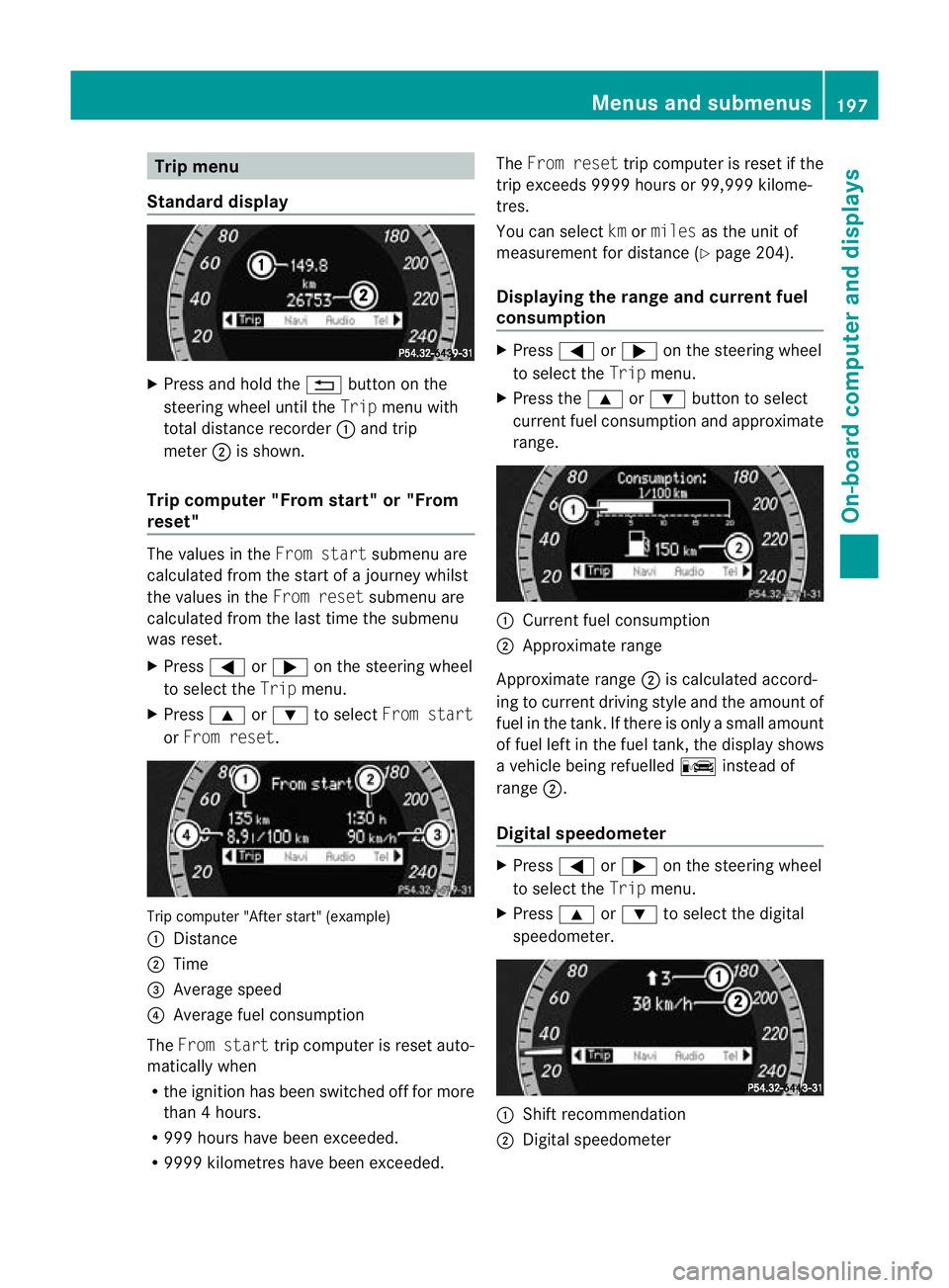
Standard display X
Press and hol dthe % button on the
steering whee lunti lthe Trip menuwith
tota ldistance recorder :and trip
meter ;is shown.
Trip computer "Fro mstart" or "From
reset" The val
uesint heFrom start submenu are
calculate dfromt he star tofajourney whilst
the values in the Fromreset submenu are
calculated fro mthe last tim ethe submenu
was reset.
X Press =or; on the steering wheel
to selec tthe Trip menu.
X Press 9or: to select From start
or From reset. Tri
pc omputer "After start" (example)
: Distan ce
; Time
= Average speed
? Average fue lconsumption
The From start trip computer is reset auto-
matically when
R the ignition has been switched off for more
than 4hours.
R 99 9h our shave been exceeded.
R 999 9kilometres have been exceeded. The
From reset trip computer is reset if the
trip exceeds 999 9hour sor99,999 kilome-
tres.
Yo uc an select kmormiles as the unit of
measurement for distance (Y page 204).
Displaying the range and current fuel
consumption X
Press =or; on the steering wheel
to select the Tripmenu.
X Press the 9or: button to select
current fuel consumption and approximate
range. :
Current fuel consumption
; Approximate range
Approximate range ;is calculated accord-
ing to current driving style and the amount of
fuel in the tank .Ifthere is only asmall amount
of fue lleft in the fuel tank ,the display shows
av ehicle being refuelled Cinstead of
range ;.
Digital speedometer X
Press =or; on the steerin gwheel
to selec tthe Trip menu.
X Press 9or: to selec tthe digital
speedometer. :
Shif trecommendation
; Digita lspeedometer Menus and submenus
197On-board computer and displays
BA 207ECE ÄJ 2010 /1a;1;2,e n-GB
mkalafa Version: 3.0.2.11 2010-01-26T13:03:22+01:00-Seite 197 Z
Page 201 of 333
i
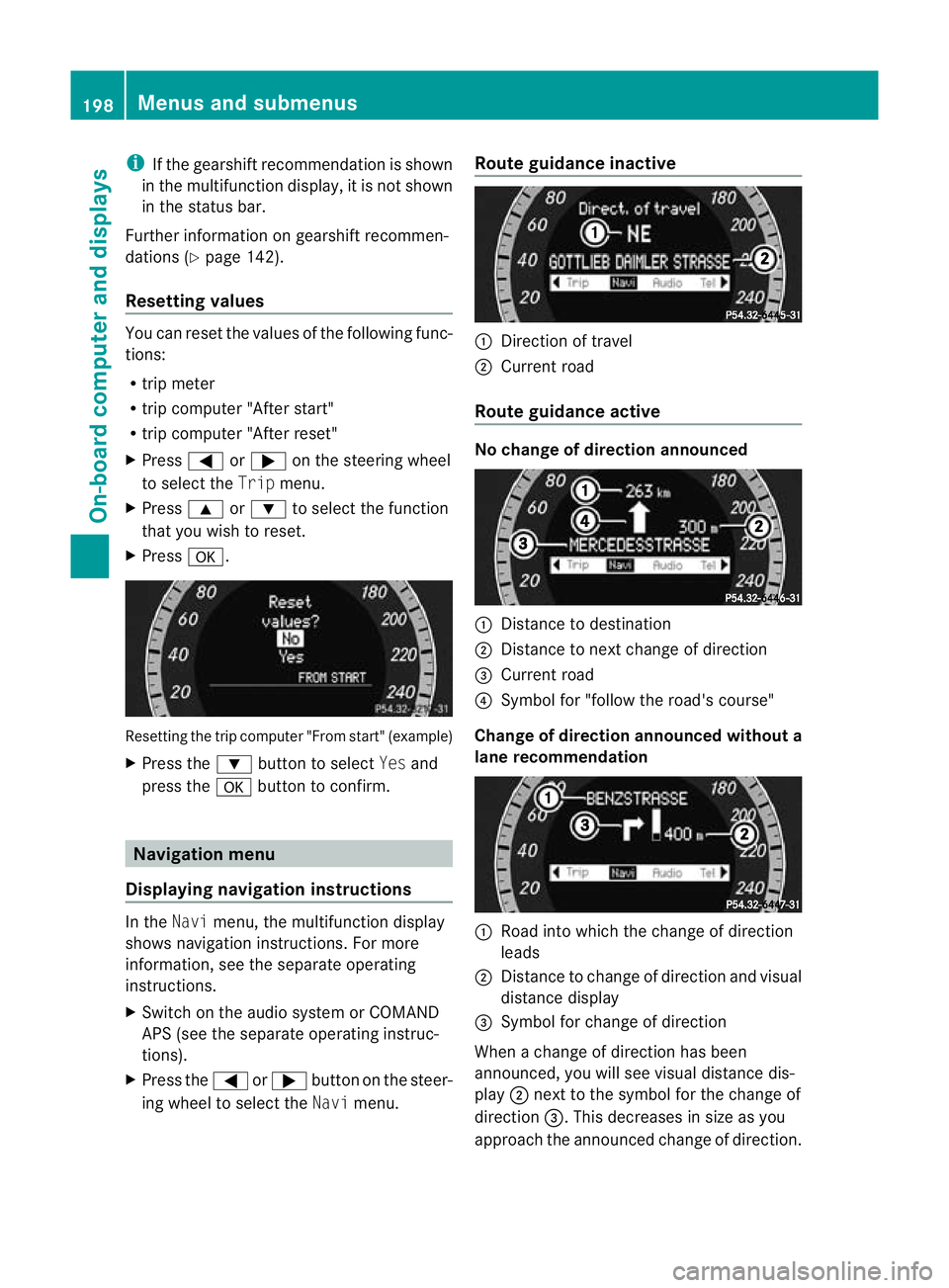
If th egearshift recommendation is shown
in the multif unctio ndisplay ,itisn ot shown
in the status bar.
Further information on gearshift recommen-
dation s(Ypage 142).
Resetting values You can reset the values of the following func-
tions:
R tripm eter
R trip computer "After start"
R trip computer "After reset"
X Press =or; on the steerin gwheel
to selec tthe Trip menu.
X Press 9or: to selec tthe function
that you wish to reset.
X Press a. Resetting the trip computer "From start" (example)
X Press the :button to select Yesand
press the abutton to confirm. Navigation menu
Displaying navigation instructions In the
Navimenu, the multifunction display
shows navigation instructions. For more
information, see the separat eoperating
instructions.
X Switch on the audio system or COMAND
APS (see the separat eoperating instruc-
tions).
X Press the =or; button on the steer-
ing whee ltoselect the Navimenu. Route guidance inactive :
Direction of travel
; Curren troad
Route guidance active No change of direction announced
:
Distanc etodestination
; Distance to next change of direction
= Curren troad
? Symbol for "follow the road's course"
Change of direction announced without a
lane recommendation :
Road int owhich the change of direction
leads
; Distanc etochange of direction and visu al
distanc edisplay
= Symbol for change of direction
When achange of direction has been
announced, you will see visu al distancedis-
play ;nex ttot he symbol for the change of
direction =.This decreases in size as you
approach the announced change of direction. 198
Menu
sand submenusOn-board computer and displays
BA 20 7ECE ÄJ 2010 /1a;1;2,e n-GB
mkalafa Version: 3.0.2.11 2010-01-26T13:03:22+01:00-Seite 198
Page 207 of 333
X
Press the =or; button on the steer-
ing wheel to select the Assist.menu.
X Press the 9or: button to select
Blin dSpot Asst..
X Press a.
Th ec urren tselection is displayed.
X To activate/deac tivate: press a
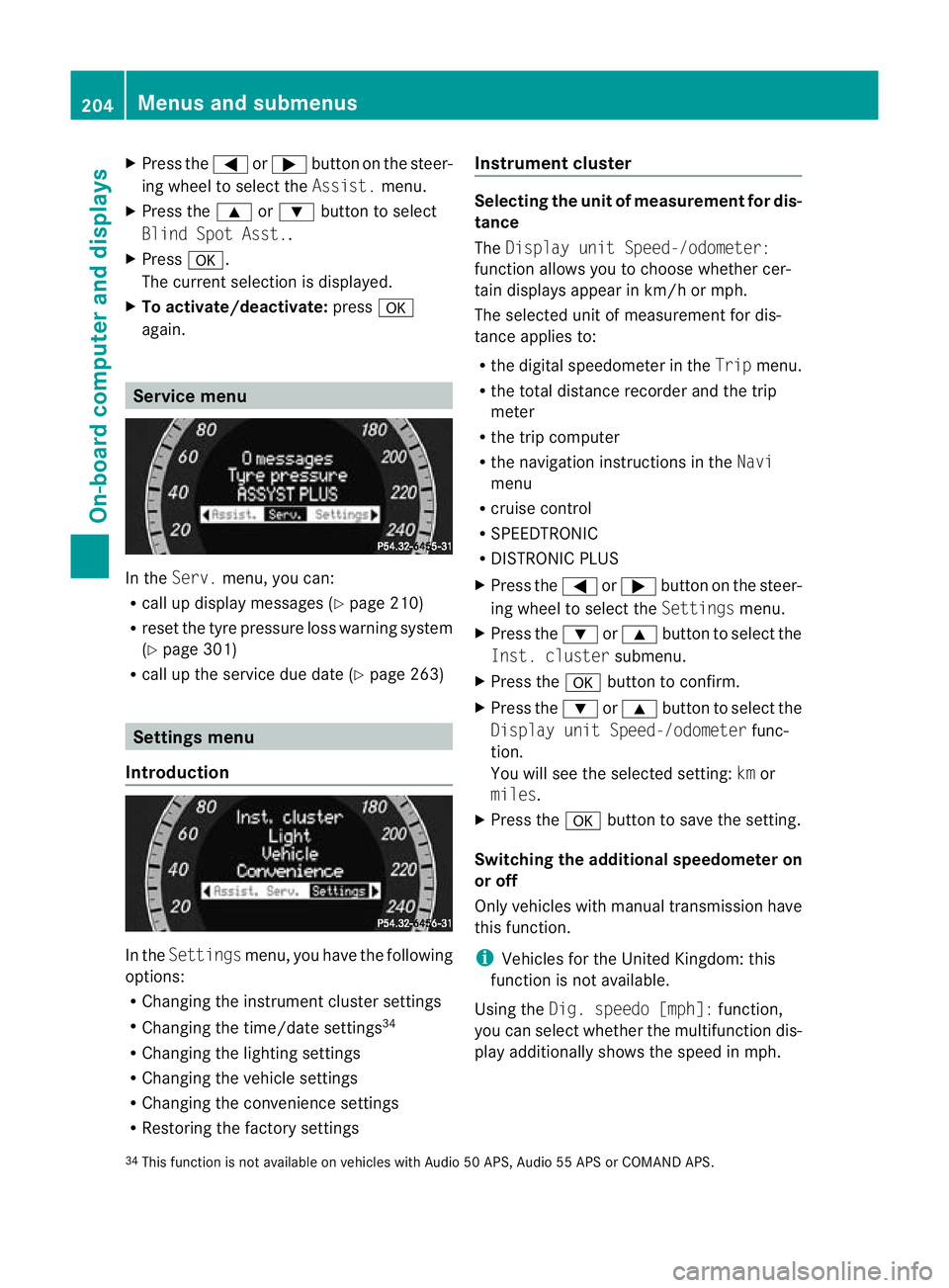
again. Servic
emenu In the
Serv. menu, you can:
R call up display messages (Y page 210)
R reset the tyre pressure loss warnin gsystem
(Y page 301)
R call up the service due date (Y page 263)Settings menu
Introduction In the
Settin gsmenu ,you have the following
options:
R Changing the instrumen tcluster settings
R Changing the time/date settings 34
R Changing the lighting settings
R Changing the vehicle settings
R Changing the convenience settings
R Restorin gthe factory settings Instr
ument cluster Selecting the unit of measurement for dis-
tance
The
Displa yunit Speed-/odometer:
functio nallows you to choose whether cer-
tain displays appear in km/ horm ph.
The selected unit of measuremen tfor dis-
tan ceapplies to:
R the digital speedometer in the Tripmenu.
R the total distance recorder and the trip
meter
R the trip computer
R the navigation instructions in the Navi
menu
R cruise control
R SPEEDTRONIC
R DISTRONIC PLUS
X Press the =or; button on the steer-
ing wheel to select the Settingsmenu.
X Press the :or9 button to select the
Inst .cluster submenu.
X Press the abuttontoc onfirm.
X Press the :or9 button to select the
Displa yunit Speed-/odometer func-
tion.
Yo uw ill see the selected setting: kmor
miles.
X Press the abutton to save the setting.
Switching the additional speedometer on
or off
Only vehicles with manual transmission have
this func tion.
i Vehicles for the United Kingdom: this
func tion is not available.
Usin gthe Dig. speedo [mph]: function,
you can select whether the multifunc tion dis-
play additionally shows the speed in mph.
34 This func tion is not available on vehicles with Audio 50 APS, Audio 55 APS or COMAN DAPS. 204
Menus and submenusOn-board computer and displays
BA 20
7ECE ÄJ 2010 /1a; 1; 2, en-GB
mkalafa Version: 3.0.2.11 2010-01-26T13:03:22+01:00 -Seite 204
Page 212 of 333

vating th
eEASY-ENTRY/EXIT feature, make
sure that nobody can become trapped.
Do not leave children unsupervise dinthe
vehicle, even if they ar esecur edinac hild
restraint system .The chil dren could open the
driver's door and thereby unintentionally acti-
vat ethe EASY-ENTRY/EXIT feature and
becom etrapp ed.
X Press the =or; button on the steer-
ing whee ltoselect the Settings menu.
X Press the :or9 button to select the
Convenience submenu.
X Press the abutton to confirm.
X Press the :or9 button to select the
Easy Entry/Exit feature.
You will see the selected setting: onor
off.
X Press the abutton to save the setting.
Switching th ebelta djustmen ton/off
Fur ther information on belt adjust ment
(Y pag e42).
X Press the =or; button on the steer-
ing whee ltoselect the Settings menu.
X Press the :or9 button to select the
Convenience submenu.
X Press the abutton to confirm.
X Press the :or9 button to select the
Belt adjustment: function.
You will see the selected setting: onor
off.
X Press the abutton to save the setting.
Switching the fold in mirrors when lock-
ing function on/off
If you switch on the Fold mirrorsinwhen
locking: function, th eexterior mirror sfold
in when you lock the vehicle. When you
unloc kthe vehicle and then open adoor, the
exterior mirror sfold out again.
If you have switched the function on and you
fold the exterior mirror sinusing the button
on the door (Y page 101), they will not fold
out automatically. The exterior mirrors can then only be folded out usin
gthe button on
the door.
X Press the =or; button on the steer-
ing wheel to selec tthe Settings menu.
X Press the :or9 button to selec tthe
Convenience submenu.
X Press the abutton to confirm.
X Press the :or9 button to selec tthe
Fold mirror sinwhen locking: func-
tion.
Yo uw ill see the selected setting: onor
off.
X Press the abutton to save the setting.
Resetting to factory settings For safety reasons, not all function
sare reset:
the Limit speed (winter tyres): func-
tio ninp ermanen tSPEEDTRONIC can only be
set in the Vehiclesubmenu. If you want to
reset the Daytimedriving lamps: in the
Light submenu, yo umust turn the key in the
ignition lock to position 1.
X Press the =or; button on the steer-
ing wheel to select the Settingsmenu.
X Press the :or9 button to select the
Factor ysetting submenu.
X Press the abuttontoc onfirm.
The Rese tall settings? message
appe ars.
X Pres sthe : or9 button to select
No orYes.
X Press the abutton to confir mthe selec-
tion.
If you hav eselected Yes,the multifunction
display shows aconfirmation message. Menu
sand submenus
209On-board computer and displays
BA 207ECE ÄJ 2010/1a; 1; 2, en-GB
mkalafa Version: 3.0.2.11 2010-01-26T13:03:22+01:00-Seite 209 Z
Page 234 of 333
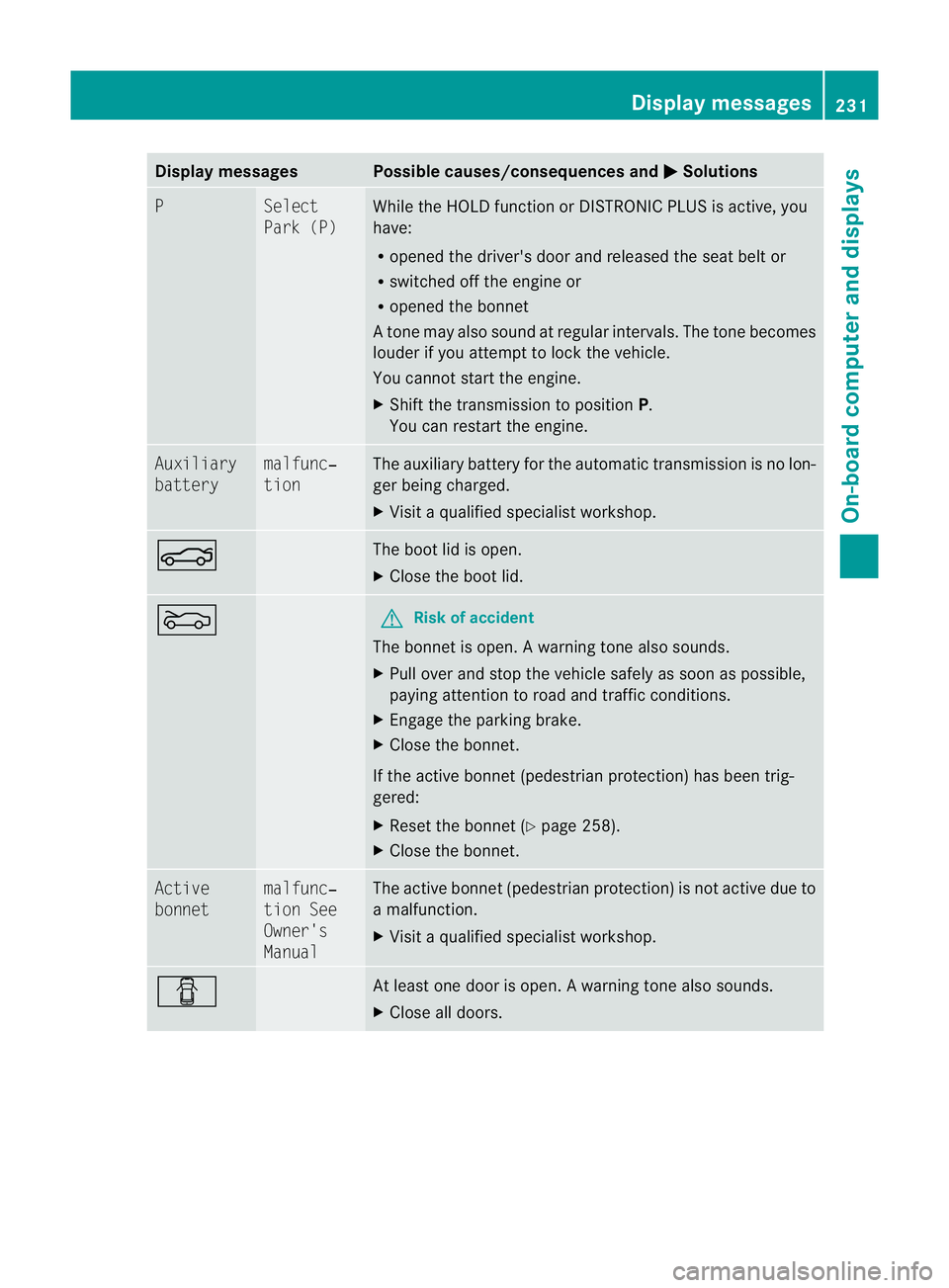
Displa
ymessages Possible causes/consequences and
M Solutions
P Se
lect
Par k( P) While the HOLD functio
norDISTRONIC PLUSisa ctive, you
have:
R opened the driver's door and releasedthe sea tbelt or
R switched off the engin eor
R opened the bonnet
At one ma yalso sound at regular intervals. The ton ebecomes
louder if you attempt to lock the vehicle.
You can notstart the engine.
X Shift the transmission to position P.
You can restart the engine. Auxiliary
battery malfunc‐
tion The auxiliary battery for the automatic transmission is no lon-
ger being charged.
X
Visit aqualified specialist workshop. N The boot lid is open.
X
Close the boot lid. M G
Risk of accident
The bonnet is open. Awarning ton ealso sounds.
X Pull ove rand sto pthe vehicle safel yassoonasp ossible,
paying attention to roa dand traffic conditions.
X Engag ethe parkin gbrake.
X Close th ebonnet.
If the active bonnet (pedestrian protection) has been trig-
gered:
X Reset the bonnet (Y page 258).
X Close the bonnet. Active
bonnet malfunc‐
tion See
Owner's
Manual The active bonnet (pedestrian protection) is not active due to
am
alfunction.
X Visit aqualified special istworkshop. C At least one door is open.
Awarning ton ealso sounds.
X Close all doors. Display messages
231On-boardcomputer and displays
BA 20 7ECE ÄJ 2010/1a; 1; 2, en-GB
mkalafa Version:3.0.2.11
2010-01-26T13:03:22+01:00
-Seite 231 Z
Page 261 of 333
Vehicl
eequipment
i Thismanua ldesc ribe sallthe standard
and optional equipment of your vehicle
which wa savailable at th etime of pur-
chase. Countr y-specif ic differences are
possible. Bear in mind tha tyour vehicle
ma ynot featur eall function sdescribed
here. Engine comp
artment Bonnet
Active bonnet (pedestrian protection) Operating principle
i
The activ ebonnet is only available in cer-
tain coun tries.
The activ ebonnet can reduce the risk of injury
to pedestrian sincertain acciden tsituations.
Raising the bonnet increases the clearanc eto
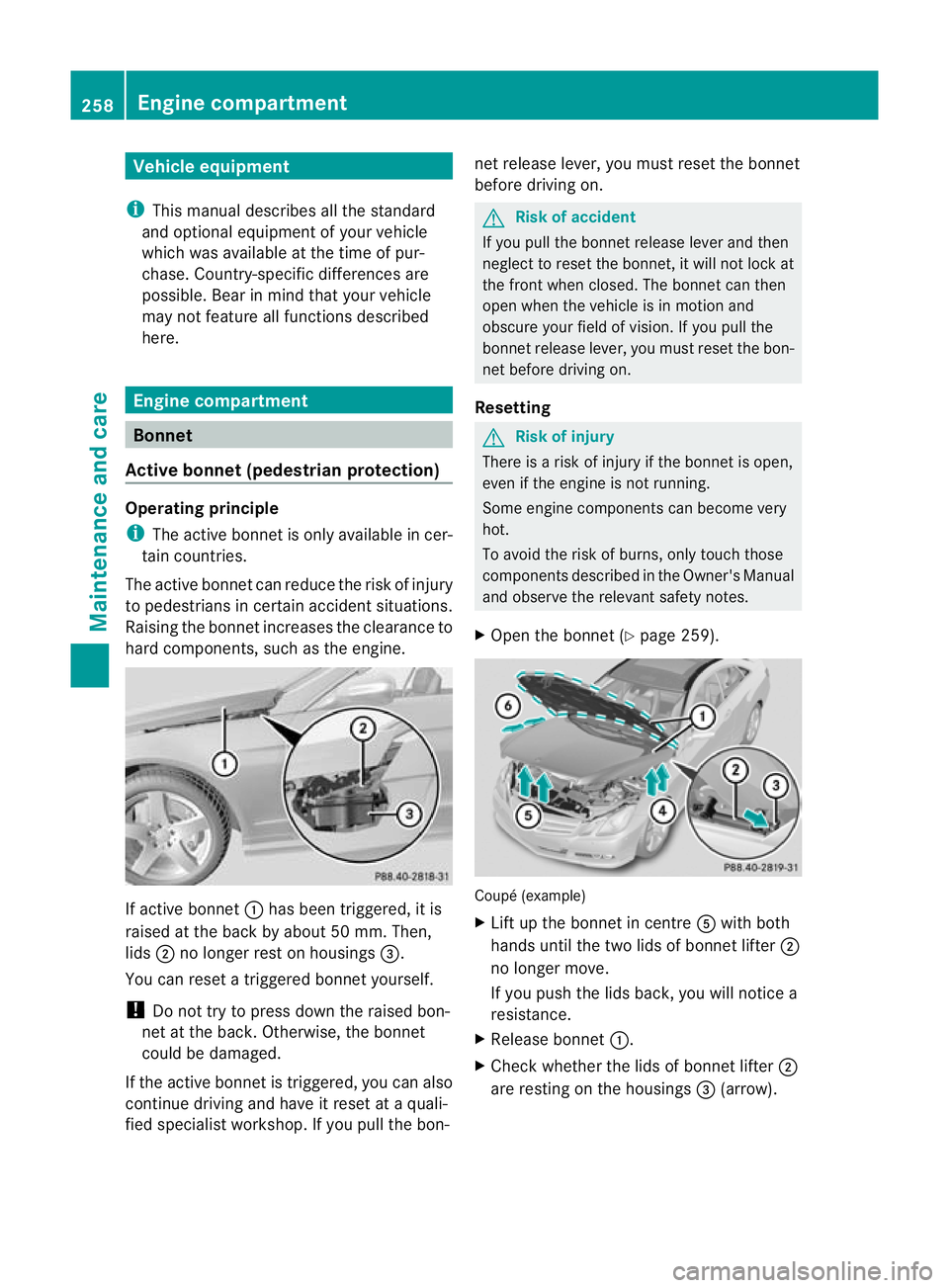
har dcomponents, such as the engine. If active bonnet
:has been triggered, it is
raised at the back by about 50 mm .Then,
lids ;no longer rest on housings =.
You can reset atriggere dbonnet yourself.
! Do not tr ytopressdown the raised bon-
net at the back .Otherwi se,the bonnet
could be damaged.
If the act iveb onnet is triggered, yo ucan also
continue driving and have it reset at aquali-
fied specialis tworkshop. If you pull the bon- net release lever, you must reset the bonnet
befor edriving on. G
Ris
kofa ccident
If you pull the bonnet release lever and then
neglect to reset the bonnet, it will not lock at
the front when closed. The bonnet can then
open when the vehicle is in motion and
obscure your field of vision. If you pull the
bonnet release lever, you must reset the bon-
net before driving on.
Resetting G
Risk of injury
There is arisk of injur yifthe bonnet is open,
even if the engin eisnot running.
Som eengine compone ntsc an become very
hot.
To avoid the risk of burns, only touch those
components described in the Owner's Manual
and observe the relevant safety notes.
X Open the bonnet (Y page 259). Coupé (example)
X
Lift up the bonnet in centre Awith both
hands until the two lids of bonnet lifter ;
no longer move.
If you push the lids back, you will notice a
resistance.
X Releas ebonnet :.
X Check whether the lids of bonnet lifter ;
ar er estin gont he housings =(arrow). 258
Engine compartmentMaintenance and care
BA 20
7ECE ÄJ 2010 /1a; 1; 2, en-GB
mkalafa Version: 3.0.2.11 2010-01-26T13:03:22+01:00 -Seite 258
Page 266 of 333
The ASSYST PLU
Sservice interval display
does not take into account any periods of
tim eduring which the battery is disconnec-
ted.
Maintaining the time-dependent service
schedule:
X Note down the service due date displayed
in the multifunction display before discon-
necting the battery.
or
X Subtract the battery disconnection periods
from the service date shown on the display
after reconnecting the battery.
Hiding the service message X
Press %ora on the steering wheel.
Displaying the service message X
Switc hont he ignition.
X Press =or; to selec tthe Service
men uont he steerin gwheel.
X Press 9or: to selec tthe ASSYST
PLUS submenu and press ato con firm.
Th es ervice due date appear sint he multi-
func tion display.
Please bear th efollowing in mind Aq
ualified specialist workshop, e.g. a
Mercedes-Ben zService Cent re,w ill reset the
ASSYST PLU Sservic einterval display after
the necessary service work has bee ncarried
out.
You can obtain further information ,e.g.
regarding servic ework,from aMercedes-
Ben zService Cent reor directly from
Mercedes-Ben z.
! If th eASSYST PLU Sservic einterval indi-
cator has bee ninadvertently reset, this set-
ting can be corrected at aMercedes-Benz
Ser vice Centre.
Have the servic ework carried out as descri-
bed in the Ser vice Boo klet. There may oth-
erwise be inc reased wear, resulting in dam- age to the vehicle or to the major assem-
blies. Care
Notes on care
Regular care of your vehicle is acondition for
retaining the quality in the long ter m.
Use car eproducts and cleaning agent srec-
ommended and approved by Mercedes-Benz.
! For cleanin gyour vehicle, do not use any
of the following:
R dry ,rough or hard cloths
R abrasiv ecleanin gagents
R solven ts
R cleaning agents containing solvents
Do not scrub.
Do not touch the surface sorprotective
films with hard objects ,e.g. aring or ice
scraper .You coul dotherwise scratch or
damage the surfaces and protective film. H
Environmental note
Dispose of empty packaging and cleaning
cloths in an environmentally respo nsible man-
ner.
! Do not park up your vehicle for alonger
period immediately after cleanin git, espe-
cially not after cleaning the whee lrims with
wheel rim cleanin gagent. Wheel rim clean-
ing agent scan increase corrosio nofbrake
discs and brake pads .Generally speaking,
you should not park the vehicle after clean-
ing until you have run it at regula roperating
temperature. Exterior care
Automatic car wash G
Risk of accident
Braking efficiency is reduced after washing
the vehicle. This could cause an accident. For Care
263Maintenance and care
BA 207ECE ÄJ 2010/1a; 1; 2, en-GB
mkalafa Version:3.0.2.11
2010-01-26T13:03:22+01:0
0-Seite 263 Z