towing MERCEDES-BENZ E-CLASS CABRIOLET 2010 User Guide
[x] Cancel search | Manufacturer: MERCEDES-BENZ, Model Year: 2010, Model line: E-CLASS CABRIOLET, Model: MERCEDES-BENZ E-CLASS CABRIOLET 2010Pages: 333, PDF Size: 7.64 MB
Page 144 of 333

Problem Possible causes/consequences and
M Solutions
Vehicles with
apetrol
engine:
The engine is not run-
ning smoothly and is
misfiring. There is
amalfunction in the engine electronics or amechanical
componen tofthe engin emanagement system.
X Only depress the accelerator pedal slightly.
X Have the cause rectified immediately at aqualified specialist
workshop.
Otherwise, non-combusted fuel may get into the catalytic con-
verter and damage it. The coolant tempera-
ture display is showing
more than 120 †. The
coolant warning lamp
may also be lit and a
warning tone may
sound. (Y
page 192). The coolant level is too low. The coolant is too hot and the engine
is no longer being cooled sufficiently.
X
Stop as soo naspossible and allow the engin eand the coolant
to cool down.
X Check the coolant level (Y page261). Observe the warning
notes as you do so and top up the coolan tifnecessary. If the coolan
tlevel is correc t,the radiator fan may be faulty. The
coolant is too hot and the engine is no longe rbeing cooled suffi-
cien tly.
X If the coolant temperature is less than 120 †, you can continue
driving to the nearest qualified specialist workshop.
X Avoid heavy loads on the engine as you do so, e.g. driving on
mountain roads and stop/start driving. Manual transmission
Gear lever
Gear lever
!
Whe nshifting between 5thand 6thgear,
you should always push the gear lever all
the way to the right. Otherwise, you could
shift uninte ntionally into 3rdor4th gear
and damage the transmission. Do not exceed the maximum speed for the
individual gears.
Shiftin
gdown at too high aspeed (trans-
mission braking) can cause the engine to
overrev ,leading to engine damage.
! On long and steep downhill gradients,
especiall yifthe vehicle is laden or towing
at railer, yo umust shift into gear 1, 2or3
in good time. This uses the engine's braking
effect .This relieves the load on the brake
system and prevents the brakes from over-
heating and wearing too quickly. Neutral
Nwhen the ECO start/stop
functio nisactive
In neutral N,the engin eisswitched off when
the vehicle speed is below acertain threshold
and the clut chpedal is not depressed. Manual transmission
141Driving and parking
BA 207ECE ÄJ 2010/1a; 1; 2, en-GB
mkalafa Version:3.0.2.11
2010-01-26T13:03:22+01:0
0-Seite 141 Z
Page 147 of 333

change reactions and is cond
ucive to asporty
driving style. The sound generat edby the
double-clutch function depends on the drive
progra mselected.
Kickdown Use kickdown for maximu
macceleration.
X Depress the accelerator pedal beyond the
pressure point.
Th et ransmission shifts to alower gear
depending on the engin espeed.
X Ease off the accelerator pedal onc ethe
desired speed is reached.
The automatic transmission shift sback up.
Trailer towing X
Driv eint he middle of the engin espeed
range on uphill gradien ts.
X Shift dow ntoshift range 3or
2(Y page 14 5)depending on the uphill or
downhill gradien t,even if cruise control,
DI ST RONIC PLUS or SPEE DTRONIC is acti-
vated. Program selecto
rbutton
Th ep rogram selector butto nallows you to
choose between differen tdriving character-
istics. Progra
mselector button Program selecto
rbutton on vehicle swithout the
"dynamic handlin gpackage with sport smode" Program selecto
rbutton on vehicle swith the
"dynamic handlin gpackage with sport smode" E
Economy Comfortable, economical
driving
S
Sport Sport
ydriving style M
Manual Manual gearshi
fting i
For further informatio non"Drive pro-
gram "(Ypage 145).
X Pres sprogram sele ctor button :repeat-
edly until th elette rfor the desire dgearshift
program appear sint he multifunc tion dis-
play.
i The automatic transmission switches to
automatic drive program Eeach tim ethe
engin eisstarted. 144
Automatic transmissionDrivin
gand pa rking
BA 20 7ECE ÄJ 2010 /1a; 1; 2, en-GB
mkalafa Version: 3.0.2.11 2010-01-26T13:03:22+01:00 -Seite 144
Page 161 of 333

On vehicle
swith Intelligent Light System the
headlamps can be conver tedint he on-board
compute r(Ypage 206).
Switching over dipped-beam headlamps
on vehicles with halogen headlamps :
Protec tive cap
; Switchover lever
X Turn protectiv ecap : anti-clockwise and
remove it.
X Push switchover lever ;down.
X Insert protective cap :and turn it clock-
wise.
When you are driving back on the same side
of the road as the country where the vehicle
is registered, have the headlamps changed
back to asymmetrical dippe dbeam as soon
as possibl eafter crossing th eborder. Driving systems
Cruise control
Import ants afety notes Cruise control maintain
saconstant road
speed for you. It brakes automatically in order
to avoid exceeding the set speed. On long and
steep downhil lgradients ,especially if the
vehicle is laden or towing atrailer, yo umust
shift to alower gear in good tim eorselect
shift range 1,2or 3on vehicles with auto-
matic transmission. By doing so, you will
mak euse of the brakin geffect of th eengine,
which relieves the load on the brake system and prevents the brakes from overheating
and wearing too quickly. G
Risk of accident
Do not change down for additional engine
braking on aslippery road surface. This could
cause the drive wheels to lose their grip and
the vehicle could skid.
Use cruise control only if road and traffic con-
ditions make it appropriate to maintain a
steady speed for aprolonged period. Yo ucan
store any road spee dabove 30 km/h. G
Risk of accident
Cruise control cannot take account of road
and traffic conditions.
Always pay atten tion to traffic conditions
even when cruise control is activated.
Cruise control is only an aid designed to assist
driving. You are responsible for the vehicle's
speed and for brakin gingood time. G
Risk of accident
Do not use cruise control:
R in road and traffic condition swhich do not
allow you to maintain aconstant speed (e.g.
heavy traffic or winding roads). You could
otherwise cause an accident.
R on slippery roads. Brakin goraccelerating
coul dcause the drive wheels to lose trac-
tion and the vehicle could then skid.
R when there is poor visibility, e.g. due to fog,
heavy rain or snow
Cruise control lever You can operate cruise control and variable
SPEEDTRONIC with the cruise control lever.
The LIM indicator lamp on the cruise control
lever indicates which system you have selec-
ted:
R
LIM indicator lamp off: cruise control is
selected.
R LIM indicator lamp on: variableSPEED-
TRONI Cisselected. 158
Driving systemsDriving and parking
BA 20
7ECE ÄJ 2010/1a; 1; 2, en-GB
mkalafa Version: 3.0.2.11
2010-01-26T13:03:22+01:00
-Seite 158
Page 163 of 333

Setting
aspeed X
Press the cruise control lever to the pres-
sure point, up :for ahigher speed or
down ?fora lower speed.
X Keep the cruise contro llever pressed until
the desired speed is reached.
X Release the cruise control lever.
The new speed is stored.
i Cruise control is not deactivated if you
depress the accelerator pedal. For exam-
ple, if you accelerate briefly to over take,
cruise control adjusts the vehicle's speed
to the last speed stored after you have fin-
ished overtaking.
Making adjustments in 1km/h incre-
ments X
Briefly press the cruise contro llever to the
pressur epoint ,up :for ahigher speed or
down ?for alower speed.
The last speed stored is inc reased or
reduced.
Making adjustments in 10 km/h incre-
ments X
Briefly press the cruise contro llever
beyond the pressur epoint ,up :for a
higher spee dordown?for alower speed.
The last speed stored is inc reased or
reduced.
Deactivating cruise control There are several ways to deactivate cruise
control:
X Briefly press the cruise contro llever for-
wards B.
or
X Brake. or
X
Briefly press the cruise control lever in the
direc tion of arrow A.
Variable SPEEDTRONIC is selected. LIM
indicator lamp ;in the cruise contr ol lever
li ghts up.
Cruise control is automatically deactivated if:
R you depress the parkin gbrake
R yo ua re driving at less than 30 km/h
R ESP ®
intervenes or yo udeactiva teESP ®
R you change into neutral in avehicle with
manual transmission while driving or if the
clut chis depressed for longer than 6sec-
onds
R on vehicles with manual transmission ,you
shift to agear that is too high and as aresult
the engin espeed is too low
R on vehicles with automatic tra nsmission,
you shif tinto position Nwhil edriving
If cruise contro lisd eactiva ted, you will hear
aw arning tone. You will see the Cruise
contro loffmessage in th emultifunction
display for approximately five seconds.
i The last spee dstored is cleared when you
switch off the engine. DISTRONIC PLUS
Important safet ynotes i
DISTRONIC PLU Sisn ot available in all
coun tries.
DISTRONIC PLU Sregulates the speed and
automatically helps you maintain the dis-
tanc etot he vehicle detected in front. It
brakes automatically in orde rtoavoid
exceeding th eset speed.
On long and steep downhill gradien ts,e spe-
cially if the vehicle is laden or towing atrailer,
yo um ust select shift range 1,2or 3in good
time. By doing so, you will make use of the
brakin geffect of the engine ,which relieves
the load on the brake system and prevents 160
Driving systemsDriving and pa
rking
BA 20 7ECE ÄJ 2010 /1a;1;2,e n-GB
mkalafa Version: 3.0.2.11 2010-01-26T13:03:22+01:00-Seite 160
Page 165 of 333
mus
talsoa pply the brakes yourself if this
braking powe risnot sufficient.
If DISTRONIC PLU Sdetect sarisk of collision
with avehicle in front, an intermit tent warning
tone sounds. In addition, the ·distance
warning lamp in the instrument cluste rlights
up. Brak etoavoidac ollision.
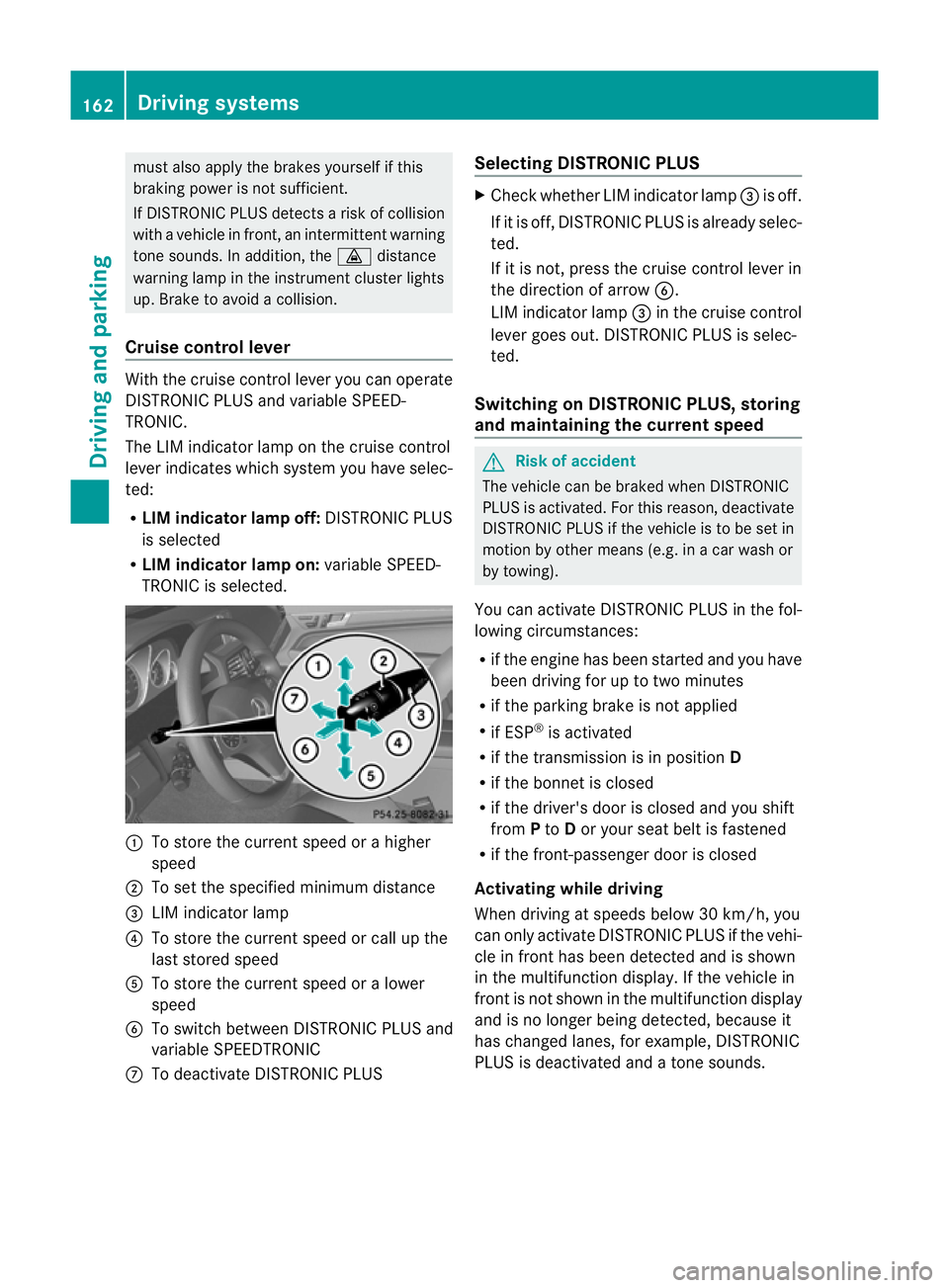
Cruise control lever With the cruise control lever you can operate
DI ST RONIC PLUS and variable SPEE D-
TRONIC.
The LI Mindicator lamp on the cruise control
lever indicates which system you have selec-
ted:
R LIM indicator lamp off: DISTRONIC PLUS
is selected
R LIM indicator lamp on: variable SPEED-
TRONIC is selected. :
To sto rethe curren tspeed or ahigher
speed
; To set the specified minimum distance
= LIMi ndicator lamp
? To sto rethe curren tspeed or call up the
last stored speed
A To stor ethe curren tspeed or alower
speed
B To switc hbetween DI STRONIC PLUS and
variable SPEEDTRONIC
C To deactivate DISTRONIC PLUS Selecting DISTRONIC PLUS X
Check whether LIM indicator lamp =is off.
If it is off, DISTRONIC PLUS is already selec-
ted.
If it is not ,pres sthe cruise contr ol leverin
the direction of arrow B.
LIM indicator lamp =in the cruise control
lever goe sout. DISTRONIC PLUS is selec-
ted.
Switching on DISTRONIC PLUS ,storing
and maintaining the current speed G
Risk of accident
The vehicle can be braked when DISTRONIC
PLUS is activated. For this reason, deactivate
DISTRONIC PLUS if the vehicle is to be set in
motion by othe rmeans (e.g. in acar wash or
by towing).
You can activate DISTRONIC PLUS in the fol-
lowing circumstances:
R if the engine has been started and you have
been drivin gfor up to two minutes
R if the parkin gbrake is not applied
R if ESP ®
is acti vated
R if the transmission is in position D
R if the bonnet is closed
R if the driver' sdoor is closed and you shift
from Pto Dor your seat belt is fastened
R if the front-passenger door is closed
Activating while driving
When drivin gatspeeds below 30 km/h, you
can only acti vate DISTRONIC PLUS if the vehi-
cle in fron thas been detected and is shown
in the multifunction display. If the vehicle in
front is not shown in the multifunction display
and is no longe rbeing detected, because it
has changed lanes, for example, DISTRONIC
PLU Sisd eactivated and atone sounds. 162
Driving systemsDriving and pa
rking
BA 20 7ECE ÄJ 2010 /1a; 1; 2, en-GB
mkalafa Version: 3.0.2.11 2010-01-26T13:03:22+01:00 -Seite 162
Page 172 of 333
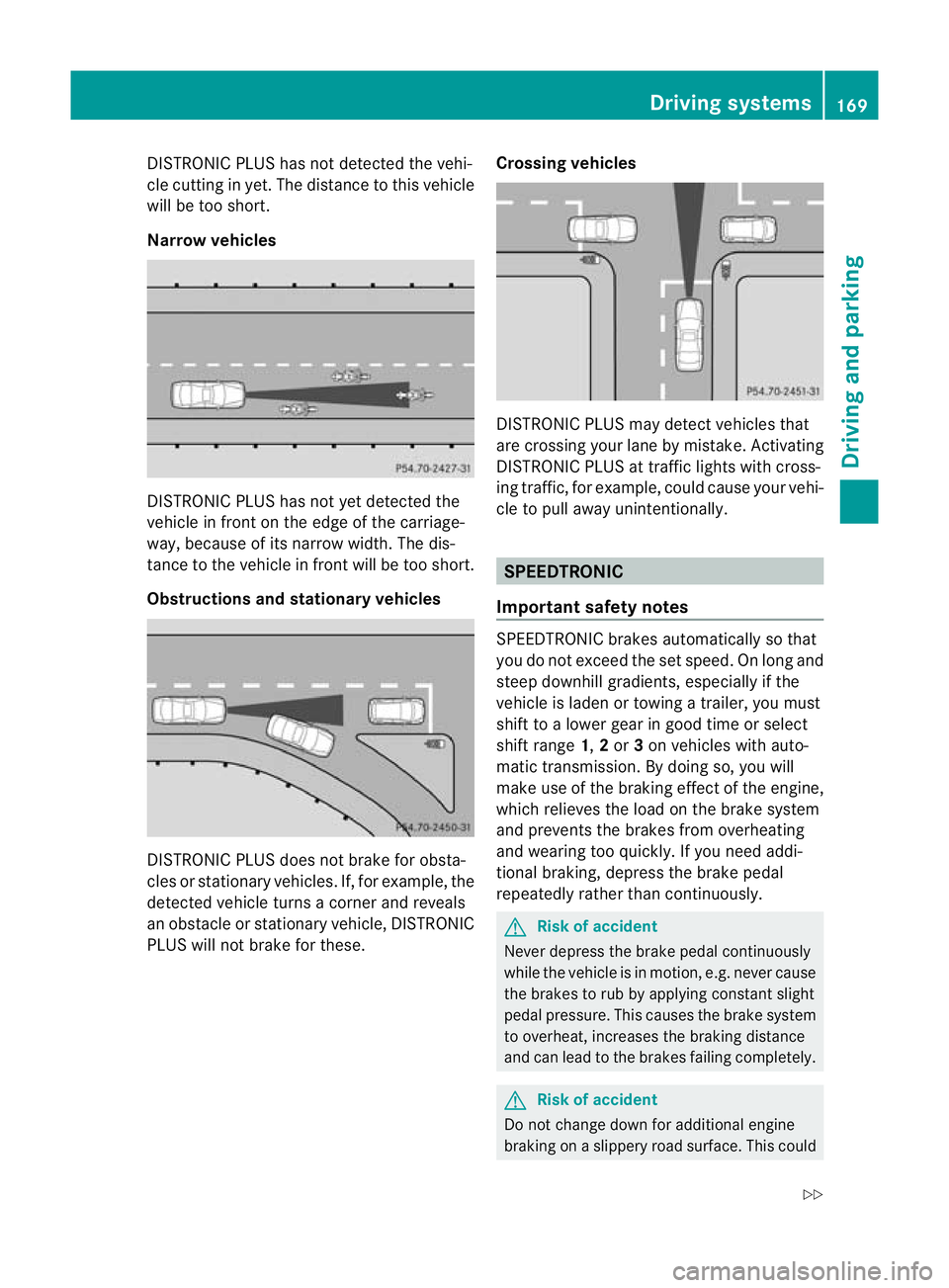
DISTRONIC PLUS ha
snot detected the vehi-
cle cutting in yet. Th edistance to thi svehicle
will be too short.
Narrow vehicles DISTRONIC PLUS ha
snot ye tdetected the
vehicl einfront on th eedgeoft he carriage-
way, because of its narrow width .The dis-
tance to the vehicle in front will be too short.
Obstruction sand sta tionary vehicles DISTRONIC PLUS does not brake for obsta-
cles or stationary vehicles. If, for example, the
detected vehicle turns acorner and reveals
an obstacle or stationar yvehicle, DI STRONIC
PLUS will not brake for these. Crossin
gvehicles DISTRONIC PLUS may detect vehicles that
are crossing your lane by mistake. Activating
DISTRONIC PLUS at traffic lights with cross-
ing traffic, for example, could cause your vehi-
cle to pull away unintentionally.
SPEEDTRONIC
Important safety notes SPEEDTRONIC brakes automatically so that
you do not exceed the set speed
.Onlong and
steep downhil lgradients ,especially if the
vehicle is laden or towing atrailer, yo umust
shift to alower gear in good tim eorselect
shift range 1,2or 3on vehicles with auto-
matic transmission. By doing so, you will
mak euse of the brakin geffect of th eengine,
which relieves the load on the brake system
and prevents the brakes from overheating
and wearing too quickly .Ifyou need addi-
tional braking, depress the brake pedal
repeatedly rather than con tinuously. G
Risk of accident
Never depress the brake pedal continuously
whil ethe vehicle is in motion, e.g. never cause
the brakes to ru bbyapplying constant slight
pedal pressure. This causes the brak esystem
to overheat, increases the braking distance
and can lead to the brakes failing completely. G
Risk of accident
Do not change down for additional engine
braking on aslippery road surface. This could Drivin
gsystems
169Drivingand pa rking
BA 20 7ECE ÄJ 2010 /1a;1;2,e n-GB
mkalafa Version: 3.0.2.11 2010-01-26T13:03:22+01:00-Seite 169 Z
Page 176 of 333
Activation conditions
You can activat
ethe HOL Dfunction if:
R the vehicl eisstationary
R the engin eisrunnin gorhas been automat-
ically switched off by th eECO star t/stop
function
R the dri ver'sd oor is closed or your seat belt
is fastened
R thep arking brak eisnot applied
R theb onnet is closed
R the selector leve risinp osition D,Ror Non
vehicles with automatic transmission
R DIST RONIC PLUS is deactivated
Activating the HOLD function X
Make sure that the activation conditions
are met.
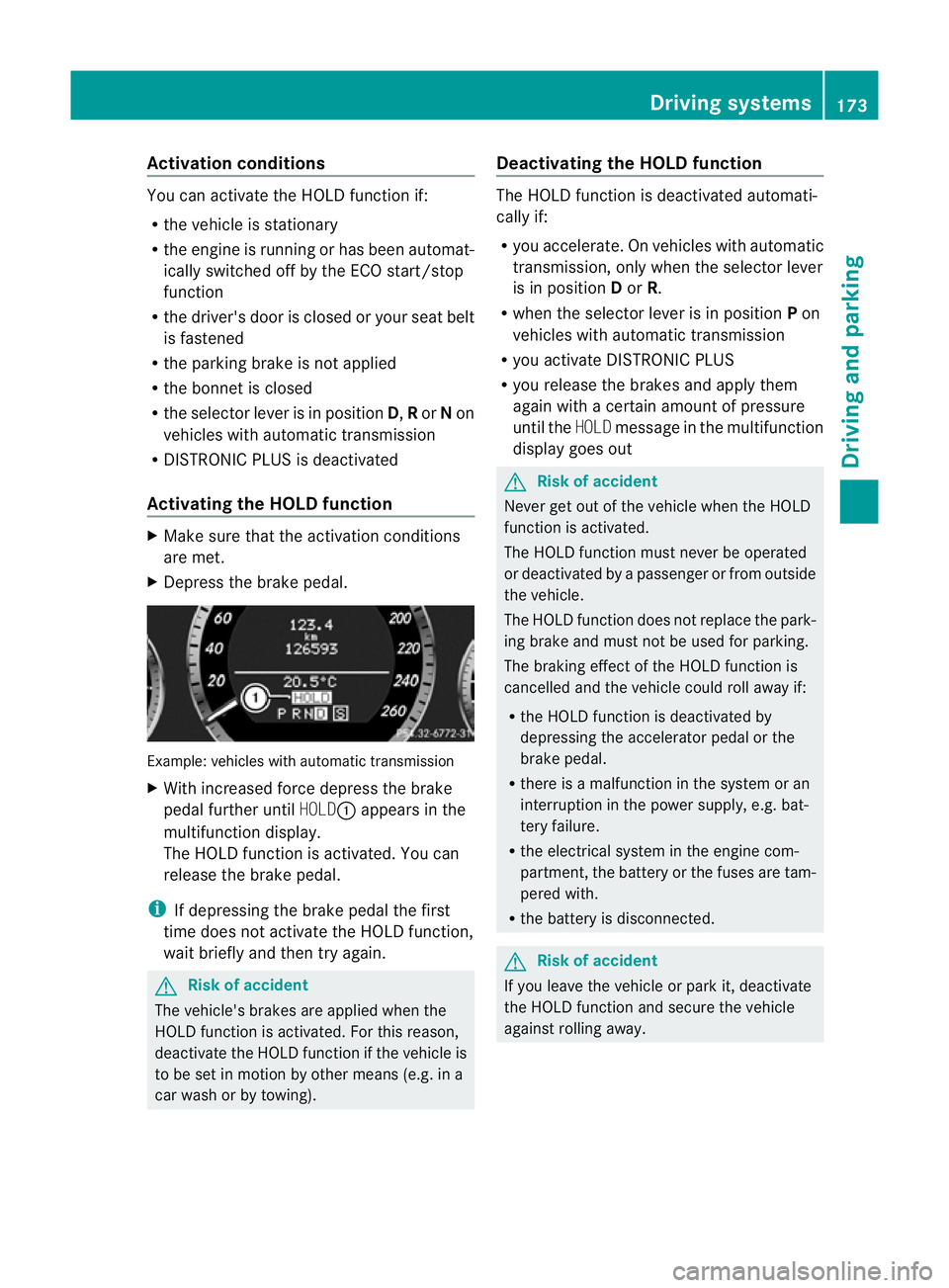
X Depress the brake pedal. Example: vehicles with automatic transmission
X
With increase dforc edepress the brake
pedal fur ther until HOLD:appear sinthe
multifunction display.
The HOL Dfunction is activated. You can
release the brake pedal.
i If depressing the brake pedal the first
time does not activate the HOLD function,
wait briefly and then try again. G
Risk of accident
The vehicle's brakes are applied when the
HOLD function is activated. For this reason,
deactivate the HOLD function if the vehicle is
to be set in motion by other means (e.g. in a
car wash or by towing). Deactivating the HOLD function The HOLD function is deactivated automati-
cally if:
R
you accelerate. On vehicles with automatic
transmission ,only whe nthe selec torlever
is in position Dor R.
R when the selector lever is in position Pon
vehicles with automatic transmission
R you activate DI STRONIC PLUS
R you release the brakes and apply them
again with acertain amount of pressure
until the HOLDmessage in the multifunction
display goes out G
Risk of accident
Never get out of the vehicle when the HOLD
fun ction is activated.
The HOLD function must never be operated
or deactivated by apassenger or from outside
the vehicle.
The HOLD function does not replace the park-
ing brake and must not be used for parking.
The brakin geffect of the HOLD function is
cancelled and the vehicl ecould roll away if:
R the HOL Dfunction is deactivated by
depressin gthe accelerator pedal or the
brake pedal.
R ther eisam alfunction in the system or an
interruption in the power supply, e.g. bat-
tery failure.
R the electrical system in the engine com-
partment ,the battery or the fuses ar etam-
pered with.
R the battery is disconnected. G
Risk of accident
If you leave the vehicle or park it, deactivate
the HOLD function and secure the vehicle
against rolling away. Driving systems
173Drivingand parking
BA 20 7ECE ÄJ 2010/1a; 1; 2, en-GB
mkalafa Version:3.0.2.11
2010-01-26T13:03:22+01:0
0-Seite 173 Z
Page 179 of 333
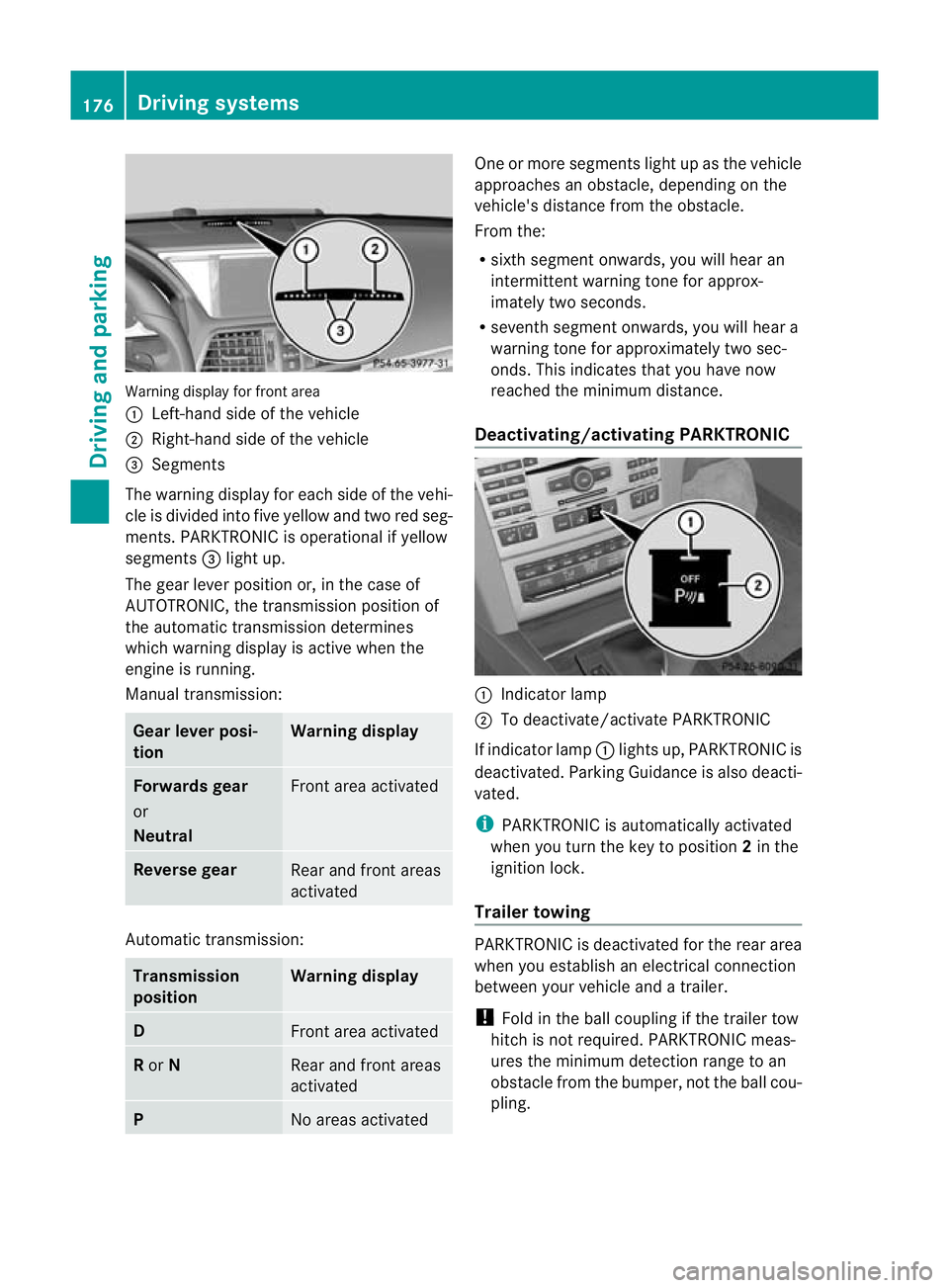
Warning display for fron
tarea
: Left-hand side of th evehicle
; Right-hand side of the vehicle
= Segments
The warning display for each side of the vehi-
cle is divided into fiv eyellow and two red seg-
ments. PARKTRONI Cisoperational if yellow
segments =ligh tup.
The gear lever position or, in the case of
AUTOTRO NIC, the transmission position of
the automatic transmission determines
which warning display is active when the
engine is running.
Manual transmission: Gear lever posi-
tion Warning display
Forward
sgear
or
Neutral Fron
tarea activated Revers
egear Rear and fron
tareas
activated Auto
matic transmission: Transmission
position Warning display
D
Fron
tarea activated R
or N Rear and front areas
activated
P
No areas activated On
eorm ore segments light up as the vehicle
approaches an obstacle, depending on the
vehicle' sdistanc efrom th eobstacle.
From the:
R sixt hsegmen tonwards ,you will hea ran
intermitten twarnin gtonef or approx-
imately two seconds.
R seven thsegment onwards, you will hear a
warnin gtonef or approximately two sec-
onds. This indicates that you have now
reached the minimu mdistance.
Deactivating/activating PARKTRONIC :
Indicator lamp
; To deactivate/activate PARKTRONIC
If indicator lamp :lights up, PARKTRONIC is
deactivated. Parking Guidance is also deacti-
vated.
i PARKTRONIC is automatically activated
when you turn the key to position 2in the
ignition lock.
Trailer towing PARKTRONIC is deactivated for the rear area
when you establish an electrical connection
between your vehicle and
atrailer.
! Foldint he ball couplin gifthe trailer tow
hitc hisn ot required .PARKTRONIC meas-
ures the minimum detection range to an
obstacle from the bumper, not the ball cou-
pling. 176
Drivin
gsystemsDrivin gand pa rking
BA 20 7ECE ÄJ 2010 /1a; 1; 2, en-GB
mkalafa Version: 3.0.2.11 2010-01-26T13:03:22+01:00 -Seite 176
Page 183 of 333
Cancelling Parking Guidance
X
Press th ePARKT RONIC butto nonthe
cen treconsole (Y page176).
Parking Gui dance is cancelle dimmediately
and PARKTRONIC is deactivated.
Parkin gGuidance is cancelled automatically
if it is no longer possible to guide you into the
parking space, or if amalfunction occurs.
The parking space symbol disapp ears and the
Parking Guidance cancelled message
appe arsint he multifunction display.
Trailer towing For vehicles with
atrailer to whitch, the min-
imum length for parkin gspaces is slightly
increased.
If you have attached atrailer to your vehicle,
yo us hould not use Parkin gGuidance. When
the electrical connection is established
betwee nyour vehicle and the trailer ,Parking
Guidance ceases to be available. PARK-
TRONIC is deactivated for the rear area. Reversin
gcamera
Important safety guidelines Th
er eversing camera is an optica lparking
aid. It shows the area behind your vehicle in
the COMAND APS displ ay.G
Risk of injury
Make sure that no persons or animal sare in
th em anoeuvring range. Otherwise ,they
coul dbei njured.
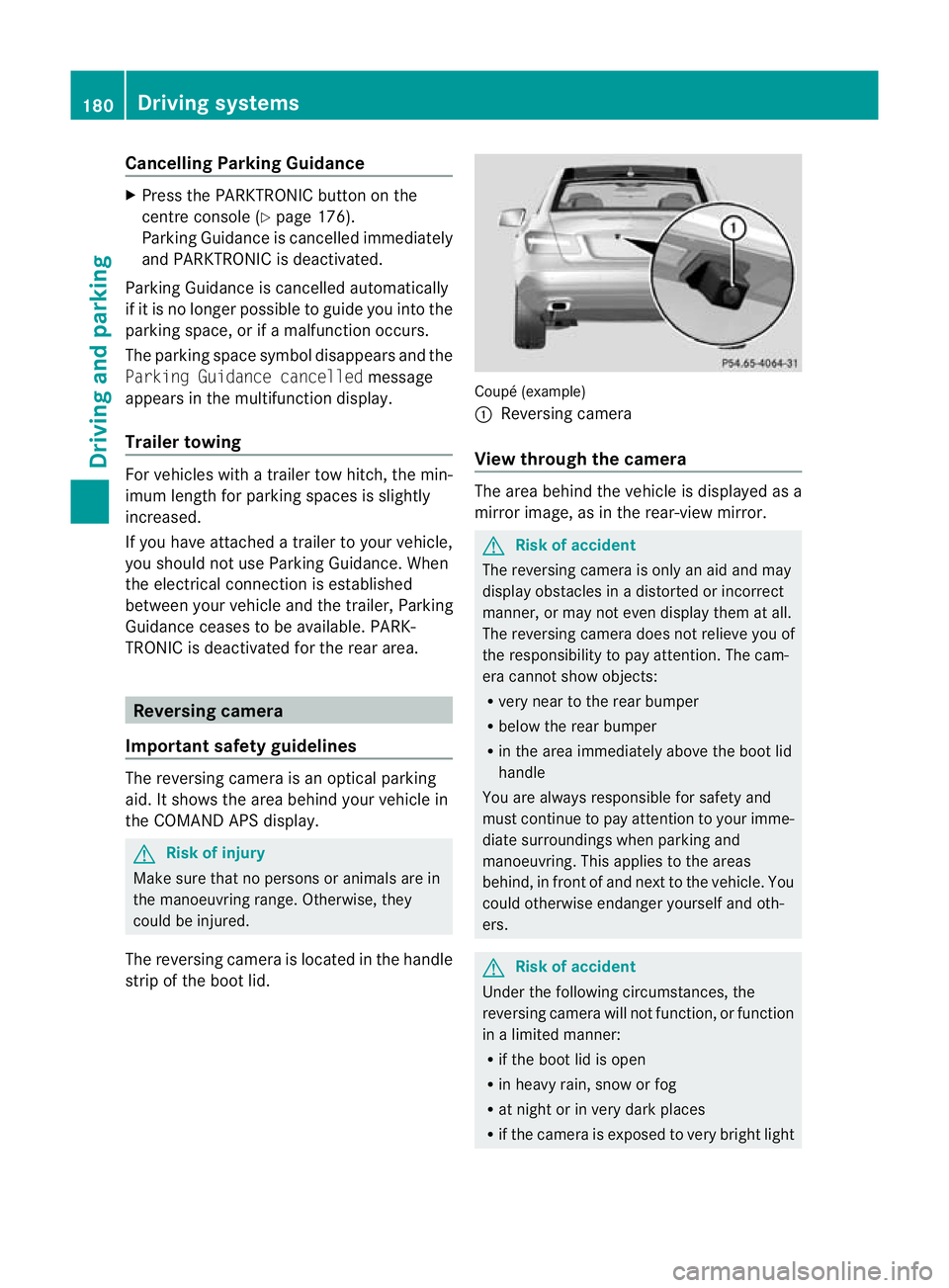
The reversin gcamera is located in the handle
strip of the boot lid. Coupé (example)
:
Reversing camera
View through the camera The area behind the vehicle is displ
ayedas a
mirror image, as in the rear-view mirror. G
Risk of accident
The reversing camera is only an aid and may
display obstacles in adistorted or incorrect
manner, or may not even display them at all.
The reversing camer adoes not relieve you of
the responsibilit ytopay attention. The cam-
era cannot show objects:
R very near to the rear bumper
R below the rear bumper
R in the area immediately above the boot lid
handle
You are always responsible for safety and
must continue to pay attention to your imme-
diate surroundings when parking and
manoeuvring. This applies to the areas
behind, in front of and next to the vehicle. You
could otherwise endanger yourself and oth-
ers. G
Risk of accident
Under the following circumstances, the
reversing camera will not function, or function
in alimited manner:
R if the boot lid is open
R in heavy rain, snow or fog
R at night or in very dark places
R if the camer aisexposed to very brigh tlight 180
Drivin
gsystemsDrivin gand pa rking
BA 20 7ECE ÄJ 2010 /1a;1;2,e n-GB
mkalafa Version: 3.0.2.11 2010-01-26T13:03:22+01:00-Seite 180
Page 188 of 333
lar, this may be the case if the vehicles are
drivin gatthe edge of their lan enearest your
vehicle. Due to the nature of the system,
warnings may be issued in err or when driving
clos etoc rashb arriers or similar solid lane
borders.
The two sensors for Blind Spot Assis tare
integrate dinto the sides of the rear bumper.
Make sure that the bumpe risfree from dirt,
ice or slus haround th esensors. For example,
the rada rsensors must not be covered by
cycle racks or overhanging loads. Followin ga
severe impac torinthe even tofdamage to
the bumpers, have the function of the radar
sensors checked at aqualified specialist
workshop, e.g. aMercedes-Ben zService
Cent re.B lind Spot Assist may otherwise not
work properly.
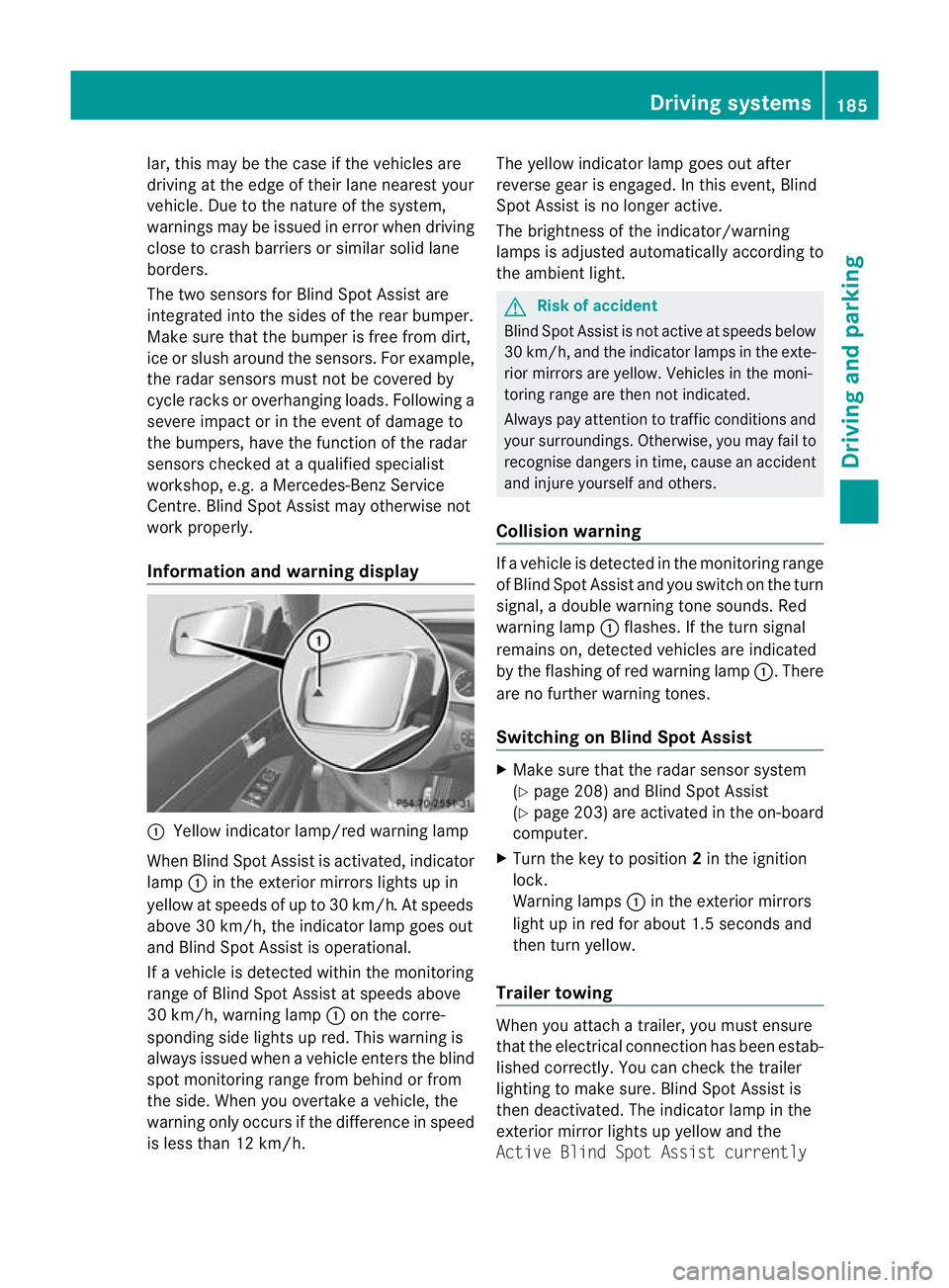
Information and warning display :
Yellow indicator lamp/red warnin glamp
When Blind Spot Assis tisa ctivated, indicator
lamp :in the exterior mirrors lights up in
yellow at speed sofupto30km/ h.At speeds
above 30 km/h, the indicator lamp goe sout
and Blind Spo tAssist is operational.
If av ehicle is detected within the monitoring
range of Blin dSpot Assist at speeds above
30 km/h, warning lamp :on the corre-
sponding side lights up red. This warning is
always issued when avehicle enter sthe blind
spot monitoring range from behind or from
the side. When you overtak eavehicle, the
warning only occurs if the difference in speed
is less than 12 km/h. The yellow indicator lam
pgoes out after
reverse gear is engaged. In this event, Blind
Spot Assist is no longer active.
The brightness of the indicator/warning
lamps is adjusted automatically according to
the ambient light. G
Risk of accident
Blind Spot Assist is not active at speeds below
30 km/h, and the indicator lamps in the exte-
rio rm irror sare yel low.Vehicles in the moni-
toring range are then not indicated.
Alway spay attention to traffic conditions and
your surroundings. Otherwise ,you may fai lto
recognise dangers in time ,cause an accident
and injure yoursel fand others.
Collisio nwarning If
av ehicle is detected in the mon itoring range
of Blind Spot Assis tand you switch on the turn
signal, adouble warnin gtone sounds. Red
warnin glamp :flashes .Ifthe tur nsignal
remains on, detected vehicles are indicated
by the flashing of red warnin glamp :.T here
ar enof urther warning tones.
Switching on Blind Spot Assist X
Make sure that the radar senso rsystem
(Y page 208) and Blind Spot Assist
(Y page 203) are activated in the on-board
computer.
X Turn the key to position 2in the ignition
lock.
Warning lamps :in the exterior mirrors
ligh tupinr ed for about 1. 5seconds and
then tur nyellow.
Trailer towing When you attach
atrailer, yo umust ensure
that the electrical connection has been estab-
lished correctly. You can check the trailer
lighting to make sure. Blind Spot Assis tis
then deactivated .The indicator lam pint he
exterior mirror lights up yellow and the
Active Blin dSpot Assist currently Drivin
gsystems
185Drivingand pa rking
BA 20 7ECE ÄJ 2010 /1a;1;2,e n-GB
mkalafa Version: 3.0.2.11 2010-01-26T13:03:22+01:00-Seite 185 Z