ECO mode MERCEDES-BENZ E-CLASS CABRIOLET 2010 Owner's Manual
[x] Cancel search | Manufacturer: MERCEDES-BENZ, Model Year: 2010, Model line: E-CLASS CABRIOLET, Model: MERCEDES-BENZ E-CLASS CABRIOLET 2010Pages: 333, PDF Size: 7.64 MB
Page 202 of 333
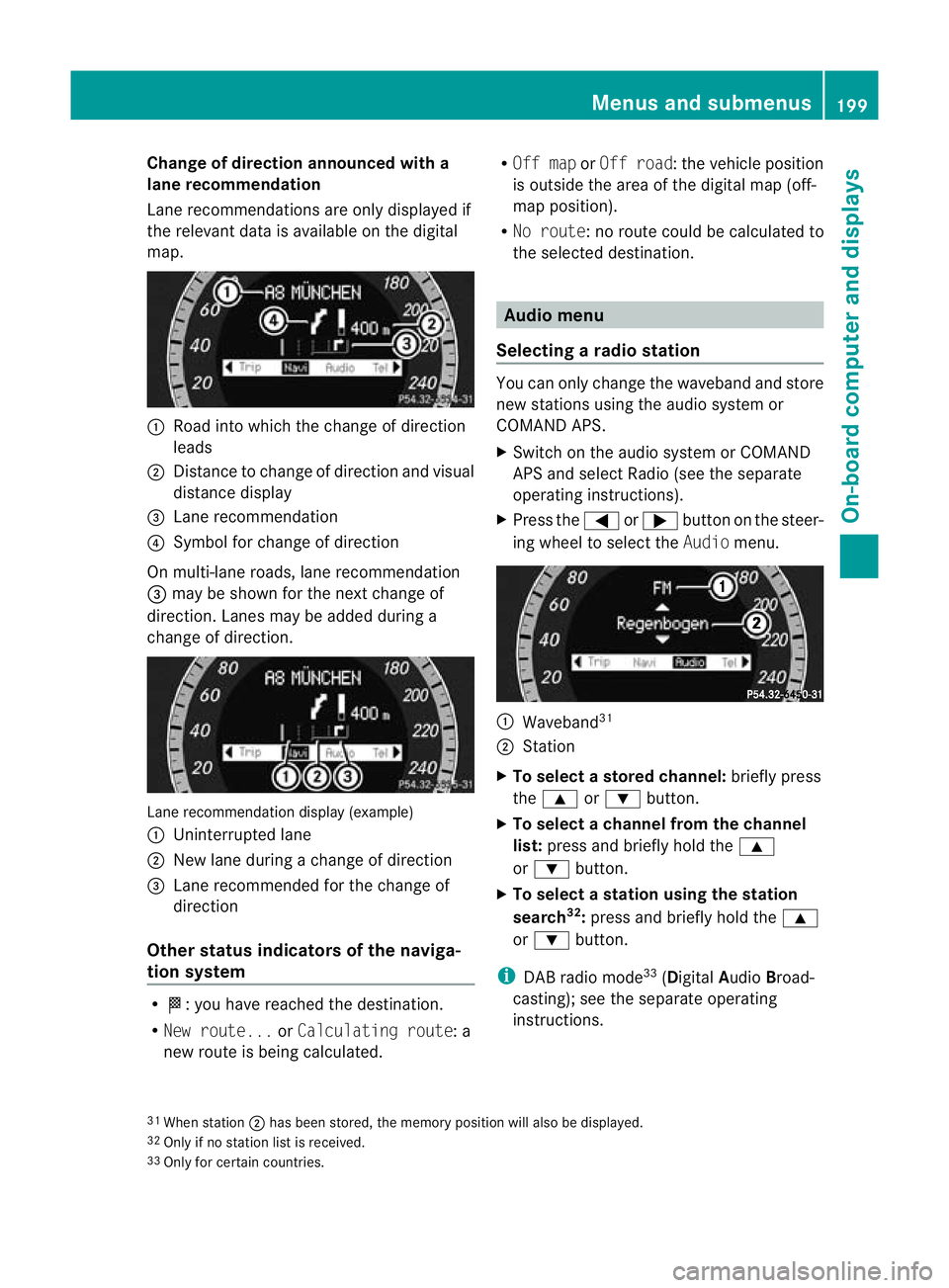
Change of direction announced with a
lane recommend
ation
Lan erecommendations are only displaye dif
the relevan tdata is available on thed igital
map. :
Road into which the change of direction
leads
; Distanc etochange of direction and visual
distanc edisplay
= Lane recommendation
? Symbol for change of direction
On multi-lane roads, lane recommendation
= may be shown for the next change of
direction. Lanes may be added during a
change of direction. Lan
erecommendation display (example)
: Uninterrupted lane
; New lane durin gachange of direction
= Lane recommended for the change of
direction
Other sta tusindicators of the naviga-
tion system R
O:y ou have reached the destination.
R Ne wr oute... orCalculating route:a
new route is being calculated. R
Off map orOff road :the vehicle position
is outside the area of the digital ma p(off-
ma pp osition).
R No route :noroute coul dbecalculated to
the selected destination. Audio menu
Selectin garadio station Yo
uc an only change the waveband and store
new stations using the audio system or
COMAND APS.
X Switch on the audio system or COMAND
APS and select Radio (se ethe separate
operating instructions).
X Press the =or; button on the steer-
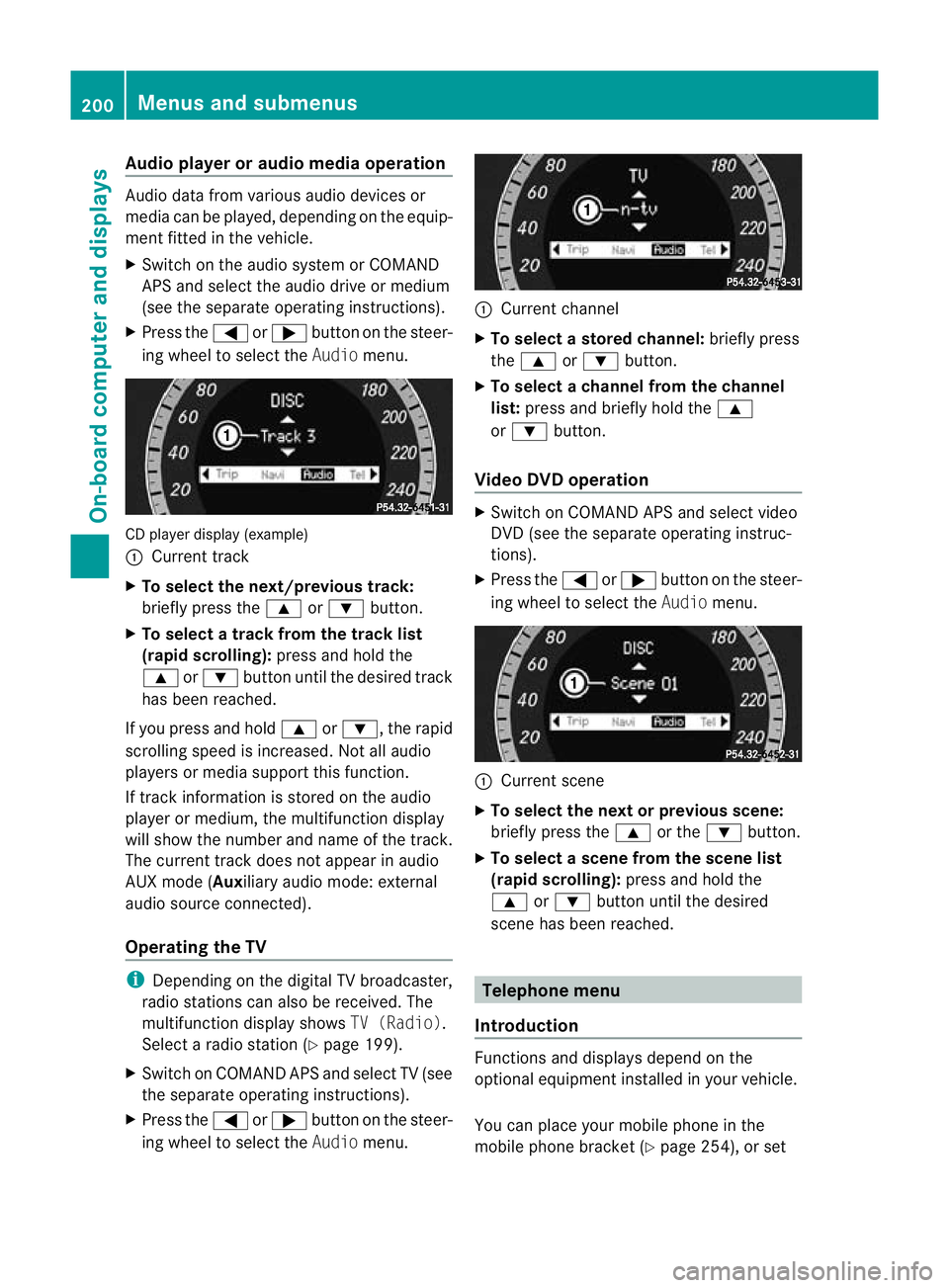
ing wheel to select the Audiomenu. :
Wav eband 31
; Station
X To selec tastoredchann el:briefly press
the 9 or: button.
X To select achann elfrom the chan nel
list: press and briefly hold the 9
or : button.
X To select astatio nusing th estation
search 32
:press and briefl yholdt he 9
or : button.
i DAB radio mode 33
(Digit alAudio Broad-
castin g);s ee the separate operating
instructions.
31 Whe nstation ;hasb eens tored ,the memor yposition will also be displayed.
32 Only if no statio nlist is received.
33 Only for certain countries. Menus and submenus
199On-boardcomputer and displays
BA 20 7ECE ÄJ 2010/1a; 1; 2, en-GB
mkalaf aV ersion: 3.0.2.11
2010-01-26T13:03:22+01:00
-Seite 199 Z
Page 203 of 333
Audio player or audio media operation
Audio dat
afromv arious audio device sor
media can be played, depending on the equip-
ment fitted in the vehicle.
X Switch on the audio system or COMAND
APS and select the audi odrive or medium
(see th eseparate operating instructions).
X Press the =or; button on the steer-
ing whee ltoselect the Audiomenu. CD player display (example)
:
Current track
X To select the next/previous track:
briefl ypress the 9or: button.
X To select atrack from the track list
(rapi dscrolling): press and hold the
9 or: button until th edesired track
ha sb eenr eached.
If yo upress and ho ld9 or:,t he rapid
scr olling speed is incre ased.Not allaudio
players or media support this function.
If track information is stored on the audio
playe rorm edium ,the multifunction display
will show the number and nam eofthe track.
The curren ttrack does not ap pear in audio
AUX mode (Auxiliar yaudi om ode: external
audio sourc econnected).
Operating th eTV i
Depending on the digital TV broadcaster,
radi ostations can als obereceived.The
multifunction display shows TV (Radio).
Select aradi ostation (Y page199).
X Switch on COMAND APS and select TV (see
the separate operating instructions).
X Press the =or; button on the steer-
ing whee ltoselect the Audiomenu. :
Curren tchannel
X To select astore dchann el:briefly press
the 9 or: button.
X To select achann elfrom the chan nel
list: press and briefly hold the 9
or : button.
Video DVD operation X
Switc honC OMAN DAPS and select video
DV D(see the separate oper ating instruc-
tions).
X Press the =or; button on the steer-
ing wheel to select the Audiomenu. :
Current scene
X To select th enext or previous scene:
briefly press the 9or the :button.
X To select ascene from th escene list
(rapid scrolling): press and hold the
9 or: button until th edesired
scene ha sbeenr eached. Telephon
emenu
Introdu ction Functions and display
sdepen dont he
optional equipment installe dinyourvehicle.
Yo uc an place your mobil ephone in the
mobil ephone bracket (Y page 254), or set200
Menus and submenusOn-board computer and displays
BA 207 ECE ÄJ 2010/1a; 1; 2, en-GB
mkalafa
Version: 3.0.2.11 2010-01-26T13:03:22+01:00-Seite 200
Page 257 of 333
Mob
ilep hone G
Ris
kofa ccident
Observe the lega lrequirements of the country
in which you are currently driv ingr egarding
operating mobile communications equipment
in av ehicle.
If it is permitted by law to operate communi-
cations equipment while the vehic leis in
motion, you must only do so if the traffic sit-
uation permits. Otherwise, you could be dis-
tracted from the traffic conditions, cause an
accident and injur eyourself and others.
Two-way rad iosa nd fax equipment use dwith-
out low-reflection exter iora erials can inter-
fere with the vehicle's electronics and thereby
jeopardis ethe operating safety of the vehicle
and your safety. Therefore, you must only use
this equipment if it is correctly connected to
as eparate reflection-free exterior aerial. G
Risk of injury
Excessive levels of electromagnetic radiation
may cause damage to your health and the
health of others. Usin ganexterior aerial takes
into account current scientific discussions
relating to the possible health risk posed by
electromagnetic fields.
To ensure optimum reception quality for
mobil ephones in the vehicle and to minimise
mutua linfluences between the vehicl eelec-
tronics and mobile phones, Mercedes-Benz
recommends the use of an approved exterior
aerial. An exterior aerial conduct sthe elec-
tromagnetic fields generated by awireless
device to the exterior of the vehicle; the field
strength within the vehicle interior is lower
than in avehicle that does not have an exte-
rior aerial.
i There are various mobile phone brackets
that may be fit tedtoy our vehicle; in some
cases, these ar ecountry-specific. You can
obtain these mobile phone bracke ts from a
qualified specialist workshop, e.g. a
Mercedes-Benz Servic eCentre. The functions and services available when
you use the phone depend on your mobile
phone model and service provider.
Inserting the mobile phone
X Open the telephone compart ment
(Y page 245).
X Place the mobil ephone bracket int othe
pre-installed bracket ;see the separate
mobile phone bracket installation instruc-
tions.
X Insert the mobile phone into the mobile
phone bracket ;see the separate mobile
phone bracket installation instructions.
If the mobile phone is inser tedint he mobile
phone bracket ,you can speak to the person
you ar ecalling using the hands-free system.
You can operate the telephone using the
6 and~ button sonthe multifunc tion
steerin gwheel. You can operate other mobile
phone func tions via the on-boar dcomputer
(Y page 200).
When you tak ethe key out of the ignition lock,
the mobile phone stay sonb ut you can no
longer use the hands-free system.
If you are making acall and you would like to
take the key out of the ignition lock, first
remove the mobile phone from the bracket.
Otherwise, the call will be ended. Floormat on the driver'
sside G
Risk of accident
Make sure that there is sufficien tclearance
around the pedals when floormats are used,
and that the floormats are properly secured.
The floormats must be correctly secured at all
times using retainer sand press-s tuds.
Befor eyou driv eoff, check the floormat sand
secure if necessary. Afloormat which is not
properly secured can slip and, thereby, inter-
fere with the movemen tofthe pedals.
Do not plac efloormats on top of one another. 254
FeaturesLoading
,stowin gand features
BA 20 7ECE ÄJ 2010/1a; 1; 2, en-GB
mkalafa Version: 3.0.2.11 2010-01-26T13:03:22+01:00 -Seite 254
Page 288 of 333
Do not continue to drive in run-flat mod
eif:
R youh earb anging noises.
R the vehicl estarts to shake.
R yous ee smoke and smell rubber.
R ESP ®
is intervening constantly.
R there are tears in the sidewall softhe tyre.
After driving in run-flat mode, you must have
the wheel(s) checked for damage at aquali-
fie ds pecialist workshop whic hhas the nec-
essary specialis tknowledge and tool stocarry
out the work required. The faulty tyre must be
replaced in every case.
Mercedes-Benz recommends that you use a
Mercedes-Benz Service Centre for this pur-
pose .Inp articular, work relevant to safety or
on safety-related systems must be carried out
at aq ualified specialist workshop.
i Whe nreplacing one or all tyres, make
sure that you only use tyres marked
MOExtended and of the specified size for
the vehicle.
i Vehicles featuring the MOExtended run-
flat system are not equipped with the
TIREFI Tkit. It is therefor erecommended
that you additionally equip your vehicle
with the TIREFI Tkit if you fit tyres that do
not featur erun-flat properties ,e.g. winter
tyres .You can obtain aTIREFIT kit from a
Mercedes-Benz Service Centre ,for exam-
ple. Ba
ttery Important safety notes
In order for the battery to achieve the maxi-
mum possible service life, it must always be
sufficiently charged.
Have the battery charge checked more fre-
quently if you use the vehicle mainly for short
trips or if you leave it standing idle for a
lengthy period. To prevent damage from corrosion, only
replace the battery with one that has
acentral
ven tilation cover.
Only replace abattery with abattery that has
been recommended by Mercedes-Benz.
Consult aMercedes-Benz Servic eCentr eif
you wish to leave your vehicle parked up for
al ong period of time. G
Risk of inju
ry
Comply with safety precautions and take pro-
tective measures when handling batteries. Risk of explosion
Fire, naked flames and
smoking are prohibited
when handling the battery.
Avoid creatin
gsparks. Battery acid is caustic.
Avoid contact with the skin,
eyes or clothing.
Wear suitable protec
tive
clothing, in particular
gloves, an apro nand aface
mask.
Immediately rinse acid
splashes off with clean
water. Consult adoctor if
necessary. Wear eye protection.
Keep children away.
Observ
ethis Owner's Man-
ual. H
Environmental note
Do not dispose of batteries in the household
rubbish. Dispose of defective batteries in an
environmen tally responsible manner .Take Battery
285Breakdown assistance
BA 207ECE ÄJ 2010/1a; 1; 2, en-GB
mkalafa Version: 3.0.2.11 2010-01-26T13:03:22+01:00-Seite 285 Z
Page 326 of 333
recommend
sthat you use aMercedes-Benz
Ser vice Centre for thi spurpose. In particular,
work relevant to safety or on safety-related
systems must be carried out at aqualified
specialist workshop.
! If you have atrailer to whitchr etrofit ted,
changes to the cooling system may be nec-
essary, depending on the vehicle type.
If you have atrailer to whitchr etrofit ted,
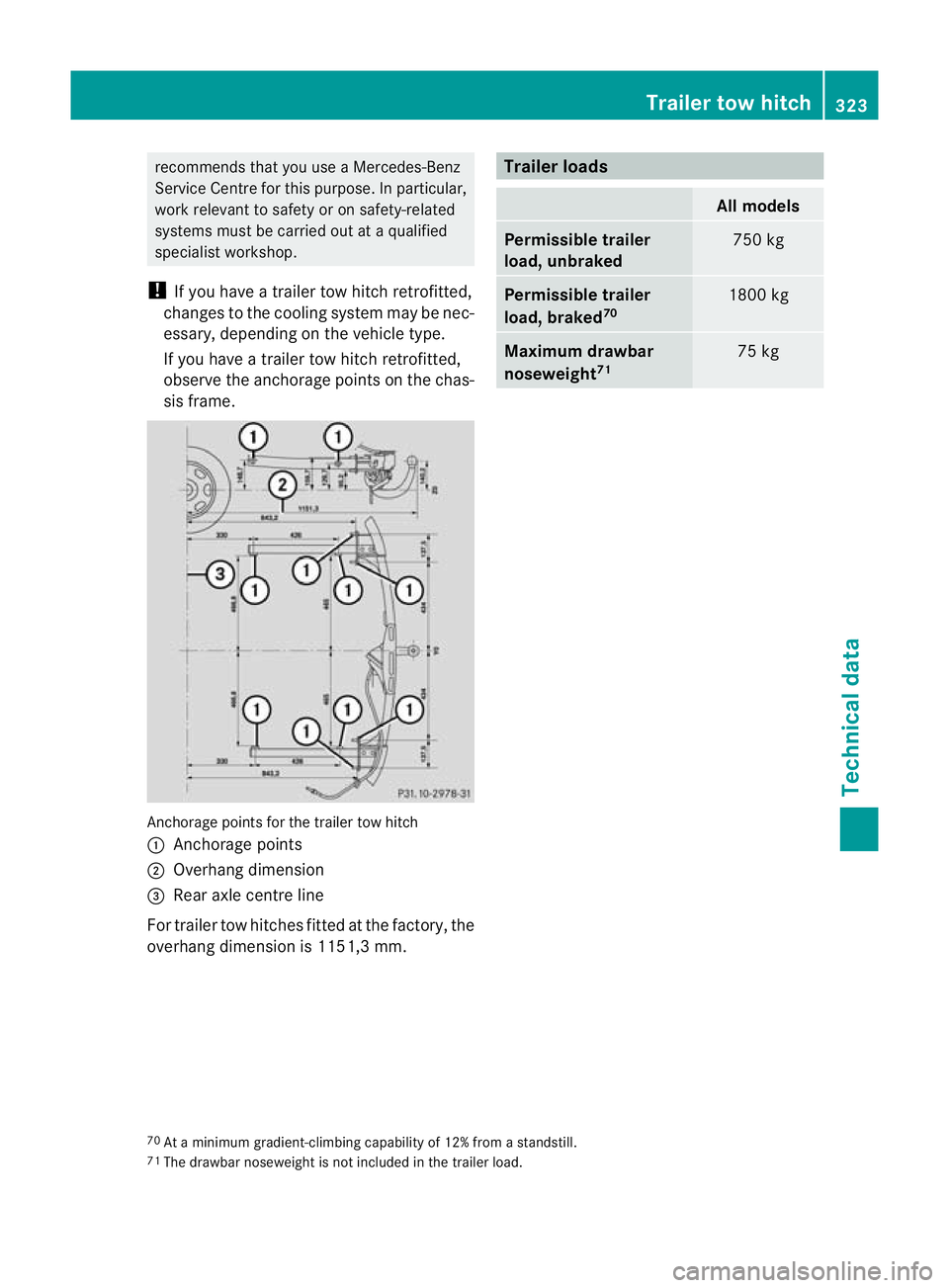
observe the anchorage point sonthe chas-
sis frame. An
chorage point sfor the trailer tow hitch
: Anchorage points
; Overhang dimension
= Rear axle centre line
For trailer tow hitches fitted at the factory ,the
overhang dimension is 1151,3 mm. Trailer loads
All models
Permissible trailer
load, unbraked
75
0kg Permissible trailer
load, braked
70 1800 kg
Maximu
mdrawbar
nose weight71 75 kg
70
At am inimum gradient-climbing capability of 12% from astandstill.
71 The drawbar noseweigh tisnot included in the trailer load. Trailer tow hitch
323Technical data
BA 207ECE ÄJ 2010 /1a;1;2,e n-GB
mkalafa Version: 3.0.2.11 2010-01-26T13:03:22+01:00-Seite 323 Z