automatic transmission MERCEDES-BENZ E-CLASS CABRIOLET 2010 Owner's Manual
[x] Cancel search | Manufacturer: MERCEDES-BENZ, Model Year: 2010, Model line: E-CLASS CABRIOLET, Model: MERCEDES-BENZ E-CLASS CABRIOLET 2010Pages: 333, PDF Size: 7.64 MB
Page 162 of 333
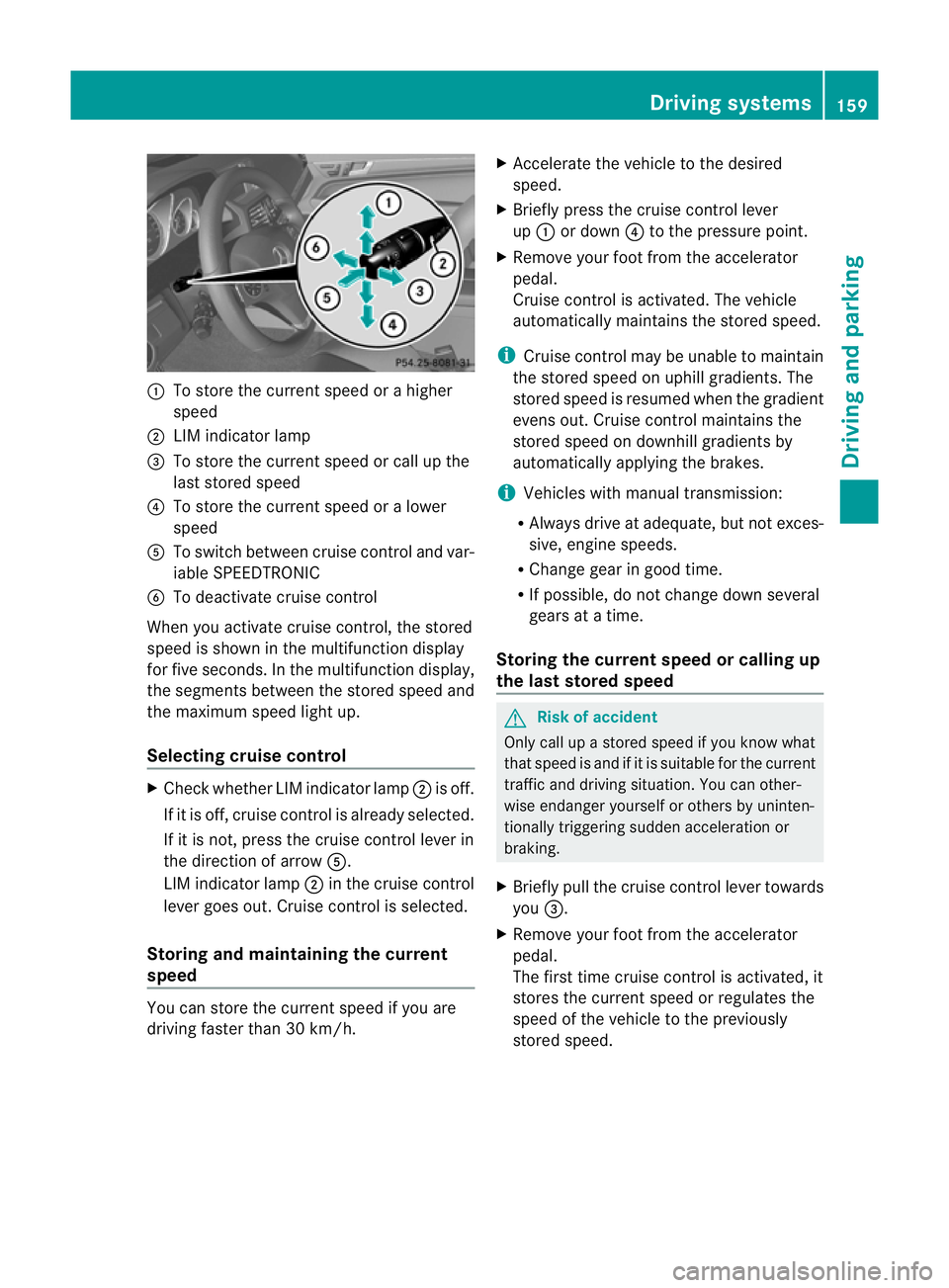
:
To store the curren tspeed or ahigher
speed
; LIMi ndicator lamp
= To sto rethe curren tspeed or call up the
last stored speed
? To stor ethe curren tspeed or alower
speed
A To switc hbetween cruise control and var-
iable SPEEDTRONIC
B To deactivate cruise control
When you activate cruise control ,the stored
speed is shown in the multifunction display
for fiv eseconds. In the multifunction display,
the segments between the stored speed and
the maximu mspeed light up.
Selecting cruise control X
Check whether LI Mindicator lamp ;is off.
If it is off, cruise contro lisalready selected.
If it is not ,pres sthe cruise contr ol leverin
the direction of arrow A.
LIM indicator lamp ;in the cruise control
lever goe sout. Cruise contro lisselected.
Storing and maintaining the cur rent
speed You can stor
ethe curren tspeed if you are
drivin gfaster than 30 km/h. X
Accelerat ethe vehicle to the desired
speed.
X Briefly press the cruise contr ol lever
up : or down ?to the pressure point.
X Remove your foot from the accelerator
pedal.
Cruise contr ol is activated. The vehicle
automatically maintains the stored speed.
i Cruise contr ol maybeu nable to maintain
the sto reds peed on uphill gradien ts.T he
stored speed is resumed when the gradient
even sout. Cruise contro lmaintains the
stored speed on downhill gradients by
automatically applying the brakes.
i Vehicles with manual transmission:
R Always driv eatadequate, but no texces-
sive, engine speeds.
R Chang egearing oodt ime.
R If possible, do not change down several
gears at atime.
Storin gthe curre nt speedorc allingup
the last stored speed G
Risk of accident
Only call up astored spe ed ifyou know what
that spee disand if it is suitable for the current
traffic and driving situation. You can other-
wise endanger yourself or others by uninten-
tionally triggering sudden acceleration or
braking.
X Briefly pull the cruise control lever towards
you =.
X Remove your foot from the accelerator
pedal.
Th ef irst time cruise control is activated, it
stores the current speed or regulates the
speed of the vehicle to the previously
stored speed. Drivin
gsystems
159Drivingand pa rking
BA 20 7ECE ÄJ 2010 /1a; 1; 2, en-GB
mkalafa Version: 3.0.2.11 2010-01-26T13:03:22+01:00 -Seite 159 Z
Page 163 of 333

Setting
aspeed X
Press the cruise control lever to the pres-
sure point, up :for ahigher speed or
down ?fora lower speed.
X Keep the cruise contro llever pressed until
the desired speed is reached.
X Release the cruise control lever.
The new speed is stored.
i Cruise control is not deactivated if you
depress the accelerator pedal. For exam-
ple, if you accelerate briefly to over take,
cruise control adjusts the vehicle's speed
to the last speed stored after you have fin-
ished overtaking.
Making adjustments in 1km/h incre-
ments X
Briefly press the cruise contro llever to the
pressur epoint ,up :for ahigher speed or
down ?for alower speed.
The last speed stored is inc reased or
reduced.
Making adjustments in 10 km/h incre-
ments X
Briefly press the cruise contro llever
beyond the pressur epoint ,up :for a
higher spee dordown?for alower speed.
The last speed stored is inc reased or
reduced.
Deactivating cruise control There are several ways to deactivate cruise
control:
X Briefly press the cruise contro llever for-
wards B.
or
X Brake. or
X
Briefly press the cruise control lever in the
direc tion of arrow A.
Variable SPEEDTRONIC is selected. LIM
indicator lamp ;in the cruise contr ol lever
li ghts up.
Cruise control is automatically deactivated if:
R you depress the parkin gbrake
R yo ua re driving at less than 30 km/h
R ESP ®
intervenes or yo udeactiva teESP ®
R you change into neutral in avehicle with
manual transmission while driving or if the
clut chis depressed for longer than 6sec-
onds
R on vehicles with manual transmission ,you
shift to agear that is too high and as aresult
the engin espeed is too low
R on vehicles with automatic tra nsmission,
you shif tinto position Nwhil edriving
If cruise contro lisd eactiva ted, you will hear
aw arning tone. You will see the Cruise
contro loffmessage in th emultifunction
display for approximately five seconds.
i The last spee dstored is cleared when you
switch off the engine. DISTRONIC PLUS
Important safet ynotes i
DISTRONIC PLU Sisn ot available in all
coun tries.
DISTRONIC PLU Sregulates the speed and
automatically helps you maintain the dis-
tanc etot he vehicle detected in front. It
brakes automatically in orde rtoavoid
exceeding th eset speed.
On long and steep downhill gradien ts,e spe-
cially if the vehicle is laden or towing atrailer,
yo um ust select shift range 1,2or 3in good
time. By doing so, you will make use of the
brakin geffect of the engine ,which relieves
the load on the brake system and prevents 160
Driving systemsDriving and pa
rking
BA 20 7ECE ÄJ 2010 /1a;1;2,e n-GB
mkalafa Version: 3.0.2.11 2010-01-26T13:03:22+01:00-Seite 160
Page 171 of 333
i
DISTRONIC PLUS is no tdeactivated if you
depress the accelerator pedal. If you accel-
erate to overtake, DISTRONI CPLUS
adjusts th evehicle' sspeed to the last
speed stored after you have finished over-
taking.
DI ST RONIC PLUS is automatically deactiva-
ted if:
R you apply the parking brake
R you are driving slower than 25 km/ hand
there is no vehicl einfront, or if th evehicle
in front is no longer detected
R ESP ®
intervenes or you deactivate ESP ®
R the transmission is in the P,Ror Nposition
R the vehicle is near aradio telescop efacility
(Y page 324)
R you switch off the radar senso rsystem
(Y page 208)
R you pull the cruise control lever towards
you in order to pull away and the front-
passenger doo riso pen
If DI STRONIC PLUS is deactivated, you will
hear awarning tone. You will see the DIS‐
TRONIC PLUS off message in the multifunc-
tion display for approximately five seconds.
If the vehicle has been stopped by DISTRONIC
PLUS and afault occurs in the system, the
Brak eimmediately message appears in the
multifunction displa y.Depre ss the brake
pedal immediately so that the vehicle does
not rol laway. DISTRONIC PLUS is then deac-
tivated, and the message disappears.
Tips for driving with DISTRONIC PLUS The following contains descriptions of certain
road and traf ficc ondition sinwhich you must
be particularly attentive. In such situations,
brake if necessary. DI STRONIC PLUS is then
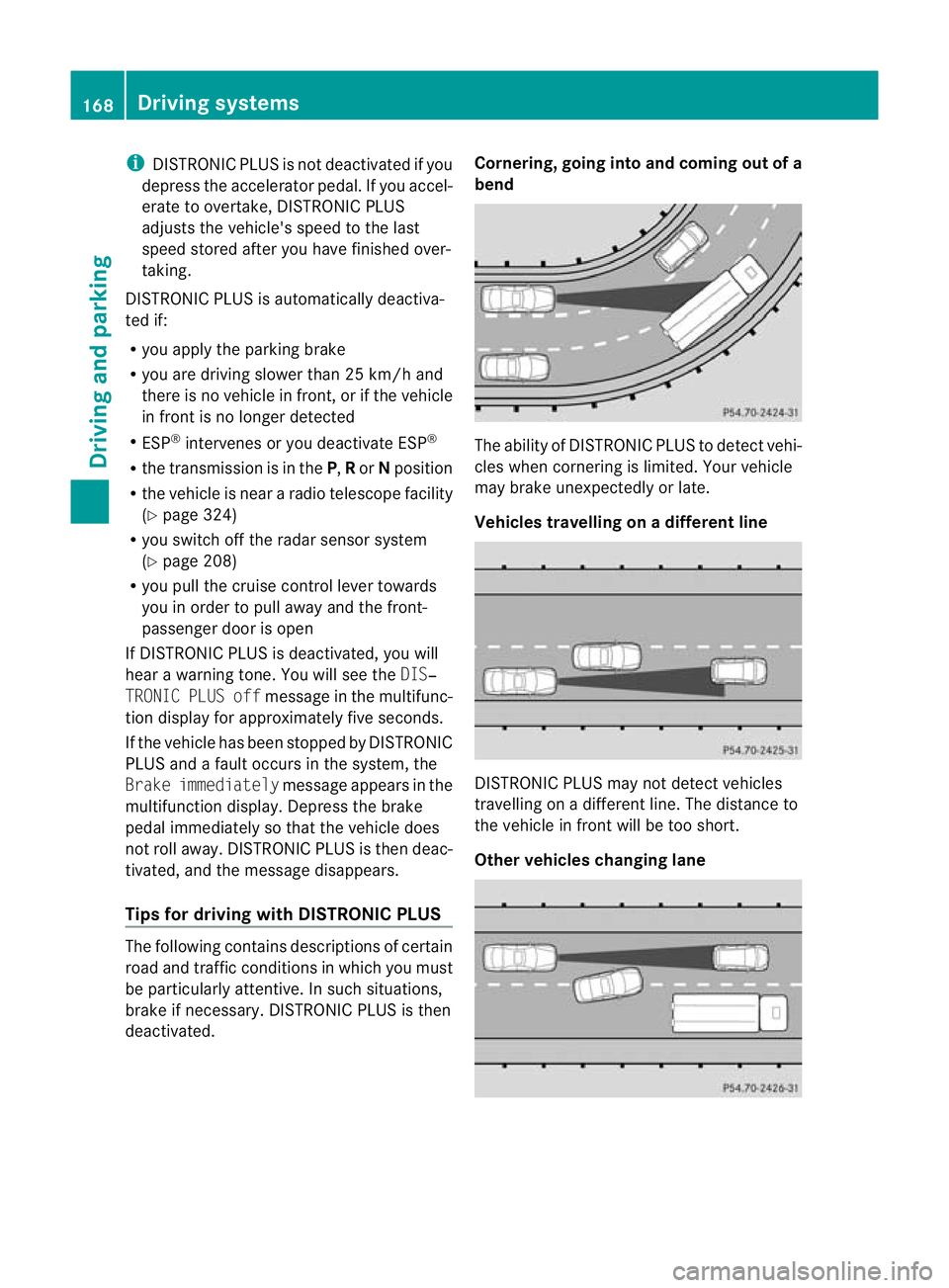
deactivated. Cornering, going into and coming out of a
bend The ability of DISTRONIC PLUS to detect vehi-
cles when cornering is limited. Your vehicle
may brake unexpectedly or late.
Vehicles travellin
gonadifferent line DISTRONIC PLU
Smay not detec tvehicles
travelling on adifferent line. The distance to
the vehicle in fron twill be too short.
Other vehicles changing lane 168
Drivin
gsystemsDrivin gand parking
BA 20 7ECE ÄJ 2010/1a; 1; 2, en-GB
mkalafa Version: 3.0.2.11 2010-01-26T13:03:22+01:00-Seite1 68
Page 172 of 333
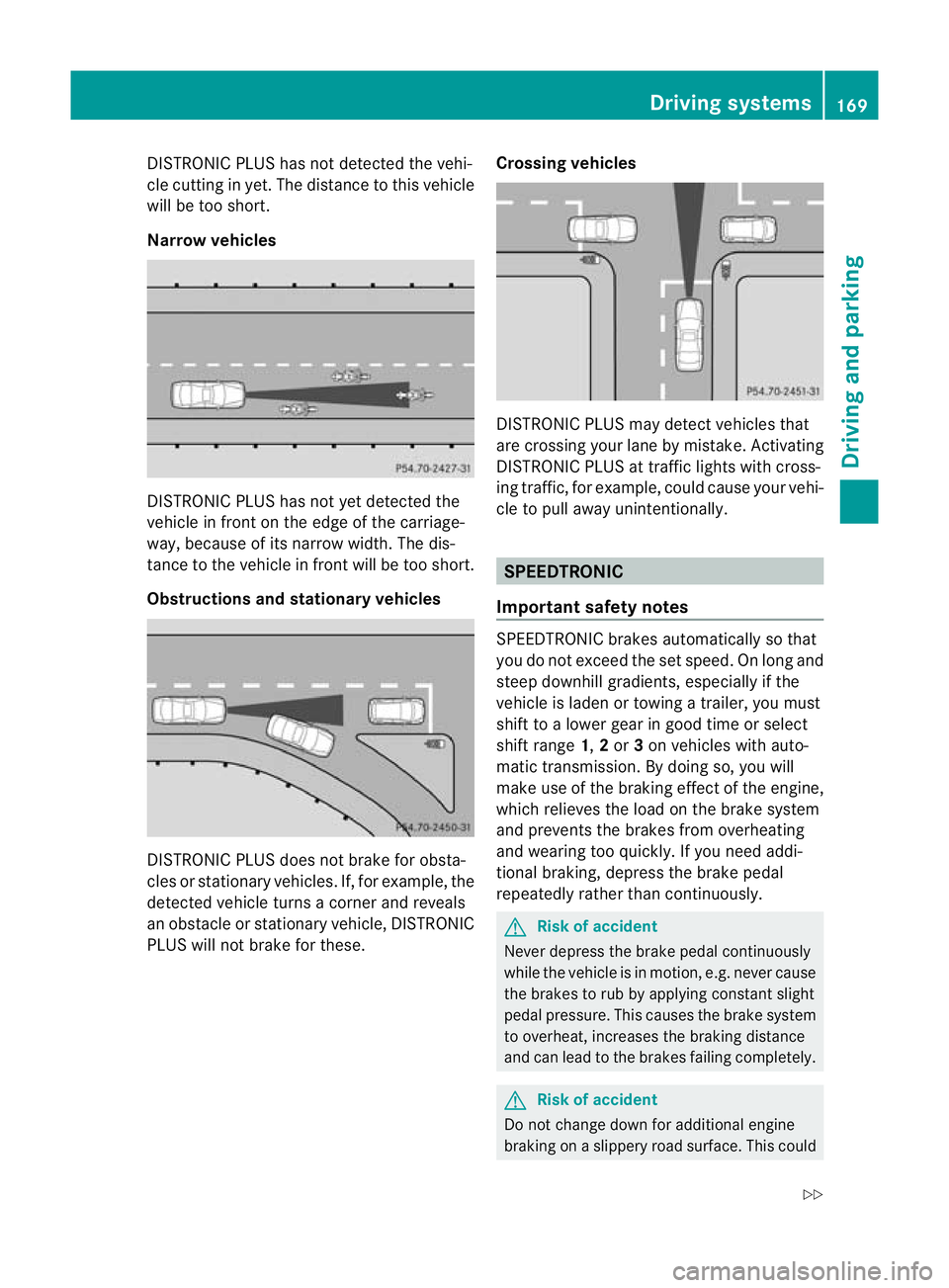
DISTRONIC PLUS ha
snot detected the vehi-
cle cutting in yet. Th edistance to thi svehicle
will be too short.
Narrow vehicles DISTRONIC PLUS ha
snot ye tdetected the
vehicl einfront on th eedgeoft he carriage-
way, because of its narrow width .The dis-
tance to the vehicle in front will be too short.
Obstruction sand sta tionary vehicles DISTRONIC PLUS does not brake for obsta-
cles or stationary vehicles. If, for example, the
detected vehicle turns acorner and reveals
an obstacle or stationar yvehicle, DI STRONIC
PLUS will not brake for these. Crossin
gvehicles DISTRONIC PLUS may detect vehicles that
are crossing your lane by mistake. Activating
DISTRONIC PLUS at traffic lights with cross-
ing traffic, for example, could cause your vehi-
cle to pull away unintentionally.
SPEEDTRONIC
Important safety notes SPEEDTRONIC brakes automatically so that
you do not exceed the set speed
.Onlong and
steep downhil lgradients ,especially if the
vehicle is laden or towing atrailer, yo umust
shift to alower gear in good tim eorselect
shift range 1,2or 3on vehicles with auto-
matic transmission. By doing so, you will
mak euse of the brakin geffect of th eengine,
which relieves the load on the brake system
and prevents the brakes from overheating
and wearing too quickly .Ifyou need addi-
tional braking, depress the brake pedal
repeatedly rather than con tinuously. G
Risk of accident
Never depress the brake pedal continuously
whil ethe vehicle is in motion, e.g. never cause
the brakes to ru bbyapplying constant slight
pedal pressure. This causes the brak esystem
to overheat, increases the braking distance
and can lead to the brakes failing completely. G
Risk of accident
Do not change down for additional engine
braking on aslippery road surface. This could Drivin
gsystems
169Drivingand pa rking
BA 20 7ECE ÄJ 2010 /1a;1;2,e n-GB
mkalafa Version: 3.0.2.11 2010-01-26T13:03:22+01:00-Seite 169 Z
Page 174 of 333
Storing th
ecurren tspeed
You can use the cruise control leve rtolimit
the speed to any speed above 30 km/ hwhile
the engin eisrunning.
X Briefly press the cruise control lever
up : or down ?to the pressure point.
The current spee disstored and shown in
the multifunction display.
The segments in the multifunction display
ligh tupf rom th estart of the scale up to the
stored speed.
Storin gthe current speed or callin gupthe
las tstored speed G
Risk of accident
Only select astored speed if you know what
that speed is and whether it is suitable for the
current driving and traffic situation. Other-
wise ,sudden braking could endanger you or
others.
X Briefly pull the cruise control lever towards
you =.
Making adjustments in 10 km/h incre-
ments
X Briefly press the cruise control lever
beyond the pressure point, up :for a
higher spee dordown ?for alower speed.
or
X Keep the cruise con trollever pressed
beyond the pressur epoint until the desired
speed is set. Press the cruise con trollever
up : for ahigher speed or down ?for a
lower speed.
Making adjustments in 1km/h incre-
ments
X Briefly press the cruise control lever to the
pressure point, up :for ahigher speed or
down ?for alower speed.
or
X Keep the cruise con trollever pressed to the
pressur epoint until the desire dspeed is
set. Press the cruise control lever up :for ah
igher speed or down ?for alower
speed.
Deactivating variabl eSPEEDTRONIC
There ar eseveral ways to deactivate variable
SPEEDTRONIC:
X Briefly press the cruise control lever for-
wards B.
or
X Briefly press the cruise control lever in the
direction of arrow A.
LI Mi ndicato rlamp ;in the cruise control
lever goes out. Variable SPEEDTRONIC is
deactivated.
Cruise control or DISTRONIC PLUS is selec-
ted.
Variable SPEEDTRONIC is automatically
deactivated:
R when you depress the accelerator pedal
beyond the pressure point (kickdown), but
only if your current spee ddoes not differ by
mor ethan 20 km/h from the stored speed.
You will hear awarning tone if this is the
case.
R on vehicles with manual transmission, if
you shift to ahigher gear and as aresult the
engine speed is too low. G
Risk of accident
It is not possible to deactivate variable Speed-
tronic by braking.
i The last speed stored is cleared when you
switc hoff th eengine.
Permanent SPEEDTRONIC i
Permanent SPEEDTRONIC is only availa-
ble for certain countries.
You can use the on-board compute rtolimit
the speed permanently to avalue between
16 0k m/ h(e.g. for driving on winter tyres)
and th emaximum speed ( Ypage 207).
Shor tlyb efore th estore dspeed is reached, it
appear sinthe multifunction display. Driving systems
171Driving and parking
BA 207ECE ÄJ 2010/1a; 1; 2, en-GB
mkalafa Version:3.0.2.11
2010-01-26T13:03:22+01:0
0-Seite 171 Z
Page 175 of 333
Permanen
tSPEEDTRONI Cremains active,
even if variable SPEEDTRONI Cisdeactiva ted.
You can note xceed the stored limit speed,
even if you depress the accelerator pedal
beyond the pressure point (kickdown). Dynamic handlin
gpackage with
sports mode
General notes Th
em ost importan tpart of the dynamic han-
dling package with sport smodeist he adjust-
able suspension system. This aut omatically
control sand adap tsthe suspension to the
respectiv edriving si tuation.
The calibration of the suspension depends
on:
R your driving style
R the road surface conditions
R your individual selection ;see th efollowing
descrip tion
If your vehicle is equippe dwitha utomatic
transmission ,the dynamic handlin gpackage
with sport smodea lso includes steering
wheel gearshif tpaddles (Y page 145) with a
manual driv eprogram (Y page 146). X
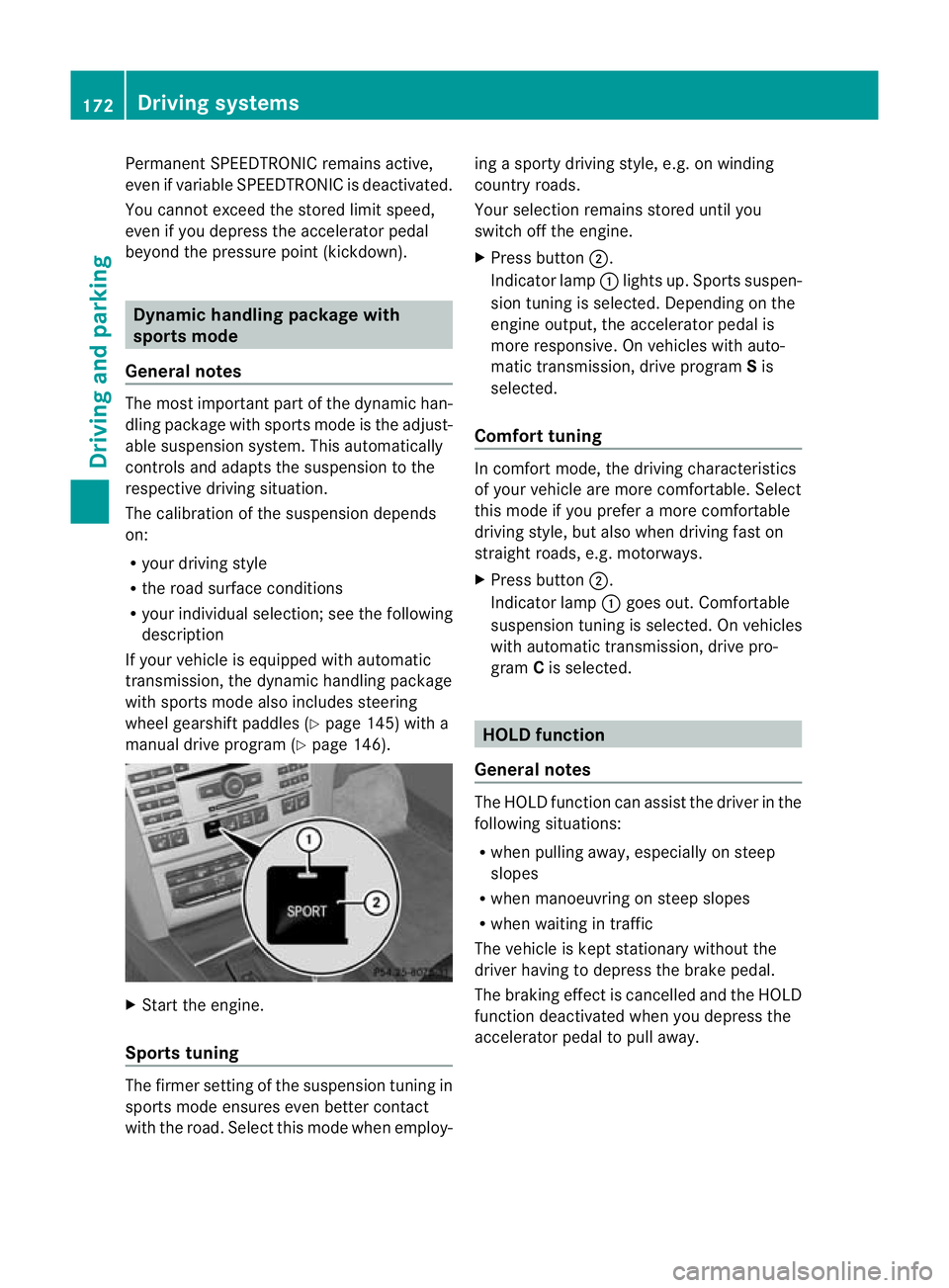
Start the engine.
Sports tuning Th
ef irmer settin gofthe suspension tuning in
sports mod eensure seven better contact
with the road. Select this mode whe nemploy- ing
asport ydriving style ,e.g. on winding
country roads.
You rselection remains stored until you
switc hoff th eengine.
X Pres sbutton ;.
Indicator lamp :lights up. Sport ssuspen-
sion tunin gisselected. Depending on the
engin eoutput, the accelerator pedal is
more responsive. On vehicles with auto-
matic transmission, drive program Sis
selected.
Comfort tuning In comfort mode, the driving characteristics
of your vehicle are more comfortable. Select
this mode if you prefer
amore com fortable
driving style ,but also when driving fast on
straight roads, e.g. motorways.
X Press button ;.
Indicator lamp :goes out. Comfortable
suspensio ntunin giss elected. On vehicles
with automatic transmission ,drive pro-
gram Cis selected. HOL
Dfunction
Gen eral notes Th
eH OLD function ca nassist the driver in the
foll owing situations:
R when pulling away, especially on steep
slopes
R when manoeuvrin gonsteep slopes
R when waiting in traffic
The vehicle is kept stationary without the
driver having to depress the brake pedal.
The braking effect is cancelled and the HOLD
function deactivated when you depress the
accelerator peda ltop ull away. 172
Driving systemsDrivin
gand pa rking
BA 20 7ECE ÄJ 2010 /1a;1;2,e n-GB
mkalafa Version: 3.0.2.11 2010-01-26T13:03:22+01:00-Seite 172
Page 176 of 333
Activation conditions
You can activat
ethe HOL Dfunction if:
R the vehicl eisstationary
R the engin eisrunnin gorhas been automat-
ically switched off by th eECO star t/stop
function
R the dri ver'sd oor is closed or your seat belt
is fastened
R thep arking brak eisnot applied
R theb onnet is closed
R the selector leve risinp osition D,Ror Non
vehicles with automatic transmission
R DIST RONIC PLUS is deactivated
Activating the HOLD function X
Make sure that the activation conditions
are met.
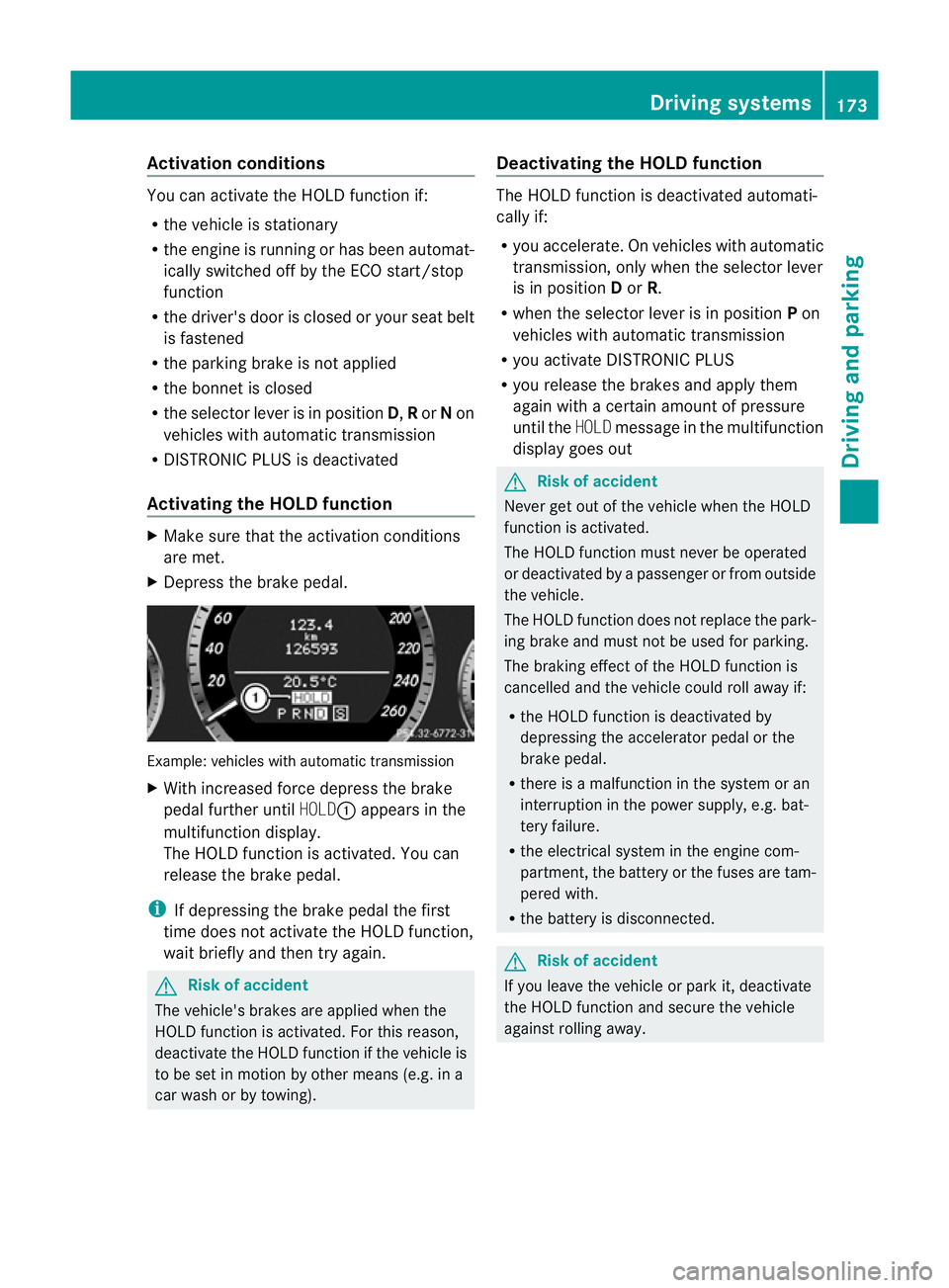
X Depress the brake pedal. Example: vehicles with automatic transmission
X
With increase dforc edepress the brake
pedal fur ther until HOLD:appear sinthe
multifunction display.
The HOL Dfunction is activated. You can
release the brake pedal.
i If depressing the brake pedal the first
time does not activate the HOLD function,
wait briefly and then try again. G
Risk of accident
The vehicle's brakes are applied when the
HOLD function is activated. For this reason,
deactivate the HOLD function if the vehicle is
to be set in motion by other means (e.g. in a
car wash or by towing). Deactivating the HOLD function The HOLD function is deactivated automati-
cally if:
R
you accelerate. On vehicles with automatic
transmission ,only whe nthe selec torlever
is in position Dor R.
R when the selector lever is in position Pon
vehicles with automatic transmission
R you activate DI STRONIC PLUS
R you release the brakes and apply them
again with acertain amount of pressure
until the HOLDmessage in the multifunction
display goes out G
Risk of accident
Never get out of the vehicle when the HOLD
fun ction is activated.
The HOLD function must never be operated
or deactivated by apassenger or from outside
the vehicle.
The HOLD function does not replace the park-
ing brake and must not be used for parking.
The brakin geffect of the HOLD function is
cancelled and the vehicl ecould roll away if:
R the HOL Dfunction is deactivated by
depressin gthe accelerator pedal or the
brake pedal.
R ther eisam alfunction in the system or an
interruption in the power supply, e.g. bat-
tery failure.
R the electrical system in the engine com-
partment ,the battery or the fuses ar etam-
pered with.
R the battery is disconnected. G
Risk of accident
If you leave the vehicle or park it, deactivate
the HOLD function and secure the vehicle
against rolling away. Driving systems
173Drivingand parking
BA 20 7ECE ÄJ 2010/1a; 1; 2, en-GB
mkalafa Version:3.0.2.11
2010-01-26T13:03:22+01:0
0-Seite 173 Z
Page 177 of 333
You will see the followin
gwarnin gmessage in
the multifunction display if the HOL Dfunction
is activated and:
R the driver' sdoor is open and th edriver's
seat belt is unfastened
R the engi neis switched off ,unless it is auto-
matically swi tchedoff by the ECO start/
stop function
R the bo nnetis opened
Vehicles wit hmanual transmission: Brake
immediately
X Immediately depress the brake pedal firmly
until the warning message in the multifunc-
tion displ ay goes out. This deactivates the
HOL Dfunction.
In vehicles with automatic transmission:
Select Park (P)
X Move the selector lever to Pto prevent the
vehicle from rolling away.
The HOLD function is deactivated. The
warning messag eint he multifunction dis-
play disappears.
Ah orn will also sound at regular intervals if
the HOL Dfunction is activated and you:
R switch the engine off, open the driver's
door and take off your seat belt
R open the bonnet
The sounding of the horn alerts you to the fact
that the vehicle has been parked while the
HOLD function is still activated. The tone
becomes louder if you attempt to lock the
vehicle. The vehicle is not locked until the
HOLD function is deactivated.
i If the ignition has been switched off, the
engine cannot be started again until the
HOLD function has been deactivated.
If there is afault in the system or power supply
while the HOLD function is activated, the
Brak eimmediately message is show nin
the multifunction display .Immed iately
depress the brake firmly until the warning
message in the multifunction dis play goes
out. On vehicles with automatic transmission, you
can als oshift int oposition P.This deactivates
the HOL Dfunction. PARKTRONIC
Important safety notes G
Risk of accident
PARKTRONIC is only an aid and may not
detect all obstacles .This system does not
reliev eyou of the need to pay attention.
You are always responsible for safet yand
must continue to pay attention to your imme-
diate surroundings whe nparking and
manoeuvring. You could otherwise endanger
yourself and others. G
Risk of injury
Make sure that no persons or animals are in
the manoeuvring range. Otherwise ,they
coul dbei njured.
PARKTRONIC is an electronic parking aid with
ultrasonic sensors. It indicates visual lyand
audibly the distance between your vehicle
and an object.
PARKTRONIC is activated automatically when
you:
R switch on the ignition
R release the parking brake
PARKTRONIC is deactivated at speeds above
18 km/h. It is reactivated at lower speeds.
PARKTRONIC monitors the area around your
vehicle using six sensors in the front bumper
and four sensors in the rear bumper. 174
Driving systemsDriving and parking
BA 207 ECE ÄJ 2010/1a; 1; 2, en-GB
mkalafa
Version:3.0.2.11
2010-01-26T13:03:22+01:00
-Seite 174
Page 179 of 333
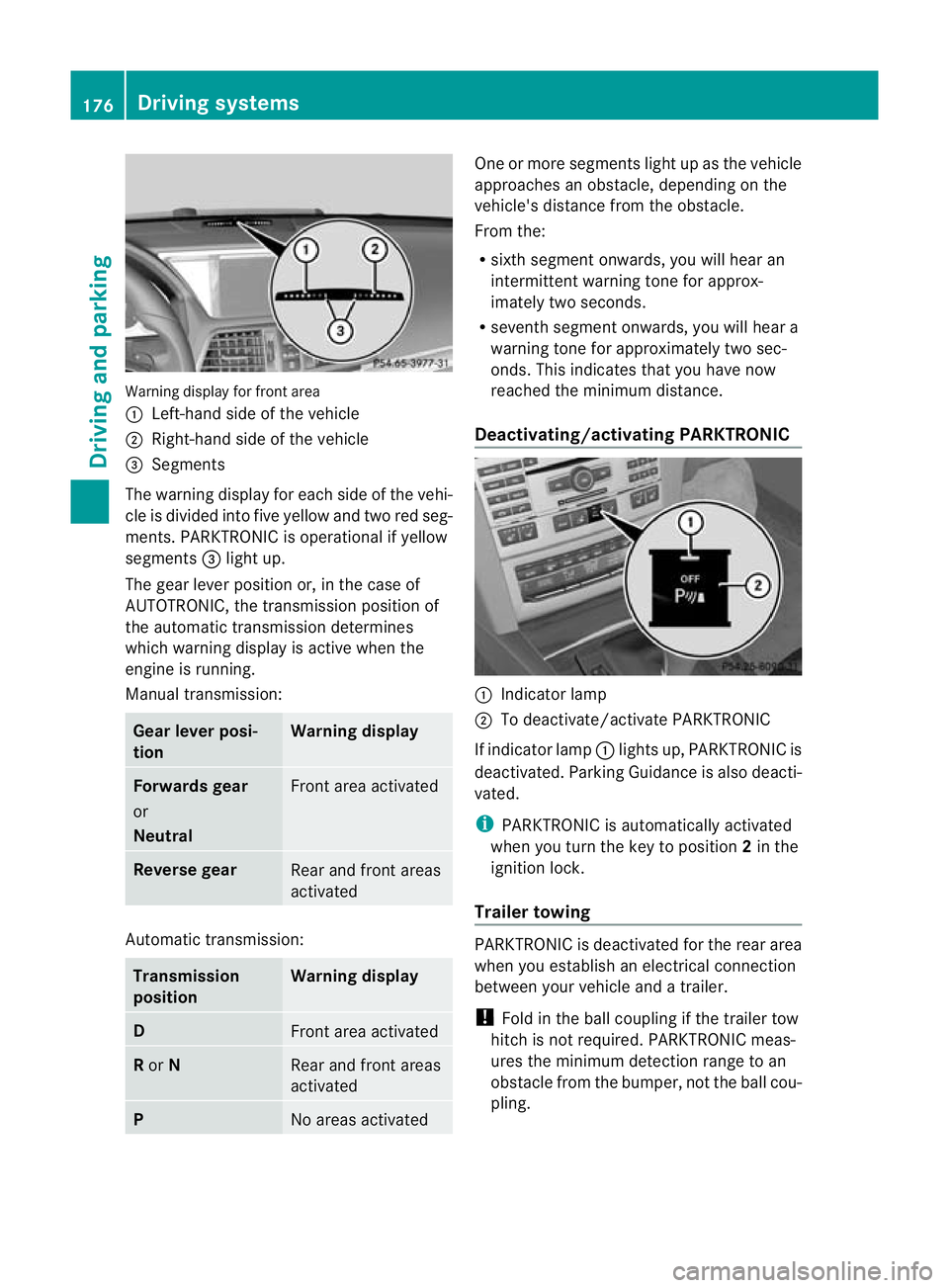
Warning display for fron
tarea
: Left-hand side of th evehicle
; Right-hand side of the vehicle
= Segments
The warning display for each side of the vehi-
cle is divided into fiv eyellow and two red seg-
ments. PARKTRONI Cisoperational if yellow
segments =ligh tup.
The gear lever position or, in the case of
AUTOTRO NIC, the transmission position of
the automatic transmission determines
which warning display is active when the
engine is running.
Manual transmission: Gear lever posi-
tion Warning display
Forward
sgear
or
Neutral Fron
tarea activated Revers
egear Rear and fron
tareas
activated Auto
matic transmission: Transmission
position Warning display
D
Fron
tarea activated R
or N Rear and front areas
activated
P
No areas activated On
eorm ore segments light up as the vehicle
approaches an obstacle, depending on the
vehicle' sdistanc efrom th eobstacle.
From the:
R sixt hsegmen tonwards ,you will hea ran
intermitten twarnin gtonef or approx-
imately two seconds.
R seven thsegment onwards, you will hear a
warnin gtonef or approximately two sec-
onds. This indicates that you have now
reached the minimu mdistance.
Deactivating/activating PARKTRONIC :
Indicator lamp
; To deactivate/activate PARKTRONIC
If indicator lamp :lights up, PARKTRONIC is
deactivated. Parking Guidance is also deacti-
vated.
i PARKTRONIC is automatically activated
when you turn the key to position 2in the
ignition lock.
Trailer towing PARKTRONIC is deactivated for the rear area
when you establish an electrical connection
between your vehicle and
atrailer.
! Foldint he ball couplin gifthe trailer tow
hitc hisn ot required .PARKTRONIC meas-
ures the minimum detection range to an
obstacle from the bumper, not the ball cou-
pling. 176
Drivin
gsystemsDrivin gand pa rking
BA 20 7ECE ÄJ 2010 /1a; 1; 2, en-GB
mkalafa Version: 3.0.2.11 2010-01-26T13:03:22+01:00 -Seite 176
Page 181 of 333
might therefore issu
esteering instructions
too soon. Thi smay lea dtoac ollision. For this
reason, you should avoid using Parking Guid-
anc eins uch situations. G
Risk of injury
Make sure that no persons or animals are in
the manoeuvring range. Otherwise, they
could be injured.
Whe nPARKTRONIC is deactivated, Parking
Guidance is als ounavailable.
Use Parking Guidance for parking spaces:
R that are paralle ltothe direction of travel
R that ar eonstraight roads, not bends
R that are on the same leve lasthe road, i.e.
not on the pav ement
Parking tips:
R On narrow roads, driv easclose to the park-
ing space as possible.
R Parking spaces which are littered, over-
grown or partially occupied by trailer draw-
bars might be identified incorrectly or not
at all.
R Snowfa ll or heav yrain may lea dtoaparking
space being measured inaccurately.
R Pay attention to the PARKTRONIC warning
messages during the parking procedure
(Y pag e175).
R When transporting aload which protru des
from you rvehicle, you must not use Parking
Guidance.
R Never use Parkin gGuidance with snow
chains or an emergenc yspare wheel fit ted.
R The way your vehicle is positioned in the
parkin gspace after parkin gisdependent
on various factors. These include the posi-
tion and shape of the vehicles parked in
front and behind it and the conditions of the
location. In some cases, Parking Guidance
may guide you too far or not far enough into
ap arking space. In some cases, it may also
lead you across or onto the kerb. If neces-
sary, cancel the parking procedure with
Parking Guidance. !
If unavoidable, you should drive over
obstacles such as kerbs slowly and not at
as har pangle .Otherwise, you may damage
the wheels or tyres.
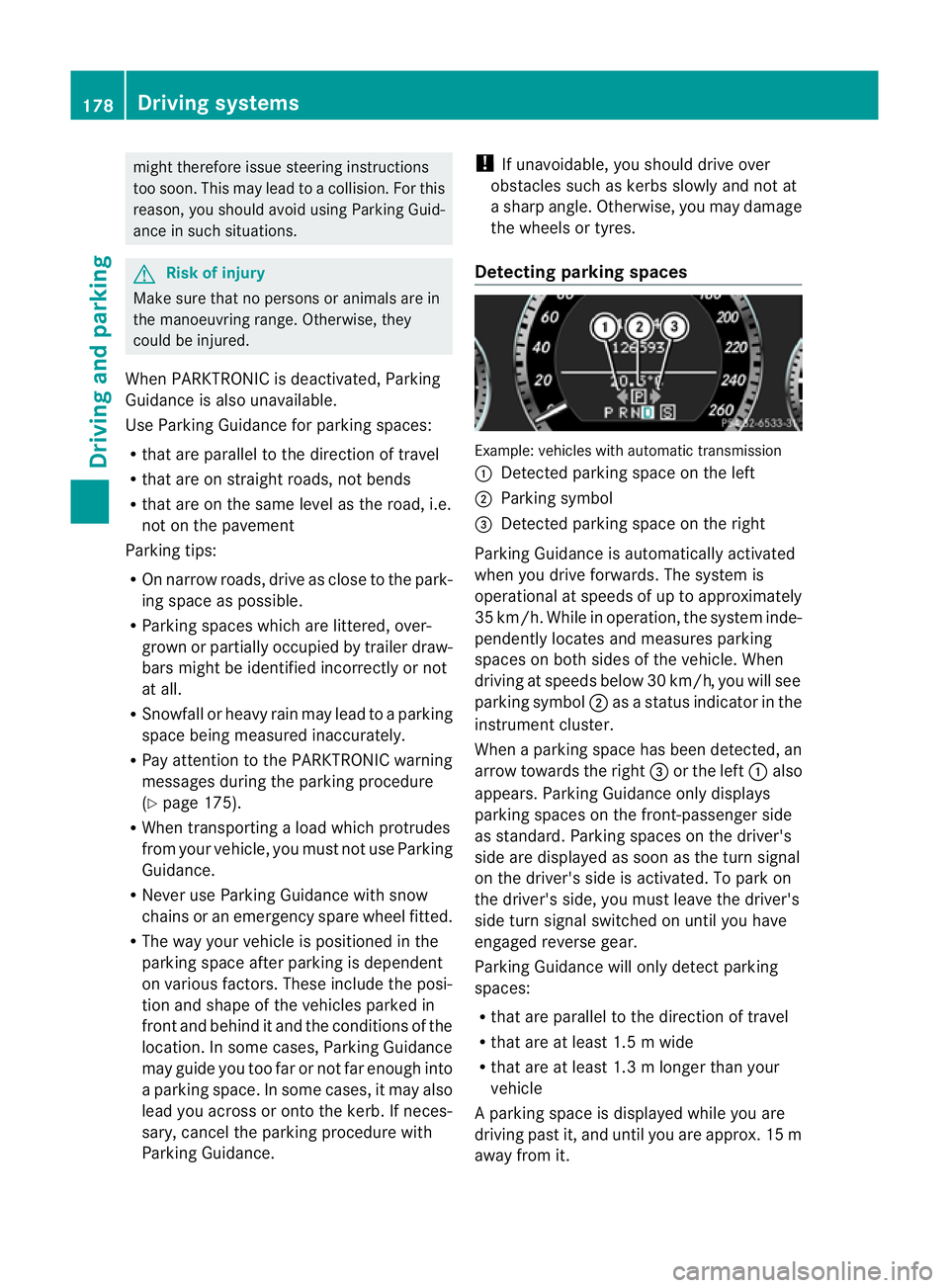
Detecting parking spaces Example: vehicles with automatic transmission
:
Detected parking space on the left
; Parking symbol
= Detected parking space on the right
Parking Guidance is automaticall yactivated
whe nyou drive forwards. The system is
operational at speeds of up to approximately
35 km/h. While in operation ,the system inde-
pendently locates and measures parking
spaces on both sides of the vehicle. When
drivin gatspeeds below 30 km/ h,you will see
parking symbol ;asastatus indicato rinthe
instrumen tcluster.
When aparking space has been detected, an
arrow towards the right =or the left :also
appears. Parking Guidance only displ ays
parking spaces on the front-passenger side
as standard. Parking spaces on the driver's
side are displayed as soon as the tur nsignal
on the driver's side is activated. To park on
the driver's side, you must leave the driver's
side turn signal switched on until you have
engaged reverse gear.
Parking Guidance will only detect parking
spaces:
R that are parallel to the direction of travel
R that are at least 1.5 mwide
R that are at least 1.3 mlonger than your
vehicle
Ap arking space is displayed while you are
driving past it, and until you are approx .15m
away from it. 178
Driving systemsDrivin
gand parking
BA 20 7ECE ÄJ 2010/1a; 1; 2, en-GB
mkalafa Version:3.0.2.11
2010-01-26T13:03:22+01:00
-Seite 178